

10 alternatives à Zoho Assist pour l’assistance à distance en 2026

10 Sélection des meilleures alternatives à Zoho Assist


Gérer un projet peut être difficile, surtout lorsque votre outil de bureau à distance ne répond pas aux besoins de votre équipe. Vous pourriez trouver que Zoho Assist présente des lacunes dans certains domaines, ce qui vous incite à rechercher la meilleure alternative pour relever les défis de votre entreprise.
D’après mon expérience, le logiciel de bureau à distance adapté peut améliorer considérablement la collaboration et la productivité. Vous avez besoin d’outils fiables, faciles à utiliser et adaptés à vos exigences spécifiques.
Dans cet article, je vais vous présenter mes meilleures alternatives à Zoho Assist. J’ai testé et évalué chaque option de manière indépendante afin de vous fournir des informations impartiales pour vous aider à prendre une décision éclairée. Que vous recherchiez des fonctionnalités, des tarifs ou une expérience utilisateur, vous trouverez ici toutes les informations nécessaires.
Qu’est-ce que Zoho Assist ?
Zoho Assist est un logiciel de bureau à distance qui vous aide à fournir des sessions d’assistance à distance et à accéder à des ordinateurs distants. Les professionnels de l’informatique et les équipes d’assistance l’utilisent couramment pour dépanner et gérer efficacement les systèmes. Des fonctionnalités telles que le contrôle à distance, le transfert de fichiers et la prise en charge multiplateforme permettent de résoudre rapidement les problèmes et de maintenir la productivité. Dans l’ensemble, Zoho Assist constitue une solution pratique pour l’assistance à distance.
Tableau comparatif des alternatives à Zoho Assist
Ce tableau comparatif récapitule les informations tarifaires de ma sélection des meilleures alternatives à Zoho Assist :
| Tool | Best For | Trial Info | Price | ||
|---|---|---|---|---|---|
| 1 | Idéal pour l'assistance à distance gratuite | Forfait gratuit disponible | Tarifs sur demande | Website | |
| 2 | Idéal pour l'assistance à distance instantanée | Essai gratuit de 14 jours | À partir de $30/utilisateur/mois (facturé annuellement) | Website | |
| 3 | Idéal pour l’accès à distance gratuit | Essai gratuit de 30 jours | À partir de $24.9/mois (facturé annuellement) | Website | |
| 4 | Idéal pour une assistance à distance tout-en-un | Essai gratuit de 14 jours | À partir de $30/utilisateur/mois (facturé annuellement) | Website | |
| 5 | Idéal pour les sessions rapides avec peu de latence | Essai gratuit + démonstration gratuite disponibles | À partir de $28.90/mois (facturé annuellement) | Website | |
| 6 | Idéal pour un accès à distance facile | Not available | Gratuit à utiliser | Website | |
| 7 | Idéal pour les exigences strictes en matière de sécurité | Essai gratuit disponible | Tarification sur demande | Website | |
| 8 | Idéal pour un accès illimité | Essai gratuit de 15 jours disponible | À partir de $16.90/utilisateur/mois (facturé annuellement) | Website | |
| 9 | Idéal pour la gestion unifiée | Essai gratuit + démonstration gratuite | Tarification sur demande | Website | |
| 10 | Idéal pour un accès à distance sécurisé | Essai gratuit de 7 jours | À partir de $1.84/user/month (facturé annuellement) | Website |
Pourquoi faire confiance à nos recommandations de logiciels
Notre équipe teste et évalue des logiciels depuis 2012. En tant que chefs de projet nous-mêmes, nous savons à quel point il est difficile — et important — de choisir le bon logiciel.
Pour ce guide, nous avons évalué les outils grâce à des tests pratiques et une recherche indépendante, en notant les outils selon nos critères de sélection. Nous nous appuyons également sur les enseignements de leaders d’opinion du secteur et de professionnels de la gestion de projet en activité.
Nos avis reflètent notre jugement éditorial humain, et non un argumentaire de vente.
Réviseurs experts:
Avis sur les meilleures alternatives à Zoho Assist
Vous trouverez ci-dessous mes présentations détaillées des meilleures alternatives à Zoho Assist qui ont intégré ma sélection. Mes avis proposent une analyse approfondie des principales fonctionnalités, des avantages et inconvénients, des intégrations et des cas d’utilisation idéaux de chaque outil afin de vous aider à trouver celui qui vous convient le mieux.

HelpWire
Idéal pour l'assistance à distance gratuite
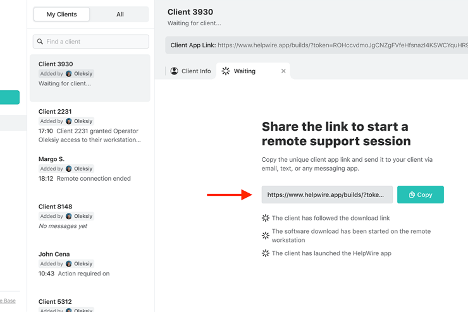
HelpWire est un logiciel d'assistance à distance qui vous permet de vous connecter aux clients et de les aider à distance. Les équipes du support client et les professionnels de l'informatique l'utilisent pour diagnostiquer et résoudre les problèmes techniques.
Pourquoi c'est une bonne alternative à Zoho Assist : HelpWire offre une assistance à distance gratuite, ce qui en fait un choix abordable pour les entreprises disposant d'un budget limité. Ses fonctionnalités comprennent l'accès à distance sécurisé, la compatibilité multiplateforme et les diagnostics en temps réel. Ces capacités permettent à votre équipe de résoudre rapidement les problèmes des clients. La configuration simple du logiciel et son interface conviviale renforcent son attrait pour les opérations de support.
Fonctionnalités et intégrations remarquables :
Les fonctionnalités comprennent les diagnostics en temps réel, le partage sécurisé de fichiers et la prise en charge multiplateforme. Ces fonctionnalités permettent à votre équipe de fournir une assistance efficace sans compromettre la sécurité. L'interface intuitive de HelpWire facilite également la navigation, réduisant ainsi la courbe d'apprentissage pour les nouveaux utilisateurs.
Les intégrations ne sont pas répertoriées publiquement.
Pros and Cons
Pros:
- Option d'assistance gratuite disponible
- Accès à distance sécurisé
- Diagnostics en temps réel
Cons:
- Fonctionnalités avancées limitées
- Options de personnalisation limitées

Idéal pour l'assistance à distance instantanée

ConnectWise ScreenConnect est un logiciel de bureau à distance conçu pour offrir une assistance à distance rapide et sécurisée aux professionnels de l'informatique dans divers secteurs, notamment l'éducation, la finance et les soins de santé. Il propose des fonctions clés telles que l'accès à distance 24 h/24 et 7 j/7, la gestion des accès privilégiés, ainsi que la prise en charge des accès sans surveillance et des appareils mobiles.
Pourquoi c'est une bonne alternative à Zoho Assist : ConnectWise ScreenConnect fournit une assistance à distance instantanée, ce qui en fait une solution idéale pour les équipes qui ont besoin d'accéder rapidement aux appareils. Ses fonctionnalités, telles que les connexions à distance sécurisées, la gestion des accès privilégiés et la prise en charge des appareils mobiles, permettent à votre équipe de gérer efficacement les opérations informatiques. L'accent mis par le logiciel sur la réduction des temps d'arrêt garantit le maintien de la productivité de votre équipe. En outre, ses mesures de sécurité complètes, telles que le chiffrement AES et l'authentification multifacteur, vous offrent une tranquillité d'esprit.
Fonctionnalités et intégrations remarquables :
Les fonctionnalités comprennent l'accès à distance 24 h/24 et 7 j/7, la prise en charge des accès sans surveillance et la compatibilité avec les appareils mobiles. Ces fonctionnalités permettent à votre équipe de se connecter facilement aux appareils et de gérer les opérations informatiques sans difficulté. D'après mon expérience, les mesures de sécurité avancées du logiciel constituent un avantage considérable pour protéger les données sensibles.
Les intégrations comprennent les services d'assistance ConnectWise, ConnectWise Automate, Microsoft Intune, et bien plus encore.
Pros and Cons
Pros:
- Fonctionnalités d'assistance à distance instantanée
- Connexions à distance sécurisées
- Prise en charge des appareils mobiles
Cons:
- Problèmes potentiels de qualité vidéo et audio
- Nécessite une gestion appropriée pour assurer la sécurité

Idéal pour l’accès à distance gratuit
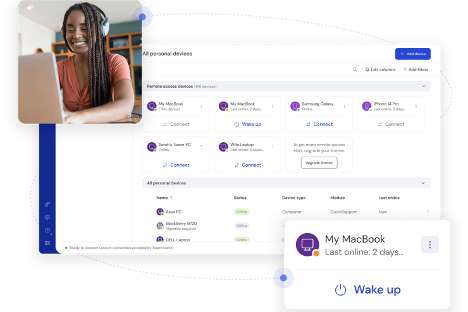
TeamViewer est un logiciel de bureau à distance qui vous permet de vous connecter à des appareils et de les gérer à distance. Les équipes d’assistance informatique et les entreprises l’utilisent pour faciliter le dépannage et la gestion à distance.
Pourquoi c’est une bonne alternative à Zoho Assist : TeamViewer est une solution d’accès à distance gratuite, idéale si vous avez besoin de solutions économiques. Ses fonctionnalités, telles que le transfert de fichiers simplifié, la compatibilité multiplateforme et l’impression à distance, renforcent vos capacités d’assistance. Vous pouvez vous connecter rapidement à n’importe quel appareil sans difficulté. Ces éléments en font un concurrent sérieux lorsque vous envisagez des alternatives à Zoho Assist.
Fonctionnalités et intégrations remarquables :
Les fonctionnalités comprennent le contrôle et l’impression à distance, ainsi que l’accès à distance sans surveillance. Ces fonctionnalités vous permettent de gérer facilement les appareils et garantissent que votre équipe peut fournir une assistance sans être physiquement présente. De plus, l’accès multiplateforme de TeamViewer prend en charge différents systèmes d’exploitation, ce qui est essentiel dans les environnements informatiques diversifiés.
Les intégrations comprennent Microsoft Teams, ServiceNow, Salesforce, Jira, Zendesk, Freshworks, Microsoft Intune, Zoho, Microsoft Entra ID, et bien plus encore.
Pros and Cons
Pros:
- Prix abordable
- Prise en charge multiplateforme
- Transfert de fichiers simplifié
Cons:
- Problèmes de connexion signalés
- Latence occasionnelle lors des connexions

LogMeIn
Idéal pour une assistance à distance tout-en-un
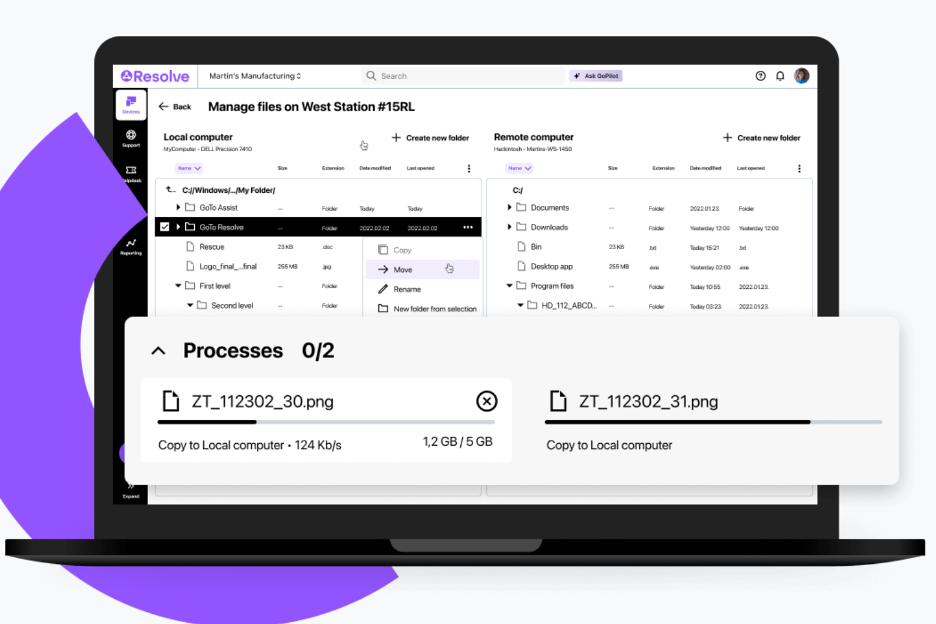
LogMeIn est une solution d'accès et d'assistance à distance conçue pour les professionnels de l'informatique et les fournisseurs de services gérés (MSP) afin de simplifier la gestion informatique. Elle assure des fonctions essentielles telles que l'assistance à distance, la gestion des terminaux et l'accès sécurisé aux fichiers.
Pourquoi c'est une bonne alternative à Zoho Assist : LogMeIn offre une assistance à distance complète grâce à des fonctionnalités telles que la gestion pilotée par l'IA, la gestion automatisée des appareils et des mesures de sécurité avancées. Son interface conviviale et sa surveillance à distance fluide en font une solution idéale pour les équipes informatiques. L'amélioration de la productivité et la simplification de la gestion informatique sont au cœur de l'offre de LogMeIn, ce qui séduit les organisations à la recherche d'une solution d'assistance complète.
Fonctionnalités et intégrations remarquables :
Les fonctionnalités comprennent des outils pilotés par l'IA pour gagner en efficacité, la gestion automatisée des appareils et des mesures de sécurité avancées. Ces fonctionnalités simplifient les tâches informatiques complexes afin d'améliorer la productivité de votre équipe. La gestion des appareils mobiles de LogMeIn vous permet de gérer les appareils en déplacement sans difficulté.
Les intégrations comprennent ServiceNow, Salesforce, Jira Service Desk, et bien plus encore.
Pros and Cons
Pros:
- Outils de gestion pilotés par l'IA
- Gestion automatisée des appareils
- Mesures de sécurité avancées
Cons:
- Forte consommation de ressources sur les appareils
- Courbe d'apprentissage abrupte

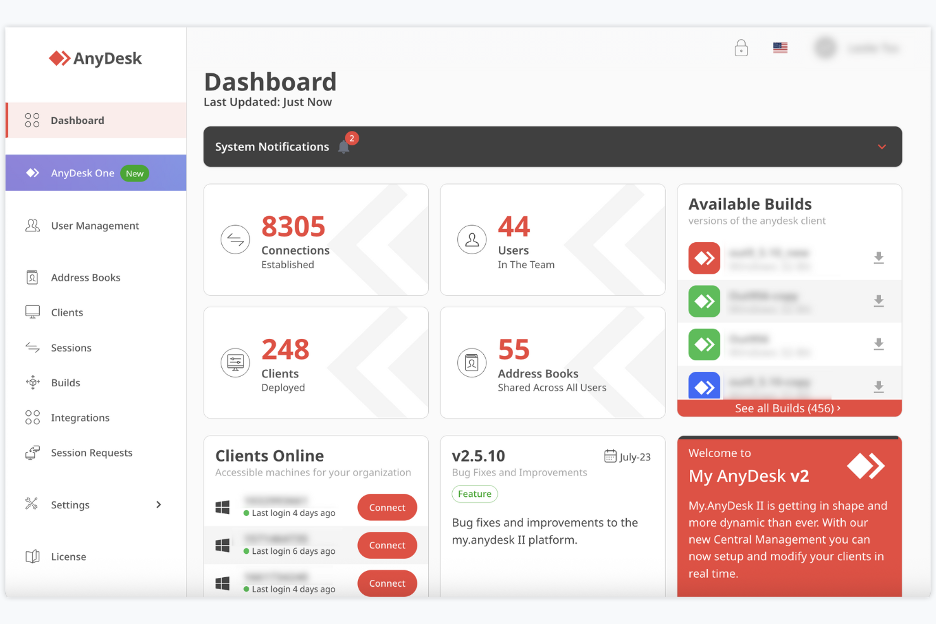
AnyDesk est un outil de bureau à distance et d’assistance qui vous permet d’accéder à des ordinateurs ou à des appareils et de les contrôler depuis n’importe où. Il est utilisé par des travailleurs indépendants, de petites équipes, le personnel informatique et toute autre personne ayant besoin d’un accès et d’une assistance à distance.
Pourquoi AnyDesk est une bonne alternative à Zoho Assist : AnyDesk vous offre un partage de bureau sans latence et un contrôle à distance stable, afin que vous et votre équipe puissiez travailler sur des appareils distants comme si vous étiez sur place. Il vous permet de contrôler le clavier et la souris tout en autorisant d’autres personnes à interagir avec votre écran, ainsi que de partager rapidement des fichiers et des données. Grâce à ses sessions à distance avec peu de latence et à sa transmission rapide des données utilisant la norme de chiffrement avancé (AES), il est particulièrement utile si vous avez fréquemment besoin d’un accès ou d’une assistance à distance rapide.
Fonctionnalités et intégrations remarquables :
Les fonctionnalités comprennent le contrôle à distance des ordinateurs de bureau et des serveurs, le partage d’écran depuis n’importe quel appareil (PC, mobile ou tablette) et le transfert de fichiers entre appareils pendant les sessions. L’outil prend également en charge l’accès interactif, ce qui vous permet à la fois de consulter et de contrôler les écrans distants.
Les intégrations comprennent la prise en charge de Windows, macOS, Linux, Android, iOS et bien plus encore.
Pros and Cons
Pros:
- Accès à distance à faible latence
- Prise en charge de nombreuses plateformes
- Le transfert de fichiers et le contrôle à distance sont pris en charge
Cons:
- La version gratuite est limitée pour un usage professionnel
- Manque d’outils avancés de gestion des équipes

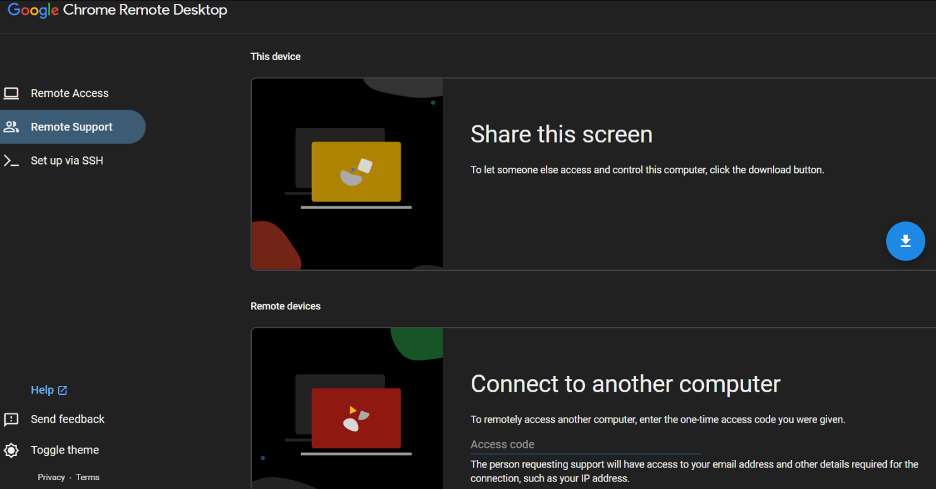
Chrome Remote Desktop est un outil d’accès à distance qui permet aux utilisateurs de se connecter en toute sécurité à d’autres ordinateurs via le navigateur Chrome ou un Chromebook. Les particuliers et les petites entreprises le choisissent pour leur usage personnel et l’assistance informatique de base.
Pourquoi c’est une bonne alternative à Zoho Assist : Chrome Remote Desktop offre un accès à distance facile avec une configuration minimale, ce qui le rend accessible aux utilisateurs qui ont besoin de connexions rapides. Son intégration au navigateur Chrome élimine la nécessité d’installer des logiciels supplémentaires. Vous pouvez accéder à vos appareils depuis n’importe où, ce qui améliore la flexibilité. L’interface simple de l’outil est conviviale, réduisant la courbe d’apprentissage pour les nouveaux utilisateurs.
Fonctionnalités et intégrations remarquables :
Fonctionnalités : accès à distance via le navigateur Chrome, prise en charge de plusieurs systèmes d’exploitation et possibilité de partager votre écran avec d’autres personnes. Ces fonctionnalités vous permettent de vous connecter facilement à vos appareils. D’après mon expérience, la simplicité de l’outil constitue un avantage important pour les utilisateurs qui ont besoin d’un accès à distance simple.
Intégrations : elles ne sont pas répertoriées publiquement.
Pros and Cons
Pros:
- Configuration facile
- Aucun logiciel supplémentaire nécessaire
- Accès depuis n’importe où
Cons:
- Aucun transfert de fichiers disponible
- Pas d’impression à distance

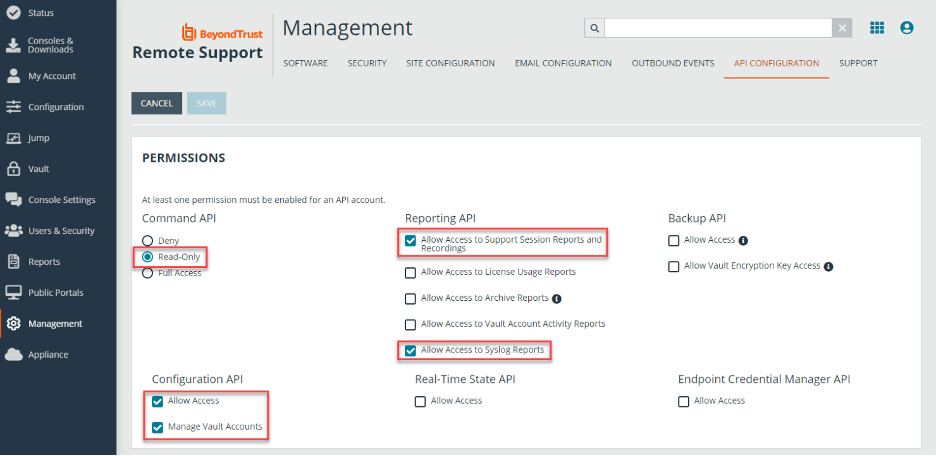
BeyondTrust Remote Support est un outil d’accès et d’assistance à distance basé sur le cloud que les équipes informatiques utilisent pour dépanner les appareils en toute sécurité. Il aide votre équipe à assister les utilisateurs, à gérer les systèmes distants et à effectuer des tâches d’assistance depuis n’importe où.
Pourquoi BeyondTrust Remote Support est une bonne alternative à Zoho Assist : Il fournit des contrôles complets qui vous aident à répondre à des exigences strictes en matière de sécurité. Vous pouvez définir des règles d’accès strictes afin que votre équipe n’accède qu’aux systèmes sur lesquels elle est autorisée à intervenir. La surveillance des sessions et les journaux d’audit détaillés vous permettent de conserver des traces claires de ce qui se passe pendant les opérations d’assistance. Ces contrôles vous aident à mieux protéger les environnements sensibles lors des accès à distance.
Fonctionnalités et intégrations remarquables :
Les fonctionnalités comprennent l’enregistrement des sessions, qui vous aide à examiner les opérations d’assistance, le partage de caméra à distance, qui permet aux utilisateurs de vous montrer ce qu’ils voient, ainsi que des outils de discussion qui vous permettent d’assister les clients. Ces fonctionnalités facilitent la résolution des problèmes par votre équipe, même lorsque les systèmes sont difficiles à atteindre. Vous pouvez également utiliser le partage d’écran pour guider les utilisateurs lors des corrections, sans confusion.
Les intégrations comprennent ServiceNow, BMC, Salesforce, Okta et bien d’autres.
Pros and Cons
Pros:
- Options étendues de contrôle des accès
- Options étendues de contrôle des accès
- Partage d’écran à la demande
Cons:
- Nombreux paramètres à gérer
- Peu pratique pour les petites équipes

ISL Online est un outil d'accès et d'assistance à distance qui permet à votre équipe de se connecter à des appareils Windows, Mac, Linux et mobiles depuis n'importe où. Les équipes informatiques, le personnel des services d'assistance et les fournisseurs de support l'utilisent pour fournir une assistance à distance et accéder aux appareils sans surveillance.
Pourquoi ISL Online est une bonne alternative à Zoho Assist : ISL Online vous fournit une licence qui vous permet d'assister un nombre illimité d'utilisateurs et d'appareils — une solution idéale si votre équipe gère de nombreux terminaux. Vous pouvez accéder aux machines distantes sans limites par appareil et configurer un accès sans surveillance afin que votre équipe puisse fournir une assistance à distance lorsque cela est nécessaire. L'outil offre une sécurité avancée avec un chiffrement AES-256, une authentification à deux facteurs et des autorisations basées sur les rôles, afin que vous conserviez le contrôle de plusieurs appareils. Vous bénéficiez d'un accès complet et de fonctionnalités d'assistance à distance sans avoir à vous soucier constamment des limites de licence.
Fonctionnalités et intégrations remarquables :
Les fonctionnalités comprennent le transfert de fichiers entre les machines locales et distantes, l'enregistrement des sessions à des fins d'audit et de révision, ainsi que la prise en charge de l'accès à distance, y compris sur les appareils mobiles. Elles vous permettent également de vous connecter via le protocole RDP/SSH (protocole de bureau à distance/shell sécurisé) si nécessaire et de gérer les autorisations des utilisateurs de manière centralisée. Le système prend en charge plusieurs moniteurs ainsi que le redémarrage ou la réinitialisation à distance avec reconnexion.
Les intégrations comprennent ServiceNow, Freshworks, HaloITSM et bien d'autres.
Pros and Cons
Pros:
- Nombre illimité d'appareils avec une seule licence
- Chiffrement AES et contrôles d'accès
- Fonctionne sur les appareils Windows, Mac, Linux et mobiles
Cons:
- La licence par utilisateur simultané peut limiter les équipes
- Interface moins moderne que celle de certains outils

NinjaOne
Idéal pour la gestion unifiée
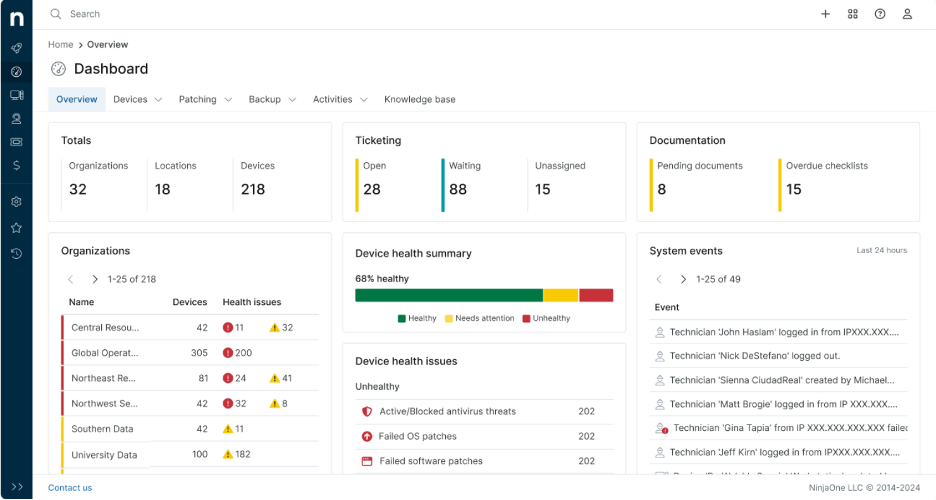
NinjaOne est un logiciel de gestion des terminaux conçu pour les professionnels de l’informatique et les MSP afin de gérer et de surveiller efficacement les appareils. Il assure des fonctions essentielles telles que la surveillance à distance, la gestion des correctifs et la gestion des actifs informatiques.
Pourquoi c’est une bonne alternative à Zoho Assist : NinjaOne offre une gestion unifiée, ce qui en fait une solution idéale pour les équipes ayant besoin d’une supervision complète de leurs environnements informatiques. Des fonctionnalités telles que l’application automatisée des correctifs, la surveillance en temps réel et les rapports détaillés aident votre équipe à maintenir la sécurité et les performances. Son tableau de bord intuitif fournit une vue centralisée de tous les appareils, facilitant ainsi une prise de décision rapide. L’évolutivité du logiciel prend en charge les infrastructures informatiques en pleine croissance.
Fonctionnalités et intégrations remarquables :
Les fonctionnalités comprennent la gestion automatisée des correctifs, les alertes en temps réel et des rapports approfondis. Ces fonctionnalités permettent à votre équipe de gérer de manière proactive les problèmes informatiques sans intervention manuelle. Le tableau de bord centralisé de NinjaOne vous aide à suivre tous vos appareils au même endroit, ce qui améliore l’efficacité.
Les intégrations comprennent ConnectWise Screen Connect, Autotask, Zendesk, ServiceNow, Microsoft Entra et bien plus encore.
Pros and Cons
Pros:
- Gestion automatisée des correctifs
- Surveillance en temps réel
- Gestion centralisée des appareils
Cons:
- Les détails tarifaires ne sont pas transparents
- Complexe pour les utilisateurs non techniques


RemotePC est un logiciel d'accès à distance sécurisé conçu pour une grande diversité d'utilisateurs, notamment les particuliers, les petits bureaux, les équipes et les entreprises. Il assure des fonctions essentielles, notamment l'accès à distance à plusieurs ordinateurs, le transfert de fichiers et l'impression à distance.
Pourquoi c'est une bonne alternative à Zoho Assist : RemotePC offre un accès illimité aux utilisateurs, ce qui est idéal si votre équipe a besoin de capacités étendues d'accès à distance. Ses fonctionnalités comprennent le transfert sécurisé de fichiers, des outils de collaboration et l'accès assisté pour le support client. L'évolutivité et la facilité d'utilisation du logiciel en font un choix pratique pour les applications personnelles et professionnelles. Des mesures de sécurité, telles que TLS v 1.2 avec chiffrement AES-256, renforcent son intérêt pour les besoins de support informatique.
Fonctionnalités et intégrations remarquables :
Les fonctionnalités comprennent l'impression à distance, un tableau blanc pour la collaboration et l'accès mobile. Ces fonctionnalités permettent à votre équipe de travailler efficacement depuis n'importe où. Les outils de gestion des utilisateurs et de surveillance de RemotePC sont également utiles pour les entreprises qui ont besoin d'un suivi.
Les intégrations comprennent Zendesk, Freshdesk, Jira, Okta, G Suite, OneLogin et bien d'autres.
Pros and Cons
Pros:
- Licences utilisateur illimitées
- Transferts de fichiers sécurisés
- Accès mobile disponible
Cons:
- Aucune démo disponible
- Aucun forfait gratuit disponible
Autres alternatives à Zoho Assist
Voici quelques alternatives supplémentaires à Zoho Assist qui n’ont pas intégré ma sélection, mais qui méritent tout de même d’être examinées :
- Parallels Access
Idéal pour l'intégration de Windows sur Mac
- TSplus Remote Support
Idéal pour des solutions sectorielles personnalisées
- Dameware Remote Support
Idéal pour le support sur site


Comment j’évalue les alternatives à Zoho Assist
J’évalue les outils selon deux niveaux : les fonctionnalités indispensables, comme l’accès sans surveillance et le contrôle multiplateforme, puis les éléments différenciateurs, comme les intégrations aux outils de gestion de projet et la journalisation des audits, qui distinguent les meilleurs outils des autres.
Fonctionnalités essentielles (indispensables pour cette liste)
Lorsque je sélectionne les outils qui figureront dans ma liste, j’attribue à chacun une note sur une échelle de 0 (la fonctionnalité n’est pas proposée) à 5 (l’outil excelle dans ce domaine) pour chacune des fonctionnalités essentielles répertoriées ci-dessous. Je convertis ensuite le score total de l’outil en pourcentage. Chaque outil doit obtenir un score total minimum de 65 % pour être pris en compte.
- Contrôle à distance de l’écran : J’évalue la réactivité de l’expérience de contrôle en temps réel, notamment lorsqu’un technicien doit redémarrer des services, modifier des configurations ou guider un interlocuteur à travers un livrable pendant un appel.
- Accès sans surveillance : Je recherche des connexions permanentes fiables aux machines sans écran, notamment le regroupement des appareils et les options de déploiement en masse qui facilitent la gestion de dizaines de serveurs de projet.
- Compatibilité multiplateforme : Les équipes de projet utilisent des environnements mixtes. Je vérifie donc si chaque outil prend en charge Windows, macOS, Linux, iOS et Android, y compris les connexions d’un appareil mobile à un ordinateur pour le dépannage en déplacement.
- Transfert de fichiers pendant la session : Le déplacement de fichiers de projet au cours d’une session en direct est important. J’évalue donc si l’outil permet les transferts par glisser-déposer dans les deux sens, sans limites de taille de fichier trop restrictives.
- Prise en charge de plusieurs sessions et écrans : Je vérifie si les techniciens peuvent exécuter des sessions en parallèle et basculer entre plusieurs écrans, ce qui est constamment nécessaire pour prendre en charge des configurations de développement ou de conception comportant plusieurs écrans.
- Sécurité et chiffrement des sessions : Je vérifie ici le chiffrement de bout en bout, l’authentification multifacteur et les journaux d’audit des sessions, en particulier pour les équipes qui traitent des données client sensibles ou travaillent dans le respect d’exigences de conformité comme SOC 2 ou le RGPD.
Une fois que j’ai établi une liste d’outils répondant à ces critères, j’examine ce qui distingue chaque plateforme.
Éléments différenciateurs (ce qui distingue les fournisseurs)
Voici comment je compare les différents fournisseurs :
Fonctionnalités remarquables
Je recherche des intégrations natives avec des outils de gestion de projet et de tickets comme Jira, ServiceNow ou Slack, car le fait de lancer une session à distance directement depuis un ticket permet de gagner un temps précieux lors de la réponse aux incidents. L’enregistrement des sessions est un autre élément différenciateur que j’évalue : il est utile pour les analyses post-incident, les audits clients et la documentation d’intégration des nouveaux employés. Les fonctionnalités de collaboration intégrées, comme la discussion instantanée, la VoIP et l’annotation de l’écran, sont également importantes lorsqu’il s’agit de guider un interlocuteur à travers une démonstration en direct plutôt que de simplement réparer une machine.
Au-delà des fonctionnalités
La structure tarifaire joue ici un rôle majeur. Je vérifie si un fournisseur facture par technicien ou par appareil, car cette distinction peut modifier considérablement les coûts selon la taille de l’équipe et le nombre de terminaux. La conformité est un autre facteur que j’évalue attentivement : les équipes qui accompagnent des clients dans des secteurs réglementés ont besoin d’une couverture SOC 2, RGPD ou HIPAA, et tous les outils ne la proposent pas. Je tiens également compte de la simplicité du déploiement, notamment de la prise en charge des installations silencieuses ou des déploiements basés sur un MDM pour les équipes distribuées qui gèrent des centaines de terminaux.
Pourquoi rechercher une alternative à Zoho Assist ?
Bien que Zoho Assist soit un bon choix de logiciel de bureau à distance, plusieurs raisons peuvent pousser certains utilisateurs à rechercher d’autres solutions. Vous recherchez peut-être une alternative à Zoho Assist parce que :
- Vous avez besoin de fonctionnalités de sécurité plus avancées
- Votre équipe a besoin d’un meilleur accès mobile
- Vous recherchez davantage d’options de personnalisation
- Vous avez besoin d’une solution offrant une meilleure évolutivité
- Votre équipe exerce ses activités dans une zone géographique où Zoho Assist n’est pas disponible
Si l’une de ces situations vous concerne, vous êtes au bon endroit. Ma liste comprend plusieurs options de logiciels de bureau à distance mieux adaptées aux équipes confrontées à ces difficultés avec Zoho Assist et à la recherche de solutions alternatives.
Principales fonctionnalités de Zoho Assist
Voici quelques-unes des principales fonctionnalités de Zoho Assist, afin de vous aider à comparer les offres des solutions alternatives :
- Assistance à distance : une aide instantanée pour les utilisateurs, vous permettant de résoudre rapidement les problèmes.
- Accès sans surveillance : gérez les appareils sans la présence de l'utilisateur, offrant ainsi davantage de flexibilité à votre équipe.
- Transfert de fichiers : partagez facilement des fichiers entre les appareils afin de faciliter la collaboration.
- Enregistrement des sessions : enregistrez les sessions pour pouvoir vous y référer ultérieurement et à des fins de formation.
- Outils d'annotation : mettez en évidence et annotez les éléments pendant les sessions afin d'améliorer la communication.
- Rapports avancés : générez des rapports d'utilisation détaillés pour une meilleure analyse et une compréhension approfondie.
- Prise en charge des appareils mobiles : accédez à distance aux appareils mobiles afin d'assurer une assistance en déplacement.
- Intégration API/SDK : personnalisez et intégrez la solution à d'autres applications pour créer des solutions adaptées.
- Gestion de la file d'attente des services : organisez et hiérarchisez efficacement les demandes d'assistance.
- Personnalisation : profitez d'options d'interface et de marque adaptées à l'identité de votre entreprise.