


Reseña de Runn: Ventajas, Desventajas, Características y Precios Explicados para 2026



Capacity planning across projects can quickly descend into guesswork without the right tools. Demand changes, priorities shift, disconnected spreadsheets create conflicting versions of the truth, and leaders are left scrambling to answer a deceptively simple question: do we actually have the capacity to take this on?
Runn is a resource management and capacity planning software designed for organizations that need better visibility into how people are allocated across projects, combining resource scheduling, capacity planning, forecasting, and reporting in a single platform. Runn can help balance workloads, anticipate future resourcing needs, and make informed decisions about project delivery, giving teams a clearer picture of both current commitments and upcoming demand.
In this detailed review, I've evaluated and tested Runn using my expertise as a project manager to help you determine whether this tool is the right fit for your project needs and goals.
Runn Evaluation Summary
- From $7/user/month (billed annually)
- 30-day free trial
Por qué confiar en nuestras recomendaciones de software
Nuestro equipo lleva probando y evaluando software desde 2012. Como gestores de proyectos, sabemos lo difícil —y lo importante— que es elegir el software adecuado.
Para esta guía, evaluamos las herramientas mediante pruebas prácticas e investigación independiente, puntuando las herramientas según nuestros criterios de selección. También nos basamos en la experiencia de líderes de opinión del sector y de profesionales en activo de la gestión de proyectos.
Nuestras reseñas reflejan nuestro criterio editorial humano, no un discurso de ventas.
Revisores expertos:
Runn Overview
In my opinion, Runn stands out as a capable tool for resource and capacity planning. Its real-time visual project visibility is appealing, especially for technical development teams balancing multiple deliverables. With features like forecasting, capacity planning, and financial reporting, Runn provides a comprehensive view of ongoing projects and resource allocation. The software's ease of use and intuitive onboarding experience set it apart from competitors.
pros
-
Accurate forecasting tools provide insights into project health and resource needs, and help make informed decisions about future projects.
-
Custom tags and fields make it easier to structure your data and make faster decisions.
-
Reusable project templates reduce manual setup and help maintain consistency across recurring projects.
cons
-
Teams with highly complex permission requirements should review whether Runn’s role-based permissions meet their needs
-
You may experience issues with managing over 1000 resources.
-
Timesheet functionality isn't as robust as dedicated timesheet solutions.
Is Runn Right For Your Needs?
Who Would be a Good Fit for Runn?
Runn is ideal for technical-facing outfits like IT departments and software development teams that need real-time resource management and capacity planning. Its clear visual timelines and intuitive interface make it perfect for creative agencies that juggle multiple projects. If your team needs quick onboarding and easy task reassignment, Runn can save you time and effort. It can also generate instant reports to help you make informed decisions.
-
IT Solutions
Runn's project forecasting and capacity planning features are tailored for IT teams and help you manage resources effectively.
-
Software Delivery
The intuitive timeline view helps with planning sprints and managing project phases seamlessly.
-
Digital Transformation Agencies
Runn helps manage specialist workloads, plan future projects, and allocate resources more effectively across client engagements.
-
Consulting firms
With Runn, you can quickly adapt to changing client needs through its flexible scheduling.
-
Marketing teams
Its visual timelines help you coordinate campaigns and track deliverables efficiently.
-
Cross-functional teams
The skills management feature helps you assign tasks based on expertise and improve collaboration across departments.
Who Would be a Bad Fit for Runn?
Runn may not be the best fit for very large organizations managing thousands of resources or companies that need a single platform for both workforce planning and detailed task management. It can also be less suitable for businesses with highly variable shift-based scheduling, multi-year project lifecycles, or very short-duration projects that require rapid day-to-day resource changes.
-
Large enterprises
Organizations managing thousands of resources across complex portfolios may find the platform less suited to their scale and operational requirements.
-
Organizations Without Project Management Software
Companies with more than 100 employees that lack a dedicated project management tool may need additional software to handle task tracking and project execution.
-
Shift-Based Work Environments
Businesses that rely on highly variable shift-based scheduling may struggle with frequent changes to staffing requirements and working hours.
-
Short-Duration Project Work
Teams running projects that last only a few days may find the platform's planning capabilities more robust than their workflows require.
Nuestra Metodología de Revisión
Cómo probamos y puntuamos las herramientas
Llevamos años construyendo, refinando y mejorando nuestro sistema de prueba y puntuación de software. La rúbrica está diseñada para capturar los matices de la selección de software y los factores que hacen efectivo a un sistema, centrándose en los aspectos críticos del proceso de toma de decisiones.
A continuación, puedes ver exactamente cómo funciona nuestro proceso de prueba y puntuación en base a siete criterios. Esto nos permite proporcionar una evaluación imparcial del software basada en la funcionalidad principal, características destacadas, facilidad de uso, incorporación, soporte al cliente, integraciones, opiniones de clientes y valor por el dinero.
Funcionalidad principal (25% de la puntuación final)
El punto de partida de nuestra evaluación es siempre la funcionalidad principal de la herramienta. ¿Cuenta con las funciones y características básicas que un usuario esperaría ver? ¿Alguna de estas funciones principales está limitada a planes de precios superiores? Esperamos que la herramienta se mantenga a la par de las capacidades básicas de sus competidores.
Características destacadas (25% de la puntuación final)
A continuación, evaluamos las características destacadas poco comunes que van más allá de la funcionalidad principal normalmente encontrada en este tipo de herramientas. Una puntuación alta refleja funciones únicas o especializadas que hacen que el producto sea más rápido, eficiente, o aporte valor extra al usuario.
También evaluamos la facilidad de integración con otras herramientas habitualmente presentes en el ecosistema tecnológico para ampliar la funcionalidad y utilidad del software. Las herramientas que ofrecen muchas integraciones nativas, conexiones de terceros y acceso por API para integrar soluciones personalizadas obtienen la mejor puntuación.
Facilidad de uso (10% de la puntuación final)
Consideramos cuán rápido y fácil es ejecutar las tareas fundamentales usando la herramienta. El software con alta puntuación está bien diseñado, es intuitivo, ofrece aplicaciones móviles, proporciona plantillas y hace que tareas relativamente complejas parezcan sencillas.
Incorporación (10% de la puntuación final)
Sabemos lo importante que es una adopción rápida para un nuevo sistema, así que evaluamos cuán sencillo es aprender a usar la herramienta con una capacitación mínima. Analizamos cuán rápido un miembro del equipo puede configurarse y comenzar a usar la herramienta sin experiencia previa. Las soluciones mejor puntuadas indican que se requiere poco o ningún soporte.
Soporte al cliente (10% de la puntuación final)
Revisamos la rapidez y facilidad para obtener ayuda por teléfono, chat en vivo o base de conocimientos. Las empresas que ofrecen soporte en tiempo real obtienen las mejores puntuaciones, mientras que los chatbots obtienen las peores.
Opiniones de clientes (10% de la puntuación final)
Además de nuestras propias pruebas y valoraciones, consideramos la puntuación neta del promotor de clientes actuales y anteriores. Revisamos la probabilidad de que, ante la opción, quisieran elegir la herramienta de nuevo por su funcionalidad central. Un software con una puntuación alta refleja una gran satisfacción de sus usuarios actuales o pasados.
Valor por el dinero (10% de la puntuación final)
Por último, tomando en cuenta todos los criterios mencionados, comparamos el precio promedio de los planes básicos respecto a las funciones principales y el valor aportado por los otros criterios. El software que entrega más por menos recibirá una puntuación superior.
Core Features
Resource Management
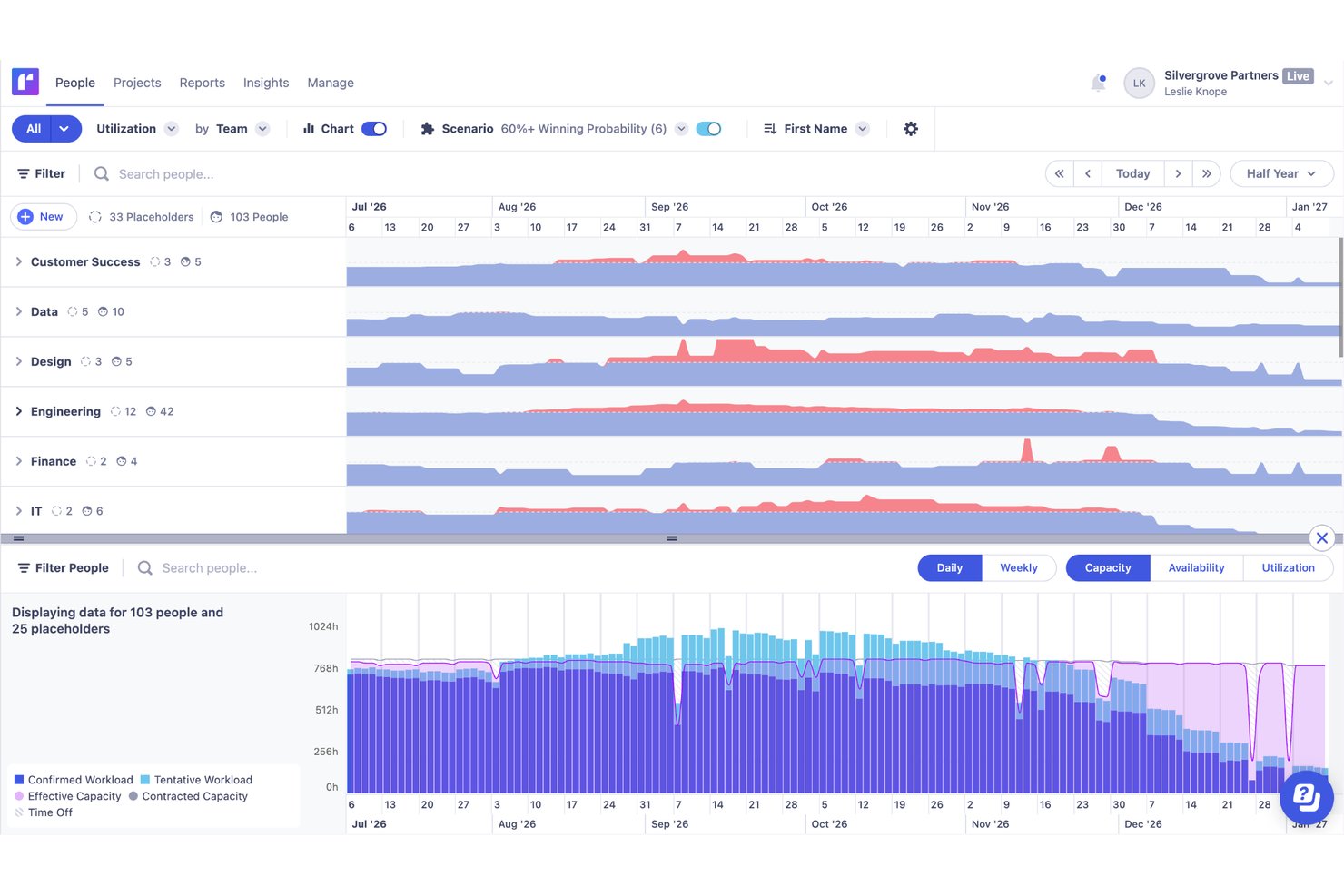
You can easily manage resources with Runn's drag-and-drop interface, which lets you quickly assign and reassign work. Live reports give you real-time insights into how your decisions impact resources.
Forecasting and Capacity Planning
Runn lets you forecast resources using placeholders and tentative work. This helps you understand team capacity and plan for potential hires or reallocations.
Resource Scheduling
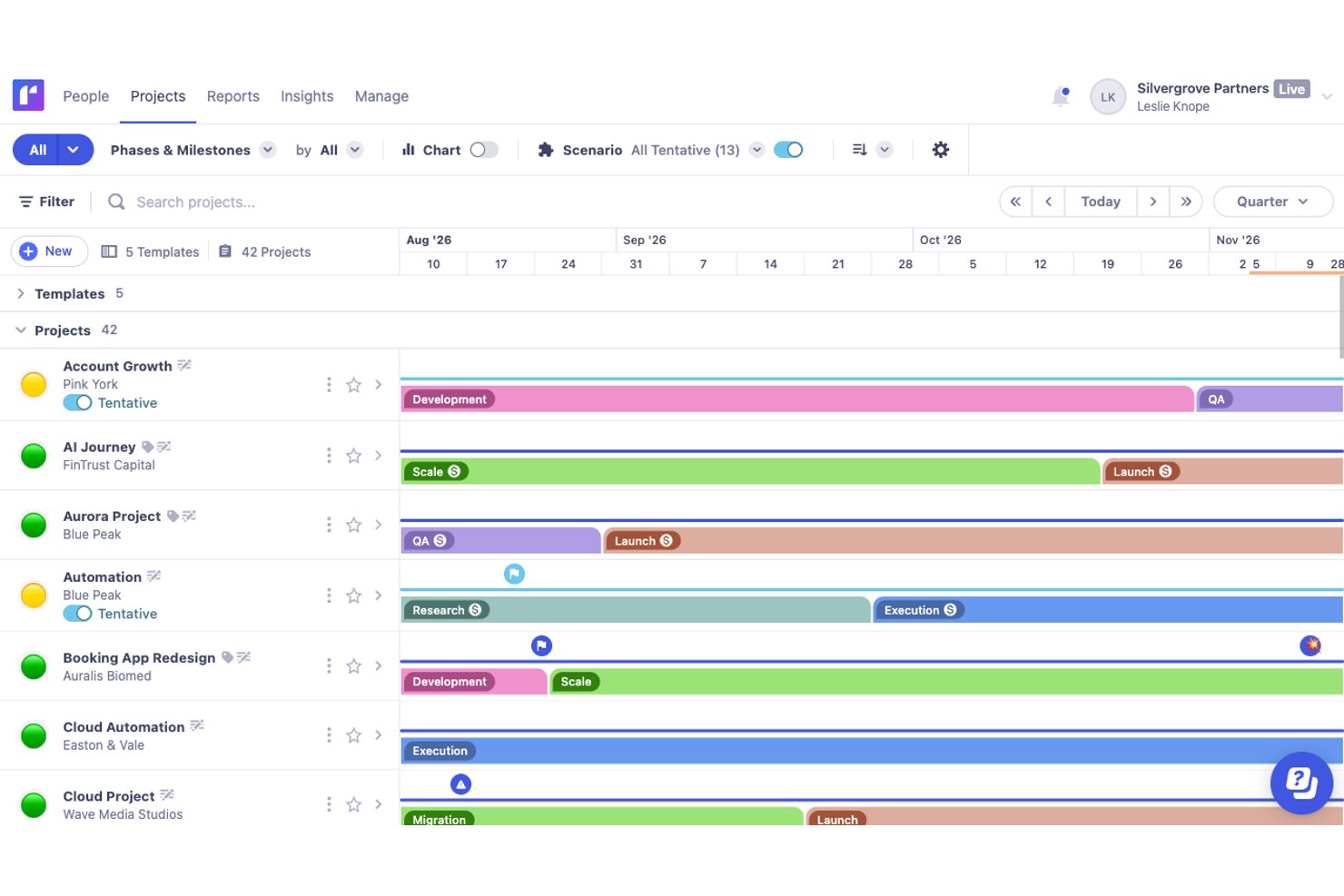
Assigning resources to projects is straightforward with Runn's intuitive drag-and-drop timeline. Multi-select mode allows for bulk actions and makes scheduling adjustments quick and efficient.
Scenario Planning
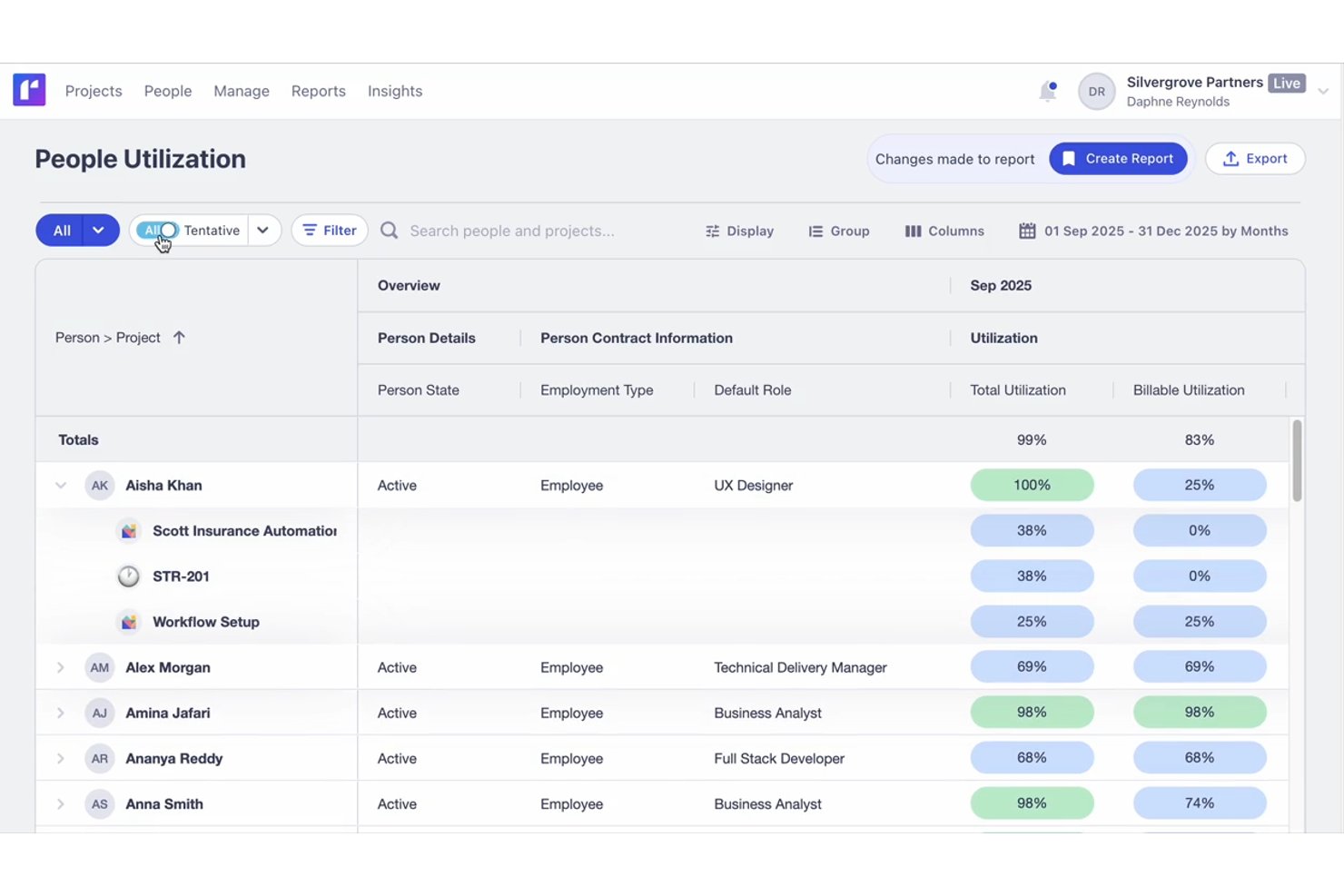
Runn's side-by-side reports let you see utilization and capacity in real-time and conduct scenario planning. You can adjust schedules and immediately see the impact on your team's resources.
Financial Reporting
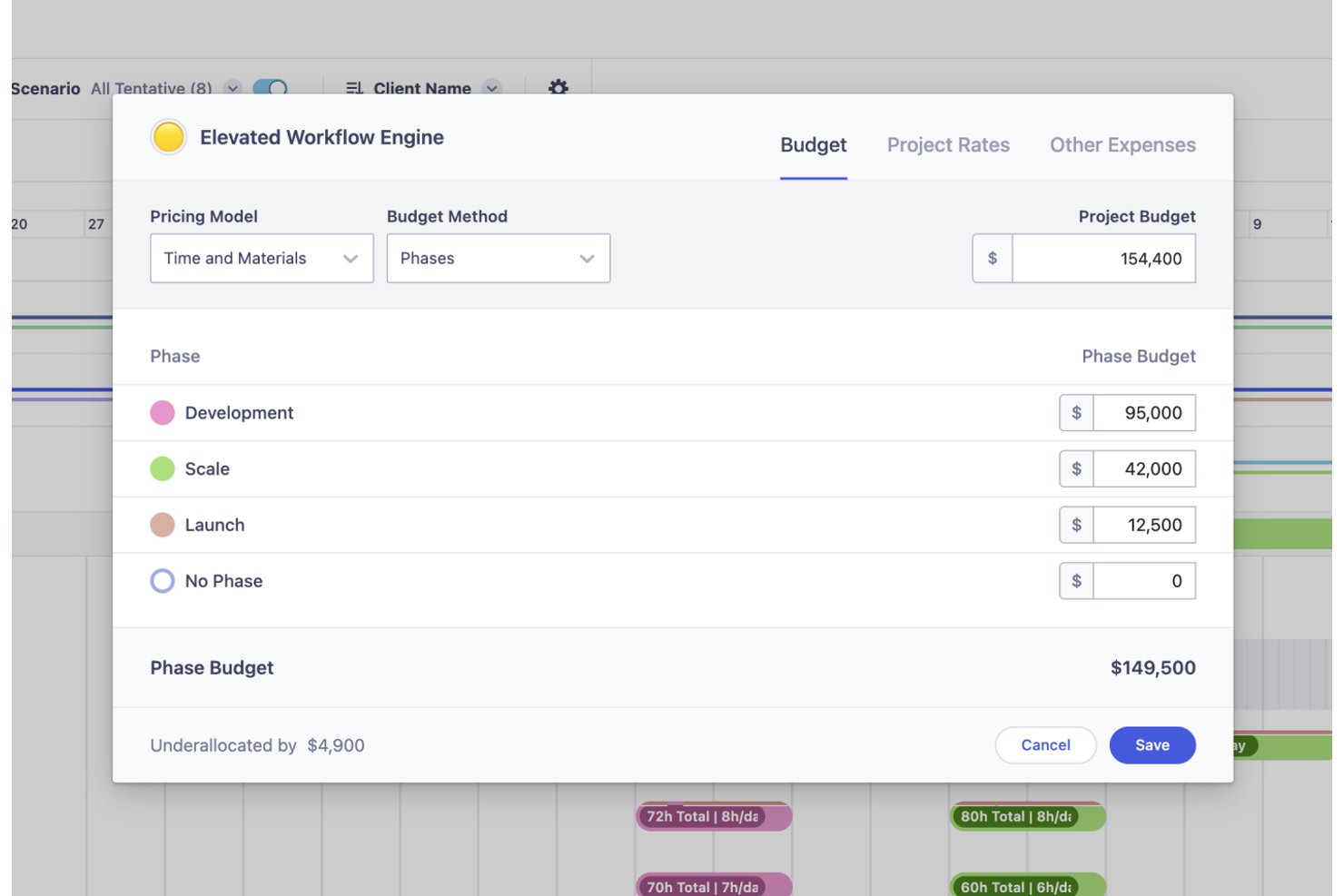
Runn’s financial tools help you track project budgets and costs, so you can meet financial goals. Its support for both fixed-price and time-and-materials billing models adds flexibility to budget management.
Standout Features
Milestones
Runn's milestone feature lets you add context to projects with categories like financial milestones and warning symbols. This helps in signaling important phases, payments, or potential issues to improve project clarity.
Skills Management:
Runn’s skill database lets you list and filter skills across your organization which helps with decision-making. You can assign expertise levels to team members to make it easier to form cross-functional teams for various projects.
Ease of Use
Runn stands out for making complex capacity questions easier to answer. Its visual planning interface helps teams see availability, forecast demand, and understand whether they have the right people to take on upcoming work. Instead of digging through disconnected spreadsheets or guessing at staffing needs, teams can quickly spot capacity gaps, compare future scenarios, and make more confident resourcing decisions.
Onboarding
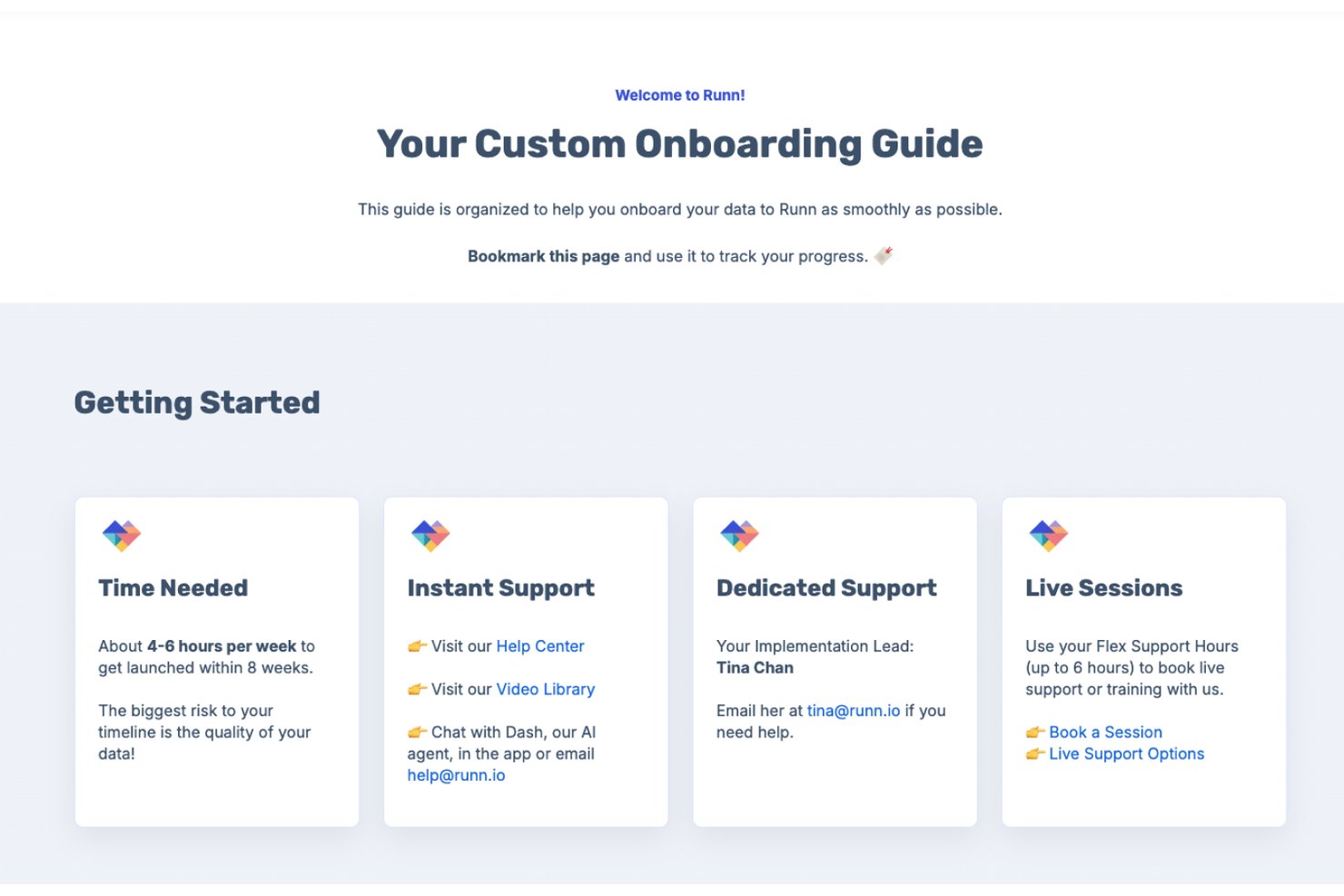
Runn offers flexible onboarding options to suit different team sizes and implementation needs. Organizations can get started quickly through a self-service free trial with guided in-app tutorials and walkthroughs, while those requiring a more hands-on approach can work directly with Runn's customer success team for tailored onboarding and data migration support. Depending on the complexity of the rollout, teams can be fully operational in a matter of days or follow a structured implementation process over several weeks. Users also benefit from ongoing support from resource management specialists who help ensure teams get the most value from the platform.
Customer Support
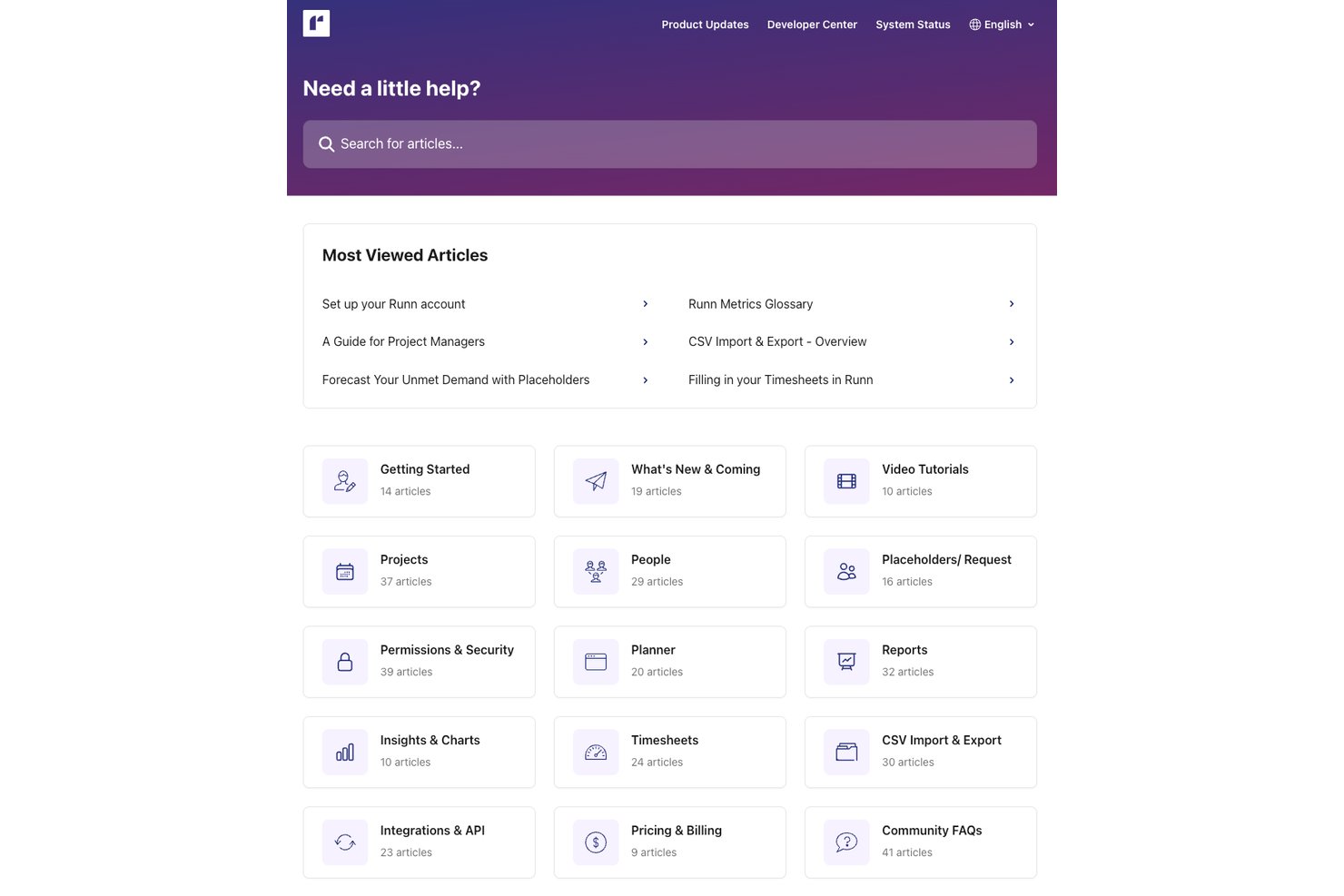
Runn provides reliable customer support from a knowledgeable and helpful team. You can also access guides, FAQs, and other resources through its extensive knowledge center.
Integrations
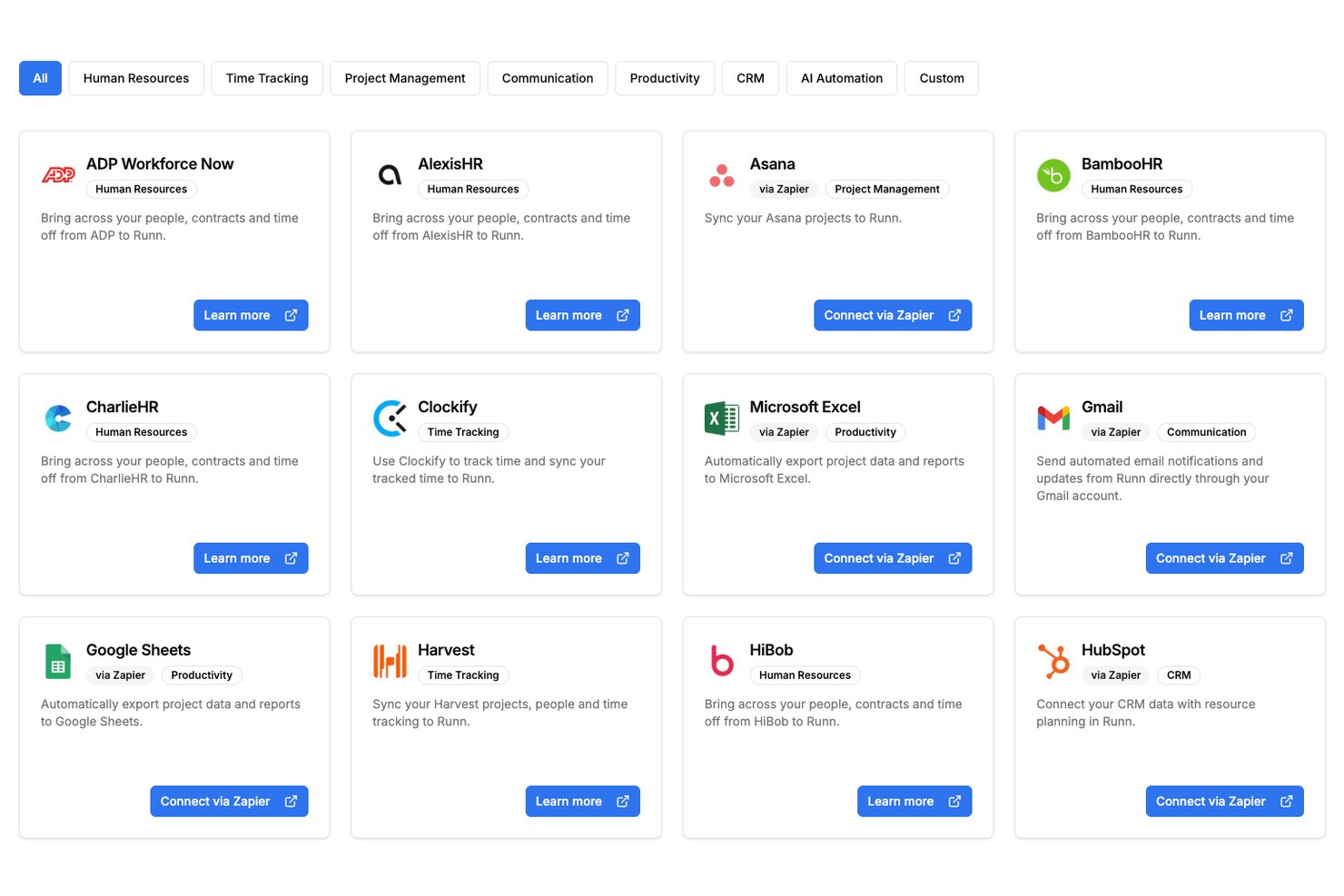
Runn offers native integrations with selected tools, plus API access and additional connections through Zapier and n8n.
Value for Money
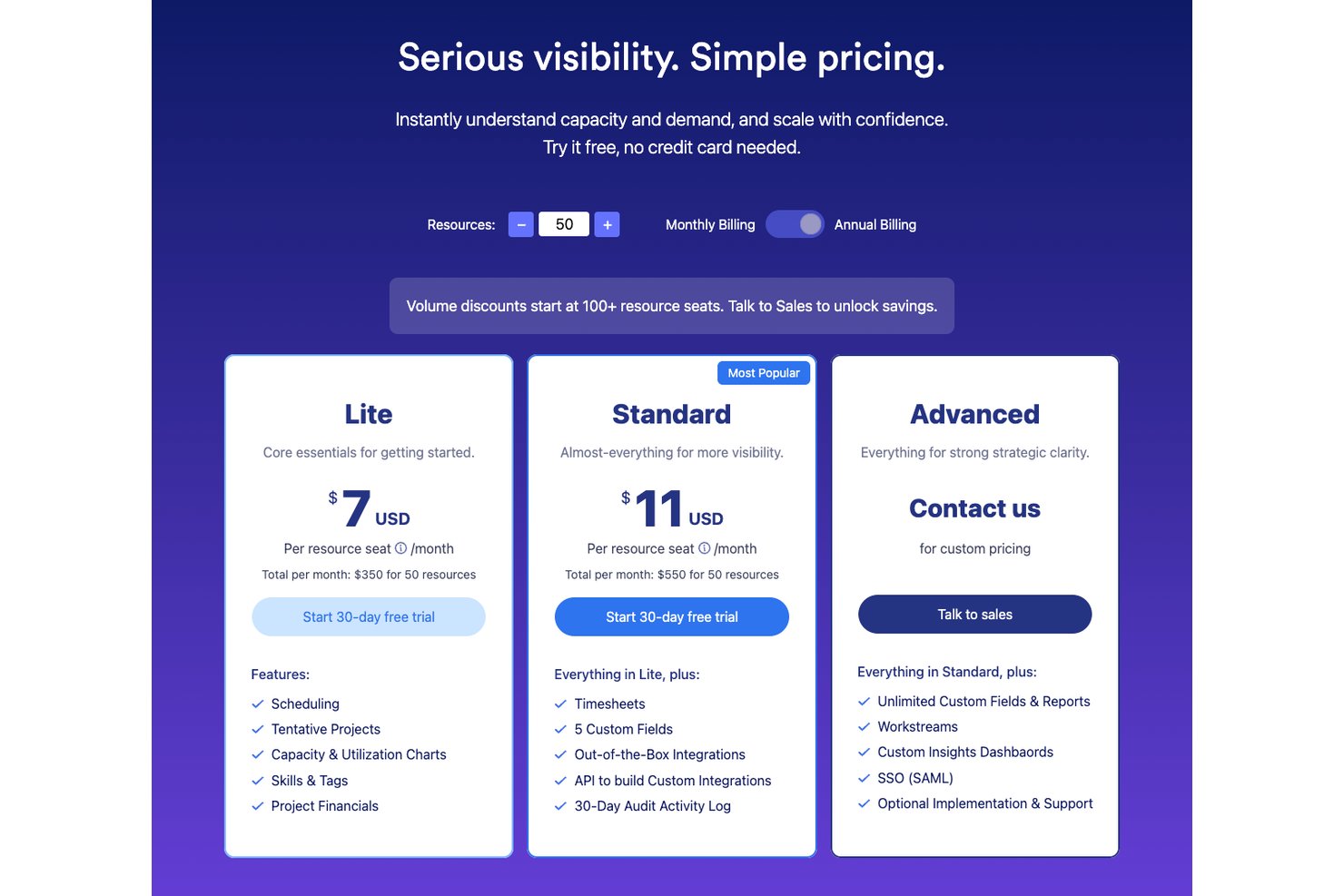
Runn's pricing is based on the number of resource seats and is split across three plans: Lite, Standard, and Advanced. The Lite and Standard plans are charged per resource seat and include progressively more advanced resource planning, reporting, and integration features. There is also an Advanced plan designed for organizations that need enterprise-grade capabilities, which requires contacting Runn for a custom quote. Larger teams can access volume discounts at higher seat counts. Users appreciate Runn's intuitive design, capacity planning tools, and project financial visibility, which help justify its cost compared to more general project management platforms.
- Lite: Includes capacity planning, scheduling, project planning, and advanced filtering.
- Standard: Adds timesheets, utilization insights, integrations, and API access.
- Advanced: Offers custom dashboards, SAML, SSO, resource requests, and workforce insights.
Runn Specs
- API
- Approval Workflows
- Audit Trail
- Budgeting
- Calendar Management
- Compliance Tracking
- Custom Reports
- Customer Management
- Dashboard
- Data Export
- Data Import
- Data Visualization
- Document Management
- Expense Tracking
- External Integrations
- Forecasting
- Inventory Tracking
- Multi-Currency
- Multi-User
- Notifications
- Prioritization
- Process Reporting
- Project Management
- Resource Management
- Risk Assessment
- Roadmapping
- Scheduling
- Supplier Management
- Third-Party Plugins/Add-Ons
- Workflow Management
Runn FAQs
How does Runn handle data security and compliance?
Is there a mobile app for Runn?
How often does Runn update its software?
What kind of training does Runn offer new users?
How does Runn facilitate resource planning?
Does Runn offer customer support on weekends?
Runn Company Overview & History
Runn was founded in 2018 and is headquartered in Wellington, New Zealand. The team is fully remote and operates across three continents. It specializes in resource scheduling and project management solutions for industries like IT and consulting. Runn aims to improve visibility and collaboration in project workflows has over 10,000 users worldwide.
Runn Major Milestones
- 2018: Founded in New Zealand.
- 2025: Reached $6.9 million ARR.