

Los 10 mejores rastreadores de tiempo sencillos analizados en 2026

10 Lista de los mejores rastreadores de tiempo sencillos


Gestionar un proyecto puede parecer como intentar ocuparse de demasiadas tareas a la vez. Quieres que tu equipo sea productivo, pero registrar el tiempo puede resultar tedioso y distraer. Ahí es donde entran en juego los rastreadores de tiempo sencillos. Te ayudan a controlar las horas sin añadir complicaciones innecesarias.
Según mi experiencia, elegir la herramienta adecuada puede marcar una gran diferencia. He analizado una variedad de rastreadores de tiempo para encontrar los mejores para ti. Obtendrás información imparcial sobre sus funciones, facilidad de uso y ventajas.
En esta recopilación, te guiaré por las mejores opciones. Aprenderás cómo cada herramienta puede adaptarse a las necesidades de tu equipo y mejorar la gestión de tus proyectos. Empecemos a descubrir la solución perfecta para ti.
Por qué confiar en nuestras recomendaciones de software
Nuestro equipo lleva probando y evaluando software desde 2012. Como gestores de proyectos, sabemos lo difícil —y lo importante— que es elegir el software adecuado.
Para esta guía, evaluamos las herramientas mediante pruebas prácticas e investigación independiente, puntuando las herramientas según nuestros criterios de selección. También nos basamos en la experiencia de líderes de opinión del sector y de profesionales en activo de la gestión de proyectos.
Nuestras reseñas reflejan nuestro criterio editorial humano, no un discurso de ventas.
Revisores expertos:
Resumen de los mejores rastreadores de tiempo sencillos
Este cuadro comparativo resume los detalles de precios de mis principales selecciones de rastreadores de tiempo sencillos para ayudarte a encontrar el mejor según tu presupuesto y las necesidades de tu empresa.
| Tool | Best For | Trial Info | Price | ||
|---|---|---|---|---|---|
| 1 | Ideal para la compatibilidad con extensiones del navegador | Plan gratuito + prueba gratuita de 7 días disponible | Desde $3.99/usuario/mes (facturado anualmente) | Website | |
| 2 | La mejor opción por sus funciones de RR. HH. en el seguimiento del tiempo | Plan gratuito disponible | Desde $5.50/usuario/mes | Website |
Análisis de los mejores rastreadores de tiempo sencillos
A continuación encontrarás mis resúmenes detallados de los mejores rastreadores de tiempo sencillos que llegaron a mi lista de selección. Mis análisis ofrecen una visión detallada de las funciones principales, las ventajas y desventajas, las integraciones y los casos de uso ideales de cada herramienta para ayudarte a encontrar la mejor para ti.

Clockify
Ideal para la compatibilidad con extensiones del navegador
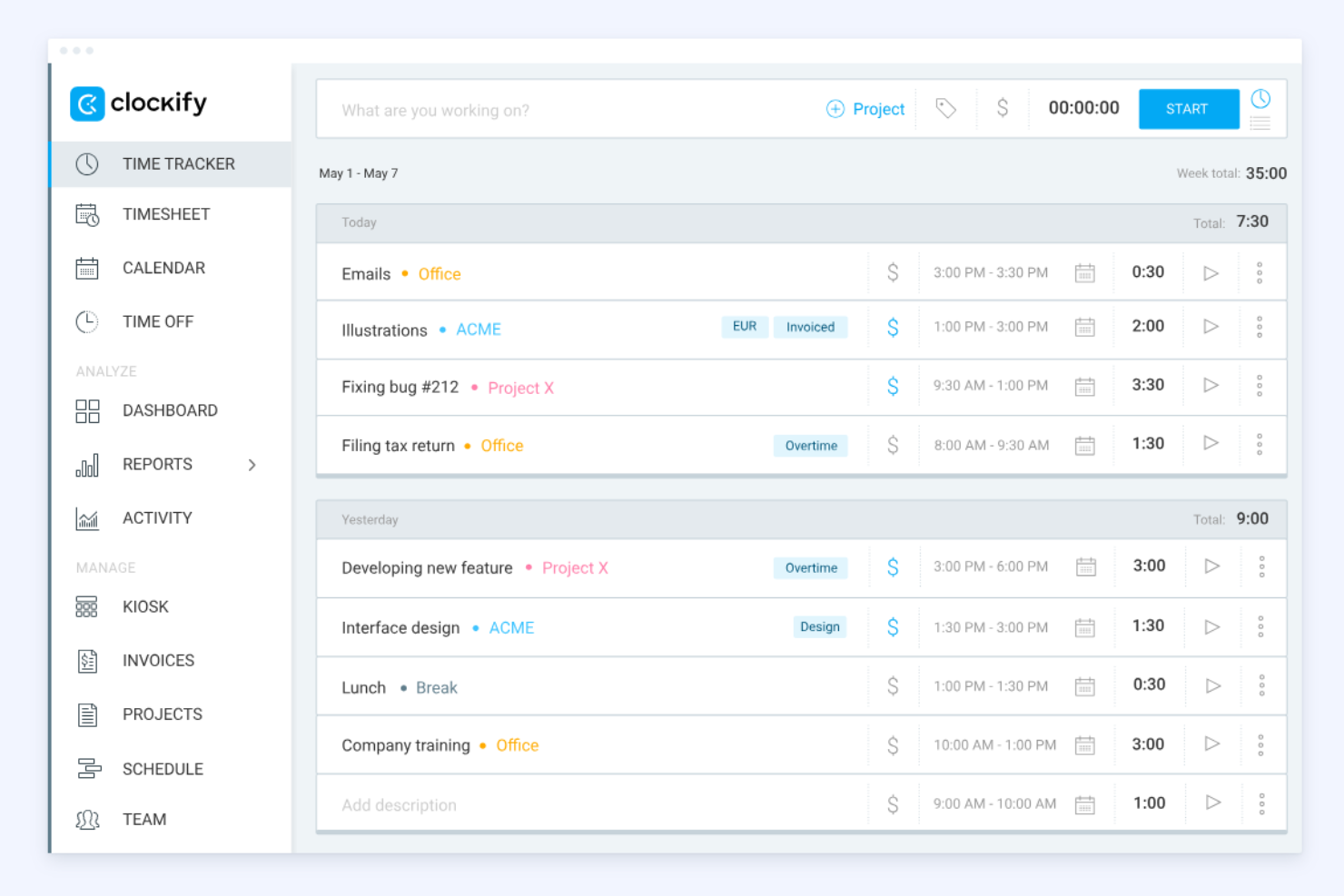
Clockify es una herramienta de seguimiento del tiempo ampliamente utilizada por autónomos y empresas de todos los tamaños. Ayuda a los usuarios a registrar las horas facturables y gestionar proyectos de forma eficiente.
Por qué elegí Clockify: La compatibilidad con extensiones del navegador es una característica destacada, ya que permite registrar el tiempo directamente desde el navegador sin cambiar de aplicación web. Es perfecta para quienes trabajan con varias aplicaciones web y necesitan un acceso rápido. Clockify ofrece herramientas detalladas de generación de informes para analizar eficazmente el uso del tiempo. También puedes configurar recordatorios para ayudar a tu equipo a registrar sus horas de forma constante.
Características e integraciones destacadas:
Las características incluyen un seguimiento sencillo del tiempo mediante temporizadores y hojas de horas, además de herramientas de gestión de proyectos y facturación que permiten establecer tarifas y generar informes o facturas. También admite la gestión de equipos con funciones como el seguimiento de la asistencia, la programación y la aprobación de hojas de horas.
Las integraciones incluyen Trello, Asana, Atlassian Jira, Slack y más.
Pros and Cons
Pros:
- Gran compatibilidad con extensiones del navegador
- Capacidades de seguimiento móvil
- Cinco usuarios en el plan gratuito
Cons:
- Sin programación automática ni cambios de turno
- Gestión limitada de proyectos y tareas

La mejor opción por sus funciones de RR. HH. en el seguimiento del tiempo
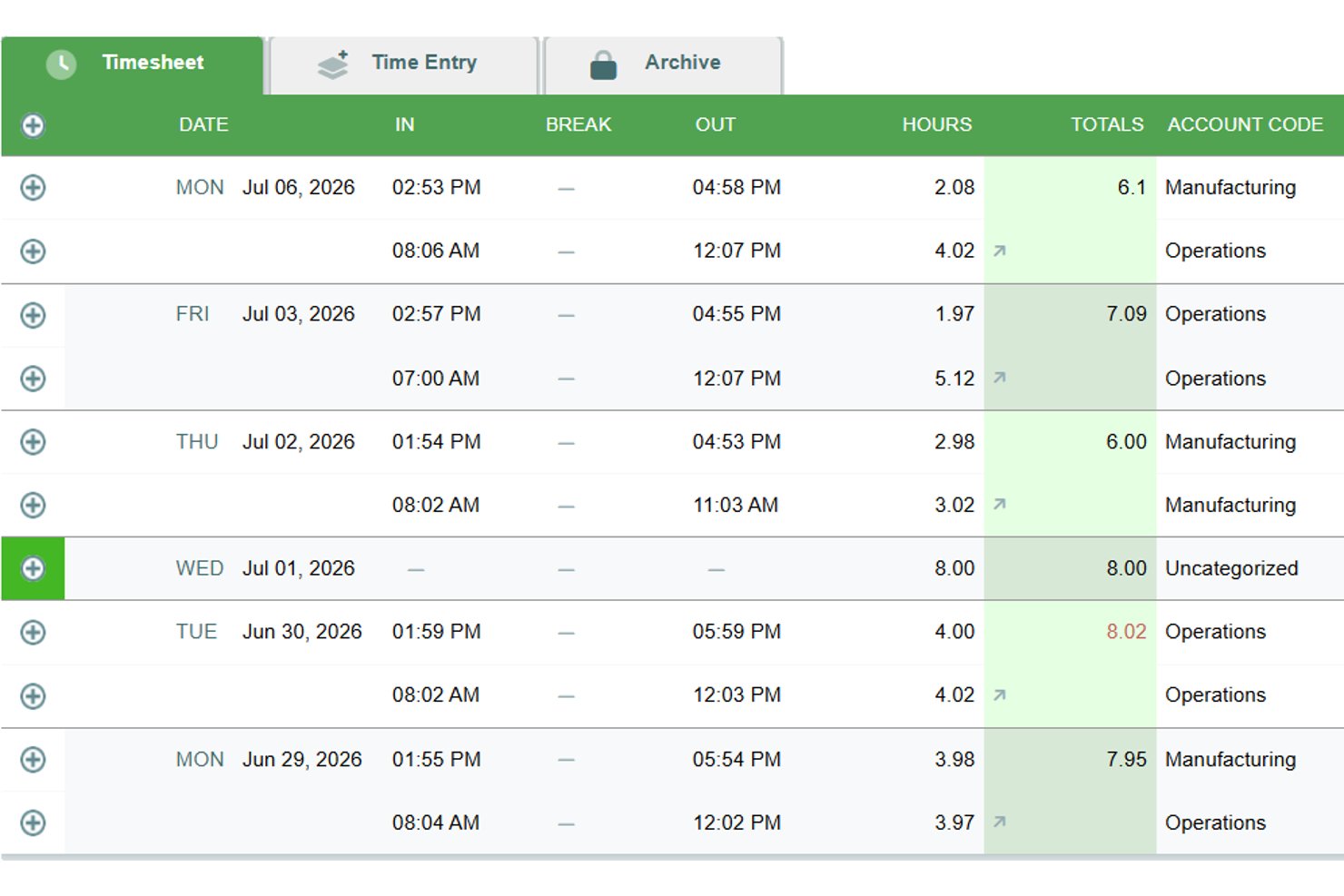

Timesheets.com es una plataforma de seguimiento del tiempo basada en navegador que combina hojas de horas para nóminas, registro de horas facturables, cálculo de costos por proyecto, programación, seguimiento de gastos y un conjunto de documentos de RR. HH. en una sola herramienta.
¿Para quién es más adecuado Timesheets.com?
Timesheets.com es una opción excelente para equipos pequeños que necesitan seguimiento del tiempo, programación y gestión de documentos de RR. HH. en un solo lugar.
Por qué elegí Timesheets.com
He incluido Timesheets.com entre mis principales opciones porque su conjunto de funciones de RR. HH. va mucho más allá de lo que ofrecen la mayoría de los rastreadores de tiempo sencillos. El conjunto integrado de documentos de RR. HH. gestiona formularios W-4, I-9, evaluaciones de desempeño y plantillas disciplinarias, todo vinculado directamente a la misma plataforma donde los empleados registran sus horas. También me gusta que las reglas de acumulación de permisos remunerados, incluidos los límites, el traspaso de saldo y las políticas de uso o pérdida, se puedan configurar sin una herramienta de RR. HH. independiente.
Funciones principales de Timesheets.com
- Tarifas de facturación multinivel: Establece tarifas de facturación y costos distintas a nivel de empleado, proyecto o tarea para respaldar una facturación precisa a clientes y el cálculo de costos de trabajos.
- Temporizadores de proyectos simultáneos: Ejecuta varios temporizadores activos a la vez, lo que facilita cambiar entre tareas sin perder el tiempo registrado.
- Exportaciones para nóminas y contabilidad: Envía los datos de las hojas de horas directamente a QuickBooks, Gusto, ADP, Paychex y otros sistemas de nóminas mediante exportaciones integradas.
- Seguimiento de kilometraje y gastos: Registra el kilometraje con imágenes del odómetro y envía gastos con fotos de recibos directamente junto con las entradas de tiempo.
Integraciones de Timesheets.com
Timesheets.com ofrece integraciones nativas con QuickBooks Online, QuickBooks Desktop, Gusto, ADP, Paychex, SurePayroll, Sage, Ceridian, Microsoft Dynamics y Heartland. Su API admite integraciones personalizadas, pero no ofrece integraciones nativas con herramientas de gestión de proyectos.
Pros and Cons
Pros:
- Documentos de RR. HH. junto con el seguimiento del tiempo
- Reglas configurables de acumulación de permisos remunerados
- Las tarifas facturables multinivel permiten calcular los costos de trabajos
Cons:
- La experiencia móvil basada únicamente en navegador parece anticuada
- Las ediciones con demasiadas aprobaciones ralentizan las correcciones
Cómo evalúo los rastreadores de tiempo simples
Divido mi evaluación en dos capas: lo esencial e imprescindible (como un temporizador de un clic y el seguimiento de horas facturables para trabajos de clientes) y los diferenciadores que hacen que una herramienta sea la adecuada para un equipo específico.
Funcionalidad básica (requisitos indispensables para esta lista)
Cuando selecciono herramientas para mi lista, califico cada una en una escala del 0 (no ofrece la funcionalidad) al 5 (sobresale en esta área) para cada funcionalidad principal que aparece abajo. Luego, calculo el puntaje total de la herramienta como un porcentaje. Cada herramienta necesita alcanzar una puntuación mínima total del 65% para ser considerada.
- Temporizador de un clic: Verifico si puedes comenzar a registrar inmediatamente desde la interfaz principal—sin tener que buscar entre menús o configurar campos antes de que el reloj empiece a correr.
- Ingreso manual de tiempo: Los equipos a veces olvidan presionar inicio. Busco opciones flexibles para añadir tiempo después, como ingresar registros por duración o por hora de inicio y fin en cualquier fecha pasada.
- Asignación de proyecto y tarea: Cada entrada debería poder etiquetarse a un cliente, proyecto o tarea para que el tiempo no termine en un agujero negro sin asignar al final del mes.
- Vista de hoja de tiempo: Evalúo si el tiempo registrado se consolida en una cuadrícula diaria o semanal clara y sencilla de revisar, editar y enviar antes de la fecha límite de reporte.
- Informe y exportación de tiempos: Poder descargar un CSV de las horas del mes pasado por proyecto para la factura de un cliente es un escenario básico que busco en cada herramienta considerada.
- Seguimiento de horas facturables: Marcar entradas como facturables con tarifas asignadas es importante—especialmente para responsables de agencias que gestionan múltiples clientes con distintos precios.
Cuando tengo una lista de herramientas que cumplen con estos criterios, considero qué distingue a cada plataforma.
Factores diferenciadores (qué distingue a los proveedores)
Así es como comparo y contrasto los diferentes proveedores:
Características destacadas
La sincronización de calendarios es fundamental—las herramientas que importan reuniones desde Google Calendar o Outlook y las convierten en registros de tiempo ahorran a los gestores de proyectos de registrar manualmente gran parte de su día. También busco detección de inactividad y recordatorios inteligentes, que detectan temporizadores olvidados antes de que se conviertan en conjeturas. El seguimiento automático de tiempo va más allá registrando actividades en apps y documentos en segundo plano, lo cual es especialmente útil para consultores que cambian frecuentemente de tarea.
Más allá de las características
Un plan gratuito que realmente funcione es importante aquí—consultores freelance y equipos pequeños necesitan comenzar a registrar tiempo desde el primer día sin necesitar aprobación de presupuesto. También evalúo cuán rápido alguien puede pasar del registro a iniciar su primer temporizador. Los mejores rastreadores simples requieren casi cero configuración. Las integraciones con herramientas como Jira, Asana y Trello también valen la pena, ya que tener ese temporizador directamente en tu herramienta de gestión de proyectos significa menos cambios de contexto y registros más precisos en equipos distribuidos.
Cómo elegir un rastreador de tiempo sencillo
Es fácil perderse entre largas listas de funciones y estructuras de precios complejas. Para ayudarte a mantener la concentración mientras avanzas en tu proceso particular de selección de software, aquí tienes una lista de factores que debes tener en cuenta:
| Factor | Qué debes considerar |
| Escalabilidad | ¿Puede la herramienta crecer junto con tu equipo? Comprueba si admite un número cada vez mayor de usuarios y proyectos sin que disminuya el rendimiento. |
| Integraciones | ¿Se conecta con tus herramientas actuales? Comprueba su compatibilidad con tus plataformas de gestión de proyectos, contabilidad y comunicación para mejorar los flujos de trabajo. |
| Personalización | ¿Puedes adaptar la herramienta a tus necesidades? Busca opciones para ajustar los paneles, informes y permisos de usuario de acuerdo con los procesos de tu equipo. |
| Facilidad de uso | ¿Es intuitiva la interfaz? Asegúrate de que los miembros del equipo con cualquier nivel de conocimientos técnicos puedan utilizarla sin una formación extensa ni confusiones. |
| Implementación e incorporación | ¿Con qué rapidez puedes empezar? Evalúa el proceso de configuración, los recursos de formación disponibles y el soporte durante la fase inicial de implementación. |
| Coste | ¿Se ajusta a tu presupuesto? Compara los planes de precios y considera el coste total de propiedad, incluidas las posibles tarifas adicionales por funciones o soporte. |
| Medidas de seguridad | ¿Qué nivel de seguridad tienen tus datos? Busca estándares de cifrado, procedimientos de copias de seguridad y cumplimiento de normativas de privacidad como el RGPD. |
| Disponibilidad del soporte | ¿Puedes obtener ayuda cuando la necesitas? Comprueba si el proveedor ofrece soporte las 24 horas, chat en directo o un gestor de cuenta dedicado para ayudarte. |
¿Qué es un rastreador de tiempo sencillo?
Un rastreador de tiempo sencillo es una herramienta que ayuda a los usuarios a registrar y gestionar sus horas de trabajo de manera eficiente. Profesionales como trabajadores independientes, gerentes de proyectos y equipos remotos utilizan estas herramientas para aumentar la productividad y realizar un seguimiento de las horas facturables. Funciones como el registro del tiempo, los informes y la gestión de proyectos ayudan a los usuarios a organizar las tareas y optimizar su flujo de trabajo. En general, estas herramientas ofrecen claridad sobre la distribución del tiempo y mejoran la gestión del tiempo.
Funciones
Al seleccionar un rastreador de tiempo sencillo, presta atención a las siguientes funciones clave:
- Registro del tiempo: Registra las horas de trabajo de forma automática o manual para garantizar un seguimiento preciso del tiempo facturable.
- Informes: Genera informes detallados para analizar la productividad y la distribución del tiempo entre proyectos.
- Integración con la gestión de proyectos: Sincroniza la herramienta con las herramientas de gestión de proyectos existentes para perfeccionar el flujo de trabajo y la gestión de tareas.
- Acceso móvil: Registra el tiempo sobre la marcha con aplicaciones móviles, garantizando flexibilidad para los miembros del equipo que trabajan a distancia o se desplazan.
- Facturación y emisión de facturas: Crea facturas basadas en el tiempo registrado para simplificar el proceso de facturación para los clientes.
- Alertas personalizables: Configura recordatorios para registrar el tiempo o notificar a los usuarios sobre próximos plazos para mantener los proyectos encaminados.
- Seguimiento de la ubicación mediante GPS: Supervisa la ubicación de los equipos móviles para garantizar un seguimiento preciso del tiempo dedicado al trabajo de campo.
- Hojas de horas visuales: Ofrece una visión clara de las horas registradas para ayudar a los usuarios a evaluar rápidamente cómo utilizan su tiempo.
- Seguimiento automático de la actividad: Registra el tiempo dedicado a las tareas sin necesidad de introducir datos manualmente para minimizar los errores y ahorrar tiempo.
- Medidas de seguridad: Protege los datos de los usuarios mediante cifrado y el cumplimiento de normativas de privacidad como el GDPR.
Ventajas
Implementar un rastreador de tiempo sencillo ofrece varias ventajas para tu equipo y tu empresa. Estas son algunas de las que puedes esperar:
- Mayor productividad: Al realizar un seguimiento de las horas y actividades de trabajo, los equipos pueden identificar las tareas que hacen perder tiempo y centrarse en lo que realmente importa.
- Facturación precisa: Las funciones automatizadas de registro del tiempo y emisión de facturas ayudan a garantizar que los clientes reciban una facturación correcta por las horas trabajadas.
- Mejor gestión de proyectos: La integración con herramientas de gestión de proyectos permite coordinar las tareas y gestionar los plazos de manera eficiente.
- Mayor responsabilidad: El seguimiento del tiempo fomenta la transparencia y la responsabilidad entre los miembros del equipo, animándolos a mantenerse centrados en sus tareas.
- Toma de decisiones fundamentada: Los informes detallados y los análisis ofrecen información sobre la distribución del tiempo, lo que ayuda a los gerentes a tomar decisiones basadas en datos.
- Modalidades de trabajo flexibles: El acceso móvil y el seguimiento mediante GPS permiten a los trabajadores remotos y a los equipos de campo registrar el tiempo desde cualquier ubicación.
- Ahorro de costes: Al optimizar la gestión del tiempo, las empresas pueden reducir los costes de las horas extraordinarias y mejorar la eficiencia general.
Costes y precios
Seleccionar un rastreador de tiempo sencillo requiere comprender los diversos modelos de precios y planes disponibles. Los costes varían según las funciones, el tamaño del equipo, los complementos y otros factores. La tabla siguiente resume los planes habituales, sus precios medios y las funciones que suelen incluir las soluciones de rastreo de tiempo sencillas:
Tabla comparativa de planes para rastreadores de tiempo sencillos
| Tipo de plan | Precio medio | Funciones habituales |
| Plan gratuito | $0 | Seguimiento básico del tiempo, proyectos limitados e informes básicos. |
| Plan personal | $2.99-$12/mes | Seguimiento del tiempo, integración con la gestión de proyectos, acceso móvil e informes básicos. |
| Plan empresarial | $15-$30/mes | Informes avanzados, emisión de facturas, alertas personalizables y asistencia prioritaria. |
| Plan corporativo | $30-$50/mes | Integraciones personalizadas, gerente de cuenta dedicado, funciones de seguridad avanzadas y análisis exhaustivos. |
Preguntas frecuentes sobre los rastreadores de tiempo sencillos
Estas son algunas respuestas a preguntas frecuentes sobre los rastreadores de tiempo sencillos:
¿Cómo elijo el rastreador de tiempo sencillo adecuado para mi equipo?
Empieza por evaluar las necesidades de tu equipo, como la integración con la gestión de proyectos o el acceso móvil. Ten en cuenta el tamaño de tu equipo y el nivel de informes que necesitas. Prueba algunas herramientas con periodos de prueba gratuitos para comprobar qué interfaz prefiere tu equipo. No olvides comparar los planes de precios según tu presupuesto.
¿Pueden los rastreadores de tiempo sencillos integrarse con mi software actual?
Sí, muchos rastreadores de tiempo sencillos ofrecen integraciones con herramientas populares, como software de gestión de proyectos y de contabilidad. Consulta el sitio web de la herramienta para ver una lista de las integraciones compatibles. Si no se integra con tu software, considera usar una herramienta como Zapier para crear conexiones personalizadas.
¿Es la seguridad de los datos una preocupación con los rastreadores de tiempo sencillos?
Sí, la seguridad de los datos debe ser una prioridad. Busca herramientas que ofrezcan cifrado, copias de seguridad periódicas de los datos y cumplimiento de normativas de privacidad como el RGPD. Pregunta a los proveedores sobre sus medidas de seguridad y lee reseñas para saber cómo gestionan la protección de datos.
¿Los rastreadores de tiempo sencillos funcionan sin conexión?
Algunos rastreadores de tiempo sencillos ofrecen funcionalidad sin conexión, lo que te permite registrar horas sin conexión a Internet. Cuando vuelves a conectarte, los datos se sincronizan automáticamente. Consulta la lista de funciones de la herramienta para asegurarte de que el acceso sin conexión esté disponible, especialmente si tu equipo trabaja en zonas con conectividad limitada.
¿Cuánto tiempo se tarda en implementar un rastreador de tiempo sencillo?
El tiempo de implementación varía según la herramienta y el tamaño de tu equipo. Algunas herramientas ofrecen una configuración rápida con recorridos interactivos del producto y plantillas. La mayoría de los proveedores ofrecen recursos de formación para ayudarte a empezar. La implementación completa puede tardar de unos días a una semana, incluida la formación de tu equipo.
Qué hacer a continuación:
Si estás investigando rastreadores de tiempo sencillos, conecta con un asesor de SoftwareSelect para recibir recomendaciones gratuitas.
Rellenas un formulario y mantienes una breve conversación en la que se profundiza en los detalles de tus necesidades. Después recibirás una lista breve de programas que puedes revisar. Incluso te ayudarán durante todo el proceso de compra, incluidas las negociaciones de precios.