

Los 10 mejores programas de gestión de espacios de oficina en 2026

Lista de las mejores opciones de software de gestión de espacios de oficina


El software de gestión de espacios de oficina te ofrece un único lugar para asignar escritorios, planificar traslados y supervisar los costes de tu lugar de trabajo y tus inmuebles. Si gestionas equipos cambiantes, horarios híbridos o una cartera en crecimiento, la herramienta adecuada te ayuda a adaptarte rápidamente y a mantener el cumplimiento bajo control. Esta guía analiza el mejor software de gestión de espacios de oficina para que puedas ver qué soluciones abordan la gestión de planos, los informes ESG y los análisis, y encontrar la opción adecuada para tu combinación de necesidades de espacio de trabajo, cumplimiento e informes.
Por qué confiar en nuestras recomendaciones de software
Nuestro equipo lleva probando y evaluando software desde 2012. Como gestores de proyectos, sabemos lo difícil —y lo importante— que es elegir el software adecuado.
Para esta guía, evaluamos las herramientas mediante pruebas prácticas e investigación independiente, puntuando las herramientas según nuestros criterios de selección. También nos basamos en la experiencia de líderes de opinión del sector y de profesionales en activo de la gestión de proyectos.
Nuestras reseñas reflejan nuestro criterio editorial humano, no un discurso de ventas.
Revisores expertos:
Tabla comparativa de software de gestión de espacios de oficina
Esta tabla comparativa resume los detalles de precios de mis principales selecciones de software de gestión de espacios de oficina:
| Tool | Best For | Trial Info | Price | ||
|---|---|---|---|---|---|
| 1 | Ideal para informes ESG vinculados al gasto inmobiliario | Demostración gratuita disponible | Precios bajo petición | Website | |
| 2 | Ideal para análisis unificados del espacio y datos de sensores IoT | Demostración gratuita disponible | Precio bajo solicitud | Website | |
| 3 | Ideal para el seguimiento de costes y arrendamientos de carteras inmobiliarias | Demostración gratuita disponible | Precios bajo solicitud | Website | |
| 4 | Ideal para la gestión de traslados y el prorrateo de alquileres | Demostración gratuita disponible | Precios disponibles previa solicitud | Website | |
| 5 | Ideal para la gestión del lugar de trabajo basada en planos | Demostración gratuita disponible | Precios disponibles previa solicitud | Website | |
| 6 | La mejor opción para integrar la gestión de visitantes y entregas | Demostración gratuita disponible | Precios bajo solicitud | Website | |
| 7 | El mejor IWMS para lugares de trabajo autorizado por FedRAMP | Demostración gratuita disponible | Precio bajo solicitud | Website | |
| 8 | Ideal para la gestión de carteras inmobiliarias con capacidades de IWMS | Demostración gratuita disponible | Precios disponibles previa solicitud | Website | |
| 9 | La mejor opción para informes de costos del espacio y prorrateo de costos | Demostración gratuita disponible | Precio disponible previa solicitud | Website | |
| 10 | La mejor opción para la gestión de espacios de trabajo en sectores regulados | Demostración gratuita disponible | Precios bajo solicitud | Website |
Reseñas de software de gestión de espacios de oficina
A continuación encontrarás mis resúmenes detallados del mejor software de gestión de espacios de oficina que ha llegado a mi lista de opciones. Mis reseñas ofrecen un análisis detallado de las funciones, los casos de uso más adecuados y las capacidades de cada plataforma para ayudarte a encontrar la mejor opción para ti.

Ideal para informes ESG vinculados al gasto inmobiliario
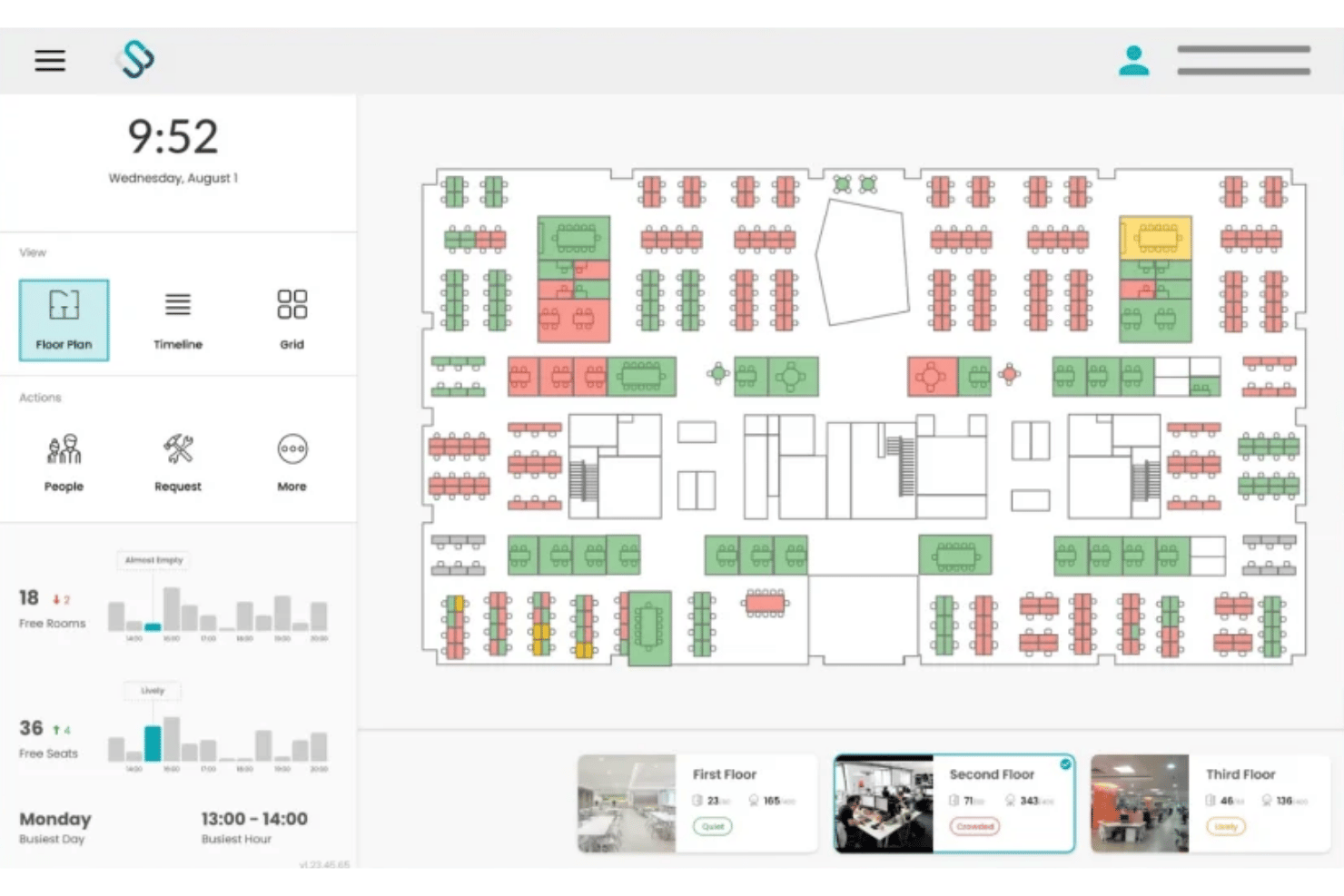
Spacewell es una plataforma de gestión del lugar de trabajo que combina la reserva de escritorios y salas, la visualización interactiva de planos de planta, el análisis de ocupación basado en IoT y los informes energéticos ESG en carteras inmobiliarias con múltiples ubicaciones.
¿Para quién es más adecuado Spacewell?
Spacewell es una opción especialmente adecuada para equipos empresariales de gestión inmobiliaria y de instalaciones que administran carteras con múltiples ubicaciones, donde los costes del espacio, el consumo energético y los informes ESG deben conectarse en un único sistema.
Por qué elegí Spacewell
Spacewell se gana un lugar en mi lista de preseleccionados porque el módulo de Energía conecta los informes de carbono, el análisis fotovoltaico y los paneles de control ESG directamente con los datos del centro de costes de cada reserva de escritorio y sala. Me encanta que, cuando un director inmobiliario necesita justificar la consolidación de dos plantas, la plataforma muestra tanto el gasto energético como los datos del coste por puesto en la misma vista. Las simulaciones de espacio permiten modelar escenarios de densificación o consolidación antes de comprometerse, por lo que el argumento ESG está respaldado por cifras reales de utilización.
Características principales de Spacewell
- Reserva conversacional con IA: Un asistente de IA integrado permite a los usuarios reservar escritorios o salas mediante lenguaje natural en más de 30 idiomas, aprendiendo del comportamiento de reservas anterior para mostrar sugerencias relevantes.
- Monitorización de la calidad del aire interior: Los sensores registran en tiempo real el CO2, los niveles de COV, la temperatura y la humedad, y los datos de calidad del aire interior se muestran directamente en planos de planta interactivos junto con el estado de ocupación.
- Localizador de compañeros: A partir del plan Avanzado, los empleados pueden buscar a sus compañeros y ver sus asignaciones actuales de puestos en un plano de planta en directo para coordinar los días de trabajo presencial.
- Integración de sensores IoT: Spacewell se conecta a una red de sensores independiente del fabricante, incluidos VergeSense, XY Sense y Cisco Spaces, y reúne datos de movimiento, recuento de personas y condiciones ambientales en una única vista de ocupación.
Integraciones de Spacewell
Spacewell ofrece integraciones nativas con Microsoft 365, Outlook, Teams, Google Workspace, Zoom, SAP, Oracle, ServiceNow, Workday, VergeSense, XY Sense y Cisco Spaces. Hay una API disponible para integraciones personalizadas.
Pros and Cons
Pros:
- Conecta los costes ESG y del espacio
- La plataforma independiente del fabricante de sensores admite grandes carteras
- Supervisa las métricas de calidad del aire interior
Cons:
- No permite realizar un seguimiento de las plazas de aparcamiento exteriores
- Limita el acceso independiente desde la aplicación móvil

HubStar
Ideal para análisis unificados del espacio y datos de sensores IoT
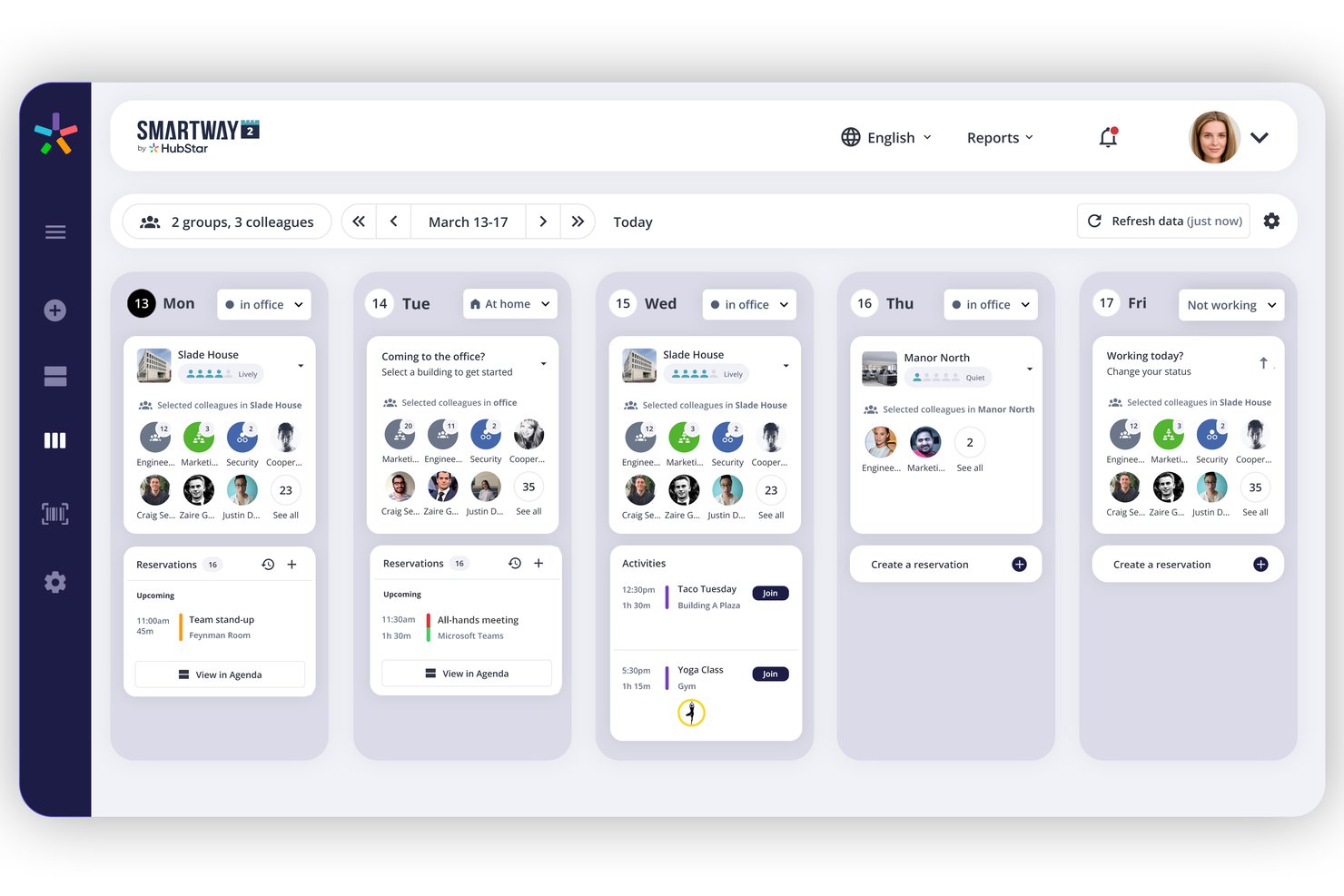
HubStar es una plataforma modular de gestión del lugar de trabajo que combina la reserva de escritorios y salas, análisis de ocupación basados en sensores IoT, gestión interactiva de planos de planta y gestión de visitantes en carteras de oficinas con múltiples sedes.
¿Para quién es más adecuado HubStar?
HubStar es una opción muy adecuada para equipos empresariales de gestión de instalaciones y del lugar de trabajo que administran carteras con múltiples sedes y necesitan unificar en una sola plataforma los datos de ocupación procedentes de sensores IoT, Wi-Fi y sistemas de credenciales.
Por qué elegí HubStar
HubStar se ha ganado un lugar en mi lista de favoritos porque ninguna otra plataforma que haya probado reúne datos de ocupación de tantas fuentes en una sola capa de análisis. PresenceIQ combina datos de puntos de acceso Wi-Fi (Aruba, Cisco), registros de credenciales, sensores propios y dispositivos IoT de terceros como VergeSense y Butlr para ofrecer una visión realmente completa del uso del espacio. También me gusta que los análisis no sean meramente descriptivos: el nivel prescriptivo muestra recomendaciones específicas para ajustar el tamaño de los vecindarios y reconfigurar zonas basándose en patrones reales de asistencia.
Características principales de HubStar
- Asistente digital de IA: Recomienda los días óptimos de oficina para cada empleado según sus preferencias e historial, y después reserva automáticamente el mejor escritorio o sala disponible.
- Gestión de visitantes: Gestiona el registro mediante quiosco de autoservicio, la captura de fotos, la firma de acuerdos de confidencialidad, la impresión de credenciales y el seguimiento de visitantes en tiempo real dentro de la misma plataforma.
- Gestión de vecindarios y zonas: Asigna equipos a zonas específicas del plano de planta con políticas de reserva, proporciones de asientos y reglas de reserva configurables hasta el nivel de cada puesto de trabajo.
- Exportación de datos a plataformas de BI: Envía directamente los datos de ocupación y utilización a Power BI, Tableau, Qlik y ThoughtSpot para la generación de informes y el análisis externos.
Integraciones de HubStar
HubStar ofrece integraciones nativas en todo el ecosistema de Microsoft (Teams, Outlook, Exchange, Azure AD), además de Zoom, Workday, PeopleSoft, Rippling, Okta, Ping Identity, VergeSense y proveedores de Wi-Fi como Cisco y Aruba, junto con exportaciones de BI a Power BI, Tableau, Qlik y ThoughtSpot. También hay una API abierta disponible para integraciones personalizadas.
Pros and Cons
Pros:
- Agrega datos de ocupación procedentes de sensores y Wi-Fi
- El asistente de IA reserva automáticamente los escritorios y las salas óptimos
- El aprendizaje automático facilita la edición de planos de planta
Cons:
- No ofrece un flujo de trabajo específico para la gestión de traslados
- Limita el acceso independiente desde la aplicación móvil

Planon
Ideal para el seguimiento de costes y arrendamientos de carteras inmobiliarias
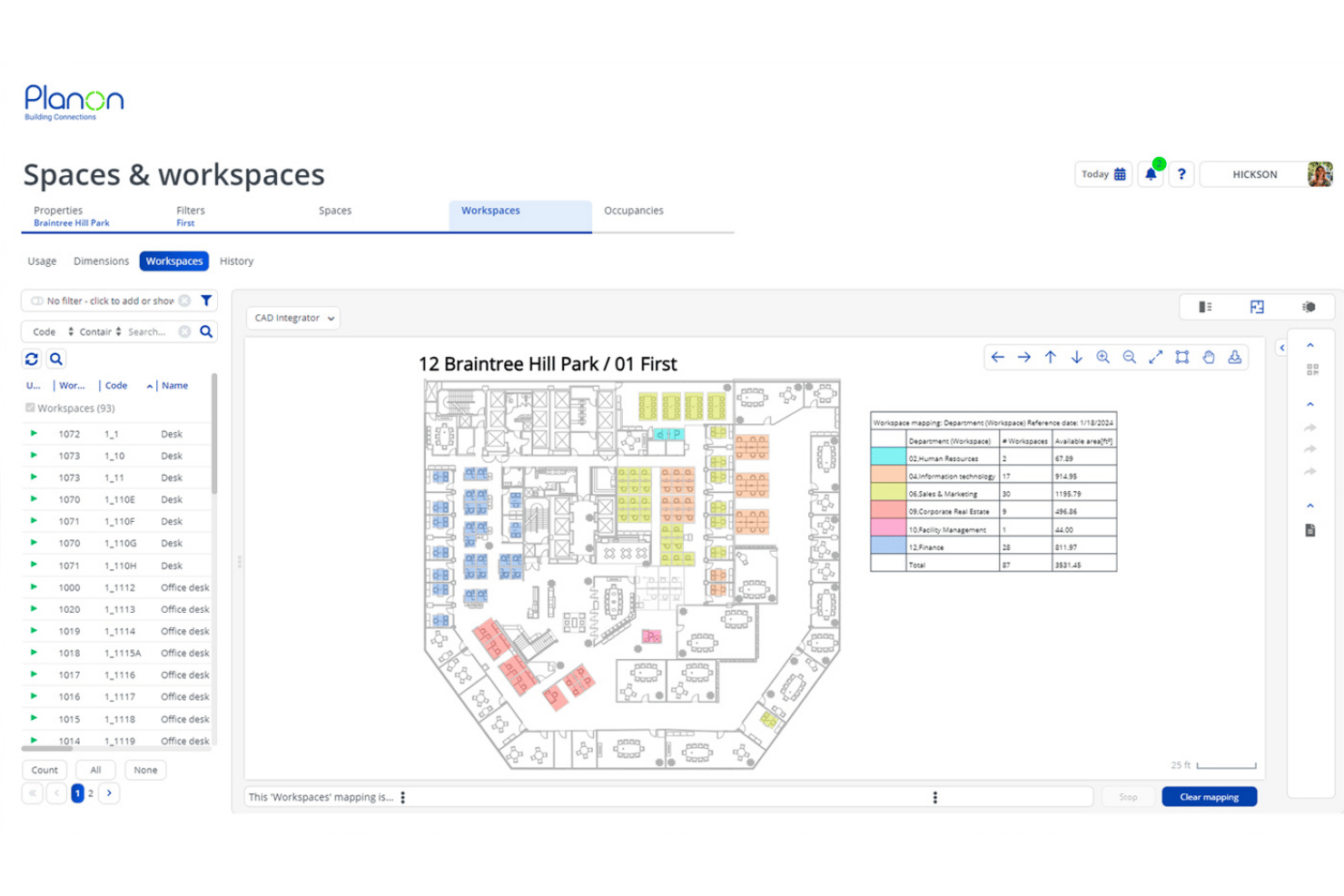
Planon es una plataforma IWMS empresarial que combina la reserva de espacios y escritorios, la gestión de planos de planta integrada con CAD/BIM, el análisis de ocupación basado en IoT, la contabilidad de arrendamientos y el seguimiento de carteras inmobiliarias en operaciones globales con múltiples ubicaciones.
¿Para quién es más adecuado Planon?
Planon está diseñado para equipos empresariales de bienes inmuebles y gestión de instalaciones que administran carteras grandes y distribuidas en múltiples ubicaciones, con requisitos complejos de contabilidad de arrendamientos y seguimiento de costes.
Por qué elegí Planon
Planon ocupa un lugar en mi lista de favoritos porque ninguna otra plataforma que haya probado iguala su profundidad en la visibilidad de los costes de las carteras inmobiliarias y la contabilidad de arrendamientos. Me gusta especialmente cómo combina el seguimiento de arrendamientos conforme a IFRS 16/ASC 842 con análisis de imputación de costes por puesto, de modo que los equipos de finanzas y gestión de instalaciones trabajan con las mismas cifras. Si además se incorpora la planificación de escenarios vinculada directamente a los planos de planta CAD, se puede modelar la redistribución completa de una planta utilizando datos de costes de arrendamiento en tiempo real antes de mover un solo escritorio.
Características principales de Planon
- Integración de sensores IoT: Conecta sensores de ocupación, monitores de calidad del aire y sistemas de gestión de edificios para enviar datos en tiempo real a los paneles de utilización.
- Zonificación de áreas: Asigna equipos a zonas de planta definidas, con políticas de reserva configurables y límites de capacidad por departamento.
- Gestión de visitantes: El registro de visitantes mediante autoservicio, las notificaciones a los anfitriones y el seguimiento seguro del flujo de visitantes están integrados directamente en la plataforma.
- Connect para análisis: Exporta datos del lugar de trabajo a herramientas de inteligencia empresarial como Power BI, Tableau o Snowflake mediante API para crear informes personalizados.
Integraciones de Planon
Planon ofrece integraciones nativas con Microsoft Outlook, Microsoft Teams, Microsoft Places, Google Calendar, SAP, Oracle, AutoCAD y Autodesk Revit. Hay una API disponible para integraciones personalizadas.
Pros and Cons
Pros:
- Planos de planta en tiempo real con integración CAD/BIM
- Análisis avanzado de ocupación mediante sensores IoT
- Planificación de escenarios integrada para cambios de espacio
Cons:
- No incluye credenciales de visitante personalizadas con la marca
- No permite realizar un seguimiento de las plazas de aparcamiento exteriores

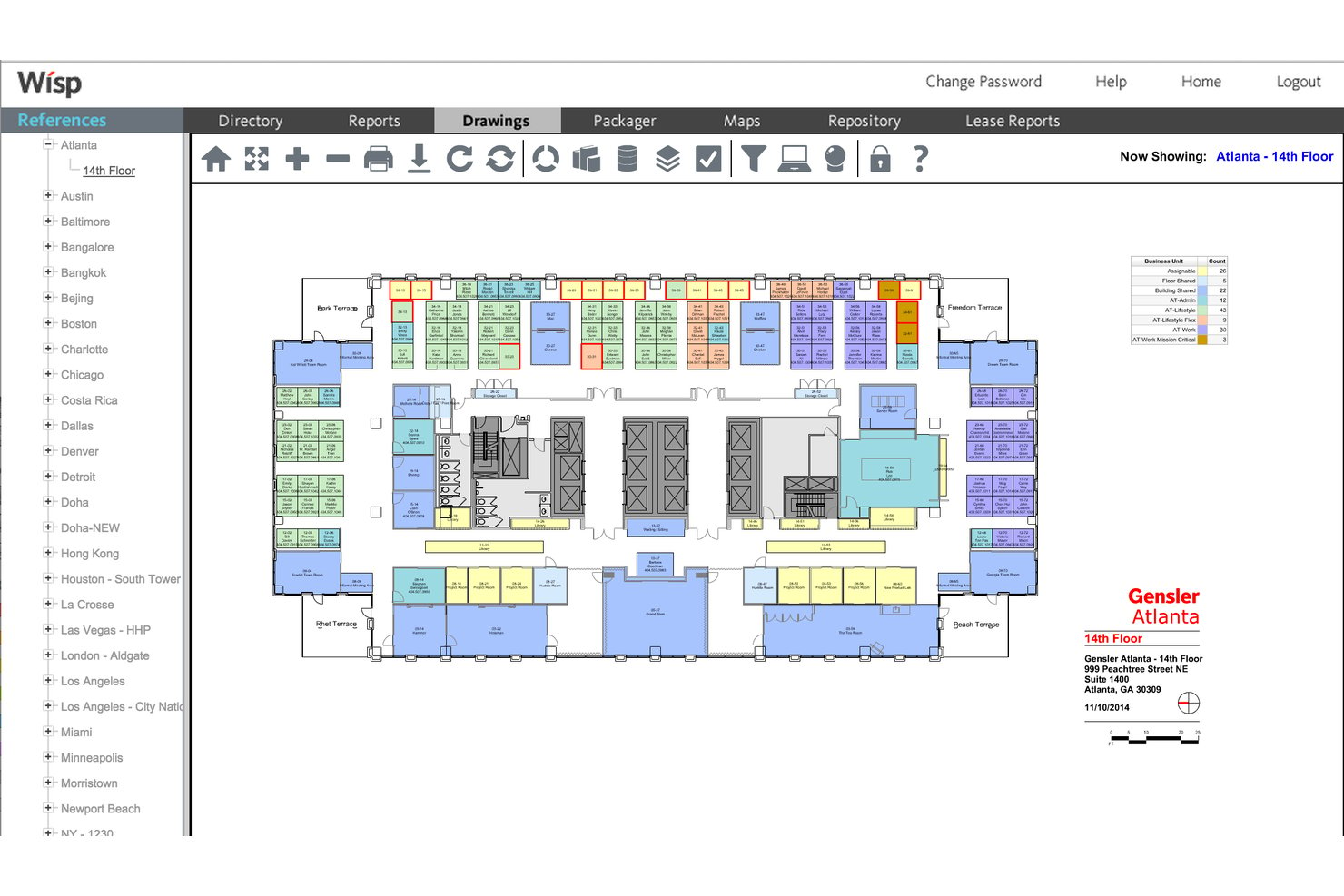
Wisp by Apex42 es una plataforma de gestión del espacio de oficinas basada en planos interactivos, gestión de traslados, reservas de escritorios, análisis de utilización y prorrateo de alquileres e informes de distribución de costes entre múltiples ubicaciones.
¿Para quién es más adecuado Wisp by Apex42?
Wisp es una opción especialmente adecuada para equipos empresariales de gestión de instalaciones y bienes inmuebles corporativos que administran carteras de múltiples ubicaciones con una alta rotación de puestos y necesidades complejas de asignación interna de costes.
Por qué elegí Wisp by Apex42
He incluido Wisp by Apex42 entre mis principales opciones porque sus capacidades de gestión de traslados y prorrateo de alquileres son las más desarrolladas que he visto en esta categoría. El flujo de trabajo MAC configurable gestiona las solicitudes de traslado, las aprobaciones y las actualizaciones automatizadas de los planos de planta de principio a fin, y la planificación de espacios basada en escenarios ilimitados permite a los equipos modelar reconfiguraciones completas sin modificar los datos activos. En cuanto a los costes, el prorrateo de alquileres en 27 niveles permite cobrar a cada departamento por la superficie exacta que ocupa en una cartera de múltiples ubicaciones.
Funciones principales de Wisp by Apex42
- Planos de planta interactivos: Visualiza y edita planos de planta de múltiples ubicaciones creados a partir de dibujos CAD, con codificación por colores mediante Colorizers™ para visualizar los departamentos, los espacios vacantes y la ocupación en toda la cartera.
- Informes de utilización del espacio: Accede a más de 50 informes prediseñados con desglose detallado en tiempo real, desde el nivel de la cartera hasta cada puesto individual, incluidos mapas de calor basados en sensores que se muestran directamente en los planos de planta.
- Reservas de escritorios: Reserva escritorios desde cualquier dispositivo mediante registro con código QR, liberación automática en caso de ausencia, opciones de reserva recurrente y restricciones basadas en zonas.
- Flujo de trabajo de solicitudes de servicio: Envía y gestiona órdenes de trabajo de instalaciones vinculadas directamente a espacios específicos de los planos de planta, con asignación configurable al técnico de instalaciones correspondiente.
Integraciones de Wisp by Apex42
Wisp ofrece integraciones nativas con ADP Workforce Now, UKG, Microsoft Entra ID, Brivo, Google Calendar, Microsoft Outlook, Microsoft Teams y Slack. También hay una API disponible para integraciones personalizadas.
Pros and Cons
Pros:
- Actualizaciones ilimitadas de CAD proporcionadas por el equipo del proveedor
- Herramientas de automatización de la gestión de traslados líderes del sector
- Capacidad de prorrateo interno de alquileres en 27 niveles
Cons:
- La reserva nativa de salas es menos visible que en otras soluciones
- Herramientas limitadas para crear informes personalizados

Ideal para la gestión del lugar de trabajo basada en planos
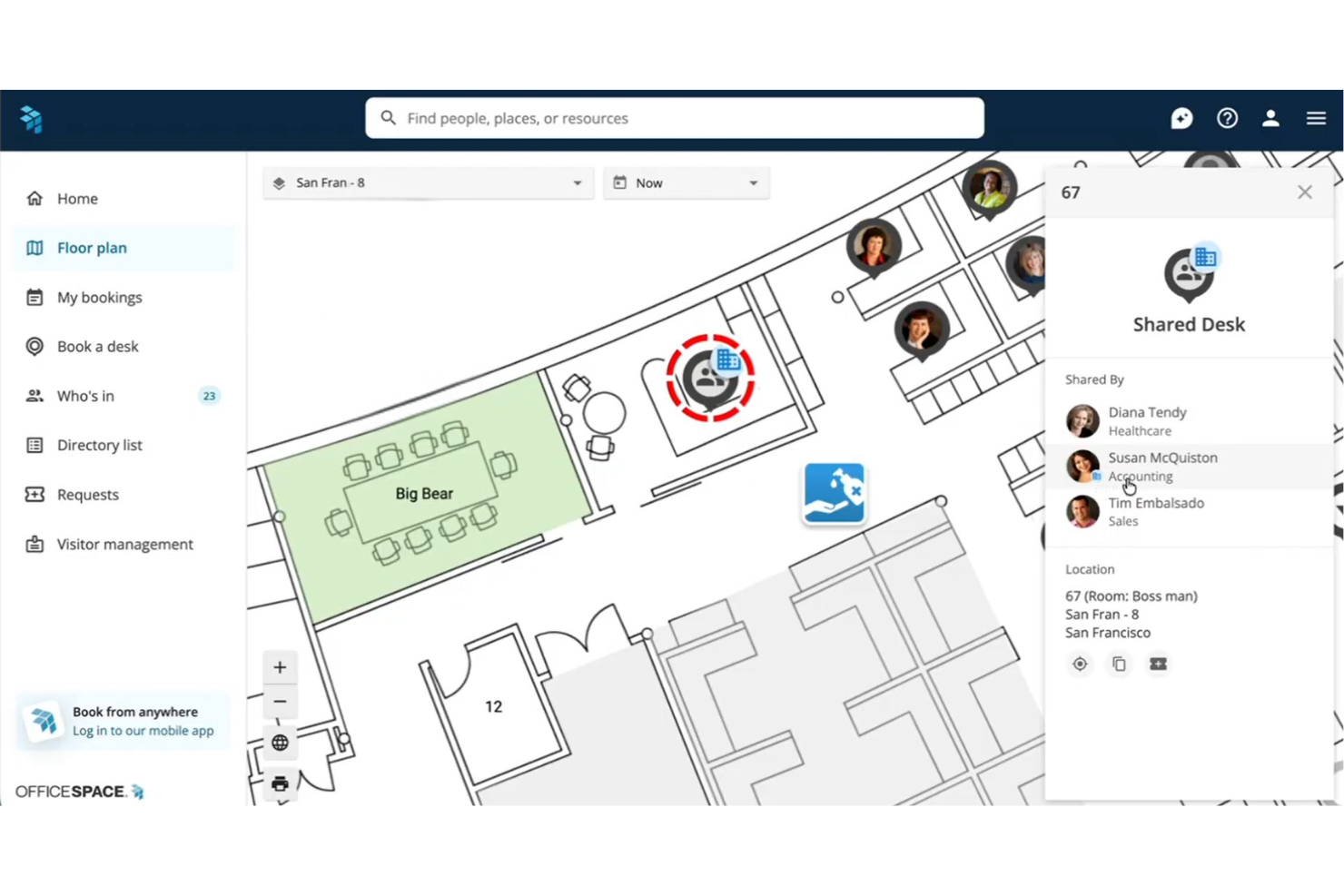
OfficeSpace es una plataforma de gestión del lugar de trabajo basada en planos interactivos, que combina la reserva de escritorios y salas, la gestión de traslados, el análisis de utilización del espacio y la planificación de escenarios impulsada por IA en carteras de oficinas con múltiples ubicaciones.
¿Para quién es más adecuado OfficeSpace?
OfficeSpace es una opción sólida para equipos empresariales de gestión de instalaciones y bienes inmuebles que administran carteras de oficinas complejas con múltiples ubicaciones y necesitan una planificación del espacio basada en planos como eje central de su flujo de trabajo.
Por qué elegí OfficeSpace
OfficeSpace ocupa un lugar en mi lista de favoritos porque el plano está en el centro de todo, no como un complemento visual, sino como la interfaz real para reservar escritorios, planificar traslados y consultar los datos de utilización. Me gusta especialmente que OfficeSpace Studio permita a los equipos de gestión de instalaciones editar las asignaciones de puestos, las zonas de vecindario y las distribuciones de las salas directamente desde el navegador, sin tener que abrir una solicitud de asistencia. La planificación de escenarios de bloques y plantas es donde realmente destaca: puedes modelar una redistribución completa en varias plantas, comparar versiones y combinar los mejores elementos antes de comprometerte con un único cambio.
Características principales de OfficeSpace
- Controles para responsables de zona: Asigna responsables de departamento para gestionar las políticas de reserva específicas de cada zona, los límites de capacidad y los permisos de acceso dentro de sus áreas asignadas.
- Gestión de visitantes de Greetly: Registra a los invitados mediante quioscos de tabletas con la marca de la empresa, registro autónomo mediante códigos QR, recopilación de acuerdos de confidencialidad y notificaciones a los anfitriones a través de Slack, Teams o correo electrónico.
- Agentes de IA para el lugar de trabajo: Un conjunto de agentes diseñados específicamente gestiona solicitudes relacionadas con las instalaciones, recomendaciones de días de trabajo híbrido y consultas sobre utilización en lenguaje natural mediante el agente de información.
- Integración de datos de sensores y credenciales: Conecta sensores del Internet de las cosas, datos de presencia mediante Wi-Fi y sistemas de credenciales de proveedores como VergeSense y Cisco Meraki para capturar la ocupación en tiempo real más allá de los registros de reserva.
Integraciones de OfficeSpace
OfficeSpace ofrece integraciones nativas con Slack, Zoom, Google Meet, Workday, ADP, BambooHR, Okta, VergeSense, Cisco Meraki y Jira, además de integraciones nativas en todo el ecosistema de Microsoft, incluidos Microsoft 365, Teams, Outlook y Azure AD. Hay disponible una API REST completa y webhooks avanzados para integraciones personalizadas en el nivel Pro Plus.
Pros and Cons
Pros:
- Planos interactivos en tiempo real para todas las ubicaciones
- Agentes de IA avanzados para la planificación del espacio
- Planificación de escenarios para proyectos de gestión de traslados
Cons:
- No ofrece seguimiento nativo de entregas de paquetes
- Los evaluadores señalan que la interfaz de administración es compleja
New Product Updates from OfficeSpace

OfficeSpace Adds Work Order Status and Cost Reports
OfficeSpace adds Work Order Status and Work Order Cost reports for built-in maintenance reporting. These reports help facilities teams track work order activity and costs without relying on manual spreadsheets. For more information, visit OfficeSpace’s official site.
 .
.
Robin
La mejor opción para integrar la gestión de visitantes y entregas
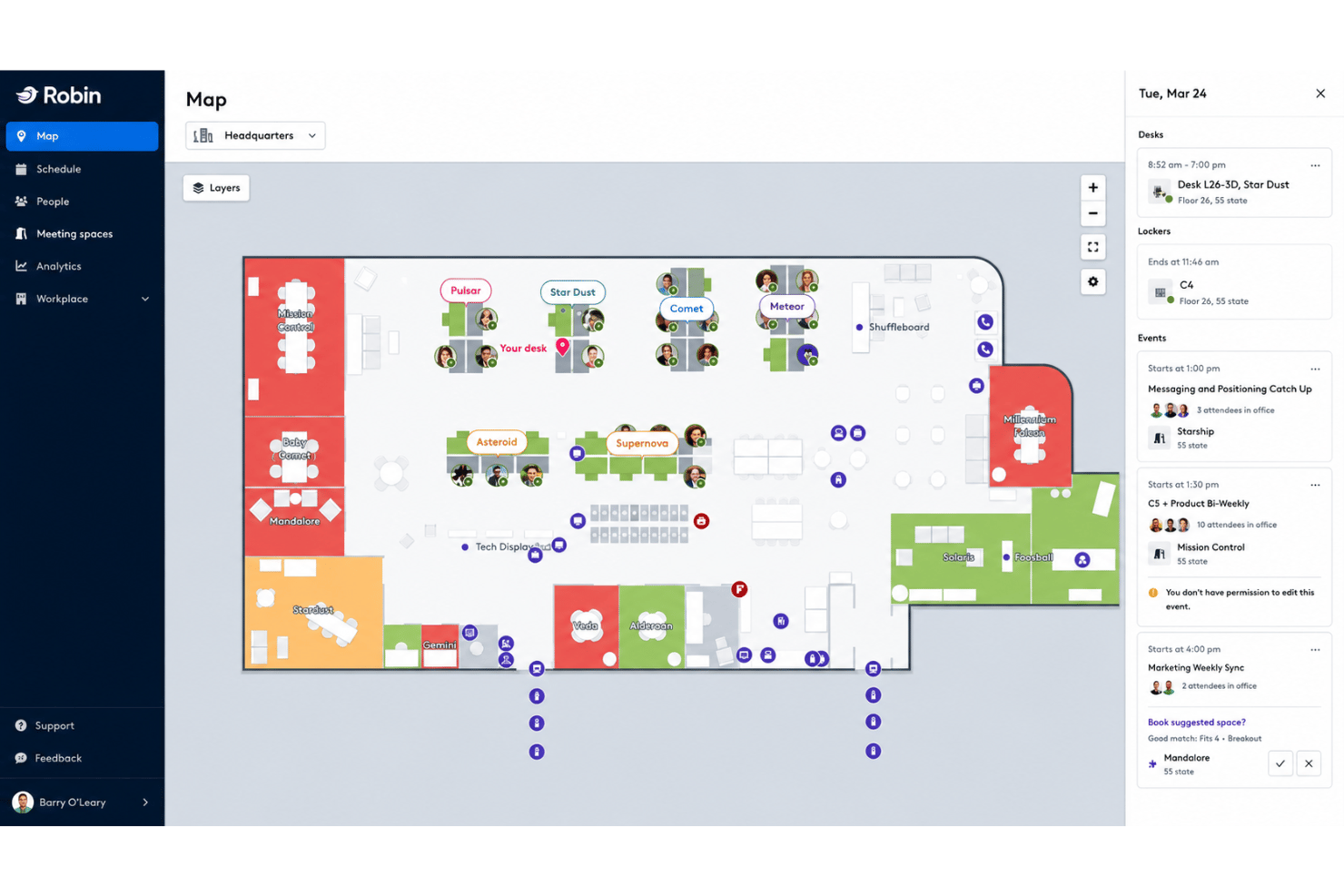
Robin es una plataforma de gestión del espacio de trabajo que combina la reserva de escritorios y salas, planos interactivos de las instalaciones, análisis de utilización del espacio, gestión de visitantes y entregas, y herramientas de programación híbrida.
¿Para quién es más adecuado Robin?
Robin es una opción excelente para empresas medianas y grandes que gestionan equipos híbridos en varias oficinas y necesitan integrar la gestión de visitantes y entregas en la misma plataforma que utilizan para reservar escritorios y salas.
Por qué elegí Robin
Robin ocupa un lugar en mi lista de favoritos porque ninguna otra plataforma que haya probado integra la gestión de visitantes y entregas de forma tan estrecha en el mismo espacio de trabajo. El prerregistro, el registro automático, la impresión de credenciales y las notificaciones a los anfitriones mediante Slack o Teams son funciones nativas, y el seguimiento de los paquetes entrantes se encuentra en el mismo panel que las reservas de escritorios y salas. También me gusta que los registros de visitantes y las entregas se puedan buscar junto con los datos de las reservas, por lo que nada queda en una herramienta independiente.
Características principales de Robin
- Reserva de escritorios y salas sugerida por AI: Robin recomienda y reserva automáticamente escritorios y salas en función de tus patrones de reserva anteriores y la proximidad de tu equipo.
- Controles de zonas y áreas: Los administradores pueden asignar equipos a zonas de escritorios específicas y configurar permisos de reserva y reglas de capacidad a nivel de departamento.
- Análisis de ocupación de múltiples fuentes: Robin reúne los datos de los accesos con credencial, los sensores de ocupación, los registros de conexión Wi-Fi y las reservas del calendario en un único panel de utilización.
- Coordinación de la semana laboral: Una vista de programación del equipo muestra quién trabaja en la oficina y qué días de la semana, sincronizada con la ubicación de trabajo de Google Calendar.
Integraciones de Robin
Robin ofrece integraciones nativas con Microsoft 365, Outlook, Teams, Google Calendar, Slack, Zoom, VergeSense, Avigilon, Brivo, Kisi, Okta, OneLogin y Rippling. Hay una API disponible para integraciones personalizadas.
Pros and Cons
Pros:
- Panel integrado de gestión de visitantes y entregas
- Reserva de escritorios sugerida por AI y reservas automáticas
- Análisis de ocupación de múltiples fuentes y planificación de escenarios
Cons:
- Las modificaciones de los planos pueden requerir asistencia de Robin
- Los complementos de análisis requieren una compra independiente

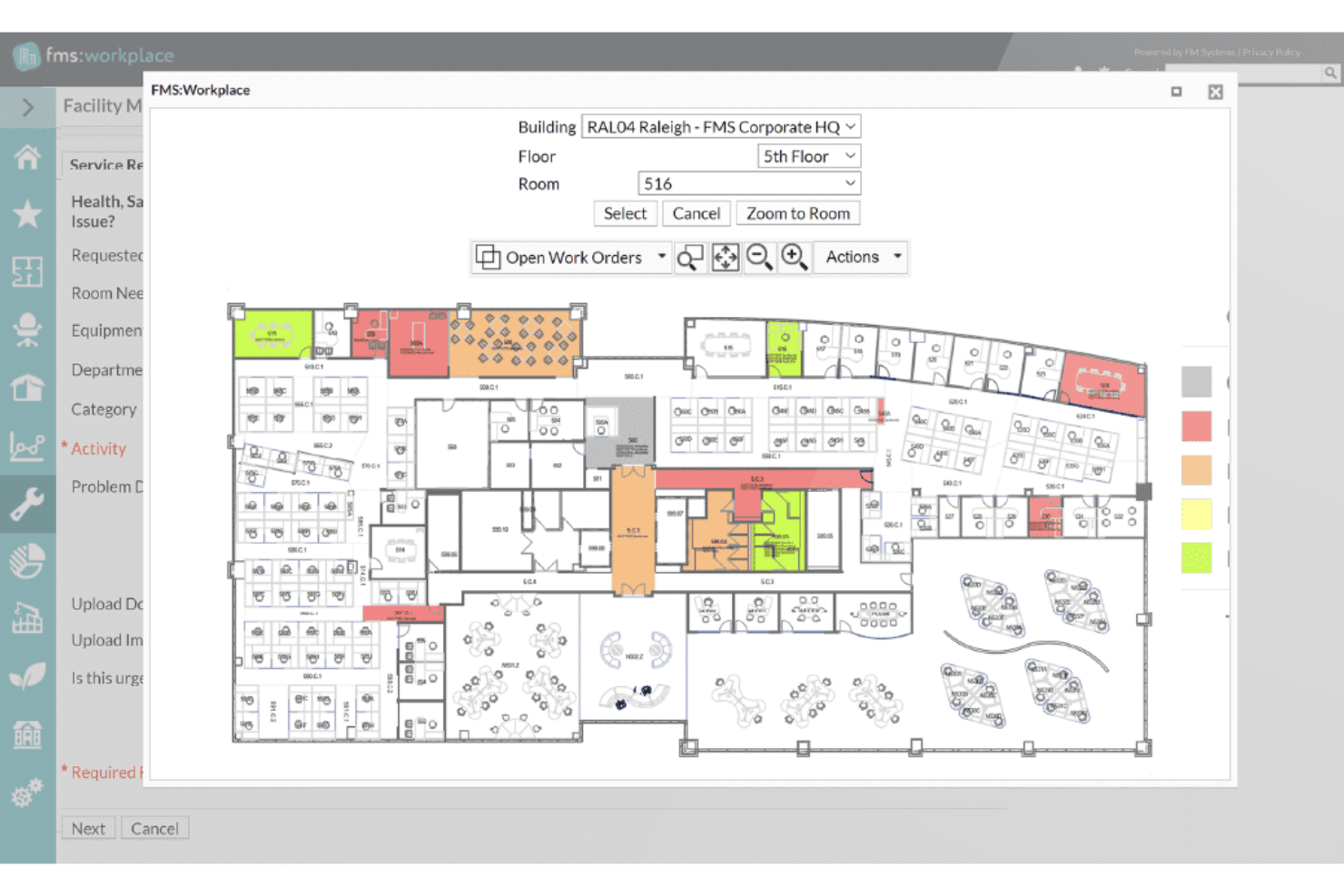
FM:Systems es una plataforma modular de gestión integrada del lugar de trabajo (IWMS) que abarca la reserva de escritorios y salas, los planos de planta interactivos, la gestión de traslados, el análisis de utilización del espacio, la gestión de visitantes y la integración de sensores IoT en carteras de una o varias sedes.
¿Para quién es más adecuado FM:Systems?
FM:Systems es una opción muy adecuada para los equipos empresariales de gestión de instalaciones y bienes inmuebles, especialmente en los sectores gubernamental, sanitario y de educación superior, que necesitan un IWMS autorizado por FedRAMP con integración de sensores incorporada y gestión de carteras de varias sedes.
Por qué elegí FM:Systems
FM:Systems ocupa un lugar en mi lista de opciones porque es una de las únicas plataformas de gestión del espacio de oficinas con autorización de operación de FedRAMP, lo que la convierte en una opción legítima para organismos federales y entornos regulados en los que la mayoría de las herramientas simplemente no pueden cumplir los requisitos. Me atrae especialmente su ecosistema nativo de sensores IoT, que proporciona datos de ocupación en tiempo real directamente a FMS:Insights sin requerir una plataforma de sensores de terceros. El módulo de planificación estratégica de escenarios también es realmente impresionante, ya que permite a los equipos de gestión de instalaciones crear planes de distribución mediante la función de arrastrar y soltar, con análisis de costes, antes de comprometerse con una reorganización o consolidación.
Características principales de FM:Systems
- Reserva de escritorios y salas: Reserva escritorios, salas y servicios mediante la web, la aplicación móvil, Outlook o quioscos físicos, con registro mediante código QR y sensores, además de liberación automática en caso de que no se presente el usuario.
- Gestión de visitantes: Registra previamente a los visitantes, habilita el registro de entrada mediante quioscos de autoservicio, activa notificaciones al anfitrión cuando llegan e imprime credenciales automáticamente mediante el módulo de visitantes integrado.
- Análisis de ocupación de múltiples fuentes: FMS:Insights reúne datos de sensores, reservas, lectores de credenciales, Cisco Spaces, redes Wi-Fi y sistemas financieros en un único panel configurable con puntuación ponderada de KPI.
- Integración con AutoCAD y Revit: Sincroniza bidireccionalmente con dibujos CAD y modelos BIM para mantener la precisión de los planos de planta en la planificación del espacio, la gestión de traslados y los informes de utilización.
Integraciones de FM:Systems
FM:Systems ofrece integraciones nativas con Microsoft 365, Outlook, Teams, AutoCAD, Autodesk Revit, Google Workspace, Slack, Cisco Spaces, Cisco WebEx y Crestron Fusion. Hay una API disponible para integraciones personalizadas.
Pros and Cons
Pros:
- Sensores nativos para análisis del espacio en tiempo real
- Planificación estratégica de escenarios con modelado de costes
- Autorización de FedRAMP para entornos regulados
Cons:
- No incluye sensores físicos integrados
- Herramientas limitadas para crear informes personalizados

Ideal para la gestión de carteras inmobiliarias con capacidades de IWMS
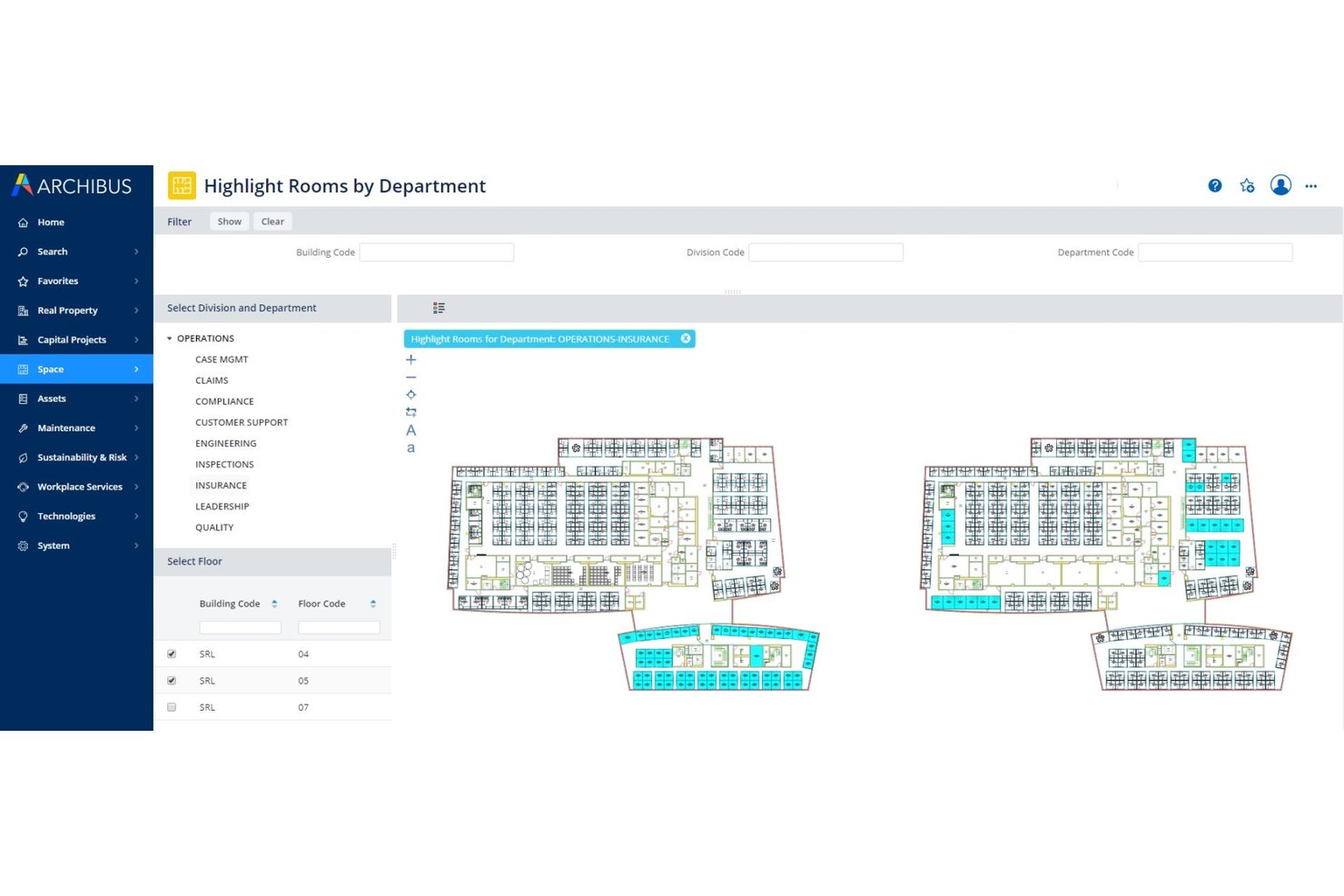
Archibus de Eptura es una plataforma IWMS integral que abarca la planificación del espacio, la gestión de traslados, la administración de arrendamientos, el seguimiento de activos y la gestión de carteras inmobiliarias en entornos empresariales con múltiples ubicaciones.
¿Para quién es más adecuado Archibus de Eptura?
Archibus está diseñado para equipos empresariales de gestión de instalaciones y bienes raíces que administran carteras complejas con múltiples ubicaciones, donde la administración de arrendamientos, la planificación del espacio y la gestión de traslados deben coexistir en un mismo sistema.
Por qué elegí Archibus de Eptura
Archibus de Eptura ocupa un lugar en mi lista de favoritos porque ninguna otra herramienta de esta categoría iguala su profundidad para gestionar de principio a fin una cartera inmobiliaria de gran tamaño. Me impresiona especialmente el módulo de administración de arrendamientos, que centraliza los datos contractuales con alertas automatizadas y paneles interactivos de cartera para operaciones globales con múltiples ubicaciones. Si a esto se suma la planificación de bloques y distribución basada en escenarios, que permite modelar reorganizaciones completas y comparar configuraciones hipotéticas antes de trasladar un solo escritorio, el resultado es un IWMS auténtico diseñado para gestionar la complejidad a gran escala.
Características principales de Archibus de Eptura
- Visor BIM: Permite ver e interactuar con modelos de Autodesk Revit y BIM 360 directamente dentro de la plataforma, sin necesidad de conocimientos especializados de Revit.
- Informes de utilización mediante IoT: Extrae datos de ocupación en tiempo real de los sensores de VergeSense para generar mapas de calor e informes de utilización máxima por sala y planta.
- Seguimiento de proyectos de capital: Supervisa presupuestos, calendarios e hitos de proyectos de acondicionamiento del lugar de trabajo e infraestructura desde la misma plataforma.
- Módulo de sostenibilidad: Realiza el seguimiento del consumo de energía y las emisiones en toda la cartera mediante herramientas de informes específicas vinculadas a los datos de espacios y activos.
Integraciones de Archibus de Eptura
Archibus de Eptura ofrece integraciones nativas con VergeSense, Autodesk Revit, Autodesk BIM 360, AutoCAD, Workday, Okta, ServiceNow, Snowflake y cuenta con integraciones nativas en todo el ecosistema de Microsoft, incluidos Microsoft 365, Teams, Outlook, Copilot, Places, Power BI y Azure AD. También dispone de una API abierta para integraciones personalizadas.
Pros and Cons
Pros:
- Supervisa los plazos de entrega de proyectos de capital
- Integración líder del sector con planos BIM y CAD
- Mapas de calor de ocupación en tiempo real con sensores
Cons:
- Requiere una red de compra y asistencia exclusiva para socios
- Carece de mapeo exterior nativo del campus

La mejor opción para informes de costos del espacio y prorrateo de costos
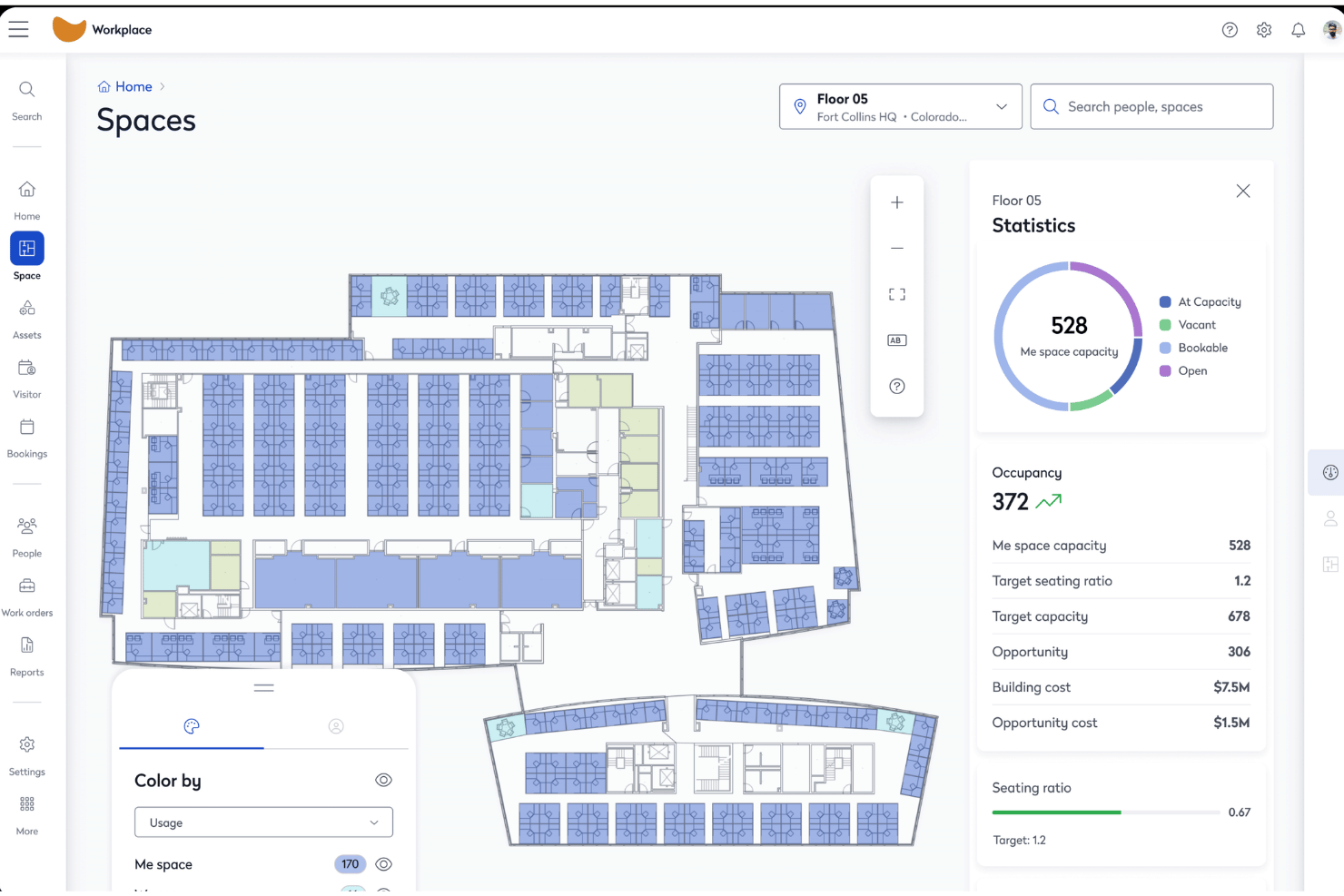
Eptura Workplace es una plataforma empresarial de gestión de espacios de oficina que combina planos interactivos, reserva de escritorios y salas, gestión de traslados, análisis de utilización del espacio y gestión de visitantes en carteras de una o varias ubicaciones.
¿Para quién es más adecuado Eptura Workplace?
Eptura Workplace es una opción especialmente adecuada para equipos empresariales de bienes raíces y gestión de instalaciones que administran carteras grandes y distribuidas en varias ubicaciones, donde la rendición de cuentas sobre los costos del espacio y los informes de prorrateo de costos son fundamentales para las operaciones.
Por qué elegí Eptura Workplace
Eptura Workplace está en mi lista de favoritos por lo bien que gestiona la rendición de cuentas sobre los costos del espacio a nivel de cartera. Me gusta que combine la gestión de datos de arrendamientos, el seguimiento del costo por puesto y los informes de prorrateo de costos en un solo lugar, de modo que los equipos financieros y de bienes raíces puedan vincular directamente el consumo de espacio con las unidades de negocio. El Agente de análisis de cartera muestra estas cifras automáticamente, y los conectores de Power BI permiten incorporarlas a los paneles ejecutivos sin extracciones manuales de datos.
Funciones principales de Eptura Workplace
- Planificación de bloques y distribución: Las herramientas visuales de planificación con función de arrastrar y soltar permiten asignar equipos a plantas y zonas, modelar escenarios de redistribución y comparar opciones de diseño antes de comprometerse con cualquier traslado.
- Seguimiento de ocupación de múltiples fuentes: Extrae datos de ocupación de lectores de credenciales, detección de presencia mediante WiFi y plataformas de sensores como VergeSense y Relogix para ofrecer una visión pasiva y precisa de cómo se utiliza realmente el espacio.
- Gestión de visitantes: El registro previo, el registro de entrada en las instalaciones, la impresión personalizada de credenciales, la captura de firmas electrónicas, las listas de vigilancia y los recuentos de emergencia se gestionan mediante el módulo integrado de visitantes.
- Agente de planificación de espacios con IA: Genera automáticamente planes de distribución a partir de datos reales de ocupación y cantidad de empleados, y luego muestra comparaciones de escenarios para que tu equipo actúe basándose en datos en lugar de suposiciones.
Integraciones de Eptura Workplace
Eptura Workplace ofrece integraciones nativas con Microsoft 365, Outlook, Teams, Google Calendar, Okta, AutoCAD, Autodesk Revit, VergeSense, Relogix, CoWorkr, ServiceNow, Tableau y Snowflake. Hay una API disponible para integraciones personalizadas.
Pros and Cons
Pros:
- La planificación visual de bloques y distribución facilita las redistribuciones
- Combina datos de ocupación de sensores, credenciales y reservas
- Informes avanzados de prorrateo de costos y gastos integrados
Cons:
- La navegación del portal de administración es compleja
- No hay una integración nativa con Slack documentada

Nuvolo
La mejor opción para la gestión de espacios de trabajo en sectores regulados
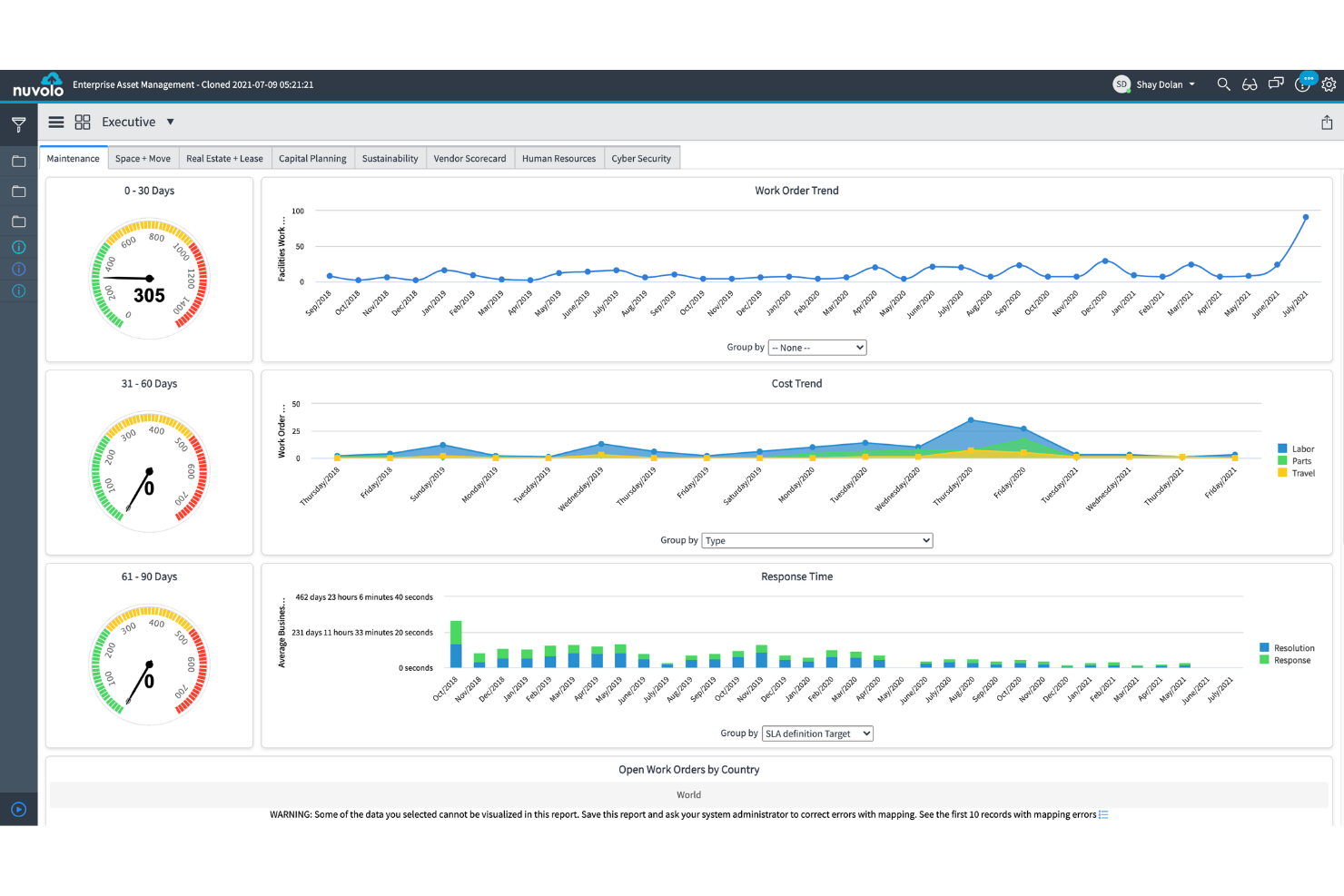
Nuvolo es una plataforma IWMS creada de forma nativa en ServiceNow que combina la gestión del espacio, la reserva de escritorios y salas, la gestión de traslados, el seguimiento de carteras inmobiliarias y la elaboración de informes de sostenibilidad en una única suite conectada.
¿Para quién es más adecuado Nuvolo?
Nuvolo es una excelente opción para grandes empresas de sectores regulados—sanidad, ciencias de la vida y organismos gubernamentales—que ya utilizan ServiceNow y necesitan un IWMS totalmente integrado con contabilidad de arrendamientos, gestión de traslados y seguridad de nivel de cumplimiento normativo en una sola plataforma.
Por qué elegí Nuvolo
He incluido Nuvolo entre mis principales opciones porque está diseñado específicamente para grandes empresas de sectores regulados que necesitan algo más que una herramienta básica de reservas. Su motor patentado de interpretación CAD se sincroniza directamente con AutoCAD y Revit, lo que significa que la incorporación de planos de planta a gran escala (pensemos en más de 3.500 ubicaciones) no requiere interminables cargas manuales. Si a esto le sumamos un módulo específico de gestión de traslados que admite reubicaciones de campus con múltiples escenarios y el envío automatizado de órdenes de trabajo, obtenemos una plataforma capaz de gestionar la complejidad que la mayoría de las herramientas para espacios de trabajo sencillamente no pueden.
Características principales de Nuvolo
- Cumplimiento de la contabilidad de arrendamientos: Gestiona propiedades propias y arrendadas con cumplimiento integrado de ASC 842 e IFRS 16, incluidas alertas de fechas críticas y notificaciones automatizadas de renovación.
- Previsión de la demanda de espacio: Proyecta las necesidades futuras de espacio utilizando datos de crecimiento de la plantilla y el seguimiento de los índices de compartición para respaldar las decisiones de consolidación o expansión.
- Integración con sensores de IoT y ocupación: Se conecta a sensores de edificios y dispositivos de IoT para incorporar datos de ocupación en tiempo real directamente a los paneles de utilización.
- Gestión de visitantes: Gestiona los flujos de trabajo de visitantes presenciales, el registro mediante quioscos y las notificaciones a los anfitriones dentro de la misma interfaz de gestión de reservas.
Integraciones de Nuvolo
Nuvolo ofrece integraciones nativas con AutoCAD, Revit, Workday, Oracle PeopleSoft, Microsoft Teams, Slack, Microsoft 365 y Outlook. Hay una API disponible para integraciones personalizadas.
Pros and Cons
Pros:
- Sincronización CAD nativa para planos de planta automatizados
- Gestión integral de traslados para reubicaciones complejas
- Módulos de cumplimiento para sanidad y organismos gubernamentales
Cons:
- Requiere una licencia independiente de ServiceNow para su uso
- No realiza el seguimiento de activos de hardware
Otros programas de gestión de espacios de oficina
Estas son algunas opciones adicionales de software de gestión de espacios de oficina que no llegaron a mi lista de opciones, pero que aún merece la pena consultar:
- Kadence
Ideal para la planificación de traslados y la programación híbrida impulsadas por IA
- Tactic
Ideal para reservar visitantes y espacios de trabajo en un solo lugar
- Skedda
Ideal para reglas de autogestión de reservas de escritorios y salas
- deskbird
Ideal para reservar oficinas híbridas mediante Slack y Teams
- OfficeRnD Workplace
Ideal para programar y reservar horarios de equipos híbridos
- Appspace
Ideal para la orientación en quioscos y oficinas móviles
- Envoy Workplace
Ideal para la reserva de visitantes y escritorios en una sola plataforma
- Gable
Ideal para coworking y reserva de oficinas bajo demanda
- Yoffix
Ideal para la reserva de escritorios y salas nativa de Microsoft 365
- Mri Manhattan
Ideal para la gestión de carteras inmobiliarias empresariales


Cómo evalúo el software de gestión del espacio de oficinas
Mi evaluación se divide en dos niveles: la funcionalidad básica que una herramienta debe ofrecer—planos de planta, reservas y análisis de utilización—y los factores diferenciadores que separan una aplicación especializada en reservas de escritorios de una plataforma capaz de gestionar traslados a escala de cartera y cumplimiento normativo.
Funcionalidad principal (requisitos básicos para esta lista)
Al seleccionar herramientas para mi lista, clasifico cada una en una escala de 0 (no ofrece la funcionalidad) a 5 (sobresale en esta área) para cada funcionalidad principal que se indica a continuación. Después calculo la puntuación total de la herramienta como un porcentaje, utilizando el 65% como referencia para ayudar a evaluar su adecuación general a la lista.
- Planos de planta interactivos: Busco planos de planta multicéntricos y por capas, compatibles con la importación de CAD o BIM y con el estado de los puestos en tiempo real, no solo imágenes estáticas cargadas como archivos PNG.
- Reserva de escritorios y salas: Es importante contar con reservas de autoservicio para escritorios, salas y extras como aparcamiento o taquillas, además del registro de entrada desde el móvil y controles de políticas para áreas o zonas.
- Análisis de utilización del espacio: Evalúo si la plataforma combina los datos de reservas con señales de sensores, credenciales o Wi-Fi para mostrar tendencias reales de ocupación, no solo el número de reservas.
- Gestión de traslados: Compruebo si ofrece planificación de distribuciones mediante arrastrar y soltar, con comparación de escenarios, especialmente para equipos que realizan reconfiguraciones o traslados entre varias plantas con plazos ajustados.
- Directorio de empleados y orientación: El directorio debería sincronizarse con el sistema de información de recursos humanos (HRIS) y vincular a las personas con sus puestos asignados en el mapa, para que cualquiera pueda encontrar a un compañero sin tener que enviarle primero un mensaje.
- Integración de la programación híbrida: La sincronización bidireccional con Outlook, Google Calendar, Teams o Slack es el requisito básico, pero también busco vistas para coordinar los días de equipo y compatibilidad con el inicio de sesión único (SSO).
Una vez que tengo una lista de herramientas que cumplen los criterios, considero qué distingue a cada plataforma.
Factores diferenciadores (lo que distingue a los proveedores)
Así es como comparo y contrasto a los distintos proveedores:
Funciones destacadas
Las herramientas de planificación de escenarios son especialmente importantes cuando se está evaluando una reconfiguración o consolidación. Busco modelos de análisis de escenarios que permitan probar cambios en la proporción de trabajo híbrido frente a los datos de costes y plantilla antes de tomar una decisión. La integración con sensores y dispositivos IoT es igualmente importante: evalúo si una plataforma obtiene datos pasivos de ocupación a partir de credenciales o señales Wi-Fi, no solo el número de reservas. La gestión de visitantes y entregas completa el panorama, sustituyendo las aplicaciones independientes de recepción por un registro de entrada integrado, alertas a los anfitriones y seguimiento de paquetes.
Más allá de las funciones
Evalúo con qué rapidez puede un proveedor digitalizar los planos de planta: algunos ofrecen servicios completos de conversión de CAD/BIM, mientras que otros esperan que lo hagas por tu cuenta, lo que puede retrasar el despliegue varias semanas. La profundidad de las integraciones es igual de importante: compruebo si existe sincronización bidireccional con Microsoft 365, Google Workspace y plataformas de gestión de recursos humanos como Workday, para que el aprovisionamiento de usuarios y las reservas se mantengan automatizados. La postura de seguridad es otro filtro, especialmente la certificación SOC 2 Tipo II y las opciones de residencia de datos para equipos que operan en distintas regiones. Por último, analizo la exportación de datos analíticos: si los paneles se conectan con Power BI o Tableau para que los datos de utilización alimenten informes más amplios sobre la cartera sin extracciones manuales.
Cómo elegir un software de gestión de espacios de oficina
El software de gestión de espacios de oficina adecuado depende de los problemas del lugar de trabajo que quieras resolver primero:
| Si tu prioridad es... | Busca... |
|---|---|
| Gestionar horarios y reservas híbridos | Sincronización con el calendario y estado de los puestos en tiempo real en el mapa |
| Controlar el gasto inmobiliario y las refacturaciones | Asignación integrada de costes del espacio e informes de ocupación |
| Gestionar entornos regulados o sujetos a requisitos de cumplimiento | Compatibilidad del proveedor con FedRAMP, SOC 2 o documentación similar |
| Coordinar grandes traslados o reorganizaciones | Herramientas de modelado de escenarios para la planificación de varias plantas |
| Unificar los flujos de trabajo de visitantes, entregas y reservas | Funciones integradas de registro y notificación al anfitrión |
Cómo evaluar tu lista de opciones
- Prueba la digitalización de planos: Sube un diseño de muestra y mide el tiempo de respuesta en directo o la compatibilidad con archivos CAD/BIM.
- Valida la profundidad de los análisis: Realiza un análisis de ocupación real utilizando tus datos de reservas junto con los datos de credenciales o sensores.
- Solicita pruebas de cumplimiento: Pide por escrito la auditoría SOC 2 Tipo II más reciente o el estado de FedRAMP.
- Prueba un escenario de traslado: Utiliza su plataforma para reorganizar tres equipos en un entorno de prueba y exporta las proyecciones de costes antes y después.
- Elige tu compensación: Decide entre la rapidez de implementación (herramientas de autoservicio) y la amplitud de las integraciones junto con el cumplimiento (soluciones de nivel empresarial).
¿Qué es el software de gestión de espacios de oficina?
El software de gestión del espacio de oficina es una plataforma digital que centraliza la asignación de escritorios, la gestión de planos, la programación del uso del espacio de trabajo y el seguimiento de los costes inmobiliarios. Ayuda a los equipos a coordinar el trabajo híbrido, controlar la ocupación y garantizar el cumplimiento normativo mediante mapas interactivos, herramientas de reserva y análisis. Este tipo de software ayuda a los responsables de instalaciones, TI y proyectos a mantener visibles y adaptables los recursos del lugar de trabajo a medida que cambian las necesidades del equipo.
Funciones del software de gestión del espacio de oficina
Al seleccionar un software de gestión del espacio de oficina, presta atención a las siguientes funciones clave:
- Planos interactivos: Visualiza, edita y gestiona mapas digitales de las plantas que muestran la asignación de asientos, los servicios y las actualizaciones de ocupación en tiempo real. Esto ayuda a los equipos a visualizar y planificar los espacios de trabajo en varias ubicaciones.
- Reserva de escritorios y salas: Permite al personal reservar escritorios, salas de reuniones o zonas de colaboración mediante herramientas de autoservicio, que suelen incluir registro desde dispositivos móviles, políticas de reserva y controles por zonas.
- Análisis de utilización del espacio: Supervisa el uso real y reservado del espacio de trabajo mediante el seguimiento de datos de reservas, sensores, Wi-Fi o actividad de credenciales para fundamentar las decisiones sobre las necesidades de espacio y la distribución.
- Gestión de traslados: Planifica traslados y reorganizaciones de oficinas mediante la creación de escenarios, la edición de planos con función de arrastrar y soltar y visualizaciones del antes y el después, lo que facilita ajustar la asignación del espacio de trabajo a medida que cambian los equipos.
- Directorio de empleados y orientación: Vincula a las personas con sus puestos asignados, muestra los datos de contacto y proporciona mapas interactivos para que los empleados encuentren a sus compañeros, salas de reuniones o servicios.
- Programación del trabajo híbrido: Se integra con plataformas de calendario y ofrece una programación basada en equipos que muestra cuándo tienen previsto trabajar en las instalaciones las personas o los grupos, coordinando la presencia y reduciendo los conflictos.
- Gestión de visitantes: Registra a los invitados, emite pases digitales, notifica a los anfitriones y realiza un seguimiento de los registros de visitantes dentro de la misma plataforma, sustituyendo a las herramientas independientes de recepción.
- Integración con sistemas de RR. HH. y TI: Sincroniza los datos de los empleados, las asignaciones de puestos y los permisos de usuario con herramientas como Active Directory, Google Workspace o tu HRIS para mantener la información actualizada automáticamente.
- Seguimiento y elaboración de informes sobre los costes del espacio: Asigna los costes de ocupación a centros de costes o equipos, genera informes de uso y exporta datos para las partes interesadas de finanzas e instalaciones.
- Controles de seguridad y cumplimiento: Protege los datos confidenciales mediante SSO, permisos basados en roles, registros de auditoría y el cumplimiento de estándares de seguridad como SOC 2 o FedRAMP, dando respuesta a las necesidades normativas y de privacidad.
Funciones habituales de IA del software de gestión del espacio de oficina
Además de las funciones estándar del software de gestión del espacio de oficina mencionadas anteriormente, muchas de estas soluciones incorporan IA con funciones como:
- Previsión de ocupación basada en IA: Utiliza datos históricos de uso y entradas de sensores en tiempo real para predecir la demanda futura de espacios de trabajo, ayudándote a optimizar la asignación de escritorios y reducir el espacio no utilizado.
- Recomendaciones de optimización del espacio basadas en IA: Analiza los patrones de reserva, los horarios de los equipos y los datos de desplazamiento para sugerir cambios en la distribución o reasignaciones de puestos que mejoren la colaboración y la eficiencia del espacio.
- Detección automatizada de anomalías: Supervisa los datos de ocupación y reservas para señalar patrones inusuales, como ausencias persistentes o aglomeraciones, de modo que puedas abordar los problemas antes de que interrumpan las operaciones.
- Asistentes de consultas en lenguaje natural: Permiten hacer preguntas sobre el uso del espacio, la disponibilidad o las políticas de reserva en lenguaje sencillo, mientras la IA muestra al instante respuestas e información útil a partir de tus datos.
- Alertas de mantenimiento predictivo: Utiliza la IA para analizar los datos de sensores y uso, identificando cuándo las salas de reuniones o los espacios compartidos pueden necesitar limpieza, reparaciones o reposición de suministros antes de que surjan problemas.
Beneficios del software de gestión del espacio de oficina
La implementación de un software de gestión del espacio de oficina ofrece varias ventajas para tu equipo y tu empresa. Estas son algunas de las que puedes esperar:
- Asignación centralizada del espacio de trabajo: Coordina las asignaciones de escritorios, las reservas de salas y los planos de planta en una sola plataforma, para que tu equipo sepa siempre qué espacios están disponibles y quién se sienta en cada lugar.
- Información sobre el uso basada en datos: Combina análisis de ocupación, datos de sensores y registros de reservas para realizar un seguimiento del uso real del espacio de trabajo, lo que te ayuda a identificar las zonas infrautilizadas y justificar las decisiones sobre el espacio.
- Planificación integrada de traslados y escenarios: Utiliza herramientas de arrastrar y soltar y modelos hipotéticos para planificar traslados de oficinas, redistribuciones o transiciones al trabajo híbrido sin depender de hojas de cálculo estáticas.
- Coordinación del trabajo híbrido: Sincroniza los horarios con herramientas de calendario como Outlook o Google Calendar, lo que permite a tu equipo planificar los días presenciales y reducir los conflictos de asignación de puestos.
- Gestión de visitantes y entregas: Registra a los invitados, emite pases digitales y notifica directamente a los anfitriones desde la plataforma, sustituyendo las aplicaciones independientes de registro y notificaciones.
- Seguimiento y generación de informes de costes automatizados: Asigna los gastos de ocupación y espacio de trabajo a centros de costes o equipos, y exporta los datos de uso para los informes financieros o de gestión de instalaciones.
- Garantía de seguridad y cumplimiento: Gestiona quién puede acceder a los planos de planta y a los datos de reservas mediante SSO, controles de permisos y compatibilidad con estándares como SOC 2 o FedRAMP cuando sea necesario.
Costes y precios del software de gestión de espacios de oficina
Para seleccionar un software de gestión de espacios de oficina es necesario comprender los distintos modelos de precios y planes disponibles. Los costes varían en función de las características, el tamaño del equipo, los complementos y otros factores. La siguiente tabla resume los planes habituales, sus precios medios y las características que suelen incluir las soluciones de software de gestión de espacios de oficina:
Tabla comparativa de planes para software de gestión de espacios de oficina
| Tipo de plan | Precio medio | Características habituales |
|---|---|---|
| Plan gratuito | $0 | Visualización básica de planos de planta, reservas limitadas de escritorios y salas, análisis sencillos y asistencia por correo electrónico. |
| Plan personal | $5–$25/usuario/mes | Planos de planta interactivos, reservas estándar de escritorios y salas, informes de uso, registro desde dispositivos móviles e integraciones básicas. |
| Plan empresarial | $8–$40/usuario/mes | Políticas de reserva avanzadas, análisis del uso del espacio, gestión de traslados, integraciones con RR. HH. y TI, y sincronización con el directorio. |
| Plan empresarial | $30–$120/usuario/mes | Análisis de toda la cartera, planificación de escenarios, integraciones personalizadas, SSO, controles de cumplimiento y asistencia especializada. |
Preguntas frecuentes sobre el software de gestión de espacios de oficina
Estas son algunas respuestas a preguntas frecuentes sobre el software de gestión de espacios de oficina:
¿Cómo ayuda el software de gestión de espacios de oficina con los horarios de trabajo híbrido?
El software de gestión de espacios de oficina conecta los sistemas de reserva con los calendarios en una aplicación fácil de usar para iOS o Android, lo que permite ver quién tiene previsto trabajar en las instalaciones. Esto ayuda a los equipos a coordinar su presencia, evitar la doble reserva de escritorios y gestionar horarios rotativos en un entorno de trabajo híbrido. Muchas herramientas muestran la disponibilidad de puestos en tiempo real y se sincronizan con Outlook o Google Calendar para facilitar la planificación y mejorar la experiencia de los empleados.
¿Puede el software de gestión de espacios de oficina gestionar planos complejos en varias ubicaciones?
Sí, muchas plataformas de software de gestión de espacios de oficina admiten planos de varias ubicaciones y plantas, con mapas por capas e importaciones de CAD o BIM para realizar un seguimiento de cada metro cuadrado. Esta visibilidad ayuda a los equipos de gestión de instalaciones y a los responsables de proyectos a optimizar la asignación del espacio, asignar puestos, planificar traslados y mantener los diseños actualizados en organizaciones en crecimiento o en varios entornos de trabajo.
¿Qué integraciones debo buscar en un software de gestión de espacios de oficina?
Busca una plataforma todo en uno con integraciones para tu calendario principal (Google Workspace, Microsoft 365), sistema de información de recursos humanos, gestión de identidades y sensores para realizar un seguimiento de la ocupación de la oficina. Las integraciones avanzadas automatizan el aprovisionamiento de usuarios, sincronizan los horarios y muestran datos reales de uso mediante análisis del entorno de trabajo. Esto te ayuda a tomar decisiones informadas para mejorar la planificación del espacio.
¿Hasta qué punto es seguro el software de gestión de espacios de oficina para los datos confidenciales de la oficina?
La mayoría de las plataformas consolidadas protegen tu entorno de oficina mediante SSO, permisos detallados y registros de auditoría. Para la gestión de recursos regulados, comprueba si cuentan con certificaciones SOC 2 Type II, ISO 27001 o controles de residencia de datos. Antes de elegir un proveedor o adoptar nuevas funciones, solicita sus informes de cumplimiento más recientes para aclarar cómo protegen los datos en todas las ubicaciones.
¿Puedo utilizar un software de gestión de espacios de oficina para reservar espacios de trabajo flexibles o a corto plazo?
Sí, puedes utilizar la mayoría de los programas de reserva de espacios para establecer políticas sobre puestos flexibles, reservas de salas de reuniones, aparcamiento y otros recursos de la oficina. El personal puede reservar espacios fácilmente, mientras que las reservas desde dispositivos móviles, los registros mediante códigos QR, las pantallas de las salas de conferencias y los mapas en tiempo real facilitan las reservas a corto plazo y los cambios diarios en la asignación de puestos.
¿Qué implica digitalizar los planos existentes con un software de gestión de espacios de oficina?
Normalmente tendrás que cargar los planos en formatos PDF, CAD o BIM. Algunos proveedores ofrecen un servicio de asistencia especializada para crear mapas interactivos a partir de tus archivos y mejorar la experiencia en el entorno de trabajo, mientras que otros requieren que cargues los archivos por tu cuenta. Te recomiendo enviar un plano de muestra para comprobar la calidad. Así te aseguras de que los mapas se ajustan a tu estrategia de trabajo, especialmente si necesitas mapas de varias plantas o personalizados.