

Las 10 mejores alternativas a Scribe para crear procedimientos operativos estándar en 2026

Lista de las mejores alternativas a Scribe


Si gestionas proyectos, sabes lo difícil que puede ser mantener la documentación organizada. Scribe es una herramienta útil, pero puede que no siempre se adapte al flujo de trabajo de tu equipo ni ayude a todos a estar en sintonía.
Explorar alternativas puede revelar soluciones que se ajusten mejor a los desafíos de tu empresa. En este artículo te guiaremos por las mejores alternativas a Scribe basándonos en pruebas y análisis exhaustivos.
Descubrirás herramientas que pueden ofrecerte exactamente las funciones que echas en falta o simplificar procesos que antes parecían demasiado complejos. Encontremos juntos la opción perfecta para tu equipo.
¿Qué es Scribe?
Scribe es una herramienta de documentación de procesos que te ayuda a capturar y compartir flujos de trabajo fácilmente. La suelen utilizar gestores de proyectos, responsables de equipo y formadores que necesitan mantener la documentación organizada y accesible. Con funciones como la creación de guías paso a paso, la captura de pantallas y las actualizaciones automáticas, Scribe ayuda a mantener una documentación clara y concisa. En general, Scribe ofrece una forma sencilla de documentar procesos, lo que facilita que tu equipo esté alineado.
Tabla comparativa de alternativas a Scribe
Esta tabla comparativa resume los detalles de precios de mis principales alternativas a Scribe.
| Tool | Best For | Trial Info | Price | ||
|---|---|---|---|---|---|
| 1 | Ideal para guías de flujo de trabajo narradas por IA | Plan gratuito disponible | Desde $29/usuario/mes (facturado anualmente) | Website | |
| 2 | Ideal para documentos de formación centralizados | Demo gratuita disponible | Precios a consultar | Website | |
| 3 | Mejor opción para demostraciones de productos interactivas | Prueba gratuita de 14 días + plan gratuito + demo gratuita disponible | Desde $38/creador/mes (facturado anualmente) | Website | |
| 4 | Ideal para creación de videos con inteligencia artificial | Prueba gratuita de 7 días + plan gratuito + demo gratuita disponible | Desde $18/creador/mes (facturación anual) | Website | |
| 5 | Ideal para mensajería en video de equipos | Demostración gratuita disponible | $18/mes | Website | |
| 6 | Mejor opción para entornos regulados | Prueba gratuita de 7 días disponible | Desde $44/usuario/dispositivo/mes (facturado anualmente) | Website | |
| 7 | Ideal para guías de procesos integrables | Plan gratuito disponible | Desde $10/asiento/mes (facturado anualmente) | Website | |
| 8 | Ideal para compartir guías con un solo clic | Prueba gratuita de 14 días + plan gratis disponible | Desde $18/mes (facturado anualmente) | Website | |
| 9 | Ideal para tutoriales en múltiples formatos | Prueba gratuita disponible | Desde $200/mes | Website | |
| 10 | Ideal para capturar procesos en tiempo real | Plan gratuito + demo gratis disponible | Desde $22/usuario/mes (facturado anualmente) | Website |
Por qué confiar en nuestras recomendaciones de software
Nuestro equipo lleva probando y evaluando software desde 2012. Como gestores de proyectos, sabemos lo difícil —y lo importante— que es elegir el software adecuado.
Para esta guía, evaluamos las herramientas mediante pruebas prácticas e investigación independiente, puntuando las herramientas según nuestros criterios de selección. También nos basamos en la experiencia de líderes de opinión del sector y de profesionales en activo de la gestión de proyectos.
Nuestras reseñas reflejan nuestro criterio editorial humano, no un discurso de ventas.
Revisores expertos:
Análisis de las mejores alternativas a Scribe
A continuación encontrarás resúmenes detallados de las mejores alternativas a Scribe de nuestra lista. Nuestros análisis ofrecen una visión detallada de las funciones principales, ventajas y desventajas, integraciones y casos de uso ideales de cada herramienta para ayudarte a encontrar la mejor opción para ti.

Ideal para guías de flujo de trabajo narradas por IA
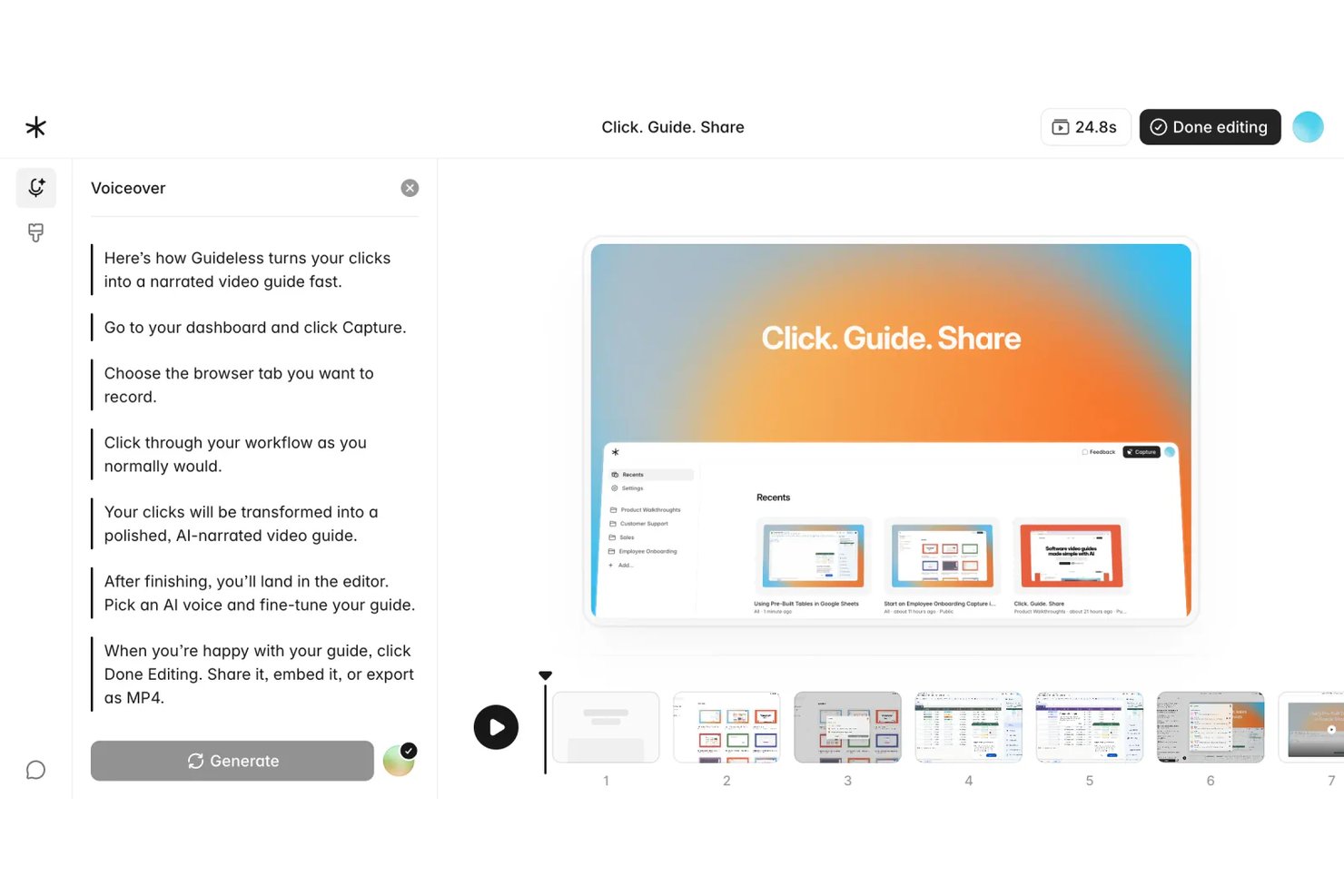
Guideless es una herramienta basada en el navegador para crear guías que convierte grabaciones de flujos de trabajo en videos guiados narrados por IA, lo que la convierte en una opción ideal para equipos de operaciones y proyectos que necesitan documentación de procesos atractiva y fácil de actualizar sin grabación manual de pantalla.
¿Para quién es ideal Guideless?
Guideless es adecuada para equipos SaaS y tecnológicos pequeños a medianos cuyos flujos de trabajo están completamente en el navegador y que necesitan contenido de capacitación pulido sin necesidad de un proceso de producción de video dedicado.
Por qué Guideless es una de las mejores alternativas a Scribe analizadas
Elegí Guideless como una de las mejores porque va más allá de Scribe: genera videos guiados narrados por IA directamente a partir de capturas de flujos de trabajo en el navegador. Mientras que Scribe produce pasos estáticos con capturas de pantalla, Guideless empareja cada acción capturada con instrucciones escritas por IA, una voz en off de sonido natural y efectos de zoom inteligentes. Me gusta especialmente el editor regenerativo, que me permite actualizar solo los pasos que cambiaron y reconstruir la narración sin volver a grabar toda la guía.
Características clave de Guideless
- Captura de flujos de trabajo en el navegador: Graba cada paso en cualquier aplicación web automáticamente mediante una extensión de Chrome.
- Desenfoque de datos sensibles: Difumina información confidencial o sensible en las capturas de pantalla durante el proceso de creación de guías.
- Exportación a MP4, PDF y Markdown: Descarga las guías en formatos de video y documentos para compartir y archivar.
- Personalización del kit de marca: Aplica los temas, logotipos y colores de tu organización en todas las guías para mantener la coherencia de la marca.
Integraciones de Guideless
Guideless ofrece integraciones nativas con Notion, Confluence y Slack. Hay una API disponible para integraciones personalizadas.
Pros and Cons
Pros:
- La voz en off por IA elimina la grabación manual de narraciones
- Las guías se exportan directamente como video MP4
- El editor regenerativo actualiza solo los pasos cambiados
Cons:
- La captura solo en navegador limita los flujos de trabajo de aplicaciones de escritorio
- Plataforma nueva con una biblioteca de plantillas más pequeña

Trainual
Ideal para documentos de formación centralizados

Trainual es un software de gestión de formación que ayuda a las pequeñas empresas a organizar y compartir sus procedimientos operativos estándar y políticas. Está dirigido a equipos que buscan perfeccionar sus procesos de incorporación y capacitación.
Por qué es una buena alternativa a Scribe: Trainual centraliza tus documentos de formación, lo que facilita su acceso y actualización según sea necesario. Con plantillas personalizables y asignaciones según el rol, puedes adaptar el contenido para miembros específicos del equipo. La plataforma también te permite hacer un seguimiento del progreso, así todos en tu espacio de trabajo se mantienen al día.
Funciones y integraciones destacadas:
Las funciones incluyen creación de documentos mediante arrastrar y soltar, cuestionarios para evaluar conocimientos y notificaciones automáticas de actualizaciones. También puedes usar la función de búsqueda para encontrar documentos específicos. Esto facilita que tu equipo esté informado y cumpla con las políticas de la empresa.
Las integraciones incluyen ADP Run, Paycom, Zapier, Dayforce, Figma y más.
Pros and Cons
Pros:
- Centro centralizado para manuales, políticas y procedimientos
- Asignaciones según el rol automatizan la incorporación de empleados
- Cuestionarios integrados confirman la comprensión del material de formación
Cons:
- No tiene recorridos interactivos en tiempo real ni guías dentro de la aplicación
- La organización manual del contenido puede ralentizar la configuración

Supademo
Mejor opción para demostraciones de productos interactivas
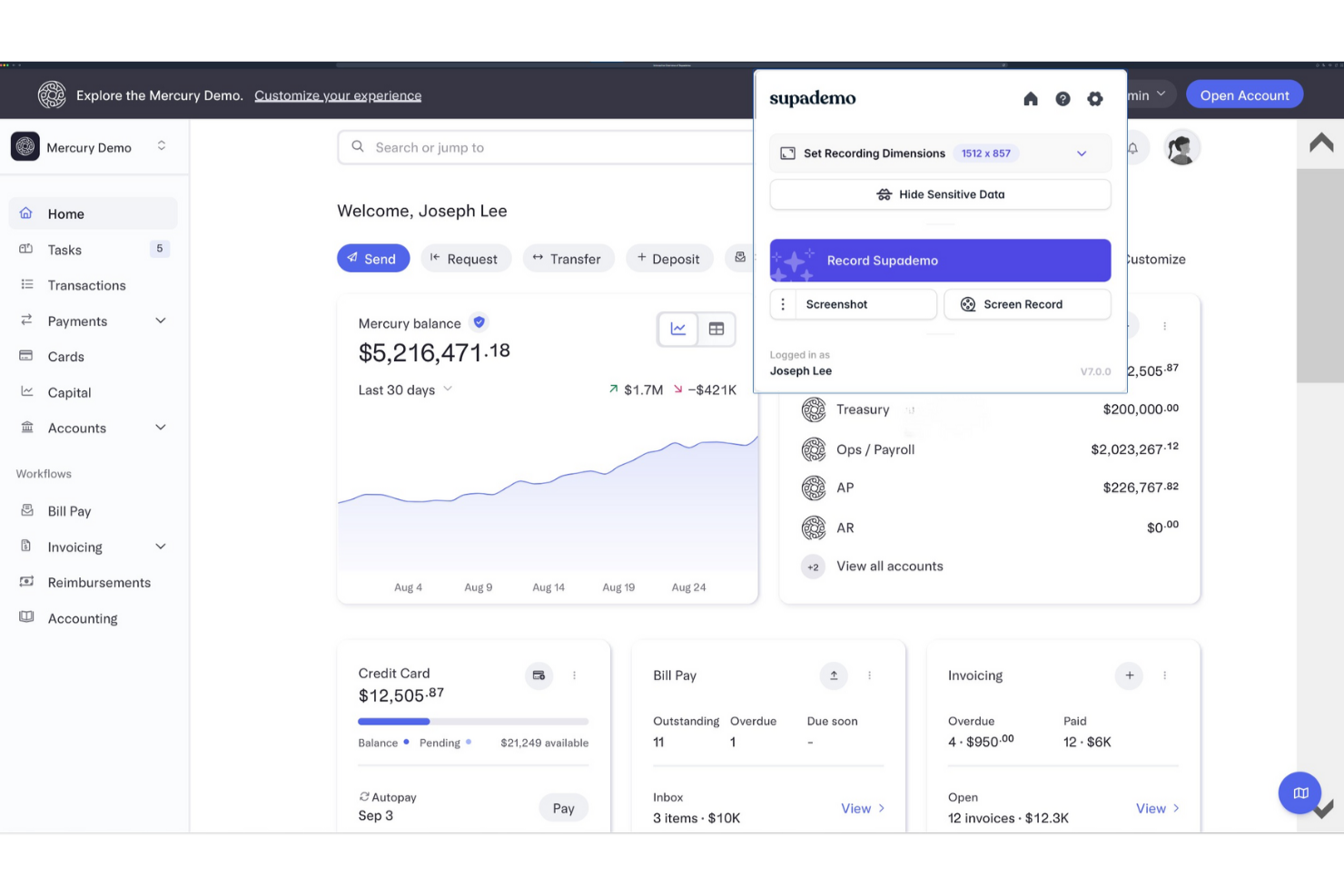
Supademo es una plataforma para crear demostraciones interactivas de productos, orientada principalmente a equipos de ventas y éxito del cliente. Ayuda a las empresas a mostrar sus productos de manera efectiva a clientes potenciales.
Por qué es una buena alternativa a Scribe: Supademo ofrece demostraciones interactivas que involucran a tu audiencia con elementos clicables y recorridos guiados. Puedes personalizar eficazmente las demos para destacar funciones específicas, haciéndolas relevantes según las necesidades de cada usuario. La plataforma también rastrea las interacciones de los usuarios, brindando información sobre qué capta la atención. Estas características hacen que Supademo sea ideal para equipos enfocados en ofrecer demostraciones de productos atractivas e informativas.
Características destacadas e integraciones:
Funciones incluyen plantillas de demostraciones personalizables, analítica de interacción de usuarios y la posibilidad de incrustar demos en sitios web. También puedes crear escenarios ramificados para personalizar la experiencia según la audiencia. Esta flexibilidad ayuda a tu equipo a ofrecer presentaciones dirigidas y efectivas.
Integraciones incluyen Calendly, Slack, SurveyMonkey, HubSpot, Salesforce, Google Forms, y más.
Pros and Cons
Pros:
- La IA convierte grabaciones en demostraciones interactivas
- Incrusta demos en sitios web y aplicaciones
- La analítica revela clics y abandonos de los espectadores
Cons:
- Carece de controles avanzados de edición de vídeo
- El conjunto de funciones aún está evolucionando para empresas

Guidde
Ideal para creación de videos con inteligencia artificial
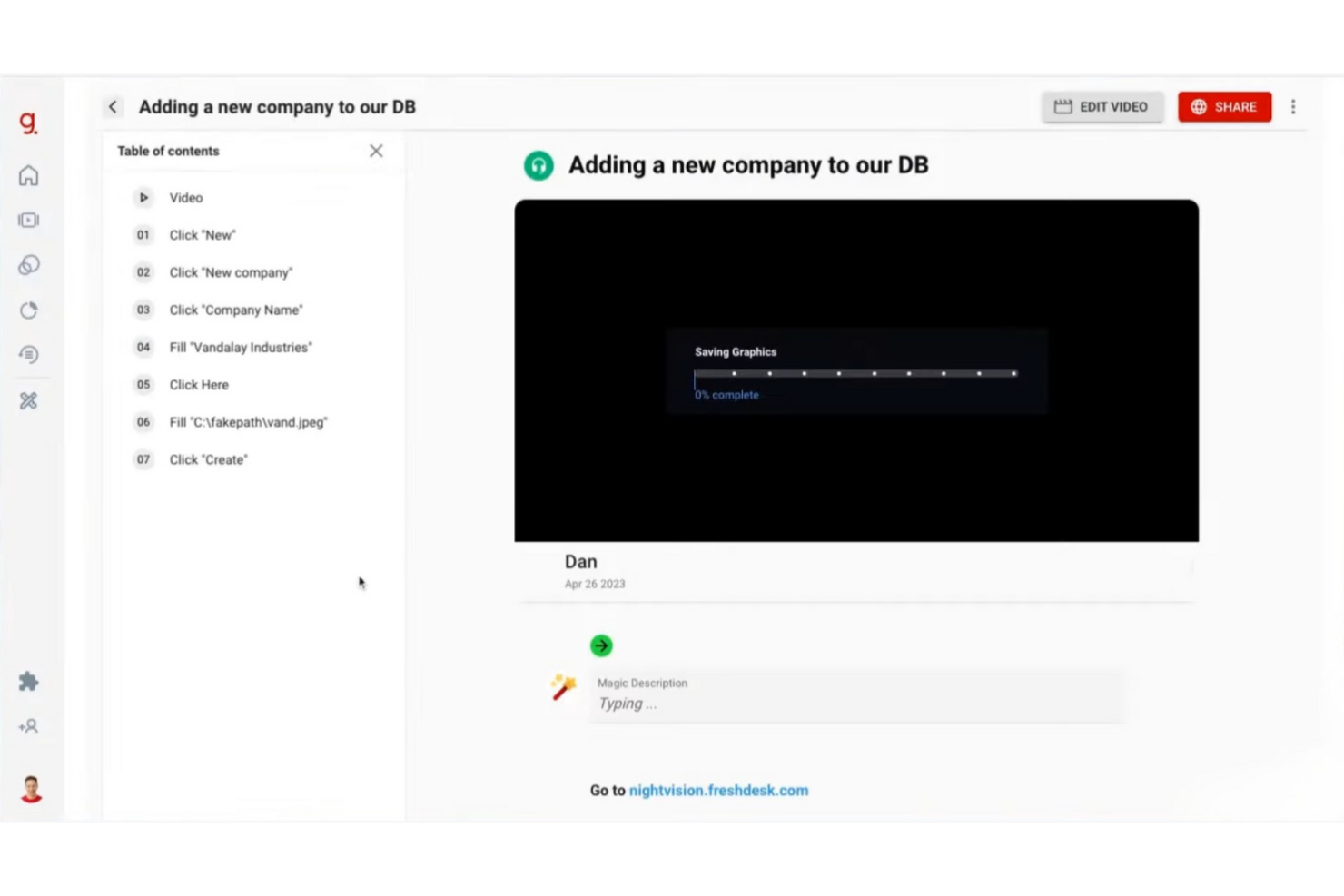
Guidde es una plataforma impulsada por IA que simplifica la creación de documentación en video, atendiendo a empresas y equipos que necesitan producir tutoriales y guías de manera eficiente. Principalmente ayuda a las empresas a fortalecer la incorporación de empleados y la educación de clientes.
Por qué es una buena alternativa a Scribe: Guidde destaca por sus herramientas impulsadas por IA que transforman capturas de flujo de trabajo en tutoriales de video editados. La función Magic Mic agrega narración generada por IA a tus guías para una mejor experiencia de aprendizaje. También puedes difundir tu contenido tanto a empleados como a clientes, lo que la hace adecuada para diversas necesidades. Estas capacidades la convierten en una opción sólida si buscas algo más allá de la documentación tradicional.
Características destacadas e integraciones:
Características incluyen la herramienta Magic Capture para grabar flujos de trabajo, guiones generados por IA y locuciones personalizables con más de 200 opciones. Puedes crear tutoriales profesionales rápidamente, lo cual es ideal para equipos que necesitan publicar actualizaciones con frecuencia. La plataforma también ofrece opciones inteligentes de distribución de contenido.
Integraciones incluyen GitLab, ClickUp, Zendesk, Notion, Slack, Zoom y más.
Pros and Cons
Pros:
- La IA transforma grabaciones en tutoriales pulidos
- Las plantillas con la marca mantienen la documentación en video coherente
- Admite tanto videos como instrucciones paso a paso
Cons:
- Análisis limitados en comparación con plataformas empresariales
- Límites en la cantidad de pasos por guía

Loom
Ideal para mensajería en video de equipos

Loom es una herramienta de mensajería por video para equipos y empresas que necesitan comunicarse mediante video. Los usuarios pueden grabar, compartir y ver mensajes en video para favorecer una mejor colaboración y comunicación a distancia.
Por qué es una buena alternativa a Scribe: Loom ofrece un enfoque único a la comunicación con sus capacidades de mensajería por video. Puedes grabar tu pantalla, voz y rostro simultáneamente, lo que facilita transmitir información compleja rápidamente. La función de compartir al instante permite que tu equipo vea los mensajes sin demora, manteniendo a todos sincronizados. Estas funciones lo hacen ideal para equipos que priorizan la comunicación en tiempo real y la narración visual.
Características destacadas e integraciones:
Las características incluyen grabación de videos en HD, agregar botones de llamada a la acción y utilizar información sobre los espectadores para rastrear la participación. También puedes recortar y editar videos directamente en la plataforma, lo que facilita perfeccionar el contenido. La interfaz intuitiva de la herramienta permite comenzar a crear videos con una configuración mínima.
Las integraciones incluyen Slack, Salesforce, Jira, Confluence, Calendly, Zoom y más.
Pros and Cons
Pros:
- Los enlaces compartibles al instante sustituyen muchas reuniones
- Graba tu pantalla, cámara y micrófono juntos
- Las analíticas de los espectadores muestran la participación y finalización
Cons:
- La versión gratuita restringe la duración y las funciones de grabación
- Ocasionalmente baja calidad de video

Mejor opción para entornos regulados

FlowShare es un software de documentación diseñado para entornos regulados que automatiza la creación de guías paso a paso. Principalmente sirve a empresas que necesitan documentación eficiente para capacitación y cumplimiento normativo.
Por qué es una buena alternativa a Scribe: FlowShare captura las acciones del usuario en segundo plano, creando guías mientras trabajas. Esta función es adecuada para entornos regulados donde la exactitud de la documentación es esencial. Con opciones de personalización de marca corporativa y edición masiva, puedes adaptar las guías a las necesidades de tu organización. Exportar en múltiples formatos proporciona flexibilidad para diversas necesidades de documentación.
Funciones destacadas e integraciones:
Las funciones incluyen captura automática de acciones, ajustes de identidad corporativa para la personalización de la marca y difuminado masivo de datos sensibles. También puedes exportar las guías en formatos PDF, PPTX y HTML. Esta versatilidad ayuda a tu equipo a mantener documentación profesional y coherente.
Las integraciones incluyen Confluence, SharePoint, WordPress, Guru y más.
Pros and Cons
Pros:
- La aplicación de escritorio graba automáticamente cada acción en pantalla
- Exporta guías a PDF, PPTX y HTML
- El acceso sin conexión es ideal para entornos estrictamente regulados
Cons:
- Solo disponible para escritorio Microsoft Windows
- Limitaciones de formato

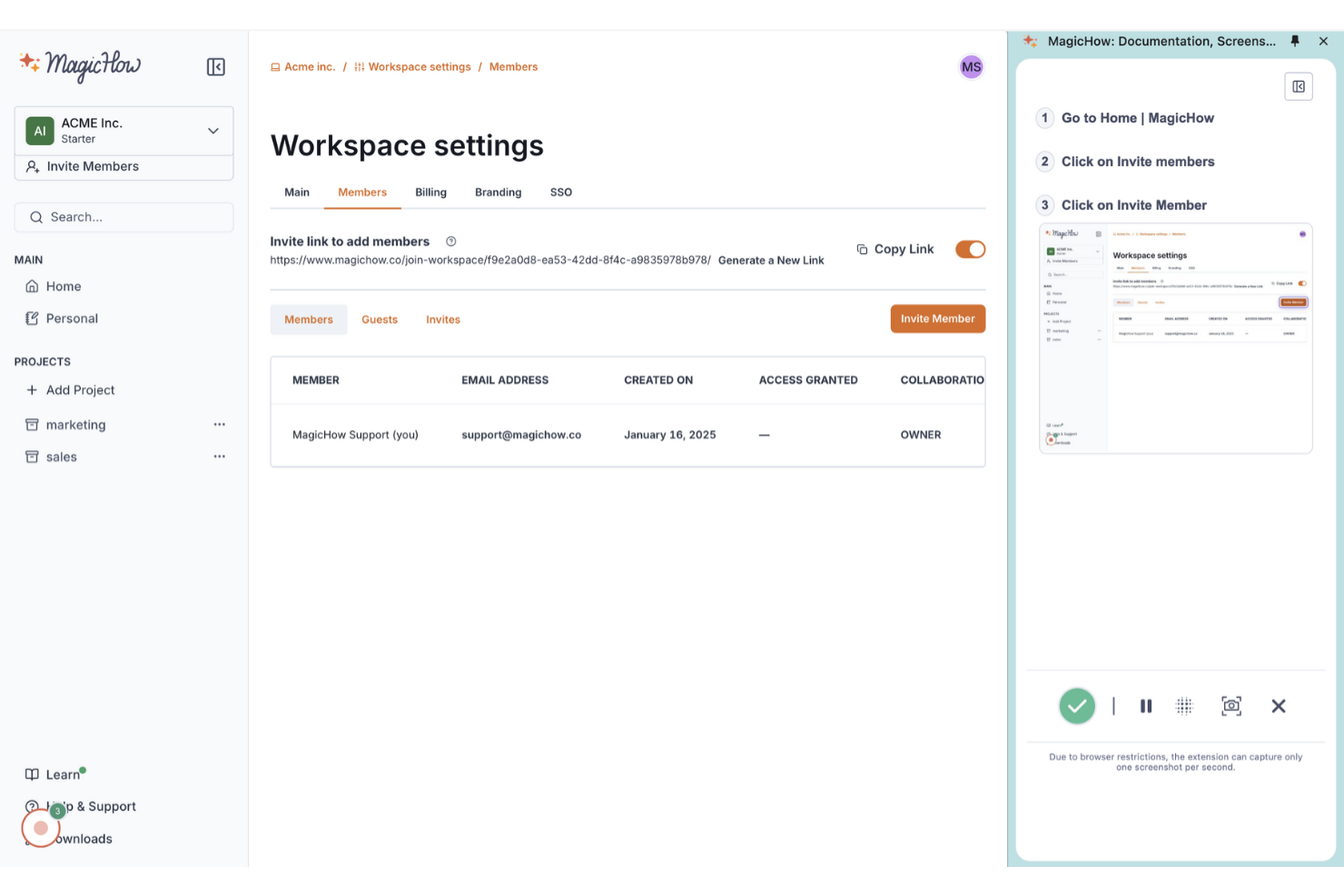
MagicHow es una herramienta fácil de usar para crear guías paso a paso, instrucciones y manuales, dirigida a equipos que necesitan documentar procesos de manera eficiente. Está orientada a empresas que desean simplificar sus prácticas de documentación sin requerir habilidades especializadas.
Por qué es una buena alternativa a Scribe: MagicHow permite crear guías rápidamente, ahorrando tiempo a tu equipo en la documentación. La grabación automática de procesos y la sencilla edición de contenido permiten producir y personalizar guías ilimitadas con rapidez, mientras que las opciones para compartir enlaces, PDFs y HTML facilitan la distribución.
Funciones destacadas e integraciones:
Funciones incluyen compatibilidad con escritorio y navegador, guías personalizables y la posibilidad de incrustar contenido en plataformas. También puedes compartir guías en varios formatos, proporcionando flexibilidad en cómo se distribuye la información. Esta versatilidad ayuda a tu equipo a mantener una documentación clara y accesible.
Las integraciones incluyen Confluence, Notion, WordPress y más.
Pros and Cons
Pros:
- Plan básico gratuito para equipos pequeños
- La extensión de Chrome graba automáticamente los flujos de trabajo del navegador
- Exporta guías a enlaces compartibles y PDFs
Cons:
- Análisis limitados frente a competidores más consolidados
- Ecosistema más pequeño con menos integraciones profundas

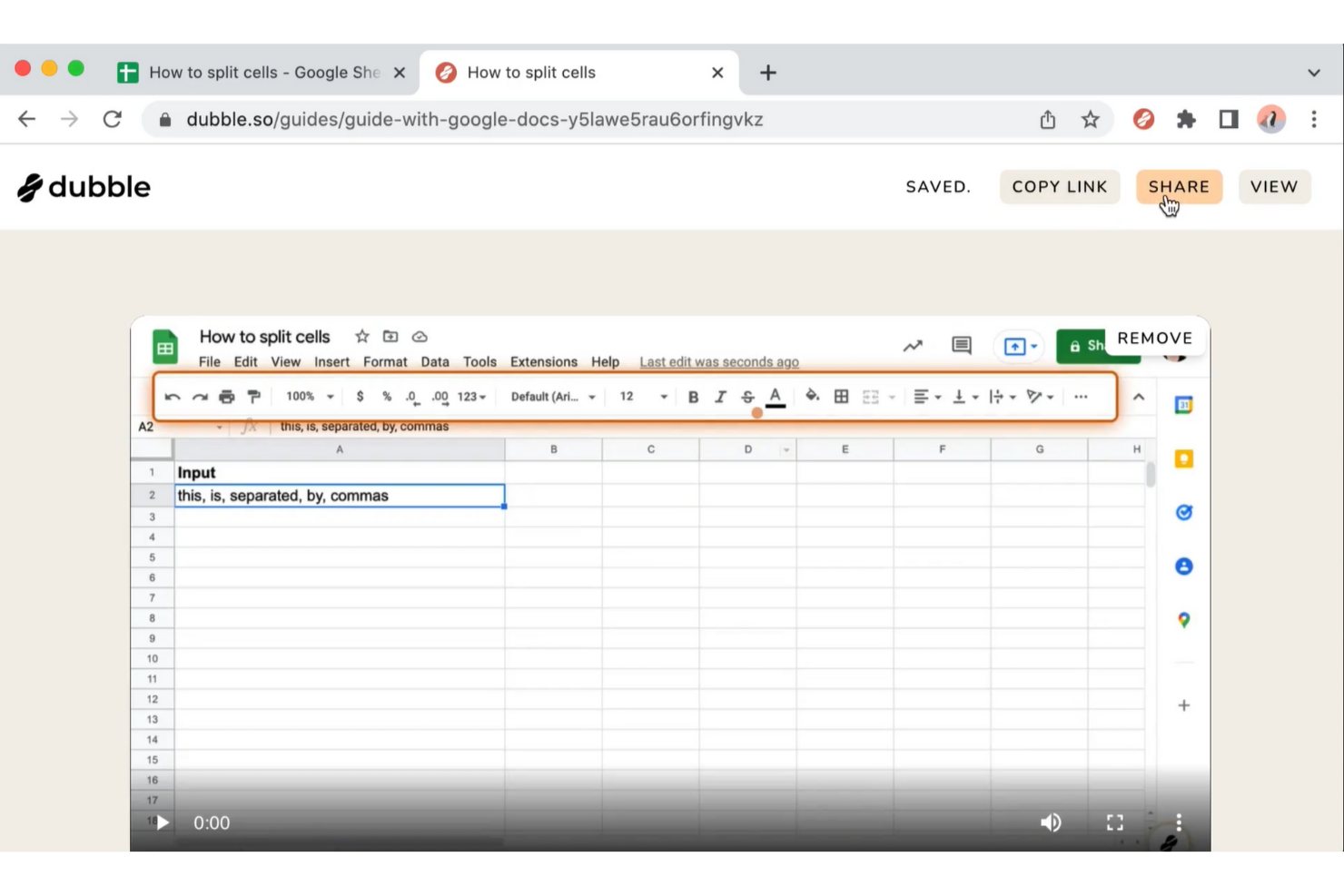
Dubble es una herramienta para crear guías paso a paso, tutoriales y recursos de incorporación capturando las acciones del usuario. Es ideal para equipos que necesitan documentación de procesos rápida y eficiente sin necesidad de introducir datos manualmente.
Por qué es una buena alternativa a Scribe: Dubble ofrece documentación instantánea grabando tus acciones y convirtiéndolas en guías. Funciones como la captura automática de pantallas y las herramientas de edición te permiten crear documentación detallada con una edición manual mínima. También puedes compartir guías con un solo clic, lo que facilita la colaboración. Estas funcionalidades hacen que Dubble sea adecuada para equipos que priorizan la rapidez y la simplicidad en la documentación.
Características y integraciones destacadas:
Características incluyen edición rápida, con opciones para actualizar descripciones y capturas de pantalla, y la capacidad de ocultar información sensible. También puedes compartir guías fácilmente, ya que Dubble admite varios formatos, incluido contenido enriquecido y Markdown. Esta flexibilidad ayuda a tu equipo a mantener la documentación actualizada y accesible.
Las integraciones incluyen Notion, Confluence, Google Docs y más.
Pros and Cons
Pros:
- La extensión para Chrome convierte acciones en documentación
- Exporta guías como Markdown para desarrolladores
- Permite capturas de pantalla, videos y texto para cada paso
Cons:
- Las funciones de colaboración son básicas
- Mejor para aplicaciones web; los flujos de trabajo de escritorio o fuera del navegador son limitados

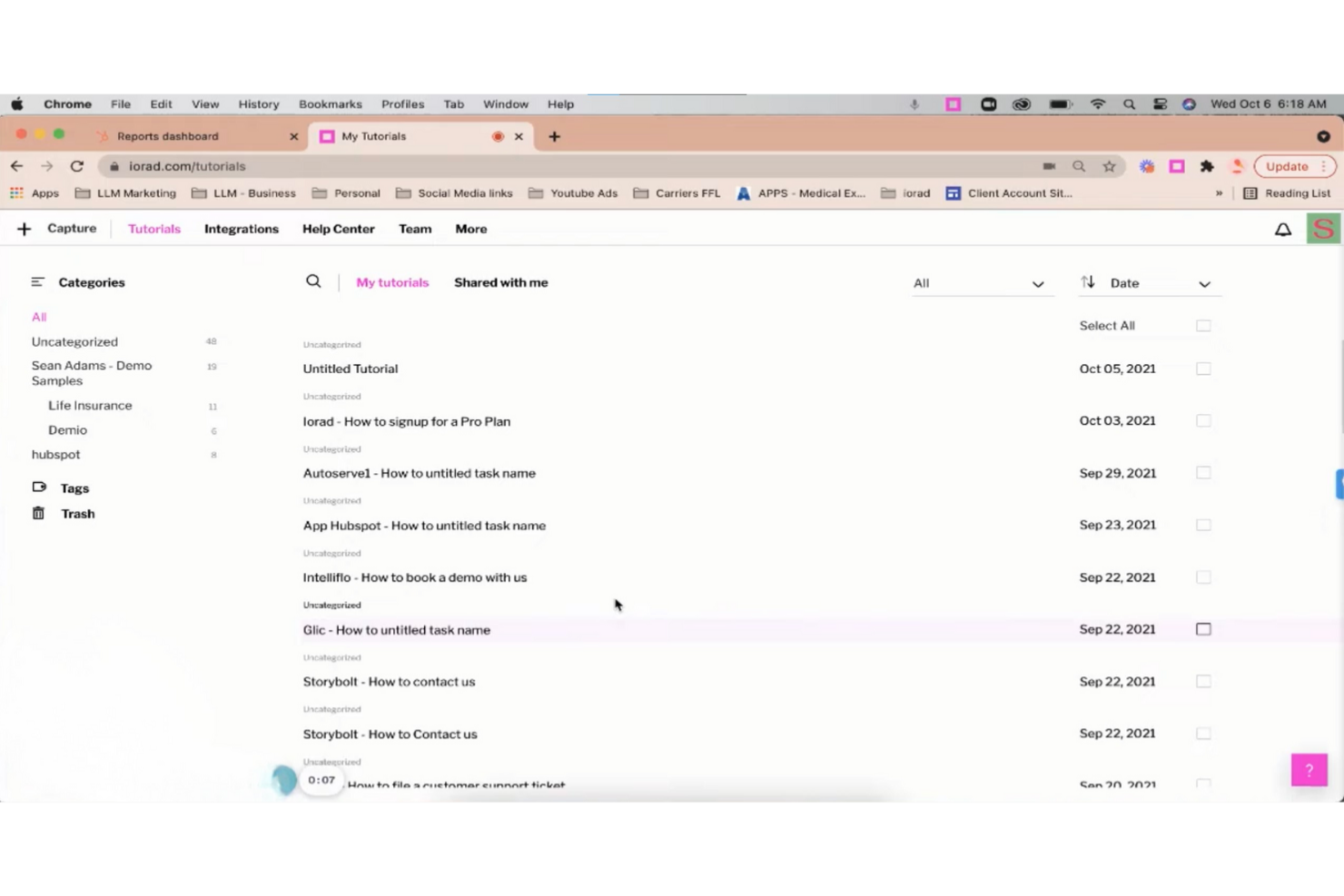
iorad es una herramienta digital para educadores y formadores que permite capturar y explicar flujos de trabajo mediante tutoriales interactivos y guías paso a paso, simplificando procesos complejos.
Por qué es una buena alternativa a Scribe: iorad ofrece un enfoque interactivo para la creación de tutoriales, con funciones como recorridos guiados paso a paso y la posibilidad de resaltar con un clic. Puedes insertar los tutoriales directamente en sitios web o compartirlos mediante un enlace, lo que los hace accesibles para tu audiencia. La plataforma también permite la edición en tiempo real, de modo que puedes actualizar el contenido a medida que los procesos cambian. Estas características hacen que iorad sea ideal para equipos que buscan contenido instruccional dinámico y atractivo.
Funciones y conectores destacados:
Funciones incluyen captura automática de pasos, capacidades de narración en voz y temas personalizables. También puedes exportar tutoriales en varios formatos, como PDF y HTML, brindando flexibilidad en la forma de distribuir la información. Esto ayuda a tu equipo a acceder y utilizar los tutoriales de manera eficaz.
Conectores incluyen Slack, ServiceNow, Confluence, YouTube, HubSpot y más.
Pros and Cons
Pros:
- Las simulaciones interactivas permiten a los usuarios practicar flujos de trabajo
- La extensión de Chrome captura automáticamente tutoriales del navegador
- Exporta tutoriales a PDF para usarlos sin conexión
Cons:
- La interfaz puede resultar compleja para creadores sin conocimientos técnicos
- La personalización avanzada requiere formación

Tango
Ideal para capturar procesos en tiempo real

Tango es una herramienta de documentación de procesos para gestores de proyectos y equipos que necesitan capturar flujos de trabajo de forma eficiente. Permite crear guías paso a paso para mejorar la colaboración y el intercambio de conocimientos entre el equipo.
Por qué es una buena alternativa a Scribe: Tango ofrece captura de procesos en tiempo real, lo que te permite documentar los flujos de trabajo mientras los realizas. Esta función ahorra tiempo y reduce errores al capturar los pasos automáticamente. A diferencia de Scribe, la captura en tiempo real de Tango te permite generar guías detalladas mientras trabajas. Esto lo hace especialmente útil para equipos que necesitan documentar procesos sobre la marcha.
Funciones e integraciones destacadas:
Las funciones incluyen captura en tiempo real, generación automática de capturas de pantalla y descripciones personalizables de los pasos. Puedes editar y organizar tu documentación, lo que facilita la actualización de procesos a medida que evolucionan. La herramienta también ofrece una interfaz amigable para que puedas comenzar rápidamente sin una curva de aprendizaje pronunciada.
Integraciones incluyen Salesforce, HubSpot, DocuSign, Zoom, Gmail y más.
Pros and Cons
Pros:
- La extensión para navegador graba flujos de trabajo basados en clics
- Las capturas de pantalla automáticas generan guías de pasos claras
- Las guías integrables se conectan con herramientas existentes
Cons:
- El plan gratuito limita el número de flujos de trabajo
- No hay aplicación móvil para capturas en el dispositivo
Otras alternativas a Scribe
Estas son algunas alternativas adicionales a Scribe que no llegaron a mi lista, pero que merece la pena conocer:
- UserGuiding
La mejor para herramientas de incorporación de usuarios
- Trupeer
Ideal para obtener vídeos y documentos a partir de una sola grabación
- Fluency
Mejor para documentación multilingüe
- Fleeq
Mejor para contenido de capacitación basado en video
- Glitter AI
Mejor para documentación de procesos con IA


Cómo evalúo las alternativas a Scribe
Reviso cada herramienta desde dos perspectivas: requisitos básicos como la captura automática de pasos y la edición de guías, y diferenciadores como generación de texto por IA, análisis y ecosistemas de integraciones para gestión de proyectos.
Funcionalidad principal (Imprescindibles para esta lista)
Cuando selecciono herramientas para mi lista, califico cada una en una escala de 0 (no ofrece la funcionalidad) a 5 (destaca en esta área) para cada funcionalidad principal que aparece a continuación. Luego, calculo la puntuación total de la herramienta y la convierto en porcentaje. Cada herramienta debe alcanzar una puntuación mínima total del 65% para ser considerada para su inclusión.
- Captura automática de pasos: Evalúo qué tan bien cada herramienta registra clics, desplazamientos y pulsaciones de teclas en pasos estructurados, como documentar el flujo de creación de un ticket en Jira sin tener que hacer capturas de pantalla manualmente de cada campo.
- Anotación de capturas de pantalla: El conjunto de herramientas de anotación de cada plataforma es importante, por lo que reviso flechas, llamadas, resaltados y cuadros que ayuden a aclarar pasos como navegar por un tablero de Sprint o configurar un panel.
- Edición y personalización de guías: Analizo cuánto control tienes sobre el contenido generado—reordenar pasos, reescribir descripciones, añadir elementos de marca—para que tus procedimientos operativos estándar (SOP) sean coherentes en toda la documentación del proyecto.
- Compartir y exportar en múltiples formatos: Ya sea que necesites un PDF para entregar a las partes interesadas o una guía incrustada en Confluence, evalúo la variedad de formatos de salida y opciones de compartición que permite cada herramienta.
- Redacción de datos sensibles: Las herramientas deberían permitirte difuminar o enmascarar credenciales, nombres de clientes o información financiera en las capturas de pantalla antes de compartir los documentos de proceso con contratistas externos o equipos multifuncionales.
- Integraciones con herramientas de trabajo: Verifico si existen conexiones nativas con plataformas como Jira, Slack, Notion y Confluence para que las guías se encuentren donde tu equipo de proyecto ya trabaja en vez de quedar aisladas.
Una vez tengo una lista de herramientas que cumplen con estos criterios, considero qué distingue a cada plataforma.
Factores diferenciadores (lo que distingue a los proveedores)
Así es como comparo y contrasto los diferentes proveedores:
Características destacadas
Las descripciones de pasos generadas por IA ahorran tiempo real—cuando estás documentando la configuración de un sprint retro de 20 pasos, editar texto autogenerado es mejor que escribirlo desde cero. También busco una biblioteca centralizada de guías donde los equipos puedan organizar los SOP por proyecto o departamento, lo que es fundamental cuando la documentación crece más allá de unas pocas guías. Los análisis que rastrean visualizaciones y tasas de finalización ayudan a las oficinas de gestión de proyectos a confirmar si realmente se usan los documentos de onboarding o solo están acumulando polvo.
Más allá de las características
La seguridad y el cumplimiento son vitales cuando tus guías contienen datos de clientes o credenciales internas—verifico el cumplimiento SOC 2 y soporte para SSO, especialmente para oficinas de gestión de proyectos empresariales que comparten documentación entre proveedores. La estructura de precios es otro factor clave; una capa gratuita permite a los PM individuales probar la herramienta antes de proponerla para un despliegue en equipo. También evalúo el tiempo hasta obtener valor, es decir, cuán rápido un usuario nuevo puede instalar la extensión, capturar un proceso y compartir una guía pulida el primer día.
¿Por qué buscar una alternativa a Scribe?
Aunque Scribe es una buena opción para documentar procesos, hay varios motivos por los que algunos usuarios buscan soluciones alternativas. Puede que estés buscando una alternativa a Scribe porque…
- Necesitas más opciones de personalización
- Tu equipo necesita acceso sin conexión
- Quieres una mejor integración con las herramientas existentes
- Tu organización necesita compatibilidad con varios idiomas
- Necesitas funciones avanzadas de análisis
- Tu equipo está creciendo rápidamente con nuevas incorporaciones y necesita capacidad de ampliación
Si te identificas con alguno de estos casos, has llegado al lugar adecuado. Nuestra lista incluye varias opciones de herramientas integrales de documentación de procesos más adecuadas para equipos que afrontan estos desafíos con Scribe y buscan soluciones alternativas.
Principales funciones de Scribe
Estas son algunas de las principales funciones de Scribe, para ayudarte a contrastar y comparar lo que ofrecen las soluciones alternativas:
- Captura automática: Registra automáticamente los procesos de aplicaciones web, de escritorio y móviles, ahorrando tiempo a tu equipo en la documentación manual.
- Personalización: Personaliza las guías con contenido generado por IA, la imagen de marca de la empresa y opciones de formato para adaptarlas a las necesidades de tu equipo.
- Edición de capturas de pantalla: Edita las capturas de pantalla para centrarte en la información clave y mejorar la claridad para tu audiencia.
- Opciones para compartir: Comparte las guías por correo electrónico o mediante enlaces, insértalas en páginas web o expórtalas como archivos PDF y HTML para mantener el contenido accesible.
- Información sobre la interacción: Realiza un seguimiento de las visualizaciones, finalizaciones y otras métricas de las guías para mantener tu contenido actualizado y relevante.
- Páginas: Combina varias guías en un único documento con texto, vídeos y capturas de pantalla para documentar procesos extensos.
- Scribe Sidekick: Proporciona acceso a la información bajo demanda, reduciendo las preguntas repetitivas y las interrupciones.
- Redacción automática: Oculta de forma segura la información confidencial de manera automática o manual para proteger la privacidad de los datos.