

10 alternativas a Apache Airflow para canalizaciones de datos en 2026

Selección de alternativas a Apache Airflow


Una buena alternativa a Apache Airflow ofrece una automatización de flujos de trabajo fiable, una orquestación flexible y compatibilidad con canalizaciones de datos complejas sin la sobrecarga operativa que puede conllevar Airflow. Si buscas distintas formas de sustituir Airflow o ir más allá de esta plataforma, es probable que te enfrentes a problemas de escalabilidad, mantenimiento o integración en tu configuración actual de automatización de flujos de trabajo.
Esta lista te ayudará a comparar las principales opciones, comprender sus puntos fuertes y elegir una plataforma que se adapte a los requisitos técnicos y las necesidades de tus proyectos. Tanto si necesitas una mejor compatibilidad con Kubernetes como canalizaciones basadas en código o una colaboración más sencilla, aquí encontrarás alternativas prácticas que te orientarán en tu próximo paso.
¿Qué es Apache Airflow?
Apache Airflow es una plataforma de código abierto para automatizar flujos de trabajo, crear, programar y supervisar canalizaciones de datos complejas. Permite a los equipos definir flujos de trabajo como código mediante Python, lo que facilita la gestión de dependencias y la orquestación de tareas en sistemas distribuidos. Airflow es muy utilizado por ingenieros de datos y desarrolladores que necesitan automatizar procesos ETL, canalizaciones de aprendizaje automático y otros trabajos recurrentes que requieren visibilidad y control sobre su ejecución.
Tabla comparativa de alternativas a Apache Airflow
Esta tabla comparativa resume los detalles de precios de mis principales alternativas seleccionadas a Apache Airflow.
| Tool | Best For | Trial Info | Price | ||
|---|---|---|---|---|---|
| 1 | Ideal para la orquestación nativa de Kubernetes | Not available | Gratis | Website | |
| 2 | Ideal para la orquestación de nubes híbridas | Plan gratuito + demostración gratuita disponible | Desde $35/usuario/mes + uso | Website | |
| 3 | Ideal para la programación de tareas basada en dependencias | Not available | Gratis | Website | |
| 4 | Ideal para la creación rápida de prototipos en Python | Uso gratuito | Website | ||
| 5 | Ideal para crear flujos de trabajo basados en código | Demostración gratuita disponible | Desde $100/mes + recursos de cómputo | Website | |
| 6 | Ideal para el diseño modular de canalizaciones de datos | Prueba gratuita de 30 días + demostración gratuita disponible | Desde $10/mes | Website | |
| 7 | Ideal para la edición colaborativa de flujos de trabajo | Plan gratuito + demostración gratuita disponible | Desde $150/usuario fijo/mes | Website | |
| 8 | Ideal para proyectos reproducibles de ciencia de datos | Not available | Uso gratuito | Website | |
| 9 | Ideal para la gestión de flujos de trabajo complejos y con estado | Prueba gratuita de 90 días disponible | Desde $100/mes | Website | |
| 10 | Ideal para la creación de secuencias de comandos de automatización de bajo código | Plan gratuito + demostración gratuita disponible | Desde $10/mes | Website |
Por qué confiar en nuestras recomendaciones de software
Nuestro equipo lleva probando y evaluando software desde 2012. Como gestores de proyectos, sabemos lo difícil —y lo importante— que es elegir el software adecuado.
Para esta guía, evaluamos las herramientas mediante pruebas prácticas e investigación independiente, puntuando las herramientas según nuestros criterios de selección. También nos basamos en la experiencia de líderes de opinión del sector y de profesionales en activo de la gestión de proyectos.
Nuestras reseñas reflejan nuestro criterio editorial humano, no un discurso de ventas.
Revisores expertos:
Opiniones sobre alternativas a Apache Airflow
A continuación encontrarás mis resúmenes detallados de las mejores alternativas a Apache Airflow que llegaron a mi selección. Mis reseñas ofrecen un análisis detallado de las funciones, los casos de uso más adecuados y las integraciones de cada plataforma para ayudarte a encontrar la mejor opción para tu equipo.


Para los equipos que ejecutan cargas de trabajo en Kubernetes, Argo Workflows ofrece una plataforma de automatización de flujos de trabajo diseñada específicamente para entornos nativos de la nube. Los ingenieros de plataformas y los equipos de DevOps utilizan Argo Workflows para definir, programar y gestionar canalizaciones complejas como recursos de Kubernetes. A diferencia de Apache Airflow, Argo Workflows está diseñado para aprovechar funciones nativas de Kubernetes, como la orquestación de contenedores, la escalabilidad y la configuración declarativa.
Por qué Argo Workflows es una buena alternativa a Apache Airflow
Si necesitas una plataforma de automatización de flujos de trabajo diseñada específicamente para Kubernetes, Argo Workflows es una opción sólida. Elegí Argo Workflows porque permite definir los flujos de trabajo como recursos personalizados de Kubernetes, de modo que tus canalizaciones se ejecutan de forma nativa dentro de tu clúster.
Su enfoque centrado en los contenedores significa que cada paso de tu flujo de trabajo está aislado, es reproducible y escalable mediante primitivas de Kubernetes. Para los equipos que ya utilizan Kubernetes, Argo Workflows ofrece una orquestación que se siente nativa y aprovecha toda la potencia de tu infraestructura en la nube.
Características principales de Argo Workflows
Entre las demás características de Argo Workflows que vale la pena destacar se incluyen:
- Compatibilidad con flujos de trabajo basados en DAG y en pasos: Define flujos de trabajo mediante grafos acíclicos dirigidos o plantillas basadas en pasos para diseñar canalizaciones flexibles.
- Archivado de flujos de trabajo: Almacena y recupera el historial de ejecución de los flujos de trabajo para realizar auditorías y depuraciones.
- Parametrización y transferencia de artefactos: Transfiere parámetros y artefactos entre los pasos del flujo de trabajo para admitir canalizaciones dinámicas y basadas en datos.
- Interfaz de usuario basada en la web: Supervisa, gestiona y visualiza las ejecuciones de los flujos de trabajo mediante una interfaz web específica.
Integraciones de Argo Workflows
Las integraciones incluyen Argo Events, Couler, Hera, Katib, Kedro, Kubeflow Pipelines, Netflix Metaflow, Onepanel, Orchest y Seldon.
Pros and Cons
Pros:
- Integración nativa con Kubernetes para la orquestación de flujos de trabajo
- Admite flujos de trabajo basados tanto en DAG como en pasos
- Las plantillas de flujos de trabajo permiten reutilizar componentes de canalización
Cons:
- No ofrece compatibilidad integrada con tareas no contenedorizadas
- Carece de programación nativa fuera de los CronJobs de Kubernetes

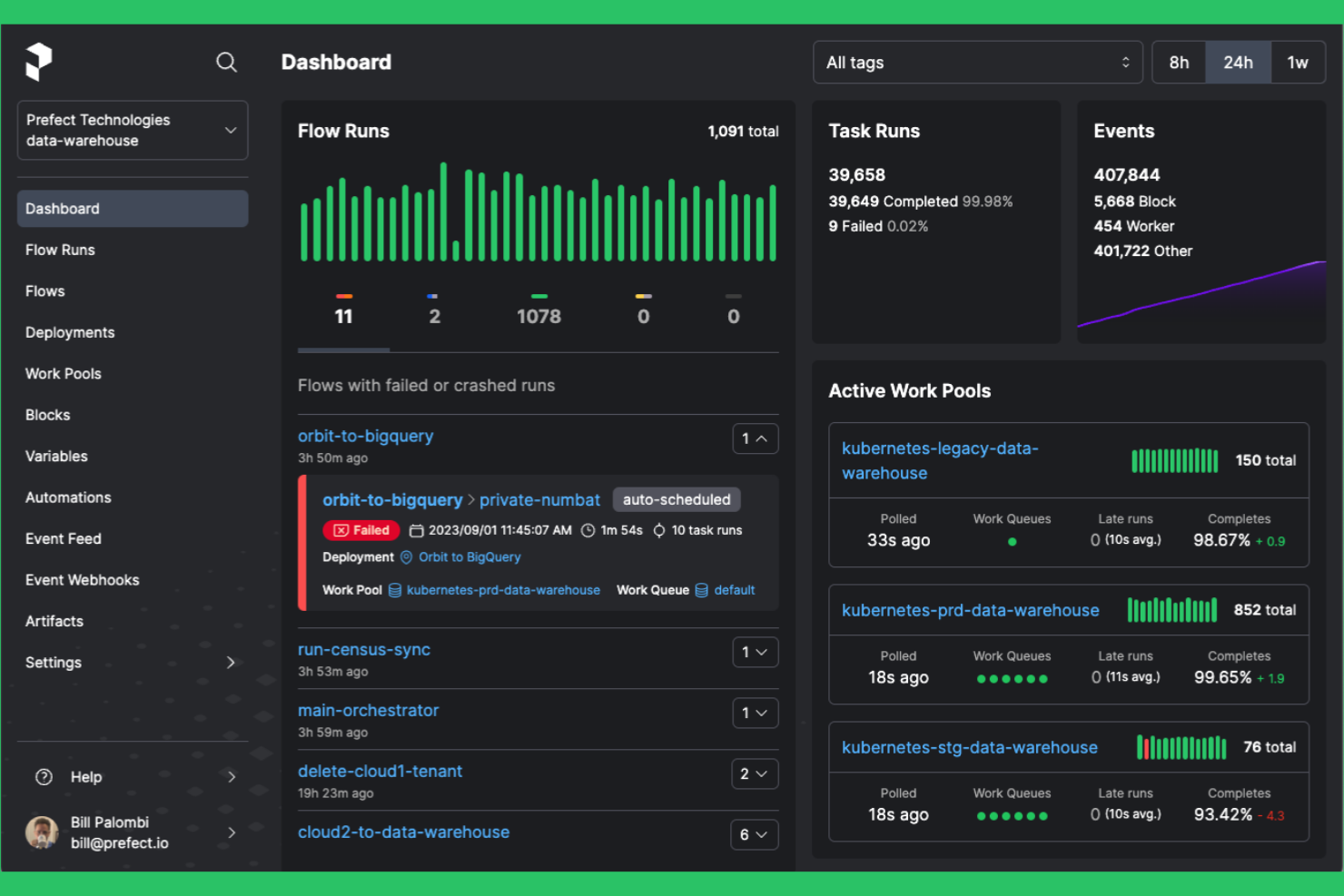
Prefect está diseñado para equipos que necesitan una automatización flexible de flujos de trabajo en entornos tanto de nube como locales. Es una opción atractiva para ingenieros de datos y equipos de TI que buscan una alternativa moderna a Apache Airflow, con una implementación híbrida más sencilla y una gestión dinámica de los flujos de trabajo. Prefect te ayuda a orquestar canalizaciones de datos complejas sin la sobrecarga de mantener una infraestructura pesada.
Por qué Prefect es una buena alternativa a Apache Airflow
Lo que distingue a Prefect es su sólido soporte para la orquestación de nubes híbridas, lo que lo convierte en una opción práctica para equipos que gestionan flujos de trabajo en varios entornos. Elegí Prefect porque te permite implementar y ejecutar flujos de trabajo en las instalaciones, en la nube o en ambos entornos, sin cambiar tu base de código.
Su arquitectura basada en agentes te permite controlar dónde y cómo se ejecutan las tareas, lo que resulta especialmente útil para organizaciones con requisitos estrictos de residencia de datos o seguridad. Prefect también ofrece una configuración dinámica de los flujos de trabajo, para que puedas adaptar las canalizaciones a las necesidades cambiantes de la infraestructura en tiempo real.
Funciones principales de Prefect
Algunas otras funciones de Prefect útiles para la automatización de flujos de trabajo incluyen:
- Programador de ejecuciones de flujos: Programa y activa ejecuciones de flujos de trabajo según la hora, eventos o condiciones personalizadas.
- Asignación de tareas: Paraleliza automáticamente las tareas en varias entradas para acelerar el procesamiento de datos.
- Opciones de almacenamiento de resultados: Almacena los resultados de los flujos de trabajo en diversos servicios de almacenamiento, incluidos S3, Google Cloud Storage y Azure Blob Storage.
- Notificaciones integradas: Configura alertas y notificaciones para fallos, reintentos o finalizaciones de flujos de trabajo mediante correo electrónico, Slack u otros canales.
Integraciones de Prefect
Las integraciones incluyen Amazon S3, Google Cloud Storage, Azure Blob Storage, Databricks, Snowflake, Slack, Kubernetes, Docker, GitHub y Twilio.
Pros and Cons
Pros:
- La implementación híbrida admite entornos de nube y locales
- Configuración dinámica de flujos de trabajo con Python
- Ejecución basada en agentes para una ubicación flexible de las tareas
Cons:
- Conectores integrados limitados para sistemas heredados
- La interfaz puede ralentizarse con flujos de trabajo a gran escala

Si tu equipo necesita un control preciso sobre dependencias complejas entre tareas, Luigi ofrece un marco basado en Python diseñado para ese propósito. Los ingenieros de datos y los equipos de análisis suelen elegir Luigi para gestionar flujos de trabajo por lotes en los que el orden de las tareas y la resolución de dependencias son fundamentales. A diferencia de Apache Airflow, el enfoque de Luigi para la programación basada en dependencias es sencillo y centrado en el código, lo que lo convierte en una opción adecuada para los equipos que desean definir flujos de trabajo mediante programación.
Por qué Luigi es una buena alternativa a Apache Airflow
Luigi destaca para los equipos que necesitan un control detallado y basado en código sobre las dependencias entre tareas de sus flujos de trabajo. Elegí Luigi porque permite definir cadenas de dependencias complejas directamente en Python, lo que resulta ideal para escenarios de ingeniería de datos y ETL en los que el orden de las tareas es fundamental. Su programador resuelve automáticamente las dependencias y solo ejecuta las tareas cuando se cumplen sus requisitos previos, lo que reduce la orquestación manual. Si tus proyectos requieren una gestión explícita y programática de las dependencias, Luigi ofrece una alternativa enfocada al enfoque más amplio basado en DAG de Airflow.
Características principales de Luigi
Otras características que hacen que Luigi sea útil para la automatización de flujos de trabajo incluyen:
- Interfaz de usuario centralizada del programador: Supervisa y gestiona las tareas en ejecución mediante un panel basado en la web.
- Biblioteca de tareas extensible: Aprovecha las plantillas de tareas integradas para operaciones de datos comunes y amplíalas según tus necesidades personalizadas.
- Reintentos y gestión de errores: Configura reintentos automáticos y una lógica de errores personalizada para tareas individuales.
- Destinos de sistemas de archivos y bases de datos: Utiliza la compatibilidad integrada para realizar un seguimiento de los resultados de las tareas en sistemas de archivos locales, HDFS o bases de datos.
Integraciones de Luigi
Entre las integraciones se incluyen Hadoop, Hive, Pig, HDFS, Spark, PostgreSQL, MySQL, Redshift, Kubernetes, Prometheus y Datadog.
Pros and Cons
Pros:
- Las definiciones de flujos de trabajo nativas de Python simplifican la integración del código
- Sólida compatibilidad con cadenas de dependencias complejas
- Instalación ligera con requisitos externos mínimos
Cons:
- No ofrece compatibilidad integrada con DAG dinámicos
- Carece de un editor moderno de flujos de trabajo basado en la web

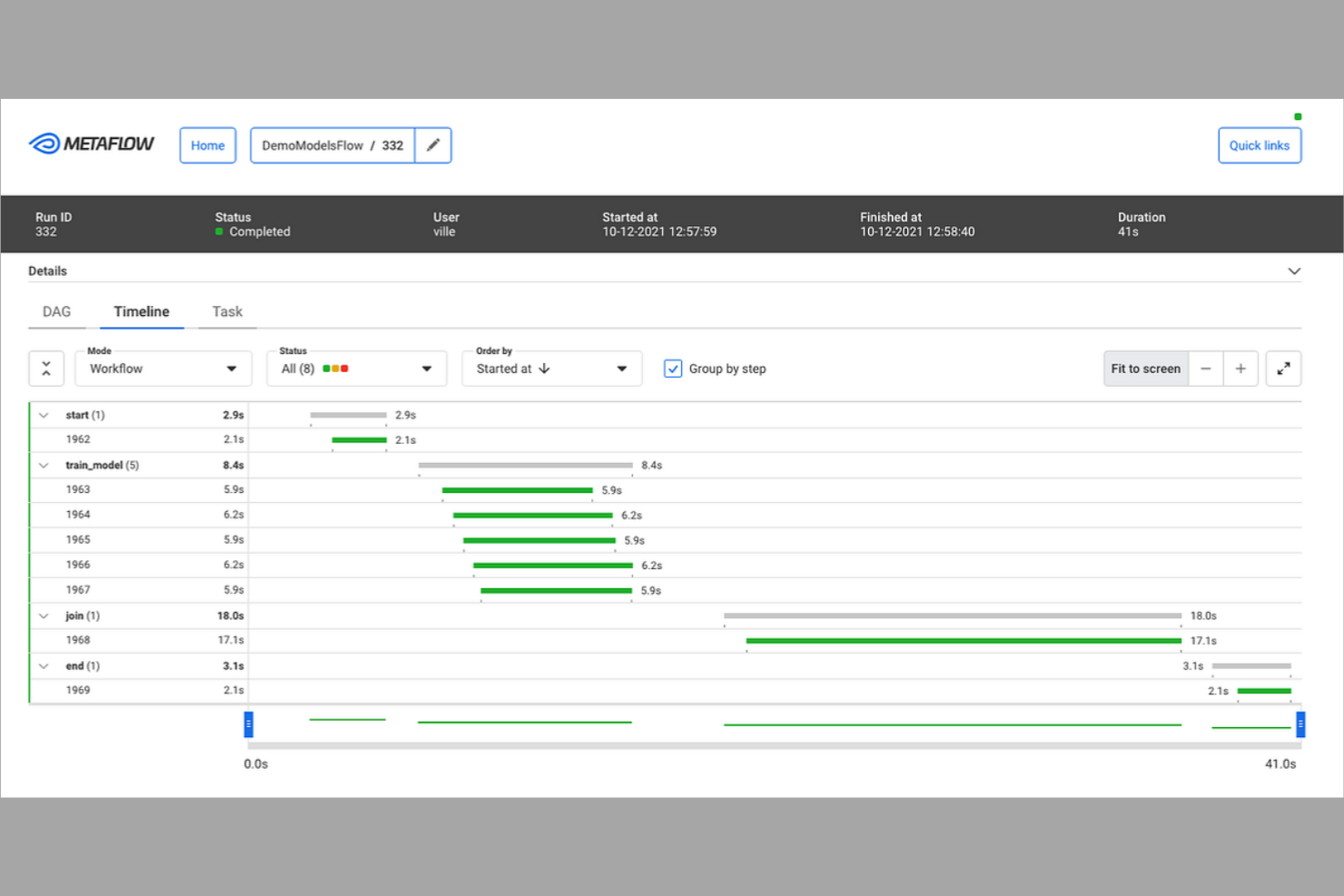
Si buscas crear e iterar rápidamente sobre flujos de trabajo de datos en Python, Metaflow está diseñado para ti. Los científicos de datos y los ingenieros de aprendizaje automático utilizan Metaflow para crear prototipos, implementar y gestionar flujos de trabajo sin salir de su entorno de Python. A diferencia de Apache Airflow, Metaflow hace hincapié en el desarrollo rápido y el control de versiones, lo que facilita la experimentación y la ampliación desde los cuadernos hasta producción.
Por qué Metaflow es una buena alternativa a Apache Airflow
Para los equipos que quieren avanzar rápidamente con flujos de trabajo basados en Python, Metaflow destaca por la creación rápida de prototipos. Elegí Metaflow porque permite definir, probar e iterar sobre los flujos de trabajo directamente en Python, de modo que puedes pasar del cuaderno a producción sin cambiar de herramienta.
Sus funciones integradas de control de versiones y linaje de datos te ayudan a realizar un seguimiento de los experimentos y cambios a medida que perfeccionas tus canalizaciones. Si necesitas crear rápidamente prototipos y escalar flujos de trabajo de datos, el enfoque centrado en Python de Metaflow ofrece una alternativa flexible al modelo de Apache Airflow, que requiere más configuración.
Características principales de Metaflow
Algunas otras características de Metaflow que merece la pena destacar son:
- Almacenamiento de datos integrado: Almacena y recupera artefactos de datos directamente dentro de tus flujos de trabajo mediante la gestión de datos integrada.
- Compatibilidad con AWS Step Functions: Ejecuta y escala flujos de trabajo en AWS Step Functions con una configuración mínima.
- Lógica de reintento automático: Reintenta automáticamente los pasos fallidos de los flujos de trabajo para mejorar la fiabilidad.
- Integración con la CLI y los cuadernos: Interactúa con los flujos de trabajo mediante herramientas de línea de comandos y cuadernos de Jupyter.
Integraciones de Metaflow
Las integraciones incluyen AWS S3, AWS Batch, AWS Step Functions, Azure Blob Storage, Azure Kubernetes Service, Google Cloud Storage, Google Kubernetes Engine, Kubernetes, Jupyter y Python.
Pros and Cons
Pros:
- Definición de flujos de trabajo nativa de Python para una iteración rápida
- Control integrado de versiones y seguimiento del linaje de datos
- Integración directa con los cuadernos de Jupyter
Cons:
- Funciones nativas limitadas de programación y orquestación
- No incluye una interfaz web integrada para gestionar flujos de trabajo

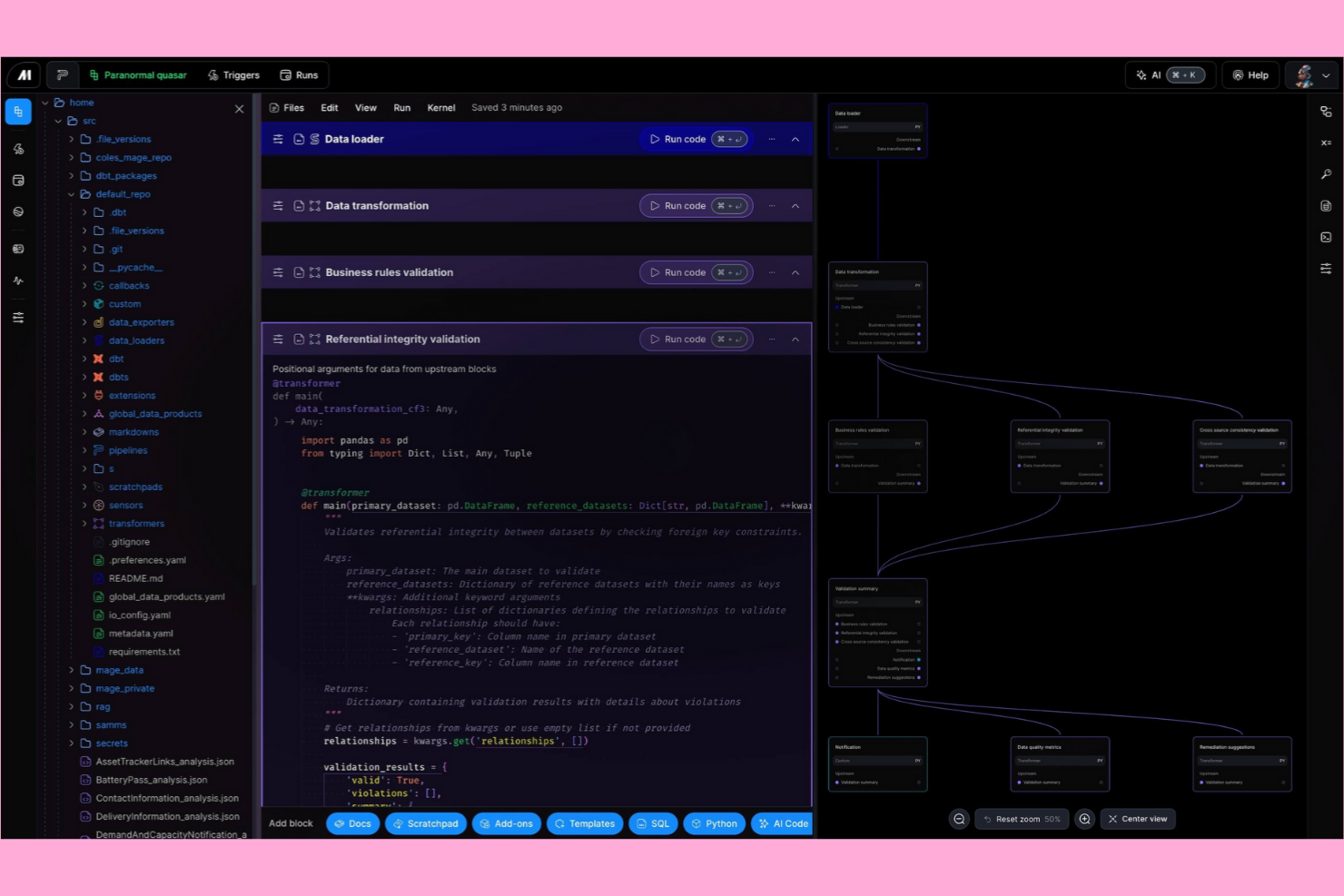
Mage AI ofrece a los ingenieros de datos y desarrolladores una plataforma basada en código para crear y gestionar flujos de trabajo de datos. Está diseñada para equipos que desean trabajar directamente en Python y necesitan flexibilidad para personalizar canalizaciones sin depender de una interfaz visual. Si buscas una solución de automatización de flujos de trabajo que priorice el control de los desarrolladores y la capacidad de escribir scripts por encima de las herramientas de arrastrar y soltar como Apache Airflow, Mage AI está creada para ese enfoque.
Por qué Mage AI es una buena alternativa a Apache Airflow
Mage AI destaca para los equipos que desean una experiencia de creación de flujos de trabajo basada en código, lo que la convierte en una sólida alternativa a Apache Airflow. Elegí Mage AI porque permite definir, probar e implementar canalizaciones directamente en Python, proporcionando a los desarrolladores un control total sobre la lógica y las dependencias.
Su interfaz con estilo de cuaderno admite el desarrollo iterativo y la depuración, lo que resulta especialmente útil para proyectos de ingeniería de datos y análisis. Para los equipos que prefieren los scripts en lugar de los editores visuales de DAG, el enfoque de Mage AI ofrece una plataforma de automatización de flujos de trabajo más flexible y centrada en los desarrolladores.
Funciones principales de Mage AI
Otras funciones de Mage AI que vale la pena destacar incluyen:
- Supervisión de canalizaciones en tiempo real: Supervisa la ejecución de las canalizaciones y consulta los registros mientras se ejecutan las tareas para obtener comentarios inmediatos.
- Validación de datos integrada: Configura comprobaciones de validación para garantizar la calidad de los datos en cada paso de la canalización.
- Integración con sistemas de control de versiones: Conéctate con Git para gestionar los cambios en el código de las canalizaciones y colaborar con tu equipo.
- Sistema de complementos ampliable: Añade módulos personalizados o intégralo con herramientas externas mediante la arquitectura de complementos de Mage AI.
Integraciones de Mage AI
Entre las integraciones se incluyen dbt Cloud, Algolia, Athena, Azure Blob Storage, BigQuery, ClickHouse, Databricks, Google Sheets, MongoDB, Snowflake y Spark.
Pros and Cons
Pros:
- La interfaz de cuaderno admite el desarrollo iterativo de canalizaciones
- Compatibilidad nativa con tareas de Python y SQL
- Validación de datos integrada en cada paso de la canalización
Cons:
- Menos opciones de programación que Airflow
- Menos conectores prediseñados para sistemas heredados

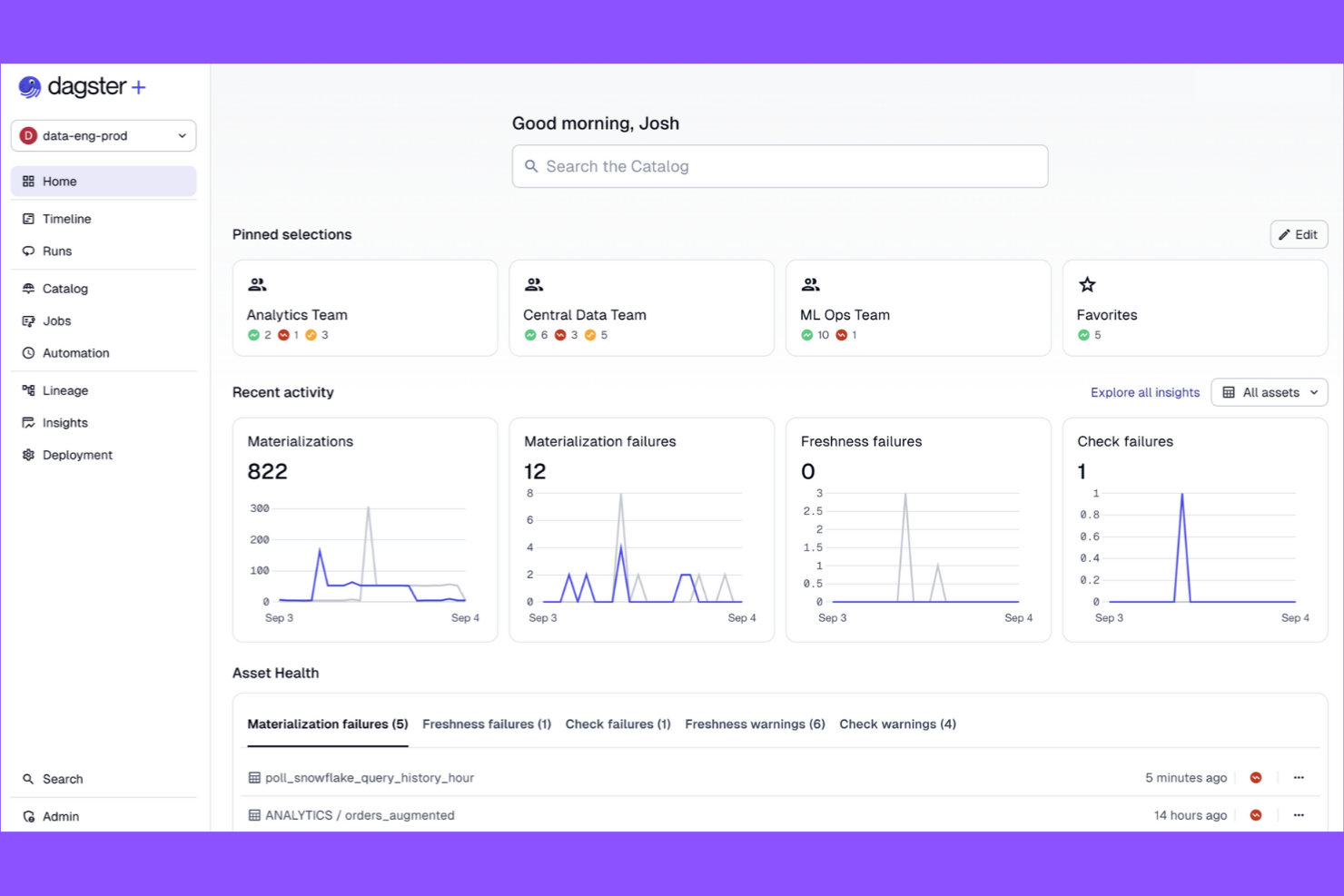
Dagster es una plataforma de automatización de flujos de trabajo diseñada para equipos que necesitan canalizaciones de datos modulares y comprobables. Resulta atractiva para ingenieros de datos y equipos de análisis que desean una gran observabilidad de las canalizaciones y componentes reutilizables. Si buscas una solución basada en código que priorice la estructura y el mantenimiento de las canalizaciones, Dagster ofrece una alternativa clara al enfoque centrado en DAG de Apache Airflow.
Por qué Dagster es una buena alternativa a Apache Airflow
Lo que distingue a Dagster es su enfoque en el diseño modular de las canalizaciones de datos, lo que proporciona a los equipos más flexibilidad para crear y mantener flujos de trabajo. Elegí Dagster porque permite dividir las canalizaciones en componentes reutilizables y comprobables llamados solids y ops, lo que facilita la gestión de proyectos complejos.
Su sistema de tipos impone contratos de datos entre los pasos de las canalizaciones, lo que reduce los errores y mejora la fiabilidad. Para los equipos que desean iterar rápidamente y mantener las canalizaciones organizadas, el enfoque modular de Dagster ofrece una ventaja clara frente a la estructura monolítica de DAG de Airflow.
Características principales de Dagster
Entre las otras características de Dagster que destacan para los equipos de automatización de flujos de trabajo se incluyen:
- API de GraphQL: Accede a las ejecuciones, programaciones y registros de las canalizaciones, y contrólalos mediante programación utilizando una sólida interfaz de GraphQL.
- Programador integrado: Programa las ejecuciones de las canalizaciones con expresiones similares a cron y gestiona los trabajos recurrentes directamente desde la interfaz de usuario de Dagster.
- Catálogo de activos: Realiza un seguimiento, visualiza y gestiona los activos de datos producidos por tus canalizaciones para mejorar el linaje y la trazabilidad.
- Herramientas de pruebas integradas: Utiliza las herramientas integradas para probar los componentes de las canalizaciones de forma aislada antes de implementarlos en producción.
Integraciones de Dagster
Las integraciones incluyen dbt, Fivetran, Snowflake, Databricks, AWS S3, Google Cloud BigQuery, Airbyte, Looker, Slack y Kubernetes.
Pros and Cons
Pros:
- Los componentes modulares de las canalizaciones permiten reutilizar el código
- Un sólido sistema de tipos impone contratos de datos
- Catálogo de activos integrado para el linaje de datos
Cons:
- Menos integraciones con sistemas heredados que Airflow
- Comunidad y ecosistema más pequeños que los de Airflow

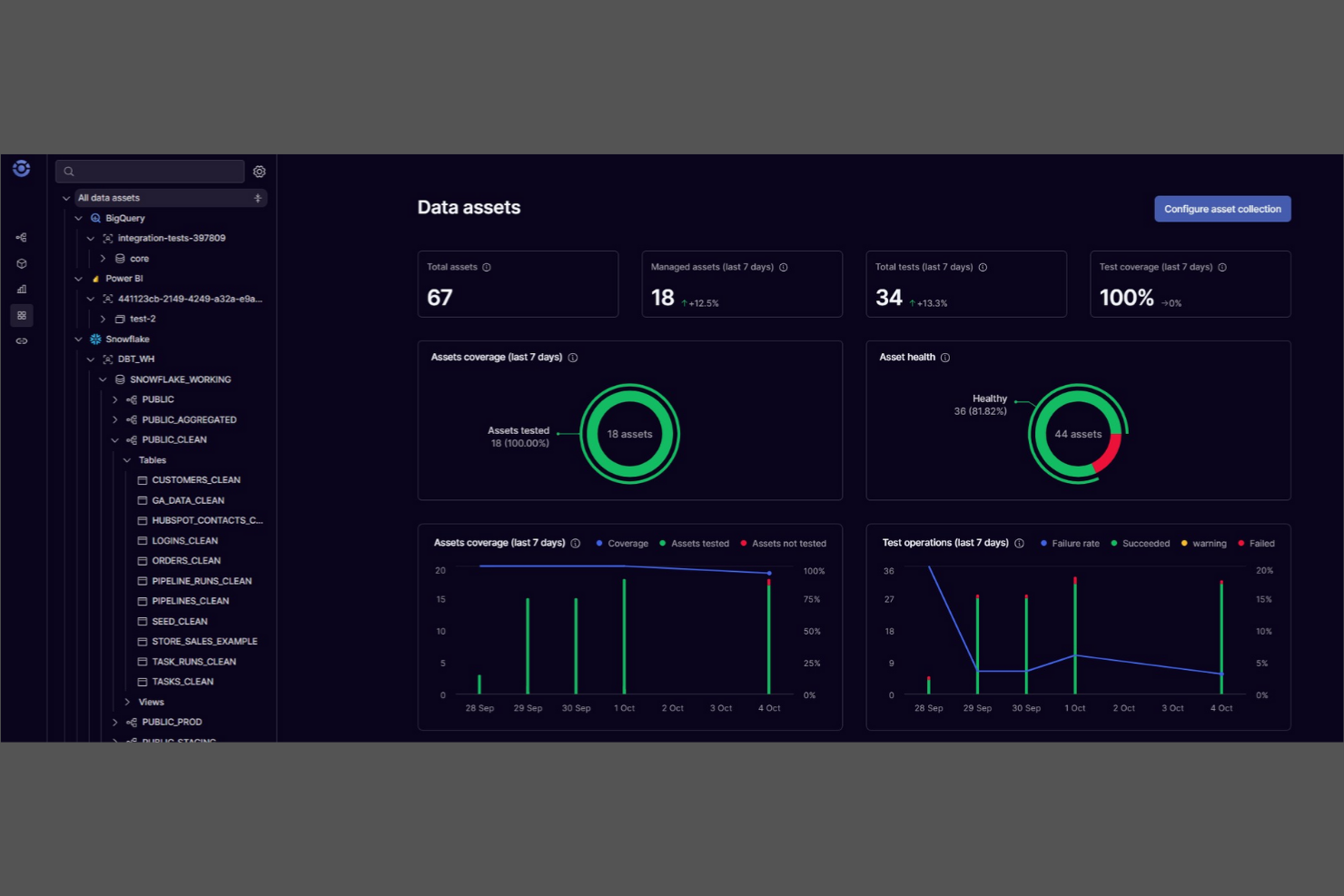
A diferencia de la mayoría de las plataformas de automatización de flujos de trabajo, Orchestra está diseñada para equipos que necesitan diseñar, editar y gestionar flujos de trabajo de forma colaborativa y en tiempo real. Los responsables de producto, los líderes de operaciones y los equipos multifuncionales utilizan Orchestra para representar visualmente e iterar juntos sobre procesos complejos. Sus funciones de edición en tiempo real y control de versiones la diferencian de Apache Airflow, lo que la convierte en una opción sólida para las organizaciones en las que el diseño colaborativo de flujos de trabajo es una prioridad.
Por qué Orchestra es una buena alternativa a Apache Airflow
Para los equipos que necesitan diseñar e iterar juntos sobre los flujos de trabajo, Orchestra ofrece una edición colaborativa de flujos de trabajo que Apache Airflow no admite de forma nativa. Elegí Orchestra porque permite que varios usuarios editen, comenten y creen versiones de los flujos de trabajo en tiempo real, lo que resulta especialmente útil para equipos distribuidos o multifuncionales.
El generador visual de flujos de trabajo de la plataforma y su control de versiones integrado facilitan el seguimiento de los cambios y el mantenimiento de la claridad de los procesos mientras los equipos colaboran. Si tu organización valora la responsabilidad compartida y la edición en directo de la lógica de los flujos de trabajo, Orchestra es una alternativa sólida al enfoque centrado en el código de Airflow.
Funciones principales de Orchestra
Otras funciones que hacen atractiva a Orchestra para la automatización de flujos de trabajo incluyen:
- Asignación automatizada de tareas: Asigna pasos del flujo de trabajo a miembros específicos del equipo según sus funciones o disponibilidad.
- Registro de auditoría: Registra cada cambio y acción dentro de los flujos de trabajo para garantizar el cumplimiento y la transparencia.
- Bloques de lógica condicional: Crea flujos de trabajo que se ramifican o repiten según reglas y activadores personalizados.
- Generador de integraciones de API: Conecta herramientas y servicios externos directamente a tus flujos de trabajo mediante una interfaz visual.
Integraciones de Orchestra
Las integraciones incluyen Snowflake, Databricks, Fivetran, dbt, Coalesce, Iceberg, Estuary, Alteryx, Tableau y Google Cloud Dataflow.
Pros and Cons
Pros:
- La edición de flujos de trabajo en tiempo real facilita la colaboración del equipo
- El generador visual reduce la necesidad de escribir scripts en Python
- El control de versiones integrado registra los cambios en los flujos de trabajo
Cons:
- Menos opciones avanzadas de programación que Airflow
- No ofrece implementación local para quienes necesitan autohospedaje


Si necesitas garantizar la reproducibilidad y la modularidad en tus flujos de trabajo de ciencia de datos, Kedro está diseñado para ese propósito. Es especialmente útil para equipos de datos e ingenieros de aprendizaje automático que desean crear canalizaciones mantenibles y listas para producción utilizando Python. A diferencia de Apache Airflow, Kedro pone el énfasis en la estructura del proyecto, la catalogación de datos y el control de versiones para ayudarte a entregar resultados coherentes y auditables en todos tus proyectos.
Por qué Kedro es una buena alternativa a Apache Airflow
Kedro está diseñado específicamente para equipos que necesitan proyectos de ciencia de datos reproducibles, lo que lo diferencia del enfoque más amplio de Apache Airflow en los flujos de trabajo. Elegí Kedro porque impone una estructura de proyecto modular y utiliza un catálogo de datos para realizar un seguimiento de los conjuntos de datos y sus versiones a lo largo de tu canalización.
Su abstracción de canalizaciones permite definir, reutilizar y probar los componentes de las canalizaciones como unidades independientes, lo que facilita mucho la colaboración y el mantenimiento. Para los equipos de ciencia de datos y aprendizaje automático, el enfoque de Kedro en la reproducibilidad y la calidad del código aborda directamente los desafíos de ampliar y llevar a producción los flujos de trabajo analíticos.
Características principales de Kedro
Entre las otras características destacadas de Kedro se incluyen:
- Editor visual de canalizaciones: Crea y modifica canalizaciones mediante una interfaz de arrastrar y soltar.
- Integración con Jupyter Notebook: Desarrolla y prueba nodos de canalización de forma interactiva en entornos de Jupyter.
- Marco de pruebas integrado: Escribe y ejecuta pruebas unitarias para los componentes de la canalización directamente dentro de tu proyecto.
- Amplio ecosistema de complementos: Amplía la funcionalidad con complementos para la implementación, la visualización y la integración en la nube.
Integraciones de Kedro
Entre las integraciones se incluyen Amazon SageMaker, Apache Airflow, Apache Spark, Azure ML, Dask, Databricks, Docker, Jupyter Notebook, Kubeflow y MLflow.
Pros and Cons
Pros:
- Impone una estructura de proyecto modular para las canalizaciones
- Catálogo de datos integrado para la gestión de conjuntos de datos
- Admite la reproducibilidad con canalizaciones versionadas
Cons:
- No incluye un motor integrado de programación de flujos de trabajo
- Menos conectores para sistemas empresariales heredados

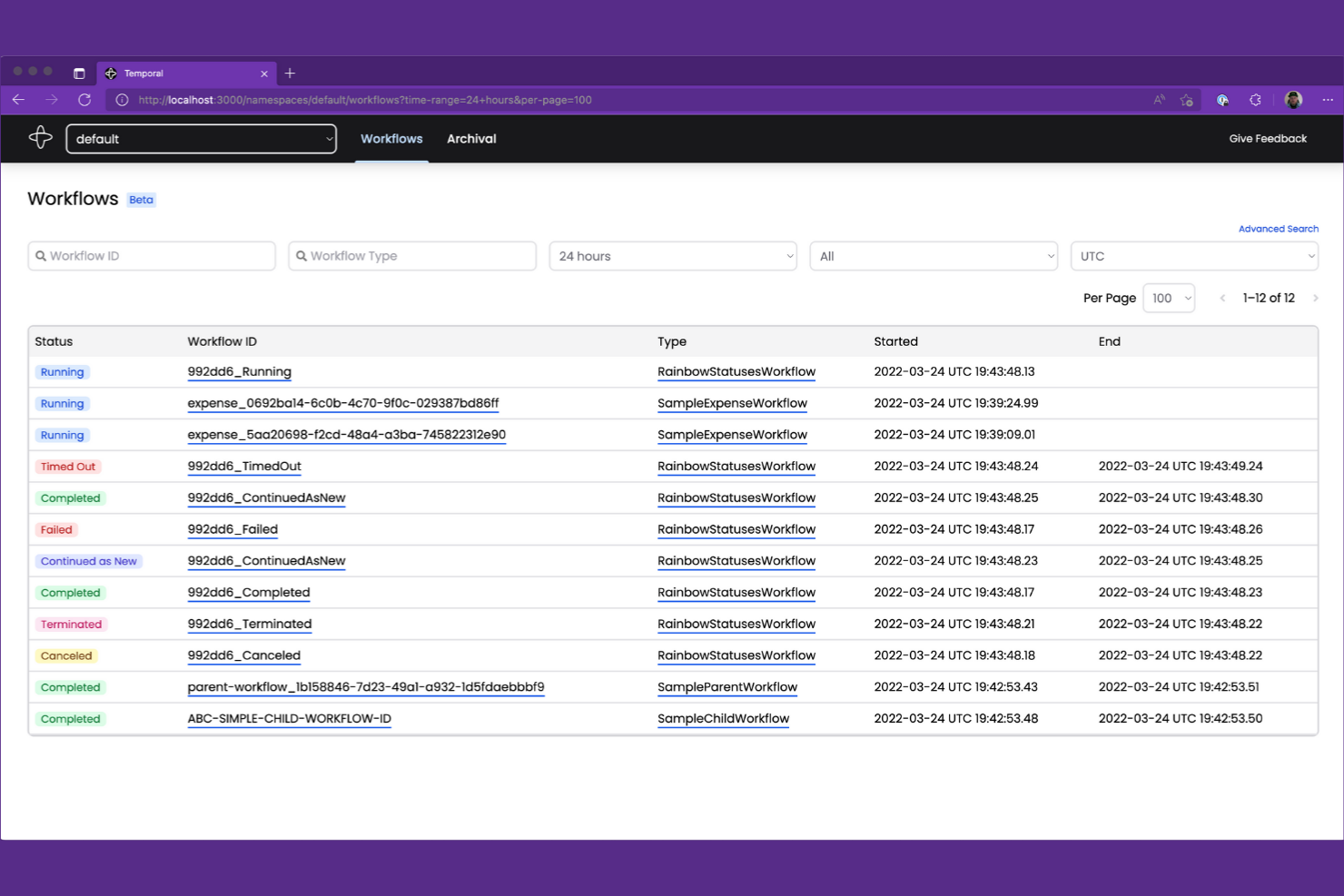
Cuando tu equipo necesita gestionar flujos de trabajo complejos y de larga duración con lógica con estado, Temporal ofrece un enfoque único. Los ingenieros de software y los equipos de plataformas utilizan Temporal para crear, ejecutar y escalar flujos de trabajo distribuidos que requieren fiabilidad y una gestión precisa del estado. A diferencia de Apache Airflow, Temporal está diseñado para gestionar procesos controlados por eventos y de alta concurrencia en los que el estado del flujo de trabajo y el historial de ejecución deben conservarse a lo largo del tiempo.
Por qué Temporal es una buena alternativa a Apache Airflow
Si buscas una plataforma de automatización de flujos de trabajo capaz de gestionar procesos complejos y con estado, Temporal está diseñado exactamente para este desafío. Elegí Temporal porque permite definir flujos de trabajo mediante código, con compatibilidad integrada para gestionar el estado, los reintentos y las tareas de larga duración que pueden extenderse durante días o incluso meses.
Las funciones de origen de eventos y de historial de ejecución de Temporal garantizan que cada paso del flujo de trabajo se registre y pueda recuperarse, incluso después de fallos o reinicios. Para los equipos que trabajan con sistemas distribuidos y cargas de trabajo de alta concurrencia, Temporal ofrece un nivel de fiabilidad y gestión del estado que va más allá de lo que Apache Airflow está diseñado para proporcionar.
Funciones principales de Temporal
Otras funciones de Temporal que merece la pena destacar incluyen:
- SDK multilingües: Crea flujos de trabajo en Go, Java, TypeScript y Python utilizando los SDK oficiales.
- Escalado dinámico de flujos de trabajo: Escala dinámicamente la ejecución de los flujos de trabajo según la carga y la demanda del sistema.
- API de visibilidad: Consulta mediante programación el estado y el historial de ejecución de los flujos de trabajo para su supervisión y generación de informes.
- Aislamiento de espacios de nombres: Organiza y aísla los flujos de trabajo y los recursos mediante espacios de nombres para entornos con varios equipos o varios inquilinos.
Integraciones de Temporal
Entre las integraciones se incluyen OpenAI, GitLab, Cloudflare, Salesforce, Twilio, NVIDIA, GoDaddy, Retool, Checkr y Descript.
Pros and Cons
Pros:
- Admite la ejecución de flujos de trabajo de larga duración y con estado
- Garantiza la durabilidad del flujo de trabajo y el historial de eventos
- SDK multilingües para Go, Java, TypeScript y Python
Cons:
- Requiere una infraestructura de servidor de Temporal dedicada
- No incluye una interfaz integrada de diseño visual de flujos de trabajo

Windmill
Ideal para la creación de secuencias de comandos de automatización de bajo código

Windmill permite a los equipos crear, ejecutar y gestionar flujos de trabajo automatizados y herramientas internas utilizando una combinación de código e interfaces de bajo código. Está diseñado para desarrolladores y equipos de operaciones que desean orquestar secuencias de comandos, API y trabajos de servidor sin una sobrecarga considerable de infraestructura. Como plataforma de código abierto y autohospedable, Windmill permite automatizar procesos, crear aplicaciones internas y exponer flujos de trabajo como API, manteniendo al mismo tiempo un control total sobre la implementación y los datos.
Por qué Windmill es una buena alternativa a Apache Airflow
Windmill destaca para los equipos que desean automatizar flujos de trabajo con un esfuerzo mínimo de programación. Elegí Windmill porque permite crear e implementar secuencias de comandos de automatización mediante un editor de bajo código, de modo que tanto los usuarios técnicos como los no técnicos pueden contribuir. La plataforma admite plantillas de secuencias de comandos reutilizables y control de versiones, lo que facilita estandarizar y actualizar las automatizaciones en toda la organización. Para los equipos que buscan pasar rápidamente de la idea a la automatización, Windmill ofrece un enfoque más accesible y colaborativo que Apache Airflow.
Características principales de Windmill
Otras características de Windmill que vale la pena destacar incluyen:
- Motor de programación integrado: Programa secuencias de comandos y flujos de trabajo para que se ejecuten en momentos o intervalos específicos.
- Control de acceso basado en roles: Gestiona los permisos de los usuarios y el acceso a secuencias de comandos y flujos de trabajo con un nivel de detalle preciso.
- Mercado de secuencias de comandos: Accede a secuencias de comandos de automatización prediseñadas y compártelas con la comunidad de Windmill.
- Registros y supervisión en tiempo real: Consulta los registros de ejecución y supervisa las ejecuciones de los flujos de trabajo en tiempo real para solucionar problemas y realizar auditorías.
Integraciones de Windmill
Entre las integraciones se incluyen Airtable, Discord, GitHub, Google Sheets, HubSpot, Notion, OpenAI, Slack, Stripe y Supabase.
Pros and Cons
Pros:
- El editor visual permite crear flujos de trabajo de bajo código
- Mercado integrado de secuencias de comandos para automatizaciones reutilizables
- Los registros en tiempo real simplifican la solución de problemas de los flujos de trabajo
Cons:
- No admite dependencias DAG complejas
- Escalabilidad limitada para cargas de trabajo de alto rendimiento
Otras alternativas a Apache Airflow
Estas son algunas alternativas adicionales a Apache Airflow que no llegaron a mi selección, pero que aún merece la pena consultar:


Cómo evalúo las alternativas a Apache Airflow
Divido mi evaluación en criterios básicos que toda alternativa a Airflow debe cumplir, como la orquestación de DAG y la fiabilidad del programador, y factores diferenciadores importantes para tu equipo y tu pila tecnológica específicos.
Funcionalidad principal (requisitos básicos de esta lista)
Al seleccionar herramientas para mi lista, clasifico cada una en una escala de 0 (no ofrece la funcionalidad) a 5 (sobresale en esta área) para cada una de las funcionalidades principales que se indican a continuación. Después, calculo la puntuación total de la herramienta como porcentaje. Cada herramienta debe alcanzar una puntuación total mínima del 65 % para ser considerada para su inclusión.
- Orquestación de flujos de trabajo: Evalúo cómo gestiona cada herramienta las dependencias basadas en DAG, las bifurcaciones y la ejecución en paralelo, como coordinar una canalización nocturna que extrae datos de tres API, los transforma secuencialmente y después los distribuye entre varios destinos.
- Programación de canalizaciones: Cada herramienta debe admitir programación basada en tiempo (cron), activada por eventos y mediante API, además de rellenos para reprocesar datos históricos después de cambios en el esquema o fallos en los sistemas ascendentes.
- Supervisión y observabilidad: Busco el estado de las tareas en tiempo real, registros con búsqueda, historial de ejecuciones y alertas configurables para que tu equipo detecte una tarea bloqueada a las 2 de la madrugada antes de que los paneles posteriores queden obsoletos.
- Integraciones y conectores: La herramienta debe conectarse a los almacenes, lagos y capas de transformación que tu equipo ya utiliza, como Snowflake, BigQuery, dbt y plataformas similares, mediante conectores nativos o un SDK extensible.
- Gestión de errores y reintentos: Aquí son importantes las políticas de reintento configurables, las devoluciones de llamada ante fallos y el enrutamiento de alertas. Compruebo si una herramienta permite configurar una espera progresiva exponencial o dirigir tipos específicos de fallos a distintos canales de notificación.
- Canalización como código o creador visual: Considero si puedes definir flujos de trabajo en Python, YAML o mediante una interfaz visual. Herramientas como Prefect y Dagster priorizan el código, mientras que otras ofrecen creadores de arrastrar y soltar junto con opciones de SDK.
Una vez que tengo una lista de herramientas que cumplen estos criterios, considero qué distingue a cada plataforma.
Factores diferenciadores (qué distingue a los proveedores)
Así es como comparo y contrasto distintos proveedores:
Características destacadas
El alojamiento en la nube gestionado es un factor diferenciador importante. Herramientas como Astronomer y Prefect Cloud se encargan del aprovisionamiento y el escalado, para que tu equipo se concentre en crear canalizaciones en lugar de gestionar la infraestructura. También evalúo la integración con Git y la compatibilidad con CI/CD: controlar las versiones de los DAG y promocionarlos entre desarrollo, pruebas y producción reduce el riesgo de despliegue. El seguimiento del linaje de datos completa mi comparación, ya que rastrear cómo una tarea ascendente fallida afecta a los informes posteriores ahorra horas de depuración.
Más allá de las características
La integración con la pila de datos moderna es muy importante en este caso. Compruebo si una herramienta se conecta de forma nativa con plataformas como Snowflake, dbt y BigQuery, ya que las brechas en esa cadena generan soluciones manuales que contradicen el propósito de la orquestación. La experiencia del desarrollador es otro factor clave: una documentación de calidad y herramientas para el desarrollo local afectan directamente a la rapidez con la que los ingenieros migran los DAG existentes de Airflow. La transparencia de los precios también influye en mi evaluación, especialmente si el proveedor cobra por capacidad de cómputo, usuarios o ejecuciones de tareas, ya que esto afecta al coste total a medida que escalan las canalizaciones.
¿Por qué buscar una alternativa a Apache Airflow?
Aunque Apache Airflow es una buena opción como plataforma de automatización de flujos de trabajo, hay varias razones por las que algunos usuarios buscan soluciones alternativas. Es posible que estés buscando una alternativa a Apache Airflow porque…
- Necesitas un proceso de configuración y mantenimiento más sencillo
- Tu equipo prefiere un creador visual de flujos de trabajo en lugar de DAG basados en código
- Necesitas integraciones nativas más profundas con servicios en la nube
- Quieres controles de acceso y gestión de usuarios más detallados
- Necesitas una mejor compatibilidad con flujos de trabajo dinámicos o basados en eventos
- Buscas una comunidad de asistencia más activa o receptiva
Si alguna de estas situaciones te resulta familiar, has llegado al lugar adecuado. Mi lista incluye varias opciones de plataformas de automatización de flujos de trabajo más adecuadas para equipos que se enfrentan a estos desafíos con Apache Airflow y buscan soluciones alternativas.
Características principales de Apache Airflow
Estas son algunas de las características clave de Apache Airflow, que te ayudarán a contrastar y comparar lo que ofrecen las soluciones alternativas:
- Modelado de flujos de trabajo mediante grafos dirigidos acíclicos (DAG)
- Definiciones de flujos de trabajo basadas en Python
- Motor integrado de programación y ejecución
- Gestión de dependencias entre tareas
- Interfaz de usuario web para la supervisión y la gestión
- Compatibilidad con complementos y operadores personalizados
- Integración con los principales proveedores de servicios en la nube
- Control de acceso basado en roles
- Reintentos automatizados y gestión de errores
- Registros detallados y trazas de auditoría