

10 sistemas de gestión documental de marca blanca en 2026

Lista de sistemas de gestión documental de marca blanca


Un sistema de gestión documental de marca blanca es una plataforma que puedes cambiar de marca y personalizar como propia para organizar, almacenar y compartir documentos de forma segura con clientes o equipos internos. Si buscas el mejor sistema de gestión documental de marca blanca, probablemente quieras ofrecer una experiencia fluida y con tu marca, manteniendo al mismo tiempo el control sobre los flujos de trabajo y el acceso a los documentos.
En esta guía encontrarás opciones compatibles con todo, desde permisos detallados hasta la automatización personalizada de flujos de trabajo, para que puedas elegir una solución que se adapte a las necesidades de tu empresa y a las expectativas de tus clientes.
Por qué confiar en nuestras recomendaciones de software
Nuestro equipo lleva probando y evaluando software desde 2012. Como gestores de proyectos, sabemos lo difícil —y lo importante— que es elegir el software adecuado.
Para esta guía, evaluamos las herramientas mediante pruebas prácticas e investigación independiente, puntuando las herramientas según nuestros criterios de selección. También nos basamos en la experiencia de líderes de opinión del sector y de profesionales en activo de la gestión de proyectos.
Nuestras reseñas reflejan nuestro criterio editorial humano, no un discurso de ventas.
Revisores expertos:
Tabla comparativa de sistemas de gestión documental de marca blanca
Esta tabla comparativa resume los detalles de precios de mis principales sistemas de gestión documental de marca blanca:
Opiniones sobre sistemas de gestión documental de marca blanca
A continuación encontrarás mis resúmenes detallados de los sistemas de gestión documental de marca blanca que llegaron a mi lista. Mis reseñas ofrecen un análisis detallado de las funciones, los mejores casos de uso y las integraciones de cada plataforma para ayudarte a encontrar la mejor opción para ti.

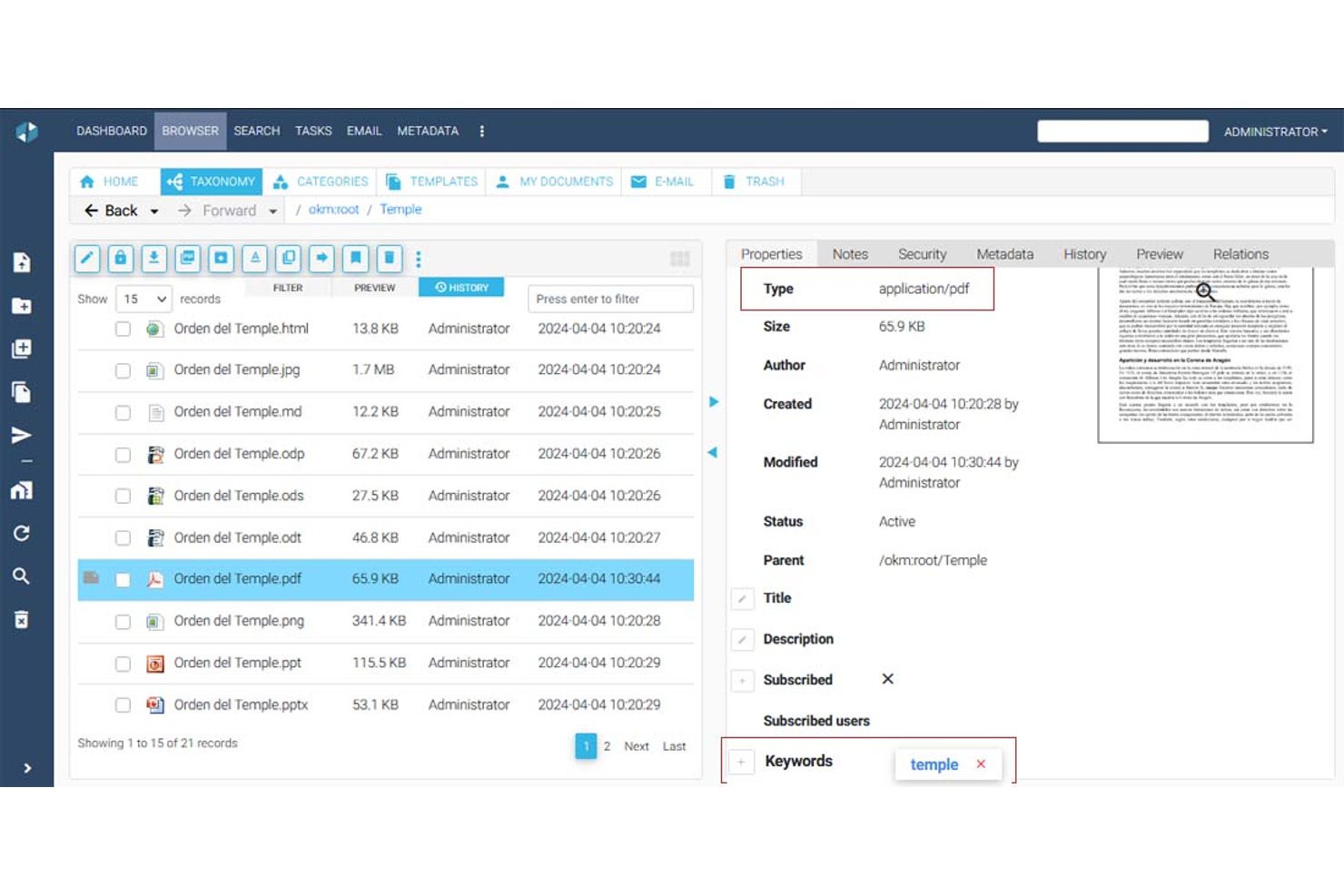

OpenKM es un sistema de gestión de documentos con una arquitectura multiinquilino que admite jerarquías de carpetas, gestión de metadatos, control de versiones, búsqueda de texto completo, OCR, firmas electrónicas y un motor de flujos de trabajo nativo para crear procesos de aprobación y revisión.
¿Para quién es más adecuado OpenKM?
OpenKM es adecuado para equipos centrados en el cumplimiento normativo y oficinas de gestión de proyectos (PMO) que necesitan automatizar los flujos de trabajo de aprobación de documentos en varios departamentos o entornos de clientes.
Por qué elegí OpenKM
OpenKM se ha ganado un lugar en mi lista de opciones porque su motor de flujos de trabajo nativo, OKMFlow, va mucho más allá de las aprobaciones básicas. Me gusta que permite crear cadenas de revisión en serie y en paralelo, asignar tareas dinámicamente a usuarios o grupos y editar flujos de trabajo activos sin interrumpir los procesos en curso. Su arquitectura multiinquilino permite aprovisionar entornos aislados para cada cliente, con su propio administrador, raíz de almacenamiento y personalización de la interfaz de usuario. Esta combinación lo hace realmente adecuado para gestionar procesos de aprobación de documentos en varias cuentas de clientes desde una sola instancia.
Características principales de OpenKM
- Arquitectura multiinquilino: Aprovisione entornos aislados para cada cliente o departamento, cada uno con su propio administrador, raíz de almacenamiento y configuración independiente.
- Módulo Doc-Request: Envíe solicitudes de documentos cifradas y seguras directamente a los clientes y reciba archivos mediante un canal de entrega protegido.
- Motor de búsqueda de texto completo: Indexe y busque en archivos PDF, Office, HTML, XML y otros tipos de archivos mediante sinónimos, derivación lingüística y consultas guardadas.
- Comparación de versiones: Compare dos versiones de un documento una al lado de la otra y revise tanto los cambios en los metadatos como las diferencias de texto en la misma interfaz.
Integraciones de OpenKM
OpenKM cuenta con integraciones nativas en todo el ecosistema de Microsoft, incluidas Outlook, Word, Excel, PowerPoint, Visio, Project y Access, además de compatibilidad con CMIS. Su API REST se conecta con SAP y Microsoft Dynamics y admite integraciones personalizadas.
Pros and Cons
Pros:
- Los entornos multiinquilino aíslan los espacios de trabajo de los clientes
- Los flujos de trabajo a nivel de inquilino permiten aprobaciones personalizadas
- El historial de versiones refuerza la responsabilidad del cliente
Cons:
- La personalización de marca no llega a ofrecer una solución completamente de marca blanca
- La interfaz anticuada puede ralentizar la adopción por parte de los clientes
Cómo evalúo los sistemas de gestión documental white label
Evalúo estos sistemas en dos niveles: lo que necesita un equipo para crear y gestionar un portal de documentos de marca personalizada, sin ningún rastro del proveedor, y los aspectos diferenciadores que importan según cómo planees usarlo.
Funcionalidad principal (Requisitos básicos para esta lista)
Al seleccionar herramientas para mi lista, califico cada una en una escala del 0 (no ofrece la funcionalidad) al 5 (destaca en esta área) en cada funcionalidad principal listada abajo. Después, calculo la puntuación total de cada herramienta como un porcentaje. Cada herramienta debe alcanzar una puntuación total mínima del 55% para ser considerada.
- Controles de marca white label: Verifico si se puede reemplazar cada referencia visible al proveedor con tu propio logotipo, paleta de colores, favicon y página de inicio de sesión, para que los clientes nunca vean la plataforma subyacente.
- Almacenamiento y organización de documentos: Las jerarquías de carpetas, el etiquetado y los esquemas de metadatos son importantes aquí, especialmente cuando gestionas SOW, contratos y entregables en docenas de cuentas de clientes.
- Control de versiones y auditoría: Evalúo cómo cada herramienta rastrea las revisiones y registra la actividad del usuario, ya que la documentación de proyectos suele pasar por varios ciclos de revisión antes de su aprobación final.
- Controles de acceso y permisos: Busco reglas granulares basadas en roles a nivel de carpeta y archivo, especialmente la capacidad para establecer diferentes niveles de permisos para equipos internos y partes interesadas externas.
- Portal de clientes y colaboración: La experiencia del portal es donde vive tu marca para el cliente final, así que evalúo si los revisores pueden comentar, aprobar e interactuar con los documentos dentro de un espacio de trabajo de marca.
- Dominio personalizado y soporte multi-inquilino: Cada cuenta de cliente debe estar bajo tu propio dominio con datos aislados y una marca independiente, lo cual es esencial cuando revendes a través de una cartera de proyectos.
Una vez tengo una lista de herramientas que cumplen con los criterios, considero qué distingue a cada plataforma.
Factores diferenciadores (qué destaca a los proveedores)
Así es como comparo y contrasto diferentes proveedores:
Características destacadas
El acceso a API y webhooks es un gran diferenciador: determina si puedes integrar los flujos de trabajo de documentos directamente en tus propias herramientas de gestión de proyectos o aplicaciones orientadas al cliente. También evalúo la automatización de rutas de aprobación, ya que perseguir manualmente a las partes interesadas para obtener firmas en SOW y órdenes de cambio no escala si tienes múltiples cuentas de clientes. Los análisis de uso completan el panorama. Los informes por inquilino sobre visualizaciones, descargas y almacenamiento de documentos ayudan a los revendedores a identificar oportunidades de venta adicional y demostrar valor a los clientes durante las QBR.
Más allá de las características
La estructura de licencias para revendedores es muy relevante aquí. Analizo si el modelo de precios permite apilamiento de márgenes y cuentas secundarias ilimitadas, ya que limitar por cliente puede acabar con la rentabilidad a medida que crece tu portafolio. Las integraciones con el ecosistema general de gestión de proyectos son igual de importantes: las herramientas que se conectan de manera nativa con plataformas como Jira, Asana o Monday mantienen los documentos ligados a los flujos de trabajo a los que pertenecen. También reviso certificaciones de cumplimiento como SOC 2 e ISO 27001, especialmente al incorporar clientes empresariales que requieren pruebas del nivel de seguridad antes de conceder acceso.
Cómo elegir un sistema de gestión documental de marca blanca
Es fácil perderse entre largas listas de funciones y estructuras de precios complejas. Para ayudarte a mantener la atención mientras avanzas en tu proceso único de selección de software, estos son los factores que debes tener en cuenta:
| Factor | Qué debes tener en cuenta |
|---|---|
| Escalabilidad | ¿El sistema gestionará el volumen de documentos y el crecimiento de usuarios con el tiempo? Pregunta por los límites de almacenamiento y de usuarios. |
| Integraciones | ¿Se conecta de forma nativa con tus herramientas principales (por ejemplo, Microsoft 365, Google Drive)? Comprueba si ofrece acceso a la API si necesitas conexiones personalizadas. |
| Personalización | ¿Puedes aplicar completamente tu marca a la interfaz y adaptar los flujos de trabajo a tus procesos? Busca opciones detalladas de personalización de marca y de flujos de trabajo. |
| Facilidad de uso | ¿Tu equipo lo adoptará rápidamente? Prueba la interfaz para comprobar que sea clara y que requiera una formación mínima. |
| Implementación e incorporación | ¿Cuánto tiempo llevarán la configuración y la migración? Pregunta por las herramientas de importación de datos, el soporte para la incorporación y los recursos de formación disponibles. |
| Coste | ¿Los niveles de precios son transparentes y predecibles a medida que creces? Presta atención a las tarifas ocultas o a los complementos obligatorios. |
| Medidas de seguridad | ¿Ofrece cifrado, registros de auditoría y controles de acceso detallados? Confirma que cumple las normas de tu sector. |
| Disponibilidad del soporte | ¿Recibirás ayuda rápida cuando surjan problemas? Comprueba si ofrece chat en directo, asistencia telefónica y gestión de cuenta personalizada si la necesitas. |
¿Qué son los sistemas de gestión documental?
Un sistema de gestión documental de marca blanca es una plataforma SaaS que permite a los equipos almacenar, organizar y controlar documentos bajo su propia marca. Estos sistemas admiten la colaboración en tiempo real, mejoran la experiencia del usuario y ayudan a las empresas a ofrecer una interfaz coherente y propia a sus clientes o equipos internos. Aunque no es una herramienta específica de gestión de proyectos, muchas plataformas pueden utilizarse junto con los flujos de trabajo de gestión de proyectos para gestionar archivos, aprobaciones y documentación dentro de herramientas de colaboración todo en uno.
Características
Al seleccionar un sistema de gestión documental de marca blanca, presta atención a las siguientes características clave:
- Personalización de marca: Permite aplicar tu propio logotipo, colores y dominio, para que la plataforma tenga el aspecto y la experiencia de tu propio producto para clientes o equipos internos.
- Control de acceso basado en roles: Permite establecer permisos detallados para usuarios o grupos, garantizando que solo las personas autorizadas puedan ver, editar o aprobar documentos específicos.
- Control de versiones de documentos: Registra los cambios y mantiene un historial de las ediciones de los documentos, lo que facilita volver a versiones anteriores o auditar quién realizó las actualizaciones.
- Automatización de flujos de trabajo: Permite diseñar y automatizar los procesos de revisión, aprobación y distribución de documentos, reduciendo los pasos manuales y acelerando la colaboración.
- Búsqueda de texto completo: Permite a los usuarios buscar en el contenido y los metadatos de los documentos, para encontrar rápidamente archivos incluso en repositorios grandes.
- Registros de auditoría: Registra todas las acciones realizadas en los documentos, proporcionando un registro transparente para el cumplimiento normativo, la seguridad y la resolución de problemas.
- Capacidades de integración: Se conecta con otras herramientas empresariales, como el correo electrónico, el almacenamiento en la nube o los sistemas CRM, para agilizar el intercambio de documentos y la colaboración.
- Compatibilidad con varios idiomas: Ofrece interfaces y notificaciones en varios idiomas, haciendo que el sistema sea accesible para equipos o clientes internacionales.
- Carga e importación masivas: Permite añadir un gran número de documentos a la vez, simplificando la migración desde sistemas heredados o la incorporación de nuevos clientes.
- Acceso desde dispositivos móviles: Proporciona acceso seguro a documentos y flujos de trabajo desde teléfonos inteligentes o tabletas, facilitando el trabajo remoto y desde cualquier lugar.
Ventajas
Implementar un sistema de gestión documental de marca blanca ofrece varias ventajas para tu equipo y tu empresa. Estas son algunas de las que puedes esperar:
- Marca coherente: Ofrece una experiencia unificada y profesional a clientes y usuarios personalizando la plataforma con tu propio logotipo, colores y dominio.
- Mayor seguridad: Protege la información confidencial con controles de acceso basados en roles, registros de auditoría y funciones de cifrado que te ayudan a cumplir los requisitos normativos.
- Flujos de trabajo optimizados: Automatiza los procesos de revisión, aprobación y distribución de documentos para reducir el trabajo manual y acelerar la colaboración entre equipos.
- Mejor control de los documentos: Mantén historiales de versiones y configuraciones de permisos claros, para saber siempre quién accedió a un documento o lo editó y cuándo.
- Colaboración escalable: Da soporte a equipos y bases de clientes en crecimiento con funciones como la carga masiva, la compatibilidad con varios idiomas y el acceso móvil para el trabajo remoto.
- Integraciones fluidas: Conecta tus herramientas empresariales actuales para centralizar la gestión documental y reducir los cambios de contexto de tu equipo.
- Incorporación más rápida: Utiliza plantillas, recursos de formación e interfaces intuitivas para ayudar a los nuevos usuarios a ponerse al día rápidamente y empezar a aportar valor.
Costes y precios
Seleccionar un sistema de gestión documental de marca blanca requiere comprender los distintos modelos de precios y planes disponibles. Los costes varían en función de las características, el tamaño del equipo, los complementos y otros factores. La siguiente tabla resume los planes habituales, sus precios medios y las características que suelen incluir las soluciones de sistemas de gestión documental de marca blanca:
Tabla comparativa de planes para sistemas de gestión documental de marca blanca
| Tipo de plan | Precio medio | Características habituales |
|---|---|---|
| Plan gratuito | $0 | Almacenamiento básico de documentos, usuarios limitados, búsqueda sencilla y asistencia básica. |
| Plan personal | $5-$15/usuario/mes | Acceso para un solo usuario, personalización de marca, automatización básica de flujos de trabajo e integraciones limitadas. |
| Plan empresarial | $15-$40/usuario/mes | Compatibilidad con varios usuarios, automatización avanzada de flujos de trabajo, permisos basados en roles, registros de auditoría e integraciones. |
| Plan corporativo | $40-$100/usuario/mes | Usuarios ilimitados, personalización completa de marca blanca, seguridad avanzada, asistencia dedicada y herramientas de cumplimiento normativo. |
Preguntas frecuentes sobre el sistema de gestión documental de marca blanca
Aquí tienes algunas respuestas a preguntas frecuentes sobre el sistema de gestión documental de marca blanca:
¿Qué convierte a un sistema de gestión documental en un sistema de «marca blanca»?
Un sistema de gestión documental de marca blanca te permite cambiar completamente la marca de la plataforma con tu propio logotipo, colores y dominio. Esto significa que los clientes y usuarios ven tu marca en lugar de la del proveedor del software, lo que resulta especialmente útil para agencias, distribuidores o empresas que ofrecen portales orientados al cliente.
¿Puedo integrar un sistema de gestión documental de marca blanca con mis herramientas actuales?
Sí, la mayoría de los sistemas de gestión documental de marca blanca ofrecen integraciones con herramientas empresariales populares como Microsoft 365, Google Drive y plataformas de CRM. Algunos también proporcionan API para integraciones personalizadas, de modo que puedes conectar el sistema con tus flujos de trabajo específicos.
¿Qué nivel de seguridad ofrecen los sistemas de gestión documental de marca blanca?
Los sistemas de gestión documental de marca blanca suelen incluir funciones de seguridad como cifrado, controles de acceso basados en roles y registros de auditoría. Comprueba siempre las certificaciones de cumplimiento y pregunta por la ubicación de los datos si tu empresa tiene requisitos normativos específicos.
¿Es posible migrar documentos desde mi sistema anterior?
Sí, la mayoría de las soluciones ofrecen herramientas de carga masiva o migración para ayudarte a transferir documentos desde sistemas antiguos. Algunos proveedores también ofrecen asistencia durante la incorporación o servicios de migración para facilitar el proceso.
¿Quién debería considerar el uso de un sistema de gestión documental de marca blanca?
Los sistemas de gestión documental de marca blanca son una buena opción para empresas que necesitan ofrecer una experiencia de marca a sus clientes, agencias que gestionan varias cuentas de clientes u organizaciones con requisitos estrictos de marca y personalización.