

2026’nın En İyi 10 Yapay Zekâ Teklif Oluşturucusu

En İyi Yapay Zekâ Teklif Oluşturucu Kısa Listesi


Yapay zekâ teklif oluşturucu, işletme tekliflerini daha kısa sürede taslak hâline getirmek, özelleştirmek ve düzenlemek için yapay zekâ kullanan bir yazılımdır. En iyi yapay zekâ teklif oluşturucuyu arıyorsanız, muhtemelen önemli ayrıntıları atlamadan veya ekipler arasında geri bildirim peşinde koşmadan kısa sürede özenli teklifler hazırlama baskısı altındasınız.
Müşteriler ve kurum içi paydaşlar daha hızlı sonuç süreleri talep ederken, tekrarlayan teklif görevlerini otomatikleştirmek büyük bir rahatlama sağlayabilir. Bu liste, en yüksek puanlı yapay zekâ teklif oluşturucuları karşılaştırmanıza yardımcı olacak; böylece ekibiniz için doğru seçimi yapabilmeniz adına farklı sektörler, iş akışları ve iş birliği biçimleri açısından hangilerinin en uygun olduğunu vurgulayacaktır.
Why Trust Our Software Recommendations
Our team has been testing and reviewing software since 2012. As project managers ourselves, we know how difficult—and important—it is to choose the right software.
For this guide, we evaluated tools using hands-on testing and independent research, scoring tools using our selection criteria. We also draw on insights from industry thought leaders and practicing project management experts.
Our reviews reflect our human editorial judgment, not a sales pitch.
Expert reviewers:
Yapay Zekâ Teklif Oluşturucu Karşılaştırma Tablosu
Bu karşılaştırma tablosu, yapay zekâ teklif oluşturucu yazılımı seçimlerimin fiyatlandırma ayrıntılarını özetlemektedir.
Score legend (out of 5)
- Excellent 4.5–5
- Good 4–4.4
- Average 3–3.9
- Below average 2–2.9
- Poor 1–1.9
| Tool | Starting Price | Website | |||||||
|---|---|---|---|---|---|---|---|---|---|
| Best for custom-branded proposal formatting | — | 2 | 2 | — | 3 | 2 | 4 | Pricing upon request Free demo available | Website |
| Best for end-to-end client sign and pay flows | 3.8 out of 5 | 4 | 5 | 4 | 4 | 4 | 2 | $19/user/month 14-day free trial | Website |
| Best for CRM-synced quoting and e-signatures | 3.5 out of 5 | 3 | 4 | 3 | 4 | 4 | 3 | $19/user/month 14-day free trial + free demo available | Website |
| Best for buyer-tracked proposals with CRM prefill | 3.8 out of 5 | 4 | 4 | 4 | 4 | 4 | 3 | $35/user/month 14-day free trial | Website |
| Best for CRM-connected proposal workflows | 3.7 out of 5 | 4 | 4 | 4 | 4 | 4 | 2 | $19/user/month Free plan + 14-day free trial + free demo available | Website |
| Best for CRM-connected quote-to-proposal execution | 3.8 out of 5 | 3 | 4 | 5 | 4 | 4 | 3 | Pricing upon request Free demo available | Website |
| Best for interactive proposals with built-in analytics | 3.3 out of 5 | 4 | 3 | 2 | 3 | 4 | 4 | $237.60/year 14-day free trial + free demo available | Website |
| Best for proposal tracking with built-in e-sign | 4.0 out of 5 | 4 | 4 | 4 | 4 | 4 | 4 | $25/user/month 14-day free trial + free demo available | Website |
| Best for CRM-connected proposal-to-contract workflows | 3.7 out of 5 | 2 | 5 | 4 | 4 | 4 | 3 | $272/month Free plan + 14-day free trial + free demo available | Website |
| Best for proposal creation on a tight budget | 3.3 out of 5 | 3 | 3 | 4 | 3 | 4 | 3 | $19/user/month 14-day free trial | Website |
En İyi Yapay Zekâ Teklif Oluşturucu İncelemeleri
Aşağıda, kısa listeme giren en iyi yapay zekâ teklif oluşturucularının ayrıntılı özetlerini bulabilirsiniz. İncelemelerim, sizin için en iyisini bulmanıza yardımcı olmak amacıyla her platformun özelliklerine, entegrasyonlarına ve en uygun kullanım alanlarına ayrıntılı bir bakış sunmaktadır.

Best for custom-branded proposal formatting
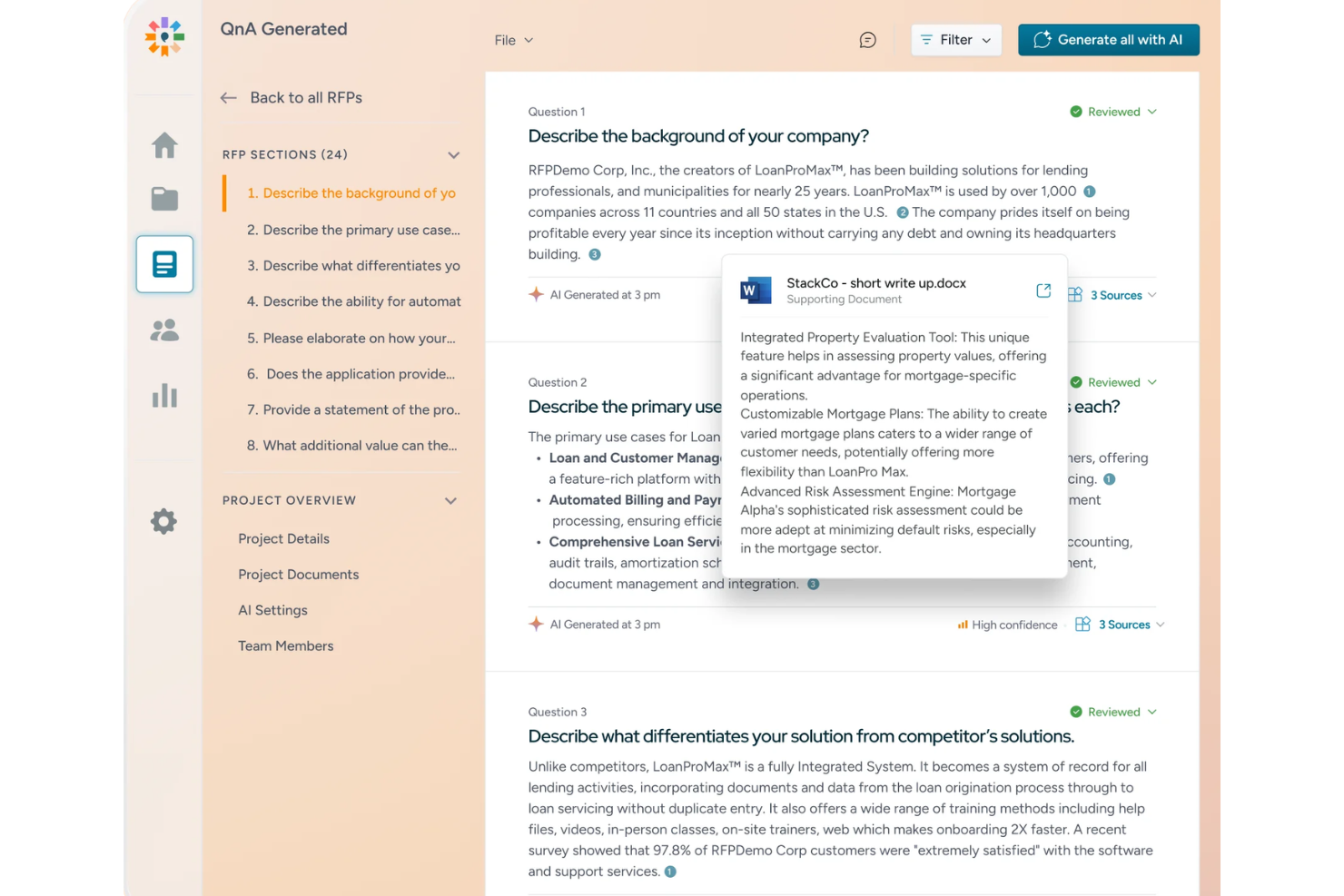
Inventive AI is an AI proposal and RFP response platform that drafts, reviews, and submits responses using RAG-grounded generation, a connected Knowledge Hub, strategic AI agents, and built-in collaboration and approval workflows.
Who Is Inventive AI Best For?
Inventive AI is a strong fit for proposal managers and bid teams that respond to high volumes of incoming RFPs and need AI-grounded drafts tied directly to their company's knowledge sources.
Why I Picked Inventive AI
I picked Inventive AI as one of the best because its narrative-style proposal support lets me start from an existing branded document and have AI suggest an outline, draft section content from approved company sources, and export the finished result in the same format I started with. Every draft cites the Knowledge Hub content it pulled from, with confidence scores attached, so I can see exactly which approved source each section is grounded in. That combination of on-brand formatting and source-traced drafting is where Inventive AI genuinely separates itself.
Inventive AI Key Features
- RAG-grounded response drafts: Generates proposal content pulled directly from your connected Knowledge Hub, with each answer linked to its source and a 0–100% confidence score attached.
- Strategic AI agents: Includes Go/No-Go, Competitive Intelligence, Win Theme, and Compliance agents that run analysis before and during the drafting process.
- Salesforce opportunity sync: Launches RFP responses directly from a Salesforce Opportunity record and keeps response status synced back to that record automatically.
- Internal approval workflow: Lets teams assign sections to SMEs or compliance reviewers, track sign-offs, and log who approved each answer and when.
Inventive AI Integrations
Inventive AI offers native integrations with Salesforce, Google Drive, SharePoint, Confluence, Notion, Slack, HubSpot, Jira, OneDrive, and Okta. It also connects to enterprise knowledge sources and lists Zapier among its service providers.
Pros and Cons
Pros:
- Reviewers report faster response cycles
- Source-cited answers flag unsupported requirements
- Branded narrative drafts preserve document formatting
Cons:
- No recipient-level proposal engagement tracking
- No built-in pricing calculations or quote tables

Best for end-to-end client sign and pay flows

Better Proposals is a proposal platform that combines interactive web-based proposals, e-signatures, built-in pricing tables, and post-signature client onboarding flows with payment collection.
Who Is Better Proposals Best For?
Better Proposals is a strong fit for sales reps and business development leads who need to move clients from proposal to signature and payment in one flow.
Why I Picked Better Proposals
I picked Better Proposals as one of the best because it's the only tool on this list that keeps the entire client journey, from reviewing a proposal to signing and paying, inside a single flow. After a client signs, an automated onboarding sequence kicks off that can collect intake forms, take a deposit through Stripe or PayPal, and book a kickoff call via Calendly, all without leaving the platform. I also like the interactive pricing tables, where clients select their own package and the total recalculates instantly, so the payment amount is always tied directly to what they chose.
Better Proposals Key Features
- AI proposal creation via MCP server: Connect a compatible external AI tool through Better Proposals' CLI and MCP server to generate a new proposal from an existing template, using your account's branding.
- Document Checker: Before sending, this tool flags potential issues in your proposal and offers suggestions, with more targeted feedback if you've specified your industry.
- Proposal tracking and analytics: Track opens, pages viewed, time spent per page, forwarding, and downloads, with a full activity timeline and real-time notifications.
- Multi-signer workflows with signing order: Request signatures from multiple recipients, set the order in which they sign, and let clients sign by typing or drawing.
Better Proposals Integrations
Better Proposals offers six documented native integrations with HubSpot, Salesforce, Calendly, Stripe, GoCardless, and PayPal. It also supports Zapier, an API, and MCP connectivity for compatible AI tools.
Pros and Cons
Pros:
- Interactive pricing connects choices with payment
- Client engagement tracking informs follow-up timing
- Reusable templates speed proposal drafting
Cons:
- Some reviewers find layout editing clunky
- AI requires external tools and setup

Best for CRM-synced quoting and e-signatures

Proposify is a proposal platform that combines AI-assisted writing, customizable templates, interactive quoting, e-signatures, and CRM-synced document workflows.
Who Is Proposify Best For?
Proposify is a strong fit for sales teams that send high volumes of proposals and need CRM-synced pricing, built-in e-signatures, and per-section engagement tracking in one place.
Why I Picked Proposify
I picked Proposify as one of the best because it genuinely closes the gap between your CRM and your proposals. When a deal updates in Salesforce or HubSpot, line items and pricing tables in the linked document update on the next sync automatically. I also rely on its per-section view timeline, which shows exactly how long a prospect spent on each section, so I know whether to follow up on scope or pricing before the call.
Proposify Key Features
- AI writing assistant: Drafts and refines proposal sections—including executive summaries, scopes of work, and cover letters—from call notes, transcripts, or rough ideas you supply.
- Interactive pricing tables: Buyers can adjust quantities and options directly in the proposal, with totals updating in real time based on your product catalog.
- Approval workflows: Assigned approvers must review and sign off on a document before it can be sent, with email notifications and commenting built into the process.
- Content Library: Stores reusable sections, case studies, images, and approved copy that any team member can pull into a new document without rebuilding from scratch.
Proposify Integrations
Proposify offers native integrations with Salesforce and HubSpot for syncing deal data, line items, document activity, and status. It also integrates with Stripe and Zapier and provides an API for custom integrations.
Pros and Cons
Pros:
- Interactive quotes pair pricing choices with signatures
- Section-level reading data guides timely follow-ups
- Reusable library keeps approved proposal content handy
Cons:
- Template layout edits can feel clunky
- AI needs supplied material and human review

Qwilr
Best for buyer-tracked proposals with CRM prefill

Qwilr is a proposal creation platform that combines an interactive page editor, AI-assisted content generation, CRM-prefilled templates, quoting, e-signatures, payments, and buyer engagement analytics into a single shareable link.
Who Is Qwilr Best For?
Qwilr is a strong fit for sales reps who need to send polished, CRM-prefilled proposals quickly and track how buyers engage with them before following up.
Why I Picked Qwilr
I've included Qwilr in my top picks because it's the tool I reach for when speed-to-send matters and buyer behavior needs to be tracked after the proposal goes out. Its CRM prefill pulls deal data directly into a branded template, so a rep can send a polished proposal the same day as a discovery call. I also rely on the Engagement Algorithm, which lets me define custom thresholds to flag when a buyer has spent meaningful time reviewing the pricing section, giving my team a concrete signal for when to follow up.
Qwilr Key Features
- Interactive quote builder: Create line-item tables or pricing cards with selectable packages, add-ons, and discounts that recalculate totals as buyers make choices.
- Saved block library: Save, organize, and reuse branded content blocks across proposals, with admin-controlled locking to prevent unauthorized edits.
- Multi-signer e-signature: Collect legally binding signatures from multiple buyers within the same Qwilr page, with a certified audit trail automatically generated on completion.
- AI Prefill from call transcripts: Pull deal context from meeting notes and call transcripts directly into proposal variables using AI-assisted prefill on the Scale plan.
Qwilr Integrations
Qwilr offers native integrations with HubSpot, Salesforce, Microsoft Dynamics 365, Zoho CRM, Pipedrive, Claude, and ChatGPT through MCP. It also supports REST API and webhooks, plus Zapier marketplace integrations.
Pros and Cons
Pros:
- Saved blocks keep repeat proposals consistent
- Interactive quotes recalculate buyer selections
- Buyer engagement reveals pricing-section attention
Cons:
- PDF exports can lose page formatting
- AI generation scans one supplied website
PandaDoc
Best for CRM-connected proposal workflows
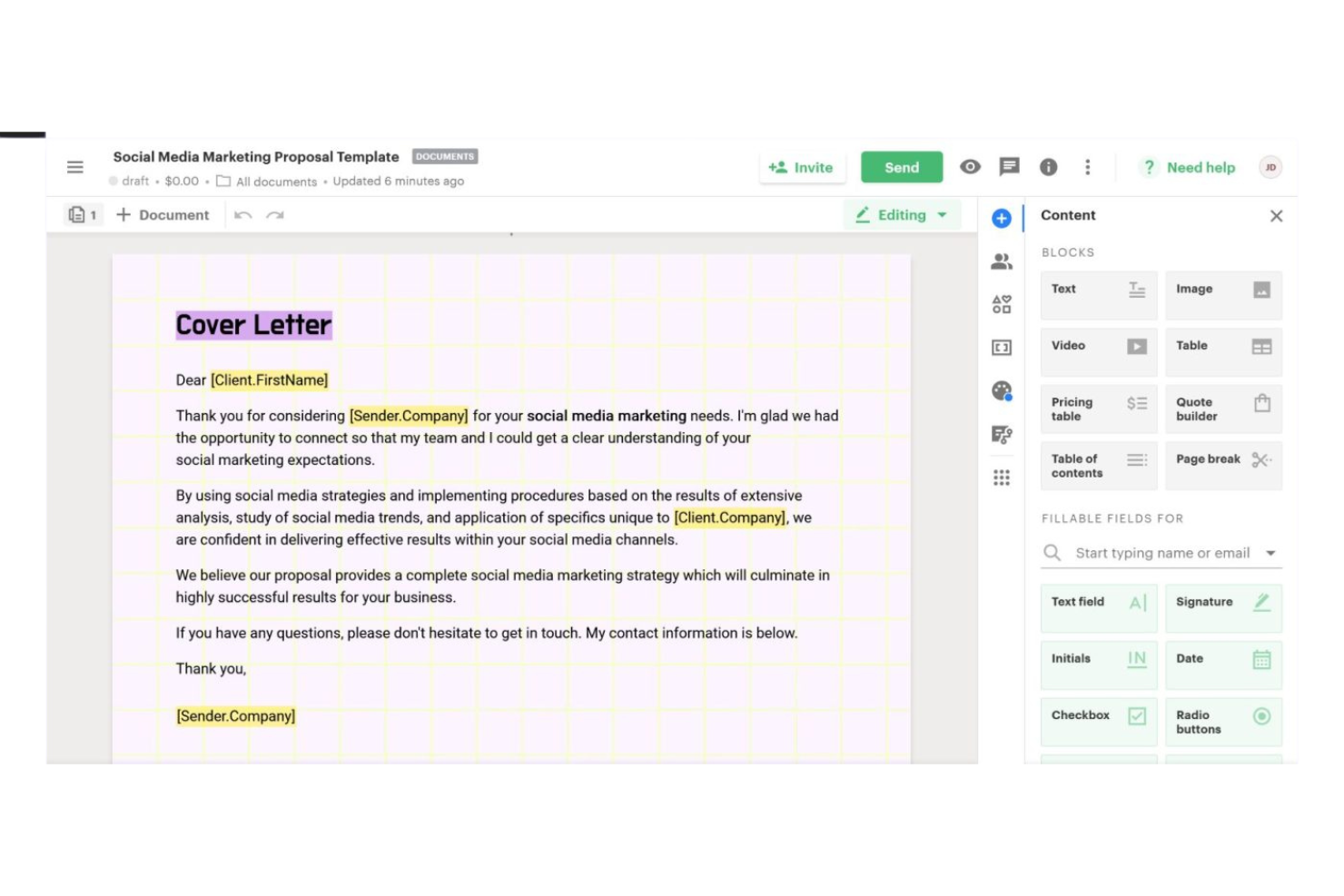
PandaDoc is a document workflow and e-signature platform that lets you build proposals, contracts, and quotes using a drag-and-drop editor, reusable content library, dynamic pricing tables, and native CRM integrations.
Who Is PandaDoc Best For?
Sales teams that rely heavily on CRM data—especially in Salesforce or HubSpot—to drive proposal creation and need e-signature built into the same workflow.
Why I Picked PandaDoc
I picked PandaDoc as one of the best because it's where CRM data and proposal creation genuinely meet in one workflow. When I'm working from a Salesforce opportunity or a HubSpot deal, PandaDoc pulls that data directly into a proposal, including line items, product details, and contact fields, without manual copying. The two-way sync also pushes document status and pricing updates back into the CRM, so the deal record stays current without extra steps.
PandaDoc Key Features
- Approval workflows: Route proposals through ordered internal reviewers before they reach recipients, with approval events logged in the audit trail.
- Document analytics: Track recipient-level engagement including view count, time spent per page, PDF downloads, and link clicks.
- Bulk send: Use templates, variables, and CSV files to send customized documents to multiple recipients at once.
- Conditional smart content: Insert Content Library items into a proposal automatically based on variable values or pricing-table data using if/then rules.
PandaDoc Integrations
PandaDoc lists 30+ integrations, including native Salesforce, HubSpot CRM, Pipedrive, Microsoft Dynamics CRM, and Zoho connections. It also offers a REST API, webhooks, SDKs, a JavaScript SDK, and Zapier connectors.
Pros and Cons
Pros:
- Engagement analytics inform recipient follow-up
- Pricing tables keep quotes in proposals
- Reusable templates reduce proposal rework
Cons:
- AI proposal generation remains in limited beta
- No autonomous prospect research or web crawling

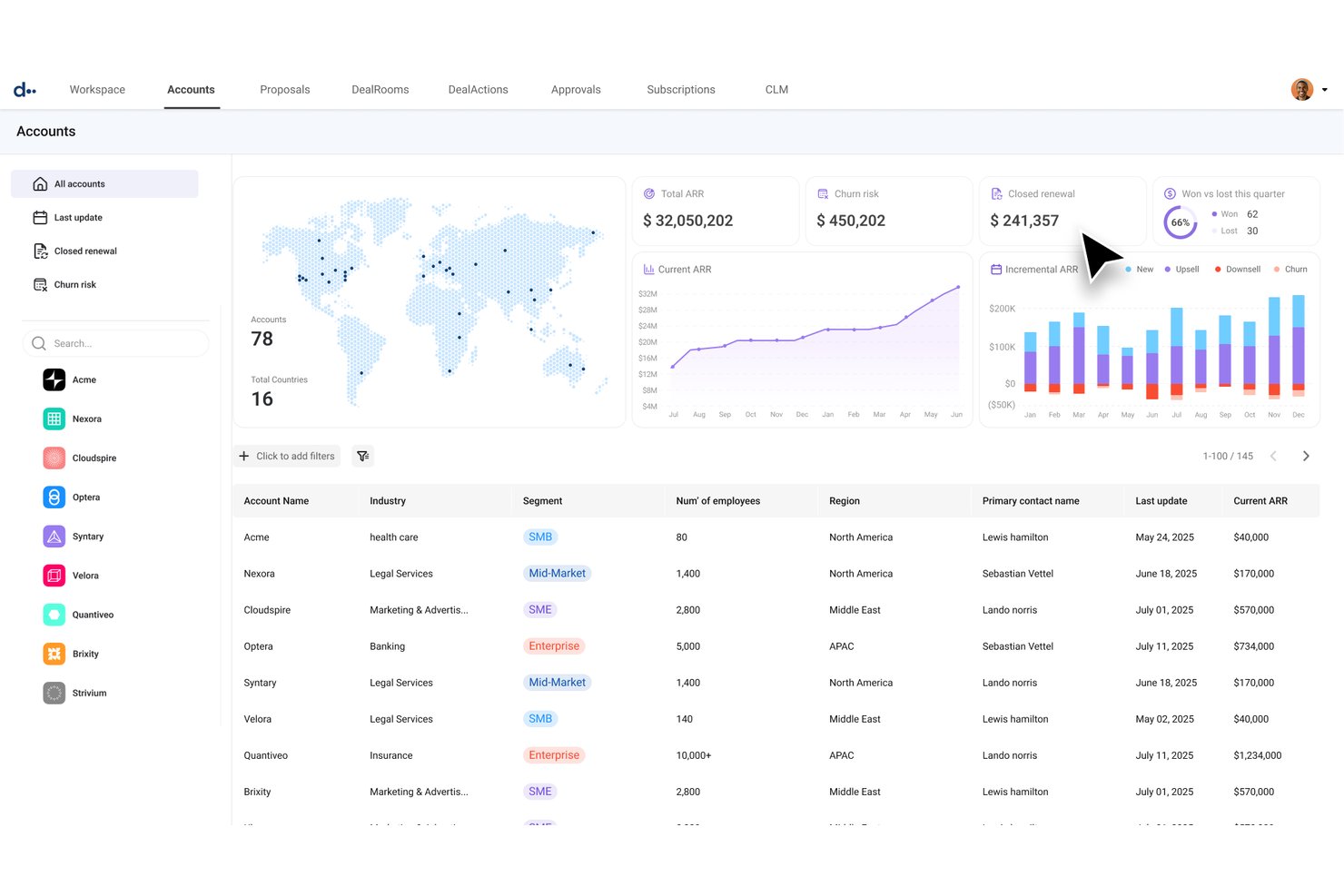
DealHub is a quote-to-revenue platform that combines CPQ, AI-assisted quoting, digital sales rooms, e-signatures, and contract generation in a single connected workflow.
Who Is DealHub Best For?
DealHub fits sales teams running complex, high-volume quote-to-close cycles where CRM data needs to drive every proposal, quote, and contract automatically.
Why I Picked DealHub
I picked DealHub as one of the best because it's the only tool on this list where CRM data doesn't just inform a proposal—it actively builds one. When a rep opens a Salesforce or HubSpot opportunity, DealHub pulls product configuration, pricing rules, and discount guardrails directly into a guided quote, then packages everything into a branded DealRoom with e-signature ready to go. I especially like the governed approval layer, which routes pricing exceptions automatically so deals don't stall waiting on a manager.
DealHub Key Features
- AI conversational quoting: Turns natural-language deal requests into fully configured quotes, pulling pricing rules and product data automatically.
- Buyer engagement tracking: Monitors how buyers interact with shared DealRoom content, including views, downloads, and document activity.
- Automated approval workflows: Routes pricing exceptions and discount approvals to the right stakeholders using parallel, one-click approval flows.
- Contract generation: Builds NDAs, MSAs, and other contracts dynamically from a pre-approved clause library and CRM-integrated data.
DealHub Integrations
DealHub offers native integrations with Salesforce, Microsoft Dynamics 365, HubSpot, and DocuSign eSignature. It also supports API and MCP connectivity for custom integrations and external AI agents.
Pros and Cons
Pros:
- Buyer activity alerts reveal document engagement
- Approval workflows route pricing exceptions
- Templates keep proposals and quote terms consistent
Cons:
- Complex pricing formulas need careful configuration
- AI doesn't research prospects or crawl web

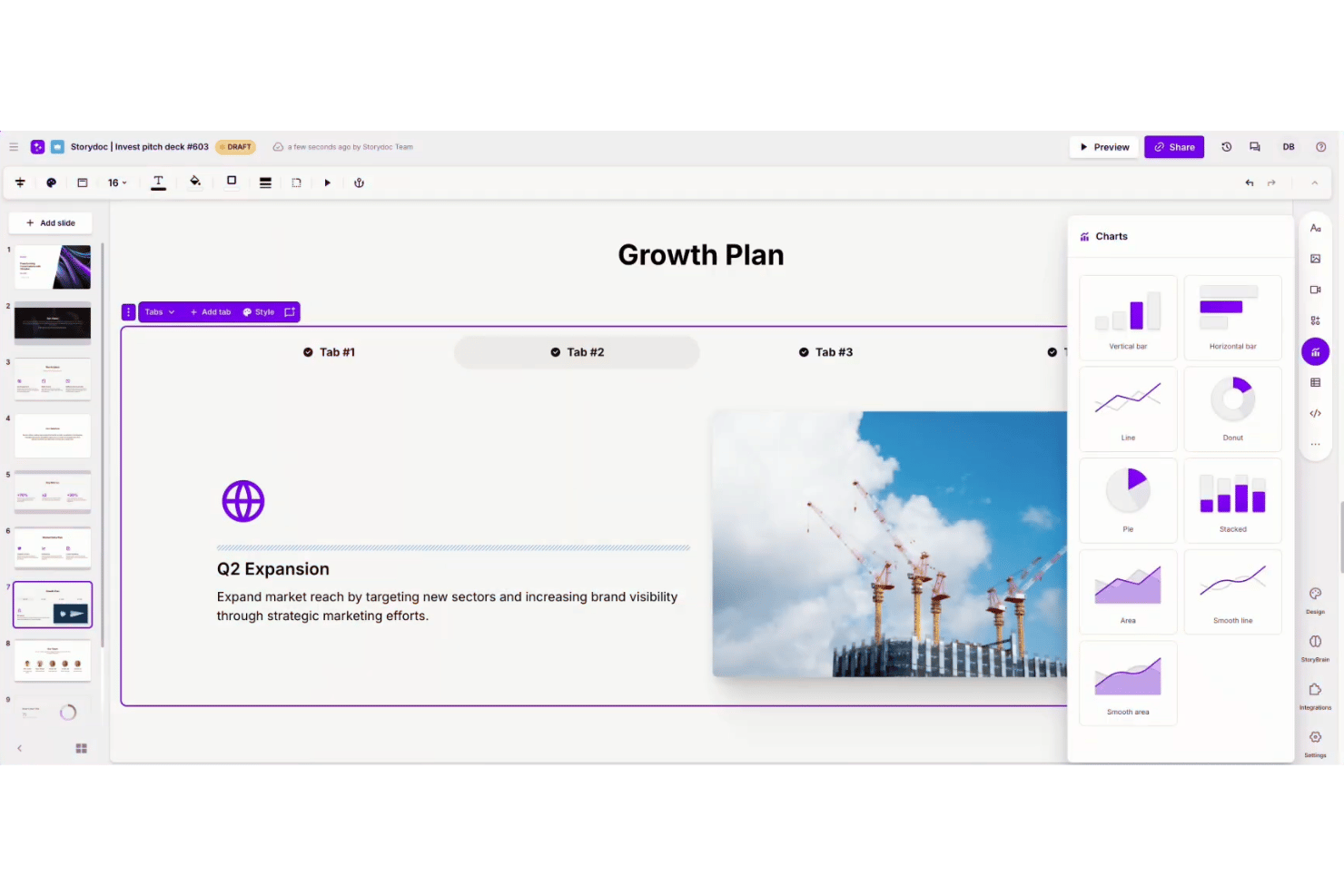
Storydoc is an AI proposal generator that creates interactive, scroll-based proposals with embedded media, pricing calculators, e-signatures, and built-in engagement analytics.
Who Is Storydoc Best For?
Storydoc is a strong fit for sales representatives and business development leads who need to send proposals that look polished and tell them exactly how prospects engage with the content.
Why I Picked Storydoc
I picked Storydoc as one of the best because its built-in engagement analytics tell you exactly how a prospect moved through your proposal: which slides they lingered on, where they dropped off, and whether they shared it internally. That visibility feeds directly into smarter follow-up. Pair that with embedded pricing calculators and one-click e-signatures, and a single Storydoc link can take a prospect from reading to signed without ever leaving the document.
Storydoc Key Features
- StoryBrain AI training: Train the AI on your brand voice, past proposals, and internal materials so generated documents reflect your existing content and style.
- Live-link updates: Edit a proposal after sending it so recipients always see the most current version without needing a new link.
- Team Slides library: Save and share reusable slides across your organization, including case studies, pricing tables, and cover slides.
- Calendar booking embed: Let prospects schedule a meeting directly from within the proposal using integrated calendar tools.
Storydoc Integrations
Storydoc offers native integrations with HubSpot and Salesforce, plus an API for custom integrations and Zapier support.
Pros and Cons
Pros:
- Reusable team slides support consistent proposals
- Tracks slide engagement to guide follow-up
- Polished templates help proposals look professional
Cons:
- PDF exports lose interactive elements and analytics
- AI doesn’t research prospects autonomously

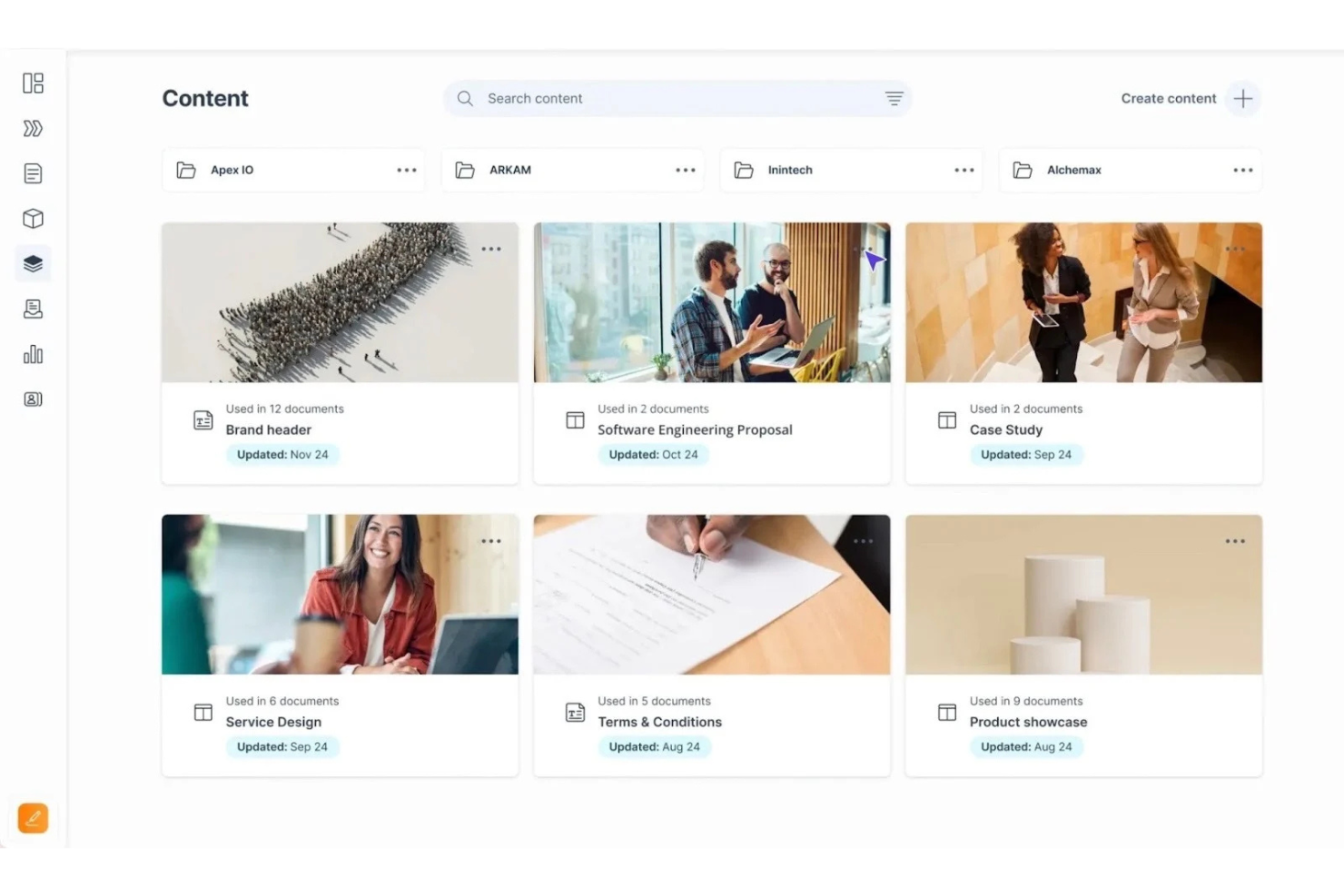
GetAccept is an AI-powered proposal and digital sales room platform that combines proposal creation, interactive pricing tables, buyer engagement tracking, e-signatures, and CRM integrations in one deal-execution workflow.
Who Is GetAccept Best For?
GetAccept fits sales reps and revenue teams who need to send, track, and close proposals fast—without juggling separate tools for quoting, e-signatures, and follow-up.
Why I Picked GetAccept
I picked GetAccept as one of the best because it treats proposal tracking and e-signatures as a single, connected workflow rather than two separate steps. I love that you can see exactly which pages a buyer spent time on, then trigger a targeted follow-up video or reminder without ever leaving the platform. Native, legally binding e-signatures are built directly into that same flow, so there's no handoff to a separate signing tool once a prospect is ready to commit.
GetAccept Key Features
- AI knowledge base: Lets admins train the AI on company content—websites, uploaded PDFs, or manually entered items—so it generates contextually relevant proposal copy.
- Deal room templates: Reusable rooms with lockable sections, placeholders, and variables that keep brand-approved content protected while allowing rep-level personalization.
- Mutual action plans: Shared buyer-seller task lists with owners and due dates that map out every step needed to close a deal.
- Deal score: A machine-learning model that scores each send-out by its likelihood of getting signed, helping reps prioritize follow-up.
GetAccept Integrations
GetAccept offers native integrations with HubSpot, Salesforce, Pipedrive, Lime CRM, Microsoft Teams, Zoom, and Gong. It also supports REST API, webhooks, and Zapier for custom integrations.
Pros and Cons
Pros:
- Native signing and reminders simplify approvals
- Reusable templates reduce repetitive proposal drafting
- Page-level tracking guides timely proposal follow-up
Cons:
- No autonomous prospect research for tailored proposals
- AI drafts can need manual rewriting

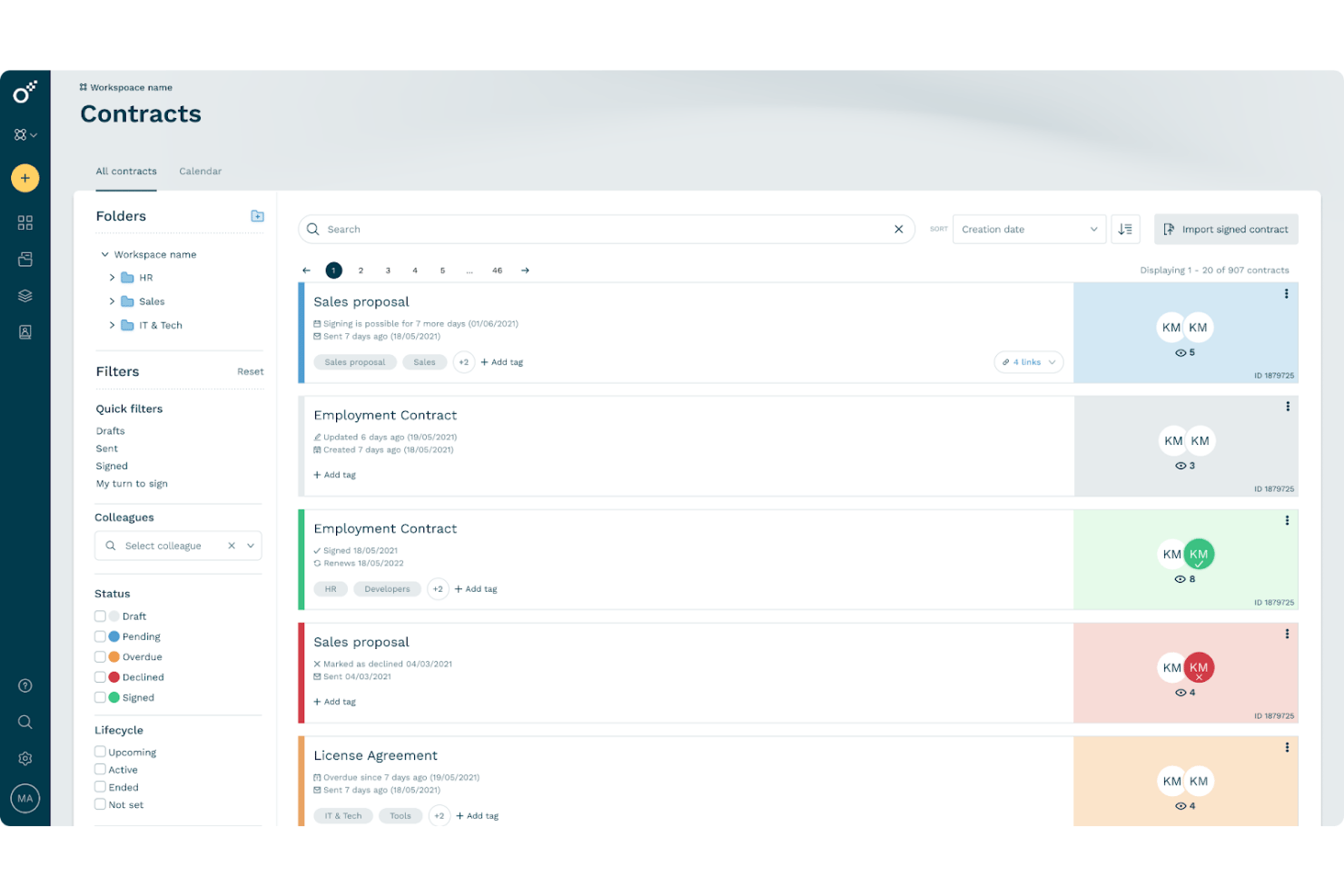
Oneflow is a contract lifecycle management platform that combines AI writing assistance, interactive proposal creation, e-signature, and CRM-connected workflows to take deals from proposal to signed contract.
Who Is Oneflow Best For?
Oneflow is a strong fit for sales teams that need proposals and contracts to live in the same workflow, connected directly to their CRM.
Why I Picked Oneflow
I've included Oneflow in my top picks because it's the only tool on this list that keeps proposals and contracts inside a single, CRM-connected workflow. I love how deal data from Salesforce, HubSpot, or Dynamics 365 populates directly into live, interactive proposals, so there's no manual re-entry when a deal moves forward. The built-in e-signature and internal approval routing mean a proposal can become a signed contract without ever leaving the platform.
Oneflow Key Features
- AI writing assistance: Write with AI helps you draft, refine, and review contract and proposal content directly inside the document editor.
- Content Library: Store and reuse approved text sections across multiple templates, with published updates syncing to connected templates.
- Interactive pricing tables: Product-table sections let recipients view prices, apply discounts, and select quantities, with totals calculated automatically.
- Contract insights dashboard: Track proposal and contract engagement, including visit counts and open activity, from a centralized dashboard.
Oneflow Integrations
Oneflow offers native integrations with Salesforce, HubSpot, and Microsoft Dynamics 365. It also provides API and webhook access for custom integrations and supports Zapier.
Pros and Cons
Pros:
- Live proposals reduce email version churn
- Interactive pricing tables support tailored packages
- Reusable templates speed proposal preparation
Cons:
- Template formatting can require extra fixes
- AI doesn't research prospects autonomously

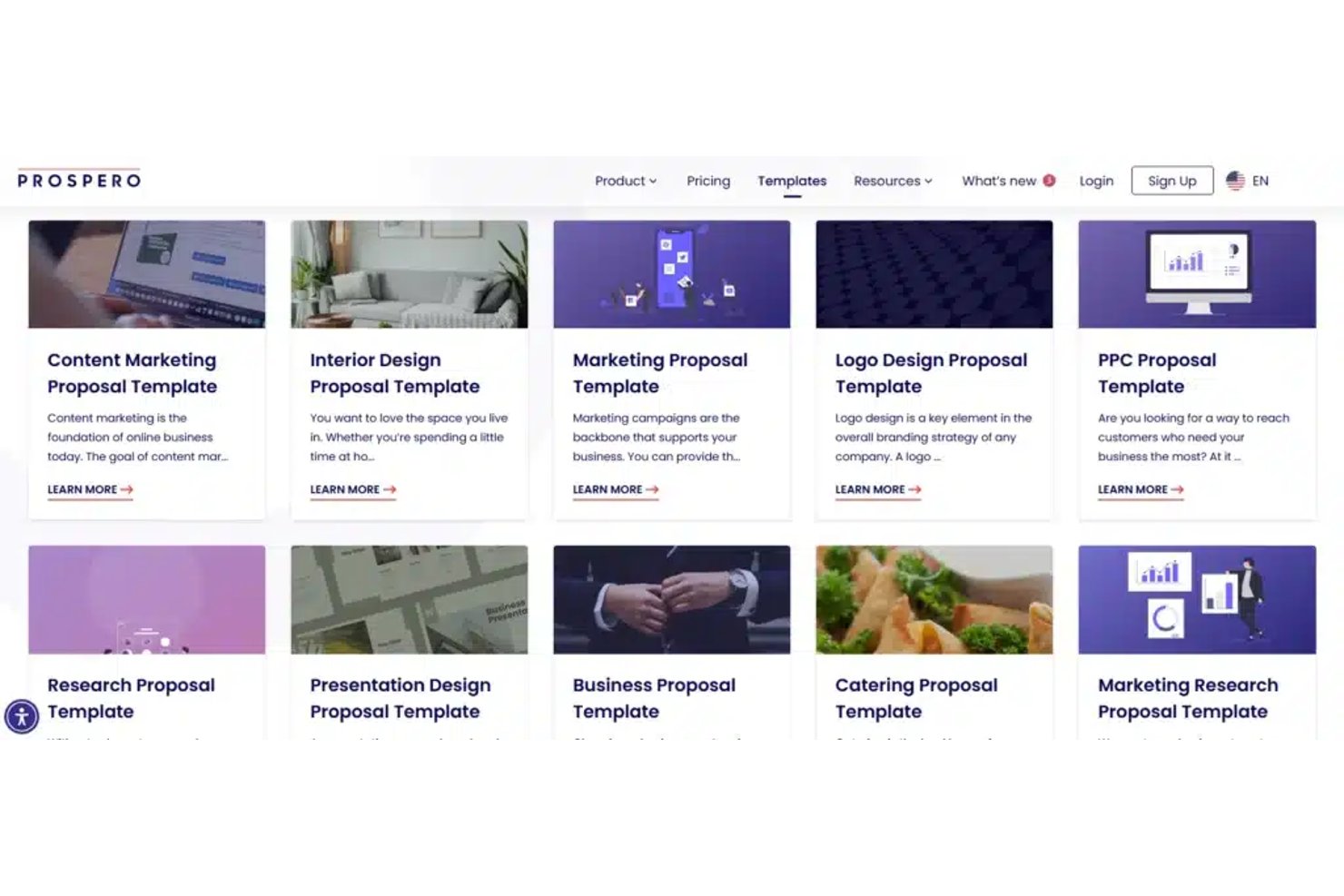
Prospero is an AI proposal generator that pairs an AI writing and image assistant with customizable templates, interactive pricing tables, e-signatures, and proposal tracking.
Who Is Prospero Best For?
Prospero is a strong fit for freelancers and small agencies who need a polished, all-in-one proposal tool without paying enterprise-level prices.
Why I Picked Prospero
I've included Prospero in my top picks because it delivers the core proposal toolkit—customizable templates, interactive pricing tables, e-signatures, and proposal tracking—at a price point that doesn't require an enterprise budget. I like that the pricing tables support quantity, duration, taxes, and discounts, so you can build a genuinely dynamic quote inside the proposal itself. The content library with 113-plus templates also means you're not starting from scratch every time.
Prospero Key Features
- AI text and image assistant: Generate and edit proposal copy or visuals directly inside the editor using a single prompt.
- E-signature with audit trail: Collect typed, drawn, or uploaded signatures from up to two signers, with timestamp, IP, and device recorded for each.
- Proposal engagement tracking: Monitor open counts, viewing duration, and device details for each sent proposal, plus get email notifications when a client opens one.
- HubSpot and Pipedrive integration: Pull contact and deal data from your CRM to auto-populate proposals, and sync proposal status back to the connected record.
Prospero Integrations
Prospero offers native integrations with HubSpot, Pipedrive, QuickBooks, FreshBooks, Stripe, Square, Monday, Wix, and Slack. It also supports Zapier and Make, but no public API is documented.
Pros and Cons
Pros:
- Proposal views help guide client follow-ups
- Interactive quotes combine pricing and signatures
- Reusable templates speed polished proposal drafts
Cons:
- Reviewers want deeper engagement reporting
- AI doesn’t research prospects autonomously
Diğer Yapay Zekâ Teklif Oluşturucuları
Kısa listeme girmeyen ancak yine de göz atmaya değer bazı ek yapay zekâ teklif oluşturucu seçenekleri şunlardır:
- Nusii
For freelancers sending tracked proposals
- Taskip
For agency proposals with built-in quoting
- Responsive
For structured RFP and questionnaire responses
- Venngage
For accessible proposal PDFs
- Bonsai
For freelance proposals with built-in billing
- Gamma
For proposals reused as sales collateral
- Zoho Sign
For AI checks on proposal contract terms
- QorusDocs
For proposal work inside Microsoft 365
- GovDash
For government RFP proposals end-to-end
- Manus
For AI-agent-led prospect research


How I Evaluate AI Proposal Generators
To make this list, a tool's AI needs to handle real proposal work, like drafting context-aware content and populating templates from deal data. From there, I evaluate three things. Core functionality carries the most weight, like customizing branded templates and tracking proposal engagement. Then I look at content library reuse and how clearly vendors explain client data retention and AI training.
Core Functionality (Table Stakes For This List)
When I'm selecting tools for my list, I score each one on a scale from 0 (does not offer the functionality) to 5 (excels in this area) for each core functionality listed below. I then convert the total into a percentage to help assess each tool's overall fit, with extra weight on any functionalities I’ve deemed essential.
- AI Capabilities (Essential): I look for context-aware drafting or deal-data mapping that turns discovery notes and CRM details into a useful first draft, not just generic text.
- Customizable Templates (Essential): Can teams adapt branded layouts and reusable scope, deliverable, and timeline blocks for different clients while preserving approved language?
- Pricing Tools: I check whether teams can build clear line-item estimates, calculate totals, and present package options within the proposal.
- E-Signature & Approval: I look for client signing and internal sign-off steps that fit the proposal workflow, rather than requiring a separate manual handoff.
- Proposal Tracking: Can teams see when a client views a proposal and which sections they review, so they can time follow-up to real engagement?
- CRM Integration: I evaluate how deal details populate proposals and whether proposal status syncs back to sales tools for a clear handoff.
Once I have a list of tools that meet the criteria, I consider what sets each platform apart.
Differentiating Factors (What Sets Vendors Apart)
Here's how I compare and contrast different vendors:
Standout Features
Content library reuse is the first thing I check. Teams that run dozens of proposals a month need pre-approved scope blocks, case studies, and pricing snippets they can drop in without rewriting from scratch. I also look at brand compliance controls, since locked sections and admin-level permissions keep legal language and pricing intact even when reps customize the rest. Deal win analytics round out the picture—tools like Proposify surface patterns from closed-won proposals so teams can adjust structure and messaging based on what actually converts.
Beyond Features
I check whether vendors clearly disclose how client data is handled—especially whether uploaded pricing or scope details train their AI models. Agencies sending sensitive client information need that transparency before onboarding. I also evaluate pricing model clarity, since per-seat and per-proposal tiers scale very differently depending on team size and proposal volume. Hidden AI usage caps can quietly inflate costs for high-volume teams.
Yapay Zekâ Teklif Oluşturucu Nasıl Seçilir?
Uzun özellik listeleri ve karmaşık fiyatlandırma yapıları arasında kaybolmak kolaydır. Kendinize özgü yazılım seçim sürecinizde ilerlerken odağınızı korumanıza yardımcı olmak için göz önünde bulundurmanız gereken faktörleri aşağıdaki kontrol listesinde derledik:
| Faktör | Dikkat Edilmesi Gerekenler |
|---|---|
| Ölçeklenebilirlik | Araç, ekibinizin beklenen teklif hacmini ve gelecekteki büyümesini destekleyebilir mi? Yeni kullanıcılar eklemek veya aynı anda birden fazla projeyi yönetmek sorunsuz olacak mı? |
| Entegrasyonlar | İçerik depolarınıza, CRM sisteminize veya Microsoft 365 ya da Google Workspace gibi ofis paketlerine doğrudan bağlanabiliyor mu? Eksiklikler manuel çalışmaya veya iş akışı gecikmelerine yol açabilir. |
| Özelleştirilebilirlik | Şablonları, onay iş akışlarını ve içerik kitaplıklarını geliştirici desteği olmadan kendi teklif süreçlerinize tam olarak uyarlayabilir misiniz? |
| Kullanım kolaylığı | Arayüz, hem ara sıra hem de sık kullanan kullanıcılar için sezgisel mi? Ekibiniz, çok az eğitim veya belge desteğiyle gerçekçi biçimde bir teklif hazırlayabilir mi? |
| Uygulama ve işe alıştırma | Hangi kurulum ve veri taşıma adımları gerekiyor? Öğrenme eğrisini ve sağlayıcı tarafından sunulan işe alıştırma desteğini, ürün turlarını veya belgeleri değerlendirin. |
| Maliyet | Abonelik katmanları bütçenizle uyumlu mu ve ekip büyüklüğünüz ile özellik gereksinimleriniz için değer sağlıyor mu? Depolama, kullanıcılar veya eklentiler için alınan ek ücretlere dikkat edin. |
| Güvenlik önlemleri | Özellikle hassas RFP teklifleri için veri erişimi, denetim izleri ve kuruluşunuzun gizlilik veya sektör standartlarına uyumluluk konusunda kontroller bulunuyor mu? |
| Destek kullanılabilirliği | Sağlayıcı hangi kanalları ve hizmet düzeylerini sunuyor? Canlı bir teklif gönderimini engelleyen bir sorun olduğunda desteğe hızlıca ulaşabilir misiniz? |
Yapay Zekâ Teklif Oluşturucu Nedir?
Yapay zekâ teklif oluşturucular, işletme tekliflerinin ve RFP yanıtlarının oluşturulmasını, düzenlenmesini ve yönetilmesini otomatikleştirmek için yapay zekâ kullanan yazılım araçlarıdır.
Bu araçlar; içerik kütüphanelerinden, doğal dil işlemeden ve iş akışı otomasyonundan yararlanarak ekiplerin özelleştirilmiş, hatasız belgeler hazırlamasına yardımcı olur, manuel çabayı azaltır ve yüksek öneme sahip teklifler için geri dönüş sürelerini hızlandırır.
Özellikler
Bir yapay zekâ teklif oluşturucu seçerken aşağıdaki temel özelliklere dikkat edin:
- Yapay zekâ tabanlı içerik önerileri: Geçmiş belgelerinize ve teklif talebi gereksinimlerine göre ilgili metinleri, yanıtları veya bölümleri önermek için yapay zekâ kullanır.
- Şablon yönetimi: Tutarlılığı korumak ve teklif oluşturma sürecini hızlandırmak için markalı şablonlar oluşturmanıza, saklamanıza ve yeniden kullanmanıza olanak tanır.
- İş birliği araçları: Birden fazla kullanıcının teklifleri gerçek zamanlı olarak düzenlemesini, yorumlamasını veya onaylamasını sağlar; böylece sürüm denetimi ve ekipler arası katkı güvence altına alınır.
- İçerik kütüphanesi: Hızlı erişim ve tüm tekliflerde tutarlı yeniden kullanım için proje çıktılarıyla ilgili onaylanmış yanıtları, grafikleri ve standart bölümleri saklar.
- İş akışı otomasyonu: Tekliflerin zamanında teslim edilmesine yardımcı olmak için onay yönlendirme, bildirim uyarıları ve son tarih hatırlatıcıları gibi görevleri otomatikleştirir.
- Belge biçimlendirme ve dışa aktarma seçenekleri: Canva gibi araçları kullanarak özelleştirilmiş biçimlendirme yapmayı ve PDF, Word veya PowerPoint gibi çeşitli dosya türlerine kolayca dışa aktarmayı sağlar.
- Teklif analizleri: Tekliflere ne zaman ve nasıl erişildiğini izleyerek satış stratejilerine ve takip çalışmalarına yön verebilecek etkileşim verileri sağlar.
- Kullanıcı izinleri ve roller: Hassas bilgileri ve iş akışlarını koruyarak teklifleri kimlerin oluşturabileceği, düzenleyebileceği, inceleyebileceği veya gönderebileceği üzerinde ayrıntılı denetim sağlar.
- Uyumluluk ve denetim izleri: Teklif süreci sırasında mevzuata uyumluluk ve hesap verebilirlik için değişiklikleri izler ve kayıtları tutar.
Faydalar
Bir yapay zekâ teklif oluşturucunun uygulanması ekibiniz ve işletmeniz için çeşitli faydalar sağlar. Yararlanabileceğiniz birkaç avantaj şunlardır:
- Daha hızlı teklif hazırlama: Otomatik içerik önerileri ve yeniden kullanılabilir şablonlar, ekiplerin teklifleri çok daha hızlı oluşturmasına, incelemesine ve göndermesine yardımcı olur.
- Daha yüksek teklif tutarlılığı: Merkezi içerik kütüphaneleri ve şablon yönetimi, tutarlı marka kimliğini ve mesajları korumayı kolaylaştırır.
- Geliştirilmiş iş birliği: Gerçek zamanlı düzenleme, yorum yapma ve iş akışı araçları, ekiplerin farklı konumlarda olsalar bile sorunsuz bir şekilde birlikte çalışmasına olanak tanır.
- Artan teklif doğruluğu: Yapay zekâ destekli otomatik doldurma ve uyumluluk araçları, hataların yakalanmasına ve eksiksiz, ilgili yanıtların verilmesine yardımcı olur.
- Daha iyi görünürlük ve izleme: Yerleşik analizler ve etkileşim izleme özellikleri, alıcıların tekliflerle nasıl etkileşim kurduğuna dair içgörü sağlar.
- Azaltılmış manuel çaba: İş akışı otomasyonu ve yapay zekâ destekli yanıt önerileri, her teklif için gereken tekrarlayan işleri büyük ölçüde azaltır.
- Geliştirilmiş veri güvenliği: Güçlü izinler ve denetim özellikleri, teklif süreci boyunca hassas işletme bilgilerini korur.
Maliyetler ve Fiyatlandırma
Bir yapay zekâ teklif oluşturucu seçmek, mevcut çeşitli fiyatlandırma modellerinin ve planların anlaşılmasını gerektirir. Maliyetler özelliklere, ekip büyüklüğüne, eklentilere ve daha fazlasına göre değişir. Aşağıdaki tablo, yapay zekâ teklif oluşturucu çözümlerindeki yaygın planları, ortalama fiyatlarını ve genellikle sunulan özellikleri özetlemektedir:
Yapay Zekâ Teklif Oluşturucu İçin Plan Karşılaştırma Tablosu
| Plan Türü | Ortalama Fiyat | Yaygın Özellikler |
|---|---|---|
| Ücretsiz Plan | $0 | Temel teklif oluşturma, sınırlı şablonlar, tek kullanıcı erişimi ve kısıtlı dışa aktarma seçenekleri. |
| Kişisel Plan | $10-$25/kullanıcı/ay | Gelişmiş şablon yönetimi, basit iş birliği araçları, içerik kütüphanesine erişim ve temel analizler. |
| İşletme Planı | $30-$65/kullanıcı/ay | Ekip iş birliği, iş akışı otomasyonu, gelişmiş analizler, teklif izleme ve özel markalama seçenekleri. |
| Kurumsal Plan | $75-$150/kullanıcı/ay | Gelişmiş izinler, API erişimi, uyumluluk özellikleri, ayrıcalıklı destek, işe alıştırma hizmetleri ve denetim izleri. |
Yapay Zekâ Teklif Oluşturucu SSS
Yapay zekâ teklif oluşturucu hakkında yaygın soruların bazı yanıtları:
Yapay zekâ teklif oluşturucu teklif sürecini nasıl hızlandırır?
Yapay zekâ teklif oluşturucular hızla ilgili içerikler önerir, bir kitaplıktan yeniden kullanılabilir bölümleri çeker ve onay iş akışlarını otomatikleştirir. Bu, ekiplerin geçmiş yanıtları aramaya veya biçimlendirmeyi yeniden yapmaya daha az zaman harcaması anlamına gelir; böylece kaliteden ödün vermeden sıkı teslim tarihlerine uyabilirsiniz.
Yapay zekâ teklif oluşturucular diğer iş araçlarıyla entegre olabilir mi?
Evet, çoğu yapay zekâ teklif oluşturucu CRM sistemleri, belge depolama platformları ve üretkenlik paketleri gibi araçlara bağlanır. Entegrasyonlar müşteri verilerini almanıza, belgeleri senkronize etmenize ve mevcut teknoloji yığınınız genelinde iş akışlarını sorunsuz biçimde sürdürmenize yardımcı olur.
Yapay zekâ teklif oluşturucuda depolanan veriler ne kadar güvenli?
Çoğu sağlayıcı şifreleme, kullanıcı izinleri ve denetim günlükleri gibi standart güvenlik uygulamalarını kullanır. Özellikle gizli müşteri veya şirket verilerini işlerken, uyumluluk sertifikaları ve hassas dosyalara kimlerin erişebileceğini kontrol etme seçenekleri sunan çözümleri tercih edin.
Ekibimi yeni bir yapay zekâ teklif oluşturucuya alıştırmak zor mu?
Hayır, çoğu platform ekiplerin hızlıca başlamasına yardımcı olmak için şablonlar, ürün tanıtımları ve eğitim videoları sunar. İyi bir başlangıç sürecinde, yeni kullanıcıların ilk hafta içinde değer elde etmesine yardımcı olacak canlı destek ve anlaşılır belgeler bulunmalıdır.
Bir yapay zekâ teklif oluşturucudan ne tür analizler bekleyebilirim?
Alıcı etkileşimi, belge açılma oranları ve onay durumu takibi gibi içgörüler bekleyebilirsiniz. Bu analizler hangi tekliflerin ilerlediğini görmenize ve sürecinizi ve yanıt oranlarınızı iyileştirmenin yollarını belirlemenize yardımcı olur.