

2026’nın En İyi 10 Yapay Zekâ Fatura Oluşturucusu

En İyi Yapay Zekâ Faturası Oluşturucuları Kısa Listesi


Yapay zekâ faturası oluşturucu, işletmeniz için fatura oluşturma, kişiselleştirme ve yönetme süreçlerini otomatikleştirmek üzere yapay zekâ kullanan bir yazılımdır. En iyi yapay zekâ faturası oluşturucuyu arıyorsanız muhtemelen faturalandırmayı hızlandırmak, manuel veri girişini azaltmak ve yinelenen ya da karmaşık faturaları işlerken hataları en aza indirmek istiyorsunuz. Bu kadar çok seçenek arasından iş akışınıza ve bütçenize uygun olanı bulmak bunaltıcı olabilir. Bu rehber, önde gelen araçları inceler, her birini benzersiz kılan özellikleri öne çıkarır ve ekibinizin ihtiyaçları ile hedefleri için doğru çözümü belirlemenize yardımcı olur.
Yazılım Önerilerimize Neden Güvenebilirsiniz?
Ekibimiz 2012’den beri yazılımları test ediyor ve inceliyor. Biz de proje yöneticisi olduğumuz için doğru yazılımı seçmenin ne kadar zor ve önemli olduğunu biliyoruz.
Bu rehber için araçları uygulamalı testler ve bağımsız araştırmalarla değerlendirdik ve seçim kriterlerimize göre puanladık. Ayrıca sektörün fikir önderlerinin ve alanında çalışan proje yönetimi uzmanlarının görüşlerinden de yararlanıyoruz.
İncelemelerimiz bir satış konuşması değil, editör ekibimizin kendi değerlendirmesidir.
Uzman inceleyenler:
Yapay Zekâ Faturası Oluşturucu Karşılaştırma Tablosu
Bu karşılaştırma tablosu, en iyi yapay zekâ faturası oluşturucu seçimlerimin fiyatlandırma ayrıntılarını özetler.
| Tool | Starting Price | Website | |
|---|---|---|---|
| Best for contract and payment integration | 4.6 out of 5 | $9/user/month 7-day free trial | Website |
| Best for multi-user team permission controls | — | $8/month Free plan + free demo available | Website |
| Best for client portal and feedback features | — | $19/month 7-day free trial | Website |
| Best for agency-centric invoice tools | 4.6 out of 5 | $10/user/month 14-day free trial + demo available | Book Demo |
| Best for end-to-end business management | 4.5 out of 5 | $17/user/month 14-day free trial + free demo available | Book Demo |
| Best for time tracking and billing integration | — | $11/user/month Free plan + 30-day free trial + demo available | Website |
| Best for multi-currency invoice generation | 5.0 out of 5 | $14/month Free plan available | Website |
| Best for fast invoice creation from email data | — | $29.99/user/month Free plan + 7-day trial + demo available | Website |
| Best for one-click invoice automation | — | Pricing upon request Free plan available | Website |
| Best for freelancers needing flexible templates | — | $20/month Free plan available | Website |


En İyi Yapay Zekâ Faturası Oluşturucu İncelemeleri
Aşağıda, kısa listeme giren en iyi yapay zekâ faturası oluşturucularının ayrıntılı özetlerini bulabilirsiniz. İncelemelerim, size en uygun olanı bulmanıza yardımcı olmak için her aracın özelliklerine, en iyi kullanım alanlarına ve entegrasyonlarına ayrıntılı bir bakış sunar.

Bonsai
Best for contract and payment integration
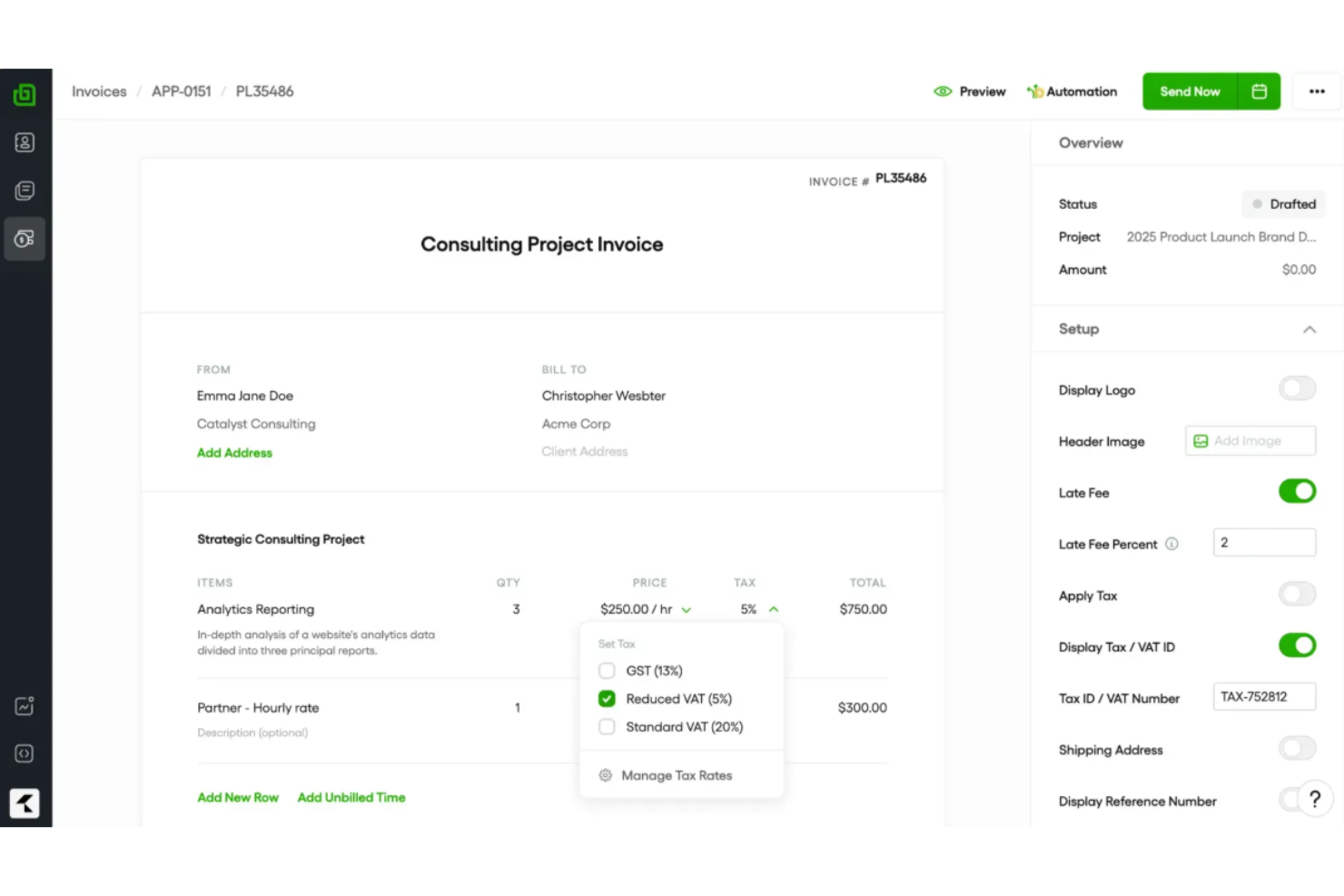
Bonsai is a client management platform for freelancers and small businesses that offers AI-powered invoice generation, contract creation, payments, proposals, and workflow automation in one place.
Who Is Bonsai Best For?
Bonsai is ideal for freelancers and small business owners who need integrated tools for contracts, invoicing, and payment management in one platform.
Why I Picked Bonsai
I picked Bonsai as one of the best because I can generate AI-powered invoices directly tied to contracts, get clients to e-sign documents, and then trigger payment requests from a single workspace. I like having proposals, contracts, and invoicing so tightly connected.
Bonsai Key Features
- AI-powered invoice creation: Generate invoices automatically from tracked hours and billable tasks.
- Recurring payment scheduling: Set up and manage automated recurring invoices for repeat clients.
- Expense tracking: Categorize and monitor project-related expenses within the same workspace.
- Tax reports dashboard: Access downloadable tax summaries and financial reports for every client and project.
Bonsai Integrations
Bonsai offers native integrations with QuickBooks, PayPal, Stripe, and Zapier. An API is also available for custom integrations.
Pros and Cons
Pros:
- Contracts, proposals, and invoicing in one system
- AI reads tracked hours for invoice creation
- Generates invoices directly from contracts
Cons:
- Few workflow automation capabilities
- No built-in file or asset proofing mechanisms


Refrens is an online invoicing platform for teams that offers invoicing, estimate management, purchase orders, expense tracking, and payment collection in one system.
Who Is Refrens Best For?
Refrens is a strong fit for small to midsize businesses that need multi-user invoicing, approval processes, and expense management for distributed teams.
Why I Picked Refrens
I picked Refrens because I can set detailed user permissions for billing, finance, and sales roles—controlling who can create, approve, or edit invoices. I like having dedicated approval flows and audit logs for every edit or action on invoices.
Refrens Key Features
- Invoice generator: Quickly create GST-compliant invoices with customizable fields.
- Expense tracking: Log and categorize expenses directly within the platform.
- Quotation and estimate tools: Build and send sales quotes or estimates to clients.
- Recurring billing: Automate invoice generation for repeat clients or subscriptions.
Refrens Integrations
Refrens offers native integrations with Razorpay, PayPal, and Google Sheets. An API is available for custom integrations.
Pros and Cons
Pros:
- Built-in client portal for invoice sharing
- Approval workflows for invoice edits
- Multi-level team and role permissions
Cons:
- No built-in OCR for document scanning
- Limited third-party software connections


Plutio is an all-in-one business management platform with invoicing, proposals, contracts, time tracking, and task management for teams and freelancers.
Who Is Plutio Best For?
Freelancers, agencies, and small creative teams who need an integrated system for handling client work, invoicing, and communication.
Why I Picked Plutio
I picked Plutio because I can invite clients into a secure, branded portal, collect invoice feedback, and enable clients to approve or reject line items. I also like managing project conversations and payment tracking all in one place.
Plutio Key Features
- Custom invoice templates: Create branded invoices with adjustable fields and layouts.
- Multi-currency support: Issue invoices and accept payments in multiple currencies.
- Automated payment reminders: Send scheduled follow-ups when invoices remain unpaid.
- Partial payments: Allow clients to pay invoices in multiple installments.
Plutio Integrations
Plutio offers native integrations with Stripe, PayPal, and Zapier. An API is available for custom integrations.
Pros and Cons
Pros:
- Built-in commenting and feedback for each invoice
- Supports partial payments and installment scheduling
- Invoices and payment status visible in client portal
Cons:
- Invoice templates have few customization options
- Automations for invoices are limited

Best for agency-centric invoice tools
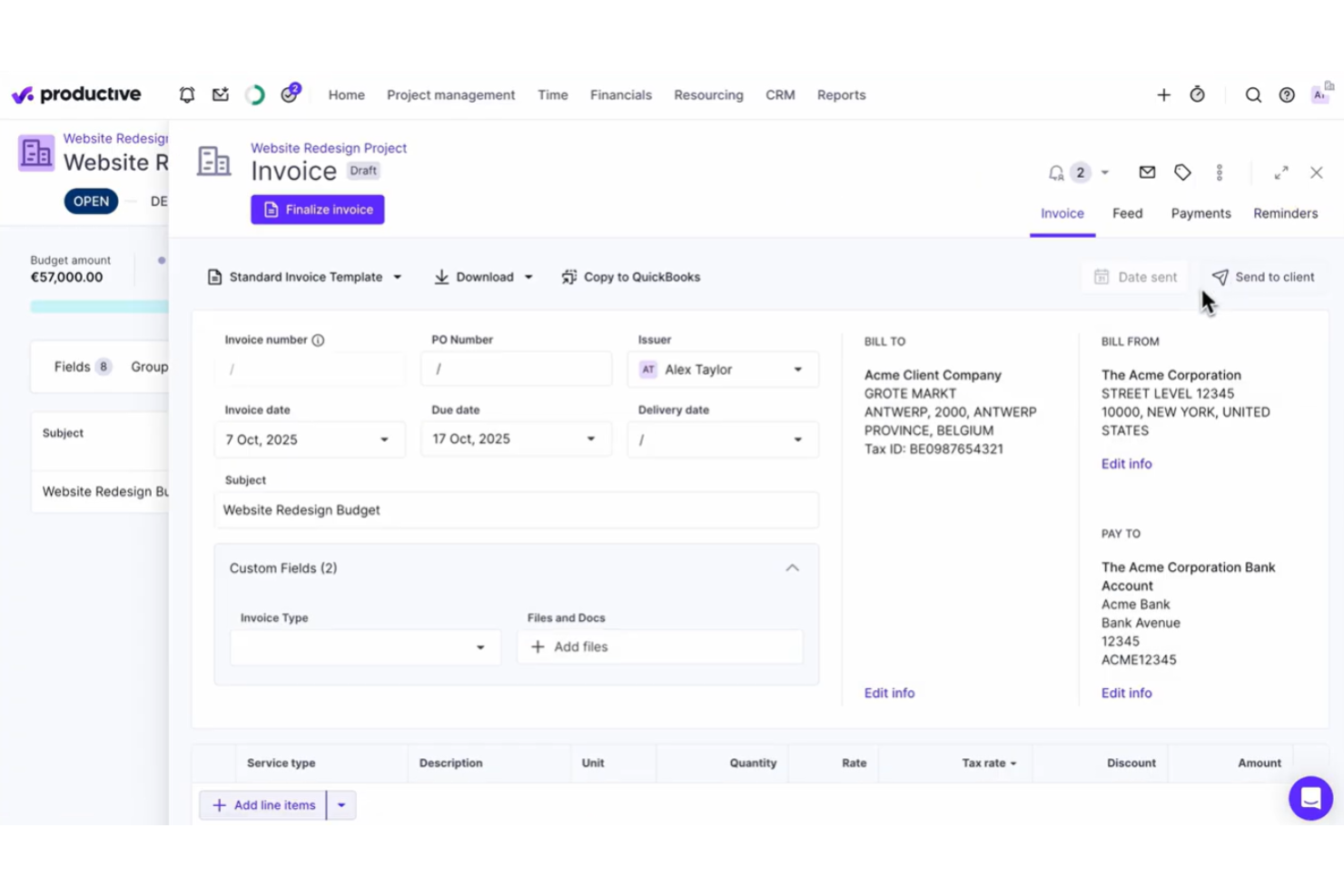
Productive is a work management and invoicing platform designed for agencies that need project budgeting, time tracking, real-time reporting, and automated invoice generation in one system.
Who Is Productive Best For?
Productive suits digital agencies and consultancies that need project-based invoicing, resource planning, and integrated time tracking in one platform.
Why I Picked Productive
I picked Productive as one of the best because I create invoices directly from tracked time, budgets, or project milestones, which is ideal for agencies with complex billing models. I also like using custom templates to match client expectations.
Productive Key Features
- Automated invoice notifications: Send automated reminders and updates to clients for outstanding invoices.
- Multi-currency support: Generate invoices and handle payments in multiple currencies for international clients.
- Integrated expense management: Attach billable expenses to invoices directly from tracked project costs.
- Batch invoice creation: Create and send multiple invoices at once for recurring or repeat work.
Productive Integrations
Productive offers native integrations with Xero, QuickBooks Online, Slack, Google Calendar, and Jira, and provides an API for custom integrations.
Pros and Cons
Pros:
- Supports multi-currency invoicing and client portals
- Links projects, budgets, and invoices automatically
- Built for agency workflows and billing models
Cons:
- Invoicing features require time tracking setup
- Invoice customization is somewhat limited
New Product Updates from Productive
Productive Adds Email and Calendar Integrations for Agents
Productive adds Gmail, Outlook, Google Calendar, and Outlook Calendar connectors for its AI agents. These integrations let agents manage emails and create calendar events directly within Productive. For more information, visit Productive’s official site.

Scoro
Best for end-to-end business management
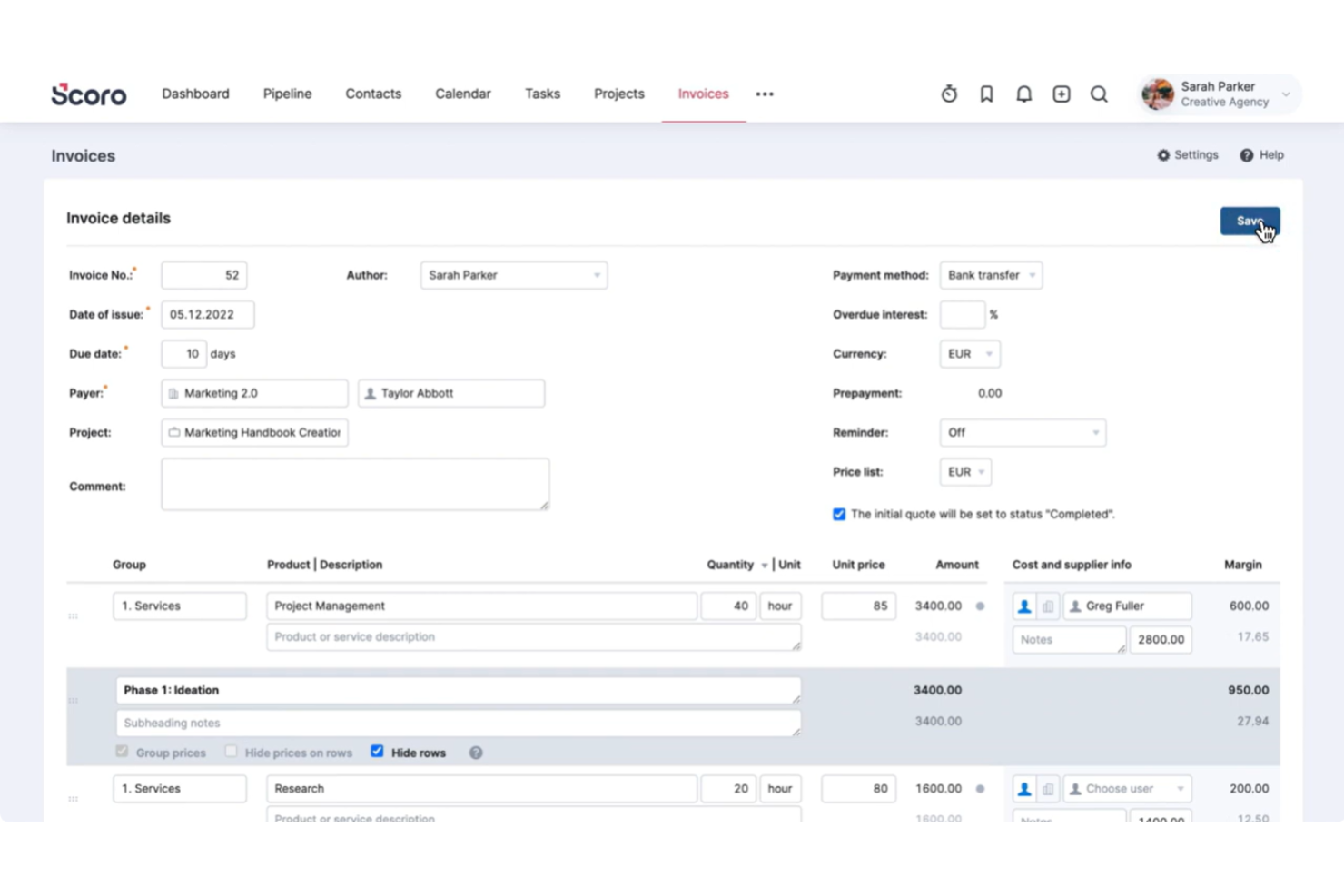
Scoro is a unified business management platform for invoicing, quoting, billing, and automation that combines financial management with project tracking and workflow automation tools.
Who Is Scoro Best For?
Scoro is a good fit for mid-sized agencies and consultancies that need integrated invoicing, project management, and workflow tools in one platform.
Why I Picked Scoro
I picked Scoro as one of the best because I can issue invoices, manage recurring payments, and track overdue accounts, all while tying them directly to projects and quotes. I like viewing business performance and invoicing data from a single dashboard.
Scoro Key Features
- Customizable invoice templates: Create and save branded templates with pre-configured fields.
- Product and service catalogue: Add items directly to invoices from a searchable catalogue.
- Multi-currency support: Generate invoices in multiple currencies for global clients.
- Automated tax calculations: Apply regional taxes automatically during invoice creation.
Scoro Integrations
Scoro offers native integrations with Xero, QuickBooks, Mailchimp, Google Calendar, Outlook, and Dropbox, and it provides an API for custom integrations.
Pros and Cons
Pros:
- Offers built-in approval workflows for invoices
- Handles recurring billing and subscription invoicing
- Connects invoices directly to tracked projects
Cons:
- Custom invoice fields are only partly configurable
- Time tracking must be enabled for invoicing
New Product Updates from Scoro

Scoro Adds Time Mobile App and ELI Improvements
Scoro adds the Scoro Time mobile app for iOS/Android to track time anywhere and expands ELI with attachments, smarter filtering, and trigger-based actions. For more information, visit Scoro's official site.

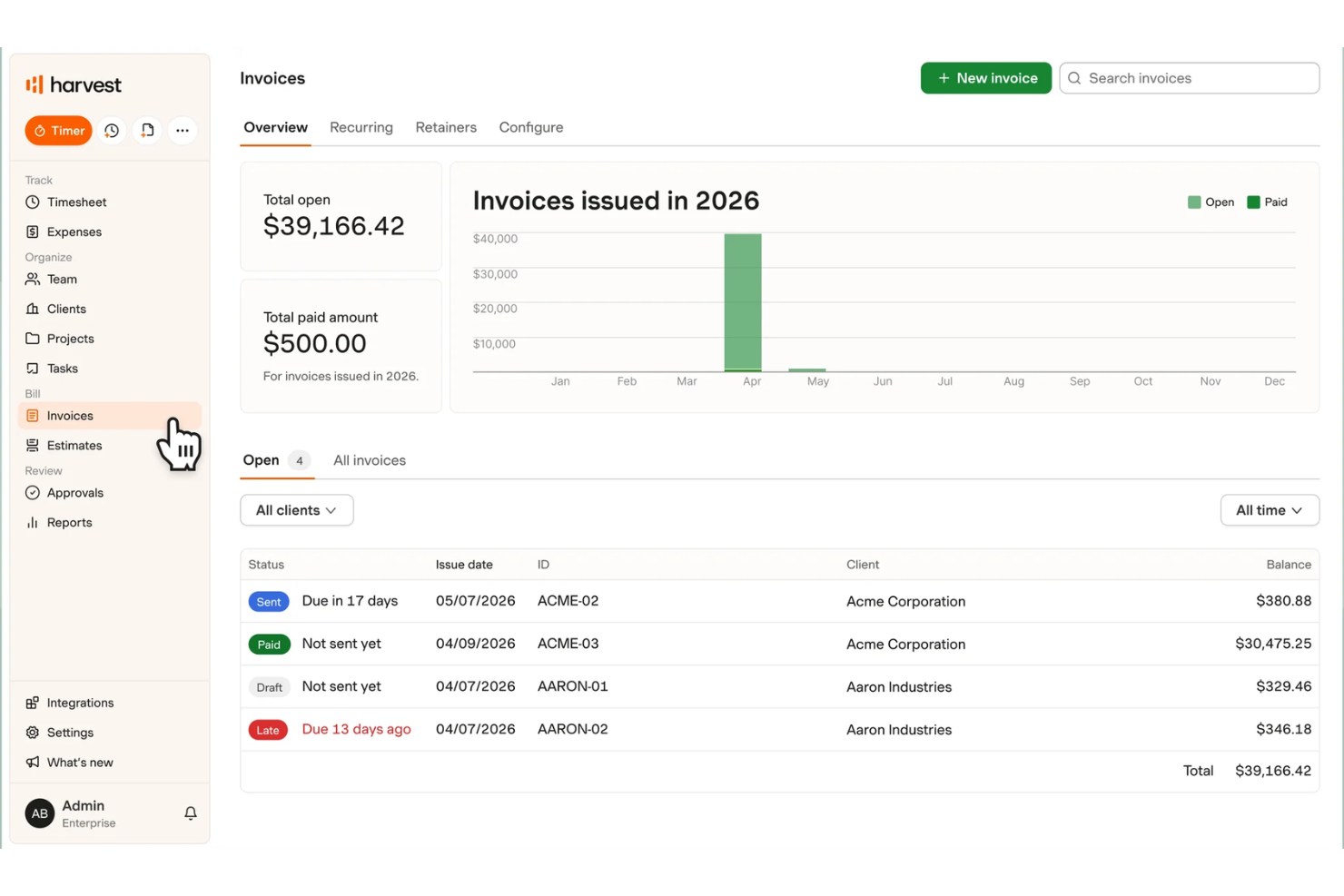
Harvest is a time tracking and invoicing platform that brings together project timesheets, AI-powered invoice generation, expenses management, and billing workflows for teams and freelancers.
Who Is Harvest Best For?
Harvest is a strong fit for agencies and service-based businesses that need combined time tracking and invoicing in one platform.
Why I Picked Harvest
I picked Harvest because I can turn tracked billable hours into AI-powered invoices, all linked within ongoing projects. I like how the tool pulls accurate time, expense, and rate data from timesheets into professional invoice templates with almost no manual entry.
Harvest Key Features
- Multiple currency support: Send invoices in over 160 currencies for global clients.
- Custom invoice fields: Add custom notes, tax rates, and payment terms to each invoice.
- Invoice status tracking: Monitor which invoices are sent, viewed, and paid in real time.
- Payment integration: Accept online payments directly through PayPal and Stripe.
Harvest Integrations
Harvest offers native integrations with QuickBooks Online, Xero, Stripe, PayPal, Asana, Trello, Google Workspace, Slack, and Jira. An API is available for custom integrations.
Pros and Cons
Pros:
- Supports multiple currencies in invoices
- Tracks time, expenses, and projects together
- AI-generated invoices from tracked billable hours
Cons:
- Does not automate recurring payment reminders
- AI suggestions limited to invoice creation

Eonebill
Best for multi-currency invoice generation
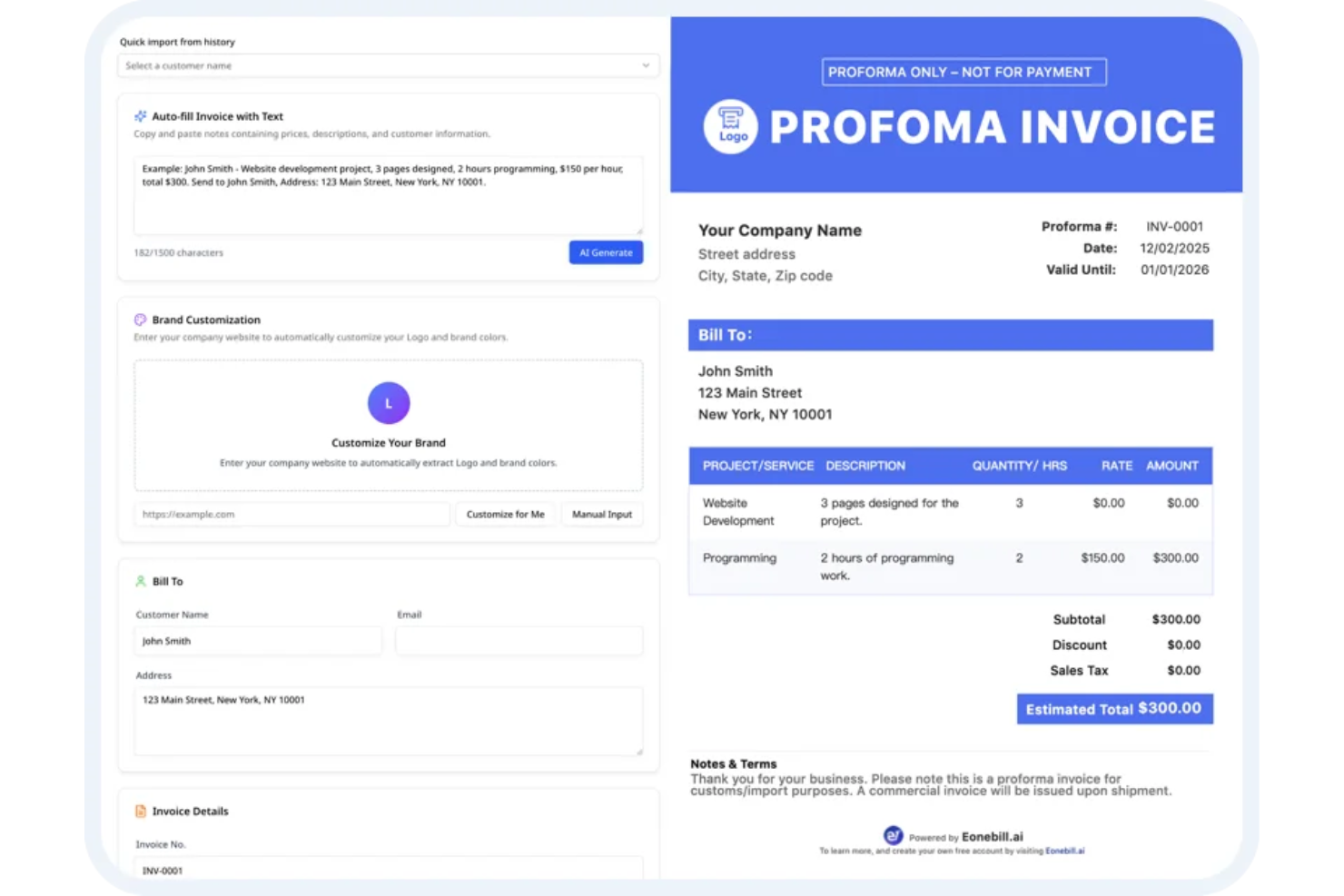
Eonebill is an AI invoice generator platform for businesses that supports invoice creation, automated payment collection, GST and tax compliance, expense tracking, and global client management.
Who Is Eonebill Best For?
Eonebill is a good fit for finance teams or small businesses managing international clients and needing built-in multi-currency invoicing functionality.
Why I Picked Eonebill
I picked Eonebill because I can create invoices in multiple currencies with real-time exchange rates and auto-convert totals. I like being able to send AI-powered invoices to international clients and track GST, VAT, and other taxes automatically.
Eonebill Key Features
- Automated payment reminders: Schedule and send payment follow-up messages to clients automatically.
- Expense tracking: Log and categorize business expenses inside the platform for financial oversight.
- GST and tax compliance tools: Generate GST, VAT, and other compliance reports directly from invoices.
- Multi-user access: Allow team members to collaborate and manage invoices under one account.
Eonebill Integrations
It provides an API for custom integrations.
Pros and Cons
Pros:
- AI-assisted invoice creation from tracked hours
- Automated GST and VAT compliance features
- Multi-currency invoice generation with real-time conversion
Cons:
- Invoice template customization options are basic
- Limited native integrations for workflow automation

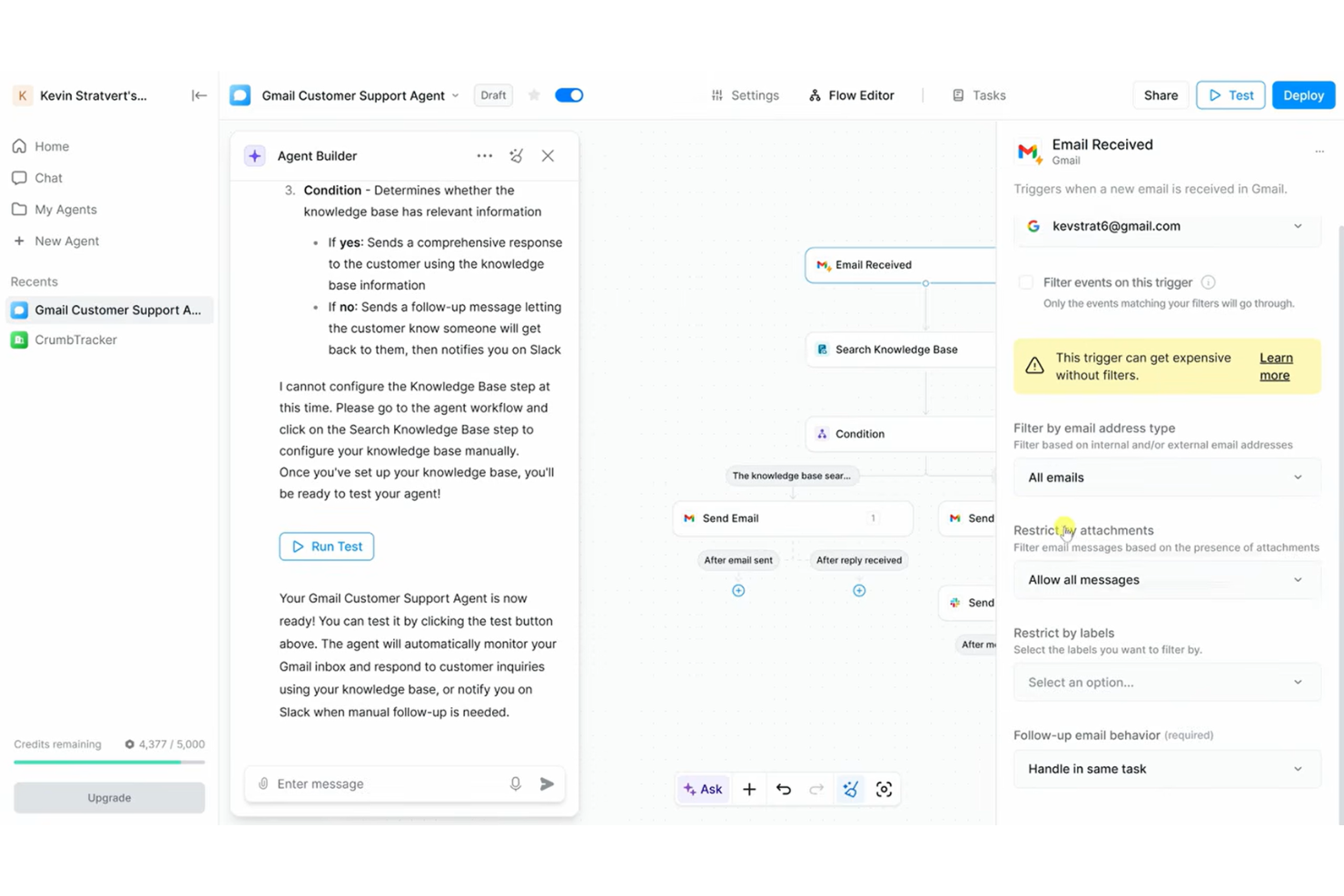
Lindy is an AI invoice generator platform that uses automation and email parsing to help teams create, manage, and customize invoices directly from communication data.
Who Is Lindy Best For?
Small businesses and finance teams that manage high volumes of invoice requests by email.
Why I Picked Lindy
I picked Lindy as one of the best because I can extract invoice details straight from email threads, automatically generate draft invoices, and handle frequent, ad hoc billing requests without switching between tools.
Lindy Key Features
- Custom invoice templates: Create and save templates to match your branding and client needs.
- Automated data extraction: Pull line item details from attached files and forms.
- Batch invoice processing: Generate and send multiple invoices in bulk with a single action.
- Real-time invoice tracking: Monitor invoice status updates within the dashboard.
Lindy Integrations
Integrations include Google Sheets, Gmail, Slack, Google Drive, HubSpot, Calendly, Airtable, Salesforce, Amazon, and Adobe Photoshop.
Pros and Cons
Pros:
- Scales high-volume billing capacity
- Handles high volumes of billing requests quickly
- Captures invoice details directly from email content
Cons:
- Advanced customization options are limited
- Base tier limits number of connected mailboxes
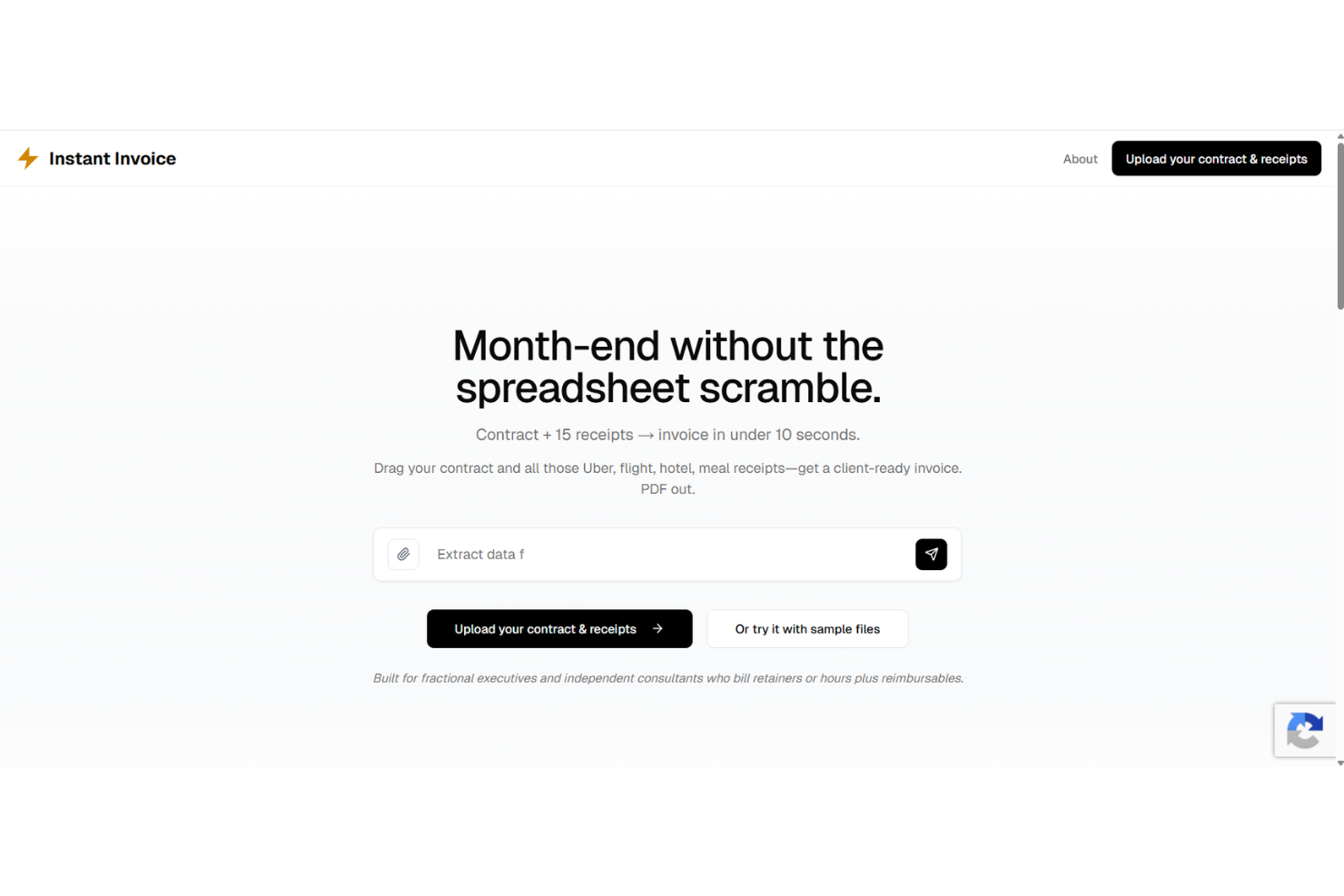
Instant Invoice is an AI invoice generator that uses automation and smart template matching to let you create, customize, and send invoices with minimal manual steps.
Who Is Instant Invoice Best For?
Freelancers and small business owners who need to automate invoice creation and delivery with minimal manual work.
Why I Picked Instant Invoice
I included Instant Invoice in my shortlist because I can auto-populate invoice fields from client data and trigger invoice creation with one click. I like being able to set up recurring invoice workflows and manage drafts in a centralized dashboard.
Instant Invoice Key Features
- Custom invoice templates: Choose from pre-built designs or create your own styles.
- Smart data extraction: Automatically recognize and input details from uploaded files.
- Multi-currency support: Issue invoices in different currencies for global clients.
- Audit trail tracking: Keep a record of invoice edits and user actions.
Instant Invoice Integrations
An API is available for custom integrations.
Pros and Cons
Pros:
- Extracts invoice details using AI parsing
- Handles batch invoice creation requests
- One-click invoice generation from email content
Cons:
- Relies on preset format structures
- No mobile app available for iOS or Android

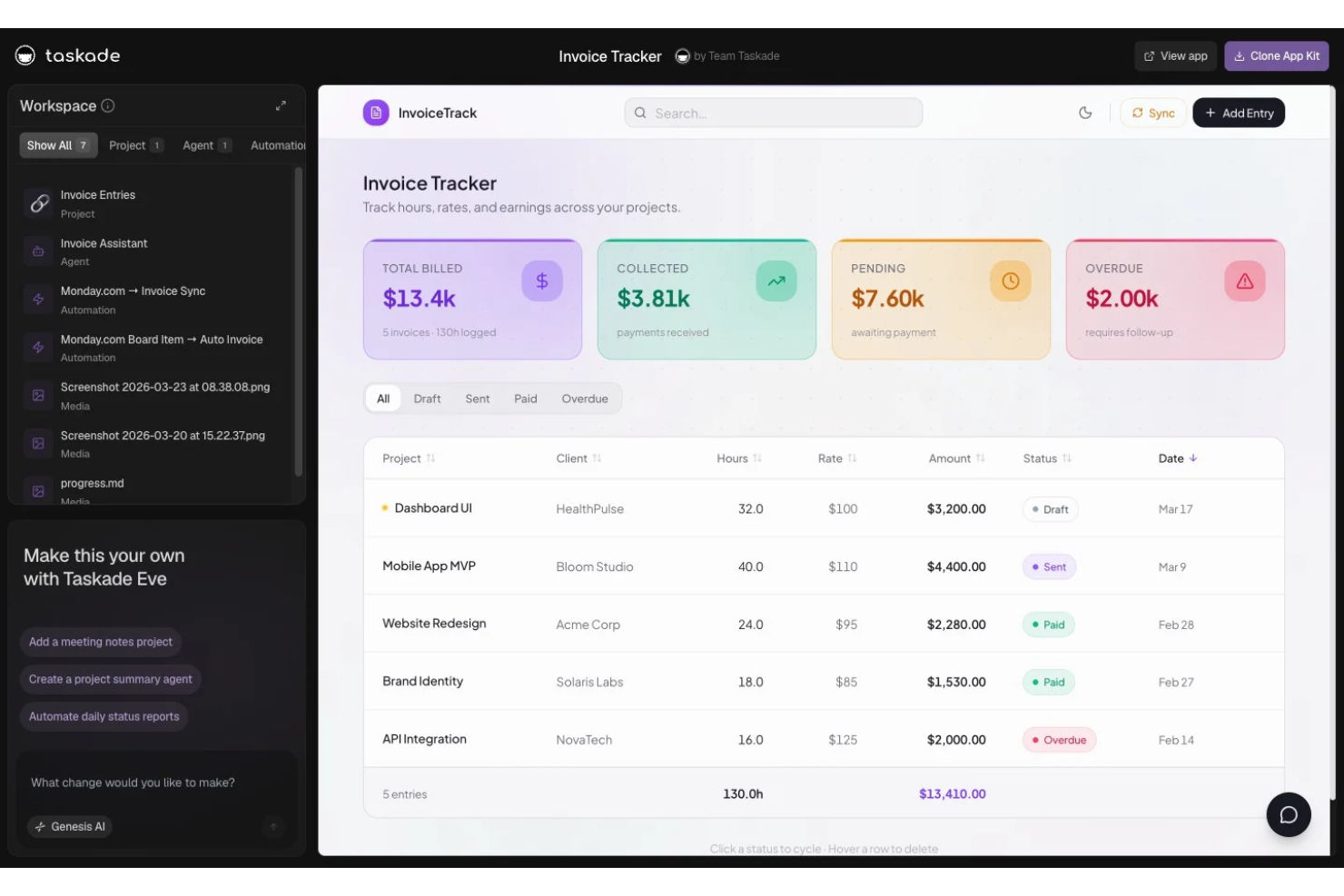
Taskade Genesis is an AI-powered invoice generator that offers customizable invoice templates, automated field population, and document creation tools designed for freelancers and small business owners.
Who Is Taskade Genesis Best For?
Freelancers and solo professionals who need to generate invoices from flexible AI-powered templates for a variety of projects or client types.
Why I Picked Taskade Genesis
I picked Taskade Genesis as one of the best because I can instantly generate AI-powered invoices using a wide range of customizable templates. I like being able to edit fields for each project and save reusable formats tailored to my freelancing work.
Taskade Genesis Key Features
- AI content generation: Automatically fills invoice fields based on prompts or project data.
- Template gallery: Access a library of invoice templates for different freelancing needs.
- Collaborative editing: Multiple users can edit and update invoices in real time.
- Multi-format export: Export completed invoices as PDF, DOCX, or markdown files.
Taskade Genesis Integrations
Integrations include Slack, Gmail, Stripe, GitHub, Shopify, HubSpot, Salesforce, Pipedrive, Discord, and Microsoft Teams.
Pros and Cons
Pros:
- Unlimited invoice generation for freelancers
- Large selection of editable invoice templates
- Supports AI-driven invoice text suggestions
Cons:
- Cannot schedule recurring invoices
- No automated payment tracking features
Diğer Yapay Zekâ Faturası Oluşturucuları
Kısa listeme giremeyen ancak yine de göz atmaya değer bazı ek yapay zekâ faturası oluşturucu seçeneklerini burada bulabilirsiniz:
- Kantata
For project-based financial workflows
- FreshBooks
For expense tracking integration
- Invoice Ninja
For open-source customization
- Zoho Invoice
For automated payment reminders
- Hiveage
For team collaboration features
- Invoice Quickly
With integrated service library storage
- Bookipi
For mobile-first invoicing solutions


How I Evaluate AI Invoice Generators
Every tool on this list needs to do more than slap an AI label on a standard invoicing form—I look for platforms that actually turn project data, time logs, or SOWs into ready-to-send invoices. I split my evaluation into core functionality every tool must deliver and differentiating factors that separate the best fits from the rest.
Core Functionality (Table Stakes For This List)
When I'm selecting tools for my list, I rank each one on a scale from 0 (does not offer the functionality) to 5 (excels in this area) for each core functionality listed below. Then, I calculate the tool's total score into a percentage. Each tool needs to achieve a minimum total score of 55% to be considered for inclusion.
- AI-Driven Invoice Generation: I look for tools that draft invoices from real inputs—like a prompt describing a completed sprint or uploaded time logs—rather than just auto-filling a blank form.
- Project & Time Data Integration: The tool should pull billable hours, tasks, or milestones from PM and time-tracking tools so a completed project phase flows into an invoice draft.
- Line Item Extraction & Structuring: I evaluate whether the AI can parse an uploaded SOW or contract into structured line items with descriptions, quantities, and rates intact.
- Client & Rate Management: Each tool should store client profiles with per-project rates, currencies, and tax rules so a multi-client agency doesn't re-enter billing details every cycle.
- Customizable Invoice Templates: I check whether AI-populated invoices land in branded, editable templates that stay consistent whether you're billing a retainer client or a one-off engagement.
- Invoice Delivery & Export: Tools should let you send, export to PDF, or sync finalized invoices to accounting platforms like QuickBooks or Xero without leaving the interface.
Once I have a list of tools that meet this criteria, I consider what sets each platform apart.
Differentiating Factors (What Sets Vendors Apart)
Here's how I compare and contrast different vendors:
Standout Features
Smart data extraction is a major differentiator. I look for AI that pulls line items from uploaded contracts or timesheets via OCR and NLP, skipping manual re-entry. Recurring invoice intelligence also matters—tools that detect billing patterns and flag anomalies like a missing line item before a retainer invoice ships save real headaches. Automated payment follow-ups round things out, where AI personalizes reminder timing and tone based on each client's payment history to reduce DSO.
Beyond Features
I evaluate how well each tool connects to the accounting and payment stack your team already uses—syncing invoices to QuickBooks or Xero and collecting payments through Stripe or PayPal without a manual export step. The client-facing experience matters too, especially for agencies: branded portals and mobile-friendly views make it easier for clients to review and pay. I also consider onboarding speed. A project manager should be able to generate a first invoice within minutes, not after a week-long setup.
Yapay Zekâ Faturası Oluşturucu Nasıl Seçilir?
Uzun özellik listeleri ve karmaşık fiyatlandırma yapıları arasında kaybolmak kolaydır. Size özgü yazılım seçimi sürecini yürütürken odağınızı korumanıza yardımcı olmak için göz önünde bulundurmanız gereken faktörleri içeren bir kontrol listesi hazırladık:
| Faktör | Dikkat Edilmesi Gerekenler |
| Ölçeklenebilirlik | Platform, kesintiler veya büyük yükseltmeler olmadan işletmenizin büyümesini, daha fazla kullanıcıyı ve daha yüksek fatura hacimlerini karşılayabilir mi? |
| Entegrasyonlar | Araç, muhasebe, CRM veya ödeme ağ geçidi sistemlerinize bağlanıyor mu? Hazır ya da API bağlantılarını kontrol edin. |
| Özelleştirilebilirlik | Fatura şablonlarını, iş akışlarını ve otomasyon kurallarını benzersiz faturalandırma ihtiyaçlarınıza ve marka kimliğinize uyarlayabiliyor musunuz? |
| Kullanım kolaylığı | Finans, satış ve operasyon ekiplerindeki kullanıcılar, çok az eğitimle hızlı bir şekilde fatura oluşturup sorunları giderebilecek mi? |
| Uygulama ve kullanıma alma | Ekibiniz çalışmaya ne kadar kolay başlayabilir, mevcut verileri taşıyabilir ve geçiş sırasında eğitim kaynaklarına veya desteğe erişebilir? |
| Maliyet | Kullanıcılar da dâhil olmak üzere beklenen kullanım için toplam maliyeti ve ek özellikler ya da daha üst düzey destek için alınan ücretleri inceleyin. |
| Güvenlik önlemleri | Hassas finansal ve müşteri verileri, depolama sırasında ve aktarım sırasında şifreleniyor mu? Kullanıcı izinleri ve erişim denetimleri, uyumluluk ihtiyaçlarınızı karşılayacak kadar ayrıntılı mı? |
| Uluslararası yetenekler | Sistem, sınır ötesi faturalandırma için gereken para birimlerini, vergi kurallarını, bölgesel biçimleri ve dilleri destekliyor mu? |
Yapay Zekâ Faturası Oluşturucu Nedir?
Yapay zekâ faturası oluşturucu, fatura oluşturma sürecini otomatikleştirmek için yapay zekâ kullanan özel bir faturalandırma yazılımı türüdür. Faturalandırma verilerini çıkarır, faturaları biçimlendirir ve genellikle hesaplamalar, vergi kuralları veya hata denetimi gibi görevleri yerine getirir. Bu platformlar manuel veri girişini azaltarak, hataları en aza indirerek ve yinelenen ya da yüksek hacimli faturalandırma görevlerini hızlandırarak zaman kazandırabilir.
Yapay Zekâ Fatura Oluşturucunun Özellikleri
Bir yapay zekâ fatura oluşturucu seçerken aşağıdaki temel özelliklere dikkat edin:
- Otomatik fatura oluşturma: Manuel veri girişi gerektirmeden tekliflerden, proje kayıtlarından veya makbuzlardan veri alarak anında fatura oluşturur.
- Özelleştirilebilir şablonlar: Fatura biçimini, marka öğelerini, satır kalemlerini, para birimini ve vergi alanlarını işletmenizin gereksinimlerine uyacak şekilde özelleştirmenizi sağlar.
- Yapay zekâ destekli veri çıkarma: Yüklenen belgelerdeki veya e-postalardaki bilgileri, minimum girdiyle fatura alanlarına dönüştürür; böylece ayrıntıları doldurmak için yapay zekâyı kullanabilirsiniz.
- Çoklu para birimi desteği: Otomatik para birimi seçimi ve döviz kuru işlemleriyle farklı ülkelerdeki müşteriler için faturalandırmayı yönetir.
- Otomatik ödeme hatırlatıcıları: Vadesi yaklaşan veya geçmiş ödemeler için son ödeme tarihi geçmeden müşterilere zamanlanmış e-posta ya da SMS hatırlatmaları gönderir.
- Vergi hesaplama motoru: Manuel eşleştirme yapmadan coğrafi konuma, vergi kurallarına veya ürün kategorilerine göre doğru vergileri uygular.
- Yinelenen faturalandırma: Düzenli ve tekrarlanan faturalandırma dönemleriyle müşterilere otomatik olarak fatura gönderilmesini zamanlar.
- Ödeme izleme panosu: Fatura durumunu izler, kredi kartı işlemi veya banka havalesi gibi alınan ödemeleri kaydeder ve gecikmiş bakiyeleri tek bir görünümde işaretler.
- Role dayalı kullanıcı erişimi: Ekibinizin farklı üyelerine fatura oluşturma, onaylama veya düzenleme için belirli izinler atar.
- Denetim izi kaydı: İç kontroller veya uyumluluk gereksinimleri için her faturayı kimin oluşturduğuna, düzenlediğine veya onayladığına ilişkin ayrıntılı bir kayıt tutar.
Fatura Oluşturucunun Faydaları
Bir yapay zekâ fatura oluşturucuyu uygulamak, ekibiniz ve işletmeniz için çeşitli faydalar sağlar. Yararlanabileceğiniz avantajlardan bazıları şunlardır:
- Daha hızlı faturalandırma döngüleri: Otomatik iş akışları ve yapay zekâ ile veri çıkarma, manuel veri girişini azaltır ve daha hızlı faturalandırma için fatura oluşturma sürecini hızlandırır.
- Azalan insan hataları: Yerleşik doğrulama kontrolleri ve ücretsiz fatura şablonları, hesaplamalarda, vergi kurallarında ve müşteri bilgilerinde yapılan hataları en aza indirmeye yardımcı olur.
- Geliştirilmiş ödeme tahsilatı: Otomatik hatırlatıcılar ve ödeme izleme özellikleri, takip işlemlerini kolaylaştırır, vadesi geçmiş faturaları azaltır ve müşterilerin faturaları anında indirmesine olanak tanır.
- Daha güçlü mevzuat uyumluluğu: Denetim izleri, vergi hesaplamaları ve güvenli kayıt tutma, yerel yasalara ve iç politikalara uyumluluğu kolaylaştırır.
- Gelişmiş iş birliği: Role dayalı erişim denetimleri, her büyüklükteki ekiplerin görevleri devretmesine, düzenlemeleri onaylamasına ve karmaşa yaşamadan denetimi sürdürmesine olanak tanır.
- Büyümeye uygun ölçeklenebilirlik: Birden fazla para birimi, yinelenen faturalandırma ve veri içe aktarma desteği, sistemin işletmenizin gereksinimleriyle birlikte büyümesini sağlar.
- Daha iyi içgörüler: Gerçek zamanlı panolar ve ödeme durumu izleme, nakit akışına ve ödenmemiş alacaklara ilişkin net bir genel bakış sunar.
Yapay Zekâ Fatura Oluşturucunun Maliyetleri ve Fiyatlandırması
Bir yapay zekâ fatura oluşturucu seçmek, sunulan çeşitli fiyatlandırma modellerinin ve planların anlaşılmasını gerektirir. Maliyetler özelliklere, ekip büyüklüğüne, eklentilere ve diğer unsurlara göre değişir. Aşağıdaki tabloda yaygın planlar, bunların ortalama fiyatları ve yapay zekâ fatura oluşturucu çözümlerinde genellikle bulunan özellikler özetlenmiştir:
Yapay Zekâ Fatura Oluşturucu İçin Plan Karşılaştırma Tablosu
| Plan Türü | Ortalama Fiyat | Yaygın Özellikler |
| Ücretsiz Plan | $0 | Temel fatura oluşturma, sınırlı şablonlar, temel raporlama ve tek kullanıcı erişimi. |
| Kişisel Plan | $5-$15/kullanıcı/ay | Özel şablon seçenekleri, temel otomasyon, sınırlı entegrasyonlar, çoklu para birimi desteği ve öncelikli e-posta desteği. |
| İşletme Planı | $20-$40/kullanıcı/ay | Gelişmiş otomasyon, ekip izinleri, ödeme hatırlatıcıları, gelişmiş analizler, birden fazla entegrasyon ve yinelenen fatura oluşturma özelliği. |
| Kurumsal Plan | $50-$100/kullanıcı/ay | Özel marka öğeleri, role dayalı erişim, API erişimi, tek oturum açma, denetim günlükleri, gelişmiş güvenlik ve özel hesap yönetimi. |
Yapay Zekâ Fatura Oluşturucu Hakkında SSS
Yapay zekâ fatura oluşturucu veya faturalama yazılımı seçimiyle ilgili sıkça sorulan bazı sorular şunlardır:
Yapay zekâ fatura oluşturucular mevcut muhasebe yazılımımla entegre olabilir mi?
Evet, birçok yapay zekâ fatura oluşturucu popüler muhasebe platformlarıyla entegrasyonlar sunar. Bu, veri aktarımını otomatikleştirmenize, yinelenen girişleri azaltmanıza ve finansal kayıtlarınızı sistemler arasında tutarlı tutmanıza yardımcı olur. Faturaları şu anda Excel’de takip ediyorsanız bu verileri genellikle doğrudan dışa aktarabilirsiniz. Bir araç seçmeden önce desteklenen entegrasyonları mutlaka doğrulayın.
Yapay zekâ fatura oluşturucuda finansal verilerim ne kadar güvende?
Çoğu çözüm, verilerinizi güvende tutmak için şifreleme ve erişim denetimleri kullanır. Beklemede ve aktarım sırasında şifreleme, izin tabanlı kullanıcı rolleri ve düzenli güvenlik denetimleri veya sertifikaları gibi veri koruma uygulamaları sunan platformları tercih edin. Hassas işletme bilgileriniz ve müşteri iletişim bilgileriniz bu güvenlik katmanlarıyla korunur.
Yapay zekâ fatura oluşturucular serbest çalışanlar ve büyük ekipler için uygun mu?
Evet, bu araçlar hem bireysel kullanıcılar hem de büyüyen ekipler için tasarlanmıştır. Birçok platformda işletmenizin büyüklüğüne uyum sağlayan esnek fiyatlandırma, iş birliği için ekip izinleri ve farklı ihtiyaçlara yönelik kademeli özellikler bulunur. İster tek bir hizmet faturası gönderiyor ister yüzlerce faturayı yönetiyor olun, sistem sizinle birlikte ölçeklenir.
Faturalama sürecinde hangi yapay zekâ özellikleri gerçekten yardımcı olur?
Yapay zekâ; makbuzlardan otomatik veri çıkarma, önerilen fatura kalemleri, vergi hesaplamaları ve akıllı ödeme hatırlatıcıları gibi özellikleri destekler. Gelişmiş yapay zekâ araçları şirket adınız, fatura numarası ve müşterinin fatura adresi gibi yinelenen alanları otomatik olarak doldurabilir. Bunlar zamandan tasarruf etmenizi, hataları azaltmanızı ve faturalama döngülerini hızlandırmanızı sağlayabilir.
Ekibim için bir yapay zekâ fatura oluşturucu kurmak ne kadar zor?
Kurulum genellikle müşteri listelerini içe aktarmayı, şablonları seçmeyi ve hesapları bağlamayı içerir. Şirket kimliğinize uyum sağlaması için fatura biçimini marka renklerinize göre özelleştirebilirsiniz. Birçok araç, bir veya iki gün içinde çalışmaya başlamanız için etkileşimli başlangıç kılavuzları, yardım makaleleri ve geçiş sihirbazları sunar.
Faturaları farklı para birimlerinde ve dillerde düzenleyebilir miyim?
Evet, çoğu yapay zekâ fatura oluşturucu çoklu para birimiyle faturalamayı destekler ve dil seçenekleri sunar. Sistem, yerel vergi yasalarına göre ara toplamı, toplam tutarı ve ödenecek nihai tutarı otomatik olarak hesaplar. Bu özellik, uluslararası müşterileri veya sınır ötesi faturalama ihtiyaçları olan ekipler için özellikle kullanışlıdır. Bir çözümü kullanmaya karar vermeden önce kapsamı mutlaka kontrol edin.