

2026’nın En İyi 10 Ofis Alanı Yönetimi Yazılımı

En İyi Ofis Alanı Yönetimi Yazılımları Kısa Listesi


Ofis alanı yönetimi yazılımı; masaları tahsis etmek, taşınmaları planlamak ve iş yeriniz ile gayrimenkul maliyetlerinizi denetlemek için size tek bir merkez sunar. Değişken ekipleri, hibrit çalışma programlarını veya büyüyen portföyleri yönetiyorsanız doğru araç, hızlıca uyum sağlamanıza ve uyumluluğu korumanıza yardımcı olur. Bu kılavuz, en iyi ofis alanı yönetimi yazılımlarını ayrıntılı şekilde ele alır; böylece hangi çözümlerin kat planı yönetimi, ESG raporlaması ve analitik ihtiyaçlarını karşıladığını görebilir, çalışma alanı, uyumluluk ve raporlama gereksinimleriniz için doğru seçeneği bulabilirsiniz.
Yazılım Önerilerimize Neden Güvenebilirsiniz?
Ekibimiz 2012’den beri yazılımları test ediyor ve inceliyor. Biz de proje yöneticisi olduğumuz için doğru yazılımı seçmenin ne kadar zor ve önemli olduğunu biliyoruz.
Bu rehber için araçları uygulamalı testler ve bağımsız araştırmalarla değerlendirdik ve seçim kriterlerimize göre puanladık. Ayrıca sektörün fikir önderlerinin ve alanında çalışan proje yönetimi uzmanlarının görüşlerinden de yararlanıyoruz.
İncelemelerimiz bir satış konuşması değil, editör ekibimizin kendi değerlendirmesidir.
Uzman inceleyenler:
Ofis Alanı Yönetimi Yazılımları Karşılaştırma Tablosu
Bu karşılaştırma tablosu, en iyi ofis alanı yönetimi yazılımı seçimlerim için fiyatlandırma ayrıntılarını özetlemektedir:
Score legend (out of 5)
- Excellent 4.5–5
- Good 4–4.4
- Average 3–3.9
- Below average 2–2.9
- Poor 1–1.9
| Tool | Starting Price | Website | |||||||
|---|---|---|---|---|---|---|---|---|---|
| Best for ESG reporting tied to real estate spend | 4.3 out of 5 | 3 | 5 | 5 | 5 | 4 | 4 | Pricing upon request Free demo available | Website |
| Best for unified space analytics and IoT sensor data | 4.2 out of 5 | 2 | 5 | 5 | 5 | 5 | 3 | Pricing upon request Free demo available | Website |
| Best for real estate portfolio cost and lease tracking | 4.5 out of 5 | 4 | 5 | 5 | 5 | 4 | 4 | Pricing upon request Free demo available | Website |
| Best for move management and rent proration | 4.3 out of 5 | 5 | 4 | 5 | 5 | 3 | 4 | Pricing upon request Free demo available | Website |
| Best for AI-driven move planning and hybrid scheduling | 4.5 out of 5 | 5 | 5 | 4 | 4 | 5 | 4 | Pricing upon request Free demo available | Website |
| Best for visitor and delivery management built in | 4.5 out of 5 | 3 | 5 | 5 | 5 | 5 | 4 | Pricing upon request Free demo available | Website |
| Best for FedRAMP-authorized workplace IWMS | 4.7 out of 5 | 5 | 5 | 5 | 5 | 4 | 4 | Pricing upon request Free demo available | Website |
| Best for IWMS-grade real estate portfolio management | 4.5 out of 5 | 5 | 4 | 5 | 5 | 4 | 4 | Pricing upon request Free demo available | Website |
| Best for space cost and chargeback reporting | 4.8 out of 5 | 5 | 5 | 5 | 5 | 4 | 5 | Pricing upon request Free demo available | Website |
| Best for regulated-industry workplace management | 4.5 out of 5 | 5 | 5 | 5 | 4 | 4 | 4 | Pricing upon request Free demo available | Website |
Ofis Alanı Yönetimi Yazılımı İncelemeleri
Aşağıda, kısa listeme giren en iyi ofis alanı yönetimi yazılımlarının ayrıntılı özetlerini bulabilirsiniz. İncelemelerim, her platformun özelliklerini, en uygun kullanım alanlarını ve yeteneklerini ayrıntılı olarak ele alarak sizin için en iyi seçeneği bulmanıza yardımcı olur.

Best for ESG reporting tied to real estate spend
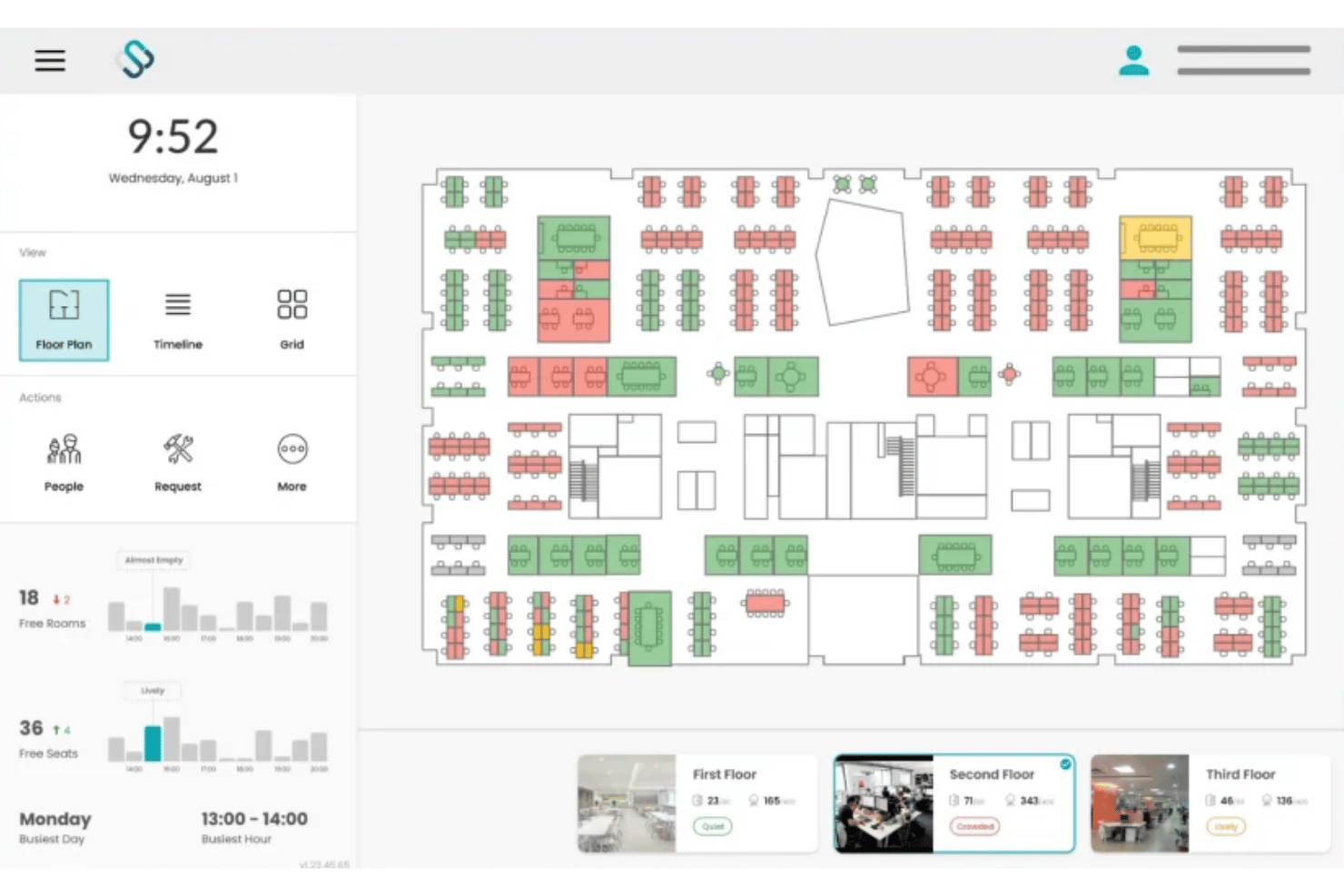
Spacewell is a workplace management platform that combines desk and room booking, interactive floor plan visualization, IoT-based occupancy analytics, and ESG energy reporting across multi-site real estate portfolios.
Who Is Spacewell Best For?
Spacewell is a strong fit for enterprise real estate and facilities teams managing multi-site portfolios where space costs, energy consumption, and ESG reporting need to connect in a single system.
Why I Picked Spacewell
Spacewell earns its spot on my shortlist because the Energy module connects carbon reporting, PV analytics, and ESG dashboards directly to cost centre data across every desk and room reservation. I love that when a real estate director needs to justify consolidating two floors, the platform surfaces both the energy spend and the per-seat cost data in the same view. Space simulations let you model densification or consolidation scenarios before committing, so the ESG case is backed by actual utilization numbers.
Spacewell Key Features
- AI conversational booking: A built-in AI assistant lets users book desks or rooms using natural language across 30+ languages, learning from past booking behaviour to surface relevant suggestions.
- Indoor air quality monitoring: Sensors track CO2, VOC levels, temperature, and humidity in real time, with IAQ data displayed directly on interactive floor plans alongside occupancy status.
- Colleague finder: From the Advanced plan, employees can search for teammates and see their current seat assignments on a live floor plan to coordinate in-office days.
- IoT sensor integration: Spacewell connects to a hardware-agnostic sensor network—including VergeSense, XY Sense, and Cisco Spaces—pulling motion, people-counting, and environmental data into a single occupancy view.
Spacewell Integrations
Spacewell offers native integrations with Microsoft 365, Outlook, Teams, Google Workspace, Zoom, SAP, Oracle, ServiceNow, Workday, VergeSense, XY Sense, and Cisco Spaces. An API is available for custom integrations.
Pros and Cons
Pros:
- Monitors indoor air quality metrics
- Sensor-agnostic platform supports large portfolios
- Connects ESG and space costs
Cons:
- Limits independent mobile app access
- Lacks outdoor parking space tracking

HubStar
Best for unified space analytics and IoT sensor data
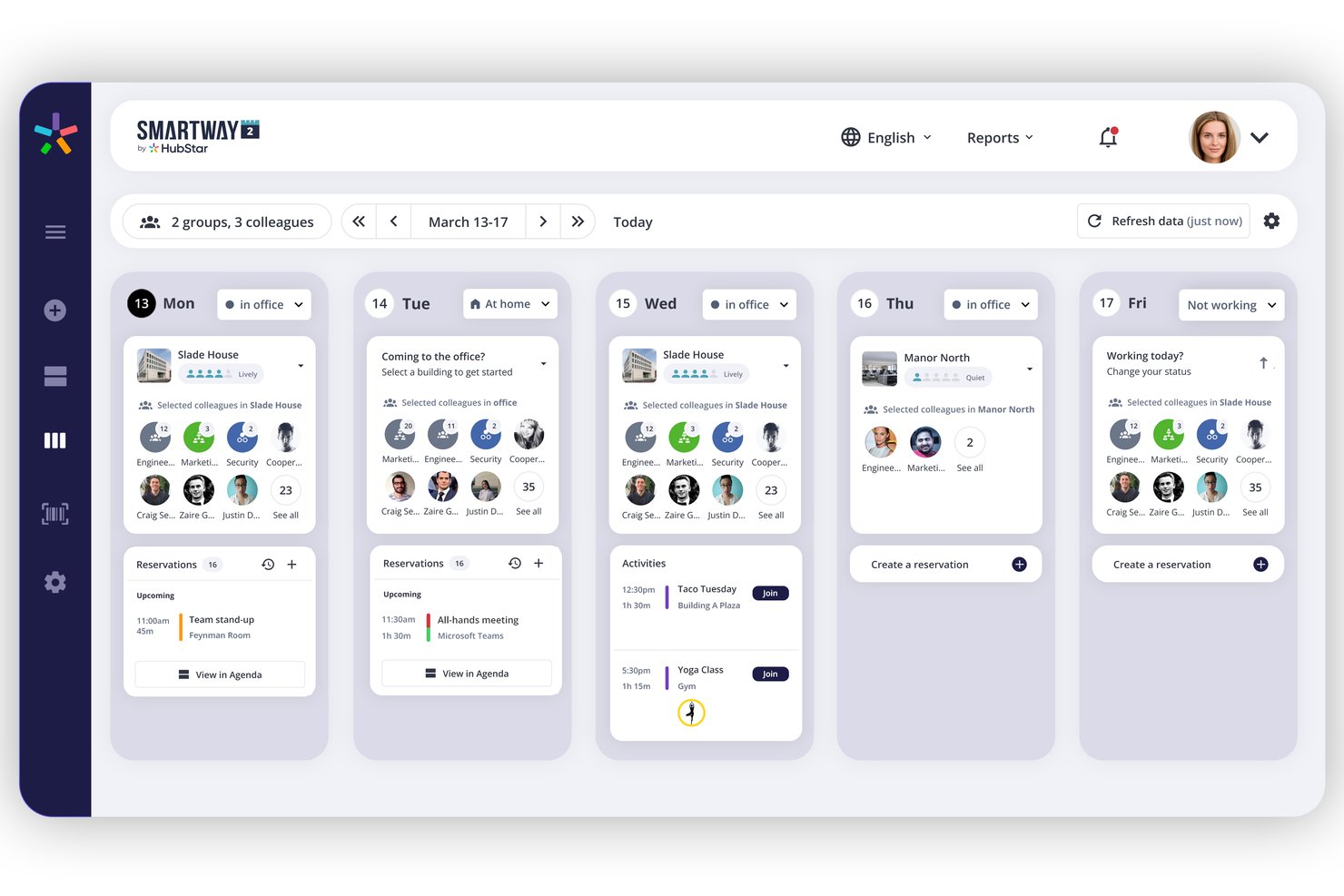
HubStar is a modular workplace management platform that combines desk and room booking, IoT sensor-driven occupancy analytics, interactive floor plan management, and visitor management across multi-site office portfolios.
Who Is HubStar Best For?
HubStar is a strong fit for enterprise facilities and workplace teams managing multi-site portfolios who need occupancy data from IoT sensors, Wi-Fi, and badge systems unified in one platform.
Why I Picked HubStar
HubStar earns its spot on my shortlist because no other platform I've tested pulls occupancy data from this many sources into a single analytics layer. PresenceIQ combines Wi-Fi access point data (Aruba, Cisco), badge scans, proprietary sensors, and third-party IoT devices like VergeSense and Butlr to give you a genuinely complete picture of how space is used. I also like that the analytics aren't just descriptive: the prescriptive tier surfaces specific recommendations for right-sizing neighbourhoods and reconfiguring zones based on real attendance patterns.
HubStar Key Features
- AI digital assistant: Recommends optimal office days per employee based on preferences and history, then auto-books the best available desk or room.
- Visitor management: Handles self-service kiosk check-in, photo capture, NDA signing, badge printing, and real-time visitor tracking within the same platform.
- Neighbourhood and zone management: Assigns teams to specific floor plan zones with configurable booking policies, seating ratios, and booking rules down to individual workstation level.
- BI platform data export: Pushes occupancy and utilization data directly to Power BI, Tableau, Qlik, and ThoughtSpot for external reporting and analysis.
HubStar Integrations
HubStar offers native integrations across the Microsoft ecosystem (Teams, Outlook, Exchange, Azure AD), plus Zoom, Workday, PeopleSoft, Rippling, Okta, Ping Identity, VergeSense, and Wi-Fi providers like Cisco and Aruba, along with BI exports to Power BI, Tableau, Qlik, and ThoughtSpot. An open API is available for custom integrations.
Pros and Cons
Pros:
- Machine learning supports floor plan editing
- AI assistant auto-books optimal desks and rooms
- Aggregates occupancy data from sensors and Wi-Fi
Cons:
- Limits independent mobile app access
- No dedicated move management workflow

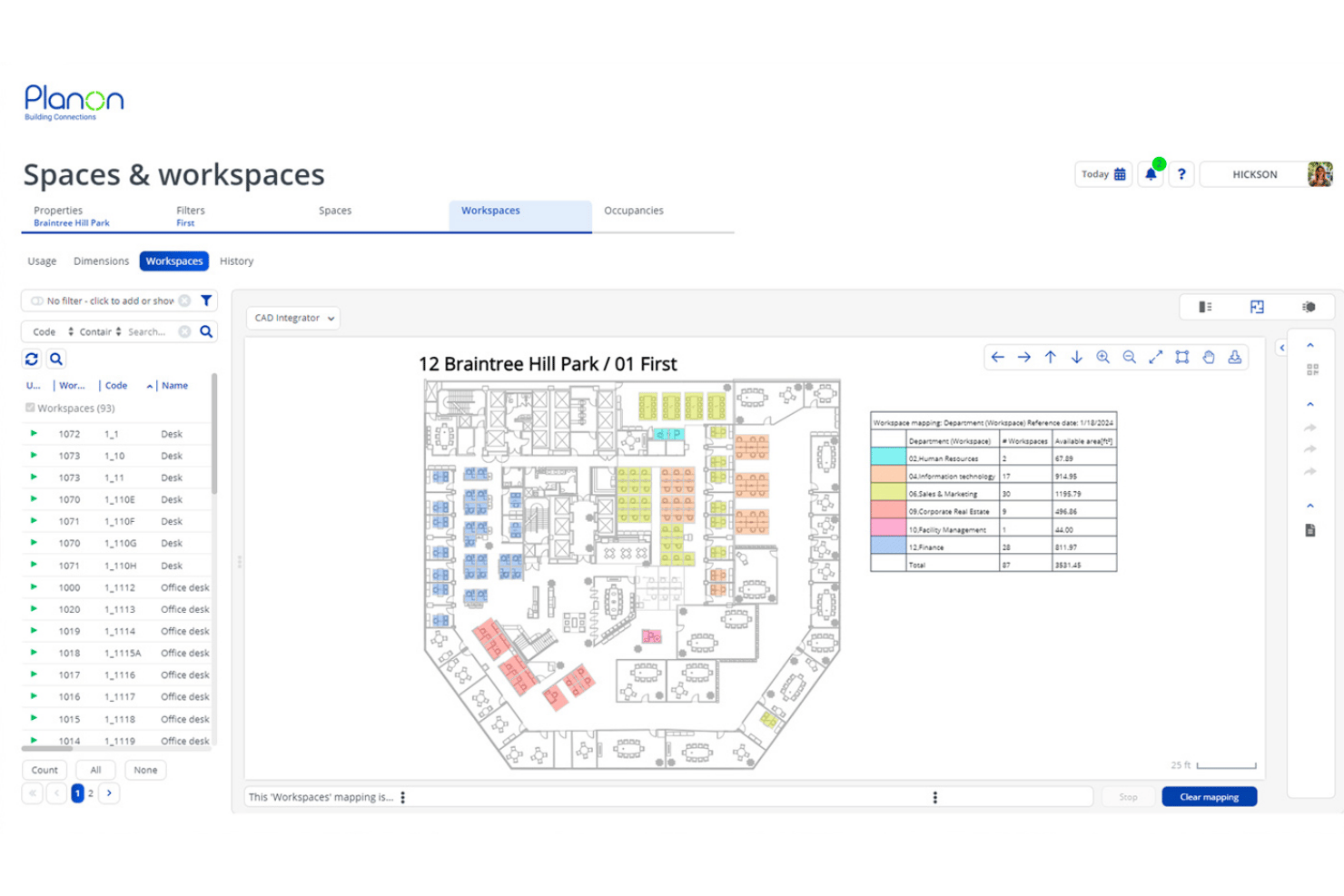
Planon is an enterprise IWMS platform that combines space and desk booking, CAD/BIM-integrated floor plan management, IoT-driven occupancy analytics, lease accounting, and real estate portfolio tracking across multi-site global operations.
Who Is Planon Best For?
Planon is built for enterprise real estate and facilities teams managing large, multi-site portfolios with complex lease accounting and cost tracking requirements.
Why I Picked Planon
Planon earns its spot on my shortlist because no other platform I've tested matches its depth on real estate portfolio cost visibility and lease accounting. I particularly like how it combines IFRS 16/ASC 842-compliant lease tracking with cost-per-seat chargeback analytics, so finance and facilities teams are working from the same numbers. Layer in scenario planning tied directly to CAD floor plans, and you can model a full-floor restack against live lease cost data before a single desk moves.
Planon Key Features
- IoT sensor integration: Connect occupancy sensors, air quality monitors, and building management systems to feed real-time data into utilization dashboards.
- Neighbourhood zoning: Assign teams to defined floor zones with configurable booking policies and departmental capacity caps.
- Visitor management: Self-service visitor check-in, host notifications, and secure visitor flow tracking are built directly into the platform.
- Connect for Analytics: Export workplace data to BI tools like Power BI, Tableau, or Snowflake via API for custom reporting.
Planon Integrations
Planon offers native integrations with Microsoft Outlook, Microsoft Teams, Microsoft Places, Google Calendar, SAP, Oracle, AutoCAD, and Autodesk Revit. An API is available for custom integrations.
Pros and Cons
Pros:
- Built-in scenario planning for space moves
- Advanced occupancy analytics using IoT sensors
- Real-time floor plans with CAD/BIM integration
Cons:
- Lacks outdoor parking space tracking
- Excludes custom-branded visitor badges

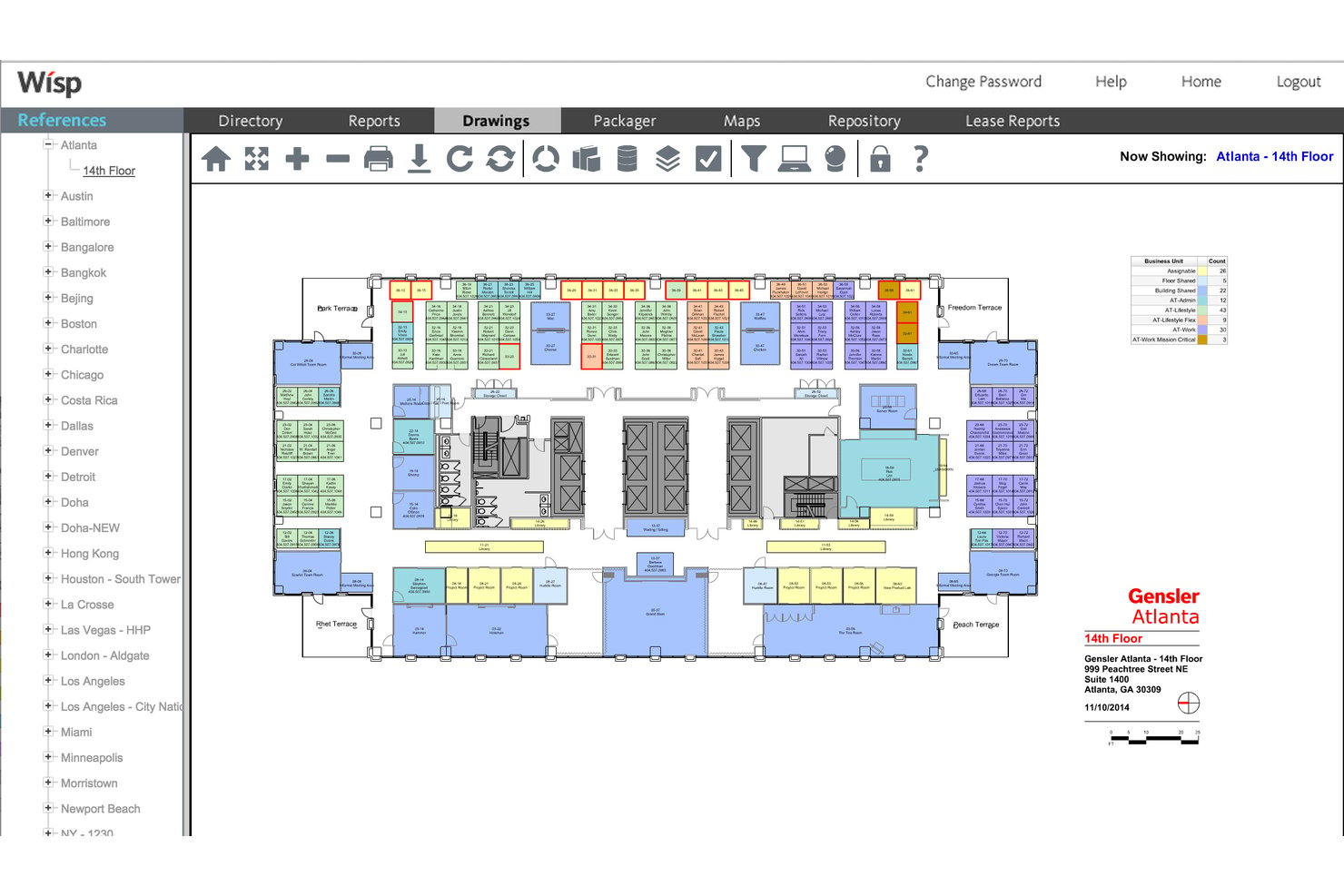
Wisp by Apex42 is an office space management platform built around interactive floor plans, move management, desk reservations, utilization analytics, and multi-site rent proration and chargeback reporting.
Who Is Wisp by Apex42 Best For?
Wisp is a strong fit for enterprise facilities and corporate real estate teams managing multi-site portfolios with high seat churn and complex internal cost allocation needs.
Why I Picked Wisp by Apex42
I've included Wisp by Apex42 in my top picks because its move management and rent proration capabilities are the most developed I've seen in this category. The configurable MAC workflow handles move requests, approvals, and automated floor plan updates end-to-end, and unlimited scenario-based space planning lets teams model full restacks without touching live data. On the cost side, 27-level rent proration means you can charge individual departments for their exact footprint across a multi-site portfolio.
Wisp by Apex42 Key Features
- Interactive floor plans: View and edit multi-site floor plans built from CAD drawings, with colour-coding via Colorizers™ to visualize departments, vacancy, and occupancy across your portfolio.
- Space utilization reporting: Access 50+ pre-built reports with real-time drill-down from portfolio level to individual seat, including sensor-based heatmaps displayed directly on floor plans.
- Desk reservations: Book desks via any device with QR code check-in, auto-release for no-shows, recurring reservation options, and neighbourhood-based restrictions.
- Service request workflow: Submit and manage facilities work orders tied directly to specific spaces on your floor plans, with configurable routing to the appropriate facilities technician.
Wisp by Apex42 Integrations
Wisp offers native integrations with ADP Workforce Now, UKG, Microsoft Entra ID, Brivo, Google Calendar, Microsoft Outlook, Microsoft Teams, and Slack. An API is available for custom integrations.
Pros and Cons
Pros:
- 27-level internal rent proration capability
- Industry-leading move management automation tools
- Unlimited CAD updates provided by the vendor team
Cons:
- Limited custom report-building tools
- Native room booking is less visible than peers
Kadence
Best for AI-driven move planning and hybrid scheduling
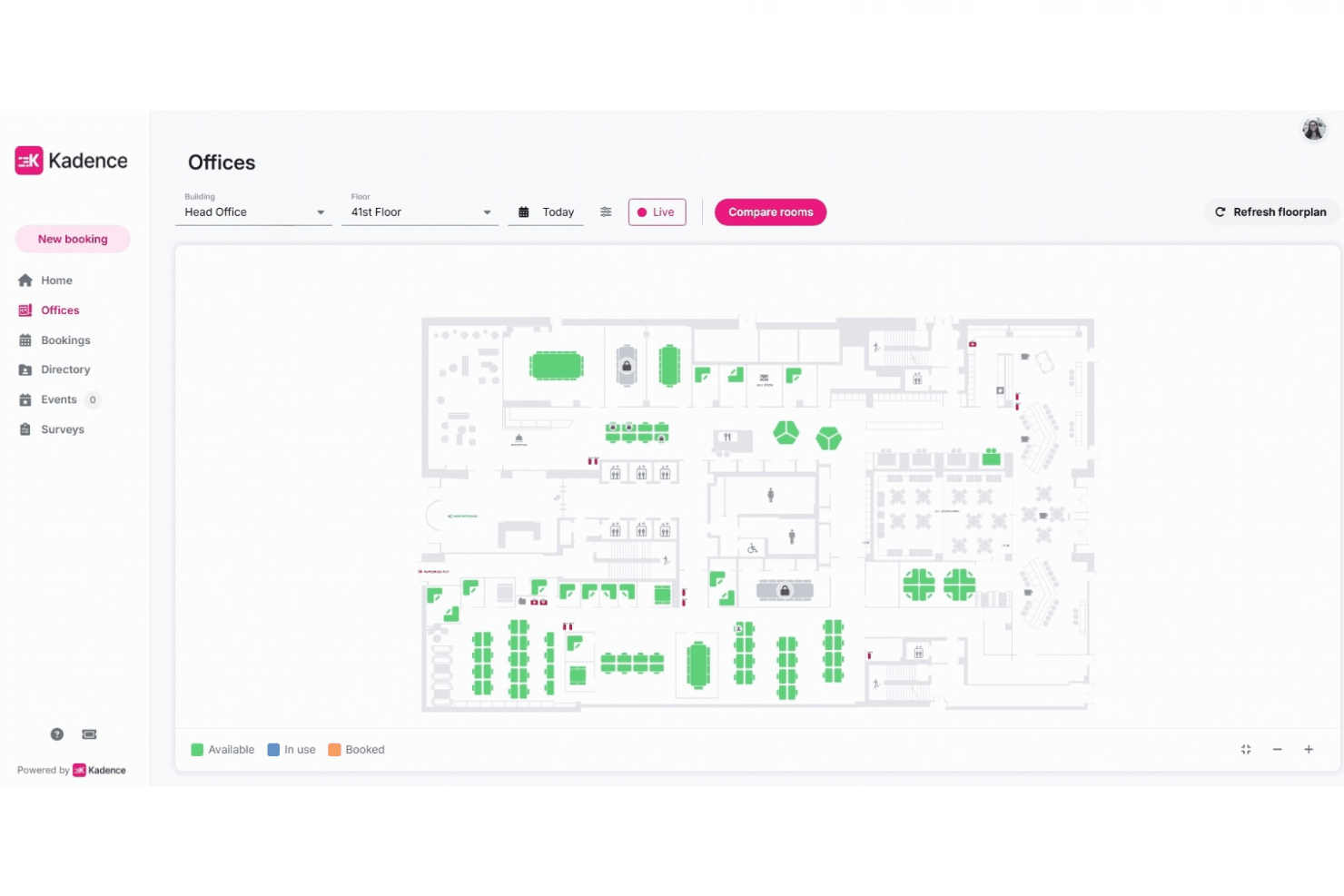
Kadence is an office space management platform that combines desk and room booking, interactive floor plans, visitor management, space utilization analytics, and AI-driven move planning and hybrid scheduling.
Who Is Kadence Best For?
Kadence is a strong fit for facilities and workplace managers at mid-to-large organizations navigating hybrid work models who need AI-driven space planning alongside day-to-day desk and room booking.
Why I Picked Kadence
I picked Kadence as one of the best because its SpaceOps AI agent genuinely changes how move planning works. Instead of managing restacks through spreadsheets, I can describe a scenario in plain language ("reduce our footprint by two floors"), and Kadence generates multiple configurations side by side for comparison. Its HRIS-triggered move execution also automatically updates desk assignments when employees change teams, which removes a painful manual step from any restack project.
Kadence Key Features
- Kadence Sense sensorless occupancy tracking: Aggregates presence signals from Wi-Fi, badge swipes, kiosk check-ins, and room displays to build real-time occupancy data without physical sensor hardware.
- Visitor management: Handles pre-registration, kiosk check-in, badge printing, NDA signing, host notifications, and timestamped visitor logs from within the WorkOps plan.
- Starred colleagues and team day notifications: Lets you follow specific teammates' schedules and receive alerts when they book in, with nudges to coordinate in-office days together.
- Active user billing: Charges only for users who make a booking in a given month, so part-time or infrequent in-office employees don't count against your seat total.
Kadence Integrations
Kadence offers native integrations with Microsoft Teams, Slack, Microsoft Outlook, Google Calendar, Workday, BambooHR, Rippling, Okta, Neat, and LiquidSpace. An API is available for custom integrations.
Pros and Cons
Pros:
- Hybrid team coordination features built-in
- Sensorless occupancy tracking lowers setup costs
- AI-driven move planning saves manual effort
Cons:
- Reporting and analytics depth is limited
- No IWMS or CAFM integration support
New Product Updates from Kadence
Kadence MCP Comes to Popular AI Assistants
Kadence launches MCP support for Claude, ChatGPT, and Microsoft Copilot to manage workplace tasks and access space insights. This brings booking, scheduling, and reporting into the AI assistants teams already use. For more information, visit Kadence’s official site.
 .

Robin
Best for visitor and delivery management built in
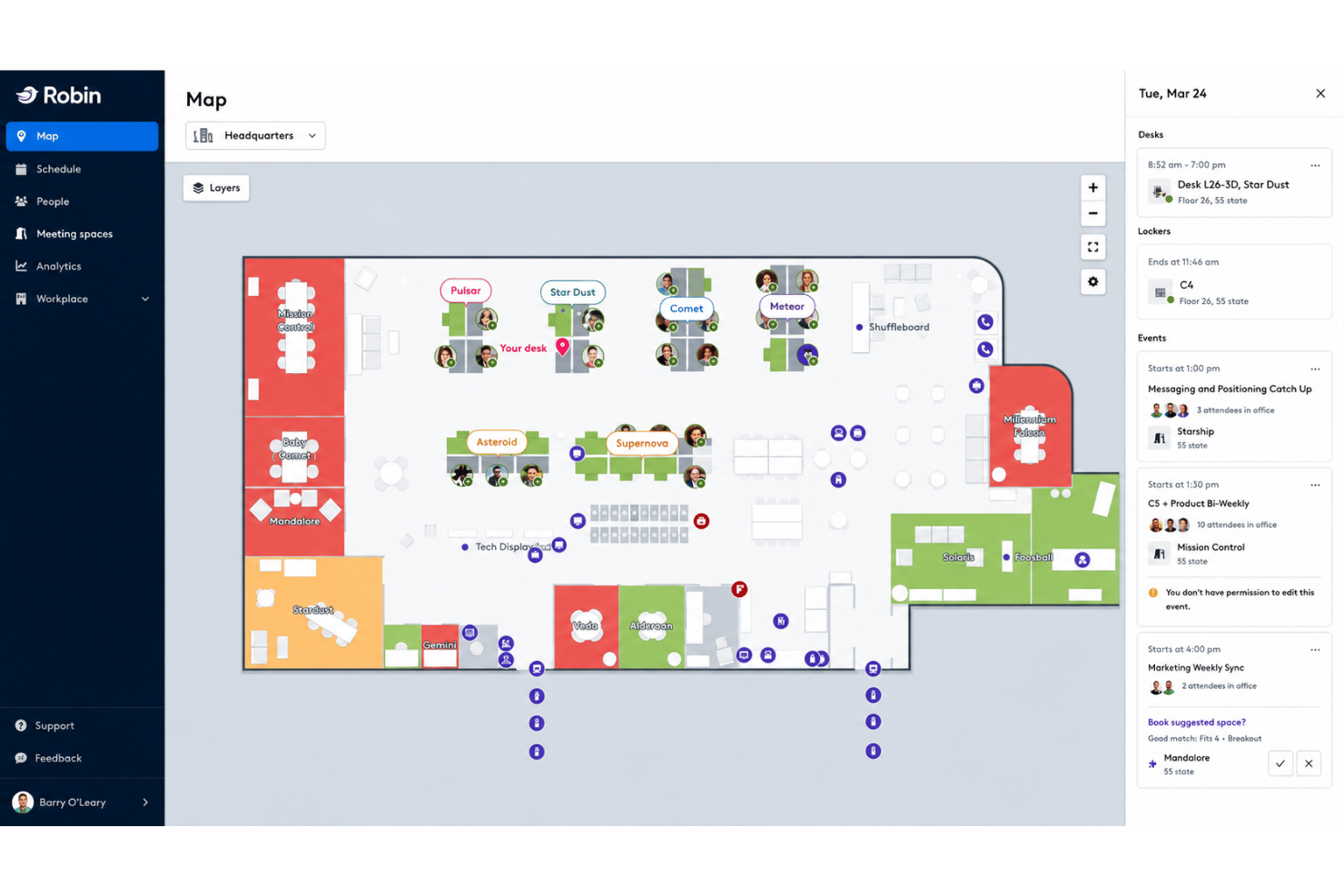
Robin is a workplace management platform that combines desk and room booking, interactive floor plans, space utilization analytics, visitor and delivery management, and hybrid scheduling tools.
Who Is Robin Best For?
Robin is a strong fit for mid-to-large enterprises managing hybrid teams across multiple offices who need visitor and delivery management built into the same platform as their desk and room booking.
Why I Picked Robin
Robin earns its spot on my shortlist because no other platform I've tested wraps visitor and delivery management this tightly into the same workspace. Pre-registration, self-check-in, badge printing, and host notifications via Slack or Teams are all native, and incoming package tracking sits in the same dashboard as your desk and room bookings. I also like that visitor logs and delivery records are searchable alongside booking data, so nothing lives in a separate tool.
Robin Key Features
- AI-suggested desk and room booking: Robin automatically recommends and reserves desks and rooms based on your past booking patterns and team proximity.
- Neighbourhood and zoning controls: Admins can assign teams to specific desk zones and configure department-level booking permissions and capacity rules.
- Multi-source occupancy analytics: Robin pulls data from badge swipes, occupancy sensors, Wi-Fi check-ins, and calendar bookings into a single utilization dashboard.
- Workweek coordination: A team scheduling view shows who's working in-office on which days across the week, synced with Google Calendar working location.
Robin Integrations
Robin offers native integrations with Microsoft 365, Outlook, Teams, Google Calendar, Slack, Zoom, VergeSense, Avigilon, Brivo, Kisi, Okta, OneLogin, and Rippling. An API is available for custom integrations.
Pros and Cons
Pros:
- Multi-source occupancy analytics and scenario planning
- AI-suggested desk booking and auto-reservations
- Visitor and delivery management built-in dashboard
Cons:
- Analytics add-ons require separate purchase
- Floor plan edits can require Robin support

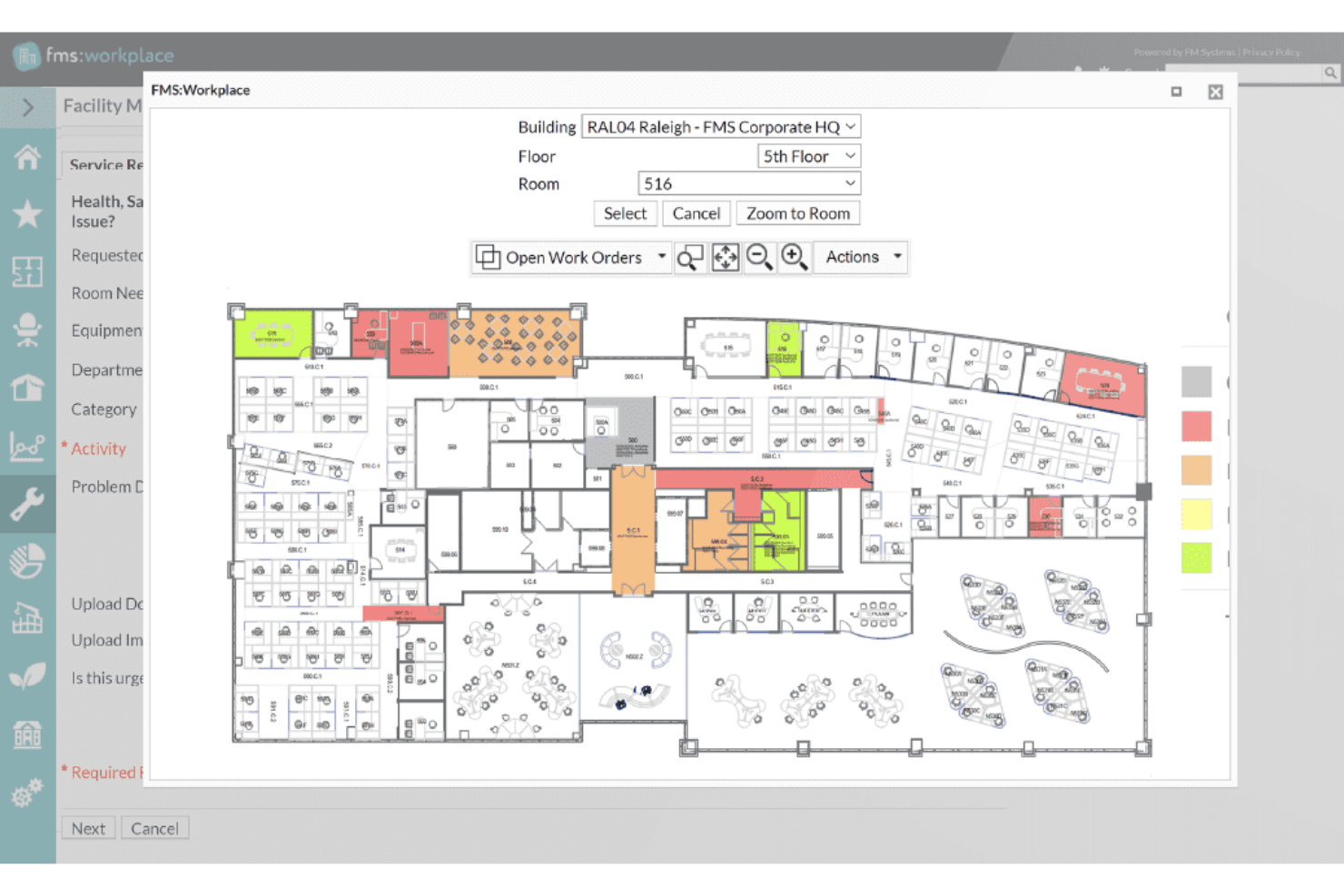
FM:Systems is a modular IWMS platform covering desk and room booking, interactive floor plans, move management, space utilization analytics, visitor management, and IoT sensor integration across single and multi-site portfolios.
Who Is FM:Systems Best For?
FM:Systems is a strong fit for enterprise facilities and real estate teams—especially in government, healthcare, and higher education—that need a FedRAMP-authorized IWMS with built-in sensor integration and multi-site portfolio management.
Why I Picked FM:Systems
FM:Systems earns its spot on my shortlist because it's one of the only office space management platforms with FedRAMP Authority to Operate, making it a legitimate option for federal agencies and regulated environments where most tools simply can't qualify. I'm particularly drawn to its native IoT sensor ecosystem, which feeds real-time occupancy data directly into FMS:Insights without requiring a third-party sensor platform. The strategic scenario planning module is also genuinely impressive, letting facilities teams build drag-and-drop stack plans with cost analysis before committing to a restack or consolidation.
FM:Systems Key Features
- Desk and room booking: Reserve desks, rooms, and services via web, mobile app, Outlook, or physical kiosks, with QR code and sensor-based check-in and auto-release for no-shows.
- Visitor management: Pre-register visitors, enable self-service kiosk check-in, trigger host notifications on arrival, and print badges automatically through the built-in visitor module.
- Multi-source occupancy analytics: FMS:Insights pulls data from sensors, bookings, badge readers, Cisco Spaces Wi-Fi, and financial systems into a single configurable dashboard with weighted KPI scoring.
- AutoCAD and Revit integration: Sync bi-directionally with CAD drawings and BIM models to keep floor plans accurate across space planning, move management, and utilization reporting.
FM:Systems Integrations
FM:Systems offers native integrations with Microsoft 365, Outlook, Teams, AutoCAD, Autodesk Revit, Google Workspace, Slack, Cisco Spaces, Cisco WebEx, and Crestron Fusion. An API is available for custom integrations.
Pros and Cons
Pros:
- FedRAMP authorization for regulated environments
- Strategic scenario planning with cost modelling
- Native sensors for real-time space analytics
Cons:
- Limited custom report building tools
- Excludes built-in physical sensors

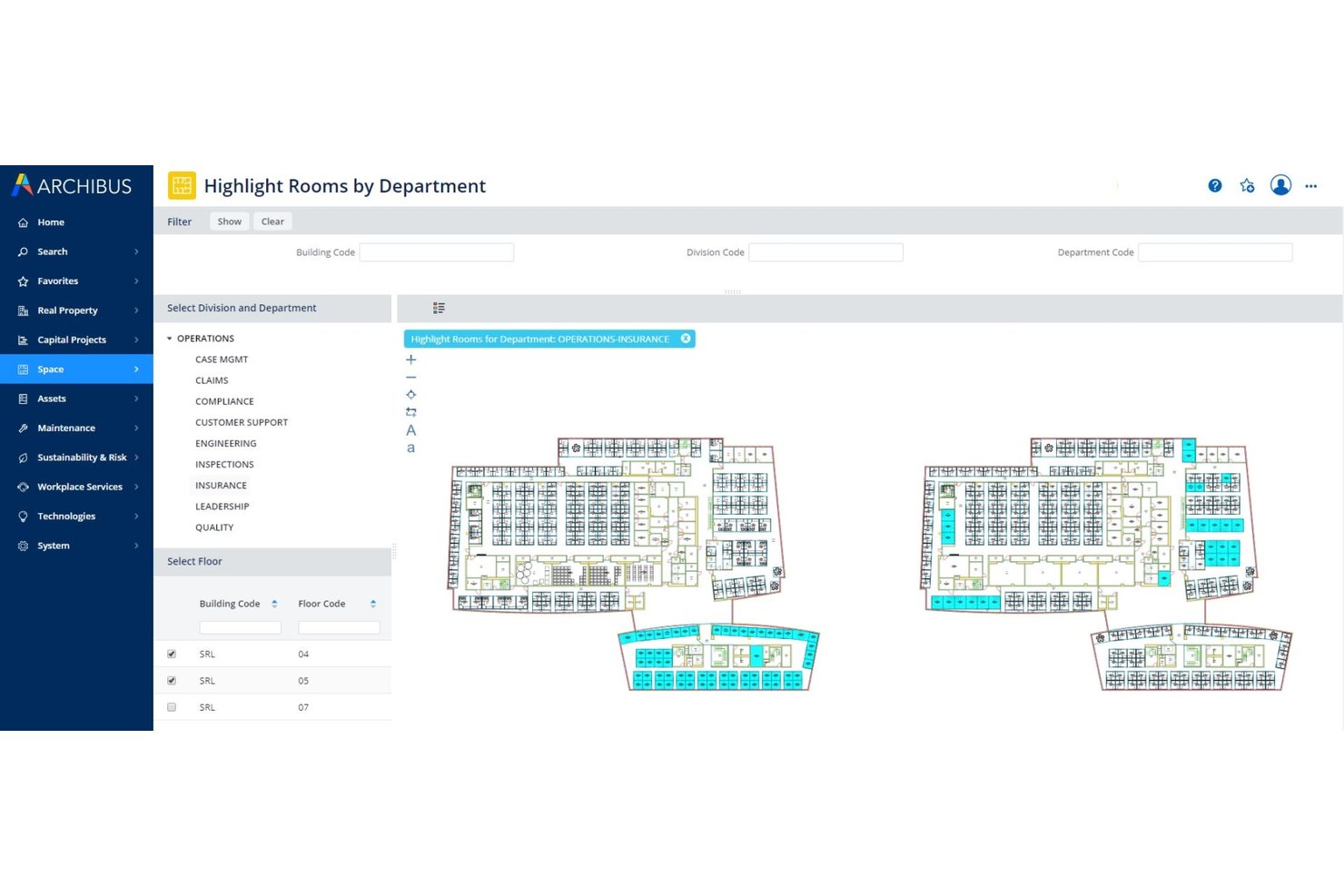
Archibus by Eptura is a full IWMS platform covering space planning, move management, lease administration, asset tracking, and real estate portfolio management across multi-site enterprise environments.
Who Is Archibus by Eptura Best For?
Archibus is built for enterprise facilities and real estate teams managing complex, multi-site portfolios where lease administration, space planning, and move management all need to live in one system.
Why I Picked Archibus by Eptura
Archibus by Eptura earns its spot on my shortlist because no other tool in this category matches its depth for managing a large real estate portfolio end to end. I'm particularly impressed by the lease administration module, which centralizes contract data with automated alerts and interactive portfolio dashboards across global multi-site footprints. Pair that with scenario-based block and stack planning, where you can model full restacks and compare what-if configurations before a single desk moves, and you have a genuine IWMS built for complexity at scale.
Archibus by Eptura Key Features
- BIM viewer: View and interact with Autodesk Revit and BIM 360 models directly within the platform, no Revit expertise required.
- IoT utilization reporting: Pulls real-time occupancy data from VergeSense sensors to generate heat maps and peak utilization reports by room and floor.
- Capital project tracking: Monitors budgets, schedules, and milestones for workplace fit-out and infrastructure projects from within the same platform.
- Sustainability module: Tracks energy usage and emissions across your portfolio with dedicated reporting tools tied to space and asset data.
Archibus by Eptura Integrations
Archibus by Eptura offers native integrations with VergeSense, Autodesk Revit, Autodesk BIM 360, AutoCAD, Workday, Okta, ServiceNow, Snowflake, and has native integrations across the Microsoft ecosystem, including Microsoft 365, Teams, Outlook, Copilot, Places, Power BI, and Azure AD. An open API is available for custom integrations.
Pros and Cons
Pros:
- Real-time occupancy heat maps with sensors
- Industry-leading BIM and CAD plan integration
- Monitors capital project delivery timelines
Cons:
- Lacks native campus exterior mapping
- Partner-only purchasing and support network required

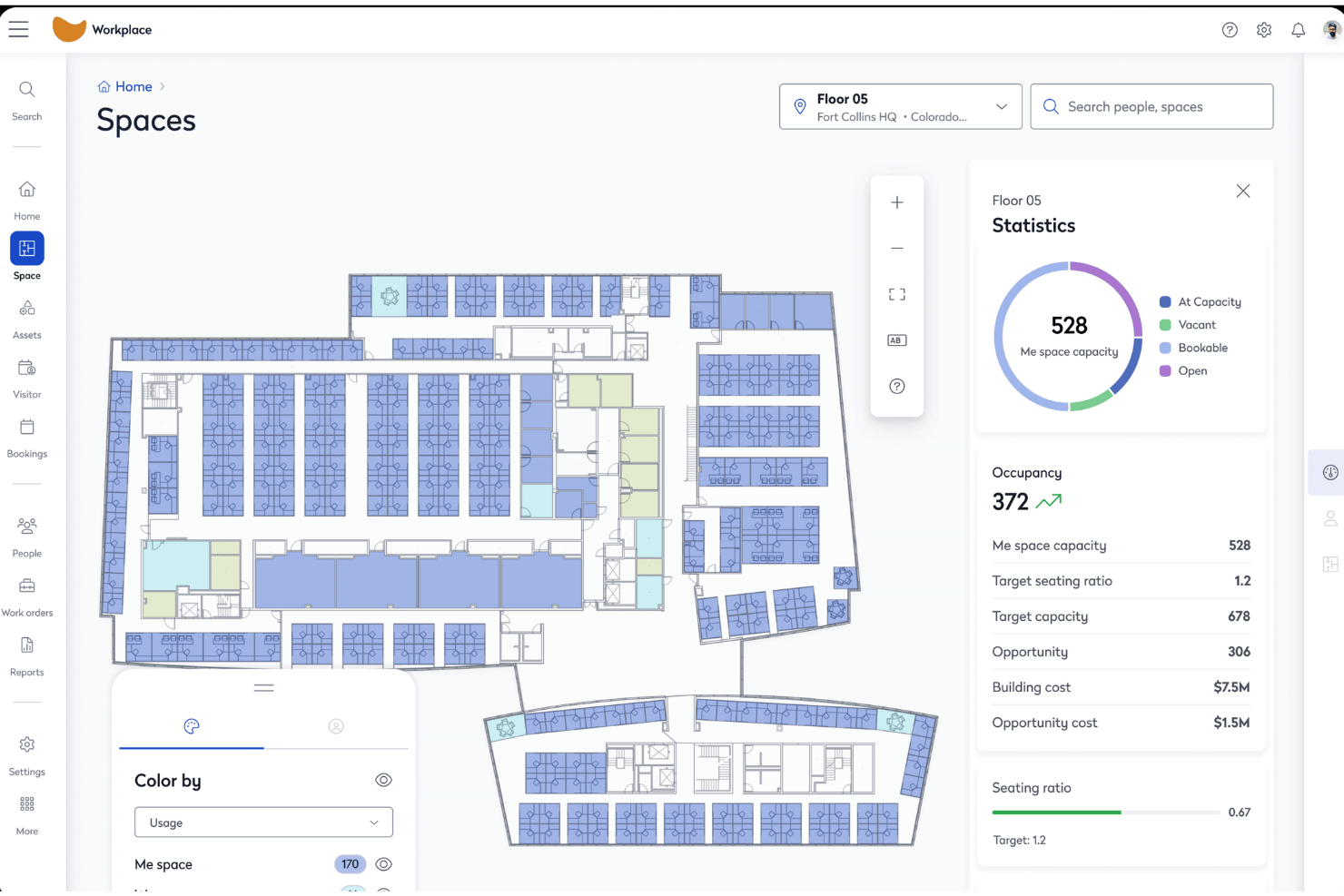
Eptura Workplace is an enterprise office space management platform that combines interactive floor plans, desk and room booking, move management, space utilization analytics, and visitor management across single and multi-site portfolios.
Who Is Eptura Workplace Best For?
Eptura Workplace is a strong fit for enterprise real estate and facilities teams managing large, multi-site portfolios where space cost accountability and chargeback reporting are central to operations.
Why I Picked Eptura Workplace
Eptura Workplace earns its spot on my shortlist because of how well it handles space cost accountability at the portfolio level. I love that it combines lease data management, cost-per-seat tracking, and chargeback reporting in one place, so finance and real estate teams can tie space consumption directly to business units. The Portfolio Insights Agent surfaces these numbers automatically, and Power BI connectors let you pipe them into executive dashboards without manual data pulls.
Eptura Workplace Key Features
- Block and stack planning: Drag-and-drop visual planning tools let you assign teams to floors and zones, model restack scenarios, and compare layout options before committing to any moves.
- Multi-source occupancy tracking: Pulls occupancy data from badge readers, WiFi presence detection, and sensor platforms like VergeSense and Relogix to give you a passive, accurate picture of how space is actually used.
- Visitor management: Pre-registration, on-site check-in, custom badge printing, eSignature capture, watchlists, and emergency roll calls are all handled through the integrated visitor module.
- AI Space Planning Agent: Automatically generates stack plans from real occupancy and headcount data, then surfaces scenario comparisons so your team can act on data rather than guesswork.
Eptura Workplace Integrations
Eptura Workplace offers native integrations with Microsoft 365, Outlook, Teams, Google Calendar, Okta, AutoCAD, Autodesk Revit, VergeSense, Relogix, CoWorkr, ServiceNow, Tableau, and Snowflake. An API is available for custom integrations.
Pros and Cons
Pros:
- Advanced chargeback and cost reporting built-in
- Combines sensor, badge, and booking occupancy data
- Visual block and stack planning enables restacks
Cons:
- No native Slack integration documented
- Admin portal navigation is complex

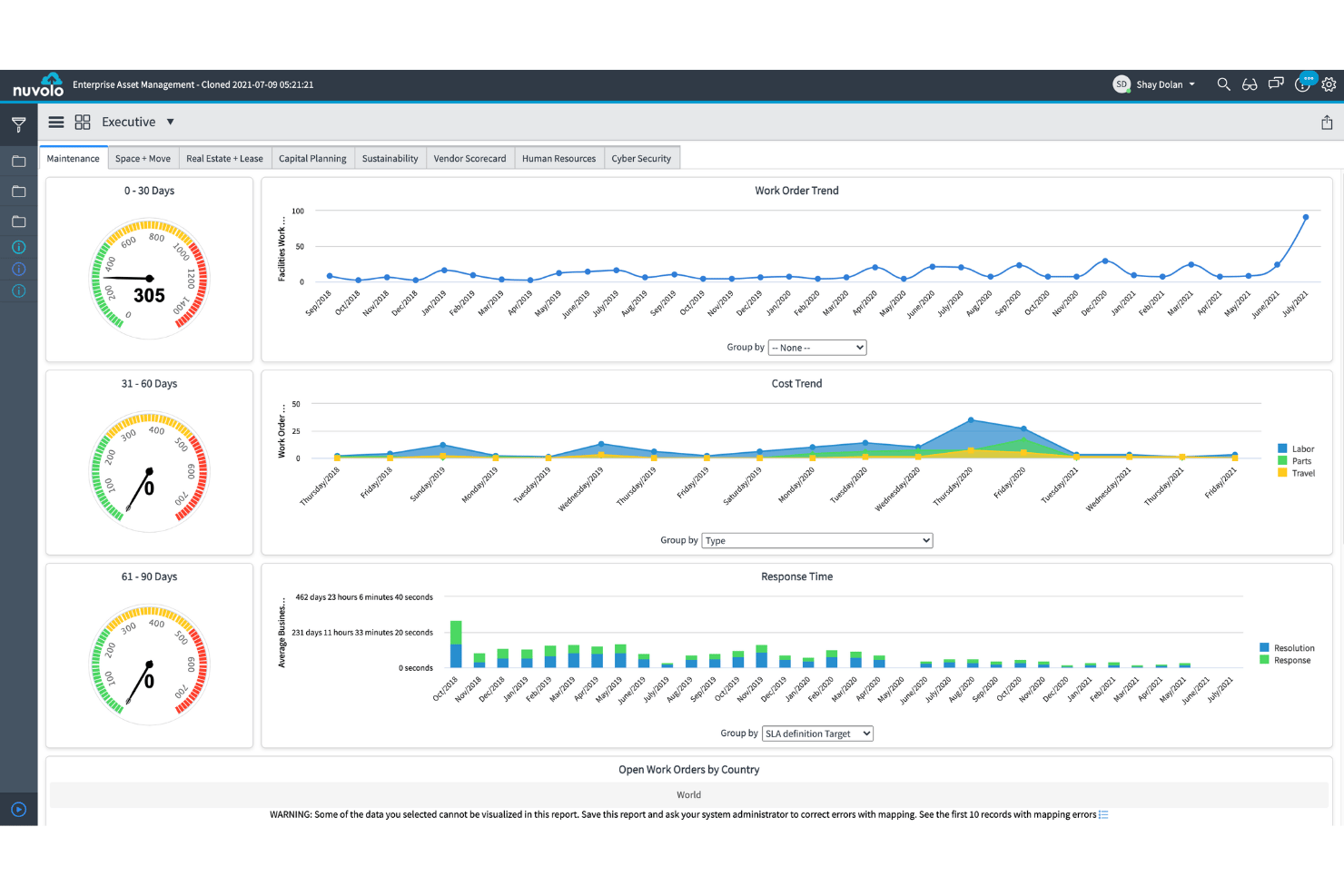
Nuvolo is an IWMS platform built natively on ServiceNow that combines space management, desk and room booking, move management, real estate portfolio tracking, and sustainability reporting in a single connected suite.
Who Is Nuvolo Best For?
Nuvolo is a strong fit for large enterprises in regulated industries—healthcare, life sciences, and government—that are already on ServiceNow and need a fully integrated IWMS with lease accounting, move management, and compliance-grade security in one platform.
Why I Picked Nuvolo
I've included Nuvolo in my top picks because it's purpose-built for large enterprises in regulated industries that need more than a basic booking tool. Its patented CAD interpretation engine syncs directly with AutoCAD and Revit, which means floor plan onboarding at scale (think 3,500+ locations) doesn't require endless manual uploads. Pair that with a dedicated Move Management module that supports multi-scenario campus relocations and automated work order dispatch, and you've got a platform that handles the complexity most workplace tools simply can't.
Nuvolo Key Features
- Lease accounting compliance: Manages owned and leased properties with built-in ASC 842 and IFRS 16 compliance, including critical date alerts and automated renewal notifications.
- Space demand forecasting: Projects future space needs using headcount growth data and sharing ratio tracking to support consolidation or expansion decisions.
- IoT and occupancy sensor integration: Connects to building sensors and IoT devices to feed real-time occupancy data directly into utilization dashboards.
- Visitor management: Handles onsite visitor workflows, kiosk-based check-in, and host notifications within the same reservation management interface.
Nuvolo Integrations
Nuvolo offers native integrations with AutoCAD, Revit, Workday, Oracle PeopleSoft, Microsoft Teams, Slack, Microsoft 365, and Outlook. An API is available for custom integrations.
Pros and Cons
Pros:
- Compliance modules for healthcare and government
- Full move management for complex relocations
- Native CAD sync for automated floor plans
Cons:
- Does not track hardware assets
- Requires separate ServiceNow licensing to use
Diğer Ofis Alanı Yönetimi Yazılımları
Kısa listeme giremeyen ancak yine de göz atmaya değer bazı ek ofis alanı yönetimi yazılımı seçenekleri şunlardır:
- Tactic
For visitor and workspace booking in one place
- OfficeSpace
For floor plan-led workplace management
- Skedda
For self-serve desk and room booking rules
- deskbird
For hybrid office booking via Slack and Teams
- OfficeRnD Workplace
For hybrid team scheduling and booking
- Appspace
For kiosk and mobile office wayfinding
- Envoy Workplace
For visitor and desk booking in one platform
- Gable
For on-demand coworking and office booking
- Yoffix
For Microsoft 365-native desk and room booking
- Mri Manhattan
For enterprise real estate portfolio management


How I Evaluate Office Space Management Software
My evaluation splits into two layers: the baseline functionality a tool must offer—floor plans, booking, utilization analytics—and the differentiators that separate a niche desk-booking app from a platform that handles portfolio-scale move management and compliance.
Core Functionality (Table Stakes For This List)
When I'm selecting tools for my list, I rank each one on a scale from 0 (does not offer the functionality) to 5 (excels in this area) for each core functionality listed below. I then calculate the tool's total score as a percentage, using 65% as a benchmark to help assess its overall fit for the list.
- Interactive floor plans: I look for multi-site, layered floor plans with CAD or BIM import support and live seat status—not just static images uploaded as PNGs.
- Desk and room booking: Self-service reservation for desks, rooms, and extras like parking or lockers matters, along with mobile check-in and policy controls for neighbourhoods or zones.
- Space utilization analytics: I evaluate whether the platform combines booking data with sensor, badge, or Wi-Fi signals to show real occupancy trends, not just reservation counts.
- Move management: Drag-and-drop stack planning with scenario comparison is what I check for, especially for teams running restacks or multi-floor relocations on tight timelines.
- Employee directory and wayfinding: The directory should sync with your HRIS and link people to their seat assignments on the map so anyone can find a colleague without sending a message first.
- Hybrid scheduling integration: Two-way sync with Outlook, Google Calendar, Teams, or Slack is the baseline, but I also look for team-day coordination views and SSO support.
Once I have a list of tools that meet the criteria, I consider what sets each platform apart.
Differentiating Factors (What Sets Vendors Apart)
Here's how I compare and contrast different vendors:
Standout Features
Scenario planning tools matter most when you're weighing a restack or consolidation. I look for what-if modelling that lets you test hybrid ratio changes against cost and headcount data before committing. Sensor and IoT integration is equally important—I evaluate whether a platform pulls passive occupancy data from badges or Wi-Fi signals, not just reservation counts. Visitor and delivery management rounds out the picture, replacing standalone lobby apps with built-in check-in, host alerts, and package tracking.
Beyond Features
I evaluate how quickly a vendor can digitize your floor plans—some offer full CAD/BIM conversion services, while others expect you to self-serve, which can stall rollout by weeks. Integration depth matters just as much: I check for bidirectional sync with Microsoft 365, Google Workspace, and HRIS platforms like Workday so user provisioning and booking stay automatic. Security posture is another filter, especially SOC 2 Type II certification and data residency options for teams operating across regions. Finally, I look at analytics export—whether dashboards connect to Power BI or Tableau so utilization data feeds into broader portfolio reporting without manual pulls.
Ofis Alanı Yönetimi Yazılımı Nasıl Seçilir?
Doğru ofis alanı yönetimi yazılımı, öncelikle çözmek istediğiniz iş yeri sorunlarına bağlıdır:
| Önceliğiniz... | Şunları arayın... |
|---|---|
| Hibrit çalışma programlarını ve rezervasyonları yönetmek | Takvim senkronizasyonu ve harita üzerinde gerçek zamanlı koltuk durumu |
| Gayrimenkul harcamalarını ve masraf dağıtımlarını izlemek | Yerleşik alan maliyeti dağıtımı ve doluluk raporlaması |
| Uyumluluk gerekliliklerini veya düzenlemeye tabi ortamları yönetmek | FedRAMP, SOC 2 veya benzer belgeler için tedarikçi desteği |
| Büyük taşınmaları veya yeniden yerleşimleri koordine etmek | Birden fazla katın planlanmasına yönelik senaryo modelleme araçları |
| Ziyaretçi, teslimat ve rezervasyon iş akışlarını birleştirmek | Entegre giriş ve ev sahibi bildirim özellikleri |
Kısa Listenizi Nasıl Değerlendirmelisiniz?
- Kat planı dijitalleştirmesini test edin: Örnek bir yerleşim planı yükleyin ve canlı geri dönüş sürelerini ya da CAD/BIM dosyaları için desteklerini ölçün.
- Analitik derinliğini doğrulayın: Rezervasyon verilerinizi kart veya sensör verileriyle birleştirerek gerçek bir doluluk analizi çalıştırın.
- Uyumluluk kanıtı isteyin: En güncel SOC 2 Type II denetimini veya FedRAMP durumunu yazılı olarak talep edin.
- Bir taşınma senaryosunu deneyin: Test ortamında üç ekibin yerleşimini yeniden düzenlemek için platformlarını kullanın ve taşınma öncesi ve sonrası maliyet öngörülerini dışa aktarın.
- Önceliğinizi belirleyin: Dağıtım hızını (kendi kendine hizmet araçları) entegrasyon kapsamı ve uyumlulukla (kurumsal düzeyde çözümler) dengeleyerek karar verin.
Ofis Alanı Yönetimi Yazılımı Nedir?
Ofis alanı yönetimi yazılımı; masa tahsisini nasıl yaptığınızı, kat planlarını nasıl yönettiğinizi, çalışma alanı kullanımını nasıl planladığınızı ve gayrimenkul maliyetlerini nasıl izlediğinizi merkezileştiren dijital bir platformdur. Etkileşimli haritalar, rezervasyon araçları ve analizler sunarak ekiplerin hibrit çalışmayı koordine etmesine, doluluk oranlarını takip etmesine ve uyumluluğu sağlamasına yardımcı olur. Bu tür yazılımlar; ekip ihtiyaçları değiştikçe çalışma alanı kaynaklarını görünür ve uyarlanabilir tutma konusunda tesis, BT ve proje yöneticilerini destekler.
Ofis Alanı Yönetimi Yazılımının Özellikleri
Ofis alanı yönetimi yazılımı seçerken aşağıdaki temel özelliklere dikkat edin:
- Etkileşimli kat planları: Koltuk tahsisini, olanakları ve gerçek zamanlı doluluk güncellemelerini gösteren dijital kat haritalarını görüntüleyin, düzenleyin ve yönetin. Bu, ekiplerin birden fazla konumdaki çalışma alanlarını görselleştirmesine ve planlamasına yardımcı olur.
- Masa ve oda rezervasyonu: Çalışanların self servis araçlar aracılığıyla masaları, toplantı odalarını veya iş birliği alanlarını rezerve etmesini sağlayın; bu araçlar genellikle mobil giriş, rezervasyon politikaları ve bölge denetimlerini de içerir.
- Alan kullanım analizleri: Alan ihtiyaçları ve yerleşim düzenleriyle ilgili kararları yönlendirmek için rezervasyon verilerini, sensörleri, Wi-Fi'yi veya kartlı geçiş etkinliğini izleyerek gerçek ve rezerve edilmiş çalışma alanı kullanımını takip edin.
- Taşınma yönetimi: Senaryo modelleme, sürükleyip bırakma yöntemiyle kat planı düzenleme ve öncesi/sonrası görselleştirmeleriyle ofis taşınmalarını ve yeniden yerleşimleri planlayın; böylece ekipler değiştikçe çalışma alanı tahsisini ayarlamak kolaylaşır.
- Çalışan dizini ve yön bulma: Kişileri kendilerine tahsis edilen koltuklarla ilişkilendirin, iletişim bilgilerini görüntüleyin ve çalışanların iş arkadaşlarını, toplantı odalarını veya olanakları bulabilmesi için etkileşimli haritalar sunun.
- Hibrit çalışma planlaması: Takvim platformlarıyla entegre olun ve kişilerin veya grupların tesiste çalışmayı planladığı zamanları gösteren ekip tabanlı planlama olanağı sunarak ofiste bulunma durumunu koordine edin ve çakışmaları azaltın.
- Ziyaretçi yönetimi: Konukları kaydedin, dijital geçiş kartları düzenleyin, ev sahiplerine bildirim gönderin ve ziyaretçi kayıtlarını aynı platform üzerinden takip ederek bağımsız lobi araçlarının yerini alın.
- İK ve BT sistemleriyle entegrasyon: Bilgilerin otomatik olarak güncel kalması için çalışan verilerini, koltuk tahsislerini ve kullanıcı izinlerini Active Directory, Google Workspace veya İKYS'niz gibi araçlarla senkronize edin.
- Alan maliyeti takibi ve raporlama: Doluluk maliyetlerini maliyet merkezlerine veya ekiplere tahsis edin, kullanım raporları oluşturun ve finans ile tesis paydaşları için verileri dışa aktarın.
- Güvenlik ve uyumluluk denetimleri: SSO, role dayalı izinler, denetim izleri ve SOC 2 veya FedRAMP gibi güvenlik standartlarına bağlılık yoluyla hassas verileri koruyarak mevzuat ve gizlilik ihtiyaçlarını destekleyin.
Ofis Alanı Yönetimi Yazılımındaki Yaygın Yapay Zekâ Özellikleri
Yukarıda sıralanan standart ofis alanı yönetimi yazılımı özelliklerinin yanı sıra bu çözümlerin çoğu aşağıdakiler gibi özelliklerle yapay zekâyı bünyesine katıyor:
- Yapay zekâ destekli doluluk tahmini: Gelecekteki çalışma alanı talebini tahmin etmek için geçmiş kullanım verilerini ve gerçek zamanlı sensör girdilerini kullanır; masa tahsisini optimize etmenize ve kullanılmayan alanı azaltmanıza yardımcı olur.
- Yapay zekâ destekli alan optimizasyonu önerileri: İş birliğini ve alan verimliliğini artıran yerleşim değişiklikleri veya koltuk yeniden tahsisleri önermek için rezervasyon modellerini, ekip programlarını ve hareket verilerini analiz eder.
- Otomatik anomali tespiti: Sürekli gerçekleşen gelmeme durumları veya aşırı kalabalık gibi olağandışı modelleri işaretlemek için doluluk ve rezervasyon verilerini izler; böylece sorunları operasyonları aksatmadan önce ele alabilirsiniz.
- Doğal dil sorgu asistanları: Alan kullanımı, uygunluk veya rezervasyon politikaları hakkında günlük dille soru sormanıza olanak tanır; yapay zekâ, verilerinizden yanıtları ve içgörüleri anında sunar.
- Öngörülü bakım uyarıları: Sensör ve kullanım verilerini analiz etmek için yapay zekâyı kullanır; sorunlar ortaya çıkmadan önce toplantı odalarının veya ortak alanların temizlik, onarım ya da malzeme yenileme ihtiyacı duyabileceğini belirler.
Ofis Alanı Yönetimi Yazılımının Faydaları
Ofis alanı yönetimi yazılımını uygulamak, ekibiniz ve işletmeniz için çeşitli faydalar sağlar. Yararlanabileceğiniz birkaç fayda şunlardır:
- Merkezi çalışma alanı tahsisi: Masa atamalarını, oda rezervasyonlarını ve kat planlarını tek bir platformda koordine ederek ekibinizin hangi alanların kullanılabilir olduğunu ve kimin nerede oturduğunu her zaman bilmesini sağlayın.
- Veriye dayalı kullanım içgörüleri: Gerçek çalışma alanı kullanımını izlemek için doluluk analizlerini, sensör verilerini ve rezervasyon kayıtlarını bir araya getirin; böylece az kullanılan alanları belirleyebilir ve alan kararlarınızı gerekçelendirebilirsiniz.
- Entegre taşınma ve senaryo planlaması: Statik elektronik tablolara bağlı kalmadan ofis taşınmalarını, yeniden yerleşimleri veya hibrit çalışma geçişlerini planlamak için sürükle ve bırak araçlarını ve varsayımsal modellemeyi kullanın.
- Hibrit çalışma koordinasyonu: Programları Outlook veya Google Takvim gibi takvim araçlarıyla senkronize ederek ekibinizin ofiste çalışacağı günleri planlamasını ve masa çakışmalarını azaltmasını sağlayın.
- Ziyaretçi ve teslimat yönetimi: Konukları kaydedin, dijital giriş kartları oluşturun ve ev sahiplerine doğrudan platform üzerinden bildirim göndererek bağımsız giriş ve bildirim uygulamalarının yerini alın.
- Otomatik maliyet takibi ve raporlama: Doluluk ve çalışma alanı giderlerini maliyet merkezlerine veya ekiplere dağıtın ve finans ya da tesis raporlaması için kullanım verilerini dışa aktarın.
- Güvenlik ve uyumluluk güvencesi: Gerektiğinde SSO, izin kontrolleri ve SOC 2 veya FedRAMP gibi standartlara yönelik destekle kat planlarına ve rezervasyon verilerine kimlerin erişebileceğini yönetin.
Ofis Alanı Yönetim Yazılımının Maliyetleri ve Fiyatlandırması
Ofis alanı yönetim yazılımı seçerken mevcut çeşitli fiyatlandırma modellerini ve planları anlamak gerekir. Maliyetler özelliklere, ekip büyüklüğüne, eklentilere ve diğer unsurlara göre değişir. Aşağıdaki tablo, ofis alanı yönetimi yazılımı çözümlerinde yaygın planları, ortalama fiyatlarını ve genellikle sunulan özellikleri özetlemektedir:
Ofis Alanı Yönetim Yazılımı Plan Karşılaştırma Tablosu
| Plan Türü | Ortalama Fiyat | Yaygın Özellikler |
|---|---|---|
| Ücretsiz Plan | $0 | Temel kat planı görüntüleme, sınırlı masa ve oda rezervasyonu, basit analizler ve e-posta desteği. |
| Kişisel Plan | $5–$25/kullanıcı/ay | Etkileşimli kat planları, standart masa ve oda rezervasyonu, kullanım raporları, mobil giriş ve temel entegrasyonlar. |
| İşletme Planı | $8–$40/kullanıcı/ay | Gelişmiş rezervasyon politikaları, alan kullanım analizleri, taşınma yönetimi, İK ve BT entegrasyonları ve dizin senkronizasyonu. |
| Kurumsal Plan | $30–$120/kullanıcı/ay | Portföy genelinde analizler, senaryo planlaması, özel entegrasyonlar, SSO, uyumluluk kontrolleri ve özel destek. |
Ofis Alanı Yönetim Yazılımı Hakkında SSS
Ofis alanı yönetim yazılımı hakkında sık sorulan soruların bazı yanıtlarını burada bulabilirsiniz:
Ofis alanı yönetim yazılımı hibrit çalışma programlarına nasıl yardımcı olur?
Ofis alanı yönetim yazılımı, kullanıcı dostu bir iOS veya Android uygulamasında rezervasyon sistemlerini takvimlerle birbirine bağlayarak kimin ofiste çalışmayı planladığını görmenizi sağlar. Bu, ekiplerin ofiste bulunma durumlarını koordine etmesine, masaların çift rezerve edilmesini önlemesine ve hibrit bir iş yerinde dönüşümlü çalışma programlarını desteklemesine yardımcı olur. Birçok araç, koltukların gerçek zamanlı kullanılabilirliğini gösterir ve kolay planlama için Outlook veya Google Takvim ile senkronize olur; böylece çalışan deneyimini iyileştirir.
Ofis alanı yönetim yazılımı, birden fazla lokasyondaki karmaşık kat planlarını yönetebilir mi?
Evet, birçok ofis alanı yönetim yazılımı platformu, her metrekareyi takip etmek için katmanlı haritalama ve CAD veya BIM içe aktarma özellikleriyle birden fazla lokasyonu ve kat planını destekler. Bu görünürlük; tesis yönetiminin ve proje yöneticilerinin alan dağılımını optimize etmesine, koltuk atamasına, taşınmaları planlamasına ve büyüyen kuruluşlarda veya çeşitli çalışma ortamlarında yerleşim planlarını güncel tutmasına yardımcı olur.
Ofis alanı yönetim yazılımında hangi entegrasyonları aramalıyım?
Birincil takviminiz (Google Workspace, Microsoft 365), İKYS, kimlik yönetimi ve ofis doluluğunu takip eden sensörlerle entegrasyonlar sunan hepsi bir arada bir platform arayın. Kapsamlı entegrasyonlar, kullanıcı tanımlama işlemlerini otomatikleştirir, programları senkronize eder ve iş yeri analitiği aracılığıyla gerçek kullanım verilerini sunar. Bu, daha iyi alan planlaması için bilinçli kararlar almanıza yardımcı olur.
Ofis alanı yönetim yazılımı, gizli ofis verileri için ne kadar güvenlidir?
Yerleşik platformların çoğu, SSO, ayrıntılı izinler ve denetim günlüğü sunarak ofis ortamınızı güvence altına alır. Düzenlemelere tabi kaynak yönetimi için SOC 2 Type II ve ISO 27001 sertifikalarını veya veri yerleşimi kontrollerini kontrol edin. Bir tedarikçi seçmeden ya da yeni özellikleri kullanıma almadan önce, verileri farklı lokasyonlarda nasıl koruduklarını netleştirmek için en güncel uyumluluk raporlarını isteyin.
Kısa süreli veya esnek çalışma alanı rezervasyonu için ofis alanı yönetim yazılımını kullanabilir miyim?
Evet, çoğu alan rezervasyon yazılımını paylaşımlı masalar, toplantı odası rezervasyonları, otopark ve diğer ofis kaynakları için politikalar belirlemek amacıyla kullanabilirsiniz. Çalışanlar alanları kolayca rezerve edebilir; mobil rezervasyon, QR ile giriş, konferans odası ekranları ve gerçek zamanlı haritalama, kısa süreli rezervasyonları ve koltuk dağılımındaki günlük değişiklikleri destekler.
Mevcut kat planlarını ofis alanı yönetim yazılımıyla dijitalleştirmek için neler gerekir?
Genellikle yerleşim planlarını PDF, CAD veya BIM formatlarında yüklersiniz. Bazı tedarikçiler, iş yeri deneyimini iyileştirmek için dosyalarınızdan etkileşimli haritalar oluşturmak üzere özel destek hizmeti sunarken diğerleri kendi kendine hizmet yüklemelerini zorunlu kılar. Kaliteyi test etmek için örnek bir plan göndermenizi öneririm. Bu, özellikle birden fazla katı kapsayan veya özelleştirilmiş haritalara ihtiyacınız varsa haritaların iş yeri stratejinizle uyumlu olmasını sağlar.