

2026’nın En İyi 10 İnşaatta Zaman Takibi Yazılımı

10 En İyi İnşaat Zaman Takip Yazılımları Kısa Listesi


İnşaat projelerini yönetmek hiç de kolay değildir. Her şeyi yolunda tutmaya çalışırken zaman çizelgelerini, bütçeleri ve ekipleri aynı anda yönetmeniz gerekir. İşte bu noktada inşaat zaman takip yazılımı devreye girer. Çalışılan saatleri, proje ilerlemesini ve iş gücü maliyetlerini yakından takip etmenize yardımcı olur.
Çeşitli yazılım çözümlerini test edip incelemek için zaman harcadım ve bulgularımı sizinle paylaşmak için buradayım. Amacım, en iyi seçimlerim hakkında tarafsız ve kapsamlı bir inceleme sunmak.
Bu makalede işinizi kolaylaştırabilecek ve projelerinizi daha verimli hâle getirebilecek araçları keşfedeceksiniz. Ekibiniz için en uygun seçeneği bulabilmeniz amacıyla bunların özelliklerini, avantajlarını ve olası dezavantajlarını inceleyeceğim.
Why Trust Our Software Recommendations
Our team has been testing and reviewing software since 2012. As project managers ourselves, we know how difficult—and important—it is to choose the right software.
For this guide, we evaluated tools using hands-on testing and independent research, scoring tools using our selection criteria. We also draw on insights from industry thought leaders and practicing project management experts.
Our reviews reflect our human editorial judgment, not a sales pitch.
Expert reviewers:
İnşaat Zaman Takip Yazılımları Karşılaştırma Tablosu
Bu karşılaştırma tablosu, en iyi inşaat zaman takip yazılımı seçimlerimin fiyatlandırma ayrıntılarını özetlemektedir.
| Tool | Starting Price | Website | |
|---|---|---|---|
| Best for team communication | 4.6 out of 5 | Pricing upon request Free plan + 14-day free trial available | Website |
| Best for complex project workflows | 4.2 out of 5 | Pricing upon request Free demo available | Website |
| Best for shared site kiosk clock-ins | 4.8 out of 5 | $4.99/user/month Free plan + 7-day trial + demo available | Website |
| Best for integration with accounting | 4.7 out of 5 | $38/month 30-day free trial | Website |
| Best for automatic time tracking | 4.7 out of 5 | $3.99/user/month Free plan + free trial + free demo available | Website |
| Best for invoicing features | 4.4 out of 5 | $9/user/month Free trial + free plan available | Website |
| Best for prevailing-wage payroll reporting | 4.4 out of 5 | Pricing upon request Free demo available | Website |
| Best for GPS tracking | 4.1 out of 5 | $9/employee/month + $50/month base fee Free demo available | Website |
| Best for mobile workforce | — | $3/user/month 14-day free trial | Website |
| Best for industry-specific needs | — | $10/user/month 7-day free trial | Website |
En İyi İnşaat Zaman Takip Yazılımları İncelemeleri
Aşağıda, kısa listeme giren en iyi inşaat zaman takip yazılımları hakkındaki ayrıntılı özetlerimi bulabilirsiniz. İncelemelerim, sizin için en uygun seçeneği bulmanıza yardımcı olmak amacıyla her aracın temel özelliklerine, artılarına ve eksilerine, entegrasyonlarına ve ideal kullanım alanlarına ayrıntılı bir bakış sunmaktadır.

Best for team communication

Connecteam is an all-in-one employee management software designed for deskless teams, helping businesses coordinate and communicate with their workforce efficiently. It offers tools for time tracking, scheduling, and team communication.
Why I picked Connecteam: Connecteam excels at enhancing team communication with features like in-app chat and updates. These tools keep your team connected and informed, which is crucial for deskless workers. You can also create custom forms and checklists to streamline workflows. Its focus on communication makes it perfect for businesses that need to keep remote teams aligned.
Standout Features & Integrations
Features include task management to assign and track work, a time clock for accurate time tracking, and training modules to onboard new employees. You can also use surveys to gather feedback from your team.
Integrations include QuickBooks, Gusto, Dropbox, Google Drive, Zoom, Slack, Microsoft Teams, Square, PayPal, and Zapier.
Pros and Cons
Pros:
- Training modules for onboarding
- Custom forms and checklists
- In-app chat for team communication
Cons:
- Basic desktop functionality
- Occasional app glitches
- Limited advanced reporting features
New Product Updates from Connecteam

Connecteam Adds Automatic Paid Break Actions and Manual Break Windows
Connecteam adds automatic paid break actions and configurable start windows for manual breaks. These updates help teams manage break schedules and maintain accurate timesheets. For more information, visit Connecteam’s official site.
 .

CMiC
Best for complex project workflows

CMiC is a construction ERP built on a single database platform, with dedicated modules for crew time tracking, jobsite check-in/clock-out, job costing, payroll, and field-to-office project management.
Who Is CMiC Best For?
CMiC is well-suited to mid-size and enterprise general contractors and specialty contractors managing large, multi-phase construction projects.
Why I Picked CMiC
I've included CMiC in my top picks because it handles time tracking as part of a fully connected project workflow, not as a standalone function. When you're running multi-phase builds with overlapping crews and subcontractors, CONSTRUCT Crew Time lets managers track labor hours and work order durations tied directly to specific tasks and projects. What I find especially useful is the multi-level approval workflow for time entries, which keeps sign-off moving even on large teams. Pair that with CMiC Workflow's customizable, automated notifications, and you've got a system that keeps time data moving through the right hands without manual follow-up.
CMiC Key Features
- CONSTRUCT Check-In: Lets field workers clock in and out directly at the jobsite, with automated break recording built in.
- Offline data entry: Field teams can log time without an internet connection, and entries sync automatically once connectivity is restored.
- Job cost integration: Labor hours entered in time tracking feed directly into job costing, keeping project financials current.
- Equipment time tracking: Tracks equipment usage hours alongside labor, tying both to specific tasks and cost codes.
CMiC Integrations
CMiC offers a wide range of partner-built integrations, including Procore, SmartBarrel, hh2, mJobtime, Oracle Textura, GCPay, Autodesk ProEst, EarthCam, Arcoro, HammerTech, and Prophix. An open API is available across functional areas like financials, project controls, human capital management, and materials management, supporting custom integrations for construction firms with specialized tech stacks.
Pros and Cons
Pros:
- Handles multi-entity, multi-project labor tracking
- Certified payroll built into the platform
- Unified single-database links time to job costs
Cons:
- Implementation requires significant time and consulting investment
- Interface feels dated and navigation is clunky

Clockify
Best for shared site kiosk clock-ins

Clockify is a time tracking software designed for teams of all sizes, offering unlimited user access. It allows you to track work hours, manage projects, and monitor productivity easily.
Why I picked Clockify: I selected Clockify for its shared kiosk feature, which allows teams to record shift start and end times from a single dedicated tablet or desktop device. Onsite team members can log their attendance in seconds using personalized PIN codes, eliminating the need for individual mobile app installs or hardware setups. This makes it ideal for HR managers and site leads who need a central, tamper-proof clock-in station to streamline shift attendance across physical workplaces.
Standout Features & Integrations
Features include time tracking with a stopwatch, manual time entry for flexibility, and project tracking to monitor progress and budgets. You can also create visual reports to analyze productivity and export them as needed.
Integrations include Asana, Trello, Slack, Jira, Monday.com, QuickBooks, Notion, Salesforce, Microsoft Teams, and Google Calendar.
Pros and Cons
Pros:
- Flexible manual and automated entry options
- Visual report generation
- Project budget tracking
Cons:
- Basic mobile app functionality
- Limited advanced reporting features

Best for integration with accounting

QuickBooks is a time tracking and accounting software designed for small to medium-sized businesses. It helps you manage employee time, payroll, and accounting tasks in one place.
Why I picked QuickBooks: QuickBooks excels at integrating time tracking with accounting, making it easy to manage both in one platform. You can track employee hours and sync them directly with payroll, reducing manual entry errors. The software provides detailed reports that help you analyze labor costs. Its deep integration with accounting functions makes it a top choice for businesses needing unified financial management.
Standout Features & Integrations
Features include automatic payroll calculations to save you time, expense tracking to monitor spending, and invoicing capabilities to streamline billing. You can also access customizable reports to gain insights into your business operations.
Integrations include PayPal, Shopify, Square, TSheets, HubSpot, Expensify, Bill.com, Microsoft Excel, Salesforce, and Amazon.
Pros and Cons
Pros:
- Expense tracking capabilities
- Automatic payroll calculations
- Detailed financial reports
Cons:
- Limited offline functionality
- Requires accounting knowledge
- Complex setup process

TimeCamp
Best for automatic time tracking

TimeCamp is a time tracking software aimed at small to medium-sized businesses that need to monitor employee productivity and project progress. It automates time tracking, making it easier for you to manage tasks and budgets effectively.
Why I picked TimeCamp: TimeCamp's automatic time tracking feature is a key differentiator, allowing you to capture work time without manual input. This helps in reducing errors and ensuring accurate time logs. You can also categorize time entries by project or task, providing detailed insights into where your team's efforts are going. The automation feature simplifies the tracking process, making it ideal for busy teams.
Standout Features & Integrations
Features include project management tools to keep your tasks organized, attendance tracking to monitor employee presence, and reporting capabilities to analyze productivity. You can also use invoicing features to bill clients directly from the tracked hours.
Integrations include Trello, Asana, Slack, Jira, Monday.com, QuickBooks, Xero, Microsoft Teams, Salesforce, and GitHub.
Pros and Cons
Pros:
- Attendance tracking
- Invoicing from tracked hours
- Detailed project categorization
Cons:
- Learning curve for advanced functions
- Basic mobile app features
- Occasional syncing delays

Harvest
Best for invoicing features

Harvest is a time tracking software tailored for freelancers and small businesses that need to manage time and expenses efficiently. It helps you track billable hours, manage projects, and create invoices for clients.
Why I picked Harvest: Harvest's invoicing capabilities make it a standout choice for those who need to track time and bill clients accurately. You can generate invoices directly from tracked hours, streamlining the billing process. The software also offers expense tracking to help you manage project costs effectively. Its focus on invoicing makes it ideal for businesses that require precise billing features.
Standout Features & Integrations
Features include time tracking with a simple interface, project management tools to keep your work organized, and expense tracking to monitor costs. You can also generate detailed reports to analyze your team's productivity and project profitability.
Integrations include Asana, Trello, Slack, QuickBooks, Xero, Stripe, PayPal, Zapier, Salesforce, and Google Calendar.
Pros and Cons
Pros:
- Project profitability analysis
- Expense tracking capabilities
- Direct invoicing from time entries
Cons:
- Learning curve for new users
- Basic mobile app features
- Limited offline capabilities
Miter
Best for prevailing-wage payroll reporting
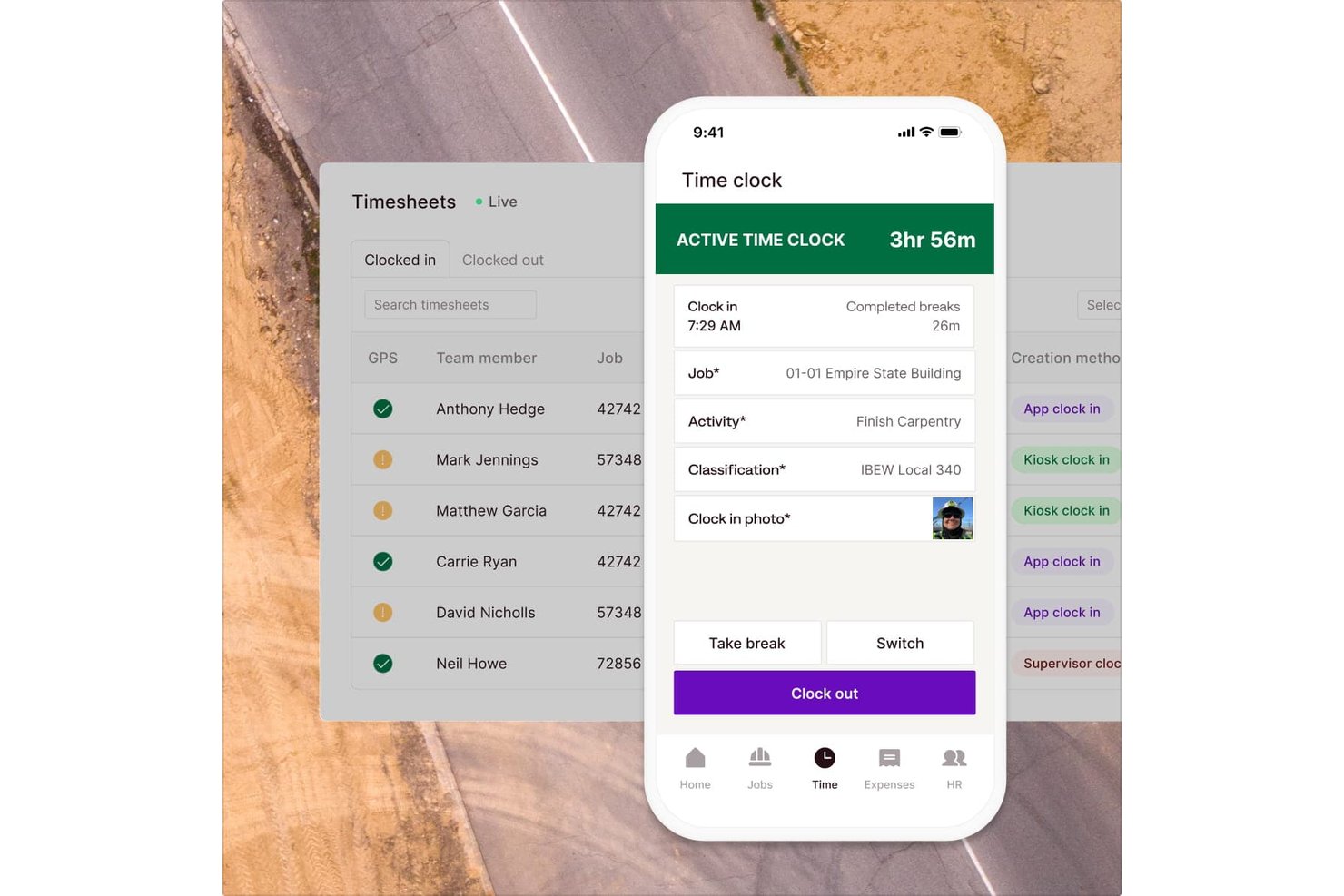
Miter is a construction workforce management platform that combines field time tracking, crew scheduling, production tracking, daily reports, and certified payroll reporting into a single system built for contractors.
Who Is Miter Best For?
Miter is a strong fit for general contractors who need to connect field time tracking, prevailing-wage payroll, and job costing in one construction-specific platform.
Why I Picked Miter
I picked Miter as one of the best because its certified payroll and prevailing-wage support is built directly into how time gets captured and approved. When my crew clocks in, hours are tied to cost codes and wage determinations right away, so generating a WH-347 isn't a separate cleanup task. I also like that Miter applies union fringe benefit rules automatically, which saves real time on public works jobs where fringe calculations are otherwise done manually.
Miter Key Features
- Geofencing and location tracking: Virtual jobsite boundaries can block or flag clock-ins from outside a defined perimeter, with optional breadcrumb tracking while workers are on the clock.
- Project Intelligence dashboard: Tracks budget versus actual labor costs by cost code and job using each worker's fully burdened rate, including overtime, taxes, and fringe.
- Multi-step timesheet approvals: Approval workflows can be configured across multiple levels, assigned by job, department, or location, with bulk editing before payroll runs.
- Daily reports with auto-fetched weather: Field reports pull together timesheets, production quantities, equipment use, photos, and real-time weather data into customizable branded PDFs.
Miter Integrations
Miter offers native integrations with Sage Intacct, Sage 300 CRE, Procore, HCSS, NetSuite, Acumatica, Viewpoint Vista, and QuickBooks. It also provides a REST API for custom integrations.
Pros and Cons
Pros:
- Prevailing-wage rules include union fringes
- Geofences help verify jobsite clock-ins
- Job-costed punches feed project budgets
Cons:
- Certified payroll reports fail or export inconsistently
- Mobile app crashes and loads slowly

ExakTime
Best for GPS tracking

Exak Time is a time tracking software designed for construction and field service industries, focusing on mobile workforce management. It helps you track employee hours, manage payroll, and ensure compliance with labor laws.
Why I picked Exak Time: Exak Time offers precise GPS tracking, which is essential for monitoring remote teams in the field. This feature ensures that your team clocks in and out from the correct locations. The mobile app allows employees to submit time entries and access schedules on the go. Its GPS capabilities make it indispensable for businesses needing accurate location tracking.
Standout Features & Integrations
Features include geofencing to automate clock-ins and outs, a time clock app for easy mobile access, and compliance tools to ensure labor law adherence. You can also generate detailed reports to analyze workforce efficiency.
Integrations include QuickBooks, Sage, Foundation, Viewpoint, ADP, BambooHR, Acumatica, Paychex, Xero, and Microsoft Dynamics.
Pros and Cons
Pros:
- Compliance tools for labor laws
- Mobile time clock app
- Geofencing for automated entries
Cons:
- Learning curve for new users
- Initial setup complexity
- Limited offline features


Clock Shark is a time tracking solution tailored for construction and field service companies, designed to support mobile workforces. It helps you track employee hours, manage jobs, and simplify payroll processing.
Why I picked Clock Shark: Clock Shark excels in serving mobile teams, offering GPS tracking and geofencing to ensure accurate time logging. Its mobile app allows workers to clock in and out from job sites, making it convenient for those on the move. You can assign jobs and tasks directly through the app, keeping your team organized. The tool's focus on the mobile workforce sets it apart from other time tracking solutions.
Standout Features & Integrations
Features include GPS tracking for accurate location data, geofencing to automate time tracking when entering or leaving job sites, and a drag-and-drop scheduling tool for easy job assignments. You can also generate timesheets automatically to streamline payroll.
Integrations include QuickBooks, ADP, Xero, Sage, MYOB, Zapier, Gusto, BambooHR, Paychex, and Microsoft Dynamics.
Pros and Cons
Pros:
- Automatic timesheet generation
- Mobile app convenience
- Geofencing for automated tracking
Cons:
- Steeper learning curve
- Basic reporting capabilities
- Occasional mobile app glitches


ConstructionClock is a time tracking tool specifically designed for the construction industry, focusing on teams that require accurate and automated time logging. It allows construction teams to clock in and out effortlessly, managing work hours and project timelines efficiently.
Why I picked ConstructionClock: ConstructionClock is tailored for construction-specific needs, offering features like automatic time tracking that suits on-site personnel. Its GPS capabilities ensure precise time logging based on location, which is crucial for field teams. The software also allows for easy task assignments and budget tracking, making it a comprehensive tool for construction projects. Its focus on industry-specific requirements sets it apart from more generic solutions.
Standout Features & Integrations
Features include real-time personnel tracking to monitor team activity, instant export to payroll formats for streamlined processing, and task assignment capabilities to manage project workflows. You can also track budgeted labor hours to ensure projects stay within financial limits.
Integrations include QuickBooks, Xero, and CompanyCam.
Pros and Cons
Pros:
- Real-time personnel monitoring
- GPS-based location logging
- Accurate automatic time tracking
Cons:
- Initial setup complexity
- Basic reporting features
- Limited offline functionality
Diğer İnşaat Zaman Takip Yazılımları
Kısa listeme giremeyen ancak yine de incelemeye değer bazı ek inşaat zaman takip yazılımı seçenekleri şunlardır:
- Buddy Punch
For employee accountability
- BusyBusy
For equipment tracking
- Xero
For integration with accounting
- Workyard
For labor cost tracking
- SmartBarrel
For biometrics clock-ins


How I Evaluate Construction Time Tracking Software
I split my evaluation into must-have basics—like mobile clock-in, GPS verification, and job cost coding—and the differentiators that separate tools built for real construction workflows.
Core Functionality (Table Stakes For This List)
When I'm selecting tools for my list, I rank each one on a scale from 0 (does not offer the functionality) to 5 (excels in this area) for each core functionality listed below. Then, I calculate the tool's total score into a percentage. Each tool needs to achieve a minimum total score of 55% to be considered for inclusion.
- Mobile Time Capture: I check whether field workers can clock in and out from native iOS/Android apps, and whether the app works offline on remote sites with spotty cell service.
- GPS & Geofencing: Each tool's location verification matters—I look for geofenced job site boundaries that confirm a worker is on-site, not just a single GPS pin at clock-in.
- Job & Cost Code Allocation: I evaluate how hours get tagged to projects, phases, and cost codes, especially whether workers can switch codes mid-shift when they move between tasks.
- Crew & Multi-Site Management: Foremen often clock in entire crews at once, so I look for bulk clock-in tools and supervisor dashboards that span multiple active job sites.
- Payroll & Accounting Integration: I check for native connections to construction-specific accounting platforms like Sage, Foundation, or QuickBooks, not just generic CSV exports.
- Construction Reporting & Compliance: I evaluate whether the tool generates construction-specific outputs like certified payroll reports, daily field logs, and labor cost summaries.
Once I have a list of tools that meet this criteria, I consider what sets each platform apart.
Differentiating Factors (What Sets Vendors Apart)
Here's how I compare and contrast different vendors:
Standout Features
Buddy punching is a real problem on busy job sites, so I look for biometric verification—facial recognition or fingerprint scans—at clock-in. Scheduling and dispatch tools also matter because they let supervisors assign crews to shifts and auto-populate timesheets from the schedule. I evaluate whether a tool captures daily field reports alongside time entries, logging weather, photos, and work completed in one place instead of requiring a separate app.
Beyond Features
Field adoption is one of the first things I consider—construction crews include workers with varying tech comfort levels, so I check whether the app supports multilingual interfaces and low-friction clock-in workflows on rugged devices. I also evaluate how well each tool fits a contractor's existing tech stack, especially native integrations with platforms like Procore, Sage, or Viewpoint. Compliance coverage is another key factor, particularly support for prevailing wage rules and certified payroll reporting that payroll administrators depend on during audits.
İnşaat Zaman Takip Yazılımı Nasıl Seçilir?
Uzun özellik listeleri ve karmaşık fiyatlandırma yapılarına takılıp kalmak kolaydır. Kendinize özgü yazılım seçim sürecinizde ilerlerken odağınızı korumanıza yardımcı olmak için göz önünde bulundurmanız gereken faktörleri aşağıda bir kontrol listesi hâlinde bulabilirsiniz:
| Faktör | Dikkat Edilmesi Gerekenler |
|---|---|
| Ölçeklenebilirlik | Araç işletmenizle birlikte büyüyebilir mi? Önemli maliyet artışları veya performans sorunları olmadan ek kullanıcıları ve projeleri destekleyip desteklemediğini değerlendirin. |
| Entegrasyonlar | Mevcut sistemlerinizle çalışıyor mu? Veri silolarını önlemek için bordro, İK ve proje yönetimi araçlarınıza bağlanıp bağlanmadığını kontrol edin. |
| Özelleştirilebilirlik | İş akışlarınıza uyacak şekilde uyarlayabilir misiniz? Özellikleri süreçlerinize uyacak biçimde ayarlamanıza olanak tanıyan ayarları ve seçenekleri arayın. |
| Kullanım kolaylığı | Ekibiniz için kullanıcı dostu mu? Sezgisel bir arayüze sahip olduğundan ve kullanımı için kapsamlı bir eğitim gerektirmediğinden emin olun. |
| Uygulama ve işe alıştırma | Ne kadar hızlı kullanmaya başlayabilirsiniz? Ekibinizi etkili bir şekilde uygulamaya geçirmek ve eğitmek için sunulan kaynakları ve desteği değerlendirin. |
| Maliyet | Bütçenize uygun mu? Uygun maliyeti güvence altına almak için gizli ücretler veya ek özelliklerin maliyetleri de dâhil olmak üzere fiyatlandırma modellerini karşılaştırın. |
| Güvenlik önlemleri | Verilerinizi nasıl koruyor? Bilgilerinizi güvende tutmak için şifreleme ve erişim denetimleri gibi güvenlik önlemlerini değerlendirin. |
| Destek erişilebilirliği | İhtiyaç duyduğunuzda yardım alabilecek misiniz? canlı sohbet, e-posta veya telefon desteği gibi seçenekler dâhil olmak üzere müşteri desteğinin erişilebilirliğini ve yanıt verme hızını kontrol edin. |
İnşaat Zaman Takip Yazılımı Nedir?
İnşaat zaman takip yazılımı, inşaat projelerinde çalışanların çalıştığı saatleri izlemek ve kaydetmek için kullanılan bir araçtır. Bu araçlar genellikle proje yöneticileri, saha sorumluları ve yükleniciler tarafından iş gücü maliyetlerini ve verimliliği yönetmek için kullanılır. Zaman kaydı, GPS takibi ve rapor oluşturma özellikleri; doğru bordro işlemleri, proje yönetimi ve uyumluluk takibine yardımcı olur. Genel olarak bu araçlar, inşaat projelerinde verimliliği artırır ve maliyet tasarrufu sağlar.
İnşaat Zaman Takip Yazılımının Özellikleri
İnşaat zaman takip yazılımı seçerken aşağıdaki temel özelliklere dikkat edin:
- Zaman kaydı: Doğru bordro ve faturalandırma sağlamak için çalışanların çalışma saatlerini takip eder.
- GPS takibi: Sahadaki varlığı doğrulamak ve hesap verebilirliği artırmak için konum tabanlı veriler sağlar.
- Coğrafi çit: Çalışanlar belirlenen alanlara girdiğinde veya bu alanlardan çıktığında işe giriş ve çıkış işlemlerini otomatikleştirir.
- Biyometrik girişler: Zaman kayıtlarında parmak izi veya yüz tanıma kullanarak güvenliği ve doğruluğu artırır.
- Görev yönetimi: Proje takvimlerine uyulmasını sağlamak için görevlerin atanmasına ve izlenmesine olanak tanır.
- Bütçe takibi: Aşırı harcamaları önlemek için iş gücü maliyetlerini proje bütçelerine göre izler.
- Raporlama özellikleri: İş gücü verimliliğini ve proje ilerlemesini analiz etmek için ayrıntılı raporlar oluşturur.
- Entegrasyon desteği: Operasyonları kolaylaştırmak için bordro, İK ve proje yönetimi sistemlerine bağlanır.
- Mobil erişim: Sahada çalışanların kolaylıkla mobil cihazlarını kullanarak işe giriş ve çıkış yapmasını sağlar.
- Uyumluluk araçları: Yasal sorunlardan kaçınmak için iş gücü yasalarına ve düzenlemelerine uyulmasını sağlar.
İnşaat Zaman Takip Yazılımının Faydaları
İnşaat zaman takip yazılımını uygulamak, ekibiniz ve işletmeniz için çeşitli faydalar sağlar. Yararlanabileceğiniz birkaç fayda şunlardır:
- Artan doğruluk: Çalışanların çalışma saatlerini ve konumlarını hassas bir şekilde takip ederek bordro ve faturalandırmadaki hataları azaltır.
- Artan verimlilik: Görev ilerlemesi ve iş gücü dağılımı hakkında gerçek zamanlı bilgiler sunarak proje yönetimini geliştirir.
- Maliyet tasarrufu: İş gücü maliyetlerini izleyip belirlenen bütçelerle karşılaştırarak bütçe aşımlarını önlemeye yardımcı olur.
- Geliştirilmiş uyumluluk: Coğrafi çit ve uyumluluk araçları gibi özelliklerle iş gücü yasalarına uyulmasını sağlar.
- Daha iyi hesap verebilirlik: GPS takibi ve biyometrik girişler aracılığıyla çalışanların hesap verebilirliğini artırır.
- Kolaylaştırılmış operasyonlar: İdari iş yükünü azaltmak için bordro ve İK sistemleriyle sorunsuz entegrasyon sağlar.
- Saha ekipleri için kolaylık: İşe giriş ve çıkış işlemleri için mobil erişim sağlayarak sahada çalışanların zamanlarını yönetmesini kolaylaştırır.
İnşaat Zaman Takip Yazılımının Maliyetleri ve Fiyatlandırması
İnşaat zaman takip yazılımı seçmek, mevcut çeşitli fiyatlandırma modellerinin ve planların anlaşılmasını gerektirir. Maliyetler özelliklere, ekip büyüklüğüne, eklentilere ve daha fazlasına göre değişir. Aşağıdaki tabloda yaygın planlar, bunların ortalama fiyatları ve inşaat zaman takip yazılımı çözümlerinde genellikle bulunan özellikler özetlenmiştir.
İnşaat Zaman Takip Yazılımı Plan Karşılaştırma Tablosu
| Plan Türü | Ortalama Fiyat | Yaygın Özellikler |
|---|---|---|
| Ücretsiz Plan | $0 | Temel zaman takibi, mobil erişim ve sınırlı raporlama. |
| Kişisel Plan | $5-$15/kullanıcı/ay | Manuel girişlerle zaman takibi, GPS takibi ve temel raporlama. |
| İşletme Planı | $20-$40/kullanıcı/ay | Gelişmiş raporlama, bordro sistemleriyle entegrasyon ve özelleştirilebilir uyarılar. |
| Kurumsal Plan | $50+/kullanıcı/ay | Tam entegrasyon olanakları, özel destek ve uyumluluk yönetimi özellikleri. |
İnşaatta Zaman Takibi Yazılımı Hakkında SSS
İnşaatta zaman takibi yazılımı hakkında sık sorulan soruların bazı yanıtları:
İnşaatta zaman takibi sistemi nasıl uygulanır?
Bir sistemi uygulamak için ekibinizin ihtiyaç duyduğu temel özellikleri belirleyerek başlayın. Sistemi tüm ekibe sunmadan önce küçük bir pilot uygulamada test edin. Çalışanlarınızı kapsamlı biçimde eğitin ve uygulamayı dikkatlice planlayın. Sistemin performansını sürekli izleyin ve gerektiğinde düzenlemeler yapın.
İnşaatta zaman takibi yazılımı uyumluluğa nasıl yardımcı olabilir?
Bu araçlar, çalışma saatlerini doğru şekilde kaydederek ve fazla mesaiyi yöneterek uyumluluğun sağlanmasına yardımcı olur. Ayrıca iş kanunlarına ve yönetmeliklere uyulduğunu doğrulamak için kullanılabilecek ayrıntılı raporlar sunar. Bu, yasal sorunlar ve uyumsuzluk nedeniyle karşılaşılabilecek olası para cezaları riskini azaltır.
GPS takibi, inşaatta zaman takibine nasıl fayda sağlar?
GPS takibi, gerçek zamanlı konum verileri sağlayarak çalışanların çalışma saatleri sırasında söyledikleri yerde bulunup bulunmadığını güvence altına alır. Bu özellik hesap verebilirliği artırır ve zaman hırsızlığını azaltır; bu da onu birden fazla sahada veya uzak konumlarda çalışan ekipler için temel bir bileşen haline getirir.
Çalışanları uygulama sürecine dahil etmek neden önemlidir?
Çalışanları dahil etmek, yeni sistemin faydalarını ve işlevlerini anlamalarını sağlar. Sistemi benimsemelerini teşvik eder ve sahip olabilecekleri endişelerin ele alınmasına yardımcı olur. Bu katılım, daha sorunsuz bir geçiş sağlar ve başarılı bir benimseme olasılığını artırır.