

2026’da İncelenen En İyi 10 Yapay Zekâ Müşteri Uçtan Uca Süreç Yönetimi Yazılımı

En İyi Yapay Zekâ Müşteri Kabul Yazılımları Kısa Listesi


Müşteri kabul sürecini yönetmek, özellikle birden fazla görev ve teslim tarihiyle uğraşırken bunaltıcı olabilir. Ekibinizin bu zorluklarla verimli bir şekilde başa çıkmasına yardımcı olacak bir çözüme ihtiyacınız vardır. Yapay zekâ müşteri kabul yazılımı, tekrarlayan görevleri otomatikleştirerek ve müşterileriniz için sorunsuz bir geçiş sağlayarak yardımcınız olabilir.
Deneyimlerime göre yazılımları bağımsız olarak test etmek ve incelemek, bu araçların gerçek yeteneklerini ortaya koyar. İhtiyaçlarınızı karşılayabilecek en iyi yapay zekâ müşteri kabul çözümlerini dikkatle seçtim. Bu liste yazısı, bilinçli bir karar vermenize yardımcı olmak için her seçeneğin özellikleri, artıları ve eksileri konusunda size rehberlik edecek.
Ekibinizin başarısı önemlidir ve doğru yazılımı seçmek fark yaratabilir. Gelin bu seçenekleri birlikte inceleyelim ve ekibiniz için en uygun olanı bulalım.
Yazılım Önerilerimize Neden Güvenebilirsiniz?
Ekibimiz 2012’den beri yazılımları test ediyor ve inceliyor. Biz de proje yöneticisi olduğumuz için doğru yazılımı seçmenin ne kadar zor ve önemli olduğunu biliyoruz.
Bu rehber için araçları uygulamalı testler ve bağımsız araştırmalarla değerlendirdik ve seçim kriterlerimize göre puanladık. Ayrıca sektörün fikir önderlerinin ve alanında çalışan proje yönetimi uzmanlarının görüşlerinden de yararlanıyoruz.
İncelemelerimiz bir satış konuşması değil, editör ekibimizin kendi değerlendirmesidir.
Uzman inceleyenler:
Yapay Zekâ Müşteri Kabul Yazılımları Karşılaştırma Tablosu
Bu karşılaştırma tablosu, en iyi yapay zekâ müşteri kabul yazılımı seçimlerim için fiyatlandırma ayrıntılarını özetlemektedir:
| Tool | Starting Price | Website | |
|---|---|---|---|
| Best for AI-built onboarding plans from SOPs | 4.9 out of 5 | €59/user/month 14-day free trial | Website |
| Best for automated enrolments | 4.7 out of 5 | Pricing upon request 14-day free trial + demo available | Website |
| Best for mobile collaboration | 4.4 out of 5 | $5,000/year Free trial + free demo available | Website |
| Best for project transparency | 4.8 out of 5 | $49/user/month 14-day free trial + free demo available | Website |
| Best for reducing churn | 4.7 out of 5 | Pricing upon request Free demo available | Website |
| Best for in-app guidance | 4.7 out of 5 | Pricing upon request Free trial available | Website |
| Best for project visibility | 4.7 out of 5 | Pricing upon request Free demo available | Website |
| Best for customer messaging | 4.4 out of 5 | $19/user/month 14-day free trial + free demo available | Website |
| Best for decentralized identity verification | 4.9 out of 5 | $350/month Free plan + free demo available | Website |
| Best for secure file sharing | — | $16.50/user/month Free trial available | Website |
En İyi Yapay Zekâ Müşteri Kabul Yazılımları İncelemesi
Aşağıda, kısa listeme giren en iyi yapay zekâ müşteri kabul yazılımlarına ilişkin ayrıntılı özetlerimi bulabilirsiniz. İncelemelerim, size en uygun aracı bulmanıza yardımcı olmak için her aracın temel özelliklerine, artılarına & eksilerine, entegrasyonlarına ve ideal kullanım alanlarına ayrıntılı bir bakış sunuyor.

Best for AI-built onboarding plans from SOPs
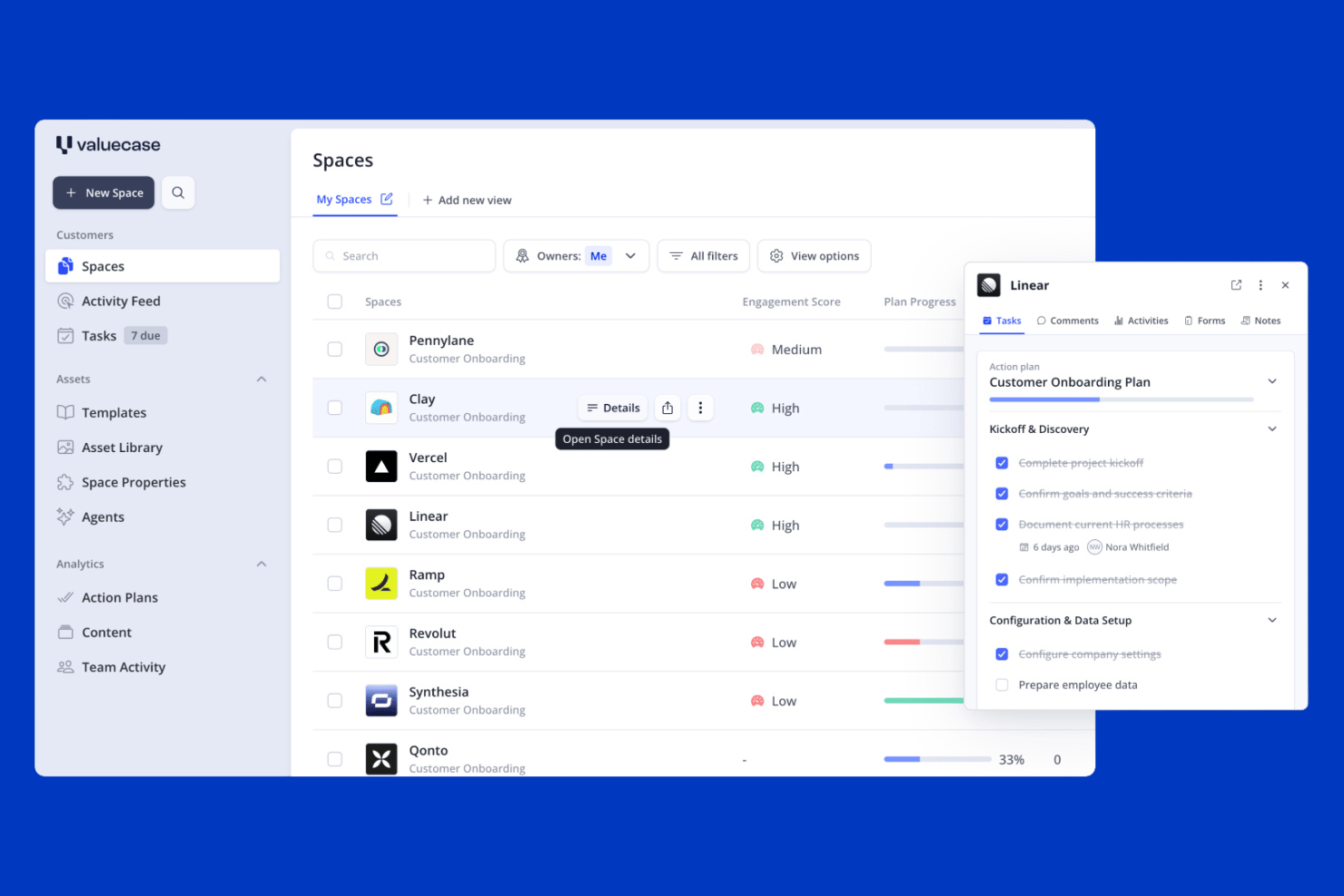
Valuecase is an AI client onboarding platform that combines branded client portals, mutual action plans, automated workflows, and AI-generated onboarding plans built from uploaded SOPs, transcripts, and CRM data.
Who Is Valuecase Best For?
Valuecase is a strong fit for B2B SaaS and professional services teams that want to turn their existing SOPs and process documents into client-ready onboarding plans without building everything from scratch.
Why I Picked Valuecase
I picked Valuecase as one of the best because it's the only tool I've seen that takes your existing SOPs, slide decks, and process documents and turns them into a fully structured client onboarding plan. Upload a transcript from a discovery call, and the AI populates milestones, tasks, and content pages tailored to that specific client. I also like that template-inherited automations mean every new client Space launches with reminders, conditional logic, and follow-up sequences already built in.
Valuecase Key Features
- Branded client portal: Each client gets a dedicated, white-labeled Space accessible via shared link—no client login required.
- Conditional logic forms: Auto-saving intake forms show or hide fields based on prior responses to capture the right data from each client.
- IFTTT workflow automation: Triggers fire on form submissions, task completions, or client inactivity to send emails, unlock content, or update task statuses.
- Real-time activity insights: Tracks client page views, video watch time, and form submissions so your team can spot stalled accounts before they go dark.
Valuecase Integrations
Valuecase offers native integrations with HubSpot, Salesforce, Slack, Microsoft Teams, Gmail, and Google Calendar, plus MCP connections for Claude and ChatGPT. It also supports an API for custom integrations and Zapier.
Pros and Cons
Pros:
- At-risk clients flagged with real-time activity insights
- No-login required for client portal access
- AI turns SOPs into onboarding plans instantly
Cons:
- No native AI chatbot for client self-service
- No built-in e-signature integration available
SkyPrep
Best for automated enrolments
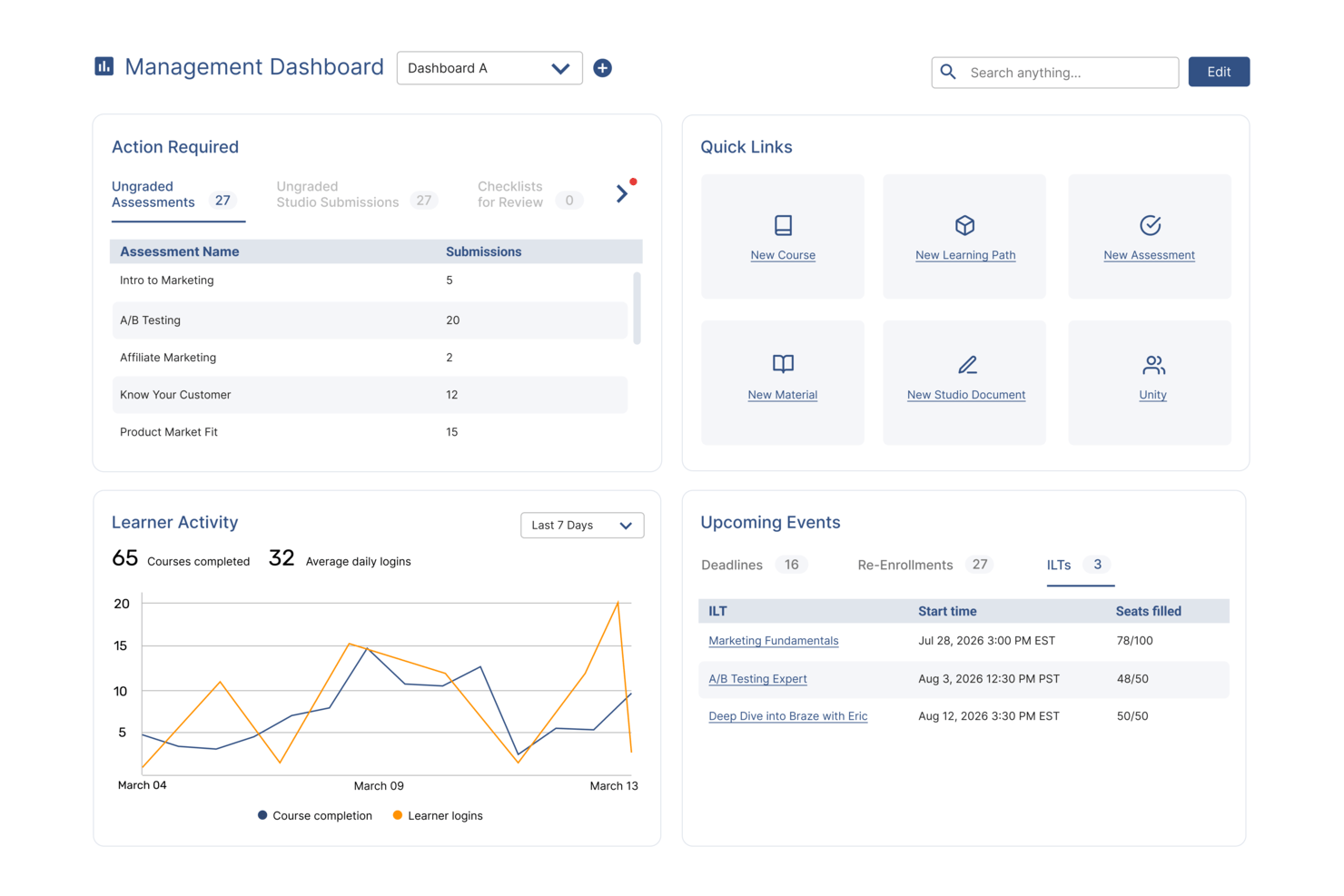
If you want to improve your client onboarding with AI, SkyPrep is a practical option for businesses in a wide range of industries. The platform focuses on making onboarding more consistent and efficient through structured learning paths, automated enrollments, and interactive content that can be adapted to each client’s needs. By centralizing training materials and integrating with existing HR systems, SkyPrep helps reduce onboarding gaps and supports better client satisfaction and retention.
Why I Picked SkyPrep
I chose SkyPrep because it automates and personalizes onboarding in a way that fits AI-driven client onboarding workflows. Automated enrolments assign new clients to the right courses based on their roles, reducing manual administration and ensuring relevant training from the start. The platform also supports flexible content creation, letting you build onboarding courses with multiple formats or AI-generated interactive elements to keep training engaging and up to date. In addition, digital sign-offs make it easy to securely capture client acknowledgments, supporting compliance and confirming that key policies have been reviewed and understood.
SkyPrep Key Features
In addition to its standout features, SkyPrep offers several other functionalities that enhance the onboarding experience:
- Learning Paths: Structured training journeys with prerequisites guide employees through the necessary steps, ensuring they gain the skills needed for their roles.
- Support for Company Culture: Engaging content helps new hires connect with your company's mission and values from day one.
- Introduction to Tools & Systems: Interactive resources familiarize new hires with essential software and platforms, aiding their transition.
- Compliance Training: Provides clear training on policies and regulations to reduce risk and ensure understanding across your team.
SkyPrep Integrations
Integrations include ADP, Zoom, BambooHR, Paycor, Google Workspace, Microsoft Teams, Salesforce, Slack, and Asana. An API is also available for custom integrations.
Pros and Cons
Pros:
- AI-driven scenarios improve real-world decision-making skills
- Hotspots support deeper understanding of complex concepts
- Org charts clarify team structure and dynamics
Cons:
- Mobile app lacks offline access and gamification
- Basic built-in authoring tools with few advanced features

Moxo
Best for mobile collaboration

Moxo is a client interaction hub designed for businesses to manage client communications and workflows effectively. It caters to industries like banking and real estate, offering AI capabilities to enhance collaboration and facilitate smoother interactions.
Why I picked Moxo: Its focus on business collaboration makes it perfect for teams needing fluid communication with clients. AI features like automated task management and intelligent notifications ensure efficient workflow management. These tools help your team stay organized and responsive to client needs. Moxo's capabilities ensure fluid collaboration across various business functions.
Standout features & integrations:
Features include secure client portals, task automation, and document collaboration. These features help your team manage client interactions efficiently. You can also use video conferencing to facilitate real-time communication.
Integrations include Salesforce, Microsoft 365, Google Workspace, Slack, Zoom, Dropbox, Docusign, QuickBooks, Box, and Stripe.
Pros and Cons
Pros:
- Supports real-time communication with video conferencing
- Automates tasks for efficient workflow management
- Enhances collaboration with secure client portals
Cons:
- Limited customization options for specific industries
- May require time to set up client portals
Best for project transparency

Rocketlane is a project management and client onboarding platform designed for customer success and implementation teams to ensure smooth project delivery. It provides AI-driven insights and collaboration tools to improve project transparency and client communication
Why I picked Rocketlane: It focuses on project transparency, making it ideal for teams needing clear communication with clients. AI features like predictive analytics and automated status updates keep everyone informed. These tools help your team anticipate project hurdles and maintain clear timelines. Rocketlane's emphasis on visibility ensures both your team and clients are aligned.
Standout features & integrations:
Features include timeline tracking that helps monitor project progress, milestone management to ensure key objectives are met, and collaboration tools that facilitate team communication and coordination.
Integrations include Salesforce, Slack, HubSpot, Jira, Trello, Asana, Microsoft Teams, Google Calendar, monday.com, and Freshdesk.
Pros and Cons
Pros:
- Effective milestone tracking
- Ready-to-use templates
- Consistent project execution
Cons:
- Some features need integration setup
- Requires regular updates

Best for reducing churn

ChurnZero is a customer success platform designed for SaaS companies to reduce churn and increase customer engagement. It leverages AI to provide insights into customer health and automate engagement strategies.
Why I picked ChurnZero: Its focus on customer retention makes it essential for teams aiming to reduce churn rates. AI features like customer health scoring and automated playbooks help you proactively manage customer relationships. These tools enable your team to identify at-risk customers and tailor engagement efforts. ChurnZero's emphasis on data-driven insights supports effective customer success strategies.
Standout features & integrations:
Features include in-app messaging that allows direct communication with users, customer health dashboards to monitor client status, and automated playbooks that guide your team in managing customer interactions effectively.
Integrations include Salesforce, HubSpot, Zendesk, Slack, Microsoft Dynamics 365, Gainsight, Freshdesk, Pipedrive, Intercom, and Mailchimp.
Pros and Cons
Pros:
- Customizable engagement strategies
- Provides real-time customer insights
- Strong focus on reducing churn rates
Cons:
- May require dedicated onboarding support
- Learning curve for new users

Appcues
Best for in-app guidance

Appcues is a user onboarding platform designed for product teams to enhance user experience and engagement. It uses AI to create personalized onboarding flows and in-app guidance, helping users navigate products effectively.
Why I picked Appcues: Appcues excels in offering in-app guidance with its interactive walkthroughs and tooltips, helping users understand and adopt new features quickly. It provides customizable user flows that can be tailored to specific user segments. AI features like behavior-driven triggers and personalized user paths offer tailored experiences. These tools help your team engage users right from the start.
Standout features & integrations:
Features include interactive walkthroughs that guide users through new features, customizable user flows to tailor experiences, and analytics that provide insights into user engagement and behavior.
Integrations include Segment, Mixpanel, HubSpot, Salesforce, Slack, Marketo, Google Analytics, Amplitude, Intercom, and Zendesk.
Pros and Cons
Pros:
- Easy to implement without coding
- Provides analytics for tracking user engagement
- Tailors user experiences with personalized paths
Cons:
- Limited advanced customization options
- May require time to optimize onboarding flows

GUIDEcx
Best for project visibility

GUIDEcx is a client onboarding platform designed for project managers and client success teams to enhance collaboration and transparency during the onboarding process. It uses AI to automate task assignments and send reminders, ensuring projects stay on track.
Why I picked GUIDEcx: Its collaborative onboarding approach is ideal for teams that need to work closely with clients. AI features like task automation and intelligent reminders keep everyone aligned and informed. These tools help your team manage projects efficiently while keeping clients in the loop. GUIDEcx's focus on collaboration ensures that both your team and clients have visibility into project progress.
Standout features & integrations:
Features include customizable dashboards that provide a detailed view of project progress, automated notifications to keep everyone informed, and task dependency tracking to help manage workflows efficiently.
Integrations include Salesforce, HubSpot, Slack, Jira, Asana, Trello, Microsoft Teams, Google Calendar, QuickBooks, and monday.com.
Pros and Cons
Pros:
- Strong client collaboration features
- Customizable project templates
- Automated reminders keep tasks on track
Cons:
- Limited advanced reporting options
- May require time to learn all features

Intercom
Best for customer messaging

Intercom is a customer communication platform used by sales, marketing, and support teams to engage with customers through messaging. It offers AI-driven chatbots and automated workflows to enhance customer interactions and support overall onboarding processes.
Why I picked Intercom: Its focus on customer messaging makes it ideal for teams looking to improve communication. Features like AI-driven chatbots and automated message routing directly support customer engagement. These capabilities help your team deliver timely responses and personalized experiences. Intercom's automation tools also reduce manual workload, allowing your team to focus on more complex tasks.
Standout features & integrations:
Features include customizable chat widgets, in-app messaging, and targeted email campaigns. These tools help you engage customers at the right moment. The platform also offers real-time customer insights to guide your interactions.
Integrations include Slack, Salesforce, HubSpot, Shopify, Marketo, Zendesk, Mailchimp, Stripe, Google Analytics, and WordPress.
Pros and Cons
Pros:
- Customizable messaging options
- Automates message routing for efficiency
- AI chatbots enhance customer engagement
Cons:
- Limited functionality for non-messaging tasks
- May require training for advanced features

Dock
Best for decentralized identity verification

Dock is a decentralized identity management platform designed for businesses to issue, verify, and monetize digital ID credentials. It caters to industries requiring secure identity verification, offering AI-driven solutions for enhanced security and compliance.
Why I picked Dock: Its focus on decentralized identity makes it ideal for businesses needing secure credential management. AI features like reusable KYB checks and biometric data binding enhance security and efficiency. These capabilities help your team manage identity workflows without disrupting existing processes. Dock's decentralized approach ensures flexible and secure identity management across industries.
Standout features & integrations:
Features include customizable templates that help standardize onboarding processes, task tracking to keep everyone on schedule, and real-time collaboration tools that facilitate direct interaction with clients.
Integrations include Salesforce, HubSpot, Slack, Google Drive, Trello, Asana, Dropbox, Microsoft Teams, Jira, and monday.com.
Pros and Cons
Pros:
- Customizable engagement strategies
- Provides real-time customer insights
- Strong focus on reducing churn rates
Cons:
- May require dedicated onboarding support
- Learning curve for new users


ShareFile is a secure document management and file-sharing software designed for businesses that need efficient client onboarding processes. It primarily serves industries like accounting, legal, finance, and healthcare by providing secure file exchanges and compliance support.
Why I picked ShareFile: It prioritizes security and compliance, making it ideal for regulated industries. Its AI features include workflow automation and integrated e-signatures, which directly relate to its USP of secure file sharing. These tools help your team handle documents safely and efficiently, reducing manual work and improving client interactions.
Standout features & integrations:
Features include flexible file management, a dedicated client portal, and workflow automation. These features enhance organization and communication within your team. Integrated e-signatures further simplify document handling.
Integrations include Salesforce, Zapier, Microsoft 365, Google Workspace, QuickBooks, and more.
Pros and Cons
Pros:
- Efficient workflow automation saves time
- User-friendly client portal enhances collaboration
- Strong security and compliance for regulated industries
Cons:
- Slight learning curve for new users
- Limited customization options for advanced users
Diğer Yapay Zekâ Müşteri Kabul Yazılımları
İşte kısa listeme giremeyen ancak yine de göz atmaya değer bazı ek yapay zekâ müşteri kabul yazılımı seçenekleri:
- Fenergo
For financial compliance
- Motion.io
For task automation
- Product Fruits
For user onboarding
- iSpring LMS
For e-learning courses
- Trupeer
For multilingual client onboarding
- Guideless
For zero-code onboarding setup
- ClickUp
For customizable workflows
- Planhat
For customer success metrics
- Userpilot
For onboarding experiments
- Pendo
For user analytics
- Chameleon
For product tours


How I Evaluate AI Client Onboarding Software
Every tool on this list needs to do more with AI than slap a chatbot on a form—I look for platforms where AI actually cuts onboarding time by auto-generating tasks, parsing intake data, or drafting client follow-ups. I split my evaluation into core functionality a tool must have to qualify and the differentiating factors that separate a good fit from a great one.
Core Functionality (Table Stakes For This List)
When I'm selecting tools for my list, I rank each one on a scale from 0 (does not offer the functionality) to 5 (excels in this area) for each core functionality listed below. Then, I calculate the tool's total score into a percentage. Each tool needs to achieve a minimum total score of 65% to be considered for inclusion.
- AI Intake Automation: I evaluate how well the tool parses client forms, documents, and emails into structured project data—like pulling scope details from a signed SOW.
- Automated Onboarding Workflows: Each tool should offer templated workflows with triggers and sequencing, so a new client signing a contract kicks off the right tasks automatically.
- Client-Facing Portal: I look for a branded space where clients can upload files, track milestones, and complete approvals without toggling between email threads and shared drives.
- AI Task & Project Generation: I check whether AI can turn real inputs—like a discovery call transcript or intake form—into a full onboarding plan with tasks, owners, and deadlines.
- Integrations & Data Sync: The tool needs to connect with the systems teams already use, from CRMs like Salesforce and HubSpot to PM tools like Asana and Jira.
- AI Communication Assistance: I evaluate whether AI helps draft client updates, summarize meetings, or trigger follow-ups—things that otherwise eat hours each week during onboarding.
Once I have a list of tools that meet the criteria, I consider what sets each platform apart.
Differentiating Factors (What Sets Vendors Apart)
Here's how I compare and contrast different vendors:
Standout Features
Predictive risk alerts are a big differentiator—I look for tools that flag stalled onboarding projects before a client disengages, based on patterns like missed milestones or declining portal activity. Conditional client journeys also matter because a startup onboarding shouldn't follow the same path as an enterprise rollout. I check whether the tool adapts steps, content, and timelines by client segment. AI meeting intelligence rounds this out by turning kickoff call recordings into tasks and notes automatically.
Beyond Features
Data security matters here because onboarding involves sensitive client contracts, financial details, and personal data. I check for SOC 2 Type II compliance and clear AI data-handling policies—especially whether the vendor trains models on customer data. Pricing structure is another factor I evaluate closely, since per-client models can get expensive fast for agencies onboarding dozens of accounts each quarter. I also consider time-to-value: how quickly a team can launch its first onboarding workflow using prebuilt templates rather than building everything from scratch.
Yapay Zekâ Müşteri Kabul Yazılımı Nasıl Seçilir?
Uzun özellik listeleri ve karmaşık fiyatlandırma yapılarına kendinizi kaptırmanız kolaydır. Kendinize özgü yazılım seçim sürecinizi yürütürken odağınızı korumanıza yardımcı olmak için göz önünde bulundurmanız gereken faktörleri içeren bir kontrol listesi hazırladım:
| Faktör | Dikkat Edilmesi Gerekenler |
|---|---|
| Ölçeklenebilirlik | Yazılım işletmenizle birlikte büyüyecek mi? Öngörülen büyümenizi ve aracın kullanıcı ve veri artışını sorunsuz bir şekilde yönetip yönetemeyeceğini değerlendirin. |
| Entegrasyonlar | Mevcut araçlarınızla uyumlu çalışıyor mu? Manuel geçici çözümlerden kaçınmak için mevcut yazılım yığınınızla yerel entegrasyonları kontrol edin. |
| Özelleştirilebilirlik | Aracı iş akışlarınıza uyarlayabilir misiniz? Yazılımı belirli süreçlerinize ve markalama ihtiyaçlarınıza uyarlama esnekliği sunmasına dikkat edin. |
| Kullanım kolaylığı | Ekibiniz için sezgisel mi? Öğrenme eğrisini ve ekibinizin kapsamlı bir eğitim almadan hızlı bir şekilde uyum sağlayıp sağlayamayacağını değerlendirin. |
| Uygulama ve kullanıma alma | Kurulum ne kadar sürecek? Veri aktarımı ve eğitim de dahil olmak üzere sistemi çalışır duruma getirmek için gereken zamanı ve kaynakları değerlendirin. |
| Maliyet | Bütçeniz dahilinde mi? Fiyatlandırma planlarını karşılaştırın ve gizli ücretlere dikkat edin. Maliyetin elde etmeyi beklediğiniz değer ve yatırım getirisiyle örtüşüp örtüşmediğini değerlendirin. |
| Güvenlik önlemleri | Hassas verileri koruyor mu? Yazılımın veri korumaya ilişkin sektör standartlarına uyduğundan ve şifreleme ile erişim kontrolleri gibi özellikler sunduğundan emin olun. |
| Uyumluluk gereklilikleri | Düzenleyici ihtiyaçları karşılıyor mu? Özellikle finans veya sağlık hizmetleri gibi sıkı düzenlemelere tabi bir sektördeyseniz, yazılımın ilgili düzenlemelere uyumluluğu destekleyip desteklemediğini doğrulayın. |
Yapay Zekâ Müşteri Kullanıma Alma Yazılımı Nedir?
Yapay zekâ destekli müşteri kullanıma alma yazılımı, yeni müşterileri işletmeye dahil etme sürecini otomatikleştirmek ve geliştirmek için tasarlanmıştır. Proje yöneticileri, müşteri başarısı ekipleri ve kullanıma alma uzmanları, kullanıma alma süreci boyunca verimliliği ve müşteri memnuniyetini artırmak için genellikle bu araçları kullanır.
Otomatik iş akışları, gerçek zamanlı analizler ve özelleştirilebilir şablonlar; görevleri yönetmeye, ilerlemeyi takip etmeye ve kullanıma alma deneyimini kişiselleştirmeye yardımcı olur. Genel olarak bu araçlar zamandan tasarruf sağlar ve hataları azaltır; böylece kullanıma alma süreci hem işletmeler hem de müşteriler için daha sorunsuz hale gelir.
Özellikler
Yapay zekâ müşteri kullanıma alma yazılımını seçerken aşağıdaki temel özelliklere dikkat edin:
- Otomatik iş akışları: Tekrarlayan süreçleri otomatikleştirerek görev yükünü azaltır, zamandan tasarruf sağlar ve hataları azaltır.
- Özelleştirilebilir şablonlar: Kullanıma alma süreçlerini belirli ihtiyaçlarınıza ve markanıza uyacak şekilde uyarlamanıza olanak tanır.
- Gerçek zamanlı analizler: Müşteri yolculuğu boyunca müşteri etkileşimleri ve ilerleme hakkında içgörüler sunarak veriye dayalı kararlar alınmasını sağlar.
- Güvenli mesajlaşma: Ekibiniz ve müşterileriniz arasındaki iletişimin gizli ve güvenilir olmasını sağlar.
- Görev yönetimi: Görevleri düzenlemeye ve takip etmeye yardımcı olarak kullanıma alma sırasında hiçbir şeyin gözden kaçmamasını sağlar.
- Etkileşimli ürün turları: Kullanıcıları yeni özellikler konusunda yönlendirerek anlayışı ve benimsemeyi artırır.
- Entegrasyon yetenekleri: Birleşik bir iş akışı oluşturmak için teknoloji yığınınızdaki diğer araçlara sorunsuz bir şekilde bağlanır.
- Mobil erişilebilirlik: Kullanıma alma süreçlerini her zaman ve her yerden yönetme esnekliği sunar.
- Müşteri portalları: Müşterilere tüm kullanıma alma etkinlikleri için merkezi bir alan sunarak şeffaflığı ve etkileşimi artırır.
- Uyumluluk desteği: Özellikle düzenlemelere tabi sektörler için önemli olan sektör düzenlemelerine uyulmasını sağlar.
Avantajlar
Bir yapay zekâ kullanıma alma aracı uygulamak, ekibiniz ve işletmeniz için çeşitli avantajlar sağlar. Yararlanmayı bekleyebileceğiniz avantajlardan bazıları şunlardır:
- Artan verimlilik: Birçok ekip manuel süreçleri, iş akışlarını ve kullanıma alma görevlerini otomatikleştirmek için yapay zekâ kullanır.
- Gelişmiş müşteri memnuniyeti: Özelleştirilebilir şablonlar ve etkileşimli ürün turları, kullanıma alma deneyimini kişiselleştirir.
- Daha iyi karar alma: Gerçek zamanlı analizler, değere ulaşma süresi söz konusu olduğunda bilinçli kararlar almanıza yardımcı olan içgörüler sunar.
- Geliştirilmiş iletişim: Güvenli mesajlaşma, müşteriler ve ekip üyeleriyle güvenilir ve gizli etkileşimler kurulmasını sağlar.
- Daha fazla esneklik: Mobil erişilebilirlik, kullanıma alma süreçlerini her yerden yönetmenize olanak tanır.
- Daha güçlü uyumluluk: Uyumluluk desteği, işletmenizin sektör düzenlemelerine uymasına ve müşterilerinizin güvenini kazanmasına yardımcı olur.
- Daha yüksek etkileşim: Müşteri portalları ve entegrasyon yetenekleri, müşterilerin kullanıma alma süreci boyunca sürece dahil olmasını ve bağlantıda kalmasını sağlar.
Maliyetler ve Fiyatlandırma
Yapay zekâ müşteri oryantasyon yazılımını seçmek, mevcut çeşitli fiyatlandırma modellerini ve planları anlamayı gerektirir. Maliyetler özelliklere, ekip büyüklüğüne, eklentilere ve daha fazlasına göre değişir. Aşağıdaki tablo, AI müşteri oryantasyon yazılımı çözümlerinde yaygın planları, ortalama fiyatlarını ve genellikle sunulan özellikleri özetlemektedir:
AI Müşteri Oryantasyon Yazılımı için Plan Karşılaştırma Tablosu
| Plan Türü | Ortalama Fiyat | Yaygın Özellikler |
|---|---|---|
| Ücretsiz Plan | $0 | Temel görev yönetimi, sınırlı analizler ve topluluk desteği. |
| Kişisel Plan | $5-$25/kullanıcı/ay | Özelleştirilebilir şablonlar, temel entegrasyonlar ve güvenli mesajlaşma. |
| İşletme Planı | $30-$75/kullanıcı/ay | Gelişmiş analizler, etkileşimli ürün turları ve mobil erişim. |
| Kurumsal Plan | $100-$200/kullanıcı/ay | Tam entegrasyon olanakları, özel destek ve uyumluluk araçları. |
AI Müşteri Oryantasyon Yazılımı Hakkında SSS
AI müşteri oryantasyon yazılımı hakkında sık sorulan bazı soruların yanıtları aşağıdadır:
AI müşteri oryantasyon yazılımı verimliliği nasıl artırır?
AI müşteri oryantasyon yazılımı rutin görevleri otomatikleştirerek ekibinizin müşterilerle stratejik etkileşimlere odaklanmasını sağlar. Yapay zekâ, yoğun ve tekrarlayan işleri üstlenerek hataları azaltır ve oryantasyon sürecini hızlandırır. Bu sayede ekibiniz müşterilerle daha anlamlı biçimde etkileşim kurabilir ve genel memnuniyeti artırabilir.
AI müşteri oryantasyon yazılımı oryantasyon deneyimini kişiselleştirebilir mi?
Evet, AI araçları oryantasyon materyallerini ve deneyimlerini belirli müşteri ihtiyaçlarını karşılayacak şekilde uyarlayabilir. AI, kullanıcı verilerini analiz ederek oryantasyon içeriğini gerçek zamanlı olarak uyarlayabilir ve yeni müşterilerin en alakalı bilgi ve desteği almasını sağlayabilir. Bu kişiselleştirme, ilk günden itibaren müşteriye özel oryantasyon iş akışları ve benzersiz bir müşteri deneyimi anlamına gelir.
Oryantasyon için veri analizinde AI nasıl bir rol oynar?
AI, uygulanabilir içgörüler sunmak için müşteri verilerini analiz eder ve ekibinizin ilgilenilmesi gereken hesaplara öncelik vermesine yardımcı olur. Bu içgörüler, daha bilinçli karar alma ve strateji oluşturmayı mümkün kılarak her müşterinin ihtiyaçlarına göre uyarlanmış daha etkili bir oryantasyon süreci sağlar.
AI, oryantasyon sırasında müşteri başarısı yöneticilerini nasıl destekler?
AI; idari görevleri otomatikleştirerek, kişiselleştirilmiş içerik oluşturarak ve verileri analiz ederek müşteri başarısı yöneticilerine yardımcı olur. Bu destek, yöneticilerin daha güçlü müşteri ilişkileri kurmaya ve stratejik ihtiyaçları ele almaya odaklanmasını sağlayarak oryantasyon deneyimini geliştirir.
Oryantasyon için önerilen belirli AI araçları var mı?
Evet, toplantıları kaydedip özetleyen toplantı asistanları, kullanıcı davranışına uyum sağlayan kişiselleştirilmiş oryantasyon platformları ve paydaş dinamikleri hakkında içgörüler sunan veri zenginleştirme araçları gibi oryantasyonu geliştirmek üzere tasarlanmış çeşitli AI araçları vardır.
AI'ı oryantasyon sürecime entegre ederken nelere dikkat etmeliyim?
AI’ı entegre ederken, müşteriyle etkileşimli uygulamalara geçmeden önce dahili araçlarla başlayarak aşamalı bir yaklaşım benimsemeyi düşünün. AI çözümlerinin ekibinizin hedefleri ve iş akışlarıyla uyumlu olduğundan emin olun ve otomasyon ile temel insan etkileşimleri arasında denge kurun.