

2026’da İncelenen En İyi 10 Video İş Birliği Aracı

En İyi Video İş Birliği Araçları Kısa Listesi


Bu kadar çok seçenek varken doğru video iş birliği aracını seçmek zor olabilir. Ekibinizle etkili bir şekilde iletişim kurmak ve iş birliği yapmak istiyor, ancak hangi aracın sizin için en uygun olduğunu belirlemeniz gerekiyor. Ben sizin için bunu yaptım! Bu yazıda, dijital projeleri yönetme ve çeşitli iş birliği araçlarını kullanma konusundaki kapsamlı deneyimimden yararlanarak en iyi seçimlerimi sunuyorum. Bu araçlar, gerçek zamanlı video iletişimi ve iş birliğini mümkün kılar. Yanlış anlaşılmaları azaltmaya, ekip koordinasyonunu geliştirmeye ve toplantılarda zaman kazanmaya yardımcı olurlar.
Why Trust Our Software Recommendations
Our team has been testing and reviewing software since 2012. As project managers ourselves, we know how difficult—and important—it is to choose the right software.
For this guide, we evaluated tools using hands-on testing and independent research, scoring tools using our selection criteria. We also draw on insights from industry thought leaders and practicing project management experts.
Our reviews reflect our human editorial judgment, not a sales pitch.
Expert reviewers:
En İyi Video İş Birliği Araçları Özeti
| Tool | Starting Price | Website | |
|---|---|---|---|
| Best for media collaboration | 4.9 out of 5 | $10/user/month Free plan available | Website |
| Best for intuitive video review and approval | 4.8 out of 5 | $9.95/month Free trial + free demo available | Website |
| Best for video hosting and marketing | 4.5 out of 5 | $12/month Free trial + free plan available | Website |
| Best for centralized creative feedback and compliance | 4.7 out of 5 | $199/month 30-day free trial + free plan + free demo available | Website |
| Best for Frame-Accurate Feedback and camera-to-cloud | 4.5 out of 5 | $15/user/month Free plan + free trial available | Website |
| Best for intuitive online proofing and creative workflow | 4.7 out of 5 | $12/month Free trial + free demo available | Website |
| Best for interactive video creation and education | 4.4 out of 5 | $4.99/user/month | Website |
| Best for AI-enhanced professional video editing | — | $20.99/user/month Free trial available | Website |
| Best for cloud-based digital dailies and review | — | Pricing upon request | Website |
| Best for all-in-one post-production | — | $295 | Website |
En İyi Video İş Birliği Araçları İncelemeleri
Bu bölümde, önde gelen video iş birliği araçlarının kapsamlı analizlerini ve genel değerlendirmelerini sunuyoruz. Bu incelemeler, her aracın avantajlarını ve dezavantajlarını, temel özelliklerini ve farklı sektörler ile ekip boyutları için en uygun kullanım alanlarını anlamanıza yardımcı olacak.

KROCK
Best for media collaboration
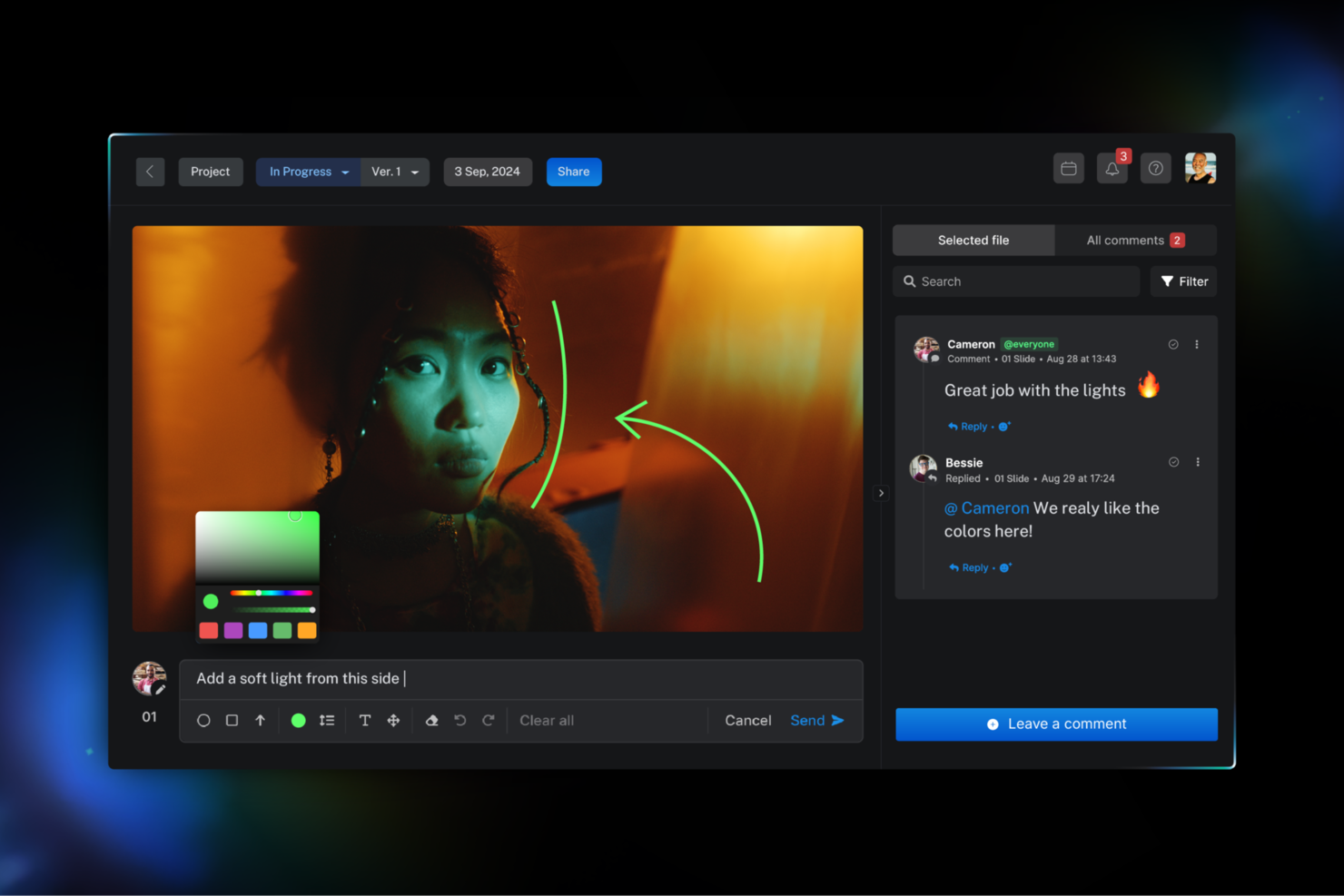
KROCK makes my shortlist because I see creative teams struggling to keep feedback and versioning organized as video projects scale. This is one of the few tools that lets you clearly mark up video frames, collect client comments in context, and track change requests side by side.
I like how review cycles stay visible to all stakeholders (no more endless email loops). For media-heavy collaboration across timelines and teams, I find KROCK keeps projects moving.
KROCK’s Best For
- Creative agencies managing multi-stage video review and approvals
- Distributed teams needing frame-accurate video feedback and markup
KROCK’s Not Great For
- Teams needing live video meetings or real-time editing
- Organizations with simple, single-step approval processes
What Sets KROCK Apart
KROCK is designed with creative production in mind, especially for teams working with video, animation, and multimedia. Instead of blending into generic collaboration tools like Slack or Google Workspace, it brings every step of review and feedback directly onto the media timeline. In practice, you leave comments in context, mark up frames, and move projects forward without side-threaded emails or scattered feedback files. Compared to workflow-heavy tools like Jira, KROCK keeps the process visual and media-centric.
Tradeoffs with KROCK
KROCK optimizes for visual, asynchronous review, which means you give up built-in live meeting or chat features. It can leave fast back-and-forths feeling less efficient for some teams.
Pros and Cons
Pros:
- AI-powered storyboarding features
- Built-in audio annotation tools
- Frame-accurate video feedback
Cons:
- Not built for non-creative teams
- Interface design may feel busy

Wipster
Best for intuitive video review and approval

Wipster is my pick for teams who need feedback on video assets from people who aren't editors. The frame-accurate commenting tool lets everyone give precise, actionable notes right on the video timeline. I appreciate how you can set up multi-stage approvals and instantly see exactly where things get stuck or need revision. Wipster works best for marketing and content teams who want to keep creative reviews moving fast without constant email or chat back-and-forth.
Wipster’s Best For
- Creative teams managing video reviews and approvals
- Content marketers who need precise, visual feedback
Wipster’s Not Great For
- Teams handling live or real-time video collaboration
- Organizations needing advanced editing or motion graphics features
What sets Wipster apart
Wipster stands out by framing video feedback around frame-accurate comments you pin to the timeline, so feedback isn’t scattered across email threads. Unlike tools like Frame.io that target post-production specialists, Wipster assumes you want non-editors (clients, managers) giving specific, visual feedback without learning editing tools. In practice, this works best when you need approvals from people outside the typical production workflow but still want to keep everything concrete and actionable inside the video context.
Tradeoffs with Wipster
Wipster optimizes for review and clear feedback, but you give up built-in tools for editing or real-time collaboration. If you want to work directly within the same environment, you probably need a second tool for that.
Pros and Cons
Pros:
- Frame-specific feedback
- Real-time collaboration
- Easy-to-use interface
Cons:
- May lack scalability for larger teams
- Limited advanced features
- Higher cost for small teams

Vimeo
Best for video hosting and marketing

Vimeo is on this list for how it approaches video hosting and collaboration at scale. When I’m working with teams who manage large video libraries, Vimeo’s review and approval workflows make it much easier to gather feedback and keep projects moving.
I like that you can share private review links and collect time-stamped comments right on the video, which cuts down confusion during editing cycles. This is where Vimeo stands apart from other options.
Vimeo’s Best For
- Creative teams managing large video libraries
- Organizations needing review, approval, and feedback on video content
Vimeo’s Not Great For
- Teams wanting real-time video meetings or chat
- People needing detailed analytics or advanced live streaming
What sets Vimeo apart
Vimeo focuses on hosting video content where feedback cycles and review are essential to the process. Unlike platforms like YouTube (which are built for public sharing and distribution), Vimeo is designed around secure collaboration and granular access controls.
I see video teams using it for production workflows where sharing drafts, collecting frame-specific feedback, and managing permissions actually matter. The experience is set up for working through multiple rounds of stakeholder input, not just quick posting or real-time meetings.
Tradeoffs with Vimeo
Vimeo optimizes for review and asynchronous collaboration, but this means you don’t get real-time interaction or built-in meeting features, so teams looking for live video discussions will need another tool.
Pros and Cons
Pros:
- Robust hosting and streaming options
- Customizable video player
- AI-powered video editing
Cons:
- Some advanced features cost extra
- Requires a learning curve for new users
- Limited collaboration features

Best for centralized creative feedback and compliance

Filestage earns a spot here because I see teams in creative, marketing, and regulated industries needing airtight control of video feedback and approvals. When you need every reviewer’s input logged against the latest version, Filestage does it better than anything else I’ve tested. I like that you can map out approval workflows and lock down compliance feedback with detailed audit trails—this has solved version confusion and accountability issues for my clients.
Filestage’s Best For
- Creative teams needing centralized video review and approvals
- Organizations in regulated industries with strict compliance needs
Filestage’s Not Great For
- Real-time video chat, screen sharing, or live collaboration
- Teams who want granular, timestamped video annotation
What Sets Filestage Apart
Filestage is built for teams that need all feedback, approvals, and version history to stay centralized and tightly controlled. It expects you to map out who reviews what and in which order, shifting creative work from chaotic threads and email attachments into a step-by-step approval pipeline. Unlike Google Drive or Dropbox, where comments and feedback can quickly become fragmented, here you work with structured stages and clear audit trails by design. This works best when accountability, version clarity, and compliance aren’t optional.
Tradeoffs with Filestage
Filestage optimizes for formal, routed review cycles, but that focus limits flexibility for informal brainstorming or real-time collaboration. In practice, spontaneous discussions and off-the-cuff notes tend to get squeezed out.
Pros and Cons
Pros:
- Customizable workflows
- Centralized feedback system
- Strong compliance focus
Cons:
- Learning curve for advanced features
- May be overkill for small teams
- Higher price point

Frame.io
Best for Frame-Accurate Feedback and camera-to-cloud

Frame.io stands out to me for its ability to collect frame-accurate feedback right inside shared video assets. If you’re juggling rounds of client or stakeholder review, this precision means fewer miscommunications and do-overs.
I especially like the camera-to-cloud feature—when a team uploads footage straight from set, editors and producers can start collaboration instantly, with comments attached exactly where they need to be.
Frame.io’s Best For
- Video teams who need frame-accurate review and feedback
- Productions that use direct camera-to-cloud uploading
Frame.io’s Not Great For
- Teams needing document collaboration or text review tools
- Projects without heavy video or media workflow needs
What sets Frame.io apart
Frame.io is purpose-built around video review and feedback, not generic file sharing. The workflow expects you to work within shared video assets, adding feedback as precise, frame-specific comments. This is different from Dropbox or Slack, where feedback tends to get buried or disconnected from the context. It fits best when timing and visual details matter, like creative or post-production teams that need to keep everyone’s eye on the same frame.
Tradeoffs with Frame.io
Frame.io optimizes for clarity in video feedback, but that comes at the cost of versatility. If your project mixes video with design files, documents, or complex project tracking, the tool starts to feel limited.
Pros and Cons
Pros:
- Secure media sharing
- Camera to Cloud uploads
- Frame-accurate feedback
Cons:
- Requires robust internet for uploads
- Pricier compared to general tools
- Limited to video production use cases

Best for intuitive online proofing and creative workflow

ReviewStudio stands out because it’s purpose-built for reviewing creative video and design assets collaboratively. What I like is how fast teams can leave frame-accurate comments, markups, and approvals in one place, which cuts down on messy email chains. I recommend it when you want a clear audit trail for feedback, or your creative workflow gets choked with version confusion. Drawing directly on video and image frames is especially useful on deadline-driven campaigns.
ReviewStudio’s Best For
- Creative teams managing video or design reviews
- Agencies needing visual, frame-accurate feedback and approvals
ReviewStudio’s Not Great For
- Teams needing live video calls or conferencing
- Groups handling large-scale enterprise asset management
What sets ReviewStudio apart
ReviewStudio is designed for fast creative feedback without adding layers of process. It feels different from collaboration tools like Slack or Google Workspace, where feedback is harder to centralize and visual markups are awkward. Here, you comment directly on video or image frames, supporting precise feedback and version control. I’ve seen this work especially well when teammates or clients need to mark up deliverables in context and keep threaded discussions anchored to a specific visual.
Tradeoffs with ReviewStudio
By focusing on markup and review, it skips real-time chat or live meetings. That means you lose quick back-and-forths when teams prefer to talk things out live.
Pros and Cons
Pros:
- Strong version control
- Real-time collaborative markup
- User-friendly interface
Cons:
- Advanced features may require setup
- Limited to creative workflows
- Higher price compared to some alternatives

WeVideo
Best for interactive video creation and education

WeVideo makes my list because of its unique approach to interactive video creation for education and team projects. I like how you can layer green screen effects, add quizzes, and share time-stamped comments directly on the video timeline. I often see classrooms and creative teams use WeVideo when they want to collaborate on stories, training, or video-based assignments where feedback, assessment, and creative input all happen inside the same platform.
WeVideo’s Best For
- Teachers and students creating interactive educational videos
- Teams making collaborative video-based assignments or projects
WeVideo’s Not Great For
- Professional video editors needing advanced post-production controls
- Teams focused on live video collaboration or streaming
What sets WeVideo apart
WeVideo is distinctly built for collaborative, interactive video creation with a focus on education and creative projects. Unlike Adobe Premiere Pro, which assumes a single editor working independently, WeVideo leans into multi-user engagement through cloud-based editing, comment threads, and interactive elements like embedded quizzes. In practice, this works best when you want students or project members involved in both creating and reviewing content directly inside the timeline.
Tradeoffs with WeVideo
WeVideo optimizes for collaboration and ease of access, but that simplicity means you give up the depth of advanced video editing or detailed visual effects. If you need highly technical edits and precise frame-by-frame control, you’ll find it limiting.
Pros and Cons
Pros:
- Collaborative editing tools
- Strong educational focus
- Intuitive interface
Cons:
- Higher tiers required for full functionality
- Best suited for education, not professional use
- Limited advanced features


Adobe Premiere Pro earns its place here for how well it brings AI-assisted editing into collaborative post-production. When I see teams working on complex video projects with tight feedback loops, this tool stands out. Features like shared Projects and integrated Frame.io review make group editing and remote feedback smooth. Plus, I really appreciate how auto tagging, scene detection, and AI-driven audio tools cut down time spent on repetitive tasks so teams can focus on creative direction.
Adobe Premiere Pro’s Best For
- Video teams producing high-quality, polished content at scale
- Editors who need integrated feedback and AI-powered workflows
Adobe Premiere Pro’s Not Great For
- Teams seeking basic, lightweight video collaboration tools
- Occasional users needing simple, no-training-required editing
What sets Adobe Premiere Pro apart
Adobe Premiere Pro is designed for production teams who need to bring together creative and technical work through shared timelines, comments, and reviews. Unlike lighter video editors like iMovie or Clipchamp, it expects users to work in larger projects with multiple editors, roles, and handoffs. In practice, this works best for creative teams who want tight edit-review cycles and specialized editing tools backed by the Adobe ecosystem. The workflow encourages continuous feedback, not one-off file sharing.
Tradeoffs with Adobe Premiere Pro
Premiere Pro optimizes for depth and high-end workflows, but that means more complexity and a steeper learning curve for anyone used to fast or informal collaboration. Beginners or teams wanting quick fixes usually find setup and navigation slow them down.
Pros and Cons
Pros:
- Wide range of integrations
- Industry-standard software
- Advanced AI editing tools
Cons:
- Higher price point
- Higher price point
- Steep learning curve for beginners


Autodesk Flow Capture makes my list for cloud-based dailies and review because it automates the heavy lift of securely getting dailies from set to post, then organizes everything for quick feedback.
When I see film or VFX teams struggling to share and comment on large volumes of review footage, this is one of the best ways to simplify it. What stands out for me is the granular access controls and watermarking, which let you keep reels secure and feedback tightly managed when you’re working with sensitive content.
Autodesk Flow Capture’s Best For
- Film and VFX teams sharing daily footage for review
- Studios strict about content security and access controls
Autodesk Flow Capture’s Not Great For
- Teams needing real-time video editing or co-creation
- Small projects with basic file sharing needs only
What sets Autodesk Flow Capture apart
Autodesk Flow Capture targets video production teams who want to quickly move daily footage into centralized review with built-in security controls. Unlike Google Drive or Dropbox, it’s not just storage—it’s designed for media review cycles where access permissions and watermarks matter. I see it work best when multiple stakeholders need to give fast feedback, but content security stays a top concern. This doesn’t try to cover real-time co-editing like Frame.io or Slack; it’s focused on asynchronous, organized daily reviews.
Tradeoffs with Autodesk Flow Capture
Flow Capture optimizes for content security and structured reviews, but you lose the real-time creative back-and-forth and timeline editing found in tools made for live collaboration. For projects where you need quick edits and less structure, it feels rigid.
Pros and Cons
Pros:
- Integrates with major post-production tools
- Real-time collaborative review
- Cloud-based dailies management
Cons:
- May require robust internet connectivity
- Targeted at specific production workflows
- Pricing not publicly available


DaVinci Resolve is on my shortlist because it’s the most complete post-production environment I’ve tested that natively supports multi-user video collaboration. I recommend it when you need professional color grading, editing, audio, and VFX happening in parallel—especially if your team regularly hands off footage between editors and specialists. What I really like is how Remote Collaboration syncs changes frame-accurately for multiple people working on the same timeline, making it fit for complex, high-volume projects.
DaVinci Resolve’s Best For
- Post-production teams handling editing, color, and VFX in one app
- Studios needing timeline-level collaboration with remote contributors
DaVinci Resolve’s Not Great For
- Teams needing basic review and comment workflows only
- Video creators focused solely on real-time client feedback
What sets DaVinci Resolve apart
DaVinci Resolve is built around true post-production collaboration on a studio scale, not just simple video reviews. Instead of treating editing, color grading, sound, and VFX as separate phases, you actually see specialists working together in the same timeline. This is a big shift from tools like Adobe Premiere Pro, which expect hand-offs and relinking. For bigger teams running parallel tasks—like editing, audio tweaks, and graphics—it feels closer to an integrated studio workflow than most multi-tool stacks.
Tradeoffs with DaVinci Resolve
DaVinci Resolve optimizes for studio-style pipelines, but the layered environment and pro-grade features mean solo creators or teams with light-handed workflows can get bogged down in complexity.
Pros and Cons
Pros:
- Supports multi-user collaboration
- Advanced color grading features
- All-in-one post-production tool
Cons:
- Requires powerful hardware to run efficiently
- Higher upfront cost
- Steeper learning curve for beginners
Diğer Video İş Birliği Araçları
Aşağıda, kısa listemize aldığımız ancak en iyi araçlar listesine giremeyen ek video iş birliği araçlarının bir listesini bulabilirsiniz. Kesinlikle göz atmaya değer.
- MediaSilo
For secure video management and collaboration
- Pro Media Tools
For media and workflow management for video pros
- Ziflow
For automated creative workflows and version management
- StreamWork
For centralizing video review workflows
- Movavi Video Editor
Good for easy-to-use video editing
- Ftrack
Good for collaborative media review
- Iconik
Good for cloud-based media management
- Evercast
For real-time creative collaboration


How I Evaluate Video Collaboration Tools
I evaluate each tool on two layers: the baseline criteria a tool must meet—like frame-accurate commenting and approval workflows—and the differentiators that set the best options apart.
Core Functionality (Table Stakes For This List)
When I'm selecting tools for my list, I rank each one on a scale from 0 (does not offer the functionality) to 5 (excels in this area) for each core functionality listed below. Then, I calculate the tool's total score into a percentage. Each tool needs to achieve a minimum total score of 65% to be considered for inclusion.
- Async Video Messaging: I check whether you can record screen and webcam walkthroughs directly in the platform and share them as project updates instead of scheduling another standup.
- Time-Stamped Commenting: Precise feedback matters, so I look for the ability to pin comments to exact moments in a video rather than leaving vague notes in a separate thread.
- Video Sharing & Permissions: Each tool gets evaluated on how it handles access controls, from password-protected links for external stakeholders to role-based permissions for internal teams.
- Version Control & Approvals: I look at how each platform tracks revisions and captures sign-off, like stacking V1 through V4 of a launch video so reviewers can compare changes side by side.
- Project Management Integrations: Tools like Asana, Jira, and Monday are where project work lives, so I evaluate whether video comments and approvals sync back into those workflows natively.
- Real-Time Collaboration: For distributed teams reviewing a cut together, I consider whether the platform supports co-watching with synced playback and live discussion during review sessions.
Once I have a list of tools that meet this criteria, I consider what sets each platform apart.
Differentiating Factors (What Sets Vendors Apart)
Here's how I compare and contrast different vendors:
Standout Features
I look for tools that convert timestamped comments directly into assigned tasks, so feedback from a review session turns into trackable action items in your PM workflow. AI-generated transcripts and summaries also make a big difference—when a five-minute project update becomes a scannable recap, stakeholders who missed the recording catch up in seconds. Viewer engagement analytics round things out by showing who actually watched a deliverable and where they dropped off, which helps you follow up before approvals stall.
Beyond Features
Pricing models vary widely in this space. Some vendors charge per seat while others let unlimited reviewers comment for free, which matters when you're looping in clients or execs who only need to approve. I also evaluate how each tool fits into the broader stack—native connections to Jira, Asana, or Monday keep video feedback from living in a silo. Security is another factor I weigh, especially for teams handling pre-release content. I check for SOC 2 compliance, SSO support, and watermarking options that protect sensitive assets during external review cycles.
Video İş Birliği Araçları Nasıl Seçilir
Kendinize özgü yazılım seçme sürecinizi yürütürken aşağıdaki noktaları göz önünde bulundurun:
- Mevcut Araçlarla Entegrasyon: Seçtiğiniz video iş birliği aracının ekibinizin hâlihazırda kullandığı yazılımlarla sorunsuz bir şekilde entegre olmasını sağlayın. Örneğin, ekibiniz Asana veya Jira gibi proje yönetimi yazılımlarına büyük ölçüde güveniyorsa bu platformlarla senkronize olan bir araç seçmek iş akışlarını kolaylaştırabilir ve farklı uygulamalar arasında geçiş yapma gereksinimini azaltabilir.
- Kullanıcı Deneyimi (UX) ve Kullanım Kolaylığı: Herhangi bir iş birliği aracının başarısı çoğu zaman kullanım kolaylığına bağlıdır. Ekip üyelerinin öğrenme süresini azaltan, sezgisel ve kullanıcı dostu bir video iş birliği aracı arayın. Bu, özellikle farklı kullanıcı gruplarının bulunduğu veya teknolojiye geçişin daha yavaş olabileceği sağlık hizmetleri ya da eğitim gibi sektörlerde önemlidir.
- Ölçeklenebilirlik ve Esneklik: Özellikle kuruluşunuz büyüyorsa veya uzaktan çalışmada artış bekliyorsanız aracın ölçeklenebilirliğini değerlendirin. Bir video iş birliği aracı; ek kullanıcıları, daha büyük toplantıları veya sanal etkinlikler ya da web seminerleri gibi yeni kullanım alanlarını kolayca destekleyebilmelidir. Örneğin, küçük bir girişim temel işlevlerle başlayabilir ancak şirket büyüdükçe ara odaları veya büyük ölçekli yayın gibi gelişmiş özelliklere ihtiyaç duyabilir.
- Güvenlik ve Uyumluluk: Veri güvenliği ve mevzuata uyumluluğun kritik olduğu finans, sağlık hizmetleri veya kamu gibi sektörlerde güçlü güvenlik özelliklerine sahip bir araç seçmek çok önemlidir. Hassas bilgileri korumak için video iş birliği aracının uçtan uca şifreleme, veri uyumluluğu sertifikaları (ör. HIPAA, GDPR) ve güvenli kullanıcı kimlik doğrulaması sunduğundan emin olun.
- Destek ve Eğitim: Kullanıcılar yeterli destek veya eğitimden yoksunsa en iyi araçlar bile beklentileri karşılamayabilir. Kullanılabilirlik, yanıt süreleri ve eğitim materyallerinin kalitesi dâhil olmak üzere sağlayıcının müşteri destek hizmetlerini değerlendirin. Bu, özellikle video iş birliğine yeni başlayan ekipler veya teknoloji desteğinin kritik olduğu sektörlerde, örneğin kesinti ya da hataların önemli sonuçlar doğurabileceği hukuk veya danışmanlık firmalarında hayati önem taşır.
Bu temel faktörleri göz önünde bulundurarak ekibinizin özel ihtiyaçlarını karşılayan ve sorunsuz, etkili iletişim sağlayan bir video iş birliği aracı seçmek için gereken donanıma sahip olacaksınız.
Video İş Birliği Araçlarındaki Trendler
Video iş birliği teknolojisini şekillendiren temel trendlerden bazıları aşağıda yer almaktadır. Bu trendler, sektördeki en son gelişmeleri ve yenilikleri ortaya koymaktadır.
- Yapay Zekâ Destekli Düzenleme ve İş Birliği: Yapay zekâ, video iş birliği araçlarına giderek daha fazla entegre edilerek karmaşık düzenleme görevlerini otomatikleştiriyor ve gerçek zamanlı önerilerle iş birliğini geliştiriyor. Bu teknoloji, daha hızlı ve verimli iş akışları sağlayarak ekiplerin yaratıcılığa odaklanmasına olanak tanıyor. Bu trend önemlidir çünkü manuel çabayı azaltır ve prodüksiyon takvimlerini hızlandırır.
- Bulut Tabanlı İş Akışları: Bulut tabanlı çözümler, ekiplerin her yerden gerçek zamanlı olarak birlikte çalışmasına olanak tanıdığından video iş birliğinde standart hâline geliyor. Bu trend, uzaktan çalışma ve küresel iş birliğine yönelik artan ihtiyacı desteklediği için kritik öneme sahiptir. Ayrıca ekiplerin büyük medya dosyalarına gecikme yaşamadan erişmesini ve bu dosyaları paylaşmasını sağlar.
- Güvenlik ve Uyumluluk Geliştirmeleri: Uzaktan çalışmanın artmasıyla birlikte video iş birliği araçları, uçtan uca şifreleme ve veri koruma düzenlemelerine uyumluluk gibi güvenlik özelliklerine daha fazla odaklanıyor. Bu trend, veri gizliliğinin büyük önem taşıdığı sağlık hizmetleri ve finans gibi sektörler için hayati önemdedir. Gelişmiş güvenlik, iş birliği sırasında hassas bilgilerin korunmasını sağlar.
- Entegre Geri Bildirim ve Onay İş Akışları: Daha fazla araç artık geri bildirim ve onay süreçlerini doğrudan video iş birliği ortamına entegre ediyor. Bu trend, harici iletişim araçlarına duyulan ihtiyacı azaltarak proje yönetimini kolaylaştırıyor. Önemlidir çünkü tüm proje etkinliklerini merkezileştirerek iş birliğini daha uyumlu ve verimli hâle getirir.
- Kameradan Buluta Teknolojisinin Benimsenmesi: Kameradan Buluta teknolojisi hızla benimseniyor ve görüntülerin kameradan doğrudan buluta yüklenerek editörlerin ve iş birliği yapan kişilerin anında erişimine sunulmasına olanak tanıyor. Bu trend, çekim ile düzenleme arasındaki süreyi azaltarak post prodüksiyon iş akışını dönüştürüyor. Önemlidir çünkü prodüksiyon sürecini hızlandırarak gerçek zamanlı iş birliğini daha etkili hâle getirir.
Bu yıl video iş birliği araçlarındaki trendler; verimlilik, güvenlik ve gerçek zamanlı iş birliğine yönelik güçlü bir eğilimi yansıtıyor.
Video İş Birliği Yazılımı Nedir?
Video iş birliği yazılımı, ekiplerin video aracılığıyla gerçek zamanlı olarak iletişim kurmasını, iş birliği yapmasını ve medya içeriği paylaşmasını sağlayan bir araçtır. İlk fikir aşamasından post prodüksiyona kadar video projelerinde kusursuz iletişim ve koordinasyon gerektiren yaratıcı profesyoneller, prodüksiyon ekipleri ve kuruluşlar tarafından kullanılır.
Video iş birliği yazılımının temel amacı, ekip üyelerinin fiziksel konumlarından bağımsız olarak birlikte çalışmasına olanak tanıyarak verimli geri bildirim, onay ve düzenleme süreçlerini kolaylaştırmaktır. Genellikle kare hassasiyetinde yorum yapma, güvenli medya paylaşımı ve sürüm denetimi gibi özelliklerle video içeriğinin merkezi ve düzenli bir şekilde incelenmesini, düzenlenmesini ve onaylanmasını sağlar.
Video İş Birliği Yazılımının Özellikleri
Video iş birliği yazılımını değerlendirirken ekip çalışmasını geliştiren, iş akışlarını kolaylaştıran ve video projelerinin genel kalitesini artıran özelliklere odaklanıyorum. Aşağıda, herhangi bir video iş birliği aracında en gerekli bulduğum temel özellikler yer alıyor.
- Gerçek Zamanlı İş Birliği: Birden fazla kullanıcının video projeleri üzerinde aynı anda çalışmasına olanak tanır.
- Kare Hassasiyetinde Yorum Yapma: Bir videonun belirli kareleri hakkında hassas geri bildirim sağlar.
- Sürüm Denetimi: Değişiklikleri izler ve kullanıcıların bir projenin önceki sürümlerine dönmesine olanak tanır.
- Güvenli Medya Paylaşımı: Video dosyalarının ve belgelerin ekip üyeleriyle güvenli bir şekilde paylaşılmasını sağlar.
- Özelleştirilebilir İş Akışları: Ekiplerin onay ve inceleme süreçlerini ihtiyaçlarına göre uyarlamasını sağlar.
- Bulut Depolama Entegrasyonu: Video dosyalarını kolayca depolamak ve bunlara erişmek için bulut hizmetlerine bağlanır.
- Yapay Zekâ Destekli Düzenleme: Düzenleme görevlerini otomatikleştirmek ve geliştirmek için yapay zekâ kullanır.
- Açıklama Araçları: Video içindeki belirli alanları veya sorunları vurgulamak için işaretleme seçenekleri sunar.
- Görev Yönetimi: Projeleri takvime uygun şekilde ilerletmek için görev atama ve izleme özelliklerini entegre eder.
- Çoklu Biçim Desteği: Farklı proje gereksinimlerini karşılamak için çeşitli video biçimlerini destekler.
- Zaman Damgalı Bildirimler: Bir şeyin tam olarak ne zaman eklendiğini, değiştirildiğini, onaylandığını veya hakkında yorum yapıldığını bilin.
- Uzaktan Çalışan Ekipler İçin Mesajlaşma: Aynı ofiste çalışmayan ekiplerin kolayca sohbet etmesi ve birlikte iş birliği yapması için olanaklar.
Bu özellikler, video inceleme yazılımını ekip iş birliği için vazgeçilmez bir araç hâline getirir. Projelerin verimli bir şekilde tamamlanmasına ve tüm ekip üyelerinin üretim süreci boyunca aynı doğrultuda ilerlemesine yardımcı olurlar.
Video İş Birliği Yazılımının Faydaları
Video iş birliği yazılımı, ekiplerin video projeleri üzerinde birlikte çalışma biçimini geliştiren çeşitli avantajlar sunar. Aşağıda, bu tür yazılımların kullanıcılara ve kuruluşlara sağladığı başlıca faydalar yer almaktadır.
- Gelişmiş İletişim: Gerçek zamanlı video görüşmelerine ve geri bildirimlere olanak tanıyarak ekip iletişimini geliştirir ve herkesin aynı bilgiye sahip olmasını sağlar.
- Artan Verimlilik: Geri bildirim, onay ve düzenleme süreçlerini merkezileştirerek iş akışlarını kolaylaştırır ve video projelerini tamamlamak için gereken süreyi azaltır.
- Gelişmiş Güvenlik: Güvenli paylaşım ve erişim denetimleriyle hassas medya dosyalarını korur ve içeriği yalnızca yetkili kullanıcıların görüntüleyip düzenleyebilmesini sağlar.
- Daha İyi Proje Yönetimi: Proje ilerlemesini izlemek, görevleri yönetmek ve kaynakları düzenlemek için araçlar sunarak ekiplerin teslim tarihlerine daha etkili bir şekilde uymasına yardımcı olur.
- Daha Yüksek Kalitede Çıktı: Ayrıntılı ve kareye özel geri bildirim ile yapay zekâ destekli düzenlemeyi kolaylaştırır; bunun sonucunda, belirli teknik özellikleri karşılayan daha kaliteli videolar ortaya çıkar.
Bu faydalar, video iş birliği yazılımını video prodüksiyonuyla ilgilenen her kuruluş için hayati bir araç hâline getirir. İletişimi, verimliliği ve güvenliği geliştirmenin yanı sıra video prodüksiyonu proje yönetimini ve çıktı kalitesini de artıran bu yazılım, ekiplerin daha iyi sonuçları daha hızlı sunmasına yardımcı olur.
Video İş Birliği Yazılımının Maliyetleri ve Fiyatlandırması
Video iş birliği yazılımını değerlendirirken çeşitli fiyatlandırma seçeneklerini anlamak, bilinçli bir karar vermek için çok önemlidir. Bu araçlar genellikle bireysel kullanıcıların, küçük ekiplerin ve büyük kuruluşların ihtiyaçlarını karşılamak üzere tasarlanmış farklı planlarla sunulur. Aşağıda yaygın plan türlerini, ortalama fiyatlarını ve her birinde genellikle sunulan özellikleri özetledim.
Video İş Birliği Yazılımı İçin Plan Karşılaştırma Tablosu
| Plan Türü | Ortalama Fiyat | Yaygın Özellikler |
| Ücretsiz Plan | $0 | Temel iş birliği araçları, sınırlı depolama, standart video biçimleri |
| Temel | $10/user/month | Temel düzenleme özellikleri, bulut depolama, sınırlı entegrasyonlar |
| Standart | $20/user/month | Gelişmiş düzenleme araçları, gerçek zamanlı iş birliği, çoklu biçim desteği |
| Profesyonel | $40/user/month | Yapay zekâ destekli düzenleme, özelleştirilebilir iş akışları, güvenli paylaşım, kapsamlı entegrasyonlar |
| Kurumsal | Talep üzerine fiyatlandırma | Sınırsız depolama, eksiksiz güvenlik paketi, özel destek, özel entegrasyonlar |
Her plan, temel video iş birliğinden gelişmiş, kurumsal düzeyde işlevlere kadar farklı kullanıcı ihtiyaçlarını karşılamak üzere tasarlanmıştır. En uygun planı seçmek için ekip büyüklüğünüzü, özellik gereksinimlerinizi ve bütçenizi göz önünde bulundurun.
Video İş Birliği Araçları SSS
Video iş birliği araçları ekip iletişimini nasıl geliştirir?
Video iş birliği araçları, ekip üyelerinin gerçek zamanlı geri bildirim sağlamasına, dosyaları anında paylaşmasına ve aynı platform içinde canlı tartışmalar yürütmesine olanak tanıyarak iletişimi geliştirir. Bu, herkesin güncel kalmasını ve projeye etkili bir şekilde katkıda bulunabilmesini sağlar.
Bir video iş birliği aracında hangi özellikleri aramalıyım?
Gerçek zamanlı iş birliği, güvenli medya paylaşımı, sürüm denetimi ve ekibinizin kullandığı diğer yazılımlarla entegrasyon özelliklerini arayın. Bu özellikler, sorunsuz iş birliği ve verimli proje yönetimi sağlamak için gereklidir.
Video iş birliği araçları hassas içerik paylaşımı için güvenli midir?
Evet, video iş birliği araçlarının çoğu şifreleme, güvenli dosya paylaşımı ve kullanıcı izinleri dâhil olmak üzere güçlü güvenlik özellikleri sunar. Bu önlemler, hassas içeriğin yetkisiz erişime karşı korunmasına yardımcı olur.
Video iş birliği araçları diğer yazılımlarla entegre olabilir mi?
Birçok video iş birliği aracı Adobe Creative Cloud, Dropbox ve Slack gibi popüler yazılımlarla entegre olur. Bu entegrasyonlar, gerekli araçlara iş birliği platformu içinden kolayca erişilmesini sağlayarak iş akışlarını kolaylaştırır.
Video iş birliği araçları birden fazla video formatını destekler mi?
Video iş birliği araçlarının çoğu, çeşitli dosya türleriyle uyumluluk sağlayan geniş bir video formatı yelpazesini destekler. Bu, farklı video kaynakları ve formatlarıyla çalışan ekipler için önemlidir.
Video iş birliği araçlarını kullanmanın bir öğrenme süreci var mı?
Bazı araçların öğrenme süreci daha zorlu olsa da birçoğu kurulum süresini en aza indirmek için kullanıcı dostu arayüzlerle tasarlanmıştır. İşe alıştırma sürecini kolaylaştırmak için eğitimler ve müşteri desteği sunan araçları tercih edin.
Video iş birliği araçlarının maliyet aralığı nedir?
Maliyetler, temel planlar için ücretsiz seçeneklerden gelişmiş özellikler için $40/user/month veya daha fazlasına kadar değişebilir. Özel özelliklere sahip kurumsal planlar genellikle talep üzerine fiyatlandırılır.
Küçük ekipler video iş birliği araçlarından yararlanabilir mi?
Evet, küçük ekipler iş akışlarını kolaylaştırarak, iletişimi geliştirerek ve projeleri daha verimli bir şekilde yöneterek video iş birliği araçlarından önemli ölçüde yararlanabilir. Temel planlar bile küçük ekipleri desteklemek için gerekli özellikleri sağlayabilir.