

2026’da İncelenen En İyi 10 Ücretsiz Zaman Takibi Yazılımı

10 En İyi Ücretsiz Zaman Takibi Yazılımları Kısa Listesi


Ekibinizin zaman takibini sınırlı bir bütçeyle yönetmekte zorlanıyor musunuz? İşte ücretsiz zaman takibi yazılımları bu noktada devreye girer. Bütçenizi aşmadan önemli olan şeyleri takip etmenize yardımcı olur.
Deneyimlerime göre doğru aracı bulmak, ekibinizin üretkenliğini yönetme konusunda büyük bir fark yaratabilir. Piyasadaki en iyi ücretsiz zaman takibi yazılımlarını tarafsız bir şekilde değerlendirebilmek için çeşitli seçenekleri test edip inceledim.
Bu makalede en iyi araçları keşfedecek, onları birbirinden ayıran özellikleri öğrenecek ve hangisinin ihtiyaçlarınıza uygun olduğunu göreceksiniz. Haydi, zaman yönetimiyle ilgili bu zorlukların üstesinden birlikte gelelim.
Why Trust Our Software Recommendations
Our team has been testing and reviewing software since 2012. As project managers ourselves, we know how difficult—and important—it is to choose the right software.
For this guide, we evaluated tools using hands-on testing and independent research, scoring tools using our selection criteria. We also draw on insights from industry thought leaders and practicing project management experts.
Our reviews reflect our human editorial judgment, not a sales pitch.
Expert reviewers:
Ücretsiz Zaman Takibi Yazılımları Karşılaştırma Tablosu
Bu karşılaştırma tablosu, en iyi ücretsiz zaman takibi yazılımı seçimlerimdeki fiyatlandırma ayrıntılarını özetler:
| Tool | Starting Price | Website | |
|---|---|---|---|
| Best for deskless team time tracking | 4.6 out of 5 | Pricing upon request Free plan + 14-day free trial available | Website |
| Best for solo freelancers | 4.7 out of 5 | $9/user/month Free plan available; 30-day free trial; Free demo available | Book Demo |
| Best with custom workflow configurations | 4.6 out of 5 | $6/user/month Free plan + Free trial + Free demo available | Book Demo |
| Best with built-in hiring and onboarding tools | 4.2 out of 5 | $99/month Free plan + 30-day free trial + free demo available | Website |
| Best for small teams | 4.8 out of 5 | $4.99/user/month Free plan + 7-day trial + demo available | Website |
| Best for project management | 4.8 out of 5 | $5/user/month Free plan + 14-day free trial + free demo available | Website |
| Best for attendance tracking | 4.8 out of 5 | Pricing upon request Free plan + free demo available | Website |
| Best for automatic time tracking | 4.7 out of 5 | $3.99/user/month Free plan + free trial + free demo available | Website |
| Best for unlimited users | 4.5 out of 5 | $3.75/user/month Free plan + free demo + 14-day free trial available | Website |
| Best for invoicing integration | — | $9/seat/month Free plan + 30-day free trial available | Website |
En İyi Ücretsiz Zaman Takibi Yazılımları İncelemesi
Aşağıda, kısa listeme giren en iyi ücretsiz zaman takibi yazılımlarına ilişkin ayrıntılı özetlerimi bulabilirsiniz. İncelemelerim, size en uygun olanı bulmanıza yardımcı olmak için her aracın temel özelliklerine, avantajlarına & dezavantajlarına, entegrasyonlarına ve ideal kullanım alanlarına ayrıntılı bir bakış sunar.

Best for deskless team time tracking
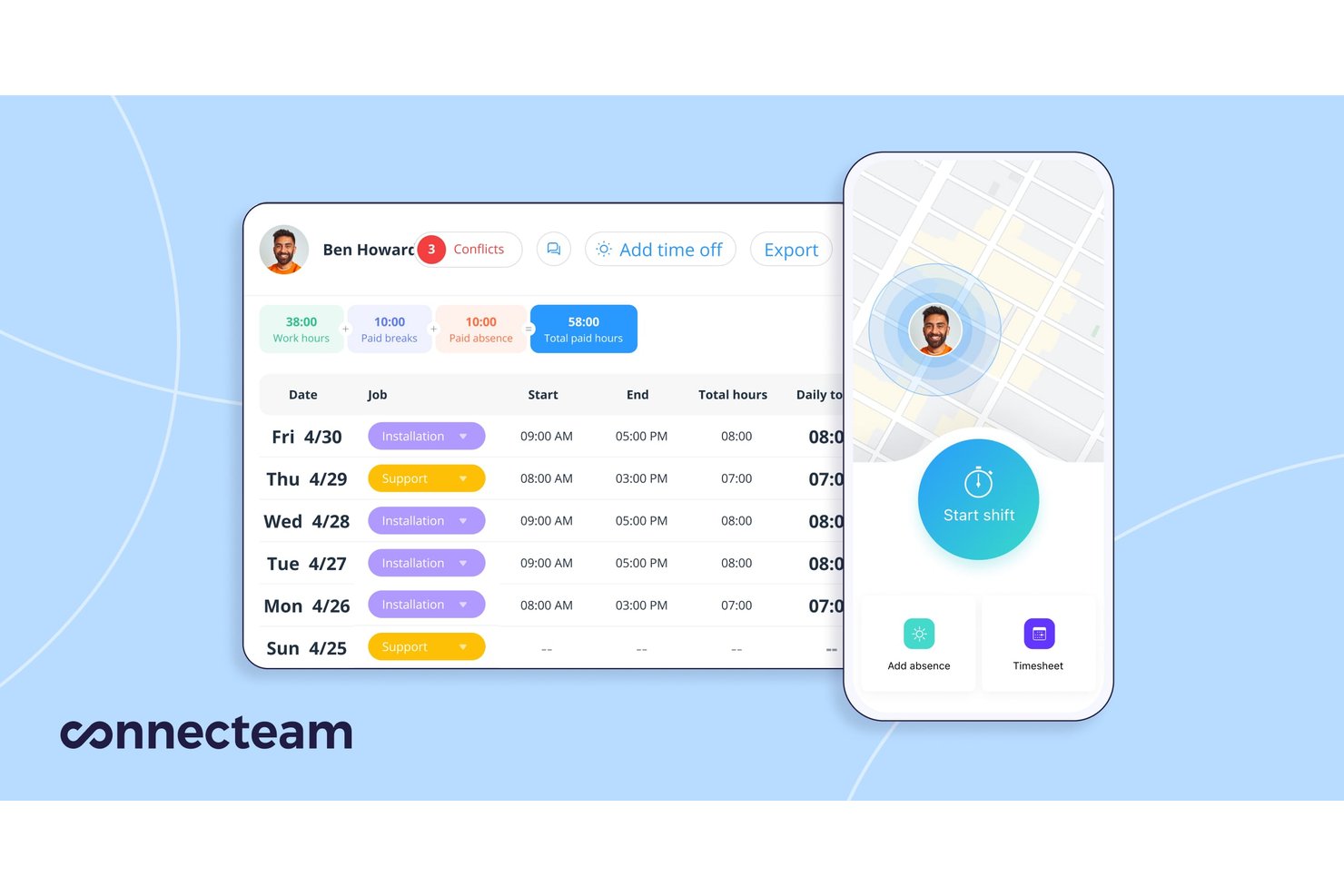
Connecteam is a time-tracking and workforce operations platform with a free-for-life plan for eligible teams of up to 10 users, offering mobile and kiosk clock-ins, manual timesheet entries, job-based tracking, scheduling, and payroll exports.
Who Is Connecteam Best For?
Team leads and payroll admins at small businesses can use Connecteam to oversee shift attendance and prepare employee hours for payroll.
Why I Picked Connecteam
I picked Connecteam for deskless time tracking because field crews can clock in from a mobile device or shared kiosk, then assign hours to jobs, clients, or equipment. Managers can review attendance and job-level hours in Job Insights, then export timesheets for payroll or client billing. Standard clock-ins require an internet connection, so sites without reliable connectivity are a poor fit.
Connecteam Key Features
- Shift scheduling: Create schedules with templates, duplicated shifts, and recurring shifts.
- Manual time entries: Add shifts and breaks to timesheets, subject to admin settings.
- Payroll integrations: Connect with Gusto and QuickBooks or use export templates for other payroll systems.
- Attendance alerts: Get notifications about late or missed clock-ins.
Connecteam Integrations
Connecteam has native payroll integrations with Gusto and QuickBooks. Its export options include templates for Xero, Paychex, MYOB, and ADP; it also supports Zapier and offers an API with endpoints and webhooks.
What's Free?
Connecteam offers a free-forever plan for eligible teams of up to 10 users. Teams above that limit need a paid plan.
Pros and Cons
Pros:
- Job-level hours show team allocation
- Client-ready timesheets support billing
- Mobile clock-ins suit field crews
Cons:
- Break-time totals vary across reports
- Clock-ins require an internet connection
New Product Updates from Connecteam

Connecteam Adds Automatic Paid Break Actions and Manual Break Windows
Connecteam adds automatic paid break actions and configurable start windows for manual breaks. These updates help teams manage break schedules and maintain accurate timesheets. For more information, visit Connecteam’s official site.
 .

Toggl
Best for solo freelancers
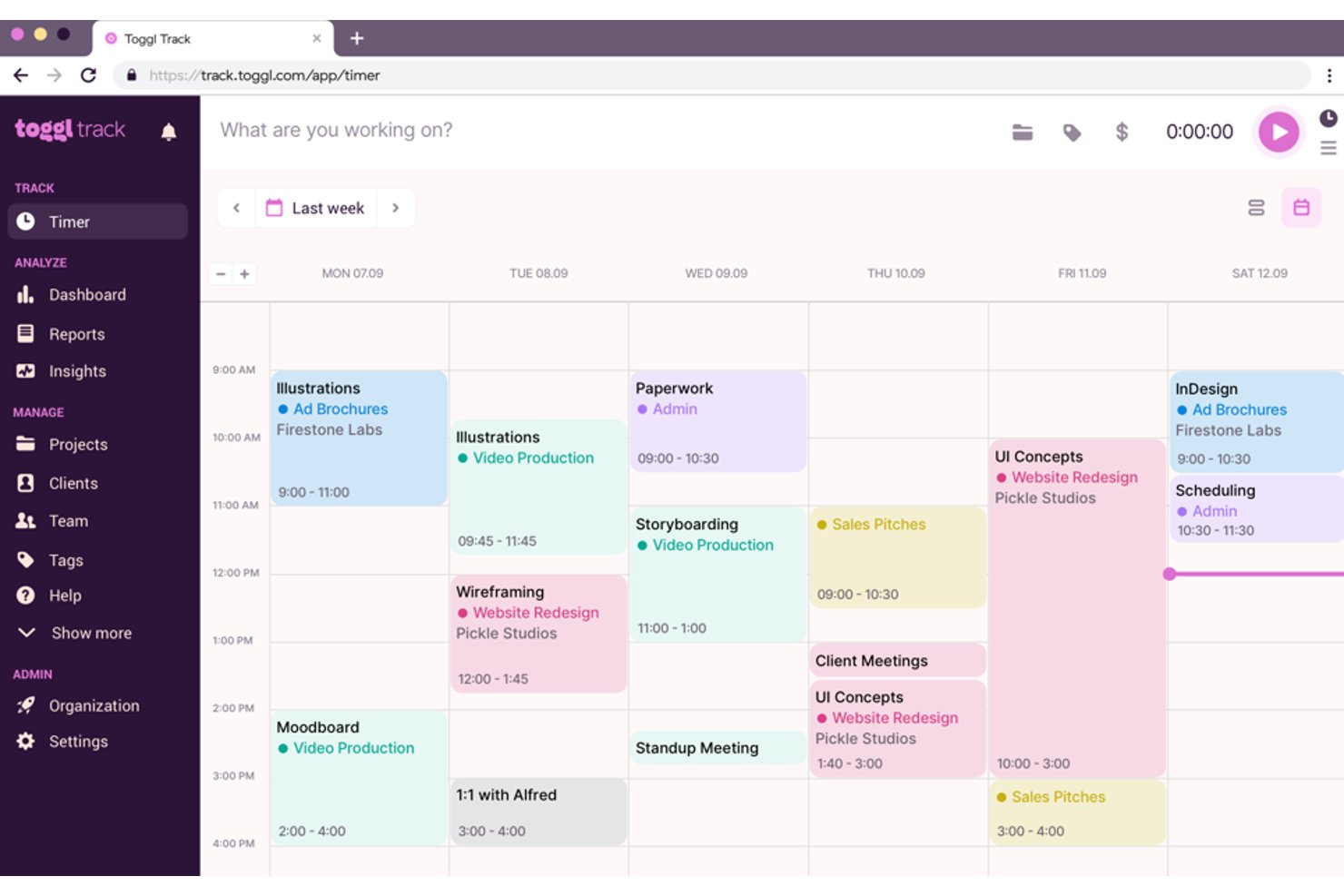
Toggl is a time tracking tool designed for freelancers who need to manage their time. It offers features that help users track their work hours and analyze productivity.
Why I picked Toggl: This tool provides an interface that’s good for solo freelancers. You can start tracking time, making it easier to capture each billable hour. Toggl's reporting features give you insights into your work patterns, helping you optimize your schedule. Its flexibility allows you to track time across different devices, so you can work from anywhere.
Standout Features & Integrations
Features include detailed reporting that lets you analyze your productivity over time. You can set up reminders so you don't forget to track your time. The tool also offers a Pomodoro timer to help you maintain focus and improve efficiency.
Integrations include Asana, Trello, Slack, Google Calendar, Jira, Todoist, Basecamp, Evernote, GitHub, and QuickBooks.
Pros and Cons
Pros:
- Detailed productivity reports
- Pomodoro timer included
- Cross-device compatibility
Cons:
- Not suited to large-scale professional use
- No invoicing features

actiTIME
Best with custom workflow configurations
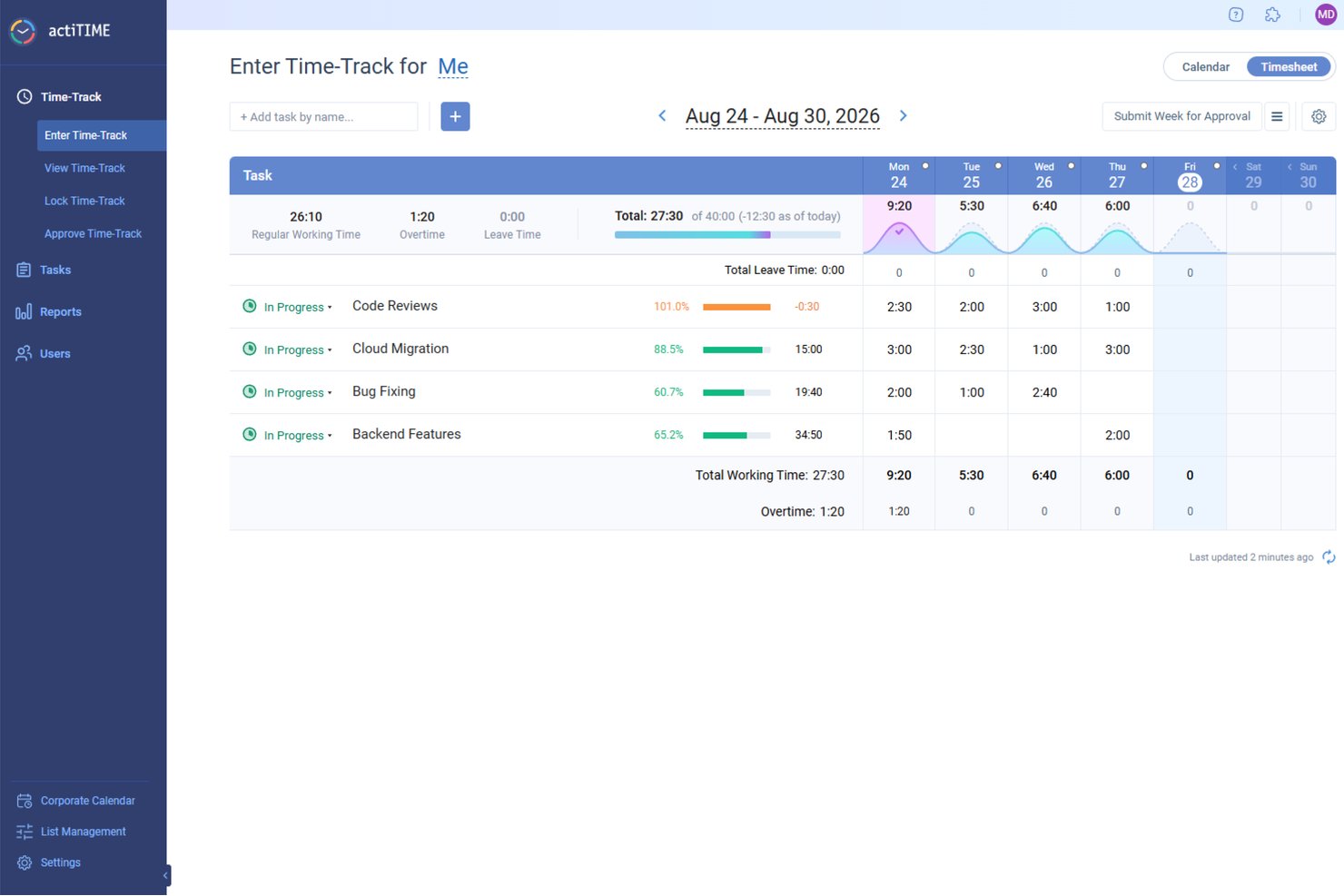
actiTIME is a free time tracking tool that pairs manual time logging and timesheet management with customizable task workflows, multi-level project tracking, and built-in budget and billing reports.
Who Is actiTIME Best For?
actiTIME suits small agencies and consulting teams that need client-level time tracking, billing visibility, and structured workflows without a software budget.
Why I Picked actiTIME
I picked actiTIME as one of the best because its custom workflow statuses let my team define exactly how tasks move through a project, going well beyond a basic to-do/done setup. I also use custom types of work to separate billable from non-billable hours at the task level, which keeps client invoicing clean without manual sorting after the fact. Both of these configurations are available on the free plan, which genuinely sets actiTIME apart from most free-tier tools.
actiTIME Key Features
- Weekly timesheet and calendar view: Log time daily or weekly and review all entries in an interactive layout.
- Multi-level project and task structure: Organize work by clients, projects, and tasks with unlimited hierarchy depth.
- Mobile app and Chrome extension: Track time from iOS, Android, or right in your browser without losing data.
- CSV and PDF report exports: Export time and billing data in common file formats to support stakeholder or client reporting.
actiTIME Integrations
actiTIME offers native integrations with QuickBooks and actiPLANS, and provides an API for custom integrations.
What's Free?
actiTIME offers a free forever plan for up to 3 users, which includes core time tracking, timesheet views, custom task statuses, and basic reporting. A 30-day free trial of the paid plan is also available if you need to test premium features before committing.
Pros and Cons
Pros:
- Built-in billing reports without upgrading
- Supports project, task, and client hierarchy
- Custom workflow statuses on the free plan
Cons:
- Free plan limited to three users
- No automatic or background time tracking
New Product Updates from actiTIME

actiTIME Visual Hour Indicator and Time-Track Report Redesign
actiTIME adds a wave-style hour indicator to the Timesheet and Calendar views and refreshes the Time-Track report for smoother navigation and clearer visuals. For more information, visit actiTIME's official site.
 .

Homebase
Best with built-in hiring and onboarding tools
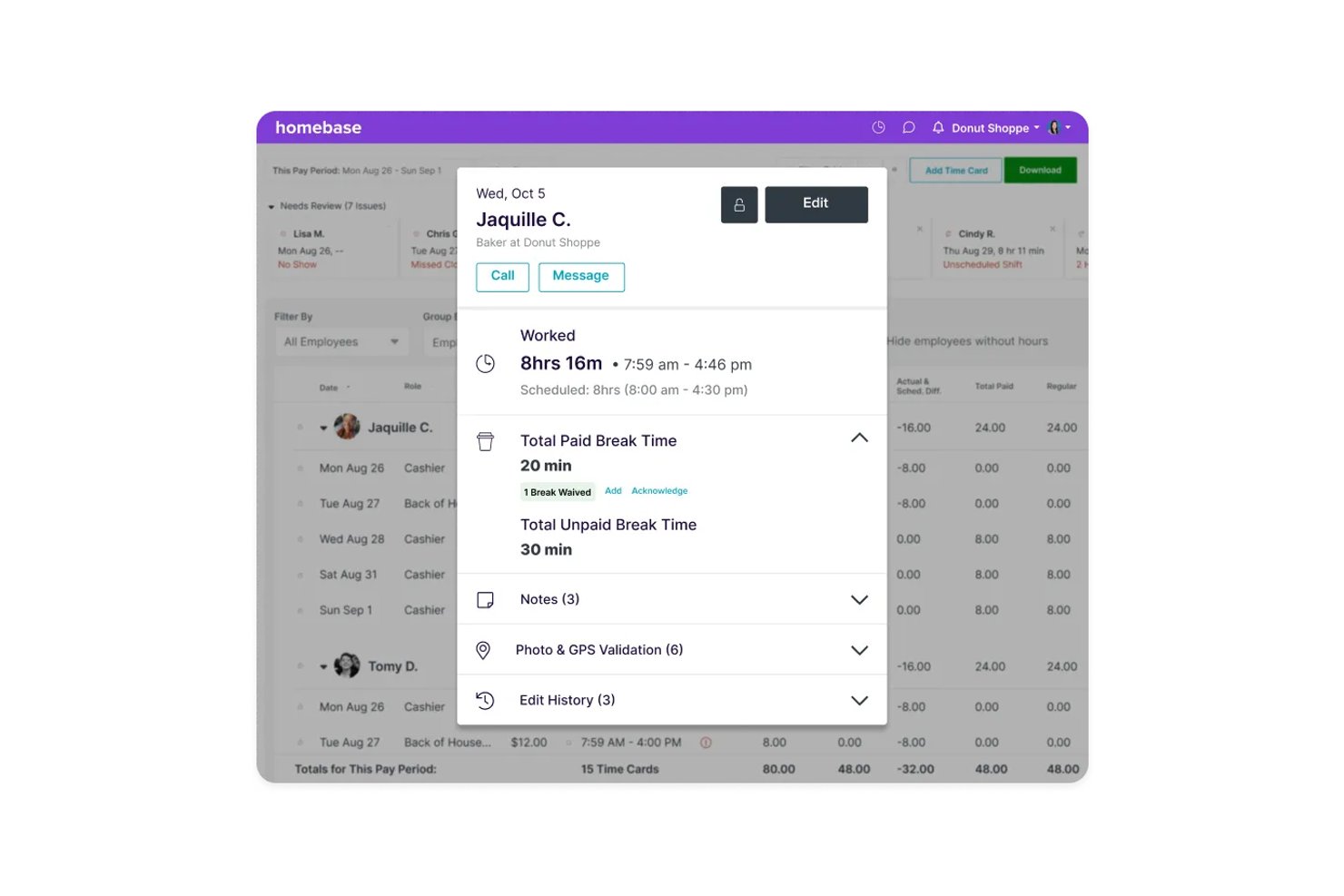
Homebase is a scheduling and time tracking platform built for hourly workforces, combining clock-in/out time logging, shift scheduling, team communication, and native hiring and onboarding tools.
Who Is Homebase Best For?
Homebase is a natural fit for small businesses in retail, food service, and hospitality that manage hourly, shift-based teams from a single location.
Why I Picked Homebase
I've included Homebase in my top picks because no other free time tracking tool also handles the full hiring-to-clock-in pipeline in one place. When I post a job through Homebase, it syncs automatically to Indeed and Google Jobs, and applicants flow into the same dashboard where I manage schedules and timesheets. Once I hire someone, I can send digital onboarding packets (W-4, I-9, direct deposit setup) without switching tools.
Homebase Key Features
- GPS-enabled time clock: Employees can clock in and out from approved locations using their mobile device with GPS verification.
- Automated overtime tracking: The system calculates overtime based on your specified rules and alerts managers automatically.
- Shift scheduling calendar: Create, assign, and manage employee shifts with a visual calendar that supports drag-and-drop edits.
- Team messaging: Managers and employees can communicate in real time directly within the Homebase platform.
Homebase Integrations
Homebase offers native integrations with Square, Clover, Toast, Shopify, Lightspeed, PAR, GoDaddy, ADP, Gusto, QuickBooks, Paychex, and SurePayroll. An API is available for custom integrations.
Pros and Cons
Pros:
- Automated scheduling and time-off management
- GPS time tracking for offsite staff
- Built-in tools for hiring hourly employees
Cons:
- Requires a separate paid add-on to run payroll
- Locks geofencing tools behind the upper tiers
New Product Updates from Homebase

Homebase Adds Time Card Review and AutoPayroll Alerts
Homebase adds Time Card Review, time clock monitoring, and AutoPayroll email alerts. These updates help managers correct timecard errors and address payroll issues before processing. For more information, visit Homebase’s official site.
 .

Clockify
Best for small teams
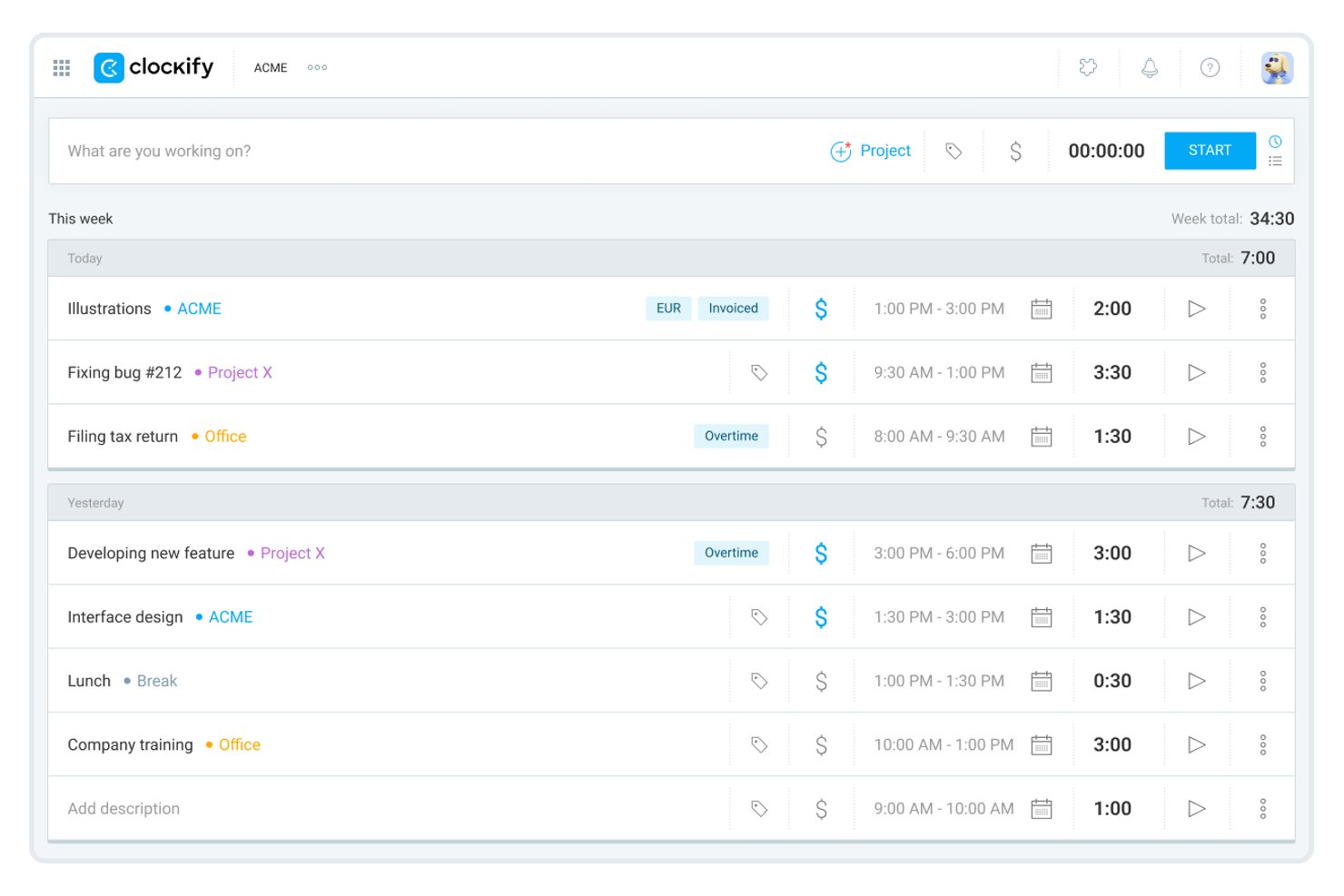
Clockify is a time tracking platform that lets individuals and small teams track work hours, manage unlimited projects and tasks, generate timesheets, and connect to 100+ third-party tools.
Who Is Clockify Best For?
Freelancers, consultants, and small teams who need unlimited time tracking and project management features on a free plan.
Why I Picked Clockify
I selected Clockify because it gives small teams an accessible way to log hours and manage basic timesheets without high upfront costs. Its core tracking features provide clear visibility into daily team output and project progress. This makes it ideal for leaders who need essential oversight and proof of work while keeping software overhead low.
Clockify Key Features
- Auto Tracker: Records app, website, and document activity in the background for more accurate time logs.
- Idle detection and reminders: Notifies you when the timer is running while inactive and lets you handle idle time.
- Team activity dashboard: Displays a real-time overview of what each team member is currently tracking.
- PDF report exports: Lets you generate and export summary, detailed, and weekly reports in PDF format from the free plan.
Clockify Integrations
Clockify offers over 100 native integrations, including Jira, Asana, Trello, ClickUp, Monday, Basecamp, Notion, GitHub, GitLab, Slack, Google Calendar, and Zapier. An API is available for custom integrations.
What's Free?
Clockify offers a free-forever plan for up to 5 users, with unlimited projects, tasks, and time tracking. The free plan includes essential features like PDF reports, the auto tracker, and 100+ integrations, but some advanced features like billable rates and time audits require a paid upgrade.
Pros and Cons
Pros:
- Cross-platform apps with offline time tracking
- Auto tracker and idle detection included
- Cost-effective time tracking for small budgets
Cons:
- PDF-only export with 31-day report limit
- Free plan capped at five users

My Hours
Best for project management

My Hours is a time tracking software tailored for teams to manage project time and improve profitability. It supports key functions like project tracking and client billing, making it ideal for project management needs.
Why I picked My Hours: This tool works in project management by offering features that allow you to track project profitability and manage billing. You can delegate tasks in real-time, so everyone knows their responsibilities. The software's ability to calculate costs for each employee helps in maintaining clear financial oversight. Its user-friendly design means your team can focus on work without getting bogged down by complex systems.
Standout Features & Integrations
Features include customizable hourly rates, which let you adjust billing as needed. The platform also provides detailed reporting capabilities, so you can easily analyze time and expenses. Additionally, its absence management feature keeps track of team availability.
Integrations include QuickBooks, Trello, Asana, Slack, Zapier, Google Calendar, Outlook, Microsoft Teams, Xero, and Basecamp.
Pros and Cons
Pros:
- Customizable hourly rates
- Real-time task delegation
- Easy project profitability tracking
Cons:
- Limited mobile features
- No offline access

Jibble
Best for attendance tracking

Jibble is a time tracking software designed for businesses that need accurate attendance records. It's ideal for industries to track employee hours and attendance.
Why I picked Jibble: This tool works in attendance tracking with features like facial recognition and GPS tracking to ensure accurate time logs. You can track employee hours in real-time and generate timesheets automatically. Jibble's mobile app lets your team clock in and out from anywhere, which is useful for remote work. Its reporting tools help you analyze attendance patterns and improve workforce management.
Standout Features & Integrations
Features include timesheet approvals, which allow managers to review and approve hours worked. You can also set up overtime rules to manage extra hours automatically. The tool provides detailed analytics, helping you make informed decisions about staffing needs.
Integrations include Slack, Microsoft Teams, QuickBooks, Xero, Asana, Trello, monday.com, Google Calendar, Zapier, and Gusto.
Pros and Cons
Pros:
- Overtime rules management
- Automatic timesheet generation
- Facial recognition for clock-ins
Cons:
- No invoicing capabilities
- Requires internet for use

TimeCamp
Best for automatic time tracking

TimeCamp is a time tracking tool designed for businesses that want to automate time management. It's useful for teams looking to accurately track time without manual input.
Why I picked TimeCamp: It offers automatic time tracking, which reduces the need for manual entries and helps in capturing time spent on tasks accurately. You can categorize time entries to better understand how time is allocated across projects. The tool's reporting features provide insights into productivity, allowing you to make informed decisions. With its interface, your team can start tracking time with minimal setup.
Standout Features & Integrations
Features include the ability to track time offline, so no hours are lost when internet access is unavailable. You can set up billable and non-billable hours to manage project budgets. TimeCamp also offers invoicing features, making it easier to bill clients directly from the platform.
Integrations include Trello, Asana, Slack, Jira, monday.com, QuickBooks, Xero, Dropbox, Google Calendar, and Evernote.
Pros and Cons
Pros:
- Categorize time entries
- Invoicing from the platform
- Offline tracking capabilities
Cons:
- Many basic features are locked behind paid tier
- Limited mobile app features

Best for unlimited users

TrackingTime is a web-based time tracking platform built for digital project managers, remote teams, and growing agencies. It enables organizations to monitor project progress, measure productivity, and generate time reports across shared workflows.
Why I picked TrackingTime: I selected TrackingTime because its free plan supports unlimited users, allowing project leads to onboard entire teams, contractors, and external clients without incurring extra seat costs. Unlike software that restricts free access to small teams, it ensures everyone on a project can log time directly into a shared workspace.
Standout Features & Integrations
Features include the ability to track time directly from your browser, making it convenient for remote teams. You can also generate detailed timesheets to review hours worked and improve project billing. The tool offers project budgeting features to help you keep track of costs and resources.
Integrations include Asana, Trello, Slack, Jira, Google Calendar, Microsoft Teams, Zapier, Basecamp, Evernote, and monday.com.
What's Free? TrackingTime offers a free-forever plan that supports unlimited users, tasks, and projects with basic real-time tracking and PDF exporting, though CSV exports and billable rate calculations require a paid tier.
Pros and Cons
Pros:
- Project budgeting features
- Real-time task tracking
- Unlimited users on free plan
Cons:
- Lacking compliance features
- Billable hour tracking requires paid tier


Harvest is a time tracking and invoicing tool designed for businesses that need to manage projects and billing. It's tailored for teams looking to track time, expenses, and generate invoices all in one place.
Why I picked Harvest: This tool integrates time tracking with invoicing, making it good for businesses that need to manage billing alongside project hours. You can track time on tasks and convert those hours into invoices with just a few clicks. Harvest's reporting tools provide insights into your projects' profitability, helping you make informed decisions.
Standout Features & Integrations
Features include expense tracking, which lets you manage project costs. You can set up automatic reminders, so your team tracks time consistently. The tool also offers detailed project reports to help you analyze time and expenses across all projects.
Integrations include Asana, Trello, Slack, QuickBooks, Xero, Google Calendar, Basecamp, Jira, Zapier, and GitHub.
Pros and Cons
Pros:
- Automatic reminders for time tracking
- Expense tracking capabilities
- Invoicing integration with time tracking
Cons:
- Requires internet for full functionality
- Limited customization for reports
Diğer Ücretsiz Zaman Takibi Yazılımları
İşte kısa listeme giremeyen ancak yine de göz atmaya değer bazı ek ücretsiz zaman takibi yazılımı seçenekleri:
- Simple Time Tracker
For simplicity
- TopTracker
For freelancers
- TimeTrace
For minimal setup
- QuickBooks Time
For payroll integration
- Everhour
For budget management
- Apploye
For remote team monitoring
- Deltek Replicon Time
For compliance tracking


How I Evaluate Free Time Tracking Software
I split my evaluation into baseline criteria—like whether a free plan actually supports team tracking—and differentiators like billing rate controls and PM tool integrations.
Core Functionality (Table Stakes For This List)
When I'm selecting tools for my list, I rank each one on a scale from 0 (does not offer the functionality) to 5 (excels in this area) for each core functionality listed below. Then, I calculate the tool's total score into a percentage. Each tool needs to achieve a minimum total score of 65% to be considered for inclusion.
- Free Plan Availability: I check whether the tool offers a genuinely free tier—not a 14-day trial—that covers day-to-day time tracking for real project work.
- Time Entry & Timers: Whether you prefer clicking a start/stop timer mid-task or logging hours after the fact, I look for tools that support both input methods.
- Project & Task Association: Logging hours is only useful when entries tie to specific projects, tasks, or clients, so I evaluate how granular the tagging structure is.
- Timesheet Management: I look for daily and weekly timesheet views that let you review, edit, and organize logged time—similar to how Toggl Track and Clockify handle it.
- Reporting & Exports: Teams need to pull time data into invoices or stakeholder updates, so I evaluate report filtering options and export formats like CSV and PDF.
- Multi-User Team Support: A free plan that caps at one user doesn't help a project team. I check how many team members can track time together on the free tier.
Once I have a list of tools that meet this criteria, I consider what sets each platform apart.
Differentiating Factors (What Sets Vendors Apart)
Here's how I compare and contrast different vendors:
Standout Features
Billable rate management is a big one—if your team tracks time across client projects, assigning rates at the project or user level saves a manual step before invoicing. I also evaluate idle detection and tracking reminders, which keep timesheets accurate when someone forgets to stop a timer or steps away mid-task. For project managers juggling multiple workstreams, capacity and workload views give you a real-time picture of who's overloaded and who has bandwidth to take on more.
Beyond Features
I pay close attention to how well a tool connects with existing PM stacks—native integrations with platforms like Jira, Asana, or Trello mean your team logs time where they already work instead of context-switching. Cross-platform accessibility also matters, especially for distributed teams who need desktop, mobile, and browser extension options with offline tracking. Finally, I evaluate free plan generosity: some tools gate reporting or integrations behind paid tiers, which limits how useful the free version actually is for a growing project team.
Ücretsiz Zaman Takibi Yazılımı Nasıl Seçilir?
Uzun özellik listeleri ve karmaşık fiyatlandırma yapıları arasında kaybolmak kolaydır. Kendinize özgü yazılım seçim sürecinizde ilerlerken odağınızı korumanıza yardımcı olmak için göz önünde bulundurmanız gereken faktörlerin bir kontrol listesini aşağıda bulabilirsiniz:
| Faktör | Dikkat Edilmesi Gerekenler |
| Ölçeklenebilirlik | Yazılım ekibinizle birlikte büyüyecek mi? Sınırsız kullanıcı veya projeyi destekleyip desteklemediğini ve ölçeği büyütmenin ek maliyet getirip getirmediğini değerlendirin. |
| Entegrasyonlar | Mevcut araçlarınıza bağlanabiliyor mu? İş akışlarınızı aksatmamak için proje yönetimi, muhasebe veya iletişim araçlarınızla entegre olup olmadığını kontrol edin. |
| Özelleştirilebilirlik | İhtiyaçlarınıza uyacak şekilde uyarlayabilir misiniz? İş akışınıza uygun raporları, gösterge panellerini ve kullanıcı izinlerini özelleştirme seçeneklerini arayın. |
| Kullanım kolaylığı | Arayüz sezgisel mi? Ekibinizin hemen kullanmaya başlayabilmesi için aracın kolayca kullanılabildiğinden ve kapsamlı bir eğitim gerektirmediğinden emin olun. |
| Uygulama ve kullanıma alıştırma | Ne kadar hızlı başlayabilirsiniz? Ekibinizin hızla uyum sağlamasına yardımcı olacak eğitim kaynakları, eğitimler veya kılavuzlar gibi materyallerin bulunup bulunmadığını değerlendirin. |
| Maliyet | Toplam maliyetler nelerdir? Ücretsiz planın ötesinde, ücretli planların fiyatlandırma yapısını, olası gizli ücretleri ve yıllık faturalandırma indirimlerini göz önünde bulundurun. |
| Güvenlik önlemleri | Verileriniz ne kadar güvende? Bilgilerinizin güvende olduğundan emin olmak için yazılımın şifreleme ve veri düzenlemelerine uyumluluk gibi veri koruma önlemlerini inceleyin. |
| Destek erişilebilirliği | Ne zaman yardıma ihtiyacınız oluyor? Gerektiğinde yardım alabilmeniz için müşteri desteğinin 7/24 veya çalışma saatlerinizde sunulup sunulmadığını ve hangi kanallar (ör. sohbet, e-posta, telefon) üzerinden verildiğini kontrol edin. |
Ücretsiz Zaman Takibi Yazılımı Nedir?
Ücretsiz zaman takibi yazılımı, bireylerin ve ekiplerin görevler ve projeler için harcanan zamanı herhangi bir maliyete katlanmadan izlemelerine yardımcı olan bir araçtır. Genellikle serbest çalışanlar, proje yöneticileri ve küçük işletmeler tarafından kullanılan bu araçlar, üretkenlik hakkında içgörüler sunar ve iş yüklerinin verimli bir şekilde yönetilmesine yardımcı olur. Zaman kaydı, raporlama ve faturalandırma gibi özellikler, kullanıcıların çalışma saatlerini takip etmesini, verileri analiz etmesini ve müşterilere fatura göndermesini destekler. Genel olarak bu araçlar, zamanın nasıl harcandığına dair değerli bilgiler sunarak daha iyi proje yönetimine ve artan verimliliğe katkıda bulunur.
Ücretsiz Zaman Takibi Yazılımının Özellikleri
Ücretsiz zaman takibi yazılımı seçerken aşağıdaki temel özelliklere dikkat edin:
- Zaman kaydı: Kullanıcıların görevler için harcanan saatleri kaydetmesini sağlayarak üretkenlik hakkında içgörüler sunar.
- Raporlama: Zaman kullanımını analiz etmek için raporlar oluşturur ve verilere dayalı kararlar alınmasına yardımcı olur.
- Faturalandırma: Takip edilen saatleri faturalara dönüştürerek müşteriler için faturalandırma sürecini kolaylaştırır.
- Proje yönetimi: Ekiplerin uyumlu kalmasını ve plan doğrultusunda ilerlemesini sağlamak için görevleri ve projeleri düzenler.
- Entegrasyon özellikleri: İş akışları için muhasebe ve proje yönetimi yazılımları gibi diğer araçlara bağlanır.
- Özelleştirilebilir panolar: Daha iyi odaklanma için bireysel veya ekip ihtiyaçlarına uygun kişiselleştirilmiş görünümler sunar.
- Mobil erişim: Hareket hâlindeyken zaman takibine olanak tanıyarak esneklik ve kolaylık sağlar.
- Gider takibi: Bütçelere uyulmasını ve bütçelerin etkili bir şekilde yönetilmesini sağlamak için proje maliyetlerini izler.
- Otomatik hatırlatıcılar: Kullanıcılara zaman kaydı yapmalarını hatırlatarak çalışma saatlerini takip etmeyi unutma olasılığını azaltır.
- Gizlilik denetimleri: Kullanıcı gizliliğinin korunmasını sağlamak için veri görünürlüğünü yönetme seçenekleri sunar.
Ücretsiz Zaman Takibi Yazılımının Faydaları
Ücretsiz zaman takibi yazılımını uygulamak, ekibiniz ve işletmeniz için çeşitli faydalar sağlar. Yararlanabileceğiniz birkaç fayda şunlardır:
- Artan üretkenlik: Görevler için harcanan zamanı takip ederek verimsizlikleri belirleyebilir ve iş akışlarını optimize edebilirsiniz.
- Daha iyi proje yönetimi: Görevleri ve projeleri düzenlemek, ekibinizin uyumlu kalmasına ve teslim tarihlerine uygun şekilde ilerlemesine yardımcı olur.
- Doğru faturalandırma: Faturalandırma özellikleri, müşterilerin çalışılan saatler için doğru şekilde faturalandırılmasını sağlayarak tutarsızlıkları azaltır.
- Maliyet yönetimi: Gider takibi, bütçe dâhilinde kalmanıza yardımcı olarak proje maliyetlerini kontrol altında tutar.
- Gelişmiş esneklik: Mobil erişim, ekibinizin bulunduğu her yerde zaman takibi yapmasına olanak tanıyarak kolaylık ve uyarlanabilirlik sağlar.
- Verilere dayalı içgörüler: Raporlama özellikleri, zamanın nasıl harcandığına dair değerli içgörüler sunarak karar alma süreçlerine yardımcı olur.
- Artan hesap verebilirlik: Otomatik hatırlatıcılar, zaman kaydının düzenli olmasını sağlayarak ekip üyeleri arasında sorumluluk bilincini teşvik eder.
Ücretsiz Zaman Takibi Yazılımının Maliyetleri ve Fiyatlandırması
Ücretsiz zaman takibi yazılımı seçmek, mevcut çeşitli fiyatlandırma modellerinin ve planların anlaşılmasını gerektirir. Maliyetler özelliklere, ekip büyüklüğüne, eklentilere ve daha fazlasına göre değişir. Aşağıdaki tabloda yaygın planlar, ortalama fiyatları ve ücretsiz zaman takibi yazılımı çözümlerinde genellikle bulunan özellikler özetlenmiştir:
Ücretsiz Zaman Takibi Yazılımı için Plan Karşılaştırma Tablosu
| Plan Türü | Ortalama Fiyat | Yaygın Özellikler |
| Ücretsiz Plan | $0 | Temel zaman takibi, basit raporlama ve sınırlı entegrasyonlar. |
| Kişisel Plan | $5-$15/kullanıcı/ay | Gelişmiş raporlama, mobil erişim, proje yönetimi ve temel faturalandırma. |
| İşletme Planı | $15-$30/kullanıcı/ay | Gelişmiş raporlama, gider takibi, birden fazla entegrasyon ve özelleştirilebilir panolar. |
| Kurumsal Plan | $30-$50/kullanıcı/ay | Tüm özelliklere erişim, öncelikli destek, gelişmiş güvenlik seçenekleri ve özel hesap yönetimi. |
Ücretsiz Zaman Takibi Yazılımı SSS
Ücretsiz zaman takibi yazılımı hakkında sık sorulan soruların bazı yanıtlarını burada bulabilirsiniz:
Ücretsiz zaman takibi yazılımı güvenli midir?
Ücretsiz zaman takibi yazılımlarının çoğu, bilgilerinizi güvende tutmak için tasarlanmış temel korumaları içerir. Bir zaman takibi uygulaması seçerken GDPR veya CCPA gibi standartlara uyup uymadığını ve zaman takibi verilerini korumak için şifreleme ile güvenli kimlik doğrulama kullanıp kullanmadığını kontrol edin. Sağlayıcının kullanıcı bilgilerini nasıl sakladığını ve hangi erişim kontrollerini sunduğunu incelemek de faydalı olur. Güvenlik en önemli önceliğinizse, gelişmiş korumalar sunan ücretli planlarla ücretsiz araçları karşılaştırmak isteyebilirsiniz.
Ücretsiz zaman takibi yazılımı çevrimdışı kullanılabilir mi?
Bazı araçlar çevrimdışı zaman kaydı sunarken diğerleri internet bağlantısı gerektirir. Uzaktan çalışıyor veya sık seyahat ediyorsanız, görevlerde ne kadar zaman harcadığınızı izleyebilen ve yeniden bağlandığınızda otomatik olarak senkronize olabilen bir web uygulaması ya da tarayıcı uzantısı arayın. Müşteri çalışmaları veya kurum içi zaman raporlaması için kullanmadan önce çevrimdışı modu mutlaka test ederek iş akışınıza uygun olduğundan emin olun.
Ücretsiz zaman takibi araçları diğer yazılımlarla entegre olur mu?
Birçok seçenek, ekiplerin zaman takibi verilerini merkezi hale getirebilmesi için proje yönetimi araçlarına ve muhasebe platformlarına bağlanır. Asana, Trello, QuickBooks veya diğer ekip yönetimi sistemleri gibi uygulamalarla entegrasyonlar, manuel veri girişini azaltabilir ve doğruluğu artırabilir. Faturalandırılabilir ücretlere güveniyorsanız veya sınırsız projeler genelinde raporlar almanız gerekiyorsa yazılımın ihtiyaç duyduğunuz belirli zaman takibi özelliklerini desteklediğini doğrulayın.
Ücretsiz zaman takibi yazılımı kullanmanın sınırlamaları var mı?
Ücretsiz sürümler genellikle kullanıcılar, entegrasyonlar veya raporlama özellikleri konusunda sınırlamalar içerir. Özellikle ne kadar zaman harcandığını izleyen bir Chrome uzantısı ya da çalışan izleme araçlarıyla birlikte kullanıldıklarında bireyler veya küçük ekipler için yine de iyi çalışabilirler. İş yükünüz arttıkça gelişmiş zaman raporlaması, kapsamı genişletilmiş izin yönetimi ve daha ayrıntılı içgörüler için en iyi zaman takibi yazılımı seçeneklerinden birine yükseltmenin faydalı olduğunu görebilirsiniz.