

2026’da İncelenen En İyi 10 Profesyonel Hizmet Faturalandırma Yazılımı

En İyi Profesyonel Hizmetler Faturalandırma Yazılımları Kısa Listesi


Her başarılı projenin temelinde, iddialı zaman çizelgelerini hassas kaynak yönetimiyle uyumlu hâle getiren hassas bir denge sanatı yatar. Profesyonel hizmetler faturalandırma yazılımı, bu süreçte sessiz ortağınız olarak hareket eder ve gider takibini finansal denetimle bir araya getirir. Böylece odağınızı elektronik tabloları yönetmekten olağanüstü sonuçlar sunmaya kaydırabilirsiniz.
Size piyasadaki en iyi seçeneklere tarafsız bir bakış sunmak için bu araçları test edip incelemek üzere zaman harcadım. Deneyimlerime göre doğru yazılımı bulmak ekibiniz için tam anlamıyla oyunun kurallarını değiştirebilir.
Bu liste yazısında en iyi seçenekleri ayrıntılı olarak ele alacak ve onları öne çıkaran özellikleri vurgulayacağım. İster serbest çalışan olun ister daha büyük bir ekibin parçası, ihtiyaçlarınıza uygun bir seçenek bulacaksınız. Gelin seçenekleri inceleyip sizin için doğru aracı bulalım.
Why Trust Our Software Recommendations
Our team has been testing and reviewing software since 2012. As project managers ourselves, we know how difficult—and important—it is to choose the right software.
For this guide, we evaluated tools using hands-on testing and independent research, scoring tools using our selection criteria. We also draw on insights from industry thought leaders and practicing project management experts.
Our reviews reflect our human editorial judgment, not a sales pitch.
Expert reviewers:
Profesyonel Hizmetler Faturalandırma Yazılımları Karşılaştırma Tablosu
Bu karşılaştırma tablosu, profesyonel hizmetler faturalandırma yazılımı seçimlerim arasındaki en iyi seçeneklerin fiyatlandırma ayrıntılarını özetlemektedir.
| Tool | Starting Price | Website | |
|---|---|---|---|
| Best for billing across all PS contract types | 4.5 out of 5 | $17/user/month 14-day free trial | Book Demo |
| Best for small businesses | 4.7 out of 5 | $38/month 30-day free trial | Website |
| Best for freelancers | 4.5 out of 5 | $23/month 30-day free trial available | Website |
| Best for integration options | 4.4 out of 5 | $27/month 1-month free trial available | Website |
| Best for legal billing | 4.5 out of 5 | Pricing upon request 10-day free trial + demo available | Website |
| Best for international invoicing | 4.3 out of 5 | Free forever plan Not available | Website |
| Best for larger enterprises | 4.1 out of 5 | Pricing upon request Free demo available | Website |
| Best for time tracking | — | $9/seat/month Free plan + 30-day free trial available | Website |
| Best for legal client management | — | $49/user/month 14-day free trial | Website |
| Best for payment processing | 4.7 out of 5 | $49/month Free plan + 30-day trial available | Website |
En İyi Profesyonel Hizmetler Faturalandırma Yazılımları İncelemesi
Aşağıda, kısa listeme giren en iyi profesyonel hizmetler faturalandırma yazılımlarına ilişkin ayrıntılı özetlerimi bulabilirsiniz. İncelemelerim, her aracın temel özelliklerine, avantajlarına ve dezavantajlarına, entegrasyonlarına ve ideal kullanım alanlarına ayrıntılı bir bakış sunarak sizin için en iyi seçeneği bulmanıza yardımcı olur.

Scoro
Best for billing across all PS contract types
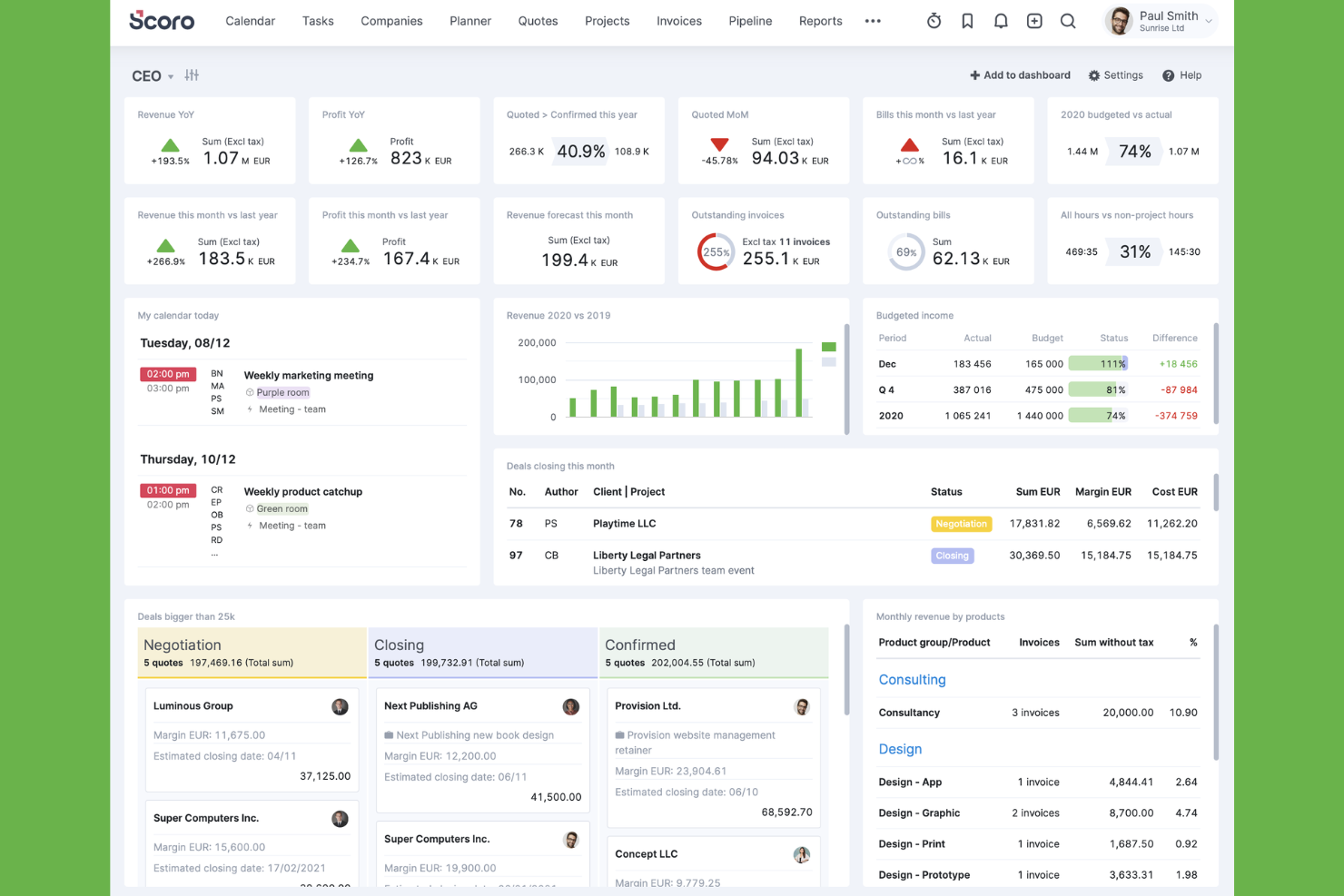
Scoro is a professional services automation platform that connects project delivery, time tracking, resource planning, CRM, and client billing—including invoicing, WIP reporting, and multi-currency support—in one system.
Who Is Scoro Best For?
Scoro fits professional services teams that bill clients across multiple contract types—fixed-fee, time-and-materials, and retainers—and need project delivery, resource planning, and invoicing in one place.
Why I Picked Scoro
Scoro earns its spot on my shortlist because it natively handles fixed-fee, time-and-materials, and retainer billing without requiring you to patch together separate tools. I particularly like how the WIP report tracks unbilled time at selling rate and uninvoiced chargeable costs in real time, so nothing slips through between delivery and invoicing. On retainer projects, you can configure billing periods in days, weeks, or months, roll hours between periods, and generate scheduled invoices automatically.
Scoro Key Features
- Multi-project invoice consolidation: Scoro lets you pull billable time from multiple projects for the same client into a single invoice, with each line automatically tagged to its source project.
- Client-specific price lists: You can set up negotiated product and service prices per client, which apply automatically when creating sales documents for that client.
- Revenue recognition reporting: Scoro calculates earned revenue using percentage-of-completion (time- or cost-based) and completed-units methods, separate from invoiced income.
- Capacity and utilization heatmaps: The resource planning view shows team availability, workload, and utilization with heatmaps that flag overload risk before you commit bookings.
Scoro Integrations
Scoro offers native integrations with Xero, QuickBooks Online, Sage Intacct, Stripe, Avalara, Exact Online, Expensify, Salesforce, Google Calendar, and Slack. It also supports REST API access, webhooks, Scoro MCP, and Zapier.
Pros and Cons
Pros:
- Consolidates billable work across client projects
- WIP reports flag unbilled time and costs
- Native billing spans fixed-fee, hourly, and retainer work
Cons:
- Scheduled retainer invoices require top-tier access
- Time-entry-to-invoice workflow can feel fiddly
New Product Updates from Scoro

Scoro Adds Time Mobile App and ELI Improvements
Scoro adds the Scoro Time mobile app for iOS/Android to track time anywhere and expands ELI with attachments, smarter filtering, and trigger-based actions. For more information, visit Scoro's official site.
 .

Best for small businesses
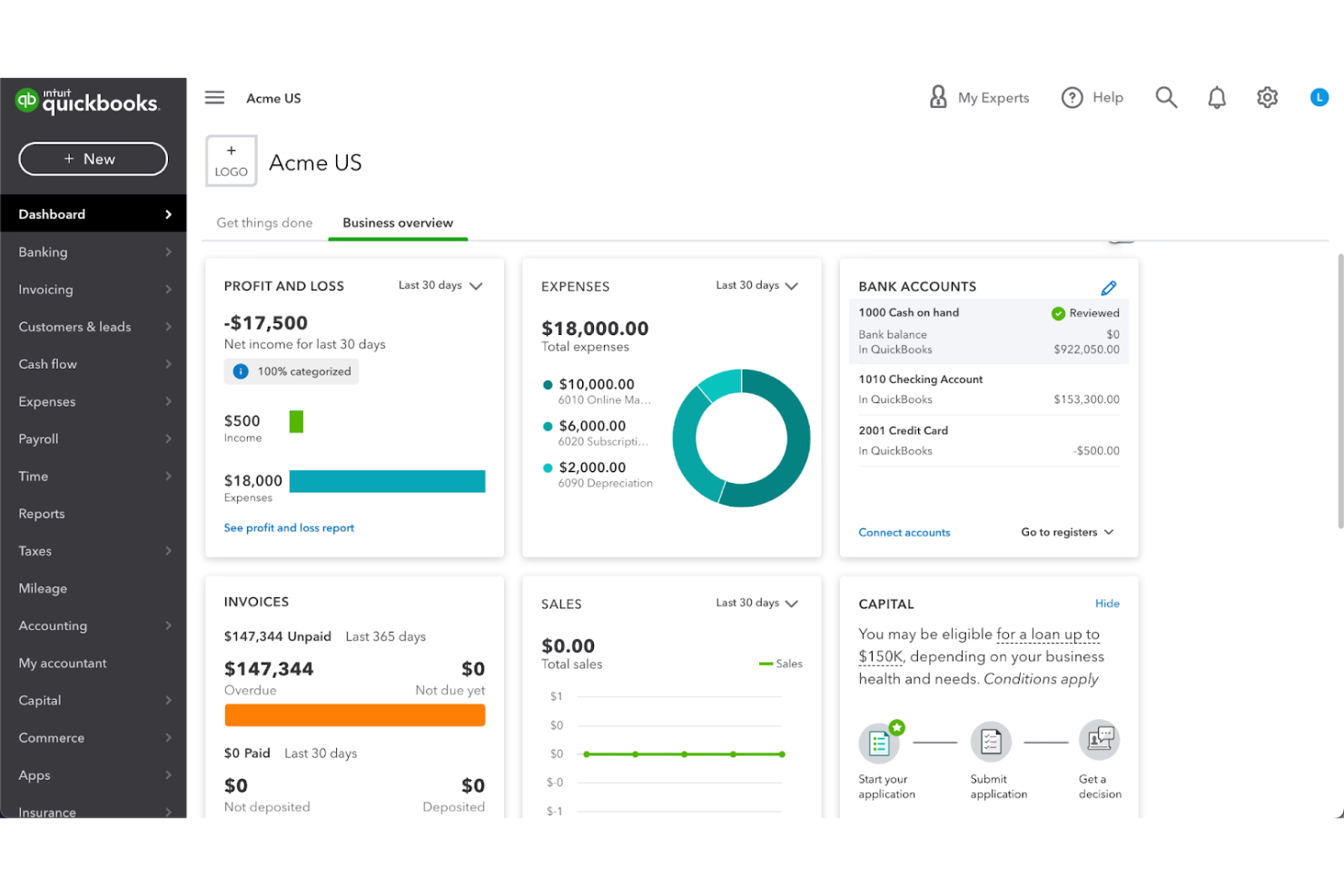
QuickBooks is a bookkeeping and accounting software solution designed for small businesses. It manages invoicing, payroll, and financial reporting.
Why I picked QuickBooks: QuickBooks is perfect for small businesses because of its straightforward invoicing and billing features. It offers an intuitive dashboard that helps you keep track of your financial health. The payroll management feature simplifies paying your team accurately and on time. With its tax preparation tools, QuickBooks ensures you stay compliant with regulations, easing the burden during tax season.
Standout Features and Integrations:
Features include expense tracking that automatically categorizes and organizes your spending. The cash flow management feature offers insights to help you make informed financial decisions. You can also use the customizable reporting feature to generate reports tailored to your business needs.
Integrations include PayPal, Shopify, Square, QuickBooks Time, HubSpot, Mailchimp, BILL, Expensify, and more.
Pros and Cons
Pros:
- Strong tax time support
- Useful cashflow snapshots
- Familiar for many teams
Cons:
- Limited permissions
- Limited scalability for larger businesses

Best for freelancers

FreshBooks is a cloud-based accounting software tailored for freelancers and small business owners. It handles invoicing, expense tracking, and time management, making it a go-to tool for solo entrepreneurs and small teams.
Why I picked FreshBooks: FreshBooks is ideal for freelancers due to its intuitive invoicing system that automates billing. The software is particularly useful for avoiding late payments thanks to its automated client reminders. The time tracking feature ensures you bill clients accurately for every hour worked. It also offers easy expense management, helping you keep track of your business expenditures. The mobile app adds flexibility, allowing you to manage finances on the go.
Standout Features and Integrations:
Features include customizable invoice templates that let you personalize your billing documents. The double-entry accounting feature provides a more detailed view of your financial health. You can also set up recurring invoices for clients you bill regularly, meaning less time is wasted.
Integrations include Gusto, HubSpot, Zapier, Asana, Trello, and more.
Pros and Cons
Pros:
- Strong client payment reminders
- Great for solo operators
- Clean invoices look professional
Cons:
- Weak project cost controls
- Steep cost for adding team members

Xero
Best for integration options
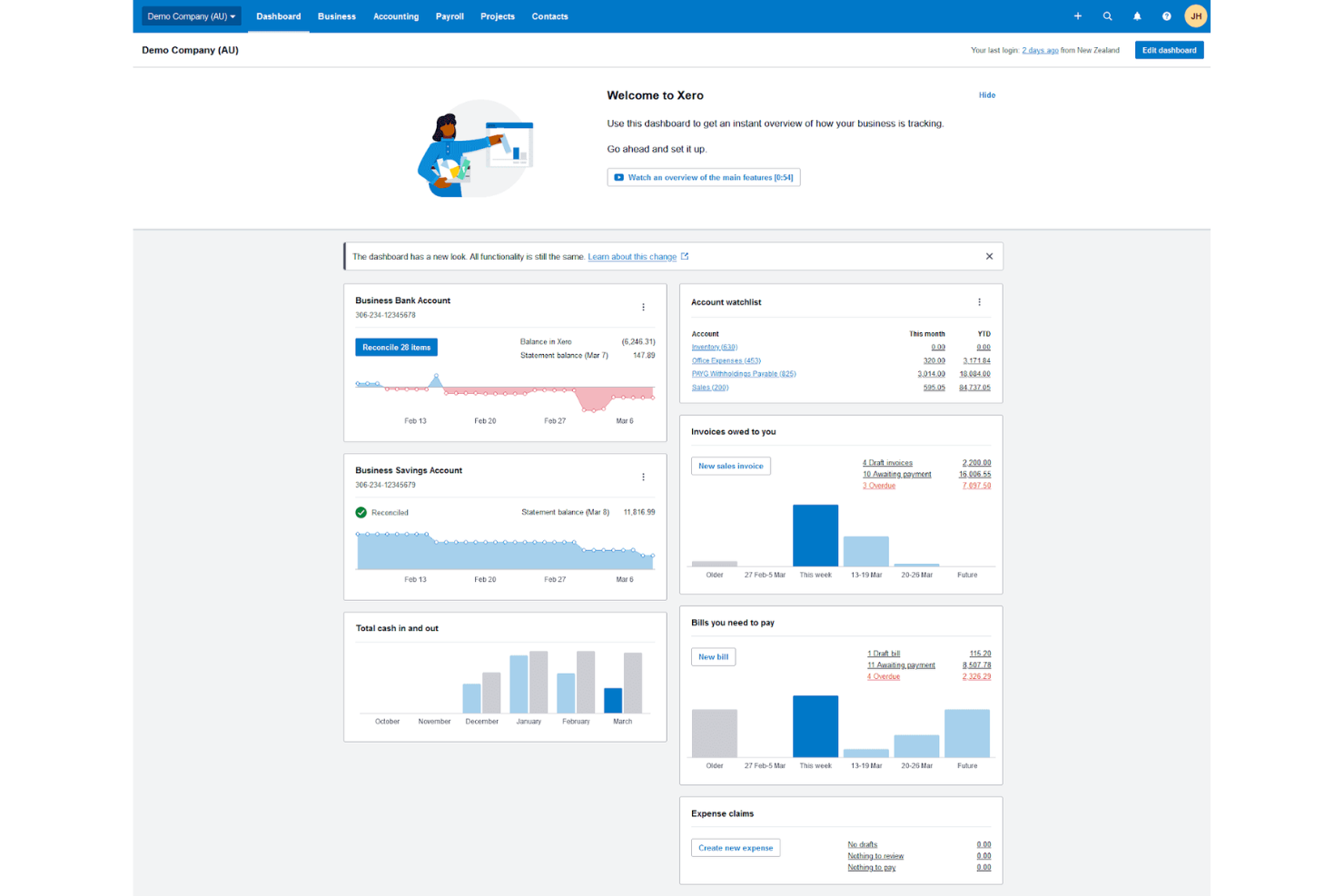
Xero is a cloud-based accounting software solution designed for small and medium-sized businesses. It offers tools for invoicing, bank reconciliation, and financial reporting, making it a versatile choice for managing business finances.
Why I picked Xero: Xero is perfect for businesses that need diverse integration options to simplify their operations. It supports a wide range of third-party apps, allowing your team to optimize the software to fit your unique needs. The invoicing feature is user-friendly, helping you create and send invoices quickly. With real-time bank reconciliation, you can keep your accounts up to date.
Standout Features and Integrations:
Features include detailed expense tracking that helps you monitor your spending effectively. The project management feature ties financials directly to your business activities, giving you a clear view of project profitability. Xero also offers detailed reporting tools, enabling you to generate financial reports with ease.
Integrations include PayPal, Stripe, Shopify, HubSpot, Expensify, and more.
Pros and Cons
Pros:
- Clean audit trail basics
- Useful invoice status tracking
- Good app ecosystem links
Cons:
- Permissions can be confusing
- Bulk invoice creation and editing options are restricted

TimeSolv
Best for legal billing

TimeSolv is a billing and time tracking software designed primarily for legal professionals and law firms. It offers tools for invoicing, time tracking, and expense management.
Why I picked TimeSolv: TimeSolv is tailored for legal billing, providing features that cater to the specific needs of law firms. Its flexible billing options allow you to manage complex client billing arrangements with ease. The software includes trust accounting, ensuring compliance with legal industry standards. With its reporting, you can gain insights into your firm's financial performance and make informed decisions.
Standout Features and Integrations:
Features include batch invoicing, which lets you generate multiple invoices at once, saving time. The time entry feature allows for detailed time tracking, ensuring accurate client billing. You can also benefit from project management tools that help you oversee legal cases and tasks efficiently.
Integrations include QuickBooks, Dropbox, NetDocuments, Xero, LawPay, Microsoft 365, Dropbox, and more.
Pros and Cons
Pros:
- Batch billing saves time
- Flexible rate arrangements
- Strong trust accounting support
Cons:
- Occasional page freezing and bugs
- Mobile app has limited functionality

Best for international invoicing
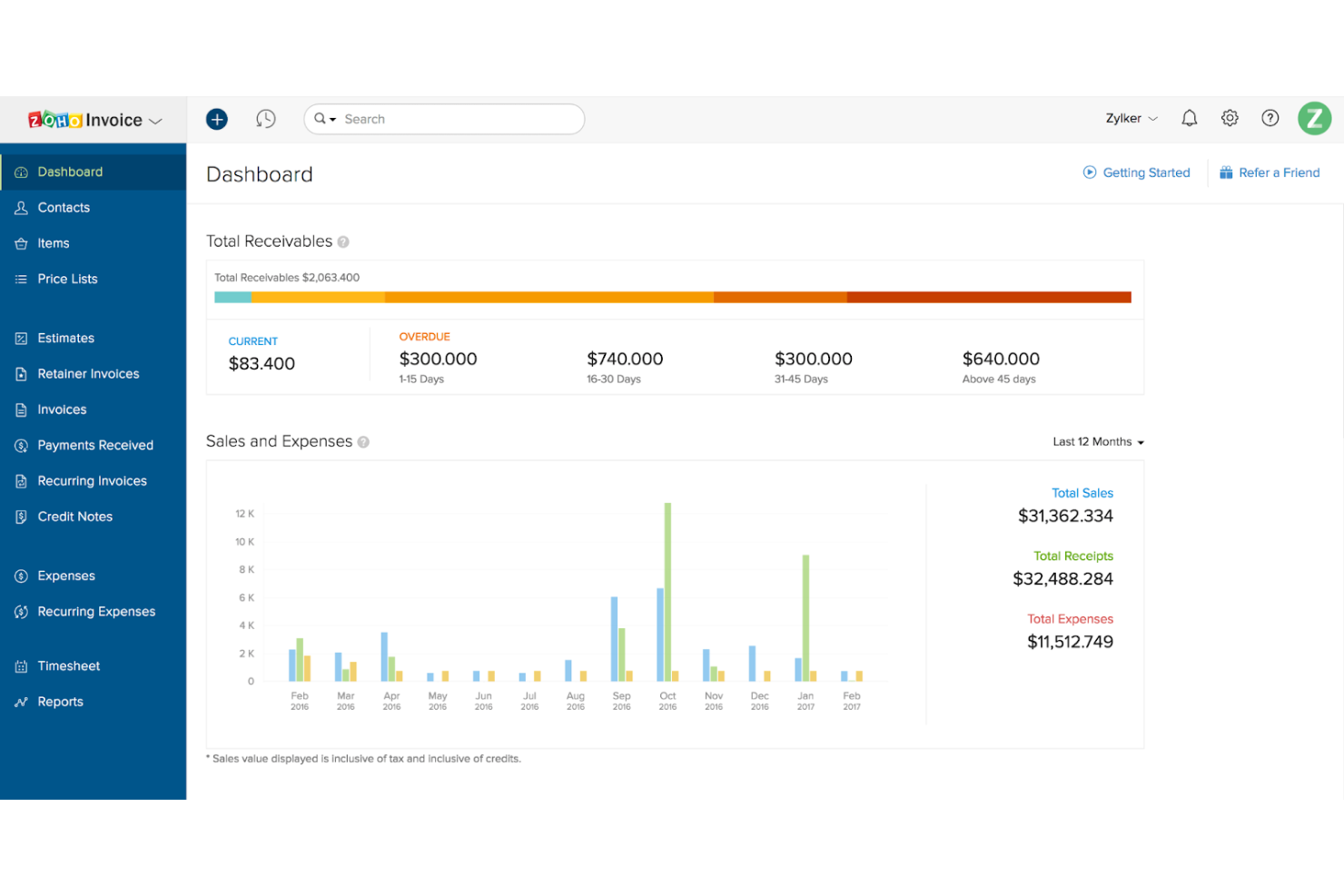
Zoho Invoice is an invoicing software solution aimed at freelancers and small businesses. It offers tools for creating invoices, managing expenses, and tracking time, making it a versatile choice for businesses with clients across the globe.
Why I picked Zoho Invoice: Zoho Invoice excels in international invoicing, providing multi-currency support for your global transactions. It allows you to customize invoices in various languages, catering to your international clientele. The software includes automated payment reminders, helping you maintain cash flow without constant manual intervention. With its detailed reporting, you can keep track of your financial health across different markets.
Standout Features and Integrations:
Features include automated workflows that reduce repetitive tasks, saving you time. The client portal feature lets your customers view and pay invoices online, improving their experience. You can also benefit from the project billing feature, which links time tracking directly to client invoices.
Integrations include PayPal, Stripe, Dropbox, Slack, Zoho CRM, and more.
Pros and Cons
Pros:
- Helpful payment follow-ups
- Smooth client portal flow
- Strong multi-currency invoicing
Cons:
- Invoice limits on free plan
- Limited advanced workflows

Sage
Best for larger enterprises

Sage is an enterprise resource planning (ERP) software designed for large businesses. It provides solutions for accounting, financial management, and payroll, catering to the complex needs of large-scale operations.
Why I picked Sage: Sage is ideal for larger enterprises due to its advanced financial management capabilities. It offers accounting features that handle complex transactions with ease. The payroll management system supports a wide range of employee needs. Sage's scalability ensures your business can grow without outgrowing the software's capabilities.
Standout Features and Integrations:
Features include detailed budgeting tools that help your team plan financially. The asset management feature lets you track and manage company assets efficiently. You can also benefit from the multi-currency support, which is essential for businesses operating in multiple countries.
Integrations include Salesforce, Microsoft Office 365, PayPal, Shopify, and more.
Pros and Cons
Pros:
- Supports multi-entity accounting
- Strong audit trail controls
- Handles complex billing rules
Cons:
- Customization can get expensive
- Needs dedicated system owners

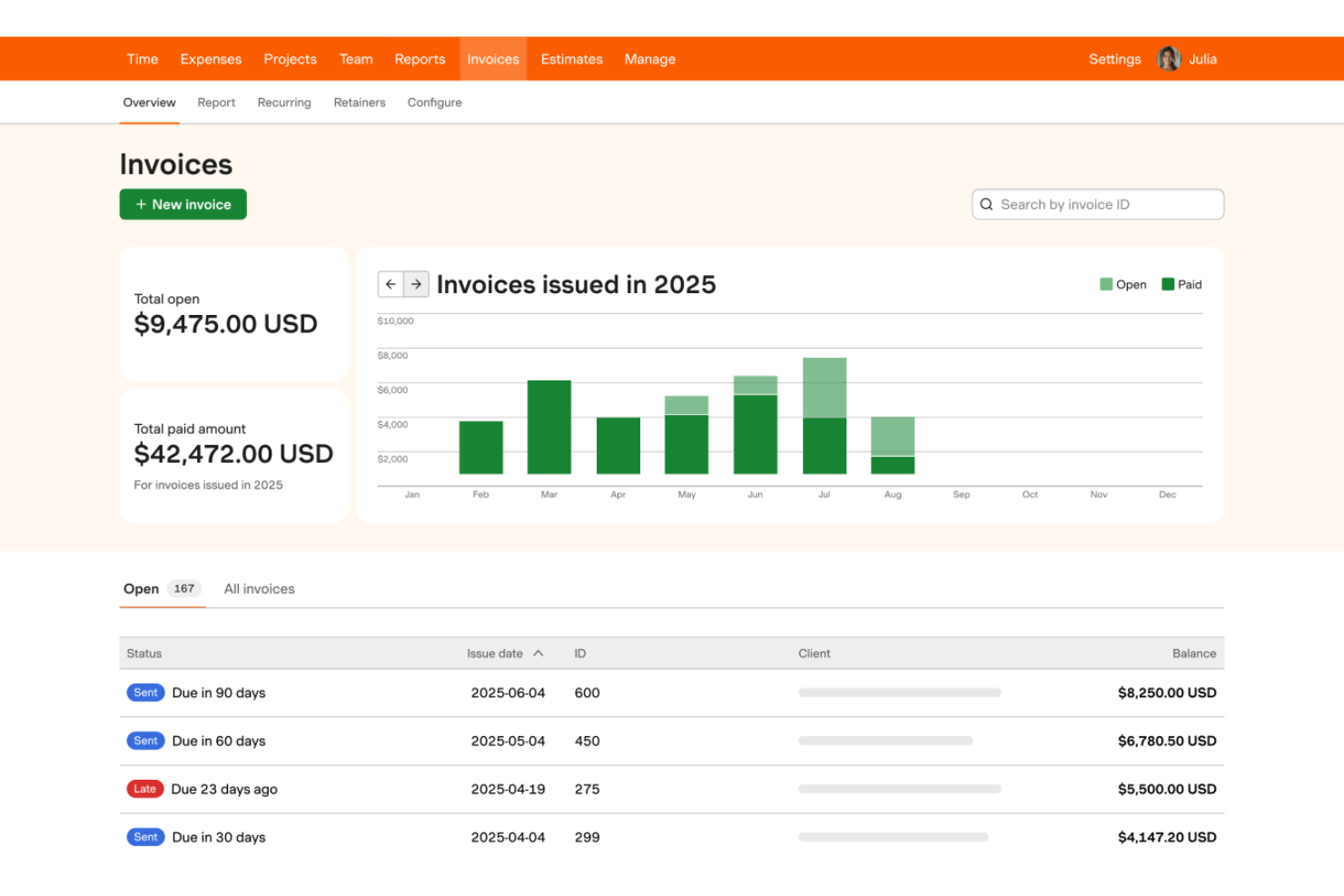
Harvest is a time tracking and invoicing software designed for freelancers and small to medium-sized businesses. It helps teams track time, manage expenses, and send invoices.
Why I picked Harvest: Harvest excels in time tracking, allowing your team to record hours spent on projects. It provides detailed timesheets and reports, giving you visibility into how time is allocated across tasks. The invoicing feature links directly to tracked time, simplifying billing processes. With its expense tracking, you can manage project costs effectively and ensure accurate client billing.
Standout Features and Integrations:
Features include project budgeting that helps you set financial limits and monitor project expenses. The reporting feature provides insights into your team's performance and project profitability. You can also benefit from the built-in reminders, which ensure your team logs time consistently.
Integrations include Asana, Trello, Slack, QuickBooks, Xero, and more.
Pros and Cons
Pros:
- Lightweight team onboarding
- Helpful project burn tracking
- Simple time entry habits
Cons:
- Limited billing rule complexity
- Lacks full project management


Bill4Time is a time tracking and billing software designed specifically for legal professionals and law firms. It offers tools for time tracking, invoicing, and client management, helping legal teams manage their billing processes.
Why I picked Bill4Time: Bill4Time is tailored for legal professionals, offering features that cater to the unique needs of law firms. The client management system helps you organize and access client information. With its detailed time tracking, you can ensure accurate billing for every minute worked. The software also includes customizable invoicing, allowing you to create invoices that fit your firm's branding and requirements.
Standout Features and Integrations:
Features include trust accounting, which helps manage and track client funds in compliance with legal standards. The reporting feature provides insights into your firm's financial performance and client billing. You can also benefit from the document management system, which organizes legal documents and files for easy access.
Integrations include QuickBooks, NetDocuments, Box, Google Calendar, and more.
Pros and Cons
Pros:
- Useful invoice customization
- Good client ledger clarity
- Strong trust accounting tools
Cons:
- Outdated interface
- Mobile performance issues

Square
Best for payment processing
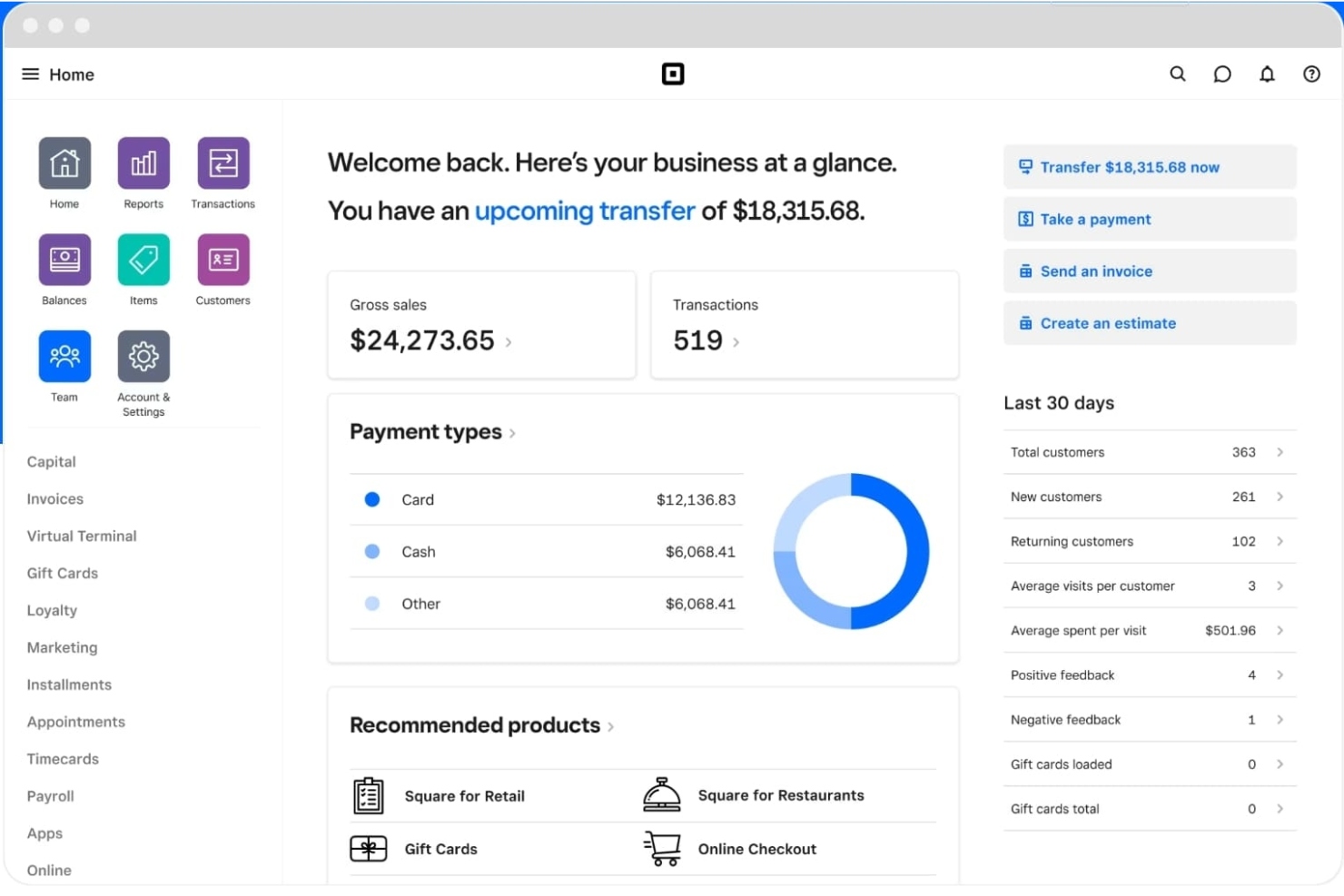
Square is a payment processing platform tailored for small to medium-sized businesses. It handles transactions, point-of-sale operations, and invoicing, offering a complete financial management solution for your business.
Why I picked Square: Square excels in payment processing, providing your team with a reliable way to handle transactions. Its easy-to-use point-of-sale system integrates smoothly with your devices, allowing you to accept credit card payments instantly. The invoicing feature is efficient, allowing you to send and track invoices with ease. Square's reporting tools give you insights into sales and customer behavior, helping you make informed business decisions.
Standout Features and Integrations:
Features include inventory management that lets you track your stock levels in real time. The customer directory helps you maintain detailed records of your clients, improving customer relationship management. You can also benefit from the employee management feature, which simplifies scheduling and time tracking.
Integrations include QuickBooks, Xero, JotForm, WooCommerce, Wix, and more.
Pros and Cons
Pros:
- Clear sales summaries
- Payments land quickly
- Fast checkout to invoice flow
Cons:
- Limited international availability
- High transaction fees
New Product Updates from Square
Square Adds Resy Integration and Points-Based Tip Pooling
Square adds real-time integration with Resy Powered by Tock and points-based tip pooling for staff roles. These updates help restaurants synchronize reservations and payments while distributing pooled tips based on assigned role values. For more information, visit Square’s official site.
 .
Diğer Profesyonel Hizmetler Faturalandırma Yazılımları
Kısa listeme giremeyen ancak yine de göz atmaya değer bazı ek profesyonel hizmetler faturalandırma yazılımı seçenekleri şunlardır:
- Paymo
For team collaboration
- BigTime
For project tracking
- Accelo
For client management
- Stripe
For payment gateway integration
- Productive
For agency management
- Ignition
For client proposal management
- Deltek
For enterprise resource planning
- Anchor
For recurring billing
- ManyRequests
For client portal services
- BILL
For automated payments


How I Evaluate Professional Services Billing Software
I evaluate each tool against two layers: the baseline criteria every billing platform must meet—like multi-model billing and project-linked invoicing—and the differentiators that set the best apart.
Core Functionality (Table Stakes For This List)
When I'm selecting tools for my list, I rank each one on a scale from 0 (does not offer the functionality) to 5 (excels in this area) for each core functionality listed below. Then, I calculate the tool's total score into a percentage. Each tool needs to achieve a minimum total score of 65% to be considered for inclusion.
- Time & Expense Tracking: I look for billable/non-billable tagging at the task and client level, plus expense capture with receipt handling—the kind of granularity that keeps a consulting team's logged hours audit-ready.
- Client Invoicing & Billing: Each tool should generate invoices directly from tracked time and expenses, with enough template control and delivery options to match how your firm actually bills clients.
- Multiple Billing Model Support: Whether your team runs retainers for an ongoing advisory client or milestones on a fixed-scope build, I check that the platform handles at least three billing models with configurable logic.
- Project Budget Management: Real-time visibility into burn rate and budget variance matters here—I evaluate how well each tool links billing data to project budgets so you can catch overruns before they hit the invoice.
- Rate & Contract Management: I look for flexible rate configuration across roles, clients, and projects, including support for effective dates and overrides—something that comes up fast when you staff mixed-seniority teams on a single engagement.
- Billing Reports & Profitability: Reporting should cover utilization, realization, and project-level margins at a minimum. I evaluate whether the tool gives you the data to answer "are we actually making money on this account?"
Once I have a list of tools that meet this criteria, I consider what sets each platform apart.
Differentiating Factors (What Sets Vendors Apart)
Here's how I compare and contrast different vendors:
Standout Features
AI-powered time capture is a big differentiator—tools that pull from calendars and work apps to suggest billable entries help reduce revenue leakage, especially on teams juggling multiple client accounts. I also evaluate revenue recognition automation, since firms billing on milestones or percent-complete need ASC 606/IFRS 15 compliance built in rather than managed through spreadsheets. A client self-service portal adds real value too, giving clients direct access to invoices and payment options without the usual email chains.
Beyond Features
Integration depth matters a lot here—I check whether a tool syncs with your PM platform and accounting system so time data flows from Jira or Asana straight through to QuickBooks or Xero without manual re-entry. Firm size and vertical fit also shape my evaluation, since a solo consultant's billing needs look nothing like a 200-person IT services firm running multi-phase engagements. Pricing transparency rounds out my assessment; I look at whether the model scales predictably as your billable headcount shifts with project demand.
Profesyonel Hizmetler Faturalandırma Yazılımı Nasıl Seçilir
Uzun özellik listeleri ve karmaşık fiyatlandırma yapıları içinde kaybolmak kolaydır. Kendinize özgü yazılım seçim süreciniz üzerinde çalışırken odaklanmanıza yardımcı olmak için göz önünde bulundurmanız gereken faktörlerin bir kontrol listesini aşağıda bulabilirsiniz:
| Faktör | Göz önünde bulundurulması gerekenler |
|---|---|
| Ölçeklenebilirlik | Yazılım işletmenizle birlikte büyüyebilir mi? Performans sorunları yaşamadan müşteri veya kullanıcı sayısındaki artışı kaldırıp kaldıramayacağını değerlendirin. |
| Entegrasyonlar | Mevcut araçlarınıza bağlanabiliyor mu? CRM'niz, muhasebe yazılımınız ve diğer önemli sistemlerinizle entegre olup olmadığını kontrol edin. |
| Özelleştirilebilirlik | Yazılımı iş akışlarınıza uyacak şekilde uyarlayabilir misiniz? Raporları, faturaları ve kullanıcı rollerini ihtiyaçlarınıza göre özelleştirme seçeneklerini arayın. |
| Kullanım kolaylığı | Arayüz ekibiniz için sezgisel mi? Öğrenme sürecini ve aracın kullanımının kolay olup olmadığını değerlendirin. |
| Uygulama ve başlangıç | Ne kadar hızlı çalışmaya başlayabilirsiniz? Eğitim videoları ve ürün tanıtımları da dâhil olmak üzere başlangıç sürecine yönelik desteği değerlendirin. |
| Maliyet | Fiyatlandırma planları şeffaf ve bütçenize uygun mu? Maliyeti sunulan özelliklerle karşılaştırın ve gizli ücretler ya da uzun vadeli sözleşmeler olup olmadığını kontrol edin. |
| Güvenlik önlemleri | Verilerinizi koruyor mu? Yazılımın veri korumaya ilişkin sektör standartlarına uyduğundan ve şifreleme ile erişim denetimleri gibi özellikler sunduğundan emin olun. |
| Destek erişilebilirliği | İhtiyaç duyduğunuzda yardım alabiliyor musunuz? Ekibinize yardımcı olmak için 7/24 destek, canlı sohbet ve ayrıntılı bir bilgi bankası bulunup bulunmadığını kontrol edin. |
Profesyonel Hizmet Faturalandırma Yazılımı Nedir?
Profesyonel hizmet faturalandırma yazılımı, işletmelerin faturalandırma, zaman takibi ve ödeme işlemlerini yönetmesine yardımcı olan bir araçtır. Danışmanlar, avukatlar ve muhasebeciler gibi profesyoneller, faturalandırma ve finans yönetimini kolaylaştırmak için bu araçları kullanır. Zaman takibi, faturalandırma ve gider yönetimi özellikleri doğru faturalandırmaya ve verimli finansal işlemlere yardımcı olur. Bu araçlar zamandan tasarruf sağlar ve hataları azaltarak profesyonellerin temel işlerine odaklanmasına olanak tanır.
Profesyonel Hizmet Faturalandırma Yazılımının Özellikleri
Profesyonel hizmet faturalandırma yazılımı seçerken aşağıdaki temel özelliklere dikkat edin:
- Zaman takibi: Projelerde çalışılan saatleri doğru şekilde kaydederek hassas faturalandırma ve bordro yönetimi sağlar.
- Faturalandırma: Müşterilere fatura oluşturup göndererek faturalandırma sürecini kolaylaştırır ve manuel hataları azaltır.
- Gider yönetimi: İşletme giderlerini takip eder ve kategorilere ayırarak doğru finansal kayıtlar tutmanıza ve maliyetleri kontrol etmenize yardımcı olur.
- Ödeme işlemleri: Çeşitli yöntemlerle müşterilerden ödeme alınmasını kolaylaştırır, nakit akışını iyileştirir ve gecikmeleri azaltır.
- Müşteri yönetimi: Müşteri bilgilerini ve iletişimlerini düzenleyerek ilişkileri geliştirir ve verimli hizmet sunumu sağlar.
- Özelleştirilebilir şablonlar: Faturaları ve raporları markanızla uyumlu olacak şekilde düzenleyerek profesyonel bir görünüm korumanızı sağlar.
- Çoklu para birimi desteği: Uluslararası işlemleri destekleyerek müşterilerinize kendi yerel para birimleriyle fatura kesmenize olanak tanır.
- Proje bütçelemesi: Mali sınırlar belirler ve giderleri izleyerek projelerin bütçe dahilinde kalmasını sağlar.
- Raporlama araçları: Finansal performans ve proje kârlılığı hakkında bilgi sunarak bilinçli karar vermeye yardımcı olur.
- Entegrasyon özellikleri: CRM ve muhasebe yazılımı gibi mevcut araçlara bağlanarak iş akışlarını ve veri yönetimini kolaylaştırır.
Profesyonel Hizmet Faturalandırma Yazılımının Faydaları
Profesyonel hizmet faturalandırma yazılımının uygulanması ekibiniz ve işletmeniz için çeşitli faydalar sağlar. Yararlanabileceğiniz avantajlardan bazıları şunlardır:
- Artan doğruluk: Otomatik faturalandırma ve zaman takibi manuel hataları azaltarak finansal kayıtlarınızın doğru olmasını sağlar.
- Zaman tasarrufu: Faturalandırma ve gider takibi gibi tekrarlayan görevleri otomatikleştiren ekibiniz, temel işletme faaliyetlerine daha fazla odaklanabilir.
- İyileştirilmiş nakit akışı: Basitleştirilmiş ödeme işlemleri daha hızlı ödeme almanıza yardımcı olarak işletmeniz için sağlıklı bir nakit akışını korur.
- Daha iyi müşteri ilişkileri: Etkili müşteri yönetimi araçları iletişimi düzenli tutarak daha iyi hizmet sunmanıza yardımcı olur.
- Finansal içgörüler: Raporlama araçları işletmenizin finansal durumu hakkında değerli bilgiler sunarak stratejik karar vermeye yardımcı olur.
- Küresel erişim: Çoklu para birimi desteği uluslararası müşterileri yönetmenize ve işletme fırsatlarınızı genişletmenize olanak tanır.
- Özelleştirme: Özelleştirilebilir şablonlar profesyonel bir görünüm korumanıza ve faturalarla raporları markanızla uyumlu hale getirmenize olanak tanır.
Profesyonel Hizmet Faturalandırma Yazılımının Maliyetleri ve Fiyatlandırması
Profesyonel hizmet faturalandırma yazılımı seçerken mevcut çeşitli fiyatlandırma modellerini ve planları anlamak gerekir. Maliyetler özelliklere, ekip büyüklüğüne, eklentilere ve daha fazlasına göre değişir. Aşağıdaki tablo, profesyonel hizmet faturalandırma yazılımı çözümlerinde yaygın olarak sunulan planları, ortalama fiyatlarını ve tipik özelliklerini özetlemektedir:
Profesyonel Hizmet Faturalandırma Yazılımı İçin Plan Karşılaştırma Tablosu
| Plan Türü | Ortalama Fiyat | Yaygın Özellikler |
|---|---|---|
| Ücretsiz Plan | $0 | Temel faturalandırma, sınırlı zaman takibi ve temel raporlama. |
| Kişisel Plan | $5-$40/kullanıcı/ay | Zaman takibi, basit faturalandırma, gider takibi ve temel müşteri yönetimi. |
| İşletme Planı | $30-$60/kullanıcı/ay | Gelişmiş faturalandırma, proje yönetimi, çoklu para birimi desteği ve entegrasyonlar. |
| Kurumsal Plan | $70-$100/kullanıcı/ay | Özelleştirilebilir şablonlar, gelişmiş raporlama, özel destek ve tam otomasyon. |
Profesyonel Hizmetler Faturalama Yazılımı SSS
Profesyonel hizmetler faturalama yazılımı hakkında sık sorulan soruların bazı yanıtları aşağıda yer almaktadır:
Profesyonel hizmetler faturalama yazılımı için tipik uygulama süresi nedir?
Uygulama süresi, yazılımın karmaşıklığına ve ekibinizin hazırlık durumuna bağlı olarak değişir. Genellikle birkaç günden birkaç haftaya kadar sürebilir. Süreci hızlandırmak için net bir planınız olduğundan emin olun, kaynak ayırın ve sağlayıcı tarafından sunulan eğitim materyallerinden yararlanın. Sağlayıcının destek ekibiyle iletişime geçmek de sorunların hızlı bir şekilde çözülmesine yardımcı olabilir.
Profesyonel hizmetler faturalama yazılımı muhasebe araçlarıyla entegre olabilir mi?
Evet, profesyonel hizmetler faturalama yazılımlarının çoğu QuickBooks ve Xero gibi popüler muhasebe araçlarıyla entegre olabilir. Bu entegrasyonlar finansal verileri senkronize etmenize yardımcı olarak manuel veri girişini ve hataları azaltır. Satın almadan önce, ekibinizin hâlihazırda kullandığı muhasebe araçlarını desteklediğinden emin olmak için yazılımın entegrasyon özelliklerini kontrol edin. Bu, zamandan tasarruf etmenizi ve doğruluğu artırmanızı sağlayabilir.
Yeni bir faturalama yazılımına geçerken veri aktarımı zor mudur?
Veri aktarımı zorlu olabilir, ancak birçok sağlayıcı süreci kolaylaştırmak için destek sunar. Mevcut verilerinizi yedekleyerek başlayın ve ardından yeni sağlayıcı tarafından sunulan içe aktarma araçlarını veya hizmetlerini kullanın. Her şeyin doğru şekilde aktarıldığından emin olmak ve ortaya çıkan sorunları ele almak için aktarımı denetleyecek bir ekip üyesi görevlendirmeniz faydalı olur.
Yazılım güncellemeleri ne sıklıkla yapılmalıdır?
Yazılım güncellemeleri, güvenliği ve performansı sağlamak için düzenli olarak yapılmalıdır. Çoğu sağlayıcı, aylık ile üç aylık dönemler arasında değişen sıklıklarda güncellemeler yayımlar. Düzenli güncellemeler hataların giderilmesine, yeni özelliklerin sunulmasına ve yazılımın güvenli tutulmasına yardımcı olur. Sistemin sorunsuz çalışmasını sağlamak için ekibinizin güncelleme takvimlerinden ve gerekli işlemlerden haberdar olduğundan emin olun.