

2026’da İncelenen En İyi 10 ERP Proje Yönetimi Yazılımı

En İyi ERP Proje Yönetimi Yazılımları Kısa Listesi


Proje yönetimi nadiren tek başına yürütülür. Genellikle birden fazla ekip ve sistem genelinde insanları, zaman çizelgelerini, bütçeleri ve bağımlılıkları koordine etmeniz gerekir. Bu unsurlar ayrı araçlarda bulunduğunda işler hızla yavaşlar. ERP proje yönetimi yazılımları planlama, yürütme ve raporlamayı tek bir sistemde bir araya getirerek sürekli manuel koordinasyona ihtiyaç duymadan projelerin ilerlemesini kolaylaştırır.
Bu platformları test etme deneyimime göre doğru ERP çözümü görünürlüğü önemli ölçüde artırabilir, yeniden yapılan işleri azaltabilir ve projeler büyüdükçe ekiplerin uyum içinde kalmasına yardımcı olabilir. Gerçek proje iş akışlarını hangi araçların gerçekten desteklediğini ve hangilerinin gereksiz karmaşıklık eklediğini ortaya koymak için çeşitli seçenekleri inceledim.
Bu makalede, her aracın iş birliğini, takibi ve operasyonel netliği nasıl desteklediğine odaklanarak ERP proje yönetimi yazılımları için en iyi seçimlerimi sizinle paylaşacağım. İster karmaşık girişimleri yönetiyor olun ister ekipler arasındaki sürtüşmeyi azaltmaya çalışıyor olun, burada değerlendirmeye değer bir seçenek bulabilirsiniz.
Yazılım Önerilerimize Neden Güvenebilirsiniz?
Ekibimiz 2012’den beri yazılımları test ediyor ve inceliyor. Biz de proje yöneticisi olduğumuz için doğru yazılımı seçmenin ne kadar zor ve önemli olduğunu biliyoruz.
Bu rehber için araçları uygulamalı testler ve bağımsız araştırmalarla değerlendirdik ve seçim kriterlerimize göre puanladık. Ayrıca sektörün fikir önderlerinin ve alanında çalışan proje yönetimi uzmanlarının görüşlerinden de yararlanıyoruz.
İncelemelerimiz bir satış konuşması değil, editör ekibimizin kendi değerlendirmesidir.
Uzman inceleyenler:
ERP Proje Yönetimi Yazılımları Karşılaştırma Tablosu
Bu karşılaştırma tablosu, en iyi ERP proje yönetimi yazılımı seçimlerim için fiyatlandırma ayrıntılarını özetlemektedir.
Score legend (out of 5)
- Excellent 4.5–5
- Good 4–4.4
- Average 3–3.9
- Below average 2–2.9
- Poor 1–1.9
| Tool | Starting Price | Website | |||||||
|---|---|---|---|---|---|---|---|---|---|
| Best for project delivery with financial management | 3.3 out of 5 | 4 | 3 | 4 | 2 | 5 | 2 | $10/user/month 14-day free trial + free demo available | Website |
| Best for project billing and revenue recognition | 3.7 out of 5 | 3 | 4 | 4 | 4 | 2 | 5 | £1,200/month Free demo available | Book Demo |
| Best for AEC and consulting firm ERP | 3.5 out of 5 | 3 | 4 | 4 | 4 | 3 | 3 | Pricing upon request Free demo available | Website |
| Best for Salesforce-native services delivery | 3.5 out of 5 | 4 | 3 | 4 | 3 | 4 | 3 | Pricing upon request Free demo available | Website |
| Best for earned value analysis in midmarket ERP | 3.5 out of 5 | 3 | 4 | 3 | 4 | 4 | 3 | Pricing upon request Not available | Website |
| Best for multinational project financial control | 3.7 out of 5 | 3 | 2 | 4 | 5 | 4 | 4 | $625/user/month Free demo available | Website |
| Best for engineering and construction ERP projects | 3.5 out of 5 | 3 | 2 | 4 | 4 | 4 | 4 | Pricing upon request Free demo available | Website |
| Best for government contractor project finance | 3.5 out of 5 | 3 | 4 | 4 | 4 | 3 | 3 | Pricing upon request Free demo available | Website |
| Best for people-centric multi-entity project finance | 3.7 out of 5 | 3 | 4 | 4 | 4 | 3 | 4 | Pricing upon request Not available | Website |
| Best for Microsoft-native project-to-ledger ERP | 3.5 out of 5 | 3 | 3 | 4 | 4 | 3 | 4 | $135/user/month Not available | Website |

En İyi ERP Proje Yönetimi Yazılımları İncelemesi
Aşağıda kısa listeme giren en iyi ERP proje yönetimi yazılımlarının ayrıntılı özetlerini bulabilirsiniz. İncelemelerim, size en uygun olanı bulmanıza yardımcı olmak için her aracın temel özelliklerine, artılarına ve eksilerine, entegrasyonlarına ve ideal kullanım alanlarına ayrıntılı bir bakış sunuyor.

Celoxis
Best for project delivery with financial management
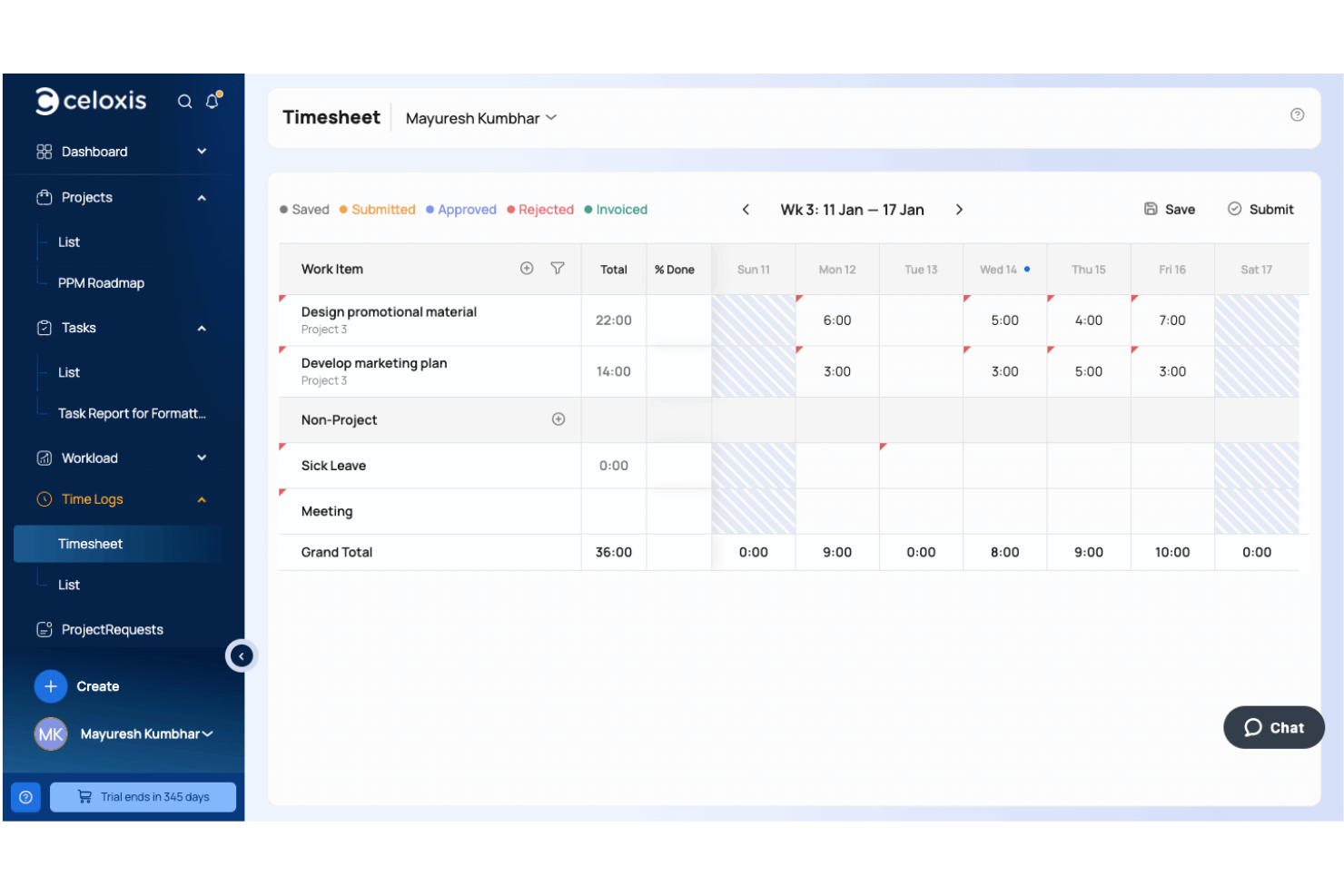
Celoxis is a project portfolio management platform that combines project planning, resource management, budgeting, billing, time tracking, expense management, and financial reporting to help organizations manage project delivery alongside business performance.
Who Is Celoxis Best For?
Celoxis is a strong fit for mid-sized to enterprise organizations, professional services firms, and project-driven businesses that need greater control over project execution, budgets, and financial performance across multiple initiatives.
Why I Picked Celoxis
I picked Celoxis because it brings project execution and financial management together in one platform. Teams can manage budgets, monitor costs, approve time and expenses, and track profitability without moving data between separate systems. I also like that project financials update automatically as work progresses, giving project managers and finance teams a more accurate view of costs, utilization, and overall project health.
Celoxis Key Features
- Resource capacity planning: Monitor team availability, utilization, and workloads across multiple active projects.
- Portfolio dashboards: Track budgets, schedules, risks, and portfolio performance through customizable executive dashboards.
- Custom workflow apps: Create configurable workflows for risks, issues, approvals, change requests, and other project processes.
- Interactive Gantt charts: Plan project schedules with dependencies, baselines, critical path analysis, and drag-and-drop scheduling.
Celoxis Integrations
Celoxis integrates with Google Drive, Microsoft Excel, Microsoft Project, Jira, Azure DevOps, QuickBooks Online, Salesforce, and iCal. It also supports Zapier and provides a REST API for custom integrations.
Pros and Cons
Pros:
- Supports hourly and fixed-price billing
- Strong project budgeting tools
- Advanced portfolio forecasting
Cons:
- Complex templates take time to configure
- Mobile app has fewer features

Best for project billing and revenue recognition
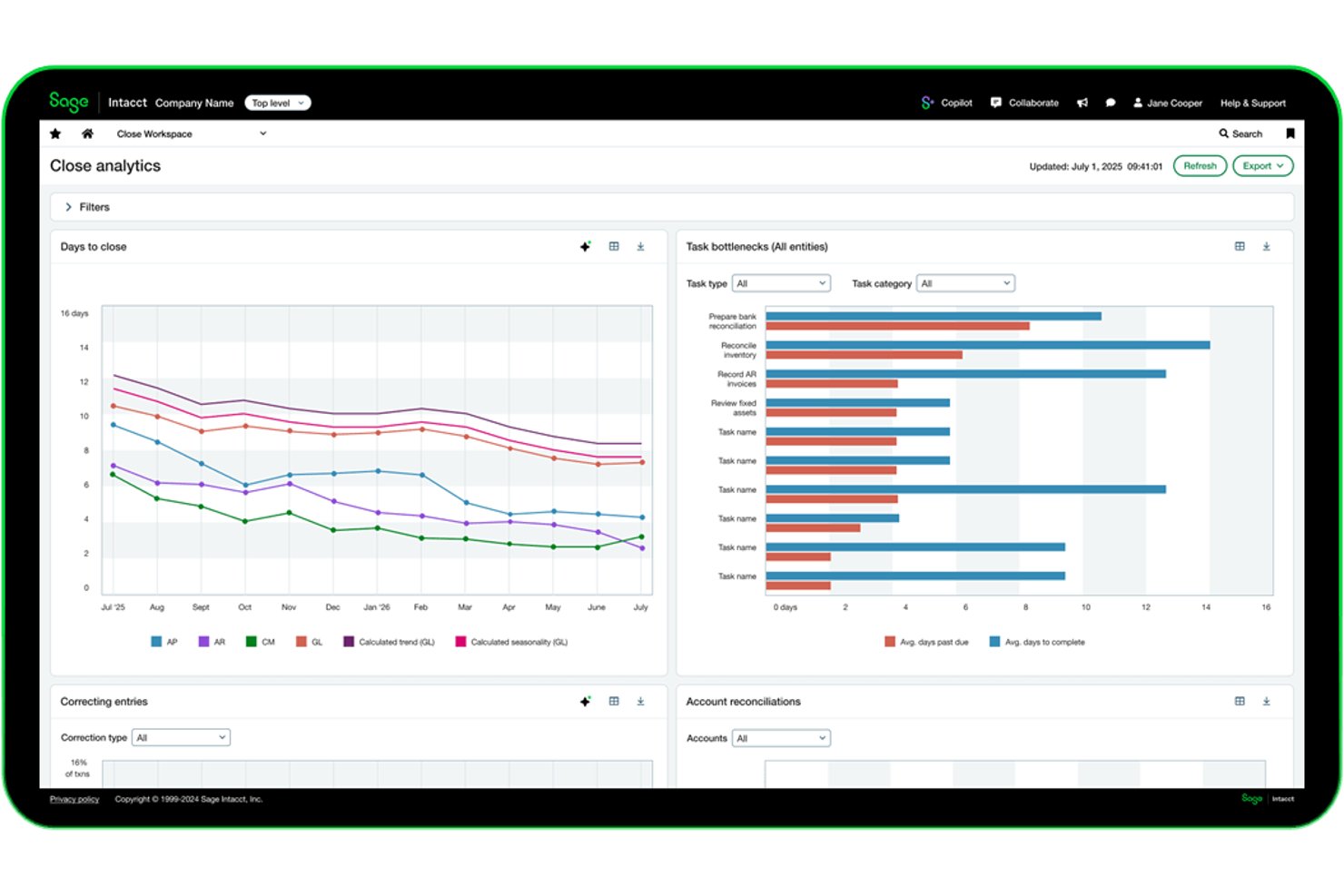
Sage Intacct is a cloud-based ERP and financial management platform that combines project accounting, billing, revenue recognition, time and expense tracking, and multi-entity consolidation in a single system.
Who Is Sage Intacct Best For?
Sage Intacct is a strong fit for mid-sized professional services firms and project-based businesses that need billing, revenue recognition, and financial management in one place.
Why I Picked Sage Intacct
Sage Intacct earns its spot on my shortlist because its billing and revenue recognition capabilities are genuinely purpose-built, not bolted on. I particularly like how it separates billing schedules from revenue recognition schedules while drawing from the same project data, so a fixed-fee engagement can bill on milestones while revenue posts on percentage of completion. The ability to consolidate different billing terms across multiple projects into a single customer invoice is something I've rarely seen handled this cleanly in an ERP.
Sage Intacct Key Features
- Multi-entity consolidation: Manage multiple entities in one shared environment, with automated eliminations, inter-entity transactions, and consolidated reporting across currencies.
- AI-assisted timesheet entry: Sage Intelligent Time uses calendar, email, and computer-activity data to suggest timesheet entries, which employees then review and submit.
- Resource utilisation dashboards: View staff availability, scheduling, and utilisation across projects to support staffing decisions and identify over-scheduled or underutilised team members.
- Change order tracking: Track change orders against project budgets, with not-to-exceed amount triggers built into the project costing and billing workflow.
Sage Intacct Integrations
Sage Intacct offers a documented native Salesforce integration. It connects with over 100 apps and business tools, lists 350+ Marketplace partners, and provides an XML-RPC API with 300+ methods and SDKs for custom integrations.
Pros and Cons
Pros:
- Users value consolidated multi-entity financial visibility
- Budget dashboards surface costs as entries arrive
- Project billing supports mixed contract terms
Cons:
- Scheduling lacks documented dependencies and critical-path analysis
- Users report time-consuming report adjustments

Best for AEC and consulting firm ERP
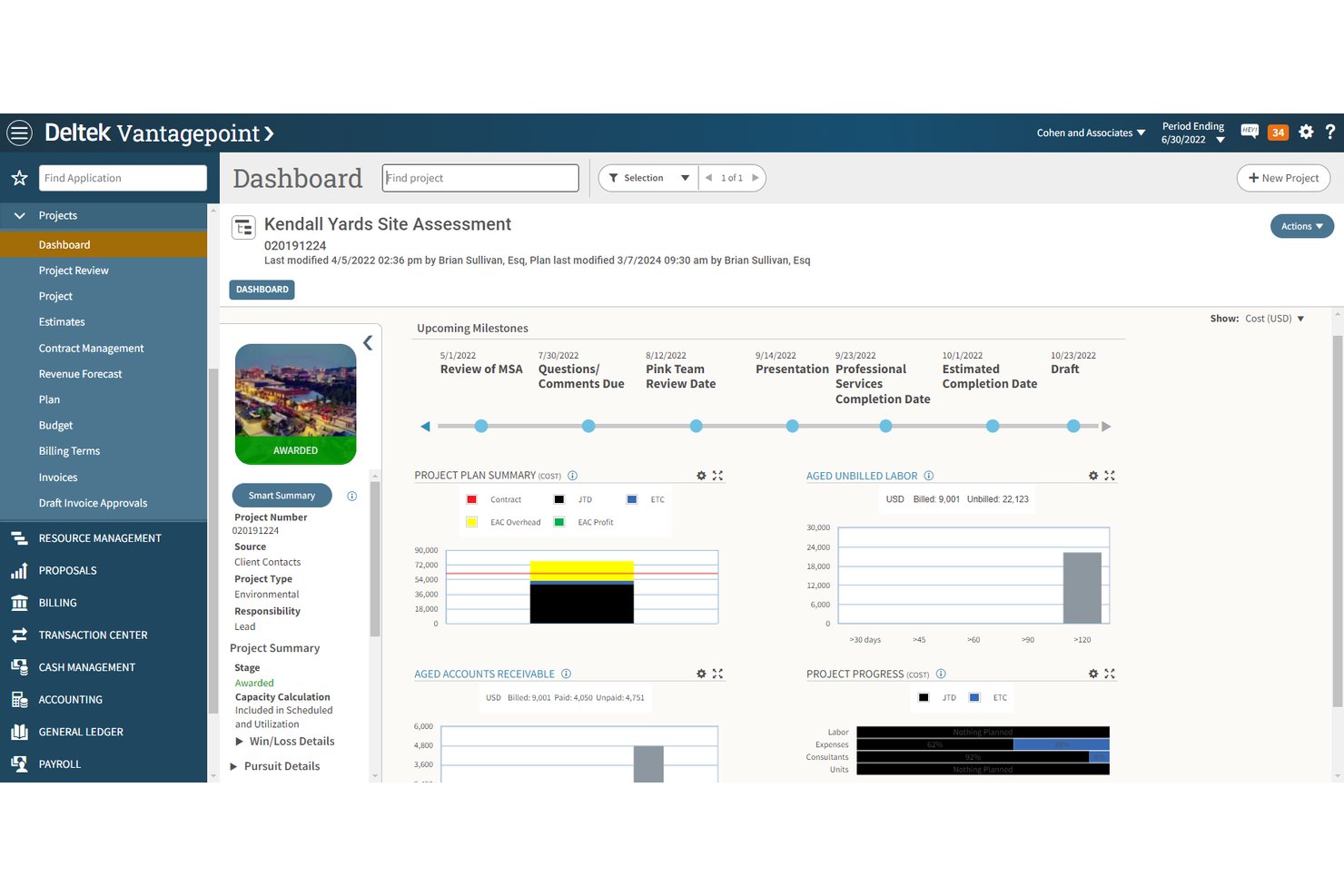
Deltek Vantagepoint is a cloud-based ERP built specifically for architecture, engineering, and consulting firms, connecting project management, resource planning, project accounting, CRM, and billing in a single system.
Who Is Deltek Vantagepoint Best For?
Deltek Vantagepoint is a strong fit for architecture, engineering, and consulting firms that need project accounting and project delivery managed in one system.
Why I Picked Deltek Vantagepoint
I picked Deltek Vantagepoint as one of the best because no other tool on this list is built as specifically for architecture, engineering, and consulting firms as this one. Project accounting, billing, and resource planning share a single data layer, so when a transaction posts, it updates the general ledger, subsidiary ledgers, and project files together. I also like the change-order planning workflow, which keeps proposed scope, fee, and staffing changes in a separate plan until your team is ready to merge them into the live baseline.
Deltek Vantagepoint Key Features
- AI-powered project risk insights: Dela automatically flags earned-revenue gaps, spending risks, and other project issues before they escalate.
- Multi-entity consolidation: Supports multiple companies and currencies, with a consolidated reporting-group currency for cross-entity financial statements.
- Configurable approval workflows: Covers purchase orders, AP invoices, expense reports, and GL budgets with multitiered, conditional approval steps.
- Mobile time and expense capture: Lets team members submit timesheets and expense reports from mobile devices, with AI-powered receipt scanning via Intelligent Character Recognition.
Deltek Vantagepoint Integrations
Deltek Vantagepoint has six documented native integrations, including GovWin IQ, Deltek PIM, Deltek ArchiSnapper, Microsoft Outlook, Gmail, and UKG. Its RESTful API supports custom integrations.
Pros and Cons
Pros:
- Project-linked timesheets support invoicing
- Budget dashboards help monitor project spending
- Unified project and financial visibility
Cons:
- Customer progress billing can take time
- Resource forecasting and staffing can feel rough

Certinia
Best for Salesforce-native services delivery
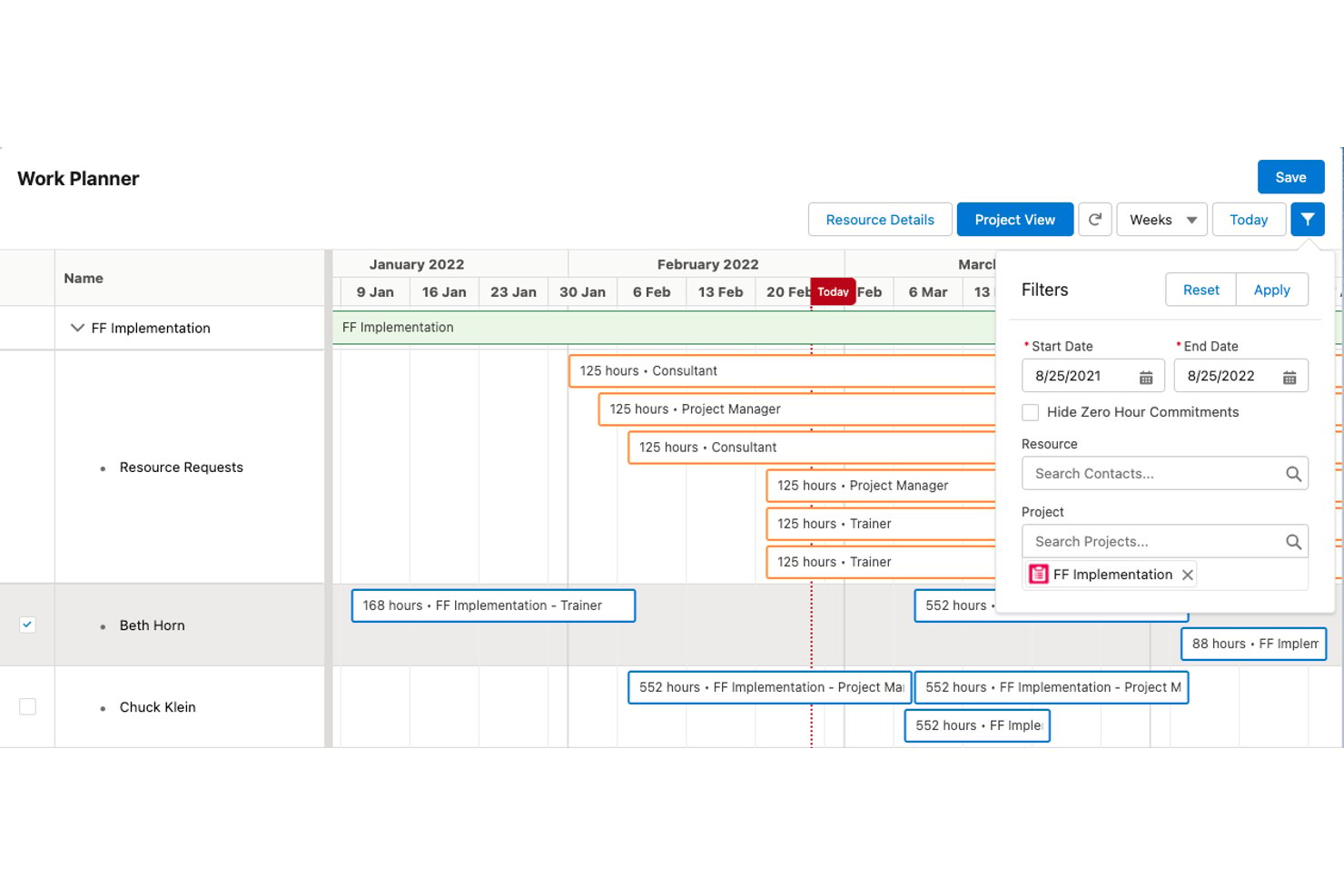
Certinia Professional Services Cloud is a Salesforce-native ERP platform for services businesses that connects project management, resource scheduling, time and expense tracking, services billing, and financial reporting in one system.
Who Is Certinia Best For?
Certinia Professional Services Cloud is a strong fit for services businesses already running on Salesforce that need project delivery, resource scheduling, and billing connected to their financials in one place.
Why I Picked Certinia
I've included Certinia in my top picks because it's built directly on Salesforce, which means your project delivery, resource scheduling, and billing data all live in the same system your sales team already uses. I love how resource matching works here: Veda, Certinia's AI layer, aligns skills, availability, and demand across projects to adjust allocations in real time. Project financials, including bookings, billings, margins, and costs, sit right alongside delivery data without manual exports.
Certinia Key Features
- Services estimation: Build and refine service estimates using templates, historical data, and predefined scoping questions before a project begins.
- Change request management: Create and track project change requests as opportunities, with optional budget forms and administrator-configured approval workflows.
- Multiple billing models: Manage time-and-materials, subscription, fixed-fee, and product-sales billing from a single platform.
- Mobile time and expense capture: Submit time, log expenses, and approve timecards from iOS or Android devices using the PSA Mobile app.
Certinia Integrations
Certinia has a native Salesforce integration, plus integrations with AvidXchange, Avalara, Concur, Expensify, DocuSign, and Microsoft Outlook. RESTful and SOAP-based APIs support custom integrations.
Pros and Cons
Pros:
- Reviewers praise connected timekeeping and billing
- Project financials sit alongside delivery status
- Resource requests and utilization share one system
Cons:
- Reviewers report cost visibility and analytics gaps
- Configuration can require Salesforce administrators

Best for earned value analysis in midmarket ERP
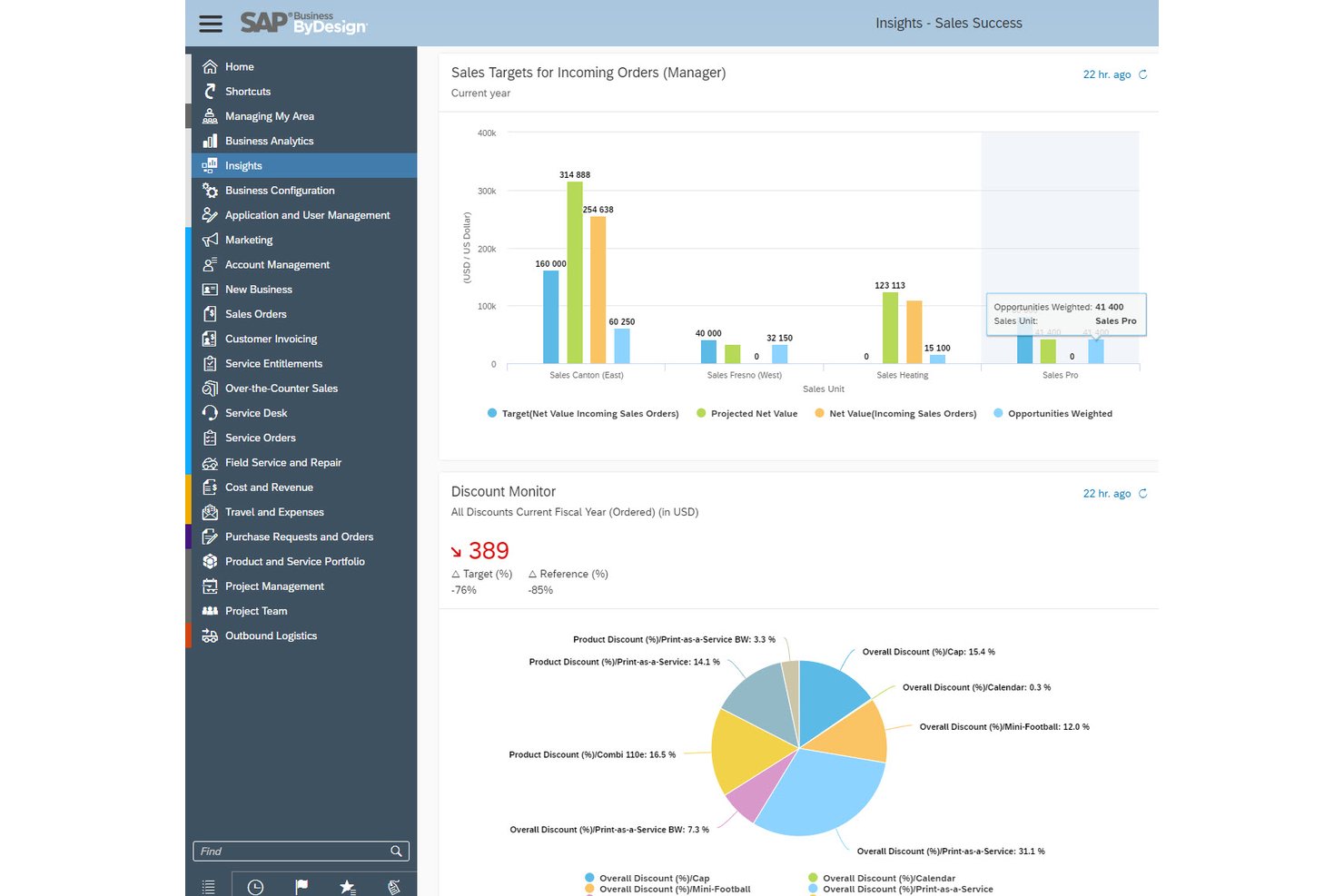
SAP Business ByDesign is a cloud ERP platform from SAP that unifies project management, financials, HR, procurement, and supply chain management in a single system for midsize businesses.
Who Is SAP Business ByDesign Best For?
SAP Business ByDesign is a strong fit for midsize professional services firms—think IT, consulting, and engineering—that need project management, finance, and HR connected in one cloud ERP system.
Why I Picked SAP Business ByDesign
SAP Business ByDesign earns its spot on my list because of how deeply it connects project execution to financial performance, particularly through its Earned Value Analysis report. I find that EVM in most tools is bolted on, but here it's built into the same data model as your actuals: cost variance, CPI, SPI, Estimate at Completion, and Estimate to Completion all pull from live project baseline and snapshot data. Project costs also post directly to Financials based on your project type, so billing, revenue recognition, and cost reporting all live in one system.
SAP Business ByDesign Key Features
- Gantt chart scheduling: View project phases, tasks, milestones, dependencies, and critical path in a single chart with automatic scheduling during planning.
- Mobile time recording app: Log project hours from iOS and Android apps, with the option to pull calendar appointments directly into time entries.
- Automated invoice request generation: Trigger project invoice requests automatically based on fixed-price or time-and-material schedules, milestones, or monthly expense cycles.
- Resource availability tracking: Assign team members with committed work and date ranges, feeding directly into resource availability calculations across projects.
SAP Business ByDesign Integrations
SAP Business ByDesign documents 76 integration scenarios and 340 web services, including integrations with Microsoft Teams and SAP Analytics Cloud. SOAP web services, REST/OData APIs, event notifications, and B2B/A2A interfaces support custom connectivity.
Pros and Cons
Pros:
- Reviewers praise connected finance and operations
- Project costs flow into financial reporting
- Earned-value metrics connect cost and schedule performance
Cons:
- Reviewers describe demanding implementation and staff training
- Reviewers report dated navigation and extra clicks
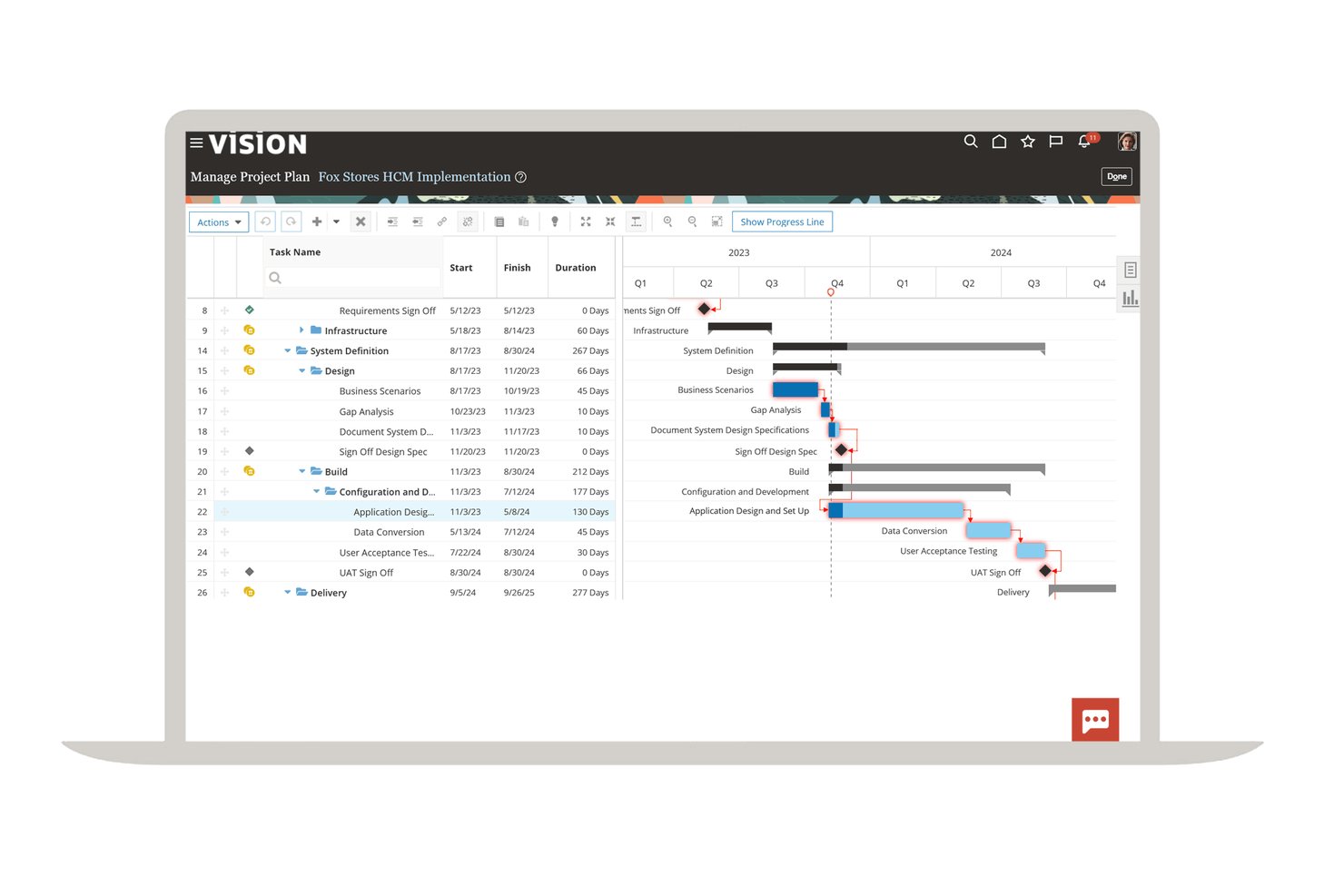
Oracle Fusion Cloud ERP is an enterprise cloud ERP suite that unifies project management, financial management, procurement, and risk and compliance on a single data model—connecting project costs, billing, revenue recognition, and resource scheduling across the full project lifecycle.
Who Is Oracle Fusion Cloud ERP Best For?
Oracle Fusion Cloud ERP is a strong fit for finance and operations teams at large, multinational organizations that need project costs, billing, and revenue recognition tied directly to a unified general ledger.
Why I Picked Oracle Fusion Cloud ERP
Oracle Fusion Cloud ERP earns its spot on my list because no other tool connects project financials to a live general ledger with this level of depth across multiple entities, currencies, and regulatory frameworks. I specifically value its contract-based billing engine, which automatically generates invoices, tracks funding limits, and flags billing exceptions before anything reaches Oracle Fusion Receivables. The built-in revenue recognition layer handles both IFRS 15 and ASC 606, which matters enormously when you're running projects across jurisdictions with different accounting standards.
Oracle Fusion Cloud ERP Key Features
- Program-level health monitoring: Organize related projects into programs and review performance, profitability, and health alerts across all of them in one view.
- Change request management: Submit formal change requests to modify an approved project baseline, track approvals, and consolidate approved changes into updated plans and budgets.
- Project-driven supply chain: Route project-specific purchase orders directly against a project, receiving materials into project inventory with project attributes carried through the full procure-to-pay cycle.
- Configurable approval workflows: Set up sequential or parallel approval routing for financial plans, invoices, cost adjustments, and project status changes across your organization.
Oracle Fusion Cloud ERP Integrations
Oracle Fusion Cloud ERP supports custom connectivity through REST and SOAP APIs, business-event subscriptions, and an integration adapter for on-premises and third-party SaaS applications.
Pros and Cons
Pros:
- Program health helps monitor project performance
- Consolidation reporting suits large capital budgets
- Unified finance supports project cost visibility
Cons:
- Reporting delays can obscure current project actuals
- Implementation can require extensive technical and functional support

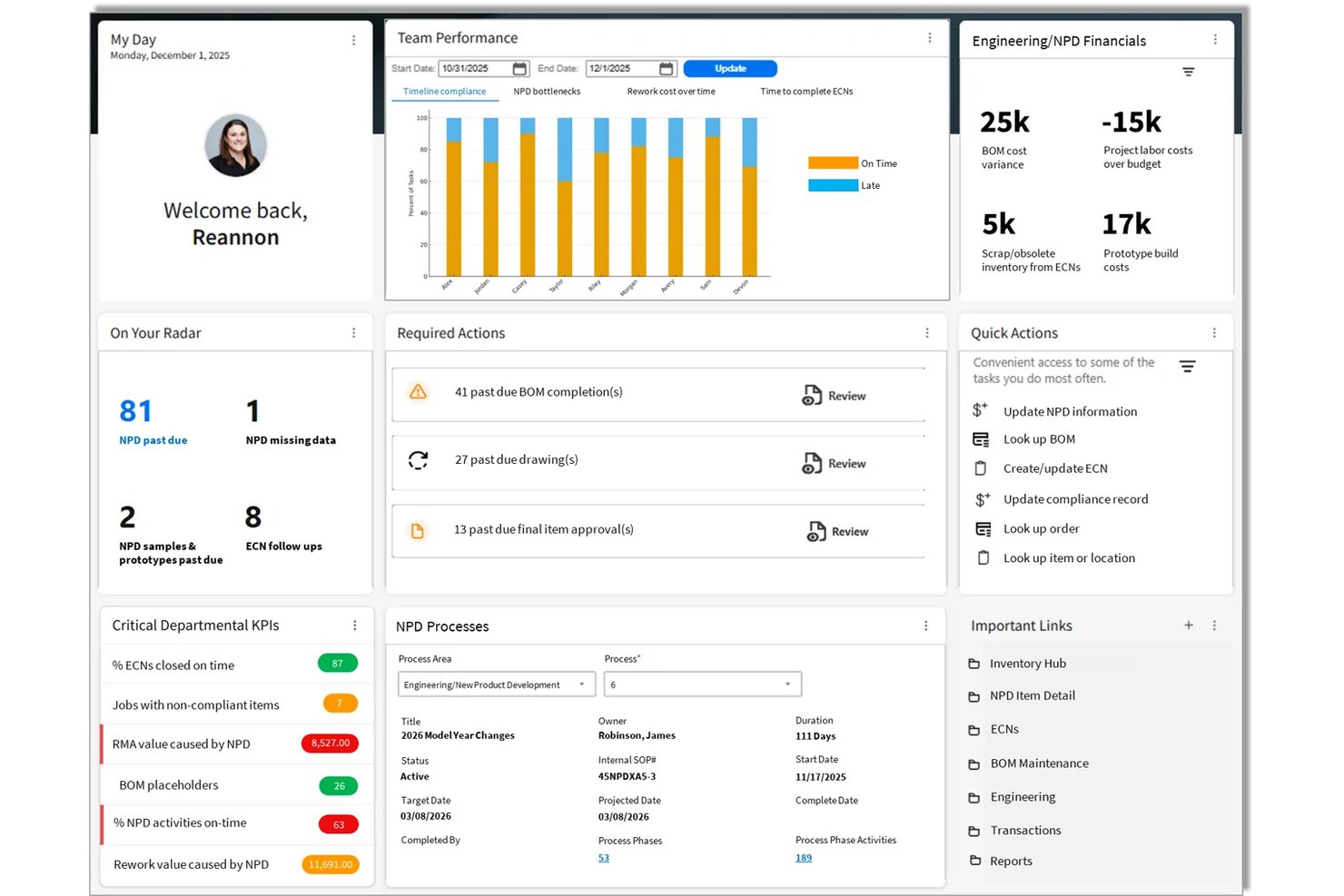
Infor CloudSuite Engineering & Construction is a cloud ERP built for project-based engineering and construction businesses, with embedded project and contract management, Gantt scheduling, job cost accounting, earned value management, and multi-method project billing.
Who Is Infor CloudSuite Best For?
Infor CloudSuite Engineering & Construction is a strong fit for project-based engineering and construction firms that need job cost accounting, contract management, and ERP financials in one system.
Why I Picked Infor CloudSuite
I picked Infor CloudSuite as one of the best because it's purpose-built for engineering and construction firms that need project financials and delivery management in one place. I'm particularly impressed by its earned value management, which tracks CPI, SPI, and EAC natively against project budgets, and its multi-method billing support, covering cost-plus, unit-rate, progress, and milestone invoicing within the same contract. The Program Metrics widget also gives me program-level visibility into budget variance and net contract profitability across multiple projects at once.
Infor CloudSuite Key Features
- Gantt scheduling with critical path: The Project Schedule displays activity dates, dependencies, float, and critical path in a drag-and-drop Gantt chart.
- Multi-method project invoicing: Supports cost-plus, unit-rate, installment, progress, and delivery-based invoicing within the same contract.
- Scope change tracking: Documents scope changes, provisional amounts, and fluctuation settlements as distinct project extension types tied to cost and schedule adjustments.
- Project requirements planning: Generates procurement plans for materials, equipment, and subcontracting directly from project data.
Infor CloudSuite Integrations
Infor CloudSuite Engineering & Construction has documented optional integrations with BarTender, Microsoft Dynamics 365 CRM, and Salesforce. Its REST API and API Modeler support custom integrations.
Pros and Cons
Pros:
- Billing supports multiple contract methods
- Gantt schedules expose float and dependencies
- Earned value connects costs with project progress
Cons:
- Go-live and training can require extra effort
- Dated interface can complicate navigation
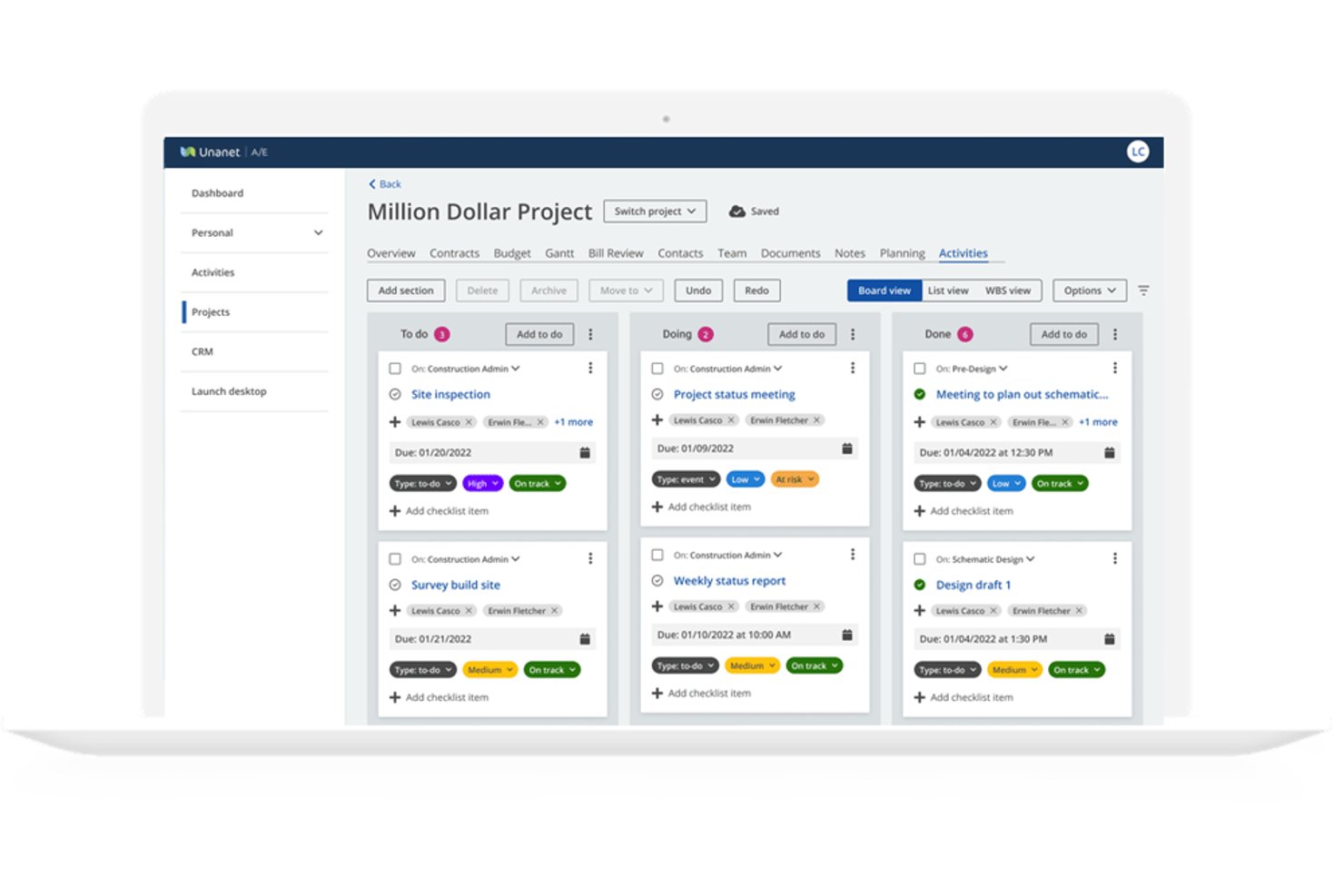
Unanet GovCon ERP is an enterprise resource planning platform built for government contractors that unifies project management, contract tracking, time and expense, billing, revenue recognition, and financial management in a single system.
Who Is Unanet Best For?
Unanet GovCon ERP is built for government contractors who need project accounting, contract compliance, and DCAA-oriented financials in one system.
Why I Picked Unanet
Unanet GovCon ERP earns its spot on my list because it's purpose-built for government contractors who need project finance and compliance baked into one system. I particularly like how timesheet entries flow directly into project burn rates and the general ledger in real time, eliminating the manual reconciliation that plagues teams using separate tools. The built-in indirect rate management and support for T&M, firm-fixed-price, and cost-plus contracts mean billing and revenue recognition work the way GovCon actually works.
Unanet Key Features
- Contract clause assignment: Government contract clauses can be assigned to contracts and objects to set rules for expenses, time, and accounting.
- Multi-entity consolidation: The system handles intercompany transactions and indirect-pool allocations across multiple legal entities with real-time P&L and balance-sheet integrity.
- Configurable alerts and reporting: Teams can set up alerts for actuals trending over plan or milestones at risk, and view performance through customizable dashboards.
- Mobile time and expense capture: A mobile app lets team members capture and submit time and expenses from the field, with real-time roll-up to projects.
Unanet Integrations
Unanet offers 100+ pre-built connectors, including QuickBooks, Salesforce, HubSpot, Workday, ADP, UKG, Mastercard, and American Express. A REST API supports custom integrations.
Pros and Cons
Pros:
- GovCon billing handles varied contract structures
- Live budget and burn visibility aids oversight
- Project costs flow directly into accounting
Cons:
- Resource planning lacks automated conflict resolution
- Dense reports take extra work to summarize
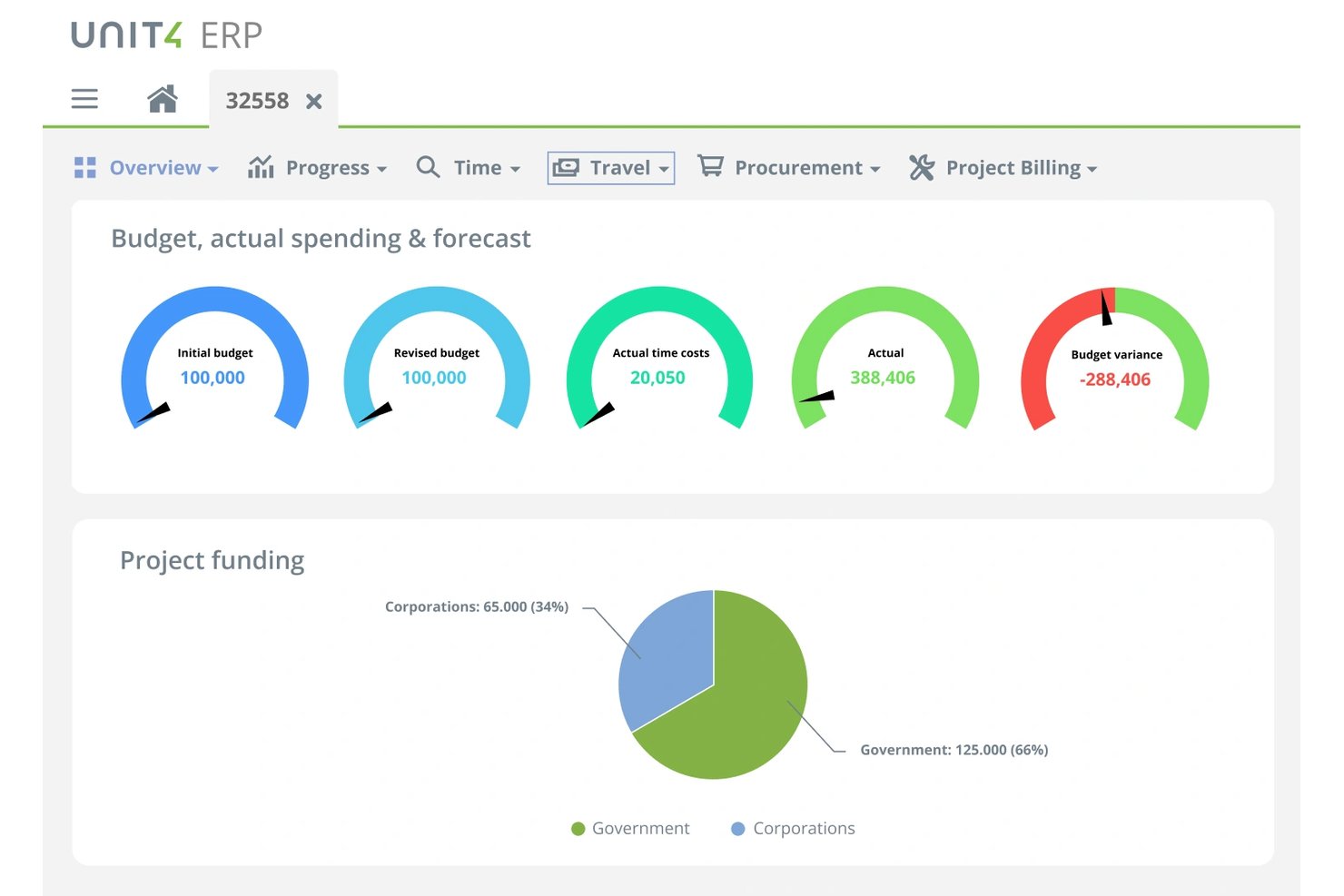
Unit4 ERP is a cloud ERP platform that connects project management, financial management, HR, payroll, and procurement into a single system—spanning project planning, budgeting, time and expense tracking, billing, and multi-entity financial consolidation.
Who Is Unit4 ERP Best For?
Unit4 ERP fits professional services firms—consulting, architecture, IT services—that run projects across multiple entities and need finance, HR, and billing unified in one system.
Why I Picked Unit4 ERP
Unit4 ERP earns its spot on my shortlist because it treats project finance and people operations as one system, not two bolted-together tools. I especially like how project costs post to the general ledger automatically, so a consulting firm running intercompany projects across three entities doesn't need a manual reconciliation step to see accurate P&L. The multi-entity billing support, including multi-currency contracts, is what makes it a strong fit here.
Unit4 ERP Key Features
- Project Workspace dashboards: A predefined workspace gives you Overview, Planning, and Billing dashboards to track project status, budgets, and invoicing in one place.
- Configurable approval workflows: Route time, expense, and budget approvals through sequential or simultaneous authorizers with escalations, reminders, and a full audit trail.
- Resource utilization tracking: Pulls employee skills and availability from HCM to support project staffing decisions and track utilization across active projects.
- Automated revenue recognition: Generates invoice proposals from timesheets, expenses, milestones, and fixed fees, with automated revenue recognition and audit trails.
Unit4 ERP Integrations
Unit4 ERP integrates with Salesforce, Microsoft Dynamics, DocuSign, Microsoft Entra ID, Okta, and Power BI, plus marketplace partners such as Avalara and Proactis. It also supports native PEPPOL eInvoicing and offers a REST API for custom connectivity.
Pros and Cons
Pros:
- Budget-versus-actual views track project margins
- Multi-entity billing handles intercompany projects
- Project costs post directly to the GL
Cons:
- Reported lag can slow routine work
- Customizations can complicate upgrades
Best for Microsoft-native project-to-ledger ERP
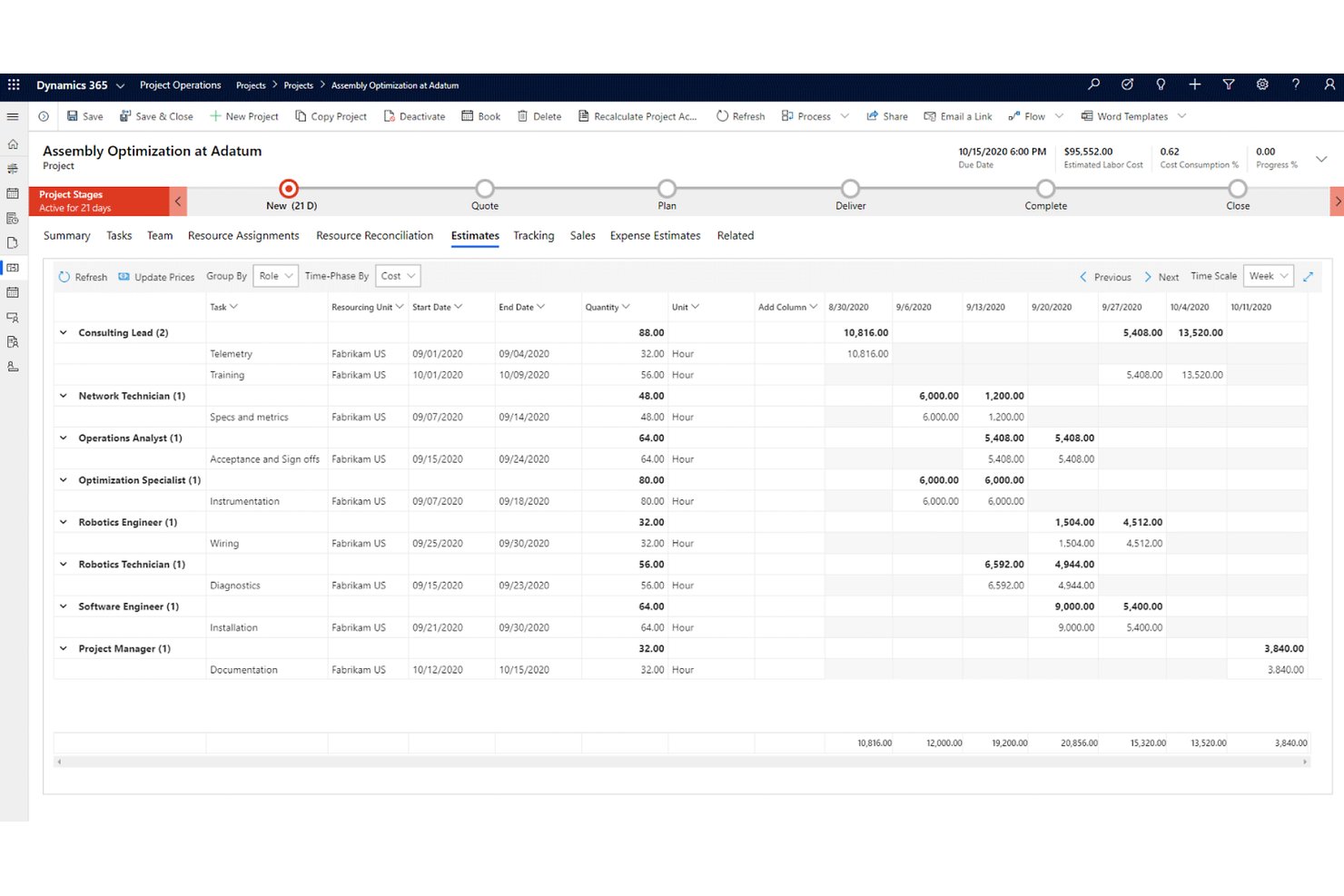
Microsoft Dynamics 365 Project Operations is an ERP-integrated project management application that covers deal management, work planning, resource scheduling, project accounting, billing, and revenue recognition within the Microsoft ecosystem.
Who Is Microsoft Dynamics 365 Project Operations Best For?
It's a strong fit for finance and operations directors at project-centric businesses that are already running on the Microsoft stack and need a single application to connect deal management, delivery, and the general ledger.
Why I Picked Microsoft Dynamics 365 Project Operations
Microsoft Dynamics 365 Project Operations earns its spot on my list because it's the clearest example I've seen of a true project-to-ledger system built natively inside the Microsoft stack. I specifically like that project contracts support multiple funding sources with allocation rules, so when a project spans divisions or clients, billing doesn't require manual reconciliation outside the system. The built-in earned value management, with ETC, EAC, and cost variance formulas tied directly to the WBS, means finance directors and project managers are working from the same numbers without exporting to a spreadsheet.
Microsoft Dynamics 365 Project Operations Key Features
- Universal resource scheduling: View resource availability across your organization and match skills to open project roles using proficiency-based profiles.
- Subcontractor management: Plan capacity, onboard suppliers, track delivery of goods and services, and apply three-way invoice matching for subcontracted work.
- Multiple billing rule types: Configure billing rules by unit of delivery, progress, milestone, fee, or time and materials within a single project contract.
- Copilot-assisted status reports: Generate project status reports and risk assessments directly from Copilot without leaving the platform.
Microsoft Dynamics 365 Project Operations Integrations
Microsoft Dynamics 365 Project Operations has native integrations with Dynamics 365 Sales, Dynamics 365 Finance, Microsoft Teams, Microsoft Power BI, and Microsoft Copilot Studio. It also supports open APIs for custom integrations with external ERP systems.
Pros and Cons
Pros:
- Funding rules support multi-source contracts
- Earned-value measures connect scope and cost
- Project and financial status stay visible together
Cons:
- Complex configuration can burden rollout
- Portfolio-level planning remains limited
Diğer ERP Proje Yönetimi Yazılımları
İşte kısa listeme giremeyen ancak yine de göz atmaya değer bazı ek ERP proje yönetimi yazılımı seçenekleri:
- Acumatica
For growing businesses
- Kantata
For resource and cost visibility in services firms
- Oracle NetSuite
For finance-led multi-subsidiary projects
- Deltek Maconomy
For professional services project finance
- Workday Financial Management
For finance-led project cost and billing control
- SAP S/4HANA Cloud
For enterprise-wide project cost and billing
- Scoro
For quote-to-invoice in one service platform
- Epicor Kinetic
For manufacturing project billing and costing
- Deltek Costpoint
For GovCon project cost and compliance ERP


How I Evaluate ERP Project Management Software
I split my evaluation into three parts, weighting core needs most: tie project costs and billing to the general ledger, and plan tasks and milestones. Next, I look for differentiators like earned-value tracking or multi-entity finance. Finally, I consider onboarding, implementation support, and total cost as teams grow.
Core Functionality (Table Stakes For This List)
When I'm selecting tools for my list, I score each one on a scale from 0 (does not offer the functionality) to 5 (excels in this area) for each core functionality listed below. I then convert the total into a percentage to help assess each tool's overall fit, with extra weight on any functionalities I’ve deemed essential.
- Native Financial Integration (Essential): I check whether project budgets, costs, and billing post to the general ledger directly, rather than relying on exports or a separate add-on.
- Project Planning & Scheduling (Essential): I look for tasks, dependencies, and milestones that help teams adjust schedules when a deliverable or approval slips.
- Resource Management: I assess how teams assign people or equipment across projects and see availability, capacity, and utilization.
- Project Costing & Budgeting: I consider whether project views compare budgets with actual costs and forecasts, making overruns visible before closeout.
- Time & Expense Tracking: I check whether people can submit time and expenses against projects or tasks, with approvals that support billing and cost analysis.
- Billing & Revenue Recognition: I evaluate support for billing by time, fixed fee, or milestone, plus revenue recognition tied to project or contract terms.
Once I have a list of tools that meet the criteria, I consider what sets each platform apart.
Differentiating Factors (What Sets Vendors Apart)
Here's how I compare and contrast different vendors:
Standout Features
I look for earned value management with built-in CPI, SPI, and estimate-at-completion calculations, since these metrics let you catch cost and schedule drift mid-project rather than at closeout. Change order management matters just as much—I evaluate how each platform tracks scope changes and cascades their impact across budgets and timelines. I also check whether project material needs link directly to purchase orders and inventory, which prevents procurement surprises on delivery-heavy projects.
Beyond Features
I evaluate implementation complexity first—phased rollouts that start with finance before layering in project modules are far more predictable than big-bang go-lives. Total cost of ownership matters just as much, since licensing models vary widely; some vendors bundle project management into the ERP core while others charge per module, which changes the math as your team scales. I also check the vendor's partner ecosystem, because a deep bench of certified consultants means faster troubleshooting when your finance and PMO teams need help post-launch.
ERP Proje Yönetimi Yazılımı Nasıl Seçilir?
Uzun özellik listeleri ve karmaşık fiyatlandırma yapıları içinde kaybolmak kolaydır. Kendinize özgü yazılım seçim süreciniz üzerinde çalışırken odaklanmanızı korumanıza yardımcı olmak için göz önünde bulundurmanız gereken faktörleri aşağıda bir kontrol listesi olarak derledim:
| Faktör | Dikkat Edilmesi Gerekenler |
|---|---|
| Ölçeklenebilirlik | Yazılım işletmenizle birlikte büyüyecek mi? Performans sorunları yaşamadan artan veri, kullanıcı ve karmaşıklık düzeylerini yönetebildiğinden emin olun. |
| Entegrasyonlar | Mevcut araçlarınıza bağlanabiliyor mu? CRM, muhasebe ve pazarlama araçları gibi mevcut sistemlerinizle uyumluluğunu kontrol edin. |
| Özelleştirilebilirlik | Yazılımı iş akışlarınıza uyacak şekilde uyarlayabiliyor musunuz? Gösterge tablolarını, raporları ve kullanıcı rollerini ekibinizin ihtiyaçlarına göre değiştirme seçenekleri arayın. |
| Kullanım kolaylığı | Arayüz ekibiniz için sezgisel mi? Gezinmesi kolay ve minimum eğitim gerektiren bir araç seçerek zorlu öğrenme süreçlerinden kaçının. |
| Uygulama ve kullanıma alma | Kurulumu tamamlayıp çalışmaya başlamanız ne kadar sürecek? Kurulum için gereken zamanı ve kaynakları, ayrıca sağlayıcının bu aşamada destek sunup sunmadığını göz önünde bulundurun. |
| Maliyet | Fiyatlandırma modeli şeffaf ve uygun maliyetli mi? Maliyeti bütçenizle karşılaştırın ve gizli ücretlere veya uzun vadeli sözleşmelere dikkat edin. |
| Güvenlik önlemleri | Verilerinizi koruyor mu? Şifreleme, erişim denetimleri ve veri koruma düzenlemelerine uygunluk gibi yazılımın güvenlik özelliklerini doğrulayın. |
| Destek erişilebilirliği | İhtiyaç duyduğunuzda yardım alabiliyor musunuz? Sağlayıcının sohbet, e-posta veya telefon gibi çeşitli kanallar üzerinden güvenilir müşteri desteği sunduğundan emin olun. |
ERP Proje Yönetimi Yazılımı Nedir?
ERP proje yönetimi yazılımı, işletmelerin temel süreçlerini entegre etmelerine ve yönetmelerine yardımcı olmak için tasarlanmış bir araçtır. Proje yöneticileri, operasyon yöneticileri ve ekip liderleri gibi profesyoneller, verimliliği ve koordinasyonu artırmak için bu araçları kullanır. Planlama, kaynak tahsisi ve raporlama özellikleri, daha iyi karar alma ve operasyonel kontrol sağlar. Bu araçlar, kuruluşların üretkenliği artırmasına ve projeleri daha etkili bir şekilde yönetmesine yardımcı olur.
Özellikler
ERP proje yönetimi yazılımı seçerken aşağıdaki temel özelliklere dikkat edin:
- Proje planlama: Son teslim tarihlerine uymak için görevleri planlamanıza ve kaynakları tahsis etmenize yardımcı olur.
- Kaynak yönetimi: Kaynakları izlemenize ve yönetmenize olanak tanıyarak bunların en iyi şekilde kullanılmasını ve erişilebilir olmasını sağlar.
- Finansal yönetim: Projeleri bütçe dahilinde tutmak için bütçeleme ve finansal izlemeyi destekler.
- Raporlama ve analiz: Bilinçli karar almaya yardımcı olmak için içgörüler ve veri analizi sunar.
- İş birliği araçları: Verimliliği artırmak için proje üyeleri arasındaki iletişimi ve ekip çalışmasını kolaylaştırır.
- Özelleştirme seçenekleri: Yazılımı belirli iş akışlarınıza ve işletme ihtiyaçlarınıza uyacak şekilde uyarlamanıza olanak tanır.
- Entegrasyon özellikleri: Birleşik bir iş akışı için CRM ve muhasebe araçları gibi mevcut sistemlere bağlanır.
- Güvenlik özellikleri: Verilerinizi şifreleme ve veri koruma düzenlemelerine uyumluluk yoluyla korur.
Avantajlar
ERP proje yönetimi yazılımını uygulamak, ekibiniz ve işletmeniz için çeşitli avantajlar sağlar. Yararlanabileceğiniz avantajlardan bazıları şunlardır:
- Artan verimlilik: Rutin görevleri otomatikleştirmek ve süreçleri entegre etmek, ekibinizin daha hızlı ve etkili çalışmasına yardımcı olur.
- Gelişmiş iş birliği: İletişim araçları ve paylaşılan platformlar, ekibinizin bağlantıda kalmasını ve proje hedefleriyle uyumlu olmasını sağlar.
- Daha iyi karar alma: Gerçek zamanlı verilere ve analizlere erişim, bilinçli kararları ve stratejik planlamayı destekler.
- Maliyet kontrolü: Finansal yönetim özellikleri, harcamaları izlemenize ve bütçe dahilinde kalmanıza yardımcı olarak finansal riskleri azaltır.
- Kaynak optimizasyonu: Etkili kaynak yönetimi, ekibinizin ve malzemelerinizin israf edilmemesini sağlar.
- Ölçeklenebilirlik: İşletmenizle birlikte büyüyebilme özelliği, ihtiyaçlarınız değiştikçe yazılımın uyum sağlayabilmesi anlamına gelir.
- Veri güvenliği: Yerleşik güvenlik özellikleri, hassas bilgilerinizi korur ve düzenlemelere uyumluluğu sürdürür.
Maliyetler & Fiyatlandırma
ERP proje yönetimi yazılımı seçmek, mevcut çeşitli fiyatlandırma modellerinin ve planların anlaşılmasını gerektirir. Maliyetler özelliklere, ekip büyüklüğüne, eklentilere ve daha fazlasına bağlı olarak değişir. Aşağıdaki tablo, ERP proje yönetimi yazılımı çözümlerinde yaygın olarak sunulan planları, bunların ortalama fiyatlarını ve tipik özelliklerini özetlemektedir:
ERP Proje Yönetimi Yazılımı İçin Plan Karşılaştırma Tablosu
| Plan Türü | Ortalama Fiyat | Yaygın Özellikler |
|---|---|---|
| Ücretsiz Plan | $0/kullanıcı/ay | Temel görev yönetimi, sınırlı depolama ve temel raporlama. |
| Kişisel Plan | $5-$54/kullanıcı/ay | Gelişmiş görev yönetimi, entegrasyonlar ve temel analiz. |
| İşletme Planı | $60+/kullanıcı/ay (Özel) | Kaynak yönetimi, gelişmiş analiz ve proje şablonları. |
| Kurumsal Plan | $200+/kullanıcı/ay (Özel) | Özelleştirme seçenekleri, özel destek ve gelişmiş güvenlik özellikleri. |
ERP Proje Yönetimi Yazılımı SSS'leri
ERP proje yönetimi yazılımı hakkında sık sorulan bazı soruların yanıtları:
ERP ile proje yönetimi yazılımı arasındaki fark nedir?
\u003cspan style=\u0022font-weight: 400\u0022\u003eERP yazılımı çeşitli iş süreçlerini tek bir sistemde birleştirirken proje yönetimi yazılımı belirli projeleri yönetmeye odaklanır. ERP; finans, insan kaynakları ve tedarik zinciri gibi daha kapsamlı işlevleri ele alarak işletmenizin bütünsel bir görünümünü sunar. Ekibinizin belirli proje görevleri için bir araca ihtiyacı varsa proje yönetimi yazılımı daha iyi bir seçenek olabilir. Ancak birden fazla iş alanını kapsayan bir çözüm istiyorsanız ERP yazılımı daha uygundur.\u003c/span\u003e
ERP yazılımı işletmem için özelleştirilebilir mi?
\u003cspan style=\u0022font-weight: 400\u0022\u003eEvet, çoğu ERP çözümü özel ihtiyaçlarınıza uyacak özelleştirme seçenekleri sunar. Modülleri, panoları ve raporları iş akışlarınızla uyumlu olacak şekilde düzenleyebilirsiniz. Özelleştirme, işletmeniz için önemli olan alanlara odaklanarak yazılımdan en iyi şekilde yararlanmanıza yardımcı olur. Özelleştirme olanaklarını ve bunlarla ilişkili maliyetleri anlamak için sağlayıcınızla birlikte çalışın.\u003c/span\u003e
ERP yazılımının uygulanması ne kadar sürer?
\u003cspan style=\u0022font-weight: 400\u0022\u003eERP yazılımının uygulanma süresi işletmenizin karmaşıklığına ve büyüklüğüne göre değişir. Küçük işletmelerde bu süreç birkaç hafta sürebilirken daha büyük işletmelerin birkaç aya ihtiyacı olabilir. Planlama yapmak ve sağlayıcınızla açık iletişim kurmak süreci hızlandırabilir. Ekibinizin hazırlıklı olduğundan emin olun ve geçişi sorunsuz bir şekilde yönetmek için kaynak ayırın.\u003c/span\u003e
ERP yazılımını kullanmak için teknik uzmanlığa ihtiyacım var mı?
\u003cspan style=\u0022font-weight: 400\u0022\u003eHayır, ERP yazılımını kullanmak için kapsamlı teknik uzmanlığa ihtiyacınız yoktur; ancak temel bilgisayar becerileri yararlıdır. Birçok ERP sistemi kullanıcı dostu arayüzler sunar ve eğitim kaynakları sağlar. Sağlayıcınız ekibinizin başlamasına yardımcı olmak için işe alım ve geçiş desteği sunabilir. Teknik zorluklarla ilgili endişeleriniz varsa güçlü müşteri desteği sunan bir sağlayıcı seçin.\u003c/span\u003e