

2026’da İncelenen En İyi 10 Çalışan Takvimi Yazılımı

En İyi Çalışan Takvimi Yazılımları Kısa Listesi


Bir ekibin programını yönetmek, aynı anda çok fazla işi dengelemeye çalışmak gibi hissettirebilir. Vardiyaları koordine etmek, çakışmaları önlemek ve herkesin aynı anlayışta olmasını sağlamakla uğraşmak, zamanınızı ve sabrınızı zorlayan bir sorun olabilir.
Çalışan takvimi yazılımları tam da bu noktada devreye girerek kâğıt puantaj çizelgelerine ve Excel tablolarıyla uğraşmaya veda etmenizi sağlar. Bu verimli araçlarla programlama sorunlarını azaltabilir, ekibinizi düzenli tutabilir ve genel iş akışını iyileştirebilirsiniz.
Yazılımları inceleme deneyimime göre, doğru aracın ne kadar büyük bir fark yaratabileceğini gördüm. Bu makalede, çalışan takvimi yazılımları için en iyi seçimlerimi inceleyerek benzersiz özelliklerini ve avantajlarını göstereceğim; böylece ekibinizin ihtiyaçlarına en uygun seçeneği bulabilirsiniz.
Yazılım Önerilerimize Neden Güvenebilirsiniz?
Ekibimiz 2012’den beri yazılımları test ediyor ve inceliyor. Biz de proje yöneticisi olduğumuz için doğru yazılımı seçmenin ne kadar zor ve önemli olduğunu biliyoruz.
Bu rehber için araçları uygulamalı testler ve bağımsız araştırmalarla değerlendirdik ve seçim kriterlerimize göre puanladık. Ayrıca sektörün fikir önderlerinin ve alanında çalışan proje yönetimi uzmanlarının görüşlerinden de yararlanıyoruz.
İncelemelerimiz bir satış konuşması değil, editör ekibimizin kendi değerlendirmesidir.
Uzman inceleyenler:
Çalışan Takvimi Yazılımları Karşılaştırma Tablosu
Aşağıdaki tabloda, çalışan takvimi yazılımları için en iyi seçimlerimin fiyatlandırma ayrıntıları karşılaştırılmaktadır.
| Tool | Starting Price | Website | |
|---|---|---|---|
| Best for real-time attendance tracking | 4.5 out of 5 | $50/month 30-day free trial + free demo available | Website |
| Best for restaurant teams | 4.7 out of 5 | $44.99/month Free plan + 14-day free trial + free demo available | Website |
| Best for small business scheduling | 4.5 out of 5 | $2.50/user/month Free trial available | Website |
| Best for Microsoft ecosystem users | 4.3 out of 5 | $4/user/month Free plan + 1-month free trial available | Website |
| Best for large enterprise needs | 4.3 out of 5 | Pricing upon request Free demo available | Website |
| Best for automated scheduling | 4.4 out of 5 | $28/month 30-day free trial available | Website |
| Best for retail scheduling needs | 4.4 out of 5 | $1.70/user/month Free trial + free plan available | Website |
| Best for complex shift patterns | — | Pricing upon request Free demo available | Website |
| Best for seasonal workforce | — | $2/active member/month Free 14-day trial + free plan + free demo available | Website |
| Best for employee feedback tools | 4.8 out of 5 | $3.50/user/month 21-day free trial + free demo available | Website |
En İyi Çalışan Takvimi Yazılımları İncelemeleri
Aşağıda, kısa listeme giren en iyi çalışan takvimi yazılımlarına ilişkin ayrıntılı özetlerimi bulabilirsiniz. İncelemelerimde, her aracın temel özelliklerine, artılarına ve eksilerine, entegrasyonlarına ve ideal kullanım alanlarına kapsamlı bir bakış sunarak sizin için doğru seçeneği bulmanıza yardımcı oluyorum.

TimeTrex
Best for real-time attendance tracking
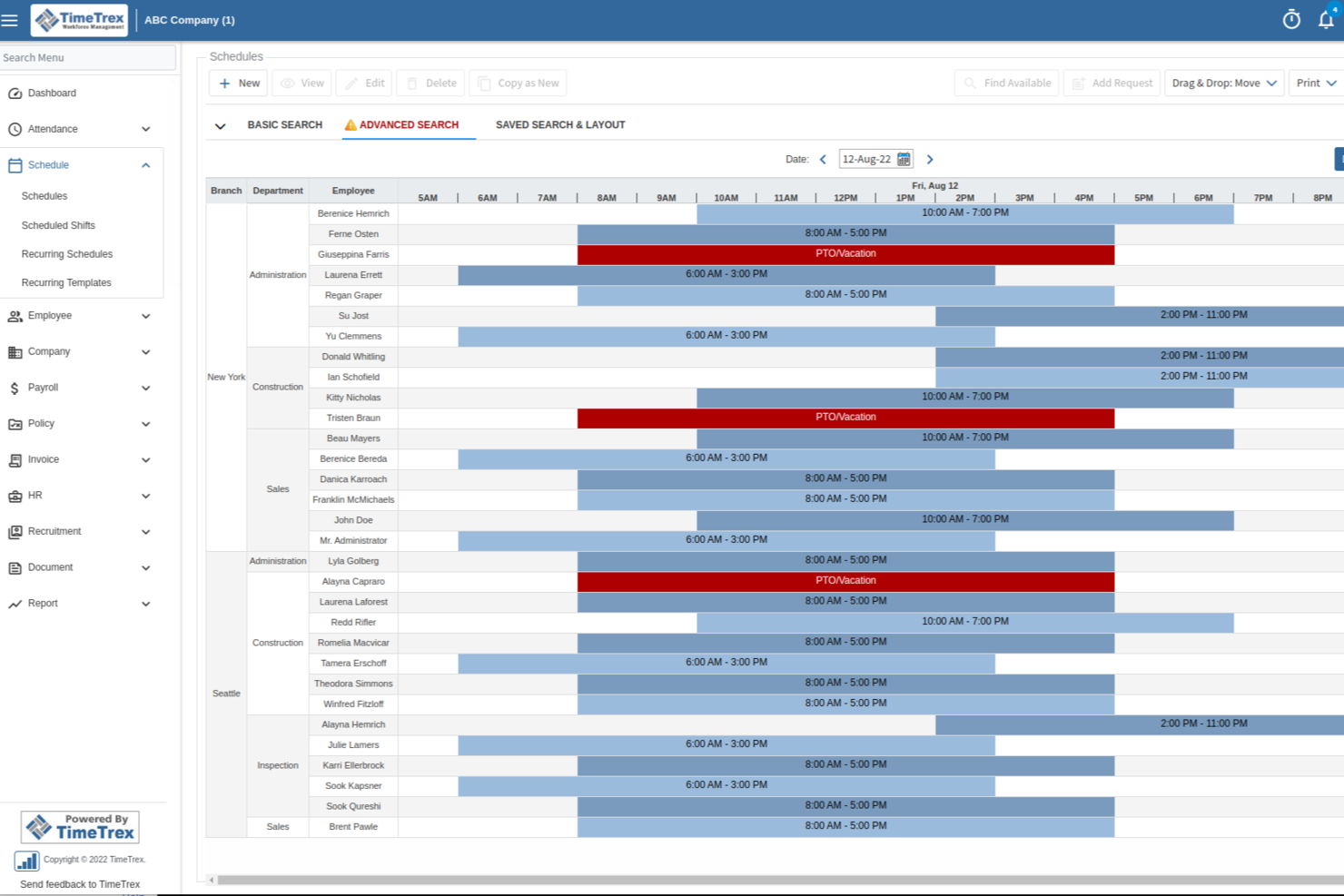
TimeTrex is a workforce management platform that ties employee scheduling and shift calendars directly to time and attendance tracking, leave management, and payroll processing.
Who Is TimeTrex Best For?
TimeTrex is a strong fit for operations and HR teams in shift-based industries like manufacturing, retail, and healthcare that need scheduling tied to time tracking.
Why I Picked TimeTrex
I've included TimeTrex in my top picks because real-time attendance tracking is genuinely central to how the platform works, not a bolt-on feature. When an employee punches in via the browser, mobile app, or a physical time clock, that attendance data surfaces immediately against the scheduled shift in the calendar. I also like that geofencing and GEO-enforcement let you define exactly where punch-ins are valid, so the live attendance view actually reflects who is on-site. Pair that with automated accrual tracking updating in real time, and managers always have an accurate picture of coverage without chasing down HR.
TimeTrex Key Features
- Drag-and-drop shift scheduling: Build and adjust employee schedules visually, with tools to detect and resolve conflicts before they affect coverage.
- Leave and absence management: Employees submit time-off requests through a self-service portal, and approvals automatically update both the schedule and payroll records.
- Calendar management: A centralized scheduling calendar keeps shifts, time-off, and workforce availability visible in one place across teams.
- AI-powered schedule optimization: TimeTrex uses an AI assistant to help automate shift creation based on employee availability, skills, and business demand.
TimeTrex Integrations
TimeTrex offers a smaller set of native integrations, limited to payroll providers like ADP, Paychex, Sage, Ceridian, and QuickBooks. The platform also supports two-way and flat-file integrations through its API, and provides an open API for custom needs.
Pros and Cons
Pros:
- Free open-source edition available for self-hosting
- Biometric facial recognition prevents buddy punching
- Built-in payroll with automatic tax calculations
Cons:
- Reporting dashboards lack ad hoc customization
- Initial setup requires significant configuration time
New Product Updates from TimeTrex
TimeTrex Redesigns Workforce Management With New Payroll, Scheduling, and AI Tools
TimeTrex redesigns its workforce management experience with new dashboards, scheduling and timesheet tools, a rebuilt payroll workflow, and expanded AI assistance. These updates give teams more flexible ways to manage schedules, payroll, reporting, and employee data. For more information, visit TimeTrex’s official site.
 .

7shifts
Best for restaurant teams
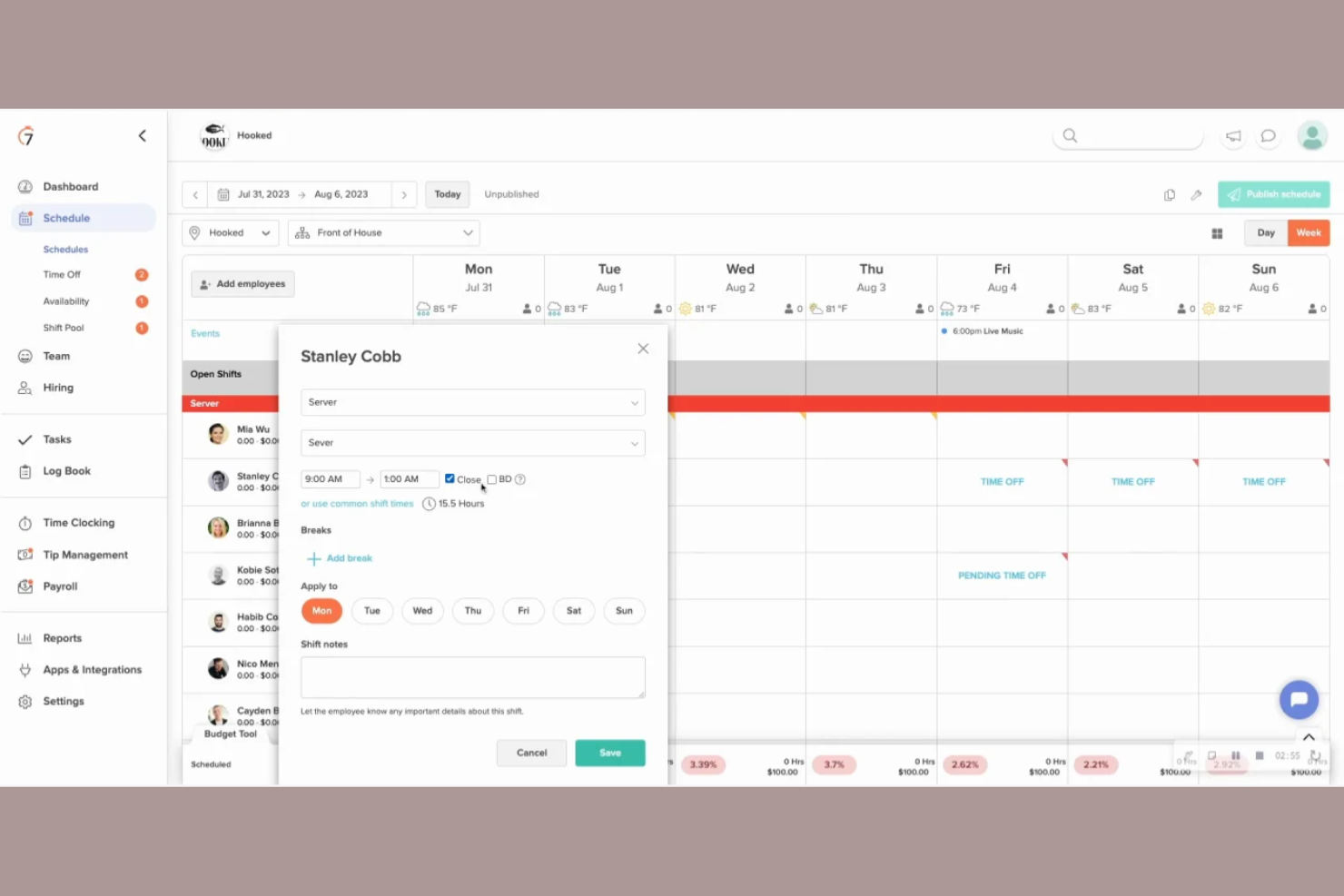
7shifts is a scheduling and workforce management tool specifically designed for the restaurant industry. It helps manage staff schedules, track labor costs, and improve team communication.
Why I picked 7shifts: It’s tailored for restaurant teams, providing features that address the unique challenges of the food service industry. Its shift-swapping feature makes it easier for your team to handle last-minute changes, while customizable tip management software provides accurate calculations and distribution to staff.
Standout Features and Integrations:
Features include labor cost forecasting to help you stay on budget, employee engagement tools to boost morale, and compliance management to ensure you meet industry regulations. All these features work together to strengthen your restaurant's scheduling efficiency.
Integrations include Toast, Square, Clover, ADP Workforce Now, Gusto, Paychex, TouchBistro, MarginEdge, and more.
Pros and Cons
Pros:
- Compliance management tools
- Effective labor cost management
- Tailored for restaurant needs
Cons:
- POS data discrepancies
- No break reminders for employees

Best for small business scheduling
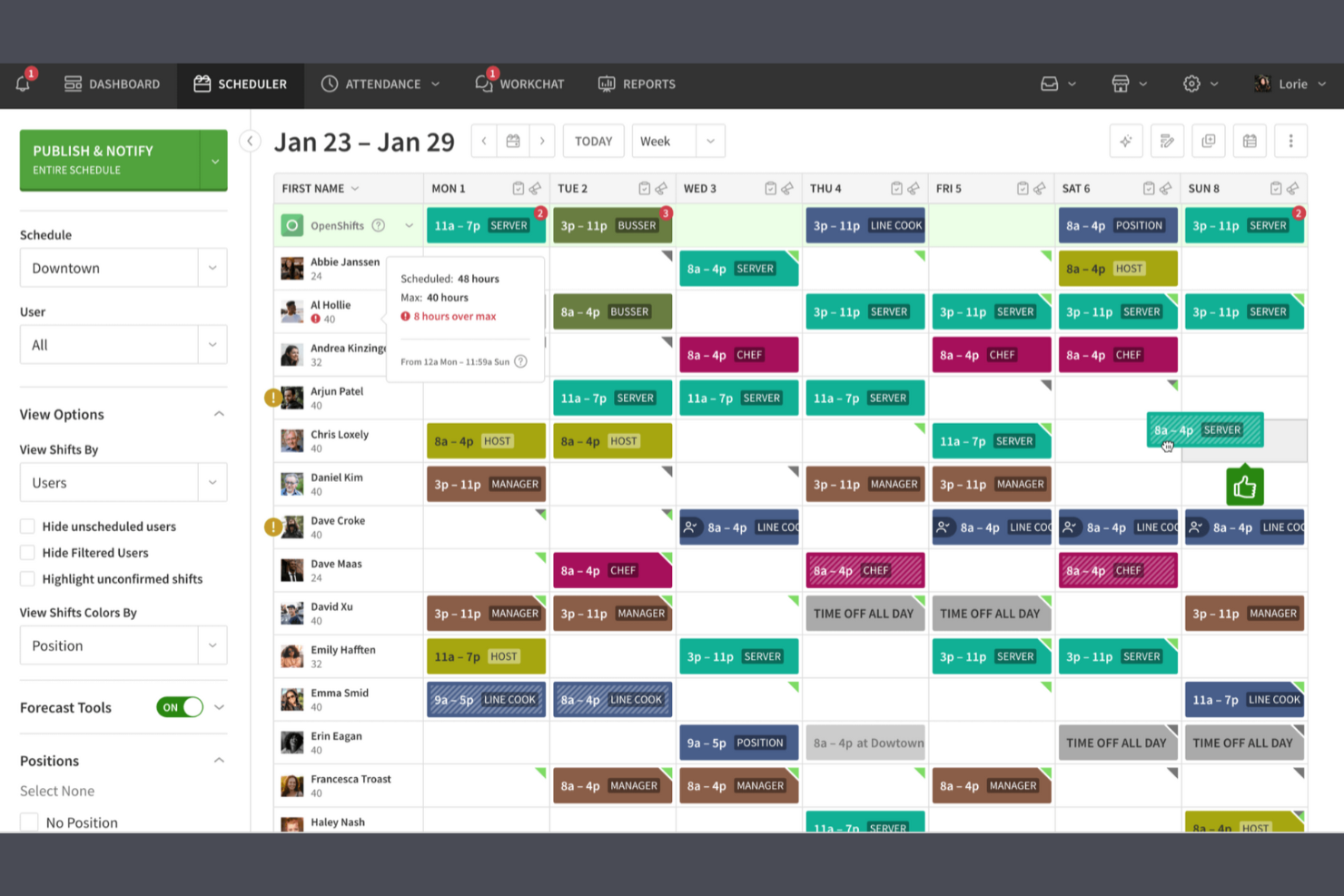
When I Work is a scheduling solution and workforce management tool designed to help small businesses across various industries keep everything they need in one place. It helps manage employee time schedules and ensures teams are well communicated.
Why I picked When I Work: It’s tailored for small businesses, offering tools that simplify shift management. The platform allows your team to swap shifts smoothly, and its user-friendly interface means your team can quickly adapt to using the tool without extensive training. It also offers time-clock functionalities that ensure accurate time tracking for payroll.
Standout Features and Integrations:
Features include an intuitive drag-and-drop schedule builder that simplifies shift planning, time-off management to handle employee requests, attendance tracking to increase employee accountability, and team messaging for instant communication. All these features help you keep your team organized and connected.
Integrations include QuickBooks, Gusto, ADP, Square, Rippling, OnPay, Zapier, GoCo, Paychex, and more.
Pros and Cons
Pros:
- Customizable shift templates
- Simple onboarding process
- Easy-to-use interface
Cons:
- Restricted staff visibility
- No automated employee break alerts

Best for Microsoft ecosystem users

Microsoft Teams is a communication and collaboration platform that includes staff scheduling features, catering primarily to businesses already using Microsoft products. It facilitates team communication, scheduling, and task management, making it a versatile tool for various industries.
Why I picked Microsoft Teams: It integrates smoothly with the Microsoft ecosystem, allowing you to leverage existing Microsoft tools for a cohesive workflow. You can manage schedules directly within Teams, reducing the need for additional software, and its features, such as shift swapping and time-off requests, are easy to manage. The integration with Microsoft 365 improves productivity by allowing straightforward access to documents and other resources.
Standout Features and Integrations:
Features include built-in video conferencing to facilitate remote meetings, file sharing to strengthen collaboration, and customizable notifications to keep your team informed. These features help maintain effective communication and coordination within your team.
Integrations include Microsoft 365, Outlook, OneDrive, SharePoint, Power BI, Trello, Asana, Salesforce, Dropbox, and more.
Pros and Cons
Pros:
- Built-in video conferencing
- Customizable notifications
- Blocks off-shift chat access
Cons:
- No back-to-back shift support
- Requires Microsoft account setup

Workday
Best for large enterprise needs
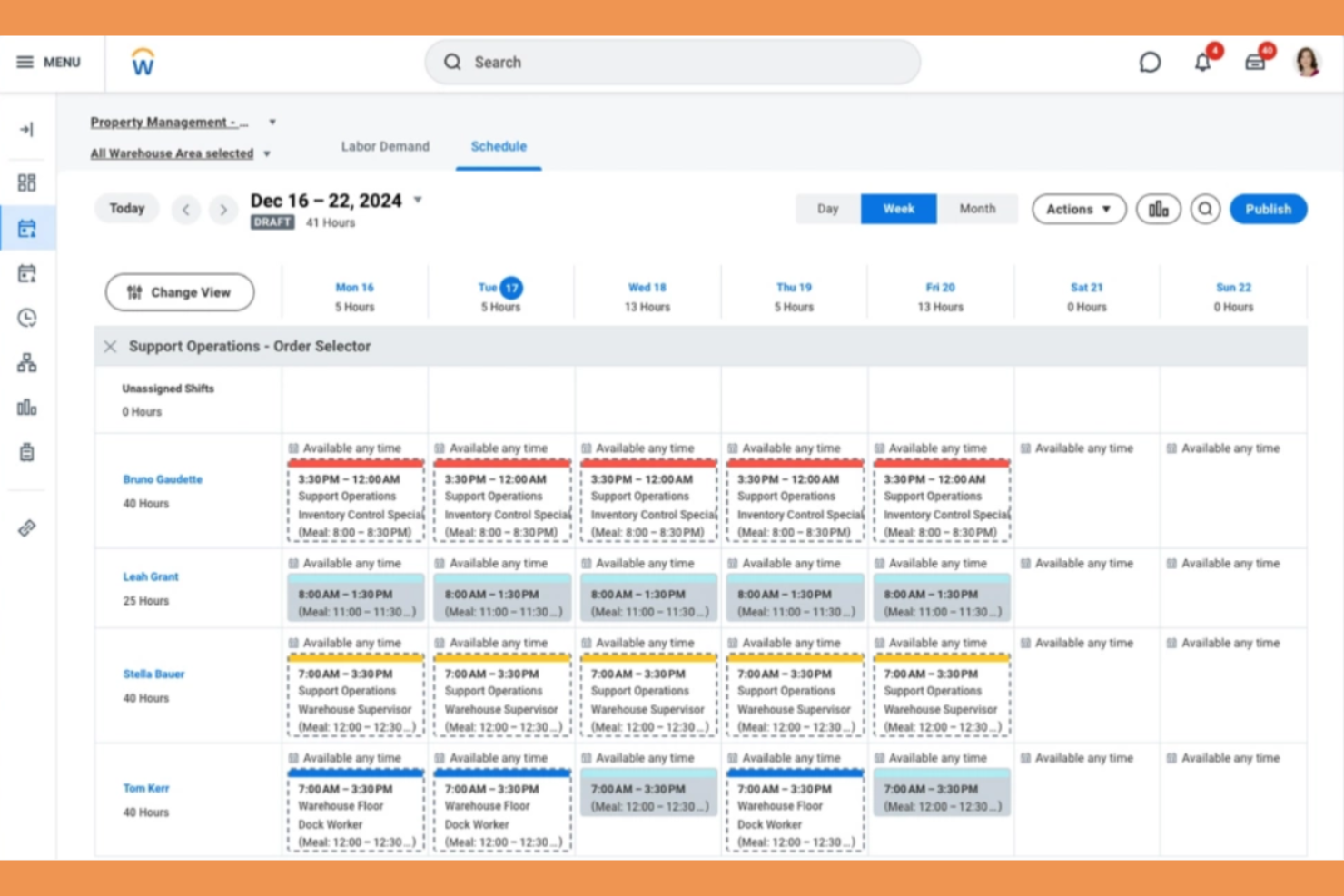
Workday is an extensive workforce management tool designed for large enterprises across various sectors. It facilitates employee scheduling, time tracking, and labor optimization, ensuring efficient workforce management.
Why I picked Workday: It addresses the complex needs of large enterprises with features such as AI-driven schedule generation and demand forecasting. Workday offers centralized scheduling, allowing managers and workers to control their schedules from mobile devices, while the open shifts board and shift-swapping features ensure flexibility and adaptability when managing large teams.
Standout Features and Integrations:
Features include automated shift assignments to simplify scheduling processes, labor optimization tools to maximize workforce efficiency, and demand forecasting to anticipate staffing needs. These features cater to the dynamic requirements of large enterprises.
Integrations include Workday Human Capital Management, Workday Payroll, and more.
Pros and Cons
Pros:
- Real-time demand forecasting
- Scalable for large teams
- AI-driven scheduling
Cons:
- Limited report filtering options
- Frequent loading delays

Best for automated scheduling
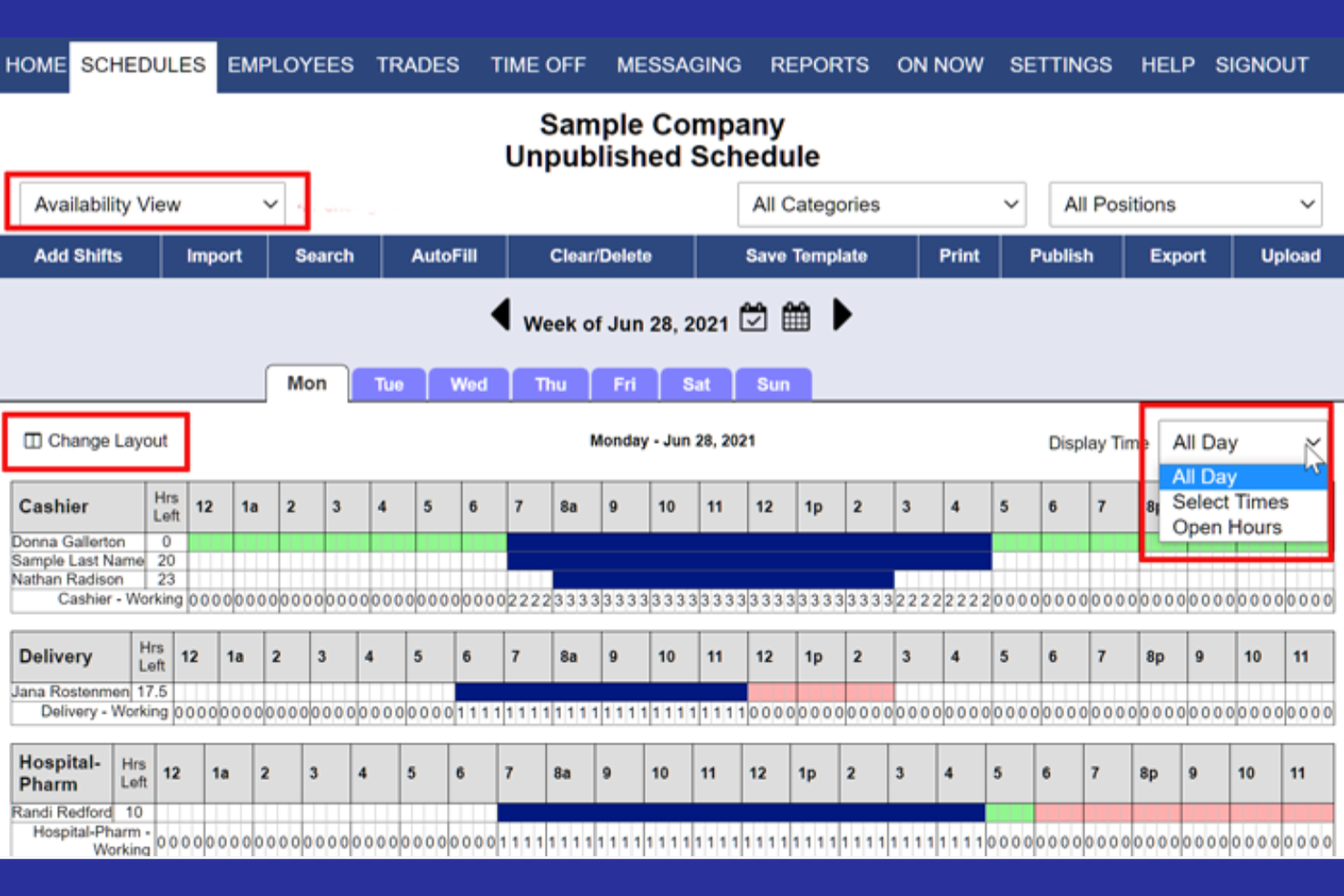
WhenToWork is an employee scheduling software designed for businesses that need efficient shift management. It caters to a variety of industries, helping manage schedules and ensure effective communication with employees.
Why I picked WhenToWork: It excels in automated scheduling so that you spend less time creating and adjusting shifts. The automatic shift assignment feature allows you to customize scheduling rules to fit your specific business needs, ensuring fair distribution of work among your team. WhenToWork’s notification system keeps your team informed of any changes so that everyone stays on the same page.
Standout Features and Integrations:
Features include shift swapping and availability management through a self-service, single-click autofill for employees, helping you accommodate employee preferences. The tool also provides reporting tools to analyze scheduling patterns and improve efficiency.
Integrations are not publicly listed.
Pros and Cons
Pros:
- Automated shift assignment
- Efficient notification system
- Customizable scheduling rules
Cons:
- Manual bulk assignments
- Lacks built-in GPS/geofencing

Sling
Best for retail scheduling needs
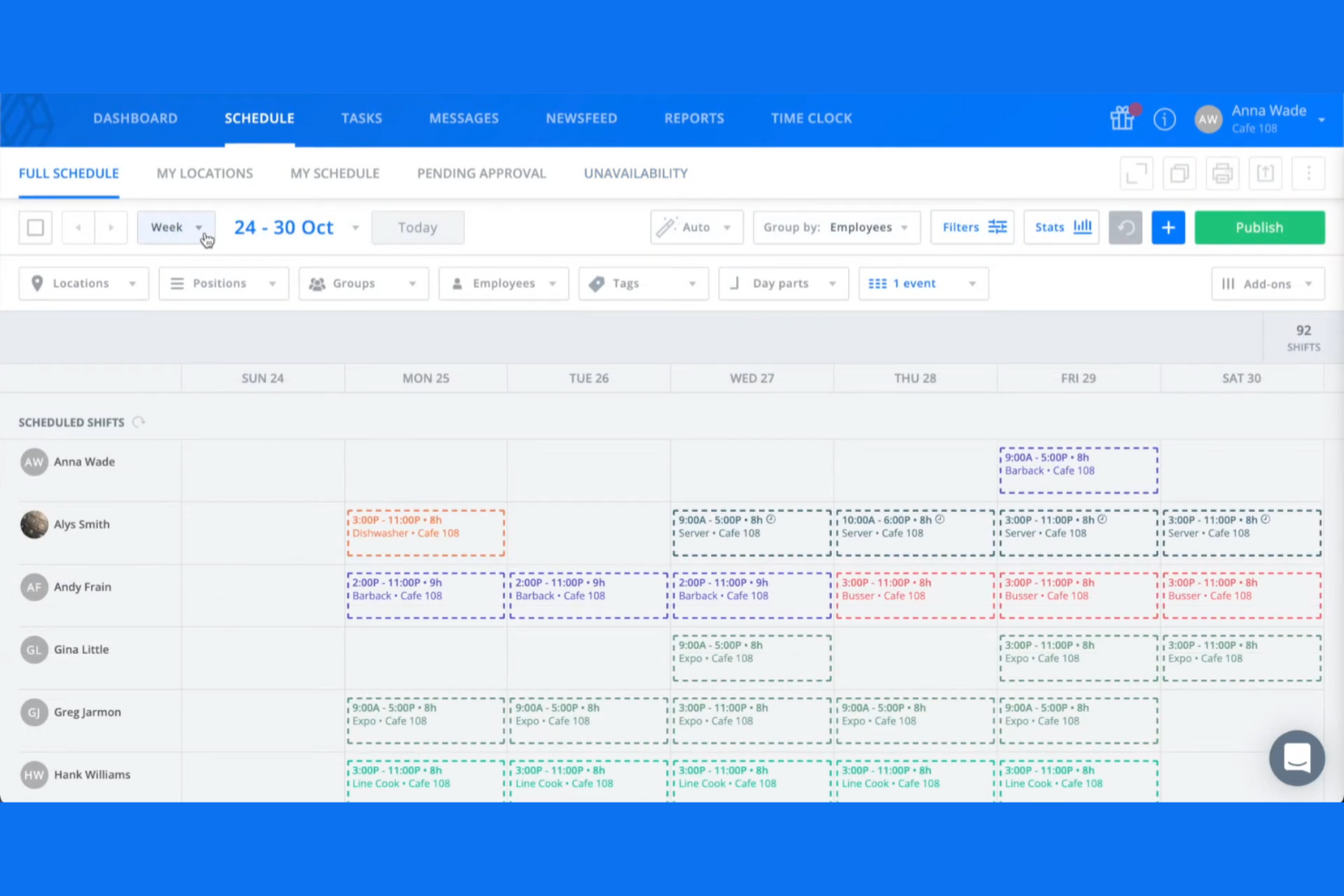
Sling is an employee scheduling app and shift planning tool designed primarily for industries like retail, restaurants, and healthcare. It focuses on simplifying workforce management by offering features such as time tracking, geofencing, task management, and team communication, all on one platform.
Why I picked Sling: It’s tailored for retail scheduling needs, providing tools that can help you manage shifts efficiently. The platform also allows you to manage time off, shift trades, and employee availability, making it easier to handle the dynamic nature of retail operations. Sling’s communication tools ensure your team stays informed and connected, which is essential in the fast-paced retail environment.
Standout Features and Integrations:
Features include labor cost optimization to help you manage your scheduling budget, time tracking to ensure accurate pay calculations, and task management to facilitate the assigning and monitoring of tasks. These features work together to improve your team’s efficiency and productivity.
Integrations include Harbortouch, POSitouch, Gusto, Square, Toast, and more.
Pros and Cons
Pros:
- Free plan with unlimited employees & locations
- Budget alerts for shifts
- Accurate time tracking
Cons:
- Limited customization options
- Limited advanced features


Shiftboard is a scheduling and workforce management tool designed for industries with complex staffing needs, such as healthcare and manufacturing. It helps you manage shifts, track time, and ensure compliance with labor regulations.
Why I picked Shiftboard: It's ideal for managing complex shift patterns, making it suitable for industries with intricate scheduling requirements. The automated scheduling feature allows your team to reduce manual errors and save time, while Shiftboard's reporting capabilities provide insights into workforce operations.
Standout Features and Integrations:
Features include compliance management to ensure adherence to labor laws, labor demand planning to scale staffing demand and meet service requirements, and straightforward timesheet management that reduces payroll errors. All these features help you manage your team efficiently and effectively.
Integrations include ADP, Workday, Salesforce, Microsoft Dynamics, Oracle, Circadian, UKG, and more.
Pros and Cons
Pros:
- Customizable reporting options
- Automated scheduling
- Handles complex shifts
Cons:
- Basic user interface
- Limited mobile features
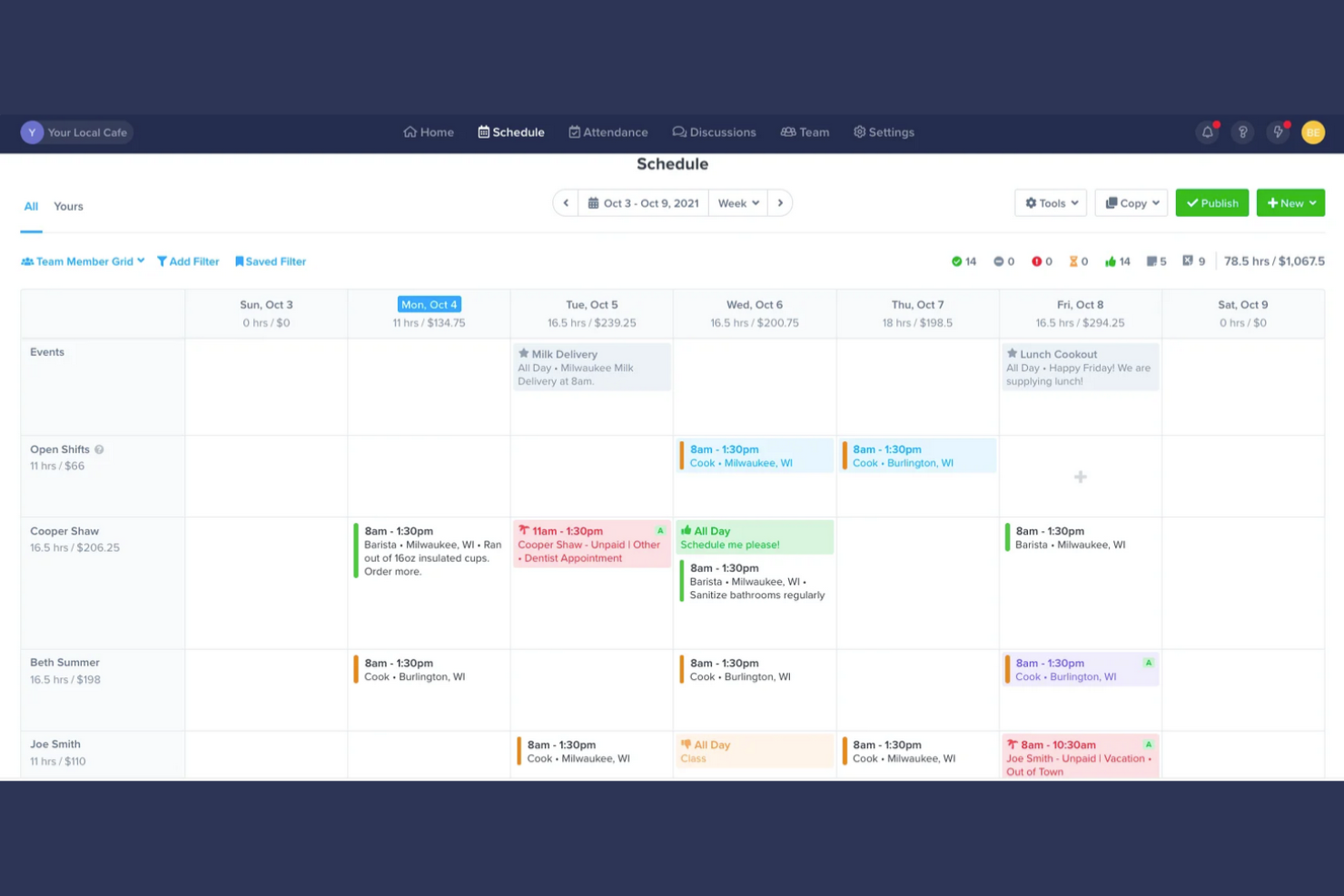
ZoomShift is a scheduling software designed for businesses with a seasonal workforce, such as in event planning and retail. It helps manage employee schedules, track time, and improve team communication.
Why I picked ZoomShift: It's ideal for managing a seasonal workforce, offering features that help you handle fluctuating staffing needs. With tools like shift swapping, your team can smoothly adjust their schedules, while time tracking ensures your payroll processing is always accurate. ZoomShift’s communication tools keep your team informed about any schedule changes, which is significant during busy seasons.
Standout Features and Integrations:
Features include a drag-and-drop schedule builder that simplifies shift creation, availability management to accommodate employee preferences, and payroll exports for easy processing. These features help refine your scheduling and payroll tasks.
Integrations include Google Calendar, iCalendar, and more.
Pros and Cons
Pros:
- Easy payroll exports
- Effective shift swapping tools
- Supports seasonal staffing needs
Cons:
- No individual task tracking
- No bulk employee data import

Agendrix
Best for employee feedback tools
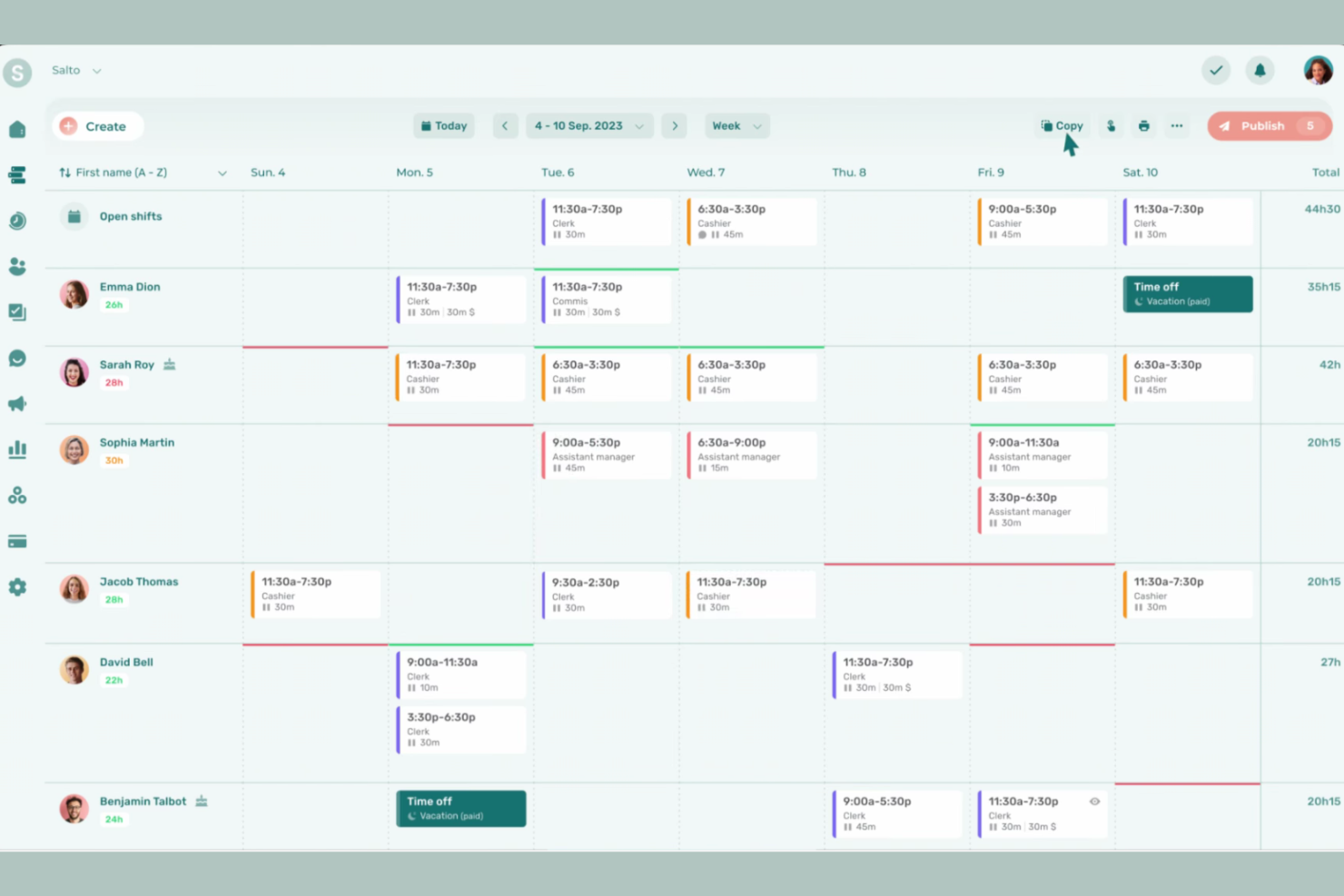
Agendrix is a scheduling and workforce management tool designed for small to medium-sized businesses across various industries. It helps manage employee schedules and time tracking, and improves communication within teams.
Why I picked Agendrix: It offers unique employee feedback tools that help you gather insights directly from your team. Features such as surveys and feedback forms allow you to understand employee satisfaction and make informed decisions. The platform supports two-way communication, ensuring your team feels heard and valued, and allowing you to foster a more engaged and productive workforce.
Standout Features and Integrations:
Features include a mobile app that’s compatible with an iPad, Android tablet, computer, or mobile phone to keep your team connected on the go. Team members receive shift reminders to reduce absenteeism, and you get time-clock functionalities for accurate payroll processing. All of Agendrix’s features work together to refine your scheduling process and improve team coordination.
Integrations include QuickBooks, Lightspeed, EasyPay, ADP Workforce Now, PayWorks, Sage 50, Acomba, and more.
Pros and Cons
Pros:
- Automatic shift seen confirmations
- Two-way communication features
- Effective employee feedback tools
Cons:
- Limited leave color-coding
- No cross-department view for managers
Diğer Çalışan Takvimi Yazılımları
İşte kısa listeme girmeyen ancak yine de göz atmaya değer bazı ek çalışan takvimi yazılımı seçenekleri:
- Connecteam
For mobile-first teams
- Zoho Shifts
For integration with Zoho apps
- Homebase
For multi-location shift scheduling
- Deputy
For shift planning for large teams
- Google Calendar
For easy integration with Google apps
- actiPLANS
For leave management features
- ADP WorkForce Suite
For compliance with labor laws


How I Evaluate Employee Calendar Software
I split my evaluation into two layers: the baseline every tool must have—shared calendars, PTO visibility, and resource scheduling—and the differentiators that separate one tool from another.
Core Functionality (Table Stakes For This List)
When I'm selecting tools for my list, I rank each one on a scale from 0 (does not offer the functionality) to 5 (excels in this area) for each core functionality listed below. Then, I calculate the tool's total score into a percentage. Each tool needs to achieve a minimum total score of 65% to be considered for inclusion.
- Shared Team Calendar: I look for a centralized calendar where managers can view schedules across departments, filter by team or role, and set permissions so contractors see different details than full-time staff.
- Availability & PTO Tracking: Each tool should surface employee working hours, approved time off, and holidays directly on the calendar so you're not scheduling sprint work around someone's vacation.
- Resource Scheduling & Assignment: I evaluate how easily you can assign tasks or shifts from the calendar itself—tools like Float and Resource Guru handle this with drag-and-drop, while others require separate workflows.
- Calendar Integrations & Sync: Two-way syncing with Google Calendar, Outlook, and iCal matters, but I also check for connections to PM tools like Jira or Asana that keep project timelines aligned with employee schedules.
- Conflict & Overlap Detection: The tool should flag double-bookings or over-allocation automatically, especially when assigning the same developer to overlapping project phases or concurrent client engagements.
- Multiple Calendar Views: Day, week, and month views are baseline. I look for timeline or Gantt-style views that let you zoom out across a quarter to spot resourcing gaps before they become delivery risks.
Once I have a list of tools that meet this criteria, I consider what sets each platform apart.
Differentiating Factors (What Sets Vendors Apart)
Here's how I compare and contrast different vendors:
Standout Features
Workload heatmaps are a big differentiator. I look for color-coded utilization views that show at a glance which team members are at capacity and who has bandwidth for incoming work. Time zone intelligence also matters when your team spans multiple regions, since tools that auto-adjust schedules prevent you from booking a standup at someone's midnight. I also evaluate in-calendar time tracking, which lets team members log hours against scheduled tasks without switching apps, giving you a real-time view of planned versus actual effort.
Beyond Features
I evaluate how well each tool connects to the broader PM ecosystem—native integrations with Jira, Asana, or Monday keep project timelines and employee calendars in sync without manual updates. Scalability is another factor I weigh, since a tool that works for a 15-person team can fall apart when you're managing calendars across 200 employees and multiple project portfolios. I also check for mobile apps with real feature parity, because hybrid teams need managers who can approve PTO or reassign work from their phone between meetings.
Çalışan Takvimi Yazılımı Nasıl Seçilir?
Uzun özellik listeleri ve karmaşık fiyatlandırma yapıları içinde kaybolmak kolaydır. Kendinize özgü yazılım seçimi sürecinizde ilerlerken odağınızı korumanıza yardımcı olmak için aklınızda bulundurmanız gereken faktörlerden oluşan bir kontrol listesi hazırladım:
| Faktör | Dikkat Edilmesi Gerekenler |
|---|---|
| Ölçeklenebilirlik | Yazılım ekibinizle birlikte büyüyebilir mi? İşletmeniz genişledikçe aracın maliyet veya karmaşıklıkta önemli artışlar olmadan daha fazla kullanıcıyı ya da özelliği destekleyip destekleyemeyeceğini değerlendirin. |
| Entegrasyonlar | Mevcut araçlarınıza bağlanabiliyor mu? Veri silolarını önlemek ve iş akışlarını kolaylaştırmak için bordro veya İK yazılımı gibi mevcut sistemlerinizle uyumluluğunu kontrol edin. |
| Özelleştirilebilirlik | İhtiyaçlarınıza göre uyarlayabilir misiniz? Yazılımın, belirli vardiya planlama politikalarınıza ve ekip yapınıza uyacak şekilde ayarlamalara izin verdiğinden emin olun. |
| Kullanım kolaylığı | Arayüz sezgisel mi? Eğitim süresini en aza indiren ve ekibinizin aracı hızlıca benimsemesine yardımcı olan kullanıcı dostu bir tasarım arayın. |
| Uygulama ve işe alıştırma | Kurulum ne kadar sürecek? Eğitim oturumları ve veri aktarımı da dahil olmak üzere sorunsuz bir geçiş için gereken zamanı ve kaynakları değerlendirin. |
| Maliyet | Bütçeniz dahilinde mi? Fiyatlandırma planlarını karşılaştırın ve olası gizli ücretleri değerlendirin. Karar vermeden önce test etmek için ücretsiz deneme olup olmadığını kontrol edin. |
| Güvenlik önlemleri | Verileriniz ne kadar güvende? Yazılımın hassas bilgileri korumak için şifreleme ve düzenli güncellemeler gibi güçlü güvenlik önlemlerine sahip olduğundan emin olun. |
| Destek erişilebilirliği | İhtiyaç duyduğunuzda yardım alabilir misiniz? Canlı sohbet, telefon veya e-posta gibi sunulan kanalların yanı sıra müşteri desteğinin erişilebilirliğini değerlendirin. |
Çalışan Takvim Yazılımı Nedir?
Çalışan takvim yazılımı, işletmelerin çalışan vardiyalarını ve uygunluk durumlarını planlamasına ve yönetmesine yardımcı olan bir araçtır. Bu araçlar genellikle yöneticiler, İK profesyonelleri ve ekip liderleri tarafından çalışma programlarını verimli bir şekilde düzenlemek için kullanılır. Zaman takibi, vardiya değişimi ve otomatik hatırlatıcılar planlama çakışmalarını azaltarak iletişimi ve iş yasalarına uyumu iyileştirmeye yardımcı olur. Genel olarak bu araçlar, herkesin aynı bilgilerden haberdar olmasını sağlayarak zamandan tasarruf ettirir ve ekip verimliliğini artırır.
Çalışan Takvim Yazılımının Özellikleri
Çalışan takvim yazılımı seçerken aşağıdaki temel özelliklere dikkat edin:
- Vardiya planlama: Yöneticilerin çalışan çalışma programlarını oluşturmasına ve yönetmesine olanak tanıyarak yeterli personel bulunmasını sağlar ve çakışmaları en aza indirir.
- Zaman takibi: Doğru bordro işlemleri ve çalışma mevzuatına uyum için çalışanların çalışma saatlerini izler.
- Vardiya değişimi: Çalışanların iş arkadaşlarıyla vardiyalarını değiştirmesine olanak tanıyarak esneklik sağlar ve yöneticilerin iş yükünü azaltır.
- Uygunluk yönetimi: Çalışanların uygunluk durumlarını girmesine olanak tanıyarak yöneticilerin vardiyaları ekip tercihlerini dikkate alarak planlamasına yardımcı olur.
- Otomatik hatırlatıcılar: Çalışanlara yaklaşan vardiyalar veya değişiklikler hakkında bildirimler göndererek işe gelmeme durumlarını ve iletişim hatalarını azaltır.
- İş gücü maliyeti takibi: Planlama maliyetleri hakkında içgörüler sunarak işletmelerin bütçelerini optimize etmesine ve fazla mesai giderlerini azaltmasına olanak tanır.
- Mobil erişim: Programlara ve bildirimlere hareket hâlindeyken erişim sağlayan bir mobil uygulama sunarak tüm ekip üyeleri için erişilebilirliği artırır.
- Özelleştirilebilir raporlama: Planlama düzenlerini analiz etmek için özel raporlar oluşturarak verimliliğin ve karar alma süreçlerinin iyileştirilmesine yardımcı olur.
- Uyum yönetimi: Programların iş yasalarına ve düzenlemelerine uygun olmasını sağlayarak işletmelerin hukuki risklerini azaltır.
- Entegrasyon özellikleri: Uyumlu bir iş akışı oluşturmak ve veri silolarını önlemek için sistemi bordro ve İK sistemleri gibi mevcut araçlara bağlar.
Çalışan Takvim Yazılımının Faydaları
Çalışan takvim yazılımını uygulamak ekibiniz ve işletmeniz için çeşitli faydalar sağlar. Yararlanabileceğiniz bazı avantajlar şunlardır:
- Planlama doğruluğunun artması: Otomatik planlama ve zaman takibi hataları azaltır ve vardiyaların doğru şekilde atanmasını sağlar.
- İletişimin güçlenmesi: Otomatik hatırlatıcılar ve bildirimler gibi özellikler, herkesi program değişiklikleri ve yaklaşan vardiyalar hakkında bilgilendirir.
- Esnekliğin artması: Vardiya değişimi ve uygunluk yönetimi, çalışanların programlarını ayarlamasına ve kişisel ihtiyaçlarına uyum sağlamasına olanak tanır.
- Maliyet verimliliği: İş gücü maliyeti takibi, işletmelerin giderleri izlemesine ve planlamayı optimize etmesine yardımcı olarak gereksiz fazla mesaiyi azaltır.
- Uyum güvencesi: Uyum yönetimi özellikleri, programlarınızın iş yasalarına uygun olmasını sağlayarak hukuki riskleri en aza indirir.
- Daha iyi karar alma: Özelleştirilebilir raporlama, planlama düzenleri hakkında içgörüler sunarak yöneticilerin bilinçli ayarlamalar yapmasına yardımcı olur.
- Erişilebilirlik: Mobil erişim, çalışanların programlarını her yerden görüntüleyip yönetebilmesini sağlayarak kolaylığı ve etkileşimi artırır.
Çalışan Takvim Yazılımının Maliyetleri ve Fiyatlandırması
Çalışan takvimi yazılımı seçimi, mevcut çeşitli planların ve fiyatlandırma modellerinin anlaşılmasını gerektirir. Maliyetler özelliklere, ekip büyüklüğüne, eklentilere ve daha fazlasına bağlı olarak değişir. Aşağıdaki tablo, çalışan takvimi yazılımı çözümlerinde yaygın planları, ortalama fiyatlarını ve genellikle sunulan özellikleri özetlemektedir:
Çalışan Takvimi Yazılımı için Plan Karşılaştırma Tablosu
| Plan Türü | Ortalama Fiyat | Yaygın Özellikler |
|---|---|---|
| Ücretsiz Plan | $0 | Temel planlama, zaman takibi ve sınırlı destek. |
| Kişisel Plan | $5-$15/kullanıcı/ay | Gelişmiş planlama, mobil erişim ve vardiya değişimi. |
| İşletme Planı | $15-$30/kullanıcı/ay | Kapsamlı raporlama, entegrasyon olanakları ve uyumluluk yönetimi. |
| Kurumsal Plan | $30-$50/kullanıcı/ay | Özelleştirilebilir çözümler, öncelikli destek ve daha güçlü güvenlik özellikleri. |
Çalışan Takvimi Yazılımı Hakkında SSS
Çalışan takvimi yazılımı hakkında sık sorulan bazı soruların yanıtları:
Çalışan takvimi yazılımı ne kadar güvenlidir?
Çoğu çalışan takvimi yazılımı, bilgileri korumak için şifreleme ve düzenli güncellemeler kullanarak verilerinizin güvenliğine öncelik verir. Güvenlik sertifikalarını ve GDPR gibi standartlara uyumluluğu mutlaka kontrol edin ve sağlayıcılara güvenlik önlemlerini sorun. Koruma düzeyini artırmak için çok faktörlü kimlik doğrulama sunan çözümleri değerlendirin.
Çalışan takvimi yazılımı ekibimin proje teslim tarihlerini yönetmesine nasıl yardımcı olabilir?
Çalışan takvimi yazılımı, teslim tarihlerini ortak bir alanda projeler arasında atamanıza, görüntülemenize ve takip etmenize olanak tanır. Her şeyin görünür olması, görevlerin kaçırılmasını önlemeye yardımcı olur ve ekibinizin teslim edilecek işleri koordine etmesini ve darboğazları hızlıca tespit etmesini kolaylaştırır.
Çalışan takvimi uygulamalarıyla tekrarlayan planlama görevlerini otomatikleştirebilir miyim?
Evet, birçok takvim platformu yinelenen toplantıları otomatikleştirmenize, hatırlatıcılar göndermenize ve hatta ekip üyelerinin uygunluk durumuna göre otomatik planlama yapmanıza olanak tanır. Bu, manuel çalışmayı azaltır ve ekibinizin daha yüksek değer taşıyan görevlere odaklanmasına yardımcı olur.
Çalışan takvimi yazılımını uygulamak ne kadar sürer?
Uygulama süreleri değişiklik gösterir. Basit bir aracın uygulanması birkaç gün sürebilirken daha karmaşık sistemler haftalar alabilir; ancak birçok çözüm hızlı ve kolay kurulum seçenekleri sunar. Bazı sağlayıcılar eğitim videoları ve ürün turları gibi işe alıştırma desteği de sağlar. Ekibinizin teknoloji yeterliliğini ve planlama ihtiyaçlarınızın karmaşıklığını göz önünde bulundurun.
Çalışan takvimi yazılımını kullanmak için eğitim gerekli mi?
Evet, genellikle bir miktar eğitim gerekir; ancak bu eğitim çoğunlukla minimum düzeydedir. Birçok araç, öğrenme sürecini kısaltmaya yardımcı olan sezgisel arayüzlerle kullanıcı dostudur. Eğitimler, web seminerleri ve sohbet desteği gibi kaynaklar sunan çözümleri tercih edin. Bu, ekibinizin kısa sürede yazılımı kullanmaya başlamasına ve yazılımdan yararlanmaya başlamasına yardımcı olabilir.