

2026’da İncelenen En İyi 10 Belge Redaksiyon Aracı

En İyi Belge Redaksiyon Aracı Seçkisi


Hassas bilgileri yönetmek, sizin gibi proje yöneticileri için gerçek bir baş ağrısı olabilir. Veri ihlalleri ve uyumluluk sorunları her an ortaya çıkabileceğinden belgelerinizi korumanız çok önemlidir. İşte güvenilir bir belge redaksiyon aracı bu noktada devreye girer.
Yazılımları test edip inceleme deneyimimde, bu araçların yükü nasıl hafifletebildiğini gördüm. Ekibinizin verilerinin gizli kalmasını ve düzenlemelere uygun olmasını sağlamaya yardımcı olurlar.
Bu makalede, kullanabileceğiniz en iyi belge redaksiyon araçları arasından tarafsız seçimlerimi paylaşacağım. Özellikler, kullanılabilirlik ve her aracı öne çıkaran unsurlar hakkında bilgiler bulacaksınız. Ekibiniz için doğru çözümü bulmak üzere başlayalım.
Why Trust Our Software Recommendations
Our team has been testing and reviewing software since 2012. As project managers ourselves, we know how difficult—and important—it is to choose the right software.
For this guide, we evaluated tools using hands-on testing and independent research, scoring tools using our selection criteria. We also draw on insights from industry thought leaders and practicing project management experts.
Our reviews reflect our human editorial judgment, not a sales pitch.
Expert reviewers:
Belge Redaksiyon Araçları Karşılaştırma Tablosu
Bu karşılaştırma tablosu, en iyi belge redaksiyon aracı seçimlerimin fiyatlandırma ayrıntılarını özetlemektedir:
| Tool | Starting Price | Website | |
|---|---|---|---|
| Best for high-volume redactions | 4.8 out of 5 | Pricing upon request Free demo available | Website |
| Best for quick PDF redaction | 4.7 out of 5 | $10/month Free 7-day trial + free plan available | Website |
| Best for creative professionals | 4.5 out of 5 | $19.99/user/month 7-day free trial | Website |
| Best for enterprise scalability | — | $129.99 Free trial available | Website |
| Best for team collaboration | — | $15/user/month Free 14-day trial + free demo available | Website |
| Best for cross-platform access | — | $9.99/month Free plan available | Website |
| Best for legal industry use | 4.8 out of 5 | $19/month Free trial available | Website |
| Best for AI-powered redaction | — | $29/month 7-day free trial | Website |
| Best for data compliance needs | — | Pricing upon request Free demo available | Website |
| Best for identifying sensitive data before redaction | — | $79.20/month Free plan available | Website |
En İyi Belge Redaksiyon Aracı İncelemeleri
Aşağıda, seçkime giren en iyi belge redaksiyon araçlarına ilişkin ayrıntılı özetlerimi bulabilirsiniz. İncelemelerim, size en uygun aracı bulmanıza yardımcı olmak için her aracın temel özelliklerine, artılarına & eksilerine, entegrasyonlarına ve ideal kullanım alanlarına ayrıntılı bir bakış sunmaktadır.
Best for high-volume redactions

Klippa DocHorizon is an intelligent document processing platform designed to handle document-based workflows from start to finish. It allows your team to upload or scan documents, automate the processing of them, and convert or afterwards use the data in the format you need.
Why I picked Klippa DocHorizon: I picked Klippa DocHorizon because it gives you automated, configurable redaction of PII/signatures/faces at scale, supports batch workflows for high document volumes, and couples AI-driven redaction with human review for quality and compliance.
Standout features & integrations:
Features include automatic data anonymization that supports multiple techniques (such as data masking, pseudonymization, and swapping) and helps fulfill compliance requirements around data privacy. It also supports human-in-the-loop workflows: after AI redaction, a human reviewer can correct false positives/negatives.
Integrations include Gmail, Google Drive, OneDrive, Outlook, NetSuite, Xero, Dropbox, QuickBooks, and Zoho.
Pros and Cons
Pros:
- Supports large-scale batch redaction workflows
- High-accuracy redaction of PII and signatures
- Handles a large variety of document types and languages
Cons:
- Potential for false positives
- Custom fields or deeply bespoke redaction rules may need work-arounds
New Product Updates from Doxis AI.dp.
Doxis AI.dp Adds Zero-Shot Classification and Natural-Language Search
Doxis AI.dp adds zero-shot classification, image classification, natural-language Inbox Search, expanded financial outputs, and Active Learning improvements. These updates help teams classify documents, find information, and process financial data. For more information, visit Doxis AI.dp’s official site.
 .

Smallpdf
Best for quick PDF redaction

Smallpdf is an online PDF redaction tool designed for individuals and teams who need to remove sensitive information from documents efficiently. It allows users to redact names, addresses, and financial data, ensuring compliance with GDPR and HIPAA standards.
Why I picked Smallpdf: Smallpdf’s quick PDF redaction process is a standout feature, allowing you to drag and drop files for immediate editing. It offers automatic file deletion after one hour, enhancing privacy. The interface is user-friendly, requiring no downloads or signups, which saves time. With TLS encryption and ISO/IEC 27001 certification, you can trust that your documents are secure.
Standout Features & Integrations
Features include a drag-and-drop interface that simplifies the redaction process, irreversible redaction to ensure data cannot be recovered, and compliance with GDPR and HIPAA for legal peace of mind.
Integrations include Dropbox, Google Drive, OneDrive, and Box.
Pros and Cons
Pros:
- Secure encryption standards
- No signup required
- Quick file processing
Cons:
- No offline access
- Limited free version

Best for creative professionals

Adobe Acrobat is a PDF management tool widely used by creative professionals for editing, converting, and redacting PDFs. It offers comprehensive features for document handling, making it a favorite among designers and content creators.
Why I picked Adobe Acrobat: It's tailored for creative professionals who need more than basic redaction. The tool provides advanced editing capabilities, allowing you to manipulate text and images within PDFs. Its OCR technology helps convert scanned documents into editable files. With trusted security features, it ensures your sensitive data stays protected.
Standout Features & Integrations
Features include OCR technology that transforms scanned documents into editable text, comprehensive editing tools for text and images, and secure encryption for added data protection.
Integrations include Microsoft OneDrive, Dropbox, Google Drive, Box, Microsoft SharePoint, Salesforce, Microsoft Teams, and Workday.
Pros and Cons
Pros:
- OCR for scanned documents
- Trusted security features
- Advanced editing capabilities
Cons:
- Resource-intensive software
- Steeper learning curve


Foxit is a PDF editor designed for large enterprises needing comprehensive document management solutions. It provides editing, redaction, and collaboration tools to help businesses handle extensive document workflows efficiently.
Why I picked Foxit: Its enterprise scalability makes it perfect for large teams that handle high volumes of documents. The tool offers advanced security features to protect sensitive information. With its collaboration capabilities, your team can work together on documents in real-time. Additionally, it supports batch processing, allowing you to edit multiple documents simultaneously.
Standout Features & Integrations
Features include advanced security measures to safeguard documents, real-time collaboration tools to enhance teamwork, and batch processing to manage multiple files efficiently.
Integrations include Microsoft Office, SharePoint, Google Drive, Box, Dropbox, Evernote, OneDrive, and Alfresco.
Pros and Cons
Pros:
- Supports batch processing
- Advanced security features
- Scalable for large enterprises
Cons:
- Resource-intensive software
- Steep learning curve


Nitro PDF is a document management tool aimed at businesses seeking efficient PDF editing and collaboration. It provides tools for creating, editing, and sharing PDF files, making it ideal for teams working on shared documents.
Why I picked Nitro PDF: It excels in team collaboration, offering features that facilitate document sharing and joint editing. The tool includes electronic signatures, which streamline approval processes. Version control ensures that your team always works on the latest document iteration. With its cloud-based access, you can collaborate from anywhere, enhancing productivity.
Standout Features & Integrations
Features include electronic signatures for easy approvals, version control to keep documents up-to-date, and cloud-based access for remote collaboration.
Integrations include Microsoft Office 365, Google Drive, Dropbox, SharePoint, OneDrive, Box, and Evernote.
Pros and Cons
Pros:
- Supports electronic signatures
- Includes version control
- Cloud-based document access
Cons:
- Occasional software updates are needed Limited mobile functionality
- Learning curve for new users


Xodo by Apryse is a versatile PDF tool designed for individuals and teams who need to access and edit documents across different devices. It facilitates document editing, annotation, and redaction, making it suitable for professionals on the go.
Why I picked Xodo by Apryse: It excels in providing cross-platform access, allowing you to work on your documents from any device. The tool offers real-time collaboration features, enabling your team to work together efficiently. Its annotation capabilities make it easy to highlight and comment on PDFs. With cloud storage integration, you can securely save and access your documents anytime.
Standout Features & Integrations
Features include a real-time collaboration feature that supports teamwork, annotation tools for easy document commenting, and cloud storage integration for secure file access.
Integrations include Google Drive, Dropbox, OneDrive, Box, and SharePoint.
Pros and Cons
Pros:
- Suitable for mobile use
- Cloud storage integration
- Comprehensive annotation tools
Cons:
- Occasional sync issues
- Limited offline features

Best for legal industry use

Redactable is a document redaction tool tailored for legal professionals who need to ensure the confidentiality of sensitive information. It focuses on secure redaction processes, making it a valuable asset for law firms and legal departments.
Why I picked Redactable: It's designed specifically with the legal industry in mind, providing tools that cater to the unique needs of legal professionals. The tool offers secure encryption to protect your documents. It also includes a detailed audit trail feature, which is crucial for legal compliance. Additionally, it supports bulk redaction, saving you time when dealing with large volumes of documents.
Standout Features & Integrations
Features include advanced encryption to protect sensitive data, a comprehensive audit trail for tracking changes, and a bulk redaction option to handle multiple documents efficiently.
Integrations include Microsoft Word, Microsoft Excel, Google Drive, Dropbox, Box, and OneDrive.
Pros and Cons
Pros:
- Bulk redaction capability
- Secure encryption standards
- Designed for legal professionals
Cons:
- Requires training for new users
- Cons Limited customization options


iDox.ai is a document redaction tool designed for professionals in data-sensitive fields like legal and healthcare. It automates the redaction process, focusing on accuracy and efficiency to protect sensitive information.
Why I picked iDox.ai: iDox.ai excels with its AI-powered redaction capabilities, which significantly reduce manual editing time. You can benefit from its intelligent profile suggestions that enhance accuracy. It offers a one-click mark feature for batch processing, making it user-friendly. The tool's compliance with SOC2 and ISO 27001 standards ensures your data's security.
Standout Features & Integrations
Features include advanced AI that identifies sensitive information quickly, batch processing that allows for efficient handling of large documents, and compliance reporting to ensure adherence to data protection standards.
Integrations include Microsoft Word, Microsoft Excel, Google Drive, Dropbox, Box, OneDrive, SharePoint, and DocuSign.
Pros and Cons
Pros:
- Batch processing capability
- SOC2 compliant for security
- Supports multiple file formats
Cons:
- Limited customization options
- Learning curve for beginners


Rectify is a document redaction tool designed for businesses that need to automate privacy and secure redaction processes. It serves industries requiring strict data compliance, offering tools to efficiently redact sensitive information.
Why I picked Rectify: It's tailored for organizations focused on data compliance, automating redaction to save time and reduce errors. The tool offers secure AI-driven processes that enhance privacy protection. Its batch processing feature allows you to handle multiple documents efficiently. With compliance monitoring, you can ensure adherence to regulatory standards.
Standout Features & Integrations
Features include AI-driven redaction for enhanced privacy, batch processing to handle large document volumes, and compliance monitoring to meet regulatory standards.
Integrations include Microsoft Word, Microsoft Excel, Google Drive, Dropbox, Box, and SharePoint.
Pros and Cons
Pros:
- Secure data handling
- Batch processing capability
- AI-driven redaction
Cons:
- Internet dependency for processing
- Requires training for optimal use
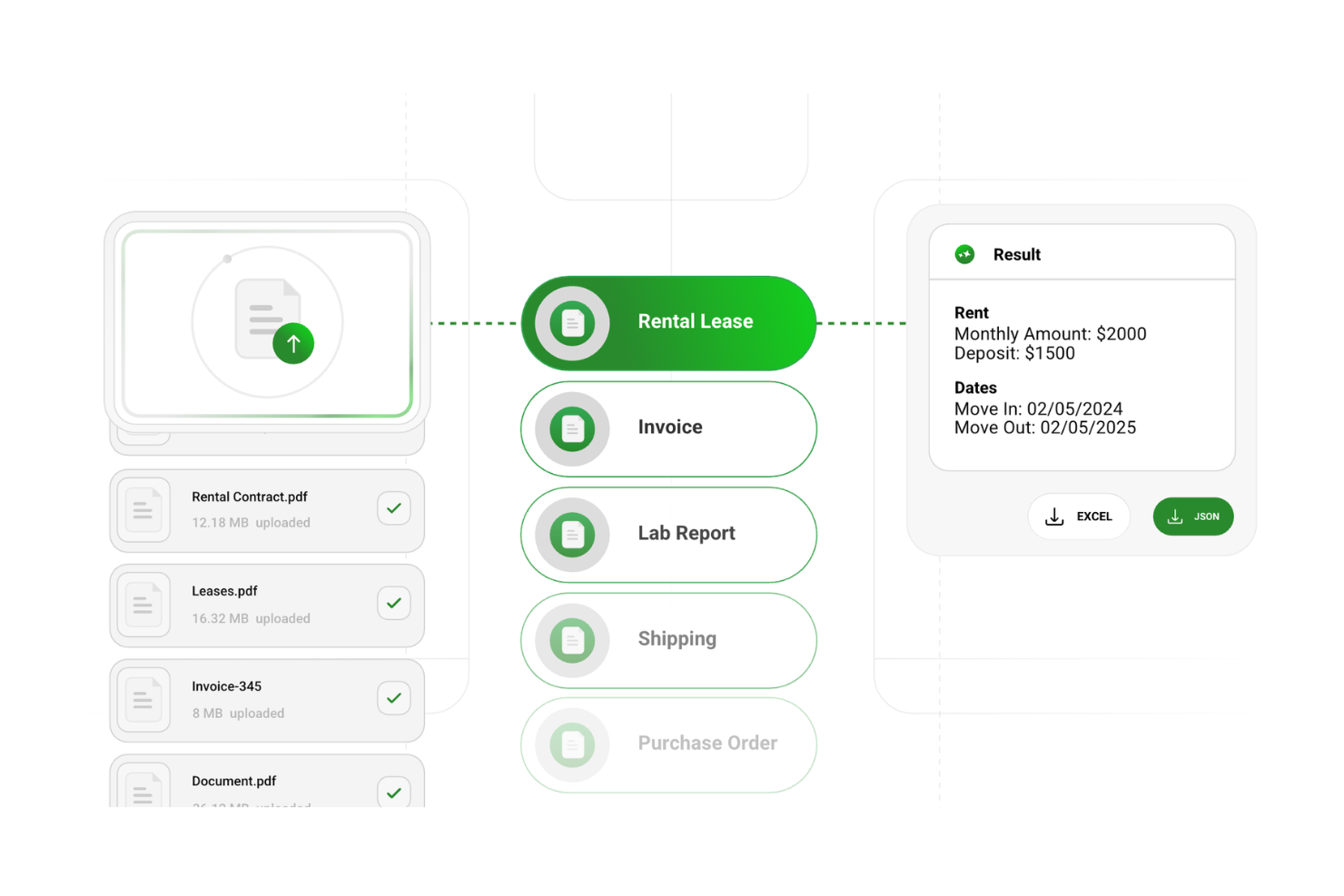
DocuPipe is an AI-powered document extraction platform that helps teams identify and structure sensitive data within complex documents. While it is not a dedicated redaction tool, it supports redaction workflows by locating personally identifiable information (PII) and preparing documents for review, making it useful for organizations handling sensitive data at scale.
Who Is DocuPipe Best For?
DocuPipe suits compliance-driven teams in legal, finance, and healthcare that need to identify and validate sensitive data before redaction or downstream processing.
Why I Picked DocuPipe
I picked DocuPipe because it handles one of the most time-consuming parts of redaction workflows—locating sensitive data across inconsistent document formats. Instead of relying on manual review or fixed templates, users can define what data to detect and apply that logic across a wide range of documents. This makes it easier to prepare documents for redaction, especially when dealing with contracts, invoices, or scanned records that don’t follow a standard structure.
DocuPipe Key Features
- Sensitive data detection: Identify fields such as names, addresses, and financial data using customizable schemas.
- Visual review interface: Highlight and review detected data directly on the document before taking action.
- Document type classification: Automatically categorize documents to apply consistent processing rules.
- Support for complex formats: Extract and analyze data from PDFs, scans, images, and handwritten inputs.
DocuPipe Integrations
DocuPipe offers a well-documented API for custom integrations and supports no-code connectivity through Make (Integromat).
Pros and Cons
Pros:
- Supports human-in-the-loop validation
- Handles unstructured and low-quality documents (scans, images, and various layouts)
- Users can define customizable detection rule
Cons:
- Does not clearly provide irreversible redaction or compliant redacted document outputs.
- Lacks features like permanent masking, redaction logs, or certified output formats
New Product Updates from DocuPipe
DocuPipe Adds Source View and Auto-Refresh Jobs Page
DocuPipe adds Source view comparisons, auto-refreshing jobs, and real-time progress bars to improve document review and processing visibility. The updates help teams monitor extraction and standardization workflows more efficiently. For more information, visit DocuPipe’s official site.
 .
Diğer Belge Redaksiyon Araçları
Aşağıda, seçkime giremeyen ancak yine de göz atmaya değer bazı ek belge redaksiyon aracı seçeneklerini bulabilirsiniz:
- VIDIZMO Redactor
For multimedia redaction
- Docusign
For integrated e-signature features
- iLovePDF
For multilingual support
- Nutrient
For API integration
- PDF24
For offline PDF redaction


How I Evaluate Document Redaction Tools
I split my evaluation into two layers: baseline criteria every tool must meet and differentiators that matter when PMO teams are redacting RFPs, contracts, or compliance documents at scale.
Core Functionality (Table Stakes For This List)
When I'm selecting tools for my list, I rank each one on a scale from 0 (does not offer the functionality) to 5 (excels in this area) for each core functionality listed below. Then, I calculate the tool's total score into a percentage. Each tool needs to achieve a minimum total score of 65% to be considered for inclusion.
- Automated PII Detection: I evaluate how well each tool identifies sensitive data like names, financial details, and ID numbers across project documents—especially in dense RFPs or SOWs.
- Permanent Redaction: The redacted data should be truly gone, not just covered with a black bar. I check whether content remains extractable through copy-paste or metadata.
- Multi-Format Support: Project teams work across PDFs, Word docs, Excel sheets, and images. I look for broad format coverage that matches real project documentation workflows.
- Bulk Redaction Processing: When a PMO needs to sanitize hundreds of contract files for an audit, one-at-a-time redaction falls apart. I evaluate batch processing and shared rule application.
- Manual Redaction Controls: Automated detection misses context-specific terms like internal project codenames. I look for flexible manual tools that let you select text, draw areas, or target image regions.
- Audit Trail & Logging: Compliance audits require proof of what was redacted, by whom, and when. I check whether logs are detailed enough to hold up during regulatory reviews.
Once I have a list of tools that meet this criteria, I consider what sets each platform apart.
Differentiating Factors (What Sets Vendors Apart)
Here's how I compare and contrast different vendors:
Standout Features
I look for reusable redaction templates that let teams apply saved rule sets to recurring documents like SOWs or NDAs without starting from scratch each time. OCR capability is another separator—construction and government project teams often deal with scanned blueprints or signed contracts where text-layer redaction alone won't cut it. I also evaluate collaborative review workflows, where multiple stakeholders can approve proposed redactions before they're finalized.
Beyond Features
Compliance alignment matters a lot here. I check whether a tool supports standards like GDPR, HIPAA, or ITAR, since project teams handling government contracts or healthcare data need defensible redaction. Deployment flexibility is another key factor—some PMOs require on-premise or air-gapped options that cloud-only tools can't offer. I also evaluate how well a tool connects to platforms like SharePoint, Google Drive, or Jira, because redaction that lives outside your project ecosystem creates friction and version control headaches.
Belge Redaksiyon Aracı Nasıl Seçilir?
Uzun özellik listeleri ve karmaşık fiyatlandırma yapıları arasında kaybolmak kolaydır. Kendinize özgü yazılım seçim sürecinizde ilerlerken odağınızı korumanıza yardımcı olmak için aklınızda bulundurmanız gereken faktörleri aşağıda bir kontrol listesi hâlinde bulabilirsiniz:
| Faktör | Dikkate Alınması Gerekenler |
|---|---|
| Ölçeklenebilirlik | Araç ihtiyaçlarınızla birlikte gelişir mi? Performanstan ödün vermeden gelecekte beklediğiniz belge ve kullanıcı sayısını destekleyip desteklemediğini değerlendirin. |
| Entegrasyonlar | Mevcut sistemlerinizle çalışıyor mu? Bulut depolama ve belge yönetim sistemleri gibi mevcut yazılımlarınızla uyumluluğunu kontrol edin. |
| Özelleştirilebilirlik | Aracı iş akışlarınıza göre uyarlayabilir misiniz? Ayarları ve şablonları kendi redaksiyon süreçlerinize uygun şekilde düzenleme seçeneklerini arayın. |
| Kullanım kolaylığı | Ekibiniz için sezgisel mi? Basit bir arayüz, eğitim süresini ve kullanıcı hatalarını azaltır. Öğrenme eğrisini ve kullanıcı geri bildirimlerini değerlendirin. |
| Uygulama ve kullanıma alıştırma | Ne kadar hızlı kullanmaya başlayabilirsiniz? Kurulum için gereken zamanı ve kaynakları değerlendirin. Güçlü destek ve kullanıma alıştırma kaynakları sunan araçları tercih edin. |
| Maliyet | Bütçenize uygun mu? Gizli ücretler veya ek özelliklerin maliyetleri de dâhil olmak üzere fiyatlandırma planlarını karşılaştırın. İlk fiyat yerine uzun vadeli değeri göz önünde bulundurun. |
| Güvenlik önlemleri | Belgeleriniz korunuyor mu? Yetkisiz erişimi önlemek için aracın şifreleme ve erişim denetimleri gibi güvenlik standartlarına uygun olduğundan emin olun. |
| Uyumluluk gereksinimleri | Sektör düzenlemelerini karşılıyor mu? Özellikle hassas verilerle çalışıyorsanız aracın GDPR veya HIPAA gibi ilgili yasalara uyumluluğu desteklediğini doğrulayın. |
Belge Redaksiyon Aracı Nedir?
Belge redaksiyon aracı, belgelerdeki hassas bilgileri kaldırmak veya gizlemek için tasarlanmış bir yazılımdır. Hukuk profesyonelleri, sağlık çalışanları ve uyumluluk görevlileri, gizliliği korumak ve veri düzenlemelerine uyumu sağlamak için genellikle bu araçları kullanır.
Metin redaksiyonu, görüntü redaksiyonu ve uyumluluk takibi gibi özellikler gizliliğin korunmasına ve yasal standartların karşılanmasına yardımcı olur. Bu araçlar, hassas verileri güvenli bir şekilde yönetmesi gereken kuruluşlara önemli destek sağlar.
Belge Redaksiyon Araçlarının Özellikleri
Bir belge redaksiyon aracı seçerken aşağıdaki temel özelliklere dikkat edin:
- Metin redaksiyonu: Hassas metinleri kaldırır veya gizler ve gizli bilgilerin özel kalmasını sağlar.
- Görüntü redaksiyonu: Kullanıcıların belgelerdeki hassas görüntüleri gizlemesine olanak tanıyarak görsel verileri korur.
- Toplu işleme: Birden fazla belgeyi aynı anda işler, zamandan tasarruf sağlar ve verimliliği artırır.
- Uyumluluk takibi: GDPR ve HIPAA gibi veri koruma düzenlemelerine uyulmasını sağlar.
- Entegrasyon olanakları: Sorunsuz bir iş akışı için bulut depolama ve belge yönetimi araçları gibi mevcut sistemlere bağlanır.
- Özelleştirilebilir şablonlar: Kullanıcıların belirli ihtiyaçlara uygun redaksiyon şablonları oluşturmasına olanak tanıyarak tutarlılığı artırır.
- Güvenlik önlemleri: Belgeleri yetkisiz erişime karşı korumak için şifreleme ve erişim denetimleri sağlar.
- Gerçek zamanlı iş birliği: Ekip üyelerinin belgeler üzerinde birlikte çalışmasını sağlayarak üretkenliği artırır.
- Ses ve video redaksiyonu: Çeşitli veri türleriyle ilgilenen sektörler için kullanışlı olan çoklu ortam redaksiyonunu destekler.
- Elektronik imzalar: Entegre imzalama özellikleriyle belge onay süreçlerini kolaylaştırır.
Belge Redaksiyon Araçlarının Faydaları
Bir belge redaksiyon aracının uygulanması ekibiniz ve işletmeniz için çeşitli faydalar sağlar. Yararlanabileceğiniz avantajlardan bazıları şunlardır:
- Geliştirilmiş gizlilik: Hassas bilgileri kaldırarak bu araçlar özel verilerin güvenli ve gizli kalmasına yardımcı olur.
- Düzenleyici uyumluluk: Belgelerinizin GDPR ve HIPAA gibi sektör standartlarını karşılamasını sağlayarak yasal riskleri azaltır.
- Zaman verimliliği: Toplu işleme ve özelleştirilebilir şablonlar redaksiyon sürecini hızlandırarak değerli zamandan tasarruf sağlar.
- Geliştirilmiş iş birliği: Gerçek zamanlı iş birliği özellikleri ekibinizin belgeler üzerinde etkili bir şekilde birlikte çalışmasına olanak tanır.
- Veri güvenliği: Şifreleme ve erişim denetimleri gibi güvenlik önlemleri belgelerinizi yetkisiz erişime karşı korur.
- Çok yönlülük: Metin, görüntü ve çoklu ortam dahil olmak üzere çeşitli veri türlerini destekleyerek farklı işletme ihtiyaçlarını karşılar.
- Kolaylaştırılmış onaylar: Entegre elektronik imzalar, belgelerin imzalanması ve onaylanması sürecini basitleştirir.
Belge Redaksiyon Aracının Maliyetleri ve Fiyatlandırması
Belge redaksiyon araçlarını seçmek, sunulan çeşitli fiyatlandırma modellerinin ve planların anlaşılmasını gerektirir. Maliyetler özelliklere, ekip büyüklüğüne, eklentilere ve daha fazlasına göre değişir. Aşağıdaki tabloda yaygın planlar, bunların ortalama fiyatları ve belge redaksiyon aracı çözümlerinde genellikle bulunan özellikler özetlenmiştir:
Belge Redaksiyon Aracı İçin Plan Karşılaştırma Tablosu
| Plan Türü | Ortalama Fiyat | Yaygın Özellikler |
|---|---|---|
| Ücretsiz Plan | $0 | Sınırlı metin redaksiyonu, temel görüntü redaksiyonu ve minimum depolama. |
| Kişisel Plan | $5-$25/kullanıcı/ay | Metin redaksiyonu, görüntü redaksiyonu, toplu işleme ve temel güvenlik özellikleri. |
| İşletme Planı | $30-$60/kullanıcı/ay | Gelişmiş redaksiyon araçları, uyumluluk takibi, entegrasyon olanakları ve geliştirilmiş güvenlik özellikleri. |
| Kurumsal Plan | $70-$100/kullanıcı/ay | Tam özelleştirme, gerçek zamanlı iş birliği, özel destek ve kapsamlı uyumluluk çözümleri. |
Belge Sansürleme Aracı SSS
Belge sansürleme aracı hakkında sık sorulan soruların bazı yanıtları aşağıda yer alıyor:
Belge sansürleme meta verileri nasıl işler?
Belge sansürleme araçları yalnızca görünür metni gizlemekle kalmaz, aynı zamanda hassas bilgiler içerebilecek gizli meta verileri de kaldırır. Bu, belgeler paylaşılırken hiçbir verinin yanlışlıkla açığa çıkmamasını sağlar. Gizliliği korumak için ekibinizin bu meta verileri otomatik olarak temizleyen araçları kullanması büyük önem taşır.
Belge sansürleme işlemlerinde sık yapılan hatalar nelerdir?
Sık yapılan hatalar arasında, geri alınabilen kalıcı işaretleyiciler gibi temel araçları kullanmak ve belgeleri kapsamlı bir şekilde incelememek yer alır. Ekibiniz, eksiksiz sansürlemeyi garanti eden özel yazılımlara güvenmeli ve gözden kaçan bilgileri tespit etmek için birden fazla inceleme gerçekleştirmelidir.
Hukuk ekipleri sansürleme araçları konusunda ne sıklıkla eğitim almalıdır?
En iyi uygulamalara ve yasal gerekliliklere ayak uydurmak için düzenli eğitim şarttır. Ekibiniz, yeni özellikler, uyumluluk güncellemeleri ve etkili sansürleme teknikleri hakkında bilgi sahibi olmak için en az yılda bir eğitim oturumlarına katılmalıdır.
Sansürleme süreçlerinde birden fazla inceleme neden önemlidir?
Birden fazla inceleme, hassas hiçbir bilginin gözden kaçırılmamasını sağlar. Sansürlenmiş belgeleri birden fazla ekip üyesinin incelemesi, hata ve eksikliklerin tespit edilmesine yardımcı olur; böylece veri ihlali riski azaltılır ve yasal standartlara uyum sağlanır.
Sansürleme sırasında hangi yasal protokoller dikkate alınmalıdır?
Medeni Usul Kuralları gibi yasal protokoller, her sansürleme işlemi için açık bir gerekçe sunulmasını gerektirir. Ekibiniz bu gerekliliklerin farkında olmalı ve şeffaflığı ve hesap verebilirliği korumak için sansürleme işlemlerini belgelemelidir.
Sansürleme araçları GDPR ve HIPAA uyumluluğunu nasıl destekler?
Sansürleme araçları; Sosyal Güvenlik numaraları ve finansal bilgiler gibi kişisel tanımlayıcıları güvenli bir şekilde kaldırarak GDPR ve HIPAA uyumluluğuna yardımcı olur. Bu araçlar, belgelerinizin söz konusu düzenlemelerin gerektirdiği sıkı veri koruma şartlarını karşılamasını sağlar.