

2026’da İncelenen En İyi 10 Açık Kaynak Proje Yönetimi Yazılımı

En İyi Açık Kaynaklı Proje Yönetimi Yazılımları Kısa Listesi


Projeleri yönetmek, aynı anda çok fazla top çevirmek gibi hissettirebilir. Son teslim tarihleri, ekip koordinasyonu ve kaynak tahsisi, her gün karşılaştığınız zorluklardan yalnızca birkaçıdır. Açık kaynaklı proje yönetimi yazılımları, bütçenizi zorlamadan her şeyi kontrol altında tutmanıza yardımcı olabilir.
Bu araçları test edip incelemek için zaman harcadım ve sizin ve ekibiniz için gerçekten önemli olan noktalara odaklandım. Sektörü iyi tanıyorum ve amacım, mevcut en iyi seçeneklere dürüst bir bakış sunmak.
Bu makalede, en iyi açık kaynaklı proje yönetimi yazılımları hakkında tarafsız incelemeler bulacaksınız. Güçlü yönlerini ve özel ihtiyaçlarınızı nasıl karşılayabileceklerini vurgulayacağım. Haydi başlayalım ve ekibiniz için en uygun seçeneği bulalım.
Yazılım Önerilerimize Neden Güvenebilirsiniz?
Ekibimiz 2012’den beri yazılımları test ediyor ve inceliyor. Biz de proje yöneticisi olduğumuz için doğru yazılımı seçmenin ne kadar zor ve önemli olduğunu biliyoruz.
Bu rehber için araçları uygulamalı testler ve bağımsız araştırmalarla değerlendirdik ve seçim kriterlerimize göre puanladık. Ayrıca sektörün fikir önderlerinin ve alanında çalışan proje yönetimi uzmanlarının görüşlerinden de yararlanıyoruz.
İncelemelerimiz bir satış konuşması değil, editör ekibimizin kendi değerlendirmesidir.
Uzman inceleyenler:
Açık Kaynaklı Proje Yönetimi Yazılımları Karşılaştırma Tablosu
Bu karşılaştırma tablosu, en iyi açık kaynaklı proje yönetimi yazılımı seçimlerim için fiyatlandırma ayrıntılarını özetlemektedir.
Score legend (out of 5)
- Excellent 4.5–5
- Good 4–4.4
- Average 3–3.9
- Below average 2–2.9
- Poor 1–1.9
| Tool | Starting Price | Website | |||||||
|---|---|---|---|---|---|---|---|---|---|
| Best for MIT-licensed Kanban self-hosting | 3.8 out of 5 | 4 | 4 | 3 | 5 | 4 | 3 | €50/year Free plan available | Website |
| Best for dev-team Git and GitHub sync | 4.2 out of 5 | 4 | 5 | 4 | 4 | 4 | 4 | Pricing upon request Free plan available | Website |
| Best for privacy-first file and task hosting | 3.5 out of 5 | 4 | 2 | 4 | 5 | 2 | 4 | 71.29€/user/year 1-hour free trial | Website |
| Best for self-hosted no-paywall task ownership | 3.7 out of 5 | 4 | 4 | 3 | 4 | 4 | 3 | €4/month Free plan available | Website |
| Best for lean startup project workflows | 3.5 out of 5 | 4 | 4 | 3 | 4 | 3 | 3 | $10/user/month Free plan available; 14-day free trial | Website |
| Best for Agile teams with Git-linked work packages | 4.2 out of 5 | 4 | 5 | 4 | 4 | 5 | 3 | €5.95/user/month Free plan available; 14-day free trial available for Enterprise Cloud and on-premises | Website |
| Best for planning tied to Git repos and pipelines | 3.5 out of 5 | 4 | 4 | 4 | 3 | 3 | 3 | $29/user/month Free plan + free trial available | Website |
| Best for plugin-driven customization | 3.2 out of 5 | 3 | 4 | 3 | 3 | 3 | 3 | Pricing upon request Free plan + demo available | Website |
| Best for connected project and business workflows | 3.2 out of 5 | 3 | 4 | 4 | 2 | 4 | 2 | $38.90/user/month Free plan + free trial available | Website |
| Best for CRM-integrated self-hosted projects | 3.2 out of 5 | 3 | 5 | 4 | 1 | 5 | 1 | $49/month Free plan + 15-day free trial + free demo available | Website |
En İyi Açık Kaynaklı Proje Yönetimi Yazılımları İncelemeleri
Aşağıda, kısa listemde yer alan en iyi açık kaynaklı proje yönetimi yazılımları hakkında ayrıntılı özetlerimi bulabilirsiniz. İncelemelerim, her aracın temel özelliklerine, avantajlarına & dezavantajlarına, entegrasyonlarına ve ideal kullanım alanlarına ayrıntılı bir bakış sunarak sizin için en uygun olanı bulmanıza yardımcı olur.

WeKan
Best for MIT-licensed Kanban self-hosting
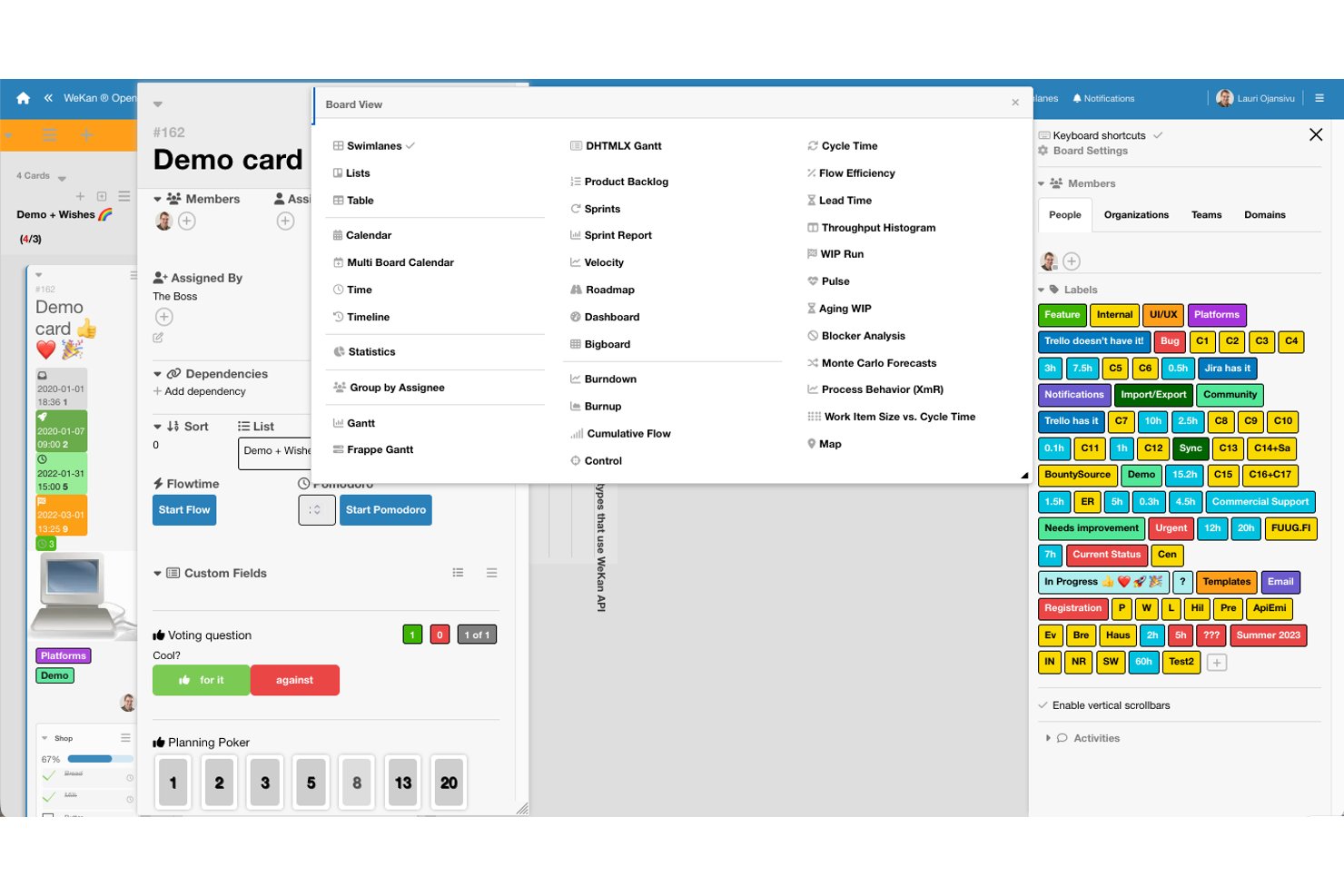
WeKan is a self-hosted, MIT-licensed open-source Kanban tool that offers boards, swimlanes, custom fields, automation rules, multiple project views, and REST API access for managing tasks and team workflows.
Who Is WeKan Best For?
WeKan is a strong fit for technical teams and IT leads who want full control over their project data through self-hosted deployment.
Why I Picked WeKan
WeKan earns its spot on my list because it's one of the few Kanban tools built entirely on an MIT license, meaning you can inspect, fork, and modify every line of code without restriction. I find its self-hosting story especially practical: you get Docker and Kubernetes deployment out of the box, LDAP and OIDC sign-in for enterprise identity management, and nine granular per-board roles so you're not choosing between open access and security. The trigger-to-action automation rules and outgoing webhooks also mean your team can wire WeKan into existing workflows without touching paid add-ons.
WeKan Key Features
- Multiple board views: WeKan includes Swimlanes, Calendar, Gantt, Table, and Stats views so you can switch between visual formats depending on how your team tracks work.
- Granular per-board roles: Nine distinct roles—from admin to read-assigned-only—let you control exactly what each team member can see and do on any given board.
- Import from Trello, Jira, and more: WeKan accepts imports from Trello JSON and ZIP, Jira, Kanboard, CSV, TSV, and Excel, with member mapping included.
- Flexible storage backends: Attachments and avatars can be stored on a filesystem, S3/MinIO, Azure Blob Storage, or Google Cloud Storage, depending on your infrastructure setup.
WeKan Integrations
WeKan documents integrations with Slack and Matrix. Its REST API supports custom integrations.
Pros and Cons
Pros:
- Trigger-based rules automate repeatable board actions
- Calendar and Gantt views add timeline visibility
- MIT licensing enables unrestricted self-host customization
Cons:
- Board-wide lists constrain swimlane-specific workflows
- Mobile access remains limited for on-the-go teams

Plane
Best for dev-team Git and GitHub sync

Plane is an open-source project management platform that combines task tracking, cycles, modules, timeline visualization, and collaborative pages—with native Git integrations and self-hosting options across Docker and Kubernetes.
Who Is Plane Best For?
Plane is a strong fit for software development teams and technical leads who want open-source project management they can self-host and extend on their own infrastructure.
Why I Picked Plane
I picked Plane as one of the best because real-time collaboration is genuinely baked into how the platform works—work-item changes sync instantly across the team, so when a dev updates a task status or shifts a timeline bar in the Gantt view, everyone sees it without a manual refresh. I also love that cycles tie directly into this: your team can track burndown live during a sprint, transfer unfinished items automatically, and keep the whole board current without coordination overhead.
Plane Key Features
- GitHub and GitLab sync: Connect repositories to sync issues, labels, assignees, and states, and map pull-request events directly to work-item states.
- AGPL-3.0 open-source license: Access, fork, and self-host the full source code with no user limits on the Community Edition.
- Self-hosting on Docker and Kubernetes: Deploy Plane on your own infrastructure using Docker Compose, Kubernetes with Helm, or Docker Swarm.
- Custom workflow automations: Set trigger-based automations to move work items through states and fire actions at the project level.
Plane Integrations
Plane offers 50+ marketplace integrations, including GitHub, GitLab, Jira, Slack, Confluence, Notion, Asana, ClickUp, Linear, and Sentry. Its REST API, webhooks, OAuth 2.0 apps, Node.js and Python SDKs, and MCP server support custom integrations.
Pros and Cons
Pros:
- Cycles make sprint progress visible
- Self-hosting preserves project data control
- Real-time updates keep teams aligned
Cons:
- Self-hosting requires customer-managed backups and upgrades
- Reporting gaps force spreadsheet workarounds

Best for privacy-first file and task hosting
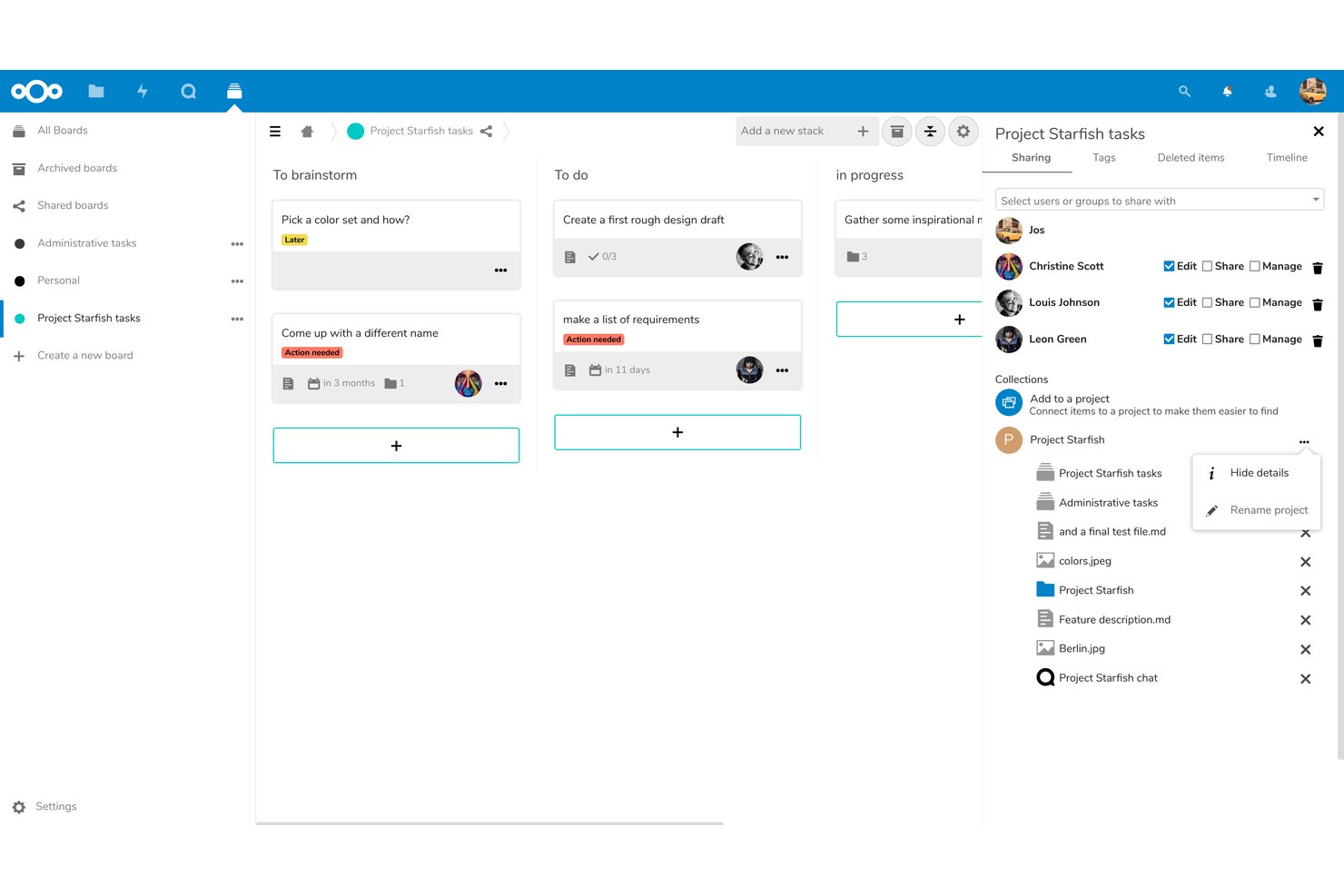
Nextcloud Hub is a self-hosted, open-source digital workspace that combines file sync and sharing, Kanban task boards via Deck, team chat and video through Talk, and collaborative document editing under a single AGPLv3-licensed platform.
Who Is Nextcloud Best For?
Nextcloud Hub is a strong fit for IT-led teams and privacy-conscious organizations that need to self-host their files and collaboration tools on their own infrastructure.
Why I Picked Nextcloud
I've included Nextcloud in my top picks because it's the only platform on this list where your files, Kanban boards, and team chat all live on infrastructure you fully control. I like that Deck lets you assign cards, set due dates, and visualize work on a Gantt-style timeline without touching a third-party server. For teams where data residency isn't optional, such as those handling patient records or government contracts, Nextcloud's AGPLv3 licensing and on-premises deployment make it a genuinely rare find.
Nextcloud Key Features
- AGPLv3 open-source licensing: The full source code is publicly available on GitHub, letting your team inspect, fork, and modify the codebase under AGPLv3 terms.
- End-to-end encryption for files: Selected folders can be encrypted client-side so the server never has access to their contents, supporting strict data-handling requirements.
- Nextcloud Flow workflow automation: Configurable triggers and actions automate processes across Hub apps, including file handling, notifications, and approval requests.
- 600+ app store extensions: A built-in marketplace lets you add integrations and tools—including time tracking and OpenProject connectivity—directly to your self-hosted instance.
Nextcloud Integrations
Nextcloud offers native integrations with Microsoft Outlook, Exchange, SharePoint, Teams, and Office Online Server, plus marketplace integrations for OpenProject, GitHub, GitLab, Jira, Slack, and Collabora Online. REST, PHP, and WebDAV APIs support custom integrations.
Pros and Cons
Pros:
- Shared boards connect tasks with files and chat
- Open-source licensing supports inspection and modification
- Self-hosting keeps project data under your control
Cons:
- Updates and maintenance require ongoing technical effort
- Deck lacks depth for complex project planning

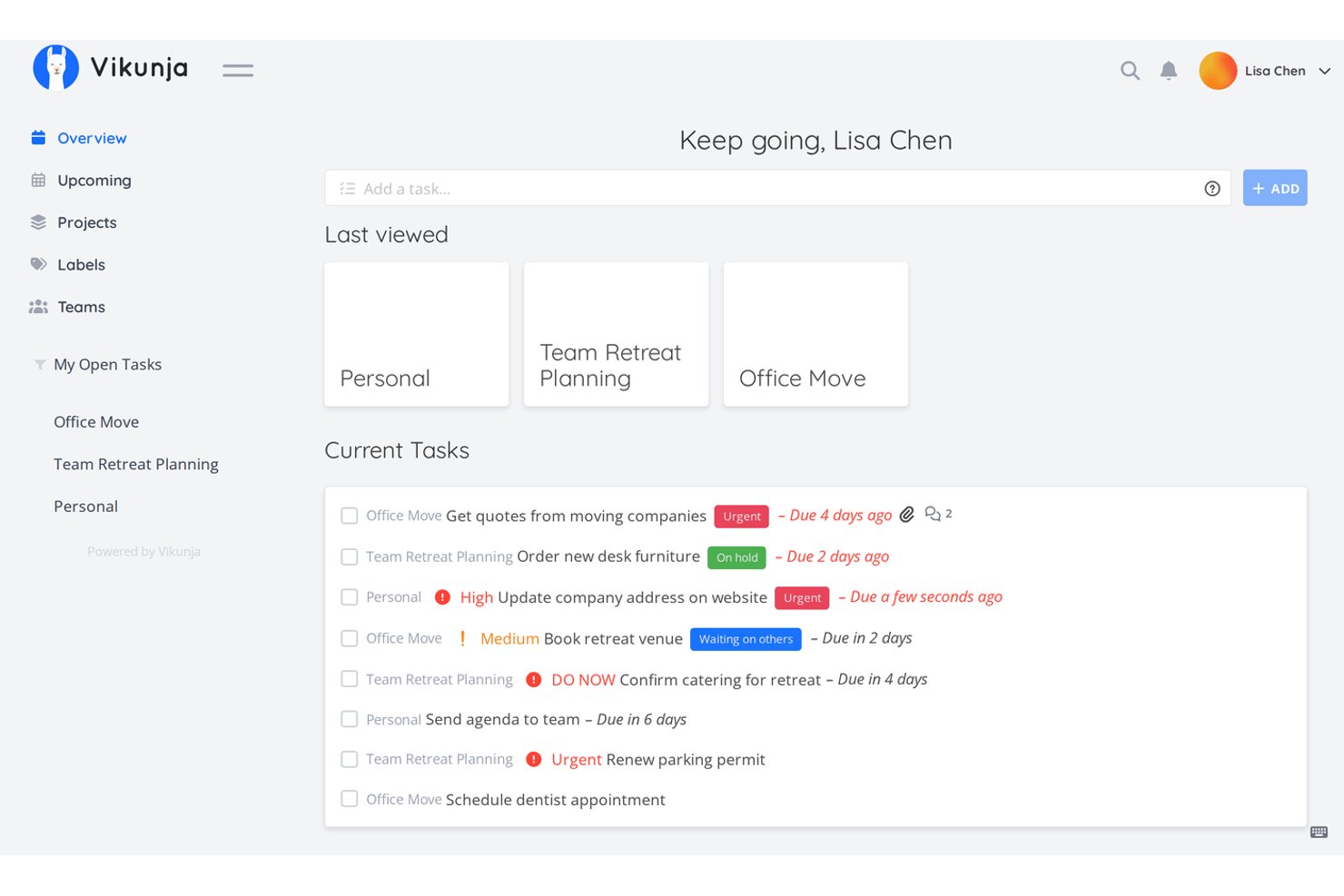
Vikunja is an open-source task management tool that supports list, Kanban, Gantt, and table views, with self-hosting options across Docker, Kubernetes, and multiple database backends.
Who Is Vikunja Best For?
Vikunja suits technical teams and budget-conscious admins who want full control over their project data without paying per-seat fees.
Why I Picked Vikunja
Vikunja earns its spot on my shortlist because it's one of the few open-source task managers that gives you genuinely full control, no paywalled core features, no per-seat pressure. I like that you can run it on Docker or Kubernetes with your choice of database backend, MySQL, PostgreSQL, or SQLite, so your data stays exactly where you put it. The Gantt, Kanban, list, and table views all work on the self-hosted edition without upgrading to a paid tier.
Vikunja Key Features
- Natural-language task creation: Type a task with keywords to automatically populate due dates, labels, and assignees in one step.
- CalDAV integration: Sync your tasks with any CalDAV-compatible calendar or task app outside of Vikunja.
- Task relations: Link tasks across different projects as subtasks, blocking tasks, or related items to map dependencies.
- Share links: Generate a shareable project link that lets others view or edit tasks without creating an account.
Vikunja Integrations
Vikunja offers native integrations with CalDAV, Todoist, Trello, Microsoft To-Do, WeKan, Thunderbird, and Apple Reminders. It also provides a REST API, OpenAPI specification, and webhooks for custom integrations and workflow automation.
Pros and Cons
Pros:
- Cross-project task relations clarify dependencies
- Docker deployment gets teams to Kanban quickly
- Four views support varied planning workflows
Cons:
- Failed webhooks aren't automatically retried
- Bulk editing remains a requested gap


Leantime is an AGPLv3-licensed, self-hostable open-source project management tool that combines task tracking, Kanban boards, milestone-based timelines, sprints, backlog management, and time tracking in a single platform.
Who Is Leantime Best For?
Leantime is a strong fit for small technical teams and budget-conscious organizations that want to self-host their project management tools without paying ongoing subscription fees.
Why I Picked Leantime
I've included Leantime in my top picks because it's one of the few open-source tools built around lean methodology from the ground up, not just bolted on after. I love how it connects strategic goals all the way down to individual tasks, so a small dev team can tie sprint work to a defined focus area without juggling separate tools. Its AGPLv3 Community Edition includes sprints, backlog management, Kanban, milestones, and time tracking at no cost, self-hosted on your own infrastructure.
Leantime Key Features
- AGPLv3 open-source license: Leantime's source code is publicly available on GitHub, letting teams self-host, inspect, and modify the codebase freely.
- Plugin marketplace: A dedicated marketplace offers one-time-purchase plugins for whiteboards, custom fields, recurring tasks, and more, extending the core system without touching core code.
- Role-based access control: Teams can assign roles including Owner, Admin, Editor, Commenter, and Read-Only, with project-specific permissions that limit what each user can see and do.
- CSV timesheet export: Time logged across tasks and projects can be pulled into a timesheet and exported as a CSV file for reporting or invoicing.
Leantime Integrations
Leantime offers native integrations with Slack, Discord, Mattermost, and ICS calendar export. It also provides an API for custom integrations.
Pros and Cons
Pros:
- Documented Docker setup supports self-hosting
- Milestones connect dated work to timelines
- Reviewers praise combined project and time tracking
Cons:
- Premium prompts and paid features frustrate users
- Tasks allow only one assignee

Best for Agile teams with Git-linked work packages

OpenProject is a GPLv3-licensed, self-hostable project management platform covering work package tracking, interactive Gantt charts, Scrum and Kanban boards, time tracking, and team collaboration across both cloud and on-premises deployments.
Who Is OpenProject Best For?
OpenProject suits software development managers and technical teams who need a self-hostable, agile-ready platform with native GitHub and GitLab integration built in.
Why I Picked OpenProject
OpenProject earns its spot as one of the best on my shortlist because its native GitHub and GitLab integrations let dev teams link pull requests, branches, and merge requests directly to work packages, keeping sprint boards and code activity in sync. I also love that it pairs this with full Scrum support: product backlogs, sprint boards, story points, and burndown charts are all built in. That combination makes it a natural fit for agile teams who want one self-hostable platform bridging planning and development.
OpenProject Key Features
- Time tracking and cost reporting: Log hours daily or weekly per work package, assign labour rates, and generate PDF timesheets and filtered cost reports.
- Role-based access control: Define granular permissions at the project level and manage user groups with fine-grained roles across your instance.
- Baseline comparison: Compare snapshots of your work packages over time to track how scope, dates, or assignments have shifted.
- REST API: Connect external systems, automate actions, or build custom plugins using OpenProject's documented API v3.
OpenProject Integrations
OpenProject offers native integrations with GitHub, GitLab, Nextcloud, OneDrive, SharePoint, XWiki, Autodesk Revit, and openDesk. Its REST API v3, SCIM, MCP, and BCF API support custom connectivity.
Pros and Cons
Pros:
- Work-package structures adapt to team workflows
- Gantt views clarify timelines and dependencies
- Self-hosting keeps project data under your control
Cons:
- Task search can make items harder to find
- Initial setup demands administrator time

GitLab
Best for planning tied to Git repos and pipelines
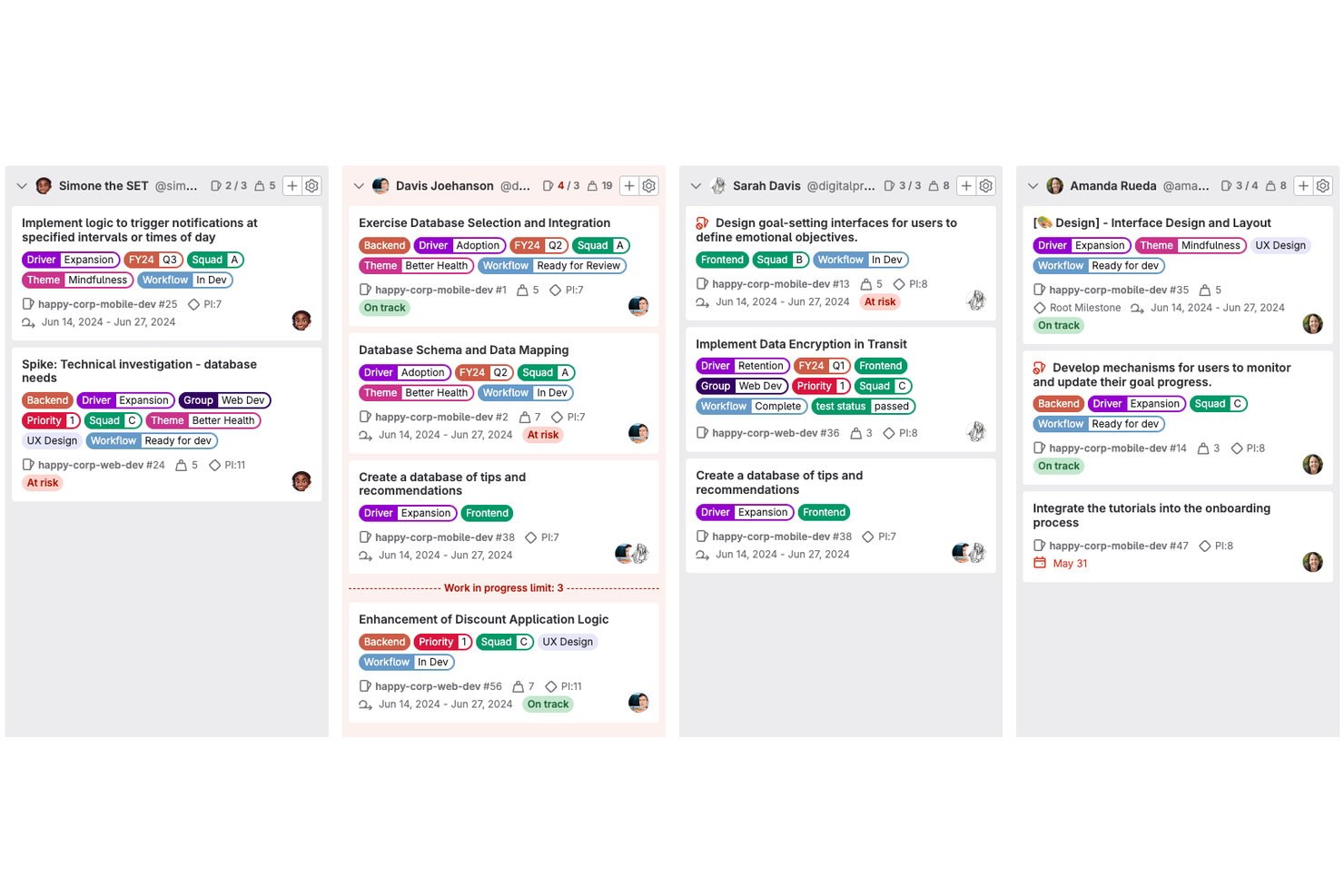
GitLab is an open-source DevOps platform that combines source code management, CI/CD pipelines, issue tracking, project boards, milestones, epics, and roadmaps into a single unified tool.
Who Is GitLab Best For?
GitLab is the strongest fit for software development teams that want project planning, code review, and CI/CD pipelines managed in one place.
Why I Picked GitLab
GitLab earns its spot on my shortlist because it's the only tool here that treats your Git repositories and project boards as the same thing, not two separate systems you have to sync. I love how issues link directly to merge requests and CI/CD pipelines, so when a developer closes a branch, the connected issue moves automatically. Epics and milestones give development managers a roadmap view that reflects real code progress, not just manually updated cards.
GitLab Key Features
- Self-managed deployment: Install and run GitLab on your own infrastructure using Linux packages, Docker, Helm Chart, or GitLab Operator.
- Issue boards: Visualize and manage work as cards across customizable lists based on labels, assignees, milestones, or iterations.
- CI/CD pipeline automation: Define pipelines in
.gitlab-ci.ymlto automatically build, test, and deploy code on commits or merge requests. - Time tracking: Log time estimates and time spent on issues, tasks, and merge requests, then pull time-entry reports per item.
GitLab Integrations
GitLab offers native integrations with Asana, Confluence, GitHub, Jira, Slack, Microsoft Teams, Mattermost, and Discord. REST, GraphQL, webhooks, and OAuth 2.0 APIs support custom integrations, while marketplace integrations extend connectivity.
Pros and Cons
Pros:
- Free boards support basic project tracking
- Self-hosting gives teams infrastructure control
- Issues connect directly to code and pipelines
Cons:
- Roadmaps and advanced boards require paid tiers
- Project workflows can feel clunky to newcomers
Redmine
Best for plugin-driven customization

Redmine is a self-hosted, open-source project management tool that combines issue tracking, multi-project organization, Gantt charts, time logging, wikis, and source code repository browsing across a wide range of version control systems.
Who Is Redmine Best For?
Redmine is a strong fit for technical teams and dev-focused organizations that want a self-hosted, free project management tool they can shape through plugins and configuration.
Why I Picked Redmine
I've included Redmine in my top picks because its plugin directory is genuinely one of the most extensive I've seen in the open-source project management space, letting you bolt on features like Agile boards, custom themes, and advanced reporting without touching the core codebase. I also like that it natively supports Git, Subversion, Mercurial, and Bazaar in a single instance, so development teams working across mixed SCM environments don't have to compromise. The configurable role-and-tracker workflow system means you can define exactly which status transitions each role can make per issue type.
Redmine Key Features
- Multi-project management: Run multiple projects in a single instance, each with its own enabled modules, visibility settings, and user role assignments.
- Custom fields: Add custom fields to issues, time entries, projects, and users in formats like text, date, dropdown, or checkbox to capture project-specific data.
- Time tracking and reporting: Log time at the project or issue level and view time reports broken down by user, issue type, category, or activity.
- LDAP authentication: Authenticate users against multiple LDAP directories, with optional automatic account creation when a user is found.
Redmine Integrations
Redmine supports five documented native source-control integrations: Git, Subversion, CVS, Mercurial, and Bazaar. Its REST API supports XML and JSON for custom integrations.
Pros and Cons
Pros:
- Issue tracking spans multiple projects
- Role-based workflows fit varied issue processes
- Plugin ecosystem extends workflows and themes
Cons:
- Setup and upkeep require technical administration
- Dated interface makes navigation harder


Odoo is an open-source business suite with a dedicated Project app that covers task tracking, Kanban and Gantt views, milestone management, time tracking, and built-in billing across connected business workflows.
Who Is Odoo Best For?
Odoo suits small to mid-sized businesses that want project management built into a broader suite covering sales, billing, and time tracking.
Why I Picked Odoo
I've included Odoo in my top picks because it covers business management in a way that most open-source project tools simply don't attempt. I love how the Project app connects directly to billing, where you can invoice clients by milestone or time spent without leaving the platform. Kanban, Gantt, and dependency-based task scheduling are all built in, so your project workflows stay tied to real business outcomes like sales orders and profitability reports.
Odoo Key Features
- LGPLv3 community edition: The Community edition source code is publicly available on GitHub and licensed under LGPLv3, so you can inspect, modify, and self-host it.
- Customer portal access: External clients can log in to a dedicated portal to view their tasks and communicate directly within the project.
- Burndown chart: A built-in burndown chart lets you monitor actual project progress against the original plan over time.
- Automated actions: You can configure rules to trigger task assignments, record updates, or email notifications based on user activity or a set schedule.
Odoo Integrations
Odoo offers native integrations across its ecosystem, including Sales, Planning, Timesheets, Field Service, Accounting, and Documents. Custom-plan users can connect external systems through XML-RPC and JSON-RPC APIs.
Pros and Cons
Pros:
- Connect project effort with profitability reporting
- Map milestones and task dependencies
- Track progress across projects and colleagues
Cons:
- Enterprise licensing limits open-source completeness
- Complex schedules can require custom work


Bitrix24 is a self-hosted workspace platform that combines project and task management, CRM, team messaging, video conferencing, HR tools, and workflow automation in a single on-premise deployment with source-code access.
Who Is Bitrix24 Best For?
Bitrix24 On-Premise is a strong fit for mid-sized teams that need task management, CRM, and team communication hosted on their own infrastructure.
Why I Picked Bitrix24
I've included Bitrix24 in my top picks because it brings together task management, CRM, team chat, and video conferencing in a single self-hosted deployment, which is a rare combination for distributed teams. I particularly like the Gantt chart's four dependency types (Finish-to-Start, Start-to-Finish, and so on), where shifting one task date automatically cascades to dependents. The built-in Scrum tooling, including sprint backlogs, burndown charts, and team velocity tracking, means remote teams can run full Agile delivery without bolting on a separate tool.
Bitrix24 Key Features
- Source code access: You get full access to the product's source code to customize layouts, modules, branding, and localization for your own deployment.
- CoPilot AI assistant: An AI assistant built into the workspace handles tasks like generating content, summarizing information, and supporting day-to-day work.
- Role-based access rights: Administrators can define granular user permissions across the workspace, with LDAP and Active Directory integration for identity management.
- Workflow automation rules: Task automation rules trigger actions—like sending notifications or creating follow-up tasks—when a task reaches a specified stage.
Bitrix24 Integrations
Bitrix24 documents integrations with Office 365, Microsoft Exchange calendars, Microsoft SharePoint Lists, LDAP, and Active Directory. Its Market lists 830+ apps, including QuickBooks and Zapier for CRM, while REST API, events, and webhooks support custom integrations.
Pros and Cons
Pros:
- Task discussions and files stay with assignments
- Scrum backlogs include burndown and velocity tracking
- Gantt dependencies reschedule linked tasks automatically
Cons:
- Dense interface and slow performance frustrate reviewers
- Proprietary licensing blocks genuine open-source freedoms
Diğer Açık Kaynaklı Proje Yönetimi Yazılımları
İşte kısa listemde yer almayan ancak yine de göz atmaya değer bazı ek açık kaynaklı proje yönetimi yazılımı seçenekleri:
- Huly
For all-in-one remote team workspaces
- Kaneo
For Git-linked task and time tracking
- Orangescrum
For nonprofits self-hosting without user limits
- ERPNext
For open-source ERP-linked projects
- Tuleap
For dev lifecycle tracking in one place
- Taiga
For small startups on agile workflows
- Kanboard
For dev-tool-linked Kanban workflows
- Worklenz
For open-source resource planning
- ProjeQtOr
For multi-project Gantt and budget tracking
- Ever Teams
For time-tracked open source team work


How I Evaluate Open Source Project Management Software
I split my evaluation into three parts, with core functionality carrying the most weight: inspect and modify the code, assign tasks, track deadlines, and show progress. Next, I look for standout features such as Git-linked tasks. Finally, I consider support, onboarding, and pricing value.
Core Functionality (Table Stakes For This List)
When I'm selecting tools for my list, I score each one on a scale from 0 (does not offer the functionality) to 5 (excels in this area) for each core functionality listed below. I then convert the total into a percentage to help assess each tool's overall fit, with extra weight on any functionalities I’ve deemed essential.
- Source Code (Essential): I check for a public repository, a recognized open-source license, and clear rights to inspect, modify, and contribute changes.
- Task & Project Tracking (Essential): For a launch or sprint, I look for ways to create, assign, organize, and track work through completion.
- Self-Hosting: I look for official deployment guidance that helps a team run the software on its own infrastructure and manage updates.
- Team Collaboration: I assess whether teammates can discuss tasks, share project files, and receive notifications tied to work.
- Community Contributions: I check for a public issue tracker, contribution guidance, and clear ways for developers to participate.
- Scheduling Views: I look for calendar, board, or Gantt views that help teams track deadlines, milestones, and shifting dependencies.
Once I have a list of tools that meet the criteria, I consider what sets each platform apart.
Differentiating Factors (What Sets Vendors Apart)
Here's how I compare and contrast different vendors:
Standout Features
I look for native Git integration that links commits and pull requests directly to tasks—when a developer pushes a fix in GitHub or Gitea, the related ticket updates automatically. Built-in CI/CD hooks matter too, since tracking build status from a project board saves context-switching during release sprints. I also evaluate each tool's custom workflow automation, checking whether teams can script rules for recurring processes like auto-assigning QA reviews without paying for add-ons.
Beyond Features
I evaluate deployment flexibility first—Docker and Kubernetes support matters when your IT team needs to match existing infrastructure. Community health is just as telling: I check commit frequency and issue response times, since a stalled repo means you're on your own when something breaks. I also weigh total cost of ownership, because eliminating per-seat fees means little if server maintenance and admin labor eat the savings.
Açık Kaynaklı Proje Yönetimi Yazılımı Nasıl Seçilir?
Uzun özellik listeleri ve karmaşık fiyatlandırma yapıları arasında kaybolmak kolaydır. Kendinize özgü yazılım seçim süreciniz üzerinde çalışırken odağınızı korumanıza yardımcı olmak için göz önünde bulundurmanız gereken faktörlerin bir kontrol listesini burada bulabilirsiniz:
| Faktör | Dikkat Edilmesi Gerekenler |
|---|---|
| Ölçeklenebilirlik | Aracın ekibinizle birlikte nasıl büyüdüğünü değerlendirin. İhtiyaçlarınız arttıkça daha fazla projeyi ve kullanıcıyı destekleyebilir mi? İleride kısıtlamaya dönüşebilecek bir proje boyutu veya kullanıcı sayısı sınırı olup olmadığını kontrol edin. |
| Entegrasyonlar | Mevcut araçlarınızla entegrasyon ihtiyaçlarını değerlendirin. Slack, GitHub veya Trello gibi yazılımlara kolayca bağlanabiliyor mu? Manuel geçici çözümler gerektirmeden sorunsuz veri akışını desteklediğinden emin olun. |
| Özelleştirilebilirlik | Aracı iş akışlarınıza uyacak şekilde ne ölçüde özelleştirebileceğinizi değerlendirin. Panoları, alanları veya raporları süreçlerinize uyacak şekilde ayarlayabilir misiniz? Esneklik eksikliği ekibiniz için fazladan iş anlamına gelebilir. |
| Kullanım kolaylığı | Arayüzün ekibiniz için sezgisel olup olmadığını belirleyin. Başlamak için kapsamlı bir eğitime ihtiyaç duyacaklar mı? Dik bir öğrenme eğrisi, benimsenmeyi yavaşlatabilir ve verimliliği azaltabilir. |
| Uygulama ve işe alıştırma | Kurulum sürecini ve destek materyallerini inceleyin. Ekibinizin hızlı bir şekilde başlamasına yardımcı olacak öğreticiler, şablonlar veya kullanıcı kılavuzları var mı? Yetersiz işe alıştırma, araçtan beklediğiniz faydaların gecikmesine neden olabilir. |
| Maliyet | Fiyatlandırmayı bütçenizle karşılaştırın. Belirli özellikler için gizli ücretler veya ek maliyetler var mı? Destek ya da bakım ücretleri de dahil olmak üzere toplam sahip olma maliyetini göz önünde bulundurun. |
| Güvenlik önlemleri | Aracın güvenlik standartlarınızı karşıladığından emin olun. Veri şifreleme, düzenli yedekleme ve erişim denetimleri sunuyor mu? Güvenlik açıkları, veri ihlallerine ve hassas bilgilerin kaybına yol açabilir. |
Açık Kaynaklı Proje Yönetimi Yazılımı Nedir?
Açık kaynaklı proje yönetimi yazılımı, kullanıcıların kodu değiştirme ve özelleştirme esnekliğiyle görevleri, projeleri ve kaynakları yönetmesine olanak tanıyan bir araç türüdür. Bu araçlar genellikle benzersiz iş akışlarına uyum sağlayabilecek çözümlere ihtiyaç duyan proje yöneticileri, ekip liderleri ve BT profesyonelleri tarafından kullanılır. Görev yönetimi, planlama ve iş birliği özellikleri projeleri düzenlemeye, iletişimi geliştirmeye ve ilerlemeyi takip etmeye yardımcı olur. Genel olarak bu araçlar, ekibinizin ihtiyaçlarıyla birlikte gelişebilen özelleştirilebilir çözümler sunarak değer sağlar.
Özellikler
Açık kaynaklı proje yönetimi yazılımı seçerken aşağıdaki temel özelliklere dikkat edin:
- Görev yönetimi: Görevler oluşturmanıza, atamanıza ve takip etmenize olanak tanıyarak kimden neyin sorumlu olduğunu ve teslim tarihini netleştirir.
- Özelleştirilebilir iş akışları: Süreçleri ekibinizin özel ihtiyaçlarına uyacak şekilde düzenlemenizi sağlayarak verimliliği ve uyarlanabilirliği artırır.
- İş birliği araçları: Ekip üyeleri arasındaki iletişimi ve bilgi paylaşımını kolaylaştırarak herkesin aynı bilgiye sahip olmasını sağlar.
- Zaman takibi: Görevler ve projeler için harcanan zamanı izlemenizi sağlayarak bütçeleme ve verimlilik analizine yardımcı olur.
- Raporlama ve analiz: Proje performansı hakkında içgörüler sunarak karar alma süreçlerine yardımcı olur ve iyileştirme alanlarını belirler.
- Entegrasyon yetenekleri: Ekibinizin hâlihazırda kullandığı diğer yazılım araçlarına bağlanarak sorunsuz veri akışı sağlar ve manuel çalışmayı azaltır.
- Güvenlik önlemleri: Şifreleme ve erişim denetimleri gibi özelliklerle verilerinizi koruyarak hassas bilgilerin güvende kalmasını sağlar.
- Ölçeklenebilirlik: Ekibiniz büyüdükçe daha fazla projeyi ve kullanıcıyı destekleyerek büyümeyi mümkün kılar.
- Kullanıcı dostu arayüz: Gezinmesi kolay, sezgisel bir tasarım sunarak yeni kullanıcıların öğrenme sürecini kısaltır.
- Belgelendirme ve destek: Kullanıma alma ve sorun giderme süreçlerine yardımcı olmak için kılavuzlar ve eğitimler gibi kaynaklar sunar.
Faydalar
Açık kaynaklı proje yönetimi yazılımını uygulamak, ekibiniz ve işletmeniz için çeşitli faydalar sağlar. Yararlanabileceğiniz bazı avantajlar şunlardır:
- Maliyet etkinliği: Genellikle daha düşük bir maliyetle veya ücretsiz olarak sunulur; temel proje yönetimi özelliklerini sağlarken giderleri azaltır.
- Esneklik: Özelleştirilebilir iş akışları, yazılımı belirli süreçlerinize uyarlamanıza olanak tanıyarak ekip verimliliğini artırır.
- Veri denetimi: Güvenlik önlemleri sayesinde hassas bilgiler üzerindeki kontrolü koruyarak veri güvenliğini ve gizliliğini sağlarsınız.
- Topluluk desteği: Kullanıcı ve geliştirici topluluğuna erişim, değerli içgörüler ve sorun giderme desteği sağlayabilir.
- Ölçeklenebilirlik: İşletmeniz büyüdükçe daha fazla kullanıcı ve projeyi destekleyerek ekibinizle birlikte büyüyebilir.
- Yenilikçilik: Açık kaynak yapısı, sürekli iyileştirmeleri ve güncellemeleri teşvik ederek yazılımın güncel ihtiyaçlarla uyumlu kalmasını sağlar.
- Entegrasyon potansiyeli: Teknoloji yığınınızdaki mevcut araçlara kolayca bağlanarak kesintileri en aza indirir ve verimliliği en üst düzeye çıkarır.
Maliyetler ve Fiyatlandırma
Açık kaynaklı proje yönetimi yazılımı seçmek, mevcut çeşitli fiyatlandırma modellerinin ve planların anlaşılmasını gerektirir. Maliyetler özelliklere, ekip büyüklüğüne, eklentilere ve diğer unsurlara göre değişir. Aşağıdaki tablo, açık kaynaklı proje yönetimi yazılımı çözümlerinde yaygın olarak sunulan planları, ortalama fiyatlarını ve tipik özelliklerini özetlemektedir:
Açık Kaynaklı Proje Yönetimi Yazılımı İçin Plan Karşılaştırma Tablosu
| Plan Türü | Ortalama Fiyat | Yaygın Özellikler |
|---|---|---|
| Ücretsiz Plan | $0 | Temel görev yönetimi, iş birliği araçları ve sınırlı entegrasyonlar. |
| Kişisel Plan | $5-$87 /ay | Görev yönetimi, özel iş akışları ve temel raporlama ve analiz. |
| İşletme Planı | $13-$175 /ay | Gelişmiş raporlama, zaman takibi ve iyileştirilmiş güvenlik özellikleri. |
| Kurumsal Plan | $19-$325 /ay | Özel entegrasyonlar, özel destek ve gelişmiş özelleştirme seçenekleri. |
Açık Kaynak Proje Yönetimi Yazılımı SSS
Açık kaynak proje yönetimi yazılımı hakkında sık sorulan soruların bazı yanıtları burada yer almaktadır:
Açık kaynak proje yönetimi yazılımı maliyetleri nasıl azaltabilir?
Açık kaynak proje yönetimi yazılımı, özel mülk yazılımlarla ilişkili lisans ücretlerini ortadan kaldırarak maliyetleri azaltabilir. Kullanmadığınız özellikler için ekstra ödeme yapmadan yazılımı ihtiyaçlarınıza uyacak şekilde özelleştirebilirsiniz. Ayrıca topluluk desteği, çoğu zaman maliyetli müşteri hizmeti paketlerinin yerini alır.
Açık kaynak proje yönetimi yazılımı seçerken nelere dikkat etmeliyim?
Ekibinizin özel ihtiyaçlarını ve iş akışlarını göz önünde bulundurun. Yazılımın ölçeklenebilirliğini, entegrasyon özelliklerini ve kullanım kolaylığını değerlendirin. Görev yönetimi ve iş birliği araçları gibi ekibinizin ihtiyaç duyduğu özellikleri sunduğundan emin olun ve mevcut topluluk desteğini değerlendirin.
Açık kaynak proje yönetimi yazılımı güvenli midir?
Güvenlik yazılıma göre değişir; bu nedenle veri şifreleme, düzenli güncellemeler ve topluluk güveni gibi özellikleri kontrol edin. Kaynak kodunu güvenlik açıkları açısından inceleyebilirsiniz. Bazı araçlar ayrıca korumayı güçlendirmek için ek güvenlik eklentileri veya ayarları sunar.
Açık kaynak yazılım güncellemeleri ve bakımı nasıl ele alır?
Güncellemeler ve bakım çoğunlukla topluluk tarafından yürütülür; geliştiriciler ve kullanıcılar iyileştirmelere ve hata düzeltmelerine katkıda bulunur. Güncellemeleri genellikle kendiniz uygulayabilirsiniz, ancak bunun için belirli bir teknik bilgi gerekir. Düzenli güncellemeler, yazılımın güvenli ve işlevsel kalmasını sağlar.
Açık kaynak proje yönetimi yazılımı diğer araçlarla entegre olabilir mi?
Birçok açık kaynak çözüm, Slack, GitHub ve Google Workspace gibi popüler araçlarla entegrasyon özellikleri sunar. Kullanılabilir entegrasyonlar için yazılımın belgelerini veya topluluk forumlarını kontrol edin ve bunların mevcut iş akışlarınıza nasıl uyduğunu değerlendirin.
Açık kaynak proje yönetimi yazılımı kullanmanın yaygın zorlukları nelerdir?
Zorluklar arasında olası bir öğrenme eğrisi, özel desteğin bulunmaması ve belge kalitesinin değişken olması yer alır. Kurulum ve özelleştirme için teknik uzmanlığa ihtiyaç duyabilirsiniz. Açık kaynak çözümlerine karar verirken esneklik gibi avantajları bu zorluklarla dengelemek önemlidir.