

2026 İçin En İyi 10 Kurumsal Belge Yönetim Sistemi

10 En İyi Kurumsal Belge Yönetim Sistemi Kısa Listesi


En iyi kurumsal belge yönetim sistemi (EDMS), hem dijital hem de fiziksel belgeleri güvenli bir şekilde depolamanıza, düzenlemenize ve bunlara erişmenize yardımcı olur. Doğru araç olmadan uyumluluğu korumakta, manuel hataları azaltmakta ve departmanlar genelindeki iş akışlarını kolaylaştırmakta zorlanırsınız.
Proje yönetimindeki deneyimimi ve 3 yılı aşkın yazılım test etme tecrübemi kullanarak onlarca aracı inceledim ve en iyi kurumsal belge yönetim sistemleri listemi oluşturdum. Önerilerimin her biri sürüm denetimini, erişim izinlerini, uyumluluk gereksinimlerini ve diğer sistemlerle entegrasyonu daha iyi yönetmenize yardımcı olacaktır.
Why Trust Our Software Recommendations
Our team has been testing and reviewing software since 2012. As project managers ourselves, we know how difficult—and important—it is to choose the right software.
For this guide, we evaluated tools using hands-on testing and independent research, scoring tools using our selection criteria. We also draw on insights from industry thought leaders and practicing project management experts.
Our reviews reflect our human editorial judgment, not a sales pitch.
Expert reviewers:
Kurumsal Belge Yönetim Sistemleri Karşılaştırma Tablosu
Aşağıdaki tabloda en iyi kurumsal belge yönetim sistemlerimin fiyatlarını ve temel özelliklerini karşılaştırın.
| Tool | Starting Price | Website | |
|---|---|---|---|
| Best for global HR documentation | 4.8 out of 5 | $5/user/month Free demo available | Website |
| Best with tailored industry-specific solutions | 4.8 out of 5 | Pricing upon request Free demo available | Website |
| Best for advanced document version control | 5.0 out of 5 | Pricing upon request Free demo available | Website |
| Best for AI-powered document automation | 4.9 out of 5 | Pricing upon request Free trial available + free demo | Website |
| Best for its 99% availability | 4.7 out of 5 | Pricing upon request Free trial available | Website |
| Best for its metadata-driven document management | 4.4 out of 5 | $65/user/month Free demo available | Website |
| Best for combining document and business process management | 4.4 out of 5 | Pricing upon request 14-day free trial + free demo available | Website |
| Best for content lifecycle management | 4.2 out of 5 | Pricing upon request Free demo available | Website |
| Best for AI-powered document search | 3.5 out of 5 | Pricing upon request Free demo available | Website |
| Best for compliance requirements | — | $5/user/month 30-day free trial | Website |
En İyi Kurumsal Belge Yönetim Sistemi İncelemeleri
Bu en iyi listeye giren araçları burada daha ayrıntılı olarak bulabilirsiniz. Ayrıca her bir araca daha yakından aşina olmanıza yardımcı olacak fiyatlandırma bilgilerini, deneme sürümü bilgilerini ve ekran görüntülerini de görebilirsiniz.

Deel HR
Best for global HR documentation

Deel is a global platform that helps you hire, pay, and manage employees and contractors across over 150 countries. It handles compliance with local labor laws, payroll, and HR tasks, making international team management simpler.
Why I picked Deel: Deel offers an enterprise document management system tailored for managing HR and compliance documentation for global teams. It includes secure document storage with advanced security protocols to protect sensitive information. The intuitive interface allows enterprises to easily access, organize, and retrieve documents.
Deel also provides compliance management tools to help organizations maintain necessary documentation in line with local regulations. Collaboration is supported through shared document capabilities, enabling efficient teamwork.
Deel Standout Features and Integrations
Standout features include contractor management, benefits administration, time tracking, visa support, integration and automation, expense management, employee self-service, termination management, employee relocation support, performance reviews, and bulk payments.
Integrations include Hubspot, Zendesk, NetSuite, QuickBooks, Slack, Google Workspace, Jira, Microsoft Teams, Cloudflare, Salesforce, Workday, and Asana.
Pros and Cons
Pros:
- Automates contract signing and other tasks
- Facilitates global hiring
- Ensures compliance with local laws
Cons:
- Only for HR-related documentation
- Limited platform customization
New Product Updates from Deel HR

Deel Expands Stablecoin Wallet to 80+ Countries
Deel expands its Stablecoin Wallet to 80+ countries with dollar-backed balances and optional rewards. This gives eligible contractors more ways to hold and manage earnings inside Deel. For more information, visit Deel’s official site.
 .
Doxis
Best with tailored industry-specific solutions
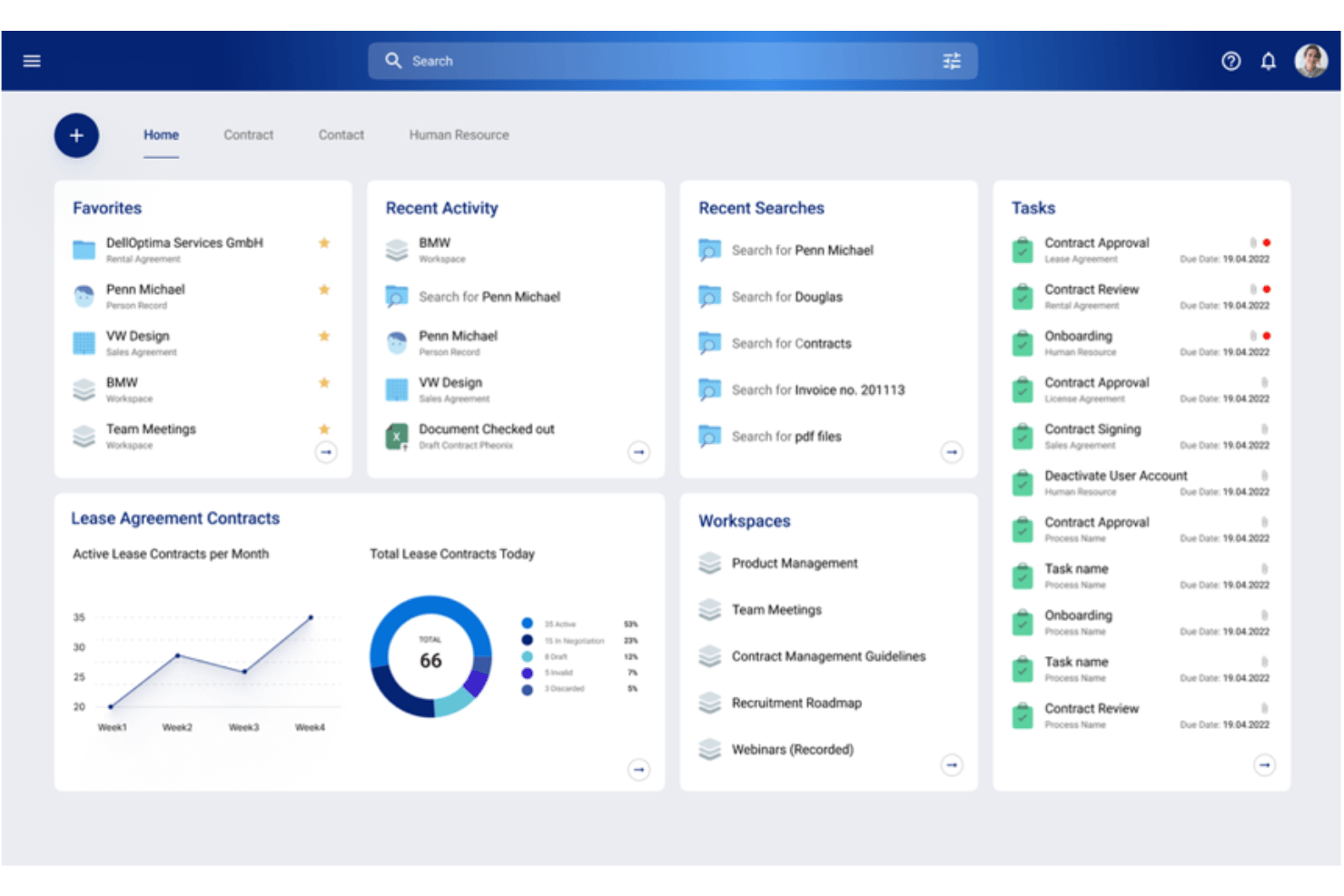
Doxis is an enterprise document management system that brings together document lifecycle management, AI-driven content analysis, process automation, and secure archiving on a single platform for complex business environments.
Who Is Doxis Best For?
Doxis suits enterprises in regulated industries like manufacturing, financial services, and insurance that require advanced document control and workflow automation.
Why I Picked Doxis
I picked Doxis as one of the best because it provides tailored industry-specific solutions like digital claims folders for insurance workflows and end-to-end process automation modules for manufacturing. I like how Doxis covers complex compliance needs with intelligent audit-proof archiving.
Doxis Key Features
- AI-powered document classification: Instantly sorts and tags documents for efficient organization and retrieval.
- Collaboration workspaces: Lets teams securely access and update shared documents from anywhere.
- Automated retention management: Applies rules for document retention and automatic disposal based on regulatory requirements.
- Multi-language OCR capture: Digitizes and processes paper documents in multiple languages for global organizations.
Doxis Integrations
Doxis offers native integrations with SAP, SAP S/4HANA, Salesforce, Microsoft 365, Microsoft Dynamics 365, SAP SuccessFactors, Infor, Sage, SharePoint, Outlook, Adobe Sign, Clarity PPM, and more. It also provides open APIs, generic connectors, and content federation services for custom integrations.
Pros and Cons
Pros:
- Industry-specific document management modules
- Audit-proof archiving for regulated industries
- AI-driven document categorization and processing
Cons:
- Search performance can slow with large repositories
- Advanced workflows require technical configuration
Best for advanced document version control
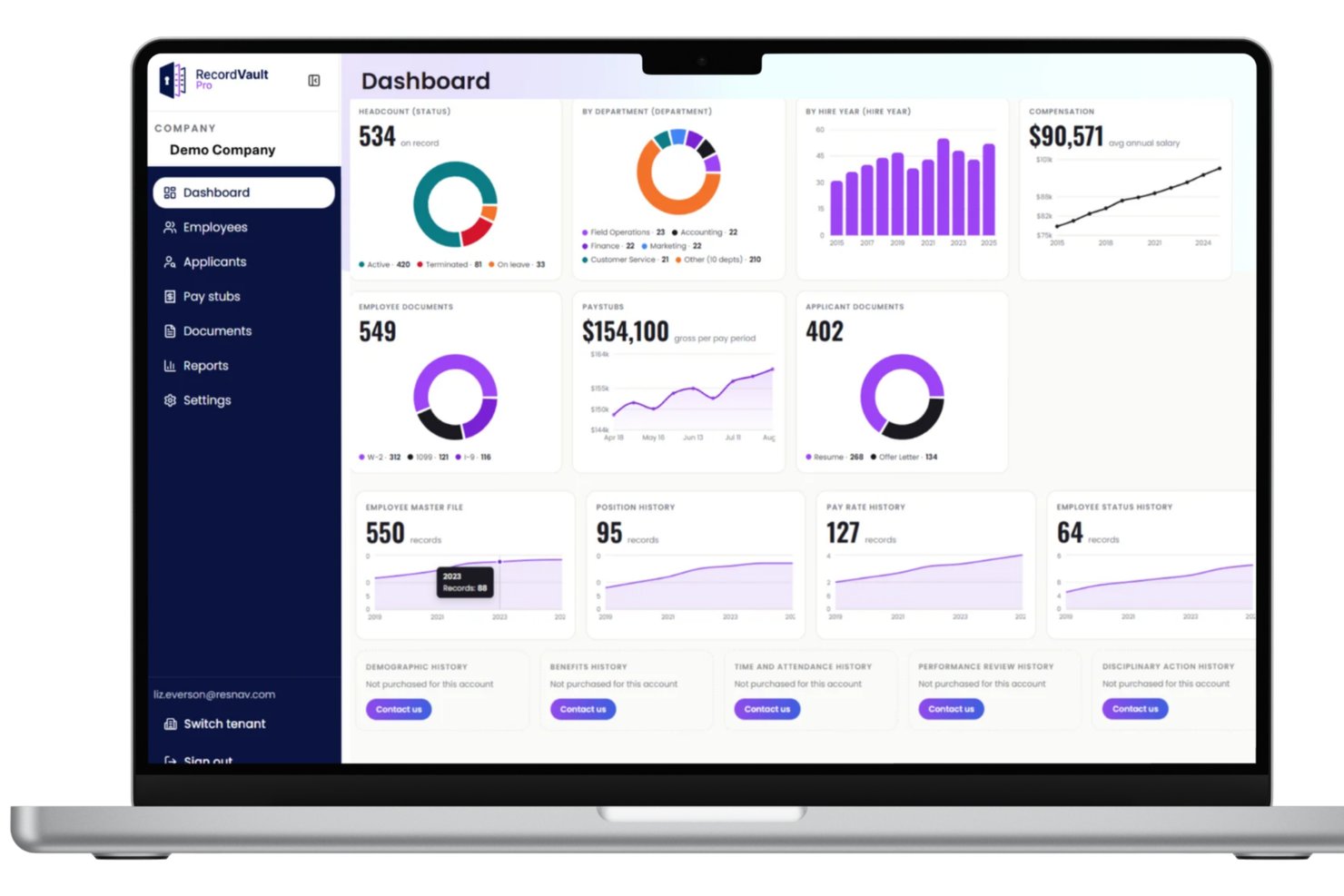
ResNav offers enterprise-grade document management designed for organizations that need strict control over sensitive files and workflows. Its platform supports teams in regulated industries or large enterprises where compliance, security, and collaboration are top priorities. If your business handles complex documentation and requires detailed oversight, ResNav addresses many of the challenges around access, tracking, and document lifecycle management.
Who Is ResNav Best For?
ResNav suits large enterprises or regulated industries that need strict control and tracking of document versions.
Why I Picked ResNav
I chose ResNav for advanced document version control because its capabilities go beyond basic file tracking to provide a forensic-level history of change. The platform allows teams to not only review previous iterations but to perform side-by-side comparisons and instant restorations, which is essential for maintaining accuracy in high-stakes environments. I particularly appreciate the automated versioning rules that enforce consistent naming and filing conventions across the entire organization, removing the risk of "version sprawl."
ResNav Key Features
To support its advanced versioning engine, ResNav includes several high-level governance tools:
- Visual Version Comparison: An interface that highlights specific text or data changes between two document versions, making it easy to spot unauthorized edits.
- Time-Stamped Audit Trails: Provides a permanent, unalterable log of every person who viewed, edited, or approved a specific version for total accountability.
- Automated Retention Archiving: Set rules to automatically move older versions into cold storage after a set period, keeping the active workspace clean and focused on the "Single Source of Truth."
- Provisional Draft Locking: Allows users to "check out" a document, which prevents others from creating conflicting versions until the current draft is checked back in.
ResNav Integrations
Integrations include ADP, Paychex, Paycom, Paycor, Paylocity, iSolved, Gusto, UKG, and Workday.
Pros and Cons
Pros:
- Rapid bulk-upload capabilities
- Integrates with major HR and payroll systems
- Military-grade data encryption
Cons:
- Limited public documentation on API capabilities
- No public free trial or free plan

TrailHQ
Best for AI-powered document automation

Nanonets is an AI-based enterprise document management system that helps you automate tasks like invoice processing, reconciliation, and data extraction. It’s especially useful for teams managing large volumes of unstructured documents across industries like finance, logistics, and healthcare.
Why I Picked Nanonets: I chose Nanonets for its ability to automate document-heavy workflows without relying on fixed templates or code. You can use it to extract data, organize it, and trigger actions—all through a no-code interface. It’s also built with compliance in mind, making it suitable for regulated industries and cross-functional use.
Standout features and integrations:
Features include intelligent data capture, a visual workflow builder, AI-powered reconciliation, and automation templates tailored to departments like HR, legal, and customer service. It also meets enterprise security standards including GDPR, HIPAA, and SOC 2.
Integrations include Google Drive, Zapier, Dropbox, SharePoint, Gmail, Notion, Airtable, Yardi, QuickBooks, Salesforce, and Xero.
Pros and Cons
Pros:
- Enterprise-grade compliance
- Template-free data extraction
- No-code automation
Cons:
- Custom integrations available on higher-tier plans
- Limited offline functionality

FileHold
Best for its 99% availability

FileHold is a flexible document management solution with several tiers of features to suit business document management needs on-premise, in the cloud or hybrid. The FileHold Cloud makes this platform a convenient and 99% document management solution for all teams, especially remote teams.
Why I picked FileHold: I picked this platform for those looking for scalable document management software that provides instantly available files and documents. With several enterprise-level features and tiered pricing, I found FileHold flexible enough to support the needs of enterprises of any size.
FileHold Standout Features and Integrations
Standout features include multiple levels of security and FileHold Cloud that provides document availability. The document FileHold Cloud allows teams to upload documents from anywhere (remotely) and work from wherever there’s an internet connection. With enterprise-grade document security, this service supports remote teams and collaboration, ultimately saving time and money. I especially liked this feature because of the increasing remote or hybrid nature of many teams in the modern business environment.
Integrations include Microsoft Office Suite, Microsoft 365, GSA, Outlook, Active Directory, LDAP, Sharepoint, SHI, FedStore, Microsoft Power Automate, multifunction printers (MFPs), OneDrive, Google Drive, DocuSign and Adobe Sign. However, FileHold also has an API you can use to build custom integrations with your favorite tools.
Pros and Cons
Pros:
- Access documents anytime, anywhere, and from any device.
- Document workflow approvals and reviews.
- Secure, enterprise-grade controlled document access.
- 99% available documents with instant search and find capabilities.
Cons:
- The 100% Microsoft-based solution limits other operating system partners.
- Integrations need improvement CRMs and automations.

M-Files
Best for its metadata-driven document management
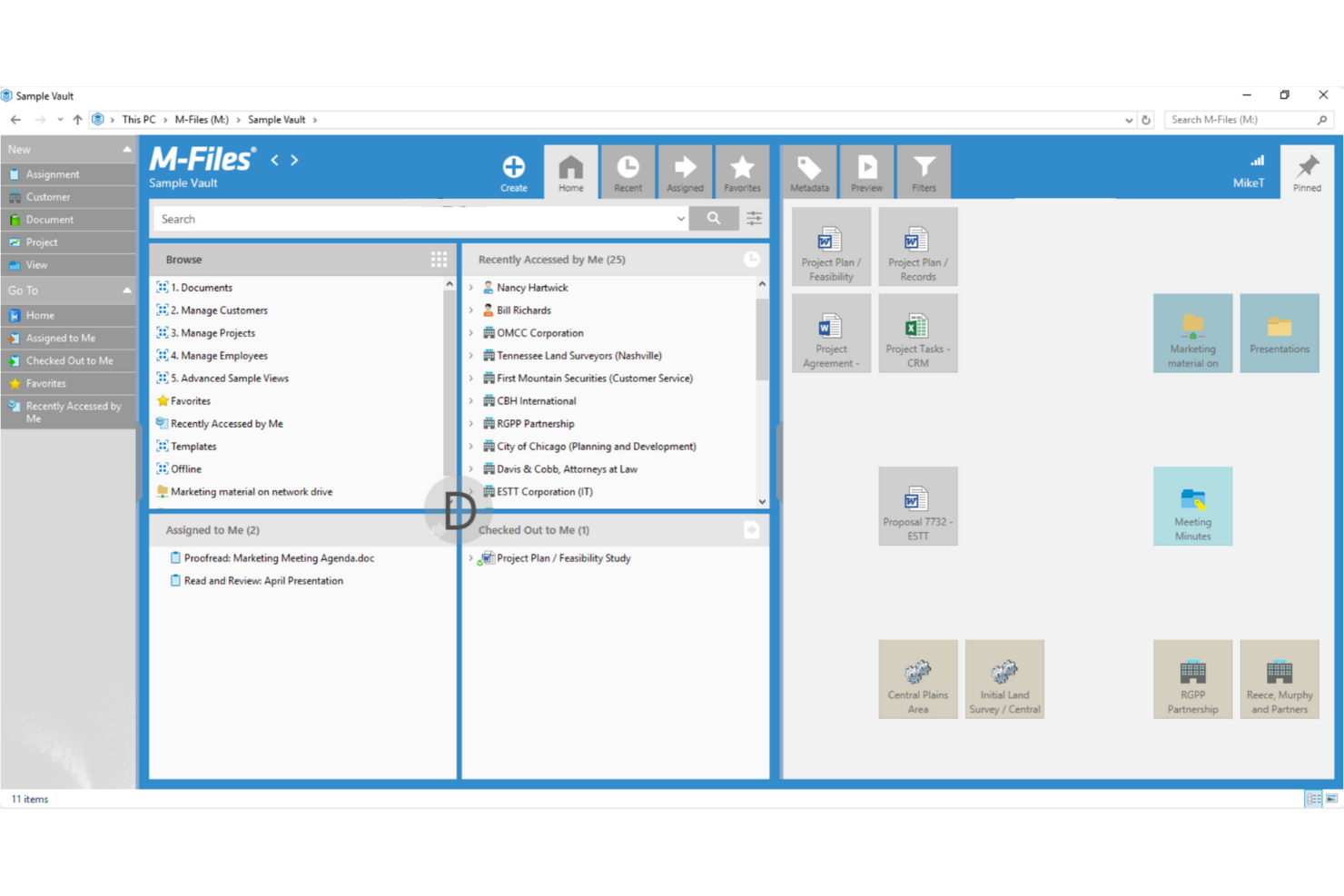
M-Files offers an innovative metadata-driven document management platform for midsize and enterprise businesses.
Why I picked M-Files: Out of all the document management systems I reviewed, M-Files provides the most neatly organized and intuitive interface. You can almost instantly glance at all the files you’ve interacted with in the past through the homegrid. The dashboard is almost reminiscent of Windows File Explorer, which most users are familiar with.
In addition, whereas other document management systems have a steep learning curve, M-Files provides a user-friendly and easy-to-navigate system. You can upload documents with a simple drag-and-drop, and achieve most of the software’s functions with a few clicks on the dashboard.
M-Files Standout Features and Integrations
Standout features include metadata-driven document management and workflow automation. The best thing about this platform is that users can search files by document text or metatags, making categorization and identification a breeze. I feel this simplicity makes M-Files stand out as the best document management system for ease of use.
Integrations include Microsoft 365, Salesforce, Sharepoint, Google Workspace, Electronic signatures, Network Folders, MS Dynamics, SAP, Amazon S3, MFSQL, OpenText, Documentum, and eDOCs.
Pros and Cons
Pros:
- Fast search through document metadata and text search.
- A minimal learning curve.
- Intuitive and familiar user interface.
Cons:
- Cost may be expensive for smaller organizations.
- Automatic documents organized by metatags mean some users have to adjust.
Revver
Best for combining document and business process management

Revver, formerly eFileCabinet, empowers businesses with intelligent organization, workflow, secure file-sharing, fillable forms, document requests, and integrated eSignature.
Why I picked Revver: I picked this platform because it helps businesses eliminate repetitive processes involved in their document-centric work and remove paper dependency while maximizing productivity. It does this by digitizing and automating all the company’s document-dependent work.
Also, I packed Revver as the best platform for combining document and business process management because of automation and workflow management. For instance, when you add a drawer to a Revver’s cabinet, it immediately replicates that folder in all linked cabinets. It will maintain the roles and permissions for these replicated drawers as in the original folder.
Revver Standout Features and Integrations
Standout features include workflows and document management automation. You can easily create custom automation workflows from within the platform’s governance tools. You’ll just set a few rules, and then whenever you take the corresponding action, the platform will handle the rest for you. This can help in completing and storing daily reports that often require employee action, such as reviews and signatures.
Integrations include Microsoft 365, Salesforce, naturalForms, Qualifi, Outlook, Microsoft Excel,
DocuSign, QuickBooks Online Advanced, iDeals Virtual Data Room, and Sharepoint. Revver (API allows for robust integration with third-party applications through a Component Object Model (COM)
Pros and Cons
Pros:
- Storage capacity of 20 TB is much higher than most competitors.
- Best Microsoft 365 integration.
- Intuitive no-code automation and workflow tools.
Cons:
- Yet to fully roll out its mobile app
- No free trial available, unlike other DMS vendors.

OpenText
Best for content lifecycle management
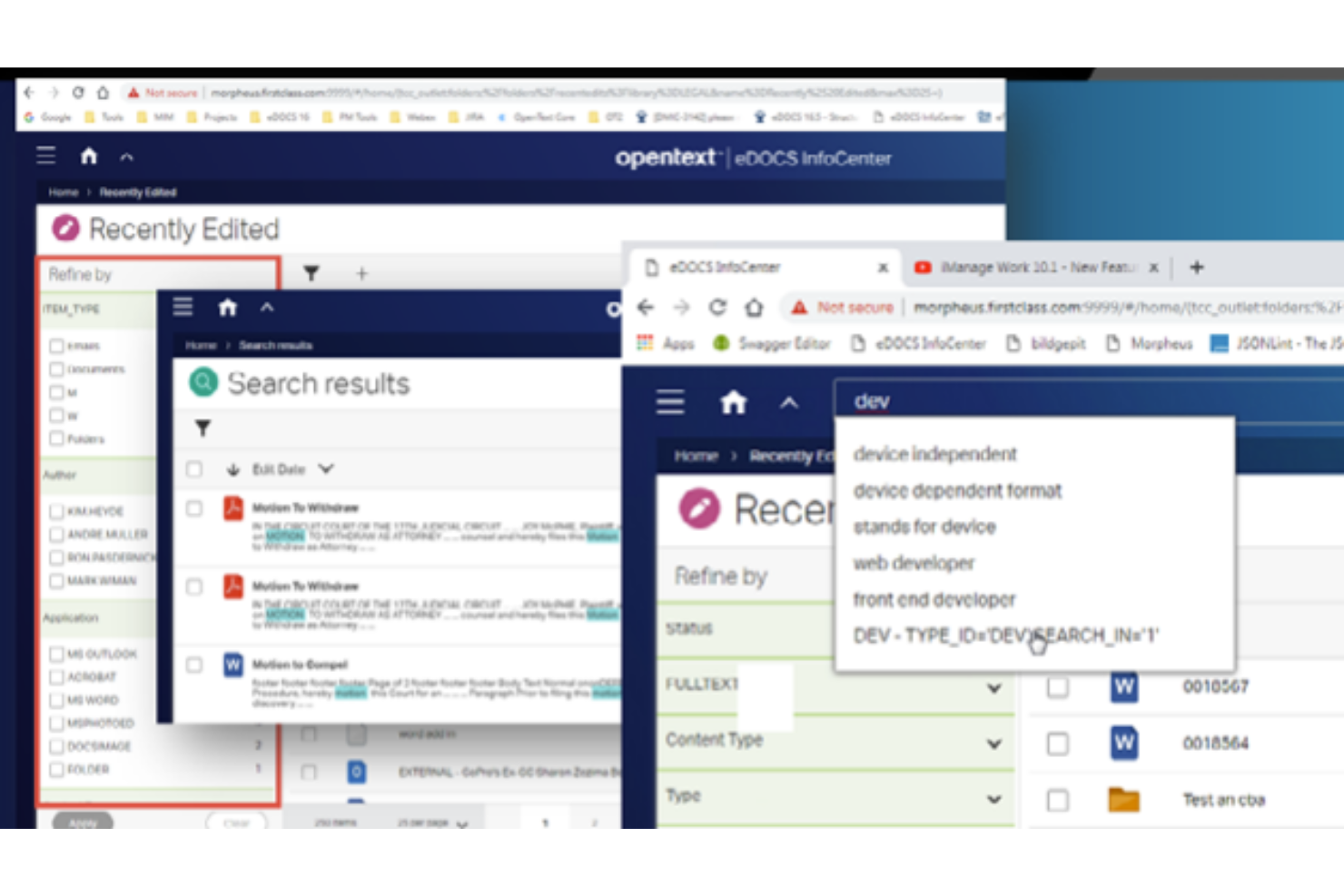
OpenText is a comprehensive information management platform that includes document management capabilities. It provides solutions for content management, collaboration, and archiving, suitable for large enterprises with complex document needs.
Why I picked OpenText: In my experience with OpenText Document Management software systems, you can effectively capture, store and track the lifecycle of your electronic documents. I liked OpenText Content Server because it gives enterprises control over documents and business content by storing and securing it throughout its lifecycle.
OpenText Standout Features and Integrations
Standout features include enterprise document management solutions such as enterprise content management (ECM) and its secure content lifecycle management and integration.
OpenText Extended ECM manages business documents and unstructured content through a shared repository that features library services, access controls, multilayer security, content navigation (search) and workflow. The platform Content lifecycle management includes planning, authoring, promotion, securing, sharing and collaboration with teams and departments for productivity. In addition, the platform now leverages AI for automated data capturing and document classifications to reduce human errors and increase search functionality for digital files.
Integrations include leading business applications, such as Salesforce, Microsoft 365, Microsoft Teams, Adobe Acrobat, and SAP S/4HANA Public Cloud. OpenText also provides development tools that integrate with the core repository through RESTful APIs for complex projects.
Pros and Cons
Pros:
- Supports AI data capturing and classifications for enhanced search.
- Support industry or enterprise-specific use cases.
- Enhanced content lifecycle management with robust security model.
Cons:
- Longer learning curve.
- Integrations need improvements.

Guru
Best for AI-powered document search

Guru is an AI-powered enterprise search and knowledge management tool designed to enhance workplace efficiency by centralizing access to company information.
Why I picked Guru: As a document management software, Guru centralizes all knowledge base articles, including company policies, best practices, and processes. Its AI-powered enterprise search capability allows you to quickly find relevant documents and information by asking a question without needing to know specific keywords.
Guru also supports remote work by allowing document access and collaboration from any location via its cloud-based system. This flexibility is essential for modern enterprises that have increasingly distributed workforces.
Guru Standout Features and Integrations
Standout features include artificial intelligence for real-time suggestions, knowledge verification processes to ensure the accuracy of information, knowledge triggers to proactively deliver context-specific information to users, and collections and boards to help users organize and structure their information.
Integrations include Slack, Salesforce, Microsoft Teams, Google Drive, GitHub, Jira, HubSpot, Dropbox, Asana, Trello, BambooHR, Freshdesk, Notion, ServiceNow, Airtable, and Adobe Workfront.
Pros and Cons
Pros:
- Provides a system for verifying information
- AI suggestions improve information relevancy and retrieval
- Analytics to track knowledge usage and identify gaps
Cons:
- Not ideal for client-facing document management
- Can become overwhelming if not properly organized

Amazon WorkDocs is a cloud-based enterprise document management and collaboration service offered by Amazon Web Services (AWS). It delivers secure enterprise document storage and sharing with strong administrative controls and innovative markup capabilities for improved employee productivity.
Why I picked Amazon WorkDocs: The platform provides secure, fully managed content creation, management, and file collaboration capabilities, with an extensible SDK that runs on AWS.
The best thing about this is that first, files are stored in the AWS cloud, safely and securely. The files are only visible to the users, and their viewers or designated contributors and other business members can’t access the files unless they’re granted access. Second, users can share files and collaborate with others or review as Amazon WorkDocs client app allows users to view many file types - document and image formats.
Additionally, users can establish document retention policies and leverage AWS services like KMS and IAM for added security and compliance measures. In regulated sectors such as healthcare and data privacy, WorkDocs offers tools and capabilities to help organizations align with HIPAA and GDPR requirements.
Amazon WorkDocs Standout Features and Integrations
Standout features include document-based APIs and content encryption with AWS global cloud infrastructure. Amazon WorkDocs ensures data security through encryption at rest and in transit, adhering to encryption-related mandates. Robust access controls enable organizations to manage document access, while detailed audit trails track user actions, aiding compliance with regulations like SOX and HIPAA.
Integrations include Hancom THINKFree, MS Office Online, iOS Files, SDK for WorDocs, MS Active Directory, Migration via Mover, Amazon WorkSpaces, WorkDocs Migration Service, AWS CloudTrail and Amazon SNS. You can build and collaborate on content apps using the Amazon WorkDocs SDK.
Pros and Cons
Pros:
- SDK and API to develop apps and collaborate.
- Content sharing and collaboration on the go.
- AWS cloud encryption secure document management service.
Cons:
- Integrations focusing more on AWS than other third-party apps.
- Difficult to navigate.
Diğer Kurumsal Belge Yönetim Sistemleri
En iyi listeme girmeyen ancak yine de değerlendirilmeye değer birkaç seçenek şunlardır.
- Accruent Meridian
For engineering teams
- MasterControl
For companies in regulated industries
- docEdge DMS
For feature-packed document management
- Dokkio
For cross-platform document management
- Document360
For cross-department SOP management
- Bynder
For multimedia asset management
- Moxo
For its interactive document portals
- altaFlow
For automated document workflows
- XaitPorter
For collaborating on bids and proposals
- DocuWare
For workflow automations


How I Evaluate Enterprise Document Management Systems
I evaluate platforms on two layers: baseline criteria like version control and access permissions, then differentiators that reveal best fit for project teams.
Core Functionality (Table Stakes For This List)
When I'm selecting tools for my list, I rank each one on a scale from 0 (does not offer the functionality) to 5 (excels in this area) for each core functionality listed below. Then, I calculate the tool's total score into a percentage. Each tool needs to achieve a minimum total score of 65% to be considered for inclusion.
- Centralized Document Repository: I look for a scalable, structured storage system where project teams can organize deliverables, contracts, and specifications across departments without scattering files across drives.
- Version Control: Every edit to a project charter or scope document should be tracked with full revision history, rollback options, and check-in/check-out to prevent conflicting changes.
- Access Controls & Permissions: I evaluate whether the platform supports role-based permissions at the document level, so a PMO director can restrict change order files to specific stakeholders.
- Workflow & Approvals: Configurable review and approval routing matters here. I check whether teams can build multi-step approval chains for things like design submittals or procurement sign-offs.
- Search & Metadata Tagging: Finding a single RFI across thousands of project files should take seconds. I look for full-text search, custom metadata fields, and saved filters that speed up retrieval.
- Audit Trail & Compliance: I evaluate the depth of activity logging, from who accessed a document to when it was modified, along with retention policies and compliance reporting capabilities.
Once I have a list of tools that meet the criteria, I consider what sets each platform apart.
Differentiating Factors (What Sets Vendors Apart)
Here's how I compare and contrast different vendors:
Standout Features
AI-powered document classification saves hours of manual filing when a project generates hundreds of submittals and RFIs. I also evaluate real-time co-authoring, which matters when distributed teams need to collaborate on scope documents or meeting minutes without version conflicts. Mobile and offline access is another differentiator I check—field-based project managers need to pull up drawings or mark up punch lists without reliable connectivity.
Beyond Features
Integration ecosystem is a major factor I evaluate—project teams rely on connections to tools like Jira, Microsoft 365, or Procore, and weak integrations create manual handoffs that slow delivery. Security and compliance certifications matter just as much, especially for teams handling regulated project data where SOC 2 or ISO 27001 coverage is expected. I also consider deployment flexibility, since some enterprises require on-premise or hybrid hosting to meet internal IT governance policies.
Kurumsal Belge Yönetim Sistemleri Nasıl Seçilir?
Uzun özellik listeleri ve karmaşık fiyatlandırma yapılarına kapılmak kolaydır. Kendinize özgü yazılım seçim sürecinizi yürütürken odaklanmanızı korumanıza yardımcı olmak için aklınızda bulundurmanız gereken faktörlerin kontrol listesi aşağıdadır:
| Faktör | Dikkate Alınması Gerekenler |
|---|---|
| Ölçeklenebilirlik | Sistem işletmenizin ihtiyaçlarına göre büyüyebilir mi? |
| Entegrasyonlar | Sistem, ekibinizin kullandığı araçlara kolayca bağlanabiliyor mu? |
| Özelleştirilebilirlik | Sistemi belirli iş akışlarınıza uyacak şekilde uyarlayabilir misiniz? |
| Kullanım Kolaylığı | Sistemin ekibiniz tarafından benimsenmesi ve kullanılması kolay mı? |
| Bütçe | Sistem şirketinizin mali planına uyuyor mu? |
| Güvenlik Önlemleri | Belgeleriniz güçlü güvenlik önlemleriyle korunuyor mu? |
| Kurumsal Destek | Sistem, büyük ölçekli operasyonlar için destek ve altyapı sunuyor mu? |
| Uyumluluk | Sistem ekibinizin sektörel düzenlemelere uymasına yardımcı oluyor mu? |
| İş Birliği | Sistem kolay belge paylaşımını ve ekip çalışmasını mümkün kılıyor mu? |
Kurumsal Belge Yönetim Sistemlerindeki Trendler
Araştırmam sırasında farklı kurumsal belge yönetim sistemi sağlayıcılarından sayısız ürün güncellemesi, basın açıklaması ve sürüm günlüğü topladım. Takip ettiğim yeni trendlerden bazıları şunlar:
- Yapay zekâ destekli belge arama: Yapay zekâ, bağlama ve kullanıcı davranışlarına göre ilgili dosyaları bulmayı kolaylaştırarak kurumsal belge aramayı geliştiriyor. Örneğin, bazı kurumsal DMS çözümleri artık temel meta verilerin ötesinde dosya içeriklerini anlamak için yapay zekâ kullanıyor; bu da arama doğruluğunu ve verimliliğini artırıyor.
- Otomatik belge sınıflandırma: Daha fazla kurumsal belge yönetimi hizmeti, belgeleri manuel olarak etiketlemeden düzenlemek için yapay zekâ destekli sınıflandırma araçlarını uyguluyor. Bu, dosyaları otomatik olarak doğru kategorilere ayırarak şirketlerin elektronik kayıt yönetimi yazılımı standartlarına uyumluluğunu korumasına yardımcı oluyor.
- Gelişmiş uyumluluk ve denetim izleri: Kurumsal kayıt yönetimi sistemi yazılımları, daha ayrıntılı denetim izleri sunarak uyumluluğa giderek daha fazla odaklanıyor. Tedarikçiler, işletmelerin finans veya sağlık hizmetleri gibi sektörlerdeki yasal gereklilikleri karşılamasına yardımcı olmak için görüntülemeden düzenlemeye kadar her belge etkileşimini izleyen özellikleri entegre ediyor.
- Blok zinciri ile belge güvenliği: Blok zinciri, güvenli belge doğrulama amacıyla elektronik veri yönetim sistemlerinde önemli bir özellik hâline geliyor. Bu teknoloji, değiştirilemez kayıtlar oluşturarak veri bütünlüğünü sağlıyor; bu da hukuk veya muhasebe firmaları gibi sıkı veri güvenliği gerektiren sektörlerde özellikle yararlı oluyor.
- Kurumsal belge görüntülemenin entegrasyonu: Birçok EDRMS yazılımı çözümü, kullanıcıların kâğıt belgeleri daha verimli bir şekilde dijitalleştirmesini sağlayan belge tarama yazılımında bulunan gelişmiş görüntüleme teknolojisini bünyesine katıyor. Bu kurumsal belge tarama özellikleri, veri yakalama süreçlerini geliştiriyor ve fiziksel depolama ihtiyacını azaltıyor.
Kurumsal Belge Yönetim Sistemi Nedir?
Kurumsal belge yönetim sistemi, elektronik belgeleri ve kayıtları güvenli bir şekilde depolamanıza, yönetmenize ve izlemenize yardımcı olan bir platformdur. Bu sistemler; operasyon, uyumluluk ve BT ekipleri tarafından sözleşmeler, çalışan kayıtları ve şirket içi belgeler gibi dosyalara erişimi merkezileştirmek ve aranabilirliği, sürüm kontrolünü ve iş akışı otomasyonunu geliştirmek için kullanılır.
EDMS, fiziksel depolama gereksinimlerini azaltıp veri güvenliğini geliştirerek iş birliğini destekler, verimliliği artırır ve yasal ve düzenleyici standartlara uyumluluğun korunmasına yardımcı olur.
Kurumsal Belge Yönetim Sistemlerinin Özellikleri
Bir kurumsal belge yönetim sistemi seçerken aşağıdaki temel özelliklere dikkat edin:
- Sürüm kontrolü: Belge değişikliklerini izler ve kullanıcıların önceki sürümlere erişmesine olanak tanıyarak veri kaybını veya düzenlemelerle ilgili karışıklığı önler.
- Belge dizinleme: Kolay arama ve erişim için belgeleri otomatik olarak etiketler ve kategorilere ayırır.
- Erişim kontrolü: Belge erişimini kullanıcı rollerine göre kısıtlayarak hassas verilerin güvende kalmasını sağlar.
- Denetim izleri: Bir belgeyle gerçekleştirilen her etkileşimi kaydederek uyumluluk ve iç incelemelere yardımcı olur.
- Belge iş birliği: Birden fazla kullanıcının belgeler üzerinde gerçek zamanlı olarak çalışmasını sağlayarak ekip verimliliğini artırır.
- Bulut depolama entegrasyonu: Belgelerin her yerden depolanmasına ve bunlara erişilmesine olanak tanıyarak uzaktan çalışan ekipler için esneklik sunar.
- Belge tarama: Kâğıt belgeleri dijital dosyalara dönüştürerek fiziksel depolama gereksinimini azaltır ve bunların yönetilmesini kolaylaştırır.
- Meta veri yönetimi: Daha doğru belge arama ve sınıflandırma için meta verileri yakalar ve yönetir.
- İş akışı otomasyonu: Tekrarlanan görevleri otomatikleştirerek belge onaylarını ve incelemelerini kolaylaştırır (bu işlem belge otomasyonu yazılımı kullanılarak da gerçekleştirilebilir).
- Elektronik imza entegrasyonu: Kullanıcıların belgeleri dijital olarak imzalamasını sağlayarak onay süreçlerini hızlandırır ve manuel evrak işlerini azaltır.
Kurumsal DMS planları, hassas bilgilerin güvenli bir şekilde işlenmesini sağlamak için genellikle giriş düzeyi seçeneklerde bulunmayan gelişmiş güvenlik özellikleri de sunar. Ayrıca büyük miktarlarda belge ve kullanıcıyı destekleyerek daha yüksek ölçeklenebilirlik sağlar.
Kurumsal Belge Yönetim Sistemlerinin Faydaları
Bir kurumsal belge yönetim sisteminin uygulanması, ekibiniz ve işletmeniz için çeşitli faydalar sağlayabilir. Yararlanabileceğiniz birkaç fayda şunlardır:
- Merkezi depolama: Kurumsal dosya yönetim sistemi kullanmak, tüm belgelerinizin tek bir yerde depolanması anlamına gelir ve departmanlar arasındaki dosyaları yönetmeyi kolaylaştırır.
- Geliştirilmiş aranabilirlik: Kurumsal belge araması sayesinde çalışanlar, anahtar kelime aramaları kullanarak ihtiyaç duydukları dosyaları hızla bulabilir ve boşa harcanan zamanı azaltabilir.
- Erişim denetimi: Yalnızca yetkili kullanıcıların hassas dosyalara erişebilmesi için izinler ayarlayabilir, böylece kurumsal belge yönetimi yapınıza ek bir güvenlik katmanı ekleyebilirsiniz.
- Sürüm denetimi: Belgelerdeki değişiklikleri izleyerek her zaman en güncel sürüm üzerinde çalışmanızı sağlar.
- Otomatik iş akışları: Belge onayları gibi tekrarlayan görevleri otomatikleştirerek eDOCs belge yönetim sistemi aracılığıyla manuel müdahale olmadan iş süreçlerini hızlandırır.
- Uyumluluk desteği: Belgelerinizin elektronik kayıt veri yönetim sistemi yazılımı tarafından gerekli görülen standartları karşılamasını sağlayarak sektörel düzenlemelere uyumlu kalmanıza yardımcı olur.
- Olağanüstü durum kurtarma: Veri kaybı durumunda dosyalar yedeklenir ve kolayca kurtarılabilir.
Kurumsal Belge Yönetim Sistemleri için Maliyetler ve Fiyatlandırma
Kurumsal belge yönetim sistemlerini seçmek, mevcut çeşitli fiyatlandırma modellerinin ve planların anlaşılmasını gerektirir. Maliyetler özelliklere, ekip büyüklüğüne, eklentilere ve daha fazlasına göre değişir. Aşağıdaki tablo, kurumsal belge yönetimi çözümlerinde yaygın planları, ortalama fiyatlarını ve genellikle sunulan özellikleri özetlemektedir:
| Plan Türü | Ortalama Fiyat | Yaygın Özellikler |
|---|---|---|
| Ücretsiz Plan | $0 | Temel depolama, sınırlı kullanıcı erişimi ve temel belge paylaşımı |
| Kişisel Plan | $5-$25/kullanıcı/ay | Artırılmış depolama, sürüm denetimi, belge araması ve bireysel kullanıcı erişimi |
| İşletme Planı | $30-$75/kullanıcı/ay | Gelişmiş arama özellikleri, iş birliği araçları, erişim denetimi ve diğer sistemlerle entegrasyon |
| Kurumsal Plan | $100-$200+/kullanıcı/ay | Sınırsız depolama, eksiksiz denetim izleri, uyumluluk araçları, kurumsal düzeyde güvenlik ve özel iş akışları |
Kurumsal Belge Yönetim Sistemleri Hakkında SSS
Bu konu hakkında diğer kişilerin sorduğu yaygın soruların yanıtlarını bulun.
Belge yönetim sistemlerinin türleri nelerdir?
Belge yönetim sistemleri (DMS), kuruluşların belgeleri verimli bir şekilde depolamasına, yönetmesine ve izlemesine yardımcı olur. Verilerin nerede depolandığına ve yönetildiğine bağlı olarak çeşitli DMS türleri vardır:
\u003col\u003e
\u003cli\u003e\u003cstrong\u003eYerel DMS\u003c/strong\u003e: Bu sistem, kuruluş içindeki yerel sunuculara kurulur ve bu sunucularda bakımı yapılır. Veriler ve güvenlik üzerinde tam kontrol sağlar; ancak kurulum, bakım ve güncellemeler için daha fazla kaynak gerektirir.\u003c/li\u003e
\u003cli\u003e\u003cstrong\u003eBulut tabanlı DMS\u003c/strong\u003e: Uzak sunucularda barındırılan bu sisteme internet bağlantısı olan her yerden erişilebilir. Kurum içi BT altyapısına duyulan ihtiyacı azaltır ve ölçeklenebilirlik sunar; ancak veri güvenliği ve yönetimi için üçüncü taraf sağlayıcılara da bağlıdır.\u003c/li\u003e
\u003cli\u003e\u003cstrong\u003eHibrit DMS\u003c/strong\u003e: Hem yerel hem de bulut tabanlı unsurları bir araya getiren hibrit DMS, kuruluşların hassas verileri yerel olarak depolarken diğer belgeler için bulut hizmetlerinden yararlanmasına olanak tanır. Güvenlik ihtiyaçlarını erişilebilirlikle dengeleyerek esneklik ve kontrol sağlar.\u003c/li\u003e
\u003cli\u003e\u003cstrong\u003eVeritabanı DMS\u003c/strong\u003e: Bu sistemler belgeleri dosya sistemleri yerine yapılandırılmış veritabanlarında depolar. Bu sayede daha gelişmiş dizinleme ve arama olanakları sunulur. Bu özellik, hassas belge kontrolünün gerekli olduğu, sıkı şekilde düzenlenen sektörlerde özellikle yararlı olabilir.\u003c/li\u003e
\u003cli\u003e\u003cstrong\u003eWeb tabanlı DMS\u003c/strong\u003e: Bulut tabanlı sistemlerin bir alt kümesi olan web tabanlı DMS’ye yazılım kurulmasına gerek olmadan web tarayıcısı aracılığıyla erişilebilir. Belgelere kolay ve uzaktan erişmesi gereken, ancak özel yazılımları yönetmeyi tercih etmeyen işletmeler için idealdir.\u003c/li\u003e
\u003cli\u003e\u003cstrong\u003eAçık kaynaklı DMS\u003c/strong\u003e: Kaynak kodu herkesin kullanımına açık olan bu sistemler, kuruluşların DMS’yi kendi özel ihtiyaçlarına göre özelleştirmesine olanak tanır. Uygun maliyetli ve esnek olmalarına karşın, genellikle uygulama ve bakım için daha yüksek düzeyde teknik uzmanlık gerektirirler.\u003c/li\u003e
\u003c/ol\u003e
Kurumsal ve geleneksel belge yönetimi arasındaki fark nedir?
Kurumsal ve geleneksel belge yönetimi arasındaki temel fark ölçek, işlevsellik ve entegrasyon olanaklarında yatar. Geleneksel sistemler genellikle küçük ve orta ölçekli işletmeler tarafından kullanılırken, kurumsal belge yönetim sistemleri (EDMS) büyük kuruluşların karmaşık ihtiyaçlarını karşılamak üzere tasarlanır.
\u003col\u003e
\u003cli\u003e\u003cstrong\u003eÖlçek ve entegrasyon\u003c/strong\u003e: Kurumsal sistemler çok büyük miktarda belgeyi yönetir ve ERP ile CRM gibi diğer iş sistemleriyle entegre olur. Örneğin, en iyi kurumsal içerik yönetim sistemleri, genellikle tek başına çalışan geleneksel DMS’nin aksine, departmanlar arasında sorunsuz entegrasyon sunar.\u003c/li\u003e
\u003cli\u003e\u003cstrong\u003eGelişmiş özellikler\u003c/strong\u003e: Kurumsal çözümler genellikle kurumsal belge görüntüleme, otomasyon ve gelişmiş iş akışları gibi özellikler sunar. Kurumsal kayıt yönetimi yazılımları da çoğunlukla mevzuata uyum dahil olmak üzere daha kapsamlı yaşam döngüsü yönetimi sağlar; bu özellikler geleneksel sistemlerde aynı düzeyde güçlü olmayabilir.\u003c/li\u003e
\u003cli\u003e\u003cstrong\u003eUyumluluk ve güvenlik\u003c/strong\u003e: En iyi kurumsal kalite yönetimi yazılımları gibi kurumsal sistemler, finans ve sağlık hizmetleri gibi sektörler için kritik olan uyumluluk, güvenlik ve denetim yeteneklerine büyük ölçüde odaklanır. Geleneksel DMS temel güvenlik sunabilir; ancak şifreleme ve denetim izleri gibi gelişmiş özelliklerden yoksun olabilir.\u003c/li\u003e
\u003cli\u003e\u003cstrong\u003eÖzelleştirme ve ölçeklenebilirlik\u003c/strong\u003e: Kurumsal bir kayıt yönetimi sistemi belirli iş ihtiyaçlarına göre özelleştirilebilir ve işletme büyüdükçe ölçeklenebilir. Geleneksel DMS bu esnekliğe sahip olmayabilir ve ölçeklenebilirlik konusunda zorlanabilir.\u003c/li\u003e
\u003cli\u003e\u003cstrong\u003eMaliyet\u003c/strong\u003e: Kurumsal çözümler, en iyi kayıt yönetimi yazılımlarında bulunanlar gibi gelişmiş özellikler sundukları için karmaşıklıkları nedeniyle genellikle daha pahalıdır; geleneksel sistemler ise küçük işletmeler için daha uygun maliyetlidir.\u003c/li\u003e
\u003c/ol\u003e
Kurumsal belge yönetimi yazılımı karşılaştırmasında, kurumsal çözümlerin katı uyumluluk gereksinimleri olan sektörler için daha uygun olduğunu görürsünüz. Buna en iyi muhasebeci belge yönetimi yazılımını arayanlar veya büyük ölçekli kayıt yönetimi sistemlerine ihtiyaç duyanlar dahildir.\u003c!– wp:heading –\u003e
Kurumsal içerik yönetimi ile kurumsal belge yönetimi arasındaki fark nedir?
Kurumsal içerik yönetimi (ECM) ile kurumsal belge yönetimi (EDM) arasındaki fark kapsam ve işlevselliklerinde yatar. Her iki sistem de bilgilerin yönetilmesine yardımcı olmak üzere tasarlanmış olsa da ECM daha geniş kapsamlıdır ve yalnızca belgelerin ötesinde daha fazla içerik türünü kapsar.
\u003col\u003e
\u003cli\u003e\u003cstrong\u003eİçerik kapsamı\u003c/strong\u003e: Kurumsal içerik yönetimi; görüntüler, videolar, e-postalar, web içeriği ve daha fazlası dahil olmak üzere çok çeşitli dijital içeriği yönetir. Buna karşılık kurumsal belge yönetimi, raporlar, sözleşmeler ve elektronik tablolar gibi belgelerin yönetimine odaklanır.\u003c/li\u003e
\u003cli\u003e\u003cstrong\u003eİşlevsellik\u003c/strong\u003e: ECM çözümleri içerik oluşturma, iş birliği ve yayınlama iş akışları için gelişmiş araçlar içerir. EDM ise öncelikle belge depolama, belge alma ve sürüm denetimine odaklanır. Örneğin kurumsal belge yönetim sistemleri, belge uyumluluğu ve denetimin kritik olduğu sektörler için vazgeçilmezdir; ECM sistemleri ise çeşitli içerik biçimlerini yönetmek için daha kapsamlı özellikler sunar.\u003c/li\u003e
\u003cli\u003e\u003cstrong\u003eEntegrasyon\u003c/strong\u003e: ECM genellikle daha geniş iş süreçleriyle entegre olur ve kuruluşların yalnızca belgeleri değil, kuruluş genelindeki iş akışlarında rol oynayan diğer içerik türlerini de yönetmesine olanak tanır. EDM ise çoğunlukla bir ECM sistemi içindeki bileşendir ve belge odaklı unsurlara yoğunlaşır.\u003c/li\u003e
\u003cli\u003e\u003cstrong\u003eKullanım alanları\u003c/strong\u003e: Web içeriği ve çoklu ortam dahil olmak üzere daha geniş kapsamlı içerik kontrolü arayan kuruluşlar muhtemelen ECM’yi tercih edecektir. Hukuk veya muhasebe gibi belge yoğun sektörlerde eDOCS belge yönetimi ya da benzer EDM sistemleri, yasal belgeleri, mali raporları ve uyumluluk belgelerini yönetmek için daha özel çözümler sunar.\u003c/li\u003e
\u003c/ol\u003e
Kurumsal belge yönetimi stratejisi nasıl geliştirilir?
Etkili bir kurumsal belge yönetimi stratejisi geliştirmek için kuruluşların belge oluşturulmasından arşivlenmesine kadar tüm belge yaşam döngüsünü dikkate alması gerekir. Bu strateji, belgelerin verimli ve güvenli bir şekilde, ilgili mevzuata uygun olarak yönetilmesini sağlar. Böyle bir strateji geliştirmek için adım adım rehber:
\u003col\u003e
\u003cli\u003e\u003cstrong\u003eKuruluşun ihtiyaçlarını değerlendirin: \u003c/strong\u003eKuruluşunuzun yönettiği belge türlerini, belge hacmini ve belgelerin nasıl kullanıldığını belirleyerek başlayın. Özel belge iş akışınızı anlamak, doğru araçları ve süreçleri seçmek için kritik öneme sahiptir.\u003c/li\u003e
\u003cli\u003e\u003cstrong\u003eDoğru belge yönetim sistemini seçin: \u003c/strong\u003eBulut tabanlı, yerel veya hibrit olup olmadığına bakmaksızın kuruluşunuzun ihtiyaçlarına uygun bir DMS seçin. Sürüm denetimi, erişim yönetimi ve diğer iş araçlarıyla entegrasyonlar gibi özellikleri değerlendirin.\u003c/li\u003e
\u003cli\u003e\u003cstrong\u003eBelge güvenliği politikaları oluşturun: \u003c/strong\u003eBelgeleri kimlerin görüntüleyebileceği, düzenleyebileceği ve paylaşabileceği konusunda açık yönergeler uygulayın. Hassas verileri korumak için şifreleme ve role dayalı izinler kullanın.\u003c/li\u003e
\u003cli\u003e\u003cstrong\u003eBelge saklama ve imha kurallarını belirleyin: \u003c/strong\u003eBelgelerin ne kadar süreyle saklanması gerektiğini ve ne zaman silineceğini belirleyen kurallar oluşturun. Bu, yasal ve düzenleyici gerekliliklere uyumu sağlar.\u003c/li\u003e
\u003cli\u003e\u003cstrong\u003eÇalışanları eğitin: \u003c/strong\u003eDosya adlandırma kurallarından güvenlik protokollerine kadar tüm çalışanların belge yönetimi uygulamaları konusunda eğitilmesini sağlayarak kuruluş genelinde tutarlılığı koruyun.\u003c/li\u003e
\u003c/ol\u003e
Kurumsal belge yönetim sistemleri güvenliği ve uyumluluğu nasıl sağlar?
Kurumsal belge yönetim sistemleri (DMS), hassas bilgilerin güvenliğini korumada ve sektör düzenlemelerine uyumu sağlamada kritik bir rol oynar. Bu sistemler, belgeleri korumak ve yasal gerekliliklerle uyum sağlamak için çeşitli araç ve uygulamalar içerir. Temel güvenlik ve uyumluluk özellikleri şunlardır:
\u003col\u003e
\u003cli\u003e\u003cstrong\u003eErişim kontrolleri ve izinler\u003c/strong\u003e: Role dayalı erişim kontrolleri, yalnızca yetkili kullanıcıların belgeleri görüntüleyebilmesini, düzenleyebilmesini veya silebilmesini sağlar. Hassas bilgilere erişimi kısıtlamak için izinler özelleştirilebilir.\u003c/li\u003e
\u003cli\u003e\u003cstrong\u003eŞifreleme\u003c/strong\u003e: DMS çözümleri belgeleri hem depolama sırasında hem de aktarım sırasında şifreleyerek verilerin depolanırken ve ağlar üzerinden paylaşılırken yetkisiz erişime karşı korunmasını sağlar.\u003c/li\u003e
\u003cli\u003e\u003cstrong\u003eDenetim izleri ve raporlama\u003c/strong\u003e: Ayrıntılı denetim günlükleri, dosyalara kimin eriştiği, dosyaları kimin düzenlediği veya paylaştığı gibi belge etkinliklerini izler. Bu, belge işlemlerinin açık bir geçmişini koruyarak şeffaflık sağlar ve mevzuat denetimlerini destekler.\u003c/li\u003e
\u003cli\u003e\u003cstrong\u003eOtomatik belge saklama politikaları\u003c/strong\u003e: Uyumluluk özellikleri, belgelerin uygun süre boyunca saklanmasını ve artık gerekli olmadıklarında silinmesini sağlamak için otomatik saklama ve imha politikalarını içerir; böylece yasal ve düzenleyici gerekliliklere uyum desteklenir.\u003c/li\u003e
\u003cli\u003e\u003cstrong\u003eSektör standartlarına uyumluluk\u003c/strong\u003e: Birçok kurumsal DMS çözümü GDPR, HIPAA veya FINRA gibi belirli sektör düzenlemelerine uyacak şekilde tasarlanır ve işletmelerin veri koruma ve gizlilikle ilgili yasal yükümlülüklerini yerine getirmesini sağlar.\u003c/li\u003e
\u003c/ol\u003e