

2026 İçin En İyi 10 Karar Yönetimi Yazılımı

En İyi Karar Yönetimi Yazılımları Kısa Listesi


Karar yönetimi yazılımı, ekibinizin karmaşık iş akışları genelinde iş kurallarını ve karar mantığını otomatikleştirmesine, izlemesine ve optimize etmesine yardımcı olur. En iyi karar yönetimi yazılımını arıyorsanız muhtemelen manuel hataları azaltma, değişen gereksinimlere ayak uydurma ve büyük ölçekte tutarlı, denetlenebilir kararlar alma baskısıyla karşı karşıyasınızdır. Bu liste, önde gelen platformların uzmanlar tarafından hazırlanmış net bir karşılaştırmasını sunar; böylece hangi araçların teknik ihtiyaçlarınıza, mevzuat gereksinimlerinize ve entegrasyon önceliklerinize uygun olduğunu hızlıca belirleyebilirsiniz. Bir sonraki projeniz için bilinçli ve güvenli bir seçim yapmak üzere bu rehberle bilgi karmaşasını azaltın.
Why Trust Our Software Recommendations
Our team has been testing and reviewing software since 2012. As project managers ourselves, we know how difficult—and important—it is to choose the right software.
For this guide, we evaluated tools using hands-on testing and independent research, scoring tools using our selection criteria. We also draw on insights from industry thought leaders and practicing project management experts.
Our reviews reflect our human editorial judgment, not a sales pitch.
Expert reviewers:
Karşılaştırma Tablosu: Karar Yönetimi Yazılımı
Bu karşılaştırma tablosu, en iyi karar yönetimi yazılımı seçimlerimin fiyatlandırma ayrıntılarını özetlemektedir.
| Tool | Starting Price | Website | |
|---|---|---|---|
| Best for robotic process automation synergy | 4.6 out of 5 | $25/month Free plan available | Website |
| Best for audit process integration | — | Pricing upon request Not available | Website |
| Best for real-time decision execution | — | Pricing upon request Free demo available | Website |
| Best for no-code rule configuration | — | Pricing upon request Free demo available | Website |
| Best for multi-criteria decision analysis | — | Pricing upon request 15-day free trial + free demo available | Website |
| Best for insurance workflow automation | — | Pricing upon request Free demo available | Website |
| Best for complex rule authoring | — | Pricing upon request Free trial available | Website |
| Best for regulatory compliance tracking | — | Pricing upon request Free demo available | Website |
| Best for high-volume transaction processing | — | Pricing upon request Free demo available | Website |
| Best for cloud-native rule management | — | €50/month Free plan + free demo available | Website |
Karar Yönetimi Yazılımı İncelemeleri
Aşağıda, kısa listeme giren karar yönetimi yazılımlarına ilişkin ayrıntılı özetlerimi bulabilirsiniz. İncelemelerim, sizin için en iyi seçeneği bulmanıza yardımcı olmak amacıyla her platformun özelliklerini, en uygun kullanım alanlarını ve entegrasyonlarını ayrıntılı biçimde ele alır.

UiPath
Best for robotic process automation synergy
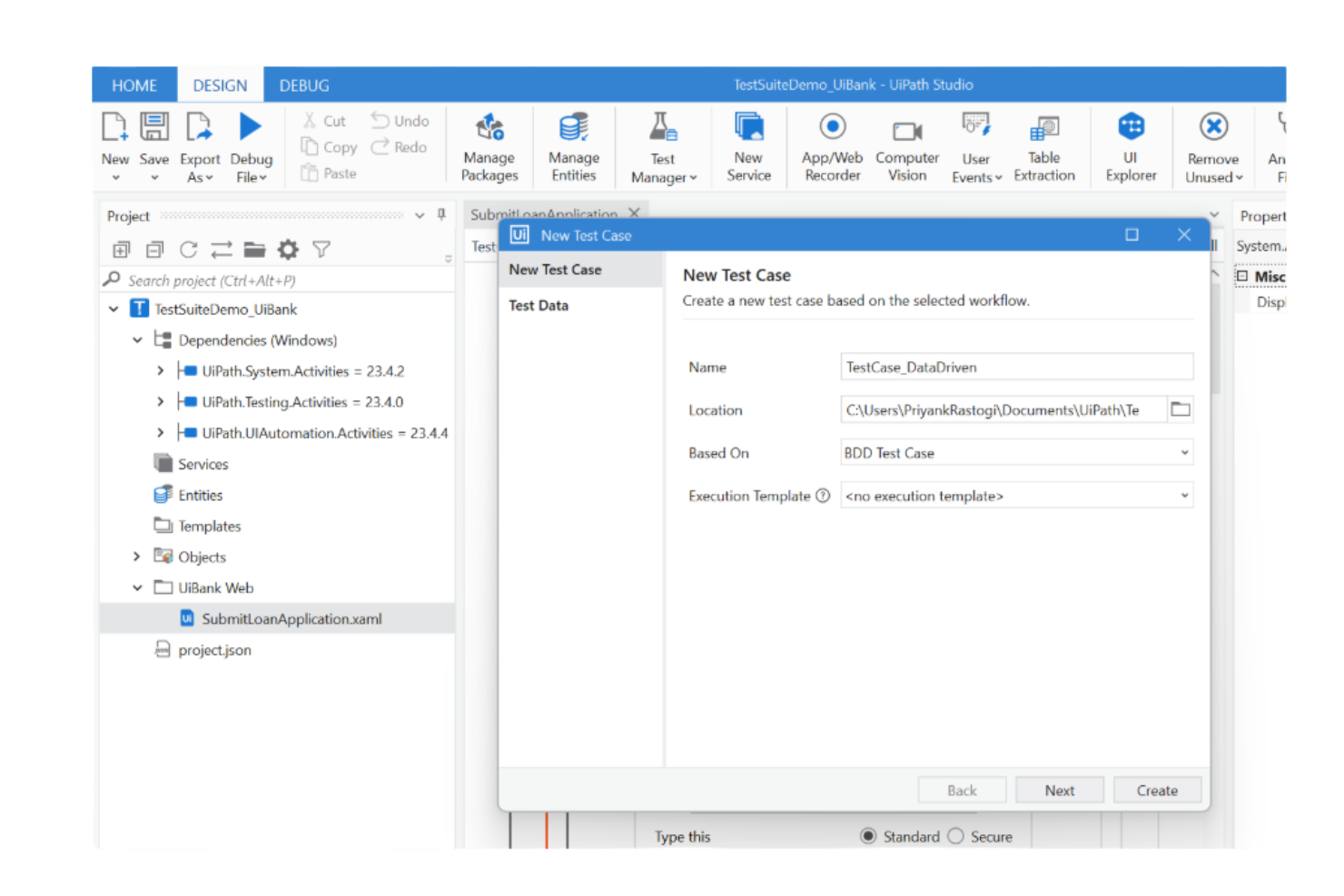
UIPath brings process intelligence and automation together for teams looking to connect decision management with robotic process automation. It’s a strong fit for operations leaders, business analysts, and IT teams who want to analyze, optimize, and automate complex workflows using real-time data. By combining process mining with automation triggers, UIPath helps you identify decision points and automate actions across business processes.
Why I Picked UIPath
What sets UIPath apart for decision management is how it connects process intelligence with robotic process automation in a single decisioning platform. I picked UIPath because it lets you map out business processes, identify decision points, and then automate those decisions using bots. The process mining feature uncovers bottlenecks and inefficiencies, while automation triggers let you act on insights without manual intervention. This synergy is especially valuable for teams that want to move from process analysis directly into automated execution.
UIPath Key Features
Some other features that make UIPath valuable for decision management include:
- Business rules editor: Build and manage decision logic using a visual interface.
- Pre-built automation templates: Access a library of templates for common business processes.
- Real-time analytics dashboards: Monitor process performance and automation outcomes as they happen.
- Role-based permissions: Control access to automation and decision logic based on user roles.
UIPath Integrations
Integrations include SAP, Microsoft, Salesforce, ServiceNow, Oracle, Workday, Google Workspace, Amazon Web Services, Jira, and more.
Pros and Cons
Pros:
- Extensive native integrations with enterprise platforms
- Process mining highlights automation opportunities
- Visual business rules editor for decision logic
Cons:
- Limited offline functionality for process management
- Complex setup for multi-departmental automation

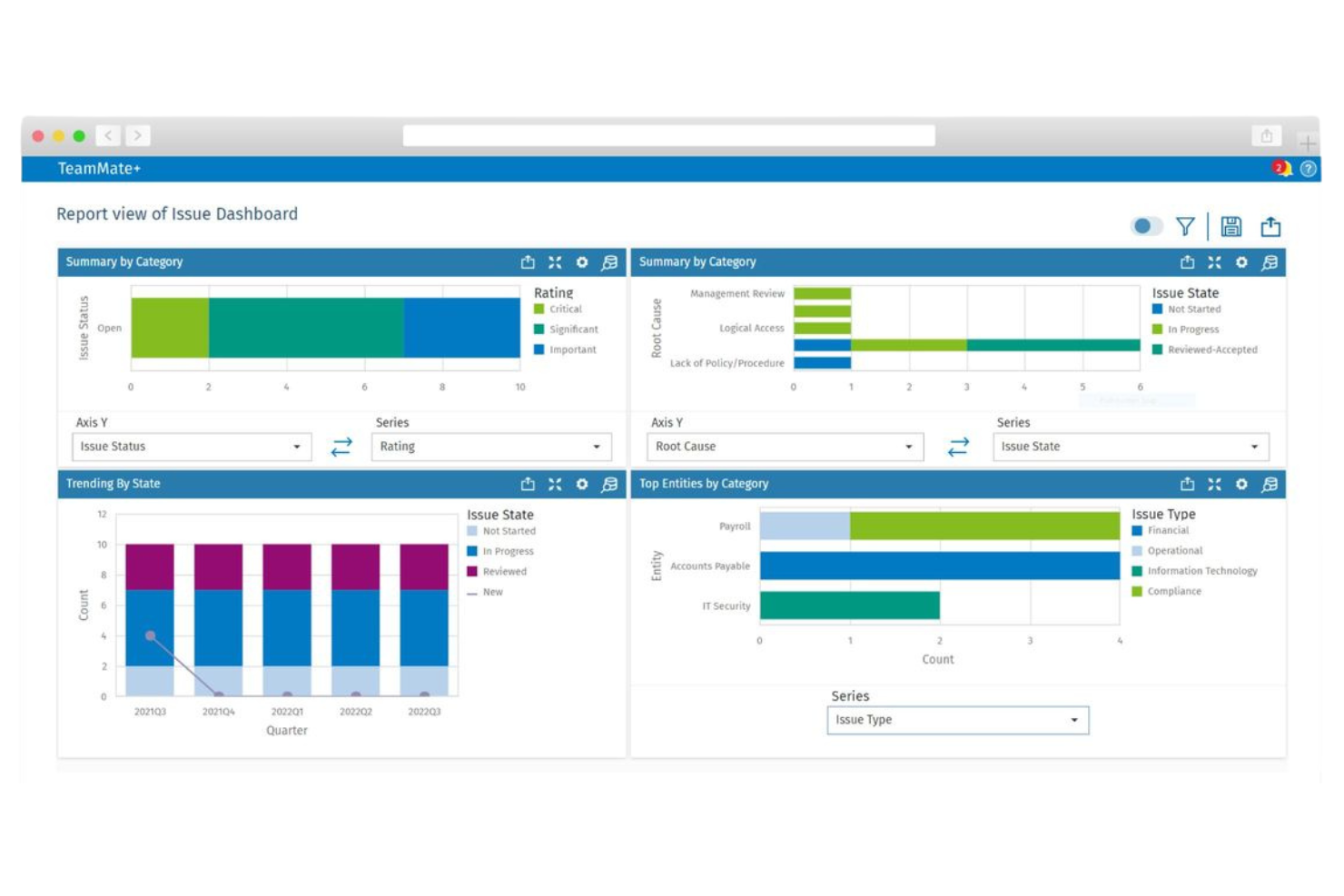
If your team needs to embed decision logic directly into audit workflows, TeamMate offers a business rules engine built for audit and compliance professionals. It’s especially relevant for internal audit departments in large organizations that want to automate risk assessments, findings, and follow-up actions. By integrating rule management with audit process automation, TeamMate helps teams enforce consistent standards and respond quickly to regulatory changes.
Why I Picked TeamMate
For teams that need to connect decision logic directly to audit processes, TeamMate stands out with its business rules engine tailored for audit workflows. I picked TeamMate because it lets you automate risk scoring, findings assignment, and escalation steps within the same platform where audits are managed. The tool’s rules engine is designed to trigger actions based on audit data, so you can enforce consistent standards and respond to compliance requirements in real time. This makes TeamMate a strong fit for audit and compliance teams that want to embed decision management into their daily operations.
TeamMate Key Features
Some other features that make TeamMate useful for decision management include:
- Custom rule templates: Create and reuse templates for common audit scenarios and decision points.
- Role-based access controls: Assign permissions to users based on their responsibilities within the audit process.
- Automated notifications: Send alerts to team members when specific rule conditions are met.
- Change tracking: Monitor and log all modifications to business rules for auditability.
TeamMate Integrations
Integrations are not publicly available.
Pros and Cons
Pros:
- Custom rule templates for recurring audit scenarios
- Automated notifications for rule-triggered events
- Built-in rule engine for audit-specific workflows
Cons:
- Limited rule engine features
- Prioritizes audit over decision logic

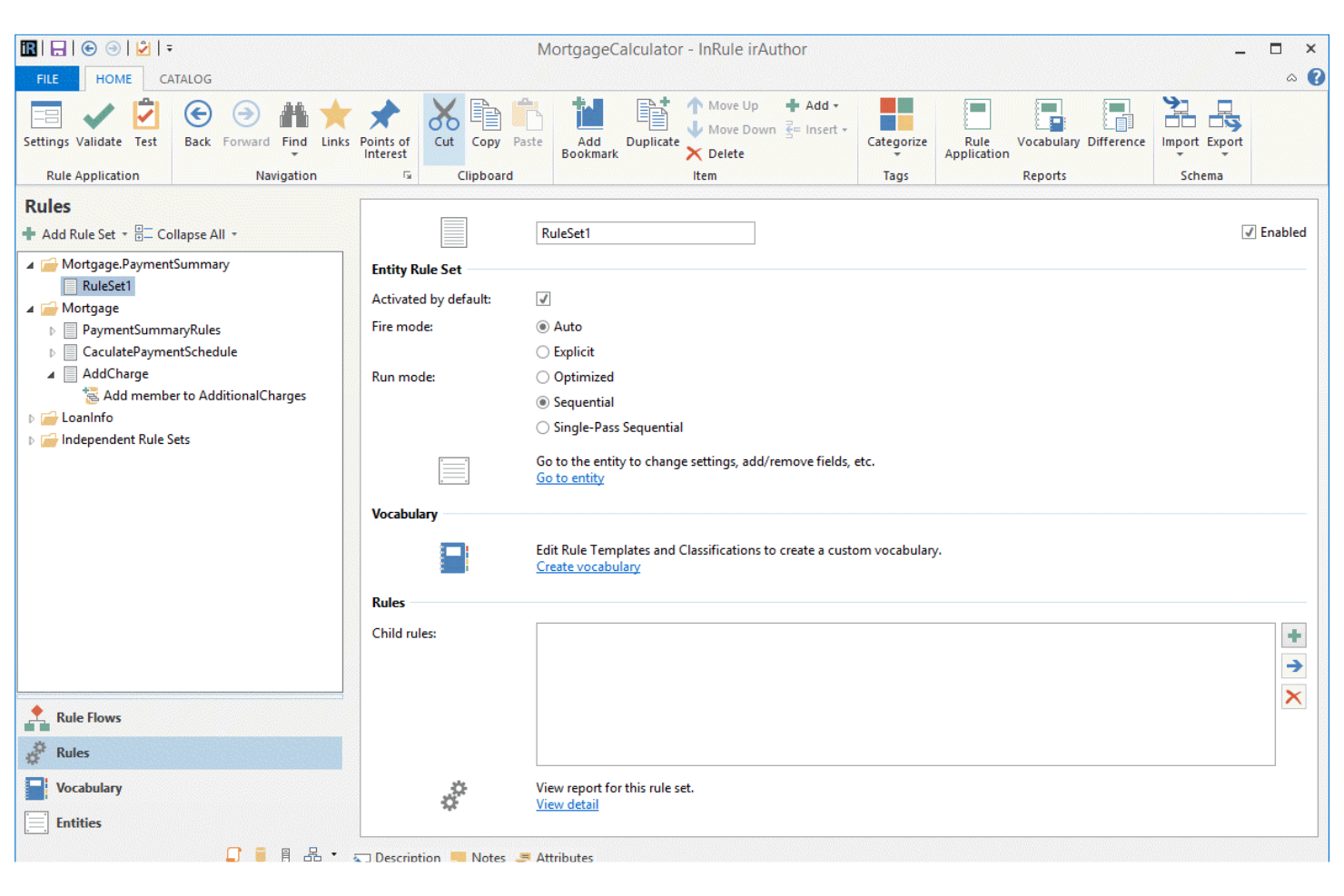
When your team needs to automate complex decisions instantly, InRule delivers real-time decision execution for high-volume environments. It’s a strong fit for financial services, insurance, and operations teams that require fast, consistent rule application across digital channels. The platform’s unique focus on real-time processing helps you operationalize business logic and adapt to changing requirements without code changes.
Why I Picked InRule
Real-time decision execution is essential for organizations that need to automate high-stakes processes without delay, and that’s where InRule excels. I picked InRule because it lets you author, test, and deploy business rules that execute instantly as data flows through your systems. The platform’s decision automation engine supports complex logic and integrates directly with operational workflows, so you can adapt to new requirements on the fly. This makes it especially valuable for industries like finance and insurance, where rapid, consistent decisions are critical for compliance and customer interactions.
InRule Key Features
Some other features that decision management teams may find useful include:
- Visual rule authoring interface: Build and modify decision logic using a drag-and-drop editor.
- Version control for rules: Track changes and manage multiple versions of business rules over time.
- Automated testing environment: Run simulations and validate rule outcomes before deployment.
- Role-based access controls: Assign permissions and manage user access to sensitive decision logic.
InRule Integrations
Integrations include Salesforce, SAP, Microsoft Dynamics, Snowflake, and more.
Pros and Cons
Pros:
- Supports integration with Salesforce and SAP
- Automated testing environment for rule validation
- Real-time rule execution for instant decisions
Cons:
- Mobile support is not fully developed
- Requires technical setup for complex integrations

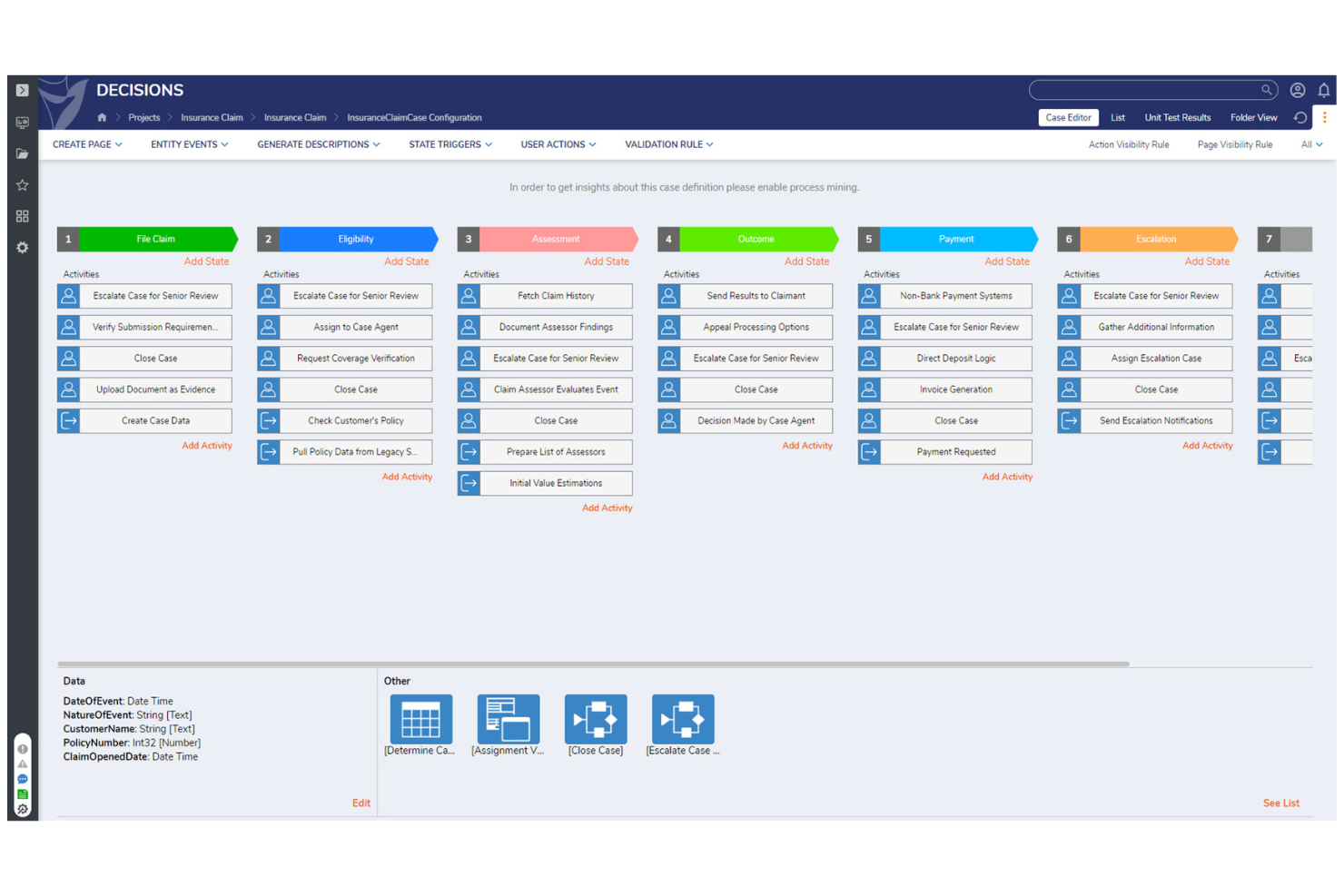
Decisions stands out for teams that want to configure business rules and workflows without writing code. It’s a strong fit for operations, compliance, and IT leaders who need to empower non-developers to automate decisions quickly. If your organization values flexibility and rapid iteration in rule management, Decisions is built to support those needs.
Why I Picked Decisions
For teams that want to build and update business rules without relying on developers, Decisions offers a true no-code environment. I picked Decisions because its visual rule designer lets users drag and drop logic components, making rule configuration accessible to non-technical staff. The platform also includes workflow automation tools that allow you to map out and automate multi-step processes directly within the interface. This approach helps organizations respond quickly to changing requirements and empowers business users to take ownership of decision logic.
Decisions Key Features
In addition to its no-code rule configuration, Decisions offers several other features that support decision management teams:
- Business metrics dashboard: Monitor rule performance and workflow outcomes in real time.
- Integrated forms designer: Build custom forms to collect and validate data within automated processes.
- Rule testing and simulation tools: Test business rules with sample data before deploying changes.
- Role-based access controls: Set granular permissions for users and groups managing rules and workflows.
Decisions Integrations
Integrations include Salesforce, HubSpot, DocuSign, Microsoft Teams, Slack, Amazon S3, Azure, Oracle, SAP, and more.
Pros and Cons
Pros:
- Drag-and-drop form designer included
- Built-in testing tools for rule validation
- Visual workflow builder supports complex logic
Cons:
- On-premises deployment requires additional setup
- Limited prebuilt industry-specific templates

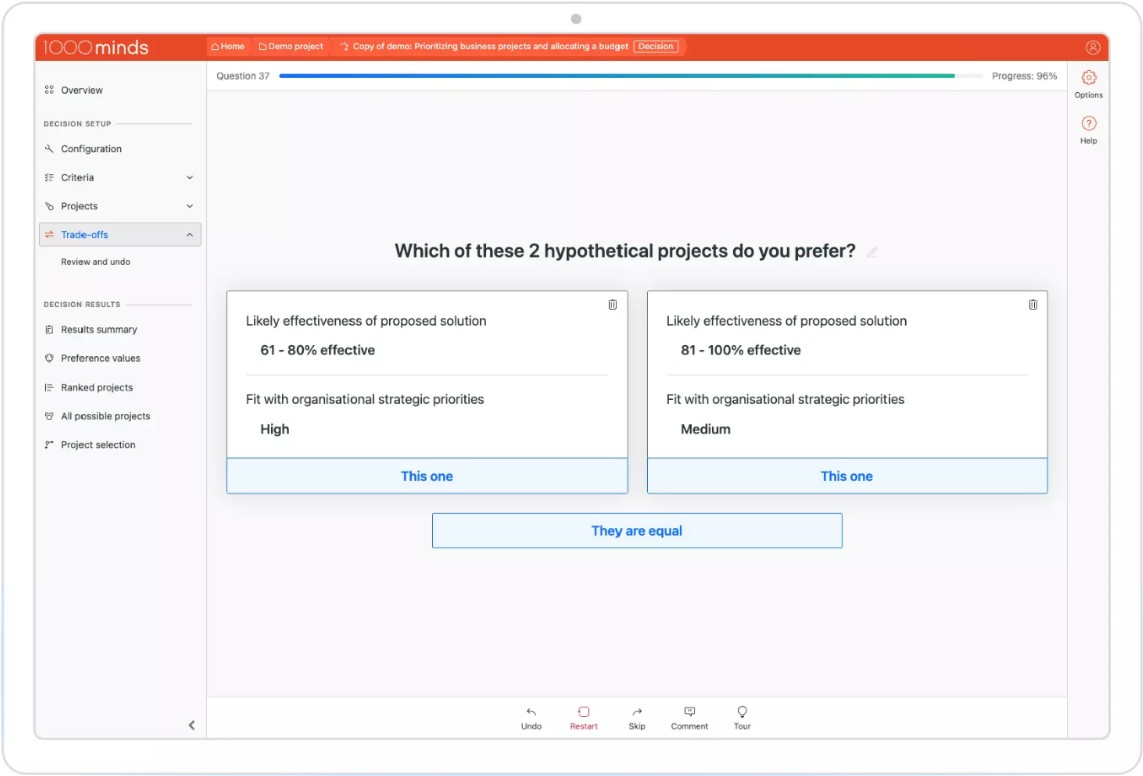
If you need to make complex decisions involving multiple criteria, 1000minds offers a structured approach for teams and organizations. It’s especially useful for professionals in policy, healthcare, research, and procurement who need to balance competing priorities transparently. The tool’s unique strength is its patented algorithm for multi-criteria decision analysis, helping you quantify preferences and justify choices with clear, data-driven decisions.
Why I Picked 1000minds
For teams that need to weigh multiple factors in their decision-making, 1000minds stands out for its multi-criteria decision analysis capabilities. I picked 1000minds because it uses a patented algorithm to help you systematically rank and prioritize options based on your unique criteria and preferences. The tool guides you through pairwise comparisons, making it easier to clarify trade-offs and document the reasoning behind each decision. This approach is especially valuable when transparency and defensibility are essential, such as in policy development, grant allocation, or procurement.
1000minds Key Features
In addition to its core decision analysis capabilities, I also found these features useful:
- Group decision-making tools: Collaborate with multiple stakeholders and aggregate input for collective decisions.
- Customizable criteria weighting: Adjust the importance of each criterion to reflect your organization’s priorities.
- Scenario analysis: Model and compare different decision scenarios to see how outcomes change.
- Audit trail and reporting: Track decision processes and generate detailed reports for transparency and documentation.
1000minds Integrations
Integrations are not publicly available.
Pros and Cons
Pros:
- Customizable weighting for decision criteria
- Transparent audit trail for decision documentation
- Patented algorithm for multi-criteria analysis
Cons:
- Lacks advanced visualization tools
- Limited automation for recurring decision processes

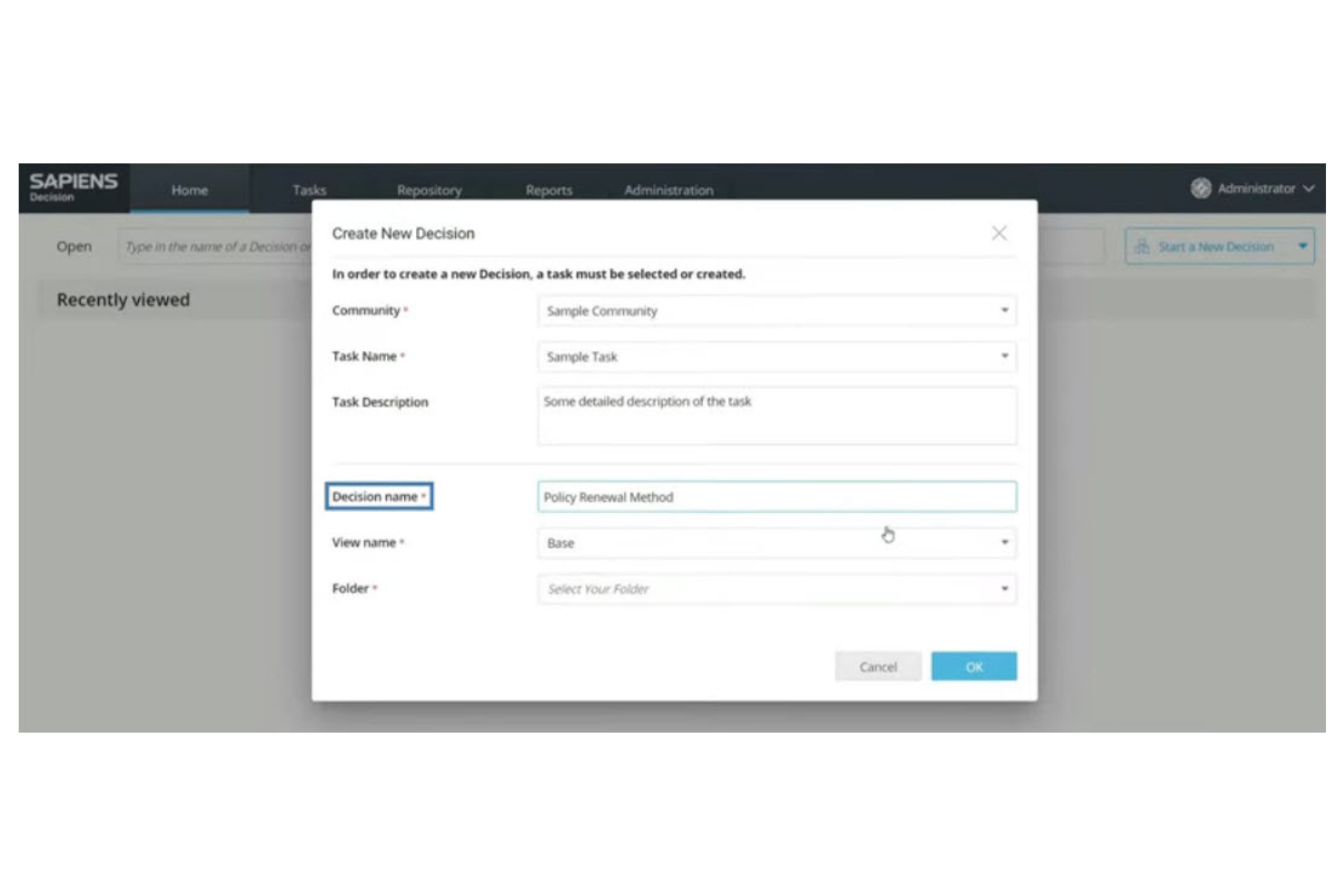
Sapiens offers a decision management platform designed specifically for insurance providers and financial services organizations. It helps teams automate underwriting, claims, and policy workflows while maintaining compliance with industry regulations. If your business needs to manage complex insurance logic and streamline decision-making processes, Sapiens targets those challenges directly.
Why I Picked Sapiens
For insurance teams, Sapiens stands out because it’s purpose-built to automate and manage complex insurance workflows. I picked Sapiens for its ability to handle underwriting and claims decision logic with configurable business rules and real-time decision tracking. The platform also supports regulatory compliance by allowing you to update rules as regulations change, without disrupting ongoing operations. These features make Sapiens a strong fit for organizations that need to automate high-stakes, industry-specific decision processes.
Sapiens Key Features
Some other features in Sapiens that decision management teams may find useful include:
- Visual rule modeling: Build and modify decision logic using a drag-and-drop interface for faster updates and easier collaboration.
- Audit trail management: Track every rule change and decision outcome for compliance and internal review.
- Integration with core insurance systems: Connect directly to policy administration, claims, and billing platforms to automate end-to-end processes.
- Scenario testing: Simulate rule changes and decision flows before deploying them to production environments.
Sapiens Integrations
Integrations are not publicly available.
Pros and Cons
Pros:
- Enables scenario testing before deployment
- Offers strong audit and compliance tracking
- Built for insurance-specific decision automation
Cons:
- Interface may feel dated
- Primarily focused on the insurance industry


IBM Operational Decision Manager (ODM) is designed for organizations that need to author, manage, and automate highly complex business rules at scale. It’s especially useful for enterprises in finance, insurance, and retail that require advanced rule modeling and real-time decision execution. If your team needs granular control over decision logic and the ability to update rules without code changes, IBM ODM addresses those needs directly.
Why I Picked IBM ODM
When complex rule authoring is a top priority, IBM ODM offers a level of control and flexibility that’s hard to match. I picked IBM ODM because it lets teams define, test, and deploy intricate business rules using a visual rule editor and decision tables. The tool also supports versioning and simulation, so you can safely experiment with changes before pushing them live. For organizations that need to manage thousands of rules and adapt quickly to regulatory or business changes, IBM ODM provides the depth and structure required.
IBM ODM Key Features
Some other features in IBM ODM that decision management teams may want to know about include:
- REST API support: Connect decision services to external applications and systems using standard RESTful APIs.
- Role-based access control: Assign permissions and manage user roles to control who can view, edit, or deploy rules.
- Automated deployment tools: Move decision logic from development to production environments with built-in deployment automation.
- Business event processing: Detect and respond to business events in real time using integrated event management capabilities.
IBM ODM Integrations
Integrations include IBM Cloud Pak for Business Automation, IBM Automation Decision Services, IBM WatsonX Orchestrate, and more.
Pros and Cons
Pros:
- Strong version control for rule changes
- Built-in simulation for rule testing
- Visual rule editor supports complex logic
Cons:
- Documentation can be difficult to navigate
- Requires specialized skills for advanced features

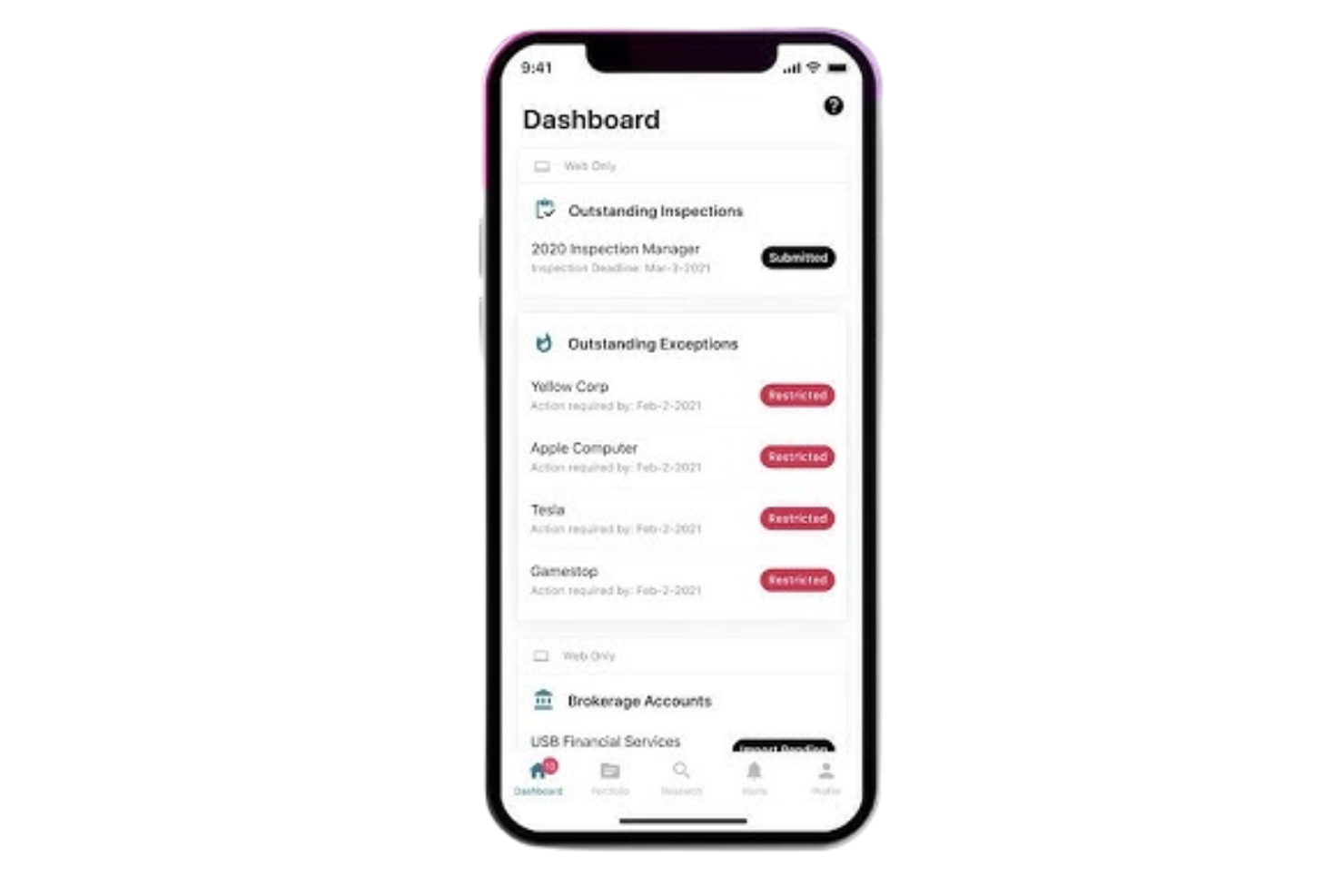
Kingland is purpose-built for organizations that need to track, manage, and document regulatory compliance decisions across complex environments. It’s especially relevant for financial services, insurance, and other highly regulated industries where audit trails and policy enforcement are non-negotiable. If your team faces evolving compliance requirements and needs a system to centralize and automate compliance workflows, Kingland addresses those challenges directly.
Why I Picked Kingland
For teams that need to stay ahead of regulatory changes, Kingland stands out for its focus on compliance tracking within decision management. I picked Kingland because it offers automated policy monitoring and detailed audit trails, which are essential for organizations facing frequent regulatory updates. The platform also provides configurable workflows that help ensure every compliance decision is documented and reviewable. If your business operates in a highly regulated sector, these features make Kingland a strong fit for managing compliance obligations.
Kingland Key Features
I also found several other features in Kingland that support decision management teams:
- Role-based access controls: Set granular permissions for users based on their responsibilities and compliance needs.
- Automated notifications: Trigger alerts for policy changes, review deadlines, or compliance exceptions.
- Data lineage tracking: Trace the origin and flow of compliance data throughout the decision process.
- Customizable reporting tools: Build and export compliance and decision reports tailored to regulatory requirements.
Kingland Integrations
Integrations include Kingland Entity Management and an API for custom integrations.
Pros and Cons
Pros:
- Automated alerts for policy updates
- Customizable compliance reporting templates
- Regulatory change tracking is built in
Cons:
- Support response times can be inconsistent
- Few native integrations with external tools


FICO Blaze Advisor is designed for organizations that need to automate and manage complex, high-volume decision processes. It’s especially useful for financial institutions, insurers, and enterprises handling large-scale transactions where speed and accuracy are essential. If your team needs to deploy business rules at scale and adapt quickly to changing policies, Blaze Advisor addresses those demands directly.
Why I Picked FICO Blaze Advisor
When high-volume transaction processing is a top priority, FICO Blaze Advisor offers a specialized approach to decision management. I picked Blaze Advisor because it supports complex business rule authoring and deployment, which is essential for organizations processing thousands or millions of transactions daily. The tool’s real-time decision execution engine ensures that automated decisions are both fast and consistent, even under heavy loads. For teams that need to update rules quickly in response to changing business or regulatory requirements, Blaze Advisor’s centralized rule management is a strong advantage.
FICO Blaze Advisor Key Features
Some other features in FICO Blaze Advisor that support decision management teams include:
- Graphical rule modeling tools: Build and visualize decision logic using a drag-and-drop interface.
- Version control for business rules: Track changes and maintain historical versions of all rule sets.
- Simulation and testing environment: Test decision logic with sample data before deploying to production.
- Multi-language support: Author and manage business rules in multiple languages for global teams.
FICO Blaze Advisor Integrations
Integrations are not publicly available.
Pros and Cons
Pros:
- Includes simulation and testing environments
- Offers graphical rule modeling tools
- Handles millions of transactions per day
Cons:
- Limited documentation for advanced features
- Requires specialized training for rule authoring

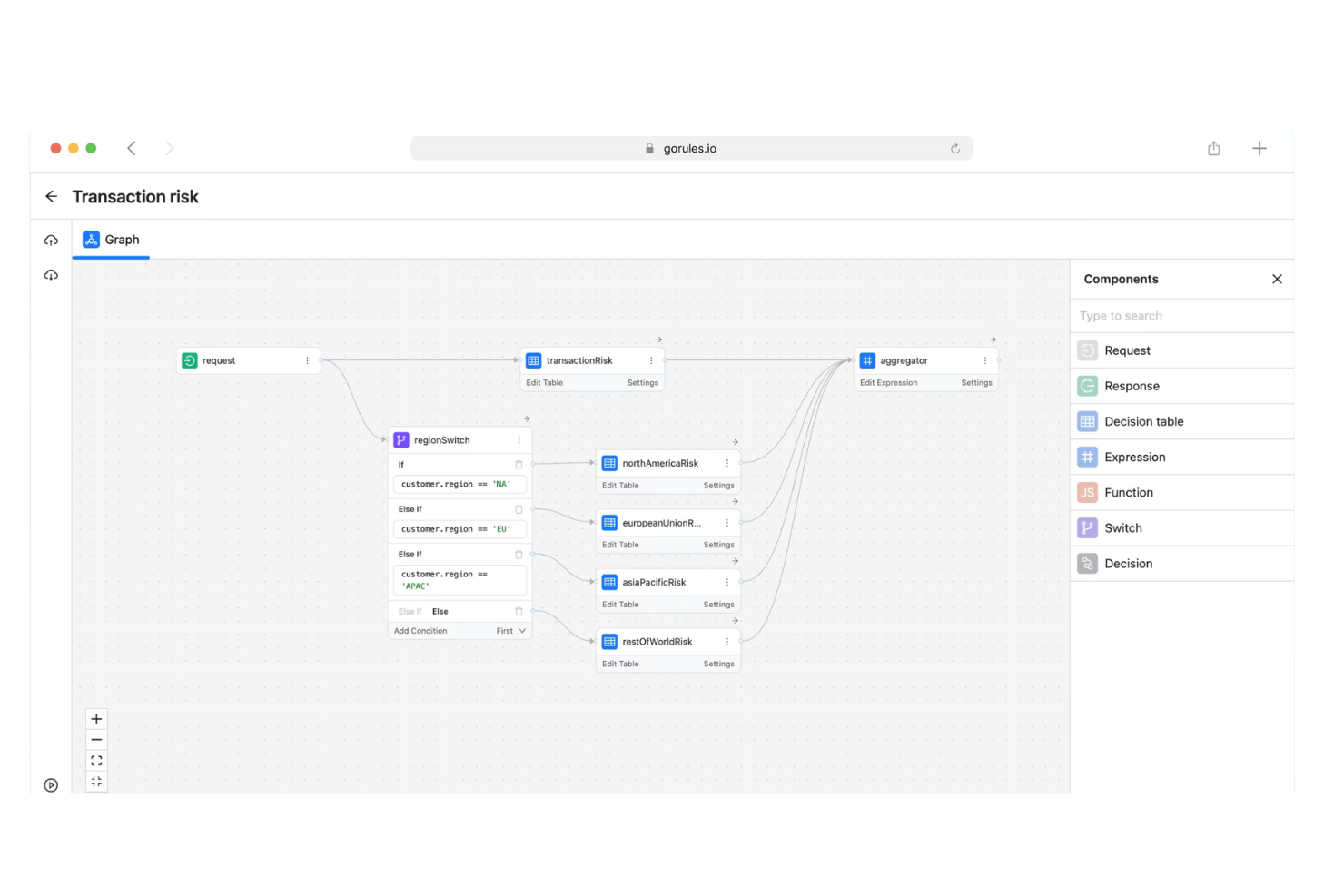
GoRules is designed for teams that want to manage business rules in a cloud-native environment. It’s especially useful for SaaS providers, fintech companies, and digital platforms that need scalable, API-driven rule management. If you’re looking to centralize and automate decision logic across distributed systems, GoRules offers a modern approach tailored for cloud-first operations.
Why I Picked GoRules
What sets GoRules apart is its focus on cloud-native rule management, which is essential for organizations operating in distributed and API-driven environments. I picked GoRules because it lets you deploy, update, and manage business rules directly through a web interface, with changes instantly available via REST APIs. The platform also supports version control for rules, so you can track changes and roll back updates as needed. This makes GoRules a strong choice for teams that need to maintain agility and reliability in fast-changing digital ecosystems.
GoRules Key Features
Some other features that make GoRules appealing for decision management teams include:
- Rule editor with syntax highlighting: Write and review rules with clear visual cues for logic and errors.
- Audit logs: Track every rule change and user action for compliance and transparency.
- Multi-environment support: Manage and test rules across development, staging, and production environments.
- Webhook triggers: Initiate external workflows or notifications automatically when rules are executed.
GoRules Integrations
Integrations include Azure AD, Okta, and any OpenID Connect provider. An API is available for custom integrations.
Pros and Cons
Pros:
- Audit logs provide traceability for compliance
- Multi-environment support for safe testing
- Cloud-native deployment
Cons:
- Minimal community support resources
- No built-in analytics or reporting dashboard
Diğer Karar Yönetimi Yazılımları
Kısa listeme girmeyen ancak yine de göz atmaya değer bazı ek karar yönetimi yazılımı seçenekleri şunlardır:
- SAS Intelligent Decisioning
For advanced analytics integration
- Aera Decision Cloud
For autonomous decision automation
- Cloverpop
For collaborative team workflows


How I Evaluate Decision Management Software
Whether a PMO is logging RAID decisions or automating change approvals, I evaluate tools on two layers: must-have functionality and the differentiators that set the best options apart.
Core Functionality (Table Stakes For This List)
When I'm selecting tools for my list, I rank each one on a scale from 0 (does not offer the functionality) to 5 (excels in this area) for each core functionality listed below. Then, I calculate the tool's total score into a percentage. Each tool needs to achieve a minimum total score of 65% to be considered for inclusion.
- Decision Repository & Log: I check whether decisions live in a dedicated, searchable log with fields for rationale, owner, and status—not buried in comment threads or wiki pages.
- Decision Workflow & Approval: Each tool should support structured routing for proposals and approvals, like escalating a scope change through a PMO review before it reaches a steering committee.
- Criteria-Based Evaluation: I look for weighted scoring or ranking against defined criteria, so teams can compare vendor shortlists or technology options with a consistent, transparent method.
- Business Rules & Logic Automation: The platform should let you define reusable decision rules—for example, auto-routing budget-impacting decisions above a set threshold to a portfolio manager for sign-off.
- Traceability & Linking: Decisions need to connect back to the artifacts they affect. I evaluate whether you can link a go/no-go call to its related risks, tasks, and milestones with visible dependencies.
- Audit Trail & Reporting: I look for a complete change history on every decision record, paired with dashboards or reports that surface patterns like approval bottlenecks or decision cycle times.
Once I have a list of tools that meet the criteria, I consider what sets each platform apart.
Differentiating Factors (What Sets Vendors Apart)
Here's how I compare and contrast different vendors:
Standout Features
Scenario modeling is a big differentiator—I look for tools that let you adjust variables like budget or timeline and see how each option plays out before a steering committee vote. Stakeholder voting and async collaboration matter just as much, especially when approvers sit across time zones and can't join a live call. I also evaluate whether a platform includes prebuilt decision templates for common project scenarios like change requests or risk responses, which saves PMOs from building governance frameworks from scratch.
Beyond Features
I evaluate how well each tool integrates with the PM and PPM platforms your team already relies on—two-way sync with Jira or Smartsheet is far more useful than a basic CSV export. Compliance and auditability also weigh heavily, since regulated industries like pharma or construction need immutable logs and role-based access controls. Finally, I consider pricing structure, particularly whether the vendor offers viewer or stakeholder-only licenses so occasional approvers don't inflate your per-seat costs as the PMO scales across programs.
Karar Yönetimi Yazılımı Nasıl Seçilir?
Uzun özellik listeleri ve karmaşık fiyatlandırma yapıları içinde kaybolmak kolaydır. Kendinize özgü yazılım seçim sürecinizi yürütürken odağınızı korumanıza yardımcı olmak için göz önünde bulundurmanız gereken faktörleri içeren bir kontrol listesi hazırladık:
| Faktör | Dikkat Edilmesi Gerekenler |
|---|---|
| Ölçeklenebilirlik | İşletmeniz büyüdükçe yazılım mevcut ve öngörülen karar hacimlerinizi yönetebilecek mi? İşlem sınırlarını ve büyük ölçekteki performansı sorun. |
| Entegrasyonlar | Araç mevcut sistemlerinize (CRM, ERP ve diğer veri kaynakları) yerel olarak bağlanabiliyor mu? Önceden oluşturulmuş bağlayıcıları ve API seçeneklerini kontrol edin. |
| Özelleştirilebilirlik | Ağır bir BT desteğine ihtiyaç duymadan kuralları, iş akışlarını ve arayüzleri kuruluşunuzun kendine özgü süreçlerine göre uyarlayabilir misiniz? |
| Kullanım kolaylığı | İş birimi kullanıcıları kuralları oluşturup güncelleyebilecek mi, yoksa devam eden değişiklikler için teknik personele mi ihtiyacınız olacak? |
| Uygulama ve kullanıma alma | Çalışmaya başlamak ne kadar sürer? Net geçiş yolları, eğitim kaynakları ve kullanıma alma sırasında destek sunulmasına dikkat edin. |
| Maliyet | Fiyatlandırma kademeleri şeffaf ve öngörülebilir mi? Kurulum, destek ve gelecekteki ölçeklendirme dahil olmak üzere toplam sahip olma maliyetini değerlendirin. |
| Güvenlik önlemleri | Platform veri koruma standartlarınızı karşılıyor mu? Şifreleme, erişim kontrolleri ve denetim izleri hakkında bilgi alın. |
| Uyumluluk gereksinimleri | Yazılım sektör düzenlemelerine (GDPR, HIPAA veya SOX gibi) uymanıza yardımcı olacak mı? Yerleşik uyumluluk özelliklerini ve denetim desteğini kontrol edin. |
Karar Yönetimi Yazılımı Nedir?
Karar yönetimi yazılımı, iş süreçleri ve sistemleri genelindeki iş karar mantığını otomatikleştiren, yöneten ve izleyen dijital bir platformdur. Bu araçlar, gerçek zamanlı olarak tutarlı ve denetlenebilir kararlar alınmasını sağlayan kuralları, politikaları ve modelleri tanımlamanıza olanak tanır. Ekipler, manuel müdahaleyi azaltmak, değişen gereksinimlere hızla uyum sağlamak ve iç ve dış standartlara uyumu güvence altına almak için karar yönetimi yazılımını kullanır.
Özellikler
Karar yönetimi yazılımı seçerken aşağıdaki temel özelliklere dikkat edin:
- Kural geliştirme arayüzü: Kullanıcıların görsel düzenleyiciler veya betik oluşturma araçlarını kullanarak iş kuralları oluşturmasına, düzenlemesine ve yönetmesine olanak tanır; böylece derin teknik becerilere ihtiyaç duymadan karmaşık mantığın yönetilmesini kolaylaştırır.
- Sürüm denetimi: Karar mantığında zaman içinde yapılan değişiklikleri izler; ekiplerin önceki sürümlere geri dönmesine ve güncellemelerin net bir denetim kaydını tutmasına olanak tanır.
- Gerçek zamanlı yürütme motoru: Veriler sistemlerinizden akarken kararları anında işler; zamana duyarlı iş operasyonlarını destekler ve manuel müdahaleyi azaltır.
- İş akışı entegrasyonu: Karar mantığını doğrudan iş süreçlerine bağlayarak otomatik kararların iş akışlarınız içinde doğru noktalarda tetiklenmesini sağlar.
- Denetim günlüğü kaydı: Uyumluluk ve sorun giderme süreçlerini desteklemek için girdiler, çıktılar ve kural yolları da dahil olmak üzere sistem tarafından verilen her kararı kaydeder.
- Role dayalı erişim denetimleri: Karar mantığını kimlerin görüntüleyebileceğini, düzenleyebileceğini veya dağıtabileceğini kısıtlayarak kuruluşların hassas kuralları yönetmesine ve yönetişimi sürdürmesine yardımcı olur.
- Test ve simülasyon araçları: Kullanıcıların test senaryoları çalıştırarak ve sonuçları inceleyerek kuralları ve karar akışlarını dağıtımdan önce doğrulamasına olanak tanır.
- Raporlama ve analiz: Karar etkinliğini, kural kullanımını ve eğilimleri özetleyen gösterge panoları ve raporlar sunarak ekiplerin performansı izlemesine ve iyileştirme alanlarını belirlemesine yardımcı olur.
Yaygın Karar Yönetimi Yazılımı AI Özellikleri
Yukarıda listelenen standart karar yönetimi yazılımı özelliklerinin yanı sıra bu çözümlerin çoğu aşağıdaki gibi özelliklerle AI'ı bünyesine katıyor:
- Öngörücü analiz: Geçmiş verilere dayanarak sonuçları tahmin etmek için makine öğrenimi modellerini kullanır; ekiplerin eğilimleri öngörmesine ve proaktif kararlar almasına yardımcı olur.
- Otomatik karar optimizasyonu: İş sonuçlarını zaman içinde iyileştirmek için sonuçları analiz ederek ve kuralları veya parametreleri ayarlayarak karar mantığını sürekli olarak geliştirir.
- Doğal dil işleme: Kullanıcıların karar mantığını günlük dili kullanarak tanımlamasını veya sorgulamasını sağlar; teknik olmayan paydaşların sistemle etkileşim kurmasını kolaylaştırır.
- Anomali tespiti: Karar verilerindeki olağandışı kalıpları veya aykırı değerleri belirleyerek ekipleri dikkat gerektirebilecek olası riskler veya fırsatlar konusunda uyarır.
- Uyarlanabilir öğrenme: Sistemin yeni verilerden ve kullanıcı geri bildirimlerinden öğrenmesine olanak tanır; değişen iş koşullarıyla uyumlu kalmak için karar modellerini otomatik olarak günceller.
Avantajlar
Karar yönetimi yazılımını uygulamak ekibiniz ve işletmeniz için çeşitli avantajlar sağlar. Faydalanmayı bekleyebileceğiniz birkaç avantaj şunlardır:
- Tutarlı karar mantığı: Otomatik kural yürütme, kararların her seferinde aynı şekilde alınmasını sağlayarak hataları ve önyargıları azaltır.
- Daha hızlı yanıt süreleri: Gerçek zamanlı işleme ve iş akışı entegrasyonu, ekibinizin veri ve olaylara anında yanıt vermesine olanak tanır.
- Geliştirilmiş uyumluluk: Denetim günlüğü kaydı ve sürüm denetimi, iç politikalara ve dış düzenlemelere uyumu izlemeyi, incelemeyi ve göstermeyi kolaylaştırır.
- Daha yüksek çeviklik: Görsel kural geliştirme ve test araçları, yoğun BT katılımı olmadan iş gereksinimleri değiştikçe karar mantığını hızla güncellemenize olanak tanır.
- Geliştirilmiş şeffaflık: Raporlama ve analiz özellikleri, kuruluşunuz genelinde kararların nasıl ve neden alındığına ilişkin net bir görünürlük sağlar.
- Azaltılmış manuel iş yükü: Rutin kararların otomatikleştirilmesi, ekibinizin daha yüksek değer taşıyan görevlere ve stratejik girişimlere odaklanmasını sağlar.
- Ölçeklenebilir operasyonlar: Artan karar hacimlerini yönetme ve temel sistemlerle entegre olma yeteneği, denetimden ödün vermeden işletmenin büyümesini destekler.
Maliyetler ve Fiyatlandırma
Karar yönetimi yazılımı seçmek, mevcut çeşitli fiyatlandırma modellerinin ve planların anlaşılmasını gerektirir. Maliyetler özelliklere, ekip büyüklüğüne, eklentilere ve daha fazlasına göre değişir. Aşağıdaki tabloda yaygın planlar, bunların ortalama fiyatları ve karar yönetimi yazılımı çözümlerinde bulunan tipik özellikler özetlenmiştir:
Karar Yönetimi Yazılımı için Plan Karşılaştırma Tablosu
| Plan Türü | Ortalama Fiyat | Yaygın Özellikler |
|---|---|---|
| Ücretsiz Plan | $0 | Temel kural yazma, sınırlı entegrasyonlar, tek kullanıcı erişimi ve topluluk desteği. |
| Kişisel Plan | $20–$50/kullanıcı/ay | Temel kural yazma, sınırlı entegrasyonlar, tek kullanıcı erişimi ve topluluk desteği. |
| İşletme Planı | $50–$150/kullanıcı/ay | Çok kullanıcılı erişim, gelişmiş entegrasyonlar, sürüm denetimi, raporlama araçları ve role dayalı izinler. |
| Kurumsal Plan | $150–$400+/kullanıcı/ay | Özel entegrasyonlar, gelişmiş güvenlik, uyumluluk araçları, özel destek ve işe alıştırma yardımı. |
Karar Yönetimi Yazılımı Hakkında SSS
Karar yönetimi yazılımı hakkında sık sorulan bazı soruların yanıtlarını burada bulabilirsiniz:
Karar yönetimi yazılımı, iş süreci yönetimi araçlarından nasıl farklıdır?
Karar yönetimi yazılımı, kurallar ve politikalar gibi karar mantığının otomatikleştirilmesine ve yönetilmesine odaklanırken iş süreci yönetimi araçları tüm iş akışlarını düzenler. Genellikle her ikisini birlikte kullanırsınız; karar yönetimi kararların “ne” olduğunu ve “nasıl” alınacağını, süreç yönetimi ise “ne zaman” ve “kim” tarafından alınacağını yönetir.
Teknik olmayan kullanıcılar karar yönetimi yazılımındaki kuralları yönetebilir mi?
Evet, birçok platform iş kullanıcıları için tasarlanmış görsel kural düzenleyiciler ve yönlendirmeli arayüzler sunar. Bu sayede teknik olmayan personel kod yazmadan kurallar oluşturabilir, güncelleyebilir ve test edebilir; ancak karmaşık mantık yine de BT desteği gerektirebilir.
Karar yönetimi yazılımında ne tür entegrasyonlar aramalıyım?
CRM, ERP, veri ambarları ve iş akışı otomasyon platformları gibi temel sistemlerinizle entegrasyonlar arayın. Özel bağlantılar için API erişimi önemlidir; önceden oluşturulmuş bağlayıcılar ise dağıtımı hızlandırabilir ve BT iş yükünü azaltabilir.
Karar yönetimi yazılımını kullanırken uyumluluğu nasıl sağlayabilirim?
Denetim günlükleri, sürüm denetimi ve role dayalı erişim kontrolleri sunan bir yazılım seçin. Bu özellikler değişiklikleri takip etmenize, karar etkinliğini izlemenize ve GDPR veya HIPAA gibi düzenlemelere uyumluluğu göstermenize yardımcı olur.
Uygulama sırasında karşılaşılan yaygın zorluklar nelerdir?
Yaygın zorluklar arasında mevcut kuralların taşınması, eski sistemlerle entegrasyon ve kullanıcıların yeni arayüzler konusunda eğitilmesi yer alır. Veri eşleme için planlama yapmak, paydaşları erken aşamada sürece dahil etmek ve tedarikçinin işe alıştırma kaynaklarından yararlanmak geçişi kolaylaştırabilir.