

2026 İçin Bulut Tabanlı 10 İş Akışı Yazılımı

Bulut Tabanlı İş Akışı Yazılımı Kısa Listesi


Bulut tabanlı iş akışı yazılımı, ekibinizin iş süreçlerini tamamen çevrim içi olarak tasarlamasına, otomatikleştirmesine ve yönetmesine olanak tanır. Böylece çalışmayı her yerden koordine edebilir ve öncelikler değiştikçe hızla uyum sağlayabilirsiniz. En iyi bulut tabanlı iş akışı yazılımını arıyorsanız muhtemelen manuel adımları azaltmak, projelerin ilerlemesini sağlamak ve şirket içi araçların zahmetiyle uğraşmadan herkese neler olup bittiğini göstermek istiyorsunuz. Bu liste, önde gelen platformları karşılaştırmanıza, ihtiyaçlarınız için hangi özelliklerin en önemli olduğunu anlamanıza ve ekibinizin bir sonraki büyüme aşaması için güvenli bir karar vermenize yardımcı olacaktır.
Why Trust Our Software Recommendations
Our team has been testing and reviewing software since 2012. As project managers ourselves, we know how difficult—and important—it is to choose the right software.
For this guide, we evaluated tools using hands-on testing and independent research, scoring tools using our selection criteria. We also draw on insights from industry thought leaders and practicing project management experts.
Our reviews reflect our human editorial judgment, not a sales pitch.
Expert reviewers:
Bulut Tabanlı İş Akışı Yazılımı Karşılaştırma Tablosu
Bu karşılaştırma tablosu, en iyi bulut tabanlı iş akışı yazılımı seçimlerimin fiyatlandırma ayrıntılarını özetlemektedir.
| Tool | Starting Price | Website | |
|---|---|---|---|
| Best with AI-powered workflow building | — | Pricing upon request 30-day free trial available | Website |
| Best for quick workflow deployment | 4.8 out of 5 | $11/user/month 14-day free trial + free demo available | Website |
| Best with open-source workflow customization | 4.7 out of 5 | €20/month Free trial available | Website |
| Best for secure document-centric workflows | 4.3 out of 5 | CAD$21/user/month 14-day free trial | Website |
| Best for process mapping and automation | 4.4 out of 5 | $15,000/year 30-day free trial + free demo available | Website |
| Best for software development teams | — | $7/user/month Free plan available | Website |
| Best for customizable task automation | — | $7/user/month Free plan available | Website |
| Best for complex data pipeline management | — | Pricing upon request Free plan available | Website |
| Best for enterprise workload orchestration | — | Not available Free demo available | Website |
| Best with native Google Cloud integrations | — | Not available Not available | Website |
Bulut Tabanlı İş Akışı Yazılımı İncelemeleri
Aşağıda kısa listeme giren bulut tabanlı iş akışı yazılımlarıyla ilgili ayrıntılı özetlerimi bulabilirsiniz. İncelemelerim, size en uygun seçeneği bulmanıza yardımcı olmak için her platformun özelliklerini, entegrasyonlarını ve en uygun kullanım alanlarını ayrıntılı olarak ele almaktadır.

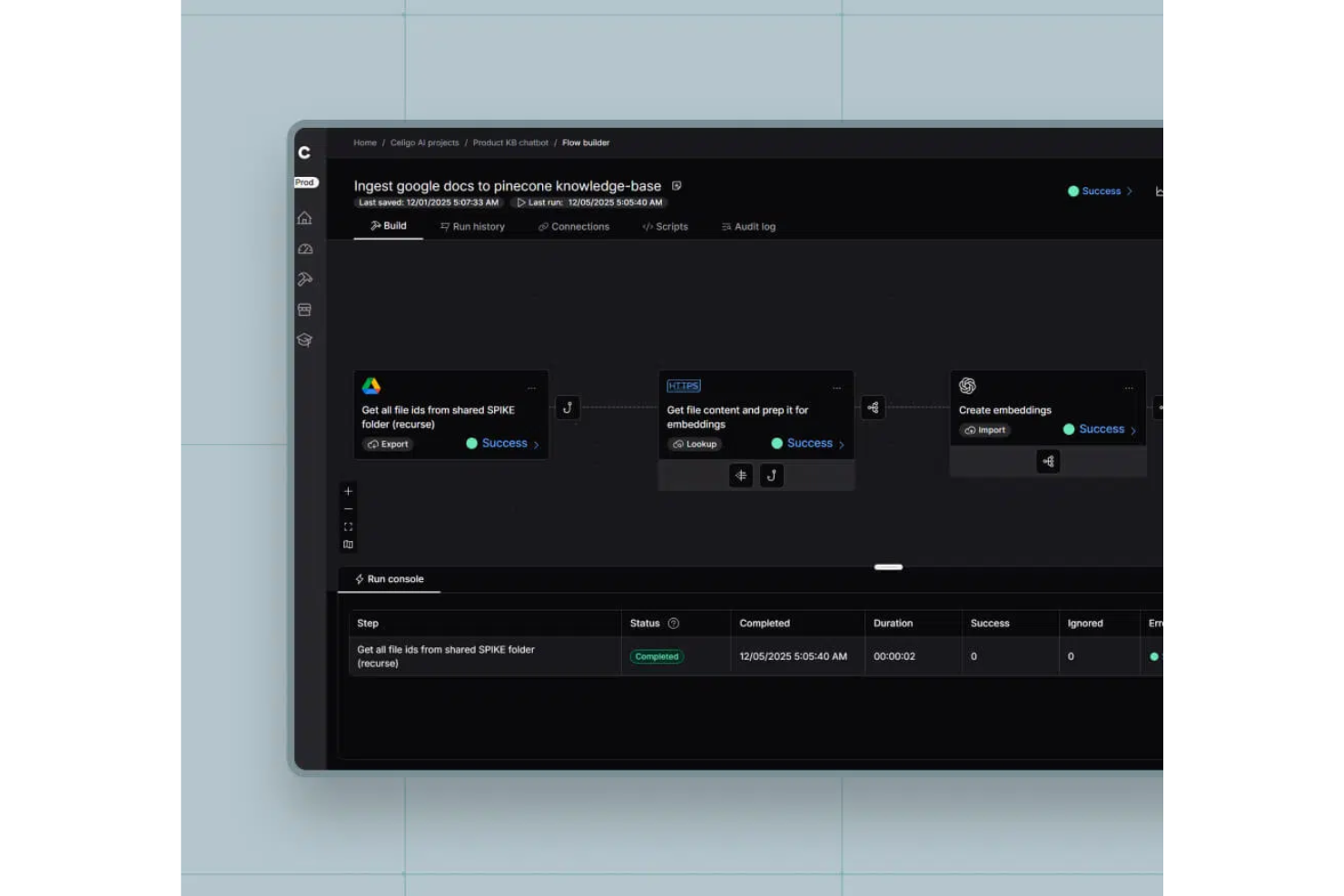
Celigo is a cloud-based workflow automation platform that connects cloud apps, automates business processes, and offers a visual interface for building and managing integrations.
Who Is Celigo Best For?
Celigo is a good fit for IT teams and operations leaders at mid-sized to large enterprises who need to automate and connect multiple cloud applications.
Why I Picked Celigo
I picked Celigo as one of the best because its AI-powered workflow builder lets me automate complex business processes without heavy manual setup. I like how the platform suggests workflow steps and mappings based on my data and app connections. My team is able to quickly build, test, and deploy automations using these AI-driven recommendations.
Celigo Key Features
- Visual flow designer: Build and edit workflows using a drag-and-drop interface.
- Error management dashboard: Monitor, troubleshoot, and resolve integration errors in real time.
- Reusable integration templates: Access a library of prebuilt templates for common business processes.
- Role-based access controls: Set permissions and manage user access for workflow and integration management.
Celigo Integrations
Celigo offers 1,000+ native connectors, including Salesforce, NetSuite, SAP, Microsoft Dynamics 365, Shopify, Amazon, QuickBooks, HubSpot, Jira, Slack, and Google Sheets. An API is available for custom integrations.
Pros and Cons
Pros:
- Detailed error management and monitoring tools
- AI-powered workflow automation suggestions
- Visual workflow builder with drag-and-drop design
Cons:
- Some connectors require additional configuration steps
- Advanced scripting requires JavaScript knowledge
New Product Updates from Celigo
Celigo Expands Storage, Data Imports, and Connection Management
Celigo adds a standalone storage connector, optimized Azure Synapse imports, NetSuite OAuth 2.0, flexible file templates, and expanded MCP access controls. These updates help teams manage files, process data, and secure integrations. For more information, visit Celigo’s official site.
 .
Cflow
Best for quick workflow deployment
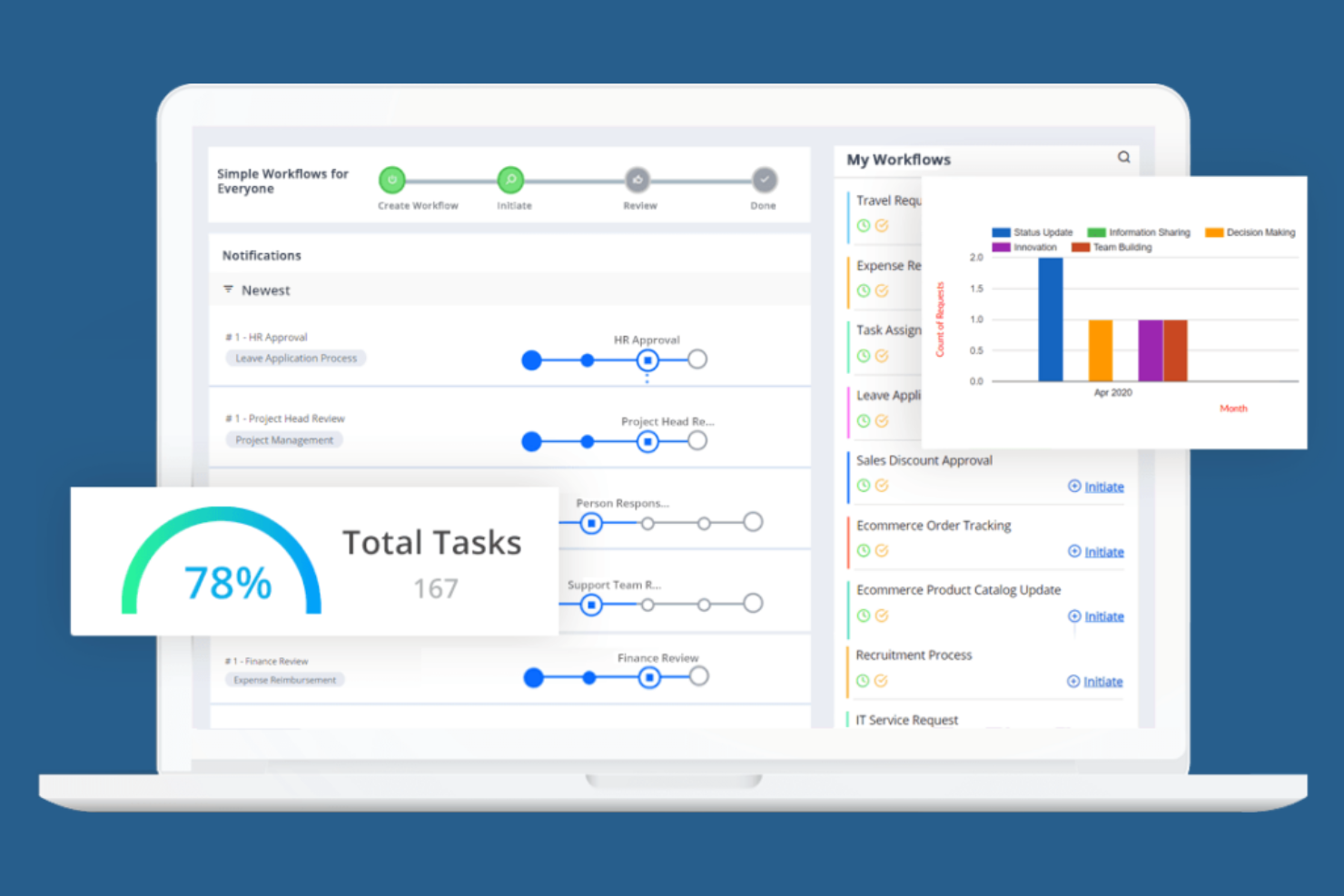
Cflow is designed for teams that need to deploy automated workflows quickly, without heavy IT involvement. It appeals to small and midsize businesses looking to digitize approvals, requests, and routine processes with minimal setup. The platform’s no-code workflow builder and ready-to-use templates help users launch new workflows in minutes.
Why I Picked Cflow
When speed is a top priority for workflow automation, Cflow stands out for its quick deployment capabilities. I picked Cflow because its no-code workflow builder lets users design and launch automated processes without technical expertise. The platform also offers a library of pre-built workflow templates, so teams can get started with common business processes right away. For organizations that need to digitize approvals, requests, or document routing in the cloud with minimal setup time, Cflow is a practical choice.
Cflow Key Features
In addition to its rapid deployment tools, Cflow includes several other features that support workflow automation in the cloud:
- Custom Form Designer: Build and modify forms with a drag-and-drop interface for capturing process data.
- Role-Based Access Control: Set permissions and manage user access based on roles within your organization.
- Automated Notifications: Send email or in-app alerts to keep stakeholders updated on workflow progress.
- Audit Trails: Track every action and change within workflows for compliance and transparency.
Cflow Integrations
Integrations include SAP, QuickBooks, Slack, Google Workspace, and Microsoft 365.
Pros and Cons
Pros:
- Good for HR and finance ops
- Easy mobile workflow approval
- Affordable cloud pricing
Cons:
- Analytics could be deeper
- Basic UI design feels dated

n8n
Best with open-source workflow customization

If you’re looking for a workflow automation platform with deep customization and open-source flexibility, N8n is worth considering. It’s built for technical teams and developers who want to design, modify, and self-host complex workflows without vendor lock-in. N8n’s node-based editor and open-source codebase let you tailor automations to fit unique business processes or compliance needs.
Why I Picked N8n
What sets N8n apart is its open-source approach to workflow automation, which gives teams full control over how their workflows are built and deployed. I picked N8n because it lets users customize every step of their automation, from building custom nodes to self-hosting the entire platform for greater data privacy. The visual node-based editor makes it possible to design complex, multi-step workflows that can be tailored to unique business requirements. For teams that want to avoid vendor lock-in and need flexibility to adapt workflows as their processes evolve, N8n offers a level of customization that’s hard to match in cloud based workflow software.
N8n Key Features
Some other features that make N8n appealing for workflow automation include:
- Version Control Support: Integrate with Git to manage workflow versions and track changes over time.
- Built-In Scheduler: Trigger workflows automatically based on time or recurring intervals.
- Error Workflow Handling: Configure custom error workflows to manage exceptions and failures.
- Environment Variables Management: Store and manage sensitive data or configuration settings securely within workflows.
N8n Integrations
Integrations include Slack, Discord, GitHub, Airtable, Google Workspace, PostgreSQL, and Mailchimp.
Pros and Cons
Pros:
- Visual builder is very clean
- Huge community integrations
- Deep custom node scripting
Cons:
- Less enterprise compliance
- Debugging nodes can be hard

Box
Best for secure document-centric workflows
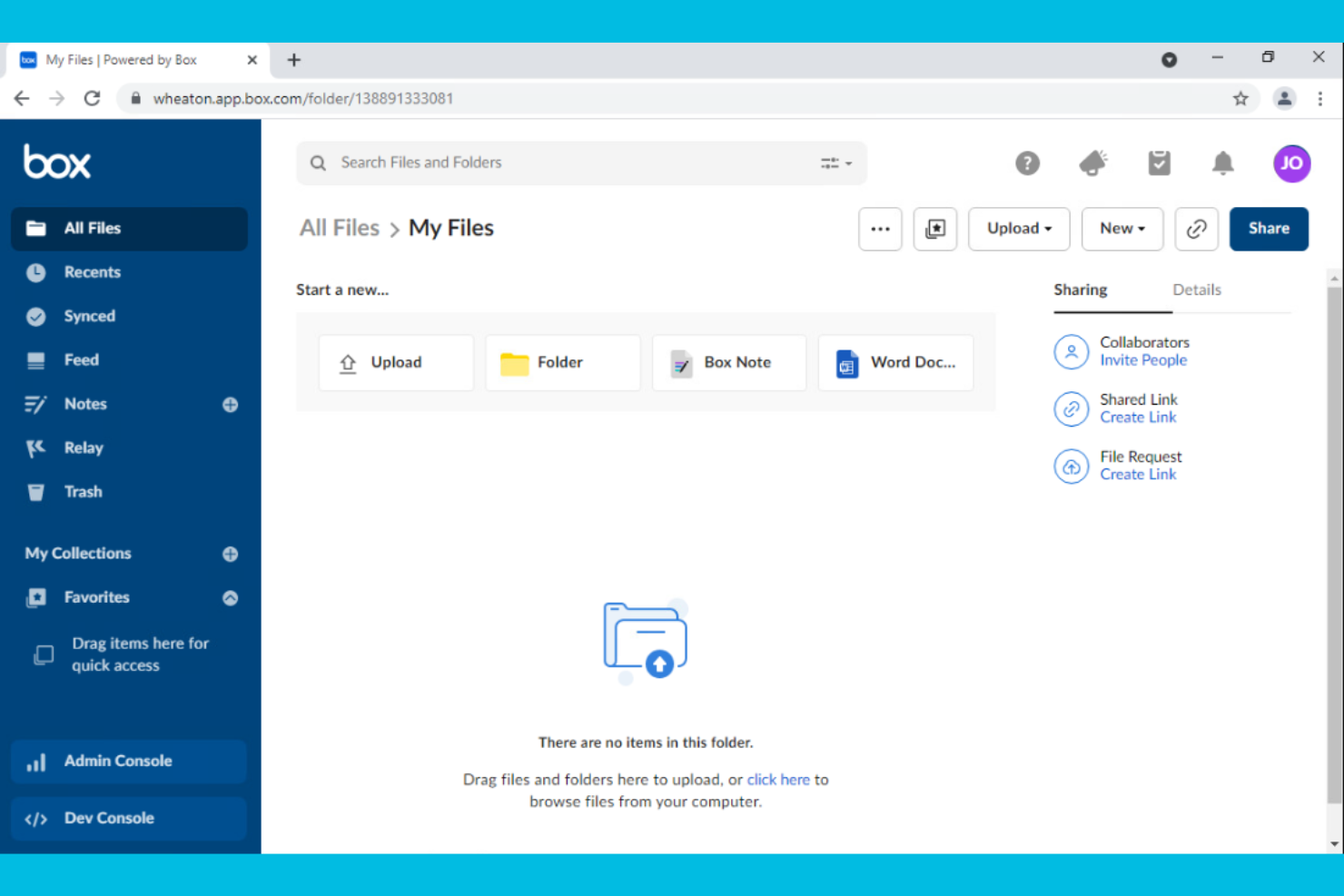
Box is designed for organizations that need to manage, share, and secure documents as part of their workflow. It’s a strong fit for teams in regulated industries or any business where document security and compliance are top priorities. With features for granular file permissions and automated document routing, Box helps teams keep sensitive information protected while moving work forward.
Why I Picked Box
When document security is a top concern, Box offers a workflow platform built around protecting sensitive files. I picked Box because it provides advanced security controls like granular permission settings and detailed audit trails, which are essential for teams handling confidential information. The platform also supports automated document workflows, allowing users to route, review, and approve files without compromising compliance. For organizations that need to balance collaboration with strict data protection, Box delivers a focused solution.
Box Key Features
In addition to its security-focused workflow tools, Box offers several other features that support document-centric processes:
- Version History: Track and restore previous versions of documents directly within the platform.
- eSignature Integration: Collect legally binding electronic signatures without leaving Box.
- Task Assignment: Assign tasks to team members and monitor progress on document-related work.
- Collaboration Workspaces: Create shared folders and workspaces for real-time document collaboration.
Box Integrations
Integrations include Microsoft 365, Google Workspace, Salesforce, Slack, Zoom, Okta, and ServiceNow.
Pros and Cons
Pros:
- Seamless e-signature add-ons
- Automated retention policies
- Easy document approvals
Cons:
- Workflow UI is very basic
- Relay feature costs extra

Nintex
Best for process mapping and automation
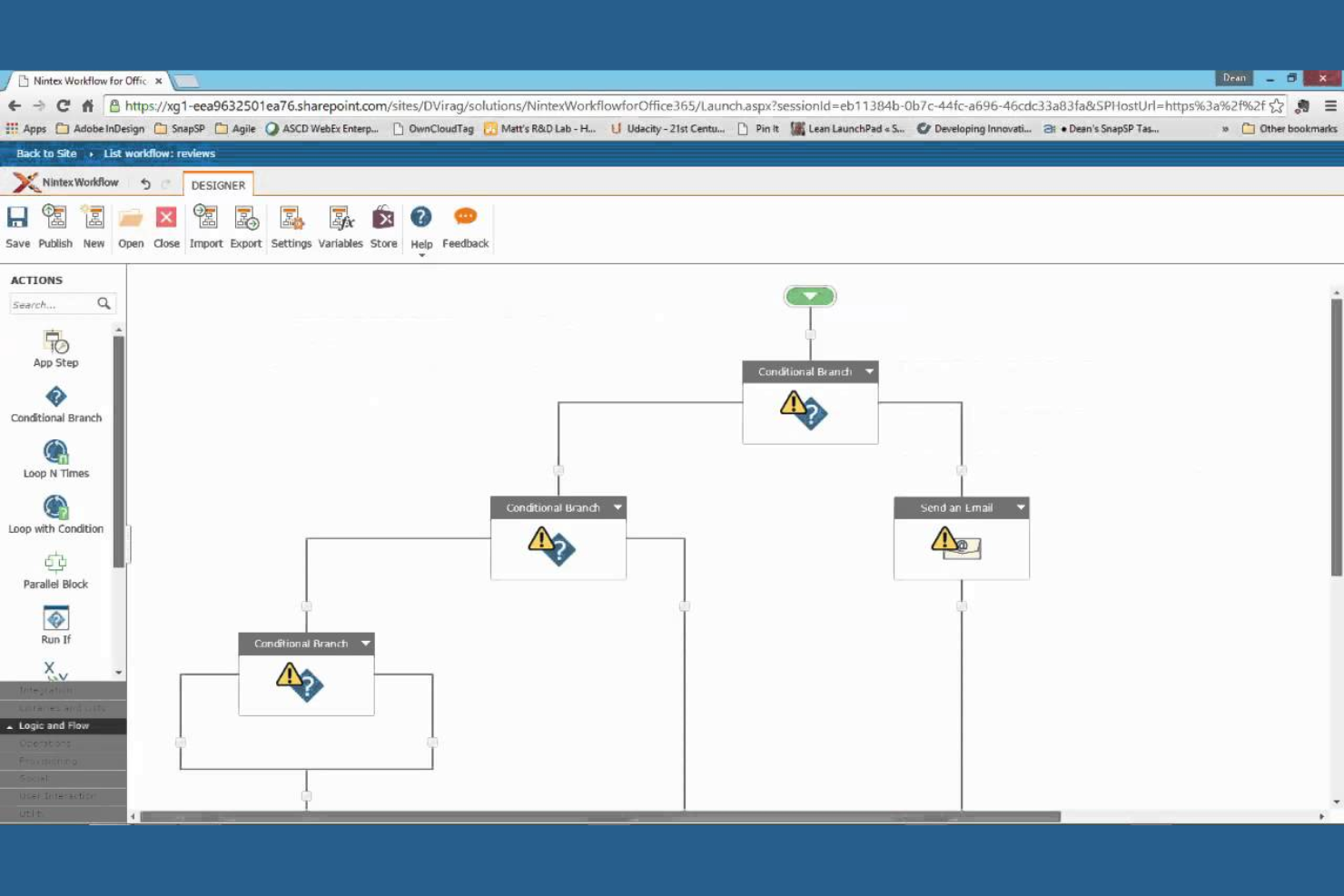
Nintex stands out for teams that need to map, automate, and optimize business processes without heavy IT involvement. Operations leaders and process analysts use it to visually design workflows, automate approvals, and document procedures across departments. Its drag-and-drop process mapping and automation tools help organizations standardize and improve complex workflows in regulated or fast-changing environments.
Why I Picked Nintex
For organizations that need to document and automate business processes visually, Nintex offers a focused set of tools for process mapping and automation. I picked Nintex because its drag-and-drop process designer lets teams quickly build, share, and update workflow diagrams without coding. The platform also supports automated approval routing and digital forms, which help standardize processes and reduce manual errors. If your team needs to map out complex procedures and automate repetitive steps in a cloud environment, Nintex provides a purpose-built solution.
Nintex Key Features
In addition to its process mapping and automation capabilities, Nintex offers several other features that support workflow management in the cloud:
- Document Generation: Automatically create and distribute documents based on workflow data and templates.
- Workflow Analytics: Track workflow performance and identify bottlenecks with built-in reporting tools.
- eSignature Integration: Collect digital signatures directly within automated workflows.
- Mobile App: Access, manage, and approve workflows from mobile devices.
Nintex Integrations
Integrations include Microsoft 365, SharePoint, Salesforce, ServiceNow, Box, Dropbox, and Adobe Sign.
Pros and Cons
Pros:
- Strong document generation
- Connects hybrid cloud apps
- Deep SharePoint integrations
Cons:
- Slow support resolution times
- Form builder is inflexible
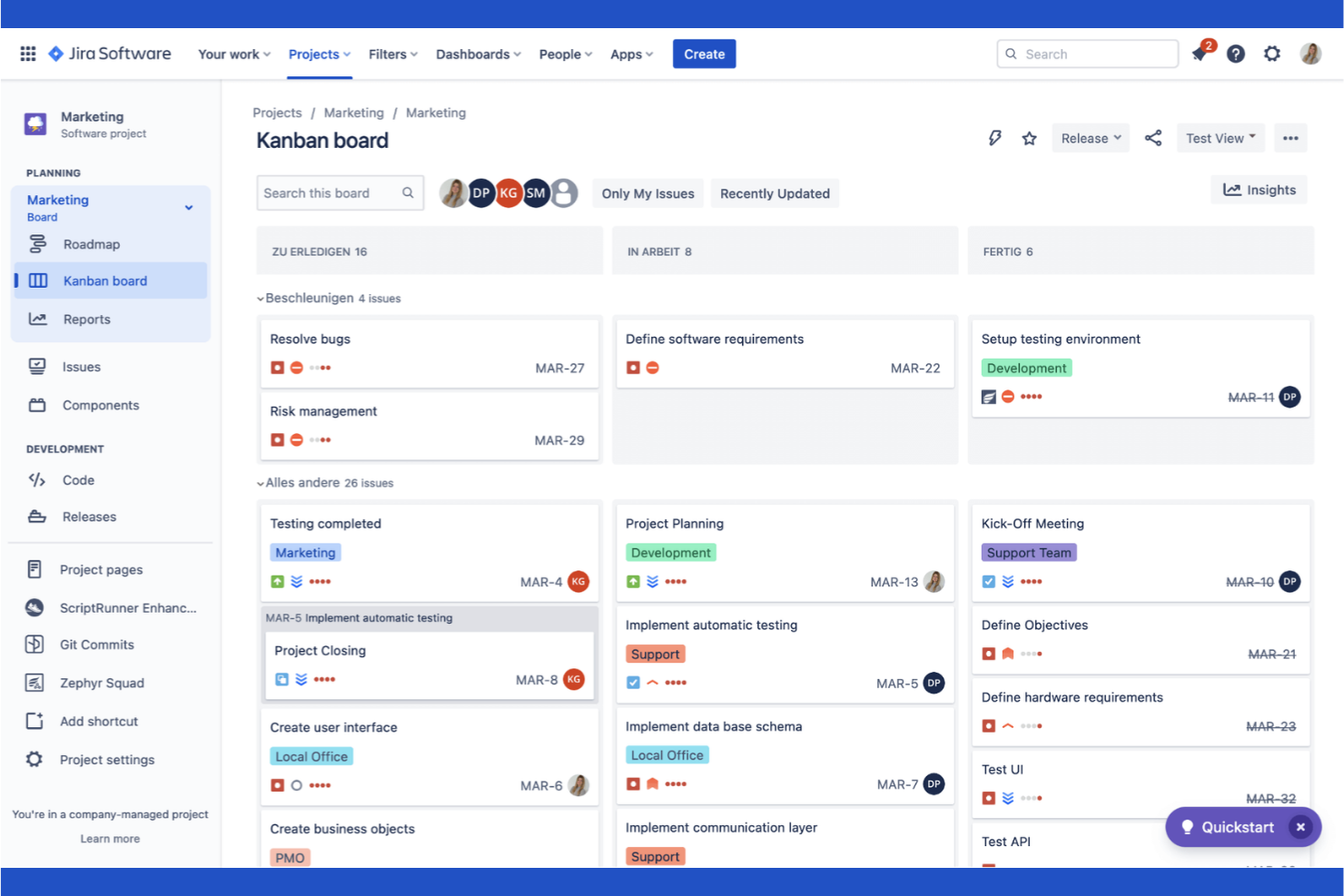
Atlassian brings together a suite of tools designed specifically for software development teams managing complex projects in the cloud. It’s especially useful for engineering leads, product managers, and DevOps teams who need to coordinate code, track issues, and automate deployment workflows. With integrated solutions for code repositories, agile boards, and incident management, Atlassian helps teams keep every part of the software delivery process connected.
Why I Picked Atlassian
For software development teams, Atlassian stands out by offering purpose-built tools that address the unique demands of building, shipping, and maintaining code in the cloud. I picked Atlassian because it brings together agile project tracking, code management, and incident response in a single ecosystem. Features like Jira’s customizable agile boards and Bitbucket’s integrated code repositories help teams manage sprints, track bugs, and collaborate on code reviews without switching platforms. This focus on the full software development lifecycle makes Atlassian a strong fit for teams that need to keep engineering, product, and operations tightly aligned.
Atlassian Key Features
Some other features that make Atlassian valuable for cloud-based workflows include:
- Confluence Knowledge Base: Create, organize, and share project documentation and team knowledge in a centralized space.
- Automation Rules: Set up custom triggers and actions to automate repetitive tasks across projects.
- Service Desk Portal: Manage IT requests and support tickets with a dedicated help desk interface.
- Advanced Reporting Dashboards: Build visual dashboards to track project metrics, team performance, and workflow bottlenecks.
Atlassian Integrations
Integrations include Slack, Microsoft Teams, GitHub, GitLab, Zendesk, AWS, and Figma.
Pros and Cons
Pros:
- Strong CI/CD pipeline sync
- Vast marketplace extensions
- Highly customizable rules
Cons:
- Cloud outages affect workflows
- Heavy focus on IT and dev ops

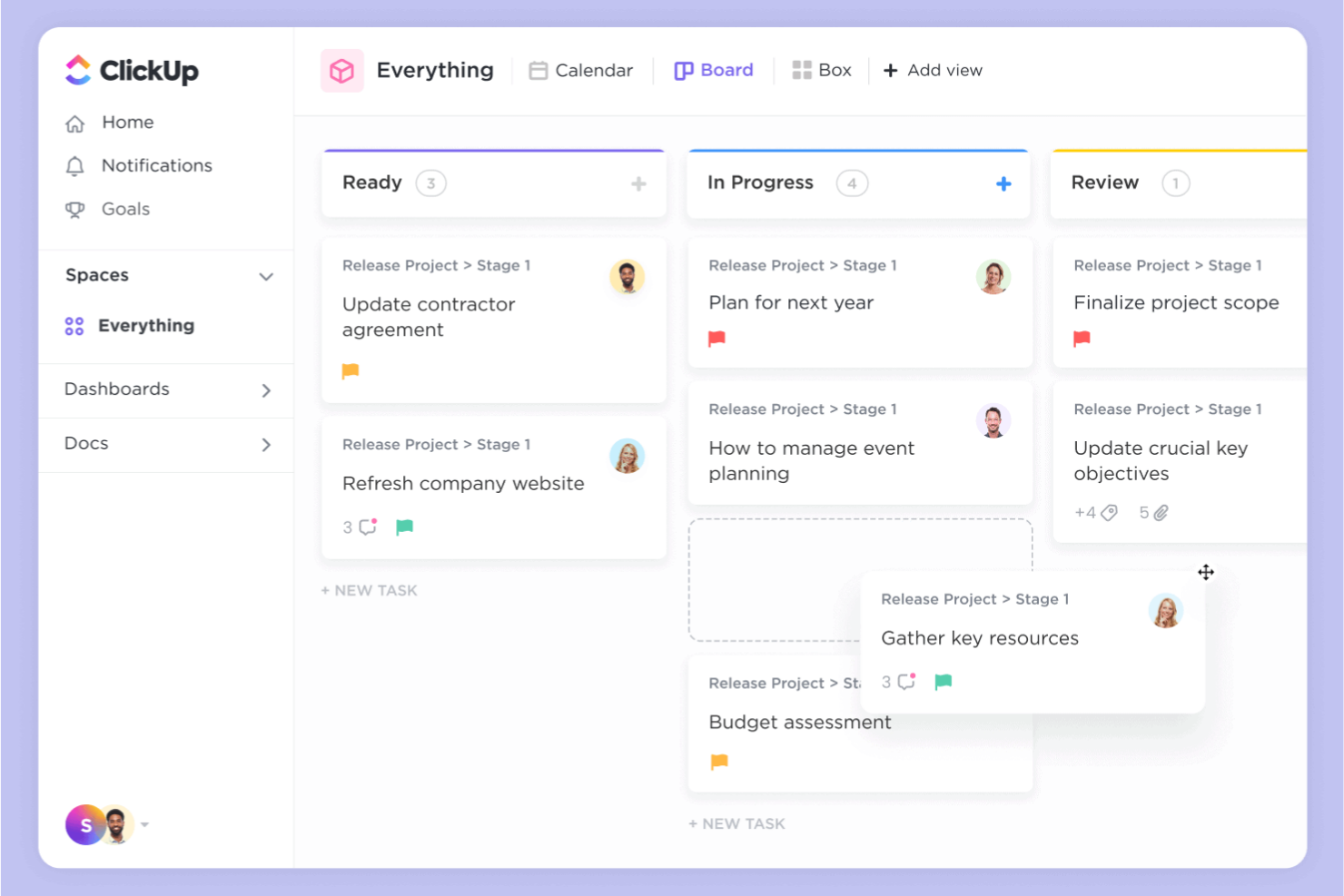
ClickUp gives teams a flexible way to build, automate, and manage workflows in the cloud. It’s a strong fit for project managers and cross-functional teams who need to tailor task processes to fit unique business needs. If you’re looking for granular control over task automation and workflow customization, ClickUp stands out with its adaptable approach.
Why I Picked ClickUp
I chose ClickUp because its customizable task automation stands out among cloud based workflow software. The platform lets you create custom automations for tasks, statuses, and notifications, so you can adapt workflows to match your team’s exact processes. I like that you can set up conditional logic and multi-step automations without coding, which helps teams handle complex or repetitive work. ClickUp’s automation builder gives you the flexibility to streamline approvals, handoffs, and recurring tasks in a way that fits your unique requirements.
ClickUp Key Features
Some other features in ClickUp help teams manage and optimize their workflows in the cloud:
- Custom Views: Choose from list, board, calendar, or Gantt views to visualize work in the way that fits your process.
- Docs and Wikis: Create and share documentation, SOPs, and knowledge bases directly within your workspace.
- Goal Tracking: Set, track, and update progress on team or project goals alongside your workflow tasks.
- Time Tracking: Log time spent on tasks and generate reports to monitor productivity and resource allocation.
ClickUp Integrations
Integrations include Slack, Google Workspace, GitHub, GitLab, Zoom, HubSpot, Zendesk, and Salesforce.
Pros and Cons
Pros:
- Cost-effective cloud pricing
- Huge integration ecosystem
- Real-time team collaboration
Cons:
- Mobile app lacks some features
- Automation limits on low tiers

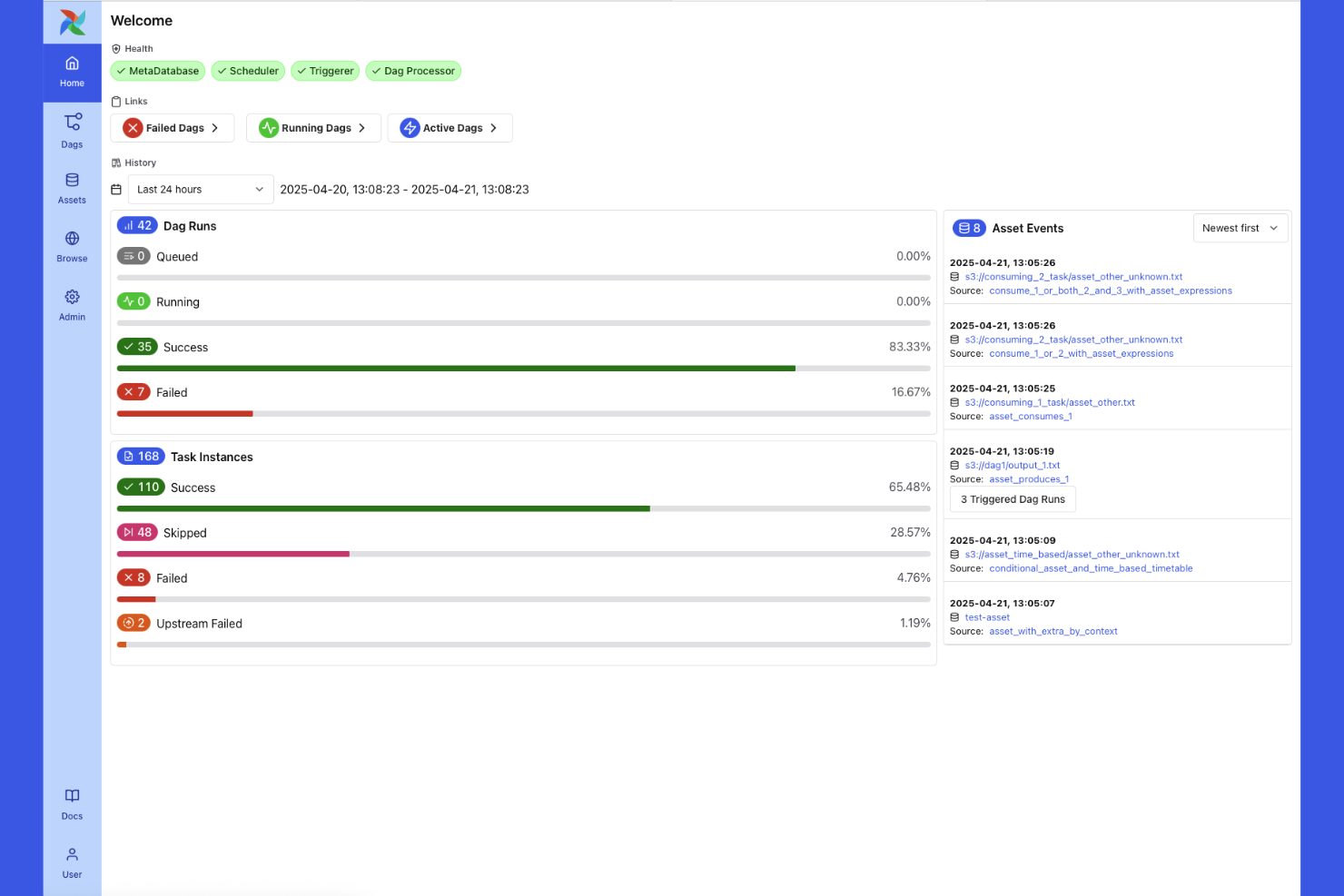
Apache Airflow is an open-source platform built for teams that need to design, schedule, and monitor complex data workflows in the cloud. Data engineers and analytics teams use it to orchestrate multi-step pipelines, automate dependencies, and manage data movement across systems. Its modular architecture and Python-based workflow definitions make it especially useful for organizations handling large-scale, dynamic data processes.
Why I Picked Apache Airflow
When managing intricate data workflows in the cloud, Apache Airflow offers a level of control and flexibility that’s hard to match. I picked Airflow because it lets you define complex, multi-step pipelines as code using Python, which is ideal for teams handling dynamic data dependencies and frequent changes. Its Directed Acyclic Graph (DAG) structure makes it possible to visualize, schedule, and monitor every stage of a data pipeline in detail. For organizations that need to orchestrate large-scale, interdependent data processes, Airflow’s modular approach and extensibility make it a strong fit.
Apache Airflow Key Features
Some other features that make Apache Airflow valuable for cloud-based workflow management include:
- Role-Based Access Control: Assign granular permissions to users and groups for secure workflow management.
- REST API: Interact programmatically with Airflow to trigger workflows, fetch logs, or manage tasks from external systems.
- Pluggable Executors: Choose from different execution backends, such as Celery or Kubernetes, to scale task processing.
- Built-In Scheduler: Automatically triggers tasks based on time, event, or external signals without manual intervention.
Apache Airflow Integrations
Integrations include AWS, Google Cloud Platform, Microsoft Azure, Snowflake, PostgreSQL, Databricks, and Kubernetes.
Pros and Cons
Pros:
- Deep task dependency tracking
- Integrates with any cloud data
- Massive open-source community
Cons:
- Not for business workflows
- Hard to maintain at scale

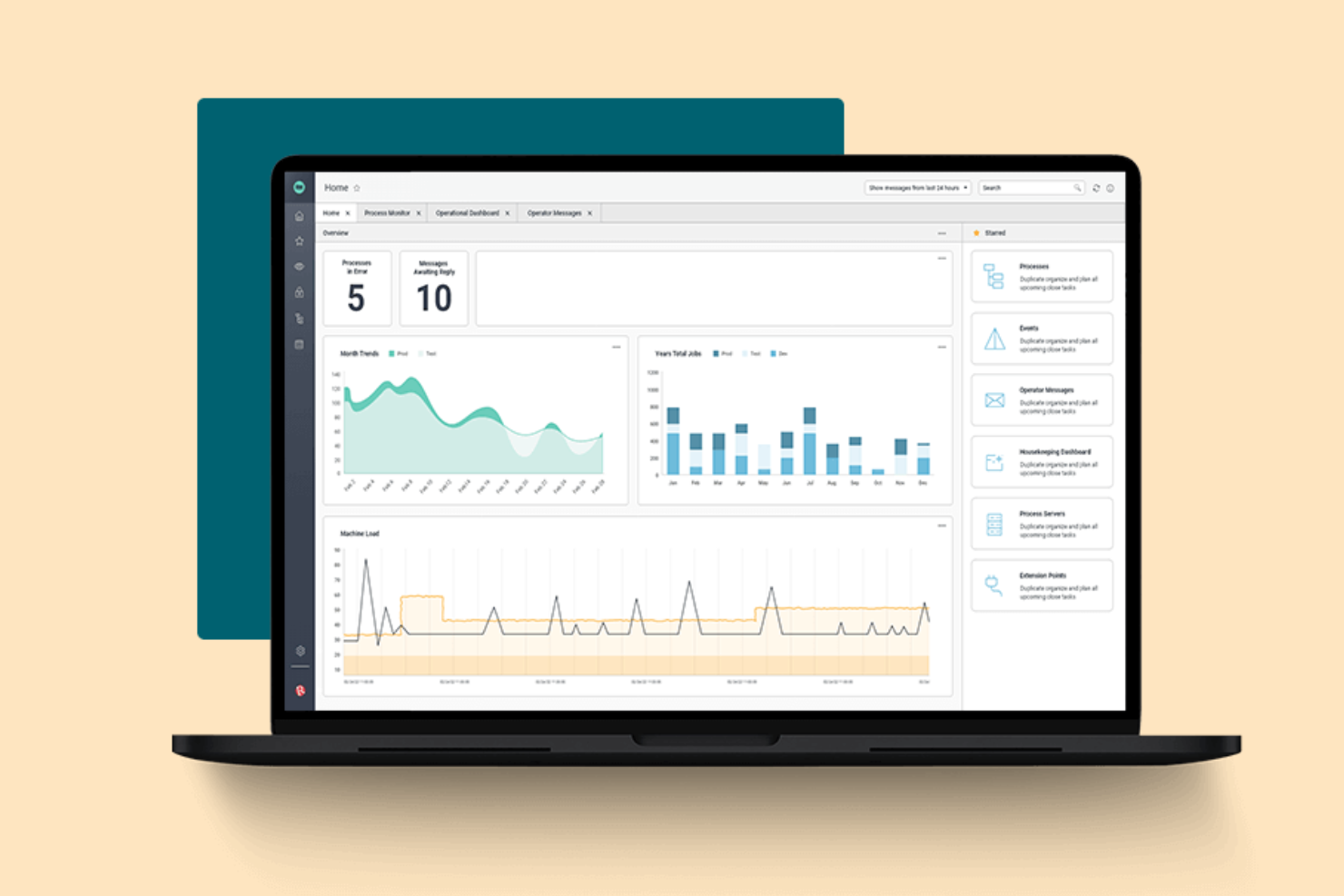
Redwood Software offers a cloud-based platform designed for orchestrating complex, enterprise-scale workloads. It’s built for IT leaders and operations teams in large organizations that need to automate, schedule, and monitor critical business processes across multiple systems. If your business manages high-volume, cross-application workflows, Redwood Software provides centralized control and visibility that’s hard to match.
Why I Picked Redwood Software
What sets Redwood Software apart is its focus on enterprise workload orchestration, which is essential for organizations managing complex, interconnected processes. The platform offers advanced scheduling and automation tools that let you coordinate workflows across ERP, cloud, and on-premises systems from a single dashboard. I appreciate how Redwood Software supports event-driven automation and real-time monitoring, so you can respond quickly to business-critical events. For teams that need to orchestrate high-volume, multi-system workflows with precision, Redwood Software delivers the control and scalability required.
Redwood Software Key Features
Some other features in Redwood Software help teams manage and optimize enterprise workflows in the cloud:
- Self-Service Automation Portal: Give business users a portal to launch and monitor their own automated processes without IT intervention.
- Audit Trails: Track every workflow action and change with detailed, exportable logs for compliance and governance.
- Role-Based Access Controls: Assign granular permissions to users and groups to manage workflow visibility and actions.
- API Integration Framework: Connect with external applications and services using built-in API connectors for seamless data exchange.
Redwood Software Integrations
Integrations include SAP, Oracle, ServiceNow, Snowflake, AWS, Microsoft Azure, and Boomi.
Pros and Cons
Pros:
- Highly reliable job execution
- Strong cloud security models
- Zero infrastructure to manage
Cons:
- Long deployment timelines
- UI feels very technical
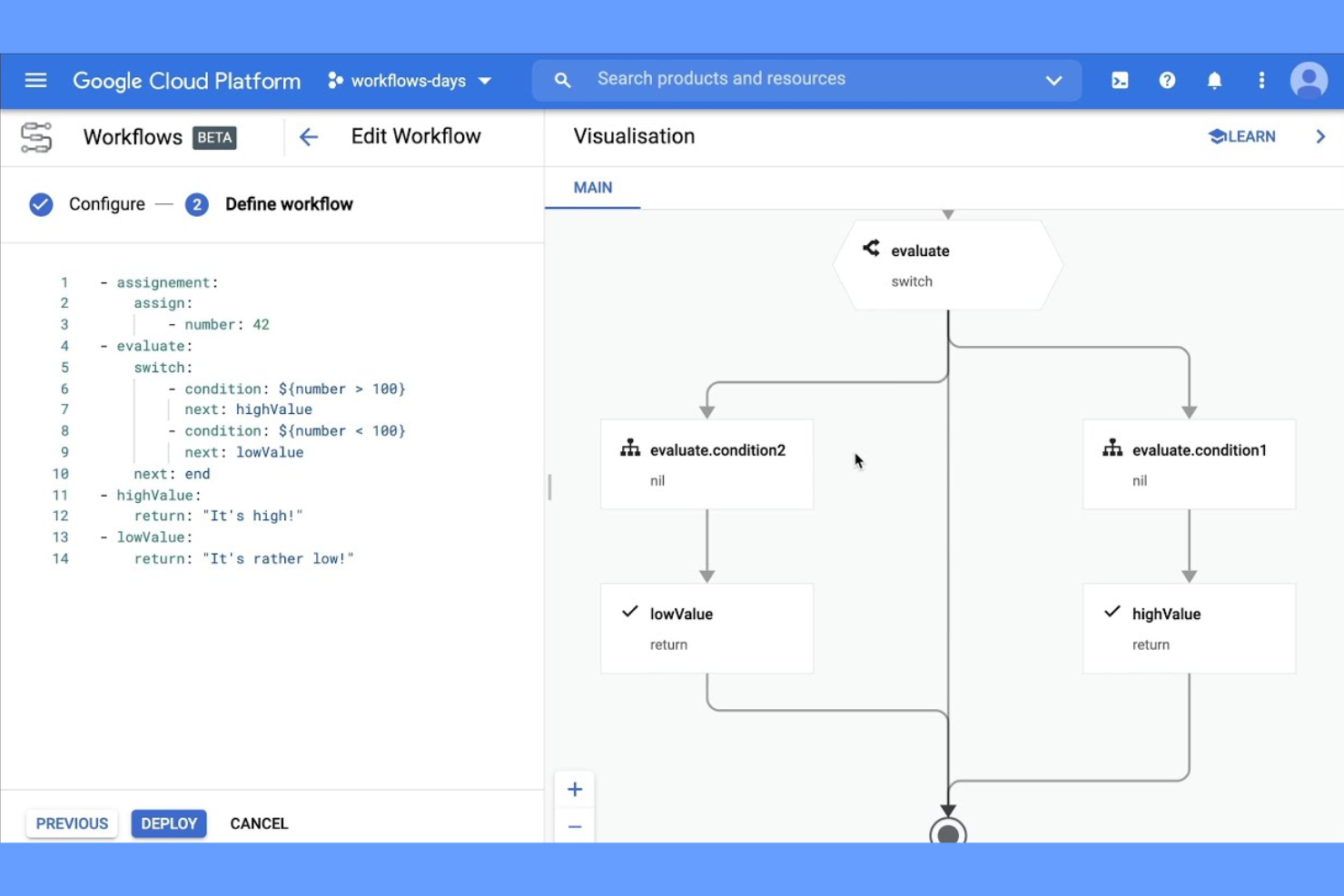
If your team relies on Google Cloud services, Google Cloud Workflows offers a way to automate and connect those services with minimal overhead. This tool is built for cloud architects, developers, and IT teams who need to coordinate APIs, microservices, and serverless functions within the Google Cloud ecosystem. It’s especially useful for orchestrating multi-step processes that span multiple Google Cloud products without leaving the platform.
Why I Picked Google Cloud Workflows
For teams already invested in Google Cloud, Google Cloud Workflows stands out because it’s purpose-built for orchestrating native Google Cloud services. You can design workflows that call Google Cloud Functions, trigger Cloud Run jobs, and manage Pub/Sub messaging all within a single, unified environment. I picked this tool because it lets you visually define and manage complex, multi-step processes that leverage the full range of Google Cloud APIs. This makes it a strong fit for organizations that want to automate and connect their cloud infrastructure without relying on third-party connectors.
Google Cloud Workflows Key Features
Some other features in Google Cloud Workflows help teams automate and manage cloud-based processes more efficiently:
- YAML-Based Workflow Definitions: Build and edit workflows using a human-readable YAML syntax for version control and collaboration.
- Error Handling and Retries: Configure custom error handling and automatic retries for each workflow step.
- Built-In Logging and Monitoring: Access detailed logs and performance metrics through Google Cloud’s operations suite.
- Conditional Logic Support: Add if/else branching and switch statements to control workflow execution paths.
Google Cloud Workflows Integrations
Integrations include Cloud Functions, Cloud Run, BigQuery, Pub/Sub, Compute Engine, and Cloud Storage.
Pros and Cons
Pros:
- Pay per execution pricing
- Fast microservice connections
- Scales automatically to zero
Cons:
- Locked into GCP ecosystem
- Not for visual business users
Diğer Bulut Tabanlı İş Akışı Yazılımları
İşte kısa listeme girmeyen ancak yine de göz atmaya değer bazı ek bulut tabanlı iş akışı yazılımı seçenekleri:
- Lark Suite
For integrated collaboration tools
- ActiveBatch
For cross-platform job scheduling
- Kissflow
For no-code workflow design
- Pipefy
For workflow requests and approvals


How I Evaluate Cloud Based Workflow Software
I split my evaluation into two layers: baseline requirements every tool must meet—like building automated task flows—and the differentiators that separate good tools from the right tool for your team.
Core Functionality (Table Stakes For This List)
When I'm selecting tools for my list, I rank each one on a scale from 0 (does not offer the functionality) to 5 (excels in this area) for each core functionality listed below. Then, I calculate the tool's total score into a percentage. Each tool needs to achieve a minimum total score of 65% to be considered for inclusion.
- Visual Workflow Builder: I look for a drag-and-drop canvas where you can map multi-step processes—like a creative approval chain—with branching, parallel paths, and reusable templates.
- Workflow Automation Engine: Each tool's if/then logic, conditional routing, and scheduled triggers matter here—think auto-assigning a QA reviewer when a dev task moves to "done."
- Cloud-Based Real-Time Collaboration: I evaluate whether distributed teams get role-based access, in-context commenting, and live status updates across devices without version conflicts.
- Task & Project Tracking: Multiple view types (Kanban, Gantt, calendar, list) with dependencies and status tracking are what I check for, especially for managing cross-functional sprints.
- Third-Party Integrations: The tool's native connectors to everyday platforms like Slack, Jira, Google Workspace, and Salesforce—plus API and webhook support—are key to fitting into existing stacks.
- Reporting & Dashboards: I evaluate whether you can build custom dashboards that surface cycle times, bottleneck patterns, and workload distribution rather than just basic activity logs.
Once I have a list of tools that meet this criteria, I consider what sets each platform apart.
Differentiating Factors (What Sets Vendors Apart)
Here's how I compare and contrast different vendors:
Standout Features
Custom form intake is a big one—I look for tools that let you build request forms that trigger automatic routing, so a new project brief from marketing lands with the right PM instantly. Resource and capacity planning also matters, especially for PMOs juggling multiple projects where workload visibility prevents over-allocation. For agency teams, I check whether the platform offers client-facing portals where external stakeholders can submit requests and track deliverables without needing a paid seat.
Beyond Features
Security and compliance posture is something I always evaluate—SOC 2 Type II and SSO/SAML support matter when your workflows handle sensitive project data or client information. I also consider implementation speed, particularly whether a platform offers pre-built templates for common use cases like IT change management or marketing campaign launches. Industry and team fit rounds out my evaluation; a tool built for agency workflows with client-facing needs differs greatly from one designed for enterprise PMOs managing cross-departmental portfolios.
Bulut Tabanlı İş Akışı Yazılımı Nasıl Seçilir?
Uzun özellik listeleri ve karmaşık fiyatlandırma yapıları içinde kaybolmak kolaydır. Kendinize özgü yazılım seçim sürecinizde ilerlerken odağınızı korumanıza yardımcı olmak için göz önünde bulundurmanız gereken faktörleri içeren bir kontrol listesi hazırladık:
| Faktör | Nelere Dikkat Edilmeli? |
|---|---|
| Ölçeklenebilirlik | Yazılım, ekibinizin büyümesini, yeni iş akışlarını veya zaman içinde artan süreç karmaşıklığını karşılayabilecek mi? Kullanıcı, iş akışı ve depolama sınırlarını kontrol edin. |
| Entegrasyonlar | Araç, mevcut sistemlerinize (Slack, Google Workspace veya Salesforce gibi) yerel olarak bağlanabiliyor mu? Aradaki boşlukları kapatmak için ne kadar manuel çalışma gerektiğini değerlendirin. |
| Özelleştirilebilirlik | Ağır bir BT desteğine ihtiyaç duymadan iş akışlarını, formları ve izinleri ekibinizin süreçlerine uyacak şekilde özelleştirebilir misiniz? Sürükle ve bırak araçları veya kural motorları sunan seçenekleri arayın. |
| Kullanım kolaylığı | Ekibiniz aracı hızlı bir şekilde benimseyecek mi, yoksa kapsamlı bir eğitim mi gerekecek? Karar vermeden önce arayüzü küçük bir grupla test edin. |
| Uygulama ve işe alıştırma | Kurulumu tamamlayıp çalışmaya başlamanız ne kadar sürecek? Veri aktarımı desteği, işe alıştırma kaynakları ve dışarıdan danışmanlara ihtiyaç duyup duymayacağınız hakkında bilgi alın. |
| Maliyet | Kullanımınız arttıkça fiyatlandırma kademeleri açık ve öngörülebilir mi? Kullanıcılar, depolama veya premium özellikler için ek ücretlere dikkat edin. |
| Güvenlik önlemleri | Yazılım şifreleme, erişim denetimleri ve denetim günlükleri sunuyor mu? Kuruluşunuzun güvenlik politikalarına ve sektör standartlarına uygunluğu doğrulayın. |
| Destek erişilebilirliği | Hangi destek kanalları sunuluyor ve hangi saatlerde hizmet veriliyor? Kritik iş akışları için 7/24 yardıma veya özel bir hesap yöneticisine ihtiyaç duyup duymayacağınızı değerlendirin. |
Bulut Tabanlı İş Akışı Yazılımı Nedir?
Bulut tabanlı iş akışı yönetimi yazılımı, ekiplerin iş süreçlerini tamamen çevrimiçi olarak tasarlamasına, otomatikleştirmesine ve yönetmesine yardımcı olan, dijital dönüşümün temel itici güçlerinden biri olarak görev yapan dijital bir platformdur. Bu iş akışı yönetimi araçları; görevleri, onayları ve belge paylaşımını her cihazdan erişilebilen tek bir çalışma alanında merkezileştirir. Kuruluşlar iş akışlarını buluta taşıyarak dağınık ekipleri koordine edebilir, ilerlemeyi gerçek zamanlı olarak takip edebilir ve ihtiyaçlar değiştikçe süreçleri hızlı bir şekilde uyarlayabilir.
Bulut Tabanlı İş Akışı Yazılımının Özellikleri
Bulut tabanlı iş akışı yazılımı seçerken aşağıdaki temel özelliklere dikkat edin:
- İş akışı otomasyonu: Tekrarlanan görevleri otomatikleştirir ve önceden tanımlanmış kurallara göre öğeleri çok adımlı süreçlerden geçirir; manuel süreçleri ve hataları azaltmak için RPA kavramlarından yararlanır.
- Görev atama: Görevleri kişilere veya ekiplere atamanıza, son tarihler belirlemenize ve ilerlemeyi merkezi bir kontrol panelinden izlemenize olanak tanır.
- Belge yönetimi: İş akışlarında kullanılan dosya ve belgeler için güvenli depolama, paylaşım ve sürüm denetimi sağlar.
- Onay yönlendirme: İsteklerin, formların veya belgelerin incelenmesi ve onaylanması için doğru paydaşlara otomatik ya da manuel olarak yönlendirilmesini sağlar.
- Gerçek zamanlı iş birliği: Görevler veya belgeler içinde eş zamanlı düzenlemeyi, yorum yapmayı ve iletişimi destekleyerek herkesin aynı doğrultuda ilerlemesini sağlar.
- Özel form oluşturucu: Kod yazmadan veri toplama, veri girişi veya süreç başlatma amacıyla formlar oluşturmanıza ve değiştirmenize olanak tanır.
- Role dayalı izinler: Hassas bilgilerin yalnızca yetkili kullanıcıların erişimine açık olmasını sağlamak için iş akışlarına, belgelere ve verilere erişimi kullanıcı rollerine göre denetler.
- Denetim izleri: Tüm iş akışı etkinliklerini, değişikliklerini ve onaylarını izleyerek uyumluluk ve hesap verebilirlik için net bir kayıt sunar.
- Entegrasyon olanakları: Verileri eşitlemek ve platformlar arasında eylemleri tetiklemek için e-posta, takvimler veya CRM sistemleri gibi diğer iş araçlarına bağlanır.
Bulut Tabanlı İş Akışı Yazılımının Faydaları
Bulut tabanlı iş akışı yazılımını uygulamak, ekibiniz ve işletmeniz için çeşitli faydalar sağlar. Yararlanabileceğiniz bazı avantajlar şunlardır:
- Merkezi süreç yönetimi: Tüm görevler, belgeler ve onaylar tek bir çevrimiçi çalışma alanında yönetilir; bu da dağınık ekiplerin koordinasyonunu kolaylaştırır.
- Daha hızlı tamamlanma süreleri: Otomatik yönlendirme ve bildirimler, işlerin her adımdan hızlı bir şekilde ilerlemesine yardımcı olarak darboğazları ve gecikmeleri azaltır.
- Gelişmiş görünürlük: Gerçek zamanlı kontrol panelleri ve denetim izleri, ilerlemeyi izlemenize, sorunları belirlemenize ve iş akışı performansını istediğiniz zaman raporlamanıza olanak tanır.
- Geliştirilmiş iş birliği: Yerleşik sohbet, yorumlar ve eş zamanlı düzenleme, herkesin aynı doğrultuda ilerlemesini sağlar ve karşılıklı e-posta trafiğine olan ihtiyacı azaltır.
- Daha güçlü uyumluluk: Role dayalı izinler ve ayrıntılı etkinlik günlükleri, hassas verilerin korunmasına ve mevzuat gerekliliklerinin karşılanmasına yardımcı olur.
- Büyüme için ölçeklenebilirlik: Bulut altyapısı ve esnek kullanıcı yönetimi, işletmeniz geliştikçe yeni iş akışları veya ekip üyeleri eklemenize olanak tanır.
- Azalan BT yükü: Yazılım sağlayıcı tarafından sürdürüldüğü ve güncellendiği için şirket içi sunuculara veya manuel güncellemelere ihtiyaç duyulmaz.
Bulut Tabanlı İş Akışı Yazılımının Maliyetleri ve Fiyatlandırması
Bulut tabanlı iş akışı yazılımı seçmek, mevcut çeşitli fiyatlandırma modellerinin ve planların anlaşılmasını gerektirir. Maliyetler özelliklere, ekip büyüklüğüne, eklentilere ve diğer unsurlara göre değişir. Aşağıdaki tablo, bulut tabanlı iş akışı yazılımı çözümlerinde yaygın olarak sunulan planları, ortalama fiyatlarını ve tipik özelliklerini özetlemektedir:
Bulut Tabanlı İş Akışı Yazılımı için Plan Karşılaştırma Tablosu
| Plan Türü | Ortalama Fiyat | Yaygın Özellikler |
|---|---|---|
| Ücretsiz Plan | $0 | Temel iş akışı otomasyonu, sınırlı sayıda kullanıcı, temel görev yönetimi ve temel belge paylaşımı. |
| Kişisel Plan | $7-$25/kullanıcı/ay | Tek kullanıcı erişimi, genişletilmiş depolama alanı, özel formlar ve e-posta desteği. |
| İşletme Planı | $15-$50/kullanıcı/ay | Çok kullanıcılı iş birliği, gelişmiş iş akışı otomasyonu, entegrasyonlar, onay yönlendirme ve analiz. |
| Kurumsal Plan | $1000+/ay | Sınırsız kullanıcı, gelişmiş güvenlik, özel izinler, denetim izleri, özel destek ve SLA'ler. |
Bulut Tabanlı İş Akışı Yazılımı SSS
Bulut tabanlı iş akışı yazılımı hakkında sık sorulan soruların bazı yanıtları:
Bulut tabanlı iş akışı yazılımı ne kadar güvenlidir?
Bulut tabanlı iş akışı yazılımı, verilerinizi korumak için genellikle şifreleme, erişim denetimleri ve düzenli güvenlik denetimleri kullanır. Karar vermeden önce her zaman bir sağlayıcının güvenlik sertifikalarını inceleyin ve SOC 2 veya ISO 27001 gibi standartlara uyumluluk hakkında bilgi alın.
Bulut tabanlı iş akışı yazılımını mevcut araçlarımla entegre edebilir miyim?
Evet, bulut tabanlı iş akışı yazılımlarının çoğu e-posta, takvimler, CRM sistemleri ve dosya depolama platformları gibi popüler iş araçlarıyla entegrasyonlar sunar. Mevcut teknoloji altyapınızla uyumluluğu doğrulamak için entegrasyon mağazasını veya API belgelerini kontrol edin.
Ekibim mevcut planımızı aşarsa ne olur?
Çoğu sağlayıcı, ihtiyaçlarınız değiştikçe kullanıcı, iş akışı veya depolama alanı eklemenize olanak tanıyan ölçeklenebilir planlar sunar. Ekibiniz büyürken beklenmedik maliyetlerden veya kesintilerden kaçınmak için yükseltme seçeneklerini ve fiyatlandırma kademelerini önceden inceleyin.
Bulut tabanlı iş akışı yazılımının uygulanması ne kadar sürer?
Uygulama süresi değişiklik gösterir, ancak birçok platform hızlı bir şekilde başlamanıza yardımcı olmak için şablonlar, ürün tanıtımları ve eğitim videoları gibi başlangıç kaynakları sunar. Karmaşık iş akışları veya büyük ekipler için aşamalı bir kullanıma sunma planlayın ve kullanıcı eğitimine zaman ayırın.
Bulut tabanlı iş akışı yazılımı uzaktan veya dağınık ekipler için uygun mudur?
Evet, bulut tabanlı iş akışı yazılımı uzaktan erişim için tasarlanmıştır; dağınık ekiplerin internet bağlantısı olan her yerden iş birliği yapmasına, ilerlemeyi takip etmesine ve onayları yönetmesine olanak tanır. Bu esneklik, hibrit ve tamamen uzaktan çalışma ortamlarını destekler.