

Os 10 melhores softwares de faturação em 2026

Melhor seleção de software de faturação


O software de faturação permite-lhe criar, enviar e acompanhar faturas, para que possa receber mais depressa e manter a sua faturação organizada. Se está à procura do melhor software de faturação, provavelmente já está cansado de perseguir pagamentos, gerir folhas de cálculo ou lidar com processos manuais complicados.
A ferramenta certa pode ajudá-lo a gerir clientes, automatizar lembretes e processar pagamentos, dando-lhe simultaneamente uma visão clara do seu fluxo de caixa. Neste guia, encontrará as principais plataformas de faturação para 2026, para que possa escolher a que melhor se adapta ao seu fluxo de trabalho e assumir finalmente o controlo da sua faturação.
Why Trust Our Software Recommendations
Our team has been testing and reviewing software since 2012. As project managers ourselves, we know how difficult—and important—it is to choose the right software.
For this guide, we evaluated tools using hands-on testing and independent research, scoring tools using our selection criteria. We also draw on insights from industry thought leaders and practicing project management experts.
Our reviews reflect our human editorial judgment, not a sales pitch.
Expert reviewers:
Tabela de comparação de software de faturação
Esta tabela de comparação resume os detalhes de preços das minhas principais escolhas de software de faturação:
| Tool | Best For | Trial Info | Price | ||
|---|---|---|---|---|---|
| 1 | Best for customizable invoice templates | Free plan available | From $11.67/month (billed annually) | Website | |
| 2 | Best for flexible payment options for clients | Free plan + demo available | Pricing upon request | Website | |
| 3 | Best for tracking time and expenses | Free plan available | From $9.99/month | Website | |
| 4 | Best for automating recurring billing | 7-day free trial | From $9/user/month (billed annually) | Website | |
| 5 | Best for billable time integration | Free trial + free plan available | From $9/user/month (billed annually) | Website | |
| 6 | Best for mobile invoicing on iOS and Android | Free plan + 30-day trial available | From $19/month | Website | |
| 7 | Best for client self-service portals | Not available | Free forever plan | Website | |
| 8 | Best for global payment method support | Not available | From 2.9% + 30¢ per transaction | Website | |
| 9 | Best for WhatsApp invoice sharing | Free plan + free demo available | From $8/month (billed annually) | Website | |
| 10 | Best for instant invoice status notifications | Free plan available | From $7.60/month (billed annually) | Website |
Análises do melhor software de faturação
Seguem-se os meus resumos detalhados do software de faturação que integrou a minha seleção. As minhas análises apresentam uma visão detalhada das funcionalidades, dos melhores casos de utilização e das integrações de cada plataforma, para ajudá-lo a encontrar a melhor opção para si.

Best for customizable invoice templates
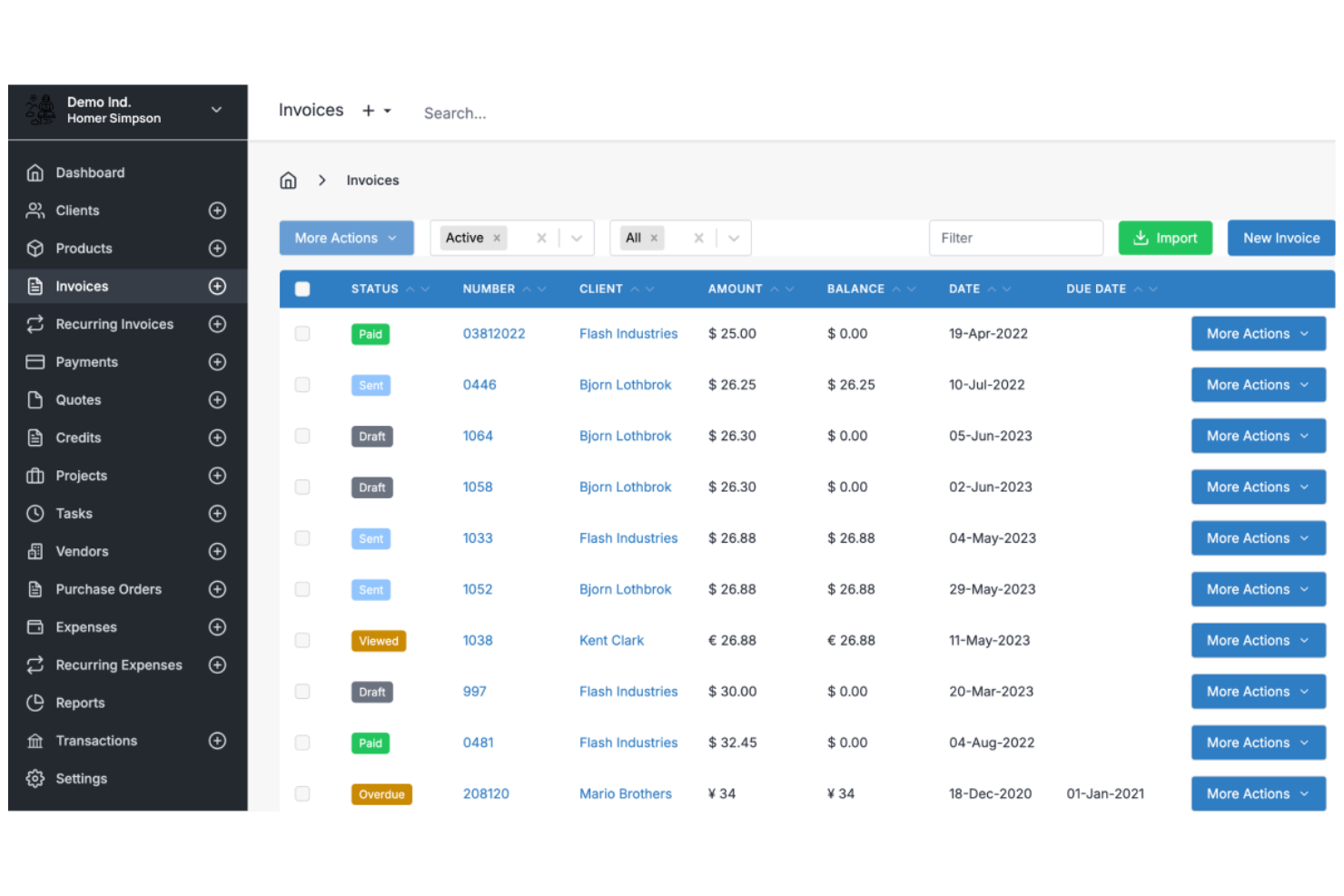
Invoice Ninja is a cloud-based invoicing software platform for freelancers and small businesses that offers invoice creation, time tracking, expense management, and client management features.
Who Is Invoice Ninja Best For?
Freelancers, agencies, and small businesses that want flexible invoice design and client billing tools.
Why I Picked Invoice Ninja
I picked Invoice Ninja as one of the best because I can fully customize invoice templates using its drag-and-drop editor and custom fields. I like that my team can add company branding, adjust layouts, and include dynamic variables for each client. In practice, that means we can create invoices that match our brand and client requirements without workarounds.
Invoice Ninja Key Features
- Time tracking: Track billable hours directly within the platform.
- Expense management: Record and categorize expenses for each client or project.
- Client portal: Give clients access to view invoices, quotes, and payment history.
- Multi-currency support: Send invoices and accept payments in multiple currencies.
Invoice Ninja Integrations
Invoice Ninja offers native integrations with PayPal, Stripe, WePay, and GoCardless for payment processing, and connects with Zapier. An API is available for custom integrations.
Pros and Cons
Pros:
- Live PDF preview during editing
- Extensive custom CSS styling options
- Open source for self-hosted control
Cons:
- Quote-to-invoice conversion requires paid plan
- Technical setup for self-hosted users

PayPal
Best for flexible payment options for clients

PayPal is an online invoicing software that lets you create, send, and manage invoices while offering built-in payment processing for credit cards, debit cards, PayPal, and Venmo.
Who Is PayPal Best For?
Freelancers and small businesses who want to offer clients a wide range of payment options.
Why I Picked PayPal
I picked PayPal as one of the best because I can let clients pay invoices using credit cards, debit cards, PayPal, or even Venmo. I like that I can add partial payments or tips directly to invoices, which is something my clients often request. My team uses PayPal to send invoices to clients in different countries and get paid in multiple currencies without extra setup.
PayPal Key Features
- Invoice tracking dashboard: Monitor sent, viewed, and paid invoices in real time.
- Customizable invoice templates: Add your logo, business details, and itemized charges.
- Automated payment reminders: Schedule reminders to prompt clients for outstanding payments.
- Multi-currency invoicing: Create and send invoices in over 25 currencies.
PayPal Integrations
PayPal offers native integrations with QuickBooks, Xero, WooCommerce, Shopify, BigCommerce, Salesforce, and FreshBooks. An API is available for custom integrations.
Pros and Cons
Pros:
- Offers partial payments and tipping options
- Instant brand recognition for client trust
- Accepts payments via PayPal, Venmo, and cards
Cons:
- Frequent account holds for high amounts
- Transaction fees are higher than competitors
Best for tracking time and expenses
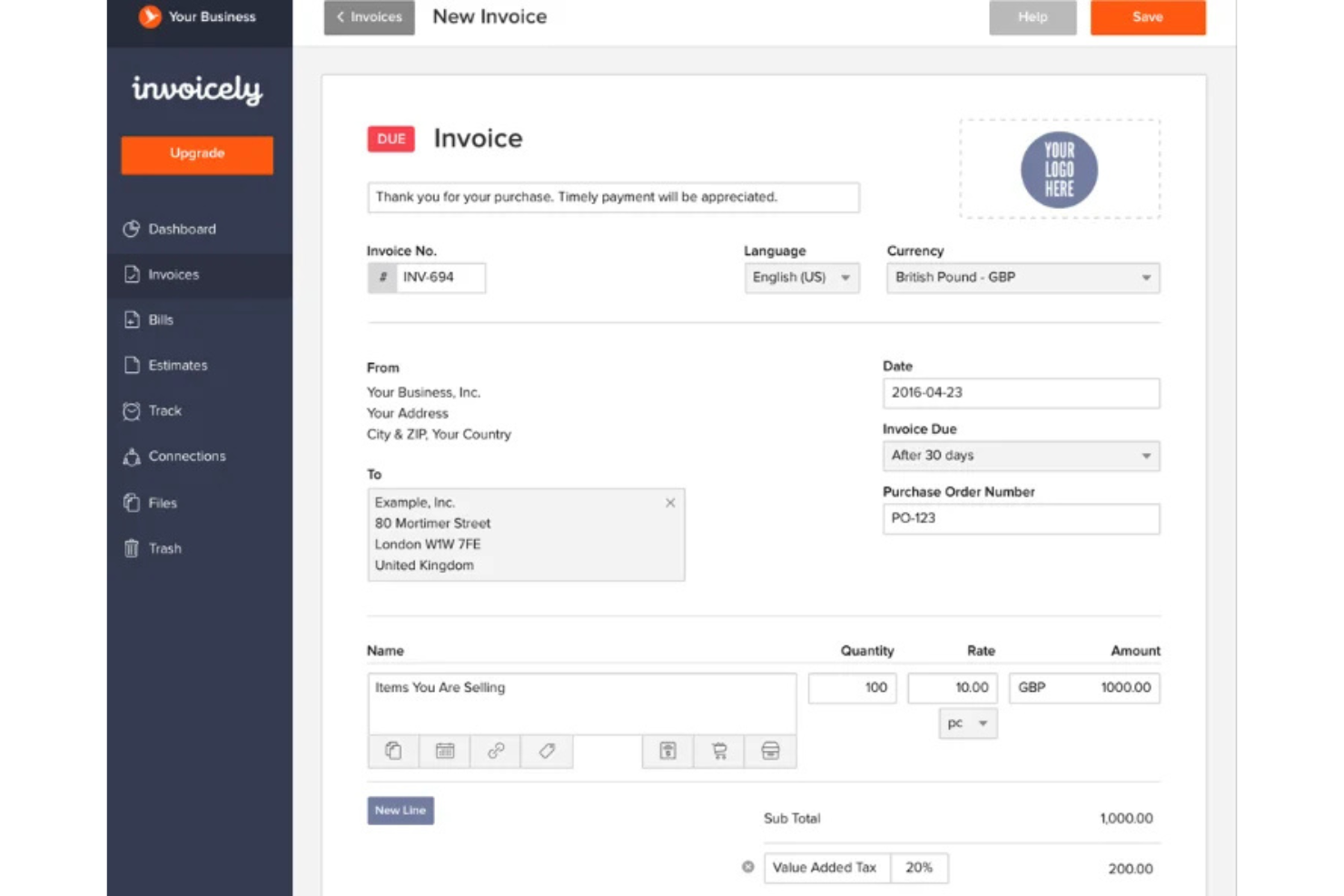
invoicely is a cloud-based invoicing software platform that lets you create invoices, track billable hours, manage expenses, and handle multiple currencies for small businesses and freelancers.
Who Is invoicely Best For?
Freelancers and small businesses that need to track time and expenses alongside invoicing.
Why I Picked invoicely
I picked invoicely as one of the best because it lets me track billable hours and expenses directly within each invoice. I like that I can log time for multiple projects and automatically convert those hours into line items. My team is able to manage mileage, expenses, and recurring invoices all in one place.
invoicely Key Features
- Multi-currency support: Create and send invoices in over 160 currencies.
- Custom branding: Add your logo, colors, and business details to every invoice.
- Online payment integration: Accept payments via PayPal, Stripe, and other gateways.
- Client management: Store client contact details and view invoice history for each client.
invoicely Integrations
invoicely offers native integrations with PayPal and Stripe for payment processing. An API is available for custom integrations.
Pros and Cons
Pros:
- Automated tax and discount calculations
- Log billable hours per project
- Track expenses in multiple currencies
Cons:
- Five client limit on entry plan
- Limited branding on free tier

Bonsai
Best for automating recurring billing
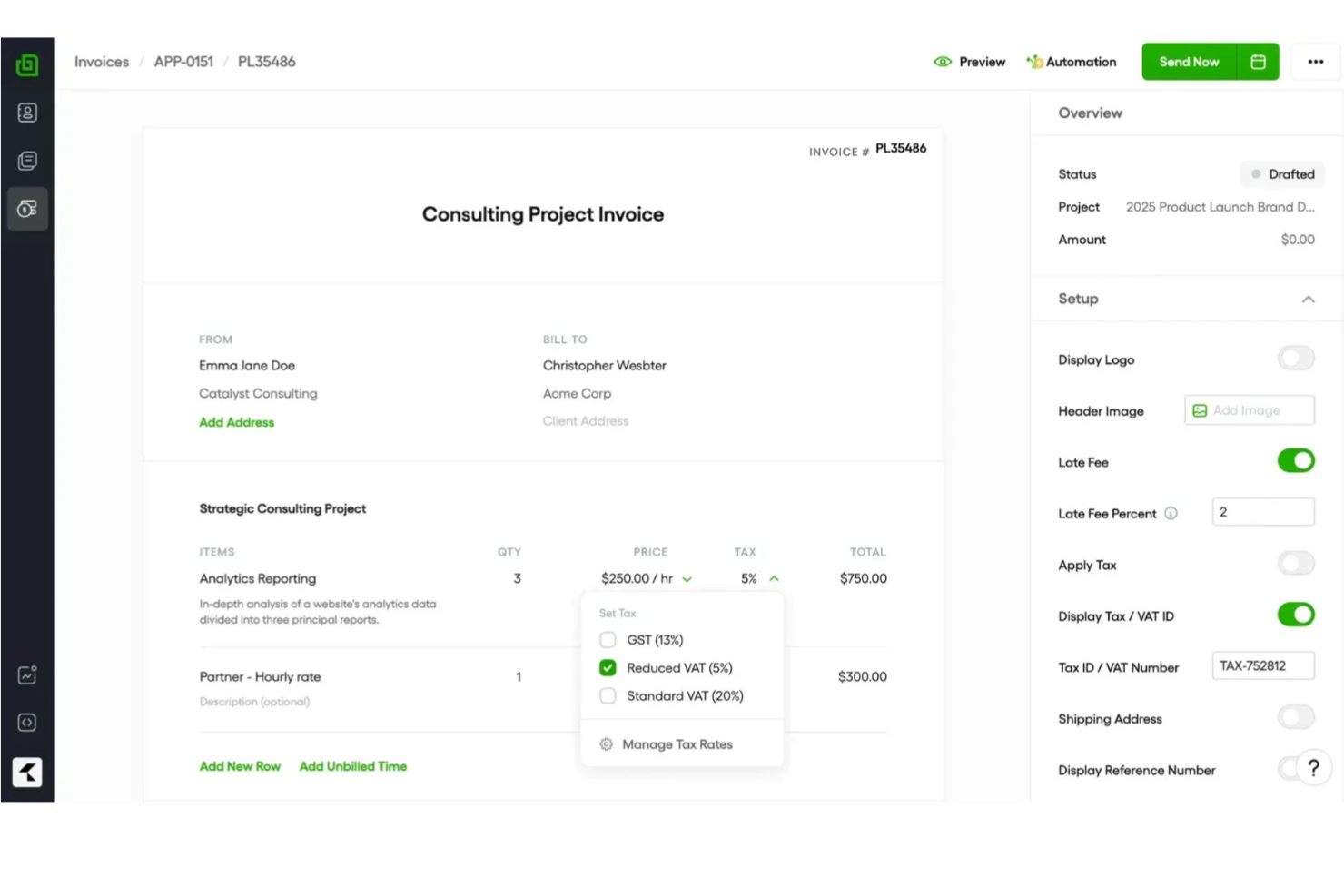
Bonsai is an invoicing software platform for freelancers and small businesses that offers invoicing, contract management, client CRM, time tracking, and automated payment collection in one system.
Who Is Bonsai Best For?
Freelancers and small business owners who need to automate recurring invoices and manage client billing in one place.
Why I Picked Bonsai
I picked Bonsai as one of the best because I can set up automated recurring invoices for clients, so billing happens on schedule without manual work. I like that Bonsai lets me link contracts and proposals directly to invoices, keeping everything organized in one place. My team uses its payment scheduling and auto-reminders to reduce missed payments and keep cash flow predictable.
Bonsai Key Features
- Client portal: Clients can view and pay invoices online.
- Multi-currency support: Issue invoices in different currencies for global clients.
- Expense tracking: Track and categorize expenses alongside invoices.
- Tax calculation tools: Automatically calculate and add taxes to invoices.
Bonsai Integrations
Bonsai offers native integrations with QuickBooks, Zapier, and Calendly, and provides an API for custom integrations.
Pros and Cons
Pros:
- Automated late fee application settings
- Auto-generated invoices from signed proposals
- Smart contracts with integrated e-signatures
Cons:
- Manual project creation from proposals
- No white-labeling on basic plans

Harvest
Best for billable time integration
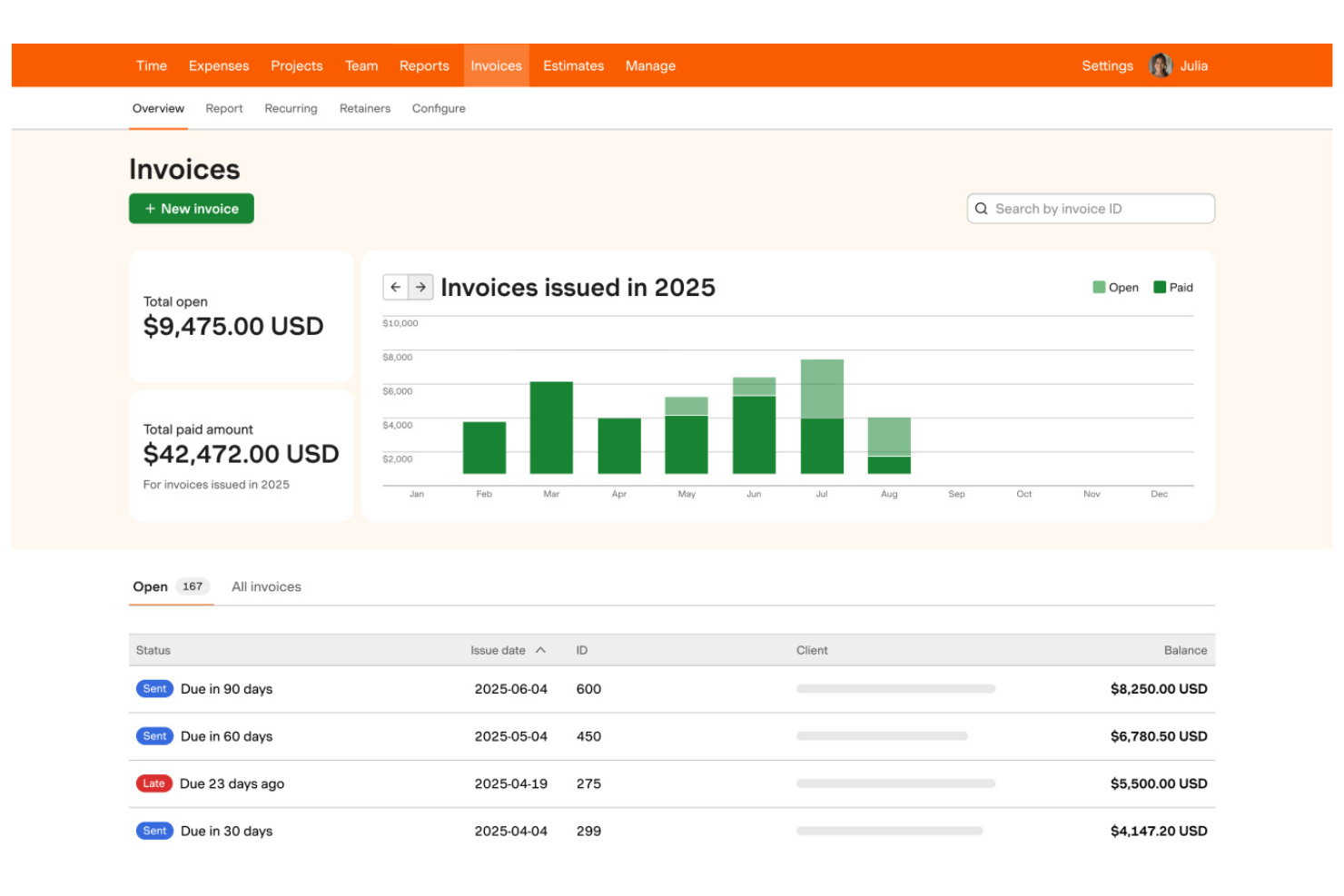
Harvest is a time tracking and invoicing software that lets teams track billable hours, generate invoices from timesheets, manage expenses, and monitor project budgets in one platform.
Who Is Harvest Best For?
Freelancers and small agencies who need to track billable hours and invoice clients based on time worked.
Why I Picked Harvest
I picked Harvest as one of the best because I can turn tracked billable hours into invoices with just a few clicks, making it easy to bill clients accurately. My team uses its built-in expense tracking to add reimbursable costs directly to invoices. I also like that Harvest lets me monitor project budgets alongside invoicing, so I always know where we stand financially.
Harvest Key Features
- Automated payment reminders: Send scheduled reminders to clients for unpaid invoices.
- Multi-currency invoicing: Create and send invoices in different currencies.
- Custom invoice branding: Add your logo and adjust invoice colors and layout.
- Detailed invoice history: View a timeline of invoice creation, edits, and payments.
Harvest Integrations
Harvest offers native integrations with QuickBooks Online, Xero, Stripe, PayPal, Asana, Trello, Basecamp, Slack, and Google Workspace. It also connects with Zapier and provides an API for custom integrations.
Pros and Cons
Pros:
- Direct integration with major project tools
- One-click time entry to invoice conversion
- Visual project budget progress bars
Cons:
- No built-in client portal for payments
- No native payment processing system

Wave
Best for mobile invoicing on iOS and Android
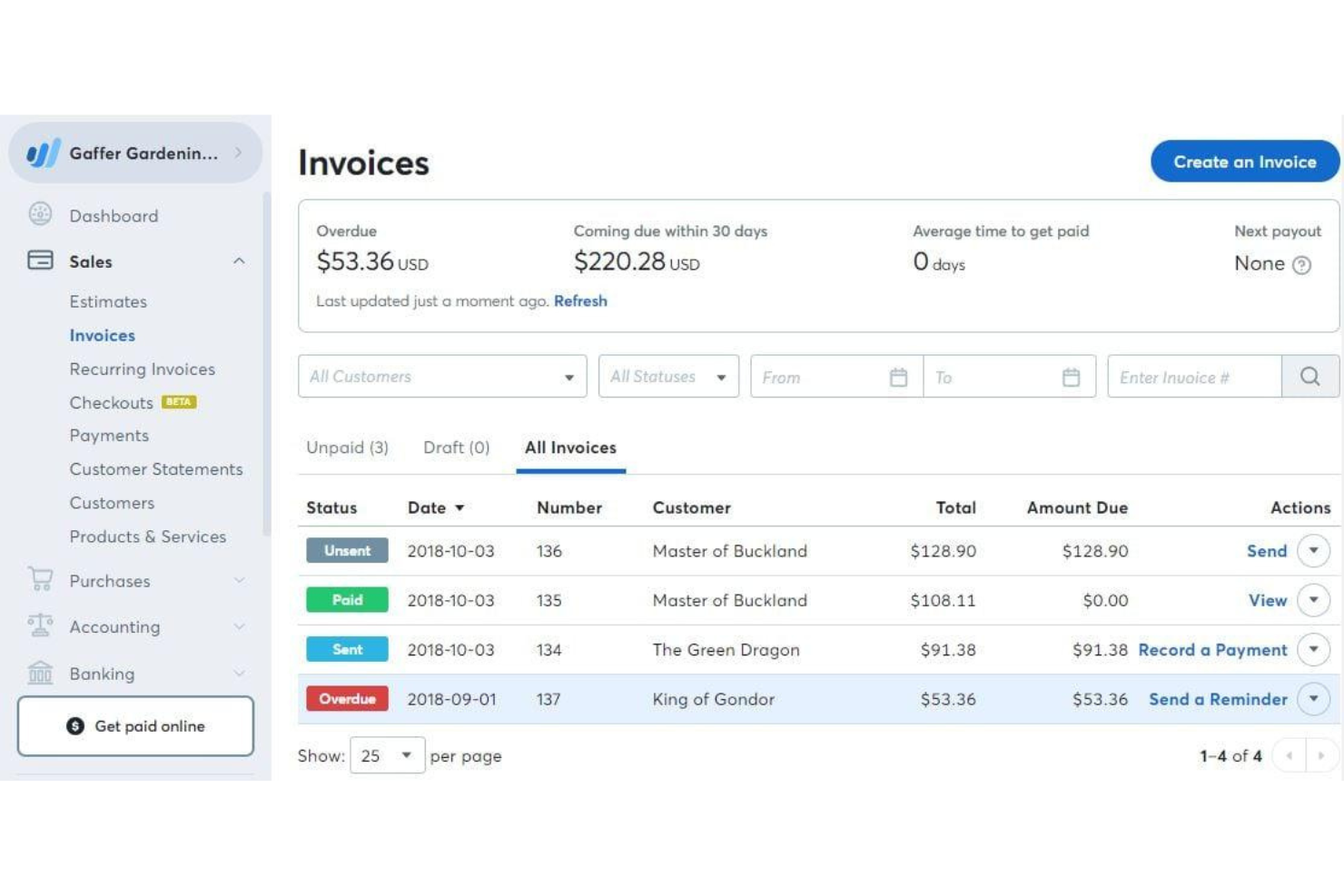
Wave is a cloud-based invoicing software that lets you create, customize, and send invoices, manage client contacts, accept online payments, and track income from a web dashboard or mobile app.
Who Is Wave Best For?
Freelancers and small business owners who want to manage invoicing and payments from their mobile devices.
Why I Picked Wave
I picked Wave as one of the best because I can invoice clients, send payment reminders, and accept payments right from my phone—whether I’m on iOS or Android. I like that the mobile app lets me create and send invoices on the go, track payment status, and even scan receipts for expense tracking. My team uses Wave’s mobile notifications to stay updated on invoice activity without needing to log in on a desktop.
Wave Key Features
- Customizable invoice templates: Choose and personalize invoice designs to match your brand.
- Automatic tax calculations: Apply and track sales tax on invoices automatically.
- Multi-currency invoicing: Send invoices and accept payments in different currencies.
- Customer management: Store and organize client contact details within the platform.
Wave Integrations
Native integrations are not publicly listed.
Pros and Cons
Pros:
- Built-in payment processing for credit cards
- Mobile app supports invoicing and payments
- Unlimited invoicing with no monthly fee
Cons:
- No automated time tracking features
- High fees for instant payouts

Best for client self-service portals
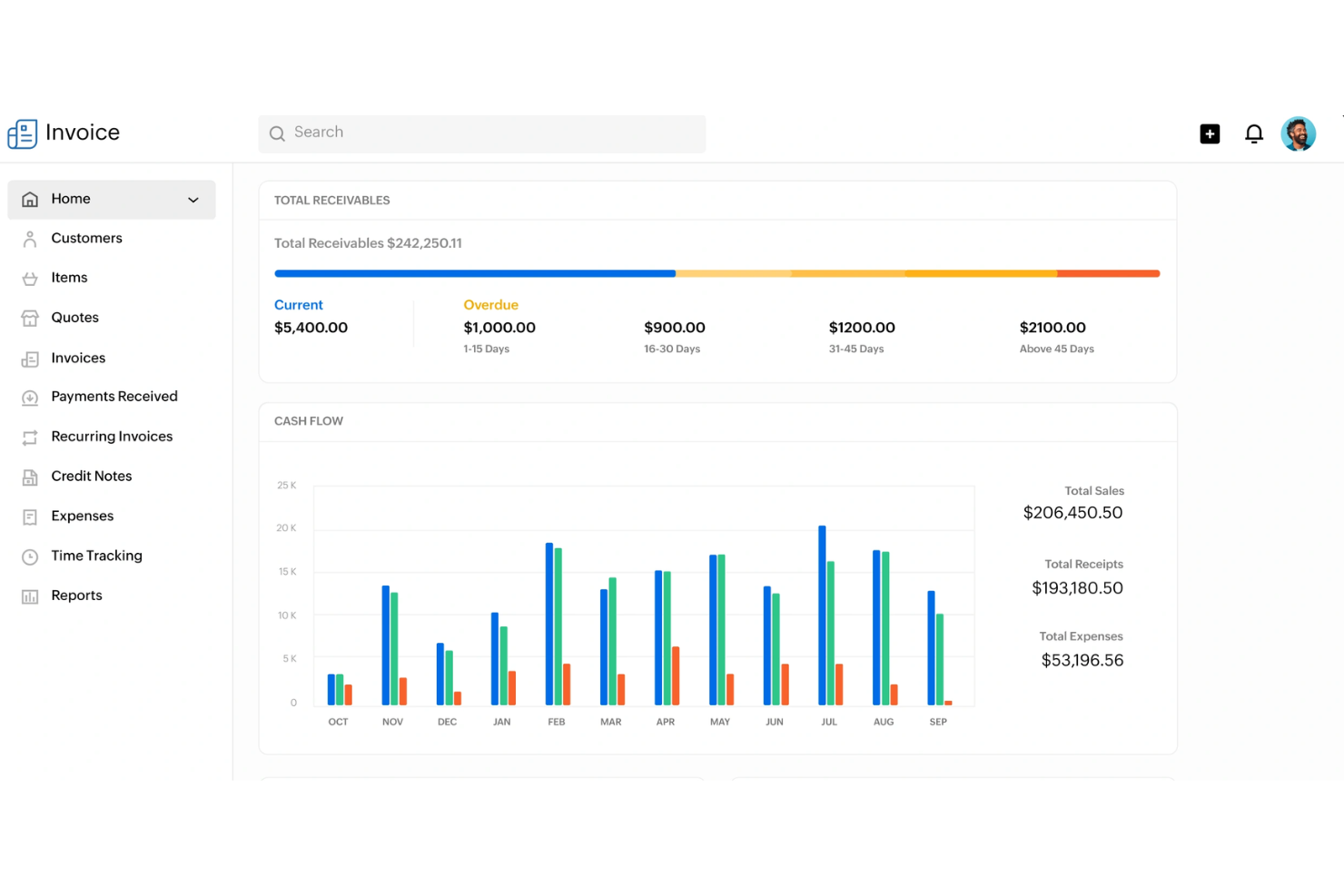
Zoho Invoice is a cloud-based invoicing software that lets you create and send invoices, automate payment reminders, manage expenses, and offer client-facing portals for self-service account management.
Who Is Zoho Invoice Best For?
Freelancers and small businesses that want to offer clients a self-service portal for managing invoices and payments.
Why I Picked Zoho Invoice
I picked Zoho Invoice as one of the best because I can give clients their own portal to view, download, and pay invoices directly. I like that my team can automate payment reminders and let clients track their payment history without emailing us. The portal also lets clients update their contact details and view past transactions, which saves us time on back-and-forth communication.
Zoho Invoice Key Features
- Time tracking: Track billable hours and convert them into invoices.
- Expense management: Record, categorize, and attach receipts to expenses.
- Multi-currency invoicing: Create and send invoices in multiple currencies.
- Custom invoice templates: Design and personalize invoice layouts to match your brand.
Zoho Invoice Integrations
Zoho Invoice offers native integrations with Zoho Books, Zoho CRM, Stripe, PayPal, Square, Razorpay, and Slack. An API is available for custom integrations.
Pros and Cons
Pros:
- Deep integration with Zoho ecosystem apps
- Automated snail mail invoice delivery option
- Complete client self-service payment portal
Cons:
- Limited custom domain mapping options
- Yearly revenue cap on free plan


Stripe Invoicing is an online invoicing platform that lets you create, send, and manage invoices while supporting a wide range of payment methods and automated billing workflows.
Who Is Stripe Invoicing Best For?
Global businesses and online sellers who need to accept payments in multiple currencies and payment methods.
Why I Picked Stripe Invoicing
I picked Stripe Invoicing as one of the best because I can send invoices that support dozens of global payment methods, including cards, bank transfers, and local wallets. My team uses its built-in tax calculation and automatic currency conversion to invoice clients in different countries. I also like that we can automate payment reminders and reconciliation for international transactions.
Stripe Invoicing Key Features
- Custom invoice templates: Create and personalize invoice layouts to match your brand.
- One-click payment links: Add secure payment links directly to invoices for fast online payments.
- Invoice status tracking: Monitor when invoices are viewed, paid, or overdue in real time.
- Bulk invoice creation: Generate and send multiple invoices at once using CSV uploads or the API.
Stripe Invoicing Integrations
Stripe Invoicing offers native integrations with QuickBooks, Xero, NetSuite, FreshBooks, and Salesforce. An API is available for custom integrations.
Pros and Cons
Pros:
- Smart retries for failed card payments
- Accepts ACH, SEPA, cards, and local wallets
- Supports over 135 currencies for invoicing
Cons:
- Limited invoice template customization options
- Higher transaction fees than bank transfers


Refrens is an invoicing software platform that lets you create, customize, and send invoices, manage client records, track payments, and handle quotations and purchase orders.
Who Is Refrens Best For?
Freelancers and small businesses in India who need to send invoices and payment reminders directly through WhatsApp.
Why I Picked Refrens
I picked Refrens as one of the best because I can send invoices directly to clients on WhatsApp, which speeds up communication and payment cycles. I like that Refrens lets me track invoice delivery and read status right from the dashboard. My team uses its built-in payment links and GST-ready invoice templates to handle compliance and collections for clients in India.
Refrens Key Features
- Quotation management: Create, send, and track quotations alongside invoices.
- Purchase order creation: Generate and manage purchase orders for clients and vendors.
- Multi-currency support: Issue invoices in different currencies for international clients.
- Expense tracking: Record and categorize business expenses within the platform.
Refrens Integrations
Native integrations are not publicly listed.
Pros and Cons
Pros:
- Free plan includes unlimited invoices
- Built-in quotation and purchase order tools
- Send invoices directly via WhatsApp
Cons:
- Fewer third-party app ecosystem connections
- Basic reporting compared to accounting suites


Bookipi is a mobile-first invoicing software that lets you create, send, and manage invoices, quotes, and receipts while tracking payments and client activity in real time.
Who Is Bookipi Best For?
Freelancers and small business owners who need mobile invoicing and real-time payment tracking.
Why I Picked Bookipi
I picked Bookipi as one of the best because I get instant push notifications when clients view, pay, or interact with my invoices. I like being able to track invoice status changes in real time from my phone, which helps me stay on top of payments. My team uses Bookipi to send invoices and receive immediate updates, so we never miss a payment event.
Bookipi Key Features
- Multi-currency support: Create and send invoices in multiple currencies.
- Quote to invoice conversion: Turn approved quotes directly into invoices.
- Payment tracking dashboard: Monitor outstanding, paid, and overdue invoices in one place.
- PDF invoice generation: Download and share invoices as professional PDF documents.
Bookipi Integrations
Native integrations are not clearly documented. Bookipi offers an API for custom integrations.
Pros and Cons
Pros:
- Signature capture on mobile device screen
- Mobile-first interface for on-site billing
- Instant read receipts for sent invoices
Cons:
- Limited data export for tax software
- Rolling 30-day document limit free plan
Outro software de faturação
Eis algumas opções adicionais de software de faturação que não integraram a minha seleção, mas que ainda assim vale a pena conhecer:
- Paymo
For multi-language invoicing
- Scoro
For billing across multiple project types
- Wrike
For invoice sign-off automation
- FreshBooks
For client retainer tracking
- Xero
For accountant collaboration
- Productive
For agency profitability tracking
- QuickBooks
For automated payment reminders
- Sage
With built-in tax calculation
- Hiveage
With multi-business account management
- Square
For instant payment links


How I Evaluate DPM Invoicing Software
I split my evaluation into two layers: the baseline criteria every tool must clear—like project-tied billing and time-to-invoice tracking—and the differentiators that determine the best fit.
Core Functionality (Table Stakes For This List)
When I'm selecting tools for my list, I rank each one on a scale from 0 (does not offer the functionality) to 5 (excels in this area) for each core functionality listed below. Then, I calculate the tool's total score into a percentage. Each tool needs to achieve a minimum total score of 65% to be considered for inclusion.
- Project-Based Invoicing: I check whether invoices can be tied to specific projects, milestones, or deliverables—not just generated as standalone documents disconnected from the work.
- Time & Expense Billing: Tracked hours and project expenses should flow into invoice line items, ideally with configurable billable rates per team member or role.
- Project Management Integration: Whether native or through connectors to tools like Asana or Jira, I evaluate how tightly PM data links to billing workflows.
- Retainers & Recurring Billing: Agencies running monthly retainers need drawdown tracking and auto-generated invoices, so I look for flexible recurring billing setups.
- Client & Payment Management: I look at how clients receive and pay invoices—portal access, supported payment gateways, automated reminders, and multi-currency support all factor in.
- Financial Reporting & Accounting Sync: Project profitability reports and two-way sync with platforms like QuickBooks or Xero help keep invoicing and bookkeeping aligned.
Once I have a list of tools that meet the criteria, I consider what sets each platform apart.
Differentiating Factors (What Sets Vendors Apart)
Here's how I compare and contrast different vendors:
Standout Features
Budget burn alerts matter when you're running multiple client projects at once—I look for tools that flag when a project trends toward a write-off before it's too late. Resource utilization analytics add another layer, showing billable vs. non-billable hours per team member so you can adjust staffing mid-sprint. I also evaluate approval workflows for timesheets and draft invoices, since agencies with multiple PMs need a review step before anything reaches the client.
Beyond Features
Integration ecosystem is one of the first things I check—tools like Harvest and Scoro connect differently with QuickBooks, Xero, and PM platforms, and gaps here create manual data entry that defeats the purpose. Pricing structure also matters a lot for agencies, especially whether contractor seats are available at a lower cost than full-user licenses. I evaluate onboarding support too, since migrating from spreadsheets or a legacy tool mid-project cycle can stall billing if the transition isn't well-supported.
Como escolher software de faturação
É fácil ficar perdido entre listas extensas de funcionalidades e estruturas de preços complexas. Para o ajudar a manter-se focado enquanto percorre o seu processo específico de seleção de software, apresentamos uma lista de verificação dos fatores a ter em conta:
| Fator | O que considerar |
|---|---|
| Escalabilidade | O software conseguirá lidar com mais clientes, faturas e utilizadores à medida que a sua empresa cresce? Procure limites relativos a utilizadores ou faturas. |
| Integrações | Estabelece ligação nativa às suas ferramentas de contabilidade, CRM ou pagamento? Verifique a compatibilidade com o seu conjunto de ferramentas atual. |
| Personalização | Pode adaptar modelos de faturas, fluxos de trabalho e elementos de marca às necessidades da sua empresa? Evite ferramentas com formatos rígidos. |
| Facilidade de utilização | A sua equipa e os seus clientes considerarão a interface intuitiva? Teste-a com utilizadores reais antes de se comprometer. |
| Implementação e integração inicial | Quanto tempo demorará a começar a utilizar o sistema? Tenha em conta a migração de dados, a formação e os recursos de integração inicial disponíveis. |
| Custo | Os níveis de preços são claros e previsíveis à medida que cresce? Esteja atento a taxas ocultas ou a custos adicionais por utilizadores ou faturas extra. |
| Medidas de segurança | O software disponibiliza encriptação, controlos de acesso e conformidade com as normas de privacidade de dados? Informe-se sobre os registos de auditoria e as certificações. |
| Disponibilidade do suporte | Que canais de suporte são disponibilizados e durante que horários? Considere se precisa de assistência 24 horas por dia, 7 dias por semana, ou de uma gestão de conta dedicada. |
O que é software de faturação?
O software de faturação é uma ferramenta digital que ajuda as empresas a criar, enviar e gerir faturas relativas a bens ou serviços. Automatiza os processos de faturação, acompanha os pagamentos e organiza as informações dos clientes num único local.
As equipas utilizam software de faturação para reduzir o trabalho manual, melhorar a precisão e manter registos claros para fins contabilísticos e de conformidade.
Funcionalidades
Ao selecionar software de faturação, esteja atento às seguintes funcionalidades essenciais:
- Criação de faturas: Crie e personalize faturas com a identidade da sua marca, encargos discriminados e condições de pagamento, enviando-as diretamente aos clientes.
- Faturação recorrente: Configure faturas automáticas para clientes habituais ou serviços de subscrição, reduzindo a introdução manual de dados e os pagamentos em falta.
- Acompanhamento de pagamentos: Monitorize quais as faturas pagas, vencidas ou pendentes e obtenha atualizações em tempo real sobre o estado dos pagamentos.
- Processamento de pagamentos online: Permita que os clientes paguem as faturas através de serviços de pagamento integrados, como cartões de crédito ou transferências bancárias.
- Gestão de clientes: Armazene e organize os dados de contacto dos clientes, o histórico de faturação e os registos de comunicação num único local.
- Acompanhamento de despesas: Registe e categorize as despesas da empresa e associe-as a faturas ou projetos para uma faturação rigorosa.
- Suporte para várias moedas: Emita faturas e aceite pagamentos em diferentes moedas para servir clientes internacionais.
- Cálculo de impostos: Aplique automaticamente as taxas de imposto corretas às faturas com base na localização ou no tipo de produto.
- Modelos personalizáveis: Personalize os esquemas, as cores e os logótipos das faturas para corresponderem à identidade da sua marca.
- Relatórios e análises: Gere relatórios financeiros sobre receitas, faturas pendentes e tendências de pagamentos para apoiar as decisões empresariais.
Funcionalidades comuns de IA no software de faturação
Para além das funcionalidades padrão do software de faturação acima indicadas, muitas destas soluções estão a incorporar IA com funcionalidades como:
- Extração automatizada de dados: A IA analisa recibos, faturas ou emails para extrair os dados relevantes das faturas, reduzindo a introdução manual de dados e os erros.
- Previsão inteligente de pagamentos: A IA analisa os históricos de pagamentos dos clientes para prever quando é provável que as faturas sejam pagas, ajudando no planeamento do fluxo de caixa.
- Deteção de anomalias: A IA assinala padrões de faturação invulgares ou possíveis fraudes, monitorizando os dados das faturas para identificar inconsistências ou valores atípicos.
- Processamento de linguagem natural para consultas: As funcionalidades de conversação ou pesquisa baseadas em IA permitem aos utilizadores fazer perguntas sobre faturas ou pagamentos em linguagem corrente e obter respostas imediatas.
- Categorização automatizada de faturas: A IA classifica as faturas por tipo, cliente ou projeto, facilitando a organização e os relatórios.
- Agendamento personalizado de lembretes: A IA determina o momento e a frequência ideais para enviar lembretes de pagamento com base no comportamento dos clientes e nas respostas anteriores.
Vantagens
A implementação de software de faturação proporciona várias vantagens para a sua equipa e para a sua empresa. Eis algumas das que pode esperar:
- Ciclos de faturação mais rápidos: A criação e o envio automatizados de faturas ajudam-no a receber mais cedo, reduzindo as etapas manuais.
- Acompanhamento melhorado dos pagamentos: As atualizações de estado e os lembretes em tempo real facilitam a monitorização das faturas pendentes e vencidas.
- Redução dos erros manuais: Os cálculos integrados, os modelos e a extração de dados baseada em IA minimizam os erros na faturação e nos relatórios.
- Melhor experiência para os clientes: Os portais de cliente e as opções de pagamento online proporcionam aos clientes maior flexibilidade e transparência.
- Conformidade simplificada: Os cálculos automatizados de impostos e os registos de auditoria ajudam-no a manter a organização e a cumprir os requisitos regulamentares.
- Processos escaláveis: O acesso multiutilizador e a automatização dos fluxos de trabalho apoiam o crescimento da sua empresa sem aumentar a carga administrativa.
- Informações financeiras acionáveis: As funcionalidades de relatórios e análises proporcionam uma visão clara das receitas, do fluxo de caixa e das tendências de pagamentos.
Custos e preços
A seleção de software de faturação exige uma compreensão dos vários modelos de preços e planos disponíveis. Os custos variam consoante as funcionalidades, a dimensão da equipa, os complementos e outros fatores. A tabela abaixo resume os planos comuns, os respetivos preços médios e as funcionalidades normalmente incluídas nas soluções de software de faturação:
Tabela de comparação de planos de software de faturação
| Tipo de plano | Preço médio | Características comuns |
|---|---|---|
| Plano gratuito | $0 | Criação básica de faturas, gestão limitada de clientes, relatórios simples e apoio por e-mail. |
| Plano pessoal | $5-$15/utilizador/mês | Faturas ilimitadas, acompanhamento de pagamentos, modelos básicos, pagamentos online e acompanhamento básico de despesas. |
| Plano profissional | $20-$40/utilizador/mês | Acesso multiutilizador, relatórios avançados, faturação recorrente, integrações e modelos personalizáveis. |
| Plano empresarial | $50-$100/utilizador/mês | Segurança avançada, apoio dedicado, automatização de fluxos de trabalho, integrações personalizadas e acesso à API. |
Perguntas frequentes sobre software de faturação
Eis algumas respostas a perguntas frequentes sobre software de faturação:
O software de faturação consegue lidar com várias moedas e idiomas?
Sim, muitas soluções de faturação suportam funcionalidades multimoeda e multilingue. Isto é especialmente útil para empreendedores que trabalham com clientes internacionais ou operam em diferentes regiões, pois ajuda a garantir que as faturas profissionais são exatas e fáceis de compreender pelos clientes.
Quão seguro é o software de faturação para armazenar dados financeiros?
A maioria dos softwares de faturação utiliza encriptação, controlos de acesso e auditorias de segurança regulares para proteger os seus dados financeiros e as informações da sua conta bancária. Verifique sempre a conformidade com normas como o RGPD ou a SOC 2 e informe-se sobre funcionalidades como registos de auditoria e permissões de utilizador para manter as informações sensíveis seguras.
É possível automatizar faturas recorrentes e lembretes de pagamento?
Sim, a maioria das plataformas modernas de aplicações de faturação permite agendar faturas recorrentes e configurar lembretes de pagamento automáticos quando o prazo de pagamento é ultrapassado. Isto reduz o trabalho de acompanhamento manual, ajuda a evitar pagamentos em falta e mantém o seu fluxo de caixa previsível.
Que integrações devo procurar num software de faturação?
Procure integrações com o seu software de contabilidade, CRM e ferramentas de gestão de projetos. Deve também garantir que o software se liga a serviços de pagamento como o Apple Pay e o Google Pay, ou até a um sistema POS se processar transações presencialmente. Estas ligações ajudam a evitar a introdução duplicada de dados e mantêm os seus processos financeiros interligados em toda a empresa.
É fácil migrar de folhas de cálculo ou de outra ferramenta de faturação?
A maioria dos fornecedores disponibiliza uma transição simples através de ferramentas de importação, modelos ou apoio durante a integração para ajudar a migrar os dados. Quer esteja a mudar de uma folha de cálculo manual ou de uma ferramenta de faturação gratuita, procure guias passo a passo ou serviços de migração para tornar a transição mais simples e gerir todo o seu processo de faturação.