

Os 10 melhores softwares de faturação eletrónica em 2026

Seleção de software de faturação eletrónica


O software de faturação eletrónica permite criar, enviar e gerir faturas digitais, para que a sua equipa possa deixar de utilizar documentação manual e reduzir os erros de faturação. Se está à procura do melhor software de faturação eletrónica, é provável que queira simplificar as contas a pagar, cumprir os regulamentos fiscais e manter o seu fluxo de caixa previsível.
Com tantas opções disponíveis, é difícil saber quais as ferramentas que cumprem realmente as suas promessas. Este guia analisa as principais plataformas de faturação eletrónica, para que possa comparar rapidamente as funcionalidades e encontrar a solução certa para a sua empresa em 2026.
Why Trust Our Software Recommendations
Our team has been testing and reviewing software since 2012. As project managers ourselves, we know how difficult—and important—it is to choose the right software.
For this guide, we evaluated tools using hands-on testing and independent research, scoring tools using our selection criteria. We also draw on insights from industry thought leaders and practicing project management experts.
Our reviews reflect our human editorial judgment, not a sales pitch.
Expert reviewers:
Tabela comparativa: software de faturação eletrónica
Esta tabela comparativa resume os detalhes de preços das minhas principais escolhas de software de faturação eletrónica.
| Tool | Best For | Trial Info | Price | ||
|---|---|---|---|---|---|
| 1 | Best for e-invoicing across 50+ countries | Free demo available | Pricing upon request | Website | |
| 2 | Best for multilingual document processing | Free demo available | Pricing upon request | Website | |
| 3 | Best for compliant e-invoicing at scale | Free demo available | Pricing upon request | Website | |
| 4 | Best for multi-country mandate compliance | Free demo available | Pricing upon request | Website | |
| 5 | Best for global e-invoicing networks | Free demo available | Pricing upon request | Website | |
| 6 | Best for EDI and e-invoicing in 60+ countries | Free demo available | Pricing upon request | Website | |
| 7 | Best for supplier collaboration | Free plan available | Pricing upon request | Website | |
| 8 | Best for cloud document automation | Free demo available | Pricing upon request | Website | |
| 9 | Best for multinational tax compliance invoicing | Free demo available | Pricing upon request | Website | |
| 10 | Best for tax-compliant invoicing | Free demo available | Pricing upon request | Website |
Análises de software de faturação eletrónica
Apresentamos abaixo os meus resumos detalhados dos softwares de faturação eletrónica que entraram na minha seleção final. As minhas análises oferecem uma visão detalhada das funcionalidades, integrações e preços de cada plataforma, para o ajudar a encontrar a melhor opção para si.
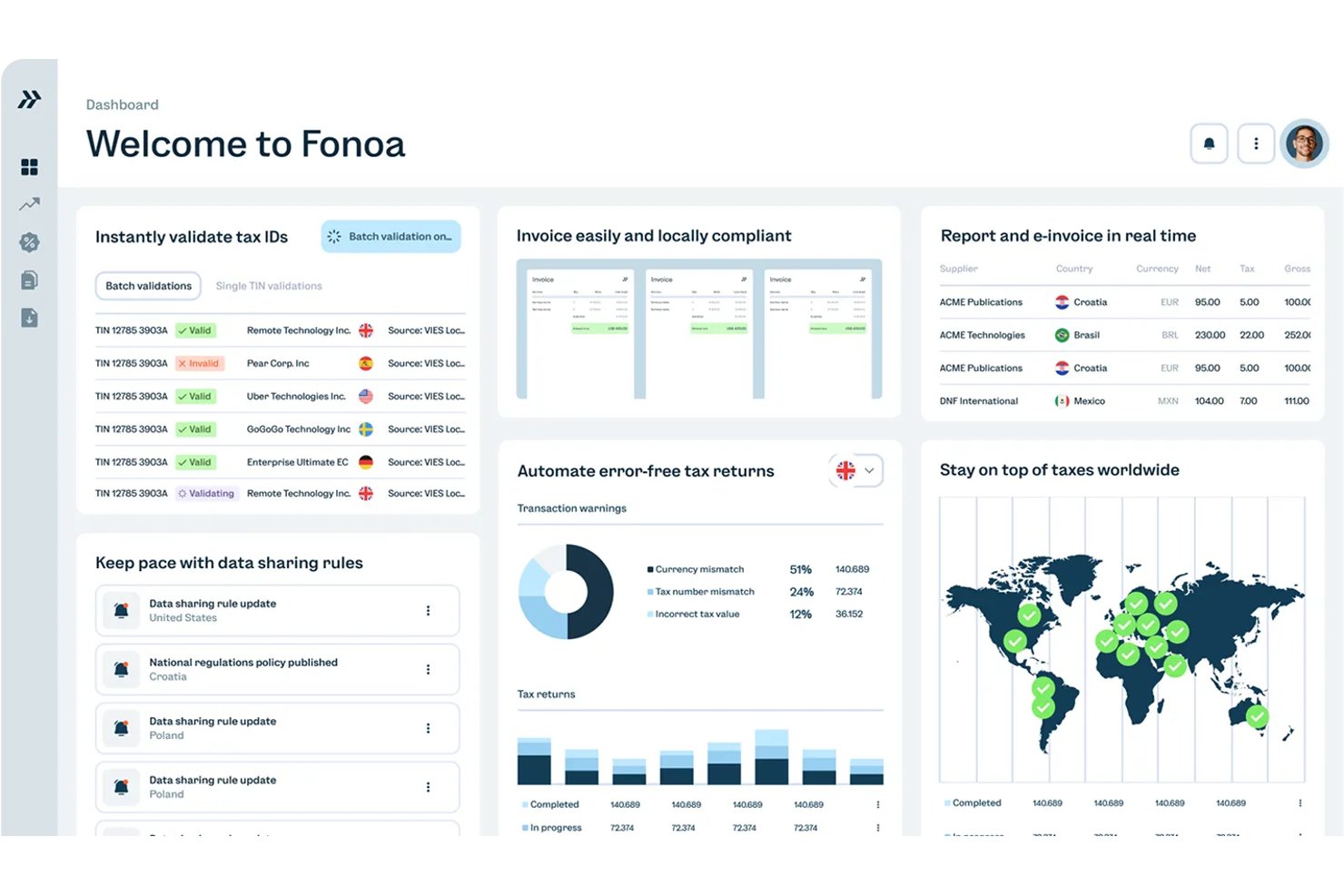
Fonoa is an API-first indirect tax platform that handles e-invoicing, tax ID validation, tax calculation, and returns filing across multiple countries from a single data model.
Who Is Fonoa Best For?
Fonoa is a strong fit for finance teams at high-volume digital businesses that need to issue compliant invoices across multiple countries through a single API integration.
Why I Picked Fonoa
I picked Fonoa as one of the best because it handles e-invoicing across 50+ countries through a single API and a single data model, which is genuinely rare. Instead of rebuilding integrations for each new market, Fonoa converts your transaction data into whatever format that country requires, whether that's Factur-X, UBL, or Peppol. It's also a certified Peppol Access Point and an accredited platform for France's e-invoicing reform, so mandate compliance isn't something your team has to chase manually.
Fonoa Key Features
- Tax ID validation: Checks and verifies tax IDs across 120+ countries, with support for company name search and fuzzy matching.
- Pre-submission invoice validation: Flags errors and automates fixes before invoices reach tax authorities, reducing rejections at the point of submission.
- Webhook-based status notifications: Reports each invoice operation as in progress, failed, or completed, with real-time webhook alerts and polling support.
- Multi-currency and multi-language invoice generation: Issues compliant invoices in multiple currencies and languages from a single integration, without requiring local templates.
Fonoa Integrations
Fonoa supports integrations with SAP, Oracle Fusion Cloud, and NetSuite through its API. No certified marketplace integrations are clearly documented, but the REST API, sandbox, webhooks, and versioned endpoints support custom connectivity.
Pros and Cons
Pros:
- Reviewers praise responsive compliance support
- Supports multiple structured invoice formats
- Handles multi-country mandates through one API
Cons:
- Coverage claims vary across vendor pages
- Built primarily for technical enterprise teams
Best for multilingual document processing
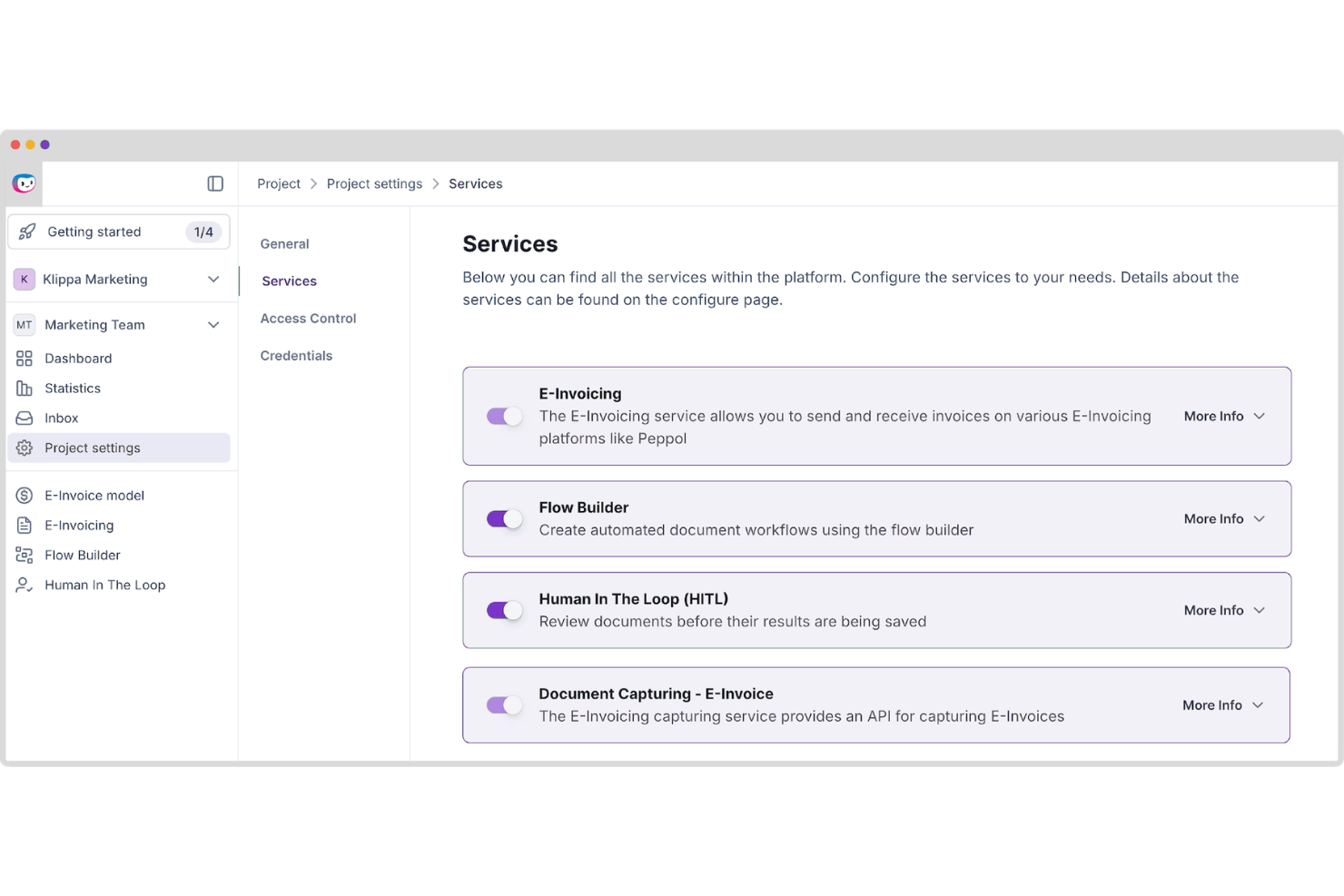
Doxis AI.dp is an AI-powered intelligent document processing platform that automates document classification, OCR-based data extraction, validation, and conversion across invoices and other business documents, including e-invoicing formats such as UBL and XML.
Who Is Doxis AI.dp. Best For?
Doxis AI.dp is a good fit for mid-size to enterprise finance and operations teams that need to process multilingual invoices and other business documents across multiple formats and regions.
Why I Picked Doxis AI.dp.
I've included Doxis AI.dp in my top picks because its multilingual OCR engine can extract structured data from invoices across multiple languages and formats. In practice, that means your team can feed invoices from European, Asian, and Latin American suppliers into the same pipeline and get clean, validated output. It also supports country-specific e-invoicing formats such as Factur-X, Peppol BIS, and UBL, which are valuable for organizations processing cross-border invoices at scale.
Doxis AI.dp. Key Features
- Invoice matching: Compare invoice data against related business documents to identify discrepancies before approval.
- Fraud detection: Identify potentially altered, duplicate, or suspicious invoices before they enter downstream workflows.
- Data validation: Check extracted invoice fields against configurable rules to verify completeness and accuracy.
- Digital archiving: Store processed invoices in a searchable archive to support audits and compliance requirements.
Doxis AI.dp. Integrations
Doxis AI.dp integrates with Oracle NetSuite, SAP, Microsoft Dynamics, Odoo, and Sage, and provides APIs and SDKs for custom integrations. It also supports workflow automation through platforms such as Make and Workato.
Pros and Cons
Pros:
- Built-in document fraud detection tools
- No-code drag-and-drop workflow builder
- Handles UBL, XML, and other e-invoicing formats
Cons:
- Enterprise-focused platform may exceed small business needs
- Setup may be complex for custom workflows
New Product Updates from Doxis AI.dp.
Doxis AI.dp Improves Dataset Validation and API Controls
Doxis AI.dp improves dataset editing with real-time type validation, better field controls, and save prevention on invalid values, plus new API capabilities. These updates help teams maintain cleaner dataset values and manage rows more reliably. For more information, visit Doxis AI.dp’s official site.
 .

OpenText
Best for compliant e-invoicing at scale
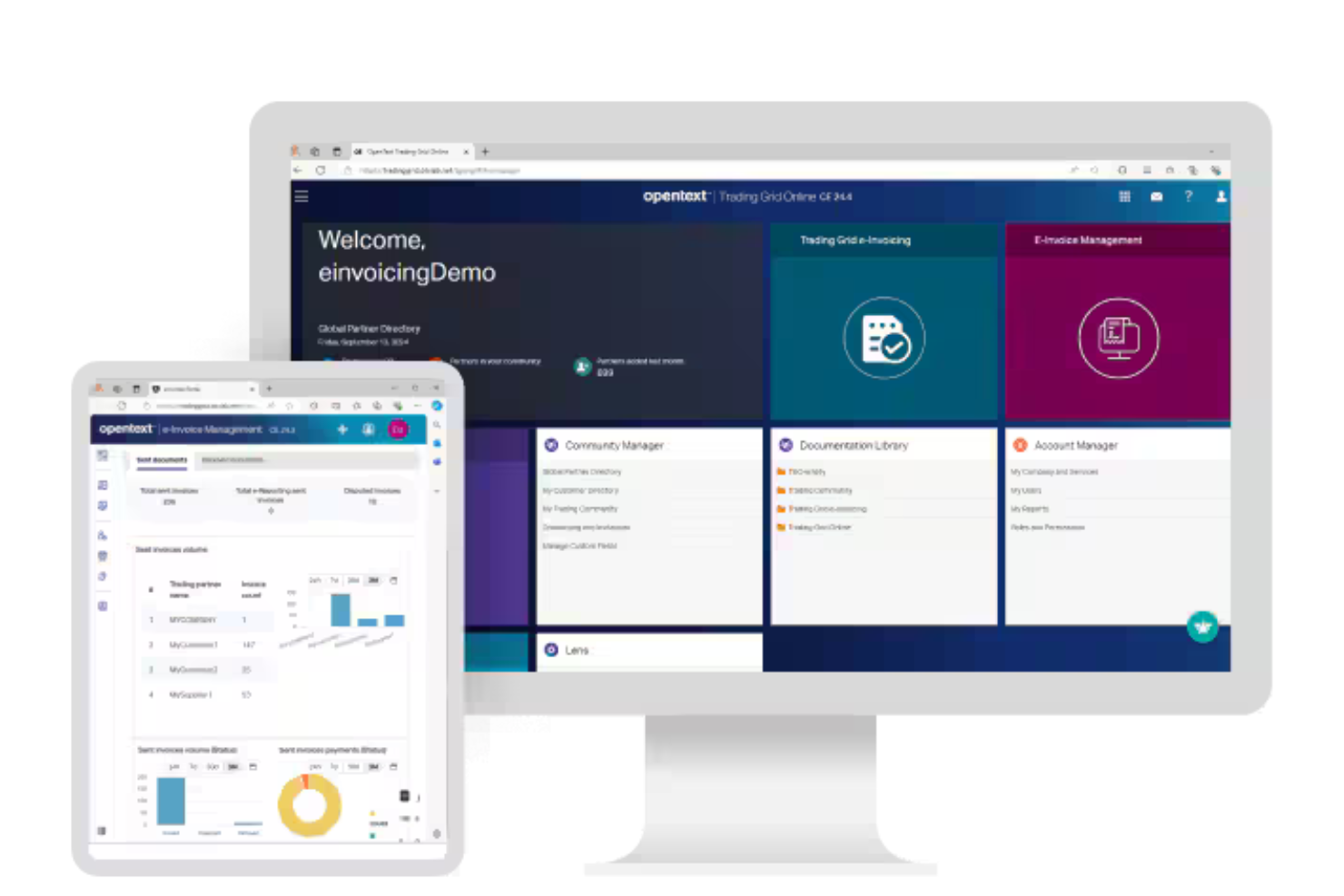
OpenText is an e-invoicing management platform that centralizes invoice capture, validation, compliance, and digital archiving for businesses handling global electronic invoicing requirements.
Who Is OpenText Best For?
OpenText is a strong fit for multinational enterprises and finance teams managing complex, cross-border e-invoicing and compliance requirements.
Why I Picked OpenText
I picked OpenText as one of the best because I can manage global e-invoice compliance and validation in a single platform. My team uses OpenText to automate invoice capture, apply country-specific tax rules, and archive documents for audit readiness. I like that it supports integration with government e-invoicing networks and handles complex cross-border requirements.
OpenText Key Features
- Invoice workflow automation: Routes invoices through configurable approval and exception workflows.
- Supplier portal: Lets suppliers submit and track invoices online.
- Duplicate invoice detection: Flags and prevents duplicate invoice entries automatically.
- Audit trail: Maintains a detailed log of all invoice actions and approvals.
OpenText Integrations
OpenText offers native integrations with SAP, Oracle, Microsoft Dynamics 365, NetSuite, and Salesforce, and provides an API for custom integrations.
Pros and Cons
Pros:
- Supports invoice compliance in multiple countries
- Offers supplier self-service invoice portal
- Automates two and three-way invoice matching
Cons:
- Workflow modifications require technical support
- Dashboard widgets for invoices are limited
Avalara
Best for multi-country mandate compliance

Avalara is a global e-invoicing compliance platform that handles structured invoice creation, validation, country-mandate formatting, and multi-network delivery across Latin America, Europe, the Middle East, and Asia.
Who Is Avalara Best For?
Avalara is a strong fit for mid-market and enterprise finance teams managing e-invoicing compliance across multiple countries and tax jurisdictions.
Why I Picked Avalara
Avalara earns its spot on my shortlist because no other tool handles the sheer breadth of country mandates from a single integration point the way it does. I love that you activate new country requirements directly in the console, so when France's B2B mandate rolled out in September 2026, existing customers could switch it on without a new implementation. Avalara also converts incoming supplier invoices from any mandated format into standard UBL XML, which means your AP automation pipeline stays clean across every jurisdiction you operate in.
Avalara Key Features
- XSD/Schematron validation: Invoices are checked against schema and business rules before sending to reduce tax authority rejections.
- Free U.S. domestic e-invoicing: Send and receive B2B invoices and credit notes through the DBNAlliance network at no document or transaction cost.
- AP invoice normalization: Incoming supplier e-invoices in any mandated format are automatically converted into standard UBL XML for your AP pipeline.
- Sandbox environment: Every customer gets a free sandbox connected to government test systems for pre-production testing.
Avalara Integrations
Avalara offers integrations with SAP, Oracle, NetSuite, Microsoft Dynamics 365, and Workday. Its REST API and Avalara Integration Studio support custom connections to other ERP, accounting, ecommerce, and billing systems.
Pros and Cons
Pros:
- Tracks delivery, acceptance, and audit trails
- Normalizes incoming invoices for AP automation
- Broad coverage for country-specific mandates
Cons:
- Support quality receives mixed customer reviews
- Enterprise setup demands substantial implementation work

Basware
Best for global e-invoicing networks
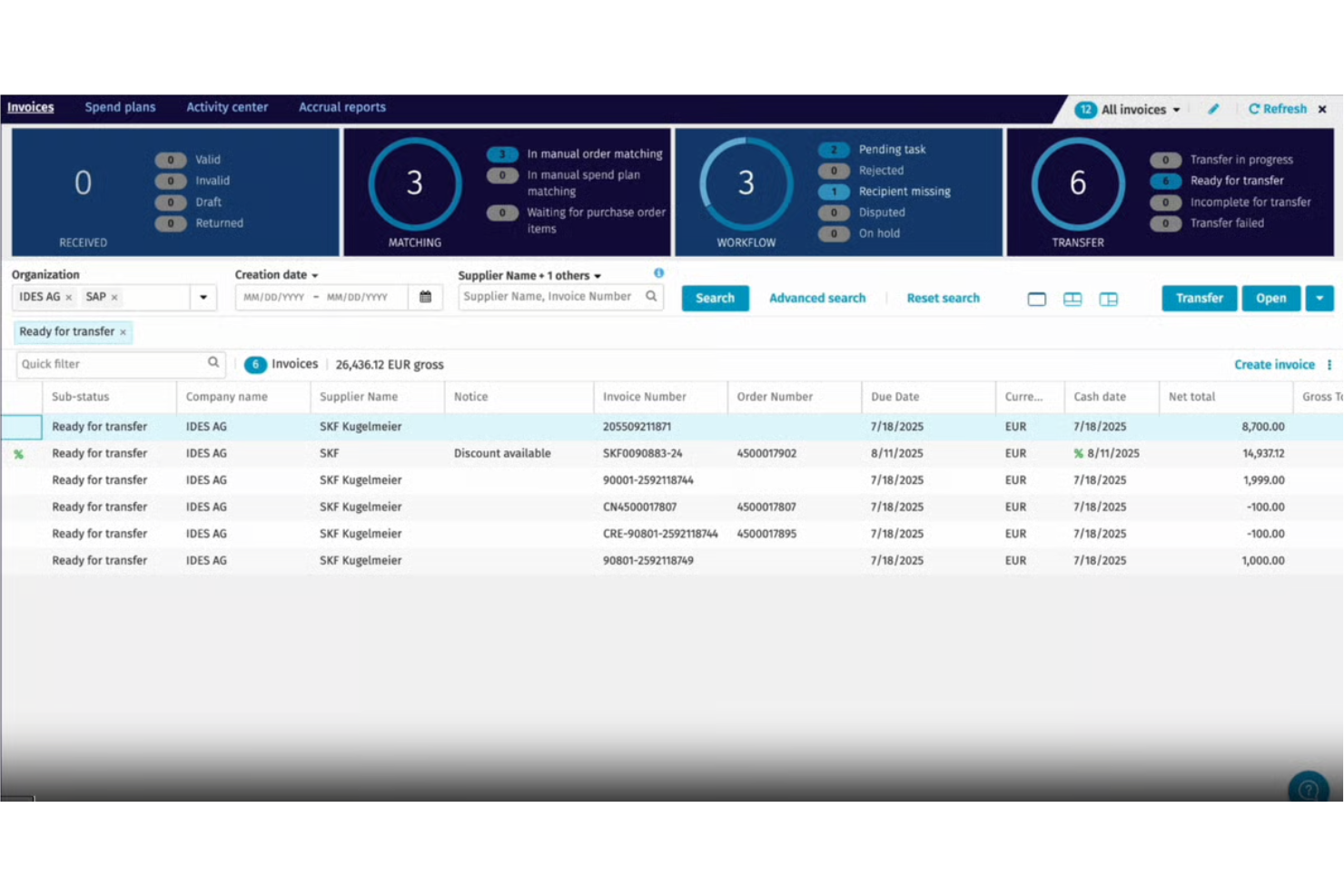
Basware is an e-invoicing software platform that connects buyers and suppliers through a global open network, offering automated invoice capture, validation, compliance, and multi-format document exchange.
Who Is Basware Best For?
Basware is a strong fit for multinational enterprises and finance teams managing high invoice volumes across multiple countries and suppliers.
Why I Picked Basware
I picked Basware because I rely on its open e-invoicing network to connect with suppliers worldwide, regardless of their platform or format. I like that my team can automate invoice validation and compliance checks across multiple countries.
The platform’s multi-format document exchange lets us handle everything from XML to PDF without manual intervention.
Basware Key Features
- Touchless invoice processing: Automatically processes invoices without manual intervention.
- Purchase-to-pay analytics dashboard: Visualizes spend and invoice data in real time.
- Supplier portal: Lets suppliers submit and track invoices online.
- Automated PO matching: Matches invoices to purchase orders and receipts for validation.
Basware Integrations
Native integrations are not currently listed. An API is available for custom integrations.
Pros and Cons
Pros:
- Supports detailed audit trails for all transactions
- Offers advanced supplier onboarding capabilities
- Handles global e-invoicing compliance requirements
Cons:
- Platform navigation for invoicing is complex
- Supplier network access fees can be high

Comarch
Best for EDI and e-invoicing in 60+ countries
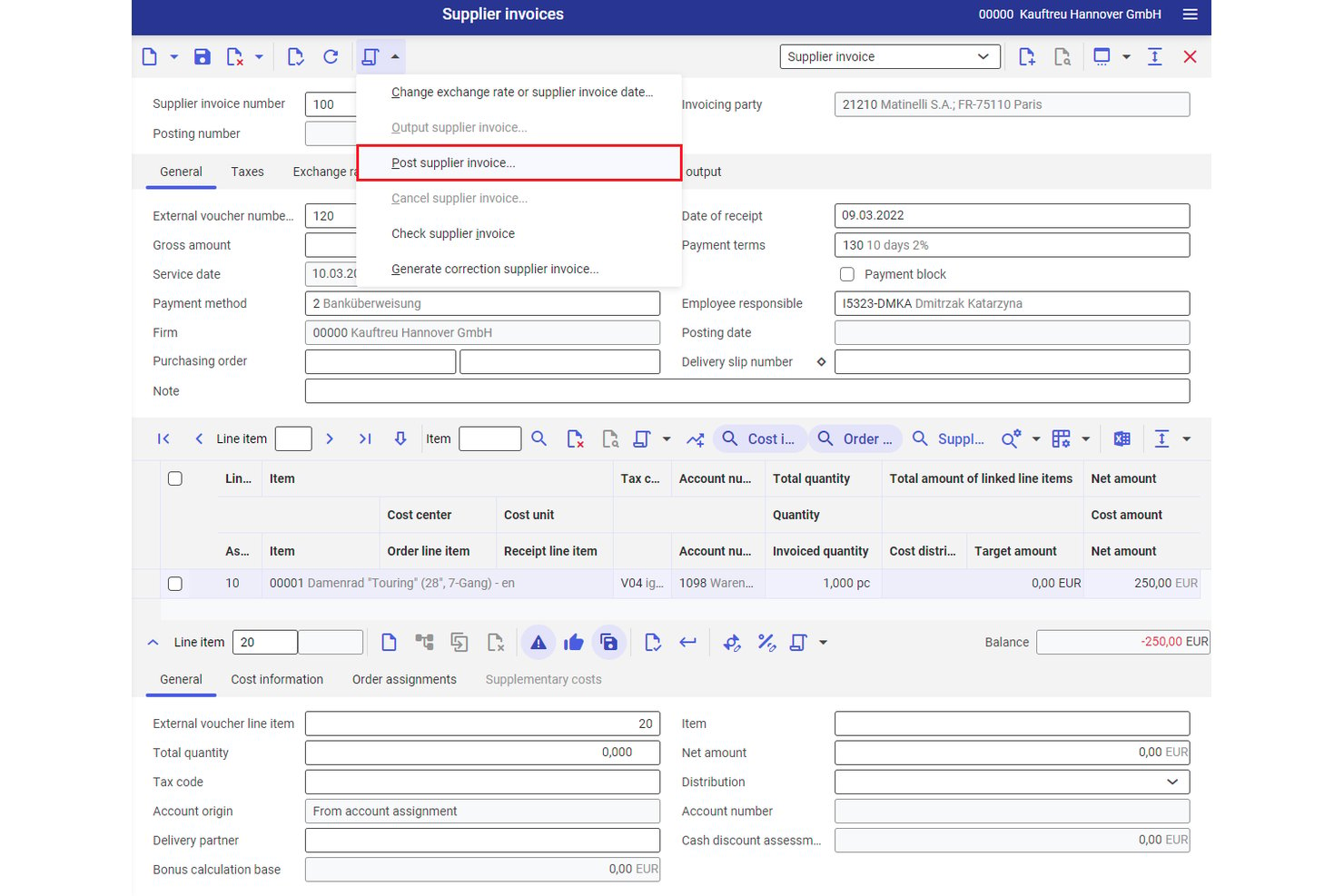
Comarch is an EDI and e-invoicing platform that supports structured invoice generation, multi-format document exchange, AP automation, and regulatory compliance across 60+ countries.
Who Is Comarch Best For?
Comarch is a strong fit for enterprise finance teams managing cross-border invoicing obligations across multiple countries and regulatory frameworks.
Why I Picked Comarch
I picked Comarch as one of the best because its certified Peppol Access Point status and direct connections to 60+ country clearance platforms (KSeF, SdI, Chorus Pro, ZATCA) make it one of the few tools I trust for truly multinational e-invoicing mandates. I especially like its automatic format conversion across EDIFACT, UBL, ZUGFeRD, and KSeF XML, so invoices reach each partner in the exact structure their government requires.
Comarch Key Features
- Layered invoice validation: Checks every invoice against technical, legal, and custom business rules, then flags errors with explanations before submission.
- E-Archive module: Stores sent and received invoices for the legally required retention period with audit trails and end-to-end encryption.
- Multi-channel invoice ingestion: Accepts incoming invoices via EDI, web portal, email, and scanned paper with OCR indexing on a single platform.
- SaaS and on-premise deployment: Lets your team choose between a fully managed cloud subscription or a self-hosted on-premise installation to meet your data governance requirements.
Comarch Integrations
Comarch documents integrations with SAP S/4HANA, SAP ERP, Oracle Fusion, Microsoft Dynamics, NetSuite, Sage, Exact, Infor, Epicor, and QuickBooks. It also connects to Peppol and KSeF through API and token-based access.
Pros and Cons
Pros:
- Explains validation errors before submission
- Converts invoices across multiple structured formats
- Supports compliance across 60-plus countries
Cons:
- Reviewers report a cluttered interface
- Enterprise rollouts require substantial implementation effort

Best for supplier collaboration
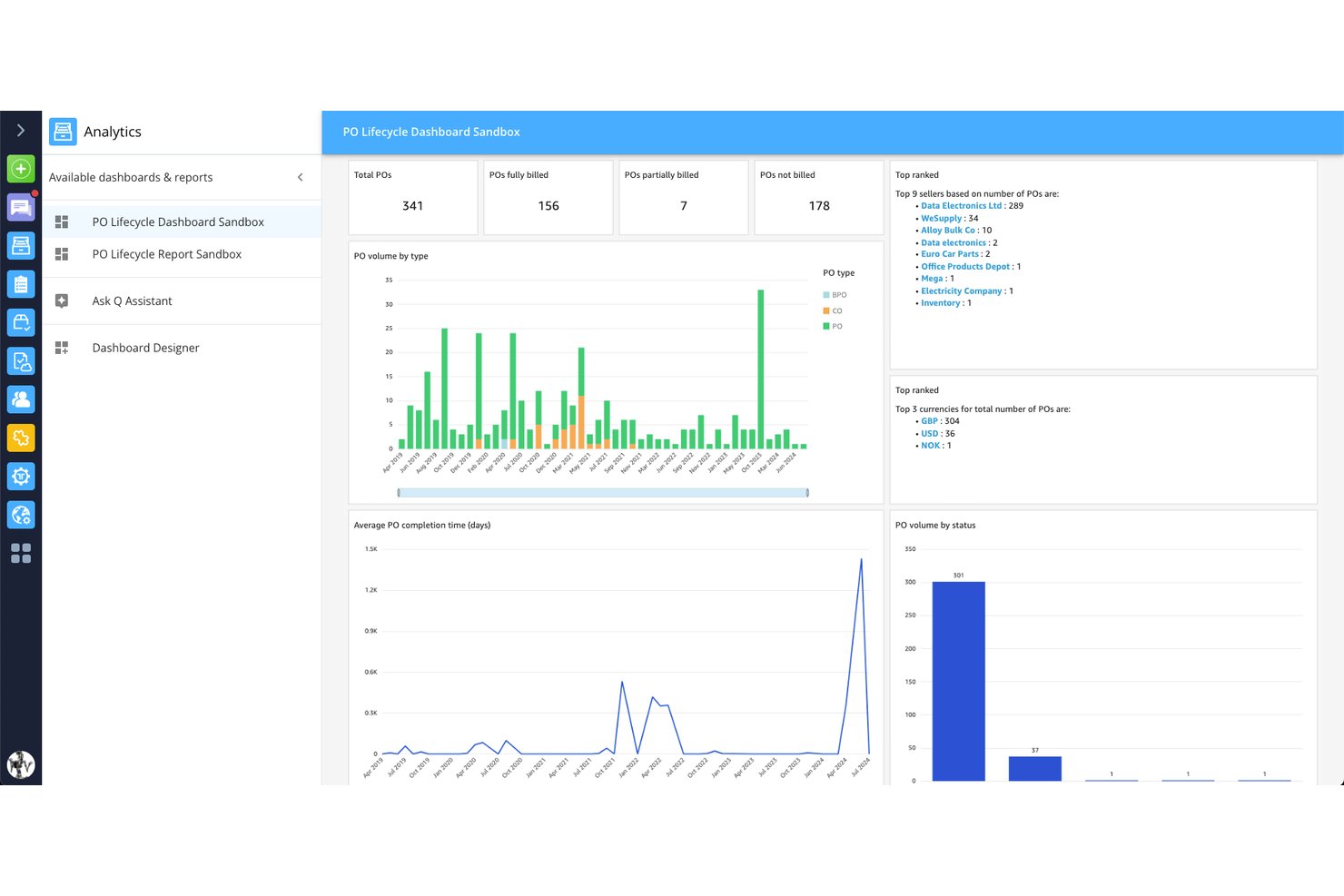
Tradeshift is a global e-invoicing and AP automation platform that handles structured invoice generation, multi-country regulatory compliance, supplier onboarding, and invoice exchange across formats and networks.
Who Is Tradeshift Best For?
Tradeshift is a strong fit for AP teams at mid-market and enterprise companies managing high invoice volumes across multiple suppliers and countries.
Why I Picked Tradeshift
I've included Tradeshift in my top picks because no other platform on this list handles supplier collaboration at the same scale. With roughly one million suppliers already on the network, buyers can connect with vendors instantly, and first-invoice onboarding means a supplier doesn't need to pre-register before sending their first compliant invoice. I also like the invoice-level messaging through Tradeshift Engage, which keeps buyer-supplier conversations tied directly to the document in question rather than scattered across email threads.
Tradeshift Key Features
- Business Firewall validation: Runs static and dynamic checks on every inbound invoice, flagging duplicates, VAT mismatches, and PO format errors before the document enters AP.
- Compliance-as-a-Service: Covers e-invoicing mandates across 70 countries, including real-time clearance connections in 12 countries with pre-built country-specific connectors.
- PO-flip: Lets suppliers convert a purchase order directly into a compliant invoice, reducing manual data entry and submission errors.
- AI Document Intelligence: Uses OCR combined with large language models to extract invoice data from any format without requiring templates, at a claimed accuracy above 95%.
Tradeshift Integrations
Tradeshift has pre-built integrations with SAP ECC 6.0, SAP S/4HANA, Oracle E-Business Suite, and Oracle Fusion. REST APIs, data-mapping tools, and Babelway support custom connectivity across 3,000+ active connections.
Pros and Cons
Pros:
- Clear invoice status visibility for suppliers
- Invoice-level messaging keeps disputes documented
- Supplier onboarding starts with the first invoice
Cons:
- Supplier onboarding may take longer than expected
- Interface can feel slow after setup
Esker
Best for cloud document automation
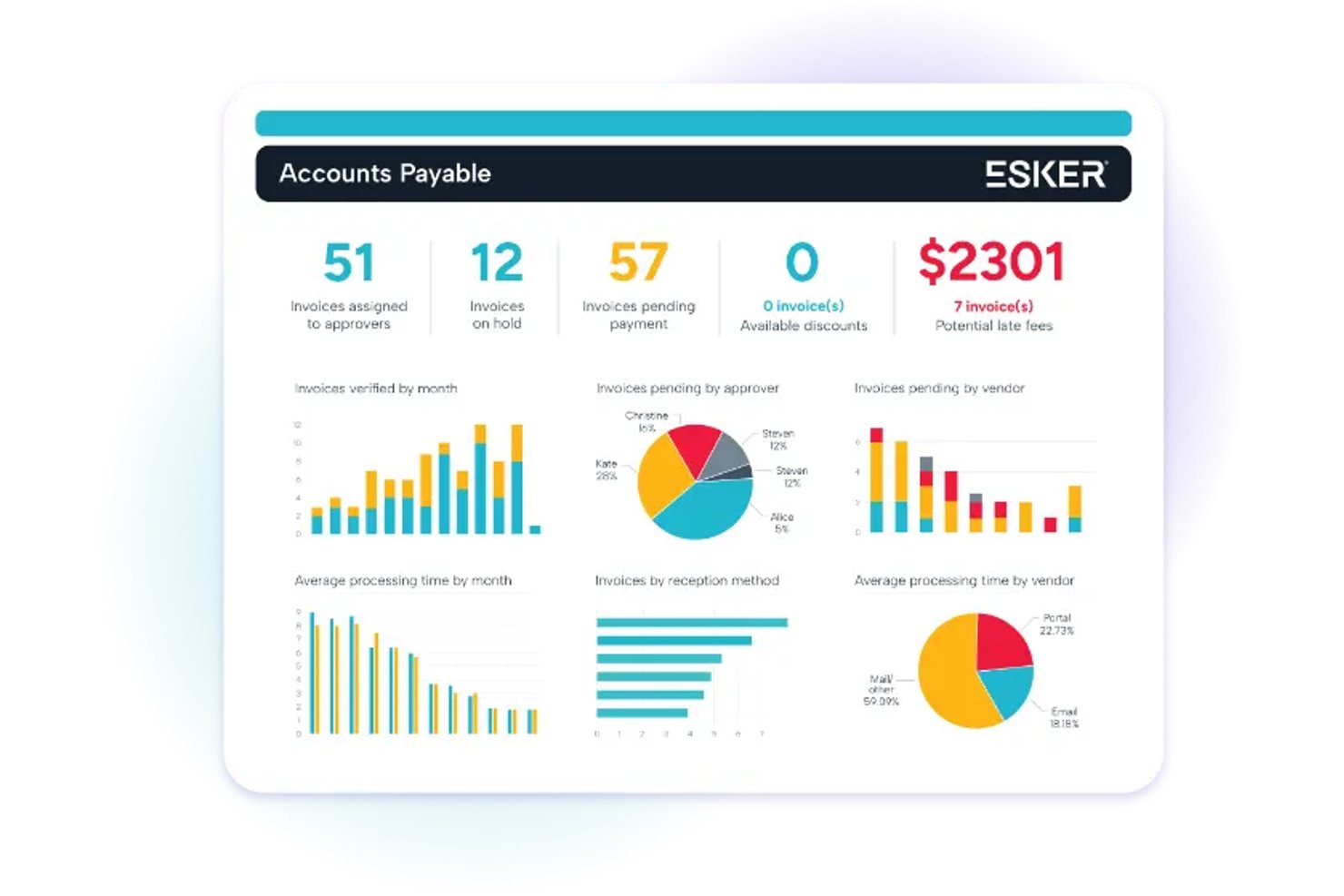
Esker is a cloud e-invoicing platform that handles both AP and AR invoice processing, covering structured invoice generation, multi-format delivery, regulatory compliance across 60+ countries, and ERP integration.
Who Is Esker Best For?
Esker is a strong fit for enterprise finance teams managing high-volume AP and AR invoicing across multiple countries and ERP systems.
Why I Picked Esker
I picked Esker as one of the best because its cloud document automation goes well beyond basic invoice sending. It automatically converts ERP output into country-mandated formats like XRechnung, FatturaPA, and Factur-X, then submits those invoices to 300+ customer AP portals and retrieves their status without manual intervention. I also rate its Peppol Access Point certification highly, covering Europe, Australia/New Zealand, and Singapore from a single platform.
Esker Key Features
- AP invoice capture and coding: AI extracts and codes incoming supplier invoices, then routes them for approval based on rules like entity, amount, and cost center.
- Customer self-service portal: Customers can view invoices, communicate with your AR team, and pay online across 40+ countries and 135+ currencies.
- Digital signature and archiving: Outgoing invoices can carry digital signatures, and all invoices, documents, and delivery proofs are stored in a secure, searchable archive.
- Two-way and three-way matching: Esker automatically matches AP invoices against purchase orders and goods receipts, flagging exceptions for review in one place.
Esker Integrations
Esker supports 100+ ERP and back-end integrations, including connectors for SAP, Microsoft Dynamics 365, Oracle, and Sage. It also supports REST and SOAP APIs, SAP web services, file exchange, and a no-code Connector Framework.
Pros and Cons
Pros:
- Supports AP and AR invoice workflows
- Automates customer portal submissions and statuses
- Peppol coverage spans multiple regions
Cons:
- Some reviewers report clunky layouts
- Doesn't calculate charges or billing logic

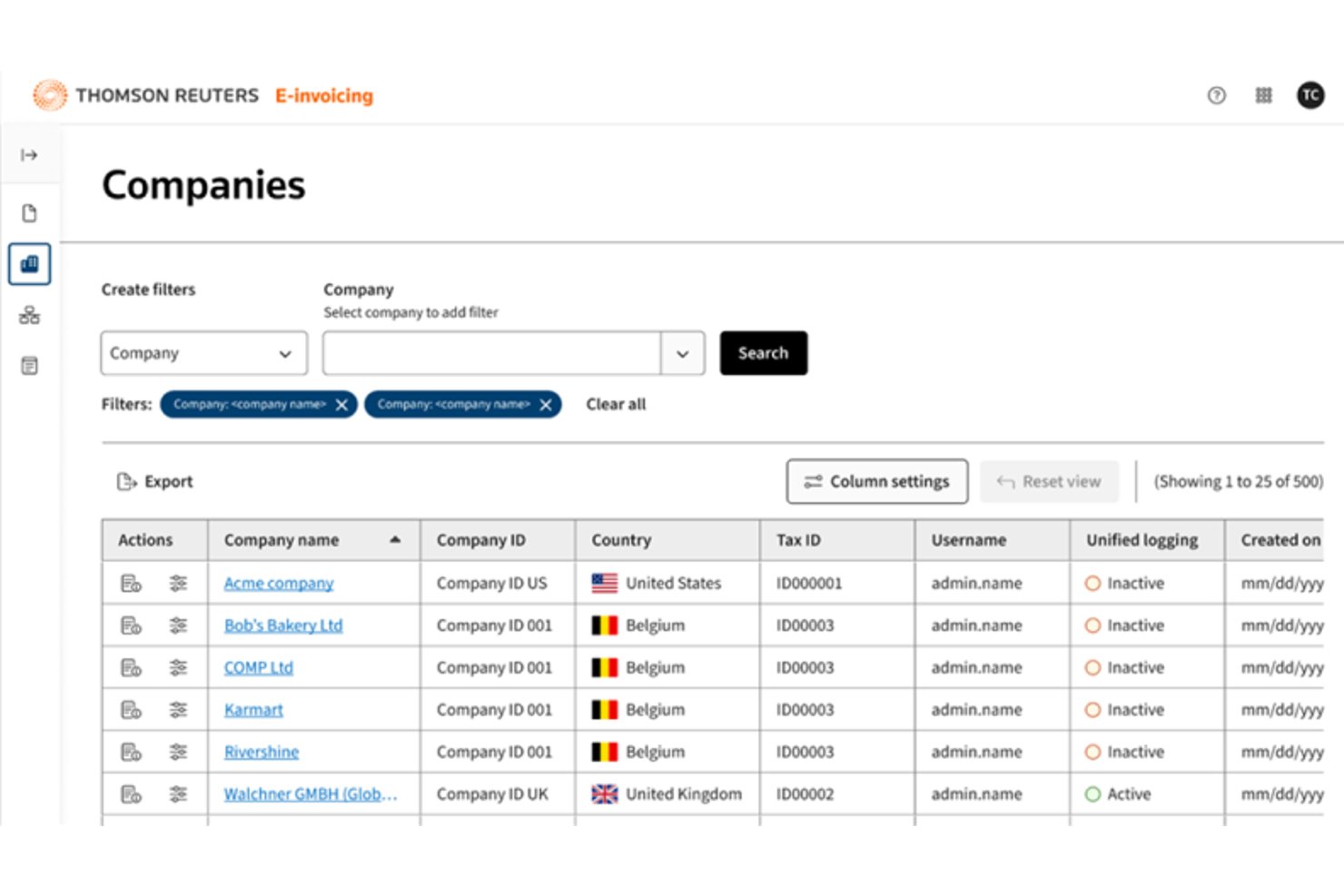
ONESOURCE is an enterprise e-invoicing platform from Thomson Reuters that handles structured invoice generation, multi-format conversion, regulatory compliance across 80+ countries, invoice exchange, and ERP integration.
Who Is ONESOURCE Best For?
ONESOURCE is built for finance directors and CFOs at large multinationals who need to manage e-invoicing compliance across dozens of countries from a single platform.
Why I Picked ONESOURCE
I picked ONESOURCE as one of the best because it's the only e-invoicing platform I've seen that handles a true single-connection model: your ERP sends data once, and ONESOURCE Pagero converts it into the correct country format, clears it with the tax authority, and delivers it across 80+ countries. I especially like its dedicated Regulatory Affairs team, which tracks mandate changes like ZATCA and KSeF so your compliance posture updates without manual intervention.
ONESOURCE Key Features
- ERP-to-clearance automation: A two-step process accepts invoice data from your ERP, converts it to the correct country format, and submits it to the relevant tax authority automatically.
- Document archiving with local retention rules: The eArchive add-on stores invoices according to country-specific retention requirements, including in-country storage where local law requires it.
- Trading partner network access: Your invoices reach 14M+ connected businesses across 100+ networks and government platforms, with email and print fallbacks for recipients outside the network.
- ONESOURCE Reconciliations integration: Matches e-invoice data to VAT/GST return data line by line, flags discrepancies, and supports EU data residency for compliance reporting.
ONESOURCE Integrations
ONESOURCE Pagero has native integrations with Oracle Fusion Cloud ERP and Workday Financials, plus a Coupa Marketplace integration. It also supports API-based custom integrations and connectivity with Deltek and IFS.
Pros and Cons
Pros:
- Tracks clearance and delivery statuses
- Reaches 14M+ connected businesses
- Supports compliance across 80+ countries
Cons:
- Limited evidence of payment tracking
- Enterprise implementation requires extensive coordination
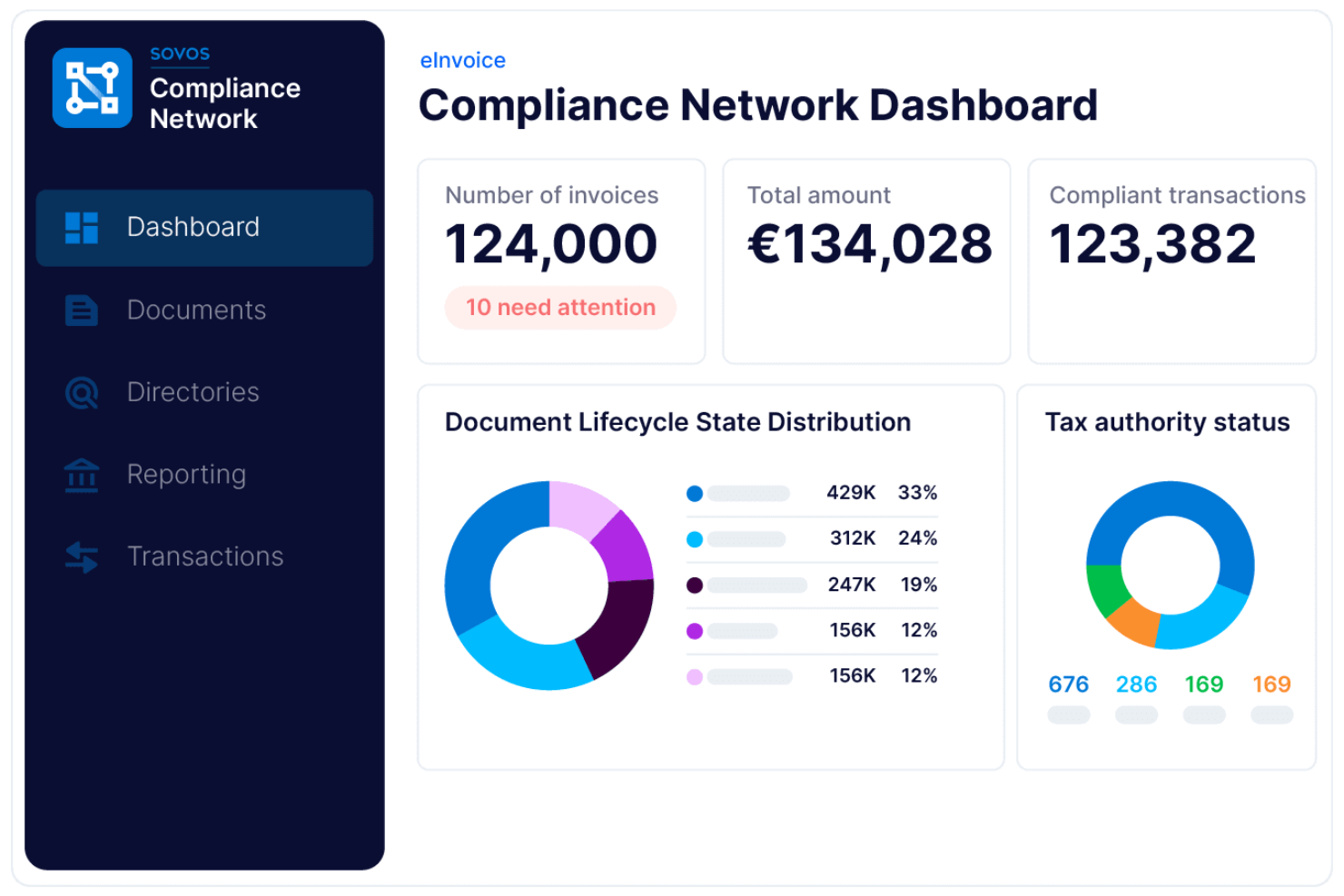
Sovos is a global e-invoicing compliance platform that centralizes electronic invoice creation, validation, tax reporting, and digital archiving for businesses operating across multiple jurisdictions.
Who Is Sovos Best For?
Sovos is a strong fit for multinational corporations and tax teams managing e-invoicing compliance across multiple countries.
Why I Picked Sovos
I picked Sovos as one of the best because I can manage global e-invoicing compliance and tax reporting in one place. My team uses Sovos to automate invoice validation against country-specific regulations and submit real-time reports to tax authorities.
I like that Sovos supports digital archiving and audit trails for multi-jurisdictional operations.
Sovos Key Features
- Supplier onboarding tools: Lets you invite and manage suppliers directly within the platform.
- Automated invoice delivery: Sends electronic invoices to customers and partners in required formats.
- Multi-language interface: Supports users working in different languages across regions.
- Custom workflow configuration: Allows you to set up approval and routing workflows for invoices.
Sovos Integrations
Sovos is built to integrate with ERP and business process automation systems, but native integrations are not currently listed. An API is available for custom integrations.
Pros and Cons
Pros:
- Monitors regulatory changes and updates processes
- Offers automated invoice status tracking features
- Covers complex VAT and global compliance
Cons:
- Supplier onboarding features are not extensive
- No built-in invoice approval workflows
Outro software de faturação eletrónica
Eis algumas opções adicionais de software de faturação eletrónica que não entraram na minha seleção final, mas que vale a pena conhecer:
- HighRadius
For AI receivables automation
- Pagero
For real-time e-invoicing
- Storecove
For API-driven global e-invoicing compliance
- SAP Ariba
For enterprise e-invoicing
- Coupa
For automated invoice processing
- Medius
For AP-focused e-invoicing compliance
- Xero
For invoice tracking and management
- Odoo
For integrated invoicing and apps
- Tungsten Automation
For AI invoice automation


How I Evaluate E-Invoicing Software
I split my evaluation into three parts, with the most weight on core functionality: create structured invoices, check tax rules, and deliver invoices through e-invoicing networks. Next, I consider standout features such as Peppol connectivity. Finally, I look beyond features at onboarding support and pricing value.
Core Functionality (Table Stakes For This List)
When I'm selecting tools for my list, I score each one on a scale from 0 (does not offer the functionality) to 5 (excels in this area) for each core functionality listed below. I then convert the total into a percentage to help assess each tool's overall fit, with extra weight on any functionalities I’ve deemed essential.
- Structured Invoice Generation (Essential): I check whether tools create machine-readable formats like XML or UBL and adapt invoices to recipient requirements across project regions.
- Regulatory Compliance (Essential): I look for support for relevant tax mandates and e-invoicing frameworks, including how tools handle changing rules across operating regions.
- Invoice Exchange: I assess whether invoices reach recipients or tax authorities through networks or direct connections, with delivery status visible to the team.
- Validation & Error Checks: I check whether tools validate required fields, schemas, and business rules before submission to catch issues that could delay supplier or customer workflows.
- Accounting & ERP Links: I consider how invoice data moves into finance systems, including whether integrations support the existing project and procurement workflows.
- Invoice Status Tracking: I look for visibility into delivery, acceptance, rejection, and payment confirmation so project teams can follow invoice dependencies.
Once I have a list of tools that meet the criteria, I consider what sets each platform apart.
Differentiating Factors (What Sets Vendors Apart)
Here's how I compare and contrast different vendors:
Standout Features
I look for Peppol network connectivity because it determines whether your team can exchange invoices with government and enterprise buyers across borders without manual workarounds. Retainer and milestone automation matters just as much—when a project hits a deliverable gate, billing should fire automatically instead of waiting on a PM to nudge finance. I also evaluate client self-service portals, checking whether clients can view, approve, and pay invoices in one place, which cuts back-and-forth that stalls project cash flow.
Beyond Features
I evaluate how quickly a vendor adapts to new e-invoicing mandates—if a country shifts to a clearance model mid-project, your tool needs to keep pace without manual workarounds. Jurisdictional coverage matters just as much, since billing clients across multiple regions means your vendor must handle local tax rules without bolting on third-party compliance tools. I also check onboarding support, looking for guided data migration and template setup so a small team can go live without pulling in IT resources they don't have.
Como escolher software de faturação eletrónica
É fácil ficar perdido entre longas listas de funcionalidades e estruturas de preços complexas. Para o ajudar a manter-se focado enquanto analisa o seu processo único de seleção de software, apresentamos uma lista de verificação com os fatores a ter em conta:
| Fator | O que deve considerar |
|---|---|
| Escalabilidade | O software conseguirá processar o volume de faturas à medida que a sua empresa cresce ou se expande para novos mercados? |
| Integrações | Liga-se nativamente ao seu ERP e aos seus sistemas de contabilidade e aprovisionamento sem soluções alternativas personalizadas? |
| Personalização | Pode adaptar os fluxos de trabalho, as regras de aprovação e os modelos aos processos da sua organização? |
| Facilidade de utilização | A sua equipa e os seus fornecedores irão adotá-lo rapidamente ou a formação e o suporte serão uma necessidade constante? |
| Implementação e integração inicial | Quanto tempo demorará a começar a trabalhar e que recursos ou apoio fornece o fornecedor? |
| Custo | Todas as taxas são claras desde o início, incluindo os custos de configuração, transação e suporte? |
| Medidas de segurança | A ferramenta cumpre os requisitos de privacidade dos dados, encriptação e controlo de acesso? |
| Requisitos de conformidade | Ajudará a cumprir os regulamentos locais e internacionais relativos à faturação eletrónica, aos impostos e às auditorias? |
O que é software de faturação eletrónica?
O software de faturação eletrónica é um sistema de faturação digital que automatiza a criação, a entrega e o processamento de uma fatura online entre compradores e fornecedores. Substitui as faturas em papel por fluxos de trabalho digitais estruturados, ajudando as empresas a otimizar a faturação e a reduzir os erros manuais.
Estas ferramentas integram-se frequentemente com software de contabilidade para gerir dados financeiros, suportar métodos de processamento de pagamentos, como cartões de crédito, e ligar-se a funções como o controlo do tempo e as operações da cadeia de abastecimento.
Também melhoram a proteção dos dados, garantem a conformidade com os regulamentos de faturação eletrónica e realçam os principais benefícios da faturação eletrónica, incluindo aprovações mais rápidas e poupança de custos.
Funcionalidades
Ao selecionar software de faturação eletrónica, esteja atento às seguintes funcionalidades essenciais:
- Captura de faturas: Digitaliza e importa faturas a partir de e-mails, carregamentos ou portais de fornecedores, reduzindo a introdução manual de dados e os erros.
- Fluxos de aprovação: Encaminha as faturas através de cadeias de aprovação personalizáveis, garantindo a conformidade com os controlos internos e acelerando o processamento.
- Deteção de duplicados: Assinala potenciais faturas duplicadas antes do pagamento, ajudando a evitar pagamentos excessivos e fraude.
- Ferramentas de conformidade fiscal: Aplica automaticamente as regras fiscais locais e internacionais, apoiando cálculos precisos e a comunicação de informações às autoridades.
- Suporte para várias moedas: Processa faturas em diferentes moedas, convertendo montantes e apoiando operações empresariais globais.
- Portal de fornecedores: Permite aos fornecedores submeter, acompanhar e gerir faturas online, melhorando a comunicação e reduzindo pedidos de informação sobre o estado.
- Integração com ERP: Liga-se diretamente a sistemas de contabilidade ou ERP, sincronizando dados das faturas e automatizando a manutenção dos registos financeiros.
- Registo de auditoria: Regista todas as ações realizadas em cada fatura, proporcionando transparência e apoiando os requisitos de auditoria.
- Relatórios e análise: Disponibiliza painéis e relatórios exportáveis para monitorizar o estado das faturas, os tempos de processamento e os padrões de despesas.
- Arquivo de documentos: Armazena faturas e documentos relacionados de forma segura, para facilitar a recuperação e garantir a conformidade com as políticas de retenção.
Funcionalidades comuns de IA do software de faturação eletrónica
Para além das funcionalidades padrão do software de faturação eletrónica acima mencionadas, muitas destas soluções estão a incorporar IA com funcionalidades como:
- Extração inteligente de dados das faturas: Utiliza IA para reconhecer e extrair campos essenciais das faturas, mesmo quando os esquemas variam, reduzindo a introdução manual e melhorando a precisão.
- Deteção automatizada de anomalias: Assinala montantes, padrões ou comportamentos invulgares dos fornecedores através da aprendizagem com dados históricos, ajudando as equipas a detetar fraude ou erros numa fase inicial.
- Agendamento preditivo de pagamentos: Analisa históricos de pagamentos e tendências de fluxo de caixa para recomendar datas de pagamento ideais, apoiando uma melhor gestão do fundo de maneio.
- Avaliação do risco dos fornecedores baseada em IA: Avalia a fiabilidade e o risco dos fornecedores através da análise de padrões de faturação, atrasos nos pagamentos e fontes de dados externas, ajudando as equipas a tomar decisões informadas.
- Consultas em linguagem natural: Permite aos utilizadores fazer perguntas sobre faturas ou dados de despesas em linguagem corrente, com a IA a interpretar e apresentar instantaneamente informações relevantes.
Vantagens
A implementação de software de faturação eletrónica proporciona várias vantagens à sua equipa e à sua empresa. Eis algumas das que pode esperar:
- Processamento mais rápido das faturas: A captura, o encaminhamento e as aprovações automatizados ajudam a sua equipa a processar as faturas desde a receção até ao pagamento muito mais rapidamente.
- Conformidade melhorada: As regras fiscais integradas, os registos de auditoria e as verificações regulamentares ajudam-no a cumprir os requisitos locais e internacionais com menos supervisão manual.
- Redução dos erros manuais: A extração automatizada de dados e a deteção de duplicados minimizam os erros que podem conduzir a pagamentos excessivos ou litígios.
- Maior visibilidade: Os painéis e relatórios em tempo real proporcionam uma visão clara do estado das faturas, dos padrões de despesas e dos estrangulamentos.
- Melhoria das relações com os fornecedores: Os portais de fornecedores e os fluxos de trabalho transparentes facilitam a submissão e o acompanhamento das faturas pelos fornecedores, reduzindo pedidos de informação e atrasos.
- Custos operacionais mais baixos: A digitalização e a automatização da faturação reduzem as despesas com papel, portes e trabalho manual.
- Maior segurança: O armazenamento centralizado de documentos e os controlos de acesso ajudam a proteger os dados financeiros sensíveis contra acessos não autorizados ou perdas.
Custos e preços
A seleção de software de faturação eletrónica exige uma compreensão dos vários modelos de preços e planos disponíveis. Os custos variam consoante as funcionalidades, o tamanho da equipa, os complementos, entre outros fatores. A tabela abaixo resume os planos comuns, os respetivos preços médios e as funcionalidades normalmente incluídas nas soluções de software de faturação eletrónica:
Tabela de comparação de planos de software de faturação eletrónica
| Tipo de plano | Preço médio | Características comuns |
|---|---|---|
| Plano gratuito | $0 | Criação básica de faturas, volume limitado de faturas, apoio por e-mail e relatórios simples. |
| Plano pessoal | $5-$25/user/month | Faturas ilimitadas, suporte para várias moedas, fluxos de trabalho básicos de aprovação e integração com ferramentas de contabilidade. |
| Plano empresarial | $25-$75/user/month | Fluxos de trabalho avançados de aprovação, ferramentas de conformidade fiscal, acesso ao portal de fornecedores e relatórios personalizados. |
| Plano para empresas | $75-$200/user/month | Integrações personalizadas, conformidade global, análise avançada, apoio dedicado e controlos de segurança reforçados. |
Perguntas frequentes sobre software de faturação eletrónica
Eis algumas respostas a perguntas comuns sobre software de faturação eletrónica:
Como é que o software de faturação eletrónica ajuda na conformidade fiscal?
O software de faturação eletrónica aplica automaticamente as regras fiscais locais e internacionais, gera formatos de fatura conformes e mantém registos de auditoria. Isto reduz os erros manuais e ajuda a sua empresa a cumprir os requisitos regulamentares em diferentes regiões.
O software de faturação eletrónica pode integrar-se com o meu sistema de contabilidade atual?
Sim, a maioria das soluções de software de faturação eletrónica disponibiliza integrações com sistemas de contabilidade e ERP populares. Isto permite sincronizar os dados das faturas, automatizar o arquivo de registos e evitar a introdução duplicada de dados.
O que devo ter em conta ao mudar do papel para a faturação eletrónica?
Planeie a migração de dados, a formação dos colaboradores e a integração dos fornecedores. Certifique-se de que o software suporta os formatos e fluxos de trabalho necessários e verifique se cumpre as suas necessidades de segurança e conformidade.
O software de faturação eletrónica é adequado para pequenas empresas?
Sim, muitas soluções de faturação eletrónica disponibilizam planos acessíveis e interfaces simples concebidas para pequenas empresas. Procure opções com configuração fácil, automatização básica e integrações essenciais.
Quão seguro é o software de faturação eletrónica?
A maioria dos softwares de faturação eletrónica de fornecedores reputados utiliza encriptação, controlos de acesso e armazenamento seguro na nuvem para proteger os seus dados financeiros. Reveja sempre as certificações de segurança e as políticas de privacidade de dados de um fornecedor antes de tomar uma decisão.