

As 10 melhores aplicações gratuitas de registo de tempo para trabalhadores independentes analisadas em 2026

Melhores aplicações gratuitas de controlo de tempo para freelancers: seleção


Enquanto freelancer, gerir o seu tempo de forma eficiente é fundamental. Está a gerir vários projetos em simultâneo e manter o registo das horas pode ser um desafio. É aqui que as aplicações gratuitas de controlo de tempo para freelancers são úteis, ajudando-o a registar o seu trabalho sem aumentar as suas despesas.
Com base na minha experiência a testar estas ferramentas, vi como podem ajudá-lo a manter-se organizado e a garantir uma faturação precisa. Precisa de uma solução que se adapte às suas necessidades sem comprometer o orçamento.
Neste artigo, vou partilhar as minhas principais escolhas de aplicações gratuitas de controlo de tempo. Fiz a pesquisa por si, para que possa concentrar-se no seu trabalho. Vamos encontrar a ferramenta certa para si e para a sua equipa.
Why Trust Our Software Recommendations
Our team has been testing and reviewing software since 2012. As project managers ourselves, we know how difficult—and important—it is to choose the right software.
For this guide, we evaluated tools using hands-on testing and independent research, scoring tools using our selection criteria. We also draw on insights from industry thought leaders and practicing project management experts.
Our reviews reflect our human editorial judgment, not a sales pitch.
Expert reviewers:
Tabela de comparação: aplicações gratuitas de controlo de tempo para freelancers
Eis os custos base de cada uma das ferramentas que entraram na minha seleção:
| Tool | Best For | Trial Info | Price | ||
|---|---|---|---|---|---|
| 1 | Best for automatic productivity analysis | Free trial available | From $6.42/user/month (billed annually) | Website | |
| 2 | Best for browser extension tracking | Free plan + 7-day trial + demo available | From $3.99/user/month (billed annually) | Website | |
| 3 | Best for project management | Free plan + 14-day free trial + free demo available | From $5/user/month | Website | |
| 4 | Best for mobile access | Free plan + free demo available | Pricing upon request | Website | |
| 5 | Best for automated tracking | Free plan + free trial + free demo available | From $3.99/user/month (billed annually) | Website | |
| 6 | Best for integration options | Free plan + 14-day free trial available | From $8.50/user/month (billed annually) | Website | |
| 7 | Best for unlimited users | Free plan + free demo + 14-day free trial available | From $3.75/user/month (billed annually) | Website | |
| 8 | Best for invoicing tools | Free plan + 14-day free trial available | From $11.95/month | Website | |
| 9 | Best for simplicity | 14-day free trial | From $14/month (billed annually) | Website | |
| 10 | Best for freelancers | 7-day free trial | From $9/user/month (billed annually) | Website |
Avaliações das melhores aplicações gratuitas de controlo de tempo para freelancers
Abaixo, apresento os meus resumos detalhados das melhores aplicações gratuitas de controlo de tempo para freelancers que entraram na minha seleção. As minhas avaliações oferecem uma análise detalhada das principais funcionalidades, vantagens e desvantagens, integrações e casos de utilização ideais de cada ferramenta, para o ajudar a encontrar a melhor opção para si.
Embora algumas destas ferramentas ofereçam uma versão totalmente gratuita, outras disponibilizam um período de teste gratuito. Adicionei uma nota sobre o que é gratuito em cada uma das minhas avaliações.

DeskTime
Best for automatic productivity analysis
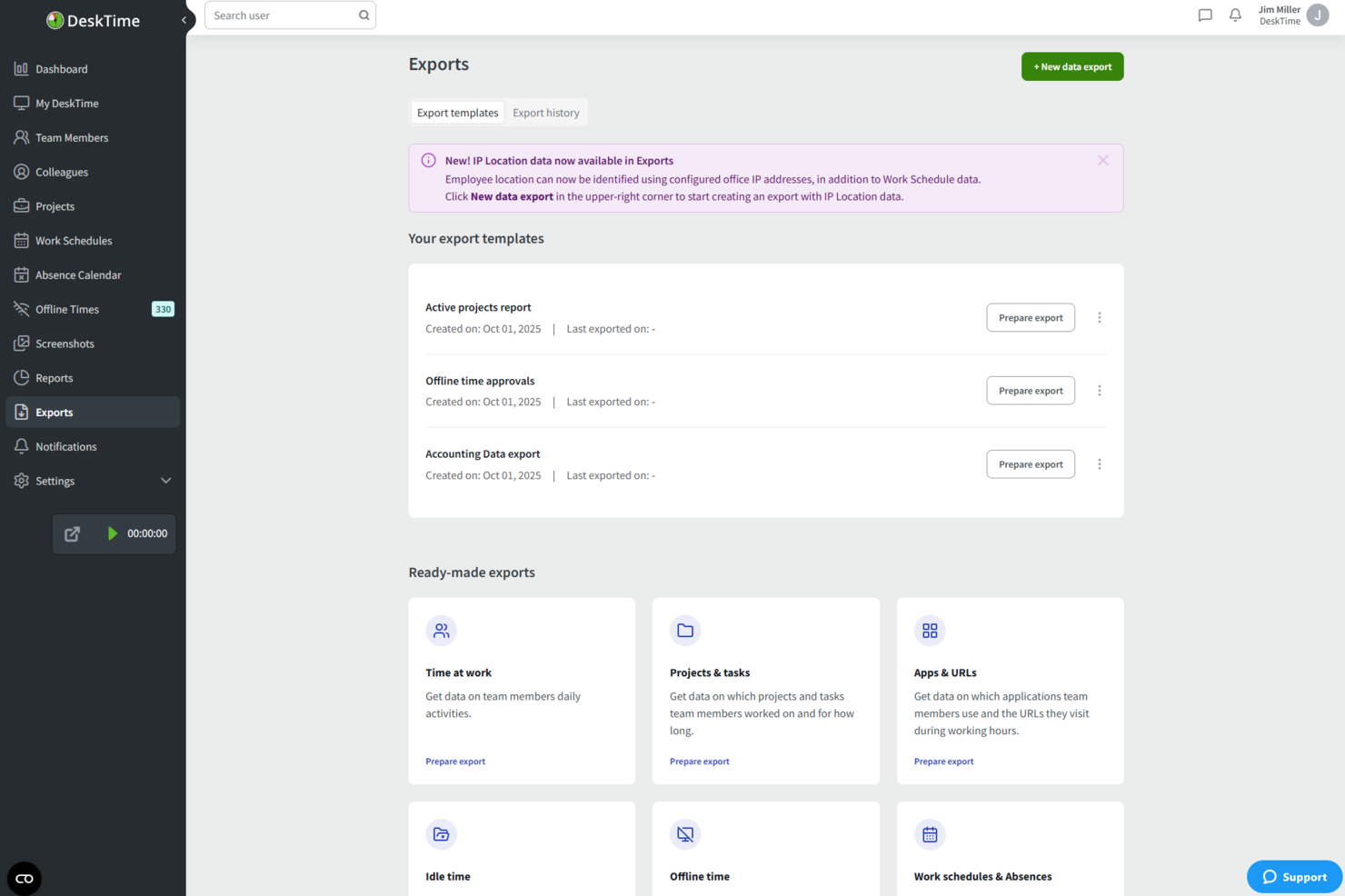
DeskTime is an automatic time tracking tool that monitors app, website, and document usage, logs offline time, and tracks hours across projects—all without requiring manual input.
Who Is DeskTime Best For?
DeskTime is a good fit for freelancers and small teams who want hands-off time tracking without logging hours manually.
Why I Picked DeskTime
DeskTime earns its spot on my shortlist because I love how its productivity analysis runs without any manual setup. The app automatically categorizes every app and URL you use as productive, unproductive, or neutral, then calculates a real-time productivity percentage for your workday. I find the document title tracking especially useful: it logs which specific files you're working in, not just which app is open, giving you a granular view of where your hours actually go.
DeskTime Key Features
- Project time tracking: Log hours against specific projects and tasks directly from the desktop app.
- Offline time tracking: Manually record time spent on non-computer activities, like calls or meetings.
- Time reports: Generate detailed reports of tracked hours, filterable by date, project, or team member.
- Pomodoro timer: Use the built-in timer to structure work into focused intervals with scheduled breaks.
DeskTime Integrations
DeskTime offers native integrations with Google Calendar, Outlook Calendar, Trello, GitLab, Asana, and Jira, and it connects with Zapier. An API is also available for custom integrations.
What's Free?
DeskTime doesn't offer a free-forever plan, but it does provide a 14-day free trial. Paid plans start at $6.42 per user per month (billed annually) on the Pro plan.
Pros and Cons
Pros:
- Built-in Pomodoro timer for focus sessions
- Categorizes apps as productive or unproductive
- Tracks time automatically without manual input
Cons:
- Dashboard interface feels visually dated
- Free plan limited to one user

Clockify
Best for browser extension tracking
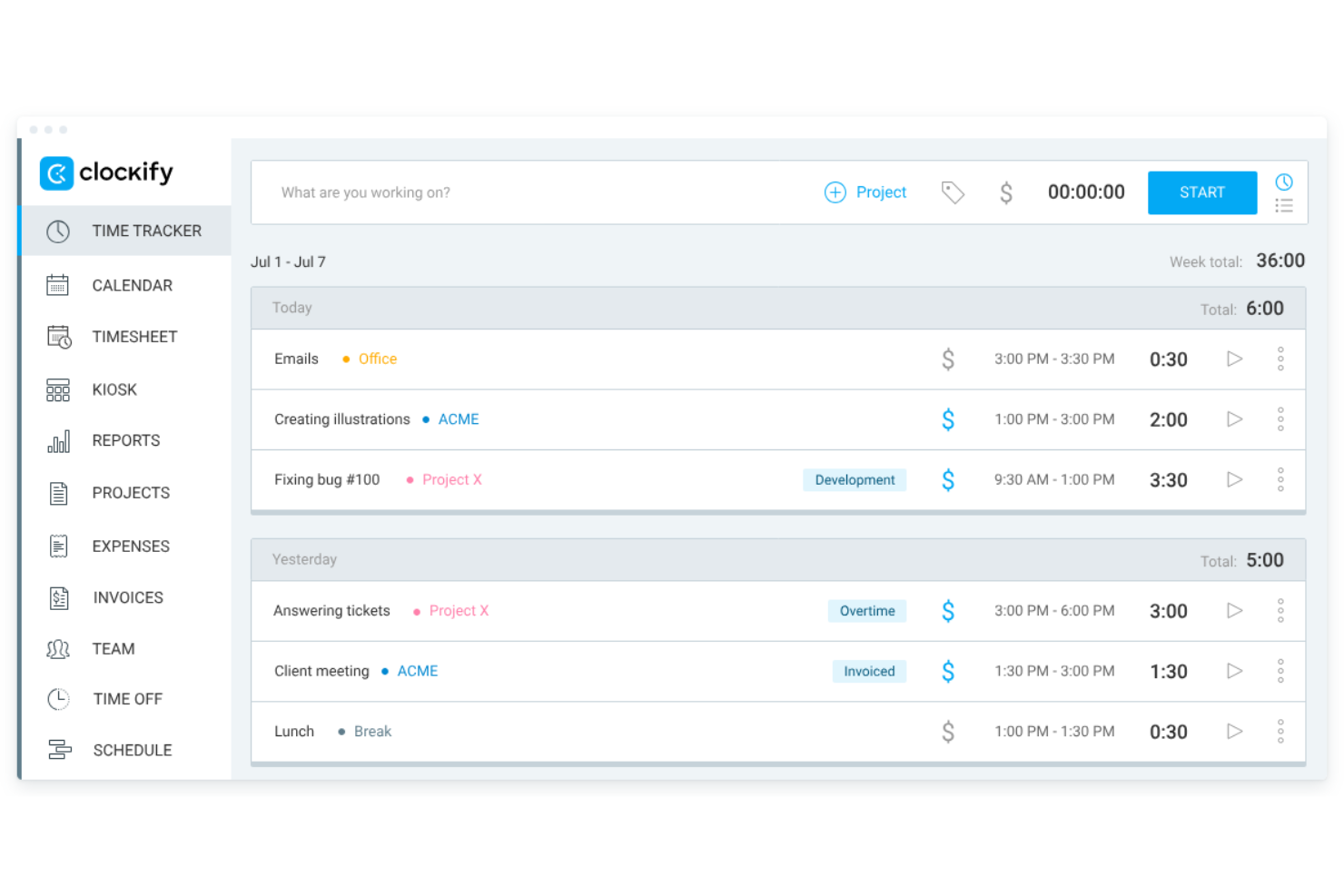
Clockify is a time tracking app designed for freelancers and contractors. It allows users to track billable hours, manage budgets, and create invoices. This tool is ideal for freelancers who need to organize their projects and assess productivity without additional costs.
Why I picked Clockify: I selected Clockify because its browser extension allows freelancers to log hours directly inside their existing toolstack without interrupting daily workflows. The extension embeds a quick-start timer straight into web apps, preventing manual tracking friction. This makes it ideal for independent contractors who need to track project time on the fly while keeping administrative setup minimal.
Standout Features and Integrations:
Features include timekeeping through timers and timesheets, invoicing capabilities, and detailed reporting on weekly activity. You can also manage budgets and assess productivity levels efficiently. The app's straightforward setup process helps you get started quickly.
Integrations include Asana, Trello, Jira, monday.com, QuickBooks, Zapier, Notion, Google Calendar, and more.
What's free? Clockify offers a free-forever plan that includes core time-tracking, timesheet management, and reporting tools for up to 5 users, though advanced administrative controls, billing features, and custom approvals require a paid plan.
Pros and Cons
Pros:
- Broad cross-platform device and extension support
- Allows easy-to-set hourly rates
- Offers timer button in web browsers
Cons:
- Clunky mobile app
- Limited free features

My Hours
Best for project management

My Hours is a project management tool tailored for freelancers and small teams. It allows users to track time, manage tasks, and oversee projects efficiently. This tool is perfect for those who want to organize their project workflows and boost productivity.
Why I picked My Hours: The free plan provides essential project management features that cater to freelancers' needs. You can manage unlimited projects and tasks, making it flexible for various work scenarios. The tool includes project time tracking with detailed reporting, helping you understand where time is spent. Its user-friendly interface simplifies the process of setting up and managing projects.
Standout Features and Integrations:
Features include task management, where you can break down projects into smaller tasks and allocate time. You can also generate detailed reports to analyze project performance and profitability. The invoicing feature helps you bill clients accurately based on tracked hours.
Integrations include Google Calendar, QuickBooks, Asana, Zapier, Basecamp, and more.
What's free? My Hours offers a free-forever plan that supports unlimited projects and tasks, with some limitations on advanced features.
Pros and Cons
Pros:
- Task management
- Detailed reporting
- Unlimited projects
Cons:
- Mobile app can be sluggish
- Limited free plan features

Jibble
Best for mobile access
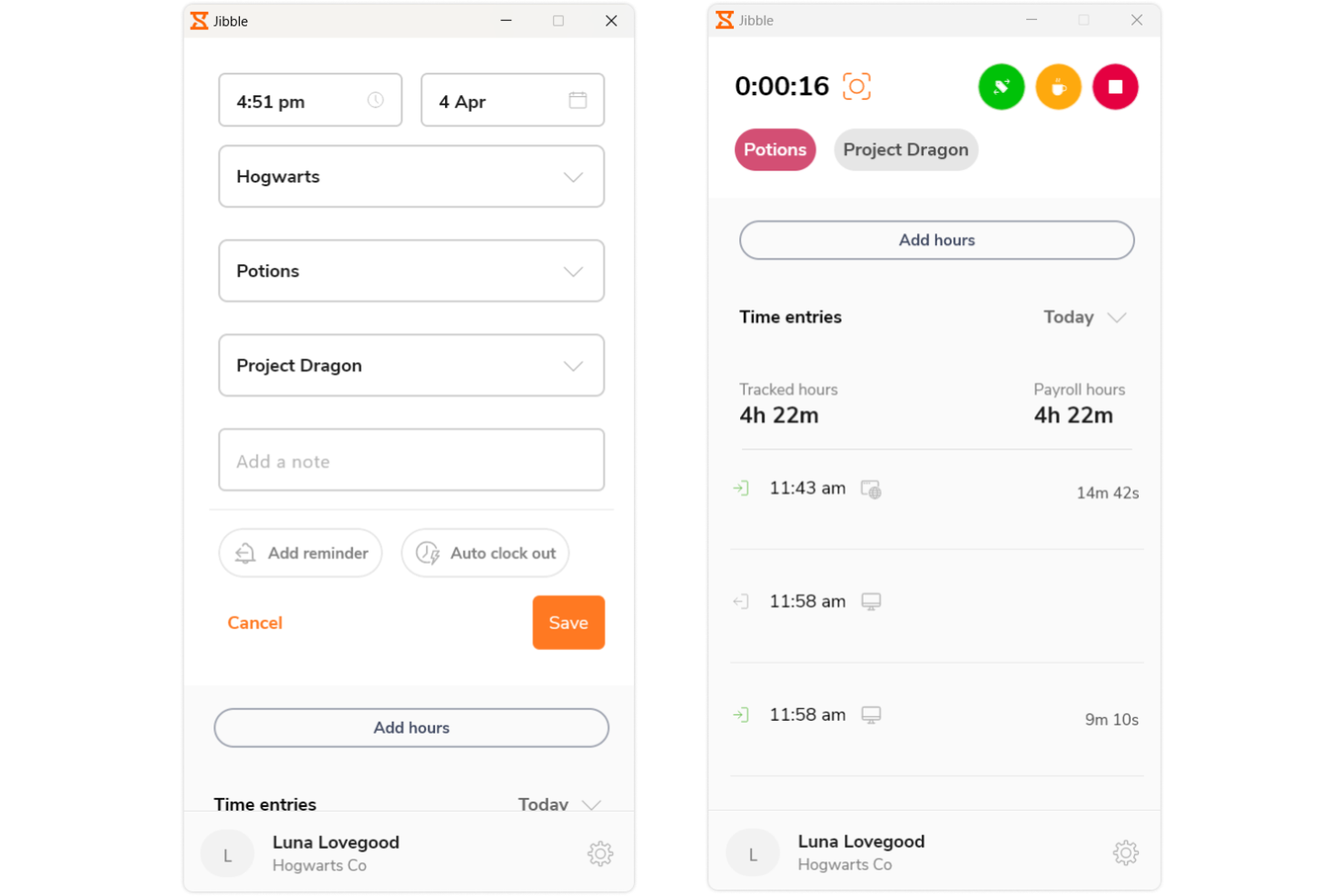
Jibble is a time tracking and attendance software tailored for teams and freelancers. It provides easy clock-in and clock-out functionality, ideal for managing work hours on the go. This tool serves users who need a mobile-friendly solution for tracking time efficiently.
Why I picked Jibble: The free version offers mobile access, allowing you to track time from anywhere. You can clock in and out using your smartphone, making it convenient for remote work. The app includes facial recognition for secure and accurate attendance tracking. With the ability to manage multiple teams, it's a flexible solution for freelancers and small businesses.
Standout Features and Integrations:
Features include facial recognition, which ensures secure clock-ins, and GPS tracking for location-based attendance management. You can also access timesheets for detailed work hour analysis. The tool provides activity tracking to monitor productivity levels effectively.
Integrations include Slack, Microsoft Teams, Google Calendar, Zapier, and more.
What's free? Jibble offers a free-forever plan with mobile access and attendance tracking features, without major restrictions.
Pros and Cons
Pros:
- Detailed timesheet
- Facial recognition security
- Mobile clock-in and out
Cons:
- No offline functionality
- Basic dashboard flexibility

TimeCamp
Best for automated tracking
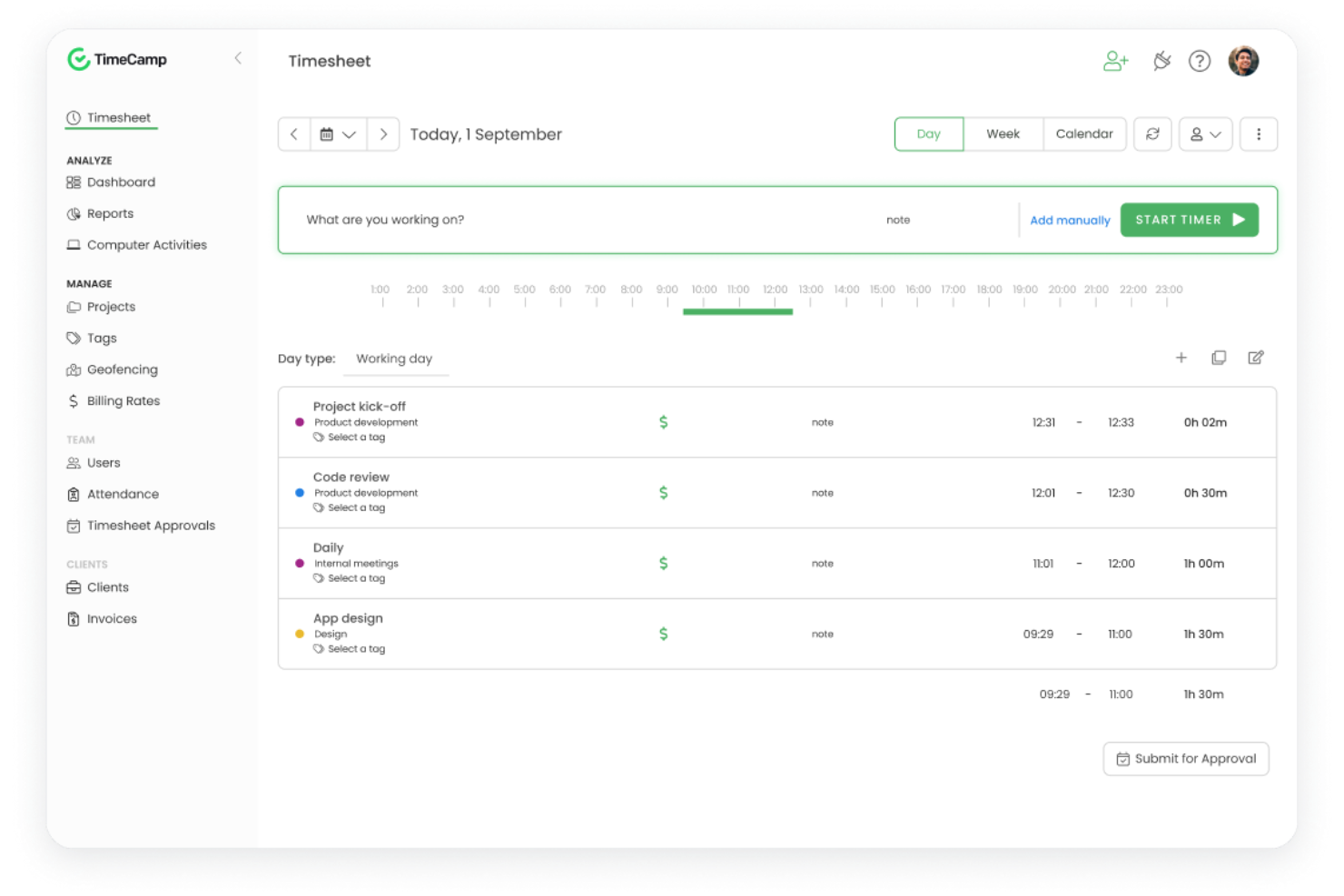
TimeCamp is a time tracking software tailored for freelancers and small businesses. It provides automatic time tracking and reporting, making it easier to manage projects and billing. This tool is ideal for users who want to automate time management tasks and increase productivity.
Why I picked TimeCamp: The free version features automated tracking, which eliminates the need for manual time entries. You can benefit from the tool's ability to categorize activities automatically, saving you time and effort. It offers detailed reports that help you analyze how time is spent across different projects. The tool also includes a single-user plan, allowing freelancers to access its capabilities without cost.
Standout Features and Integrations:
Features include the ability to track time automatically based on user activity, which helps reduce manual errors. You can also set goals and monitor project progress with visual dashboards. The reporting feature allows you to create custom reports for better insights into your work patterns.
Integrations include Asana, Trello, Jira, Slack, QuickBooks, Zapier, and more.
What's free? TimeCamp offers a free-forever plan with automated tracking and reporting features for unlimited users.
Pros and Cons
Pros:
- Custom report creation
- Visual dashboards
- Automated time tracking
Cons:
- Busy user interface
- Occasional sync lag

Everhour
Best for integration options
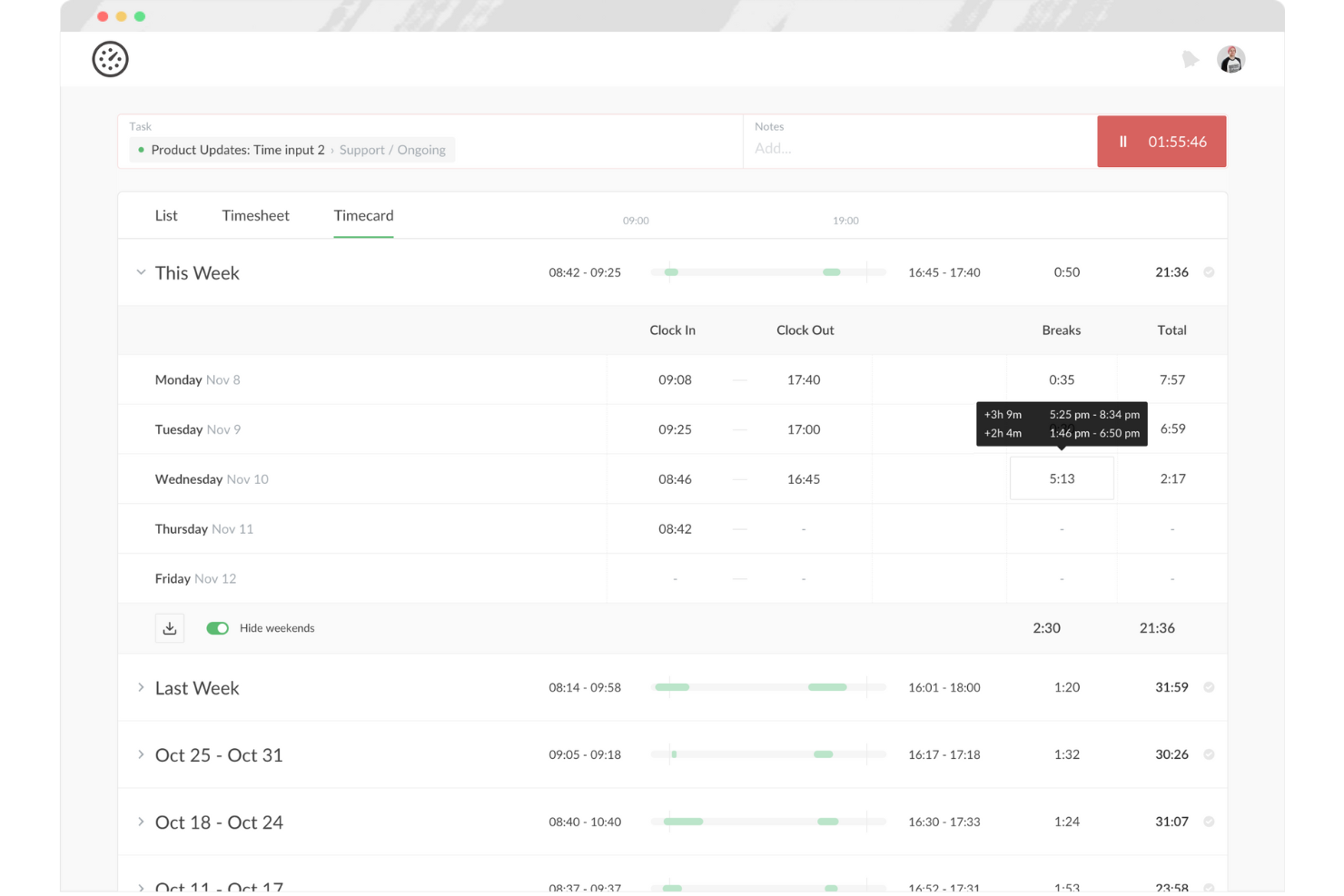
Everhour is a time tracking and project management tool tailored for teams and freelancers. It helps users track time, manage budgets, and generate reports, making it ideal for those who need detailed insights into project performance. This tool is particularly beneficial for teams that rely on smooth integration with other software.
Why I picked Everhour: The free offering includes integration options that allow you to connect with various project management tools. You can track time directly within the platforms you already use, boosting productivity without switching between apps. The tool provides detailed reporting features, helping you analyze your time usage effectively. With budget management tools included, it's a wide-ranging solution for freelancers managing multiple projects.
Standout Features and Integrations:
Features include budget tracking, which helps you manage project costs efficiently. You can also create custom reports to gain insights into your team's performance. The tool offers real-time dashboards that provide an overview of ongoing projects and tasks.
Integrations include Asana, Trello, Jira, Slack, Basecamp, and more.
What's free? Everhour offers a free plan for up to five seats, which is useful for small teams.
Pros and Cons
Pros:
- Custom report creation
- Real-time dashboards
- Extensive integration options
Cons:
- Manual entry can be tedious
- Basic reporting capabilities

Best for unlimited users
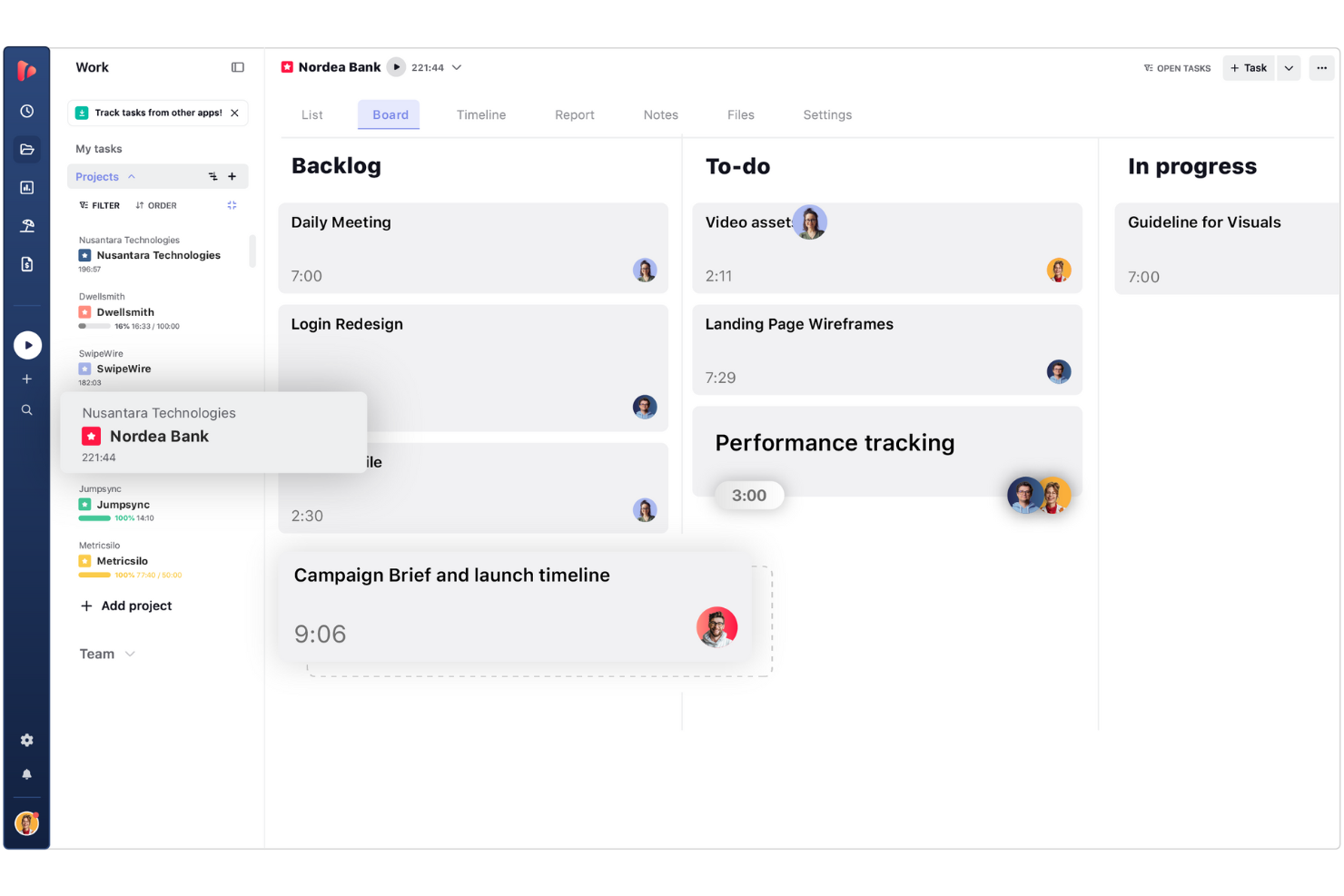
TrackingTime is a web-based time tracking app designed to help freelancers, digital project managers, and growing remote teams log hours across daily tasks. It enables users to monitor project progress, measure productivity, and generate time reports without restrictive seat limits.
Why I picked TrackingTime: I selected TrackingTime because its free plan allows you to add unlimited team members without incurring per-user fees. Unlike competitors that lock free access behind small seat caps, it lets freelancers bring on subcontractors, clients, or collaborators to log time on shared projects for free. This makes it ideal for project leads who need to coordinate time logs across flexible, growing project teams while keeping software expenses down.
Standout Features and Integrations:
Features include task management, where you can assign tasks and track progress. You can also use the calendar view to plan and schedule work effectively. The tool provides reporting capabilities that offer insights into project timelines and team performance.
Integrations include Asana, Trello, Slack, Basecamp, GitHub, and more.
What's free? TrackingTime offers a free-forever plan that supports unlimited users, tasks, and projects with basic real-time tracking, though export options to CSV/Excel and billable rate calculations require a paid tier.
Pros and Cons
Pros:
- Calendar view for scheduling
- Task comments and notifications
- Real-time team activity tracking
Cons:
- Desktop app can be glitchy
- Reporting lacks deep customization
Avaza
Best for invoicing tools
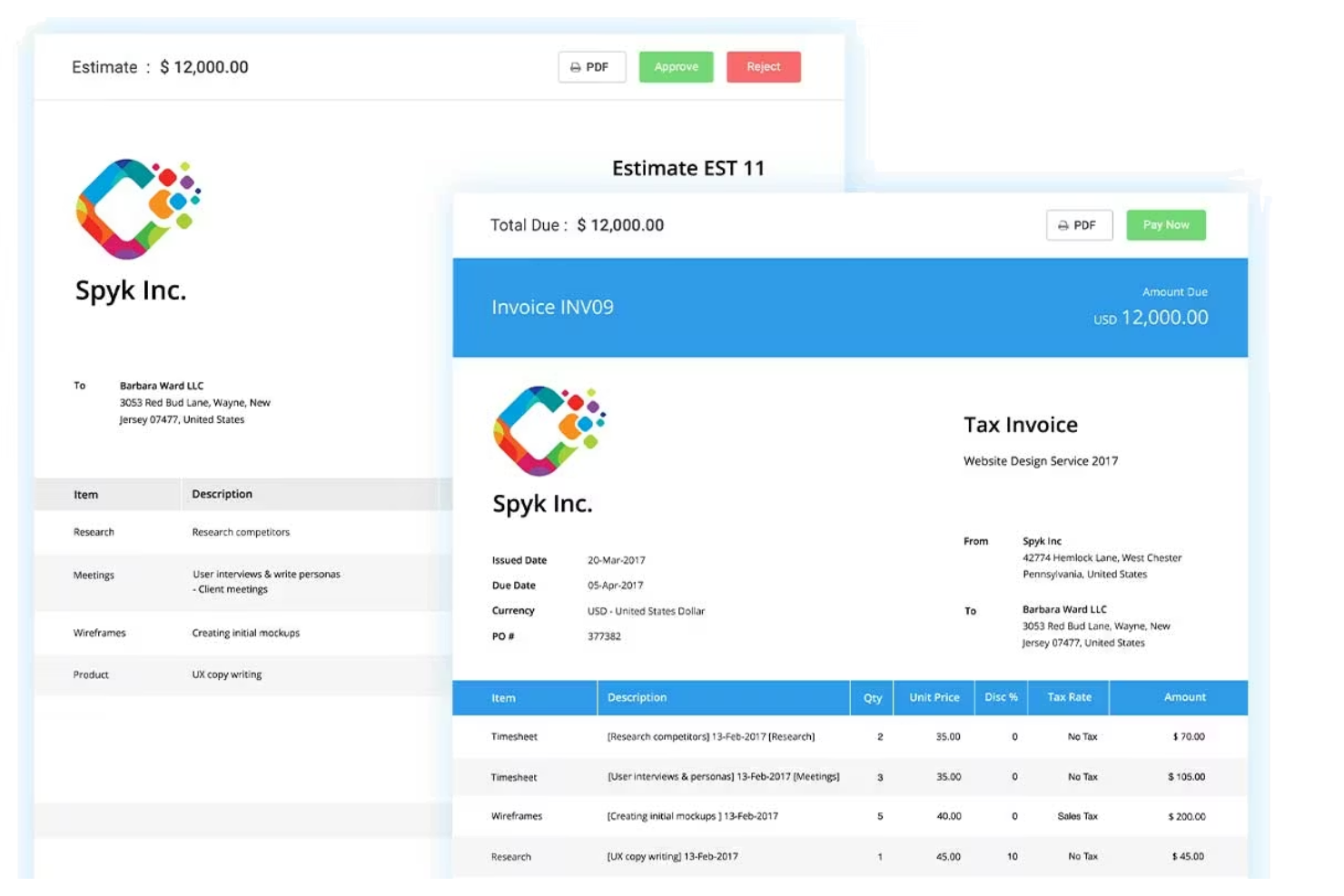
Avaza is a project management and time tracking tool designed for freelancers and small businesses. It offers features such as task management, time tracking, and invoicing, which help simplify business operations. This tool is ideal for those who need an all-in-one solution to manage projects and finances.
Why I picked Avaza: The free version includes invoicing capabilities, allowing you to create and send invoices with ease. You can track billable hours and convert them directly into invoices, simplifying your billing process. The tool provides project management features that support unlimited tasks and projects. With its user-friendly interface, managing your work and finances becomes straightforward.
Standout Features and Integrations:
Features include expense tracking, which helps you monitor and manage project costs efficiently. You can also schedule resources to optimize project timelines. The tool offers detailed reports that provide insights into project performance and financial health.
Integrations include Xero, QuickBooks, Slack, Zapier, Google Drive, and more.
What's free? Avaza offers a free-forever plan with invoicing and project management features, limited to one user.
Pros and Cons
Pros:
- Expense tracking features
- Unlimited tasks and projects
- Invoicing and billing capabilities
Cons:
- High cost for adding more users
- Complex UI can feel overwhelming

Memtime
Best for simplicity
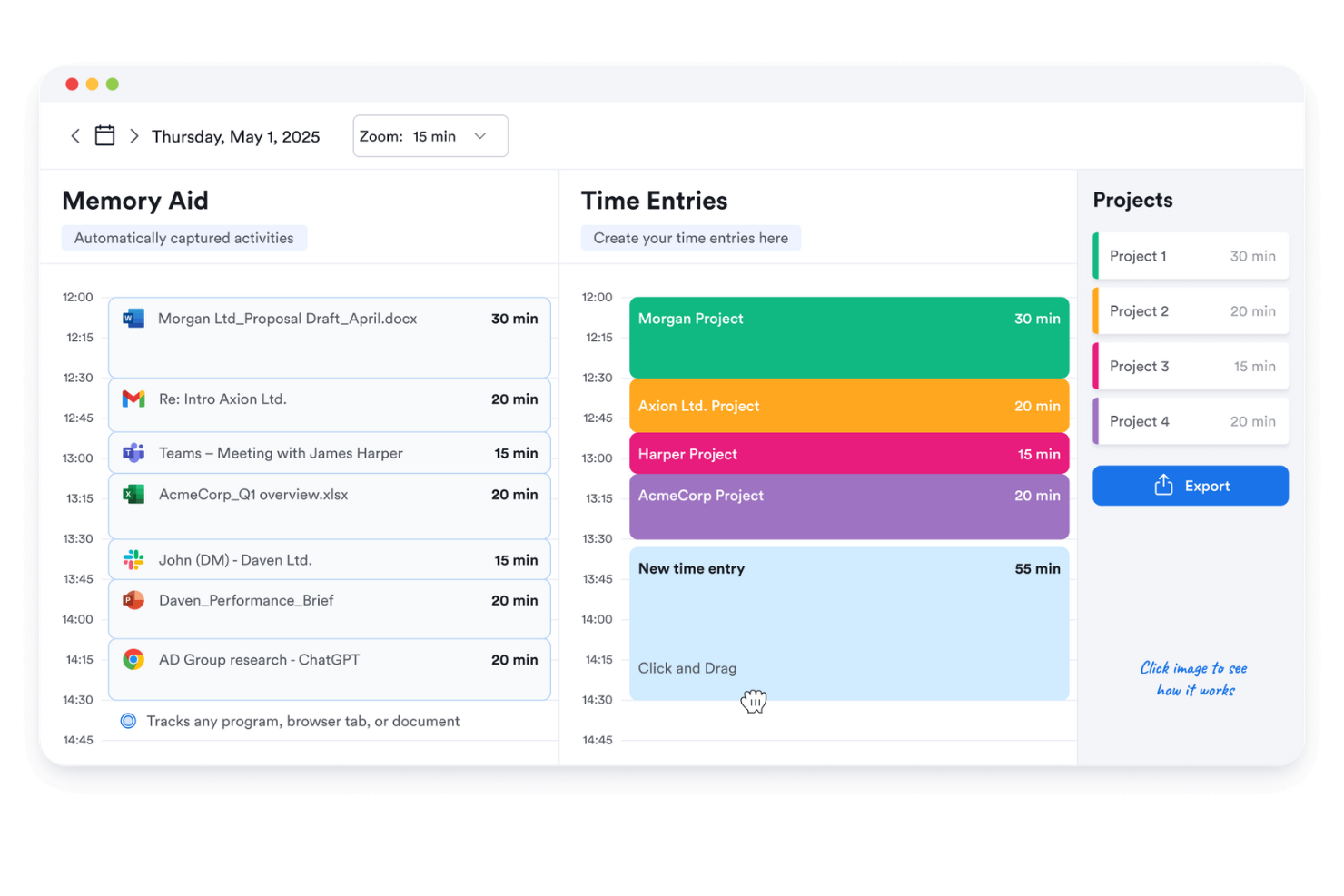
Memtime is a straightforward time tracking tool designed for freelancers and small teams. It helps users track their work hours with minimal setup, making it ideal for those who value simplicity and efficiency. This tool is perfect for anyone looking to keep track of their time without the complexity of additional features.
Why I picked Memtime: The free version focuses on simplicity, offering a user-friendly interface that requires little to no learning curve. You can automatically track your time without manually starting or stopping timers. The tool provides basic reports that help you understand how you spend your time. It's a good option for those who want a no-frills approach to time management.
Standout Features and Integrations:
Features include automatic time tracking, which records your activity without any manual input. You can review your logged time with simple reports that highlight your productivity trends. The tool offers a distraction-free interface, allowing you to focus on your work.
Integrations include Asana, Google Calendar, Microsoft Teams, Zapier, QuickBooks, Xero, and more.
What's free? Memtime offers a 14-day free trial with automatic time tracking and basic reporting features, suitable for individual users.
Pros and Cons
Pros:
- Minimal learning curve
- Automatic time tracking
- Simple to use
Cons:
- No real-time tracking view
- Privacy concerns with logging

Bonsai
Best for freelancers
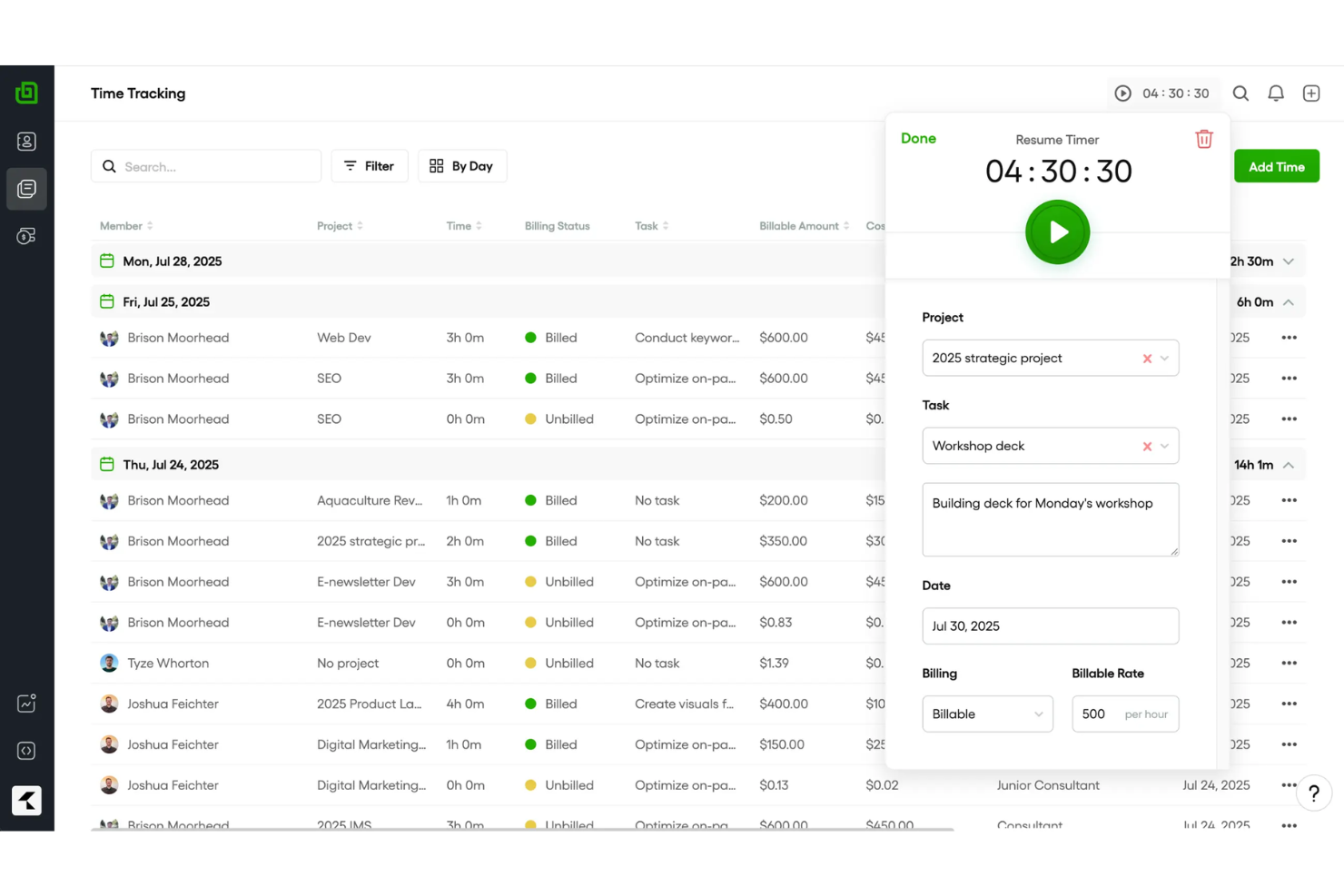
Bonsai is an extensive tool designed primarily for freelancers and small businesses, offering features such as contract management, invoicing, and time tracking. It helps users manage their projects and finances efficiently, making it a go-to solution for independent professionals.
Why I picked Bonsai: The free offering is tailored for freelancers, providing essential tools to manage contracts and invoices. You can track your time and generate professional reports. The tool offers contract templates, making it easy to formalize agreements with clients. Its user-friendly interface ensures that you can manage your projects without any hassle.
Standout Features and Integrations:
Features include task management, which allows you to organize and prioritize your work. You can also use the proposal feature to create and send proposals to potential clients. The tool offers expense tracking, helping you keep an eye on your project costs.
Integrations include QuickBooks, Xero, Zapier, Calendly, HiBob, and more.
What's free? Bonsai offers a limited-time free trial with access to its core features, suitable for freelancers looking to explore its capabilities.
Pros and Cons
Pros:
- Easy time tracking
- Proposal creation feature
- Extensive contract management
Cons:
- Limited time tracking insights
- Limited customization options
Outras aplicações gratuitas de controlo de tempo para freelancers
Eis algumas aplicações adicionais de controlo de tempo para freelancers que também disponibilizam planos ou períodos de teste gratuitos. Embora estas ferramentas não tenham entrado na minha seleção, vale a pena conhecê-las:
- Harvest
For expense tracking
- TopTracker
For privacy focus
- Hubstaff
For GPS tracking
- QuickBooks Time
For payroll integration
- Timely
For automatic time logging
- Apploye
For remote team monitoring
- Deltek Replicon Time
For enterprise scalability
- TimeTrack for Freelancers
App for mobile freelancers


How I Evaluate Free Time Tracking Apps for Freelancers
I split my evaluation into baseline criteria—like a real free tier with billable rate tracking for client projects—and the differentiators that set one tool apart from the rest.
Core Functionality (Table Stakes For This List)
When I'm selecting tools for my list, I rank each one on a scale from 0 (does not offer the functionality) to 5 (excels in this area) for each core functionality listed below. Then, I calculate the tool's total score into a percentage. Each tool needs to achieve a minimum total score of 65% to be considered for inclusion.
- Time Tracking Timer: I check whether a tool offers both a live start/stop timer and manual entry, since freelancers often need to log hours after the fact when switching between client calls and deep work.
- Genuinely Free Plan: The free tier has to be usable long-term for a solo freelancer—I look for whether core tracking features stay accessible without a forced upgrade after a trial window.
- Project & Client Organization: Freelancers juggle multiple clients at once, so I evaluate whether each tool lets you tag and separate time entries by client, project, and task.
- Billable Hours & Rate Support: I look for a billable toggle and the ability to assign hourly rates, since freelancers need accurate totals when sending invoices to different clients at different rates.
- Reporting & Data Exports: Clear weekly or per-project reports that export to CSV or PDF matter here—tools like Toggl Track and Clockify handle this differently, so I compare format options and filtering.
- Cross-Device Access: Freelancers track time from laptops, phones, and tablets throughout the day, so I check for native apps on iOS and Android alongside the web experience.
Once I have a list of tools that meet this criteria, I consider what sets each platform apart.
Differentiating Factors (What Sets Vendors Apart)
Here's how I compare and contrast different vendors:
Standout Features
Built-in invoice generation is a big one—freelancers who can turn tracked hours into a sendable invoice skip the step of exporting data into a separate billing tool. I also look for automatic time capture, which logs the apps and sites you work in so you can recover billable time you forgot to track manually. Calendar integration matters too, especially when client meetings in Google Calendar or Outlook can sync directly into time entries without double data entry.
Beyond Features
I pay close attention to how generous a free plan really is—some tools cap the number of clients or projects, which becomes a problem fast when you're juggling five or six active contracts. Integrations also weigh heavily in my evaluation. Freelancers rely on tools like Trello, Asana, QuickBooks, and FreshBooks, so native connections to these platforms reduce manual data shuffling. Data portability is another factor I check, because you want full CSV or PDF exports of your time history if you ever decide to switch tools.
Como escolher uma aplicação gratuita de controlo de tempo para freelancers
Listas complexas de funcionalidades e estruturas de preços podem dificultar a compreensão do que está realmente a obter com uma aplicação gratuita de controlo de tempo para freelancers. Para o ajudar a manter-se concentrado enquanto avalia as opções de software, eis alguns fatores a ter em conta:
| Fator | O que considerar |
|---|---|
| Âmbito da oferta gratuita | Analise as funcionalidades incluídas no plano gratuito. Certifique-se de que abrange as suas necessidades básicas sem exigir atualizações imediatas. |
| Escalabilidade | Considere se a ferramenta pode crescer consigo. Se a sua equipa aumentar, a aplicação suportará utilizadores e projetos adicionais? |
| Integrações | Verifique a compatibilidade com as ferramentas que já utiliza. Integrações simples podem poupar-lhe tempo e melhorar a eficiência do fluxo de trabalho. |
| Facilidade de utilização | Avalie a interface e a navegação. Um design intuitivo reduz a curva de aprendizagem e ajuda-o a começar rapidamente. |
| Relatórios | Procure funcionalidades de elaboração de relatórios detalhados. Consegue gerar rapidamente informações sobre a sua produtividade e os prazos dos projetos? |
| Acesso móvel | Determine se a aplicação disponibiliza uma versão móvel. Isto garante que pode controlar o tempo e gerir tarefas em qualquer lugar. |
| Apoio ao cliente | Avalie o nível de apoio disponível. Respostas rápidas e úteis podem ser essenciais quando surgem problemas. |
O que é uma aplicação gratuita de registo de tempo para trabalhadores independentes?
Uma aplicação de registo de tempo para trabalhadores independentes é uma ferramenta que ajuda os profissionais a monitorizar e registar as suas horas de trabalho. Estas ferramentas oferecem frequentemente planos ou períodos de avaliação gratuitos, permitindo aos utilizadores aceder a funcionalidades básicas sem custos imediatos.
Os trabalhadores independentes, contratantes e proprietários de pequenas empresas utilizam normalmente estas aplicações para gerir eficazmente as horas faturáveis e as faturas. Funcionalidades como o registo de tempo, a faturação e os relatórios ajudam os trabalhadores independentes a manterem-se organizados, a gerirem os seus projetos e a garantirem uma faturação precisa.
Funcionalidades
Vamos analisar as funcionalidades habitualmente encontradas nas aplicações de registo de tempo para trabalhadores independentes e quais são normalmente incluídas nos planos gratuitos e nos planos pagos.
Funcionalidades normalmente gratuitas das aplicações de registo de tempo para trabalhadores independentes
- Registo de tempo: Permite aos utilizadores registar as horas de trabalho com precisão, algo essencial para a faturação e a análise da produtividade.
- Relatórios básicos: Fornece relatórios simples para ajudar os utilizadores a compreenderem como utilizam o seu tempo em diferentes projetos.
- Introdução manual de tempo: Permite aos utilizadores introduzir manualmente o tempo trabalhado, sendo útil para corrigir registos em falta ou esquecidos.
- Gestão de projetos: Ajuda a organizar tarefas e projetos, permitindo aos trabalhadores independentes acompanhar prazos e entregáveis.
- Faturação: Gera faturas com base nas horas registadas, simplificando o processo de faturação para os trabalhadores independentes.
- Acesso móvel: Permite registar o tempo através de dispositivos móveis, garantindo flexibilidade no trabalho remoto.
- Suporte para um único utilizador: Permite normalmente um utilizador por conta, destinando-se a trabalhadores independentes.
Funcionalidades normalmente pagas das aplicações de registo de tempo para trabalhadores independentes
- Relatórios avançados: Fornece informações detalhadas e análises, ajudando a realizar avaliações abrangentes do desempenho e a tomar decisões.
- Colaboração em equipa: Facilita a comunicação e a partilha de tarefas entre os membros da equipa, melhorando a coordenação dos projetos.
- Rastreamento por GPS: Monitoriza a localização durante o trabalho no terreno, garantindo um registo preciso do tempo de trabalho das equipas móveis.
- Registo offline: Permite registar o tempo sem ligação à Internet, sendo útil em zonas com conectividade limitada.
- Integrações: Liga-se a outras ferramentas de software, como aplicações de contabilidade e gestão de projetos, aumentando a eficiência do fluxo de trabalho.
- Funcionalidades personalizáveis: Permite adaptar a ferramenta às necessidades específicas da empresa, proporcionando maior flexibilidade para projetos diversificados.
- Suporte para vários utilizadores: Suporta vários utilizadores numa única conta, sendo ideal para equipas em crescimento ou pequenas empresas.
Vantagens
A implementação de uma aplicação gratuita de registo de tempo para trabalhadores independentes proporciona várias vantagens para a sua equipa e para a sua empresa. Eis algumas das que pode esperar:
- Poupança de custos: A utilização de uma ferramenta gratuita ajuda a gerir o tempo e os projetos sem investimento financeiro, tornando-a acessível a trabalhadores independentes com um orçamento limitado.
- Maior precisão na faturação: As funcionalidades de registo de tempo garantem que fatura aos clientes com precisão as horas trabalhadas, reduzindo conflitos e erros.
- Maior produtividade: Os relatórios básicos permitem analisar como o tempo é utilizado, ajudando a identificar e eliminar ineficiências.
- Flexibilidade: O acesso móvel permite registar o tempo a partir de qualquer lugar, apoiando o trabalho remoto e os profissionais em movimento.
- Faturação simplificada: As funcionalidades gratuitas de faturação permitem gerar faturas diretamente a partir das horas registadas, simplificando o processo de faturação.
- Configuração fácil: As interfaces intuitivas e a integração simples permitem começar rapidamente a utilizar a ferramenta, com o mínimo de complicações.
- Organização de tarefas: As funcionalidades de gestão de projetos ajudam a manter as tarefas e os prazos organizados, melhorando o fluxo de trabalho e a gestão do tempo.
Custos e preços
Compreendo que chegou a este artigo à procura das melhores opções de aplicações de registo de tempo para trabalhadores independentes disponíveis gratuitamente. No entanto, uma vez que os planos gratuitos oferecem apenas funcionalidades limitadas, é bastante provável que precise de atualizar o seu plano no futuro.
Tabela de comparação de planos para aplicações de registo de tempo para trabalhadores independentes
| Tipo de plano | Preço médio | Funcionalidades comuns |
|---|---|---|
| Plano gratuito | $0 | Registar o tempo, gerar relatórios básicos e gerir projetos. |
| Plano pessoal | $3.99-$14/utilizador/ mês | Registar o tempo, criar faturas, aceder a aplicações móveis e gerir vários projetos. |
| Plano profissional | $10-$48/utilizador/ mês | Registar o tempo, gerar relatórios avançados, utilizar ferramentas de colaboração de equipas e integrar com outro software. |
| Plano empresarial | $25-$50/utilizador/ mês | Registar o tempo, gerar relatórios personalizados, contar com um gestor de conta dedicado, utilizar funcionalidades de segurança avançadas e ter utilizadores ilimitados. |
Perguntas frequentes sobre aplicações gratuitas de controlo do tempo para profissionais independentes
Eis algumas respostas a perguntas frequentes sobre aplicações gratuitas de controlo do tempo para profissionais independentes:
Como é que os profissionais independentes contabilizam as horas?
Os profissionais independentes utilizam frequentemente ferramentas de controlo do tempo para contabilizar e categorizar as horas com precisão. Estas ferramentas ajudam a registar as horas específicas de cada projeto e fornecem aos clientes relatórios transparentes sobre o tempo despendido. Também é possível configurar faturas recorrentes para simplificar o processo de faturação.
Como controlar as horas enquanto prestador de serviços independente?
Os prestadores de serviços independentes utilizam folhas de horas ou aplicações de controlo do tempo para registar as horas faturáveis despendidas nos projetos. Quer utilizem uma simples folha de cálculo ou uma aplicação completa, estas ferramentas automatizam o controlo e a faturação, garantindo uma cobrança precisa aos clientes.
Posso utilizar software de controlo do tempo para faturar?
Sim, muitas aplicações de controlo do tempo incluem funcionalidades de faturação que permitem cobrar diretamente aos clientes com base nas horas registadas. Isto simplifica o processo de faturação e garante que recebe o valor correto pelo tempo trabalhado.
Quais são as limitações das aplicações gratuitas de controlo do tempo?
As aplicações gratuitas de controlo do tempo têm frequentemente limitações, como menos funcionalidades, capacidades limitadas de criação de relatórios e de acompanhamento de projetos ou restrições quanto ao número de utilizadores ou projetos. No entanto, continuam a disponibilizar ferramentas essenciais para que os profissionais independentes giram eficazmente o seu tempo e as suas tarefas.
As aplicações gratuitas de controlo do tempo são seguras?
A maioria das aplicações gratuitas de controlo do tempo dá prioridade à segurança, utilizando encriptação e servidores seguros para proteger os seus dados. É importante analisar as medidas de segurança de qualquer aplicação que escolha, para garantir que as suas informações permanecem protegidas.