

10 soluções de software de revisão online selecionadas para 2026

Lista de software de revisão online


O software de revisão online permite que a sua equipa reveja, faça anotações e aprove materiais criativos num só lugar, substituindo as longas conversas dispersas por e-mail e os ciclos manuais de comentários. Se está à procura do melhor software de revisão online, é provável que esteja a lidar com aprovações demoradas, confusão entre versões ou comentários perdidos entre diferentes canais.
Esta lista irá ajudá-lo a comparar as principais ferramentas concebidas para equipas criativas, de marketing e digitais — para que possa escolher uma solução adequada ao seu fluxo de trabalho, mantenha os projetos em andamento e garanta que os contributos de todas as partes interessadas são registados.
Why Trust Our Software Recommendations
Our team has been testing and reviewing software since 2012. As project managers ourselves, we know how difficult—and important—it is to choose the right software.
For this guide, we evaluated tools using hands-on testing and independent research, scoring tools using our selection criteria. We also draw on insights from industry thought leaders and practicing project management experts.
Our reviews reflect our human editorial judgment, not a sales pitch.
Expert reviewers:
Tabela comparativa de software de revisão online
Esta tabela comparativa resume os detalhes de preços das minhas principais escolhas de software de revisão online:
| Tool | Best For | Trial Info | Price | ||
|---|---|---|---|---|---|
| 1 | Best for AI-guided brand checks in review | Free plan + 14-day trial + demo available | From $5/user/month | Website | |
| 2 | Best for video and multimedia approvals | Free plan available | From $169/month (billed annually) | Website | |
| 3 | Best with customizable no-code workflow automation | Free demo available | Pricing upon request | Website | |
| 4 | Best for compliance-driven document reviews | Free demo + 10-day free trial available | From $249/month | Website | |
| 5 | Best for fast-turnaround creative feedback | Free plan + free demo available | From $66/month (billed annually) | Website | |
| 6 | Best for real-time team markup sessions | Free trial + free demo available | From $12/month (billed annually) | Website | |
| 7 | Best with enterprise-grade workflow automation | Not available | Pricing upon request | Website | |
| 8 | Best for multilingual content review needs | Free demo available | Pricing upon request | Website | |
| 9 | Best for all-in-one task and file review | Free plan available | From $7/user/month (billed annually) | Website | |
| 10 | Best for high-volume asset management | Free demo available | Pricing upon request | Website |

Avaliações de software de revisão online
Hive
Best for AI-guided brand checks in review
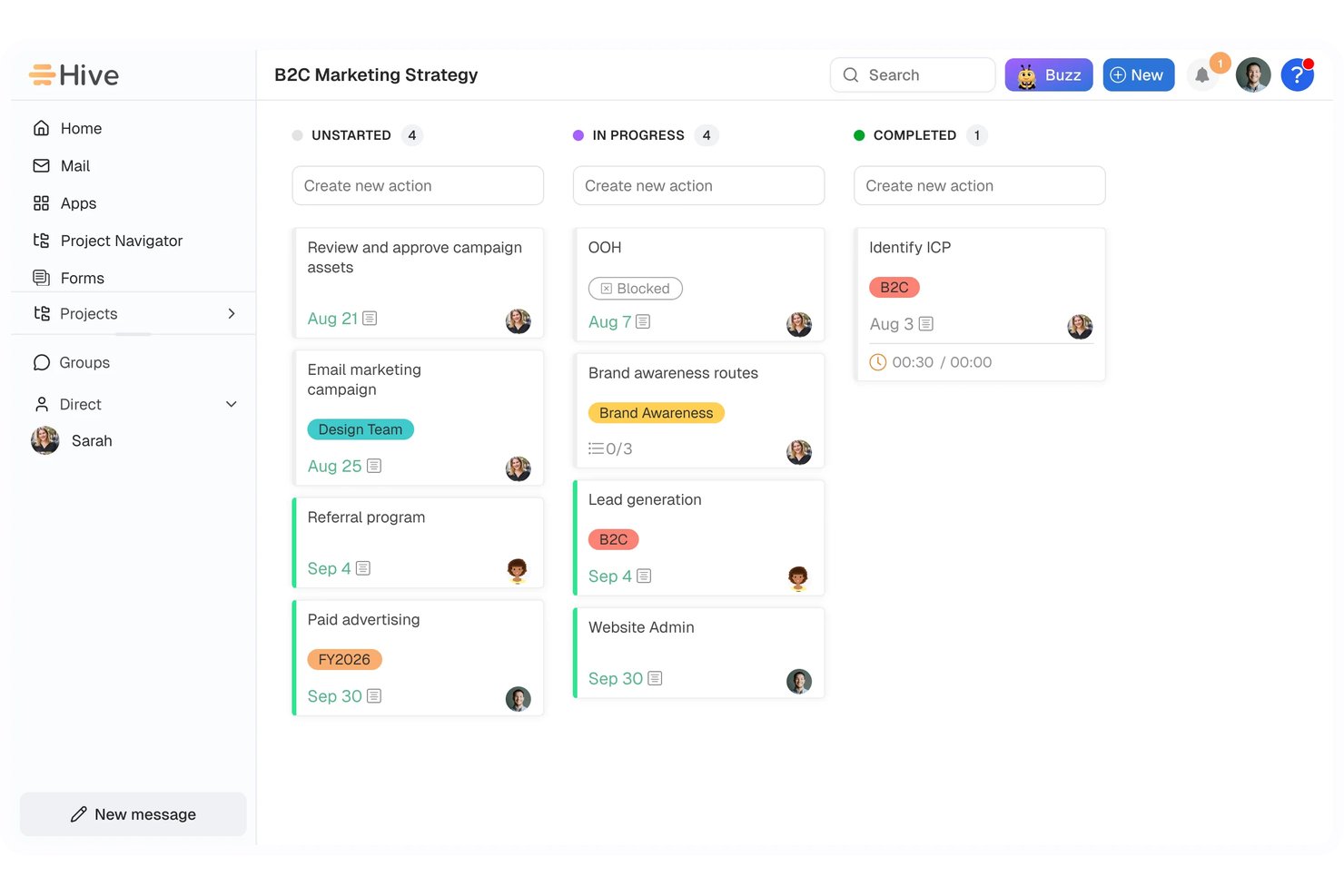
Hive is an AI-powered project and work management platform that includes proofing and approvals for documents, images, videos, and live web pages, with built-in markup tools, multi-stage approval routing, and AI-driven brand and compliance review.
Who Is Hive Best For?
Hive suits marketing and creative teams at agencies or mid-sized companies that want proofing, approvals, and project management in a single workspace.
Why I Picked Hive
I've included Hive in my top picks because its AI Proofing feature sets it apart from tools that rely entirely on human reviewers to catch brand and compliance issues. Buzz, Hive's AI, scans PDFs, videos, and live web pages against admin-uploaded brand guidelines and style documents, then pins categorized suggestions directly on the proof. I also like that multi-stage approval routes advance automatically, so reviewers at each stage are notified without anyone manually pushing the workflow forward.
Hive Key Features
- Side-by-side version comparison: Open two proof versions simultaneously with independent version pickers to annotate either side or copy annotations between versions.
- External approver review links: Share proofs with external stakeholders via emailed links, allowing them to annotate, comment, and submit decisions without a Hive account.
- Approvals Reporting app: View and filter active approval routes across projects, including current approver, response status, review length, and stage dates, with CSV export.
- Adobe Creative Cloud plugins: Upload proofs and receive Hive feedback directly inside Photoshop or InDesign, with edits syncing back to Hive instantly.
Hive Integrations
Hive documents over 1,000 integrations, including native Adobe Creative Cloud plugins, Google Drive, Dropbox, OneDrive, Box, Bynder, Jira, Slack, and Microsoft Teams. It also offers a Hive API and integrations through Zapier.
Pros and Cons
Pros:
- AI pins brand and legal suggestions to proof locations
- Approval routes advance and notify reviewers automatically
- Reviewers see comments appear live
Cons:
- Video reviews lack a frame-rate accuracy guarantee
- Version comparisons lack automatic change highlighting
Best for video and multimedia approvals
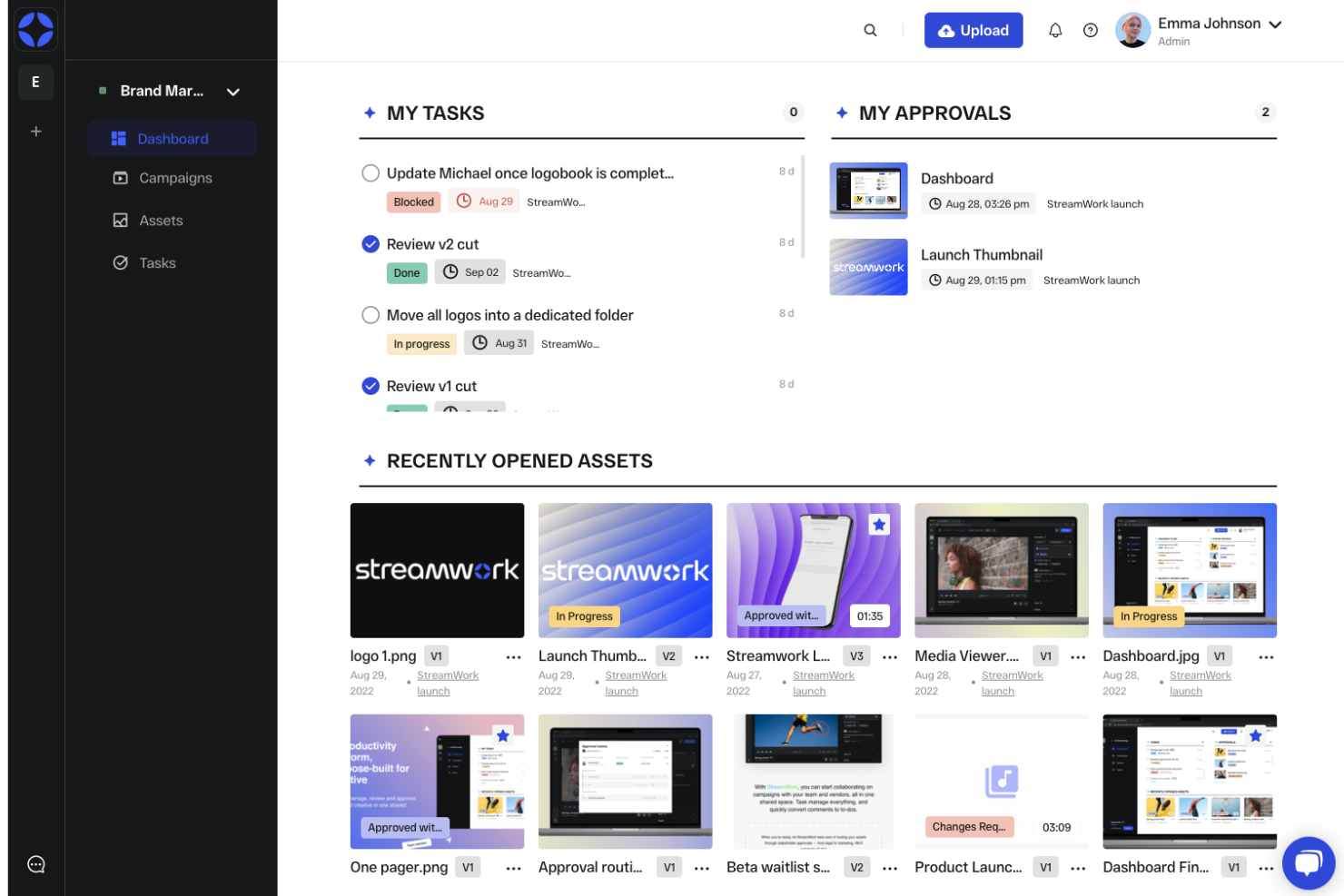
StreamWork is purpose-built for teams that need to review and approve video, audio, and multimedia content. Creative agencies, video production teams, and marketing departments use its frame-accurate commenting and versioning to keep feedback clear and actionable. If your workflow centers on multimedia assets, StreamWork helps you manage approvals without switching between tools.
Why I Picked StreamWork
For teams focused on video and multimedia approvals, StreamWork stands out by offering frame-accurate commenting and markup tools designed specifically for rich media. I picked it because you can leave feedback directly on specific moments in videos or audio files, which is essential for creative teams working with complex assets.
StreamWork also supports side-by-side version comparison, so reviewers can track changes and ensure edits are addressed. This targeted approach makes it a strong fit for anyone managing multimedia proofing and approvals.
StreamWork Key Features
Some other features in StreamWork that support multimedia proofing and collaboration include:
- Bulk file upload: Upload multiple video, audio, or image files at once to speed up project setup.
- Custom approval workflows: Set up multi-stage approval processes tailored to your team’s needs.
- Reviewer roles: Assign different permissions to internal and external reviewers for secure collaboration.
- Automated notifications: Send alerts to stakeholders when new feedback or approvals are needed.
StreamWork Integrations
Integrations include Asana, monday.com, Slack, Dropbox, Box, Google Drive, Adobe Creative Cloud, and more.
Pros and Cons
Pros:
- Bulk upload supports large multimedia projects
- Side-by-side version comparison for assets
- Frame-accurate comments for video and audio
Cons:
- No offline review or annotation capability
- No markup tools for static images

Best with customizable no-code workflow automation
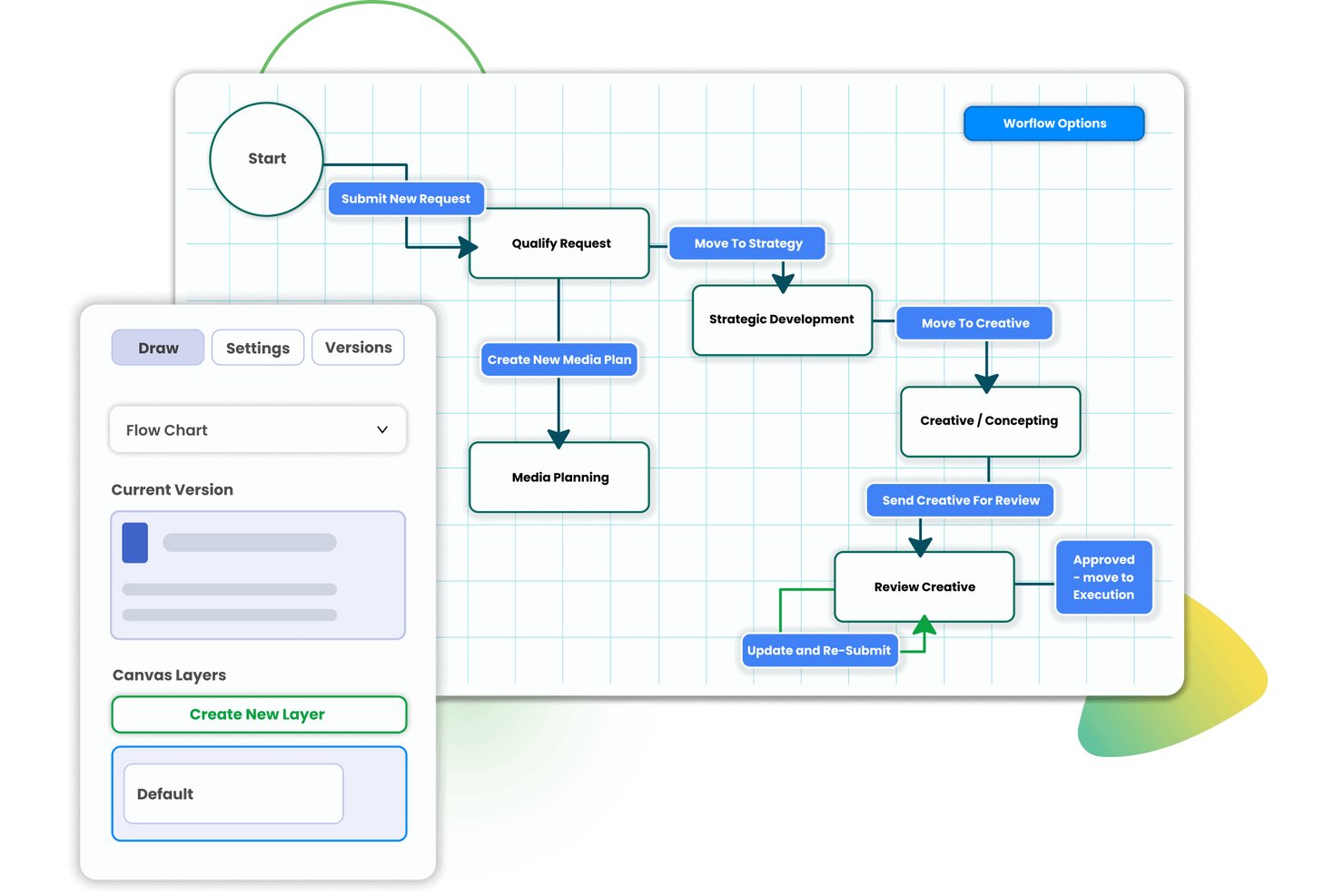
Screendragon is a work management platform for marketing and agency teams that brings online proofing, multi-stage approval workflows, version control, and resource management together in one integrated system.
Who Is Screendragon Best For?
Screendragon is a strong fit for enterprise marketing teams and large agencies that need to manage high volumes of creative assets across multiple stakeholders and approval layers.
Why I Picked Screendragon
Screendragon earns its spot on my shortlist because its no-code workflow builder does something most proofing tools skip: conditional routing that automatically sends a video down a different approval path than a print ad. Task assignment fires by role or availability, so the right reviewer joins at the right stage without a single manual hand-off. Side-by-side version comparison and a full audit trail round out a proofing setup I'd trust for compliance-sensitive campaigns.
Screendragon Key Features
- Centralized online proofing hub: Organize all creative assets, markups, and approval threads in a single, searchable workspace.
- Multi-format file support: Review, annotate, and compare images, documents, graphics, PDFs, and videos directly within the platform.
- Side-by-side version comparison: Instantly open two asset versions together, highlighting changes between iterations.
- Audit trail reporting: Export timestamped logs of all comments, decisions, and approvals tied to each proof.
Screendragon Integrations
Screendragon offers native integrations with Jira, Trello, Salesforce, SAP, Office 365, Google Drive, Box, Slack, and Adobe Creative Cloud, and provides an API for custom integrations.
Pros and Cons
Pros:
- Exportable, compliance-grade approval audit trails
- Conditional proof routing by asset type
- Configurable no-code approval workflow builder
Cons:
- Proofing UI less intuitive than specialist tools
- Setup complexity can slow initial deployment
New Product Updates from Screendragon
Screendragon Unveils New AI Hub
Screendragon introduced AI Hub, a new capability that lets teams build and manage AI agents directly within workflows. The update helps marketing teams automate tasks, maintain governance controls, and scale AI-driven operations more efficiently. For more information, visit Screendragon's official site.

Best for compliance-driven document reviews
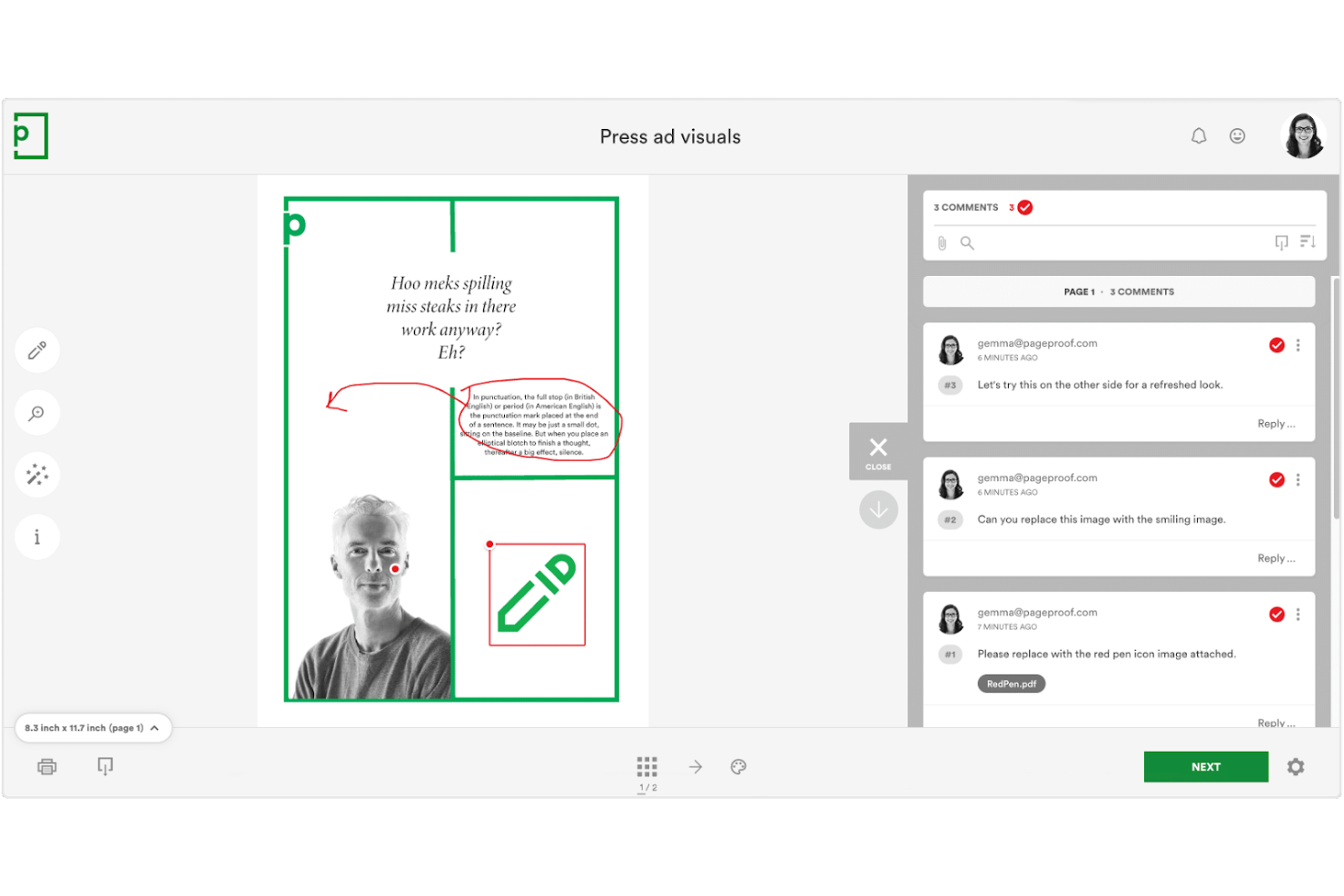
PageProof is designed for teams that need to manage document reviews with strict compliance and audit requirements. Legal, finance, and regulated industries use its encrypted workflows and detailed audit trails to meet internal and external standards. If your review process demands traceability and secure sign-offs, PageProof addresses those needs directly.
Why I Picked PageProof
When compliance and auditability are top priorities, PageProof offers features that go beyond standard online proofing tools. I picked it because its encrypted workflows and digital sign-off process help teams meet strict regulatory requirements.
PageProof also provides a detailed audit trail for every review, making it easy to demonstrate compliance during audits. These features make it a strong choice for organizations where secure, traceable document reviews are essential.
PageProof Key Features
Some other features in PageProof that support document review and collaboration include:
- Automated reminders: Set up notifications to prompt reviewers about pending tasks or deadlines.
- Multi-format support: Review and annotate PDFs, images, videos, presentations, and web pages within the same platform.
- Custom branding: Apply your organization’s logo and colors to the review interface for a consistent experience.
- Comment threading: Organize feedback by allowing users to reply directly to specific comments.
PageProof Integrations
Integrations include Asana, monday.com, Airtable, ClickUp, Trello, Slack, Microsoft Teams, Adobe Creative Cloud, Figma, and more.
Pros and Cons
Pros:
- Multi-format support covers documents and media
- Digital sign-off supports regulated approval processes
- Encrypted proofing meets strict compliance standards
Cons:
- Custom branding only on higher-tier plans
- Bulk upload is limited for large teams

Best for fast-turnaround creative feedback
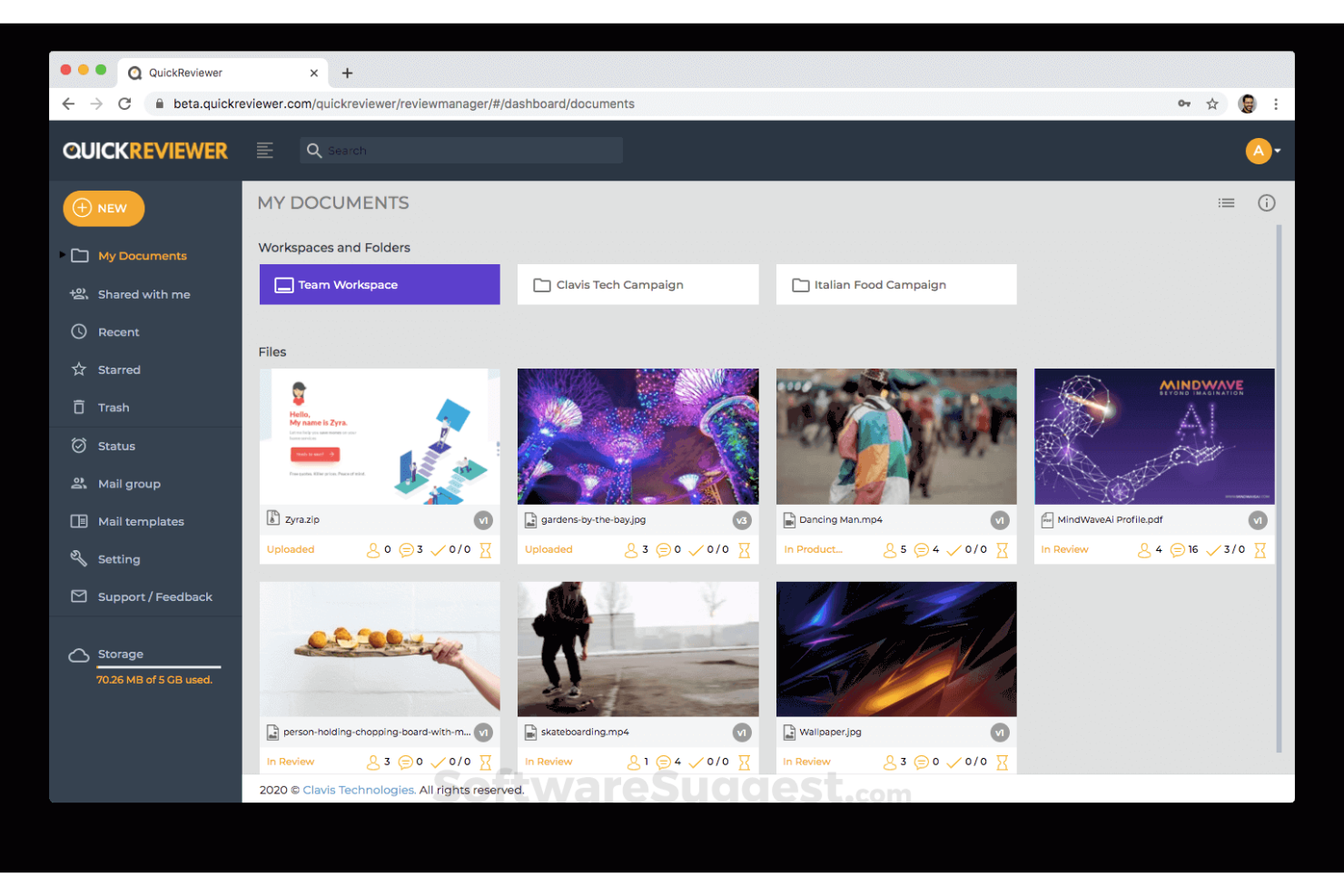
QuickReviewer is designed for creative teams that need to collect feedback and approve assets quickly. It’s a strong fit for agencies, graphic designers, and marketers who work with tight deadlines and frequent revisions. The platform helps you centralize comments and approvals on videos, images, PDFs, and web content so you can keep projects moving without delays.
Why I Picked QuickReviewer
When fast feedback cycles are a priority, QuickReviewer offers tools that help creative teams keep projects on track. I picked it because you can review and annotate videos, images, PDFs, and even live HTML web pages in real time, which is ideal for rapid creative iteration.
The platform’s instant notification system ensures reviewers are alerted as soon as new versions are uploaded, so feedback happens without lag. This setup is especially useful for agencies and marketing teams that need to deliver polished assets on tight deadlines.
QuickReviewer Key Features
Some other features in QuickReviewer that help teams manage creative reviews include:
- Custom branding: Add your company logo and colors to the review interface for a branded experience.
- Version comparison: View and compare different versions of a file side by side to track changes.
- Role-based access control: Assign specific permissions to reviewers, collaborators, and clients.
- Bulk file upload: Upload multiple files at once to speed up the review process.
QuickReviewer Integrations
Integrations include Adobe Creative Cloud, Google Drive, Box, Dropbox, YouTube, Vimeo, Shopify, Wix, Jira, and more.
Pros and Cons
Pros:
- Role-based permissions for client collaboration
- Bulk upload supports large creative projects
- Real-time commenting on live web pages
Cons:
- Mobile experience can be inconsistent
- No built-in task management features

Best for real-time team markup sessions
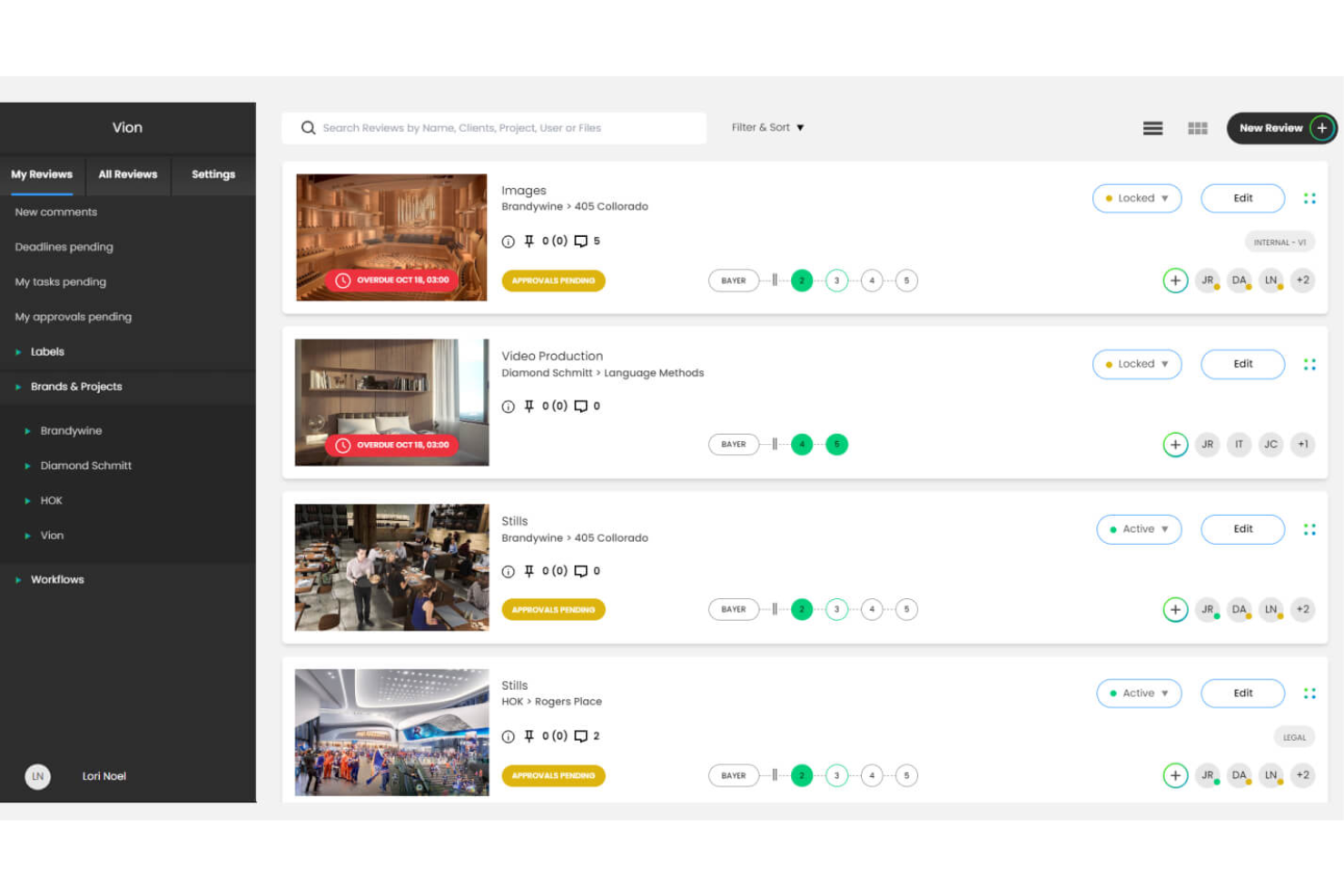
ReviewStudio is designed for teams that need to collaborate on creative assets in real time. Marketing teams, agencies, and design studios use it for interactive markup sessions on shared files. This setup helps resolve feedback faster and keeps everyone aligned throughout review cycles.
Why I Picked ReviewStudio
What sets ReviewStudio apart is its focus on real-time team markup sessions, which is especially valuable for creative teams that need to collaborate live. I picked it because you can invite multiple reviewers to annotate, comment, and draw directly on assets together during a session.
The live cursor tracking and synchronized view ensure everyone is literally on the same page, reducing confusion and miscommunication. This makes ReviewStudio a strong choice for teams that want to speed up feedback cycles and keep discussions focused in one place.
ReviewStudio Key Features
Some other features in ReviewStudio that help teams manage creative reviews include:
- Version stacking: Organize and compare multiple versions of an asset within a single review thread.
- Task assignment: Assign actionable tasks to specific team members directly from feedback.
- Custom branding: Add your company’s logo and colors to the review environment.
- Activity audit trail: Track all comments, changes, and approvals for accountability.
ReviewStudio Integrations
Integrations include Asana, Zapier, Wrike, Kantata, Dropbox, and more.
Pros and Cons
Pros:
- Activity audit trail for tracking all actions
- Custom branding for client-facing reviews
- Real-time markup sessions for group feedback
Cons:
- Bulk download of assets is not supported
- No mobile app for on-the-go reviews

Best with enterprise-grade workflow automation

Adobe Workfront stands out for large organizations that need to automate pixel perfect creative workflows and manage high volumes of content review. If your team juggles multiple projects, stakeholders, and compliance requirements, Workfront’s online proofing tools help centralize feedback and approvals at scale. Its deep workflow automation and integration with Adobe Creative Cloud make it especially useful for enterprise marketing and creative operations teams.
Why I Picked Adobe Workfront
For teams that need to automate and orchestrate complex review cycles, Adobe Workfront offers enterprise-grade workflow automation that’s hard to match. I picked Workfront because its proofing tools are tightly connected to customizable workflows, so you can automatically route creative assets for feedback, approvals, and compliance checks based on your organization’s rules.
The platform also supports detailed audit trails and automated reminders, which help large teams keep projects moving without manual follow-up. This level of automation is especially valuable for enterprises managing high volumes of creative work and strict regulatory requirements.
Adobe Workfront Key Features
Some other features in Adobe Workfront that support creative review and project management include:
- Digital asset management integration: Connect directly with Adobe Experience Manager to access and manage creative files within your workflow.
- Custom forms: Build intake forms to standardize creative requests and gather all necessary information upfront.
- Role-based access controls: Set detailed permissions for reviewers, contributors, and external partners.
- Mobile app: Review, comment, and approve creative assets from anywhere using the Workfront mobile app.
Adobe Workfront Integrations
Integrations include Adobe Creative Cloud, Adobe Experience Manager, Adobe Express, Microsoft Teams, Slack, Jira, Salesforce, Google Drive, Box, and more.
Pros and Cons
Pros:
- Supports batch review of multiple assets
- Tracks reviewer activity with detailed audit logs
- Integrates proofing with Adobe Creative Cloud
Cons:
- Proofing features require an enterprise subscription
- No markup tools for video content

WebProof
Best for multilingual content review needs
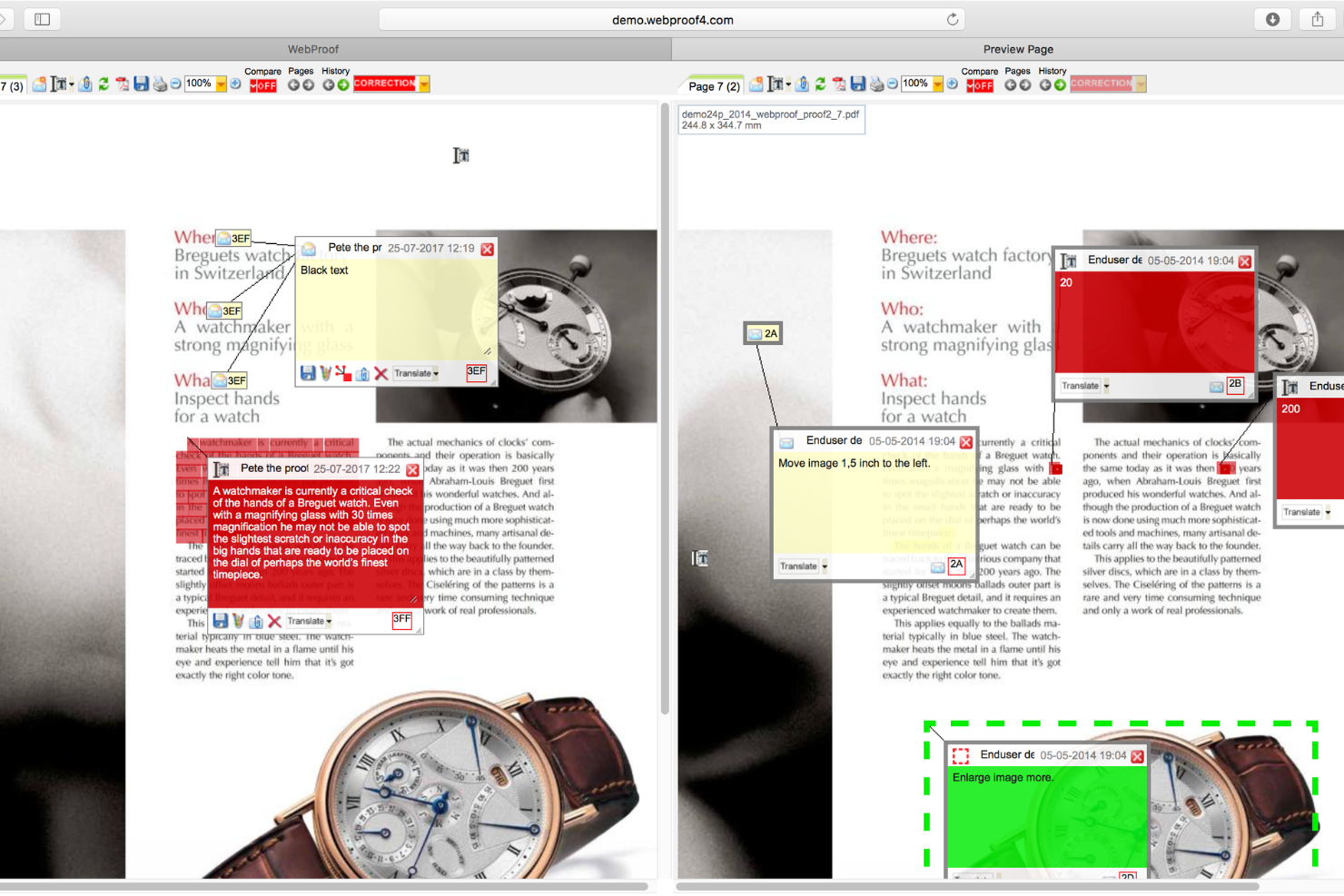
WebProof is built for teams that need to review and approve content in multiple languages. It’s especially useful for marketing departments, publishers, and agencies managing global campaigns or multilingual documents. The platform helps you centralize feedback and track changes across language versions, so nothing gets lost in translation.
Why I Picked WebProof
For teams handling multilingual projects, WebProof stands out by making it easy to manage content reviews across several languages at once. I picked it because you can organize, proof, and approve different language versions of the same document in a single workflow.
The platform’s translation management tools let you track edits and comments by language, so you always know which version is being discussed. This approach helps global teams avoid confusion and keep multilingual campaigns moving forward without missing details.
WebProof Key Features
Some other features in WebProof that help teams manage content reviews include:
- Automated workflow management: Set up custom review and approval steps for each project.
- Adobe InDesign integration: Connect directly with InDesign to update and proof files without manual uploads.
- Comment pinning: Place comments directly on specific areas of a document for precise feedback.
- Audit trail: View a complete history of all changes, comments, and approvals for every project.
WebProof Integrations
Integrations include Adobe InDesign, Adobe Illustrator, and more.
Pros and Cons
Pros:
- Comment pinning for precise markup locations
- Direct Adobe InDesign and Illustrator integration
- Multilingual review tools for global teams
Cons:
- Pricing information is not publicly available
- Interface can feel dated to some users


ClickUp brings together task management and file review in a single workspace, making it a strong fit for teams juggling both project tracking and creative feedback. Marketing departments, agencies, and product teams use its built-in proofing tools to comment on images, PDFs, and videos right alongside tasks. This all-in-one approach helps teams keep feedback, approvals, and project updates tightly connected.
Why I Picked ClickUp
Unlike many tools that separate project management from creative review, ClickUp combines both in one platform, which is why I picked it for teams needing all-in-one task and file review. You can attach files directly to tasks and use built-in proofing to add comments, markups, and threaded discussions on images, PDFs, and videos.
This setup keeps feedback and approvals tied to specific deliverables, so nothing gets lost between tools. For teams that want to manage project progress and creative feedback in a single workflow, ClickUp offers a unified solution.
ClickUp Key Features
Some other features in ClickUp that support online proofing and creative collaboration include:
- Custom statuses: Set up unique workflow stages to match your team’s review and approval process.
- Role-based permissions: Control who can view, comment, or edit files and tasks within each workspace.
- Automated reminders: Schedule notifications for reviewers and assignees to keep feedback cycles on track.
- Activity log: View a detailed history of comments, edits, and approvals for each file or task.
ClickUp Integrations
Integrations include Slack, GitHub, GitLab, HubSpot, Google Drive, Dropbox, Outlook, Figma, Zoom, and more.
Pros and Cons
Pros:
- Reviewers can annotate files without downloading
- Comments can be resolved or assigned as tasks
- Proofing supports images, PDFs, and videos
Cons:
- Limited markup tools for complex design feedback
- No live co-editing on creative files
Aproove
Best for high-volume asset management

Aproove is built for organizations that need to manage and review large volumes of creative assets across multiple teams or departments. It’s especially useful for enterprises, publishers, and agencies handling complex workflows and high asset turnover. The platform brings together asset management, automated approval routing, and detailed audit trails to help you keep control over every stage of the creative process.
Why I Picked Aproove
For teams managing hundreds or thousands of creative assets, Aproove stands out with its focus on high-volume asset management. I picked it because it combines advanced digital asset management with automated workflow routing, so you can keep large projects organized and moving.
The platform’s granular permission controls let you assign access and approval rights at scale, which is essential for enterprise environments. Its detailed audit trails also help you track every action and decision, making it easier to manage compliance and accountability across complex review cycles.
Aproove Key Features
Some other features in Aproove that help teams manage creative reviews include:
- Custom workflow builder: Design and automate multi-step approval processes tailored to your organization’s needs.
- Batch review tools: Review, comment on, and approve multiple assets at once to speed up high-volume projects.
- Advanced search and filtering: Locate specific files or comments quickly using metadata, tags, and filters.
- White-labeling options: Customize the platform interface with your company’s branding for a consistent client experience.
Aproove Integrations
Aproove offers an API for custom integrations.
Pros and Cons
Pros:
- Advanced search filters for large asset libraries
- White-labeling supports agency and client branding
- Custom workflow builder for complex approvals
Cons:
- Limited built-in reporting and analytics
- Native integrations with third-party tools missing
Outro software de revisão online
Eis algumas opções adicionais de software de revisão online que não entraram na minha lista, mas que ainda vale a pena conhecer:
- ProofStuff
For print production workflow integration
- monday AI Workspace
For customizable visual feedback boards
- Ziflow
With advanced version control tools
- Wrike
For cross-team creative collaboration
- Airtable
For spreadsheet-style asset reviews
- GoVisually
With client-facing approval portals
- Krock.io
For storyboard and video project feedback


How I Evaluate Online Proofing Software
I evaluate every tool against two layers: the baseline capabilities needed to actually run a review and approval cycle, and the differentiators that separate one vendor from another.
Core Functionality (Table Stakes For This List)
When I'm selecting tools for my list, I rank each one on a scale from 0 (does not offer the functionality) to 5 (excels in this area) for each core functionality listed below. Then, I calculate the tool's total score into a percentage. Each tool needs to achieve a minimum total score of 65% to be considered for inclusion.
- Multi-Format File Support: I check whether a tool handles the full range of deliverables a creative team actually produces—PDFs, images, video, audio, HTML, and documents—with native rendering.
- Markup & Annotation Tools: Pinpoint comments and drawing tools matter, but I look for format-specific markup like frame-accurate video annotations and threaded reply support.
- Version Control & Comparison: Every revision should be tracked and easily compared. I evaluate whether you can toggle, overlay, or view versions side by side with comments carried forward.
- Approval Workflows & Routing: Tools earn higher marks when they support multi-stage, role-based routing with deadlines—think a three-round review flowing from copywriter to legal to creative director.
- Project Management Integration: I look at how well the platform connects with tools like Asana, Jira, Monday, or Wrike, checking for two-way sync rather than just one-directional notifications.
- Audit Trail & Decision Tracking: For teams that need documented sign-offs, I evaluate whether the tool logs every action with timestamps, user attribution, and exportable records.
Once I have a list of tools that meet this criteria, I consider what sets each platform apart.
Differentiating Factors (What Sets Vendors Apart)
Here's how I compare and contrast different vendors:
Standout Features
Client and external reviewer access is a big differentiator—I look for tools that let outside stakeholders comment and approve via a simple link, no account required. Automated proof routing also matters; the best setups trigger reminders and escalate overdue reviews without manual follow-up from a traffic manager. AI-assisted review is worth evaluating too. Features like automated spell-checking or smart change detection between versions catch errors that human reviewers shouldn't have to chase.
Beyond Features
Integration ecosystem is one of the first things I evaluate. A proofing tool that syncs with Adobe Creative Cloud, Figma, and your PM platform cuts out manual file uploads and status updates. Scalability matters too—I consider whether licensing separates full users from guest reviewers, since most teams have far more approvers than creators. Reporting rounds out my evaluation. Dashboards that surface proof turnaround times and reviewer bottlenecks give creative operations leads the data they need to optimize review cycles.
Como escolher software de revisão online
É fácil ficar atolado em listas extensas de funcionalidades e estruturas de preços complexas. Para o ajudar a manter o foco enquanto analisa o seu processo específico de seleção de software, eis uma lista de fatores a ter em conta:
| Fator | O que deve considerar |
|---|---|
| Escalabilidade | O software será capaz de gerir o volume atual e futuro dos seus projetos? Considere os limites de utilizadores, os limites de armazenamento e a complexidade dos fluxos de trabalho à medida que a sua equipa cresce. |
| Integrações | Estabelece ligação nativa com as ferramentas que já utiliza, como sistemas de gestão de projetos, DAM ou impressão? Procure integrações diretas, não apenas acesso à API. |
| Personalização | Pode adaptar os fluxos de trabalho, as etapas de aprovação e as notificações aos processos da sua equipa? Evite sistemas rígidos que o obriguem a adaptar o seu fluxo de trabalho. |
| Facilidade de utilização | Todas as partes interessadas — incluindo clientes e revisores externos — considerarão a interface intuitiva? Teste-a com um utilizador sem conhecimentos técnicos antes de se comprometer. |
| Implementação e integração inicial | Quanto tempo será necessário para pôr a sua equipa a funcionar? Procure apoio à migração, recursos de formação e prazos claros para a integração inicial. |
| Custo | Os níveis de preços são transparentes e previsíveis à medida que a utilização aumenta? Esteja atento a taxas ocultas, números mínimos de utilizadores ou custos adicionais de armazenamento ou revisores. |
| Medidas de segurança | A plataforma oferece acesso baseado em funções, encriptação de dados e registos de auditoria? Certifique-se de que cumpre as normas de segurança e privacidade da sua organização. |
| Disponibilidade do suporte | Que canais de suporte são disponibilizados e em que horários? Considere se irá precisar de chat em tempo real, suporte telefónico ou ajuda dedicada durante a integração, especialmente na fase de implementação. |
O que é o software de revisão online?
O software de revisão online é uma plataforma digital que permite às equipas rever, fazer anotações e aprovar materiais criativos ou documentos num ambiente centralizado e baseado na Web.
Centraliza o processo de feedback e aprovação, permitindo que várias partes interessadas comentem, comparem versões e acompanhem as alterações em tempo real. Isto ajuda a reduzir erros, encurta os prazos dos projetos e garante que todos se mantêm alinhados ao longo de todo o ciclo de revisão.
Benefícios
A implementação de software de revisão online proporciona várias vantagens à sua equipa e à sua empresa. Eis algumas das que pode esperar:
- Ciclos de revisão mais rápidos: As notificações automatizadas, o feedback centralizado e os fluxos de trabalho de aprovação estruturados ajudam a reduzir atrasos e a manter os projetos em andamento.
- Feedback mais claro: As ferramentas de marcação e anotação permitem que os revisores forneçam contributos precisos e acionáveis diretamente nos elementos criativos.
- Melhor controlo de versões: O acompanhamento integrado das versões garante que todos estão a rever o ficheiro correto e facilita a comparação das alterações.
- Maior responsabilização: Os registos de auditoria e as permissões baseadas em funções proporcionam transparência sobre quem aprovou os elementos criativos e quando.
- Colaboração melhorada: Várias partes interessadas podem rever, comentar e aprovar elementos através da colaboração em tempo real, independentemente da sua localização.
- Menos estrangulamentos no processo de aprovação: Os lembretes automatizados e o acompanhamento do estado ajudam a evitar que os projetos fiquem parados em qualquer fase do processo de revisão.
- Melhor conformidade e manutenção de registos: Os registos detalhados do feedback, das aprovações e das alterações efetuadas no processo de revisão ajudam a cumprir os requisitos regulamentares e as auditorias internas.
Custos e preços
A seleção de software de revisão online requer uma compreensão dos vários modelos de preços e planos disponíveis. Os custos variam consoante as funcionalidades, a dimensão da equipa, os complementos, entre outros fatores. A tabela abaixo resume os planos comuns, os respetivos preços médios e as funcionalidades normalmente incluídas nas soluções de software de revisão online:
Tabela de comparação de planos para software de revisão online
| Tipo de plano | Preço médio | Funcionalidades comuns |
|---|---|---|
| Plano gratuito | $0 | Carregamentos básicos de ficheiros, revisores limitados, ferramentas de marcação simples e notificações básicas. |
| Plano pessoal | $5-$25/utilizador/mês | Projetos ilimitados, controlo de versões, ferramentas de marcação avançadas e notificações por e-mail. |
| Plano empresarial | $20-$50/utilizador/mês | Gestão de equipas, fluxos de trabalho de aprovação, integrações, registos de auditoria e funcionalidades de elaboração de relatórios. |
| Plano empresarial avançado | $40-$100/utilizador/mês | Personalização da marca, segurança avançada, suporte dedicado, acesso à API e gestão da conformidade. |
Perguntas frequentes sobre software de revisão online
Eis algumas respostas a perguntas frequentes sobre software de revisão online:
O software de revisão online consegue processar ficheiros de grandes dimensões?
Sim, a maioria dos softwares de revisão online consegue processar ficheiros de grandes dimensões, especialmente imagens, vídeos ou ficheiros de design de alta qualidade e alta resolução. No entanto, os limites de carregamento e o desempenho podem variar consoante o fornecedor e o plano, pelo que deve consultar as especificações se a sua equipa trabalhar com elementos especialmente grandes.
Quão seguro é o software de revisão online para projetos confidenciais?
A maioria das plataformas de revisão online oferece funcionalidades de segurança como encriptação de dados, permissões baseadas em funções e registos de auditoria. Para projetos altamente confidenciais, confirme se o software cumpre as normas de segurança da sua organização e informe-se sobre certificações de conformidade como SOC 2 ou ISO 27001.
É possível que clientes ou partes interessadas externas participem no processo de revisão?
Sim, muitas ferramentas de revisão online permitem convidar revisores externos ou clientes através de ligações seguras ou acesso de convidado. Normalmente, é possível controlar o que podem ver ou fazer, como comentar, aprovar ou apenas visualizar ficheiros.
Que tipos de ficheiros podem ser revistos num software de revisão online?
A maioria das plataformas suporta uma vasta gama de tipos de ficheiros, incluindo imagens, PDFs, vídeos e ficheiros de design. Algumas ferramentas também suportam formatos de documentos como Word ou PowerPoint. Verifique sempre a compatibilidade dos ficheiros se o seu fluxo de trabalho depender de formatos especializados.
É possível integrar o software de revisão online com ferramentas de gestão de projetos?
Sim, muitas soluções de revisão online oferecem integrações com plataformas de gestão de projetos, DAM ou armazenamento. Isto ajuda a manter o feedback e as aprovações sincronizados com o seu fluxo de trabalho mais abrangente e reduz as atualizações manuais.