


ProjectManager-beoordeling: voor- en nadelen, functies & prijzen



ProjectManager is a project management software built for teams that need structured project planning with Gantt charts, resource management, and real-time dashboards. I'd look at it if you want the scheduling depth of Microsoft Project without the steep learning curve or on-premise complexity—particularly if your team is distributed and needs live visibility into timelines, workloads, and project status in a cloud-based environment.
ProjectManager Evaluation Summary
- From $15/user/month (billed annually)
- 30-day free trial
Waarom u onze softwareaanbevelingen kunt vertrouwen
Ons team test en beoordeelt software sinds 2012. Als projectmanagers weten we zelf hoe moeilijk — en belangrijk — het is om de juiste software te kiezen.
Voor deze gids hebben we tools geëvalueerd met behulp van praktijktests en onafhankelijk onderzoek, waarbij we tools beoordeelden aan de hand van onze selectiecriteria. We putten ook uit inzichten van vooraanstaande experts uit de branche en praktiserende projectmanagementprofessionals.
Onze reviews weerspiegelen ons menselijke redactionele oordeel, geen verkooppraatje.
Deskundige beoordelaars:
ProjectManager Overview
In my opinion, ProjectManager is a solid choice for teams that need a comprehensive project management tool. It has an intuitive user interface and robust feature set, which makes it ideal for industries like construction and IT. The pricing is competitive, but the tool may not offer the same level of customization as some competitors.
Its strong customer support and effective onboarding process make it a compelling option if you’re prioritizing ease of use and team collaboration. If you're looking for a reliable tool that balances functionality and cost, ProjectManager should be on your shortlist.
pros
-
Gantt chart features let you filter for the critical path, track dependencies, and set baselines.
-
Detailed reporting tools let you monitor progress, resource allocation, and performance.
-
Built-in time tracking features simplify the process of logging time and monitoring productivity.
cons
-
It may lack some customization options compared to other tools.
-
The tool has a steeper learning curve than some competitors due to the extensive feature set.
-
The tool’s resource management capabilities are more limited than you would get in a dedicated resourcing tool.
-

Celoxis
Visit WebsiteThis rating combines scores from multiple user review sites to reflect overall customer sentiment about the product.4.5 -
Smartsheet
Visit WebsiteThis rating combines scores from multiple user review sites to reflect overall customer sentiment about the product.4.5 -
Accelo
Visit WebsiteThis rating combines scores from multiple user review sites to reflect overall customer sentiment about the product.4.4





Core Features
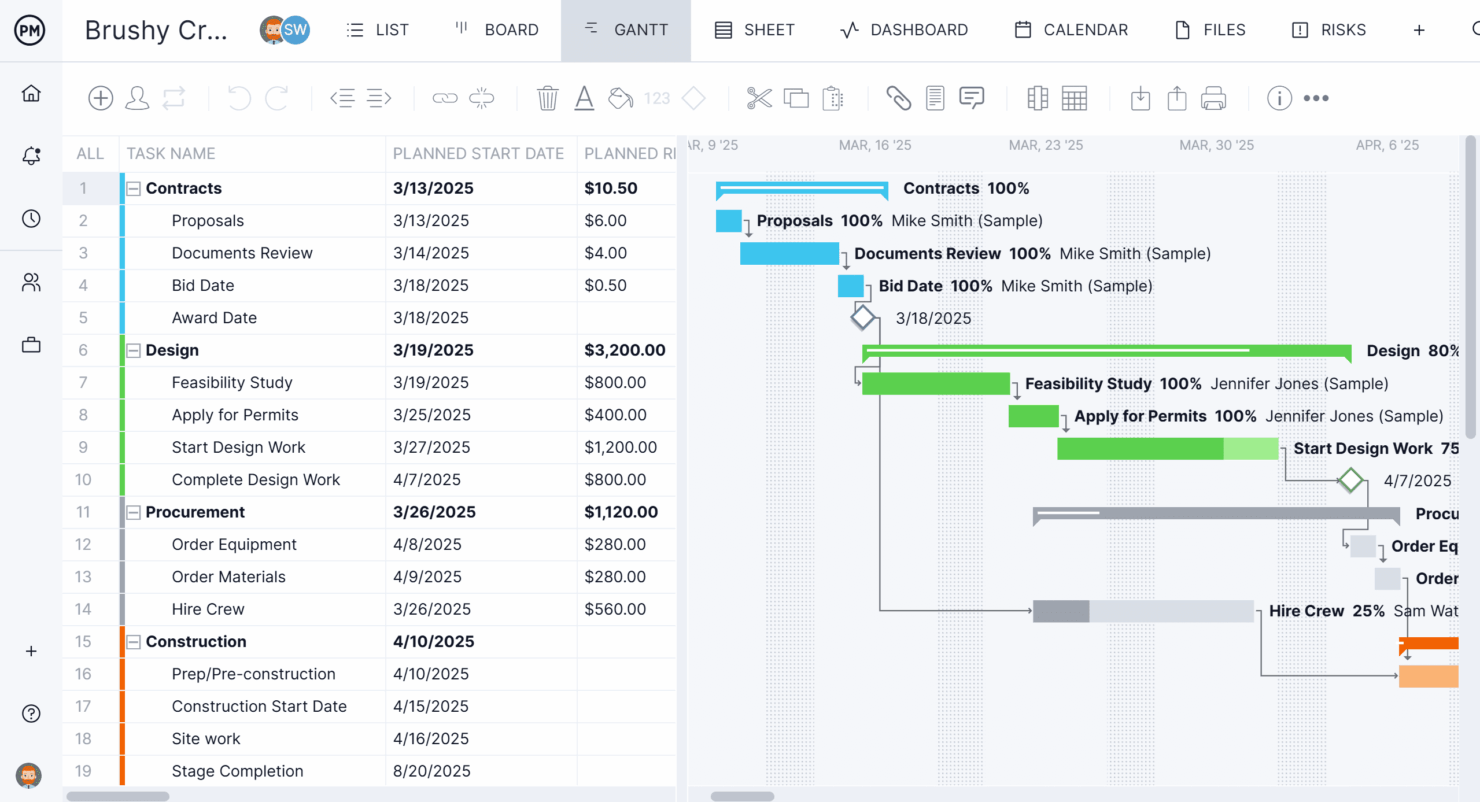
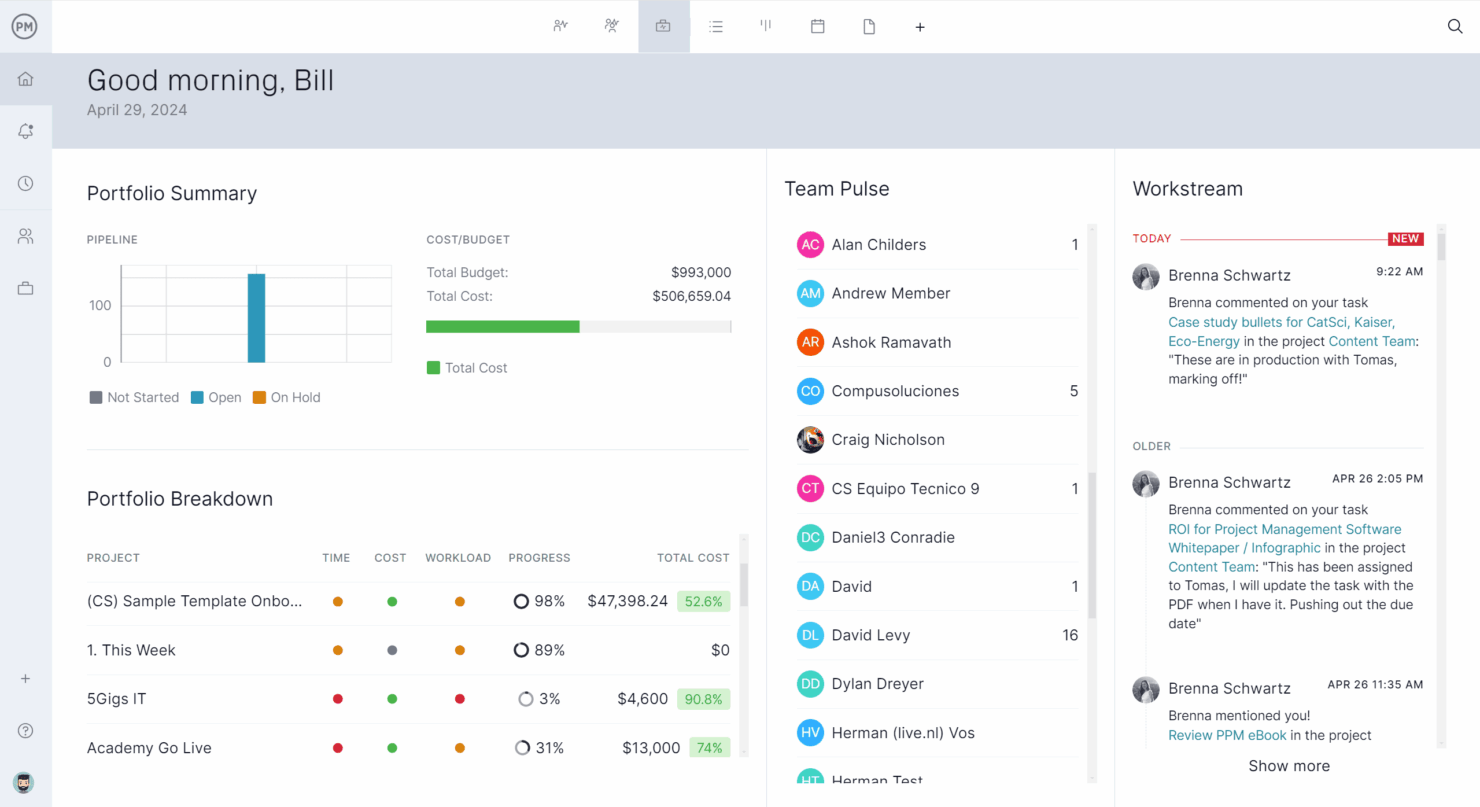
Task Management: You can easily assign tasks, set deadlines, and track progress to keep your team organized and on schedule. There are five project views you can use to help your team see what needs to be done at a glance: the task list view, Gantt chart view, Kanban board view, dashboard view, and calendar view.
Gantt Charts: ProjectManager’s Gantt charts let you filter for the critical path, track different dependencies, set baselines based on actual vs planned data, and see resource availability. This helps make sure nothing falls through the cracks and visualize the entire project lifecycle.
Resource Management: You can allocate resources efficiently with tools that let you see who's available and who's overloaded. This feature helps balance workloads and avoid burnout.
Reporting Tools: You can generate detailed reports to keep stakeholders informed on project status and performance. Use these insights to make data-driven decisions.
Time Tracking: ProjectManager lets your team track time spent on tasks so you can make sure projects stay within budget and deadlines. This helps you analyze productivity and manage time better.
Collaboration Tools: You can facilitate team collaboration with comments, workflow automations, guest licenses for external stakeholders or clients, and task approvals. These tools improve teamwork and streamline project updates.

Ease of Use
ProjectManager stands out for its user-friendly, intuitive interface that makes managing projects straightforward and accessible. The number of features can make for a bit of a learning curve, but your team can easily navigate features like task management and project scheduling.
The visual layout is clear and lets you see project timelines and dependencies at a glance. Some users find the mobile app less responsive, but the tool’s overall ease of use helps your team focus on delivering results.
ProjectManager Specs
- API
- Batch Permissions & Access
- Budgeting
- Calendar Management
- Collaboration Support
- Contact Management
- Contact Sharing
- Customer Management
- Dashboard
- Dashboards
- Data Export
- Data Import
- Data Visualization
- Dependency Tracking
- Document Sharing
- Expense Tracking
- External Integrations
- File Sharing
- Gantt Charts
- Kanban Boards
- Multi-User
- Notifications
- Project Management
- Resource Management
- Scheduling
- Task Scheduling/Tracking
- Third-Party Plugins/Add-Ons
- Time Management
- Travel Management
- Workflow Management
Alternatives to ProjectManager



ProjectManager FAQs
Can I customize workflows in ProjectManager?
How does ProjectManager handle data security?
Is there a mobile app for ProjectManager?
How can I track project progress in ProjectManager?
Does ProjectManager support agile project management?
Can I use ProjectManager for remote team collaboration?
How does ProjectManager handle resource management?
What kind of support can I expect from ProjectManager?
Wat komt hierna?
Wil je contact leggen met andere digitale projectmanagers om hulpmiddelen en best practices te delen? Word lid van onze community en krijg toegang tot meer dan 100 sjablonen, voorbeelden en cases, en kom via Slack in contact met honderden andere digitale projectmanagers.