


Paymo-beoordeling: voor- en nadelen, functies & prijzen



Paymo is a web-based project management tool built for small teams and agencies that need to manage projects, track billable hours, and handle client invoicing in one place. If you've been piecing together your PM tool with separate time tracking and invoicing apps, Paymo is worth a close look, as it handles all three natively, cutting out the manual data entry that comes with stitching those systems together.
Paymo Evaluation Summary

- From $5.9/month (billed annually)
- Free plan + free demo + 15-day free trial available
Waarom u onze softwareaanbevelingen kunt vertrouwen
Ons team test en beoordeelt software sinds 2012. Als projectmanagers weten we zelf hoe moeilijk — en belangrijk — het is om de juiste software te kiezen.
Voor deze gids hebben we tools geëvalueerd met behulp van praktijktests en onafhankelijk onderzoek, waarbij we tools beoordeelden aan de hand van onze selectiecriteria. We putten ook uit inzichten van vooraanstaande experts uit de branche en praktiserende projectmanagementprofessionals.
Onze reviews weerspiegelen ons menselijke redactionele oordeel, geen verkooppraatje.
Deskundige beoordelaars:
Paymo Overview
Paymo excels in offering an intuitive and user-friendly interface that keeps your team organized and your projects on track without overwhelming features.
pros
-
Paymo simplifies time tracking and billing, making it easy for your team to manage project budgets.
-
Its intuitive task management keeps your team organized and on schedule.
-
The user interface is clean and user-friendly, reducing the learning curve for your team.
cons
-
Reporting features might feel limited if your team needs advanced analytics.
-
Customization options are less flexible compared to some competitors.
-
Mobile app functionality is not as robust, which might affect on-the-go project management.
-

Celoxis
Visit WebsiteThis rating combines scores from multiple user review sites to reflect overall customer sentiment about the product.4.5 -
Smartsheet
Visit WebsiteThis rating combines scores from multiple user review sites to reflect overall customer sentiment about the product.4.5 -
Accelo
Visit WebsiteThis rating combines scores from multiple user review sites to reflect overall customer sentiment about the product.4.4





Core Features
Task Management
Easily organize your projects with Paymo's task management, where you can assign tasks, set deadlines, and track progress. It helps your team stay on top of their work with visual task outlines.
Time Tracking
Paymo's time tracking lets you monitor billable hours for accurate client billing and project budgeting. It's perfect for freelancers and agencies managing multiple projects.
Resource Scheduling
Allocate resources efficiently with Paymo's scheduling tools, ensuring your team isn't overburdened. This feature aids in balancing workloads across projects.
Invoicing
Generate professional invoices directly within Paymo, streamlining your billing process. It's a great way to keep your financials in order without switching platforms.
File Management
Keep project files organized and accessible with Paymo's file management feature. It allows seamless collaboration and ensures everyone has the latest documents.
Collaboration Tools
Enhance team communication with Paymo's built-in collaboration features, including comments and notifications. It keeps everyone in the loop and fosters teamwork.
Ease of Use
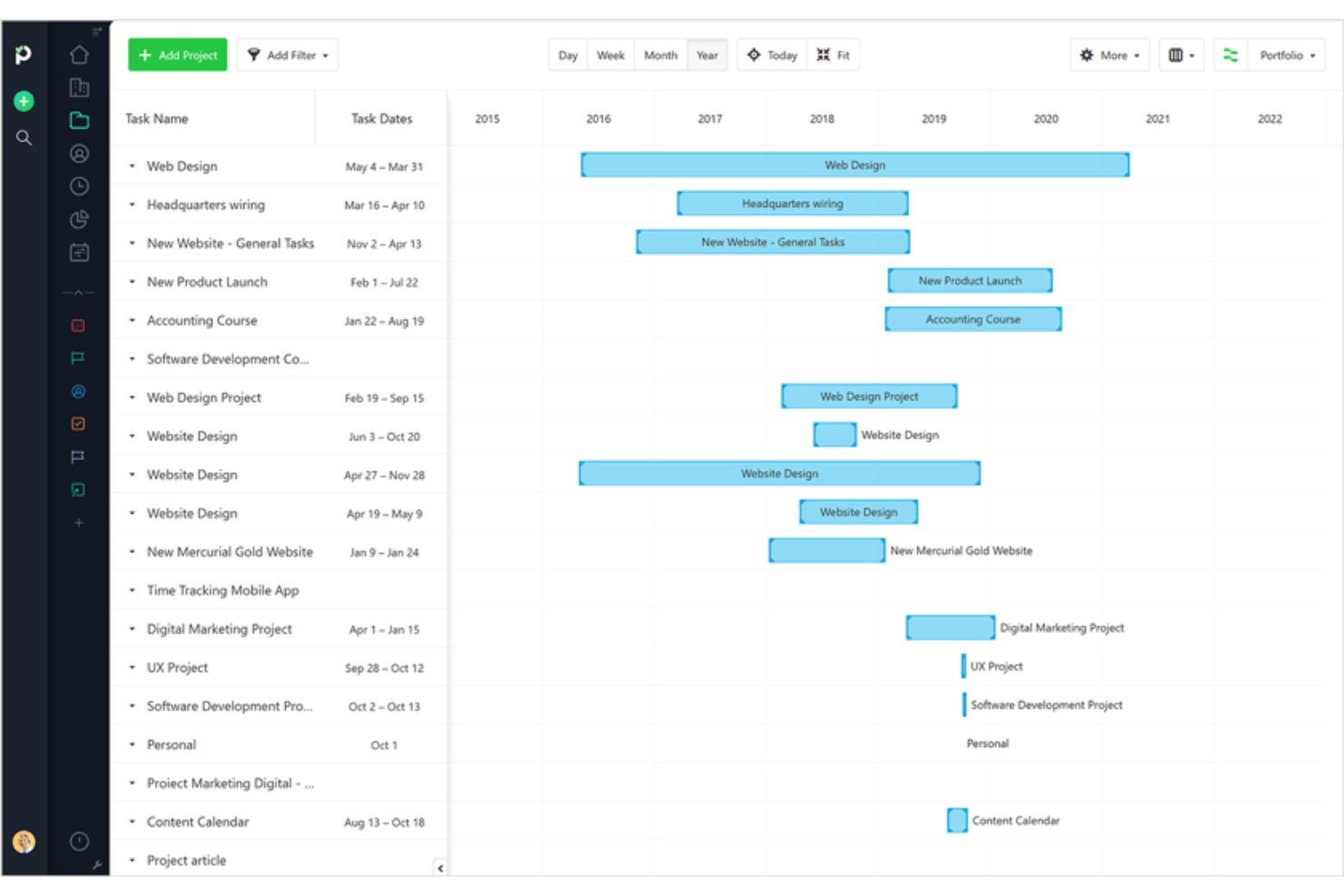
Paymo stands out for its user-friendly interface, making it easy for your team to navigate and manage projects without a steep learning curve. The intuitive design helps you quickly assign tasks, track time, and collaborate effectively. User reviews highlight its simplicity, allowing even those new to project management software to get up and running fast. Paymo’s clear visuals, like Kanban boards and Gantt charts, enhance your team’s ability to plan and execute projects efficiently.

Integrations
Integrations include Google, Google Calendar, Zapier, Slack, QuickBooks Online, Typeform, Integromat, Pomodone, LambdaTest, Rethink, Shift, and Xero.

Paymo Specs
- API
- Batch Permissions & Access
- Budgeting
- Calendar Management
- Collaboration Support
- Contact Management
- Contact Sharing
- Customer Management
- Dashboard
- Dashboards
- Data Export
- Data Import
- Data Visualization
- Dependency Tracking
- Document Sharing
- Expense Tracking
- External Integrations
- File Sharing
- Gantt Charts
- Kanban Boards
- Multi-User
- Notifications
- Project Management
- Resource Management
- Scheduling
- Task Scheduling/Tracking
- Third-Party Plugins/Add-Ons
- Time Management
- Travel Management
- Workflow Management



Paymo FAQs
How does Paymo handle data security and compliance?
Can I use Paymo offline?
How customizable is Paymo for different workflows?
How does Paymo support remote team collaboration?
What kind of reporting capabilities does Paymo offer?
Is Paymo suitable for agile project management?
How does Paymo handle task dependencies?
Can I integrate Paymo with my existing tools?
Wat komt hierna?
Wil je contact leggen met andere digitale projectmanagers om bronnen en best practices te delen? Word lid van onze community en krijg toegang tot meer dan 100 sjablonen, voorbeelden en casussen en kom in Slack in contact met honderden andere digitale projectmanagers.