


Microsoft Power Automate-beoordeling: is het de moeite waard in 2026?



Microsoft Power Automate is a process automation software built for teams that need to automate workflows across Microsoft 365 apps like Teams, SharePoint, Outlook, and Excel. I'd consider it seriously if your organization already runs on the Microsoft stack, as you'll get deeper native integrations than you would with a tool like Zapier, without needing to bridge third-party connectors to systems you're already paying for.
Microsoft Power Automate Evaluation Summary
- From $15/user/month (billed annually)
- 30-day free trial + free plan
Waarom u onze softwareaanbevelingen kunt vertrouwen
Ons team test en beoordeelt software sinds 2012. Als projectmanagers weten we zelf hoe moeilijk — en belangrijk — het is om de juiste software te kiezen.
Voor deze gids hebben we tools geëvalueerd met behulp van praktijktests en onafhankelijk onderzoek, waarbij we tools beoordeelden aan de hand van onze selectiecriteria. We putten ook uit inzichten van vooraanstaande experts uit de branche en praktiserende projectmanagementprofessionals.
Onze reviews weerspiegelen ons menselijke redactionele oordeel, geen verkooppraatje.
Deskundige beoordelaars:
Microsoft Power Automate Overview
In my opinion, Microsoft Power Automate is a solid choice for teams deeply integrated into the Microsoft ecosystem. Its standout feature is the seamless integration with other Microsoft products, which can be a game-changer for businesses already using tools like Office 365. While its ease of use is commendable, onboarding can be a bit challenging for those unfamiliar with Microsoft's suite. Compared to competitors, Power Automate offers complex automation capabilities but may fall short in user-friendliness and support for non-Microsoft applications. It's best suited for enterprises or departments looking to automate workflows within a Microsoft-centric environment.
pros
-
It is a no-code way to automate and optimize workflows.
-
It integrates well with other Microsoft products for seamless operations.
-
It helps your team save time by reducing repetitive manual tasks.
cons
-
The user interface can be confusing for those new to Microsoft's ecosystem.
-
Onboarding can be overwhelming without prior experience with similar tools.
-
Customer support response times may not always meet your expectations.
-

Smartsheet
Visit WebsiteThis rating combines scores from multiple user review sites to reflect overall customer sentiment about the product.4.5 -
Celoxis
Visit WebsiteThis rating combines scores from multiple user review sites to reflect overall customer sentiment about the product.4.5 -
Accelo
Visit WebsiteThis rating combines scores from multiple user review sites to reflect overall customer sentiment about the product.4.4





Our Review Methodology
How We Test & Score Tools
We’ve spent years building, refining, and improving our software testing and scoring system. The rubric is designed to capture the nuances of software selection and what makes a tool effective, focusing on critical aspects of the decision-making process.
Below, you can see exactly how our testing and scoring works across seven criteria. It allows us to provide an unbiased evaluation of the software based on core functionality, standout features, ease of use, onboarding, customer support, integrations, customer reviews, and value for money.
Core Functionality (25% of final scoring)
The starting point of our evaluation is always the core functionality of the tool. Does it have the basic features and functions that a user would expect to see? Are any of those core features locked to higher-tiered pricing plans? At its core, we expect a tool to stand up against the baseline capabilities of its competitors.
Standout Features (25% of final scoring)
Next, we evaluate uncommon standout features that go above and beyond the core functionality typically found in tools of its kind. A high score reflects specialized or unique features that make the product faster, more efficient, or offer additional value to the user.
We also evaluate how easy it is to integrate with other tools typically found in the tech stack to expand the functionality and utility of the software. Tools offering plentiful native integrations, 3rd party connections, and API access to build custom integrations score best.
Ease of Use (10% of final scoring)
We consider how quick and easy it is to execute the tasks defined in the core functionality using the tool. High scoring software is well designed, intuitive to use, offers mobile apps, provides templates, and makes relatively complex tasks seem simple.
Onboarding (10% of final scoring)
We know how important rapid team adoption is for a new platform, so we evaluate how easy it is to learn and use a tool with minimal training. We evaluate how quickly a team member can get set up and start using the tool with no experience. High scoring solutions indicate little or no support is required.
Customer Support (10% of final scoring)
We review how quick and easy it is to get unstuck and find help by phone, live chat, or knowledge base. Tools and companies that provide real-time support score best, while chatbots score worst.
Customer Reviews (10% of final scoring)
Beyond our own testing and evaluation, we consider the net promoter score from current and past customers. We review their likelihood, given the option, to choose the tool again for the core functionality. A high scoring software reflects a high net promoter score from current or past customers.
Value for Money (10% of final scoring)
Lastly, in consideration of all the other criteria, we review the average price of entry level plans against the core features and consider the value of the other evaluation criteria. Software that delivers more, for less, will score higher.
Core Features
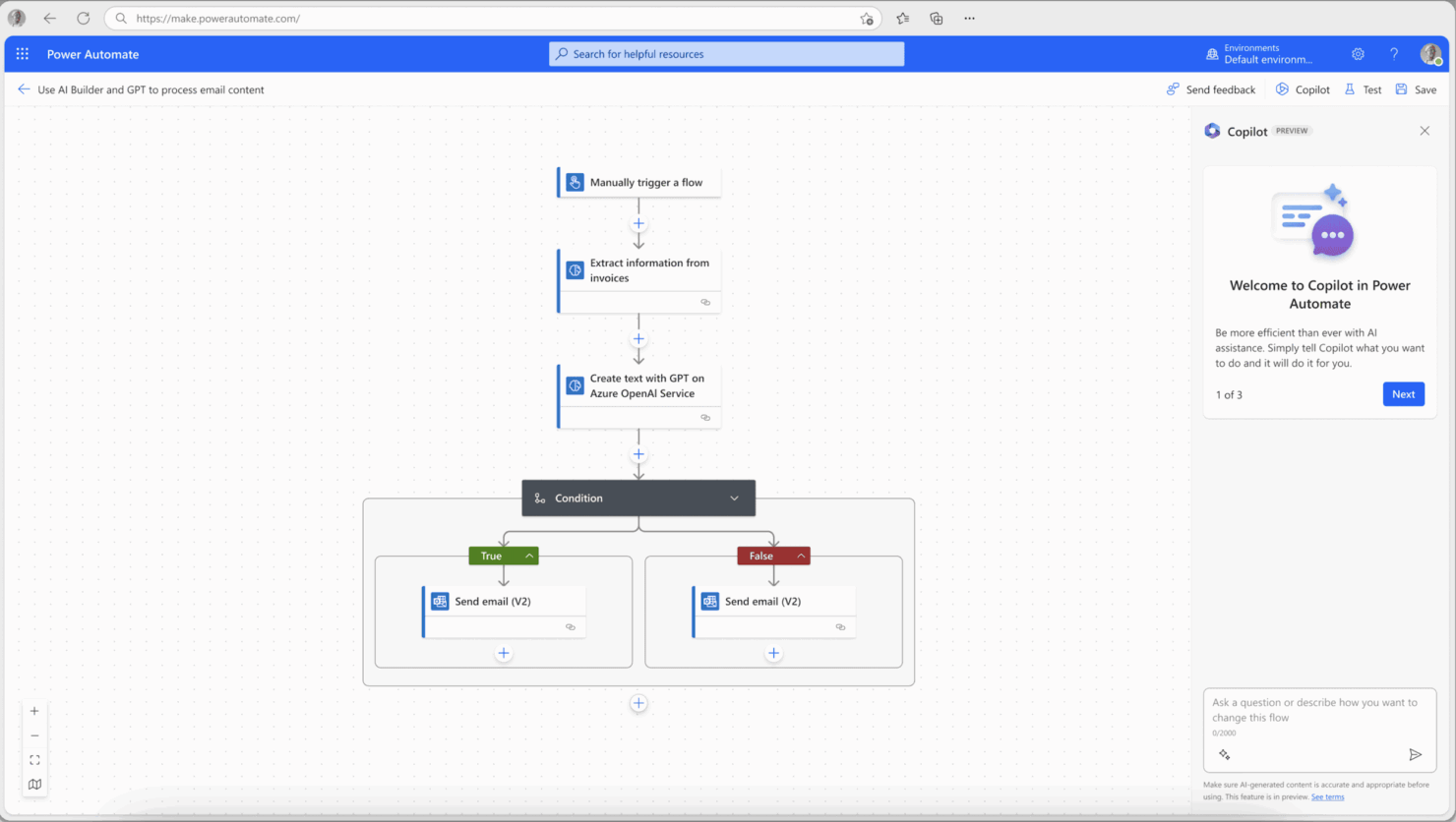
Workflow Automation: You can set up automated workflows that connect different apps and services, reducing manual effort. This helps your team focus on more important tasks while maintaining consistency across processes.
Triggers and Actions: Configure specific triggers and actions to automate tasks like sending emails or updating spreadsheets. This feature lets you tailor automations to fit your team's unique needs.
Templates: Choose from a wide array of pre-built templates to quickly automate common tasks. This saves you time and gets your processes running without starting from scratch.
Conditional Logic: Implement if-then scenarios to make your workflows smarter. This helps you create dynamic processes that respond to different conditions.
Approval Processes: Set up automated approval workflows to streamline decision-making. You ensure timely approvals and reduce bottlenecks in your processes.
Error Handling: Use built-in error handling to manage issues in your workflows. This feature ensures your automations run smoothly, even when there's a hiccup.

Ease of Use
Microsoft Power Automate is fairly user-friendly, especially if you're familiar with Microsoft's ecosystem. Its drag-and-drop interface helps you build workflows without coding, but it can feel overwhelming for newcomers. The abundance of templates and guides is helpful, yet some users find the complexity of setting up advanced automations challenging. Compared to other tools, it offers a balance between functionality and usability, but there's a learning curve if you're not used to Microsoft's layout.
Microsoft Power Automate Specs
- 2-Factor Authentication
- API
- Approval Workflows
- Audit Trail
- Batch Permissions & Access
- Chat
- Dashboard
- Data Export
- Data Import
- Document Comparison
- Document Sharing
- Electronic Signature
- Email Integration
- External Integrations
- File Sharing
- File Transfer
- Google Apps Integration
- History/Version Control
- Metadata Management
- Multi-User
- NDA Management
- Notifications
- Password & Access Management
- Project Management
- Template Designer
Alternatives to Microsoft Power Automate


Microsoft Power Automate FAQs
How does Microsoft Power Automate handle data security and compliance?
Can my team use Microsoft Power Automate without coding knowledge?
How does Microsoft Power Automate improve team productivity?
What kind of support does Microsoft Power Automate provide for onboarding?
How can Microsoft Power Automate benefit my IT department?
Is Microsoft Power Automate suitable for remote teams?
What are the limitations of Microsoft Power Automate?
How does Microsoft Power Automate handle workflow errors?
Wat is de volgende stap?
Wil je contact leggen met andere digitale projectmanagers om bronnen en best practices te delen? Word lid van onze community en krijg toegang tot meer dan 100 sjablonen, voorbeelden en praktijkvoorbeelden en kom in Slack in contact met honderden andere digitale projectmanagers.