


Creatio AI Studio versus Claude Managed Agents: Beoordelingen, functies en vergelijking voor 2026



As AI agents take on more complex work, teams need tools that can automate workflows without making them harder to manage. The challenge is finding the right balance between accessibility, flexibility, and control.
Creatio AI Studio and Claude Managed Agents are AI productivity tools for building and running AI agents across business workflows. I like that Creatio gives both business and technical teams more ways to build and govern agents, while Claude Managed Agents takes a more developer-led approach to autonomous execution.
In this comparison, I assess which tool is the better fit for your team, workflows, and automation needs.
Creatio AI Studio vs. Claude Managed Agents: An Overview
Creatio AI Studio


Claude Managed Agents
Waarom u onze softwareaanbevelingen kunt vertrouwen
Ons team test en beoordeelt software sinds 2012. Als projectmanagers weten we zelf hoe moeilijk — en belangrijk — het is om de juiste software te kiezen.
Voor deze gids hebben we tools geëvalueerd met behulp van praktijktests en onafhankelijk onderzoek, waarbij we tools beoordeelden aan de hand van onze selectiecriteria. We putten ook uit inzichten van vooraanstaande experts uit de branche en praktiserende projectmanagementprofessionals.
Onze reviews weerspiegelen ons menselijke redactionele oordeel, geen verkooppraatje.
Deskundige beoordelaars:
Creatio AI Studio vs. Claude Managed Agents Pricing Comparison
| Creatio AI Studio | Claude Managed Agents | |
|---|---|---|
| Free Trial | Free demo available | No free trial available |
| Pricing | $40/user/month | From $0.08/active session-hour + model usage |
Creatio AI Studio versus prijzen en verborgen kosten van Claude Managed Agents
Creatio combineert platformprijzen per gebruiker met afzonderlijke AI-pakketten op basis van AI Credits, plus optionele ondersteuningsniveaus. Het Unlimited-model verwijdert limieten voor gebruikers, agents, applicaties, workflows, aangepaste objecten en API-aanroepen. Nieuwe klanten moeten ook rekening houden met een minimale jaarlijkse afname en een standaardcontract voor meerdere jaren. Claude Managed Agents gebruikt ondertussen gebruiksgebaseerde prijzen die zijn gekoppeld aan het verbruik van Claude-modellen en de actieve sessieduur, met extra kosten voor zoeken op internet, de snelle modus en inferentie die uitsluitend in de VS plaatsvindt.
Om de juiste leverancier te kiezen, moet je bedenken hoe je verwacht dat het gebruik van agents binnen je workflows zal opschalen. Ik zou voor Creatio kiezen als een meer gestructureerd platform en contractmodel helpt bij het budgetteren. Claude Managed Agents volgt daarentegen een verbruiksmodel waarbij de uitgaven veranderen op basis van modelgebruik, uitvoeringstijd en optionele diensten.
Creatio AI Studio vs. Claude Managed Agents Feature Comparison
| Creatio AI Studio | Claude Managed Agents | |
|---|---|---|
| API | ||
| Analytics | ||
| Custom Reports | ||
| Data Export | ||
| Data Import | ||
| External Integrations | ||
| Multi-User | ||
| Notifications | ||
| Process Reporting | ||
| Workflow Management |
Integraties van Creatio AI Studio versus Claude Managed Agents
| Integratie | Creatio AI Studio | Claude Managed Agents |
|---|---|---|
| Google Workspace | ✅ | ✅ |
| Microsoft Teams | ✅ | ✅ |
| Slack | ✅ | ✅ |
| Jira | ✅ | ✅ |
| Zoom | ✅ | ✅ |
| SAP | ✅ | ✅ |
| HubSpot | ✅ | ✅ |
| Trello | ✅ | ✅ |
| API | ✅ | ✅ |
| Zapier | ✅ | ✅ |
Zowel Creatio AI Studio als Claude Managed Agents bieden uitgebreide integratiemogelijkheden voor bedrijfssystemen en externe tools. Creatio maakt gebruik van zijn marktplaats, API's, webhooks en MCP om agents binnen een gemengde techstack te verbinden, terwijl Claude Managed Agents sterker leunt op MCP-servers, API's en door ontwikkelaars geconfigureerde tools. Creatio biedt meer ingebouwde mogelijkheden om agents te verbinden met bredere bedrijfsworkflows binnen hetzelfde platform.
Creatio AI Studio vs. Claude Managed Agents Beveiliging, Naleving & Betrouwbaarheid
| Factor | Creatio AI Studio | Claude Managed Agents |
|---|---|---|
| Gegevensprivacy & implementatie | Ondersteunt AWS- en Azure-regio's, meerdere opties voor gegevensopslaglocatie, implementatie op locatie, volledig eigendom van klantgegevens en controles die klantgegevens gescheiden houden van training van gedeelde modellen. | Stateful sessies bewaren geschiedenis en uitvoer, terwijl zelf gehoste sandboxes de uitvoering van tools, bestanden en netwerkverkeer binnen de infrastructuur van de klant kunnen houden. |
| Authenticatie & AI-governance | Ondersteunt native authenticatie, SAML 2.0 SSO, MFA, gedetailleerde RBAC op object-, record- en bewerkingsniveau, plus beleid op organisatie- en agentniveau, goedkeuringen voor tools, bevestigingen en controles met menselijke tussenkomst. | Ondersteunt configureerbaar machtigingsbeleid waarmee tools automatisch kunnen worden toegestaan, goedkeuring kunnen vereisen of afzonderlijke toolaanroepen vóór uitvoering kunnen worden geëvalueerd. |
| Beveiliging & naleving | Beschikt over SOC 2 Type II- en ISO/IEC 27001-certificeringen, met versleuteling, toegangscontroles, auditregistratie en mogelijkheden voor gegevensbeheer die GDPR en gereguleerde workflows ondersteunen. | Het API-aanbod van Anthropic omvat SOC 2 Type II- en ISO-certificeringen, hoewel Managed Agents momenteel niet in aanmerking komt voor Zero Data Retention of HIPAA BAA-dekking. |
| Versleuteling & auditing | Gebruikt versleuteling en gedetailleerde auditregistratie voor administratieve activiteiten, gegevensbewerkingen en agentuitvoering, met governancebeleid en functies voor uitlegbaarheid die traceerbaarheid ondersteunen. | Ondersteunt versleutelde opslag, in aanmerking komende door de klant beheerde versleutelingssleutels en permanente gebeurtenisgeschiedenissen voor het traceren van agentactiviteit en -uitvoering. |
| Implementatie & betrouwbaarheid | Biedt SLA's voor enterprisecloud naast AI-observeerbaarheid, uitvoeringsgeschiedenis, beleidsmonitoring, goedkeuringen, escalatiecontroles en levenscyclusbeheer voor productie-agents. | Ondersteunt door Anthropic beheerde of zelf gehoste sandboxes met persistente status en runtimecontroles voor langdurige agentuitvoering. |
Over het algemeen legt Creatio AI Studio de nadruk op flexibele implementatie, governance op organisatie- en agentniveau, menselijk toezicht, auditbaarheid en monitoring van de levenscyclus via het AI-vertrouwens- en governanceframework. Claude Managed Agents richt zich daarentegen op configureerbare technische machtigingen en beheerde of zelf gehoste uitvoering. Beide ondersteunen veilige agentische workflows, maar Creatio integreert meer governance- en implementatiecontroles rechtstreeks in het bredere bedrijfsplatform.
Creatio AI Studio vs. Claude Managed Agents Gebruiksgemak
| Factor | Creatio AI Studio | Claude Managed Agents |
|---|---|---|
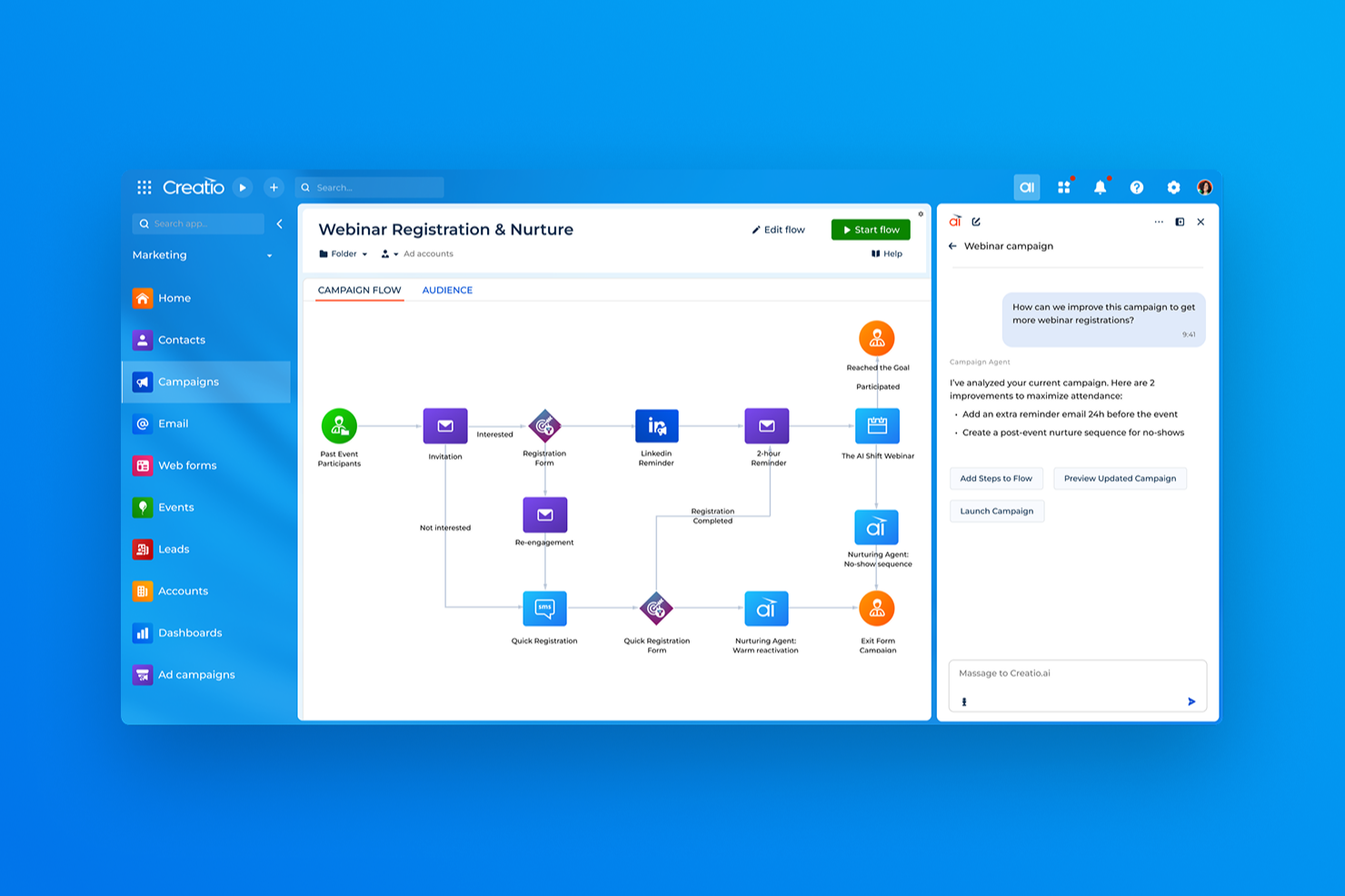
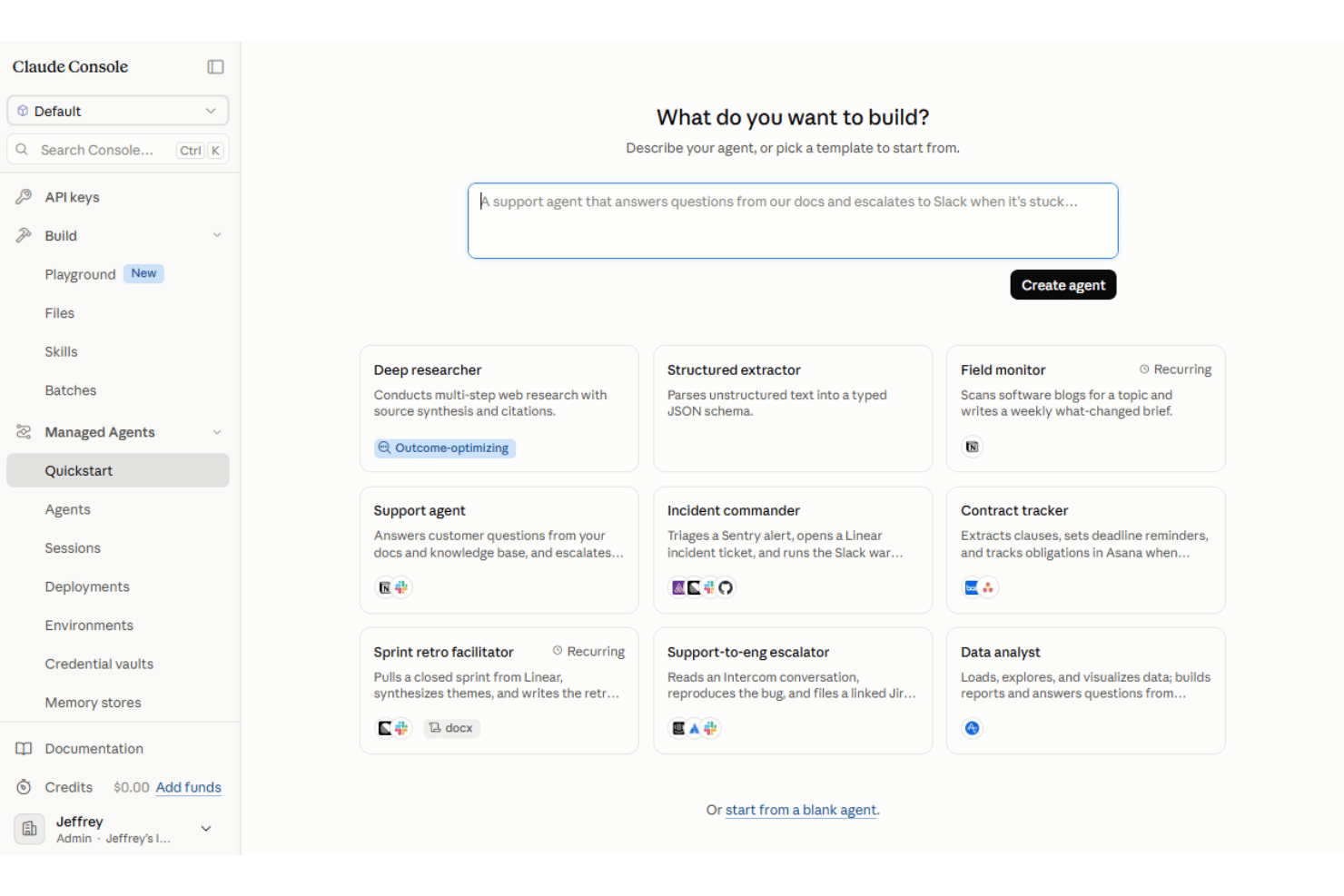
| Agents bouwen | Combineert de conversationele creatie van AI Twin, visueel no-codeontwerp en SDK's voor codering voor zakelijke en technische gebruikers. | Biedt een visuele Console voor het configureren en testen van agents, naast API's en SDK's voor productie-integratie. |
| Ingebruikname | Volgt doorgaans een begeleide implementatie voor workflows, integraties, gegevensvoorbereiding, testen en gebruikersacceptatie. | De installatie draait om het configureren van agents, tools, machtigingen en runtimevereisten. |
| Flexibiliteit van de installatie | Combineert no-codeconfiguratie, agents met code, open integraties en ondersteuning voor verschillende AI-modellen binnen een composable architectuur. | Ondersteunt beheerde of zelf gehoste omgevingen en configureerbare tools voor verschillende agentwerklasten. |
| Leercurve | No-codetools verlagen de drempel voor zakelijke gebruikers, hoewel complexe implementaties nog steeds training of gespecialiseerde ondersteuning kunnen vereisen. | Teams hebben over het algemeen meer technische kennis van API's en agentconfiguratie nodig. |
| Ondersteuningsbronnen | Biedt Creatio Academy, documentatie, opleidingstrajecten, professionele diensten en gecertificeerde partners voor implementatie en blijvende ingebruikname. | Biedt technische documentatie en bronnen voor ontwikkelaars voor het bouwen en beheren van beheerde agents. |
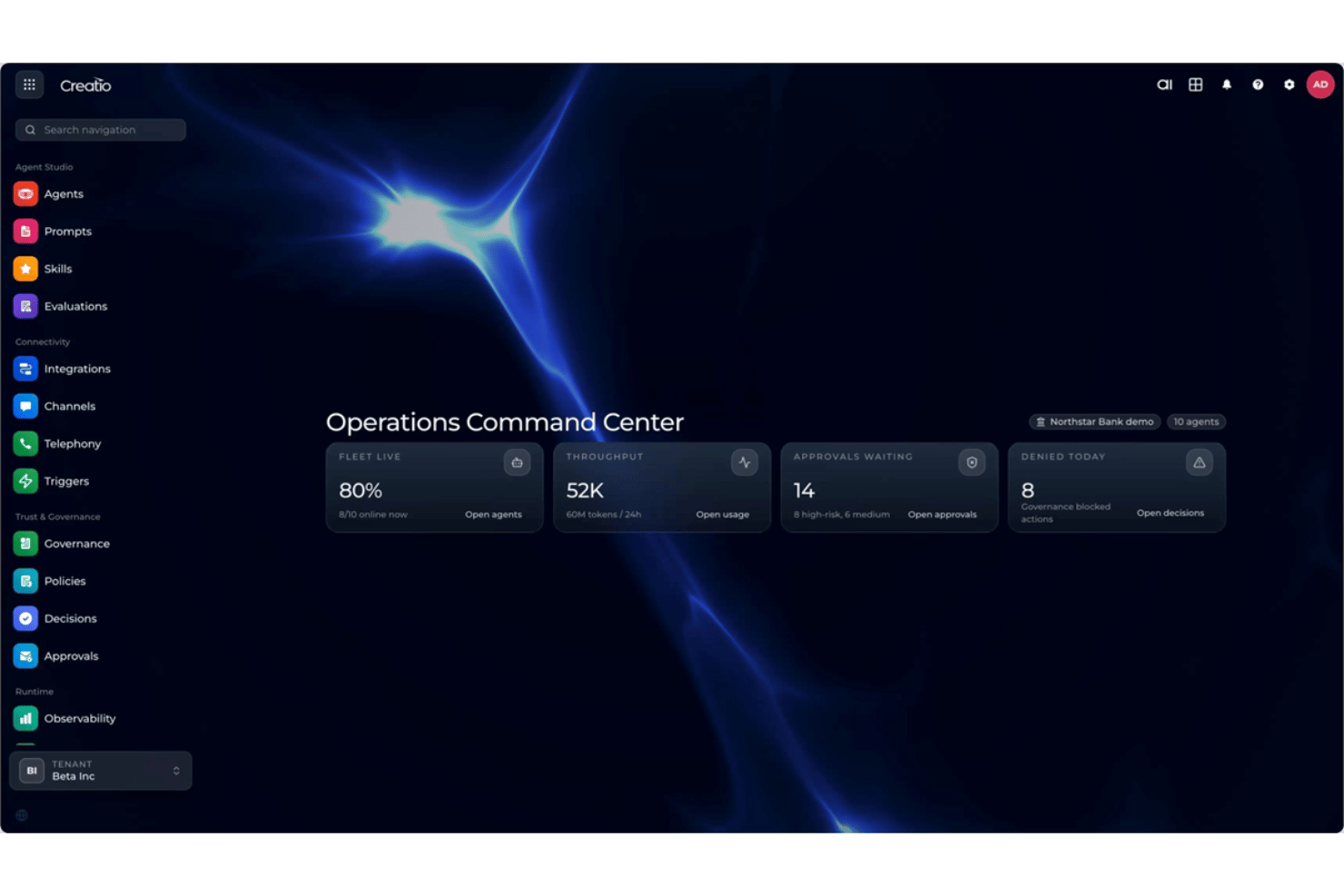
Wat gebruiksgemak betreft biedt Creatio AI Studio zakelijke en technische teams verschillende manieren om agents te creëren, van AI Twin en visueel no-codeontwerp tot SDK's voor codering. Claude Managed Agents blijft daarentegen meer op ontwikkelaars gericht, hoewel de Console visuele configuratie en tests biedt voordat teams agents via code in productieapplicaties integreren. Voor teams die willen dat zakelijke gebruikers rechtstreeks betrokken zijn bij het creëren en beheren van agents, zou ik voor Creatio kiezen, terwijl Claude geschikt is voor teams die vertrouwd zijn met agentinfrastructuur.
Creatio AI Studio vs Claude Managed Agents: Pros & Cons
Creatio AI Studio
- No-code agent designer lets teams build and deploy AI agents with less developer support
- Supports no-code and coding-based agents, giving technical and business teams more flexibility
- Built-in governance covers policies, approvals, audit trails, and human review of agent actions
- Advanced implementations may require significant configuration and integration work
- Administrators may need time to learn its broader no-code and agent management capabilities
- Its enterprise-focused feature set may be excessive for teams that only need simple AI automation
Claude Managed Agents
- Managed agent harness reduces the infrastructure teams need to build for agent loops, state, and tool execution
- Stateful sessions and scheduled deployments support long-running and recurring agent work
- Supports built-in tools, MCP connections, and managed or self-hosted execution environments
- Production implementation remains developer-oriented despite the visual Console
- Managed Agents is built for Claude models rather than offering a model-agnostic runtime
- The product remains in beta and is not currently eligible for Zero Data Retention or HIPAA BAA coverage
Best Use Cases for Creatio AI Studio and Claude Managed Agents
Creatio AI Studio
- Banking and Financial Services Creatio supports banking, credit union, insurance, and mortgage organizations with configurable AI and workflow automation for complex, regulated processes.
- Manufacturing and Distribution Manufacturing and distribution teams can use AI agents and automated workflows across operational, service, and customer-facing processes.
- Healthcare and Life Sciences Healthcare, pharma, and life sciences organizations can use configurable workflows, integrations, and governance controls across data-intensive processes.
- Telecommunications and Utilities Telecom, energy, and utility companies can automate high-volume operational and service workflows while maintaining centralized control over AI agents.
- Retail and CPG Retail and consumer goods teams can use AI-driven workflows to automate processes across customer operations, sales, and other cross-functional activities.
- High Tech and Business Services High-tech and business services organizations with complex, changing processes can use Creatio’s no-code tools and integrations to build and adapt AI-driven workflows.
Claude Managed Agents
- Software and Technology Teams Developer and platform teams can use Managed Agents for long-running technical workflows that involve code execution, files, tools, and external systems.
- Financial Services Organizations Financial services teams can build custom agents for research, reconciliation, compliance-related workflows, and other data-intensive operations.
- Customer Support Operations Technical teams can build agents that connect to business systems and handle multi-step support workflows using organizational data and external tools.
- Legal and Professional Services Organizations handling document-heavy work can build agents for research, summarization, and workflows involving large collections of files and external tools.
- Commerce and Digital Product Teams Development teams can build commerce agents that work across product data, tools, and external services using Claude Managed Agents as the runtime.
- Enterprise IT and Platform Teams Organizations with engineering resources can use managed or self-hosted sandboxes for long-running agent workloads that need tighter control over tools, files, and network access.
Wie zou Creatio AI Studio moeten gebruiken en wie Claude Managed Agents?
Als je op zoek bent naar een AI-productiviteitstool die zakelijke gebruikers, technische teams en AI-agents samenbrengt in dezelfde workflowomgeving, is Creatio AI Studio waarschijnlijk een goede keuze. Het is geschikt voor middelgrote en grote organisaties die AI-tweelingen en het creëren van agents zonder code, agents die met code zijn gemaakt, meerdere AI-modellen, open integraties, omnichannelinteractie, centraal beheer en menselijk toezicht binnen complexe bedrijfsprocessen nodig hebben.
Als je team daarentegen door ontwikkelaars aangestuurde agents bouwt voor langdurige, statusbehoudende of geplande werkzaamheden, kunnen Claude Managed Agents beter aansluiten op jullie behoeften. Het is geschikt voor technische teams die willen dat Anthropic een groot deel van de runtime-infrastructuur van de agents beheert, terwijl ze controle houden over tools, machtigingen, MCP-verbindingen en beheerde of zelf gehoste uitvoeringsomgevingen. Teams moeten ook rekening houden met de huidige bètastatus.
Differences Between Creatio AI Studio and Claude Managed Agents
| Creatio AI Studio | Claude Managed Agents | |
|---|---|---|
| AI Model Flexibility | Uses an open architecture that supports OpenAI, Google, Anthropic, and other model strategies without tying teams to one provider. | Managed Agents is purpose-built for Claude models rather than operating as a model-agnostic agent runtime. |
| Agent Creation Path | Combines AI Twin’s conversational creation, visual no-code agent design, workflow agents, and coding SDKs within one governed environment. | Uses a developer-oriented platform with visual Console configuration plus APIs and SDKs for production applications. |
| Deployment Model | Supports AWS and Azure regions plus on-premises deployment options within the broader Creatio platform. | Supports Anthropic-managed or self-hosted sandboxes for tool execution while Claude and orchestration remain part of Anthropic’s platform. |
| Omnichannel Reach | Supports agents across voice, chat, video, SMS, email, and other business interaction channels within the Creatio environment. | Provides agent runtime and outputs while teams build or integrate the user-facing interface rather than receiving an equivalent omnichannel layer. |
| Pricing Structure | Combines platform access with separate AI packages and AI Credits, with Unlimited supporting broader organization-wide scaling. | Charges for Claude model usage plus active session runtime and applicable optional services. |
| Visit Creatio AI StudioOpens new window | Read Claude Managed Agents ReviewOpens new window |
Similarities Between Creatio AI Studio and Claude Managed Agents
| Business Context | Both let agents work with organizational data and workflow context so their outputs and actions reflect relevant business information. |
|---|---|
| Enterprise Connectivity | Both connect agents with external applications, business data, and tools through APIs, MCP, and other integration methods. |
| Monitoring & Traceability | Both provide visibility into agent activity and execution history, helping teams review behavior, troubleshoot issues, and understand workflow outcomes. |
| Multi-Step Execution | Both support agents that can carry out multi-step workflows, coordinate several actions, and continue working toward a defined outcome. |
| Reusable Agent Configuration | Both let teams define reusable agents with specific instructions, capabilities, and connected resources for repeated workflow use. |
| Visit Creatio AI StudioOpens new window Read Claude Managed Agents ReviewOpens new window | |