



Confluence versus Jira: Vergelijking en deskundige beoordelingen voor 2026



Confluence offers a collaborative workspace for your team, fostering seamless knowledge sharing and project tracking. Jira, on the other hand, is designed to help you manage and track issues and tasks with precision.
While both tools are integral to project management, Confluence excels in documentation and collaboration, whereas Jira is a powerhouse for issue tracking and agile project management. In this article, you'll find a detailed comparison of these tools, exploring their features, pros and cons, and pricing, to help you choose the right project management software for your needs.
Confluence vs. Jira: An Overview
Confluence





Jira


Waarom u onze softwareaanbevelingen kunt vertrouwen
Ons team test en beoordeelt software sinds 2012. Als projectmanagers weten we zelf hoe moeilijk — en belangrijk — het is om de juiste software te kiezen.
Voor deze gids hebben we tools geëvalueerd met behulp van praktijktests en onafhankelijk onderzoek, waarbij we tools beoordeelden aan de hand van onze selectiecriteria. We putten ook uit inzichten van vooraanstaande experts uit de branche en praktiserende projectmanagementprofessionals.
Onze reviews weerspiegelen ons menselijke redactionele oordeel, geen verkooppraatje.
Deskundige beoordelaars:
Confluence vs. Jira Pricing Comparison
| Confluence | Jira | |
|---|---|---|
| Free Trial | Free trial + free plan available | Free plan available |
| Pricing | From $5.42/user/month | From $8.48/user/month |
Prijzen en verborgen kosten van Confluence versus Jira
Prijzen van Confluence zijn gebaseerd op een getrapt abonnementsmodel, waarbij de kosten stijgen naarmate je team groeit, met mogelijke extra kosten voor aanvullende functies of opslagruimte.
Prijzen van Jira volgen een vergelijkbare getrapte structuur, waarbij de kosten afhankelijk zijn van het aantal gebruikers en er mogelijk extra kosten zijn voor premiumfuncties.
Om de juiste tool voor je budget te kiezen, moet je rekening houden met de specifieke functies die je team nodig heeft en de totale eigendomskosten beoordelen, inclusief eventuele verborgen kosten. Test verschillende abonnementsniveaus en uitbreidingen om te bepalen welke het beste bij je werkproces en groeiplannen past.
Confluence vs. Jira Feature Comparison
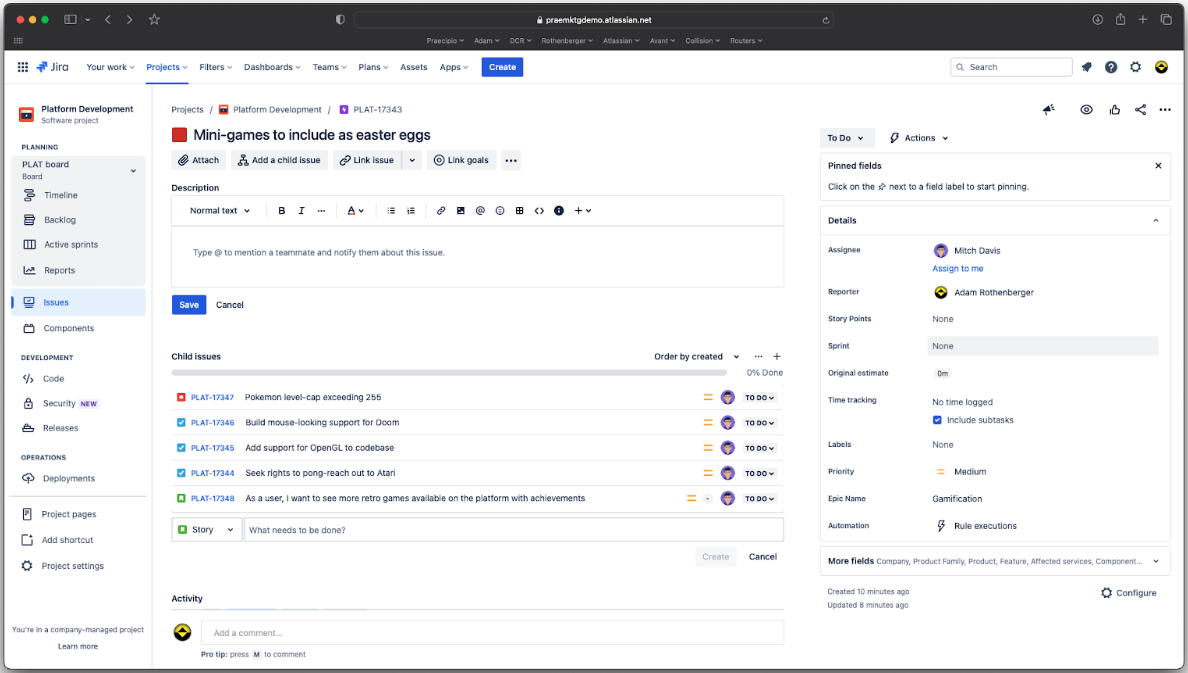
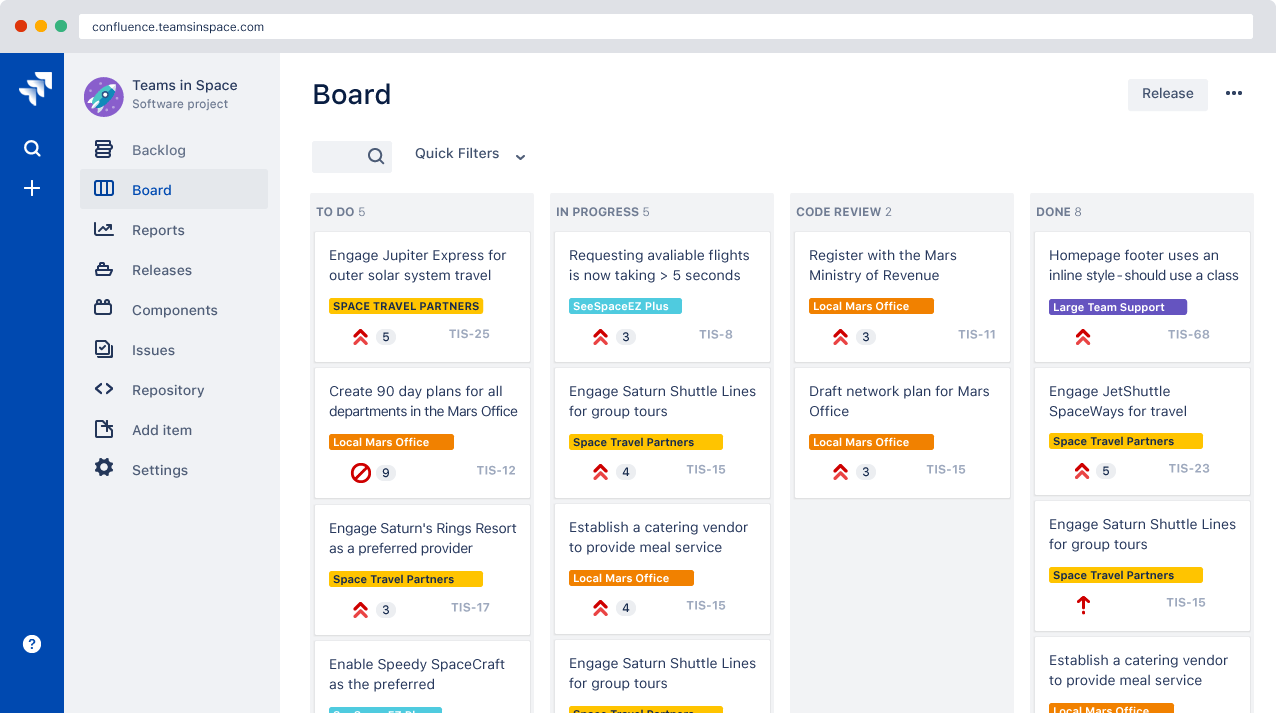
Met de gezamenlijke bewerkingsfunctie van Confluence kunnen teams projectdocumentatie in realtime maken en delen, waardoor deze tool bijzonder geschikt is voor brainstormsessies. De agile borden van Jira helpen bij het beheren van complexe projecten door taken en sprints efficiënt bij te houden, wat vooral nuttig is voor ontwikkelingsteams.
Elke tool heeft zijn sterke punten: Confluence is ontwikkeld voor samenwerking, terwijl Jira is ontworpen voor taakbeheer.
| Confluence | Jira | |
|---|---|---|
| API | ||
| Calendar Management | ||
| Data Export | ||
| Data Import | ||
| External Integrations | ||
| Gantt Charts | ||
| Multi-User | ||
| Notifications | ||
| Project Management | ||
| Task Scheduling/Tracking |
Confluence versus Jira-integraties
| Integratie | Confluence | Jira |
| Slack | ✅ | ✅ |
| Microsoft Teams | ✅ | ✅ |
| Google Drive | ✅ | ✅ |
| Trello | ✅ | ✅ |
| GitHub | ❌ | ✅ |
| Bitbucket | ✅ | ✅ |
| Dropbox | ✅ | ✅ |
| Salesforce | ❌ | ✅ |
| API | ✅ | ✅ |
| Zapier | ✅ | ✅ |
Confluence integreert met Slack om je team in realtime op de hoogte te houden van updates in documenten, wat handig is tijdens vergaderingen over de projectstatus. Hoewel zowel Confluence als Jira een breed scala aan integraties ondersteunen, is het belangrijk om te weten dat sommige integraties, zoals GitHub of Salesforce voor Confluence, externe tools zoals Zapier of apps uit de Atlassian Marketplace vereisen in plaats van native integraties te zijn.
Jira integreert met GitHub, waardoor ontwikkelingsteams codewijzigingen rechtstreeks binnen projecttaken kunnen volgen. Confluence verbetert de teamcommunicatie, terwijl Jira ontwikkelingswerkstromen ondersteunt.
Beveiliging, naleving & betrouwbaarheid van Confluence versus Jira
| Factor | Confluence | Jira |
| Gegevensprivacy | Confluence biedt opties voor gegevensresidentie, zodat je kunt kiezen waar je gegevens worden opgeslagen. | Jira biedt versleuteling van gegevens tijdens de overdracht en in rust om gevoelige informatie te beschermen. |
| Naleving van regelgeving | Confluence voldoet aan de AVG en andere internationale normen. | Jira voldoet aan SOC2 en ISO/IEC 27001 voor robuuste naleving. |
| Toegangsbeheer | Confluence biedt gedetailleerde toestemmingsinstellingen om de zichtbaarheid van content en gebruikerstoegang te beheren. | Jira biedt gedetailleerde, op rollen gebaseerde toegangscontroles om machtigingen op projectniveau en gebruikersrollen te beheren. |
Confluence en Jira bieden beide sterke beveiligingsfuncties, waaronder gedetailleerde toestemmingscontroles om toegang op pagina- of projectniveau te beheren. Hoewel Jira een breder scala aan nalevingscertificeringen omvat, ondersteunen beide tools beveiligingsnormen op ondernemingsniveau. Houd bij je beoordeling rekening met gegevensresidentie, versleuteling en de fijnmazigheid van toestemmingen om ervoor te zorgen dat het platform aansluit bij de beveiligings- en governancebehoeften van je team.
Confluence versus Jira: gebruiksgemak
| Factor | Confluence | Jira |
| Gebruikersinterface | Confluence heeft een overzichtelijke interface met intuïtieve navigatie voor samenwerking aan documentatie. | De interface van Jira is complexer en gericht op gedetailleerd taakbeheer en workflows. |
| Onboardingervaring | Confluence biedt interactieve handleidingen en sjablonen om nieuwe gebruikers vertrouwd te maken met het platform. | Jira biedt onboardingrondleidingen, maar vereist door de uitgebreide functies een steilere leercurve. |
| Ondersteuning | Confluence biedt communityforums en documentatie voor snelle hulp. | Jira biedt uitgebreide ondersteuning en gedetailleerde documentatie, evenals actieve communityforums. |
Confluence is gemakkelijk te leren dankzij de eenvoudige interface en gebruiksklare sjablonen, die documentbeheer overzichtelijk maken. Jira heeft daarentegen door zijn complexiteit een steilere leercurve, maar is zeer geschikt voor teams die geavanceerde project- en taakregistratie nodig hebben.
Confluence vs Jira: Pros & Cons
Confluence
- You can easily collaborate with your team through intuitive document sharing.
- It offers powerful search capabilities to quickly find the information you need.
- Your team can benefit from its extensive templates, saving time on setup.
- You might find its interface less visually appealing compared to other tools.
- It can be overwhelming for new users due to its extensive features.
- Your team may experience occasional performance issues with large data sets.
Jira
- Agile workflow management supports Scrum and Kanban and can improve your teams' productivity.
- Automation rules are easy to set up, which helps your team speed up their work.
- Custom filters can be created and accessed quickly, which improves your team's efficiency.
- Field names can be confusing, which might slow down your team's workflow.
- The interface can be too crowded in Scrum projects, which can make it hard for your team to navigate.
- There's a lack of resource management capabilities, which could limit your team's planning.
Best Use Cases for Confluence and Jira
Confluence
- Software development teams Your team can benefit from Confluence's strong document management features, which keep project specs and updates centralized.
- Marketing departments You can streamline campaign planning and content creation with Confluence's templates and collaboration tools.
- Educational institutions Your institution can use Confluence to support faculty collaboration and manage course materials effectively.
- Remote teams You can maintain clear communication and document sharing across distances with Confluence's online capabilities.
- Product management Your product team can track development progress and share feedback efficiently with Confluence's collaborative features.
- Non-profit organizations You can organize and manage volunteer efforts and project documentation with Confluence's easy-to-use interface.
Jira
- Software development Jira’s agile tools like Scrum and Kanban boards make it perfect for managing software projects.
- IT departments Its issue tracking capabilities help your team efficiently handle technical support and bug fixes.
- Tech startups Jira offers customization capabilities that allow your team to scale and adapt as your projects grow.
- Agile teams Sprint planning and backlog management features keep your agile processes organized and effective.
- Large enterprises Jira’s automation rules can streamline your complex workflows and improve team productivity.
- Project managers Its reporting and analytics provide insights that help you make informed decisions quickly.
Differences Between Confluence and Jira
Hieronder vind je meer informatie over wat deze tools van elkaar onderscheidt.
| Confluence | Jira | |
|---|---|---|
| Automation | Confluence has no built-in automation but connects with Jira rules. | Jira offers task rules, triggers, and updates to automate workflows. |
| Compliance | Confluence has basic permissions but limited compliance features. | Jira supports audit logs, controls, and setups for strict compliance |
| Pricing | Confluence uses a tiered subscription model based on user count and features | Jira also follows a tiered model, with additional costs for premium features and more users. |
| Scalability | Confluence scales with your team’s need for organized content. | Jira scales with complex projects and large teams handling tasks. |
| User Interface | Confluence offers a clean, intuitive interface for easy navigation and collaboration | Jira has a more complex interface tailored for detailed project management and workflows. |
| Read Confluence ReviewOpens new window | Read Jira ReviewOpens new window |
Similarities Between Confluence and Jira
Nu je weet wat hen onderscheidt, bekijken we de overeenkomsten.
| Cloud-Based | Both Confluence and Jira are cloud-based, allowing your team to access them from anywhere, enhancing remote collaboration. |
|---|---|
| Customization | Both tools offer customization features, letting you tailor dashboards and workflows to fit your team’s specific needs. |
| Integrations | Confluence and Jira both integrate with a wide range of third-party apps, enhancing their functionality within your existing tech stack |
| Security | Both platforms prioritize security with features like data encryption and access controls to protect your team’s information |
| Support | Confluence and Jira both provide extensive support through documentation, forums, and active user communities to help you solve issues quickly. |
| Read Confluence ReviewOpens new window Read Jira ReviewOpens new window | |