



Teamwork.com vs. monday.com: Confronto Esperto per il 2026



Teamwork.com offre una soluzione solida per gestire i progetti con efficienza e chiarezza. monday.com fornisce una piattaforma flessibile per organizzare il lavoro del tuo team e la collaborazione.
Sebbene entrambi gli strumenti eccellano nella gestione dei progetti, i loro approcci sono diversi: Teamwork.com si concentra sulla gestione completa delle attività, mentre monday.com punta su personalizzazione e flussi di lavoro visuali. In questo articolo troverai un confronto dettagliato di questi software di project management, esaminandone le funzionalità, i pro e i contro, i prezzi e altro ancora.
Teamwork.com vs. monday AI Workspace: An Overview
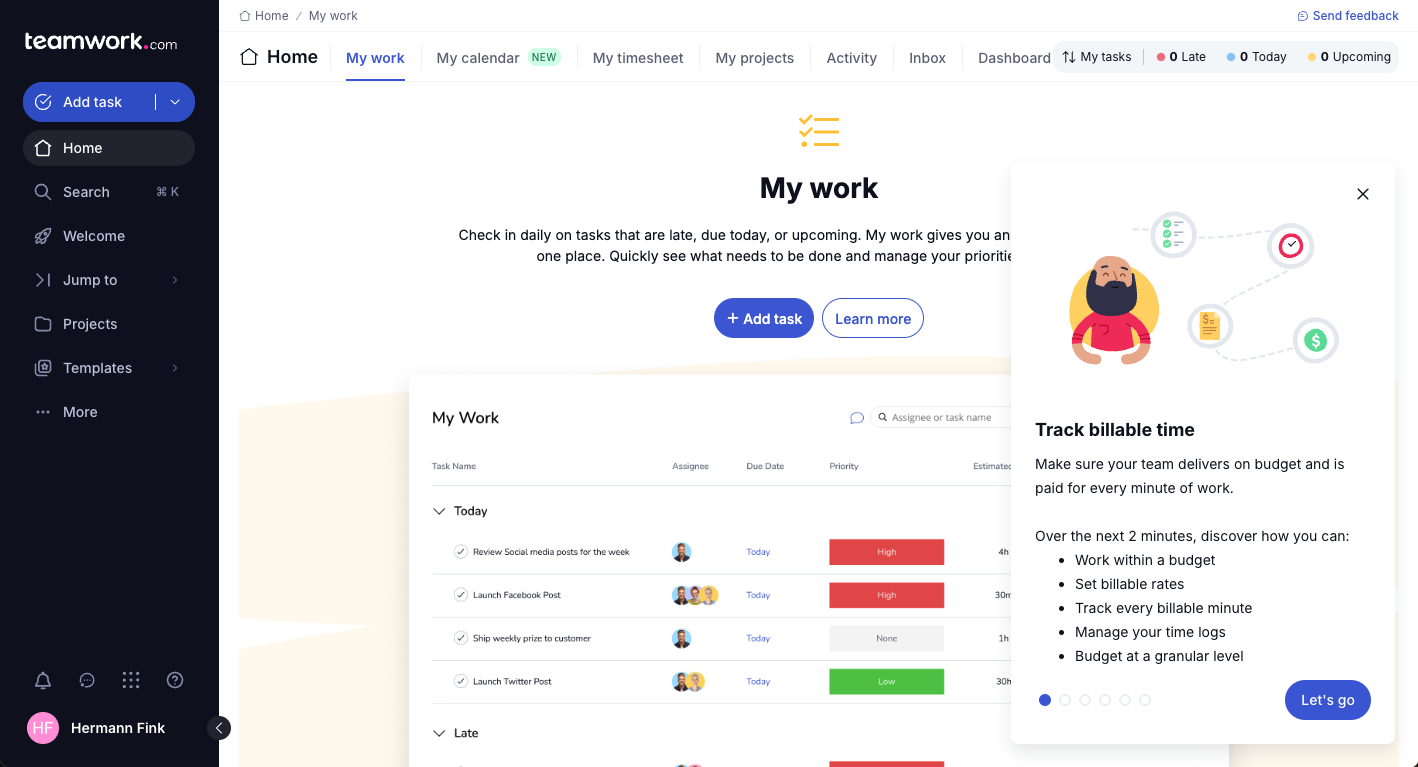
Teamwork.com


monday AI Workspace

Perché fidarsi dei nostri consigli sui software
Il nostro team testa e recensisce software dal 2012. In quanto project manager noi stessi, sappiamo quanto sia difficile — e importante — scegliere il software giusto.
Per questa guida, abbiamo valutato gli strumenti attraverso test pratici e ricerche indipendenti, assegnando un punteggio agli strumenti in base ai nostri criteri di selezione. Ci basiamo inoltre sulle competenze di leader di pensiero del settore e di professionisti attivi nella gestione dei progetti.
Le nostre recensioni riflettono il nostro giudizio editoriale umano, non un discorso di vendita.
Revisori esperti:
Teamwork.com vs. monday AI Workspace Pricing Comparison
| Teamwork.com | monday AI Workspace | |
|---|---|---|
| Free Trial | 14-day free trial | Free plan available |
| Pricing | From $9.99/user/month (billed annually) | From $9/user/month (billed annually) |
Prezzi e costi nascosti di Teamwork.com vs. monday.com
La struttura dei prezzi di Teamwork.com prevede piani a livelli che si adattano in base al numero di utenti e alle funzionalità offerte, con possibili costi aggiuntivi per opzioni premium e componenti aggiuntivi. Al contrario, la struttura dei prezzi di monday.com è basata su un modello per utente, con diversi livelli che possono includere costi nascosti per funzionalità extra o integrazioni.
Per scegliere lo strumento più adatto, valuta la dimensione del tuo team, le funzionalità necessarie e la potenziale crescita, assicurandoti che il modello di prezzo sia in linea con le esigenze di gestione dei tuoi progetti.
Teamwork.com vs. monday AI Workspace Feature Comparison
Grazie alla funzionalità di revisione di Teamwork.com, puoi gestire facilmente progetti che richiedono feedback da parte dei clienti, risultando quindi prezioso per i team creativi che si occupano di approvazioni di design. Al contrario, le capacità di automazione di monday.com sono eccellenti per ridurre le attività ripetitive, particolarmente utili in ambienti dinamici che necessitano di flussi di lavoro ottimizzati.
Mentre Teamwork.com è ideale nella gestione delle interazioni con i clienti, monday.com si distingue nell’automazione dei processi, offrendo vantaggi distinti in base alle esigenze del progetto.
| Teamwork.com | monday AI Workspace | |
|---|---|---|
| API | ||
| Batch Permissions & Access | ||
| Budgeting | ||
| Calendar Management | ||
| Collaboration Support | ||
| Contact Management | ||
| Contact Sharing | ||
| Customer Management | ||
| Dashboard | ||
| Dashboards | ||
| Data Export | ||
| Data Import | ||
| Data Visualization | ||
| Dependency Tracking | ||
| Document Sharing | ||
| Expense Tracking | ||
| External Integrations | ||
| File Sharing | ||
| Gantt Charts | ||
| Kanban Boards | ||
| Multi-User | ||
| Notifications | ||
| Project Management | ||
| Resource Management | ||
| Scheduling | ||
| Task Scheduling/Tracking | ||
| Third-Party Plugins/Add-Ons | ||
| Time Management | ||
| Travel Management | ||
| Workflow Management |
Integrazioni di Teamwork.com vs. monday.com
| Integrazione | Teamwork.com | monday.com |
|---|---|---|
| Slack | ✅ | ✅ |
| Outlook | ✅ | ✅ |
| QuickBooks | ✅ | ❌ |
| HubSpot | ✅ | ✅ |
| Google Calendar | ✅ | ✅ |
| Miro | ❌ | ✅ |
| ❌ | ✅ | |
| Clockify | ✅ | ❌ |
| API | ✅ | ✅ |
| Zapier | ✅ | ✅ |
Con l'integrazione di Teamwork.com con QuickBooks, puoi gestire in modo fluido la parte finanziaria dei tuoi progetti, fondamentale per i team che necessitano di un monitoraggio di budget preciso. L'integrazione di monday.com con Miro è invece ottima per la collaborazione visiva, ideale per i team che organizzano sessioni di brainstorming regolari.
Mentre Teamwork.com ottimizza la gestione finanziaria, monday.com favorisce la collaborazione creativa, ciascuno soddisfacendo diverse esigenze di progetto.
Teamwork.com vs. monday.com Sicurezza, Conformità & Affidabilità
| Fattore | Teamwork.com | monday.com |
|---|---|---|
| Crittografia dei dati | Crittografa i dati in transito tramite TLS e a riposo con AES-256. | Utilizza AES-256 per i dati a riposo e TLS per i dati in transito. |
| Conformità GDPR | Rispetta le linee guida GDPR e offre strumenti per l’accesso dei soggetti ai dati. | È conforme al GDPR, offrendo funzionalità di esportazione ed eliminazione dei dati. |
| Garanzia di uptime | Offre un Service Level Agreement (SLA) con uptime del 99,99% e un’infrastruttura stabile. | Fornisce un SLA di uptime del 99,9%, supportato da servizi cloud affidabili. |
| Controlli di accesso | Offre permessi basati sui ruoli per un accesso utenti sicuro. | Offre permessi personalizzabili e diversi livelli di accesso utente. |
Teamwork.com e monday.com adottano entrambi solide misure di sicurezza e conformità, differenziandosi leggermente per le garanzie di uptime e i controlli di accesso.
Per scegliere il fornitore giusto, valuta le esigenze specifiche di sicurezza della tua squadra, come la gestione dei dati e l’accesso degli utenti, e dai priorità alle funzionalità in linea con i requisiti di conformità della tua organizzazione.
Teamwork.com vs. monday.com Facilità d'Uso
| Fattore | Teamwork.com | monday.com |
|---|---|---|
| Esperienza Utente | Offre un’interfaccia pulita, basata su schede, che semplifica la navigazione. | Propone un'interfaccia vivace con drag-and-drop per un uso intuitivo. |
| Onboarding | Propone tutorial guidati e una knowledge base per i nuovi utenti. | Offre tutorial interattivi e un forum della community. |
| Processo di configurazione | Installazione semplice con modelli personalizzabili. | Configurazione rapida tramite modelli predefiniti e automazioni. |
| Supporto | Assistenza 24/7 tramite chat ed e-mail. | Assistenza multicanale, inclusi webinar e live chat. |
monday.com è intuitivo grazie all’interfaccia drag-and-drop, che facilita chi ragiona visivamente, anche se la grafica colorata può risultare eccessiva. Teamwork.com invece offre un’interfaccia lineare con ottimo supporto, anche se la struttura a schede può sembrare datata ad alcuni utenti.
Teamwork.com vs monday AI Workspace: Pros & Cons
Teamwork.com
- You can manage workloads and resources effectively with its robust features.
- Teamwork's collaboration tools, like chat and message boards, keep your team connected.
- The platform's Academy offers useful videos to help you use it effectively.
- You might find the interface overwhelming with its many features.
- Some users feel the mobile app could be more intuitive.
- The learning curve can be steep for new users without prior experience.
monday AI Workspace
- The interface is easy to use, with simple drag and drop timeline and charting mechanics.
- You can create forms that live within your project as a view.
- There is a long list of supported integrations
- The Gantt view isn't useful for building a project.
- Recurring tasks are considered automations and limited to higher tier plans.
- There is a steep learning curve for beginners.
Best Use Cases for Teamwork.com and monday AI Workspace
Teamwork.com
- Creative Agencies Teamwork.com supports your agency with tools for managing client projects and tracking billable hours.
- Remote Teams Use Teamwork to stay connected with your team through its communication and collaboration features.
- Marketing Departments Manage your marketing campaigns with task lists, calendars, and resource allocation.
- Consulting Firms Track time and manage multiple client projects efficiently with Teamwork’s time tracking capabilities.
- Event Planning Organize events with ease using project timelines and task dependencies.
- Product Development Coordinate product launches with detailed task management and team collaboration features.
monday AI Workspace
- Creative departments With features like collaborative docs and a proofing screen, creative teams can improve feedback loops and increase delivery speeds.
- Marketing teams Its customizable dashboards and automation features let you track campaigns and workflows efficiently.
- Content creation monday.com's file management and commenting capabilities let teams manage media files and improve collaboration.
- Event planners The platform’s timeline views and easy collaboration features make managing multiple events straightforward.
- Product development You can track progress and updates across teams to maintain alignment and meet deadlines.
- Remote teams With collaborative features and real-time updates, remote teams can maintain productivity and communication effortlessly.
Chi dovrebbe usare Teamwork.com e monday.com?
A mio parere, Teamwork.com si adatta molto bene ai project manager nel settore creativo che necessitano di una forte collaborazione con il cliente e di una gestione efficace dei task. Per ambienti tecnologici dinamici o startup, i flussi di lavoro personalizzabili e visivi di monday.com rispondono meglio alle esigenze dei team dinamici.
Chi ha limiti di budget può preferire la trasparenza dei prezzi di Teamwork.com, mentre i team che necessitano di tante integrazioni e automazioni potrebbero trovare la flessibilità di monday.com adeguata al costo.
Differences Between Teamwork.com and monday AI Workspace
| Teamwork.com | monday AI Workspace | |
|---|---|---|
| Automation | Provides basic automation for task management. | Excels with customizable automations for streamlining tasks. |
| Client Collaboration | Includes proofing and feedback tools ideal for creative teams. | Focuses more on internal collaboration with visual workflows. |
| Integrations | Offers integrations, such as QuickBooks, for financial management. | Connects with Miro for visual collaboration and brainstorming. |
| Pricing | Uses tiered plans that scale with features and users. | Offers a per-user pricing model with tiered feature access. |
| User Interface | Has a clean, tab-based interface for straightforward navigation. | Features a colorful, drag-and-drop interface for visual ease. |
| Read Teamwork.com ReviewOpens new window | Visit monday AI WorkspaceOpens new window |
Similarities Between Teamwork.com and monday AI Workspace
| Collaboration | They provide tools to enhance team communication and collaboration. Teamwork.com includes messaging features, and monday.com offers comment threads on tasks for seamless interactions. |
|---|---|
| Customizable Workflows | The solutions allow you to customize workflows to fit your project needs. Teamwork.com offers templates for repeatable processes, while monday.com lets you build visual workflows from scratch. |
| Integrations | The platforms support integrations to extend their capabilities. Teamwork.com connects with tools like Slack for communication, and monday.com integrates with Zapier for broader connectivity. |
| Reporting | Each tool includes reporting features to monitor project performance. Teamwork.com provides detailed reports on workload, and monday.com offers visual dashboards for quick insights. |
| Task Management | Teamwork.com and monday.com offer robust task management features, letting you assign tasks, set deadlines, and track progress. Teamwork.com provides detailed task lists, while monday.com uses visual boards to manage tasks. |
| Read Teamwork.com ReviewOpens new window Visit monday AI WorkspaceOpens new window | |