



Teamwork.com vs. Asana: Confronto e Recensioni degli Esperti per il 2026



Teamwork.com offre una piattaforma solida per gestire i progetti in modo efficiente, fungendo da unica fonte di verità per semplificare i dati di progetto, mentre Asana propone un'interfaccia intuitiva per la gestione delle attività e la collaborazione tra i membri del team.
Entrambi gli strumenti supportano flussi di lavoro organizzati, ma differiscono nelle opzioni di personalizzazione e integrazione, il che può influenzare la tua scelta.
In questo articolo troverai un confronto dettagliato tra questi software, esplorando le loro funzionalità, i pro e contro, i prezzi e tanti consigli per la scelta del software di project management più adatto.
Teamwork.com vs. Asana: An Overview
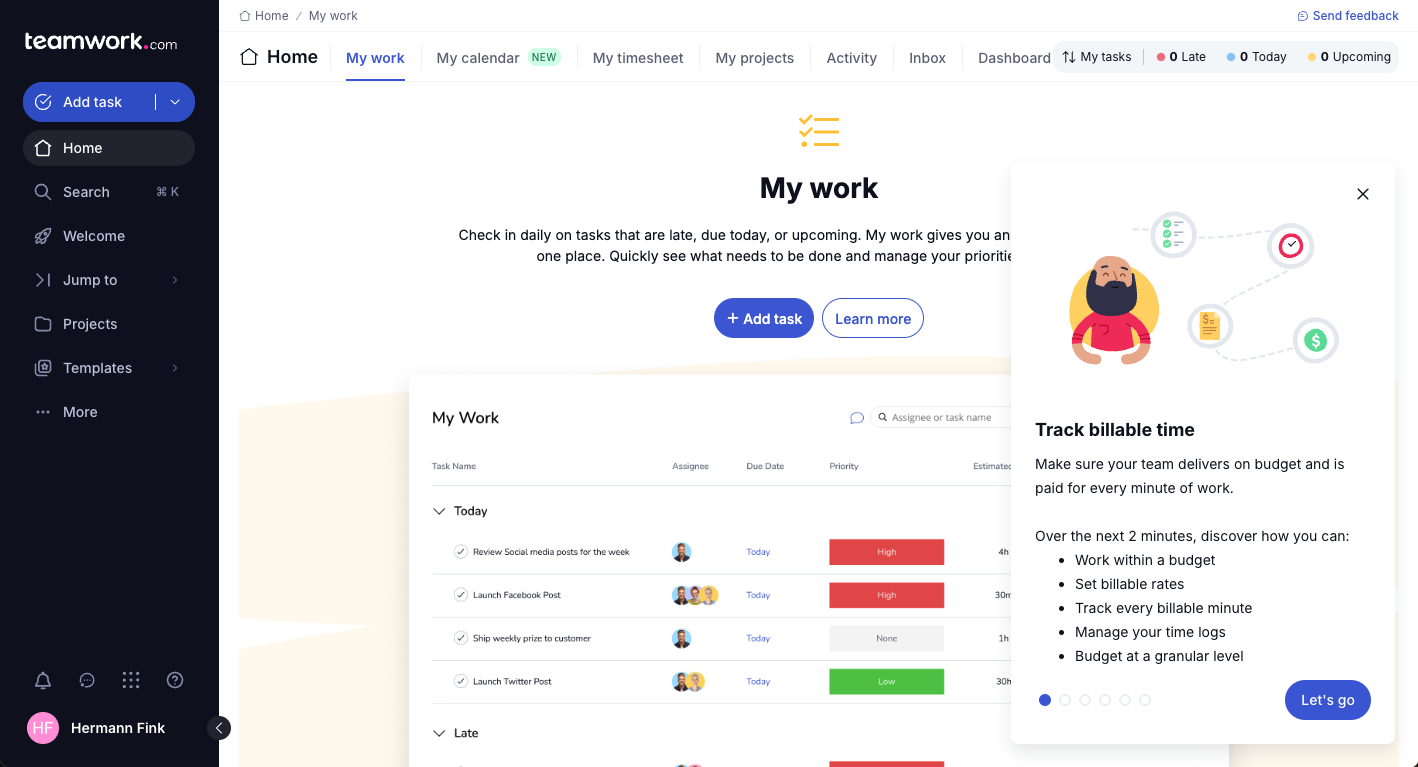
Teamwork.com


Asana

Perché fidarsi dei nostri consigli sui software
Il nostro team testa e recensisce software dal 2012. In quanto project manager noi stessi, sappiamo quanto sia difficile — e importante — scegliere il software giusto.
Per questa guida, abbiamo valutato gli strumenti attraverso test pratici e ricerche indipendenti, assegnando un punteggio agli strumenti in base ai nostri criteri di selezione. Ci basiamo inoltre sulle competenze di leader di pensiero del settore e di professionisti attivi nella gestione dei progetti.
Le nostre recensioni riflettono il nostro giudizio editoriale umano, non un discorso di vendita.
Teamwork.com vs. Asana Pricing Comparison
| Teamwork.com | Asana | |
|---|---|---|
| Free Trial | Free demo + 14-day trial available | Free plan available |
| Pricing | From $9.99/user/month (billed annually) | From $10.99/user/month (billed annually) |
I prezzi di Teamwork.com offrono piani a livelli pensati per diversi tipi di team e necessità, con eventuali costi extra per funzionalità premium e utenti aggiuntivi.
I prezzi di Asana seguono un modello a livelli simile, con un piano base gratuito e costi aggiuntivi per funzionalità avanzate e accesso esteso.
Per scegliere il fornitore più adatto alle tue esigenze, valuta come ogni struttura tariffaria si adatta ai piani di crescita del tuo team e alle funzionalità richieste, considerando anche eventuali costi nascosti che potrebbero influenzare il tuo budget.
Teamwork.com vs. Asana Feature Comparison
Teamwork.com offre una funzione di revisione che semplifica la gestione dei progetti che richiedono feedback regolari dai clienti, particolarmente utile per le agenzie creative.
La gestione delle attività di Asana supporta la responsabilità del team e una visibilità chiara sui progetti, aiutando i gruppi a rispettare scadenze strette.
Teamwork.com si distingue per la collaborazione col cliente, mentre Asana eccelle nell’organizzazione delle attività, sotto-attività e dipendenze per mantenere la trasparenza.
| Teamwork.com | Asana | |
|---|---|---|
| API | ||
| Batch Permissions & Access | ||
| Budgeting | ||
| Calendar Management | ||
| Collaboration Support | ||
| Contact Management | ||
| Contact Sharing | ||
| Customer Management | ||
| Dashboard | ||
| Dashboards | ||
| Data Export | ||
| Data Import | ||
| Data Visualization | ||
| Dependency Tracking | ||
| Document Sharing | ||
| Expense Tracking | ||
| External Integrations | ||
| File Sharing | ||
| Gantt Charts | ||
| Kanban Boards | ||
| Multi-User | ||
| Notifications | ||
| Project Management | ||
| Resource Management | ||
| Scheduling | ||
| Task Scheduling/Tracking | ||
| Third-Party Plugins/Add-Ons | ||
| Time Management | ||
| Travel Management | ||
| Workflow Management |
Teamwork.com vs. Asana Integrazioni
| Integrazione | Teamwork.com | Asana |
| Slack | ✅ | ✅ |
| Google Drive | ✅ | ✅ |
| Dropbox | ✅ | ✅ |
| HubSpot | ✅ | ❌ |
| QuickBooks | ✅ | ❌ |
| Outlook | ✅ | ✅ |
| Clockify | ✅ | ❌ |
| Toggl | ✅ | ✅ |
| API | ✅ | ✅ |
| Zapier | ✅ | ✅ |
Teamwork.com si integra con QuickBooks per aiutarti a monitorare le spese di progetto e gestire le fatture, supportando il controllo finanziario nei progetti con budget limitati.
Asana si collega con Slack per una comunicazione in tempo reale, tenendo aggiornato il tuo team sui cambiamenti di progetto senza cambiare piattaforma. Entrambi gli strumenti offrono integrazioni che rispondono a bisogni differenti: Teamwork.com si concentra sulla gestione finanziaria, mentre Asana punta a rafforzare la comunicazione tra i membri del team.
Teamwork.com vs. Asana Sicurezza, Conformità & Affidabilità
| Fattore | Teamwork.com | Asana |
| Privacy dei dati | Teamwork.com utilizza un trattamento dei dati conforme al GDPR, garantendo la protezione dei dati degli utenti. | Asana aderisce agli standard GDPR, offrendo solide misure di protezione dei dati. |
| Crittografia | Teamwork.com cripta i dati sia in transito che a riposo utilizzando protocolli avanzati. | Asana applica la crittografia ai dati in transito e a riposo per salvaguardare le informazioni. |
| Conformità normativa | Teamwork.com è conforme alla certificazione ISO 27001, garantendo elevati standard di sicurezza. | Asana mantiene la conformità allo standard SOC 2 Type II, con particolare attenzione alla sicurezza e privacy dei dati. |
| Affidabilità | Teamwork.com vanta un uptime del 99,99%, assicurando accesso e prestazioni costanti. | Asana offre un servizio affidabile con tempi di inattività minimi, supportando flussi di lavoro senza interruzioni. |
Teamwork.com e Asana forniscono entrambi solidi livelli di sicurezza e conformità, ma Teamwork.com si distingue per la sua certificazione ISO 27001.
Nella comparazione tra i due, considera gli standard di conformità e i metodi di crittografia offerti, e quanto questi si allineino alle esigenze di sicurezza della tua organizzazione e alle aspettative dei clienti.
Teamwork.com vs. Asana Facilità d'uso
| Fattore | Teamwork.com | Asana |
| Interfaccia utente | Teamwork.com offre una dashboard personalizzabile, permettendo agli utenti di adattare le viste alle specifiche esigenze dei progetti. | Asana propone un'interfaccia pulita e intuitiva con funzionalità drag-and-drop per una gestione semplice delle attività. |
| Esperienza di onboarding | Teamwork.com fornisce guide e tutorial completi per aiutarti ad iniziare rapidamente. | L'onboarding di Asana è semplificato tramite tutorial interattivi e un processo di configurazione user-friendly. |
| Procedura di configurazione | Teamwork.com ha un setup diretto, con modelli di progetto per diverse tipologie di progetto. | Asana semplifica l'impostazione con modelli di progetto preconfigurati e guide rapide per vari flussi di lavoro. |
| Supporto | Teamwork.com include un supporto clienti reattivo tramite chat ed email. | Asana offre ampissime risorse di supporto, tra cui webinar e un forum della community. |
Teamwork.com è particolarmente adatto a chi cerca un'interfaccia personalizzabile e un supporto su misura, anche se inizialmente potrebbe risultare complesso. Asana propone un design intuitivo e un onboarding semplice, ma questa semplicità può limitare la personalizzazione avanzata.
Teamwork.com vs Asana: Pros & Cons
Teamwork.com
- You can manage workloads and resources effectively with its robust features.
- Teamwork's collaboration tools, like chat and message boards, keep your team connected.
- The platform's Academy offers useful videos to help you use it effectively.
- You might find the interface overwhelming with its many features.
- Some users feel the mobile app could be more intuitive.
- The learning curve can be steep for new users without prior experience.
Asana
- You can easily track tasks and deadlines using Asana's intuitive interface.
- Asana's collaboration tools help your team communicate effectively in real-time.
- There are extensive customization options so you can tailor workflows and views to your specific needs.
- The reporting capabilities are somewhat basic, which may not satisfy teams needing detailed analytics.
- It can feel overwhelming if your team is small or your projects are simple.
- You might find the notification system a bit excessive or distracting.
Best Use Cases for Teamwork.com and Asana
Teamwork.com
- Creative Agencies Teamwork.com supports your agency with tools for managing client projects and tracking billable hours.
- Remote Teams Use Teamwork to stay connected with your team through its communication and collaboration features.
- Marketing Departments Manage your marketing campaigns with task lists, calendars, and resource allocation.
- Consulting Firms Track time and manage multiple client projects efficiently with Teamwork’s time tracking capabilities.
- Event Planning Organize events with ease using project timelines and task dependencies.
- Product Development Coordinate product launches with detailed task management and team collaboration features.
Asana
- Creative agencies You can manage creative workflows and client projects with Asana’s visual boards and timeline features.
- Tech startups You can coordinate product development and team tasks using Asana’s real-time updates and goal-setting tools.
- Marketing teams You can plan campaigns and track progress with Asana’s clear timelines and task comments.
- Nonprofits Asana lets you manage volunteer tasks, events, and fundraising efforts with clear task assignments and timelines.
- Remote teams You can collaborate effectively with Asana’s real-time updates and communication features.
- Event planners You can organize events easily with Asana’s task management and timeline visualization features.
Differences Between Teamwork.com and Asana
Mentre Teamwork.com e Asana presentano molte analogie, si differenziano per alcuni aspetti chiave, tra cui:
| Teamwork.com | Asana | |
|---|---|---|
| Automation | Teamwork.com supports task automation with integrations like Zapier. | Asana offers built-in automation features for recurring tasks and workflows |
| Client Collaboration | Teamwork.com offers proofing features for detailed client feedback. | Asana lacks built-in proofing tools, focusing more on internal task management. |
| Customization | Teamwork.com provides customizable dashboards and views for tailored project management. | Asana offers limited customization, focusing on simplicity and ease of use. |
| Pricing | Teamwork.com uses tiered pricing with potential extra costs for premium features. | Asana also uses tiered pricing but includes a free basic plan with limited features. |
| User Interface | Teamwork.com has a customizable interface that may require a learning curve. | Asana features a clean, intuitive interface designed for immediate use. |
| Read Teamwork.com ReviewOpens new window | Read Asana ReviewOpens new window |
Similarities Between Teamwork.com and Asana
Teamwork.com e Asana condividono le stesse funzionalità di base per la gestione dei progetti, oltre ad alcune funzionalità avanzate tra cui:
| Collaboration | Teamwork.com and Asana both support team collaboration with shared workspaces and communication tools. Teamwork.com offers more client-facing features, while Asana focuses on internal task coordination and team management. |
|---|---|
| Integrations | Both platforms support a wide range of integrations, including Slack and Google Drive, to enable efficient collaboration. Teamwork.com offers more options for financial tool integrations, while Asana focuses more on communication and productivity tools. |
| Mobile Usability | Both provide mobile apps for managing projects on the go. Teamwork.com offers more customization features, while Asana prioritizes ease of use with a clean, simple interface. |
| Support | Both platforms provide support resources, including tutorials and guides. Teamwork.com offers personalized support, while Asana gives users access to active community forums for peer assistance. |
| Task Management | Teamwork.com and Asana both excel in task management, allowing you to assign tasks, create subtasks, set deadlines, and monitor progress. Teamwork.com includes advanced tracking capabilities, while Asana offers a simpler, more intuitive approach designed for ease of use. |
| Read Teamwork.com ReviewOpens new window Read Asana ReviewOpens new window | |