


Recensione automazione Zapier 2026: Ne vale la pena?



Zapier is an AI orchestration platform that connects over 8,000 apps and lets you build sophisticated, multi-step workflows. It's ideal for teams across enterprise organizations—for example, marketing, RevOps, and IT—that need to turn fragmented tech stacks into intelligent, connected workflows with AI at the core.
In this article, you'll find an overview of Zapier's features, pros and cons, use cases, and pricing.
Zapier Evaluation Summary

- From $19.99/month (billed annually)
- 14-day free trial and free plan available
Perché fidarsi dei nostri consigli sui software
Il nostro team testa e recensisce software dal 2012. In quanto project manager noi stessi, sappiamo quanto sia difficile — e importante — scegliere il software giusto.
Per questa guida, abbiamo valutato gli strumenti attraverso test pratici e ricerche indipendenti, assegnando un punteggio agli strumenti in base ai nostri criteri di selezione. Ci basiamo inoltre sulle competenze di leader di pensiero del settore e di professionisti attivi nella gestione dei progetti.
Le nostre recensioni riflettono il nostro giudizio editoriale umano, non un discorso di vendita.
Revisori esperti:
Zapier Overview
Zapier stands out in building AI-powered systems—particularly because it allows you to create sophisticated, multi-step workflows without code. Zapier's built-in Copilot also makes it easy to create workflows using natural language. Its large ecosystem of app integrations, including 500+ AI apps, and no-code implementation make it a strong choice for innovators at companies of all sizes.
If you're new to automating workflows, Zapier's Free plan offers a great path to getting started. Once you're ready to build more complex workflows, Zapier's paid plans offer advanced features that let you take full advantage of Zapier's AI orchestration platform.

pros
-
Accessible to everyone across an organization, including non-technical users.
-
8,000+ app integrations, including 500+ AI apps.
-
Built-in database, forms builder, and process mapping.
cons
-
Free plan is limited to two-step workflows.
-
Dedicated email support available on paid plans only.
-
No mobile app available.
Is Zapier Right For Your Needs?
Who Would be a Good Fit for Zapier?
Zapier is a great fit if you want to cut manual work and keep your tools connected without hassle. It helps RevOps stay aligned across revenue data, supports sales teams that need faster deal cycles, and gives marketing a smoother way to run multi-channel campaigns. HR and IT teams use it to simplify onboarding, ticketing, and internal operations, while e-commerce teams rely on it to streamline orders and customer support. Even social media managers benefit from easier posting and reporting across platforms. If you want cleaner workflows and more time back in your day, Zapier is built for you.
-
RevOps Teams
Integrate CRM, billing, and analytics platforms to maintain data accuracy and visibility across revenue funnels.
-
Sales Teams
Automate lead capture, CRM updates, and follow-ups so you can accelerate deal cycles and keep your pipeline moving.
-
Marketing Departments
Unify campaign data and automate omnichannel marketing operations at scale
-
HR Departments
Streamline recruitment, onboarding, and employee engagement workflows so you can deliver a smoother employee experience.
-
IT Departments
Centralize workflows and eliminate fragmented automations to simplify compliance and app management. You can also automate ticket creation, route issues, and trigger real-time alerts for faster incident response and administrative efficiency.
-
E-Commerce Teams
Automate complex order management and customer service workflows, saving time and reducing manual errors.
Who Would be a Bad Fit for Zapier?
If your work involves heavy volumes, deep customization, two-way data integrity, strict budgets or offline needs, Zapier might feel limiting or costly rather than helpful. If you expect simple, low-volume, straightforward tasks and standard app integrations, then it might still make sense — otherwise you may want to consider more powerful or flexible automation tools.
-
Deep Custom Coders
Zapier offers Webhooks, Functions, and AI assistance, but it’s still a no-code platform at its core. If your workflows require heavy scripting, complex code execution, or engineering-level customization, you may find Zapier limiting.
-
Organizations with High Automation Volume
Even with million-task tiers, Zapier charges per task. Companies running constant, high-frequency automations may hit task ceilings fast and face escalating costs.
-
Ultra-Low-Latency Processing Needs
Zapier is fast, but triggers still run on standard polling or app-sent events. If your operations rely on split-second execution, you might want native event-driven systems instead.
-
Strict On-Premise or Offline Automation Needs
Zapier is entirely cloud-based. If your environment requires offline workflows, local servers, or internal-only systems, Zapier won’t meet your access requirements.
-
Highly-Regulated Enterprises
Although Zapier offers SOC 2, SOC 3, GDPR, SSO, SCIM, and VPC options on Enterprise, some industries still require full on-prem control or internally hosted automation. If external cloud infrastructure is prohibited, Zapier isn’t a fit. It also isn't HIPAA-compliant, so it shouldn't be used to handle protected information, like in healthcare settings.
-
Reliance on Unsupported, Niche, Legacy, or Highly Specialized Apps
Zapier connects to 8,000 apps, but if your core tools are proprietary or off-cloud, you might not get the coverage you need without custom API work.
La nostra metodologia di recensione
Come testiamo e valutiamo gli strumenti
Abbiamo passato anni a costruire, perfezionare e migliorare il nostro sistema di test e valutazione dei software. Il nostro schema è progettato per cogliere tutte le sfumature della scelta di un software e ciò che rende uno strumento efficace, ponendo l’accento sugli aspetti critici del processo decisionale. Qui sotto puoi vedere esattamente come funziona il nostro test e la nostra valutazione su sette criteri. Questo ci consente di offrire una valutazione imparziale del software basata su funzionalità fondamentali, caratteristiche distintive, facilità d’uso, onboarding, assistenza clienti, integrazioni, recensioni dei clienti e rapporto qualità-prezzo.
Funzionalità principali (25% della valutazione finale)
Il punto di partenza della nostra valutazione è sempre la funzionalità principale dello strumento. Ha le funzioni e le caratteristiche di base che un utente si aspetterebbe di trovare? Alcune di queste funzionalità sono limitate ai piani premium? In sostanza, ci aspettiamo che uno strumento sia all’altezza delle capacità di base dei suoi concorrenti.
Caratteristiche distintive (25% della valutazione finale)
Successivamente valutiamo le funzioni distintive, non comuni, che vanno oltre la semplice funzionalità di base normalmente presente in strumenti simili. Un punteggio elevato riflette funzionalità specializzate o uniche che rendono il prodotto più rapido, efficiente o che offrono un valore aggiunto all’utente. Valutiamo anche la facilità d’integrazione con altri strumenti comunemente presenti nel tech stack per ampliare la funzionalità e l’utilità del software. Gli strumenti che offrono molte integrazioni native, connessioni di terze parti e accesso API per creare integrazioni personalizzate ottengono il punteggio più alto.
Facilità d’uso (10% della valutazione finale)
Consideriamo quanto sia semplice e rapido eseguire le attività definite dalla funzionalità principale tramite lo strumento. Gli strumenti con un punteggio elevato sono ben progettati, intuitivi, offrono app mobili, propongono modelli e rendono semplici anche le attività più complesse.
Onboarding (10% della valutazione finale)
Sappiamo quanto sia importante che il team adotti rapidamente una nuova piattaforma, quindi valutiamo quanto sia facile imparare e utilizzare uno strumento con poca formazione. Valutiamo quanto velocemente un membro del team possa iniziare a utilizzare lo strumento senza esperienza. Le soluzioni con un punteggio alto indicano che è richiesto poco o nessun supporto.
Supporto clienti (10% della valutazione finale)
Recensiamo la rapidità e semplicità nel trovare aiuto tramite telefono, chat live o knowledge base. Gli strumenti e le aziende che forniscono supporto in tempo reale ottengono i punteggi migliori, mentre i chatbot i più bassi.
Recensioni dei clienti (10% della valutazione finale)
Oltre ai nostri test e valutazioni, consideriamo il net promoter score dei clienti attuali e passati. Valutiamo la loro probabilità, qualora fosse possibile, di scegliere nuovamente lo strumento per le sue funzionalità di base. Un software con un punteggio elevato riflette un alto net promoter score da clienti attuali o passati.
Rapporto qualità-prezzo (10% della valutazione finale)
Infine, prendendo in considerazione tutti gli altri criteri, analizziamo il prezzo medio dei piani base confrontandolo con le funzionalità principali e valutando il valore degli altri criteri. I software che offrono di più, spendendo meno, ottengono punteggi più alti.
Core Features
Multi-step Workflows
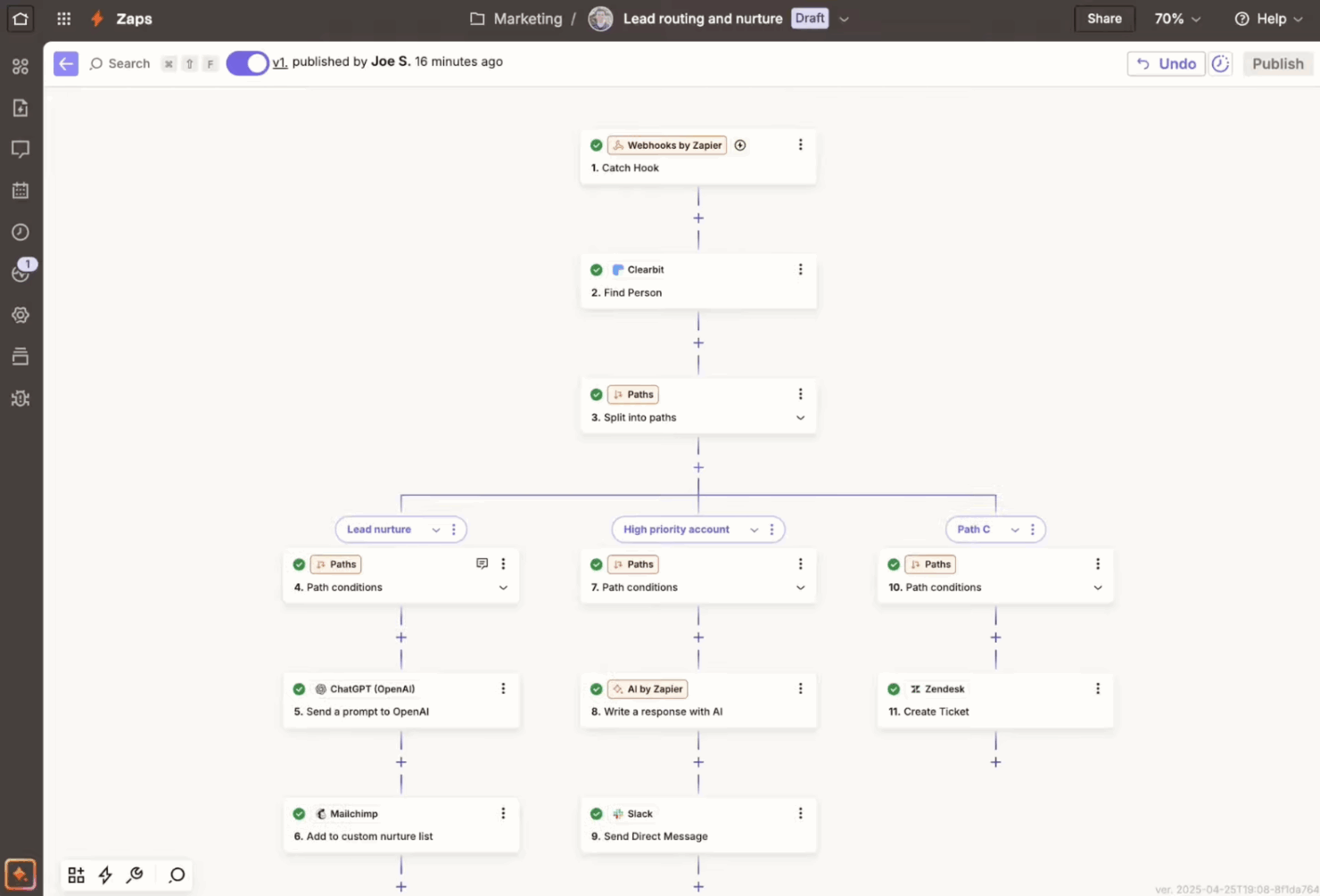
You can chain multiple actions in a single Zap (what Zapier calls their automated workflows), creating complex workflows with ease. This feature allows for streamlined processes like updating CRM entries and notifying teams simultaneously.
Customizable Templates
Start automating quickly with pre-built templates that suit common business needs. You can tweak these templates to match your specific workflow, saving setup time.
Conditional Logic
Use filters and paths to create dynamic workflows that adapt to different conditions. This lets you route tasks based on specific criteria, like sending AI-generated emails only when a sale exceeds a certain amount.
Enterprise Security, Governance, and Controls
Enterprise-level controls, including granular permissions, version control, and audit logs, let you deploy automation at scale across teams. SOC 2 (Type II), SOC 3, GDPR, and CCPA compliance, along with features like SSO, and built-in approval workflows ensure security, visibility, and governance.
Standout Features
App Integrations
Zapier is the most connected AI orchestration platform – it connects with over 8,000 apps and AI tools out-of-the-box, making it easy to build and scale production workflows across your organization.
AI Tools
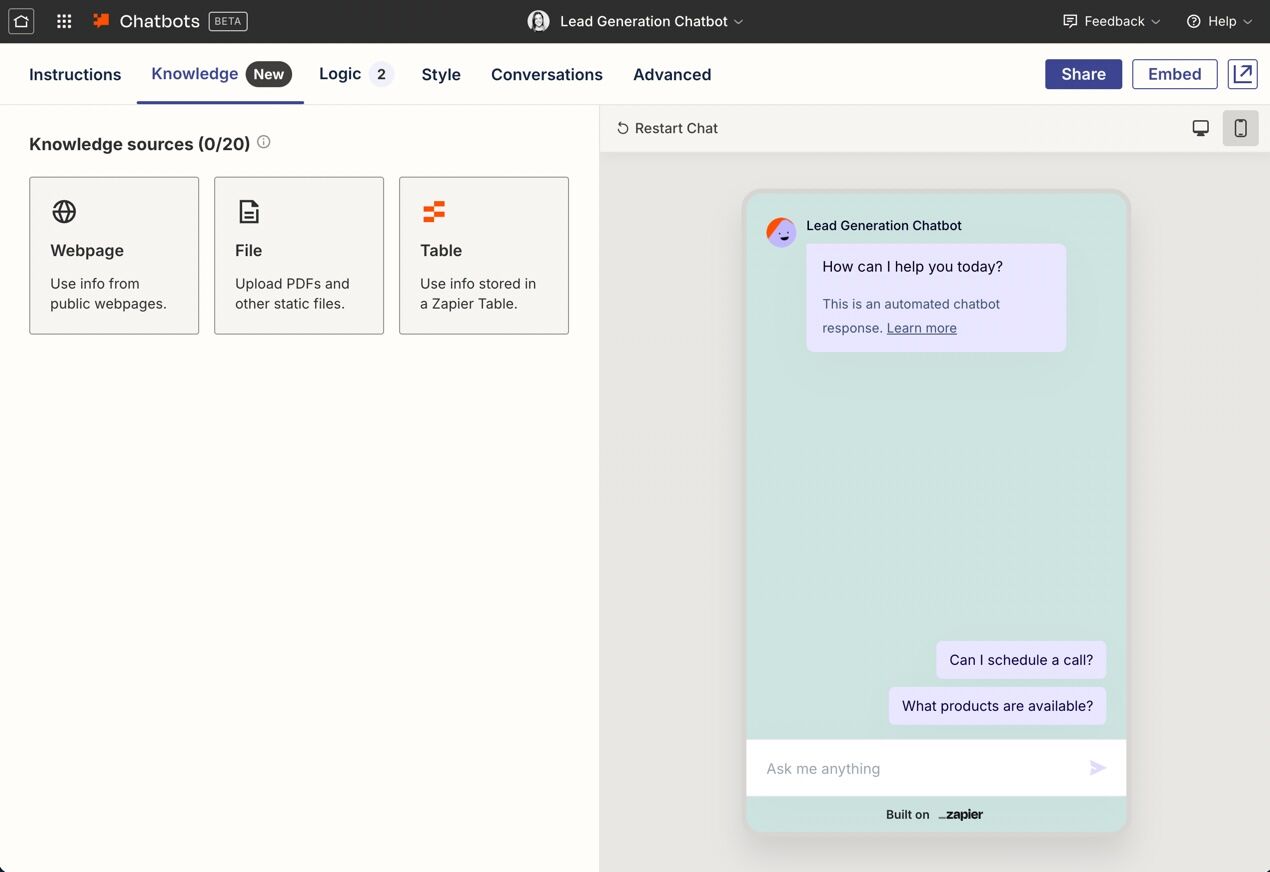
With Zapier's wide range of built-in AI tools, you can layer in AI throughout every step of your Zap. For example, you can use Zapier Copilot to build workflows using natural language, add AI steps into your deterministic workflows, trigger a Zapier Chatbot to respond to customer inquiries, or trigger a Zapier Agent to handle tasks autonomously.
Built-in Database and Form Builder
You can use Zapier Tables (a no-code database) and Zapier Forms (a flexible form and webpage builder) to build complete solutions—for example, you can create forms to capture leads and store that data in a table.
Ease of Use
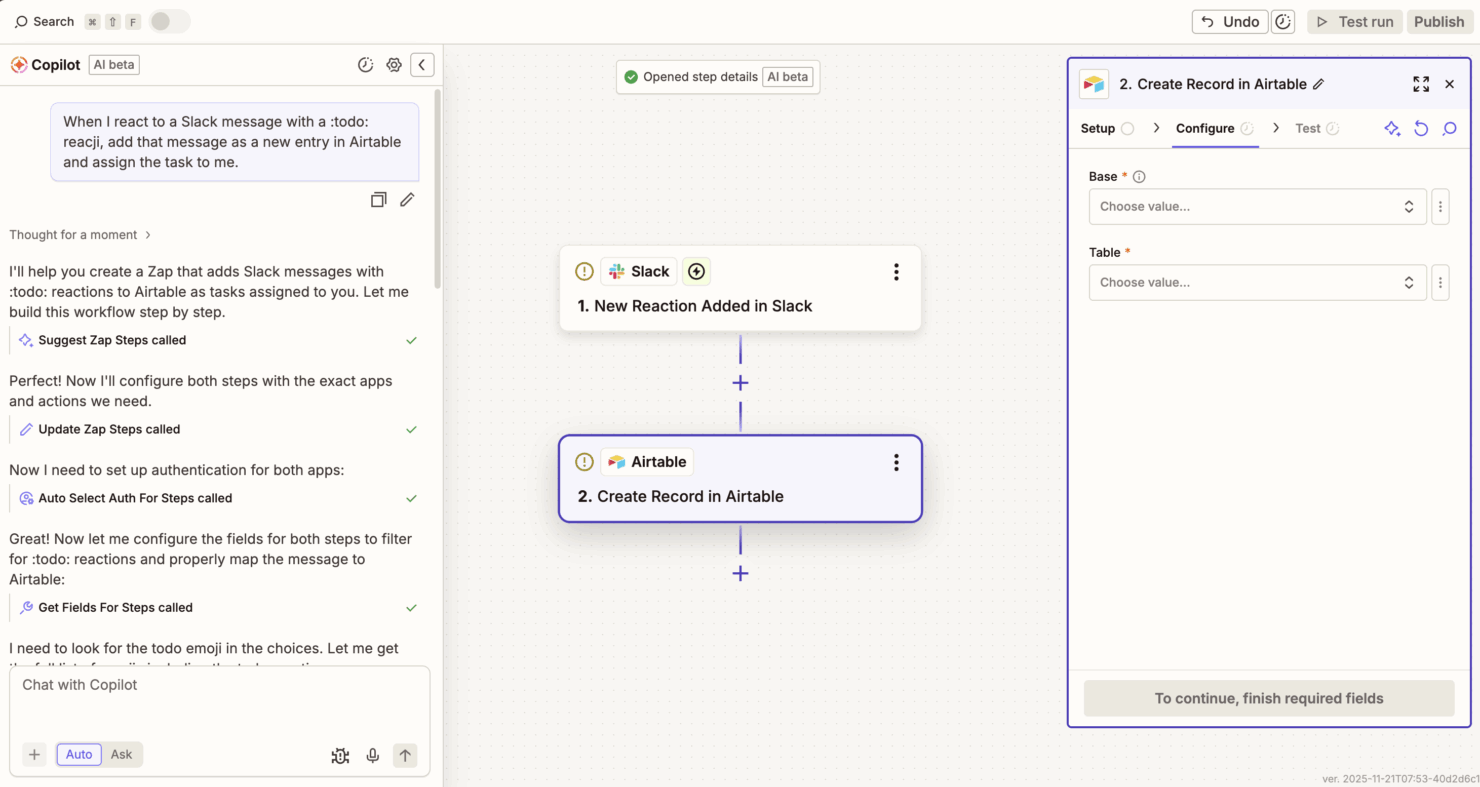
Zapier makes it easy to design, deploy, and scale powerful automations across your business without needing to call in the engineering team for support. You can use Zapier Copilot to build automated workflows using natural language—no coding required. From there, you can optimize your workflows by dragging and dropping them in Canvas (Zapier's visual diagramming tool), then turn them into automations with one click. There's also a large library of workflow templates spanning a wide range of departments and use cases to help jumpstart your build.
Onboarding
Zapier offers various forms of support, including step-by-step tutorials and guides, to help get your team up and running quickly. Zapier Copilot also acts as an AI building partner that can suggest department-specific workflows, ways to optimize existing ones, and even create them for you. And with Zapier Enterprise, you can work directly with a dedicated technical account manager for an even faster, tailored implementation.

Customer Support
Zapier provides a layered support system designed to meet the needs of different users and plan levels. The Help Center offers extensive documentation and troubleshooting guides, complemented by an active user community where people can exchange ideas and solutions.
For direct assistance, paying users can also reach Zapier’s support team through email, with faster response times and live chat available on higher-tier plans. Enterprise customers also have access to dedicated account management and priority support.
Overall, Zapier’s approach to customer support emphasizes scalable, self-serve resources backed by responsive and comprehensive human assistance as usage grows.

Integrations
Zapier connects with over 8,000 apps, including Google Sheets, Slack, Notion, Google Drive, Mailchimp, HubSpot, Stripe, Airtable, Typeform, OpenAI, Discord, Trello, and Discord.

Value for Money
Zapier pricing offers strong value for teams that want powerful automations without the development and self-hosting costs. Its tiered plans make it easy to start small and scale as your needs grow—from the Free plan, which allows teams to start building right away, to advanced tiers that unlock more complex features and higher task limits. For most teams, the time and efficiency gains more than offset the cost.
- Free: Unlimited Zaps, Tables, and Interfaces, but Zaps are limited to two-step workflows.
- Professional: Advanced features like conditional logic, multi-step Zaps, and unlimited premium app connections.
- Team: Shared Zaps and folders and access to premium support.
- Enterprise: Enterprise-grade features, including advanced admin permissions and app controls, with priority support.

Zapier Specs
- API
- Approval Workflows
- Batch Permissions & Access
- Compliance Tracking
- Contact Management
- Custom Reports
- Dashboard
- Data Export
- Data Import
- Data Visualization
- Document Management
- External Integrations
- Inventory Tracking
- Marketing Automation
- Notifications
- Process Modeling
- Process Reporting
- Project Management
- Roadmapping
- Sales Automation
- Supplier Management
- Third-Party Plugins/Add-Ons
- Workflow Management
Zapier FAQs
Is Zapier free forever?
How hard is Zapier to learn to use?
Is Zapier enterprise-ready?
Is Zapier safe and secure?
Is Zapier GDPR compliant?
Zapier Company Overview & History
Zapier is a US-based software company that builds tools to help you and your team automate workflows and connect different web apps without coding. It’s headquartered in San Francisco, California—and though it’s based there, Zapier has operated as a fully remote company since its beginning. As of recent data, Zapier has around 1,200 employees across many countries. The company remains privately held, with a valuation (as of 2021) of around US $5 billion. Zapier is known for enabling thousands of apps to work together seamlessly—and many businesses you know rely on it.
Zapier Major Milestones
- 2011: Zapier began as a side-project in Columbia, Missouri by founders Wade Foster, Bryan Helmig, and Mike Knoop.
- 2012: The company officially launched after joining the startup accelerator program Y Combinator.
- October 2012: Zapier raised its first seed funding round of US $1.2 million.
- 2014: Zapier turned profitable.
- 2021: Zapier achieved a valuation of around US $5 billion after a secondary share sale involving investors like Sequoia Capital.
- 2024: Zapier reportedly generated about US $310 million in annual revenue and has over 100,000 paying customers.
E ora?
Vuoi connetterti con altri project manager digitali per condividere risorse e le migliori pratiche?
Unisciti alla nostra community di membri e ottieni l'accesso a oltre 100 modelli, esempi e casi studio e connettiti con centinaia di altri project manager digitali su Slack.