


Recensione del software di gestione delle attività Microsoft To Do per il 2026



Microsoft To Do is a task management software for individuals and small teams who need a simple way to manage tasks, to-do lists, and daily priorities. I'd consider it over Todoist if your team already runs on Microsoft 365, as the native connections to Outlook, Teams, and Planner give you an integrated workflow that Todoist and other task management tools can't replicate without workarounds.
Microsoft To Do Evaluation Summary
- Free to use
- Free-forever plan available
Perché fidarsi dei nostri consigli sui software
Il nostro team testa e recensisce software dal 2012. In quanto project manager noi stessi, sappiamo quanto sia difficile — e importante — scegliere il software giusto.
Per questa guida, abbiamo valutato gli strumenti attraverso test pratici e ricerche indipendenti, assegnando un punteggio agli strumenti in base ai nostri criteri di selezione. Ci basiamo inoltre sulle competenze di leader di pensiero del settore e di professionisti attivi nella gestione dei progetti.
Le nostre recensioni riflettono il nostro giudizio editoriale umano, non un discorso di vendita.
Revisori esperti:
Microsoft To Do Overview
In my opinion, Microsoft To Do is a task management tool that works especially well for teams already using Microsoft 365. Its strength lies in its simplicity and smooth integration with other Microsoft apps—such as Outlook, Teams, and Planner—that offers a unified experience across tools.
That said, the platform may not meet the needs of users seeking advanced project management features like Gantt charts, Kanban boards, or complex automations. It’s best suited for small to mid-sized teams looking for a simple, cost-effective option that fits into the Microsoft ecosystem.

pros
-
Intuitive interface for easy task organization
-
Seamless Microsoft 365 integration
-
Cross-device synchronization
cons
-
Limited advanced project management features
-
Basic customization options
-
Not ideal for large teams or detailed tracking
-

Smartsheet
Visit WebsiteThis rating combines scores from multiple user review sites to reflect overall customer sentiment about the product.4.5 -
Celoxis
Visit WebsiteThis rating combines scores from multiple user review sites to reflect overall customer sentiment about the product.4.5 -
Accelo
Visit WebsiteThis rating combines scores from multiple user review sites to reflect overall customer sentiment about the product.4.4





La nostra metodologia di recensione
Come testiamo e valutiamo gli strumenti
Abbiamo passato anni a costruire, perfezionare e migliorare il nostro sistema di test e valutazione dei software. Il nostro schema è progettato per cogliere tutte le sfumature della scelta di un software e ciò che rende uno strumento efficace, ponendo l’accento sugli aspetti critici del processo decisionale. Qui sotto puoi vedere esattamente come funziona il nostro test e la nostra valutazione su sette criteri. Questo ci consente di offrire una valutazione imparziale del software basata su funzionalità fondamentali, caratteristiche distintive, facilità d’uso, onboarding, assistenza clienti, integrazioni, recensioni dei clienti e rapporto qualità-prezzo.
Funzionalità principali (25% della valutazione finale)
Il punto di partenza della nostra valutazione è sempre la funzionalità principale dello strumento. Ha le funzioni e le caratteristiche di base che un utente si aspetterebbe di trovare? Alcune di queste funzionalità sono limitate ai piani premium? In sostanza, ci aspettiamo che uno strumento sia all’altezza delle capacità di base dei suoi concorrenti.
Caratteristiche distintive (25% della valutazione finale)
Successivamente valutiamo le funzioni distintive, non comuni, che vanno oltre la semplice funzionalità di base normalmente presente in strumenti simili. Un punteggio elevato riflette funzionalità specializzate o uniche che rendono il prodotto più rapido, efficiente o che offrono un valore aggiunto all’utente. Valutiamo anche la facilità d’integrazione con altri strumenti comunemente presenti nel tech stack per ampliare la funzionalità e l’utilità del software. Gli strumenti che offrono molte integrazioni native, connessioni di terze parti e accesso API per creare integrazioni personalizzate ottengono il punteggio più alto.
Facilità d’uso (10% della valutazione finale)
Consideriamo quanto sia semplice e rapido eseguire le attività definite dalla funzionalità principale tramite lo strumento. Gli strumenti con un punteggio elevato sono ben progettati, intuitivi, offrono app mobili, propongono modelli e rendono semplici anche le attività più complesse.
Onboarding (10% della valutazione finale)
Sappiamo quanto sia importante che il team adotti rapidamente una nuova piattaforma, quindi valutiamo quanto sia facile imparare e utilizzare uno strumento con poca formazione. Valutiamo quanto velocemente un membro del team possa iniziare a utilizzare lo strumento senza esperienza. Le soluzioni con un punteggio alto indicano che è richiesto poco o nessun supporto.
Supporto clienti (10% della valutazione finale)
Recensiamo la rapidità e semplicità nel trovare aiuto tramite telefono, chat live o knowledge base. Gli strumenti e le aziende che forniscono supporto in tempo reale ottengono i punteggi migliori, mentre i chatbot i più bassi.
Recensioni dei clienti (10% della valutazione finale)
Oltre ai nostri test e valutazioni, consideriamo il net promoter score dei clienti attuali e passati. Valutiamo la loro probabilità, qualora fosse possibile, di scegliere nuovamente lo strumento per le sue funzionalità di base. Un software con un punteggio elevato riflette un alto net promoter score da clienti attuali o passati.
Rapporto qualità-prezzo (10% della valutazione finale)
Infine, prendendo in considerazione tutti gli altri criteri, analizziamo il prezzo medio dei piani base confrontandolo con le funzionalità principali e valutando il valore degli altri criteri. I software che offrono di più, spendendo meno, ottengono punteggi più alti.
Core Features
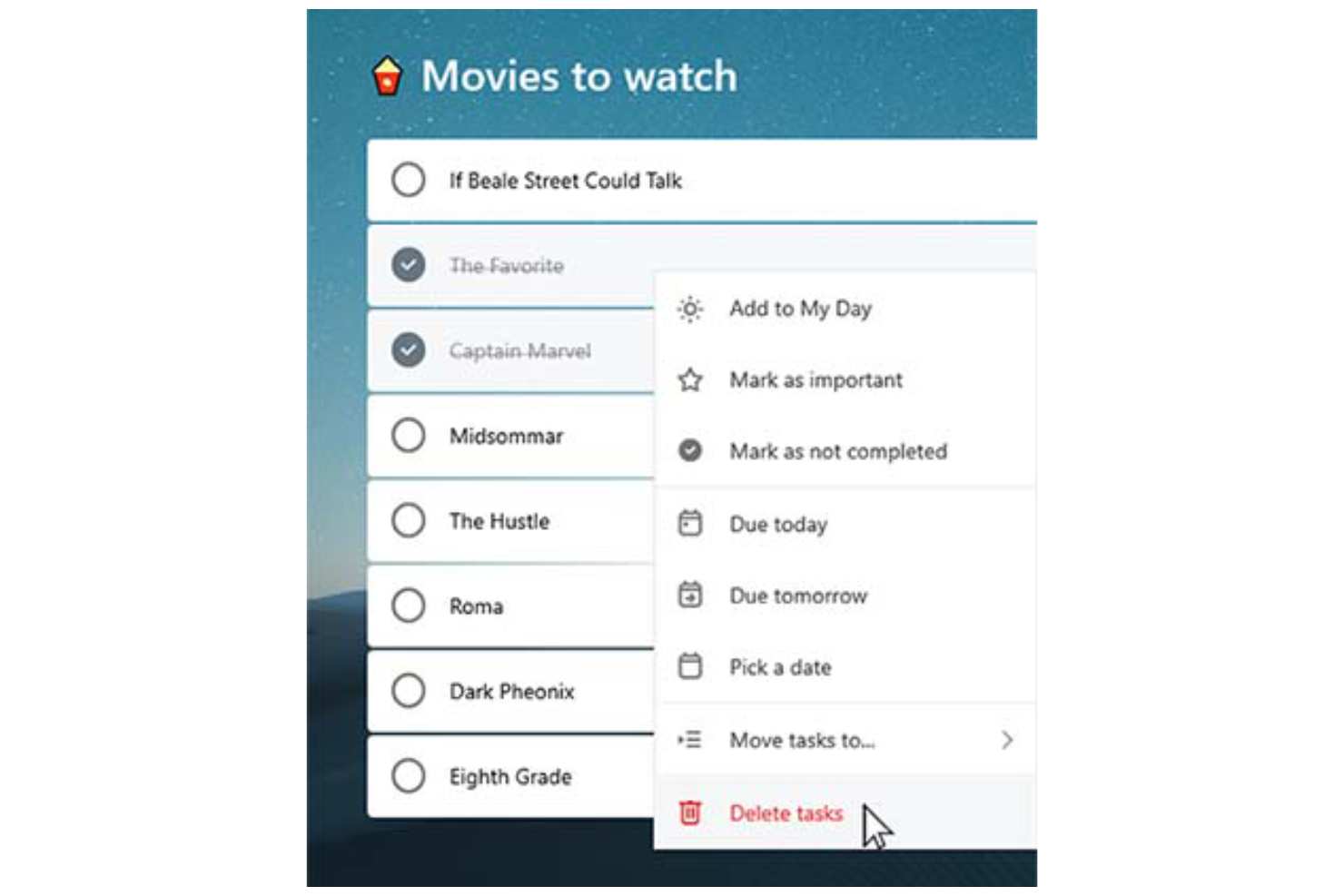
Task lists: You can create tasks, break them into smaller subtasks (called “steps”) and arrange them into organized to-do lists, making it easy to categorize, prioritize, and track various aspects of your professional or personal tasks.
Due dates: Set deadlines for each task to ensure timely completion. Due dates appear across your devices and sync with Outlook, which can help you manage schedules and meet project timelines consistently.
Reminders: You can set time-based reminders for tasks, so you never miss an important deadline. These notifications are designed to keep your team on-track and avoid last-minute rushes.
Recurring tasks: Schedule tasks to repeat at customizable intervals (daily, weekly, monthly, etc.). This is perfect for repetitive work like weekly reports, follow-ups, or administrative tasks.
Custom themes: You can personalize your task lists by applying different background themes and colors, making your workspace more visually appealing and easier to organize.
Priority levels: Assign priority tags (Important or Normal) to tasks. The “Important” tag adds the task to the "Important" smart list, helping you focus on high-priority work and better manage your workload.
Ease of Use
Microsoft To Do stands out with its clean, user-friendly interface that simplifies task management for you and your team. Features like drag-and-drop organization make it easy to rearrange tasks and update priorities on the fly.
The system’s integration with Microsoft 365 also enhances accessibility, allowing you to manage tasks across desktop (Mac or Windows), web, and mobile devices (including Android, iPhone, iPad, and Apple Watch). The mobile to-do list app, available on iOS and Android, ensures you can stay organized and productive wherever you are.
For simple and efficient task management, Microsoft To Do is a reliable choice.

Microsoft To Do Specs
- API
- Batch Permissions & Access
- Budgeting
- Calendar Management
- Collaboration Support
- Contact Management
- Contact Sharing
- Customer Management
- Dashboard
- Dashboards
- Data Export
- Data Import
- Data Visualization
- Dependency Tracking
- Document Sharing
- Expense Tracking
- External Integrations
- File Sharing
- Gantt Charts
- Kanban Boards
- Multi-User
- Notifications
- Project Management
- Resource Management
- Scheduling
- Task Scheduling/Tracking
- Third-Party Plugins/Add-Ons
- Time Management
- Travel Management
- Workflow Management
Alternatives to Microsoft To Do



Domande frequenti su Microsoft To Do
Come gestisce Microsoft To Do la sicurezza dei dati?
Microsoft To Do si basa sull'infrastruttura di sicurezza di Microsoft 365, garantendo protezioni di livello aziendale. I tuoi dati sono protetti utilizzando protocolli di crittografia standard del settore, inclusa la crittografia dei dati sia a riposo sia in transito. Le attività e le altre informazioni degli utenti vengono memorizzate nei data center Microsoft distribuiti a livello globale, certificati per soddisfare standard internazionali di conformità come ISO/IEC 27001, SOC 1, 2 e 3 e GDPR.
Inoltre, Microsoft To Do supporta l'autenticazione a più fattori (MFA) e il controllo degli accessi basato sui ruoli come parte dell'ambiente più ampio dell'account Microsoft.
Posso usare Microsoft To Do offline?
Puoi utilizzare Microsoft To Do offline per visualizzare e modificare le tue attività. Le modifiche effettuate verranno sincronizzate automaticamente su tutti i tuoi dispositivi non appena tornerai online, mantenendo tutto aggiornato.
Microsoft To Do supporta la collaborazione nei team?
Microsoft To Do consente una collaborazione di base tra i membri del team tramite elenchi di attività condivisi. Puoi invitare altri a partecipare a una lista, consentendo a tutti di visualizzare, aggiungere, completare e modificare le attività. È quindi uno strumento utile per una semplice coordinazione tra piccoli team o all'interno dei dipartimenti per gestire responsabilità condivise o pianificare checklist.
Tuttavia, Microsoft To Do non include funzionalità avanzate di collaborazione come commenti alle attività, monitoraggio delle attività, co-editing in tempo reale o permessi basati sui ruoli. Per una collaborazione più strutturata su progetti—come pianificazione di sprint, condivisione di documenti o chat di team—i team potrebbero preferire strumenti di produttività integrati come Microsoft Planner, Trello o Asana.
Come si integra Microsoft To Do con le altre app Microsoft?
Microsoft To Do si integra con altre applicazioni Microsoft come Outlook e Teams. Puoi sincronizzare le attività da email e eventi del calendario di Outlook, aiutandoti a mantenere tutto organizzato in un unico posto e migliorando la produttività complessiva.
Posso personalizzare la visualizzazione delle attività in Microsoft To Do?
Microsoft To Do offre una personalizzazione limitata delle visualizzazioni delle attività. Puoi ordinare le attività per data di scadenza, importanza o data di aggiunta, ma le opzioni di personalizzazione oltre a queste sono minime. È progettato per mantenere la semplicità e aiutarti a gestire le attività in modo efficiente.
Esiste un'app mobile per Microsoft To Do?
Sì, Microsoft To Do offre un'app mobile sia per dispositivi iOS che Android. L'app si sincronizza automaticamente con la versione web e desktop attraverso il tuo account Microsoft, garantendo che le tue liste di attività e gli aggiornamenti siano accessibili su tutte le piattaforme in tempo reale.
Con l'app mobile, puoi creare, modificare e organizzare nuove attività, impostare promemoria e segnare gli elementi come completati ovunque tu sia, per rimanere sempre organizzato e produttivo.
Posso importare attività da altre app in Microsoft To Do?
Sì, puoi importare attività in Microsoft To Do, soprattutto da Outlook e altri strumenti dell'ecosistema Microsoft. Le attività presenti in Outlook Tasks vengono sincronizzate automaticamente con Microsoft To Do se usi lo stesso account Microsoft. L'importazione di attività da app di terze parti, come Todoist o TickTick, di solito richiede l'inserimento manuale oppure l'utilizzo di strumenti di terze parti come Zapier o Microsoft Power Automate per automatizzare il processo di migrazione.
Se stai passando da un'app che offre funzionalità di esportazione, puoi esportare le attività su un file CSV e inserirle manualmente o attraverso uno script in To Do, ma non è prevista una funzione nativa di importazione in blocco di file CSV o JSON.
Panoramica e Storia di Microsoft To Do
Microsoft To Do è un'applicazione di gestione delle attività basata su cloud sviluppata da Microsoft, con sede a Redmond, Washington. L'app è stata lanciata ufficialmente nell'aprile 2017 come successore di Wunderlist, acquisita da Microsoft nel giugno 2015 dalla startup berlinese 6Wunderkinder.
Come parte della suite Microsoft 365, si integra con servizi come Outlook per supportare la produttività. L'app consente agli utenti di gestire le attività su diversi dispositivi, offrendo un'esperienza coerente e connessa.
Principali traguardi di Microsoft To Do
- 2015: Microsoft acquisisce Wunderlist.
- 2017: Microsoft To Do viene lanciato come successore di Wunderlist.
- 2019: Un importante restyling rende Microsoft To Do più simile all'interfaccia di Wunderlist.
- 2020: Microsoft interrompe ufficialmente Wunderlist per concentrarsi su Microsoft To Do.
E adesso?
Vuoi entrare in contatto con altri project manager digitali per condividere risorse e migliori pratiche? Unisciti alla nostra community di membri e ottieni l'accesso a oltre 100 modelli, esempi e campioni, e connettiti con centinaia di altri project manager digitali su Slack.