



monday dev vs. Smartsheet: Confronto Esperto per il 2026



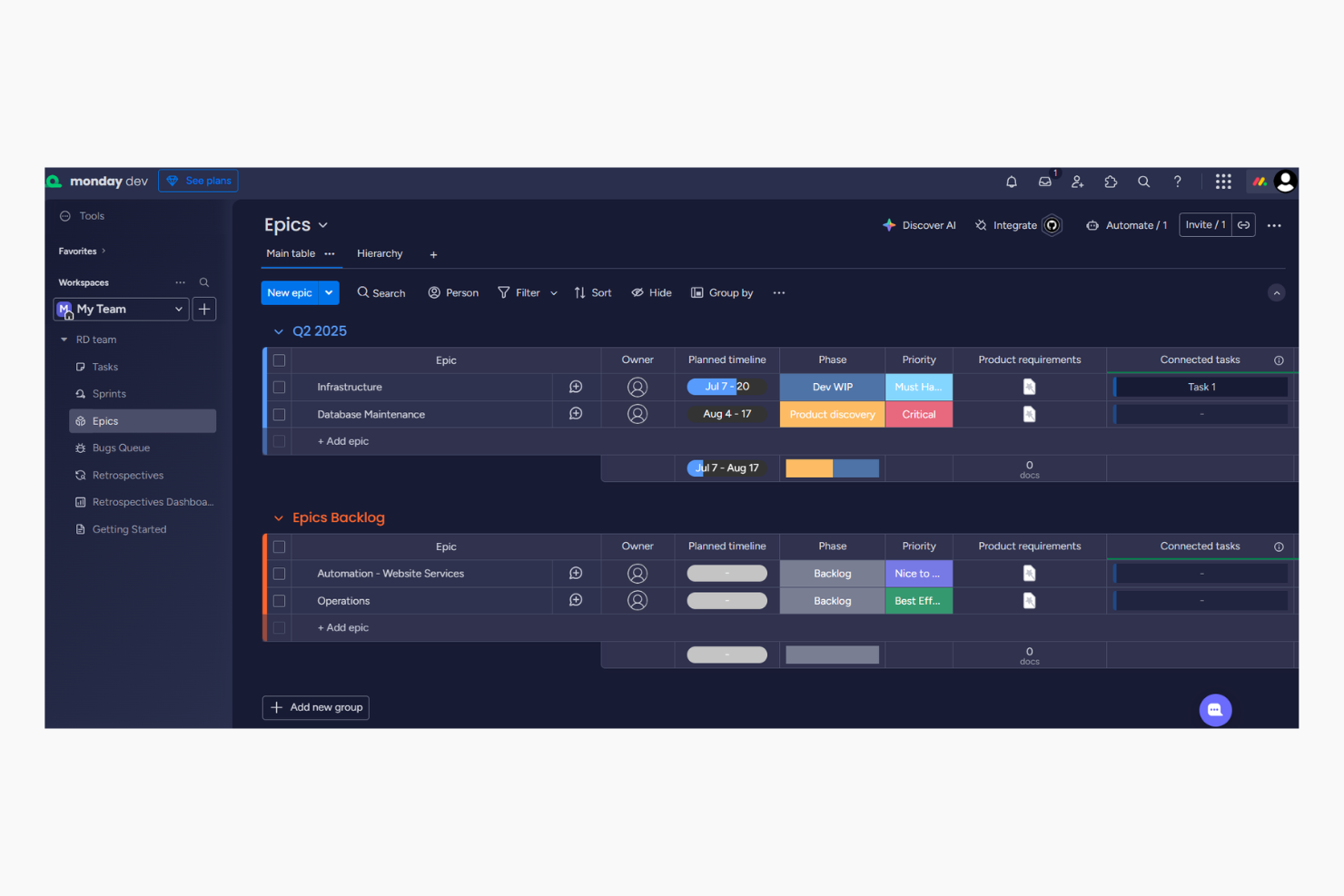
monday dev, un prodotto di monday.com, offre una piattaforma flessibile per la gestione agile del software dove puoi automatizzare i flussi di lavoro per gestire i progetti con facilità. Smartsheet fornisce una soluzione potente per la gestione collaborativa del lavoro attraverso fogli di calcolo e formule, simile a quanto offerto da Google Sheets ed Excel. Sebbene entrambi gli strumenti mirino a migliorare la produttività del team, l'interfaccia intuitiva di monday dev basata su grafici Gantt colorati e bacheche Kanban è diversa dall’approccio simile ai fogli di calcolo di Smartsheet.
In questo articolo confronteremo gli strumenti e le loro funzionalità, vantaggi e svantaggi, prezzi e molto altro per aiutarti a scegliere il software di gestione progetti più adatto al tuo team.
monday dev vs. Smartsheet: An Overview
monday dev

Smartsheet

Perché fidarsi dei nostri consigli sui software
Il nostro team testa e recensisce software dal 2012. In quanto project manager noi stessi, sappiamo quanto sia difficile — e importante — scegliere il software giusto.
Per questa guida, abbiamo valutato gli strumenti attraverso test pratici e ricerche indipendenti, assegnando un punteggio agli strumenti in base ai nostri criteri di selezione. Ci basiamo inoltre sulle competenze di leader di pensiero del settore e di professionisti attivi nella gestione dei progetti.
Le nostre recensioni riflettono il nostro giudizio editoriale umano, non un discorso di vendita.
Revisori esperti:
monday dev vs. Smartsheet Pricing Comparison
| monday dev | Smartsheet | |
|---|---|---|
| Free Trial | Free trial available | 30-day free trial |
| Pricing | From $9/month (billed annually) | From $9/user/month (billed annually) |
Prezzi e costi nascosti di monday dev e Smartsheet
I prezzi di monday dev seguono un modello di abbonamento a livelli composto da un piano base, uno standard e uno pro con diversi livelli di funzionalità, oltre a un livello enterprise. Gli utenti potrebbero incorrere in costi aggiuntivi per funzionalità premium o integrazioni, poiché queste ultime hanno un numero limitato di azioni per piano. Anche la struttura dei prezzi di Smartsheet adotta un approccio a livelli, ma in questo caso, si riscontrano costi extra se si scelgono componenti aggiuntivi specifici. Inoltre, se scegli altri strumenti nell’ecosistema Smartsheet, come Brandfolder o Resource Management by Smartsheet, si applicano ulteriori costi.
Per scegliere lo strumento giusto per il tuo team, valuta le funzionalità di cui hai davvero bisogno, considera una possibile crescita futura e includi tutti i costi extra per assicurarti che il prezzo sia coerente con gli obiettivi a lungo termine del progetto. Con le automazioni di monday dev, puoi facilmente semplificare le attività ripetitive, rendendolo ideale per la gestione di campagne di marketing su larga scala che richiedono aggiornamenti continui. La gestione dei documenti di Smartsheet è ottima per organizzare e tracciare approvazioni in progetti ingegneristici complessi dove è essenziale mantenere una documentazione dettagliata. Inoltre, mentre monday dev eccelle nell’automazione dei flussi di lavoro, Smartsheet si distingue per la capacità di gestire documentazione estesa.
monday dev vs. Smartsheet Feature Comparison
| monday dev | Smartsheet | |
|---|---|---|
| API | ||
| Collaboration Support | ||
| Data Export | ||
| Data Import | ||
| Data Visualization | ||
| External Integrations | ||
| Multi-User | ||
| Notifications | ||
| Third-Party Plugins/Add-Ons | ||
| Workflow Management |
Integrazioni monday dev vs. Smartsheet
| Integrazione | monday dev | Smartsheet |
|---|---|---|
| ✅ | ❌ | |
| HubSpot | ✅ | ✅ |
| Miro | ✅ | ✅ |
| Google Workspace | ✅ | ✅ |
| Microsoft Office 365 | ✅ | ✅ |
| Slack | ✅ | ✅ |
| Salesforce | ✅ | ✅ |
| Zoom | ✅ | ✅ |
| API | ✅ | ✅ |
| Zapier | ✅ | ✅ |
| Jira | ✅ | ✅ |
| Trello | ✅ | ❌ |
Grazie all'integrazione di monday dev con LinkedIn, puoi automatizzare gli aggiornamenti sui social media per le campagne di marketing, risparmiando tempo e mantenendo coerenza. L'integrazione di Smartsheet con Brandfolder è ideale per la gestione degli asset digitali in ambienti ricchi di contenuti, come le aziende media, garantendo facile accesso e organizzazione. Se monday dev aiuta a semplificare le attività di marketing, Smartsheet eccelle nella gestione avanzata dei contenuti complessi.
monday dev vs. Smartsheet Sicurezza, Conformità & Affidabilità
| Fattore | monday dev | Smartsheet |
|---|---|---|
| Crittografia dei dati | Utilizza la crittografia AES-256 per proteggere i dati sia in transito che a riposo. | Implementa la crittografia TLS per il trasferimento dei dati e AES-256 per l'archiviazione dei dati. |
| Conformità normativa | Si attiene agli standard GDPR e ISO/IEC 27001 per proteggere i dati degli utenti. | Rispetta GDPR, CCPA e ISO/IEC 27001 per una solida protezione dei dati. |
| Affidabilità uptime | Offre un SLA di uptime del 99,9%, garantendo accesso e prestazioni costanti. | Fornisce un SLA di uptime del 99,9% per mantenere una disponibilità del servizio affidabile. |
monday dev e Smartsheet offrono entrambi solide misure di sicurezza, ma Smartsheet garantisce una conformità normativa leggermente più ampia. Per scegliere lo strumento giusto, valuta quali standard normativi sono più critici per il tuo settore e consulta la documentazione di conformità di ciascun prodotto per assicurarti che risponda alle tue esigenze.
monday dev vs. Smartsheet Facilità d'uso
| Fattore | monday dev | Smartsheet |
|---|---|---|
| Interfaccia utente | Offre un’interfaccia visiva intuitiva e colorata che semplifica il monitoraggio delle attività. | Presenta un’interfaccia simile a un foglio di calcolo che potrebbe risultare familiare agli utenti di Excel. |
| Esperienza di onboarding | Propone tutorial interattivi e modelli per aiutare i nuovi utenti a iniziare rapidamente. | Include una knowledge base completa di supporto al cliente e video guide per i nuovi utenti. |
| Personalizzazione | Consente la personalizzazione tramite drag-and-drop di dashboard e flussi di lavoro. | Offre modelli personalizzabili ma richiede più passaggi per la personalizzazione. |
monday dev è più facile da utilizzare grazie alla sua interfaccia vivace e alla semplice personalizzazione, risultando ideale per team alle prime armi con strumenti di project management. Smartsheet può risultare complesso per chi non è abituato ai fogli di calcolo, ma le sue guide dettagliate supportano chi preferisce un percorso di apprendimento strutturato.
monday dev vs Smartsheet: Pros & Cons
monday dev
- Easily customize workflows, including sprint planning and Kanban board configurations
- Visual project tracking keeps your team aligned and focused
- Automation features save time on repetitive tasks
- Gantt chart view is less intuitive than other tools
- Mobile app lacks full functionality for managing product roadmap tasks.
- Initial setup might be overwhelming for teams new to agile tools
Smartsheet
- Gives your team a lot of flexibility with how you set up sheets, dashboards, and workflows
- Proofing and approval tools can help you better collaborate with your team
- Handles complex projects and cross-team coordination better than most tools
- It takes time to set up and isn’t very intuitive for new users
- Interactive spreadsheets don’t automatically sync changes
- You can’t easily build simple task lists without doing extra setup
Best Use Cases for monday dev and Smartsheet
monday dev
- Tech startups Customizable workflows help your team adapt and grow rapidly in a dynamic environment, especially during fast-paced product development cycles.
- Software development Automation features and bug tracking streamline repetitive tasks, allowing your developers to focus on coding.
- Product management teams Roadmapping tools and backlog prioritization help your team align stakeholders and deliver product updates on schedule.
- IT departments Efficient task tracking and automation improve your team's response to issues and requests, especially when managing technical dependencies.
- Remote teams Collaboration tools keep your team members connected, no matter where they are working.
- Creative agencies Customizable dashboards provide your team with the flexibility needed for unique projects, backed by a centralized knowledge base and shared docs.
- Local nonprofits The setup complexity and feature set might be more than what your team requires.
Smartsheet
- Marketing Teams You can manage campaign timelines, creative approvals, and content calendars in one place using built-in forms, reminders, and dashboards.
- Construction Projects Smartsheet is great for tracking tasks, permits, and inspections across vendors and crews using Gantt charts and status columns.
- PMO Departments You get a clear portfolio view of all your projects, timelines, and risks with built-in reports and resource views.
- Healthcare Operations Smartsheet helps you track compliance tasks, training, and onboarding with audit-ready logs and approval workflows.
- IT Teams Smartsheet is useful for managing system rollouts, support requests, and change logs with forms, automations, and sheet linking.
- Mid-Sized & Enterprise-Level Companies You get enough structure to handle complex operations and scale without needing a full custom solution.
Chi dovrebbe usare monday dev e chi dovrebbe usare Smartsheet?
Secondo me, monday dev è ideale per team creativi e startup che apprezzano flessibilità e un’interfaccia visivamente attraente. È adatto a organizzazioni che puntano sulla collaborazione e hanno bisogno di uno strumento in grado di adattarsi a flussi di lavoro diversi. D’altra parte, ritengo che Smartsheet sia perfetto per settori che si basano sulla gestione dettagliata dei dati e preferiscono un approccio strutturato, simile a un foglio di calcolo. È la scelta migliore per i team già abituati a Excel e per chi ha bisogno di potenti funzionalità di monitoraggio progetti e documentazione.
Differences Between monday dev and Smartsheet
| monday dev | Smartsheet | |
|---|---|---|
| Automation | Provides easy-to-set-up workflow automations for repetitive tasks. | Requires more manual setup for automating processes. |
| Customization | Allows drag-and-drop customization and flexible dashboards. | Provides customizable templates but with more rigid structures. |
| Hidden Costs | Uses a tiered subscription model with extra costs for premium features. | |
| Integrations | Integrates with tools like LinkedIn and Miro for creative workflows. | Supports extensive integrations with tools like Brandfolder for asset management. |
| Read monday dev ReviewOpens new window | Visit SmartsheetOpens new window | |
| Pricing | Offers tiered pricing with potential extra costs for add-on modules. | |
| User Interface | Features a colorful, intuitive interface for easy navigation. | Offers a familiar spreadsheet-like interface for data-heavy tasks. |
| Read monday dev ReviewOpens new window | Visit SmartsheetOpens new window |
Similarities Between monday dev and Smartsheet
| Collaboration | Both offer robust collaboration features like real-time updates and team communication channels. monday dev provides visual boards for teamwork, while Smartsheet offers shared sheets for tracking progress. |
|---|---|
| Customizable Workflows | Both allow customization of workflows to suit different project needs. monday dev offers drag-and-drop flexibility, and Smartsheet provides structured templates you can modify. |
| Integrations | Both integrate with popular tools like Slack and Google Workspace, supporting seamless workflow connectivity. They each provide APIs for custom integrations tailored to your team's needs. |
| Pricing | Both use a tiered pricing model, allowing you to choose plans based on your team's size and feature needs. They provide scalable options as your project requirements grow. |
| Security | Both prioritize security with features like data encryption and compliance with standards like GDPR. They ensure your data is protected and accessible only to authorized users. |
| Read monday dev ReviewOpens new window Visit SmartsheetOpens new window | |