



Monday.Com vs ClickUp: Recensioni e Confronto per il 2026



monday.com offre una piattaforma flessibile per ottimizzare i flussi di lavoro e la collaborazione del tuo team. ClickUp propone una suite completa di strumenti per aumentare la produttività e il monitoraggio dei progetti. Sebbene entrambe siano soluzioni potenti per la gestione dei progetti, monday.com eccelle per le opzioni di personalizzazione, mentre ClickUp stupisce per l’ampiezza delle sue funzionalità. In questo articolo troverai un confronto dettagliato degli strumenti, delle loro caratteristiche, dei pro e contro, dei prezzi e altro ancora, per aiutarti a scegliere il software di project management ideale per le tue esigenze.
monday AI Workspace vs. ClickUp: An Overview
monday AI Workspace

ClickUp
Perché fidarsi dei nostri consigli sui software
Il nostro team testa e recensisce software dal 2012. In quanto project manager noi stessi, sappiamo quanto sia difficile — e importante — scegliere il software giusto.
Per questa guida, abbiamo valutato gli strumenti attraverso test pratici e ricerche indipendenti, assegnando un punteggio agli strumenti in base ai nostri criteri di selezione. Ci basiamo inoltre sulle competenze di leader di pensiero del settore e di professionisti attivi nella gestione dei progetti.
Le nostre recensioni riflettono il nostro giudizio editoriale umano, non un discorso di vendita.
Revisori esperti:
monday AI Workspace vs. ClickUp Pricing Comparison
| monday AI Workspace | ClickUp | |
|---|---|---|
| Free Trial | Free plan + 14-day free trial available | Free plan + free demo available |
| Pricing | From $9/user/month (billed annually) | From $9/user/month (billed annually) |
Prezzi & Costi Nascosti di monday.com vs. ClickUp
I prezzi di monday.com sono basati su un modello di abbonamento a livelli, con pagamento per utente e possibili costi aggiuntivi per funzionalità premium e maggiore spazio di archiviazione. I prezzi di ClickUp seguono anch’essi un approccio a livelli, offrendo un piano gratuito con limitazioni e piani a pagamento che garantiscono più funzionalità e integrazioni. Per scegliere lo strumento con la fascia di prezzo più adatta alle tue necessità, valuta quali caratteristiche servono al tuo team e prendi in considerazione la scalabilità di ogni piano man mano che crescono i tuoi progetti e il tuo team.
monday AI Workspace vs. ClickUp Feature Comparison
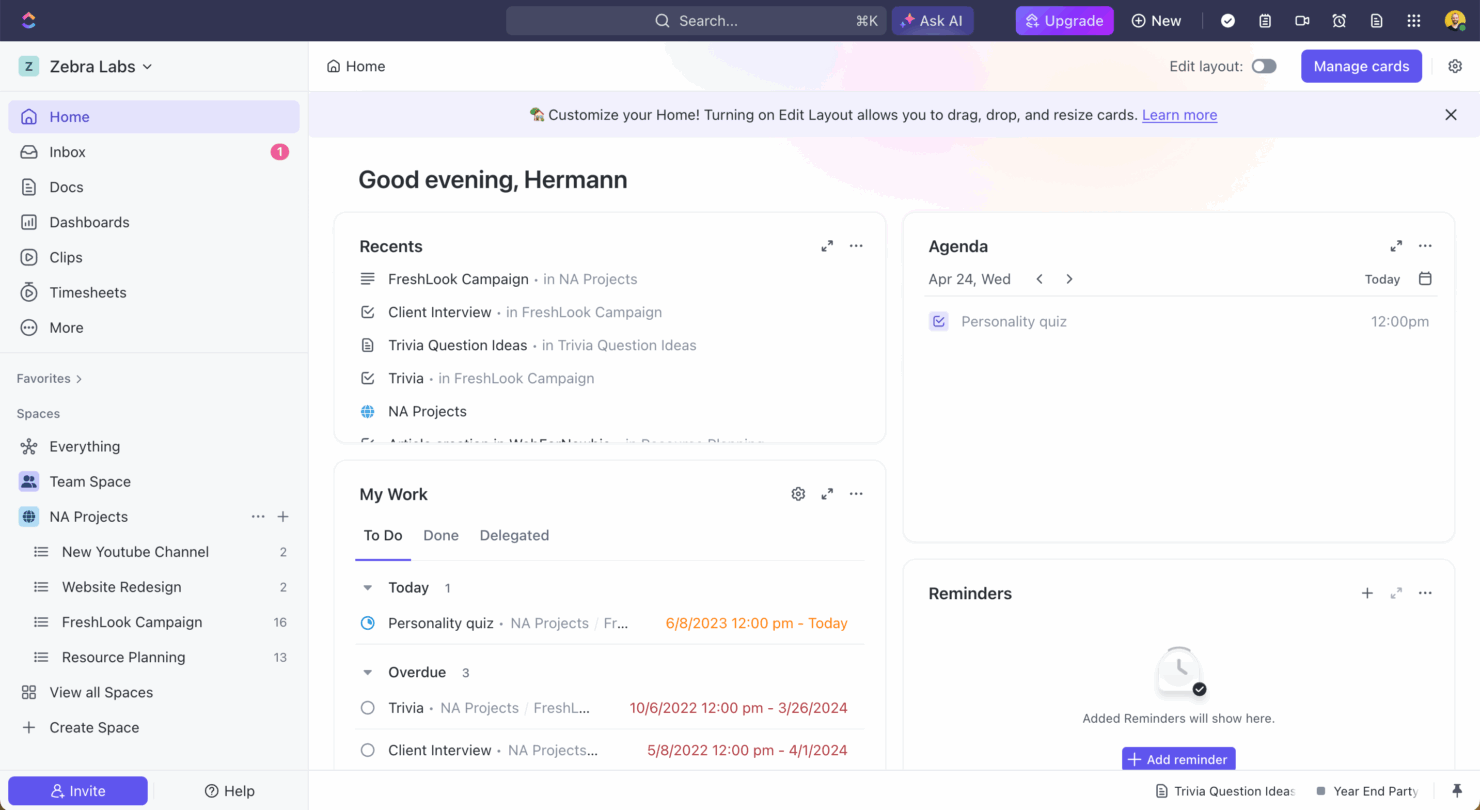
Con le automazioni di monday.com, puoi configurare flussi di lavoro che ti fanno risparmiare tempo aggiornando automaticamente lo stato dei task e notificando i membri del team, funzione particolarmente utile nei progetti di marketing veloci. La gestione dei task di ClickUp si distingue per le sue schede dettagliate e le opzioni di modifica massiva, risultando ideale per i team di sviluppo software che devono gestire gerarchie complesse di attività. Mentre monday.com ottimizza i flussi di progetto tramite automazioni, ClickUp offre una gestione dei task solida per strutture di progetto articolate.
| monday AI Workspace | ClickUp | |
|---|---|---|
| API | ||
| Batch Permissions & Access | ||
| Budgeting | ||
| Calendar Management | ||
| Collaboration Support | ||
| Contact Management | ||
| Contact Sharing | ||
| Customer Management | ||
| Dashboard | ||
| Dashboards | ||
| Data Export | ||
| Data Import | ||
| Data Visualization | ||
| Dependency Tracking | ||
| Document Sharing | ||
| Expense Tracking | ||
| External Integrations | ||
| File Sharing | ||
| Gantt Charts | ||
| Kanban Boards | ||
| Multi-User | ||
| Notifications | ||
| Project Management | ||
| Resource Management | ||
| Scheduling | ||
| Task Scheduling/Tracking | ||
| Third-Party Plugins/Add-Ons | ||
| Time Management | ||
| Travel Management | ||
| Workflow Management |
monday.com vs. ClickUp Integrazioni
| Integrazione | monday.com | ClickUp |
|---|---|---|
| ✅ | ❌ | |
| HubSpot | ✅ | ✅ |
| Miro | ✅ | ❌ |
| Slack | ✅ | ✅ |
| Google Calendar | ✅ | ✅ |
| Zoom | ✅ | ✅ |
| Microsoft Teams | ❌ | ✅ |
| Figma | ❌ | ✅ |
| API | ✅ | ✅ |
| Zapier | ✅ | ✅ |
Con l’integrazione LinkedIn di monday.com puoi automatizzare le attività sui social, rendendolo ideale per i team marketing che devono gestire più campagne in modo efficiente. L’integrazione di ClickUp con Microsoft Teams è perfetta per i team che fanno affidamento su una comunicazione e collaborazione in tempo reale, assicurando aggiornamenti e interazioni senza lasciare la piattaforma di project management. Se da un lato monday.com si distingue nell’automazione marketing, ClickUp rafforza la comunicazione nei gruppi grazie alle sue solide capacità di integrazione.
monday.com vs. ClickUp Sicurezza, Conformità & Affidabilità
| Fattore | monday.com | ClickUp |
|---|---|---|
| Privacy dei dati | monday.com è conforme al GDPR e offre crittografia dei dati per proteggere le informazioni degli utenti. | ClickUp garantisce la crittografia dei dati e segue gli standard GDPR per la privacy dei dati. |
| Conformità normativa | monday.com è certificata ISO 27001, a garanzia della conformità agli standard internazionali di sicurezza. | ClickUp è conforme SOC 2 Tipo II, dimostrando il proprio impegno nei controlli di sicurezza. |
| Affidabilità uptime | monday.com garantisce il 99,9% di uptime, supportato da un’infrastruttura solida e monitoraggio costante. | ClickUp offre il 99,99% di uptime, assicurando alta disponibilità e affidabilità per gli utenti. |
monday.com e ClickUp offrono entrambe funzionalità robuste in tema di sicurezza e conformità, ma le loro certificazioni e garanzie di uptime differiscono leggermente. Per scegliere lo strumento giusto, valuta quali certificazioni di conformità sono in linea con i requisiti del tuo settore e considera quanto sia importante l’affidabilità dell’uptime per i flussi di lavoro del tuo team.
monday.com vs. ClickUp Facilità d'Uso
| Fattore | monday.com | ClickUp |
|---|---|---|
| Interfaccia utente | monday.com offre un'interfaccia visivamente intuitiva con funzionalità drag-and-drop per una facile personalizzazione. | ClickUp offre un'interfaccia flessibile con numerose opzioni di personalizzazione, che possono risultare opprimenti per i nuovi utenti. |
| Esperienza di onboarding | monday.com fornisce tutorial guidati e modelli per aiutare i nuovi utenti a iniziare rapidamente. | ClickUp offre una documentazione estesa e video tutorial, ma la curva di apprendimento può essere ripida a causa delle sue numerose funzionalità. |
| Assistenza | monday.com ha un servizio di assistenza clienti reattivo con opzioni di chat live ed email. | ClickUp offre supporto 24/7 ma principalmente tramite email, il che può ritardare un'assistenza immediata. |
monday.com è più facile da navigare grazie alla sua interfaccia semplice e a un onboarding veloce, rendendolo ideale per i team che cercano semplicità. ClickUp, pur essendo ricco di funzionalità, può risultare complesso per la sua ampiezza, ma eccelle nell’offrire ampia personalizzazione per chi è disposto a investire tempo ad apprenderlo.
monday AI Workspace vs ClickUp: Pros & Cons
monday AI Workspace
- The interface is easy to use, with simple drag and drop timeline and charting mechanics.
- You can create forms that live within your project as a view.
- There is a long list of supported integrations
- The Gantt view isn't useful for building a project.
- Recurring tasks are considered automations and limited to higher tier plans.
- There is a steep learning curve for beginners.
ClickUp
- Extensive task management features keep your projects organized and on track
- Real-time collaboration makes team communication more effective
- Built-in automations reduce manual work and speed up your workflow
- Users often find the learning curve steep due to its rich feature set
- Some users report occasional performance lags when managing large projects
- Mobile app can be less intuitive than the desktop version
Best Use Cases for monday AI Workspace and ClickUp
monday AI Workspace
- Creative departments With features like collaborative docs and a proofing screen, creative teams can improve feedback loops and increase delivery speeds.
- Marketing teams Its customizable dashboards and automation features let you track campaigns and workflows efficiently.
- Content creation monday.com's file management and commenting capabilities let teams manage media files and improve collaboration.
- Event planners The platform’s timeline views and easy collaboration features make managing multiple events straightforward.
- Product development You can track progress and updates across teams to maintain alignment and meet deadlines.
- Remote teams With collaborative features and real-time updates, remote teams can maintain productivity and communication effortlessly.
ClickUp
- Creative agencies ClickUp's customizable dashboards and task automation features can help you manage client projects, track feedback and revisions, and keep creative teams aligned.
- Tech startups ClickUp supports agile development with sprints and real-time collaboration features that can help teams iterate quickly.
- Marketing teams You can streamline campaign planning and execution using ClickUp’s task dependencies and timelines.
- Remote teams ClickUp's real-time updates and collaboration tools keep everyone on the same page, no matter where they are.
- Product managers ClickUp’s roadmaps and goal-tracking features help you align development with business objectives.
- Freelancers You can track your tasks and deadlines efficiently with ClickUp’s simple task and time management tools.
Chi dovrebbe usare monday.com e chi dovrebbe usare ClickUp?
Secondo me, monday.com è perfetto per i team che cercano una piattaforma facile da usare, con rapido onboarding e gestione visiva delle attività, soprattutto nei settori creativi come marketing o design. ClickUp, invece, è ideale per team tecnologicamente esperti in ambito sviluppo software o IT che necessitano di una profonda personalizzazione e di un set di funzioni molto ampio. Se la vostra priorità è la semplicità e una configurazione veloce, scegliete monday.com; se invece avete bisogno di funzionalità avanzate e non temete una curva di apprendimento più ripida, ClickUp è la scelta giusta.
Differences Between monday AI Workspace and ClickUp
| monday AI Workspace | ClickUp | |
|---|---|---|
| Automation | monday.com allows you to automate routine tasks with customizable triggers. | ClickUp provides powerful automation tools, but they require more setup time. |
| Integrations | monday.com supports integrations with tools like LinkedIn and Miro. | ClickUp integrates well with Microsoft Teams and Figma, offering different options. |
| Onboarding | monday.com has guided tutorials and templates for a quick start. | ClickUp requires more time to learn due to its vast feature set and documentation. |
| Pricing | monday.com uses a tiered pricing model based on user count and features. | ClickUp offers a tiered model with a free plan, but charges for advanced features. |
| User Interface | monday.com offers a simple, drag-and-drop interface that's easy to navigate. | ClickUp provides a more complex interface with extensive customization options. |
| Visit monday AI WorkspaceOpens new window | Visit ClickUpOpens new window |
Similarities Between monday AI Workspace and ClickUp
| Collaboration | Each platform provides tools for team collaboration, such as file sharing and real-time updates, to keep your team aligned. |
|---|---|
| Customizable Workflows | monday.com and ClickUp let you create custom workflows to suit your team's unique processes, enhancing productivity and efficiency. |
| Data Visualization | Both tools provide data visualization features, such as dashboards and charts, to help you make informed decisions based on project data. |
| Integrations | Both solutions support a wide range of integrations with popular apps like Slack and Google Calendar, enhancing their functionality. |
| Task Management | Both monday.com and ClickUp offer robust task management features, allowing you to assign tasks, set deadlines, and track progress effectively. |
| Visit monday AI WorkspaceOpens new window Visit ClickUpOpens new window | |