

I 10 migliori strumenti per l’oscuramento dei documenti recensiti nel 2026

Elenco dei migliori strumenti di oscuramento dei documenti


Gestire informazioni sensibili può essere un vero grattacapo per project manager come te. Con le violazioni dei dati e i problemi di conformità sempre in agguato, è fondamentale proteggere i tuoi documenti. È qui che entra in gioco uno strumento affidabile di oscuramento dei documenti.
Nella mia esperienza di test e analisi dei software, ho visto come questi strumenti possano alleggerire il carico di lavoro. Aiutano a garantire che i dati del tuo team rimangano riservati e conformi alle normative.
In questo articolo condividerò le mie selezioni imparziali dei migliori strumenti di oscuramento dei documenti disponibili. Troverai informazioni sulle funzionalità, sulla facilità d'uso e su ciò che distingue ogni strumento. Iniziamo e troviamo la soluzione giusta per il tuo team.
Perché fidarsi dei nostri consigli sui software
Il nostro team testa e recensisce software dal 2012. In quanto project manager noi stessi, sappiamo quanto sia difficile — e importante — scegliere il software giusto.
Per questa guida, abbiamo valutato gli strumenti attraverso test pratici e ricerche indipendenti, assegnando un punteggio agli strumenti in base ai nostri criteri di selezione. Ci basiamo inoltre sulle competenze di leader di pensiero del settore e di professionisti attivi nella gestione dei progetti.
Le nostre recensioni riflettono il nostro giudizio editoriale umano, non un discorso di vendita.
Revisori esperti:
Tabella comparativa degli strumenti di oscuramento dei documenti
Questa tabella comparativa riassume i dettagli dei prezzi delle mie migliori selezioni di strumenti di oscuramento dei documenti:
| Tool | Best For | Trial Info | Price | ||
|---|---|---|---|---|---|
| 1 | Ideale per l'anonimizzazione su grandi volumi | Demo gratuita disponibile | Prezzo su richiesta | Website | |
| 2 | Ideale per la redazione rapida di PDF | Prova gratuita di 7 giorni + piano gratuito disponibile | Da $10/mese (fatturato annualmente) | Website | |
| 3 | Ideale per i professionisti creativi | Piano gratuito disponibile | Da $14.99/mese (fatturato annualmente) | Website | |
| 4 | Ideale per la scalabilità aziendale | Prova gratuita disponibile | Da $129.99 (fatturato annualmente) | Website | |
| 5 | Ideale per la collaborazione di squadra | Prova gratuita di 14 giorni + demo gratuita disponibile | Da $15/utente/mese (fatturazione annuale) | Website | |
| 6 | Ideale per l'accesso multipiattaforma | Piano gratuito disponibile | Da $9,99/mese (fatturato annualmente) | Website | |
| 7 | Ideale per l'uso nel settore legale | Versione di prova gratuita disponibile | A partire da $19/mese | Website | |
| 8 | Ideale per la redazione automatizzata tramite IA | Prova gratuita di 7 giorni | Da $29/mese | Website | |
| 9 | Ideale per esigenze di conformità sui dati | Demo gratuita disponibile | Prezzo su richiesta | Website | |
| 10 | Ideale per identificare dati sensibili prima della redazione | Piano gratuito disponibile | Da $79,20/mese (fatturato annualmente) | Website |
Recensioni dei migliori strumenti di oscuramento dei documenti
Di seguito trovi i miei riepiloghi dettagliati dei migliori strumenti di oscuramento dei documenti inclusi nel mio elenco. Le mie recensioni offrono uno sguardo approfondito sulle funzionalità principali, sui pro e contro, sulle integrazioni e sui casi d’uso ideali di ogni strumento, per aiutarti a trovare quello più adatto a te.
Ideale per l'anonimizzazione su grandi volumi
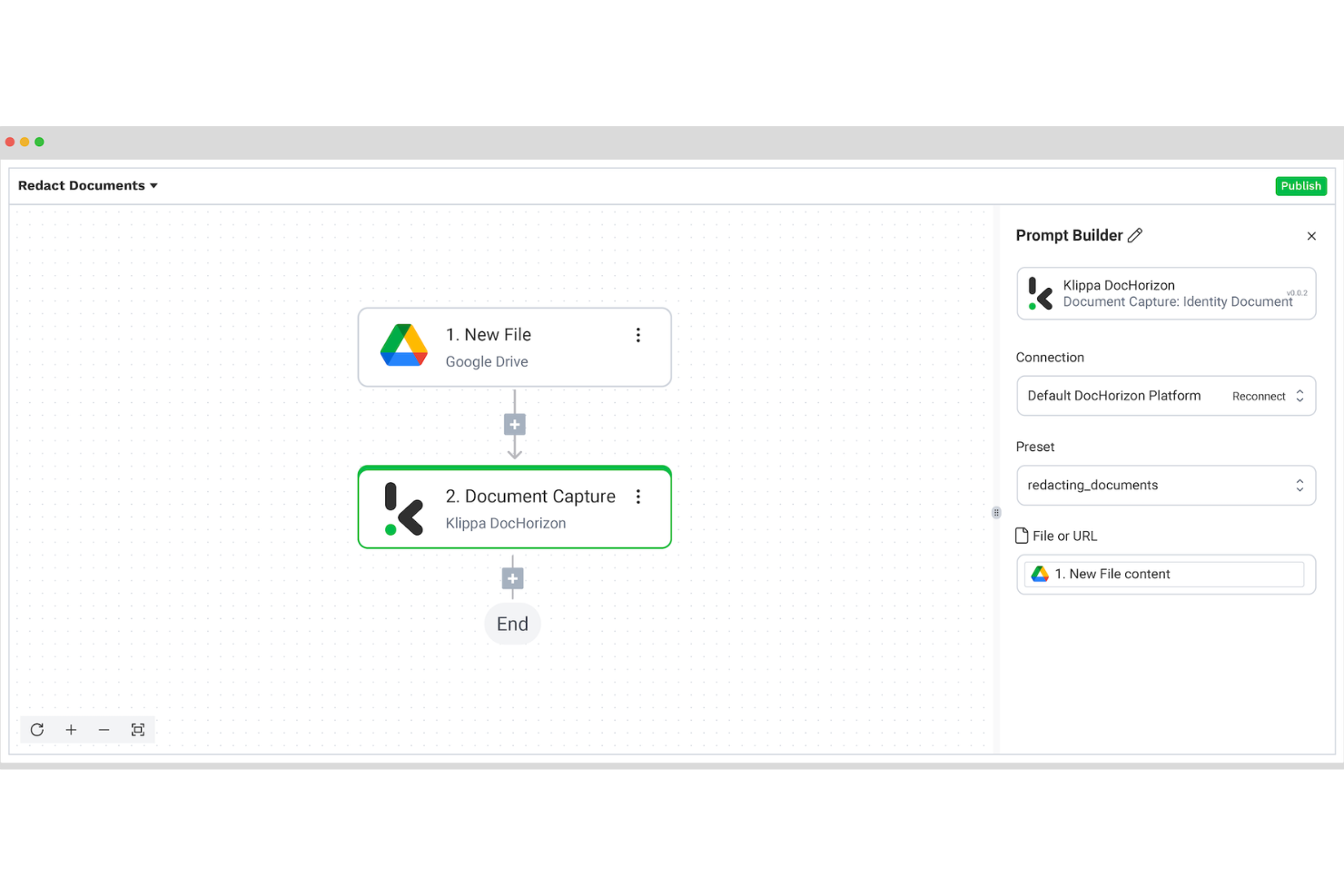
Klippa DocHorizon è una piattaforma intelligente di elaborazione documentale progettata per gestire i flussi di lavoro basati su documenti dall'inizio alla fine. Permette al tuo team di caricare o scannerizzare documenti, automatizzare l'elaborazione degli stessi e convertire o utilizzare successivamente i dati nel formato desiderato.
Perché ho scelto Klippa DocHorizon: Ho scelto Klippa DocHorizon perché consente l'anonimizzazione automatica e configurabile di PII/firme/volti su vasta scala, supporta flussi di lavoro batch per grandi volumi di documenti e unisce la redazione guidata dall'IA alla revisione umana per qualità e conformità.
Funzionalità e integrazioni principali:
Funzionalità includono l'anonimizzazione automatica dei dati che supporta molteplici tecniche (come mascheramento dei dati, pseudonimizzazione e scambio) e aiuta a soddisfare i requisiti di conformità relativi alla privacy dei dati. Supporta inoltre flussi di lavoro 'human-in-the-loop': dopo l'anonimizzazione tramite IA, un revisore umano può correggere falsi positivi/negativi.
Integrazioni incluse Gmail, Google Drive, OneDrive, Outlook, NetSuite, Xero, Dropbox, QuickBooks e Zoho.
Pros and Cons
Pros:
- Gestisce un'ampia varietà di tipi di documenti e lingue
- Anonimizzazione ad alta precisione di PII e firme
- Supporta flussi di lavoro di anonimizzazione batch su larga scala
Cons:
- Campi personalizzati o regole di anonimizzazione molto specifiche potrebbero richiedere delle soluzioni alternative
- Possibili falsi positivi
New Product Updates from Doxis AI.dp.
Doxis AI.dp Improves Dataset Validation and API Controls
Doxis AI.dp improves dataset editing with real-time type validation, better field controls, and save prevention on invalid values, plus new API capabilities. These updates help teams maintain cleaner dataset values and manage rows more reliably. For more information, visit Doxis AI.dp’s official site.
 .
.
Smallpdf
Ideale per la redazione rapida di PDF
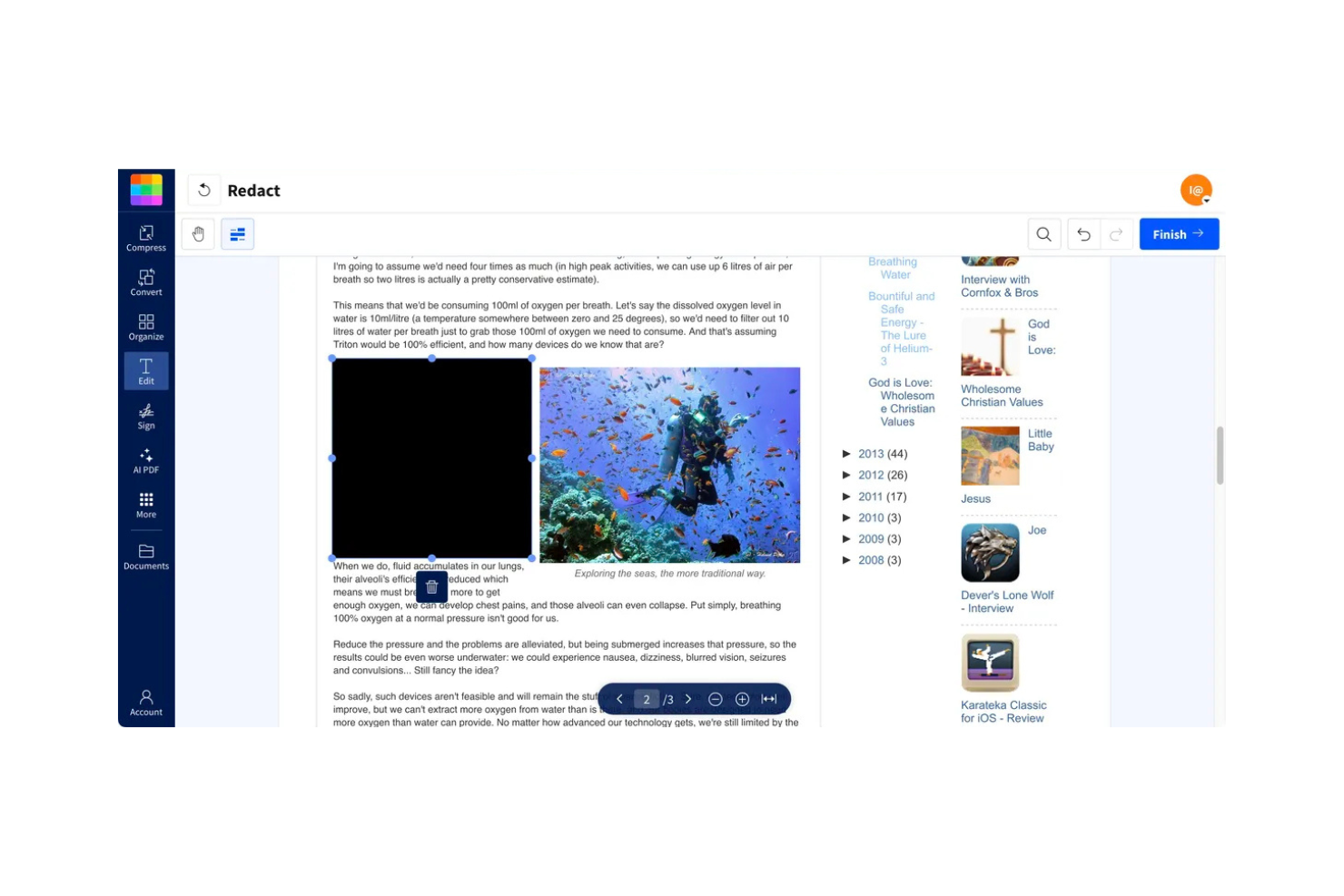
Smallpdf è uno strumento online di redazione PDF progettato per individui e team che devono rimuovere rapidamente informazioni sensibili dai documenti. Consente agli utenti di oscurare nomi, indirizzi e dati finanziari, garantendo la conformità agli standard GDPR e HIPAA.
Perché ho scelto Smallpdf: Il processo rapido di redazione offerto da Smallpdf è una caratteristica distintiva, consentendo di trascinare e rilasciare i file per la modifica immediata. Offre la cancellazione automatica dei file dopo un'ora, aumentando la privacy. L’interfaccia è intuitiva, non richiede download né registrazioni, risparmiando tempo. Grazie alla crittografia TLS e alla certificazione ISO/IEC 27001, puoi essere certo che i tuoi documenti siano protetti.
Caratteristiche principali & integrazioni
Caratteristiche includono un’interfaccia drag-and-drop che semplifica il processo di redazione, redazione irreversibile per garantire che i dati non possano essere recuperati e conformità a GDPR e HIPAA per una tranquillità legale.
Integrazioni includono Dropbox, Google Drive, OneDrive e Box.
Pros and Cons
Pros:
- Elaborazione file veloce
- Nessuna registrazione richiesta
- Standard di crittografia sicuri
Cons:
- Versione gratuita limitata
- Nessun accesso offline

Ideale per i professionisti creativi

Adobe Acrobat è uno strumento di gestione PDF ampiamente utilizzato dai professionisti creativi per modificare, convertire e oscurare i PDF. Offre funzionalità complete per la gestione dei documenti, rendendolo una scelta preferita tra designer e creatori di contenuti.
Perché ho scelto Adobe Acrobat: È pensato per i professionisti creativi che hanno bisogno di più della semplice redazione di base. Lo strumento offre capacità di modifica avanzate, consentendo di manipolare testo e immagini all’interno dei PDF. La sua tecnologia OCR aiuta a convertire documenti scansionati in file modificabili. Grazie alle affidabili funzionalità di sicurezza, assicura che i tuoi dati sensibili rimangano protetti.
Caratteristiche e integrazioni principali
Caratteristiche includono tecnologia OCR che trasforma i documenti scansionati in testo modificabile, strumenti di modifica completi per testo e immagini e crittografia sicura per una maggiore protezione dei dati.
Integrazioni includono Microsoft OneDrive, Dropbox, Google Drive, Box, Microsoft SharePoint, Salesforce, Microsoft Teams e Workday.
Pros and Cons
Pros:
- Capacità di modifica avanzate
- Funzionalità di sicurezza affidabili
- OCR per documenti scansionati
Cons:
- Curva di apprendimento più ripida
- Software che richiede molte risorse


Foxit è un editor PDF progettato per grandi aziende che necessitano di soluzioni complete per la gestione dei documenti. Offre strumenti di modifica, redazione e collaborazione per aiutare le aziende a gestire in modo efficiente flussi di lavoro documentali estesi.
Perché ho scelto Foxit: La sua scalabilità aziendale lo rende perfetto per grandi team che gestiscono volumi elevati di documenti. Lo strumento offre funzionalità di sicurezza avanzate per proteggere le informazioni sensibili. Grazie alle sue capacità di collaborazione, il tuo team può lavorare insieme sui documenti in tempo reale. Inoltre, supporta l'elaborazione in batch, consentendo di modificare più documenti contemporaneamente.
Caratteristiche principali & Integrazioni
Caratteristiche includono misure di sicurezza avanzata per proteggere i documenti, strumenti di collaborazione in tempo reale per migliorare il lavoro di squadra e l'elaborazione in batch per gestire efficientemente più file.
Integrazioni includono Microsoft Office, SharePoint, Google Drive, Box, Dropbox, Evernote, OneDrive e Alfresco.
Pros and Cons
Pros:
- Scalabile per grandi aziende
- Funzionalità di sicurezza avanzate
- Supporta l'elaborazione in batch
Cons:
- Curva di apprendimento ripida
- Software ad elevato consumo di risorse


Nitro PDF è uno strumento di gestione dei documenti pensato per le aziende che cercano un editing PDF efficiente e collaborazione. Offre strumenti per creare, modificare e condividere file PDF, rendendolo ideale per i team che lavorano su documenti condivisi.
Perché ho scelto Nitro PDF: Si distingue nella collaborazione di squadra, offrendo funzionalità che facilitano la condivisione e la modifica congiunta dei documenti. Lo strumento include le firme elettroniche, che velocizzano i processi di approvazione. Il controllo delle versioni assicura che il team lavori sempre sull’ultima versione del documento. Grazie all’accesso basato su cloud, si può collaborare ovunque, aumentando la produttività.
Caratteristiche principali e integrazioni
Caratteristiche includono firme elettroniche per approvazioni rapide, controllo delle versioni per mantenere i documenti aggiornati e accesso cloud per la collaborazione da remoto.
Integrazioni includono Microsoft Office 365, Google Drive, Dropbox, SharePoint, OneDrive, Box ed Evernote.
Pros and Cons
Pros:
- Accesso ai documenti basato su cloud
- Include il controllo delle versioni
- Supporta le firme elettroniche
Cons:
- Curva di apprendimento per i nuovi utenti
- Sono necessari occasionali aggiornamenti software Funzionalità mobile limitata


Xodo di Apryse è uno strumento PDF versatile progettato per individui e team che necessitano di accedere e modificare documenti su dispositivi diversi. Facilita la modifica, l'annotazione e l'oscuramento dei documenti, rendendolo adatto ai professionisti in movimento.
Perché ho scelto Xodo di Apryse: Eccelle nell'offrire accesso multipiattaforma, permettendoti di lavorare sui tuoi documenti da qualsiasi dispositivo. Lo strumento offre funzionalità di collaborazione in tempo reale, consentendo al tuo team di lavorare insieme in modo efficiente. Le sue capacità di annotazione rendono semplice evidenziare e commentare i PDF. Con l'integrazione al cloud, puoi salvare e accedere ai documenti in ogni momento in modo sicuro.
Funzionalità principali e integrazioni
Funzionalità includono una funzione di collaborazione in tempo reale che supporta il lavoro di squadra, strumenti di annotazione per commentare facilmente i documenti e integrazione con l'archiviazione cloud per un accesso sicuro ai file.
Integrazioni includono Google Drive, Dropbox, OneDrive, Box e SharePoint.
Pros and Cons
Pros:
- Strumenti di annotazione completi
- Integrazione con l'archiviazione cloud
- Adatto all'uso su dispositivi mobili
Cons:
- Funzionalità offline limitate
- Problemi occasionali di sincronizzazione

Ideale per l'uso nel settore legale

Redactable è uno strumento di redazione documentale pensato per i professionisti legali che necessitano di garantire la riservatezza delle informazioni sensibili. Si concentra su processi di redazione sicuri, rendendolo una risorsa preziosa per studi legali e dipartimenti legali.
Perché ho scelto Redactable: È stato progettato specificamente per il settore legale, fornendo strumenti che rispondono alle esigenze uniche dei professionisti legali. Lo strumento offre una crittografia sicura per proteggere i tuoi documenti. Include anche una funzione di audit trail dettagliata, fondamentale per la conformità legale. Inoltre, supporta la redazione in blocco, risparmiando tempo quando si gestiscono grandi volumi di documenti.
Caratteristiche principali & integrazioni
Caratteristiche includono crittografia avanzata per proteggere i dati sensibili, un audit trail completo per tracciare le modifiche e un'opzione di redazione in blocco per gestire più documenti in modo efficiente.
Integrazioni includono Microsoft Word, Microsoft Excel, Google Drive, Dropbox, Box e OneDrive.
Pros and Cons
Pros:
- Pensato per i professionisti legali
- Standard di crittografia sicuri
- Redazione in blocco
Cons:
- Opzioni di personalizzazione limitate
- Richiede formazione per i nuovi utenti


iDox.ai è uno strumento di redazione documentale pensato per professionisti in settori sensibili ai dati come quello legale e sanitario. Automatizza il processo di redazione, concentrandosi su precisione ed efficienza per proteggere le informazioni sensibili.
Perché ho scelto iDox.ai: iDox.ai si distingue per le sue capacità di redazione potenziate dall'IA, che riducono notevolmente il tempo necessario per le modifiche manuali. Puoi beneficiare dei suoi suggerimenti intelligenti che migliorano la precisione. Offre una funzionalità di marcatura con un solo clic per l'elaborazione in batch, rendendolo facile da usare. La conformità dello strumento agli standard SOC2 e ISO 27001 garantisce la sicurezza dei tuoi dati.
Funzionalità principali e integrazioni
Funzionalità includono un'intelligenza artificiale avanzata che identifica rapidamente le informazioni sensibili, l'elaborazione in batch che permette di gestire efficacemente grandi documenti e report di conformità per assicurare l'aderenza agli standard di protezione dei dati.
Integrazioni includono Microsoft Word, Microsoft Excel, Google Drive, Dropbox, Box, OneDrive, SharePoint e DocuSign.
Pros and Cons
Pros:
- Supporta diversi formati di file
- Conforme a SOC2 per la sicurezza
- Elaborazione in batch
Cons:
- Curva di apprendimento per i principianti
- Opzioni di personalizzazione limitate

Rectify è uno strumento di redazione di documenti pensato per le aziende che necessitano di automatizzare i processi di tutela della privacy e di oscuramento sicuro delle informazioni. È ideale per i settori che richiedono una rigorosa conformità alla normativa sui dati, offrendo strumenti per oscurare in modo efficiente le informazioni sensibili.
Perché ho scelto Rectify: È progettato per le organizzazioni attente alla conformità normativa, automatizzando la redazione dei dati per risparmiare tempo e ridurre gli errori. Lo strumento offre processi sicuri basati sull'intelligenza artificiale che migliorano la protezione della privacy. La funzione di elaborazione in batch consente di gestire più documenti in modo efficiente. Grazie al monitoraggio della conformità puoi garantire il rispetto degli standard regolamentari.
Caratteristiche principali & Integrazioni
Caratteristiche includono redazione tramite intelligenza artificiale per una maggiore privacy, elaborazione in batch per grandi volumi di documenti e monitoraggio della conformità per soddisfare gli standard normativi.
Integrazioni includono Microsoft Word, Microsoft Excel, Google Drive, Dropbox, Box e SharePoint.
Pros and Cons
Pros:
- Redazione tramite intelligenza artificiale
- Capacità di elaborazione in batch
- Gestione sicura dei dati
Cons:
- Richiede formazione per un uso ottimale
- Dipendenza da Internet per l’elaborazione


DocuPipe è una piattaforma di estrazione documentale alimentata dall'IA che aiuta i team a identificare e strutturare dati sensibili all'interno di documenti complessi. Pur non essendo uno strumento dedicato alla redazione, supporta i flussi di lavoro di redazione individuando informazioni personali identificabili (PII) e preparando i documenti per la revisione, risultando utile per le organizzazioni che gestiscono dati sensibili su larga scala.
Per chi è DocuPipe?
DocuPipe è adatto a team guidati dalla conformità nei settori legale, finanziario e sanitario che devono identificare e convalidare dati sensibili prima della redazione o di processi successivi.
Perché ho scelto DocuPipe
Ho scelto DocuPipe perché gestisce una delle parti più dispendiose in termini di tempo dei flussi di lavoro di redazione: individuare dati sensibili tra formati di documenti incoerenti. Invece di affidarsi alla revisione manuale o a modelli fissi, gli utenti possono definire quali dati rilevare e applicare quella logica su un'ampia gamma di documenti. Questo semplifica la preparazione dei documenti per la redazione, soprattutto quando si tratta di contratti, fatture o registri scansionati che non seguono una struttura standard.
Caratteristiche principali di DocuPipe
- Rilevamento di dati sensibili: Identifica campi come nomi, indirizzi e dati finanziari utilizzando schemi personalizzabili.
- Interfaccia di revisione visiva: Evidenzia e consente di rivedere i dati rilevati direttamente sul documento prima di intervenire.
- Classificazione dei tipi di documento: Categorizza automaticamente i documenti per applicare regole di elaborazione coerenti.
- Supporto per formati complessi: Estrae e analizza dati da PDF, scansioni, immagini e documenti scritti a mano.
Integrazioni DocuPipe
DocuPipe offre un'API ben documentata per integrazioni personalizzate e supporta la connettività senza codice tramite Make (Integromat).
Pros and Cons
Pros:
- Gli utenti possono definire regole di rilevamento personalizzabili
- Gestisce documenti non strutturati e di bassa qualità (scansioni, immagini e vari layout)
- Supporta la validazione con coinvolgimento umano
Cons:
- Mancano funzionalità come mascheramento permanente, log di redazione o formati di output certificati
- Non fornisce in modo chiaro una redazione irreversibile o output di documenti redatti conformi.
New Product Updates from DocuPipe
DocuPipe Adds Source View and Auto-Refresh Jobs Page
DocuPipe adds Source view comparisons, auto-refreshing jobs, and real-time progress bars to improve document review and processing visibility. The updates help teams monitor extraction and standardization workflows more efficiently. For more information, visit DocuPipe’s official site.
 .
.Altri strumenti di oscuramento dei documenti
Ecco alcune opzioni aggiuntive di strumenti di oscuramento dei documenti che non sono entrate nel mio elenco, ma che vale comunque la pena considerare:
- VIDIZMO Redactor
Ideale per la redazione di contenuti multimediali
- Nutrient
Ideale per l'integrazione tramite API
- PDF24
Ideale per la redazione offline di PDF


Come valuto gli strumenti di oscuramento dei documenti
Divido la mia valutazione in due livelli: criteri di base che ogni strumento deve soddisfare e fattori differenzianti che contano quando i team PMO oscurano RFP, contratti o documenti di conformità su larga scala.
Funzionalità principali (Requisiti minimi per questa lista)
Quando seleziono gli strumenti per la mia lista, valuto ognuno su una scala da 0 (non offre la funzionalità) a 5 (eccelle in quest'area) per ogni funzionalità principale elencata di seguito. Poi, trasformo il punteggio totale dello strumento in percentuale. Ogni strumento deve raggiungere un punteggio minimo totale del 65% per essere preso in considerazione.
- Rilevamento automatico dei dati personali: Valuto quanto bene ogni strumento identifica dati sensibili come nomi, dettagli finanziari e numeri di identificazione nei documenti di progetto—soprattutto in RFP o SOW ricchi di dati.
- Oscuramento permanente: I dati oscurati devono essere davvero cancellati, non solo coperti con una barra nera. Controllo se i contenuti possono essere ancora estratti tramite copia-incolla o nei metadati.
- Supporto multi-formato: I team di progetto lavorano con PDF, documenti Word, fogli Excel e immagini. Cerco una copertura ampia dei formati che rifletta i flussi di lavoro di documentazione reale.
- Elaborazione in batch: Quando un PMO deve sanificare centinaia di file contrattuali per un audit, l'oscuramento singolo per file diventa insostenibile. Valuto la possibilità di elaborazione in batch e l'applicazione condivisa delle regole.
- Controlli manuali di oscuramento: Il rilevamento automatico può non riconoscere termini contestuali come i nomi in codice interni dei progetti. Cerco strumenti manuali flessibili che consentano di selezionare testo, disegnare aree o targettare zone di immagini.
- Audit trail e logging: Gli audit di conformità richiedono la prova di cosa è stato oscurato, da chi e quando. Controllo che i log siano abbastanza dettagliati da essere validi durante le revisioni normative.
Una volta ottenuta una lista di strumenti che soddisfano questi criteri, considero ciò che differenzia ciascuna piattaforma.
Fattori differenzianti (Cosa distingue i fornitori)
Ecco come confronto e metto a confronto i diversi fornitori:
Funzionalità distintive
Cerco modelli di oscuramento riutilizzabili che consentano ai team di applicare set di regole salvate a documenti ricorrenti come SOW o NDA senza dover ripartire da zero ogni volta. La capacità OCR è un altro elemento distintivo—i team di progetto in edilizia e pubblica amministrazione si trovano spesso ad affrontare planimetrie scannerizzate o contratti firmati dove l'oscuramento su livello testo non basta. Valuto anche i flussi di lavoro di revisione collaborativa, in cui più stakeholder possono approvare le oscuramenti proposti prima della finalizzazione.
Oltre le funzionalità
In questo ambito la conformità è molto importante. Verifico se uno strumento supporta standard come GDPR, HIPAA o ITAR, dato che i team che gestiscono contratti pubblici o dati sanitari hanno bisogno di oscuramento difendibile. La flessibilità di implementazione è un altro fattore chiave—alcuni PMO richiedono soluzioni on-premise o in ambienti isolati che i tool solo cloud non possono offrire. Valuto anche l'integrazione con piattaforme come SharePoint, Google Drive o Jira, perché un sistema di oscuramento esterno all'ecosistema del progetto crea inutili attriti e problemi di controllo versione.
Come scegliere uno strumento di oscuramento dei documenti
È facile perdersi in lunghi elenchi di funzionalità e strutture tariffarie complesse. Per aiutarti a rimanere concentrato mentre affronti il tuo esclusivo processo di selezione del software, ecco una lista di fattori da tenere a mente:
| Fattore | Cosa considerare |
|---|---|
| Scalabilità | Lo strumento crescerà insieme alle tue esigenze? Verifica se supporta il numero di documenti e utenti che prevedi in futuro senza compromettere le prestazioni. |
| Integrazioni | Funziona con i sistemi che già utilizzi? Verifica la compatibilità con il software attuale, come i sistemi di archiviazione cloud e di gestione dei documenti. |
| Personalizzazione | Puoi adattarlo ai tuoi flussi di lavoro? Cerca opzioni per modificare le impostazioni e i modelli in modo che corrispondano ai tuoi specifici processi di oscuramento. |
| Facilità d'uso | È intuitivo per il tuo team? Un'interfaccia semplice riduce i tempi di formazione e gli errori degli utenti. Valuta la curva di apprendimento e i feedback degli utenti. |
| Implementazione e avviamento | Quanto velocemente puoi iniziare? Valuta il tempo e le risorse necessari per la configurazione. Cerca strumenti con un'assistenza efficace e risorse per l'avviamento. |
| Costo | Rientra nel tuo budget? Confronta i piani tariffari, comprese eventuali commissioni nascoste o i costi per funzionalità aggiuntive. Considera il valore a lungo termine rispetto al prezzo iniziale. |
| Misure di sicurezza | I tuoi documenti sono protetti? Assicurati che lo strumento sia conforme agli standard di sicurezza, come la crittografia e i controlli degli accessi, per impedire accessi non autorizzati. |
| Requisiti di conformità | Rispetta le normative del settore? Verifica che lo strumento supporti la conformità alle leggi pertinenti, come il GDPR o l'HIPAA, soprattutto se gestisci dati sensibili. |
Che cos'è uno strumento di oscuramento dei documenti?
Lo strumento di oscuramento dei documenti è un software progettato per rimuovere o rendere illeggibili le informazioni sensibili contenute nei documenti. I professionisti del settore legale, gli operatori sanitari e i responsabili della conformità utilizzano generalmente questi strumenti per proteggere la privacy e garantire la conformità alle normative sui dati.
Funzionalità come l'oscuramento del testo, l'oscuramento delle immagini e il monitoraggio della conformità aiutano a mantenere la riservatezza e a rispettare gli standard legali. Questi strumenti forniscono un supporto essenziale alle organizzazioni che devono gestire i dati sensibili in modo sicuro.
Funzionalità degli strumenti di oscuramento dei documenti
Quando scegli uno strumento di oscuramento dei documenti, presta attenzione alle seguenti funzionalità principali:
- Oscuramento del testo: rimuove o rende illeggibile il testo sensibile, garantendo che le informazioni riservate rimangano private.
- Oscuramento delle immagini: consente agli utenti di nascondere le immagini sensibili all'interno dei documenti, proteggendo i dati visivi.
- Elaborazione in batch: gestisce più documenti contemporaneamente, facendo risparmiare tempo e aumentando l'efficienza.
- Monitoraggio della conformità: garantisce il rispetto delle normative sulla protezione dei dati come GDPR e HIPAA.
- Capacità di integrazione: si collega ai sistemi esistenti, come l'archiviazione cloud e gli strumenti di gestione dei documenti, per un flusso di lavoro senza interruzioni.
- Modelli personalizzabili: consente agli utenti di creare modelli di oscuramento adattati a esigenze specifiche, migliorando la coerenza.
- Misure di sicurezza: fornisce la crittografia e i controlli di accesso per proteggere i documenti dagli accessi non autorizzati.
- Collaborazione in tempo reale: consente ai membri del team di lavorare insieme sui documenti, migliorando la produttività.
- Oscuramento di audio e video: supporta l'oscuramento dei contenuti multimediali, utile per i settori che gestiscono diversi tipi di dati.
- Firme elettroniche: semplifica i processi di approvazione dei documenti grazie alle funzionalità di firma integrate.
Vantaggi degli strumenti di oscuramento dei documenti
L'implementazione di uno strumento di oscuramento dei documenti offre diversi vantaggi al tuo team e alla tua azienda. Eccone alcuni:
- Maggiore privacy: rimuovendo le informazioni sensibili, questi strumenti aiutano a mantenere i dati privati sicuri e riservati.
- Conformità normativa: garantisce che i documenti rispettino gli standard del settore come GDPR e HIPAA, riducendo i rischi legali.
- Efficienza dei tempi: l'elaborazione in batch e i modelli personalizzabili accelerano il processo di oscuramento, facendo risparmiare tempo prezioso.
- Collaborazione migliorata: le funzionalità di collaborazione in tempo reale consentono al team di lavorare insieme in modo efficace sui documenti.
- Sicurezza dei dati: misure di sicurezza come la crittografia e i controlli di accesso proteggono i documenti dagli accessi non autorizzati.
- Versatilità: supporta diversi tipi di dati, inclusi testo, immagini e contenuti multimediali, soddisfacendo esigenze aziendali diverse.
- Approvazioni semplificate: le firme elettroniche integrate semplificano il processo di firma e approvazione dei documenti.
Costi e prezzi di uno strumento di oscuramento dei documenti
La scelta degli strumenti di oscuramento dei documenti richiede la conoscenza dei vari modelli di prezzo e dei piani disponibili. I costi variano in base alle funzionalità, alle dimensioni del team, agli elementi aggiuntivi e ad altro ancora. La tabella seguente riassume i piani più comuni, i relativi prezzi medi e le funzionalità tipicamente incluse nelle soluzioni per l'oscuramento dei documenti:
Tabella comparativa dei piani per lo strumento di oscuramento dei documenti
| Tipo di piano | Prezzo medio | Funzionalità comuni |
|---|---|---|
| Piano gratuito | $0 | Oscuramento del testo limitato, oscuramento di base delle immagini e spazio di archiviazione minimo. |
| Piano personale | $5-$25/utente/mese | Oscuramento del testo, oscuramento delle immagini, elaborazione in batch e funzionalità di sicurezza di base. |
| Piano aziendale | $30-$60/utente/mese | Strumenti avanzati di oscuramento, monitoraggio della conformità, capacità di integrazione e funzionalità di sicurezza avanzate. |
| Piano per grandi aziende | $70-$100/utente/mese | Personalizzazione completa, collaborazione in tempo reale, assistenza dedicata e soluzioni complete per la conformità. |
Domande frequenti sullo strumento di oscuramento dei documenti
Ecco alcune risposte alle domande comuni sullo strumento di oscuramento dei documenti:
In che modo l'oscuramento dei documenti gestisce i metadati?
Gli strumenti di oscuramento dei documenti non si limitano a nascondere il testo visibile, ma rimuovono anche i metadati nascosti che potrebbero contenere informazioni sensibili. In questo modo si garantisce che nessun dato venga esposto inavvertitamente durante la condivisione dei documenti. È fondamentale che il tuo team utilizzi strumenti in grado di eliminare automaticamente questi metadati per mantenere la riservatezza.
Quali sono gli errori più comuni nell'oscuramento dei documenti?
Tra gli errori più comuni vi sono l’utilizzo di strumenti di base come i pennarelli indelebili, che possono essere rimossi, e la mancata revisione approfondita dei documenti. Il tuo team dovrebbe affidarsi a software specializzati che garantiscano un oscuramento completo e svolgere più revisioni per individuare eventuali informazioni non oscurate.
Con quale frequenza i team legali dovrebbero formarsi sull'uso degli strumenti di oscuramento?
La formazione regolare è essenziale per rimanere aggiornati sulle migliori pratiche e sui requisiti legali. Il tuo team dovrebbe partecipare a sessioni di formazione almeno una volta all’anno per restare informato sulle nuove funzionalità, sugli aggiornamenti relativi alla conformità e sulle tecniche efficaci di oscuramento.
Perché sono importanti più revisioni nei processi di oscuramento?
Più revisioni garantiscono che nessuna informazione sensibile venga trascurata. Far revisionare i documenti oscurati da più di un membro del team aiuta a individuare errori e omissioni, riducendo il rischio di violazioni dei dati e garantendo la conformità agli standard legali.
Quali protocolli legali devono essere considerati nell'oscuramento?
I protocolli legali, come le Norme di procedura civile, richiedono una giustificazione chiara per ogni oscuramento. Il tuo team dovrebbe conoscere questi requisiti e documentare le attività di oscuramento per mantenere trasparenza e responsabilità.
In che modo gli strumenti di oscuramento supportano la conformità al GDPR e all'HIPAA?
Gli strumenti di oscuramento aiutano a garantire la conformità al GDPR e all’HIPAA rimuovendo in modo sicuro gli identificativi personali, come i numeri di previdenza sociale e i dati finanziari. Garantiscono che i documenti soddisfino i rigorosi requisiti di protezione dei dati previsti da queste normative.