

I 10 migliori software di gestione dei progetti VFX recensiti nel 2026

10 Miglior software di gestione dei progetti VFX: selezione


Il miglior software di gestione dei progetti VFX ti aiuta a organizzare le risorse, pianificare le attività e coordinare i team creativi, così puoi consegnare i progetti nei tempi previsti senza trascurare le revisioni dei clienti o le scadenze. Quando i feedback sono sparsi tra le email, le attività sono nascoste nei fogli di calcolo e il team non ha chiarezza sulle priorità, i ritardi e le costose rilavorazioni sono inevitabili.
La piattaforma giusta per la gestione dei progetti VFX ti aiuta a centralizzare la comunicazione, monitorare i progressi in tempo reale e mantenere allineati tutti i reparti. Ho testato e recensito personalmente diversi strumenti e ho selezionato le soluzioni migliori per aiutare il tuo team VFX a gestire flussi di lavoro complessi.
Perché fidarsi dei nostri consigli sui software
Il nostro team testa e recensisce software dal 2012. In quanto project manager noi stessi, sappiamo quanto sia difficile — e importante — scegliere il software giusto.
Per questa guida, abbiamo valutato gli strumenti attraverso test pratici e ricerche indipendenti, assegnando un punteggio agli strumenti in base ai nostri criteri di selezione. Ci basiamo inoltre sulle competenze di leader di pensiero del settore e di professionisti attivi nella gestione dei progetti.
Le nostre recensioni riflettono il nostro giudizio editoriale umano, non un discorso di vendita.
Revisori esperti:
Tabella comparativa dei software di gestione dei progetti VFX
Trova i dettagli sui prezzi e altre specifiche delle mie migliori selezioni di software di gestione dei progetti VFX:
| Tool | Best For | Trial Info | Price | ||
|---|---|---|---|---|---|
| 1 | Ideale per modelli VFX personalizzabili | Piano gratuito disponibile | Da $10/utente/mese (fatturazione annuale) | Website | |
| 2 | Ideale per la gestione del portafoglio | Prova gratuita di 30 giorni | Da $600/mese | Website | |
| 3 | Ideale per flussi di lavoro VFX agili | Piano gratuito disponibile | Da $10/utente/mese (fatturato annualmente) | Website | |
| 4 | Ideale per progetti VFX su larga scala | Prova gratuita di 30 giorni disponibile | A partire da $33/mese | Website | |
| 5 | Ideale per analisi di progetto in tempo reale | Prova gratuita di 30 giorni disponibile | Prezzi su richiesta | Website | |
| 6 | Ideale per la collaborazione creativa | Demo gratuita disponibile | A partire da $10/mese (fatturazione annuale) | Website | |
| 7 | Ideale per studi VFX indipendenti | Prova gratuita di 30 giorni disponibile | Da $17.50/utente/mese (fatturazione annuale) | Website | |
| 8 | Ideale per il monitoraggio visivo dei progetti | Piano gratuito disponibile | Da $9/utente/mese | Website | |
| 9 | Ideale per piccoli team VFX | Prova gratuita di 30 giorni disponibile | Da $4/utente | Website | |
| 10 | Ideale per la conformità dei dati VFX | Demo gratuita disponibile | Prezzi su richiesta | Website |
Recensione dei migliori software di gestione dei progetti VFX
Leggi il mio riepilogo dettagliato di ciascuna delle mie scelte per il miglior software di gestione dei progetti VFX. Illustro le funzionalità principali, i pro e i contro, le integrazioni e i casi d’uso ideali, così puoi trovare la soluzione più adatta.

Notion
Ideale per modelli VFX personalizzabili
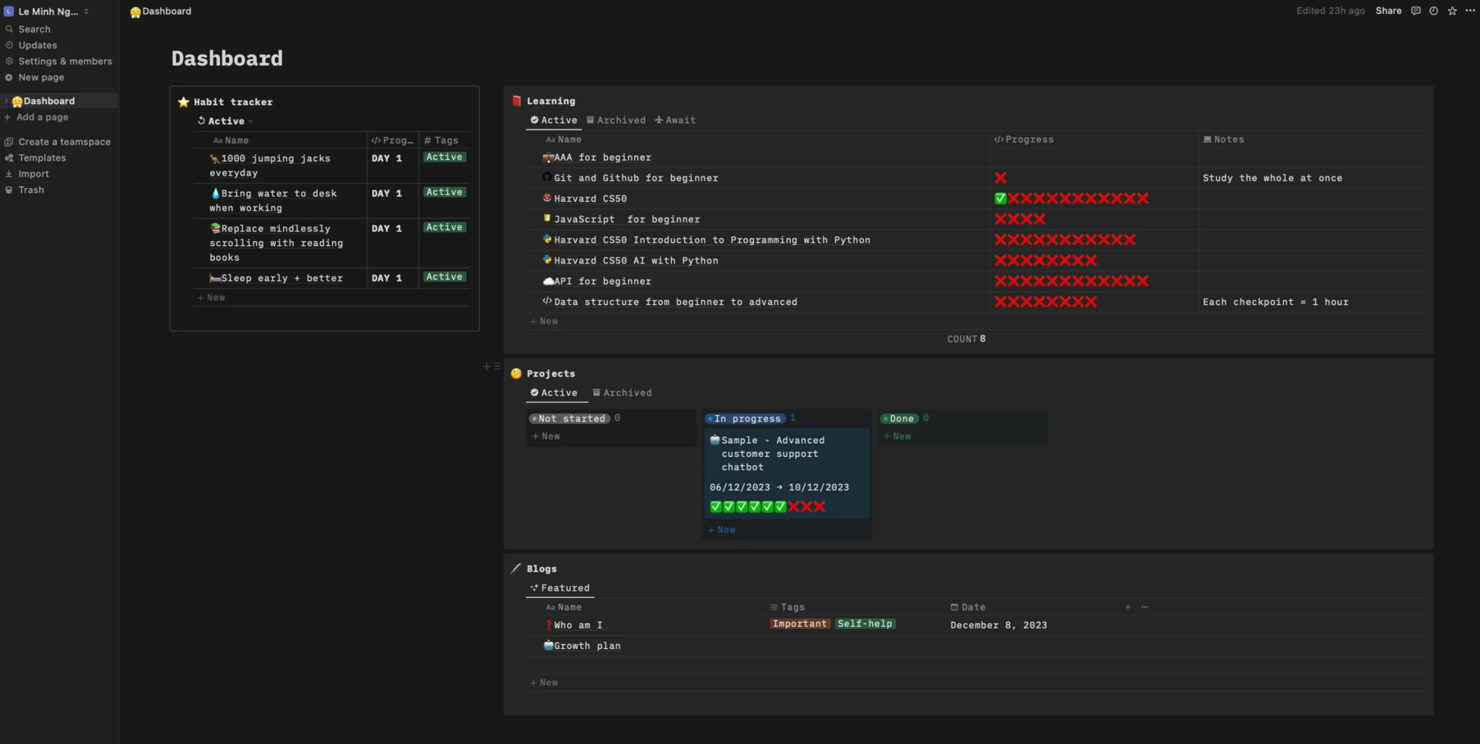
Notion è uno strumento di lavoro versatile per prendere appunti, gestire attività e pianificare progetti. È l’ideale se hai bisogno di modelli personalizzabili per organizzare progetti, attività e flussi di lavoro.
Perché ho scelto Notion: Notion offre modelli VFX personalizzabili che permettono al tuo team di adattare l’ambiente di lavoro alle esigenze specifiche del progetto. Puoi creare bacheche di progetto dettagliate e liste di attività per mantenere tutti allineati, e adattare i modelli man mano che i progetti evolvono. Notion è inoltre altamente personalizzabile e consente di integrare vari elementi di progetto in un’unica piattaforma.
Funzionalità e integrazioni principali:
Funzionalità includono bacheche delle attività personalizzabili e strumenti per prendere appunti, utili per documentare dettagli e idee di progetto. Inoltre puoi modificare documenti in modo collaborativo, migliorando comunicazione e coordinamento.
Integrazioni disponibili con Slack, Google Drive, Trello, Asana, Zapier, Figma, GitHub, Jira e Microsoft Teams.
Pros and Cons
Pros:
- Modelli altamente personalizzabili
- Funzionalità avanzate per prendere appunti
- Supporta la modifica collaborativa
Cons:
- Necessita di una configurazione per la personalizzazione
- Potrebbe richiedere aggiornamenti continui

Ideale per la gestione del portafoglio

Meisterplan è uno strumento di project portfolio management per team che devono dare priorità ai progetti e bilanciare le risorse. È ideale per gli studi VFX che necessitano di una panoramica chiara dei portafogli progetti e dell'allocazione delle risorse.
Perché ho scelto Meisterplan: Le funzionalità di pianificazione degli scenari e gestione delle risorse di Meisterplan sono utili per la gestione del portafoglio e permettono di visualizzare le tempistiche dei progetti e di adattare le risorse in base alle esigenze del team. Lo strumento offre una panoramica in tempo reale sull’avanzamento dei progetti, aiutando così a prendere decisioni informate. La capacità di Meisterplan di simulare diversi scenari progettuali lo rende un asset prezioso per i team VFX.
Caratteristiche principali & integrazioni:
Caratteristiche include un designer di portfolio interattivo che offre una panoramica di progetti, risorse e finanze in un’unica schermata, oltre a una bacheca in stile Kanban per la prioritizzazione.
Integrazioni includono Jira, Smartsheet, Excel, Google Sheets, Asana, Trello, monday.com e Slack.
Pros and Cons
Pros:
- Pianificazione degli scenari efficace
- Gestione flessibile delle risorse
- Supporta la prioritizzazione del portafoglio
Cons:
- Complessità nella configurazione
- Richiede gestione continua

Linear
Ideale per flussi di lavoro VFX agili

Linear è uno strumento di gestione dei progetti che offre monitoraggio dei problemi, pianificazione dei progetti e automazione dei flussi di lavoro. È ideale per i team VFX che seguono metodologie agili per gestire le attività e monitorare l'avanzamento dei progetti.
Perché ho scelto Linear: Linear supporta i flussi di lavoro VFX agili con funzionalità come il monitoraggio automatico dei problemi e aggiornamenti del progetto in tempo reale. La sua interfaccia intuitiva permette al tuo team di adattarsi rapidamente ai cambiamenti, migliorando così la produttività. Puoi automatizzare le attività ripetitive per risparmiare tempo e ridurre gli errori.
Funzionalità e integrazioni principali:
Funzionalità includono commenti in linea e strumenti text-to-issue che permettono di trasformare facilmente le idee in attività. C'è anche una casella di posta per la valutazione, l'etichettatura e l'assegnazione dei problemi in arrivo.
Integrazioni includono GitHub, Slack, Figma, Zapier, Sentry, Notion, Zendesk, Vercel, GitLab e Jira.
Pros and Cons
Pros:
- Supporta metodologie agili
- Interfaccia utente intuitiva
- Automatizza le attività ripetitive
Cons:
- Curva di apprendimento più ripida per i principianti
- Richiede aggiornamenti frequenti

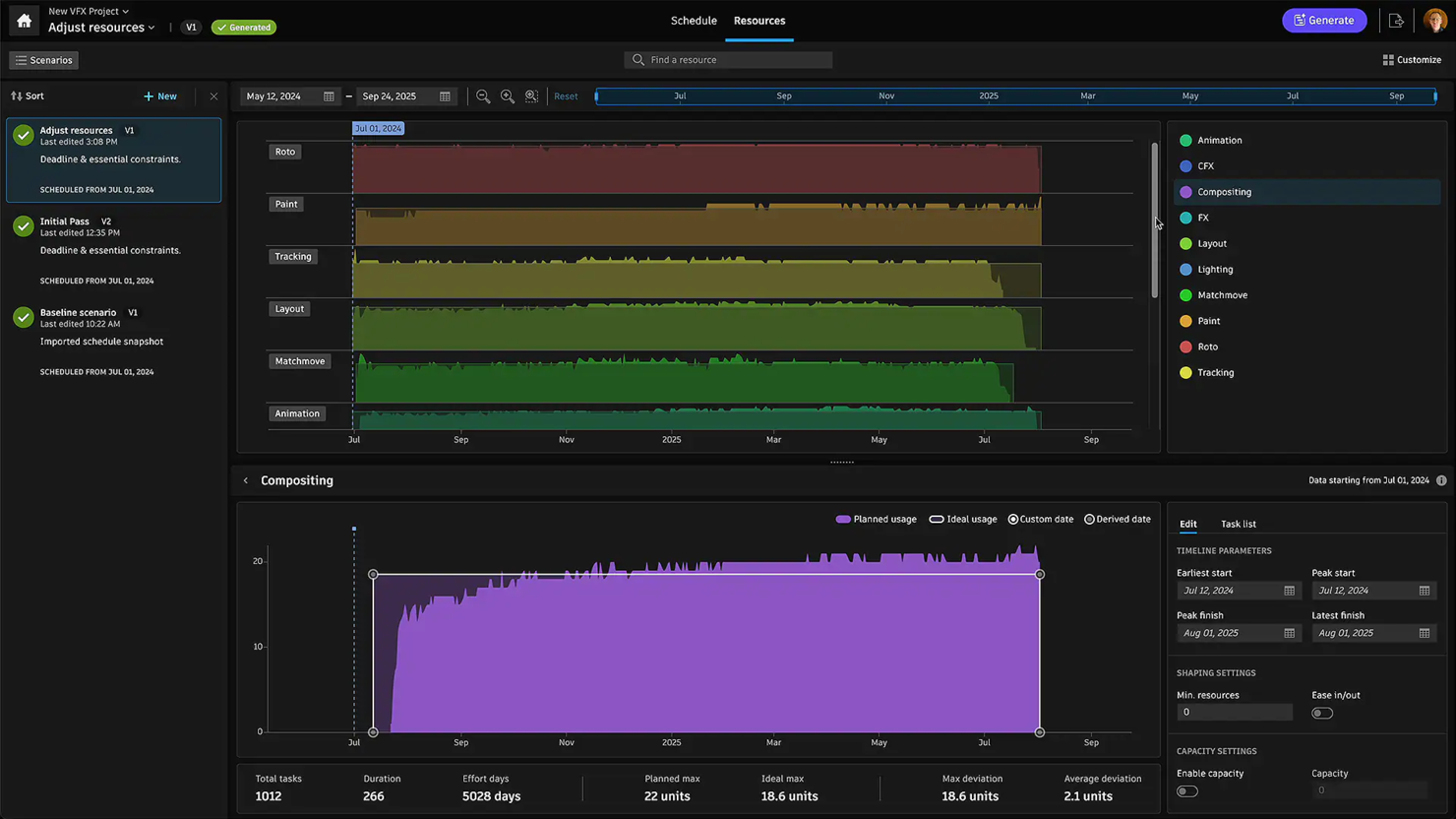
Autodesk Flow Production Tracking è una piattaforma di gestione della produzione basata su cloud per team che lavorano a progetti creativi complessi. Aiuta artisti, produttori e responsabili di studio a organizzare compiti, asset, pianificazioni e contenuti multimediali in un unico posto.
Perché ho scelto Autodesk Flow Production Tracking: Questo strumento consente al tuo team di programmare i compiti, assegnarli e monitorare i progressi tramite un'interfaccia visiva condivisa. Puoi gestire scadenze, generare report e gestire revisioni dall'inizio alla fine. È pensato per grandi produzioni con centinaia di asset e più team. Le funzionalità di controllo delle versioni e la cronologia delle attività facilitano l'organizzazione e la gestione dei cambiamenti lungo tutta la pipeline VFX.
Funzionalità principali & integrazioni:
Funzionalità includono il collegamento degli asset per poter riutilizzare gli elementi. È anche possibile creare e personalizzare modelli di attività, oltre a gestire i flussi di pubblicazione dei file con strumenti di revisione e annotazioni.
Le integrazioni includono cineSync, Deadline, Rush e Subversion (SVN).
Pros and Cons
Pros:
- Gestisce grandi volumi di asset con facilità
- Permette di automatizzare gli aggiornamenti di stato
- Si adatta a diversi stili di produzione
Cons:
- Troppo avanzato per team e progetti di piccole dimensioni
- Richiede intervento amministrativo per mantenere ordine


Projectal è un software di gestione progetti pensato per le industrie creative e offre strumenti per la pianificazione, la gestione del budget e delle risorse. È progettato per studi di VFX e animazione che devono monitorare l'avanzamento dei progetti e gestire efficacemente le risorse.
Perché ho scelto Projectal: Offre analisi dei progetti in tempo reale che aiutano a prendere decisioni informate rapidamente. Il software fornisce strumenti dettagliati per la pianificazione e il budgeting, indispensabili per progetti complessi. Le funzionalità di gestione delle risorse permettono di allocare le risorse, mentre la visualizzazione dei dati in tempo reale offre una panoramica chiara sullo stato del progetto in qualsiasi momento.
Funzionalità e integrazioni principali:
Funzionalità includono dashboard personalizzabili per il monitoraggio dei progetti e capacità di gestione del carico di lavoro. Queste caratteristiche aiutano il tuo team a restare al passo con le richieste dei progetti.
Integrazioni non sono elencate pubblicamente sul sito web di Projectal.
Pros and Cons
Pros:
- Visualizzazione dati in tempo reale
- Dashboard di progetto personalizzabili
- Funzionalità di budgeting dettagliate
Cons:
- Scalabilità limitata per team molto numerosi
- Potrebbe essere necessario supporto tecnico durante l'installazione

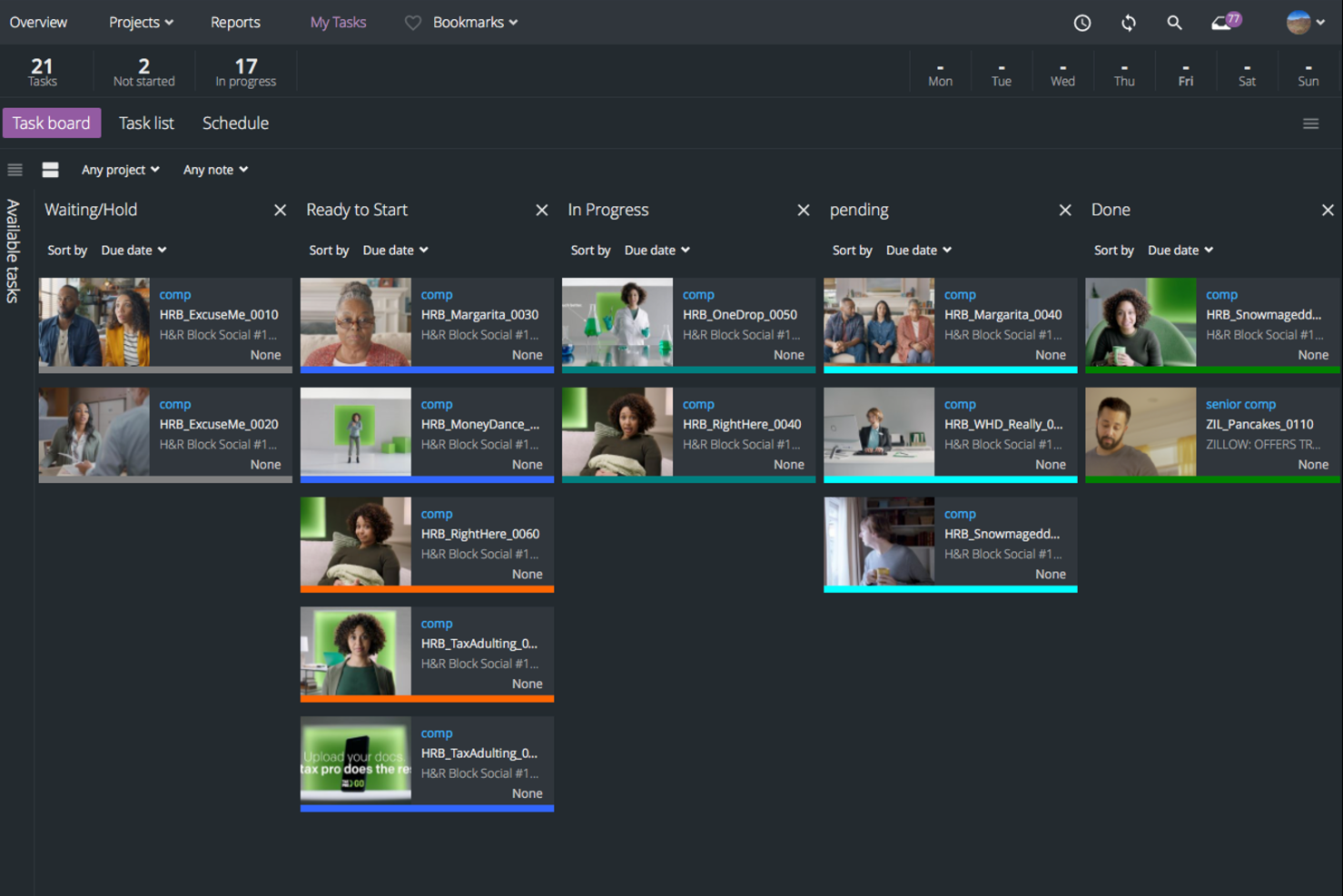
ftrack è un software di collaborazione progettato per i team creativi nel settore VFX. Include funzionalità per la gestione dei progetti, la revisione dei media e il monitoraggio delle attività, ed è pensato per i gruppi che necessitano di gestione dei flussi di lavoro e comunicazione per consegnare i progetti nei tempi previsti.
Perché ho scelto ftrack: le funzionalità di revisione dei media di ftrack aiutano a migliorare la collaborazione creativa ed eliminare le incomprensioni durante il processo di produzione. I flussi di lavoro personalizzabili consentono al tuo team di adattare la pipeline alle vostre esigenze specifiche e le funzionalità di gestione delle attività di ftrack tengono il gruppo organizzato. Gli strumenti di pianificazione dei progetti aiutano inoltre a rispettare le scadenze.
Funzionalità e integrazioni principali:
Funzionalità includono reportistica di progetto e supporto per la produzione virtuale, utili nella gestione di progetti complessi. Queste funzionalità aiutano il team a mantenere il focus sui compiti creativi.
Integrazioni includono cineSync, Adobe Premiere Pro, Nuke, Maya e After Effects.
Pros and Cons
Pros:
- Gestione efficiente di progetti e attività
- Supporta la produzione virtuale
- Migliora i processi di revisione dei media
Cons:
- Richiede tempo per l'impostazione iniziale
- Capacità offline limitate


Prism è un software di project management VFX per studi indipendenti focalizzato sulla gestione di asset e shot, sul monitoraggio delle attività e sul versioning dei media. È l'ideale per team di VFX e animazione che desiderano uno strumento facile da usare e che non richiede competenze tecniche avanzate.
Perché ho scelto Prism: l’interfaccia intuitiva di Prism e l’integrazione con applicazioni popolari come Blender e DaVinci Resolve lo rendono perfetto per gli studi VFX indipendenti. Offre gestione degli asset e monitoraggio delle attività, così i piccoli team possono rimanere organizzati. Il visualizzatore 3D per la visualizzazione degli asset ne migliora l’usabilità, soprattutto per i team che lavorano su progetti dettagliati.
Caratteristiche e integrazioni principali:
Caratteristiche includono gestione di asset e shot e versioning dei media. Inoltre, il supporto per OpenUSD facilita la collaborazione tra i membri del team su progetti complessi.
Integrazioni includono Houdini, Maya, Blender, Unreal Engine, After Effects, Nuke e 3ds Max.
Pros and Cons
Pros:
- Facile da usare anche per utenti non tecnici
- Supporta OpenUSD per la collaborazione
- Visualizzatore 3D per la visualizzazione degli asset
Cons:
- Potrebbe richiedere plugin aggiuntivi
- Non adatto a team numerosi


Cerebro è uno strumento di gestione progetti e collaborazione per team creativi focalizzato sul monitoraggio visivo delle attività e sulla comunicazione. È l’ideale per i team VFX che necessitano di gestire i progetti in modo visivo e mantenere una comunicazione chiara tra i dipartimenti.
Perché ho scelto Cerebro: Cerebro eccelle nel monitoraggio visivo dei progetti grazie a funzionalità come il diagramma di Gantt e le viste della timeline. Permette al tuo team di vedere l’intero progetto a colpo d’occhio e rende più semplice la coordinazione. Lo strumento include annotazioni visive, che aiutano a fornire feedback precisi sulle risorse. L’enfasi di Cerebro sulla comunicazione visiva lo rende una scelta particolarmente valida per i team che si basano molto sui contenuti visuali.
Caratteristiche distintive & integrazioni:
Caratteristiche comprendono una vista timeline per tenere traccia in modo efficace di avanzamento e scadenze. Il software offre anche funzionalità di reporting dettagliato, che ti supportano nella valutazione delle prestazioni di progetto.
Integrazioni includono Adobe After Effects, Maya, 3ds Max, Nuke, Cinema 4D, Blender e Houdini.
Pros and Cons
Pros:
- Forte gestione visiva delle attività
- Supporto per annotazioni visive
- Monitoraggio efficace della timeline
Cons:
- Funzionalità offline limitate
- Potrebbe richiedere supporto continuativo


Vani Software è un software di project management per studi VFX e di animazione progettato per gestire programmazioni episodiche e lavoro in outsourcing. Aiuta i team a migliorare chiarezza e controllo sui progetti AVGC, mantenere l'allineamento e tenere i progetti in carreggiata.
Perché ho scelto Vani Software: Le funzionalità di tracciamento dell'avanzamento e di gestione centralizzata delle risorse di Vani Software sono pensate per i piccoli team VFX. Lo strumento aiuta a migliorare la comunicazione tra i reparti e offre anche metriche di performance che puoi utilizzare per pianificare i progetti in modo efficace. Inoltre puoi gestire le risorse dall'ideazione al rendering finale e usare la codifica personalizzata per l'organizzazione degli asset.
Funzionalità e integrazioni principali:
Funzionalità includono analisi e tracciamento in tempo reale oltre a comunicazione integrata e cicli di feedback. Queste caratteristiche aiutano il tuo team a rimanere organizzato e produttivo.
Integrazioni non sono elencate pubblicamente sul sito di Vani.
Pros and Cons
Pros:
- Comunicazione e cicli di feedback migliorati
- Codifica personalizzata per una gestione efficiente delle risorse
- Maggiore visibilità sui progetti
Cons:
- Curva di apprendimento per i nuovi utenti
- Mancanza di integrazioni native

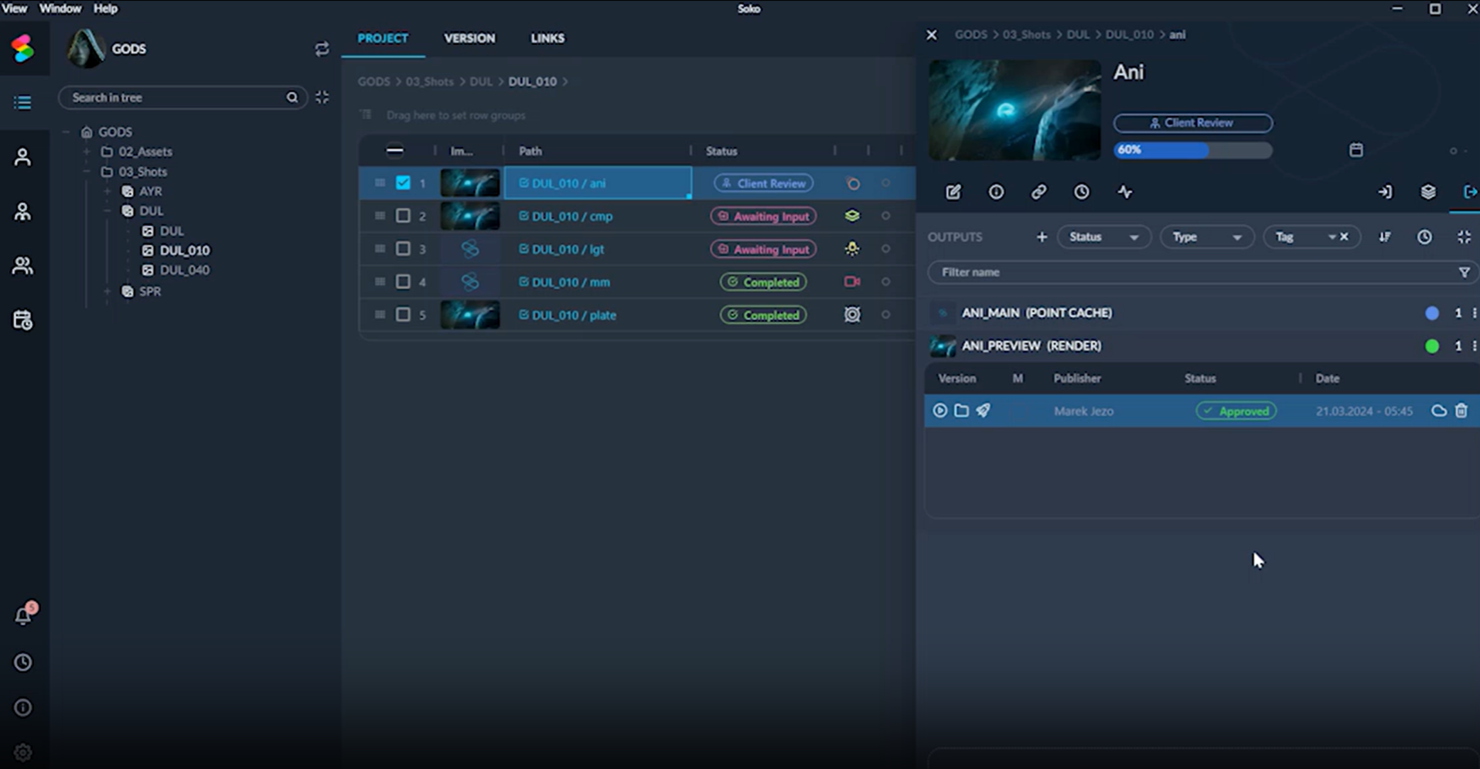
SOKO è uno strumento di gestione progetti alimentato dall'intelligenza artificiale per studi VFX, focalizzato sull'automatizzazione dei processi. È ideale per i team creativi che desiderano integrare le proprie procedure di gestione progetti e pipeline esistenti.
Perché ho scelto SOKO: SOKO offre funzionalità come gare intelligenti e pianificazione automatizzata. Il software ti permette di utilizzare l'IA per stimare costi e tempi necessari, aiutando i progetti a rimanere entro il budget. Gli aggiornamenti automatici delle attività tengono il team informato, e la capacità di SOKO di gestire la collaborazione a distanza e automatizzare i flussi di lavoro lo rende una scelta valida per i team che devono dare priorità a conformità ed efficienza.
Funzionalità principali & integrazioni:
Funzionalità includono gare intelligenti per la stima dei costi e un pilota automatico per la gestione progetti che aggiorna le attività in tempo reale. Sono incluse anche automazioni per esportazioni e conversione file.
Integrazioni non sono elencate pubblicamente sul sito di SOKO.
Pros and Cons
Pros:
- Stima dei costi alimentata da IA
- Supporta la collaborazione remota
- Funzionalità avanzate per la conformità dei dati
Cons:
- Richiede conoscenze di IA per la configurazione
- Configurazione dell'automazione complessa
Altri software di gestione dei progetti VFX
Ecco alcune opzioni aggiuntive di software di gestione dei progetti VFX che non sono entrate nella mia selezione, ma che vale comunque la pena esaminare:
- V-Slate
Ideale per team VFX remoti
- Screendragon
Ideale per strumenti VFX integrati
- GoodDay
Ideale per flussi di lavoro personalizzabili


Come Valuto il Software di Gestione Progetti VFX
Suddivido la mia valutazione tra i requisiti di base—come il tracking dei shot e le integrazioni DCC—e i fattori che differenziano una soluzione ideale da uno strumento generico.
Funzionalità Core (Requisiti Minimi per Questa Lista)
Quando seleziono gli strumenti per la mia lista, valuto ciascuno su una scala da 0 (non offre la funzionalità) a 5 (eccelle in quest'area) per ogni funzionalità fondamentale elencata di seguito. Successivamente, calcolo il punteggio totale dello strumento in percentuale. Ogni strumento deve raggiungere un punteggio totale minimo del 55% per essere preso in considerazione.
- Tracking Shot & Asset: Cerco entità dedicate per shot e sequenze con stati, metadati e dipendenze—non solo bacheche di task generiche riutilizzate con etichette shot.
- Review di Versioni & Media: Ogni strumento dovrebbe supportare la riproduzione frame-accurata con annotazioni e pila di versioni, in modo che i supervisori possano confrontare i render fianco a fianco durante le dailies.
- Assegnazione Task & Artisti: Valuto se i task sono collegati direttamente a shot o asset e mappati ai reparti VFX come comp, lighting o FX con chiare catene di dipendenza.
- Integrazioni Digital Content Creation (DCC) & Pipeline: Plugin nativi o API Python che si collegano a strumenti come Maya, Nuke e Houdini sono fondamentali qui—gli artisti devono poter pubblicare e caricare asset senza uscire dal loro DCC.
- Offerte & Pianificazione Risorse: I producer devono costruire offerte, allocare artisti tra gli show e confrontare ore stimate e reali, quindi verifico la presenza di pianificazione collegata al controllo dei costi.
- Review & Approvazioni Clienti: Cerco workflow di approvazione strutturati con condivisione esterna sicura, watermarking e sessioni di review basate su playlist a cui i clienti possono accedere direttamente.
Una volta ottenuta una lista di strumenti che soddisfano i criteri, considero cosa rende ciascuna piattaforma unica.
Fattori Differenzianti (Cosa Distingue i Fornitori)
Ecco come confronto e differenzio i vari fornitori:
Funzionalità Distintive
La sincronizzazione editoriale è un grande fattore di differenziazione—quando un taglio cambia durante la produzione, gli strumenti che importano EDL o AAF e aggiornano automaticamente la lista shot fanno risparmiare ore di riconciliazione manuale ai producer. Valuto anche le capacità di revisione remota, dato che i team distribuiti necessitano di riproduzione sincronizzata, strumenti di disegno e registrazione sessione per sostituire le dailies in presenza. Il time logging degli artisti completa il quadro; il monitoraggio delle differenze tra offerte e reali collegato agli shot specifici aiuta i producer a individuare sforamenti prima che si diffondano su tutta la produzione.
Oltre le Funzionalità
Sicurezza e conformità alla protezione dei contenuti sono fondamentali—gli studi che lavorano su titoli non ancora pubblicati necessitano di certificazione TPN, link di review con watermark e log di audit per soddisfare le richieste dei distributori. Valuto anche l'estensibilità della pipeline, poiché la maggior parte delle facility VFX personalizza ampiamente i propri strumenti; una API Python completa e la compatibilità con framework come OpenPype o Ayon possono determinare il successo dell'adozione. Anche la flessibilità di deployment è importante, dato che alcuni studi richiedono hosting on-premise per progetti sensibili mentre altri necessitano l'accesso cloud per team distribuiti.
Come scegliere il software di gestione dei progetti VFX
È facile perdersi in lunghi elenchi di funzionalità e strutture tariffarie complesse. Per aiutarti a rimanere concentrato mentre affronti il tuo esclusivo processo di selezione del software, ecco una lista di fattori da tenere a mente:
| Fattore | Cosa considerare |
|---|---|
| Scalabilità | Il software può crescere insieme al tuo team? Assicurati che supporti progetti di dimensioni crescenti e un numero maggiore di utenti. Cerca strumenti che offrano piani tariffari flessibili. |
| Integrazioni | Si collega agli strumenti che già utilizzi? Verifica se si integra con i software che usi già, come Adobe Creative Cloud o Slack. |
| Personalizzazione | Puoi adattare il software ai tuoi flussi di lavoro? Valuta se consente di creare dashboard, campi e report personalizzati in linea con i processi del tuo team. |
| Facilità d'uso | Il tuo team lo troverà intuitivo? Testa l'interfaccia per verificarne semplicità e chiarezza. Una curva di apprendimento ripida può rallentare l'adozione e la produttività. |
| Implementazione e avvio | Con quale rapidità il tuo team può iniziare? Prendi in considerazione strumenti con una configurazione semplice e risorse come tutorial e modelli per facilitare la transizione. |
| Costo | Rientra nel budget? Confronta il costo totale di possesso, comprese le commissioni nascoste. Cerca modelli tariffari in linea con i tuoi vincoli finanziari. |
| Misure di sicurezza | I tuoi progetti sono protetti? Assicurati che il software offra la crittografia dei dati, la conformità agli standard di sicurezza e aggiornamenti regolari per proteggere il lavoro del tuo team. |
| Disponibilità dell'assistenza | Puoi ricevere aiuto quando ne hai bisogno? Verifica la disponibilità di opzioni di assistenza clienti come chat, telefono ed email, per assicurarti che il supporto sia facilmente accessibile. |
Che cos'è il software di gestione dei progetti VFX?
Il software di gestione dei progetti VFX è uno strumento progettato per aiutare i team a organizzare e gestire in modo efficiente i progetti di effetti visivi (ad esempio film, animazione e videogiochi). Produttori VFX, supervisori e team creativi lo utilizzano per coordinare attività e risorse, gestire risorse e fare in modo che tutti lavorino insieme.
Il monitoraggio delle attività, la gestione delle risorse e le funzionalità collaborative aiutano a gestire flussi di lavoro complessi, consegnare i progetti nei tempi previsti, semplificare il coordinamento dei progetti e aumentare la produttività del team.
Funzionalità del software di gestione dei progetti VFX
Quando selezioni un software di gestione dei progetti VFX, presta attenzione alle seguenti funzionalità chiave:
- Monitoraggio delle attività: offre una visione chiara delle attività e delle scadenze del progetto, aiutando i team a rimanere organizzati e a raggiungere gli obiettivi del progetto.
- Gestione delle risorse: mantiene tutte le risorse del progetto in un unico luogo, facilitando la gestione e l'accesso ai file quando necessario.
- Strumenti di collaborazione: consentono ai membri del team di comunicare e lavorare insieme in modo efficace, indipendentemente dalla loro posizione.
- Flussi di lavoro personalizzabili: permettono ai team di adattare i processi alle proprie esigenze specifiche, migliorando l'efficienza e l'adattabilità.
- Report e analisi: offrono informazioni sulle prestazioni del progetto e aiutano i team a prendere decisioni consapevoli e a ottimizzare i flussi di lavoro.
- Gestione delle risorse: aiuta ad assegnare membri del team e risorse per evitare colli di bottiglia e mantenere fluido l'avanzamento del progetto.
- Capacità di integrazione: consente di collegarsi ad altri strumenti e software per migliorare funzionalità e processi.
- Misure di sicurezza: proteggono i dati sensibili del progetto tramite la crittografia e la conformità agli standard del settore.
- Aggiornamenti in tempo reale: tengono tutti informati sulle modifiche e sui progressi più recenti del progetto, riducendo le incomprensioni.
- Pianificazione degli scenari: aiuta i team a testare diversi risultati del progetto e a prendere decisioni strategiche basate su scenari potenziali.
Vantaggi del software di gestione dei progetti VFX
L'implementazione di un software di gestione dei progetti VFX offre diversi vantaggi al team e all'azienda. Ecco alcuni dei vantaggi che puoi aspettarti:
- Maggiore organizzazione: aiuta a mantenere progetti e attività in ordine e riduce il caos e la confusione.
- Migliore collaborazione: favorisce una comunicazione più efficace tra i membri del team, portando a un lavoro di squadra più efficiente.
- Maggiore efficienza: i flussi di lavoro personalizzabili e le funzionalità di automazione fanno risparmiare tempo e riducono il lavoro manuale.
- Migliore allocazione delle risorse: garantisce che i membri del team e le risorse siano utilizzati in modo efficace e previene i colli di bottiglia.
- Processo decisionale consapevole: report e analisi forniscono informazioni preziose e aiutano i team a fare scelte più efficaci.
- Sicurezza dei dati: protegge i dati del progetto tramite la crittografia e la conformità, offrendo maggiore tranquillità.
- Consegna puntuale dei progetti: il monitoraggio delle attività e gli aggiornamenti in tempo reale aiutano a mantenere i progetti nei tempi previsti e a rispettare costantemente le scadenze.
Costi e prezzi del software di gestione dei progetti VFX
La scelta di un software di gestione dei progetti VFX richiede la comprensione dei diversi modelli di prezzo e dei piani disponibili. I costi variano in base alle funzionalità, alle dimensioni del team, ai componenti aggiuntivi e ad altri fattori. La tabella seguente riepiloga i piani più comuni, i relativi prezzi medi e le funzionalità tipicamente incluse nelle soluzioni software di gestione dei progetti VFX:
Tabella comparativa dei piani per il software di gestione dei progetti VFX
| Tipo di piano | Prezzo medio | Funzionalità comuni |
|---|---|---|
| Piano gratuito | $0 | Gestione di base delle attività, spazio di archiviazione limitato e assistenza di base. |
| Piano personale | $5-$25/utente/mese | Gestione delle attività, condivisione dei file e integrazioni limitate. |
| Piano aziendale | $30-$50/utente/mese | Monitoraggio avanzato delle attività, strumenti di collaborazione del team e flussi di lavoro personalizzabili. |
| Piano per grandi aziende | $60-$100/utente/mese | Report completi, maggiori funzionalità di sicurezza e assistenza dedicata. |
Domande frequenti sul software di gestione dei progetti VFX
Ecco alcune risposte alle domande comuni sul software di gestione dei progetti VFX:
Cosa dovrei cercare in termini di sicurezza?
Assicurati che il software offra la crittografia dei dati e sia conforme agli standard di sicurezza del settore. Verifica la presenza di funzionalità come il controllo degli accessi basato sui ruoli, che consente di gestire chi può visualizzare e modificare i dati dei progetti. Anche gli aggiornamenti e le patch regolari del software proteggono dalle vulnerabilità.
Quanto sono importanti le integrazioni con altri strumenti?
Le integrazioni sono fondamentali per un flusso di lavoro fluido, soprattutto se il tuo team utilizza software come Adobe Creative Cloud o Slack. Cerca un software di gestione dei progetti VFX in grado di connettersi agli strumenti già in uso, così da migliorare la produttività e ridurre l’inserimento manuale dei dati.
In che modo il software di gestione dei progetti VFX può migliorare la collaborazione del team?
Questi strumenti offrono funzionalità come aggiornamenti in tempo reale, dashboard condivise e canali di comunicazione per mantenere i membri del team informati e allineati. Riducono le incomprensioni e aiutano tutti a lavorare verso gli stessi obiettivi, indipendentemente dalla posizione.
Quali sono le difficoltà più comuni nell'implementazione del software di gestione dei progetti VFX?
Tra le difficoltà più comuni vi sono ottenere il consenso del team, gestire la curva di apprendimento e integrare il software con gli strumenti già in uso. Per superarle, organizza sessioni di formazione, utilizza le risorse di supporto e introduci gradualmente il software nel team.
Come valuto il ROI del software di gestione dei progetti VFX?
Valuta l’impatto del software sull’efficienza e sulla produttività del team. Misura i miglioramenti nei tempi di consegna dei progetti, nell’utilizzo delle risorse e nella riduzione degli errori. Confronta questi vantaggi con il costo del software per determinarne il ritorno sull’investimento.