

10 migliori app di posta elettronica recensite nel 2026

Elenco dei migliori client di posta elettronica


Gestire i progetti può essere un vero esercizio di equilibrismo e spesso le email aumentano il caos. Ti serve un'app di posta elettronica sicura che ti aiuti a rimanere organizzato e a mantenere il tuo team sulla buona strada. In base alla mia esperienza, il client di posta giusto può fare davvero la differenza.
Ho testato e recensito innumerevoli app di posta elettronica per trovare le opzioni migliori per te. Il mio obiettivo è condividere informazioni imparziali che rispondano alle tue esigenze. Che si tratti di integrarsi con altri strumenti o di offrire funzionalità uniche, c'è qualcosa per ogni team.
In questo articolo ti guiderò attraverso le mie scelte migliori, evidenziando ciò che distingue ciascuna di esse. Troviamo l'app di posta elettronica più adatta al tuo flusso di lavoro e che ti aiuti a gestire i progetti in modo più efficace.
Perché fidarsi dei nostri consigli sui software
Il nostro team testa e recensisce software dal 2012. In quanto project manager noi stessi, sappiamo quanto sia difficile — e importante — scegliere il software giusto.
Per questa guida, abbiamo valutato gli strumenti attraverso test pratici e ricerche indipendenti, assegnando un punteggio agli strumenti in base ai nostri criteri di selezione. Ci basiamo inoltre sulle competenze di leader di pensiero del settore e di professionisti attivi nella gestione dei progetti.
Le nostre recensioni riflettono il nostro giudizio editoriale umano, non un discorso di vendita.
Revisori esperti:
Tabella comparativa delle app di posta elettronica
Questa tabella comparativa riassume i dettagli sui prezzi delle mie migliori app di posta elettronica:
| Tool | Best For | Trial Info | Price | ||
|---|---|---|---|---|---|
| 1 | Best for business integration | Free 14-day free trial + free plan available | From $4.03/user/month (billed annually) | Website | |
| 2 | Best for Google Workspace users | Free plan available | From $7/user/month (billed annually) | Website | |
| 3 | Best for Apple device integration | Free plan available | From $0.99/month | Website | |
| 4 | Best for free domain options | Free demo available | Free forever plan | Website | |
| 5 | Best for large email storage | Free 14-day trial + free plan available | From $5/month | Website | |
| 6 | Best for AI-based features | Free plan available | From $14.99/month | Website | |
| 7 | Best for open-source customization | Free to use | Free forever plan | Website | |
| 8 | Best for privacy | Free 7-day trial + free plan available | From $3/month | Website | |
| 9 | Best for Windows users | 30-day free trial | From $9.99/month | Website | |
| 10 | Best for AI-powered assistance | Free plan available | From $25/user/month (billed annually) | Website |
Recensione delle migliori app di posta elettronica
Di seguito trovi le mie sintesi dettagliate delle migliori app di posta elettronica incluse nel mio elenco. Le mie recensioni offrono uno sguardo approfondito sulle funzionalità principali, sui pro e i contro, sulle integrazioni e sui casi d’uso ideali di ogni strumento, per aiutarti a trovare quello più adatto a te.

Mailbird
Best for business integration
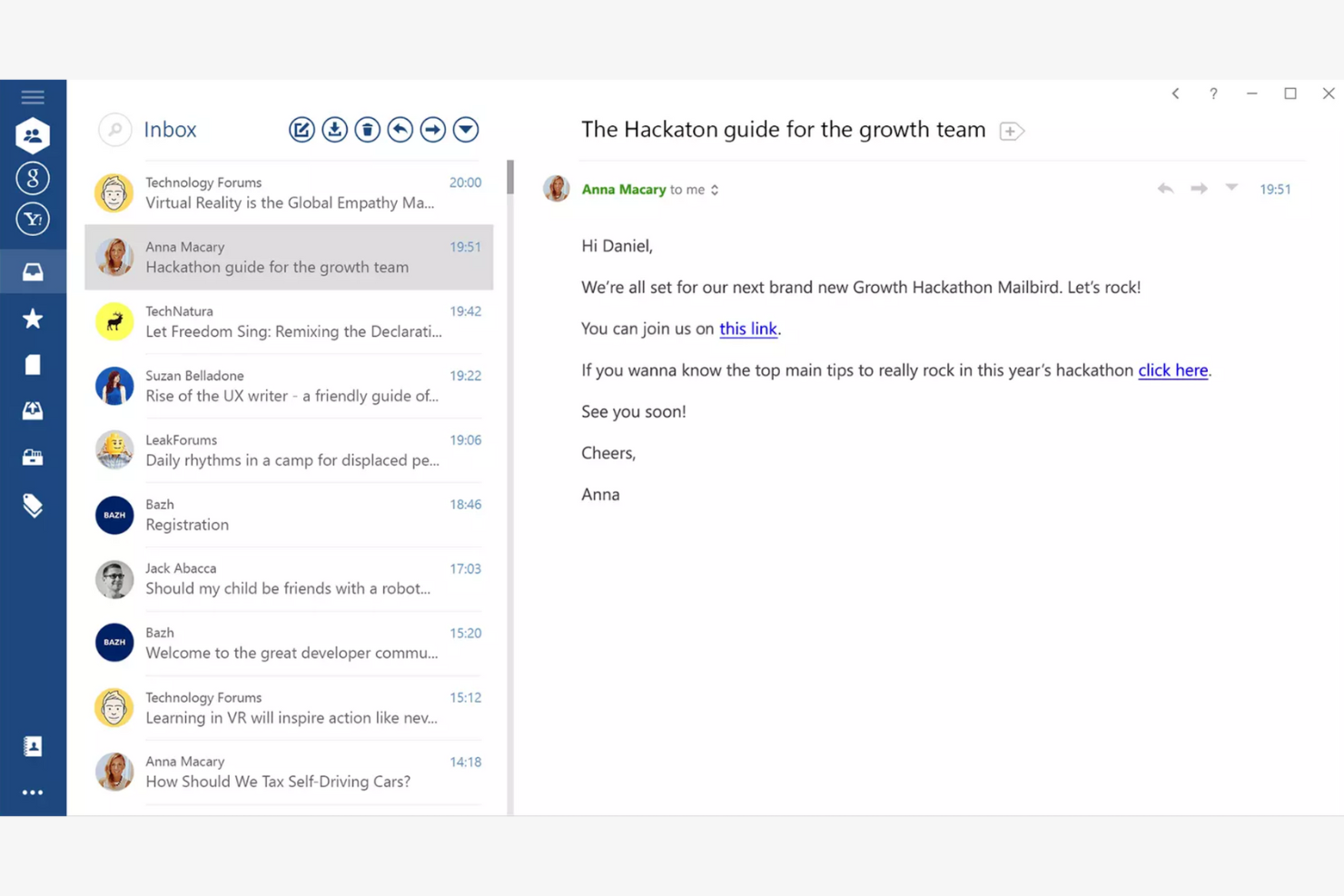
Mailbird is an email client tailored for Windows users, providing an all-in-one platform for managing multiple email accounts. It boosts productivity by offering features that simplify email management and communication.
Why I picked Mailbird: Mailbird is designed specifically for Windows, making it a great choice if your team already uses this operating system. The app's unified inbox lets you manage multiple accounts efficiently, while the speed reader feature helps you process emails quickly. The app's customization options also let you personalize your email experience to fit your needs.
Standout Features and Integrations:
Features include a snooze function to temporarily hide emails and keyboard shortcuts that make navigation quicker and easier. You can also customize the layout to fit your workflow.
Integrations include Slack, Google Calendar, Asana, Dropbox, Evernote, Trello, Facebook, Twitter, WeChat, ZeroBounce, and more.
Pros and Cons
Pros:
- Local-client architecture that keeps data on your device
- Customizable interface
- Unified inbox for multiple accounts
Cons:
- Shallow inbox automation and management tools
- Limited support for non-Windows platforms

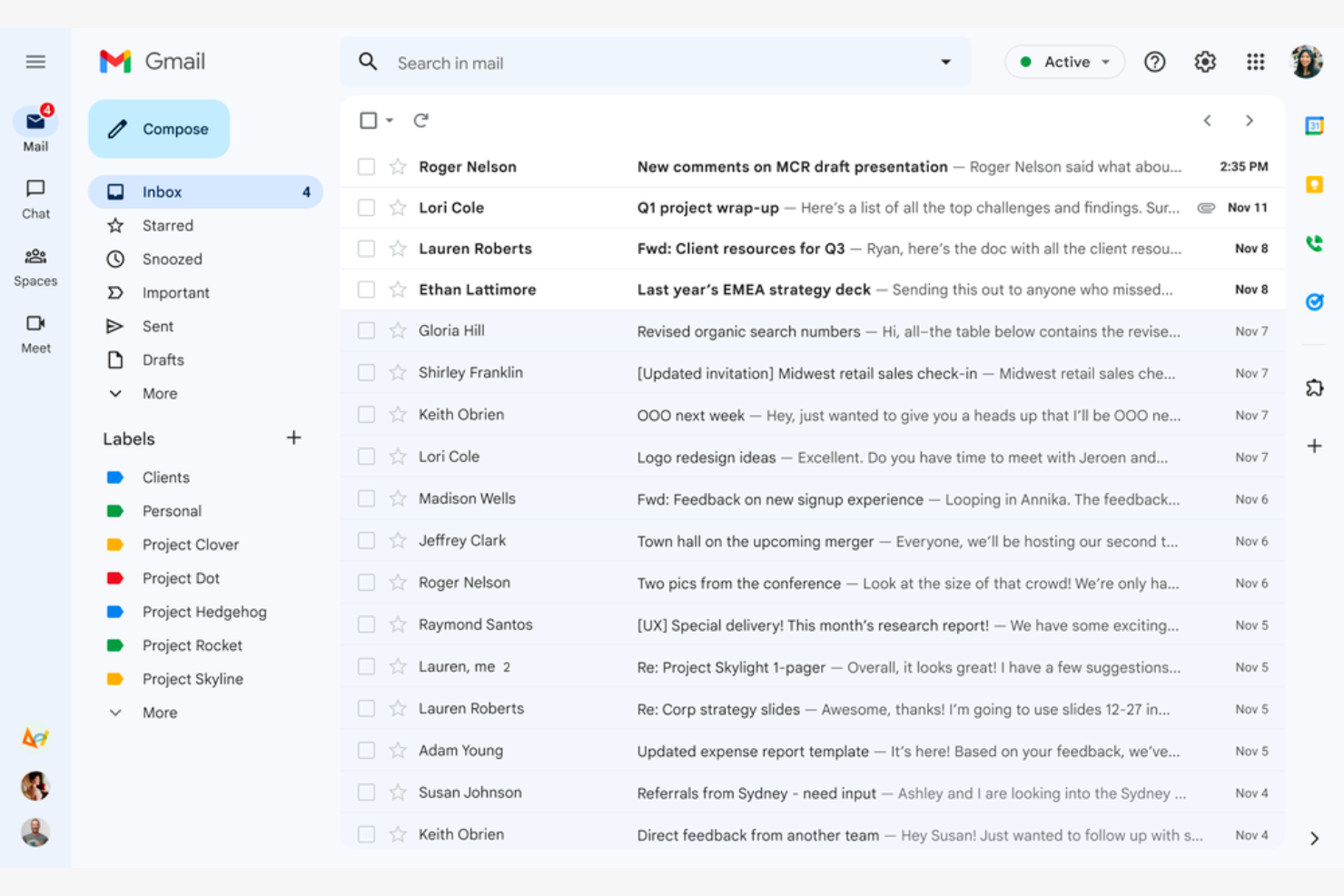
Google Gmail is a widely used email service that caters mainly to Google Workspace users. It offers essential email functions that integrate with Google services, giving both individuals and businesses a connected experience.
Why I picked Google Gmail: Google Gmail is ideal for Google Workspace users because it integrates with Google Drive, Calendar, and Docs. The conversation view groups your emails into threads so you never lose track of the discussion, while labels and filters help you categorize and sort emails efficiently. The Google Gmail app's spam filtering helps keep your inbox clean and protects you from phishing scams.
Standout Features and Integrations:
Features include 15GB of free storage, smart reply suggestions, and advanced search capabilities. You can schedule emails to be sent later, which is handy for coordinating with teams across time zones. The priority inbox also automatically highlights important emails so you never miss critical messages.
Integrations include Google Workspace and more.
Pros and Cons
Pros:
- Search functionality
- Integrates with the Google ecosystem
- Spam and phishing detection
Cons:
- Privacy concerns surrounding Google's data-driven business model
- No folder organization

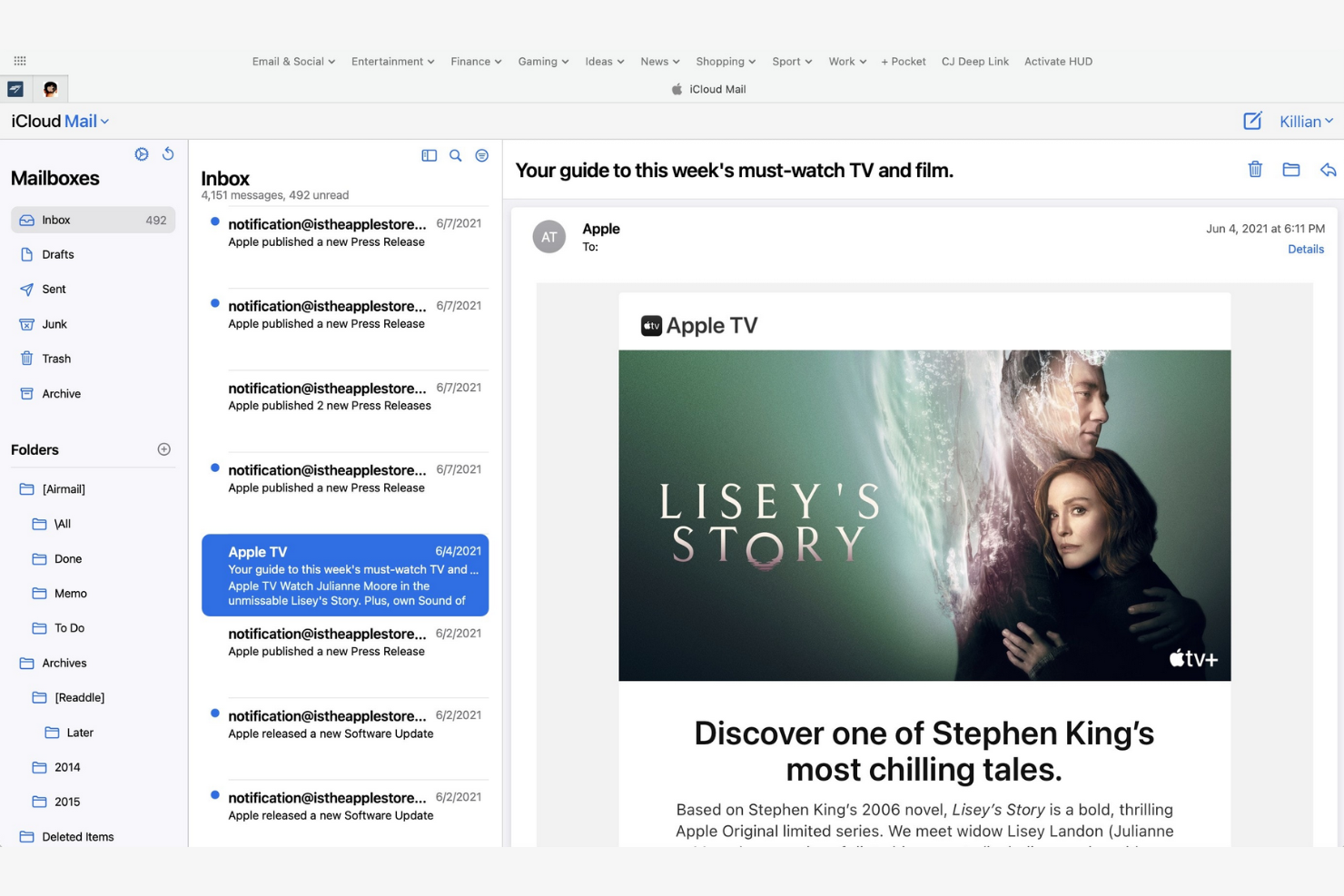
Apple iCloud Mail is an Apple-native email app that offers integration across iPhones, iPads, and Macs. It helps users stay organized and efficient with a suite of essential email management tools.
Why I picked Apple iCloud Mail: Apple iCloud Mail is tailored for Apple users, delivering consistent performance across all your Apple devices. The app's iCloud integration lets you quickly sync emails, contacts, and calendars, while the Handoff feature lets you switch between devices without losing your place. Also, the app's user-friendly interface makes managing emails straightforward.
Standout Features and Integrations:
Features include a priority inbox for important emails, customizable swipe gestures, and support for rich text formatting. You can manage multiple email accounts in one place, and the VIP feature also lets you set notifications for emails from important contacts so you never miss high-priority messages.
Integrations are not publicly listed.
Pros and Cons
Pros:
- Strong privacy protection and minimal data scanning
- Intuitive interface
- Integrates with Apple's ecosystem
Cons:
- Slow search
- Limited free space


mail.com is an email service catering to business owners who need customizable domain options. It lets users create professional-looking email addresses with tailored domain names.
Why I picked mail.com: mail.com's standout feature is free domain options, which let you personalize your email address with a custom domain name. This flexibility is ideal for both individuals and small businesses looking to upgrade their email presence. The tool's simple interface makes managing emails straightforward. The ability to use different domain names sets mail.com apart from other email apps.
Standout Features and Integrations:
Features include unlimited email storage and a customizable spam filter. You can also use the integrated online calendar to manage your schedule efficiently.
Integrations include Opera, Google Chrome, Safari, Mozilla Firefox, Mail Backup X, Mailspring, and more.
Pros and Cons
Pros:
- Intuitive interface
- Generous features included in the free plan
- Wide range of custom domain names
Cons:
- Poor spam protection
- Ads in the free version


Yahoo! Mail is an email service that offers users ample storage for their emails and attachments. Its high-capacity email inbox makes it ideal for both personal and business communication.
Why I picked Yahoo! Mail: Yahoo! Mail's expansive storage capacity is a key feature for users who manage a large volume of emails. You can store thousands of emails without worrying about running out of space. The intuitive interface lets you manage emails efficiently, and thanks to its customizable themes, you can personalize your email experience.
Standout Features and Integrations:
Features include an easy-to-use search function and a built-in calendar that lets you organize your schedule directly from your inbox. You can also customize the interface with unique themes to suit your preferences.
Integrations include Google Drive, Microsoft Office Online, Grammarly, Shift, WiseStamp, CredentialingSpectrum, Reoon Email Verifier, Rambox, Oki-Toki, and more.
Pros and Cons
Pros:
- Built-in calendar and reminder viewer
- Customizable themes available
- Generous email storage space
Cons:
- Track record of major data breaches
- Frequent upselling


Edison Mail is designed for users who value smart features and efficient email management. It increases productivity by automating routine tasks and providing intelligent insights.
Why I picked Edison Mail: Edison Mail's AI-powered features help you manage emails more efficiently. The app includes smart notifications that alert you to important emails, and the one-tap unsubscribe feature is a lifesaver for decluttering your inbox. The built-in assistant also organizes your travel and package information, keeping everything in one place.
Standout Features and Integrations:
Features include a focused inbox that prioritizes emails based on importance and customizable swipe gestures to speed up email management. You can also use dark mode to reduce eye strain during late-night work sessions.
Integrations include Google Workspace, Apple iCloud, Yahoo! Mail, AOL, Hotmail, Amazon, Walmart, Microsoft 365, and more.
Pros and Cons
Pros:
- Focused inbox for priority emails
- One-tap unsubscribing and bulk cleanup features
- Smart notifications
Cons:
- Subscription required
- Syncing errors

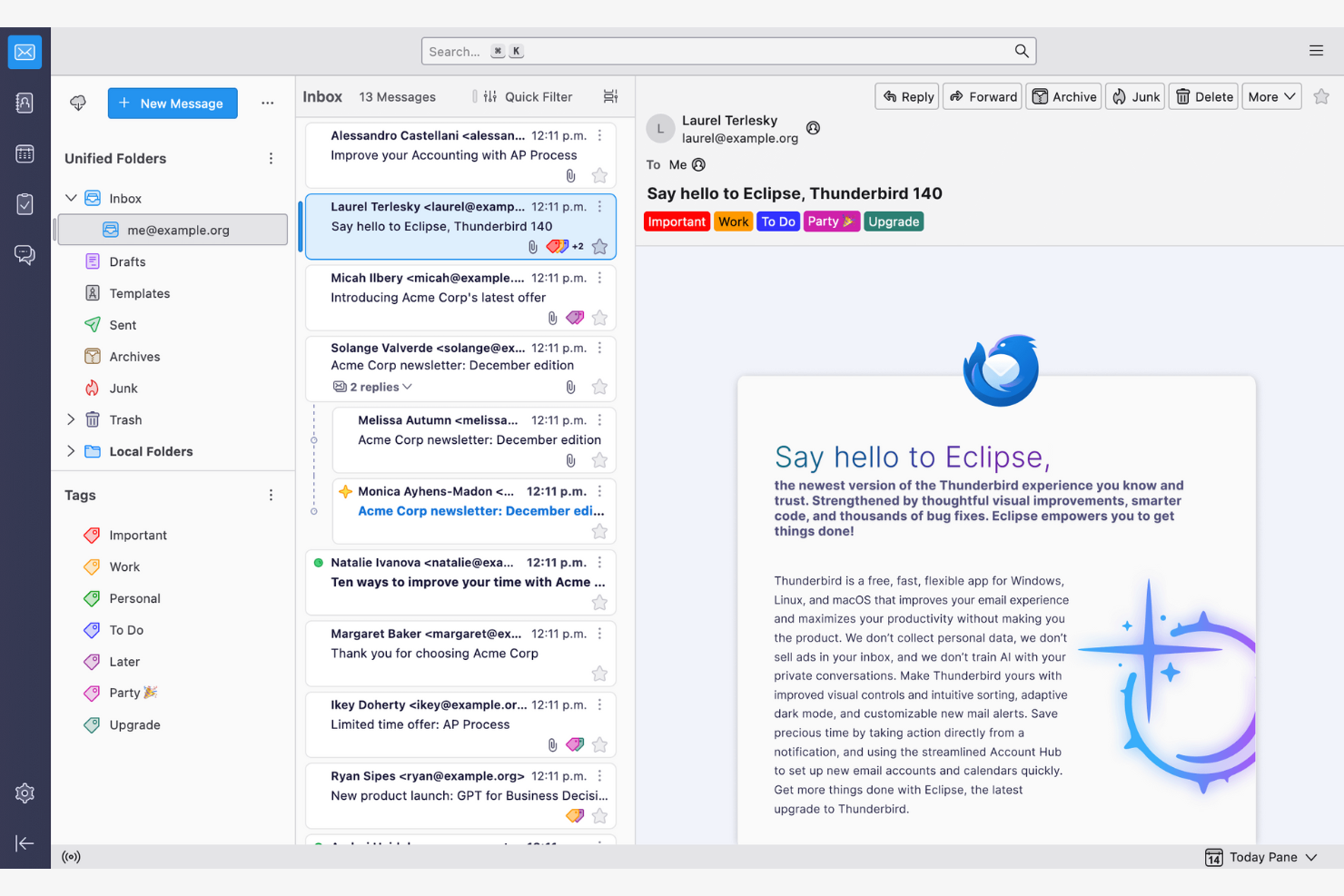
Thunderbird is an open-source email client that lets users customize and control their email environment. Its features make email management and communication more efficient.
Why I picked Thunderbird: Thunderbird is highly customizable, appealing to users who want to tailor it to their specific needs. You can use add-ons to upgrade the app's functionality, while the tabbed email feature lets you manage multiple conversations at once. Because the app is open-source, you can modify it to suit your preferences.
Standout Features and Integrations:
Features include a smart folder system to organize emails across different accounts, powerful spam filtering to block unwanted emails, and a quick filter toolbar to find emails more efficiently.
Integrations include Google Gmail, Yahoo! Mail, McAfee LiveSafe, Kasm Workspaces, Greatmail, PDFCreator, Mailfence, Aid4Mail, 1Tool CRM, and more.
Pros and Cons
Pros:
- Strong spam filtering and privacy options
- Unified inbox with tabs
- Customizable with add-ons
Cons:
- Basic user interface
- No native mobile app

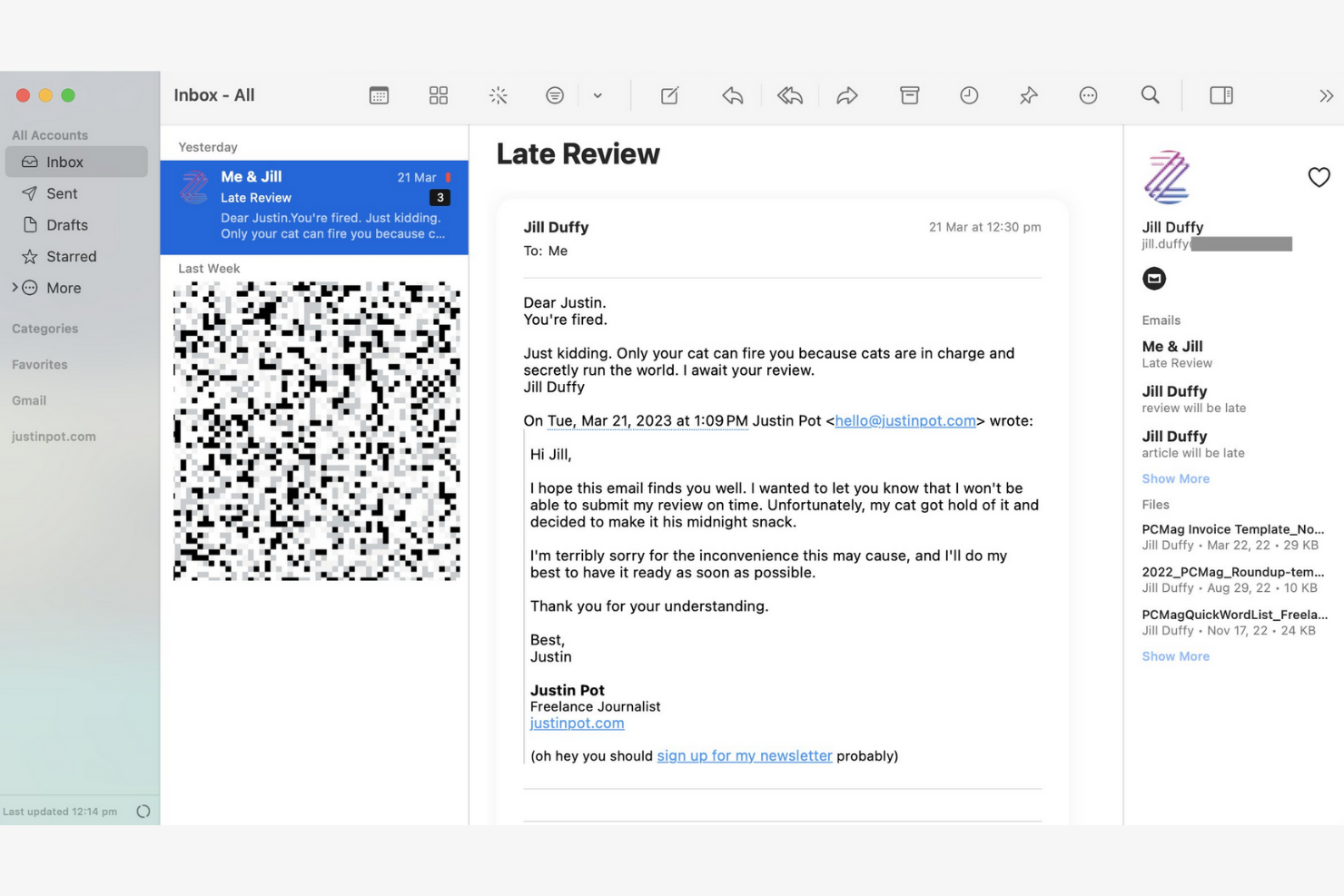
Canary Mail is an email client designed for individuals and teams who prioritize privacy and security in their communications. Its end-to-end encryption keeps your emails confidential and secure.
Why I picked Canary Mail: Canary Mail stands out for its commitment to privacy, offering a suite of data-protection features. You can encrypt emails with a single tap, giving you peace of mind for sensitive communications. The app's focus on security doesn't compromise usability, and the intuitive interface makes it simple to manage your emails while keeping them secure.
Standout Features and Integrations:
Features include search tools that help you find emails quickly, read receipts that show when your emails have been opened, and a snooze feature that temporarily hides emails so you can focus on more important tasks.
Integrations include Google Gmail, Apple iCloud, Proton Mail, Todoist, Asana, and more.
Pros and Cons
Pros:
- Unified inbox across multiple devices
- An AI copilot that functions offline
- Built-in encryption and privacy controls
Cons:
- The best Copilot features require a paid monthly subscription
- Complex encryption


Microsoft Outlook is an email client and personal information manager designed for businesses and professionals. Its integrated calendar features make communicating and scheduling more efficient.
Why I picked Microsoft Outlook: Outlook's strong integration with Microsoft Office makes it ideal for businesses that rely on Microsoft products. You can schedule meetings directly from your inbox to help your team stay organized, and the focused inbox feature shows you your most important emails first. The app's integrated calendar also lets you coordinate schedules.
Standout Features and Integrations:
Features include email categorization to manage messages efficiently, customizable rules to automate email sorting and prioritization, and a built-in task manager to keep track of your to-do lists.
Integrations include Microsoft 365 and more.
Pros and Cons
Pros:
- AI assistance
- Focused inbox for important emails
- Strong integration with the Microsoft 365 ecosystem
Cons:
- Requires regular updates
- Complex interface for new users


Superhuman Mail is an email client tailored for busy professionals who need to manage their emails quickly and efficiently. It focuses on delivering a fast email experience with advanced features that increase productivity.
Why I picked Superhuman Mail: Superhuman Mail prioritizes speed and efficiency, making it a top choice for users who want to process emails quickly. The app's keyboard shortcuts let you navigate and manage emails without a mouse, and the split inbox feature helps you focus by isolating important emails. Also, the app's undo send feature gives you further peace of mind.
Standout Features and Integrations:
Features include a powerful search function to find emails instantly, read-status indicators to see when emails have been opened, and follow-up reminders so you never miss an important response. Superhuman Mail also includes its own built-in AI assistant to help with drafting emails and scheduling meetings.
Integrations include HubSpot, Pipedrive, Salesforce, and more.
Pros and Cons
Pros:
- Minimal, distraction-free interface
- AI integration
- Keyboard shortcuts
Cons:
- Less intuitive for users who prefer traditional mouse-based navigation
- High subscription price relative to other providers
Altre app di posta elettronica
Ecco alcune altre opzioni di app di posta elettronica che non sono entrate nel mio elenco, ma che vale comunque la pena prendere in considerazione:
- Mailspring
For cross-platform use
- Spark
For team collaboration
- SaneBox
For email prioritization
- Gmelius
For turning Gmail into a workspace
- Clean Email
For inbox organization
- eM Client
For customization
- Missive
For dedicated team spaces


How I Evaluate Email Apps
I evaluate email apps on two levels: the baseline a PM needs—like task conversion and inbox collaboration—and the differentiators that make one tool click where another doesn't.
Core Functionality (Table Stakes For This List)
When I'm selecting tools for my list, I rank each one on a scale from 0 (does not offer the functionality) to 5 (excels in this area) for each core functionality listed below. Then, I calculate the tool's total score into a percentage. Each tool needs to achieve a minimum total score of 65% to be considered for inclusion.
- Email Send & Receive: I check whether the app supports multi-account access across Gmail, Outlook, and IMAP/SMTP so PMs can manage client and internal accounts from one place.
- Inbox Organization: Sorting, labeling, filtering, and archiving matter—especially when you're juggling dozens of stakeholder threads across multiple active projects at once.
- Email-to-Task Conversion: I look for the ability to turn an email into a trackable task with due dates and assignees, like converting a client change request into a backlog item.
- Project Management Integrations: Native connections to tools like Asana, Jira, Monday, ClickUp, or Trello help ensure emails don't live in a silo outside your delivery workflow.
- Shared Inbox Collaboration: For agency and cross-functional teams, I evaluate whether the app supports thread assignment, internal comments, and visibility into who's handling what.
- Calendar & Scheduling: Meeting scheduling, deadline reminders, and two-way calendar sync with Google or Outlook keep project timelines connected to everyday communication.
Once I have a list of tools that meet this criteria, I consider what sets each platform apart.
Differentiating Factors (What Sets Vendors Apart)
Here's how I compare and contrast different vendors:
Standout Features
AI-assisted drafting is a big differentiator—tools that can summarize long threads or suggest replies save PMs real time during peak delivery weeks. I also look for follow-up automation, like scheduled nudges when a stakeholder hasn't responded to a blocker. A unified project inbox that groups all emails by initiative or client is another feature I weigh, since it cuts down the time spent hunting for context across scattered threads.
Beyond Features
Integration depth matters beyond just having a connector—I check whether the link to tools like Jira or Asana supports bi-directional sync, so task updates flow back into email threads. Security is another factor I weigh, especially for PMs handling client data under SOC 2 or GDPR requirements. Cross-platform availability also plays a role; field-based coordinators in construction or logistics need reliable mobile apps with offline sync, not just a browser tab.
Come scegliere un'app di posta elettronica
È facile perdersi in lunghi elenchi di funzionalità e strutture di prezzo complesse. Per aiutarti a rimanere concentrato mentre affronti il tuo particolare processo di scelta del software, ecco una lista di controllo dei fattori da tenere a mente:
| Fattore | Cosa considerare |
|---|---|
| Scalabilità | L'app crescerà insieme al tuo team? Considera il volume futuro delle email, l'aggiunta di utenti e le esigenze di archiviazione. Verifica se l'app supporta la tua crescita senza costi aggiuntivi. |
| Integrazioni | L'app funziona con gli strumenti che già utilizzi? Cerca integrazioni native con calendari, gestori di attività e sistemi CRM per semplificare i flussi di lavoro. |
| Personalizzazione | Puoi adattare l'app alle tue esigenze? Valuta le opzioni per modificare la disposizione, creare cartelle personalizzate e impostare flussi di lavoro personali, assicurandoti che siano adatti allo stile del tuo team. |
| Facilità d'uso | L'app è intuitiva per tutti gli utenti? Testa l'interfaccia per verificarne la semplicità e controlla che la curva di apprendimento sia minima, così da evitare ritardi nella formazione. |
| Implementazione e avvio | Quanto velocemente puoi iniziare? Valuta il processo di configurazione, la disponibilità di tutorial e il supporto per la migrazione delle email esistenti, così da ridurre al minimo i tempi di inattività. |
| Costo | Il prezzo rientra nel tuo budget? Confronta i piani, i costi nascosti e le spese a lungo termine. Cerca periodi di prova gratuiti per testare l'app prima di sottoscrivere un abbonamento. |
| Misure di sicurezza | Quanto sono al sicuro i tuoi dati? Verifica gli standard di crittografia, le opzioni di backup dei dati e la conformità alle normative sulla privacy per proteggere le informazioni sensibili. |
| Disponibilità dell'assistenza | Quale supporto è disponibile quando si verificano problemi? Verifica la disponibilità dell'assistenza 24 ore su 24, 7 giorni su 7, i tempi di risposta e i canali del servizio clienti, così da ricevere aiuto quando ne hai bisogno. |
Che cos'è un'app per la posta elettronica?
Un'app per la posta elettronica è uno strumento software che consente agli utenti di inviare, ricevere e gestire le email. Professionisti come responsabili di progetto, esperti di marketing e dirigenti aziendali utilizzano questi strumenti per migliorare la comunicazione e l'organizzazione. Funzionalità come la categorizzazione delle email, le integrazioni con i calendari e le notifiche personalizzabili aiutano a gestire le attività, pianificare gli impegni e mantenere l'ordine. Questi strumenti offrono un modo strutturato per gestire la comunicazione in modo efficiente, risparmiando tempo e riducendo il disordine.
Funzionalità
Quando scegli un'app per la posta elettronica, presta attenzione alle seguenti funzionalità chiave:
- Categorizzazione delle email: Ordina automaticamente le email in cartelle, aiutandoti a dare priorità ai messaggi e a gestirli in modo efficiente.
- Integrazione con il calendario: Sincronizza i calendari per semplificare la pianificazione e aiutarti a non perdere mai gli eventi importanti.
- Notifiche personalizzabili: Ti consentono di impostare avvisi per email specifiche, riducendo le distrazioni e mantenendoti concentrato sulle priorità.
- Crittografia end-to-end: Protegge le tue email e le informazioni sensibili dagli accessi non autorizzati.
- Posta in arrivo unificata: Riunisce più account email in un'unica interfaccia.
- Funzione posticipa: Nasconde temporaneamente le email, consentendoti di concentrarti sulle attività immediate senza perdere di vista i messaggi importanti.
- Conferme di lettura: Ti informano quando i destinatari aprono le tue email.
- Ricerca avanzata: Trova rapidamente email specifiche utilizzando parole chiave o filtri, risparmiando tempo e fatica.
- Temi personalizzabili: Ti consentono di personalizzare l'aspetto dell'app in base alle tue preferenze e di migliorarne l'usabilità.
- Promemoria per i successivi contatti: Ti ricordano di rivedere le email, aiutando a mantenere sotto controllo le comunicazioni importanti.
Vantaggi
L'implementazione di un'app per la posta elettronica offre diversi vantaggi al tuo team e alla tua azienda. Eccone alcuni:
- Organizzazione migliorata: Le funzionalità di categorizzazione delle email e di posta in arrivo unificata ti aiutano a mantenere i messaggi organizzati e facili da trovare.
- Sicurezza potenziata: La crittografia end-to-end protegge le informazioni sensibili, offrendoti maggiore tranquillità.
- Gestione del tempo più efficace: Le notifiche personalizzabili e i promemoria per i successivi contatti ti aiutano a concentrarti su ciò che conta di più.
- Maggiore produttività: L'integrazione con i calendari e le funzionalità di ricerca avanzata semplificano i flussi di lavoro e fanno risparmiare tempo.
- Esperienza personalizzata: I temi personalizzabili ti consentono di adattare l'aspetto dell'app alle tue preferenze, migliorandone l'usabilità.
- Monitoraggio efficace della comunicazione: Le conferme di lettura indicano quando i destinatari aprono le tue email, aiutandoti a valutare il livello di coinvolgimento.
- Definizione delle priorità delle attività: La funzione posticipa ti aiuta a gestire le attività nascondendo temporaneamente le email non urgenti.
Costi e prezzi
La scelta di un'app per la posta elettronica richiede la comprensione dei vari modelli di prezzo e dei piani disponibili. I costi variano in base alle funzionalità, alle dimensioni del team, ai componenti aggiuntivi e ad altri fattori. La tabella seguente riassume i piani più comuni, i relativi prezzi medi e le funzionalità generalmente incluse nelle soluzioni per la posta elettronica:
Tabella comparativa dei piani per le app di posta elettronica
| Tipo di piano | Prezzo medio | Funzionalità comuni |
|---|---|---|
| Piano gratuito | $0 | Funzioni di base per la posta elettronica, spazio di archiviazione limitato e annunci pubblicitari. |
| Piano personale | $0-$10/utente/mese | Temi personalizzabili, assistenza di base e maggiore spazio di archiviazione. |
| Piano aziendale | $3-$20/utente/mese | Funzionalità di sicurezza avanzate, integrazione con i calendari e assistenza prioritaria. |
| Piano aziendale avanzato | $12-$40+/utente/mese | Sicurezza completa, account manager dedicato e integrazioni personalizzate. |
Domande frequenti sulle app di posta elettronica
\u003cspan style=\u0022font-weight: 400\u0022\u003eEcco alcune risposte alle domande comuni sulle app di posta elettronica:\u003c/span\u003e
Come posso migrare le mie email in una nuova app di posta elettronica?
\u003cspan style=\u0022font-weight: 400\u0022\u003eSì, la maggior parte delle app di posta elettronica offre strumenti o guide per aiutarti a migrare le email. Quando cambi app, dovresti eseguire il backup delle email e dei contatti esistenti. Molte app offrono opzioni di importazione o l’integrazione con il tuo provider attuale per semplificare il processo. Verifica se la nuova app dispone di uno strumento di migrazione o di un servizio di assistenza che possa aiutarti.\u003c/span\u003e
Un'app di posta elettronica può aiutarmi a gestire più progetti e parti interessate?
\u003cspan style=\u0022font-weight: 400\u0022\u003eSì, molte app di posta elettronica offrono etichette, cartelle e automazioni per aiutarti a monitorare le comunicazioni relative a diversi progetti e parti interessate. Usa questi strumenti per classificare le email in base al progetto o al cliente e imposta avvisi per le conversazioni ad alta priorità.\u003c/span\u003e
Posso usare un'app di posta elettronica offline?
\u003cspan style=\u0022font-weight: 400\u0022\u003eSì, molte app di posta elettronica offrono l’accesso offline, ma le funzionalità potrebbero essere limitate. Spesso puoi leggere e preparare email offline, ma per inviare e ricevere messaggi potrebbe essere necessaria una connessione Internet. Verifica che l’app scelta supporti la modalità offline se per te è importante, soprattutto se viaggi spesso.\u003c/span\u003e
In che modo le app di posta elettronica supportano la collaborazione tra team?
\u003cspan style=\u0022font-weight: 400\u0022\u003eLe app di posta elettronica con funzionalità di collaborazione integrate, come caselle di posta condivise o commenti, consentono al team di visualizzare i progressi, assegnare messaggi ed evitare risposte duplicate. Alcune permettono persino di trasformare direttamente le email in attività o ticket.\u003c/span\u003e
Quali misure di sicurezza dovrei cercare in un'app di posta elettronica?
\u003cspan style=\u0022font-weight: 400\u0022\u003eCerca app di posta elettronica che offrano crittografia, autenticazione a due fattori e filtri antispam. Queste funzionalità proteggono i tuoi dati e riducono il rischio di accessi non autorizzati. Verifica che l’app sia conforme alle normative sulla protezione dei dati pertinenti al tuo settore, così da mantenere sicure le tue informazioni.\u003c/span\u003e
Come posso automatizzare le attività ripetitive nella mia app di posta elettronica?
\u003cspan style=\u0022font-weight: 400\u0022\u003eMolte app di posta elettronica consentono di automatizzare le azioni di routine con regole, filtri o integrazioni. Configura l’ordinamento automatico, le risposte predefinite oppure collega strumenti per i flussi di lavoro come Slack o Trello per risparmiare tempo.\u003c/span\u003e