

Le 10 migliori app di chat per team nel 2026

10 Elenco delle migliori app di chat per team


Le app di chat per team sono piattaforme digitali che consentono al tuo team di comunicare in tempo reale, organizzare le conversazioni e condividere file in un unico luogo. Se stai cercando le migliori app di chat per team, probabilmente vuoi ridurre le email sparse, mantenere tutti sincronizzati e semplificare la collaborazione, soprattutto quando il tuo team lavora da remoto o è distribuito. In questa guida troverai un elenco curato delle migliori app di chat per team, ciò che rende unica ciascuna di esse e come possono aiutare il tuo team a rimanere connesso e produttivo nel 2026.
Perché fidarsi dei nostri consigli sui software
Il nostro team testa e recensisce software dal 2012. In quanto project manager noi stessi, sappiamo quanto sia difficile — e importante — scegliere il software giusto.
Per questa guida, abbiamo valutato gli strumenti attraverso test pratici e ricerche indipendenti, assegnando un punteggio agli strumenti in base ai nostri criteri di selezione. Ci basiamo inoltre sulle competenze di leader di pensiero del settore e di professionisti attivi nella gestione dei progetti.
Le nostre recensioni riflettono il nostro giudizio editoriale umano, non un discorso di vendita.
Revisori esperti:
Riepilogo delle migliori app di chat per team
Questa tabella comparativa riassume i dettagli dei prezzi delle mie migliori selezioni di app di chat per team, per aiutarti a trovare quella più adatta al tuo budget e alle esigenze della tua azienda.
| Tool | Best For | Trial Info | Price | ||
|---|---|---|---|---|---|
| 1 | Ideale per discussioni di team organizzate per argomento | Piano gratuito + demo gratuita disponibile | Da $6.67/utente/mese (fatturazione annuale) | Website | |
| 2 | Ideale per chat semplici con gestione delle attività | Piano gratuito + demo gratuita disponibile | Da $3/utente/mese (fatturazione annuale) | Website | |
| 3 | Ideale per la chat con strumenti di produttività | Prova gratuita di 30 giorni + piano gratuito disponibile | Da $4.50/utente/mese (fatturazione annuale) | Website | |
| 4 | Ideale per la collaborazione su Microsoft 365 | Piano gratuito disponibile | Da $4/utente/mese (fatturazione annuale) | Website | |
| 5 | Ideale per messaggistica sicura e decentralizzata | Piano gratuito disponibile | Prezzo su richiesta | Website | |
| 6 | Ideale per chat sicure e personalizzabili | Demo gratuita disponibile | Prezzo su richiesta | Website | |
| 7 | Ideale per conversazioni in thread focalizzate | Piano gratuito disponibile | Da $6/utente/mese (fatturati annualmente) | Website | |
| 8 | Ideale per messaggistica e chiamate unificate | Prova gratuita di 14 giorni + demo gratuita disponibile | Da $20/utente/mese (fatturazione annuale) | Website | |
| 9 | Ideale per la messaggistica di gruppo open-source | Demo gratuita disponibile | Prezzo su richiesta | Website | |
| 10 | Ideale per chat con automazione dei flussi di lavoro | Prova gratuita di 14 giorni disponibile | Da $2/utente/mese | Website |
Recensioni delle migliori app di chat per team
Di seguito trovi i miei riepiloghi dettagliati delle migliori app di chat per team incluse nel mio elenco. Le mie recensioni offrono un’analisi approfondita delle funzionalità, delle integrazioni e dei casi d’uso migliori di ciascuna piattaforma, per aiutarti a trovare quella più adatta a te.

Zulip
Ideale per discussioni di team organizzate per argomento
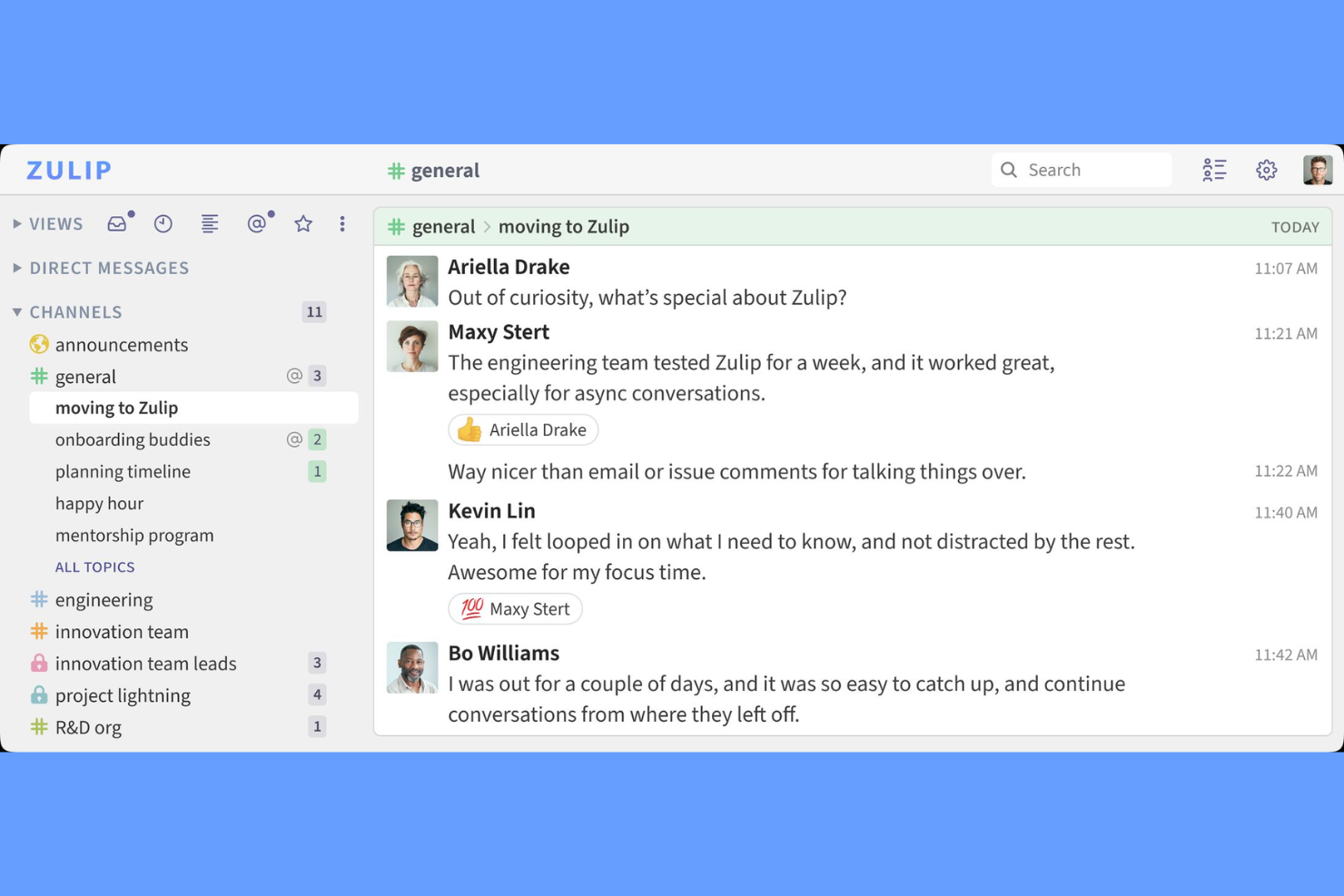
Zulip è un'app di chat per team che organizza le conversazioni in thread basati su argomento, combinando messaggistica in tempo reale e asincrona con funzionalità come canali, condivisione di file e integrazioni.
Per chi è ideale Zulip?
Zulip è particolarmente indicato per team di ingegneri distribuiti e comunità open source che necessitano di chat strutturate e basate su argomenti.
Perché ho scelto Zulip
Ho scelto Zulip tra i migliori perché apprezzo il modo in cui consente al mio team di suddividere le conversazioni in thread tematici all'interno dei canali, così non perdiamo mai il filo delle discussioni. Il modello di chat asincrona mi permette di intervenire su qualsiasi argomento, anche dopo ore, vedendo comunque tutto il contesto. Utilizzo le scorciatoie da tastiera di Zulip e i filtri dei messaggi per recuperare rapidamente ciò che conta di più, il che è un enorme aiuto nella gestione di più progetti contemporaneamente.
Funzionalità chiave di Zulip
- Modifica e cancellazione dei messaggi: Modifica o elimina i messaggi inviati entro una finestra temporale configurabile.
- Notifiche personalizzabili: Imposta le preferenze di notifica per flusso, argomento o parola chiave.
- Supporto Markdown: Formattta i messaggi con Markdown per codice, elenchi e link.
- Permessi basati sui ruoli: Assegna ruoli come amministratore, moderatore o ospite per controllare l’accesso.
Integrazioni Zulip
Zulip offre integrazioni native con GitHub, Jira, Travis CI, Sentry, Zendesk, Nagios, Jenkins, GitLab e Trello, e si collega con Zapier. È disponibile un'API per integrazioni personalizzate.
Pros and Cons
Pros:
- I thread per argomento mantengono le conversazioni organizzate
- La funzione Inbox evidenzia i messaggi non letti importanti
- Accesso ospite supporta la collaborazione con esterni
Cons:
- L’esperienza d’uso dell’app mobile è meno intuitiva e con funzionalità limitate
- Notifiche e connettività possono essere incostanti

Chanty
Ideale per chat semplici con gestione delle attività

Chanty è un'app di chat per team che combina messaggistica in tempo reale, chiamate audio e video, condivisione di file e un sistema di gestione delle attività integrato per spazi di lavoro collaborativi.
Per chi è più adatto Chanty?
Chanty è ideale per piccole imprese e startup che desiderano chat di team semplici con gestione delle attività integrata.
Perché ho scelto Chanty
Ho scelto Chanty tra i migliori perché apprezzo come unisce la chat di gruppo a un sistema di gestione delle attività incorporato: il mio team può trasformare qualsiasi messaggio in un'attività e monitorarne l'avanzamento direttamente nella chat. Utilizzo anche la funzione Teambook per organizzare conversazioni, attività e file condivisi in un unico posto. Le chiamate vocali e video sono disponibili senza la necessità di plugin aggiuntivi, cosa che semplifica il nostro flusso di lavoro.
Funzionalità principali di Chanty
- Conversazioni pubbliche e private: crea canali aperti o ristretti per diversi team o argomenti.
- Messaggi fissati: fissa i messaggi importanti per mantenere le informazioni chiave visibili in ogni conversazione.
- Condivisione file integrata: carica e condividi documenti, immagini e altri file direttamente in chat.
- Integrazioni di terze parti: collega strumenti come Google Drive, Trello e GitHub per funzionalità aggiuntive.
Integrazioni Chanty
Chanty offre integrazioni native con Trello, Asana, GitHub, Google Drive, Dropbox, OneDrive, Mailchimp e Zapier, e fornisce una API per integrazioni personalizzate.
Pros and Cons
Pros:
- Gestione delle attività integrata per chat operative
- Cronologia messaggi illimitata su tutti i piani
- Teambook organizza conversazioni e file
Cons:
- Mancano controlli admin avanzati per organizzazioni più grandi
- Nessuna condivisione schermo integrata durante le chiamate

Flock
Ideale per la chat con strumenti di produttività

Flock è un'app di chat per team che riunisce messaggistica, videoconferenze, liste di cose da fare condivise, sondaggi, promemoria e condivisione di file in un unico spazio di lavoro.
Per chi è Flock?
Flock è adatto a piccole e medie imprese che desiderano strumenti di produttività integrati insieme alla chat di team.
Perché ho scelto Flock
Ho scelto Flock tra i migliori perché mi piace come combina chat, riunioni video e strumenti di produttività integrati come liste di cose da fare condivise e sondaggi in un unico posto. Il mio team utilizza le funzionalità di promemoria e appunti per tenere traccia delle attività durante le conversazioni. Inoltre, mi affido alla condivisione di file e alla cronologia dei messaggi ricercabile di Flock per mantenere le risorse dei nostri progetti organizzate e accessibili.
Funzionalità principali di Flock
- Messaggistica basata su canali: Organizza le conversazioni per argomento, progetto o team in canali dedicati.
- Accesso ospite: Invita collaboratori esterni a canali specifici senza concedere l'accesso completo allo spazio di lavoro.
- Calendario integrato: Pianifica riunioni e visualizza gli eventi imminenti direttamente dall'app.
- Integrazioni personalizzate: Collega Flock con strumenti come Google Drive, Trello e GitHub per funzionalità aggiuntive.
Integrazioni di Flock
Flock offre integrazioni native con Google Drive, Trello, GitHub, Asana, Dropbox, Mailchimp, Twitter e si collega con Zapier. È disponibile un'API per integrazioni personalizzate.
Pros and Cons
Pros:
- Liste di cose da fare e promemoria integrati per la gestione leggera delle attività
- Messaggistica avanzata con canali, voce e video in un'unica app
- Configurazione e onboarding semplici per team da piccoli a medi
Cons:
- Riferiti occasionali bug e problemi di prestazioni
- Limiti alla cronologia dei messaggi sul piano gratuito restringono il monitoraggio a lungo termine

Ideale per la collaborazione su Microsoft 365

Microsoft Teams è una piattaforma di chat e collaborazione di gruppo che combina messaggistica istantanea, videoriunioni, condivisione di file e organizzazione dello spazio di lavoro in un'unica interfaccia.
Per chi è ideale Microsoft Teams?
Microsoft Teams si adatta a organizzazioni che fanno affidamento su Microsoft 365 per la comunicazione quotidiana, la collaborazione sui documenti e le riunioni.
Perché ho scelto Microsoft Teams
Ho scelto Microsoft Teams come uno dei migliori perché il mio team può passare dalla chat alle videoriunioni e modificare insieme i file senza uscire dall'applicazione. Mi affido alla sua profonda integrazione con Microsoft 365 per accedere ai documenti Word, Excel e PowerPoint direttamente nei nostri canali. Utilizzo anche il calendario e la pianificazione delle riunioni di Teams per mantenere tutti sincronizzati.
Funzionalità principali di Microsoft Teams
- Chat per canali: Organizza le conversazioni per argomento, progetto o team in canali dedicati.
- @menzioni e notifiche: Tagga singoli o gruppi per attirare l'attenzione su messaggi importanti.
- Cronologia chat persistente: Accedi e cerca conversazioni e file condivisi in qualsiasi momento.
- Integrazione con app di terze parti: Aggiungi strumenti come Trello, Polly e GitHub direttamente nel tuo spazio di lavoro.
Integrazioni di Microsoft Teams
Microsoft Teams offre integrazioni native nell'ecosistema Microsoft, incluso Microsoft 365 e Azure, e si connette anche con strumenti popolari come Trello, GitHub, Salesforce, ServiceNow e Zoom. È disponibile un'API per integrazioni personalizzate.
Pros and Cons
Pros:
- Integra chat, riunioni e condivisione di file
- Pianificazione delle riunioni integrata e sincronizzazione del calendario
- Consente l'accesso a ospiti esterni per collaborazioni
Cons:
- Le impostazioni delle notifiche sono complesse da gestire
- A volte la funzione di ricerca non trova i messaggi più vecchi

Element
Ideale per messaggistica sicura e decentralizzata

Element è un'app di chat per team basata sul protocollo Matrix che offre messaggistica sicura, chiamate vocali e video, condivisione di file e comunicazione decentralizzata per le organizzazioni.
Per chi è più adatto Element?
Element è particolarmente indicato per organizzazioni e team attenti alla privacy che necessitano di una comunicazione sicura e decentralizzata in più sedi.
Perché ho scelto Element
Ho scelto Element tra i migliori perché ho bisogno di una chat di gruppo sicura e decentralizzata che metta la privacy al primo posto. Mi piace poter gestire i nostri server e usare la crittografia end-to-end per ogni messaggio. In pratica, questo significa che controlliamo i nostri dati e possiamo federarci con altre piattaforme basate su Matrix.
Funzionalità principali di Element
- Collegamento ad altre piattaforme: Si collega con Slack, Microsoft Teams e IRC per una messaggistica cross-platform.
- Condivisione avanzata di contenuti multimediali: Supporta l'invio di immagini, video e file direttamente nelle chat room.
- Impostazioni di notifica personalizzabili: Permette agli utenti di regolare nel dettaglio gli avvisi per ogni stanza o conversazione.
- Ricerca messaggi: Consente di cercare in tutte le stanze e conversazioni dirette per recuperare rapidamente le informazioni.
Integrazioni di Element
Element offre integrazioni native con Slack, Microsoft Teams, IRC, GitHub, Jitsi e altro ancora. È disponibile un'API per integrazioni personalizzate.
Pros and Cons
Pros:
- Crittografia end-to-end per tutti i messaggi
- Opzione per auto-ospitare e controllo totale dei dati
- Open-source con attivo supporto della comunità
Cons:
- Prestazioni dell'app mobile non sempre costanti
- Le impostazioni di notifica possono risultare complesse

Ideale per chat sicure e personalizzabili

Rocket.Chat è una piattaforma open source per la chat di squadra che offre messaggistica in tempo reale, condivisione di file, videoconferenze e un'estesa possibilità di personalizzazione per comunicazioni interne ed esterne sicure.
Per chi è Rocket.Chat?
Rocket.Chat è particolarmente adatto a team IT e organizzazioni in settori regolamentati che necessitano di una chat di squadra sicura e personalizzabile.
Perché ho scelto Rocket.Chat
Ho scelto Rocket.Chat tra i migliori perché ho bisogno di un'app di chat di squadra open source e progettata per la sicurezza avanzata e la conformità. Utilizzo la sua implementazione on-premise e la crittografia end-to-end per soddisfare requisiti rigorosi di protezione dei dati. Il mio team inoltre personalizza permessi e registri di audit della piattaforma per adattarli ai flussi di lavoro di conformità della nostra organizzazione.
Funzionalità principali di Rocket.Chat
- Messaggistica omnicanale: Gestisci le conversazioni da email, SMS, WhatsApp e social network in un'unica casella di posta.
- Messaggi in thread: Mantieni le discussioni organizzate con risposte in thread in qualsiasi canale.
- Emoji e reazioni personalizzate: Personalizza le chat con set di emoji personalizzati e reazioni ai messaggi.
- Controlli di accesso basati sui ruoli: Assegna permessi granulati a utenti e gruppi per una collaborazione sicura.
Integrazioni Rocket.Chat
Rocket.Chat offre oltre 50 integrazioni native, inclusi Jira, GitHub, GitLab, Trello, Dropbox, Google Drive, Zapier, e dispone di integrazioni native con l'ecosistema Microsoft, tra cui Microsoft 365 e Azure. È disponibile un'API per integrazioni personalizzate.
Pros and Cons
Pros:
- Open source e self-hosted per totale controllo dei dati
- Sicurezza elevata con crittografia, SSO e controlli di accesso
- La messaggistica omnicanale combina chat, voce e video
Cons:
- L'interfaccia utente può sembrare meno curata rispetto ad altri strumenti di chat moderni
- Supporto comunitario insufficiente per esigenze enterprise

Twist
Ideale per conversazioni in thread focalizzate

Twist è un'app di chat per team progettata attorno a thread organizzati, canali e messaggistica asincrona per i team che desiderano una comunicazione strutturata.
Per chi è ideale Twist?
Twist è adatto a team remoti o distribuiti che danno priorità a una comunicazione asincrona e organizzata rispetto alla chat in tempo reale.
Perché ho scelto Twist
Ho scelto Twist tra i migliori perché mi piace come organizza le conversazioni in thread all'interno dei canali, rendendo facile per il mio team mantenere le discussioni focalizzate e ricercabili. L'approccio 'async-first' significa che non sentiamo la pressione di rispondere subito, il che aiuta quando si lavora tra diversi fusi orari. Utilizzo anche la funzione inbox per monitorare gli aggiornamenti e tornare ai thread importanti senza perdere il contesto.
Funzionalità principali di Twist
- Accesso ospite: Invita collaboratori esterni a canali specifici senza concedere loro l'accesso completo allo spazio di lavoro.
- Ricerca avanzata: Trova rapidamente messaggi, file e thread usando filtri e parole chiave.
- Integrazioni con strumenti: Collega con GitHub, Todoist, Google Drive e Zapier per l'automazione dei flussi di lavoro.
- Modalità 'non disturbare': Disattiva le notifiche durante il lavoro concentrato o fuori dall'orario lavorativo.
Integrazioni di Twist
Twist offre integrazioni native con GitHub, Todoist, Google Drive, Zapier e mette a disposizione un'API per integrazioni personalizzate.
Pros and Cons
Pros:
- Design asincrono riduce il sovraccarico di notifiche
- La funzione inbox aiuta a monitorare aggiornamenti importanti
- Accesso ospite per collaboratori esterni
Cons:
- Nessuna chiamata vocale o video integrata
- Le notifiche dell'app mobile possono essere ritardate

Ideale per messaggistica e chiamate unificate

RingCentral è una piattaforma di comunicazione unificata per team che riunisce chat, videoconferenze, chiamate telefoniche e condivisione di file in un'unica soluzione.
Per chi è più adatto RingCentral?
RingCentral è una scelta solida per grandi aziende e team distribuiti che necessitano di comunicazioni unificate attraverso diversi canali.
Perché ho scelto RingCentral
Ho scelto RingCentral tra i migliori perché mi affido alle sue comunicazioni unificate di livello enterprise per mantenere il mio team connesso tramite chat, video e telefono. Mi piace poter avviare riunioni video o chiamate direttamente da una chat senza dover cambiare applicazione. Il mio team utilizza anche stanze di chat persistenti e la ricerca nei messaggi per mantenere le conversazioni di progetto organizzate e accessibili.
Funzionalità principali di RingCentral
- Canali di chat di team: Crea spazi dedicati per conversazioni e progetti di gruppo.
- Condivisione di file: Carica e condividi documenti, immagini e file direttamente in chat.
- Fissaggio dei messaggi: Fissa i messaggi importanti per mantenere le informazioni chiave sempre visibili in qualsiasi chat.
- Assegnazione di compiti: Assegna e monitora i compiti direttamente nelle conversazioni di chat per una maggiore responsabilità.
Integrazioni di RingCentral
RingCentral offre oltre 300 integrazioni native, tra cui Google Workspace, Microsoft 365, Salesforce, Zendesk, ServiceNow, Slack, Trello, Asana, Box e Okta, oltre a connettersi con Zapier. È disponibile un'API per integrazioni personalizzate.
Pros and Cons
Pros:
- Stanze di chat persistenti per progetti in corso
- Assegnazione di compiti integrata nelle chat
- Cronologia messaggi illimitata per tutti gli utenti
Cons:
- I controlli amministrativi non hanno personalizzazioni avanzate
- La condivisione dello schermo non è disponibile nelle conversazioni in chat

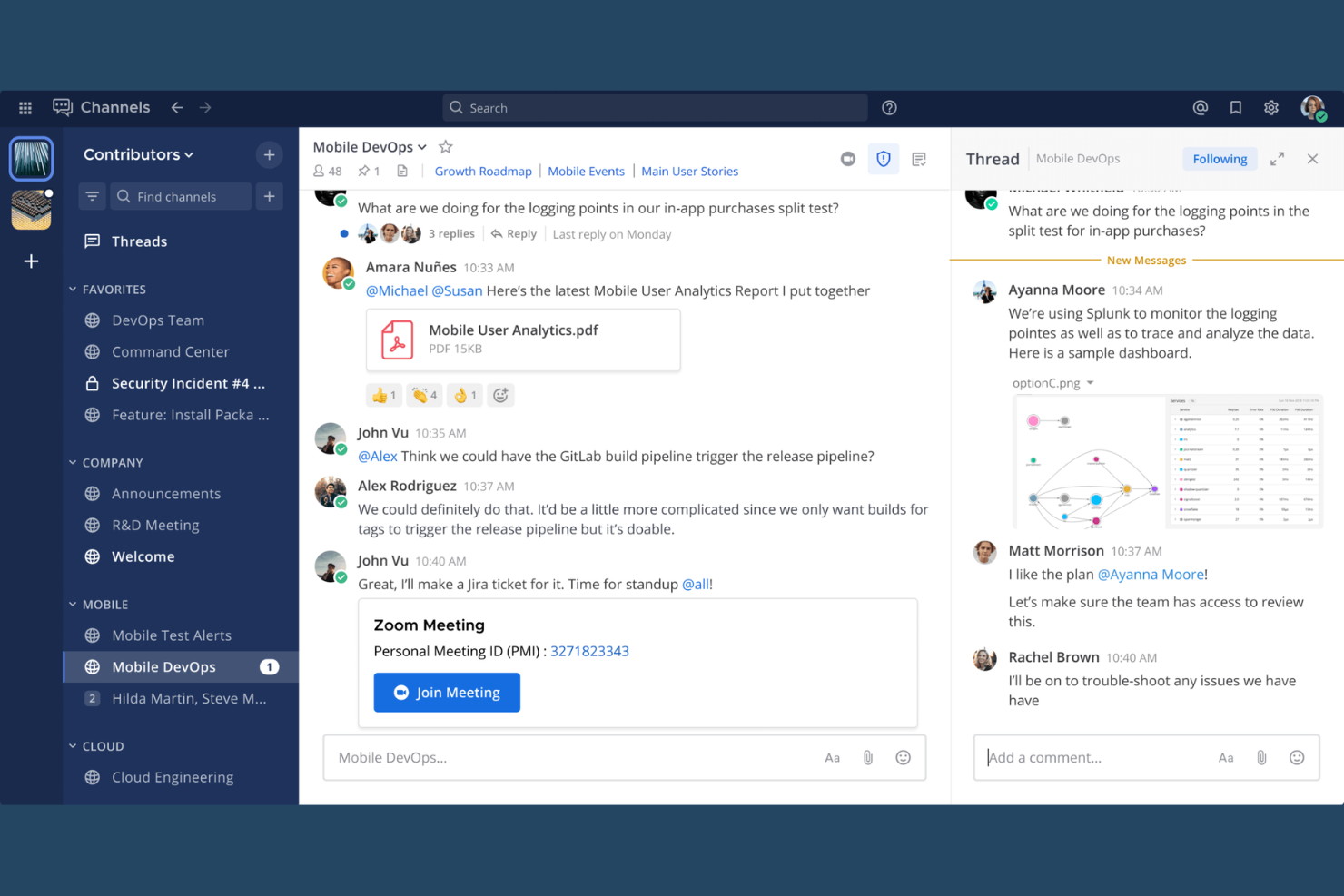
Mattermost è una piattaforma di chat di gruppo open-source progettata per una messaggistica sicura, la condivisione di file, l'automazione dei flussi di lavoro e l'integrazione con strumenti per sviluppatori.
Per chi è più adatto Mattermost?
Mattermost è la scelta ideale per team tecnici in settori regolamentati che richiedono una chat di gruppo sicura e ospitata internamente.
Perché ho scelto Mattermost
Ho scelto Mattermost tra i migliori perché apprezzo come offre al mio team il pieno controllo dei nostri dati con opzioni di implementazione self-hosted. Utilizzo i suoi controlli di accesso granulari e la messaggistica crittografata per soddisfare rigorosi requisiti di sicurezza. Il mio team si affida inoltre alla sua flessibilità open-source per personalizzare i flussi di lavoro e integrare i nostri strumenti interni.
Caratteristiche principali di Mattermost
- Conversazioni in thread: Mantieni le discussioni organizzate con risposte in thread all'interno dei canali.
- Messaggistica basata su canali: Crea canali pubblici o privati per una comunicazione di gruppo mirata.
- Condivisione di file: Carica e condividi documenti, immagini e altri file direttamente nella chat.
- Comandi slash personalizzati: Attiva azioni o automatizza attività nella chat utilizzando comandi personalizzati.
Integrazioni di Mattermost
Mattermost offre oltre 100 integrazioni native, tra cui Jira, GitHub, GitLab, Jenkins, PagerDuty, ServiceNow, Zoom, Microsoft 365, Google Workspace, Slack e Zapier. È disponibile un'API per integrazioni personalizzate.
Pros and Cons
Pros:
- L'hosting autonomo supporta esigenze rigorose di privacy dei dati
- Il codice open-source consente una profonda personalizzazione
- Supporta permessi granulari per utenti e canali
Cons:
- Richiede strumenti esterni per videoconferenze complete
- Nessun accesso offline, è necessaria la connessione Internet costante

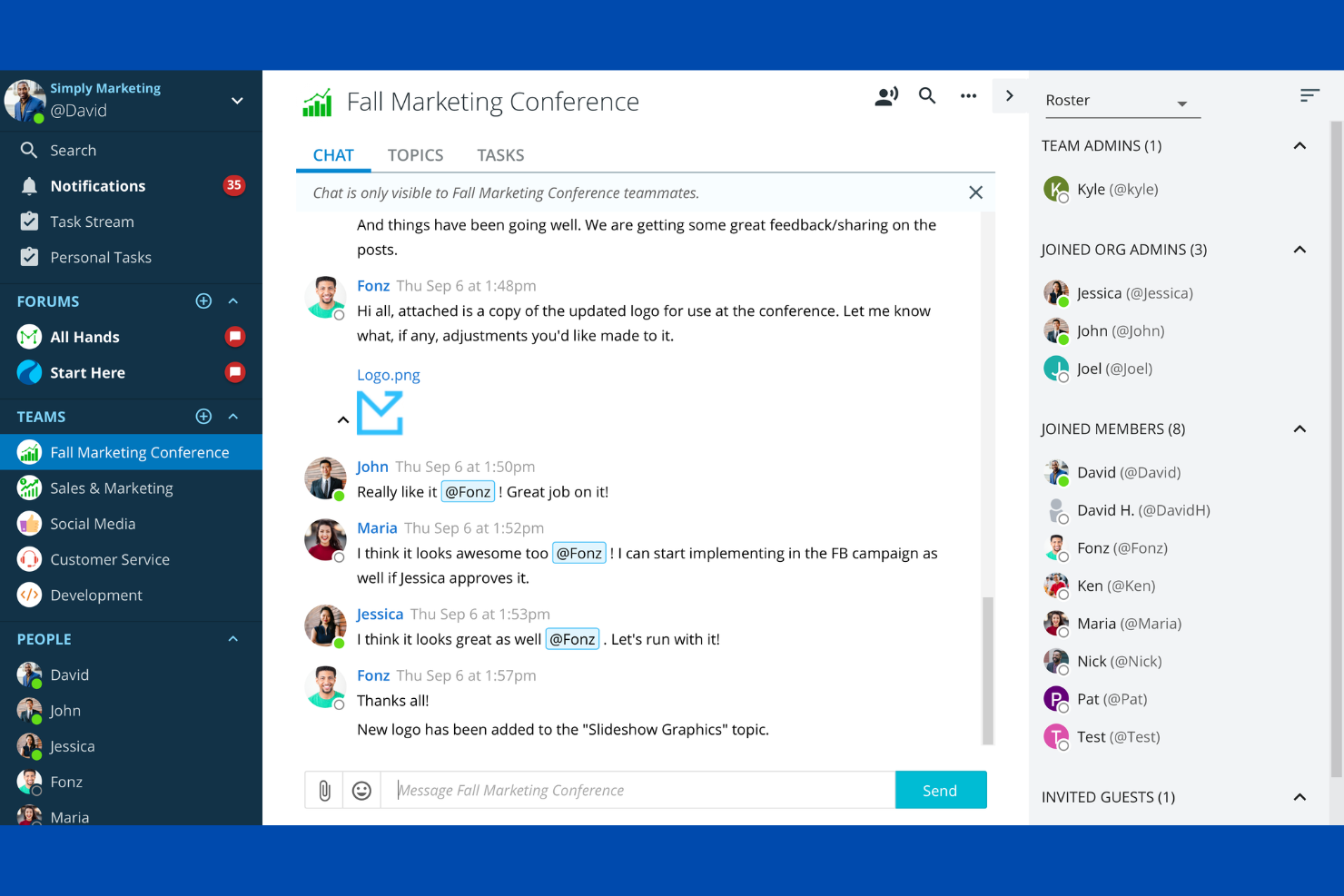
Ryver è un'app di chat per team che combina messaggistica di gruppo, forum per argomento, messaggi diretti e bacheche attività integrate per gestire conversazioni e flussi di lavoro in un'unica piattaforma.
Per chi è consigliato Ryver?
Ryver è adatto a team di piccole e medie dimensioni che desiderano chat e gestione delle attività in una sola piattaforma.
Perché ho scelto Ryver
Ho scelto Ryver tra i migliori perché mi piace come combina chat, forum per argomento e bacheche attività in un unico spazio di lavoro. Il mio team usa la gestione attività integrata per trasformare le conversazioni in compiti azionabili senza cambiare strumento. Dipendo anche dalle discussioni a thread di Ryver per mantenere gli argomenti dei progetti organizzati e facili da seguire.
Funzionalità principali di Ryver
- Ricerca universale: Trova messaggi, file e attività su tutti i team e forum.
- Link di invito personalizzati: Condividi link unici per aggiungere rapidamente nuovi utenti a team o forum specifici.
- Permessi basati sui ruoli: Assegna ruoli utenti per controllare l'accesso a conversazioni e attività.
- Cronologia chat illimitata: Accedi a tutti i messaggi passati senza restrizioni o limiti di archiviazione.
Integrazioni di Ryver
Ryver offre integrazioni native con Google Drive, Dropbox, Box e si collega con Zapier. È disponibile una API per integrazioni personalizzate.
Pros and Cons
Pros:
- Team e conversazioni illimitati migliorano la collaborazione
- Sostituisce le email interne con messaggistica in tempo reale
- Bacheche attività integrate collegano conversazioni ad azioni
Cons:
- Interfaccia non intuitiva per i nuovi utenti
- La qualità audio/video può essere incostante
Altre app di chat per team
Ecco alcune altre opzioni di app di chat per team che non sono state incluse nel mio elenco, ma che vale comunque la pena prendere in considerazione:
- Google Chat
Ideale per la messaggistica su Google Workspace
- Slack
Ideale per la collaborazione in team tramite canali
- Coast
Ideale per chat e gestione delle attività
- Breakroom
Ideale per la comunicazione in ufficio virtuale


Come Valuto le App di Chat per Team
Divido la mia valutazione in due livelli: requisiti di base come canali con thread e integrazioni con strumenti di Project Management, e fattori differenzianti come riepiloghi AI, accesso ospite e automazione dei flussi di lavoro.
Funzionalità Core (Requisiti Base per Questa Lista)
Quando seleziono gli strumenti per la mia lista, assegno a ciascuno un punteggio da 0 (non offre la funzionalità) a 5 (eccelle in quest'area) per ogni funzionalità core elencata di seguito. Poi calcolo il punteggio totale dello strumento convertendolo in percentuale. Ogni strumento deve raggiungere un punteggio totale minimo del 75% per essere preso in considerazione.
- Messaggistica in Tempo Reale: Verifico la presenza di messaggistica istantanea affidabile per conversazioni 1:1 e di gruppo, inclusi indicatori di presenza e reazioni ai messaggi che mantengono attivi i daily sprint e le decisioni improvvisate.
- Canali & Thread: Canali organizzati e risposte in thread sono il modo in cui i team di progetto separano le conversazioni per flussi di lavoro. Cerco opzioni pubbliche/private, possibilità di fissare discussioni e una struttura a livello di argomento.
- Condivisione File & Ricerca: I team condividono costantemente specifiche, mockup e documenti di stato. Valuto come ogni strumento gestisce le anteprime dei file, la cronologia dei messaggi ricercabile e la ricerca trasversale tra canali con filtri per data o utente.
- Chiamate Vocali & Video: I confronti veloci sostituiscono le riunioni inutili. Cerco chiamate di gruppo integrate con condivisione schermo affinché un Project Manager possa illustrare un diagramma di Gantt o un wireframe senza cambiare applicazione.
- Integrazioni di Terze Parti: Valuto la connessione di ogni strumento a piattaforme PM come Jira, Asana e Trello, oltre a sistemi di archiviazione file come Google Drive e OneDrive, incluso come gli aggiornamenti vengono visualizzati direttamente in chat.
- Notifiche & Menzioni: Allerte personalizzabili sono importanti quando si gestiscono più canali progetto. Cerco il supporto alle @menzioni, controlli per canale, programmazione modalità "Non Disturbare" e notifiche basate su parole chiave.
Una volta raccolto un elenco di strumenti che soddisfano i criteri, prendo in considerazione ciò che distingue ogni piattaforma.
Fattori Differenzianti (Cosa Distingue i Fornitori)
Ecco come paragono e confronto i diversi fornitori:
Funzionalità Eccezionali
I riepiloghi AI delle discussioni sono fondamentali per i Project Manager che tornano da riunioni consecutive e trovano decine di canali non letti. Cerco strumenti che propongano automaticamente azioni da intraprendere e decisioni chiave. La creazione di task direttamente in chat è un altro fattore distintivo—convertire un messaggio in un'attività assegnata con scadenza consente di evitare il copia e incolla tra applicazioni. Valuto anche le opzioni di accesso ospite, perché la maggior parte dei progetti coinvolge collaboratori o clienti esterni che necessitano di visibilità su canali specifici senza una licenza completa.
Oltre le Funzionalità
Sicurezza e conformità sono fondamentali quando nei canali di progetto circolano dati dei clienti o dettagli contrattuali. Controllo la certificazione SOC 2 Type II, il supporto SSO/SAML e le politiche di conservazione configurabili. La trasparenza dei prezzi è un altro aspetto che valuto con attenzione—limiti sulla cronologia dei messaggi e tariffe per ospite possono cogliere di sorpresa i team quando il progetto cresce. Considero inoltre la copertura su più piattaforme, poiché i team distribuiti necessitano di app native per desktop, dispositivi mobili e web, con accesso offline per rimanere connessi durante viaggi o interruzioni di rete.
Come scegliere le app di chat per team
È facile perdersi in lunghi elenchi di funzionalità e strutture tariffarie complesse. Per aiutarti a rimanere concentrato mentre affronti il tuo specifico processo di selezione del software, ecco una lista di fattori da tenere a mente:
| Fattore | Cosa considerare |
|---|---|
| Scalabilità | Lo strumento supporterà le dimensioni attuali del tuo team e la sua crescita futura? Verifica i limiti per gli utenti, i livelli tariffari e le prestazioni con gruppi numerosi. |
| Integrazioni | Si collega nativamente ai tuoi strumenti principali (ad esempio, gestione dei progetti, archiviazione dei file e sistemi HR)? Elenca le integrazioni indispensabili prima di creare una rosa di candidati. |
| Personalizzazione | Puoi adattare le notifiche, le autorizzazioni e le strutture delle chat ai tuoi flussi di lavoro? Considera i controlli per gli amministratori e le impostazioni a livello di utente. |
| Facilità d'uso | Il tuo team lo adotterà rapidamente? Cerca una navigazione intuitiva, etichette chiare e requisiti formativi minimi. Se possibile, esegui un test con un piccolo gruppo. |
| Implementazione e avvio | Quanto tempo richiederà la configurazione e quali risorse saranno necessarie? Informati sul supporto alla migrazione, sui materiali formativi e sull'assistenza all'avvio per i team distribuiti. |
| Costo | I piani tariffari sono trasparenti e prevedibili? Tieni conto di tutti gli utenti, dei componenti aggiuntivi e dei possibili costi eccedenti. Confronta il costo totale di proprietà, non solo i canoni mensili. |
| Misure di sicurezza | L'app offre la crittografia end-to-end, opzioni di residenza dei dati e conformità agli standard del tuo settore? Esamina i registri di controllo e i controlli per gli amministratori. |
| Disponibilità dell'assistenza | Quali canali di assistenza vengono offerti e in quali orari? Valuta se hai bisogno di assistenza 24 ore su 24, 7 giorni su 7, di rappresentanti dedicati o semplicemente di un centro assistenza consultabile. |
Cosa sono le app di chat per team?
Le app di chat di gruppo sono app di comunicazione per team e strumenti di comunicazione che consentono all’intero team di connettersi in tempo reale tramite messaggi, canali e spazi condivisi. Queste app di messaggistica supportano messaggi di testo, messaggi vocali e funzionalità avanzate di chat, rendendole strumenti di collaborazione essenziali per il lavoro da remoto. Spesso fornite come piattaforme SaaS, molte fungono da app di comunicazione tutto-in-uno con funzionalità di messaggistica, condivisione di file e integrazioni con strumenti come i sistemi CRM. Aiutano i team a semplificare le conversazioni, migliorare il coordinamento e mantenere l’allineamento tra i vari progetti. Questi strumenti sono popolari tra i piccoli team e le aziende in crescita e spesso offrono una versione gratuita, piani a pagamento scalabili e supporto per utenti illimitati.
Funzionalità delle app di chat di gruppo
Quando selezioni le app di chat di gruppo, presta attenzione alle seguenti funzionalità chiave:
- Messaggistica diretta: consente agli utenti di inviare messaggi privati, individuali, per conversazioni rapide e mirate senza coinvolgere l’intero team.
- Canali di gruppo: fornisce spazi condivisi in cui i team possono organizzare le discussioni per progetto, argomento o reparto, mantenendo le conversazioni organizzate e accessibili.
- Condivisione di file: consente agli utenti di caricare, condividere e visualizzare in anteprima documenti, immagini e altri file direttamente all’interno dei thread di chat, facilitando la collaborazione.
- Cronologia dei messaggi ricercabile: consente agli utenti di cercare conversazioni, file e link precedenti, rendendo semplice recuperare informazioni importanti quando necessario.
- Menzioni e notifiche: consente agli utenti di taggare i colleghi e personalizzare gli avvisi, così i messaggi importanti non vengono ignorati, nemmeno nei canali più affollati.
- Conversazioni organizzate in thread: supporta le risposte all’interno di un thread di messaggi specifico, aiutando a mantenere chiare le discussioni e riducendo il disordine nelle chat più movimentate.
- Indicatori di presenza degli utenti: mostra chi è online, assente o offline, rendendo più semplice sapere quando i colleghi sono disponibili per risposte rapide.
- Controlli amministrativi: offre agli amministratori la possibilità di gestire utenti, autorizzazioni e impostazioni dei canali, per mantenere sicurezza e ordine.
- Accesso multipiattaforma: offre app per dispositivi desktop, web e mobili, così i team possono rimanere connessi ovunque lavorino.
- Supporto per le integrazioni: si connette ad altri strumenti di lavoro, come calendari, sistemi di gestione dei progetti e archiviazione dei file, per centralizzare i flussi di lavoro.
Funzionalità di intelligenza artificiale comuni nelle app di chat di gruppo
Oltre alle funzionalità standard delle app di chat di gruppo elencate sopra, molte di queste soluzioni stanno integrando l’AI con funzionalità come:
- Riepilogo intelligente dei messaggi: utilizza l’AI per generare automaticamente riepiloghi concisi di conversazioni o thread lunghi, aiutando gli utenti a recuperare rapidamente ciò che si sono persi.
- Pianificazione automatizzata delle riunioni: sfrutta l’AI per suggerire gli orari delle riunioni, coordinare i calendari e persino prenotare riunioni direttamente nella chat in base alla disponibilità dei partecipanti.
- Definizione intelligente delle priorità dei messaggi: applica l’AI per evidenziare o portare in primo piano i messaggi urgenti o pertinenti, riducendo il rumore e aiutando gli utenti a concentrarsi su ciò che conta di più.
- Chatbot basati sull’AI: integra assistenti virtuali in grado di rispondere alle domande, automatizzare le attività di routine e fornire supporto immediato all’interno dei canali di chat.
- Traduzione linguistica in tempo reale: utilizza l’AI per tradurre istantaneamente i messaggi tra diverse lingue, consentendo una comunicazione fluida per i team globali o multilingue.
- Estrazione contestuale delle attività: utilizza l’AI per identificare le azioni o le attività menzionate nella chat e aggiungerle automaticamente agli strumenti di gestione dei progetti o agli elenchi di cose da fare.
Vantaggi delle app di chat di gruppo
L’implementazione di app di chat di gruppo offre diversi vantaggi al tuo team e alla tua azienda. Ecco alcuni dei vantaggi che puoi aspettarti:
- Processo decisionale più rapido: la messaggistica in tempo reale e le notifiche immediate aiutano i team a risolvere rapidamente le domande e a prendere decisioni.
- Comunicazione centralizzata: i canali di gruppo e la cronologia dei messaggi ricercabile mantengono tutte le conversazioni e i file in un unico luogo accessibile.
- Collaborazione migliorata: la condivisione di file, le discussioni organizzate in thread e le integrazioni con altri strumenti facilitano il lavoro congiunto sui progetti.
- Maggiore trasparenza: i canali aperti e i controlli amministrativi consentono a tutti di rimanere informati sulle attività e sugli aggiornamenti del team.
- Maggiore flessibilità: l’accesso multipiattaforma e le app mobili consentono ai membri del team di comunicare e collaborare ovunque si trovino.
- Maggiore responsabilizzazione: le menzioni, la cronologia dei messaggi e la supervisione amministrativa aiutano a monitorare le responsabilità e a dare seguito alle azioni da intraprendere.
- Maggiore sicurezza: funzionalità come la crittografia end-to-end e le autorizzazioni personalizzabili proteggono le informazioni sensibili e garantiscono la conformità.
Costi e prezzi delle app di chat per team
La scelta delle app di chat per team richiede la comprensione dei vari modelli e piani tariffari disponibili. I costi variano in base alle funzionalità, alle dimensioni del team, ai componenti aggiuntivi e ad altri fattori. La tabella seguente riassume i piani più comuni, i relativi prezzi medi e le funzionalità tipicamente incluse nelle soluzioni di app di chat per team:
Tabella comparativa dei piani per le app di chat per team
| Tipo di piano | Prezzo medio | Funzionalità comuni |
|---|---|---|
| Piano gratuito | $0 | Messaggistica di base, condivisione limitata dei file, cronologia dei messaggi ricercabile e integrazioni di base. |
| Piano personale | $5–$8/utente/mese | Cronologia dei messaggi illimitata, condivisione dei file migliorata, canali di gruppo e assistenza prioritaria. |
| Piano aziendale | $10–$15/utente/mese | Controlli amministrativi avanzati, integrazioni con strumenti aziendali, accesso per gli ospiti e maggiore spazio di archiviazione. |
| Piano per grandi aziende | $20–$25/utente/mese | Impostazioni di sicurezza personalizzate, funzionalità di conformità, gestione dedicata dell'account e analisi avanzate. |
Domande frequenti sulle app di chat per team
Ecco alcune risposte alle domande comuni sulle app di chat per team:
Le app di chat per team possono sostituire l'e-mail per le comunicazioni interne?
Sì, le app di chat per team possono sostituire la maggior parte delle e-mail interne offrendo messaggistica in tempo reale, canali di gruppo e condivisione dei file. Molti team ritengono che le app di chat riducano il sovraccarico della posta in arrivo e accelerino il processo decisionale, ma alcune comunicazioni formali o esterne potrebbero comunque richiedere l’e-mail.
Quanto sono sicure le app di chat per team per le informazioni aziendali sensibili?
La maggior parte delle app di chat per team offre solide funzionalità di sicurezza, come crittografia, controlli amministrativi e opzioni di conformità. Tuttavia, è opportuno esaminare le certificazioni di sicurezza, le opzioni di residenza dei dati e le impostazioni delle autorizzazioni di ogni strumento per assicurarsi che soddisfino i requisiti della propria organizzazione.
Le app di chat per team funzionano per i team da remoto e distribuiti?
Sì, le app di chat per team sono progettate per supportare i team da remoto e distribuiti, consentendo la comunicazione in tempo reale, la condivisione dei file e la collaborazione da qualsiasi luogo o dispositivo. Funzionalità come le app mobili e gli indicatori di presenza aiutano a mantenere tutti connessi.
Cosa devo considerare quando eseguo la migrazione a una nuova app di chat per team?
Pianifica la migrazione dei dati, l’inserimento degli utenti e l’integrazione con gli strumenti esistenti. Cerca soluzioni che offrano strumenti di importazione, risorse per la formazione e assistenza, così da ridurre al minimo le interruzioni e aiutare il team ad adattarsi rapidamente.
Le app di chat per team possono integrarsi con altri strumenti di lavoro?
Sì, la maggior parte delle app di chat per team offre integrazioni con sistemi di gestione dei progetti, archiviazione dei file, calendari e risorse umane. Verifica se gli strumenti indispensabili sono supportati e se le integrazioni sono incluse nel piano tariffario scelto.