

10 migliori alternative a PandaDoc per le proposte nel 2026

10 Elenco delle migliori alternative a PandaDoc


Gestire in modo efficiente i documenti aziendali è una sfida che molti responsabili di progetto devono affrontare. Potresti essere alla ricerca di un'alternativa a PandaDoc perché non soddisfa pienamente le esigenze specifiche del tuo team. Che si tratti di migliorare la collaborazione, ridurre i costi o trovare una soluzione più adatta al tuo flusso di lavoro, ci sono molte opzioni disponibili.
In base alla mia esperienza, valutare i software in modo indipendente aiuta a capire cosa funziona davvero. Ho analizzato e recensito diverse alternative per aiutarti a trovare quella giusta. Questo elenco ti guiderà tra le opzioni migliori, mettendo in evidenza le funzionalità che potrebbero fare la differenza per il tuo team. Esploriamo le soluzioni in grado di migliorare i flussi di lavoro documentali e affrontare le tue sfide specifiche.
Che cos'è PandaDoc?
PandaDoc è una piattaforma per la gestione dei flussi di lavoro dei documenti aziendali che ti aiuta a creare, gestire e condividere documenti online. Viene comunemente utilizzata dai team di vendita, dai responsabili del marketing e dai responsabili di progetto che hanno bisogno di gestire i documenti in modo efficiente. Tu e il tuo team potete trarre vantaggio dalla sua capacità di semplificare i processi di vendita e migliorare la collaborazione. Le sue funzionalità di firma elettronica, analisi dei documenti e gestione dei modelli aiutano a monitorare l'avanzamento dei documenti, ottenere approvazioni in modo sicuro e mantenere la coerenza. Nel complesso, PandaDoc offre un modo affidabile per gestire flussi di lavoro documentali complessi in modo intuitivo.
Riepilogo delle migliori alternative a PandaDoc
Questa tabella comparativa riassume i dettagli sui prezzi delle mie migliori alternative a PandaDoc per aiutarti a trovare quella più adatta al tuo budget e alle esigenze della tua azienda.
| Tool | Best For | Trial Info | Price | ||
|---|---|---|---|---|---|
| 1 | Ideale per le funzionalità di invio in blocco | Piano gratuito disponibile | A partire da $10/utente/mese (con fatturazione annuale) | Website | |
| 2 | Ideale per modelli personalizzabili | Prova gratuita di 14 giorni + demo gratuita disponibile | A partire da $19/utente/mese (con fatturazione annuale) | Website | |
| 3 | Ideale per soluzioni specifiche per settore | Piano gratuito disponibile | A partire da $10/utente/mese | Website | |
| 4 | Ideale per proposte interattive | Prova gratuita di 14 giorni disponibile | A partire da $35/utente/mese (con fatturazione annuale) | Website | |
| 5 | Ideale per strumenti di vendita basati sull'intelligenza artificiale | Prova gratuita + demo gratuita disponibili | A partire da $25/utente/mese | Website | |
| 6 | Ideale per la verifica avanzata dell'identità | Prova gratuita di 30 giorni + dimostrazione disponibile | A partire da $10/utente/mese (fatturato annualmente) | Website | |
| 7 | Ideale per la firma da dispositivi mobili | Prova gratuita disponibile | Da $9.99/utente/mese (con fatturazione annuale) | Website | |
| 8 | Ideale per la privacy dei dati degli utenti | Piano gratuito + prova gratuita di 14 giorni + demo disponibile | A partire da $10/utente/mese | Website | |
| 9 | Ideale per soluzioni di firma elettronica sicure | Dimostrazione gratuita disponibile | Prezzi su richiesta | Website | |
| 10 | Ideale per flussi di lavoro integrati per i contratti | Prova gratuita + demo disponibili | Da $200/utente completo/mese | Website |
Perché fidarsi dei nostri consigli sui software
Il nostro team testa e recensisce software dal 2012. In quanto project manager noi stessi, sappiamo quanto sia difficile — e importante — scegliere il software giusto.
Per questa guida, abbiamo valutato gli strumenti attraverso test pratici e ricerche indipendenti, assegnando un punteggio agli strumenti in base ai nostri criteri di selezione. Ci basiamo inoltre sulle competenze di leader di pensiero del settore e di professionisti attivi nella gestione dei progetti.
Le nostre recensioni riflettono il nostro giudizio editoriale umano, non un discorso di vendita.
Revisori esperti:
Recensioni delle migliori alternative a PandaDoc
Di seguito trovi i miei riepiloghi dettagliati delle migliori alternative a PandaDoc incluse nel mio elenco. Le mie recensioni offrono un’analisi approfondita delle funzionalità principali, dei vantaggi e degli svantaggi, delle integrazioni e dei casi d’uso ideali di ogni strumento, per aiutarti a trovare quello più adatto a te.

BoldSign
Ideale per le funzionalità di invio in blocco

BoldSign è una piattaforma per la firma elettronica progettata per le aziende che necessitano di soluzioni efficienti per la firma dei documenti. Viene utilizzata principalmente dalle organizzazioni che devono inviare documenti in blocco a più destinatari.
Perché BoldSign è una buona alternativa a PandaDoc: BoldSign offre funzionalità di invio in blocco che consentono di distribuire facilmente i documenti a gruppi numerosi. La sua interfaccia intuitiva aiuta il tuo team a gestire in modo efficiente i processi documentali ad alto volume. I modelli personalizzabili della piattaforma consentono di mantenere la coerenza tra i documenti. Con BoldSign puoi semplificare i flussi di lavoro documentali e migliorare la produttività.
Funzionalità e integrazioni distintive:
Le funzionalità includono analisi avanzate che forniscono informazioni sullo stato e sul coinvolgimento relativi ai documenti. La piattaforma supporta promemoria automatici per garantire il completamento tempestivo della firma dei documenti. Puoi inoltre personalizzare i flussi di lavoro in base alle esigenze specifiche del tuo team.
Le integrazioni includono Microsoft 365, Google Drive, Dropbox, Zapier e altro ancora.
Pros and Cons
Pros:
- Funzionalità di invio in blocco
- Interfaccia intuitiva
- Piani convenienti per liberi professionisti e piccole aziende
Cons:
- Personalizzazione avanzata limitata
- Alcune funzionalità richiedono conoscenze tecniche

Ideale per modelli personalizzabili
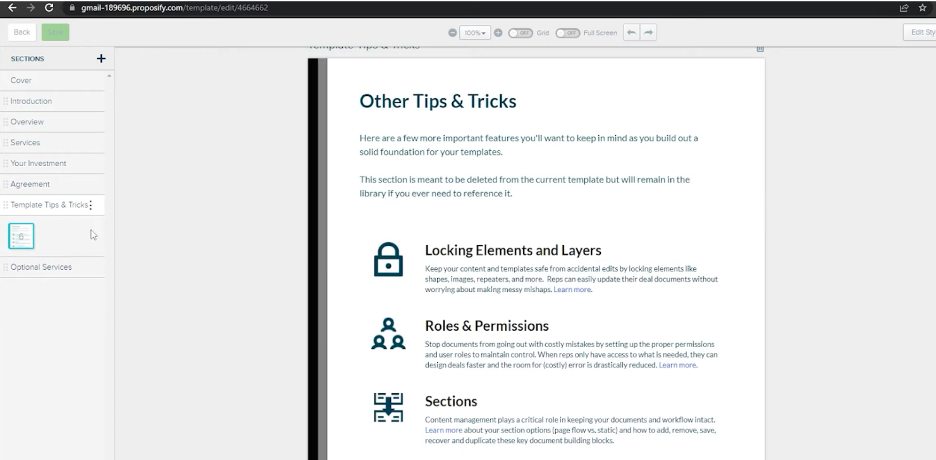
Proposify è un software per la gestione delle proposte progettato per aiutare le aziende a creare, gestire e inviare proposte in modo efficiente. Viene comunemente utilizzato dai team di vendita e dalle agenzie per semplificare il processo di creazione delle proposte e migliorare le interazioni con i clienti.
Perché Proposify è una buona alternativa a PandaDoc: Proposify offre modelli di documenti personalizzabili che consentono di adattare le proposte all'identità del proprio marchio. Il suo editor con funzionalità di trascinamento rende facile progettare e formattare i documenti senza competenze tecniche. È inoltre possibile monitorare le visualizzazioni e le interazioni con le proposte, ottenendo informazioni preziose sul coinvolgimento dei clienti. Con Proposify, il tuo team può creare proposte professionali che si distinguono.
Funzionalità e integrazioni distintive:
Le funzionalità includono una libreria di contenuti che archivia gli elementi delle proposte utilizzati più frequentemente per consentire un accesso rapido. La piattaforma supporta le firme elettroniche, garantendo un processo di firma fluido. È inoltre possibile configurare flussi di approvazione per le revisioni interne prima di inviare le proposte ai clienti.
Le integrazioni includono Salesforce, HubSpot, QuickBooks, Stripe, Zapier, Slack, Pipedrive, Basecamp, Trello e altro.
Pros and Cons
Pros:
- Editor con funzionalità di trascinamento
- Monitora le visualizzazioni e le interazioni con le proposte
- Libreria di contenuti per una creazione rapida
Cons:
- Può essere complesso per i nuovi utenti
- Richiede tempo per la configurazione iniziale
Docusign
Ideale per soluzioni specifiche per settore
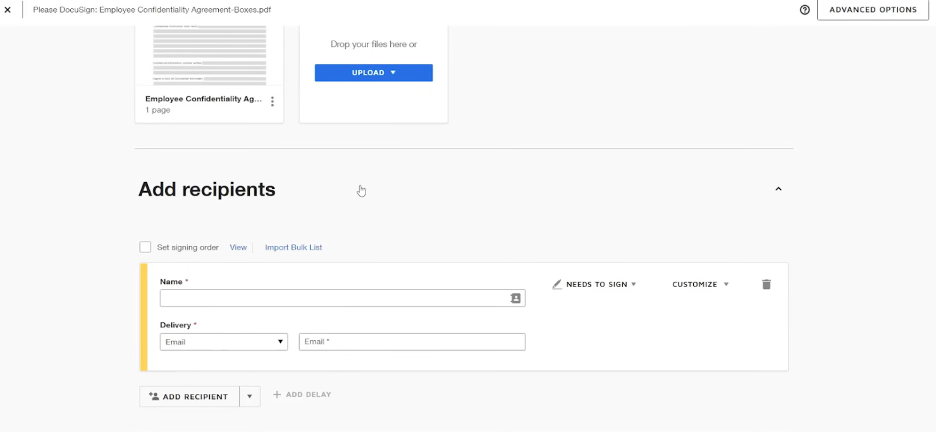
Docusign è una piattaforma per la firma elettronica ampiamente utilizzata dalle aziende per facilitare la firma sicura ed efficiente dei documenti. È apprezzata in settori come quello immobiliare, finanziario e dell'assistenza sanitaria per la sua affidabilità nella gestione dei flussi di lavoro documentali.
Perché Docusign è una buona alternativa a PandaDoc: Docusign offre soluzioni personalizzate per diversi settori, rappresentando una scelta versatile per esigenze specifiche. Le sue avanzate funzionalità di sicurezza e la conformità alle normative del settore la distinguono, garantendo che i tuoi documenti siano gestiti con attenzione. L'interfaccia intuitiva della piattaforma e l'ampia libreria di modelli aiutano a semplificare i processi di preparazione e firma dei documenti. Con Docusign puoi gestire con sicurezza i flussi di lavoro documentali in diversi settori.
Funzionalità e integrazioni principali:
Le funzionalità includono la personalizzazione del marchio, la firma di persona e il supporto multilingue per soddisfare le diverse esigenze degli utenti. Puoi inoltre usufruire della funzionalità di registro di audit, che fornisce registri dettagliati delle attività sui documenti. Un'altra funzionalità fondamentale è la possibilità di impostare l'ordine di firma e le autorizzazioni, assicurando che i documenti vengano firmati nella sequenza corretta.
Le integrazioni includono Salesforce, Microsoft 365, Google Workspace, SAP, Oracle, Workday, Box, Dropbox, Slack, NetSuite e altro ancora.
Pros and Cons
Pros:
- Supporta le normative specifiche del settore
- Offre un registro di audit dettagliato
- Consente la firma di persona
Cons:
- Personalizzazione limitata dei modelli
- Costo più elevato rispetto ad alcune alternative

Qwilr
Ideale per proposte interattive

Qwilr è uno strumento per la creazione di proposte progettato per aziende di tutte le dimensioni che desiderano realizzare documenti coinvolgenti e interattivi. È popolare tra le squadre di vendita e marketing che vogliono conquistare i clienti con proposte visivamente accattivanti.
Perché Qwilr è una buona alternativa a PandaDoc: Qwilr offre proposte interattive che consentono di creare documenti dinamici e coinvolgenti. L'editor con funzionalità di trascinamento e rilascio della piattaforma semplifica l'inclusione di elementi multimediali come video e immagini. Puoi anche monitorare il modo in cui i destinatari interagiscono con le tue proposte, ottenendo informazioni sul coinvolgimento dei clienti. Con Qwilr, la tua squadra può creare proposte che non si limitano a informare, ma coinvolgono anche il pubblico.
Funzionalità e integrazioni distintive:
Le funzionalità includono analisi che forniscono informazioni su come i clienti interagiscono con le tue proposte. La piattaforma supporta modelli personalizzabili, consentendoti di mantenere la coerenza del marchio. Puoi anche utilizzare gli strumenti di collaborazione per lavorare con la tua squadra in tempo reale.
Le integrazioni includono Salesforce, HubSpot, Slack, QuickBooks, Stripe, Zapier e altro ancora.
Pros and Cons
Pros:
- Funzionalità per proposte interattive
- Editor con funzionalità di trascinamento e rilascio incluso
- Modelli di proposta personalizzabili disponibili
Cons:
- Prezzo più elevato rispetto ad altre opzioni
- Flessibilità limitata nella progettazione e nella formattazione

Ideale per strumenti di vendita basati sull'intelligenza artificiale

GetAccept è una piattaforma di vendita digitale progettata per ottimizzare i flussi di lavoro dei documenti e promuovere il coinvolgimento nelle vendite. Viene utilizzata principalmente dai team di vendita che desiderano migliorare la gestione dei documenti e le interazioni con i clienti.
Perché GetAccept è una buona alternativa a PandaDoc: GetAccept sfrutta strumenti di vendita basati sull'intelligenza artificiale per aumentare la produttività e il coinvolgimento del tuo team. La sua funzionalità di messaggistica video consente di creare introduzioni personalizzate per i tuoi documenti. La piattaforma include anche analisi per monitorare le metriche e il coinvolgimento relativi ai documenti. Queste funzionalità ti aiutano a personalizzare il tuo approccio e a concludere gli affari in modo più efficace.
Funzionalità e integrazioni principali:
Le funzionalità includono opzioni di personalizzazione del marchio che ti consentono di mantenere un'immagine aziendale coerente. La piattaforma offre il monitoraggio dei documenti per tenere sotto controllo le interazioni con i clienti in tempo reale. Inoltre, puoi automatizzare i promemoria per assicurarti che nessuna opportunità venga persa.
Le integrazioni includono Salesforce, HubSpot, Pipedrive, Microsoft Dynamics 365, Slack, Google Drive, Dropbox, Zapier, Gmail, Outlook e altro.
Pros and Cons
Pros:
- Analisi basate sull'intelligenza artificiale
- Funzionalità di messaggistica video
- Personalizzazione del marchio disponibile
Cons:
- Curva di apprendimento più ripida per i principianti
- Alcune funzionalità avanzate richiedono formazione

emSigner
Ideale per la verifica avanzata dell'identità

emSigner è una piattaforma di firma digitale destinata alle aziende che necessitano di soluzioni sicure e conformi per la gestione dei documenti. Viene utilizzata principalmente dalle organizzazioni che danno priorità alla sicurezza e alla conformità normativa nei propri flussi di lavoro documentali.
Perché emSigner è una valida alternativa a PandaDoc: emSigner offre funzionalità avanzate di verifica dell'identità, garantendo che i documenti siano firmati in modo sicuro dalle persone giuste. La sua autenticazione a più fattori aggiunge un ulteriore livello di sicurezza ai processi documentali. La conformità della piattaforma alle normative globali sulla firma elettronica la rende adatta alle aziende che operano in settori regolamentati. Con emSigner, puoi avere la certezza che le transazioni documentali siano sicure e conformi.
Funzionalità e integrazioni principali:
Le funzionalità includono flussi di lavoro personalizzabili che si adattano ai processi specifici del tuo team. Puoi usufruire della funzione di registro di controllo, che fornisce un registro dettagliato delle attività sui documenti. La piattaforma supporta inoltre la firma collettiva, consentendoti di firmare più documenti contemporaneamente.
Le integrazioni includono Google Drive, Salesforce, Microsoft SharePoint, Dropbox, SAP SuccessFactors e altro ancora.
Pros and Cons
Pros:
- Verifica avanzata dell'identità
- Conformità alle normative globali sulla firma elettronica
- Flussi di lavoro personalizzabili disponibili
Cons:
- La configurazione iniziale può richiedere molto tempo
- Richiede competenze tecniche per la personalizzazione

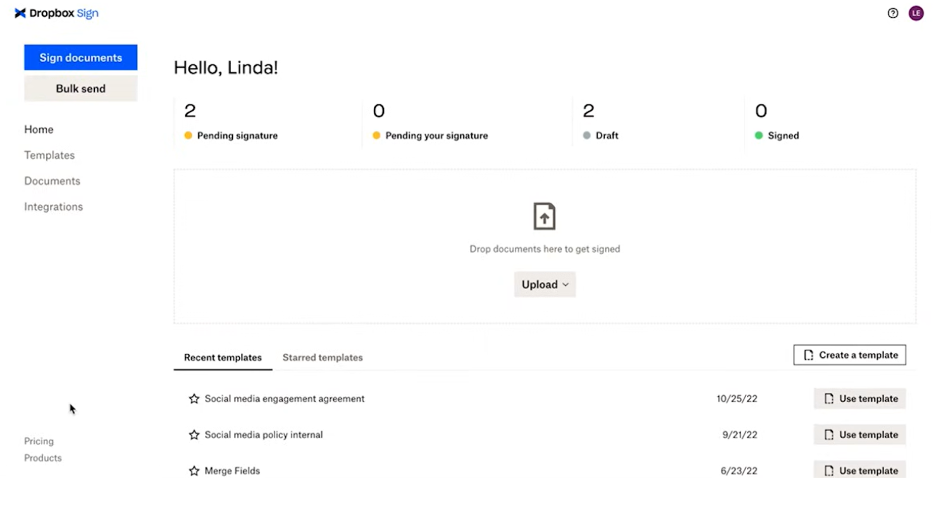
Dropbox Sign è uno strumento per la firma elettronica progettato per semplificare il processo di firma per aziende e privati. È ampiamente utilizzato dai team che richiedono una firma efficiente dei documenti in mobilità.
Perché Dropbox Sign è una buona alternativa a PandaDoc: Dropbox Sign offre un'interfaccia ottimizzata per i dispositivi mobili e uno spazio di archiviazione basato sul cloud, semplificando la firma dei documenti per te e il tuo team da qualsiasi luogo. Il suo design intuitivo garantisce che firmare tramite le app mobili sia rapido e senza complicazioni. La navigazione intuitiva della piattaforma contribuisce a ridurre il tempo dedicato alla gestione dei flussi di lavoro dei documenti. Con Dropbox Sign, puoi mantenere la tua attività operativa anche quando sei lontano dall'ufficio.
Funzionalità e integrazioni distintive:
Le funzionalità includono modelli riutilizzabili che ti fanno risparmiare tempo nella preparazione dei documenti. La piattaforma offre inoltre strumenti avanzati di gestione dei team per organizzare i flussi di lavoro dei documenti del tuo team. È possibile attivare pratici promemoria automatici per evitare che i documenti vengano trascurati.
Le integrazioni includono Google Drive, Salesforce, Microsoft Dynamics 365, Slack, HubSpot, Evernote, Microsoft OneDrive, Zapier e altro.
Pros and Cons
Pros:
- Interfaccia ottimizzata per i dispositivi mobili
- Navigazione semplice per firmare rapidamente
- Promemoria automatici per i firmatari
Cons:
- Strumenti di reportistica di base
- La configurazione iniziale può essere complessa


Zoho Sign è una piattaforma applicativa per le firme digitali pensata per le aziende che cercano una gestione dei documenti sicura ed efficiente. È particolarmente apprezzata dai team che devono mantenere standard elevati di privacy e sicurezza dei dati.
Perché Zoho Sign è una buona alternativa a PandaDoc: Zoho Sign pone l'accento sulla privacy dei dati degli utenti, rendendola una scelta affidabile per chi è preoccupato della protezione dei dati. La sua crittografia end-to-end garantisce che i documenti rimangano riservati durante l'intero processo di firma. La piattaforma offre inoltre opzioni di autenticazione avanzate per verificare l'identità dei firmatari. Puoi affidarti a Zoho Sign per gestire con cura i tuoi documenti sensibili, offrendo tranquillità al tuo team.
Funzionalità e integrazioni distintive:
Le funzionalità includono modelli di email personalizzabili, che consentono di personalizzare la comunicazione con i clienti. La funzionalità di invio in massa della piattaforma permette di inviare documenti a più destinatari contemporaneamente. Puoi inoltre automatizzare le notifiche di promemoria per garantire il completamento tempestivo della firma dei documenti.
Le integrazioni includono Zoho CRM, Zoho People, Zoho Books, Gmail, Dropbox, Google Drive, OneDrive, Microsoft Teams, Zapier e altro ancora.
Pros and Cons
Pros:
- Crittografia end-to-end disponibile
- Opzioni di autenticazione avanzate
- Supporta l'invio in massa dei documenti
Cons:
- Funzionalità avanzate limitate
- Funzionalità di reportistica di base

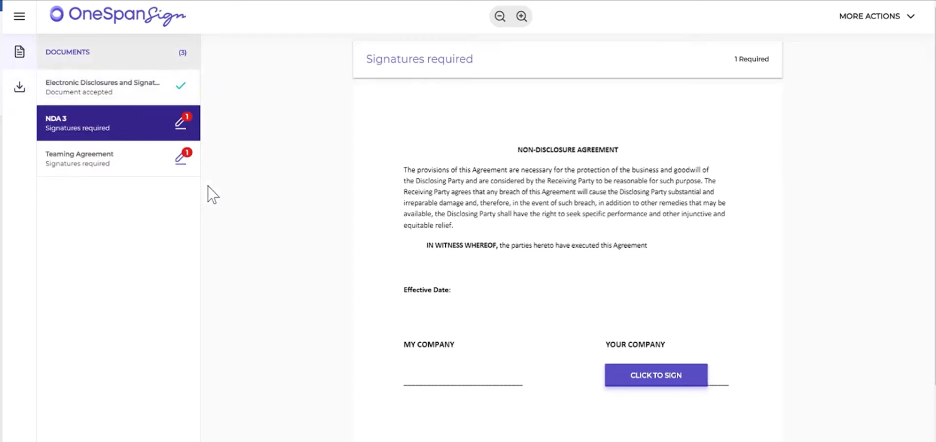
OneSpan Sign è una soluzione per la firma elettronica progettata per le aziende che necessitano di una firma dei documenti sicura e affidabile. È ampiamente utilizzata dai settori che richiedono elevati standard di sicurezza, come quello finanziario e sanitario.
Perché OneSpan Sign è una buona alternativa a PandaDoc: OneSpan Sign offre soluzioni di firma elettronica sicure che danno priorità alla protezione dei documenti e delle transazioni. La sua tecnologia antimanomissione garantisce il rilevamento di eventuali modifiche non autorizzate ai documenti. La conformità della piattaforma alle normative del settore offre tranquillità al tuo team. Con OneSpan Sign puoi gestire con sicurezza i flussi di lavoro dei documenti mantenendo i più elevati standard di sicurezza.
Funzionalità e integrazioni principali:
Le funzionalità includono solide opzioni di autenticazione per verificare l'identità dei firmatari. Puoi inoltre usufruire della funzionalità di registro di audit, che fornisce un registro dettagliato delle attività sui documenti. La piattaforma supporta la firma in presenza, consentendoti di raccogliere le firme durante incontri faccia a faccia.
Le integrazioni includono Salesforce, Microsoft Dynamics 365, Microsoft SharePoint, Workday, Google Workspace e altro.
Pros and Cons
Pros:
- Elevati standard di sicurezza
- Conformità alle normative del settore
- Supporto per la firma in presenza
Cons:
- Costo più elevato per i piani base
- Opzioni di personalizzazione limitate

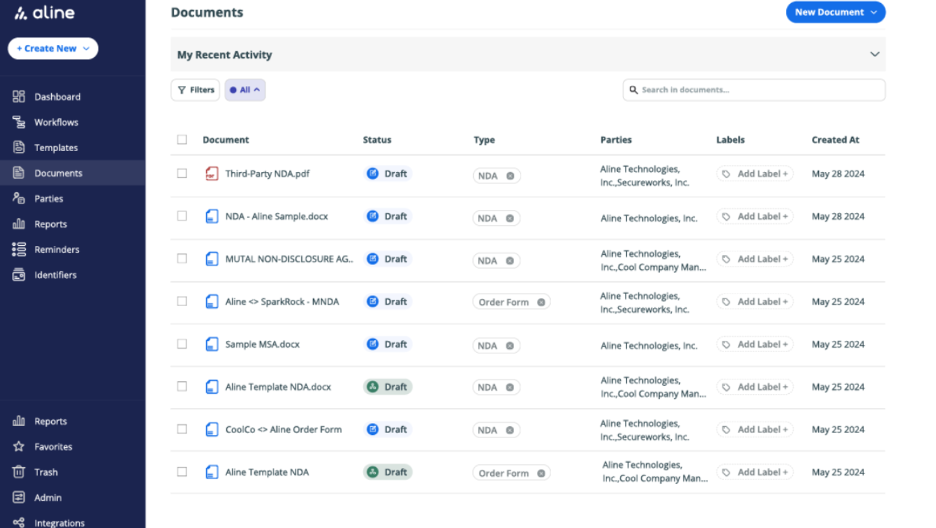
AlineSign è uno strumento di gestione dei contratti digitali progettato per i team legali e aziendali che cercano una gestione efficiente dei documenti. Supporta la firma elettronica e automatizza i flussi di lavoro dei contratti per favorire la produttività e garantire che le firme siano legalmente vincolanti.
Perché AlineSign è una valida alternativa a PandaDoc: AlineSign offre flussi di lavoro integrati per i contratti che semplificano la gestione dei documenti per il tuo team. Dispone di firme elettroniche illimitate, così puoi elaborare tutti i documenti necessari senza costi aggiuntivi. I registri di controllo integrati della piattaforma e la gestione del ciclo di vita dei contratti basata sull'intelligenza artificiale garantiscono conformità ed efficienza. Con AlineSign puoi automatizzare e gestire facilmente l'intero processo contrattuale.
Funzionalità e integrazioni principali:
Le funzionalità includono l'archiviazione automatica dei documenti firmati con cronologia delle versioni, offrendo un facile accesso ai contratti precedenti. La piattaforma AlineSign supporta report basati sull'intelligenza artificiale in tempo reale per l'analisi dei contratti, fornendoti informazioni utili sui tuoi accordi. Puoi inoltre configurare flussi di lavoro collaborativi per gestire in modo efficiente il processo di approvazione del tuo team.
Le integrazioni includono Google Drive, Dropbox, Box, Microsoft OneDrive e altro.
Pros and Cons
Pros:
- Funzionalità di firma elettronica illimitata
- Registri di controllo integrati
- Gestione dei contratti basata sull'intelligenza artificiale
Cons:
- Potrebbe essere troppo costoso per i team che necessitano solo di funzionalità di firma elettronica di base
- I dettagli dei piani tariffari specifici non sono elencati chiaramente
Altre alternative a PandaDoc
Ecco alcune ulteriori alternative a PandaDoc che non sono state incluse nel mio elenco, ma che vale comunque la pena valutare:
- airSlate SignNow
Ideale per una configurazione rapida
- ReadySign
Ideale per soluzioni di firma elettronica semplici
- DocuSeal
Ideale per la sigillatura sicura dei documenti


Come Valuto le Alternative a PandaDoc
Divido la mia valutazione in due livelli: i requisiti fondamentali come firme elettroniche e flussi di approvazione e i fattori differenzianti come integrazioni con strumenti di project management e prezzi che distinguono le soluzioni migliori dal resto.
Funzionalità Principali (Requisiti Indispensabili per Questa Lista)
Quando seleziono gli strumenti per la mia lista, assegno a ciascuno un punteggio da 0 (non offre la funzionalità) a 5 (eccelle in quest'area) per ogni funzionalità principale elencata di seguito. Poi, trasformo il punteggio totale dello strumento in una percentuale. Ogni strumento deve ottenere un punteggio minimo totale del 65% per essere considerato idoneo all'inclusione.
- Creazione Documenti & Template: Verifico se ogni strumento consente di creare Statement of Work (SOW), proposte e ordini di modifica partendo da template riutilizzabili con campi dinamici invece di iniziare ogni volta da zero.
- Firme Elettroniche: Il supporto alle firme elettroniche di ogni strumento dovrebbe coprire la firma da parte di più soggetti, autenticazione dei firmatari e conformità a standard come ESIGN, UETA ed eIDAS.
- Flussi di Approvazione: Valuto se la piattaforma supporta instradamenti multi-step configurabili, come l'invio di una SOW cliente attraverso legale, finanza e sponsor di progetto prima di arrivare al firmatario.
- Collaborazione in Tempo Reale: I team che revisionano un contratto o una proposta hanno bisogno di più dei soli commenti asincroni. Cerco co-editing live, marcature sulle modifiche e discussioni con thread, sia con interlocutori interni sia esterni.
- Tracciamento Documenti & Analytics: Sapere che una proposta è stata aperta non basta. Cerco registri dettagliati delle attività, timestamp di visualizzazione e dati sul coinvolgimento che aiutano i PM a fare follow-up al momento giusto.
- Integrazioni con Strumenti PM: Verifico la presenza di connessioni native con piattaforme come Asana, Jira, Monday e i principali CRM, così che i documenti firmati e i dati dei progetti restino collegati senza passaggi manuali.
Una volta che ho una lista di strumenti che soddisfano questi criteri, considero cosa distingue ogni piattaforma.
Fattori Differenzianti (Cosa Distingue i Fornitori)
Ecco come confronto i diversi fornitori:
Funzionalità Distintive
Tabelle di prezzo interattive fanno davvero la differenza quando si inviano proposte di servizio con ambito variabile o consegne a più livelli. Cerco anche la raccolta pagamenti integrata, che consente ai PM di incassare acconti o pagamenti per milestone direttamente dalla SOW firmata invece di inseguire fatture separatamente. Una libreria di contenuti con clausole e blocchi progetto riutilizzabili è un altro elemento che considero, perché i team che assemblano proposte da zero ogni volta perdono ore inutili.
Oltre le Funzionalità
La struttura dei prezzi è molto rilevante. Alcune piattaforme fanno pagare per ogni documento inviato, penalizzando i team ad alto volume che gestiscono più clienti contemporaneamente. Valuto se il prezzo cresce all'aumentare degli utenti o con limiti di utilizzo. La profondità delle API e l'integrazione nell'ecosistema sono altrettanto importanti—uno strumento con REST API e supporto webhook permette al team di automatizzare l'invio tra contratti firmati e board PM. Considero anche l'aderenza al settore, ad esempio se una piattaforma offre template e flussi pensati appositamente per agenzie, edilizia o servizi professionali.
Perché cercare un'alternativa a PandaDoc?
Sebbene PandaDoc sia una buona scelta per la gestione dei flussi di lavoro dei documenti aziendali, ci sono diversi motivi per cui alcuni utenti cercano soluzioni alternative. Potresti essere alla ricerca di un'alternativa a PandaDoc perché:
- Hai bisogno di opzioni di personalizzazione più avanzate
- Il tuo team ha bisogno di funzionalità per dispositivi mobili migliori
- Cerchi prezzi più competitivi
- Hai bisogno dell'integrazione con strumenti specifici
- La tua azienda opera in aree con supporto limitato
- Vuoi funzionalità di sicurezza dei dati più avanzate
Se qualcuna di queste situazioni ti è familiare, sei nel posto giusto. Il mio elenco contiene diverse opzioni che potrebbero essere più adatte ai team che stanno affrontando queste difficoltà con PandaDoc e cercano soluzioni alternative.
Funzionalità principali di PandaDoc
Ecco alcune delle principali funzionalità di PandaDoc per aiutarti a mettere a confronto e comparare ciò che offrono le soluzioni alternative:
- Modelli personalizzabili: Creazione di documenti adattata al tuo brand e alle tue esigenze.
- Firme elettroniche: Firma e gestisci i documenti elettronicamente in modo sicuro.
- Automazione dei flussi di lavoro: Automatizza le attività ripetitive per migliorare l'efficienza.
- Monitoraggio dei documenti: Monitora lo stato e le interazioni dei documenti in tempo reale.
- Flussi di lavoro per le approvazioni: Configura processi per la revisione e l'approvazione dei documenti.
- Libreria dei contenuti: Accedi a un archivio di elementi documentali riutilizzabili.
- Revisione con rilevamento delle modifiche: Collabora in modo sicuro con il rilevamento delle modifiche e il controllo delle versioni.
- Contenuti intelligenti: Adatta il contenuto dei documenti in base alle interazioni dei destinatari.
- Analisi: Ottieni informazioni sulle prestazioni e sul coinvolgimento relativi ai documenti.
- Funzionalità di integrazione: Connettiti ai sistemi CRM e ad altri strumenti aziendali.
Cosa succede ora:
Se stai cercando una piattaforma per i flussi di lavoro dei documenti aziendali, contatta gratuitamente un consulente di SoftwareSelect per ricevere consigli personalizzati.
Compili un modulo e fai una breve conversazione durante la quale vengono analizzati nel dettaglio i tuoi requisiti. Dopodiché riceverai una selezione ristretta di software da valutare. Ti supporteranno anche durante l'intero processo di acquisto, comprese le negoziazioni sul prezzo.