

10 migliori alternative a Livestorm per i webinar nel 2026

Elenco delle migliori alternative a Livestorm


Le migliori alternative a Livestorm offrono videoconferenze affidabili, solide funzionalità di coinvolgimento e opzioni di integrazione flessibili, senza i limiti di Livestorm. Se stai cercando alternative a Livestorm, probabilmente stai affrontando limiti della piattaforma, flussi di lavoro macchinosi o prezzi che semplicemente non si adattano alle esigenze del tuo team. Ho raccolto questo elenco per aiutarti a confrontare le opzioni principali. Vedrai quali soluzioni per videoconferenze eccellono nel coinvolgimento del pubblico, nella facilità d'uso e nelle integrazioni, così potrai scegliere quella più adatta e gestire senza problemi i tuoi eventi virtuali.
Che cos'è Livestorm?
Livestorm è un software per webinar basato sul browser, pensato per organizzare webinar dal vivo, riunioni virtuali, eventi ibridi e sessioni su richiesta. Offre ai team strumenti per la registrazione, il coinvolgimento del pubblico, l'analisi e i flussi di lavoro automatizzati per gli eventi, aiutandoli a creare un'esperienza webinar più fluida senza richiedere ai partecipanti di scaricare un'app.
I team utilizzano Livestorm per organizzare webinar coinvolgenti, connettersi con il pubblico in tempo reale e condividere webinar preregistrati per gli spettatori che desiderano guardarli in un secondo momento. La sua interfaccia intuitiva, le funzionalità interattive e gli strumenti di coinvolgimento video lo rendono una soluzione ideale per i team di marketing, vendite, formazione e successo dei clienti che desiderano una qualità video affidabile e un'esperienza utente semplice.
Tabella comparativa delle alternative a Livestorm
Questa tabella comparativa riassume i dettagli sui prezzi delle migliori alternative a Livestorm che ho selezionato:
| Tool | Best For | Trial Info | Price | ||
|---|---|---|---|---|---|
| 1 | Ideale per webinar dal vivo coinvolgenti | Prova gratuita di 14 giorni + demo gratuita disponibile | A partire da $45/conduttore/mese (fatturato annualmente) | Website | |
| 2 | Ideale per eventi virtuali su larga scala | Piano gratuito disponibile | A partire da $14.16/utente/mese (con fatturazione annuale) | Website | |
| 3 | Ideale per la partecipazione del pubblico dal vivo | Prova gratuita di 14 giorni + demo gratuita disponibile | A partire da $34/postazione dell'organizzatore/mese (con fatturazione annuale) | Website | |
| 4 | Ideale per riunioni semplici basate sul browser | Versione di prova gratuita disponibile | A partire da $9.20/utente/mese (fatturato annualmente) | Website | |
| 5 | Ideale per gli strumenti integrati di collaborazione tra team | Prova gratuita disponibile | A partire da $4.00/utente/mese (con fatturazione annuale) | Website | |
| 6 | Ideale per sessioni attente alla privacy | Prova gratuita di 14 giorni | Da $1/host/mese (fatturato annualmente) | Website | |
| 7 | Ideale per programmare facilmente gli eventi | Prova gratuita e demo gratuita disponibili | A partire da $59/mese (con fatturazione annuale) | Website | |
| 8 | Ideale per un coinvolgimento avanzato del pubblico | Prova gratuita + demo gratuita disponibili | Da $37/mese (con fatturazione annuale) | Website | |
| 9 | Ideale per le funzionalità interattive per i partecipanti | Prova gratuita di 14 giorni | A partire da $39/mese (con fatturazione annuale) | Website | |
| 10 | Ideale per eventi virtuali con marchio personalizzato | Demo gratuita disponibile | Prezzi su richiesta | Website |
Perché fidarsi dei nostri consigli sui software
Il nostro team testa e recensisce software dal 2012. In quanto project manager noi stessi, sappiamo quanto sia difficile — e importante — scegliere il software giusto.
Per questa guida, abbiamo valutato gli strumenti attraverso test pratici e ricerche indipendenti, assegnando un punteggio agli strumenti in base ai nostri criteri di selezione. Ci basiamo inoltre sulle competenze di leader di pensiero del settore e di professionisti attivi nella gestione dei progetti.
Le nostre recensioni riflettono il nostro giudizio editoriale umano, non un discorso di vendita.
Revisori esperti:
Recensioni delle migliori alternative a Livestorm
Di seguito trovi i miei riepiloghi dettagliati delle migliori alternative a Livestorm incluse nel mio elenco. Le mie recensioni offrono un’analisi approfondita delle funzionalità, delle integrazioni e dei casi d’uso migliori di ciascuna piattaforma, per aiutarti a trovare quella più adatta a te.

Demio
Ideale per webinar dal vivo coinvolgenti

Demio è una piattaforma per webinar basata sul browser, pensata per i team di marketing e di successo dei clienti. Penso che apprezzerai il modo in cui semplifica la gestione degli eventi dal vivo e ti permette di concentrarti sulla creazione di interazioni in tempo reale con il pubblico.
Per chi è più adatto Demio?
I team di marketing e di successo dei clienti che vogliono offrire webinar interattivi senza richiedere il download di software.
Perché Demio è una buona alternativa a Livestorm
Ho scelto Demio perché è progettato appositamente per il coinvolgimento dal vivo, non solo per la trasmissione di video. Funzionalità come i sondaggi in tempo reale, i materiali distribuiti e una sezione Q&A in evidenza rendono semplice mantenere i partecipanti attivamente coinvolti per tutta la durata della sessione. Mi piacciono anche le pagine di registrazione personalizzabili e i promemoria via e-mail automatizzati, che aiutano ad aumentare la partecipazione senza strumenti aggiuntivi. Per i team che organizzano dimostrazioni di prodotto o webinar per la generazione di contatti, Demio offre tutto in un unico flusso di lavoro mirato.
Funzionalità principali di Demio
- Webinar automatizzati: Pianifica e organizza sessioni preregistrate che vengono riprodotte secondo un calendario prestabilito.
- Pannello di analisi degli eventi: Monitora partecipazione, coinvolgimento e tassi di abbandono per ogni sessione.
- Webinar su richiesta: Permetti agli iscritti di guardare le sessioni registrate quando preferiscono, dopo l'evento dal vivo.
- Sala d'attesa: Accogli i partecipanti in uno spazio pre-evento personalizzato con il tuo marchio prima dell'inizio della sessione.
Integrazioni di Demio
Demio offre integrazioni native con HubSpot, Mailchimp, ActiveCampaign, Drip, Marketo, ConvertKit, Ontraport, AWeber e GetResponse. Si connette a Zapier e fornisce un'API per integrazioni personalizzate.
Pros and Cons
Pros:
- Strumenti di coinvolgimento come sondaggi e materiali distribuiti
- I partecipanti accedono senza scaricare software o componenti aggiuntivi
- Webinar automatizzati per sessioni ricorrenti
Cons:
- Flessibilità limitata nella personalizzazione del marchio degli eventi
- Nessuna funzionalità per le stanze separate nei workshop

Zoom
Ideale per eventi virtuali su larga scala
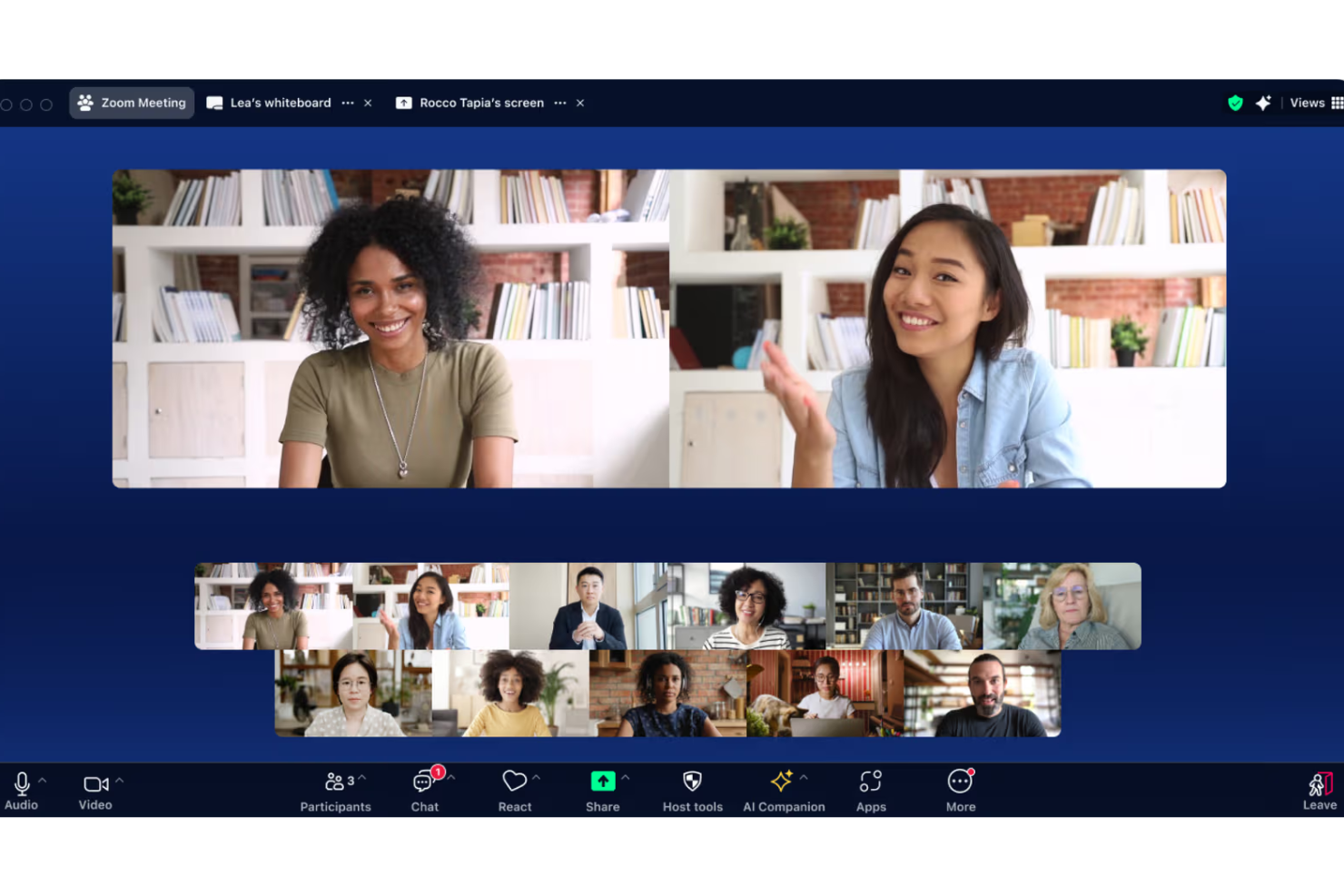
Zoom è una piattaforma per videoconferenze particolarmente popolare tra le organizzazioni che ospitano webinar, summit virtuali ed eventi online su larga scala. Se hai bisogno di una soluzione in grado di supportare un numero elevato di partecipanti e offrire una solida affidabilità video, Zoom semplifica queste attività per il tuo team.
Per chi è più adatto Zoom?
Le grandi organizzazioni e i team che gestiscono eventi e hanno bisogno di ospitare conferenze web, sessioni di formazione o eventi virtuali con centinaia o migliaia di partecipanti.
Perché Zoom è una buona alternativa a Livestorm
Ho scelto Zoom perché gestisce gli eventi virtuali su larga scala in un modo che poche piattaforme riescono a eguagliare. Zoom Webinars supporta fino a 50.000 partecipanti con sola visualizzazione, il che lo rende la scelta ideale quando ospiti riunioni plenarie aziendali o importanti lanci di prodotto. Apprezzo anche Zoom Sessions e Zoom Events, che consentono al mio team di creare conferenze virtuali con più sessioni, programmi personalizzati e un hub per eventi personalizzato con il proprio marchio. Quando le dimensioni del pubblico rappresentano un limite con Livestorm, Zoom elimina completamente questo vincolo.
Funzionalità principali di Zoom
- Stanze per sottogruppi: Dividi le riunioni numerose in gruppi più piccoli per discussioni mirate o sessioni di lavoro collaborative.
- AI Companion: Genera automaticamente riepiloghi delle riunioni, attività da svolgere e risposte alle chat durante la riunione.
- Sondaggi e domande e risposte: Raccogli il feedback del pubblico in tempo reale e rispondi alle domande dei partecipanti durante le sessioni dal vivo.
- Registrazione nel cloud: Registra riunioni e webinar nel cloud e condividili successivamente come contenuti on demand.
Integrazioni di Zoom
Zoom offre oltre 100 integrazioni native, tra cui Salesforce, HubSpot, Slack, Google Drive, Dropbox, Box, Microsoft Teams, Google Workspace, Zapier e un'API per integrazioni personalizzate.
Pros and Cons
Pros:
- Gestisce migliaia di partecipanti agli eventi dal vivo
- Qualità dello streaming video affidabile su larga scala
- Supporta flussi di lavoro avanzati per la registrazione agli eventi
Cons:
- Personalizzazione limitata del branding dei webinar
- La gestione delle stanze per sottogruppi può risultare macchinosa
Ideale per la partecipazione del pubblico dal vivo

Crowdcast è una piattaforma basata su browser pensata per creatori e team che organizzano eventi dal vivo, laboratori o seminari online interattivi ad alto volume. Se cerchi di coinvolgere il pubblico attraverso la partecipazione in tempo reale, i sondaggi e le sessioni di domande e risposte, vale la pena prendere in considerazione Crowdcast.
Per chi è più adatto Crowdcast?
Creatori, educatori e professionisti del marketing che devono interagire con un vasto pubblico durante seminari online, laboratori ed eventi virtuali dal vivo.
Perché Crowdcast è una buona alternativa a Livestorm
Ho scelto Crowdcast perché è una delle poche piattaforme che considera la partecipazione del pubblico dal vivo l'elemento principale dell'evento, non un aspetto secondario. La sessione integrata di domande e risposte è attiva per tutta la durata della sessione, così i partecipanti possono porre domande e votare quelle inviate dagli altri in tempo reale: ho riscontrato che questo mantiene alta l'energia durante i seminari online più lunghi senza bisogno di uno strumento di moderazione separato. Crowdcast consente inoltre agli organizzatori di proporre sondaggi dal vivo durante la sessione, che utilizzo per guidare la discussione in base a ciò che il pubblico vuole davvero approfondire. Per i team che organizzano eventi della community o laboratori interattivi, questo livello di reattività in tempo reale è difficile da eguagliare.
Funzionalità principali di Crowdcast
- Trasmissione su più piattaforme: Trasmetti il tuo evento dal vivo contemporaneamente su Facebook Live, YouTube Live e LinkedIn Live, così puoi raggiungere il pubblico su più piattaforme senza organizzare sessioni separate.
- Pagine di destinazione integrate: Crea pagine di registrazione personalizzabili con il tuo URL, immagini e descrizione, senza bisogno di uno strumento di creazione di pagine di destinazione di terze parti.
- Modalità RTMP: Collega direttamente al tuo evento Crowdcast software di streaming professionali come OBS o Ecamm Live per configurazioni di produzione di qualità superiore.
- Segui il canale: I partecipanti possono seguire il tuo canale Crowdcast e ricevere notifiche push o e-mail quando programmi nuovi eventi.
Integrazioni di Crowdcast
Crowdcast offre integrazioni native con Mailchimp, ConvertKit, Patreon e Stripe. Sono disponibili Zapier e un'API per creare integrazioni personalizzate.
Pros and Cons
Pros:
- Le domande del pubblico dal vivo possono ricevere voti positivi
- Nessun download richiesto per presentatori o partecipanti
- Trasmissione su più piattaforme su YouTube, Facebook e LinkedIn
Cons:
- Partecipazione video limitata dei partecipanti durante le sessioni
- Meno analisi post-evento rispetto a molti concorrenti

Ideale per riunioni semplici basate sul browser
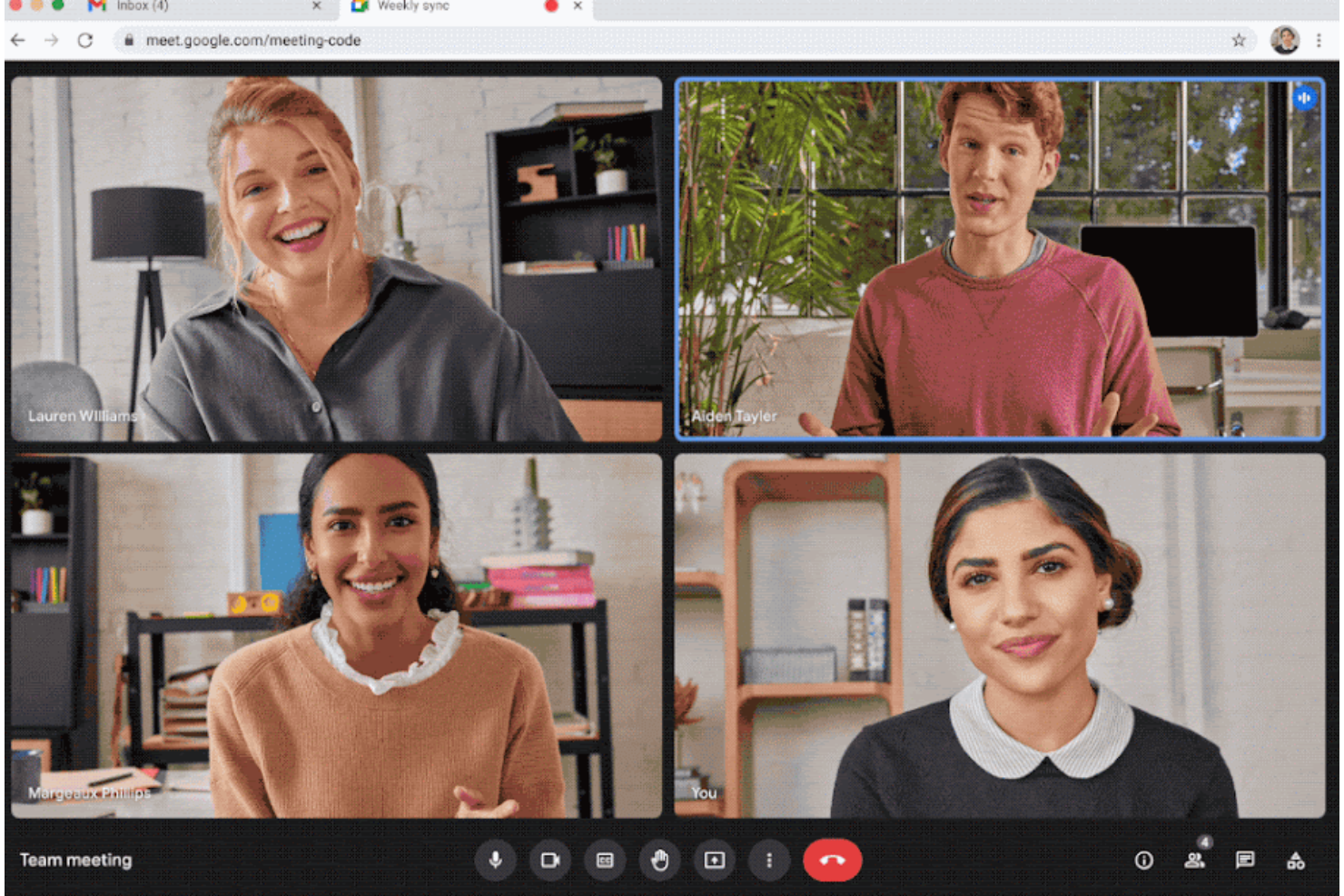
Google Meet è una piattaforma per riunioni video basata sul browser, adatta ai team che desiderano una configurazione minima e un accesso affidabile da qualsiasi dispositivo. Penso che sia particolarmente utile per i gruppi che hanno bisogno di chiamate rapide basate su link, senza scaricare applicazioni.
Per chi è più adatto Google Meet?
Team e piccole aziende che desiderano effettuare videochiamate rapide, senza download, da qualsiasi browser o dispositivo.
Perché Google Meet è una buona alternativa a Livestorm
Ho scelto Google Meet perché elimina quasi ogni ostacolo all'avvio o alla partecipazione a una riunione. Non è necessario scaricare alcuna applicazione: basta fare clic su un link e si è subito dentro, da un browser su qualsiasi dispositivo. Apprezzo anche il fatto che si integri direttamente con Google Calendar, così la programmazione di una riunione e la condivisione del link di accesso avvengono nello stesso passaggio. Per i team che lavorano nell'ecosistema Google Workspace, questa semplicità integrata è difficile da battere.
Funzionalità principali di Google Meet
- Sottotitoli in tempo reale: Mostra i sottotitoli in tempo reale mentre i partecipanti parlano durante una chiamata.
- Cancellazione del rumore: L'intelligenza artificiale filtra i rumori di fondo, mantenendo l'audio nitido in qualsiasi ambiente.
- Sondaggi e domande e risposte: Crea sondaggi interattivi e raccogli le domande del pubblico durante una riunione.
- Presa di appunti con l'IA Gemini: Acquisisce automaticamente gli appunti della riunione e mette in evidenza i punti principali della discussione.
Integrazioni di Google Meet
Google Meet offre integrazioni native nell'ecosistema Google Workspace, tra cui Google Calendar, Google Drive, Gmail e Google Chat. È disponibile un'API per le integrazioni personalizzate.
Pros and Cons
Pros:
- Accesso dal browser senza download
- Prestazioni fluide anche con una larghezza di banda ridotta
- Sottotitoli in tempo reale per una maggiore accessibilità
Cons:
- Funzionalità limitate per la gestione di webinar ed eventi
- Nessuna registrazione dei partecipanti o analisi avanzate

Ideale per gli strumenti integrati di collaborazione tra team
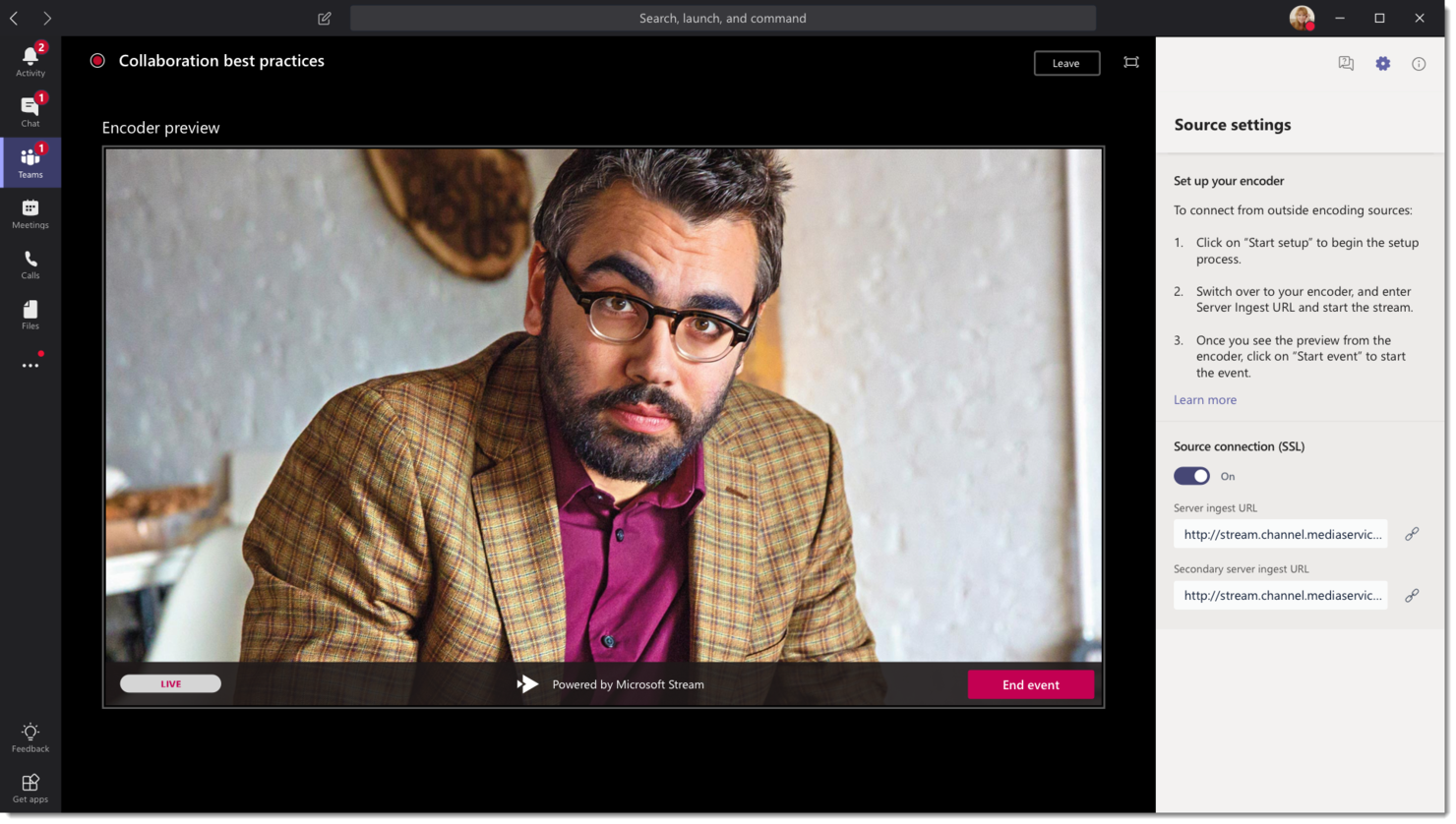
Microsoft Teams è progettato per le aziende che desiderano combinare le videoconferenze con la messaggistica, la condivisione di file e spazi di lavoro permanenti per i team. Se il tuo team utilizza già Microsoft 365, Teams riunisce riunioni, chat e file in un unico hub centrale.
Per chi è più adatto Microsoft Teams?
Aziende e reparti distribuiti che fanno ampio affidamento su Microsoft 365 per coordinare progetti, condividere documentazione e riunirsi virtualmente.
Perché Microsoft Teams è una buona alternativa a Livestorm
Ho scelto Microsoft Teams perché il livello di collaborazione è già integrato: non è necessario passare da uno strumento per le riunioni a uno spazio di lavoro separato. Il mio team utilizza la struttura dei canali permanenti per mantenere in un unico luogo le conversazioni sui progetti in corso, i file condivisi e le registrazioni delle riunioni. Apprezzo anche le riunioni plenarie di Teams, che ci permettono di trasmettere sessioni strutturate a un vasto pubblico interno senza uscire dalla piattaforma. In pratica, questo significa che possiamo passare da una riunione quotidiana a una riunione plenaria, fino alla revisione asincrona di un documento, senza mai cambiare strumento.
Funzionalità principali di Microsoft Teams
- Sale riunioni secondarie: Dividi le riunioni numerose in gruppi più piccoli per discussioni mirate o sessioni di lavoro collaborative.
- Modalità Insieme: Inserisci tutti i partecipanti alla riunione in uno sfondo virtuale condiviso per ridurre l'affaticamento visivo durante le sessioni lunghe.
- Lavagna: Collabora in tempo reale su una superficie digitale condivisa durante o al di fuori delle riunioni.
- Trascrizioni delle riunioni: Genera trascrizioni testuali automatiche delle riunioni, consultabili e ricercabili dopo la fine della sessione.
Integrazioni di Microsoft Teams
Microsoft Teams dispone di integrazioni native nell'ecosistema Microsoft, tra cui Microsoft 365 e Azure, e supporta un'API per le integrazioni personalizzate. Offre inoltre integrazioni native con Salesforce, Trello, GitHub e Adobe Creative Cloud.
Pros and Cons
Pros:
- Le riunioni video si integrano con chat e file
- Canali permanenti per la collaborazione continua sui progetti
- Accesso semplice per le organizzazioni che utilizzano Microsoft 365
Cons:
- La registrazione ai webinar offre opzioni di personalizzazione limitate
- I controlli delle sale riunioni secondarie sono meno intuitivi
Ideale per sessioni attente alla privacy

Zoho Meeting è una piattaforma di videoconferenza basata su browser, progettata per le organizzazioni che danno priorità al controllo sui dati delle riunioni e alla privacy dei partecipanti. È una buona scelta per i professionisti che desiderano controlli granulari sulle riunioni, impostazioni specializzate per il consenso degli utenti e opzioni di implementazione flessibili.
Per chi è più adatto Zoho Meeting?
Amministratori IT e team attenti alla conformità che richiedono rigorosi controlli sulla privacy e desiderano gestire le videoriunioni nel rispetto dei quadri normativi aziendali.
Perché Zoho Meeting è una buona alternativa a Livestorm
Ho scelto Zoho Meeting perché offre ai team un controllo effettivo su chi accede alle riunioni e sui dati raccolti. Le autorizzazioni di registrazione riservate esclusivamente all'organizzatore impediscono ai partecipanti di registrare le sessioni senza consenso, un aspetto importante negli ambienti regolamentati o sensibili. Apprezzo anche le funzionalità integrate di sala d'attesa e blocco della riunione, che consentono agli organizzatori di controllare esattamente quando e chi può partecipare: sono utili per revisioni interne o sessioni rivolte ai clienti, in cui l'accesso anticipato di alcuni partecipanti potrebbe creare problemi. Per i team che utilizzano già l'ecosistema Zoho, la stretta integrazione con Zoho CRM e Zoho Webinar lo rende una scelta naturale per gestire sessioni attente alla privacy dall'inizio alla fine.
Funzionalità principali di Zoho Meeting
- Sale riunioni separate: Dividi i partecipanti in gruppi più piccoli durante una sessione per discussioni mirate o workshop.
- Moduli di registrazione personalizzati: Raccogli le informazioni sui partecipanti prima dei webinar con campi del modulo configurabili.
- Sondaggi durante la sessione: Avvia sondaggi durante le riunioni dal vivo per raccogliere opinioni in tempo reale dai partecipanti.
- Analisi delle riunioni: Esamina i dati sulle presenze, la durata e il coinvolgimento dei partecipanti dopo ogni sessione.
Integrazioni di Zoho Meeting
Zoho Meeting offre integrazioni native con Zoho CRM, Zoho Projects, Zoho Calendar, Slack, Microsoft Outlook e Google Workspace, oltre a connettersi con Zapier. È disponibile un'API per le integrazioni personalizzate.
Pros and Cons
Pros:
- Controlli granulari dell'organizzatore sulle autorizzazioni dei partecipanti
- Basato su browser, senza necessità di installazione
- Conforme alle normative globali sulla privacy
Cons:
- Opzioni di coinvolgimento dei partecipanti limitate rispetto alla concorrenza
- La registrazione delle sessioni è riservata esclusivamente all'organizzatore
Ideale per programmare facilmente gli eventi
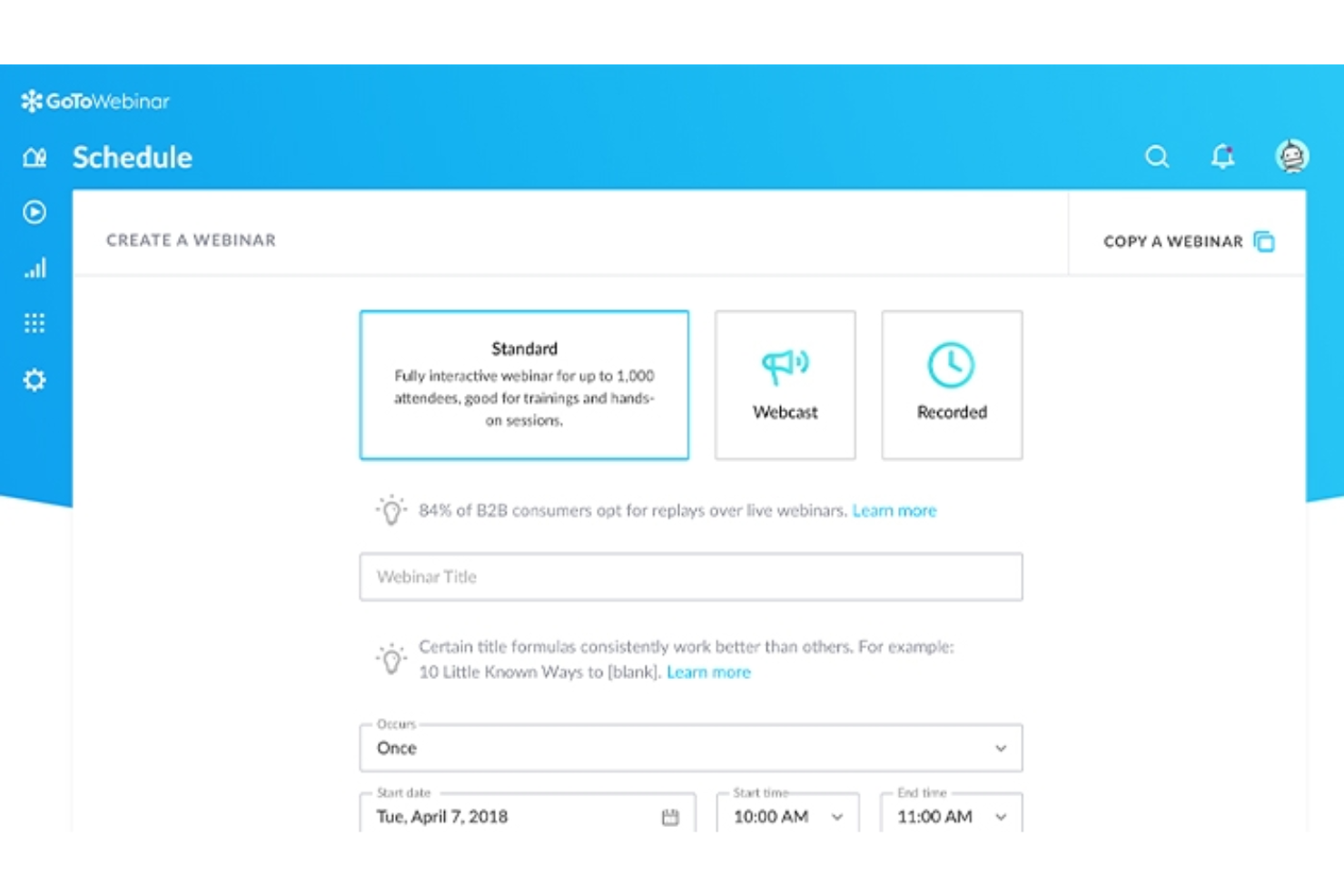
GoTo Webinar è una piattaforma per l'hosting di webinar pensata per i professionisti che hanno bisogno di organizzare eventi online affidabili e su larga scala senza complicazioni. Ritengo che sia una buona soluzione per le piccole imprese e i team aziendali che desiderano un'interfaccia semplice per gestire formazione online, riunioni plenarie o briefing con i clienti.
Per chi è più adatto GoTo Webinar?
Team di formazione aziendale e PMI che organizzano webinar per il pubblico interno o per i clienti.
Perché GoTo Webinar è una buona alternativa a Livestorm
Ho scelto GoTo Webinar per la semplicità con cui consente di programmare eventi ricorrenti. I modelli di evento integrati permettono di configurare una volta sola le pagine di registrazione, le sequenze di email e le impostazioni delle sessioni, per poi riutilizzarle negli eventi futuri senza dover ricominciare da zero. Apprezzo anche i promemoria e i messaggi di follow-up automatici via email, che vengono inviati a intervalli prestabiliti senza alcun intervento manuale. Per i team che organizzano webinar con cadenza regolare, questo tipo di automazione della programmazione riduce notevolmente il lavoro ripetitivo di configurazione.
Funzionalità principali di GoTo Webinar
- Sondaggi e questionari: Raccogli il feedback dei partecipanti o organizza sessioni di domande e risposte in diretta durante la sessione.
- Pagine di registrazione personalizzate: Crea pagine di iscrizione personalizzate con campi personalizzati per raccogliere le informazioni sui partecipanti.
- Dashboard di analisi: Monitora le registrazioni, la partecipazione, i punteggi di coinvolgimento e i dati sugli abbandoni dopo l'evento.
- Registrazione su richiesta: Registra automaticamente le sessioni e condividile con gli iscritti dopo l'evento.
Integrazioni di GoTo Webinar
GoTo Webinar offre integrazioni native con Salesforce, Marketo, Zapier e Slack. Fornisce inoltre un'API per le integrazioni personalizzate.
Pros and Cons
Pros:
- Prestazioni affidabili con un numero elevato di partecipanti
- Email automatiche di invito e follow-up
- Domande e risposte in diretta e sondaggi integrati
Cons:
- Opzioni limitate per la personalizzazione del branding degli eventi
- Nessuna stanza per sottogruppi integrata

Ideale per un coinvolgimento avanzato del pubblico
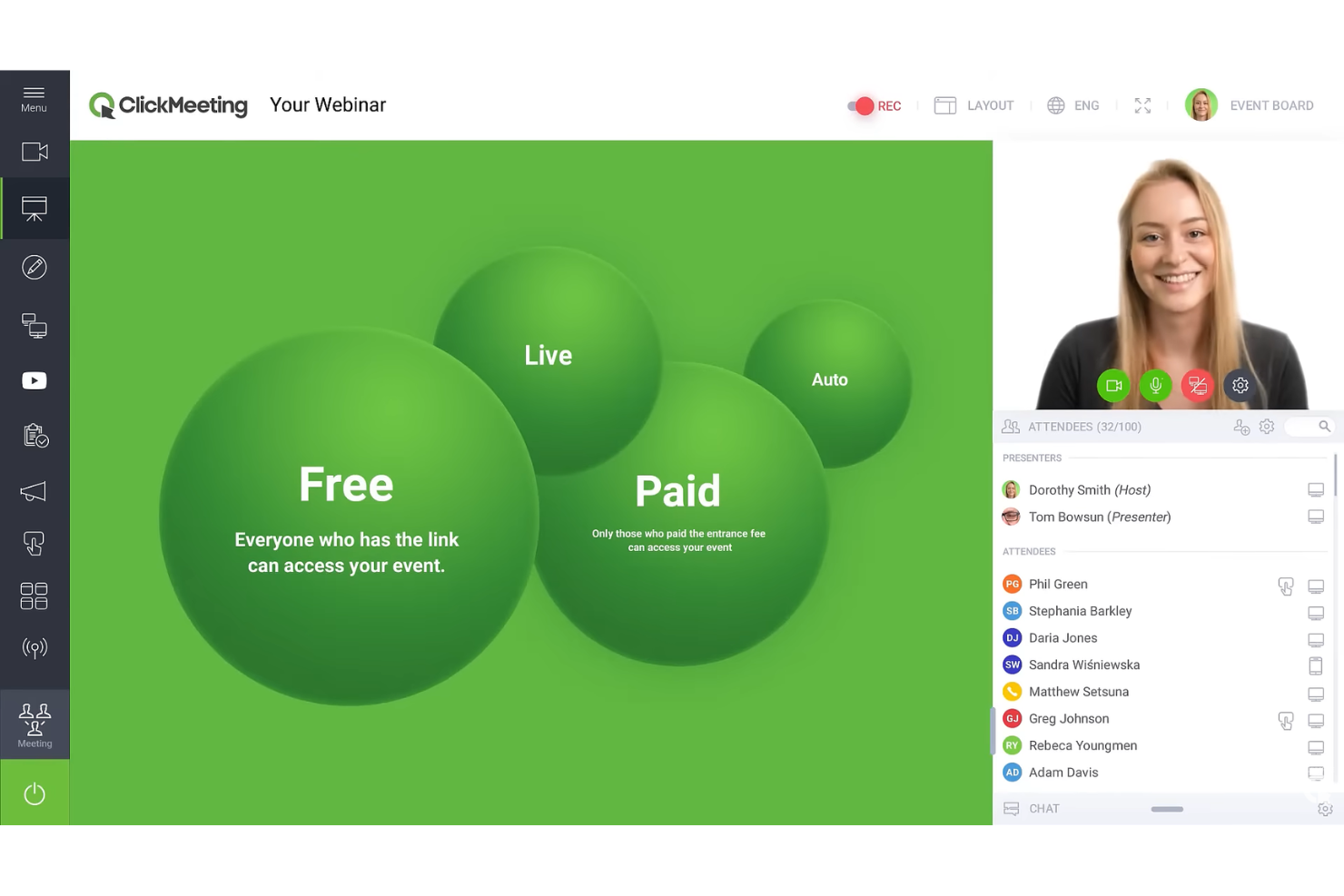
ClickMeeting si distingue per i team che organizzano webinar, dimostrazioni di prodotti dal vivo ed eventi online interattivi in cui la partecipazione del pubblico è importante. Penso che apprezzerai il suo mix di strumenti di personalizzazione e coinvolgimento se hai bisogno di mantenere attivi e coinvolti i partecipanti virtuali.
Per chi è più adatto ClickMeeting?
Organizzatori di eventi online e team di marketing che devono stimolare il coinvolgimento e l'interattività in tempo reale con un vasto pubblico digitale.
Perché ClickMeeting è una buona alternativa a Livestorm
Ho scelto ClickMeeting in particolare per la profondità dei suoi strumenti di coinvolgimento del pubblico durante le sessioni. I sondaggi e le votazioni in diretta mi permettono di valutare in tempo reale la comprensione dei partecipanti, mentre la funzione del pulsante CTA mi consente di inserire un invito all'azione cliccabile direttamente nella sala webinar in qualsiasi momento della sessione. Mi piace anche la funzione di trasmissione simultanea, che consente di trasmettere contemporaneamente su un massimo di cinque piattaforme, tra cui Facebook, YouTube, LinkedIn e TikTok, in 1080p; questo significa che posso organizzare un unico evento e raggiungere il pubblico su più canali contemporaneamente senza alcuna configurazione aggiuntiva.
Funzionalità principali di ClickMeeting
- Webinar automatizzati: Pianifica sessioni preregistrate affinché si svolgano secondo un programma prestabilito senza doverle ospitare dal vivo.
- Sale riunioni separate: Dividi i partecipanti in gruppi più piccoli per discussioni o workshop all'interno dello stesso evento.
- Sala d'attesa: Ospita i partecipanti in una sala d'attesa personalizzata con il tuo marchio prima dell'inizio della sessione.
- Lavagna: Disegna, aggiungi annotazioni e presenta idee in tempo reale durante una sessione.
Integrazioni di ClickMeeting
ClickMeeting offre integrazioni native con Zoom, HubSpot, Moodle, PayPal e Facebook, oltre a connettersi con Zapier. È disponibile un'API per le integrazioni personalizzate.
Pros and Cons
Pros:
- Analisi dettagliate del coinvolgimento dei partecipanti
- Opzioni di personalizzazione della sala webinar
- Supporta webinar automatizzati ed eventi dal vivo
Cons:
- Le funzionalità avanzate sono disponibili solo nei piani superiori
- La capacità delle sale riunioni separate è limitata
Ideale per le funzionalità interattive per i partecipanti
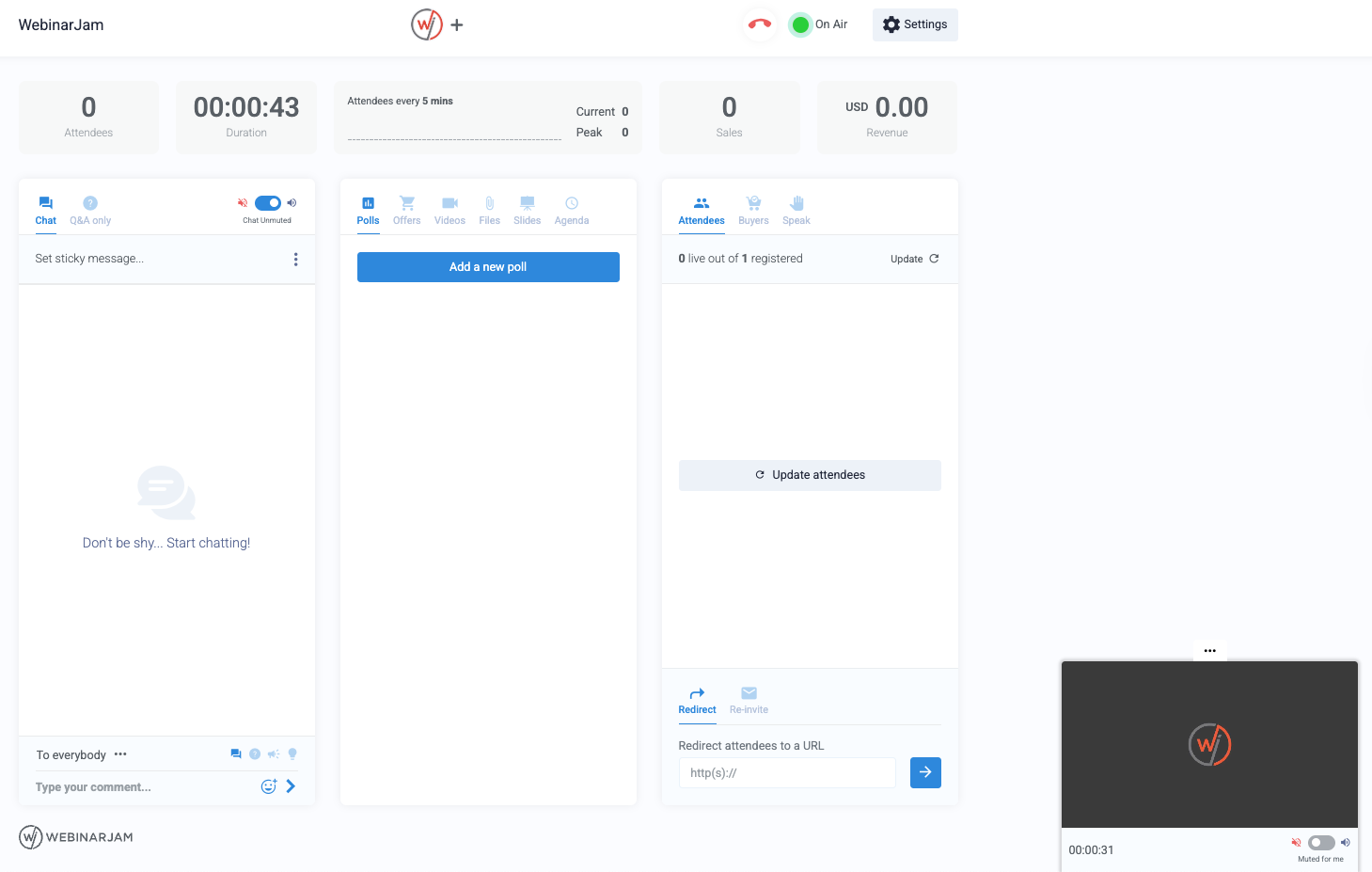
WebinarJam è una piattaforma per webinar basata sul cloud, pensata per le squadre che desiderano un controllo più approfondito sul coinvolgimento dei partecipanti e sul flusso delle presentazioni. Ritengo che la troverai particolarmente interessante se organizzi eventi online o corsi di formazione ad alto volume che richiedono riscontri dal vivo e partecipazione attiva.
Per chi è più adatto WebinarJam?
Squadre di marketing e vendite che organizzano webinar interattivi su larga scala o lanci di prodotti.
Perché WebinarJam è una buona alternativa a Livestorm
Ho scelto WebinarJam per l'ampiezza delle sue funzionalità di interazione con il pubblico dal vivo. La funzione di evidenziazione dei partecipanti consente di portare i partecipanti sullo schermo in tempo reale, una possibilità che ho trovato davvero utile per le sessioni di domande e risposte e gli eventi in stile tavola rotonda. Apprezzo anche gli strumenti di moderazione della chat dal vivo, inclusi i messaggi privati e il fissaggio dei commenti, che aiutano a gestire conversazioni ad alto volume senza perdere il controllo. Per le squadre che organizzano webinar di grandi dimensioni e ad alto coinvolgimento, queste funzionalità fanno davvero la differenza.
Funzionalità principali di WebinarJam
- Sondaggi e questionari interattivi: Raccogli i riscontri del pubblico durante le sessioni dal vivo e utilizza le risposte per guidare la conversazione in tempo reale.
- Evidenziazione dei partecipanti: Porta i partecipanti selezionati sullo schermo affinché possano porre domande, condividere riscontri o partecipare a discussioni dal vivo.
- Programmazione automatizzata: Configura sessioni di webinar ricorrenti ed eventi programmati senza dover ricostruire ogni evento da zero.
- Chat dal vivo e domande e risposte: Gestisci le domande dei partecipanti, i messaggi privati e i commenti fissati durante i webinar ad alto volume.
Integrazioni di WebinarJam
WebinarJam offre integrazioni native con ActiveCampaign, Twilio, Mailchimp, AWeber, Keap, Ontraport e Kartra. Si connette a Zapier e fornisce un'API per integrazioni personalizzate.
Pros and Cons
Pros:
- L'evidenziazione dei partecipanti porta gli utenti sullo schermo dal vivo
- Sondaggi, materiali distribuiti e offerte in tempo reale inclusi
- Programmazione automatizzata dei webinar per eventi ricorrenti
Cons:
- Controllo limitato dell'identità del marchio per la personalizzazione degli eventi
- Nessuna stanza per sottogruppi per il lavoro di gruppo
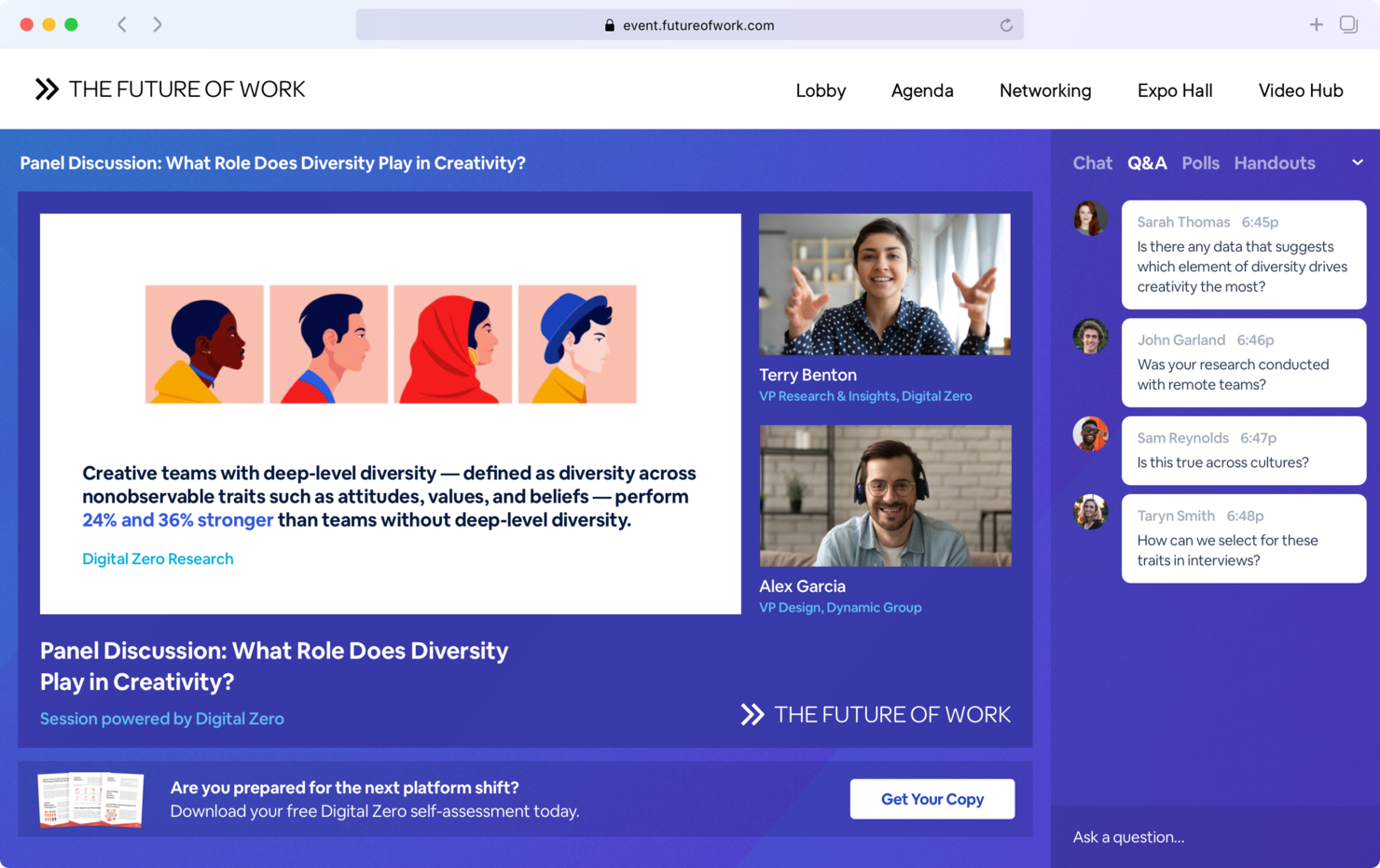
BigMarker è una piattaforma per eventi virtuali progettata per aziende e organizzazioni che desiderano offrire esperienze online altamente personalizzate e interattive. È una scelta eccellente per i responsabili del marketing degli eventi e le aziende che cercano piena flessibilità nella progettazione, nel coinvolgimento e nella trasmissione tramite i loro strumenti di videoconferenza.
A chi è più adatto BigMarker?
Team di marketing degli eventi e aziende che organizzano conferenze virtuali, esposizioni o lanci di prodotti su larga scala e che richiedono un marchio personalizzabile e un coinvolgimento interattivo dei partecipanti.
Perché BigMarker è una buona alternativa a Livestorm
Ho scelto BigMarker perché il livello di controllo sulla personalizzazione del marchio senza il logo del fornitore che offre è diverso da quello della maggior parte degli strumenti per webinar che ho utilizzato. È possibile personalizzare le pagine di registrazione, le aree di attesa dei partecipanti e l'ambiente dell'evento stesso con i propri colori, loghi e caratteri, senza alcun marchio di BigMarker in vista. Mi piace anche il generatore di conferenze virtuali integrato, che consente al mio team di progettare eventi con più sessioni, stand degli sponsor, sale per il networking e una pagina dell'agenda personalizzata. Per le organizzazioni che gestiscono conferenze annuali con un marchio definito o eventi di lancio di prodotti, questo tipo di controllo completo sulla progettazione sostituisce un insieme frammentario di strumenti separati.
Funzionalità principali di BigMarker
- Trasmissioni web simulate: preregistra la tua presentazione e programmala per l'esecuzione automatica a un orario stabilito, così puoi concentrarti sul coinvolgimento del pubblico in diretta.
- Domande e risposte con votazione positiva: consenti ai partecipanti di inviare domande e votare quelle migliori affinché raggiungano i primi posti, così affronterai sempre gli argomenti di cui il tuo pubblico desidera davvero discutere.
- Vendita di biglietti e accesso a pagamento: vendi biglietti per le sessioni dal vivo o fai pagare le registrazioni su richiesta direttamente tramite BigMarker, riscuotendo i ricavi attraverso PayPal.
- Sale per il networking dei partecipanti: organizza aree di incontro basate sui ruoli, abbinamenti e incontri all'interno del tuo evento, così i partecipanti possono entrare in contatto tra loro tra una sessione e l'altra.
Integrazioni di BigMarker
BigMarker offre integrazioni native con Salesforce, HubSpot, Marketo, Mailchimp, Constant Contact, ActiveCampaign, Pardot, Eloqua e Zapier, oltre a fornire un'API per integrazioni personalizzate.
Pros and Cons
Pros:
- Supporta conferenze virtuali con più sessioni
- Solidi strumenti per l'acquisizione dei contatti e l'analisi
- Personalizzazione avanzata del marchio degli eventi
Cons:
- Opzioni limitate per le sessioni interattive dal vivo
- Nessuna funzionalità di networking integrata per chat di piccoli gruppi
Altre alternative a Livestorm
Ecco alcune alternative aggiuntive a Livestorm che non sono state incluse nel mio elenco, ma che vale comunque la pena prendere in considerazione:
- WebinarGeek
Ideale per attività successive automatizzate
- RingCentral Webinar
Ideale per l'integrazione delle comunicazioni unificate
- Screen Recorder
Ideale per la condivisione istantanea dello schermo basata sul cloud


Come valuto le alternative a Livestorm
Considero due aspetti: se uno strumento soddisfa i requisiti fondamentali per gli eventi dal vivo—trasmissione, registrazione e riproduzione—e ciò che lo distingue per i team di progetto che organizzano dimostrazioni per i clienti o formazione interna.
Funzionalità fondamentali (requisiti imprescindibili per questo elenco)
Quando seleziono gli strumenti per il mio elenco, assegno a ciascuno un punteggio su una scala da 0 (non offre la funzionalità) a 5 (eccelle in quest'area) per ogni funzionalità fondamentale elencata di seguito. Quindi, converto il punteggio totale dello strumento in una percentuale. Ogni strumento deve raggiungere un punteggio totale minimo del 65% per essere preso in considerazione.
- Trasmissione video in diretta: valuto se una piattaforma è in grado di trasmettere in modo affidabile video HD a centinaia di partecipanti, soprattutto per casi d'uso come l'avvio di progetti o gli aggiornamenti per tutta l'azienda, in cui ritardi o connessioni interrotte compromettono la sessione.
- Strumenti per il coinvolgimento del pubblico: sondaggi, domande e risposte, chat e reazioni sono ciò che distingue un webinar da una videochiamata passiva. Cerco strumenti che consentano ai facilitatori di avviare richieste di partecipazione durante la sessione senza interrompere il flusso della presentazione.
- Registrazione e pagine di destinazione: una buona alternativa a Livestorm dovrebbe includere moduli di registrazione personalizzabili e pagine di destinazione personalizzate con il marchio, così che i team di progetto possano gestire le iscrizioni agli eventi e i promemoria automatici senza dover ricorrere a uno strumento separato.
- Registrazione e riproduzione su richiesta: per i team distribuiti su diversi fusi orari, le sessioni registrate devono essere ospitate e condivisibili. Verifico se le registrazioni sono disponibili automaticamente dopo l'evento oppure se richiedono l'esportazione e il nuovo caricamento manuali.
- Analisi e report delle sessioni: i soli conteggi delle presenze non sono sufficienti. Cerco dati sul coinvolgimento a livello di partecipante—come le risposte ai sondaggi, i punti di abbandono e la partecipazione alle domande e risposte—che aiutino i responsabili dell'erogazione a valutare l'effettiva efficacia di una formazione o di una dimostrazione.
- Integrazioni con gli strumenti aziendali: la piattaforma dovrebbe connettersi ai CRM, ai calendari e agli strumenti di gestione dei progetti già utilizzati dal team. Le integrazioni native con piattaforme come HubSpot, Google Workspace o Jira rendono molto più semplice gestire le attività successive all'evento.
Una volta ottenuto un elenco di strumenti che soddisfano questi criteri, considero ciò che distingue ciascuna piattaforma.
Fattori distintivi (ciò che distingue i fornitori)
Ecco come confronto i diversi fornitori:
Funzionalità distintive
Le stanze per gruppi sono importanti quando si organizzano workshop o retrospettive degli sprint, in cui le discussioni in gruppi più piccoli portano a risultati migliori. Valuto inoltre se una piattaforma supporta webinar simulati dal vivo o sempre disponibili, che consentono di riproporre una sessione di onboarding pre-registrata e curata senza doverla ospitare dal vivo ogni volta. Per i responsabili dell'erogazione a contatto con i clienti, il branding personalizzato e la possibilità di rimuovere il marchio del fornitore influenzano la percezione di professionalità delle dimostrazioni e delle riunioni di avvio da parte degli interlocutori esterni.
Oltre le funzionalità
La trasparenza dei prezzi è una delle prime cose che verifico. Alcune piattaforme applicano un costo per partecipante o per sessione, il che può far aumentare rapidamente i costi quando si organizzano dimostrazioni settimanali per i clienti nell'ambito di diversi flussi di progetto. Valuto anche quanto bene uno strumento si integri con l'ecosistema di gestione dei progetti—le integrazioni native con strumenti come Jira o HubSpot evitano ai team di registrare manualmente le attività successive a ogni sessione. Sono importanti anche le certificazioni di sicurezza come SOC 2 e la conformità al GDPR, soprattutto per i team che ospitano sessioni durante le quali vengono condivisi dati sensibili sui progetti o informazioni sui clienti.
Perché cercare un'alternativa a Livestorm?
Sebbene Livestorm sia una buona scelta per le videoconferenze, ci sono diversi motivi per cui alcuni utenti cercano soluzioni alternative. Potresti essere alla ricerca di un'alternativa a Livestorm perché…
- Hai bisogno di opzioni più solide per la privacy o la localizzazione dei dati
- I limiti al numero di partecipanti di Livestorm non sono adatti alle dimensioni del tuo pubblico
- Le opzioni di integrazione sono troppo limitate per i tuoi flussi di lavoro
- L'insieme di funzionalità è più incentrato sui webinar che sulle riunioni
- Desideri impostazioni di controllo dell'organizzatore più granulari
- La struttura dei prezzi non è in linea con il tuo utilizzo
Se ti riconosci in una di queste situazioni, sei nel posto giusto. Il mio elenco contiene diverse opzioni di software per videoconferenze più adatte ai team che affrontano queste difficoltà con Livestorm e cercano soluzioni alternative.
Funzionalità principali di Livestorm
Ecco alcune delle funzionalità principali di Livestorm, per aiutarti a confrontare ciò che offrono le soluzioni alternative:
- Webinar automatizzati: Ospita webinar preregistrati che si svolgono agli orari prestabiliti, aiutando i team a tenere sessioni ripetibili senza gestire ogni evento dal vivo.
- Pagine di registrazione personalizzate: Crea pagine per eventi con il tuo marchio che raccolgono i dati dei partecipanti e supportano un'esperienza webinar più curata, dalla registrazione al follow-up.
- Riunioni basate sul browser: Consenti ai partecipanti di unirsi a webinar e riunioni virtuali da qualsiasi dispositivo utilizzando solo un browser, senza download o plugin.
- Flussi di lavoro email integrati: Configura conferme, promemoria e follow-up automatizzati direttamente all'interno della piattaforma per supportare diversi piani per webinar e formati di evento.
- Strumenti per il coinvolgimento del pubblico: Usa sondaggi, domande e risposte, chat dal vivo e reazioni con emoji per creare webinar più coinvolgenti e incoraggiare la partecipazione in tempo reale.
- Pannello di analisi: Monitora registrazioni, partecipazione, coinvolgimento e prestazioni degli eventi per comprendere meglio il coinvolgimento nei video e il comportamento del pubblico.
- Sale secondarie: Dividi i partecipanti in gruppi più piccoli per workshop, sessioni di formazione, eventi ibridi o discussioni moderate.
- Integrazioni di terze parti: Collega Livestorm a strumenti come HubSpot, Salesforce, Slack e Zapier per condividere i dati degli eventi tra i vari software del tuo sistema.
- Accesso su richiesta: Condividi le sessioni registrate dopo l'evento, così gli iscritti possono guardare contenuti in streaming dal vivo o webinar preregistrati secondo i propri orari.
- Sicurezza e conformità: Utilizza la conformità al GDPR, i controlli degli accessi basati sui ruoli e le impostazioni per eventi privati per gestire l'accesso a webinar e riunioni virtuali.