

10 alternative a Jitterbit per l’integrazione dei dati nel 2026

Elenco delle migliori alternative a Jitterbit


Una valida alternativa a Jitterbit offre un’automazione affidabile dei flussi di lavoro basata sull’IA, opzioni flessibili di integrazione iPaaS e supporto per flussi di dati complessi senza le difficoltà di configurazione. Se stai valutando alternative a Jitterbit, probabilmente vuoi collegare app moderne, automatizzare processi multipiattaforma o gestire casi d’uso più avanzati di quelli che Jitterbit è in grado di supportare.
Scegliere le soluzioni di integrazione giuste può aiutarti a mantenere i progetti in movimento nonostante requisiti mutevoli, flussi di lavoro complessi e la pressione di ottenere risultati tra i vari team. Questa guida mette in evidenza alternative a Jitterbit progettate per gli ambienti tecnologici, così puoi confrontare rapidamente le opzioni e trovare quella più adatta ai tuoi obiettivi di integrazione e automazione per il 2026.
Che cos’è Jitterbit?
Jitterbit è una piattaforma di integrazione e automazione dei flussi di lavoro che collega app, dati e sistemi tramite API e IA. Puoi ottimizzare, progettare, implementare e gestire integrazioni in ambienti cloud e locali utilizzando strumenti visivi e connettori predefiniti. Jitterbit aiuta i responsabili di progetto e i team ad automatizzare le attività di routine, sincronizzare i dati e creare processi scalabili, offrendo alla tua azienda la flessibilità necessaria per adattare le integrazioni con l’evolversi del tuo stack tecnologico.
Tabella di confronto delle alternative a Jitterbit
Questa tabella di confronto riassume i dettagli sui prezzi delle mie migliori alternative a Jitterbit:
| Tool | Best For | Trial Info | Price | ||
|---|---|---|---|---|---|
| 1 | Ideale per l'automazione nell'ecosistema NetSuite | Demo gratuita disponibile | Prezzo su richiesta | Website | |
| 2 | Ideale per connettere app SaaS semplici | Piano gratuito disponibile | A partire da $19,99/mese (fatturato annualmente) | Website | |
| 3 | Ideale per analisi dati avanzata | Prova gratuita disponibile | Da $250/utente/mese (fatturato annualmente) | Website | |
| 4 | Ideale per la complessità dei workflow visivi | Piano gratuito + demo gratuita disponibile | Da $9/mese (fatturazione annuale) | Website | |
| 5 | Ideale per il deployment auto-ospitato | Prova gratuita disponibile | A partire da $20/mese (fatturato annualmente) | Website | |
| 6 | Ideale per la connettività cloud ibrida | Prova gratuita di 30 giorni disponibile | Da $99/mese + utilizzo | Website | |
| 7 | Ideale per il trasferimento di dati open-source | Piano gratuito disponibile | Da $29/mese | Website | |
| 8 | Ideale per pipeline ETL low-code | Demo gratuita disponibile | Da 1.999 $/mese | Website | |
| 9 | Ideale per la gestione delle API a livello aziendale | Prova gratuita + demo gratuita disponibili | Prezzo su richiesta | Website | |
| 10 | Ideale per processi aziendali automatizzati | Demo gratuita disponibile | Prezzo su richiesta | Website |

Perché fidarsi dei nostri consigli sui software
Il nostro team testa e recensisce software dal 2012. In quanto project manager noi stessi, sappiamo quanto sia difficile — e importante — scegliere il software giusto.
Per questa guida, abbiamo valutato gli strumenti attraverso test pratici e ricerche indipendenti, assegnando un punteggio agli strumenti in base ai nostri criteri di selezione. Ci basiamo inoltre sulle competenze di leader di pensiero del settore e di professionisti attivi nella gestione dei progetti.
Le nostre recensioni riflettono il nostro giudizio editoriale umano, non un discorso di vendita.
Revisori esperti:
Recensioni delle migliori alternative a Jitterbit
Di seguito trovi i miei riepiloghi dettagliati delle migliori alternative a Jitterbit incluse nel mio elenco ristretto. Le mie recensioni offrono un’analisi approfondita delle funzionalità, delle integrazioni e dei casi d’uso migliori di ciascuna piattaforma, per aiutarti a trovare quella più adatta a te.

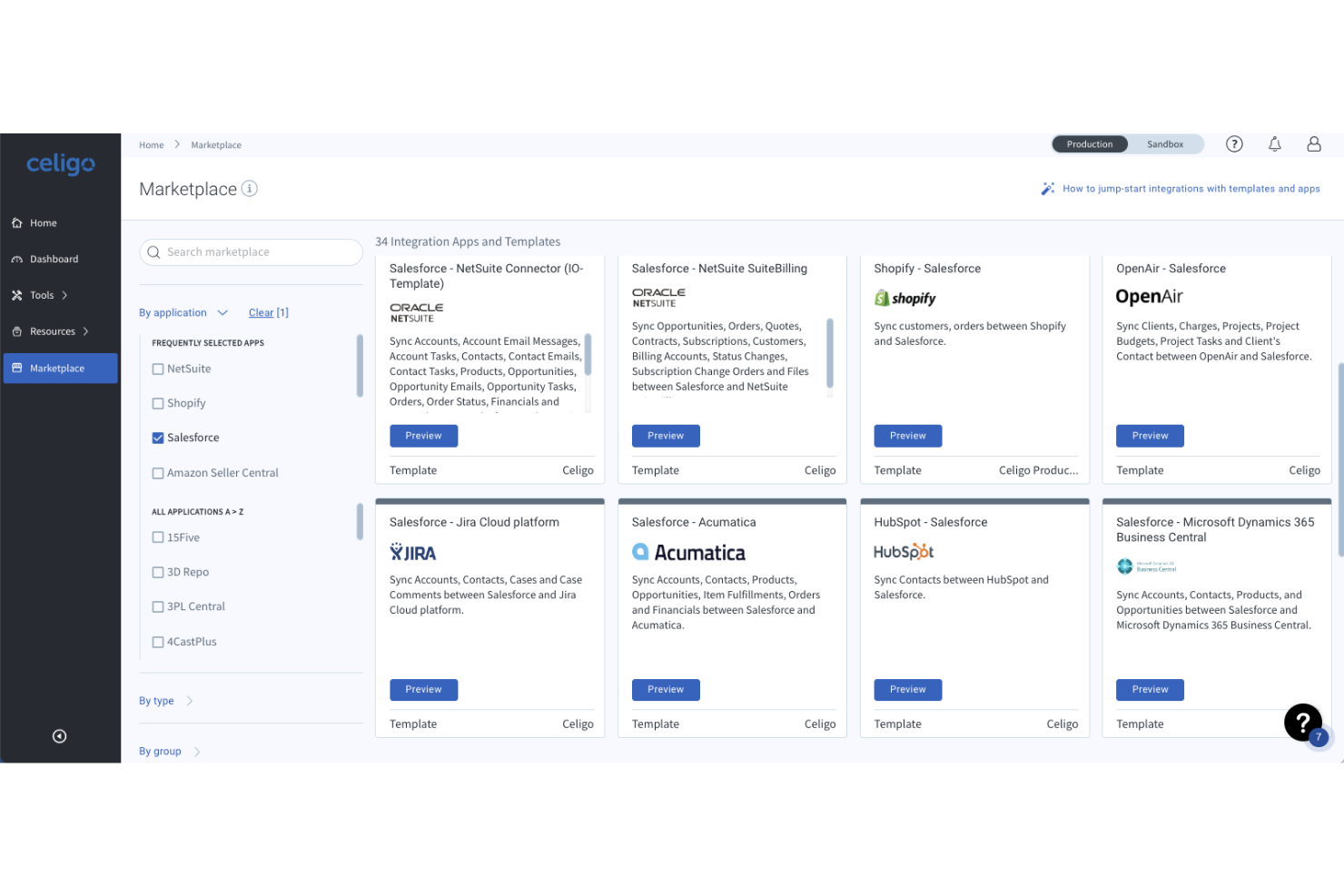
Celigo è una piattaforma di integrazione pensata per le aziende che si affidano a NetSuite e ad altri sistemi SaaS per automatizzare e orchestrare i flussi di lavoro in ambito finanziario, operativo ed ecommerce. È progettata per i team IT e gli utenti aziendali che necessitano di semplificare flussi di dati complessi senza lo sviluppo pesante di soluzioni personalizzate.
A chi è più adatto Celigo?
Team IT e operativi di aziende di medie e grandi dimensioni che automatizzano i flussi di lavoro nei settori finanziario, retail ed ecommerce.
Perché Celigo è una valida alternativa a Jitterbit
Ho scelto Celigo soprattutto per la profondità del suo supporto a NetSuite. Nessun'altra piattaforma in questo ambito si avvicina alle sue oltre 80 integrazioni preconfigurate per NetSuite, che coprono processi come quote-to-cash, procure-to-pay e workflow EDI pronti all'uso. Apprezzo inoltre la sua gestione degli errori basata sull'intelligenza artificiale, che rileva e risolve automaticamente gli errori d'integrazione in tempo reale. In pratica, questo significa che il mio team dedica molto meno tempo al debug dei sincronismi dati falliti tra NetSuite e sistemi connessi come Shopify, Salesforce o Workday.
Funzionalità chiave di Celigo
- B2B Manager per EDI: Uno strato integrato di gestione EDI, pensato per l'onboarding di partner commerciali, la gestione di diversi standard EDI e il monitoraggio delle transazioni B2B insieme alle altre integrazioni.
- Integrazione dati con motore ETL/ELT: Un motore di pipeline dati che unifica, trasforma e sposta grandi volumi di dati nel tuo data warehouse, rendendoli pronti per l'analisi.
- Celigo Ora: Un copilot AI integrato nella piattaforma che consente di costruire, gestire e risolvere problemi d'integrazione tramite conversazione in linguaggio naturale, con una fase di approvazione dei cambiamenti prima dell'applicazione.
- Agent builder: Uno strumento per progettare agenti di automazione guidati da AI che combinano regole deterministiche e ragionamento autonomo, dando alle squadre IT il controllo su come gli agenti operano nei sistemi aziendali.
Integrazioni Celigo
Celigo offre integrazioni native con NetSuite, Salesforce, Shopify, Amazon, Zendesk, ADP, ServiceNow, Slack, Google Workspace e Microsoft 365.
Pros and Cons
Pros:
- Integrazione approfondita di NetSuite per i workflow ERP
- Gestione degli errori basata su AI che riduce gli interventi manuali
- Flussi preconfigurati per e-commerce e finanza
Cons:
- Alcuni connettori non sono aggiornati rispetto alle nuove applicazioni
- L'assistente AI a volte interpreta male le richieste
New Product Updates from Celigo
Celigo Expands Microsoft Entra Authentication for SQL Connectors
Celigo’s Azure Synapse and MS SQL connectors now support Microsoft Entra service principal authentication via client secrets and certificates, so you can connect securely without relying on SQL credentials. For more information, visit Celigo’s official site.
 .
.
Zapier
Ideale per connettere app SaaS semplici

Zapier è una piattaforma di automazione no-code pensata per utenti non tecnici che desiderano connettere app cloud senza supporto dell’ingegneria. L’ho utilizzata per creare flussi di lavoro tra app che sincronizzano attività, inviano notifiche e automatizzano processi SaaS manuali.
Per chi è ideale Zapier?
Responsabili delle operazioni e piccoli team di aziende SaaS che vogliono automatizzare attività di routine tra strumenti cloud-based.
Perché Zapier è una buona alternativa a Jitterbit
Ho scelto Zapier perché rende l’automazione tra app davvero accessibile senza alcuna configurazione tecnica. Mentre Jitterbit spesso richiede il coinvolgimento IT anche per integrazioni di base, posso creare uno Zap funzionante in pochi minuti utilizzando l’editor passo-passo, collegando app come Slack, Google Sheets e HubSpot tramite un semplice modello trigger-azione. Apprezzo anche gli Zap multi-step di Zapier con logica condizionale, che permettono al mio team di instradare i dati in modo diverso a seconda di criteri specifici senza scrivere una sola riga di codice.
Funzionalità principali di Zapier
- Generatore di Zap potenziato dall’IA: Descrivi la tua automazione in linguaggio naturale e Zapier genera la struttura dello Zap per te.
- Tabelle: Archivia, filtra e gestisci dati dai tuoi Zap in un database integrato senza strumenti di terze parti.
- Interfacce: Crea semplici moduli interni e dashboard che attivano Zap direttamente dagli input degli utenti.
- Percorsi: Suddividi uno Zap in più rami in base a condizioni, così regole differenti si applicano a scenari diversi.
Integrazioni Zapier
Zapier offre oltre 6.000 integrazioni native, tra cui Google Sheets, Slack, Salesforce, HubSpot, Gmail, Trello, Asana, QuickBooks, Airtable, Shopify e Mailchimp, e fornisce un’API per integrazioni personalizzate.
Pros and Cons
Pros:
- Supporta flussi di lavoro no-code tra migliaia di app
- Automazioni multi-step con logica condizionale
- Sincronizzazione istantanea per movimenti di dati in tempo reale
Cons:
- Connessioni limitate a database diretti o on-premise
- Manca il monitoraggio dei processi a livello enterprise

Alteryx
Ideale per analisi dati avanzata

Alteryx unisce potenti strumenti di analisi dati avanzata e automazione per organizzazioni che necessitano di preparare, unire e analizzare grandi volumi di dati senza dover programmare. Ritengo che sia una soluzione ideale per i team di analisi e gli utenti aziendali che vogliono creare flussi di lavoro avanzati, inclusa l’analisi predittiva e spaziale, tutto all’interno di un’interfaccia senza codice drag-and-drop.
Per chi è più indicato Alteryx?
Team di analisi e analisti aziendali di grandi aziende che necessitano di funzioni avanzate di data blending, modellazione predittiva o analisi spaziale.
Perché Alteryx è una valida alternativa a Jitterbit
Ho scelto Alteryx perché il suo canvas di workflow no-code permette al mio team di costruire pipeline di preparazione, unione e trasformazione dati multi-step utilizzando oltre 300 strumenti drag-and-drop, senza scrivere una sola riga di codice. Ciò che lo distingue dagli altri strumenti di questo settore sono le funzionalità integrate di analisi predittiva e spaziale, il che significa che il mio team può eseguire modelli di machine learning o analisi di dati geografici direttamente nello stesso flusso di lavoro. Apprezzo anche la documentazione automatica generata per ogni workflow, che rende semplice la verifica e la trasmissione di processi dati complessi tra i team.
Funzionalità principali di Alteryx
- Modellazione AutoML: Crea ed esegui modelli di machine learning all’interno dei tuoi workflow analitici senza dover passare a uno strumento di data science separato.
- Tracciamento della provenienza dei workflow: Cattura e mantieni automaticamente la provenienza end-to-end in ogni fase del tuo pipeline dati per audit e governance.
- Interfaccia in linguaggio naturale: Interroga i tuoi dati e genera insight utilizzando un linguaggio naturale tramite l’agente Annie AI, senza scrivere codice o formule.
- Workspace analitico condiviso: Crea, esegui e gestisci i flussi di lavoro in un ambiente centralizzato dove team di business e IT collaborano sugli stessi asset.
Integrazioni Alteryx
Alteryx offre oltre 80 integrazioni native, tra cui Salesforce, Amazon Redshift, Snowflake, Google BigQuery, Tableau, Oracle, Microsoft SQL Server, SAP HANA, Databricks e Azure Data Lake, e mette a disposizione un’API per integrazioni personalizzate.
Pros and Cons
Pros:
- Include strumenti per analisi predittiva e spaziale
- Supporta la documentazione automatica end-to-end dei workflow
- Funzioni avanzate di pulizia e unione dei dati
Cons:
- Il deployment su server richiede ambiente Windows
- Opzioni limitate di integrazione in tempo reale

Make
Ideale per la complessità dei workflow visivi
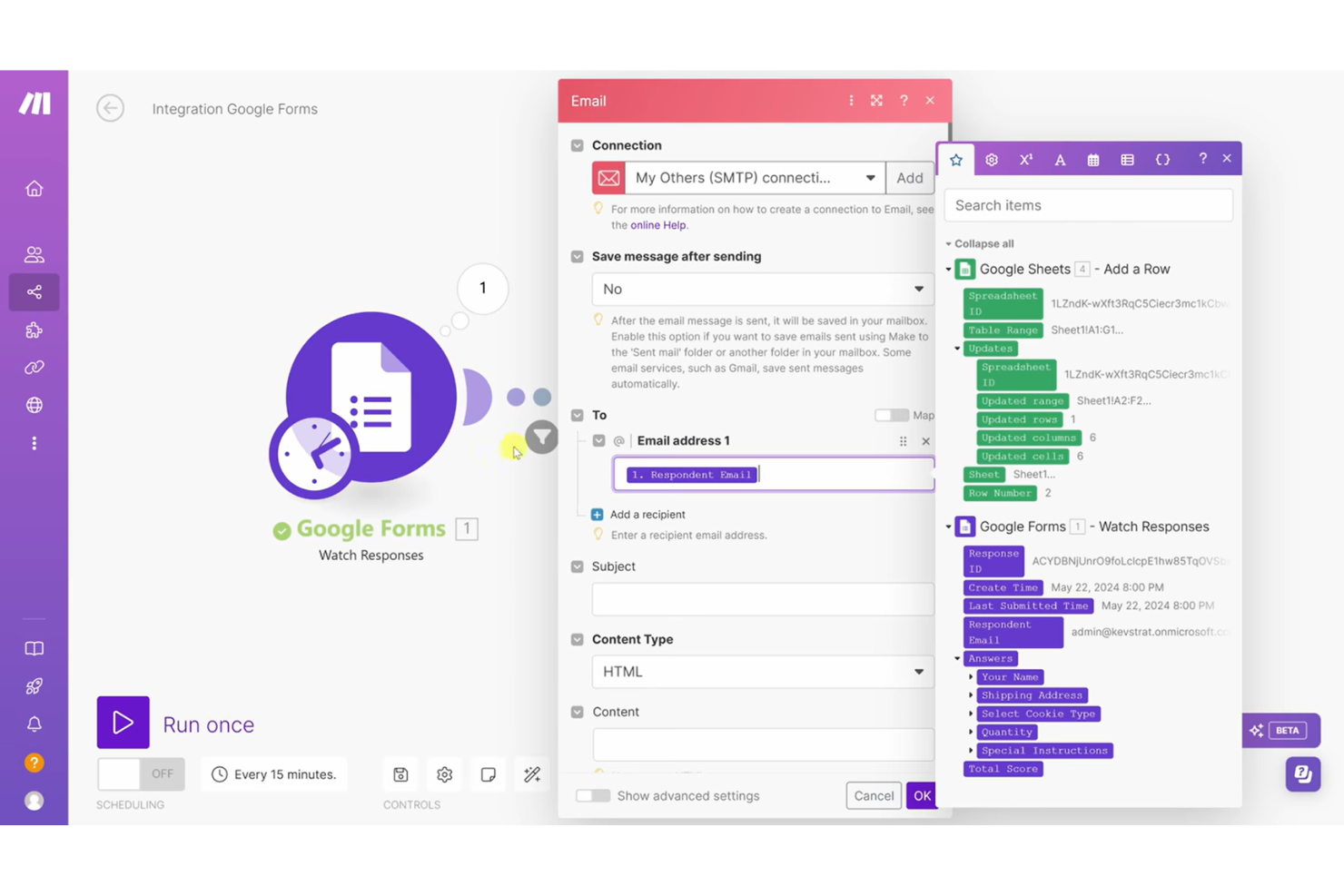
Make offre ai team di prodotto e di workflow una piattaforma drag-and-drop per creare automazioni complesse tra i loro sistemi cloud. È ideale per gli utenti che vogliono visualizzare, iterare e gestire workflow ramificati per processi aziendali che coinvolgono più applicazioni.
Per chi è più indicato Make?
Team IT e responsabili delle operazioni aziendali di aziende di medie dimensioni che progettano e mantengono automazioni di processi complessi e multi-step.
Perché Make è una buona alternativa a Jitterbit
Ho scelto Make perché il suo costruttore visivo di scenari cambia davvero il modo di pensare alla progettazione di workflow complessi. Invece di leggere passaggi lineari, posso vedere ogni modulo, ramo e trasformazione dati rappresentati su una tela — il che rende il debug di un processo multi-step molto più gestibile rispetto all'interfaccia di Jitterbit. Per i team che gestiscono flussi di lavoro distribuiti su più app e fonti di dati, Make offre una mappa in tempo reale di ogni automazione attiva, così nulla viene eseguito alla cieca in background.
Funzionalità principali di Make
- Manipolazione dei dati: Trasforma e riformatta i dati tra le app utilizzando funzioni drag-and-drop all'interno dell'editor di scenari.
- HTTP/webhook: Invia richieste a qualsiasi API pubblica e avvia workflow da servizi web esterni senza connettori preconfigurati.
- Strumenti Make AI: Esegui attività di intelligenza artificiale come categorizzazione e sintesi del testo grazie a moduli no-code predefiniti, senza necessità di prompt engineering.
- Dashboard di osservabilità: Monitora le prestazioni e l'utilizzo dei workflow nel tempo tramite la dashboard di analisi integrata di Make.
Integrazioni di Make
Make offre oltre 3.000 integrazioni native, inclusi OpenAI, Google Gemini, Anthropic Claude, HubSpot, Microsoft 365, Pipedrive, Perplexity AI, Telegram e Instagram for Business, con un'API disponibile per integrazioni personalizzate.
Pros and Cons
Pros:
- Il builder visuale supporta flussi di lavoro altamente ramificati
- Consente trasformazioni dati complesse nei workflow
- Moduli HTTP/webhook per attivare automazioni
Cons:
- Supporto limitato per integrazioni on-premises
- Strumenti di monitoraggio dei workflow di base

n8n
Ideale per il deployment auto-ospitato

n8n è uno strumento di automazione dei flussi di lavoro pensato per i team che desiderano controllare dove e come vengono eseguiti dati e automazioni. Attrae aziende con esigenze di sicurezza o team tecnici alla ricerca di un’automazione dei processi completamente personalizzabile e basata su standard aperti.
Per chi è ideale n8n?
Team DevOps e reparti IT di organizzazioni con forti requisiti di sicurezza o privacy dei dati che cercano un’automazione dei flussi di lavoro personalizzabile.
Perché n8n è una valida alternativa a Jitterbit
Ho scelto n8n perché l’auto-ospitalità garantisce che i dati delle nostre automazioni non passino mai per server di terzi—un fattore importante quando i tuoi flussi di lavoro trattano dati sensibili di clienti o per la conformità. Distribuirlo nella propria infrastruttura offre pieno controllo su versioning, configurazioni di ambiente e gestione degli accessi in modi che gli strumenti solo cloud non consentono. Per i team che gestiscono automazioni su sistemi interni e API private, questa flessibilità rende n8n molto più adattabile rispetto alla maggior parte delle alternative.
Funzionalità chiave di n8n
- Nodi AI: Crea agenti AI potenziati da LangChain direttamente nei flussi di lavoro utilizzando i nodi AI nativi di n8n, con pieno controllo su modello e flusso dati.
- Gestione dei segreti: Preleva credenziali da AWS Secrets Manager, Azure Key Vault, Google Cloud Platform, HashiCorp Vault e Infisical senza archiviarle in n8n.
- Scalabilità con modalità coda: Esegui più istanze worker in modalità coda, permettendo a n8n di gestire fino a 220 esecuzioni di workflow al secondo su una singola istanza.
- Ambienti basati su Git: Sposta i flussi di lavoro tra sviluppo, staging e produzione utilizzando uno schema push-pull con il controllo versione basato su Git.
Integrazioni n8n
n8n offre oltre 350 integrazioni native, tra cui Google Sheets, Slack, Shopify, Discord, Notion, Trello, Salesforce, GitHub, MySQL e Microsoft 365, oltre a un’API per integrazioni personalizzate.
Pros and Cons
Pros:
- Il deployment auto-ospitato permette un controllo rigoroso dei dati
- Il modello open source consente una profonda personalizzazione dei workflow
- Il builder visuale gestisce flussi di lavoro complessi con diramazioni
Cons:
- Meno strumenti aziendali ETL/migrazione dati
- Richiede competenze avanzate in infrastrutture

Boomi
Ideale per la connettività cloud ibrida

Boomi (precedentemente Dell Boomi) è una piattaforma cloud-native di integrazione come servizio, progettata per le organizzazioni che gestiscono ambienti on-premises, cloud e SaaS. È una scelta solida per i team IT che desiderano connettori predefiniti, facilità d'uso tramite flussi di lavoro drag-and-drop e automazione senza pesanti attività di codifica.
Per chi è ideale Boomi?
Team IT di medie e grandi imprese che necessitano di collegare sistemi cloud ibridi e on-premises.
Perché Boomi è una valida alternativa a Jitterbit
Ho scelto Boomi perché il suo runtime ibrido distribuito consente al mio team di distribuire i carichi di lavoro di integrazione su cloud, on-premises ed edge da un'unica piattaforma. Questo è il cuore del motivo per cui funziona così bene per la connettività ibrida. Apprezzo in particolare l'architettura Atom di Boomi, che ci permette di collocare un motore runtime leggero ovunque nella nostra infrastruttura—dentro un firewall, su un cloud privato o all'edge—senza dover instradare dati sensibili attraverso un cloud condiviso. In pratica, ciò significa che il mio team può eseguire integrazioni esattamente dove risiedono i dati, cosa che il modello di distribuzione di Jitterbit non offre con la stessa flessibilità.
Funzionalità principali di Boomi
- Gestione B2B/EDI: Crea e automatizza lo scambio di dati con partner commerciali direttamente all'interno della piattaforma, senza bisogno di una soluzione EDI separata.
- Boomi Flow: Un ambiente low-code per costruire applicazioni per gli utenti finali e automatizzare flussi di lavoro multi-step insieme alle tue integrazioni.
- Event Streams: Crea integrazioni in tempo reale, basate su eventi, che attivano azioni attraverso i sistemi collegati al verificarsi di cambiamenti nei dati.
- Boomi Suggest: Uno strumento di mapping dati guidato da AI che si basa su machine learning da oltre 300 milioni di integrazioni per raccomandare mappature dei campi tra le applicazioni.
Integrazioni Boomi
Boomi offre integrazioni native con Salesforce, NetSuite, SAP, Workday, ServiceNow, Shopify, Microsoft Dynamics 365 e QuickBooks. È disponibile un'API per integrazioni personalizzate.
Pros and Cons
Pros:
- Opzioni avanzate per runtime e distribuzione ibrida
- Ampio catalogo di connettori predefiniti
- Strumenti flessibili di trasformazione e mapping dei dati
Cons:
- La manutenzione dei connettori richiede aggiornamenti frequenti
- Livello di dettaglio limitato nei log di errore rallenta la risoluzione dei problemi

Airbyte
Ideale per il trasferimento di dati open-source

Airbyte è una piattaforma open-source per l'integrazione dei dati che aiuta i team di dati a connettere, sincronizzare e centralizzare informazioni provenienti da una vasta gamma di fonti. È ideale per le organizzazioni che desiderano avere il controllo sui propri pipeline di dati e la flessibilità di costruire connettori personalizzati.
A chi è più adatto Airbyte?
Ingegneri dei dati e team di analytics in aziende che costruiscono pipeline di dati personalizzate tramite soluzioni open-source.
Perché Airbyte è una valida alternativa a Jitterbit
Ho scelto Airbyte perché la sua base open-source significa che il mio team può ospitare autonomamente l'intera piattaforma e mantenere i pipeline di dati completamente all'interno della nostra infrastruttura—nessun fornitore che detiene i nostri dati. Ciò che lo rende davvero diverso da Jitterbit è il Connector Development Kit (CDK) di Airbyte, che mi permette di costruire un connettore personalizzato da zero in circa 30 minuti usando container Docker, in qualsiasi linguaggio. Per i team che spostano dati verso data warehouse come Snowflake o Databricks, quella combinazione di connettori personalizzati e CDC fa di Airbyte una seria alternativa rispetto all'approccio più proprietario e gestito di Jitterbit.
Caratteristiche principali di Airbyte
- Reverse ETL: Invia dati elaborati di nuovo agli strumenti operativi come CRM e piattaforme di marketing per attivare insight su tutto il tuo stack commerciale.
- Destinazioni per database vettoriali: Sincronizza i dati direttamente in Pinecone e Weaviate per supportare modelli RAG e lo sviluppo di applicazioni IA.
- Layer di trasformazione dbt: Applica trasformazioni dbt personalizzate ai tuoi dati direttamente all'interno dei pipeline Airbyte, senza bisogno di uno strumento di orchestrazione separato.
- PyAirbyte: Esegui i connettori Airbyte come codice Python, permettendo agli ingegneri dati di integrare il movimento dei dati direttamente in script e notebook.
Integrazioni Airbyte
Airbyte offre oltre 600 integrazioni native, tra cui Salesforce, Snowflake, Google BigQuery, PostgreSQL, MySQL, Redshift e Stripe. È disponibile una API per costruire integrazioni personalizzate.
Pros and Cons
Pros:
- Propone prezzi basati sulla capacità
- Enorme libreria di oltre 600 connettori già pronti
- Core open source che previene il lock-in del fornitore
Cons:
- Richiede strumenti esterni per trasformazioni avanzate
- Connettori mantenuti dalla community non sempre affidabili

Ideale per pipeline ETL low-code
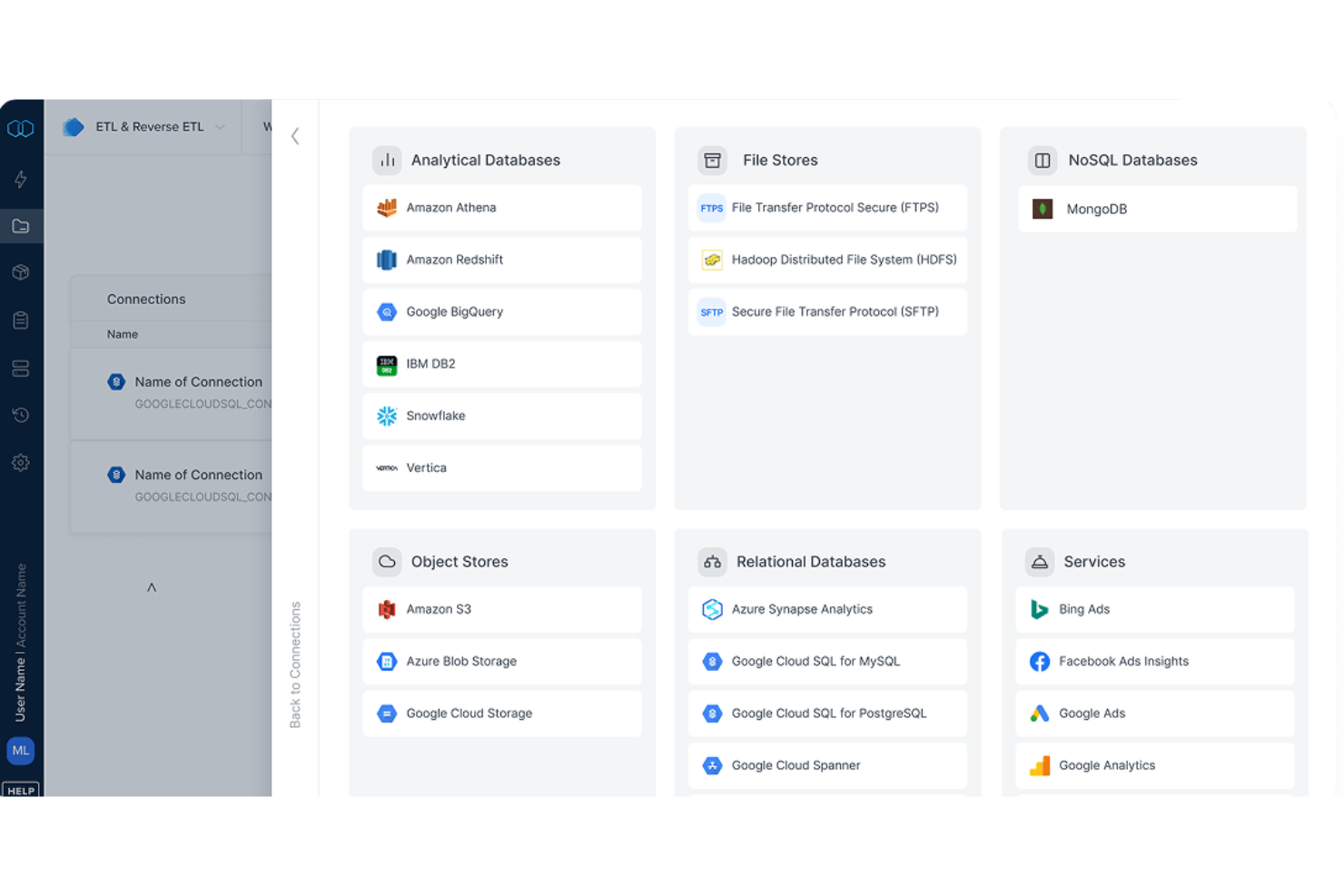
Integrate.io è una piattaforma cloud per l'integrazione dei dati progettata per i team che hanno bisogno di spostare, trasformare e centralizzare i dati tra app cloud e database. È una soluzione ideale per le aziende che cercano uno strumento visuale per automatizzare e gestire attività ETL e i flussi dati complessi.
Per chi è più indicato Integrate.io?
Team dati in aziende di medie e grandi dimensioni che necessitano di pipeline ETL low-code per unificare e automatizzare i flussi dati da numerose fonti cloud.
Perché Integrate.io è una valida alternativa a Jitterbit
Ho scelto Integrate.io perché il suo builder di pipeline ETL low-code offre ai team un ambiente drag-and-drop con oltre 220 trasformazioni dati integrate, permettendo di rimodellare e indirizzare i dati fra sistemi senza bisogno di scrivere SQL o script personalizzati. Apprezzo il fatto che supporti sia ETL che reverse ETL in un'unica piattaforma, così il mio team può re-inserire dati puliti e trasformati in strumenti operativi come Salesforce senza dover costruire pipeline separate. La replica CDC dei database in meno di 60 secondi è una funzionalità unica che non ho riscontrato altrove, rendendola pratica per dashboard in tempo reale e reportistica live. Per i team che sostituiscono l'integrazione dati di Jitterbit, questa combinazione di progettazione visuale delle pipeline e sincronizzazione quasi in tempo reale è difficile da battere.
Funzionalità principali di Integrate.io
- Preparazione e consegna file: Automatizza i workflow basati su file importando dati da fonti SFTP ed Excel e consegnando output puliti e trasformati.
- Pianificazione pipeline: Imposta pianificazioni ricorrenti delle pipeline senza codice oppure utilizza espressioni Cron per esigenze temporali più avanzate.
- Logica e dipendenze: Collega pipeline tra loro ed esegui query SQL in un ordine specifico in base alle dipendenze definite.
- Monitoraggio e avvisi: Configura notifiche di stato delle pipeline da inviare via email, Slack o PagerDuty quando si verificano determinati eventi.
Integrazioni di Integrate.io
Integrate.io offre oltre 140 integrazioni native, tra cui Salesforce, Shopify, Amazon Redshift, Google BigQuery, Snowflake, MySQL, PostgreSQL, HubSpot, Google Sheets e Microsoft SQL Server. Un'API è disponibile per integrazioni personalizzate.
Pros and Cons
Pros:
- Builder drag-and-drop semplifica le attività ETL
- Replica dei dati quasi in tempo reale per analisi live
- Il prezzo include pipeline di dati illimitate
Cons:
- Il prezzo è superiore a molte alternative
- I log degli errori possono essere poco dettagliati


MuleSoft aiuta le grandi organizzazioni a unificare l'automazione dei flussi di lavoro guidata dall'IA e le capacità di integrazione tra sistemi complessi e API. Se gestisci integrazioni aziendali, puoi utilizzare MuleSoft per automatizzare i flussi di dati e aumentare la scalabilità delle integrazioni senza rigidi requisiti di codifica.
A chi è più adatto MuleSoft?
Team IT aziendali con necessità di gestione unificata delle API e integrazioni complesse tra diversi sistemi aziendali.
Perché MuleSoft è una valida alternativa a Jitterbit
Ho scelto MuleSoft perché il suo modello di connettività guidato dalle API offre ai team aziendali un modo strutturato per gestire le integrazioni su larga scala. Apprezzo in modo particolare Anypoint Platform, che consente al mio team di progettare, distribuire e monitorare processi di integrazione e API da un unico ambiente. In pratica, significa che possiamo applicare le policy di governance su ogni livello API senza dover cambiare strumento. Per i team che gestiscono architetture complesse e multi-sistema, questo livello di controllo centralizzato è qualcosa che Jitterbit non eguaglia.
Funzionalità principali di MuleSoft
- MuleSoft Dev Agent: Un assistente AI pensato per l'integrazione aziendale che genera codice e approfondimenti durante tutto il ciclo di vita applicativo.
- Anypoint Exchange: Un marketplace in cui il tuo team può scoprire, condividere e riutilizzare API, connettori, template e asset di integrazione tra i progetti.
- Anypoint Runtime Manager: Una dashboard unica per distribuire, gestire e monitorare le applicazioni Mule su ambienti cloud e on-premises.
- Anypoint MQ: Un servizio di message queuing e pub/sub di livello enterprise per una messaggistica affidabile tra sistemi distribuiti.
Integrazioni MuleSoft
MuleSoft offre integrazioni native in tutto l'ecosistema Salesforce, SAP, ServiceNow, Workday e NetSuite. MuleSoft Anypoint Platform fornisce un’API per integrazioni personalizzate.
Pros and Cons
Pros:
- Funzionalità avanzate per la gestione e la governance delle API
- Strumenti integrati per l'automazione del ciclo di vita delle API
- Monitoraggio centralizzato per tutti i flussi di integrazione
Cons:
- Può richiedere notevoli risorse di sviluppo
- Non offre opzioni leggere per team più piccoli


Tray.ai è una piattaforma di automazione low-code progettata per i team di operations, IT e crescita che hanno bisogno di orchestrare flussi di lavoro complessi tra app cloud e sistemi interni. Si distingue per l'offerta di connettività API avanzata e automazione potenziata dall'IA per scalare i processi aziendali.
A chi è più adatto Tray.ai?
Team operations e IT di aziende di medie e grandi dimensioni che automatizzano processi aziendali tra diverse piattaforme software.
Perché Tray.ai è una valida alternativa a Jitterbit
Ho scelto Tray.ai perché il suo livello di automazione dei processi consente di modellare i flussi di lavoro esattamente come vengono eseguiti in produzione, con logiche di ramificazione esplicite, percorsi paralleli e regole decisionali costruite visivamente invece che nascoste nel codice personalizzato. Mentre Jitterbit si basa su modelli preconfigurati, Tray.ai consente al mio team di definire e aggiornare le regole aziendali al cambiare delle esigenze senza soluzioni alternative. Mi piace particolarmente Merlin AI, che traduce istruzioni in linguaggio naturale in flussi di lavoro completi e multi-step tra sistemi collegati. In pratica, significa che il mio team può costruire un processo che coinvolge diversi sistemi, come estrarre opportunità aperte su Salesforce, incrociare un tool di sales intelligence e inoltrare i risultati via Slack, tutto senza scrivere una sola riga di codice.
Funzionalità principali di Tray.ai
- Elaborazione intelligente dei documenti: Estrai dati strutturati da PDF, immagini e altri file non strutturati utilizzando query in linguaggio naturale.
- Merlin Agent Builder: Progetta, testa e lancia agenti IA utilizzando un builder senza codice senza scrivere codice personalizzato.
- Gestione API: Pubblica, proteggi e condividi API tra sistemi con controlli di policy e un gateway IA.
- Dashboard di osservabilità: Visualizza i log e monitora quali agenti e integrazioni sono in esecuzione, compreso cosa ha scatenato ciascuno.
Integrazioni Tray.ai
Tray.ai offre integrazioni native tra cui Salesforce, HubSpot, Slack, NetSuite, Google Sheets, Zendesk, Snowflake e Microsoft 365. È disponibile un'API per integrazioni personalizzate.
Pros and Cons
Pros:
- Connettività API flessibile per progetti personalizzati
- Supporta la sincronizzazione dei dati in tempo reale tra più sistemi
- Editor di workflow visivi per una progettazione dei processi intuitiva
Cons:
- Alcuni connettori possono non offrire configurazioni avanzate
- Opzioni limitate per il deploy offline o on-premise
Altre alternative a Jitterbit
Ecco alcune ulteriori alternative a Jitterbit che non sono entrate nel mio elenco ristretto, ma che vale comunque la pena prendere in considerazione:
- SnapLogic
Ideale per l'integrazione guidata da IA generativa
- Informatica IDMC
Ideale per la governance dei dati su larga scala
- Merge
Ideale per lo sviluppo di API unificate


Come Valuto le Alternative a Jitterbit
Per prima cosa verifico che ogni piattaforma copra ciò che Jitterbit già offre—connettori, gestione delle API, mappatura visiva e agenti ibridi per sincronizzare le app cloud con gli ERP on-premise. Poi considero ciò che distingue un'opzione dall'altra.
Funzionalità Principali (Requisiti Minimi per Questa Lista)
Quando seleziono gli strumenti per la mia lista, valuto ciascuno su una scala da 0 (non offre la funzionalità) a 5 (eccelle in quest'area) per ogni funzionalità chiave elencata qui sotto. Successivamente, calcolo il punteggio totale dello strumento in percentuale. Ogni strumento deve raggiungere un punteggio totale minimo del 65% per essere considerato per l'inclusione.
- Libreria di Connettori Predefiniti: Verifico quanti connettori certificati offre una piattaforma e se copre le app aziendali che i team usano effettivamente—come Salesforce, SAP, NetSuite e Workday.
- Gestione del Ciclo di Vita delle API: Conta la capacità di progettare, pubblicare, versionare e mettere in sicurezza le API. Valuto se la piattaforma supporta il controllo dell'intero ciclo o solo il consumo di API di base.
- Trasformazione & Mappatura dei Dati: Cerco un mappatore visivo che gestisca complessità reali, come la conversione di JSON annidato da un CRM in formati flat-file che un ERP può assorbire.
- Automazione dei Workflow: Qui valuto l'orchestrazione multi-step con ramificazioni, gestione degli errori e trigger basati su eventi—not solo semplici sincronizzazioni programmate.
- Supporto alle Implementazioni Ibride: Molti team continuano a usare ERP on-premise insieme a strumenti SaaS cloud. Verifico se la piattaforma offre agenti sicuri o gateway per collegare entrambi gli ambienti.
- Ambiente di Sviluppo Low-Code: Un designer drag-and-drop che permetta agli architetti di integrazione di lavorare rapidamente—pur consentendo scripting se necessario—è ciò che distingue le piattaforme usabili da quelle macchinose.
Una volta che ho una lista di strumenti che soddisfano i criteri, considero cosa distingue ciascuna piattaforma.
Fattori di Differenziazione (Cosa Distingue i Fornitori)
Ecco come confronto i diversi fornitori:
Funzionalità Distintive
L'integrazione alimentata dall'AI è un importante elemento differenziatore. Cerco piattaforme in cui l'AI vada oltre l'autocompletamento, suggerendo mappature campo a campo tra schemi complessi e segnalando anomalie nei flussi di dati in tempo reale. Anche i template di integrazione predefiniti sono importanti—una ricetta pronta per il processo quote-to-cash che collega il tuo CRM con l'ERP può ridurre la distribuzione da settimane a giorni. Per i team che lavorano su architetture event-driven, verifico se la piattaforma supporta lo streaming in tempo reale tramite Kafka o il change data capture, poiché la sincronizzazione batch non basta quando i dati su inventario o ordini devono propagarsi istantaneamente.
Oltre alle Funzionalità
I modelli di pricing variano nell'ambito iPaaS—alcuni fornitori fanno pagare per connettore, altri in base al volume delle transazioni—quindi valuto come i costi crescano mano a mano che il team aggiunge endpoint o aumenta il flusso di dati. Anche le certificazioni di sicurezza hanno un peso reale. Se la vostra organizzazione tratta dati sanitari o finanziari, controllo la presenza delle attestazioni SOC 2 Type II e HIPAA prima di procedere oltre. La scalabilità completa la mia valutazione. Una piattaforma che regge i volumi di un giorno di demo potrebbe non sostenere il carico quando si elaborano migliaia di ordini al minuto durante i picchi.
Perché cercare un’alternativa a Jitterbit?
Sebbene Jitterbit sia una buona scelta come software di automazione dei flussi di lavoro basato sull’IA, ci sono diversi motivi per cui alcuni utenti cercano soluzioni alternative. Potresti essere alla ricerca di un’alternativa a Jitterbit perché…
- Hai bisogno di funzionalità di automazione basate sull’IA più avanzate
- Le opzioni di integrazione per sistemi legacy o di nicchia sono limitate
- La scalabilità per flussi di lavoro estremamente grandi è motivo di preoccupazione
- La struttura dei prezzi non rientra nel budget del tuo team
- Mancano flessibilità di implementazione o opzioni locali
- Il supporto o le risorse non sono disponibili nella tua regione
Se ti riconosci in una di queste situazioni, sei nel posto giusto. Il mio elenco contiene diverse opzioni software per l’automazione dei flussi di lavoro basata sull’IA, più adatte ai team che affrontano queste difficoltà con Jitterbit e cercano soluzioni alternative.
Funzionalità principali di Jitterbit
Ecco alcune delle funzionalità principali di Jitterbit, per aiutarti a mettere a confronto le proposte delle soluzioni alternative:
- Automazione dei flussi di lavoro: Crea, personalizza e pianifica processi automatizzati che collegano vari sistemi e applicazioni per eliminare le attività manuali e ridurre gli errori.
- Gestione delle API: Progetta, distribuisci e monitora le API su un'unica piattaforma, consentendo lo scambio e l'integrazione sicuri dei dati nell'intero stack tecnologico aziendale.
- Integrazione cloud: Collega i servizi cloud ai sistemi locali, garantendo lo spostamento e la sincronizzazione dei dati tra ambienti diversi.
- Connettori preconfigurati: Accedi a un'ampia libreria di connettori per applicazioni popolari come Salesforce, SAP, NetSuite, Microsoft Dynamics e ServiceNow, velocizzando i progetti di integrazione.
- Sviluppo low-code: Utilizza strumenti visivi con funzionalità di trascinamento e rilascio e una logica low-code per creare integrazioni e flussi di lavoro complessi senza un forte coinvolgimento del reparto IT o la necessità di scrivere codice personalizzato.
- Integrazione in tempo reale: Abilita flussi di dati basati su eventi o su richiesta, trasferendo istantaneamente le informazioni tra le applicazioni e mantenendo aggiornati i sistemi.
- Trasformazione dei dati: Pulisci, arricchisci e ristruttura i dati mentre si spostano tra le fonti, garantendo informazioni coerenti e utilizzabili nei diversi processi.
- Gestione e monitoraggio degli errori: Monitora l'attività di integrazione, genera avvisi e risolvi i problemi con registri dettagliati e dashboard per aumentare affidabilità e trasparenza.
- Architettura scalabile: Supporta implementazioni di piccole dimensioni e aziendali offrendo prestazioni elevate, alta disponibilità e opzioni di implementazione flessibili.
- Controllo degli accessi basato sui ruoli: Definisci le autorizzazioni degli utenti e la separazione dei compiti per proteggere i dati sensibili e mantenere la governance nei progetti di automazione e integrazione.