

10 migliori alternative a Doodle per la programmazione di gruppo nel 2026

Le migliori alternative a Doodle: elenco


Gestire gli orari del tuo team può sembrare un esercizio di equilibrismo. Potresti trovare Doodle carente in termini di funzionalità o flessibilità per le tue esigenze specifiche. Un software per calendari può offrire soluzioni personalizzate adatte alla tua attività e alle dimensioni del tuo team.
In base alla mia esperienza, trovare il software di pianificazione giusto può ridurre i problemi del flusso di lavoro e migliorare la collaborazione del team. Per questo ho esaminato e testato diverse alternative a Doodle, per aiutarti a fare una scelta consapevole.
In questo articolo scoprirai opzioni adatte a esigenze specifiche, che si tratti di capacità di integrazione, problemi di privacy o funzionalità specifiche del settore. Troviamo la soluzione più adatta al tuo team.
Che cos'è Doodle?
Doodle è un software per calendari progettato per semplificare la pianificazione e il coordinamento dei team. Viene spesso utilizzato da professionisti come project manager, organizzatori di eventi e responsabili di team che devono coordinare riunioni ed eventi in modo efficiente.
Funzionalità come la pianificazione tramite un sondaggio Doodle, la facile integrazione con i calendari esistenti e i promemoria automatici aiutano a ridurre i continui scambi necessari per organizzare gli appuntamenti e a mantenere tutti aggiornati. Il valore complessivo di Doodle risiede nella sua capacità di rendere la pianificazione rapida e semplice per te e il tuo team.
Riepilogo delle migliori alternative a Doodle
Questa tabella comparativa riassume i dettagli dei prezzi delle mie migliori alternative a Doodle, per aiutarti a trovare quella più adatta al tuo budget e alle esigenze della tua attività.
| Tool | Best For | Trial Info | Price | ||
|---|---|---|---|---|---|
| 1 | Ideale per link di pianificazione personalizzabili | Prova gratuita di 14 giorni + piano gratuito + demo gratuita disponibile | Da $10/postazione/mese (fatturazione annuale) | Website | |
| 2 | Ideale per la collaborazione in tempo reale in Google Workspaces | Prova gratuita di 14 giorni | $7.56/mese | Website | |
| 3 | Ideale per calendari condivisi personalizzabili | Piano gratuito + demo gratuita disponibile | A partire da $12/mese (fatturazione annuale) | Website | |
| 4 | Ideale per la gestione di marketing e budget | Demo gratuita disponibile | Prezzo su richiesta | Website | |
| 5 | Ideale per la pianificazione essenziale delle attività | Versione di prova gratuita disponibile | Da $49.99/anno | Website | |
| 6 | Ideale per la pianificazione aziendale basata su Exchange | Piano gratuito disponibile | Da $12.50/mese (fatturato annualmente) | Website | |
| 7 | Ideale per la pianificazione nativa su piattaforme Apple | Piano gratuito disponibile | Prezzo su richiesta | Website | |
| 8 | Ideale per la pianificazione assistita dall'IA | Prova gratuita di 14 giorni disponibile | Da $16/utente/mese (fatturato annualmente) | Website | |
| 9 | Ideale per la gestione unificata di calendari multi-account | Piano gratuito disponibile | Da $4,75/utente/mese (fatturato annualmente) | Website | |
| 10 | Ideale per la pianificazione visiva del programma basata sulla sequenza temporale | Prova gratuita di 7 giorni disponibile | Da $1.99/mese | Website |
Perché fidarsi dei nostri consigli sui software
Il nostro team testa e recensisce software dal 2012. In quanto project manager noi stessi, sappiamo quanto sia difficile — e importante — scegliere il software giusto.
Per questa guida, abbiamo valutato gli strumenti attraverso test pratici e ricerche indipendenti, assegnando un punteggio agli strumenti in base ai nostri criteri di selezione. Ci basiamo inoltre sulle competenze di leader di pensiero del settore e di professionisti attivi nella gestione dei progetti.
Le nostre recensioni riflettono il nostro giudizio editoriale umano, non un discorso di vendita.
Revisori esperti:
Recensioni delle migliori alternative a Doodle
Di seguito trovi i miei riepiloghi dettagliati delle migliori alternative a Doodle, a pagamento e gratuite, che sono entrate nel mio elenco. Le mie recensioni offrono una panoramica dettagliata delle funzionalità principali, dei pro e dei contro, delle integrazioni e dei casi d’uso ideali di ogni strumento, per aiutarti a trovare quello più adatto a te.

Calendly
Ideale per link di pianificazione personalizzabili

Calendly è uno strumento di automazione della pianificazione progettato per professionisti e team, con l'obiettivo di semplificare la programmazione delle riunioni. È ampiamente utilizzato dalle aziende che desiderano eliminare gli scambi di email per fissare appuntamenti e rendere il processo di prenotazione più semplice.
Perché è una valida alternativa a Doodle: Calendly offre una funzione di sondaggio per la programmazione, oltre a link e moduli di prenotazione personalizzabili, rendendo la gestione dei clienti semplice. Puoi impostare le tue preferenze di disponibilità e condividere il tuo link con altri per trovare un orario che vada bene. Puoi collegare Calendly al tuo CRM per notifiche, follow-up e promemoria automatici, che riducono le mancate presentazioni e mantengono tutti sincronizzati. Grazie al suo focus sulla personalizzazione, Calendly ti permette di adattare l'esperienza di pianificazione alle tue esigenze specifiche.
Caratteristiche e integrazioni principali:
Caratteristiche includono la possibilità di creare tempi di buffer tra le riunioni, assicurandoti il tempo necessario per prepararti. Puoi impostare limiti giornalieri agli appuntamenti per evitare il burnout. Calendly consente anche una programmazione round-robin, distribuendo equamente le riunioni tra i membri del team. Include inoltre un piano gratuito senza pubblicità, una funzionalità solitamente riservata alle offerte a pagamento.
Integrazioni includono Zoom, Google Calendar, Microsoft Outlook, Salesforce, Zapier, Slack, HubSpot e altri ancora.
Pros and Cons
Pros:
- Opzioni di pianificazione personalizzabili
- Promemoria e notifiche SMS automatizzati
- Supporta la programmazione round-robin
Cons:
- Può risultare impersonale per alcuni clienti
- Branding molto limitato nei piani economici

Ideale per la collaborazione in tempo reale in Google Workspaces
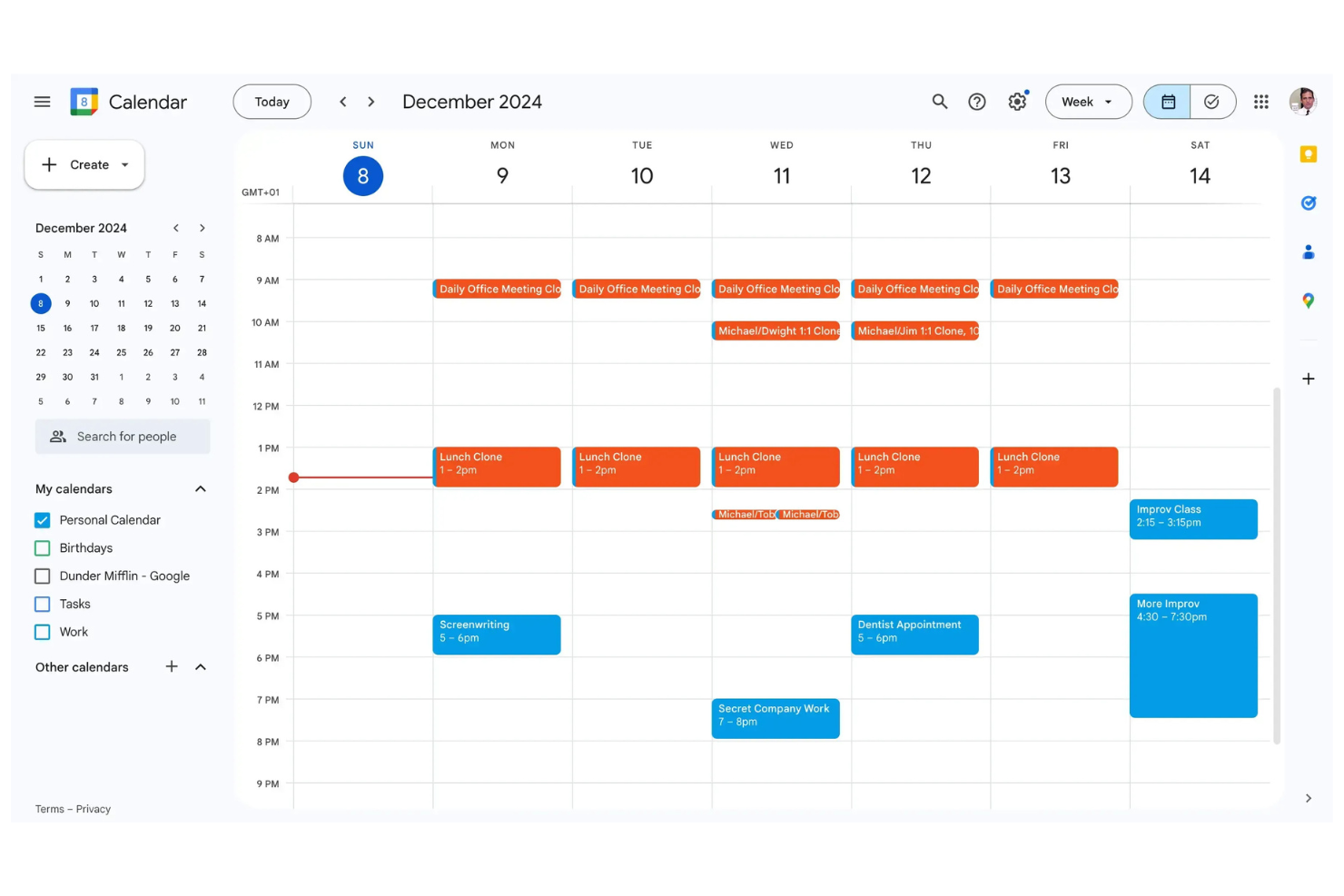
Google Calendar è uno strumento di calendario digitale comunemente utilizzato da professionisti e aziende per gestire orari e appuntamenti. Serve come un hub centrale per programmare riunioni, eventi e attività personali in modo efficiente.
Perché è una buona alternativa a Doodle: Google Calendar si integra con altri servizi Google, rendendo semplice coordinare il proprio calendario con email e contatti. Grazie all'interfaccia intuitiva, puoi creare e gestire eventi rapidamente. Puoi inoltre condividere i calendari con il tuo team, consentendo aggiornamenti in tempo reale e collaborazione. Dal momento che puoi accedere al calendario da qualsiasi dispositivo, sei sempre sincronizzato con i tuoi impegni.
Funzionalità e integrazioni principali:
Funzionalità includono la codifica a colori degli eventi, l'impostazione di promemoria e la creazione di eventi ricorrenti. È anche possibile visualizzare più calendari in un unico luogo, così da gestire sia impegni personali sia professionali. La funzione 'Trova un orario' ti aiuta a individuare rapidamente gli slot disponibili per le riunioni con il tuo team.
Integrazioni includono Google Meet, Gmail, Google Tasks, Google Drive, Microsoft Outlook, Zoom e altro ancora.
Pros and Cons
Pros:
- Integrazione con l'ambiente Google
- Sincronizzazione in tempo reale tra dispositivi
- Supporta visualizzazioni multiple del calendario
Cons:
- Mancanza di gestione nativa delle attività
- Funzionalità offline limitate

Ideale per calendari condivisi personalizzabili
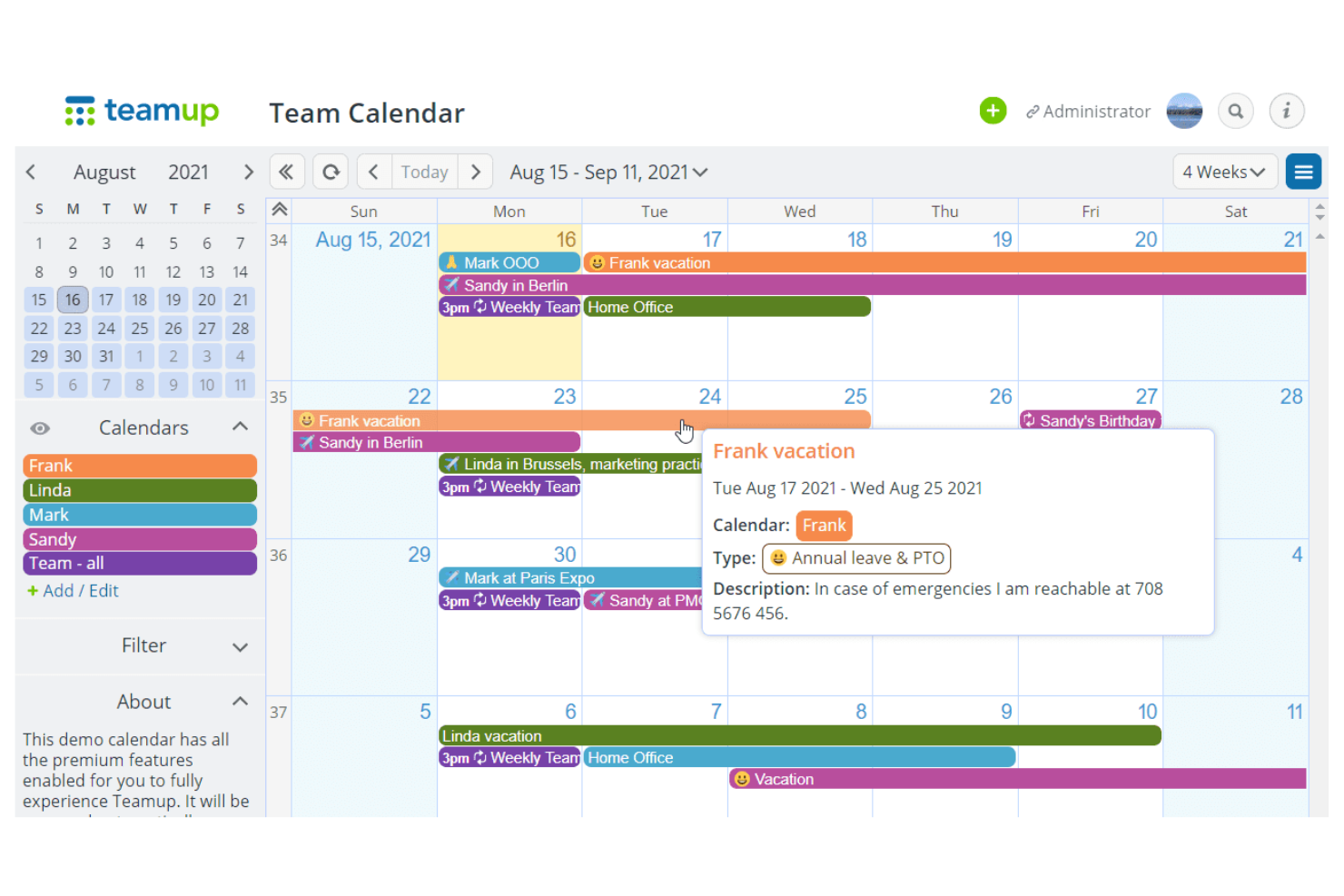
Teamup è uno strumento di calendario collaborativo progettato per team e gruppi che desiderano organizzare orari ed eventi. È utilizzato principalmente da organizzazioni che necessitano di una soluzione di calendario condiviso per gestire le attività e le risorse del team.
Perché è una valida alternativa a Doodle: Teamup offre calendari condivisi personalizzabili, facilitando l'organizzazione e l'informazione del team. Puoi creare e gestire più sotto-calendari con diversi livelli di accesso, offrendo flessibilità nel coordinare gli orari del tuo team. La codifica a colori aiuta a identificare rapidamente le diverse attività e tipologie di riunioni. Con la sua interfaccia intuitiva, Teamup semplifica la gestione di esigenze di pianificazione complesse.
Funzionalità e integrazioni principali:
Funzionalità tra cui la possibilità di assegnare diversi livelli di accesso agli utenti, garantendo che tutti abbiano le autorizzazioni adeguate. È possibile visualizzare più calendari uno accanto all'altro, utile per confrontare gli orari. La funzione di condivisione dei link al calendario permette di condividere viste specifiche del calendario con gli invitati senza la necessità di effettuare il login.
Integrazioni includono Slack, Microsoft Outlook, Google Calendar, Apple Calendar, Zapier, Trello, OttoKit, CompanyCam e altri ancora.
Pros and Cons
Pros:
- Permessi di accesso flessibili
- Sotto-calendari multipli e personalizzabili
- Condivisione di link semplice
Cons:
- Nessun link integrato per videochiamate
- L'app mobile risulta molto basilare


Uptempo è una piattaforma per le operazioni di marketing progettata per aiutare i team di marketing a gestire budget, campagne e risorse in modo efficiente. È pensata per i marketer che necessitano di allineare le proprie attività agli obiettivi aziendali e ottimizzare le spese di marketing.
Perché è una buona alternativa a Doodle: Uptempo offre funzionalità specializzate per le operazioni di marketing e la gestione del budget, rendendola ideale per i team che vogliono integrare la programmazione delle attività con la pianificazione finanziaria. La piattaforma permette di monitorare le prestazioni delle campagne e gestire i budget di marketing tutto in un unico posto. Il suo focus sull’allineamento delle attività di marketing agli obiettivi aziendali aiuta il tuo team a prendere decisioni consapevoli. Uptempo offre informazioni sull’allocazione delle risorse, assicurando che gli sforzi di marketing siano sia efficaci che efficienti.
Caratteristiche distintive e integrazioni:
Le funzionalità includono un monitoraggio dettagliato del budget, che consente di controllare in tempo reale le spese di marketing. È possibile configurare dashboard personalizzate per visualizzare metriche e indicatori di performance chiave. La funzionalità di gestione delle risorse aiuta ad assegnare i membri del team ai progetti sulla base della disponibilità e delle competenze.
Le integrazioni includono Salesforce, HubSpot, Adobe Workfront, Marketo, Google Analytics, Microsoft 365, Zapier e altro ancora.
Pros and Cons
Pros:
- Focus sulle operazioni di marketing
- Monitoraggio dettagliato del budget
- Approfondimenti sulle prestazioni in tempo reale
Cons:
- Lenti i tempi di accesso e frequenti rallentamenti
- Richiede un periodo di apprendimento per chi non è marketer

Ideale per la pianificazione essenziale delle attività

Tweek è uno strumento di calendario minimalista pensato per persone e team che preferiscono un approccio semplice alla pianificazione. È ideale per chi desidera concentrarsi sull'organizzazione delle attività senza le complicazioni di funzioni complesse.
Perché è una valida alternativa a Doodle: Tweek offre una pianificazione delle attività minimalista, consentendo a te e al tuo team di concentrarvi su ciò che conta davvero. La sua interfaccia semplice rende facile aggiungere attività ed eventi senza distrazioni. Puoi rapidamente dare priorità alle tue attività e vedere il tuo programma a colpo d’occhio. Grazie al suo focus sulla semplicità, Tweek ti aiuta a gestire il tempo in modo efficace ed evitare il sovraccarico di informazioni.
Funzionalità e integrazioni principali:
Funzionalità includono temi personalizzabili che ti permettono di personalizzare l'aspetto del calendario. Puoi anche impostare attività ricorrenti, risparmiando tempo nella pianificazione di attività ripetitive. L'app offre una panoramica settimanale, fornendoti una visione chiara dei prossimi impegni.
Integrazioni includono Google Calendar, Apple Calendar, Siri e altro ancora.
Pros and Cons
Pros:
- Design semplice e minimalista
- Prioritizzazione semplice delle attività
- Panoramica settimanale chiara
Cons:
- La sincronizzazione con Google è solo monodirezionale
- Codifica dei colori limitata per gli utenti gratuiti

Ideale per la pianificazione aziendale basata su Exchange
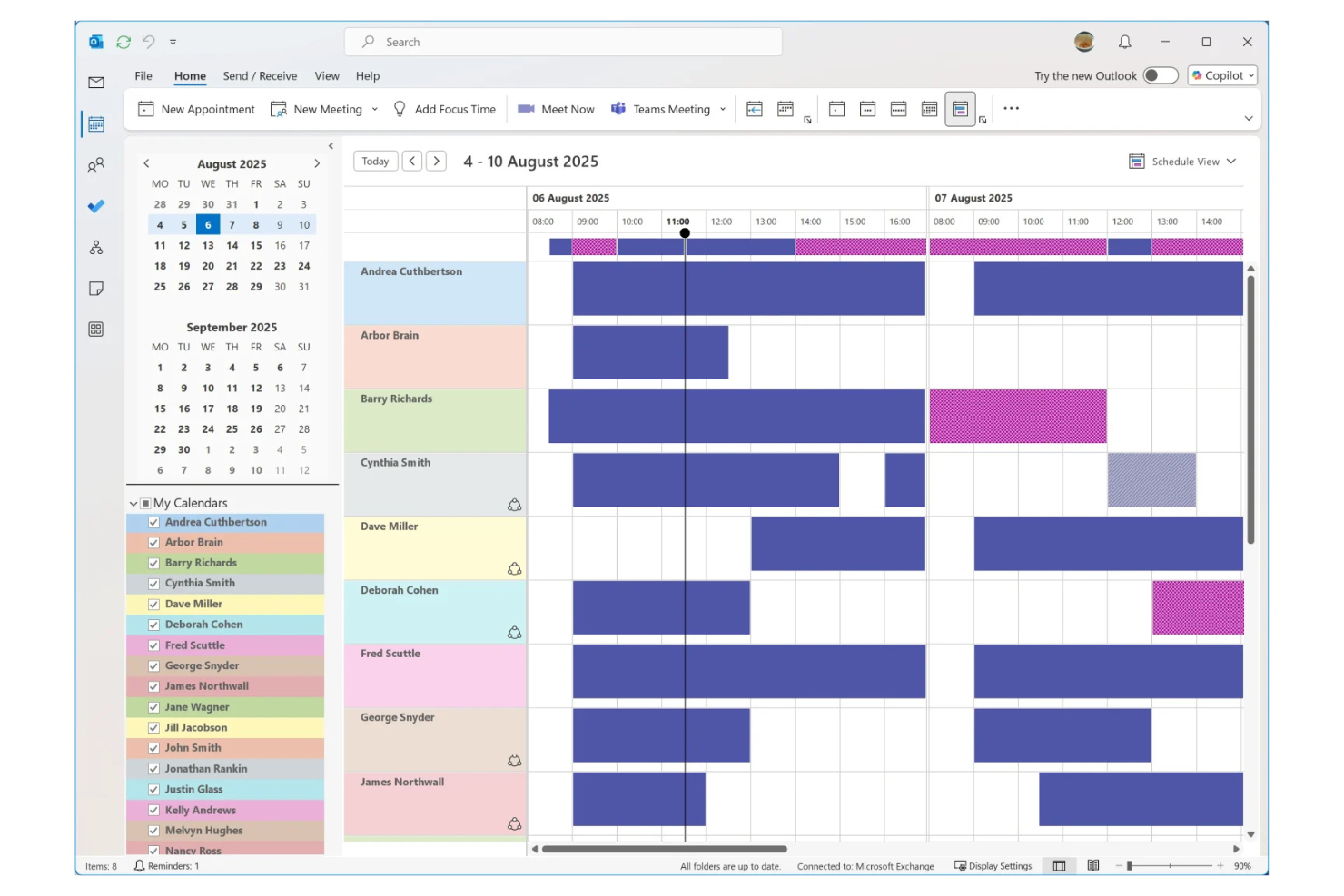
Microsoft Outlook Calendar è uno strumento di calendario digitale progettato per professionisti e aziende per gestire orari, riunioni di gruppo e attività. È comunemente utilizzato da imprese e fornitori di servizi che si affidano a Microsoft Office e Microsoft Exchange per le proprie operazioni aziendali.
Perché è una buona alternativa a Doodle: Microsoft Outlook Calendar è pensato per la posta elettronica e la pianificazione a livello aziendale, offrendo funzionalità come calendari condivisi e inviti a riunioni che si integrano direttamente con il proprio account email. È possibile gestire agende complesse grazie alla possibilità di prenotare riunioni con opzioni di pianificazione dettagliate. Grazie all'integrazione nella suite Microsoft Office, puoi coordinare il tuo calendario con altri strumenti di produttività. Questo lo rende una scelta ideale per le aziende che necessitano di una piattaforma unificata per pianificazione e comunicazione.
Funzionalità e integrazioni principali:
Funzionalità includono viste del calendario personalizzabili, eventi codificati per colore e la possibilità di impostare promemoria. Puoi anche programmare riunioni ed eventi ricorrenti per risparmiare tempo. L'integrazione del calendario con attività e contatti ti aiuta a gestire i tuoi progetti e le comunicazioni in un unico luogo.
Integrazioni includono Microsoft Teams, Microsoft OneNote, Microsoft Excel, Microsoft SharePoint, Microsoft To Do, Zoom e altro ancora.
Pros and Cons
Pros:
- Integrazione con la suite Microsoft Office
- Funzionalità di sicurezza a livello aziendale
- Supporta la pianificazione condivisa e di gruppo
Cons:
- Dipendenza dall'ecosistema Microsoft
- Scarsa integrazione con Gmail

Apple Calendar è uno strumento di calendario digitale progettato per gli utenti di dispositivi Apple, pensato per gestire appuntamenti e impegni. È utilizzato principalmente da privati e aziende che si affidano ai prodotti Apple per le proprie attività quotidiane.
Perché è una buona alternativa a Doodle: Apple Calendar offre un'integrazione semplice su tutti i dispositivi Apple, così le agende sono sempre aggiornate. Puoi creare e gestire rapidamente eventi, e il calendario si sincronizza istantaneamente su tutti i tuoi dispositivi Apple. I calendari condivisi permettono al tuo team di restare connesso e informato, mentre l'interfaccia pulita e intuitiva rende la pianificazione semplice ed efficiente per te e il tuo gruppo.
Funzionalità e integrazioni principali:
Funzionalità includono la creazione di eventi con linguaggio naturale, che consente di digitare gli appuntamenti in modo conversazionale. Offre anche il supporto per i fusi orari, permettendo di gestire appuntamenti in diverse aree geografiche. La funzione di avviso per il tempo di viaggio assicura di arrivare sempre puntuali alle riunioni.
Integrazioni includono Siri, Apple Maps, iCloud, Mail, Contatti, Promemoria, Microsoft Exchange e altro ancora.
Pros and Cons
Pros:
- Integrazione con i dispositivi Apple
- Interfaccia pulita e intuitiva
- Supporta l'inserimento con linguaggio naturale
Cons:
- Mancano strumenti di pianificazione avanzati
- Limitato agli utenti Apple


Calendar è uno strumento di calendario digitale rivolto a aziende e professionisti che desiderano ottimizzare i propri processi di pianificazione. Offre funzionalità che aiutano a gestire appuntamenti, riunioni ed eventi in modo efficiente.
Perché è una valida alternativa a Doodle: Calendar offre pianificazione assistita dall'IA, che aiuta il tuo team ad automatizzare la programmazione delle riunioni e trovare orari ottimali per incontrarsi. La funzione di analisi fornisce informazioni su come viene speso il tempo, consentendo di prendere decisioni basate sui dati. Fasce orarie personalizzabili facilitano l'impostazione della tua disponibilità e la condivisione con gli altri. Con queste funzionalità, Calendar supporta un approccio più strategico alla gestione dell’agenda.
Funzionalità e integrazioni principali:
Funzionalità includono analytics temporali che ti aiutano a comprendere i tuoi schemi di pianificazione. Puoi anche impostare tempi di buffer tra una riunione e l'altra per assicurarti delle pause durante la giornata. La possibilità di creare modelli personalizzati per le riunioni fa risparmiare tempo nella pianificazione di eventi ricorrenti. È presente anche un sistema integrato di gestione dei pagamenti con Stripe e PayPal.
Integrazioni includono Google Calendar, Microsoft Outlook, Slack, Zoom, Salesforce, Zapier, Microsoft Teams e altri ancora.
Pros and Cons
Pros:
- Pianificazione assistita dall'IA
- Analytics temporali per approfondimenti strategici
- Creazione di modelli personalizzati per le riunioni
Cons:
- Molte funzionalità disponibili solo nella versione a pagamento
- Nota per frequenti ritardi nella sincronizzazione

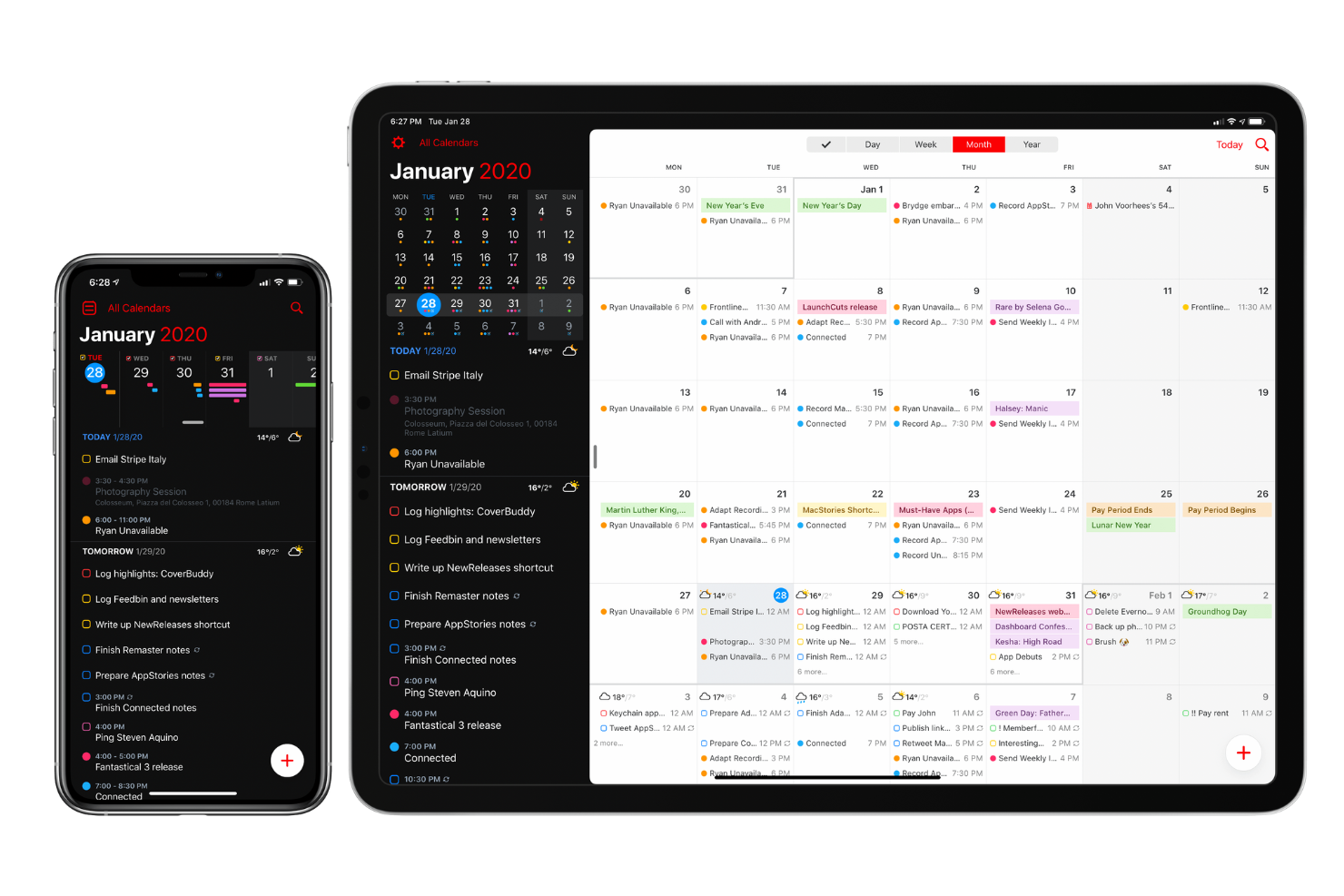
Fantastical è un'applicazione calendario progettata per gli utenti Apple, che offre una gamma di funzioni per la pianificazione e la gestione degli eventi. È molto apprezzata da privati e professionisti che devono gestire più calendari e coordinare gli eventi in modo efficiente.
Perché è una valida alternativa a Doodle: Fantastical integra diversi servizi di calendario, consentendoti di gestire tutti i tuoi impegni in un unico posto. Puoi passare tra diverse visualizzazioni, come giorno, settimana o mese, per avere la prospettiva di cui hai bisogno. L'inserimento tramite linguaggio naturale ti permette di creare eventi rapidamente scrivendo frasi come 'Pranzo con Sarah domani a mezzogiorno.' Grazie all'accento posto sull'integrazione, Fantastical ti aiuta a mantenere tutto organizzato e facilmente accessibile su tutti i tuoi dispositivi Apple.
Funzionalità e integrazioni principali:
Funzionalità includono la previsione meteo che ti permette di pianificare gli eventi tenendo conto delle condizioni atmosferiche. Puoi inoltre configurare il supporto ai fusi orari per gestire eventi tra diverse regioni. La possibilità di creare modelli per eventi ricorrenti ti fa risparmiare tempo nell'organizzazione delle riunioni periodiche.
Integrazioni includono iCloud, Google Calendar, Microsoft Exchange, Zoom, Microsoft Teams e altri ancora.
Pros and Cons
Pros:
- Integrazione con diversi servizi di calendario
- Inserimento tramite linguaggio naturale
- Supporta la gestione dei fusi orari
Cons:
- Errori di interpretazione con alcuni numeri
- Limitato all'ecosistema Apple
Timepage
Ideale per la pianificazione visiva del programma basata sulla sequenza temporale

Tweek è uno strumento calendario minimalista progettato per singoli e team che preferiscono un approccio semplice alla pianificazione. È ideale per gli utenti che desiderano concentrarsi sulla pianificazione delle attività senza la confusione di funzionalità complesse.
Perché è una buona alternativa a Doodle: Tweek offre una pianificazione delle attività minimalista, permettendo a te e al tuo team di concentrarvi su ciò che conta davvero. La sua interfaccia semplice consente di aggiungere attività ed eventi senza distrazioni. Puoi rapidamente dare priorità alle tue attività e visualizzare la tua agenda in un attimo. Grazie al suo focus sulla semplicità, Tweek ti aiuta a gestire il tempo in modo efficace ed evitare il sovraccarico.
Funzionalità e integrazioni principali:
Funzionalità includono temi personalizzabili che ti permettono di personalizzare l’aspetto del tuo calendario. Puoi anche impostare attività ricorrenti, risparmiando tempo nella pianificazione di azioni ripetute. L’app fornisce una panoramica settimanale, offrendoti una visione chiara dei tuoi prossimi impegni.
Integrazioni includono Google Calendar, Apple Calendar, Siri e altri.
Pros and Cons
Pros:
- Design semplice e minimalista
- Prioritizzazione delle attività semplice
- Panoramica settimanale chiara
Cons:
- La sincronizzazione con Google è solo unidirezionale
- Codifica colori limitata per gli utenti gratuiti
Altre alternative a Doodle
Ecco alcune alternative aggiuntive a Doodle che non sono entrate nel mio elenco, ma che vale comunque la pena prendere in considerazione:
- FamCal
Ideale per la programmazione familiare
- Proton Calendar
Ideale per pianificazioni orientate alla privacy
- Any.do
Ideale per l'integrazione di attività e calendario


Come valuto le alternative a Doodle
Valuto le alternative a Doodle su due livelli: gli aspetti fondamentali della programmazione che ogni strumento deve coprire—sondaggi di gruppo, sincronizzazione del calendario, rilevamento del fuso orario—e gli elementi distintivi che separano i migliori dagli altri.
Funzionalità essenziali (requisiti minimi per questo elenco)
Quando seleziono gli strumenti per il mio elenco, assegno a ciascuno un punteggio su una scala da 0 (non offre la funzionalità) a 5 (eccelle in quest'area) per ogni funzionalità essenziale elencata di seguito. Quindi, trasformo il punteggio totale dello strumento in una percentuale. Ogni strumento deve raggiungere un punteggio totale minimo del 65% per essere preso in considerazione.
- Sondaggio sulla disponibilità del gruppo: verifico se è possibile proporre più fasce orarie e consentire ai partecipanti di votare, come quando si coordina una sessione di pianificazione di uno sprint con cinque ingegneri molto impegnati.
- Pagine di prenotazione 1:1: i collegamenti di prenotazione condivisibili che consentono agli invitati di programmare autonomamente sono un requisito minimo. Valuto se è possibile configurare diversi tipi di riunione, ad esempio una riunione quotidiana di 15 minuti rispetto a un incontro iniziale con un cliente di 60 minuti.
- Integrazioni con i calendari: ogni strumento deve offrire la sincronizzazione bidirezionale con Google Calendar, Outlook o entrambi, in modo che le prenotazioni riflettano la disponibilità in tempo reale e prevengano doppie prenotazioni durante la giornata lavorativa.
- Notifiche e promemoria automatici: valuto cosa succede dopo che qualcuno effettua una prenotazione. Le conferme, i promemoria e le notifiche di annullamento dovrebbero essere inviati automaticamente, così non è necessario inseguire i partecipanti per ogni retrospettiva o revisione con le parti interessate.
- Rilevamento del fuso orario: per i team distribuiti, valuto se lo strumento rileva automaticamente il fuso orario di ciascun partecipante e adatta di conseguenza le fasce orarie visualizzate, invece di impostare semplicemente la posizione dell'organizzatore come predefinita.
- Integrazione con le videoconferenze: i collegamenti alle riunioni di Zoom, Google Meet o Microsoft Teams dovrebbero essere generati automaticamente quando una prenotazione viene confermata, eliminando il passaggio manuale di aggiungerne uno in seguito.
Una volta ottenuto un elenco di strumenti che soddisfano questo criterio, valuto ciò che distingue ciascuna piattaforma.
Fattori distintivi (ciò che differenzia i fornitori)
Ecco come confronto e metto a confronto i diversi fornitori:
Caratteristiche distintive
L'assegnazione a rotazione è importante quando il team condivide un collegamento di programmazione. Cerco strumenti che distribuiscano le prenotazioni in base alla disponibilità o al carico di lavoro, così un solo responsabile di progetto non deve assorbire ogni chiamata con i clienti. I moduli di raccolta dati personalizzati sono un altro elemento distintivo. Consentono agli invitati di aggiungere il contesto del progetto o un ordine del giorno prima della riunione, risparmiando i primi cinque minuti di ogni incontro iniziale. Valuto anche i controlli sui tempi cuscinetto e sulle pause, poiché le riunioni consecutive tra fusi orari diversi esauriscono rapidamente le energie dei team. Gli strumenti migliori consentono di impostare intervalli minimi tra le prenotazioni e di limitare il numero giornaliero di riunioni.
Oltre le funzionalità
Le integrazioni con gli strumenti di gestione dei progetti sono un importante elemento distintivo. Verifico se uno strumento di programmazione si collega a Jira, Asana o Monday, in modo che le prenotazioni possano attivare la creazione di attività o collegarsi direttamente a una bacheca di progetto. Anche l'esperienza delle parti interessate esterne è importante. Se un cliente deve creare un profilo solo per rispondere a un sondaggio di gruppo, l'adozione diminuisce rapidamente. Cerco strumenti che consentano agli invitati di votare o prenotare senza registrarsi. La scalabilità dei prezzi completa il quadro. Un piano gratuito funziona per i team piccoli, ma valuto se i costi per utente rimangono ragionevoli quando il tuo PMO passa da cinque a cinquanta utenti.
Perché cercare un'alternativa a Doodle?
Sebbene Doodle sia una buona scelta per un software per calendari, esistono diversi motivi per cui alcuni utenti cercano soluzioni alternative. Potresti cercare un'alternativa a Doodle perché…
- Hai bisogno di funzionalità di pianificazione più avanzate
- Il tuo team richiede opzioni di integrazione migliori
- Desideri misure più efficaci per la privacy e la sicurezza
- Hai bisogno di un'interfaccia più intuitiva
- Il tuo team cerca una personalizzazione più avanzata
- Hai bisogno di accedere al tuo calendario offline
Se ti riconosci in una di queste situazioni, sei nel posto giusto. Il mio elenco contiene diverse opzioni di software per calendari più adatte ai team che affrontano queste difficoltà con Doodle e cercano soluzioni alternative.
Funzionalità
Ecco alcune delle funzionalità principali di Doodle, per aiutarti a confrontare ciò che offrono le soluzioni alternative:
- Sondaggi per riunioni: Permetti al tuo team di trovare l'orario migliore per tutti.
- Moduli di iscrizione: Facilita le iscrizioni agli eventi per workshop e webinar.
- Pianificazione 1:1: Offre ai tuoi clienti una selezione di orari disponibili per le riunioni.
- Pagina di prenotazione: Ti consente di creare moduli di raccolta dati personalizzati per condividere la disponibilità e permettere ai clienti di prenotare appuntamenti.
- Integrazioni: Collegati a vari strumenti per una pianificazione più intelligente.
- Raccolta dei pagamenti: Riscuote automaticamente i pagamenti quando vengono prenotati gli appuntamenti.
- Sicurezza: Garantisce la sicurezza dei tuoi dati con misure di sicurezza di livello aziendale.
Cosa succede ora:
Se stai cercando un software per calendari, contatta gratuitamente un consulente di SoftwareSelect per ricevere consigli.
Compili un modulo e fai una breve conversazione durante la quale vengono analizzate nel dettaglio le tue esigenze. In seguito riceverai una selezione ristretta di software da valutare. Ti assisteranno anche durante l'intero processo di acquisto, comprese le negoziazioni sul prezzo.