

10 alternative a TimeCamp per il monitoraggio del tempo del team nel 2026

Elenco delle migliori alternative a Timecamp


Gestire i progetti può essere complesso e trovare gli strumenti giusti per aiutare il tuo team a rimanere in carreggiata è fondamentale. Se utilizzi Timecamp ma ritieni che non soddisfi le tue esigenze, non sei il solo. Molti responsabili di progetto cercano alternative quando hanno bisogno di maggiore flessibilità, funzionalità migliori o di un approccio diverso.
Nella mia esperienza, esplorare nuove opzioni software può offrire nuove prospettive al tuo flusso di lavoro. Ho testato e recensito in modo indipendente diversi strumenti di gestione dei progetti per offrirti valutazioni imparziali.
In questo articolo troverai un elenco accuratamente selezionato di alternative a Timecamp che potrebbero soddisfare le tue esigenze specifiche. Che tu abbia bisogno di un monitoraggio più avanzato, di una migliore integrazione o di funzionalità uniche, ho quello che fa per te. Esploriamo gli strumenti di gestione dei progetti più adatti a te e al tuo team.
Che cos'è Timecamp?
Timecamp è uno strumento per la produttività e la gestione dei progetti progettato per aiutare i team a monitorare il tempo e gestire i progetti in modo efficiente. Professionisti come responsabili di progetto, responsabili di team e lavoratori autonomi utilizzano generalmente Timecamp per ottenere informazioni sulla distribuzione del tempo e sulla produttività dei dipendenti.
Il semplice monitoraggio del tempo, i report dettagliati e le funzionalità di fatturazione aiutano a gestire le attività, migliorare l'efficienza e comprendere le esigenze di budget dei progetti. Nel complesso, Timecamp offre un modo semplice per aumentare la produttività e monitorare l'avanzamento dei progetti.
Tabella di confronto delle alternative a Timecamp
Questa tabella di confronto riassume i dettagli dei prezzi delle mie principali alternative a Timecamp:
| Tool | Best For | Trial Info | Price | ||
|---|---|---|---|---|---|
| 1 | Ideale per il monitoraggio del tempo dei team sul campo e da remoto | Prova gratuita di 14 giorni + demo gratuita disponibile | A partire da $3.99/utente/mese (con fatturazione annuale) | Website | |
| 2 | Ideale per piccoli gruppi | Piano gratuito + prova gratuita di 7 giorni disponibile | A partire da $3.99/utente/mese (con fatturazione annuale) | Website | |
| 3 | Ideale per il monitoraggio automatico del tempo | Prova gratuita di 14 giorni + demo gratuita disponibile | A partire da $9/utente/mese (con fatturazione annuale) | Website | |
| 4 | Ideale per ottenere informazioni sulla redditività dei progetti | Piano gratuito + prova gratuita di 14 giorni + dimostrazione gratuita disponibile | Da $4/utente/mese (fatturati annualmente) | Website | |
| 5 | Ideale per l'automazione dei processi | Prova gratuita di 14 giorni + piano gratuito | Prezzi su richiesta | Website | |
| 6 | Ideale per la fatturazione in più valute | Piano gratuito disponibile + prova gratuita di 14 giorni | A partire da $5.83/utente/mese (con fatturazione annuale) | Website | |
| 7 | Ideale per l'analisi dei team da remoto | Prova gratuita di 14 giorni + demo gratuita disponibile | A partire da $6.67/utente/mese (fatturato annualmente) | Website | |
| 8 | Ideale per l'integrazione del calendario | Prova gratuita + piano gratuito + demo disponibile | A partire da $30/mese (fatturato annualmente) | Website | |
| 9 | Ideale per la fatturazione integrata | Piano gratuito + prova gratuita di 30 giorni disponibile | A partire da $9/utente/mese (con fatturazione annuale) | Website | |
| 10 | Ideale per report personalizzabili | Piano gratuito + prova gratuita di 30 giorni + demo gratuita disponibile | A partire da $9/user/month (fatturati annualmente) | Website |


Perché fidarsi dei nostri consigli sui software
Il nostro team testa e recensisce software dal 2012. In quanto project manager noi stessi, sappiamo quanto sia difficile — e importante — scegliere il software giusto.
Per questa guida, abbiamo valutato gli strumenti attraverso test pratici e ricerche indipendenti, assegnando un punteggio agli strumenti in base ai nostri criteri di selezione. Ci basiamo inoltre sulle competenze di leader di pensiero del settore e di professionisti attivi nella gestione dei progetti.
Le nostre recensioni riflettono il nostro giudizio editoriale umano, non un discorso di vendita.
Revisori esperti:
Recensioni delle migliori alternative a Timecamp
Di seguito trovi i miei riepiloghi dettagliati delle migliori alternative a Timecamp incluse nel mio elenco. Le mie recensioni offrono una panoramica approfondita delle funzionalità principali, dei pro e dei contro, delle integrazioni e dei casi d’uso ideali di ogni strumento, per aiutarti a trovare quello più adatto a te.

Ideale per il monitoraggio del tempo dei team sul campo e da remoto
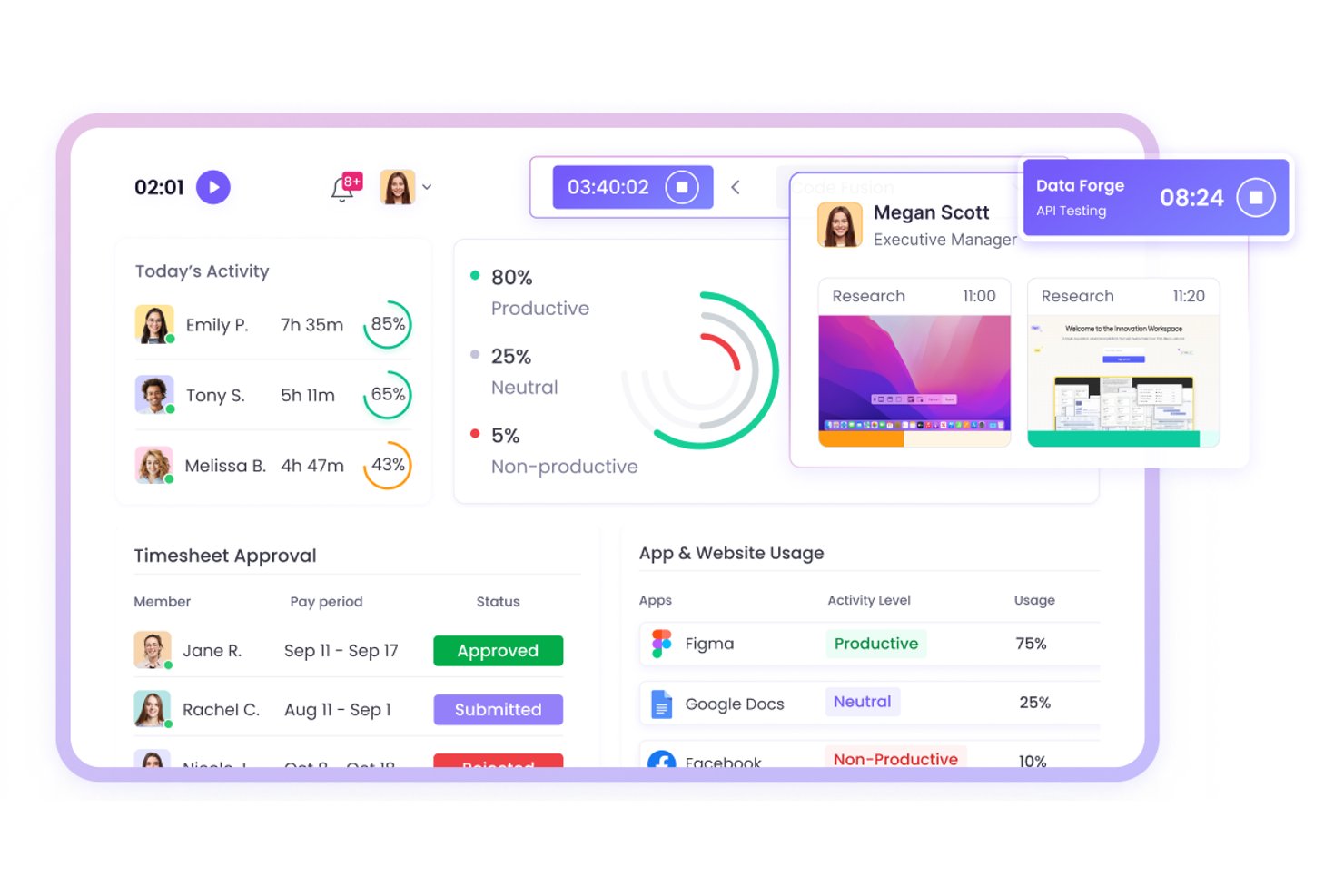
WebWork Time Tracker è un software per il monitoraggio del tempo destinato a team distribuiti e operativi sul campo, che aiuta i responsabili di progetto a monitorare le ore di lavoro, l'attività e l'avanzamento dei progetti nelle attività da remoto.
Per chi è più adatto WebWork Time Tracker?
WebWork Time Tracker è adatto ai responsabili di progetto che coordinano il personale sul campo e team remoti distribuiti, che necessitano di visibilità sulle ore, sull'attività e sull'avanzamento dei progetti.
Perché WebWork Time Tracker è una buona alternativa a Timecamp
Ho scelto WebWork Time Tracker perché supporta il monitoraggio del tempo dei team sul campo e da remoto, con screenshot e monitoraggio dell'attività. Il mio team può verificare le ore di lavoro nei diversi luoghi di lavoro, esaminare l'attività dei progetti e confrontare il tempo registrato con l'avanzamento. Il monitoraggio GPS aiuta inoltre a collegare il lavoro mobile a luoghi specifici.
Funzionalità principali di WebWork Time Tracker
- Monitoraggio automatico del tempo: Registra il tempo dedicato alle attività e ai progetti assegnati.
- Monitoraggio delle presenze: Registra entrate, uscite, pause e straordinari.
- Report sulla produttività: Genera report sulle ore, sulle presenze e sui dati dei progetti.
- Gestione delle attività: Consente ai team di creare attività, impostare priorità e monitorare gli stati.
Integrazioni di WebWork Time Tracker
WebWork Time Tracker offre integrazioni native con Jira, Asana, Trello, ClickUp, Slack, Google Workspace, Microsoft Teams, Freshdesk e QuickBooks. Si collega inoltre a Zapier e Make e mette a disposizione un'API pubblica e webhook per integrazioni personalizzate.
Pros and Cons
Pros:
- Il monitoraggio GPS collega le ore lavorate sul campo alle località
- Gli screenshot supportano la verifica del lavoro da remoto
- I report sulle presenze e sugli straordinari facilitano la verifica delle buste paga
Cons:
- Gli screenshot frequenti possono preoccupare i team attenti alla privacy
- Il monitoraggio da dispositivo mobile può consumare rapidamente la batteria

Clockify
Ideale per piccoli gruppi
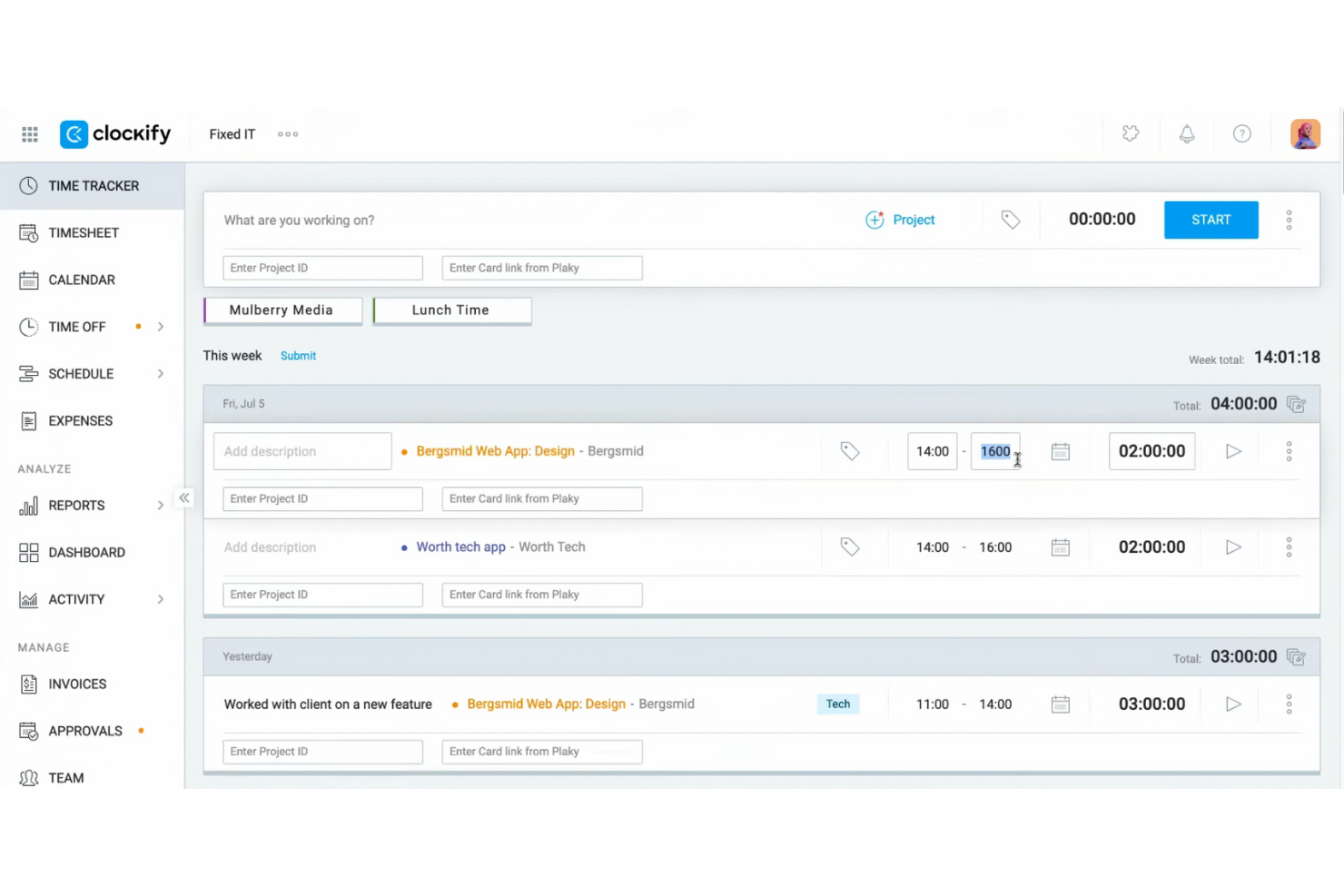
Clockify è un software per il rilevamento del tempo progettato per freelance e gruppi che devono monitorare la produttività dei dipendenti e gestire i progetti senza vincoli di budget. Ti aiuta a monitorare le ore di lavoro, gestire le attività e analizzare in modo efficiente i progressi dei progetti.
Perché è una buona alternativa a Timecamp: Ho selezionato Clockify perché offre ai piccoli gruppi un modo accessibile per monitorare le ore dei progetti e gestire i fogli presenze settimanali senza costi iniziali elevati. Le sue funzionalità principali di monitoraggio forniscono una visibilità chiara sulle tempistiche dei progetti e sulla produttività giornaliera del gruppo, senza costringere le realtà più piccole ad adottare piani software costosi. Questo lo rende ideale per i responsabili che hanno bisogno di una supervisione essenziale e di una prova del lavoro svolto, mantenendo bassi i costi del software.
Funzionalità e integrazioni principali:
Le funzionalità includono strumenti di gestione dei progetti, rilevamento gratuito del tempo e monitoraggio delle ore fatturabili. Queste funzionalità aiutano a garantire un rilevamento accurato del tempo e una fatturazione precisa ai clienti. Clockify offre inoltre rapporti visivi dettagliati per analizzare la produttività del gruppo.
Le integrazioni includono Asana, Trello, Jira, QuickBooks, monday.com, Basecamp, GitHub, Salesforce e altro.
Pros and Cons
Pros:
- Monitoraggio del tempo conveniente per piccoli budget
- Adatto a gruppi di qualsiasi dimensione
- Rapporti dettagliati disponibili
Cons:
- Gestione dei progetti di base
- Richiede una connessione Internet

Timely
Ideale per il monitoraggio automatico del tempo
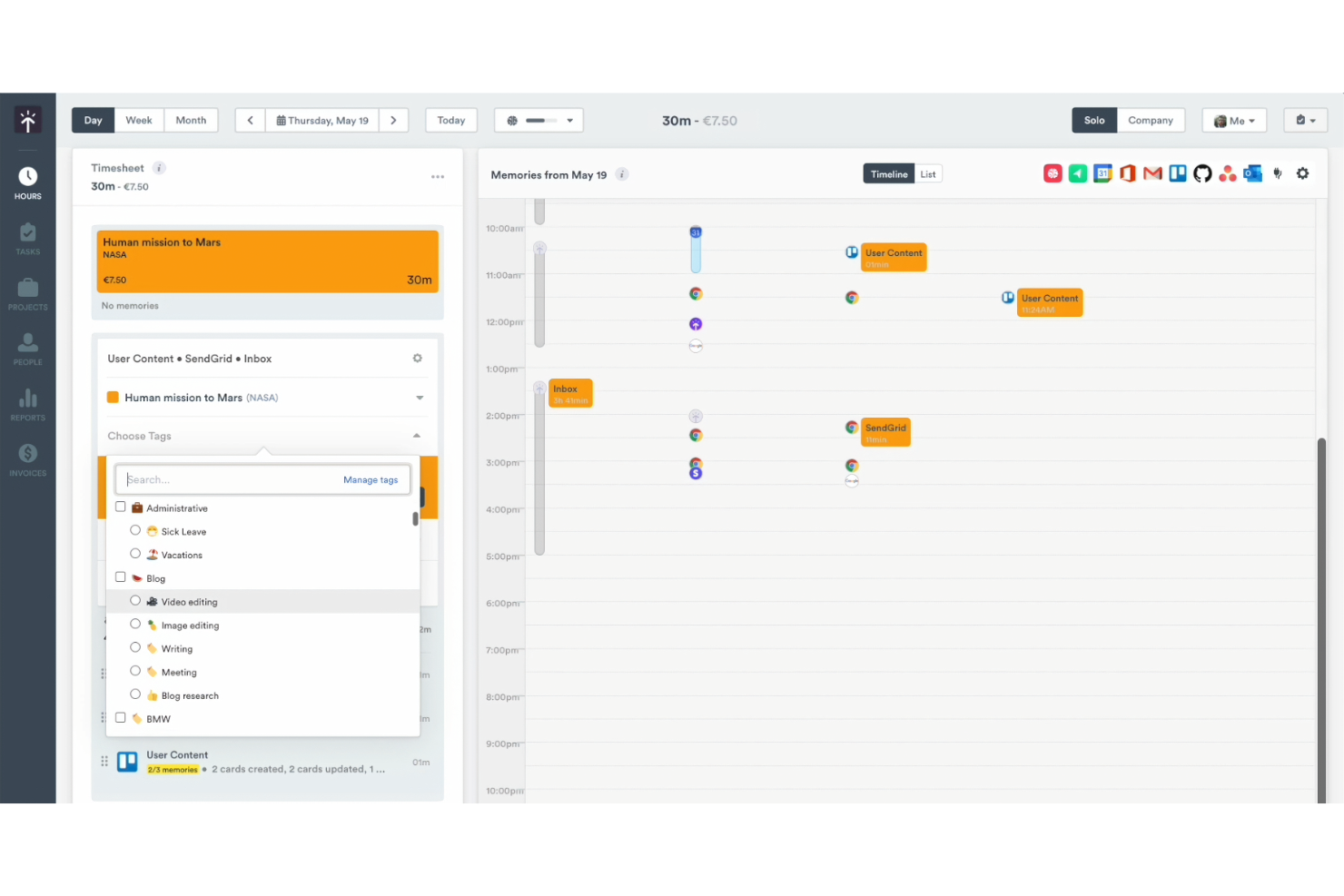
Timely è uno strumento per la gestione del tempo progettato per team e freelance che desiderano automatizzare il monitoraggio del tempo. Ti aiuta a monitorare con precisione le ore lavorate e a gestire i progressi dei progetti in modo più efficiente.
Perché Timely è una buona alternativa a Timecamp: Timely offre il monitoraggio automatico del tempo, eliminando la necessità di inserimenti manuali e garantendo una raccolta dati precisa. Il monitoraggio della memoria registra tutte le attività sul computer, fornendo una panoramica completa del lavoro. Puoi esaminare e approvare facilmente le ore monitorate, rendendo più fluida la gestione dei progetti. Questa automazione del monitoraggio del tempo rende Timely un'opzione eccellente per chi cerca semplicità e precisione.
Funzionalità distintive e integrazioni:
Le funzionalità includono il monitoraggio della memoria, i pannelli di controllo dei progetti e i rapporti sulle ore. Queste funzionalità di monitoraggio del tempo offrono una panoramica chiara delle ore lavorate. Timely offre anche una sequenza temporale che rappresenta visivamente la tua giornata lavorativa, aiutandoti a gestire meglio i tuoi impegni.
Le integrazioni includono Asana, Google Calendar e altro.
Pros and Cons
Pros:
- Monitoraggio automatico del tempo
- Funzionalità estese di monitoraggio delle attività
- Adatto ai freelance
Cons:
- Dipende dal monitoraggio dell'utilizzo del computer
- Opzioni limitate per l'inserimento manuale

My Hours
Ideale per ottenere informazioni sulla redditività dei progetti
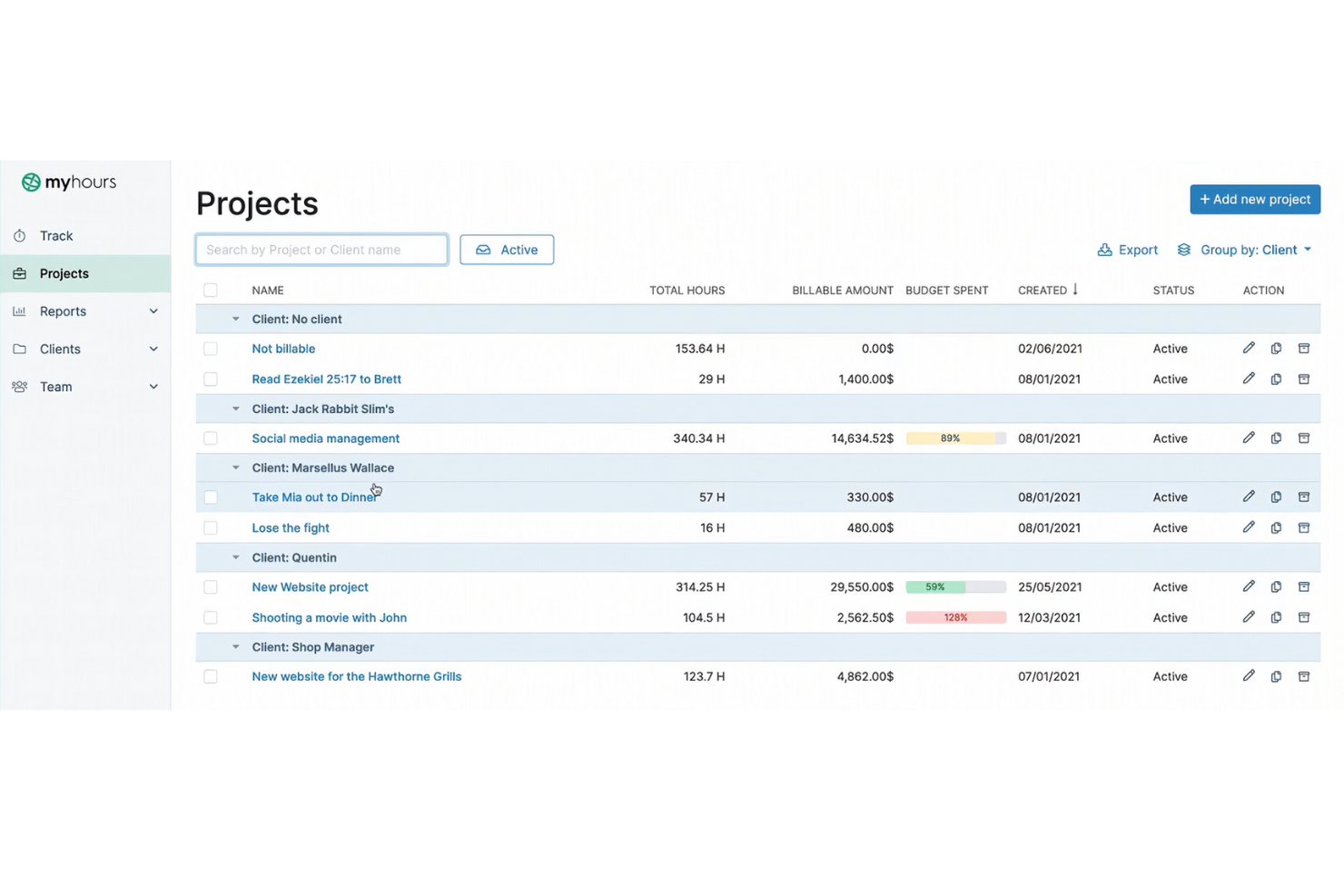
My Hours è un software per il monitoraggio del tempo progettato per freelance e piccoli team che devono gestire i budget dei progetti e le ore di lavoro. Ti aiuta a monitorare il tempo, gestire le attività e analizzare in modo efficiente i costi dei progetti.
Perché My Hours è una valida alternativa a Timecamp: My Hours offre report dettagliati con informazioni sulla redditività dei progetti, così puoi vedere quali progetti sono più vantaggiosi. Il software consente di monitorare le ore fatturabili e non fatturabili, offrendoti una visione chiara dei costi dei progetti. Puoi impostare budget per i progetti e ricevere notifiche quando ti avvicini ai limiti. Questa attenzione alle informazioni finanziarie è una funzionalità fondamentale che ti aiuta a prendere decisioni informate sulle priorità dei progetti.
Funzionalità e integrazioni principali:
Le funzionalità includono la fatturazione, report dettagliati e la gestione delle attività. Queste funzionalità ti aiutano a mantenere il controllo sui budget dei progetti e sulla produttività del team. My Hours offre inoltre schede attività personalizzabili per un monitoraggio accurato del tempo.
Le integrazioni includono Trello, Asana, Slack, Zapier, Jira, monday.com e altro.
Pros and Cons
Pros:
- Monitoraggio delle ore fatturabili e non fatturabili
- Notifiche sul budget disponibili
- Schede attività personalizzabili
Cons:
- Curva di apprendimento per i nuovi utenti
- Potrebbe non essere adatto alle grandi aziende

Ideale per l'automazione dei processi
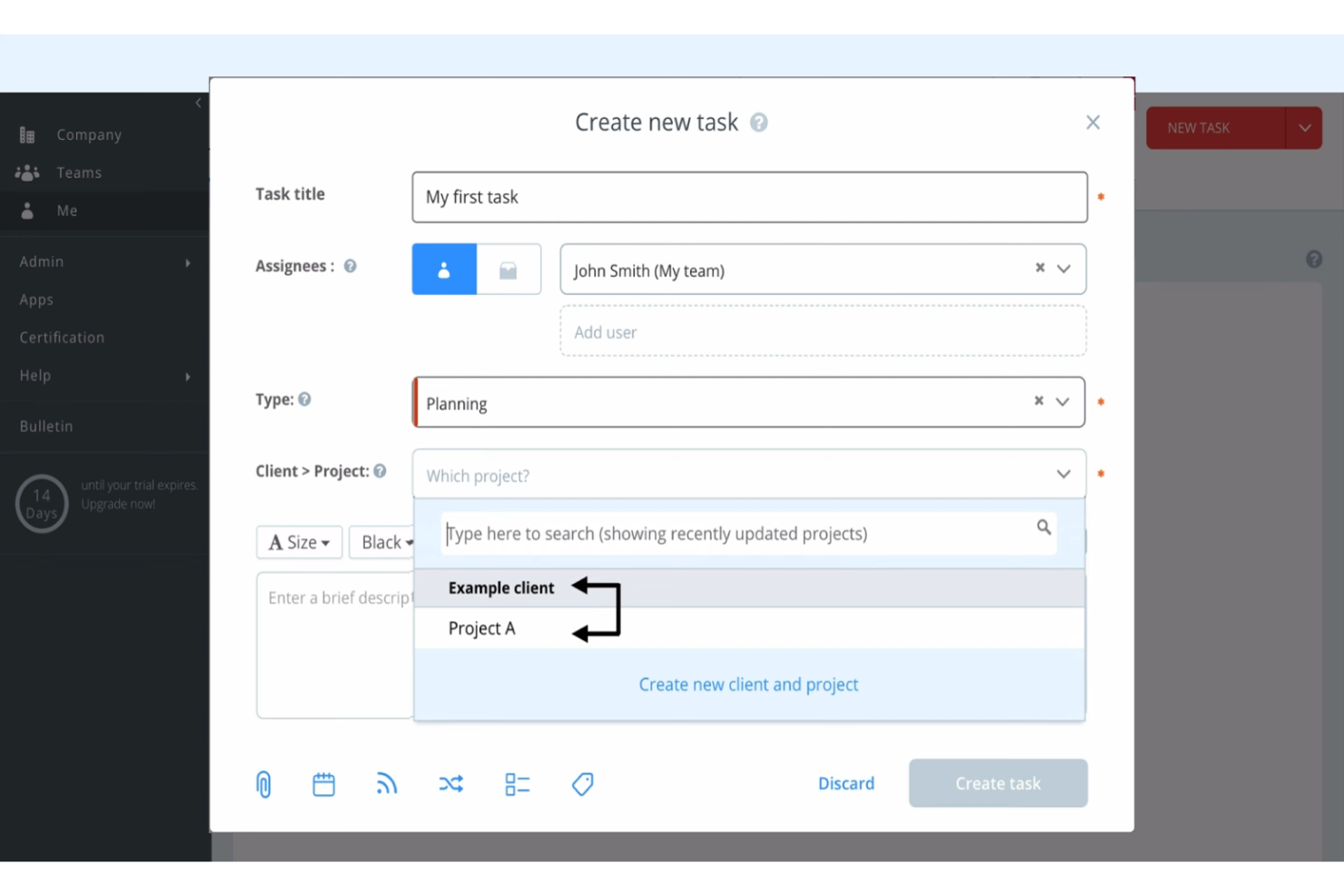
Runrun.it è una soluzione per la gestione dei progetti e il monitoraggio del tempo, progettata per le squadre che desiderano aumentare la produttività del proprio gruppo e gestire i flussi di lavoro in modo efficiente. Aiuta a organizzare le attività, monitorare il tempo e automatizzare i processi per migliorare le prestazioni della squadra.
Perché Runrun.it è una buona alternativa a Timecamp: Runrun.it offre funzionalità di automazione dei processi, consentendo di automatizzare le attività ripetitive e semplificare i flussi di lavoro. Il programma permette di configurare avvisi e notifiche automatici per tenere informata la squadra. È inoltre possibile utilizzare flussi di lavoro personalizzati per assicurarsi che le attività vengano completate nell'ordine corretto. Questa attenzione all'automazione dei processi rende Runrun.it un'ottima scelta per le squadre che desiderano migliorare l'efficienza.
Funzionalità e integrazioni di rilievo:
Le funzionalità includono la gestione delle attività e il monitoraggio del tempo. Queste funzionalità aiutano a monitorare la produttività della squadra e le tempistiche dei progetti. Runrun.it offre inoltre cruscotti visivi per fornire una panoramica chiara dei progressi del progetto.
Le integrazioni non sono elencate pubblicamente.
Pros and Cons
Pros:
- Automazione dei processi disponibile
- Flussi di lavoro personalizzati supportati
- Cruscotti visivi disponibili
Cons:
- Richiede tempo per la configurazione
- Nessuna applicazione mobile
TMetric
Ideale per la fatturazione in più valute
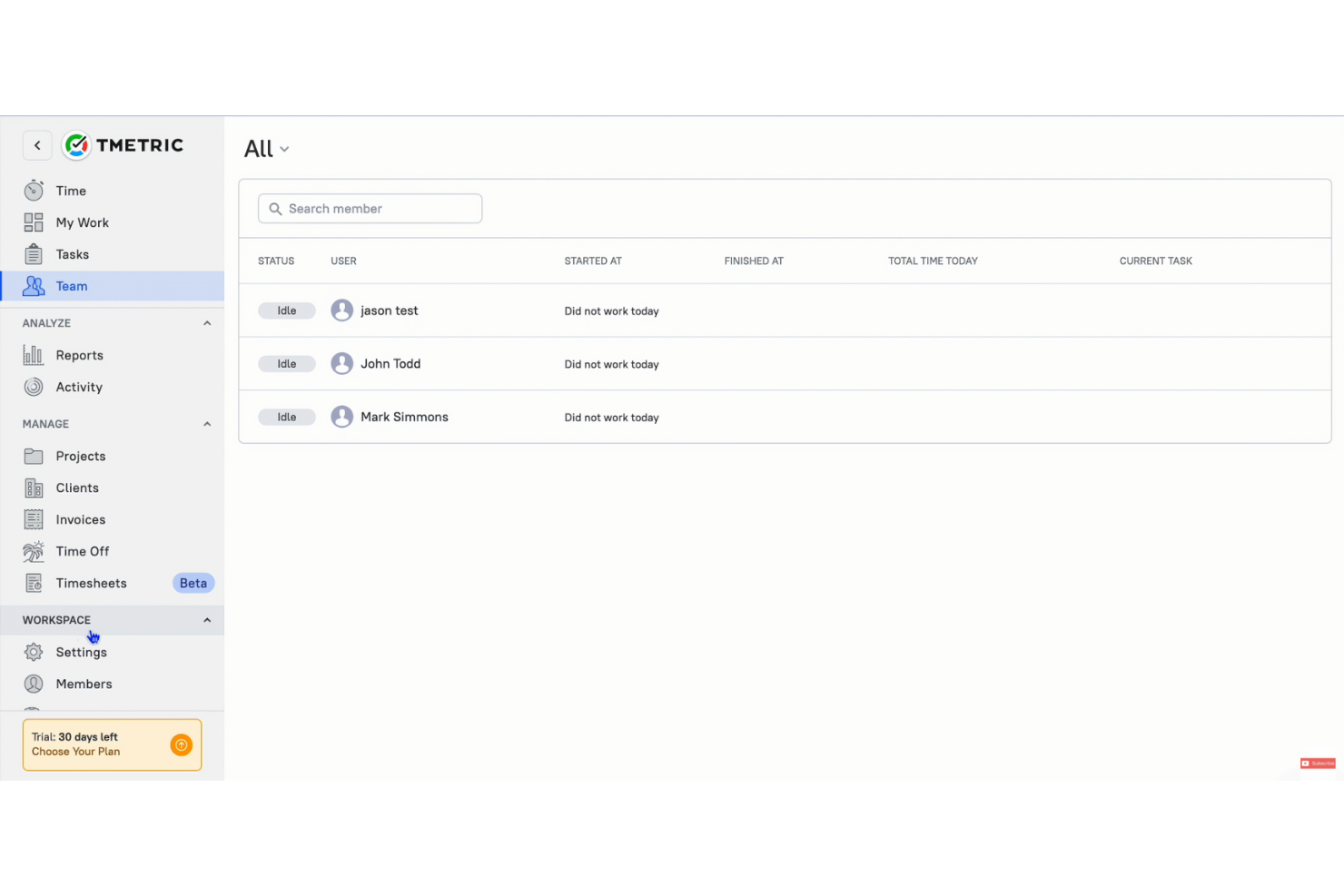
TMetric è una soluzione per il monitoraggio del tempo e uno strumento per la produttività progettato per freelance, piccole aziende e team remoti che desiderano gestire in modo efficiente le ore di lavoro e la fatturazione, sia tramite l'app desktop sia tramite l'app mobile. Ti aiuta a monitorare il tempo, gestire le attività e facilitare la fatturazione dei clienti.
Perché TMetric è una buona alternativa a Timecamp: TMetric offre la fatturazione in più valute, rendendola semplice per le aziende con clienti internazionali. La funzionalità di fatturazione consente di creare e inviare fatture e supporta la fatturazione in più valute, facilitando le transazioni internazionali. Puoi monitorare con precisione le ore fatturabili e convertirle facilmente in fatture. Questa attenzione al supporto multivaluta rende TMetric una scelta pratica per le aziende che operano oltre confine.
Funzionalità e integrazioni distintive:
Le funzionalità includono la gestione dei progetti, report dettagliati e il monitoraggio delle ferie e delle assenze. Queste funzionalità ti aiutano a mantenere il controllo sulla produttività del tuo team e sulla gestione dei progetti. TMetric offre inoltre strumenti per la gestione del budget, per mantenere i tuoi progetti finanziariamente sotto controllo.
Le integrazioni includono Asana, Trello, Slack, Jira, GitHub, Bitbucket, monday.com, GitLab e altro.
Pros and Cons
Pros:
- Fatturazione in più valute
- Strumenti per il budget dei progetti
- Gestione semplice dei progetti
Cons:
- Opzioni di reportistica di base
- Limitazioni dell'app mobile

Ideale per l'analisi dei team da remoto
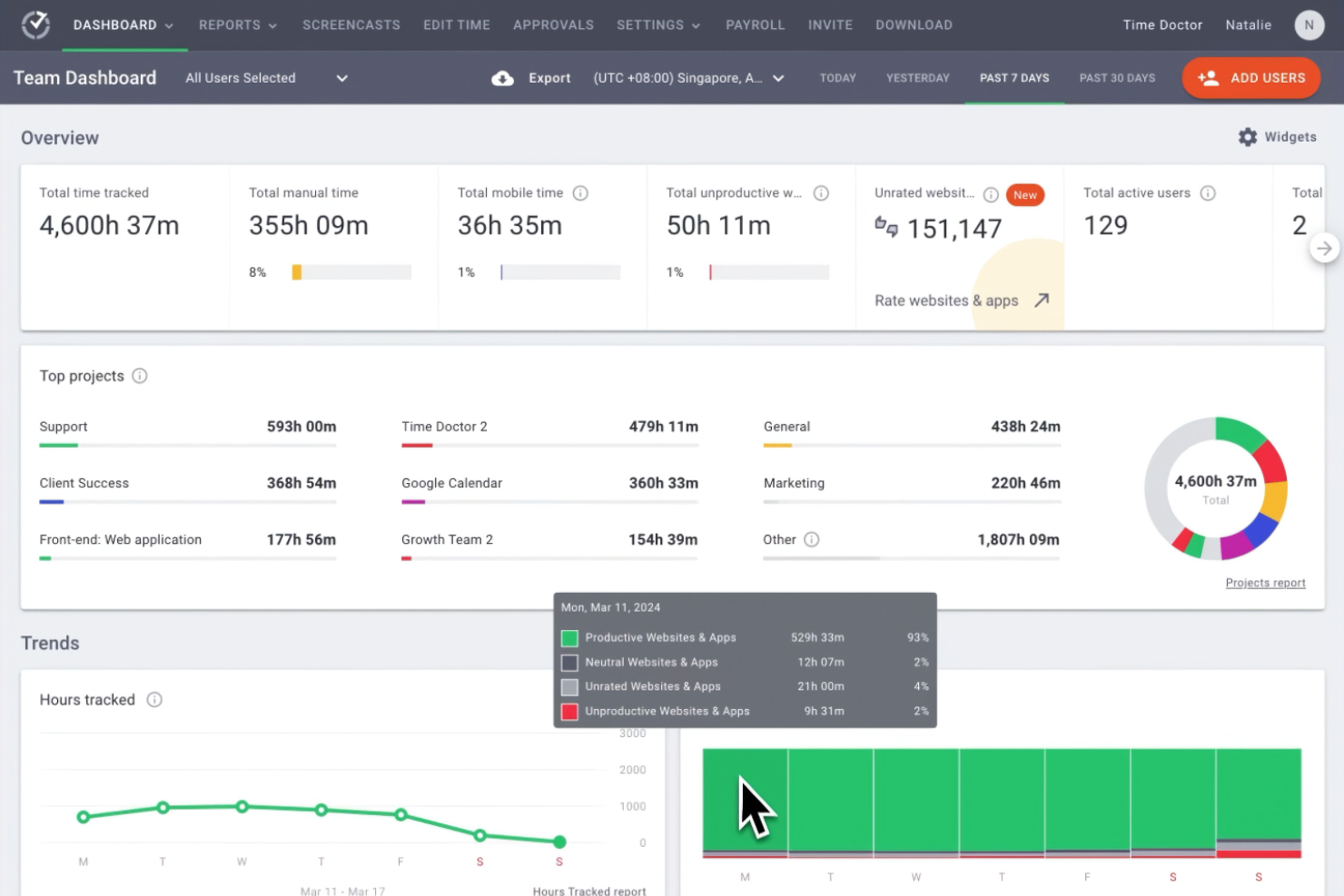
Time Doctor è un software completo per il monitoraggio del tempo, pensato per aziende e team da remoto che desiderano migliorare la produttività complessiva. Fornisce a manager e responsabili dei team informazioni dettagliate su come viene impiegato il tempo dei dipendenti nei vari progetti.
Perché Time Doctor è una buona alternativa a Timecamp: Time Doctor è un'app per il monitoraggio del tempo che offre funzionalità di analisi avanzate, con particolare attenzione alle prestazioni dei team da remoto. Le sue funzionalità di monitoraggio del tempo includono il controllo in tempo reale. Gli avvisi sulle distrazioni fanno sì che il team rimanga concentrato sulle attività. Inoltre, la cattura delle schermate di Time Doctor offre una visione chiara della produttività dei dipendenti, supportando il suo punto di forza unico (USP) nell'analisi dei team da remoto.
Funzionalità e integrazioni principali:
Le funzionalità includono il monitoraggio del tempo con schermate, gli avvisi sulle distrazioni e il monitoraggio della produttività dei dipendenti in tempo reale. Queste funzionalità aiutano a mantenere la produttività e a fare in modo che il team rimanga concentrato. Il software offre inoltre report dettagliati per aiutarti ad analizzare i modelli di lavoro.
Le integrazioni includono Asana, Trello, Jira, monday.com, Basecamp 3, Salesforce, Wrike e altro ancora.
Pros and Cons
Pros:
- Monitoraggio della produttività in tempo reale
- Cattura delle schermate
- Avvisi sulle distrazioni
Cons:
- Monitoraggio offline limitato
- Funzionalità di gestione dei progetti di base
Ideale per l'integrazione del calendario
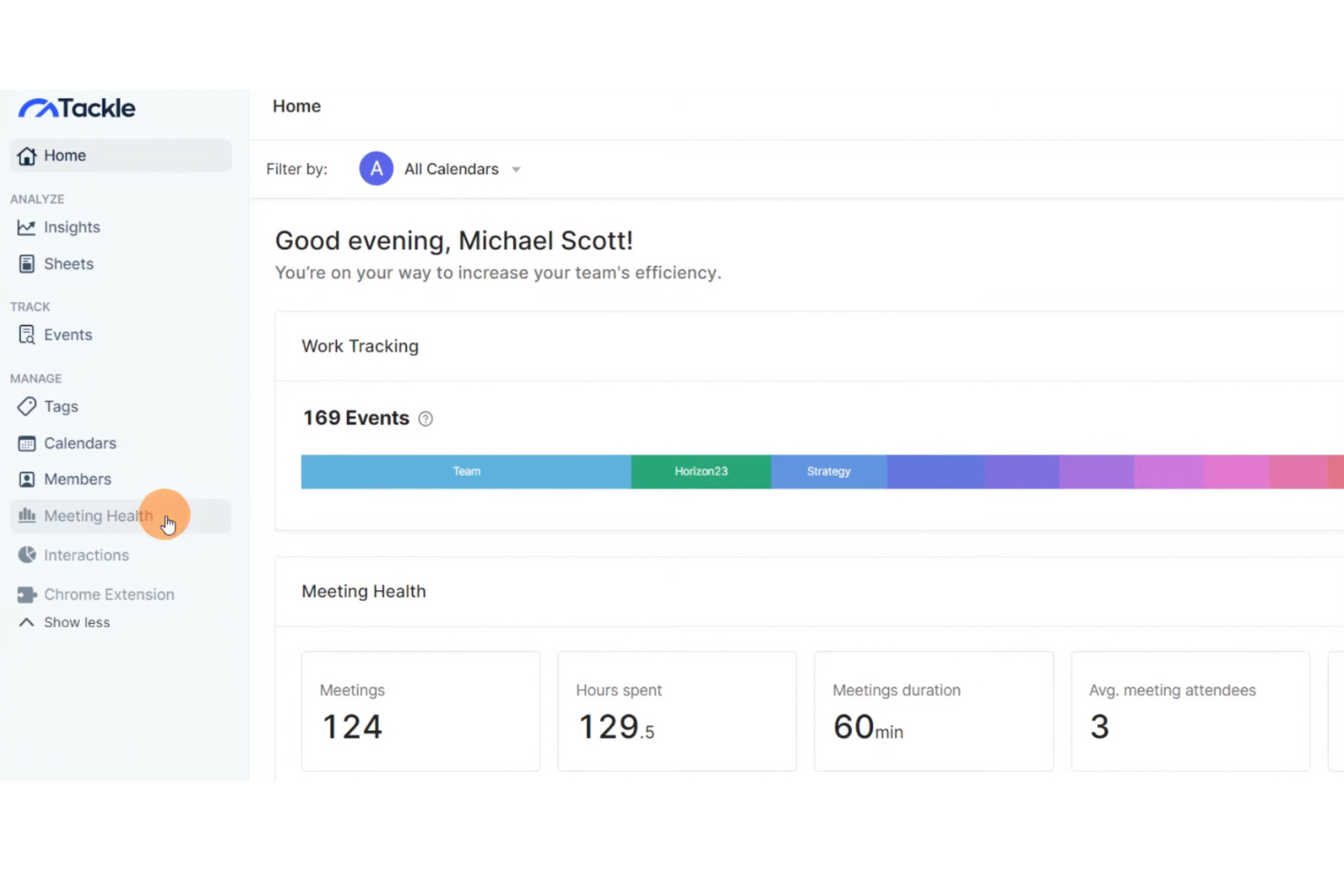
Tackle è uno strumento per la gestione del tempo progettato per professionisti e team che devono ottimizzare la pianificazione e il monitoraggio della produttività. Ti aiuta a trasformare i dati del calendario in informazioni utili per migliorare la gestione del tempo e delle attività.
Perché Tackle è una buona alternativa a Timecamp: Tackle offre un'integrazione perfetta con il calendario, consentendoti di sincronizzare e analizzare il tuo programma in modo efficiente, sia sull'app desktop che sull'app mobile. Questa funzionalità offre il monitoraggio della produttività per aiutarti a tenere traccia di come viene distribuito il tuo tempo tra diverse attività, così puoi identificare facilmente gli schemi e apportare modifiche per migliorare la produttività. L'attenzione di Tackle all'integrazione del calendario garantisce che la tua pianificazione sia in linea con i tuoi obiettivi di produttività.
Funzionalità e integrazioni distintive:
Le funzionalità includono il monitoraggio automatico del tempo, la visualizzazione dei dati e informazioni personalizzate. Queste funzionalità ti aiutano a comprendere meglio i tuoi schemi di produttività. Tackle offre inoltre un'interfaccia intuitiva per semplificare il processo di gestione della tua pianificazione.
Le integrazioni includono Google Calendar e la possibilità di esportare dati in Google Sheets ed Excel.
Pros and Cons
Pros:
- Integrazione nativa del calendario
- Monitoraggio automatico del tempo
- Interfaccia intuitiva
Cons:
- Funzionalità avanzate limitate
- Potrebbe richiedere una configurazione iniziale

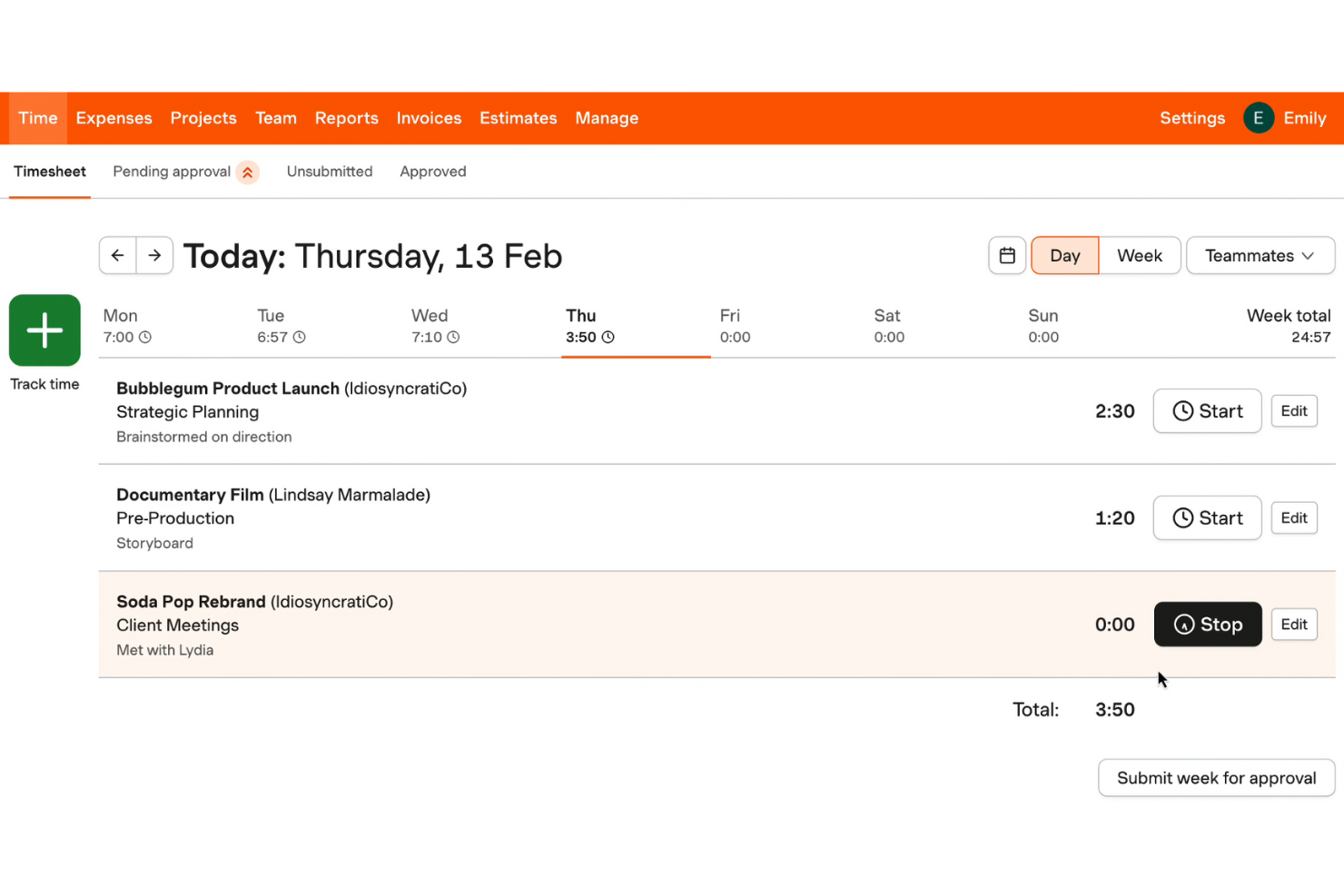
Harvest è una soluzione per il monitoraggio del tempo e un software di fatturazione progettato per freelance, piccole aziende e team che desiderano gestire il proprio tempo e le proprie finanze in modo efficiente. Ti aiuta a monitorare le ore di lavoro sui progetti, creare fatture e gestire i budget.
Perché Harvest è una buona alternativa a Timecamp: Harvest offre la fatturazione integrata, consentendo di generare fatture direttamente dalle registrazioni del tempo e dalle spese. Questa funzionalità semplifica la fatturazione ai clienti e garantisce l'accuratezza degli addebiti. Puoi convertire facilmente le ore di lavoro registrate in fatture, rendendo semplice la gestione finanziaria. L'attenzione di Harvest alla combinazione di un monitoraggio accurato del tempo con la fatturazione offre una transizione fluida dal lavoro sul progetto alla fatturazione del cliente.
Funzionalità e integrazioni di spicco:
Le funzionalità includono il monitoraggio delle spese, la gestione del budget dei progetti e report dettagliati. Queste funzionalità ti aiutano a monitorare i costi dei progetti e a garantire di rimanere entro il budget. Harvest offre inoltre l'approvazione dei fogli presenze per semplificare la gestione del team.
Le integrazioni includono Asana, Trello, Slack, Jira, QuickBooks Online, Basecamp, Stripe, PayPal, Xero, Google Calendar e altro.
Pros and Cons
Pros:
- Fatturazione integrata
- Adatto alle piccole aziende
- Monitoraggio semplice delle spese
Cons:
- Dipende da un monitoraggio accurato del tempo
- Progetti illimitati disponibili solo nei piani a pagamento
Toggl
Ideale per report personalizzabili
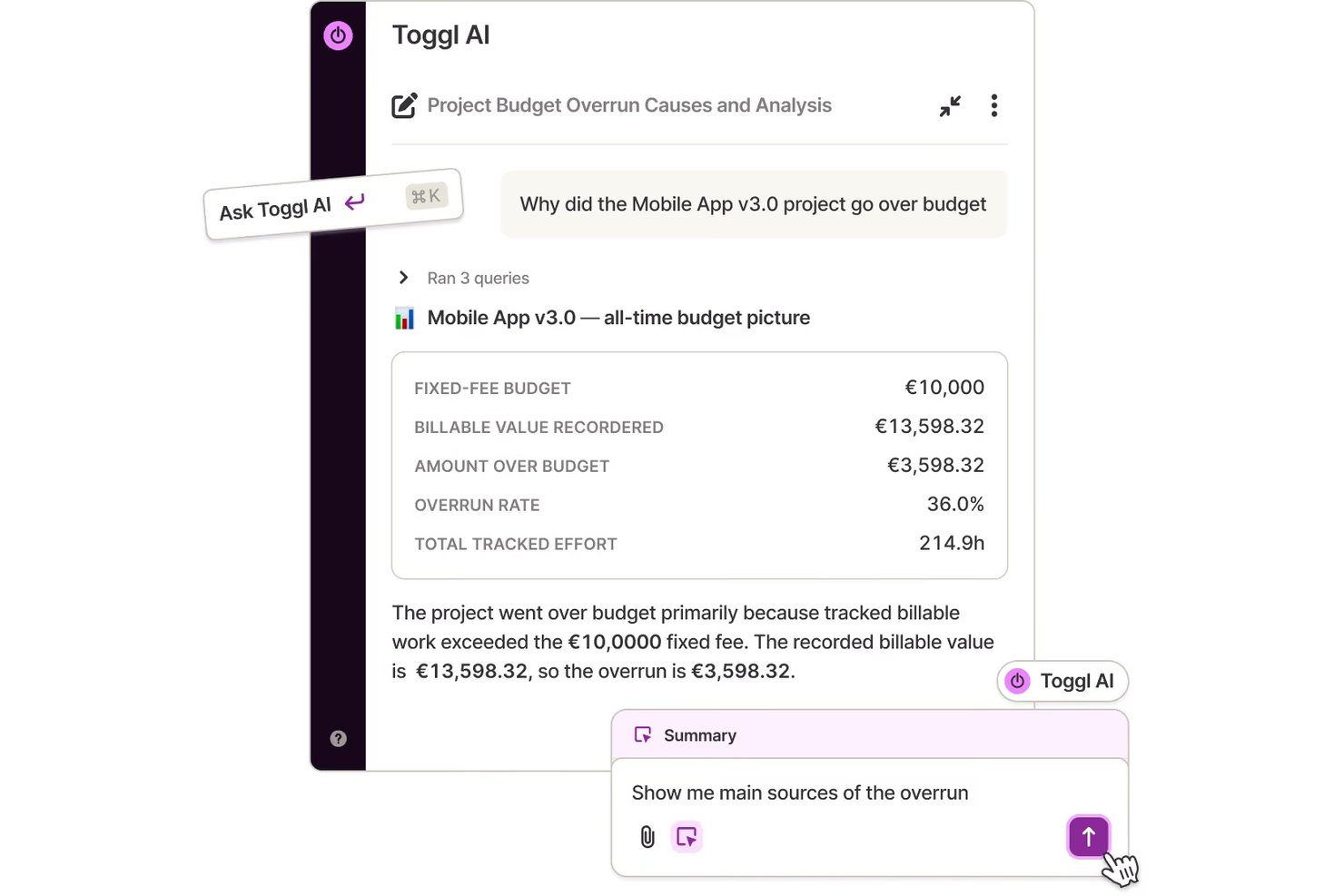
Toggl è uno strumento per il monitoraggio del tempo progettato per liberi professionisti, piccole aziende e team che desiderano migliorare la produttività. Fornisce informazioni dettagliate su come viene impiegato il tempo nei vari progetti, migliorando l'efficienza della gestione dei progetti.
Perché Toggl è una buona alternativa a Timecamp: Toggl offre possibilità di personalizzazione nei report, consentendo di adattare i report sul tempo alle proprie esigenze specifiche. La sua interfaccia semplice facilita il monitoraggio del tempo senza perdersi nei dettagli. È possibile generare report dettagliati incentrati sulle metriche più importanti. La flessibilità di Toggl Track nella personalizzazione dei report sul tempo aiuta a ottenere informazioni direttamente rilevanti per la produttività del team.
Funzionalità e integrazioni principali:
Le funzionalità includono il rilevamento del tempo di inattività e il monitoraggio dell'avanzamento dei progetti. Queste funzionalità aiutano a gestire più efficacemente la produttività del team. Toggl offre anche promemoria per garantire la continuità del monitoraggio del tempo.
Le integrazioni includono Asana, Trello, Slack, Jira, Google Calendar, Todoist, Basecamp, GitHub, Evernote, QuickBooks Online e altro.
Pros and Cons
Pros:
- App mobile per Android e iOS
- Adatto a piccoli team
- Piani a pagamento convenienti
Cons:
- Non supporta utenti illimitati
- Nessuna funzionalità di fatturazione
Altre alternative a Timecamp
Ecco alcune alternative aggiuntive a Timecamp che non sono state incluse nel mio elenco, ma che vale comunque la pena prendere in considerazione:
- Monitask
Idéal pour l’intégration à Microsoft 365
- Hubstaff
Ideale per le funzionalità di monitoraggio GPS
- Buddy Punch
Idéal pour la gestion des polices et des ressources
- Tick's Time Tracking
Ideale per il semplice monitoraggio del budget dei progetti


Come valuto le alternative a TimeCamp
Esamino ogni alternativa a TimeCamp su due livelli: requisiti essenziali, come i budget a livello di progetto e le tariffe fatturabili, e poi i fattori che distinguono realmente gli strumenti.
Funzionalità fondamentali (requisiti essenziali per questo elenco)
Quando seleziono gli strumenti per il mio elenco, assegno a ciascuno un punteggio su una scala da 0 (non offre la funzionalità) a 5 (eccelle in quest'area) per ogni funzionalità fondamentale elencata di seguito. Poi converto il punteggio totale dello strumento in una percentuale. Ogni strumento deve raggiungere un punteggio totale minimo del 65% per essere preso in considerazione.
- Monitoraggio del tempo: verifico se uno strumento offre timer, inserimento manuale e qualche forma di automazione, come il rilevamento delle applicazioni in secondo piano in Toggl Track o gli avvisi di inattività in Clockify, così che le squadre non debbano ricostruire i fogli presenze a memoria alla fine della settimana.
- Organizzazione di progetti e attività: ogni strumento dovrebbe consentire di associare le registrazioni del tempo a progetti, attività e clienti specifici, come fa Harvest collegando le ore registrate alle singole voci a livello di attività invece di raccogliere tutto in un unico contenitore.
- Ore fatturabili e fatturazione: valuto come ogni piattaforma gestisce l'etichettatura delle ore fatturabili e non fatturabili, le tariffe personalizzate per progetto o membro della squadra e la possibilità di generare o esportare fatture direttamente dal tempo monitorato.
- Monitoraggio del budget e della redditività: gli strumenti ottengono punteggi più elevati quando consentono di impostare budget in ore o in costi per progetto e di visualizzare i progressi in tempo reale, particolarmente utile per le squadre delle agenzie che monitorano i margini di più incarichi con clienti contemporaneamente.
- Report e analisi: cerco report personalizzabili che vadano oltre i semplici fogli presenze, inclusi filtri per cliente, intervallo di date o membro della squadra, oltre a opzioni di esportazione come CSV e PDF per gli aggiornamenti alle parti interessate.
- Gestione della squadra e delle risorse: qui sono importanti il supporto multiutente con autorizzazioni basate sui ruoli, l'approvazione dei fogli presenze e le visualizzazioni del carico di lavoro o della capacità, soprattutto per i responsabili che gestiscono squadre interfunzionali su più progetti simultanei.
Una volta ottenuto un elenco di strumenti che soddisfano questi criteri, considero ciò che distingue ogni piattaforma.
Fattori distintivi (ciò che differenzia i fornitori)
Ecco come confronto i diversi fornitori:
Funzionalità distintive
Il monitoraggio automatico delle attività è un aspetto importante per me: strumenti come Hubstaff e Toggl Track possono registrare applicazioni e URL in secondo piano, evitando alle squadre di dover ricostruire la propria giornata a posteriori. Valuto anche quanto siano approfondite le integrazioni di una piattaforma con gli strumenti di gestione dei progetti, poiché una sincronizzazione bidirezionale con Jira o Asana è molto più utile di una semplice connessione unidirezionale. Le analisi della produttività completano il quadro, aiutando i responsabili a individuare i modelli di concentrazione e a segnalare il sovraccarico di lavoro prima che diventi un problema di fidelizzazione.
Oltre le funzionalità
La struttura dei prezzi è molto importante in questo caso: un libero professionista che valuta Toggl Track ha esigenze molto diverse da quelle di un'agenzia di 50 persone che prende in considerazione Harvest, quindi verifico se i piani possono crescere senza costringere prematuramente le squadre a passare ai livelli aziendali. La copertura delle piattaforme è un altro fattore che considero, poiché le squadre sul campo e da remoto hanno bisogno di applicazioni mobili e del monitoraggio senza connessione, con sincronizzazione una volta ristabilita la connessione. Per le squadre che gestiscono dati sensibili dei clienti, valuto anche gli aspetti fondamentali della sicurezza, come SSO, 2FA e conformità al GDPR.
Perché cercare un'alternativa a Timecamp?
Sebbene Timecamp sia una buona scelta come software per la produttività e la gestione dei progetti, ci sono diversi motivi per cui alcuni utenti cercano soluzioni alternative. Potresti essere alla ricerca di un'alternativa a Timecamp perché:
- Hai bisogno di funzionalità di reportistica più avanzate
- Il tuo team ha bisogno di opzioni di scalabilità migliori
- Cerchi strumenti di collaborazione più avanzati
- Hai bisogno di un software con funzionalità non in linea
- Il tuo team ha difficoltà a utilizzare l'interfaccia
- Hai bisogno di piani tariffari più flessibili
Se ti riconosci in una di queste situazioni, sei nel posto giusto. Il mio elenco contiene diverse opzioni di software per la produttività e la gestione dei progetti più adatte ai team che affrontano queste difficoltà con Timecamp e cercano soluzioni alternative.
Funzionalità
Ecco alcune delle funzionalità principali di Timecamp, per aiutarti a confrontare ciò che offrono le soluzioni alternative:
- Monitoraggio del tempo: Offre il monitoraggio automatico e manuale per aiutarti a tenere registri accurati delle ore lavorate.
- Monitoraggio della forza lavoro: Tiene traccia dei livelli di attività dei dipendenti e della produttività del tuo team, risultando ideale per la gestione dei team da remoto.
- Monitoraggio delle presenze: Gestisce presenze, straordinari e richieste di permesso per semplificare i processi di elaborazione delle buste paga.
- Integrazioni: È compatibile con oltre 100 strumenti, inclusi software per la gestione dei progetti e la fatturazione, così da adattarsi al tuo flusso di lavoro.
- Analisi: Genera report dettagliati sull'utilizzo del tempo, sui confronti con il budget e sulla produttività dei dipendenti per supportare il processo decisionale.
- Fatturazione: Tiene traccia delle ore fatturabili e crea fatture a partire dal tempo registrato, semplificando la gestione della fatturazione dei clienti.
- Ruoli di gestione: Ti consente di impostare le autorizzazioni degli utenti e creare ruoli personalizzati per un migliore controllo degli accessi.
- Tag e schermate: Utilizza i tag per la classificazione e schermate facoltative per garantire trasparenza nel monitoraggio.
- Approvazioni e spese: Consente ai dipendenti di inviare i fogli presenze per l'approvazione e di tenere traccia delle spese relative ai progetti.
- Servizi personalizzati: Offre opzioni per la distribuzione su server propri e integrazioni personalizzate per soddisfare specifiche esigenze aziendali.