

10 migliori alternative a Slack per la messaggistica del team nel 2026

Selezione delle migliori alternative a Slack


Slack è una scelta popolare per la comunicazione tra team, ma non è la soluzione perfetta per ogni flusso di lavoro. Con la crescita dei team, i canali si moltiplicano, i messaggi vengono sommersi e le decisioni importanti possono scomparire all'interno di conversazioni molto dinamiche. Alcune organizzazioni hanno inoltre bisogno di una struttura più solida, di una migliore visibilità sui progetti, di una governance più rigorosa o di uno strumento che supporti una collaborazione più mirata oltre la semplice chat.
In base alla mia esperienza nel testare piattaforme per la comunicazione tra team, le migliori alternative a Slack risolvono problemi specifici invece di ricreare semplicemente la stessa esperienza. Per questo ho esaminato diverse opzioni, prestando particolare attenzione a funzionalità come la comunicazione asincrona, gli strumenti di collaborazione, le integrazioni, i controlli di sicurezza e la facilità di adozione.
In questo articolo troverai le mie migliori alternative a Slack, insieme a informazioni chiare su ciò che ogni strumento sa fare meglio e sui team per i quali è più adatto. L'obiettivo è aiutarti a scegliere una soluzione che favorisca una comunicazione migliore e una collaborazione più produttiva.
Che cos'è Slack?
Slack è un software per la comunicazione e la collaborazione tra team, progettato per facilitare la messaggistica di gruppo, la condivisione di file e molto altro. Viene comunemente utilizzato da professionisti della tecnologia, del marketing e della gestione dei progetti per mantenere i team connessi e i progetti nei tempi previsti. I canali, la messaggistica diretta e le integrazioni con le app aiutano a organizzare le conversazioni, semplificare i flussi di lavoro e migliorare la produttività. Nel complesso, Slack offre un hub centrale per le esigenze di comunicazione e collaborazione del tuo team.
Tabella di confronto delle alternative a Slack
La tabella seguente confronta i dettagli dei prezzi delle mie migliori alternative a Slack.
| Tool | Best For | Trial Info | Price | ||
|---|---|---|---|---|---|
| 1 | Ideale per la cronologia illimitata dei messaggi | Prova gratuita di 7 giorni + piano gratuito + demo gratuita disponibile | Da $2.49/postazione/mese (con addebito annuale) | Website | |
| 2 | Ideale per la messaggistica privata dei team | Prova gratuita + demo disponibile | A partire da $6/mese | Website | |
| 3 | Ideale per l'integrazione della gestione delle attività | Piano gratuito + demo gratuita disponibili | A partire da $3/utente/mese (fatturato annualmente) | Website | |
| 4 | Ideale per gli strumenti di gestione dei progetti | Prova gratuita di 14 giorni + dimostrazione gratuita disponibile | A partire da $45/mese (fatturati annualmente) | Website | |
| 5 | Ideale per l'integrazione delle videoconferenze | Prova gratuita disponibile | A partire da $4.00/utente/mese (con fatturazione annuale) | Website | |
| 6 | Ideale per comunicazioni sicure | Piano gratuito + demo gratuita disponibile | Prezzi su richiesta | Website | |
| 7 | Ideale per la comunicazione asincrona | Piano gratuito disponibile | A partire da $6/utente/mese (fatturato annualmente) | Website | |
| 8 | Ideale per organizzare la comunicazione del team | 5 licenze gratuite disponibili | A partire da $29/utente/mese | Website | |
| 9 | Ideale per il controllo della distribuzione in sede | Demo gratuita disponibile | Prezzi su richiesta | Website | |
| 10 | Ideale per la collaborazione multimodale (testo, voce, video) | Piano gratuito disponibile | A partire da $2.99/user/month | Website |
Perché fidarsi dei nostri consigli sui software
Il nostro team testa e recensisce software dal 2012. In quanto project manager noi stessi, sappiamo quanto sia difficile — e importante — scegliere il software giusto.
Per questa guida, abbiamo valutato gli strumenti attraverso test pratici e ricerche indipendenti, assegnando un punteggio agli strumenti in base ai nostri criteri di selezione. Ci basiamo inoltre sulle competenze di leader di pensiero del settore e di professionisti attivi nella gestione dei progetti.
Le nostre recensioni riflettono il nostro giudizio editoriale umano, non un discorso di vendita.
Revisori esperti:
Recensioni delle migliori alternative a Slack
\u003cspan style=\u0022font-weight: 400\u0022\u003eDi seguito trovi le mie sintesi dettagliate delle migliori alternative a Slack incluse nella mia selezione. Le mie recensioni offrono un’analisi approfondita delle funzionalità principali, dei vantaggi e degli svantaggi, delle integrazioni e dei casi d’uso ideali di ogni strumento, per aiutarti a trovare quello più adatto a te.\u003c/span\u003e
Pumble
Ideale per la cronologia illimitata dei messaggi

Pumble è uno strumento di comunicazione per team progettato per le piccole e medie imprese che cercano messaggistica e collaborazione efficienti. Offre una piattaforma che consente ai team di connettersi e condividere informazioni.
Perché è una buona alternativa a Slack: Pumble offre una cronologia illimitata dei messaggi, consentendo al tuo team di accedere alle conversazioni passate senza restrizioni. Questa funzionalità garantisce che le informazioni importanti non vadano mai perse. Grazie alla sua interfaccia semplice e intuitiva, Pumble rende la comunicazione diretta ed efficiente. La piattaforma offre inoltre strumenti di collaborazione come canali e messaggistica diretta per mantenere il team connesso.
Funzionalità distintive e integrazioni:
Le funzionalità includono la condivisione di file, che consente al tuo team di scambiare rapidamente documenti e risorse. Le impostazioni di notifica di Pumble ti aiutano a rimanere informato senza essere sommerso dalle notifiche. La funzione di ricerca della piattaforma semplifica la ricerca di messaggi e file precedenti.
Le integrazioni includono Google Calendar, GitHub, Google Drive e altro.
Pros and Cons
Pros:
- Cronologia illimitata dei messaggi
- Interfaccia semplice e intuitiva
- Ricerca semplice di messaggi e file
Cons:
- Incentrato principalmente sulla comunicazione
- Non è ideale per progetti complessi
Brosix
Ideale per la messaggistica privata dei team

Brosix è una piattaforma sicura di comunicazione per team, progettata per le aziende che necessitano di una soluzione di messaggistica privata. È ideale per i team che desiderano migliorare le comunicazioni interne senza la complessità della gestione IT.
Perché è una buona alternativa a Slack: Brosix offre comunicazioni crittografate, garantendo la riservatezza delle conversazioni nell'app di messaggistica del team. La sua interfaccia intuitiva richiede una configurazione minima, rendendola accessibile a tutti i membri del team. La matrice del pannello di controllo basato sul web consente di gestire facilmente utenti e autorizzazioni. L'attenzione di Brosix alla privacy e alla semplicità la rende una valida alternativa a Slack per i team che necessitano di un'app di comunicazione SAAS sicura.
Funzionalità e integrazioni principali:
Le funzionalità includono la condivisione semplice dei file, funzionalità di condivisione dello schermo e un pannello di controllo basato sul web per la gestione degli utenti. Brosix offre inoltre la conformità HIPAA, garantendo che le comunicazioni del team rispettino gli standard di sicurezza del settore. L'interfaccia intuitiva della piattaforma consente un rapido avvio senza la necessità di competenze IT.
Le integrazioni includono Google Sheets, YouTube, Shopify, HubSpot e altro.
Pros and Cons
Pros:
- Facile da usare grazie a un'interfaccia familiare
- Elevata sicurezza con comunicazioni crittografate
- Avvio rapido e assistenza clienti reattiva
Cons:
- Non dispone di funzionalità di chat pubblica
- Funzionalità avanzate limitate rispetto alle piattaforme più grandi

Chanty
Ideale per l'integrazione della gestione delle attività

Chanty è un software di comunicazione e collaborazione per team progettato per facilitare la messaggistica, le videochiamate e la gestione delle attività. La sua principale base di utenti comprende settori come sanità, vendita al dettaglio, marketing, istruzione e IT, con l'obiettivo di migliorare la produttività e il lavoro di squadra.
Perché è una buona alternativa a Slack: Chanty offre la gestione delle attività con visualizzazioni Kanban, consentendo al team di organizzare e monitorare le attività in modo efficiente. La funzione di videochiamata in 4K garantisce comunicazioni chiare durante le riunioni virtuali. Grazie alle chat di gruppo illimitate e alla condivisione sicura dei file, Chanty si concentra sul facilitare la comunicazione interna. L'interfaccia intuitiva della piattaforma la rende accessibile ai team di vari settori.
Funzionalità e integrazioni principali:
Le funzionalità includono la creazione e la gestione delle attività con visualizzazioni Kanban, che aiutano a mantenere organizzati i progetti. Chanty offre inoltre la condivisione sicura dei file, garantendo la protezione dei dati. La piattaforma supporta chat di gruppo illimitate, consentendo al team di collaborare senza restrizioni.
Le integrazioni includono Zapier, Google Drive, Dropbox, Trello, Asana, GitHub, Bitbucket, Mailchimp, HubSpot e altro ancora.
Pros and Cons
Pros:
- Opzioni sicure per la condivisione dei file
- Interfaccia intuitiva
- Adatto a diversi settori
Cons:
- Opzioni di personalizzazione di base
- Concentrato principalmente sull'uso interno
ProofHub
Ideale per gli strumenti di gestione dei progetti

ProofHub è un software per la gestione dei progetti e la collaborazione, pensato per le squadre che necessitano di una piattaforma centralizzata per la pianificazione, la collaborazione e la gestione delle attività. È ampiamente utilizzato da responsabili di progetto, squadre creative e aziende che desiderano migliorare il proprio flusso di lavoro.
Perché è una buona alternativa a Slack: ProofHub offre strumenti per la gestione dei progetti, tra cui la gestione delle attività, il monitoraggio del tempo e i diagrammi di Gantt, che non sono disponibili in Slack. I suoi flussi di lavoro personalizzati consentono alla squadra di adattare i processi alle esigenze specifiche di ogni progetto. La funzione di chat mantiene centralizzata la comunicazione, riducendo la necessità di utilizzare più applicazioni. L'attenzione di ProofHub alla gestione dei progetti lo rende un'alternativa preziosa per le squadre che desiderano riunire gli strumenti in un'unica soluzione.
Funzionalità e integrazioni principali:
Le funzionalità includono ruoli personalizzati, che consentono di definire i livelli di accesso per i membri della squadra. La funzione dei modelli di progetto aiuta a risparmiare tempo riutilizzando strutture di progetto efficaci. ProofHub fornisce inoltre rapporti dettagliati per monitorare i progressi e la produttività.
Le integrazioni includono Google Drive, Dropbox, OneDrive, Box, FreshBooks, QuickBooks, Google Calendar, iCal, Slack e altro ancora.
Pros and Cons
Pros:
- Flussi di lavoro personalizzati per processi su misura
- Adatto a diversi settori e squadre
- Rapporti dettagliati sui progressi e sulla produttività
Cons:
- Potrebbe essere complesso per le squadre piccole
- Attenzione limitata alla comunicazione non legata ai progetti

Ideale per l'integrazione delle videoconferenze

Microsoft Teams è una piattaforma di collaborazione utilizzata principalmente da aziende e istituti scolastici per la comunicazione e il lavoro di squadra. Facilita la chat, le videoconferenze e la condivisione di file per migliorare la produttività e la connettività tra i team.
Perché è una valida alternativa a Slack: Microsoft Teams offre videoconferenze integrate con funzionalità come la condivisione dello schermo e la registrazione delle riunioni, che Slack non offre. La piattaforma supporta la collaborazione tramite un'app di chat, chiamate audio, file condivisi e modifica in tempo reale nelle app di Office. Con il calendario integrato, puoi programmare facilmente le riunioni e tenere traccia delle attività del team. Microsoft Teams offre un ambiente coerente per la comunicazione e la gestione dei progetti, rappresentando una scelta eccellente per aziende grandi e piccole.
Funzionalità e integrazioni principali:
Le funzionalità includono strumenti di gestione delle attività che aiutano il team a organizzare e stabilire efficacemente le priorità del lavoro. Microsoft Teams offre anche canali del team personalizzabili per mantenere le conversazioni concentrate e organizzate. La lavagna integrata nella piattaforma consente di svolgere sessioni creative di brainstorming.
Le integrazioni includono Microsoft 365, SharePoint, OneDrive, Power BI, GitHub, Trello, Asana, Zoom, Salesforce, Adobe Creative Cloud e altro.
Pros and Cons
Pros:
- Supporta videoconferenze di grandi dimensioni
- Canali del team personalizzabili
- Strumenti integrati di gestione delle attività
Cons:
- Forte dipendenza dall'ecosistema Microsoft
- Può risultare complesso per i team piccoli

Ideale per comunicazioni sicure
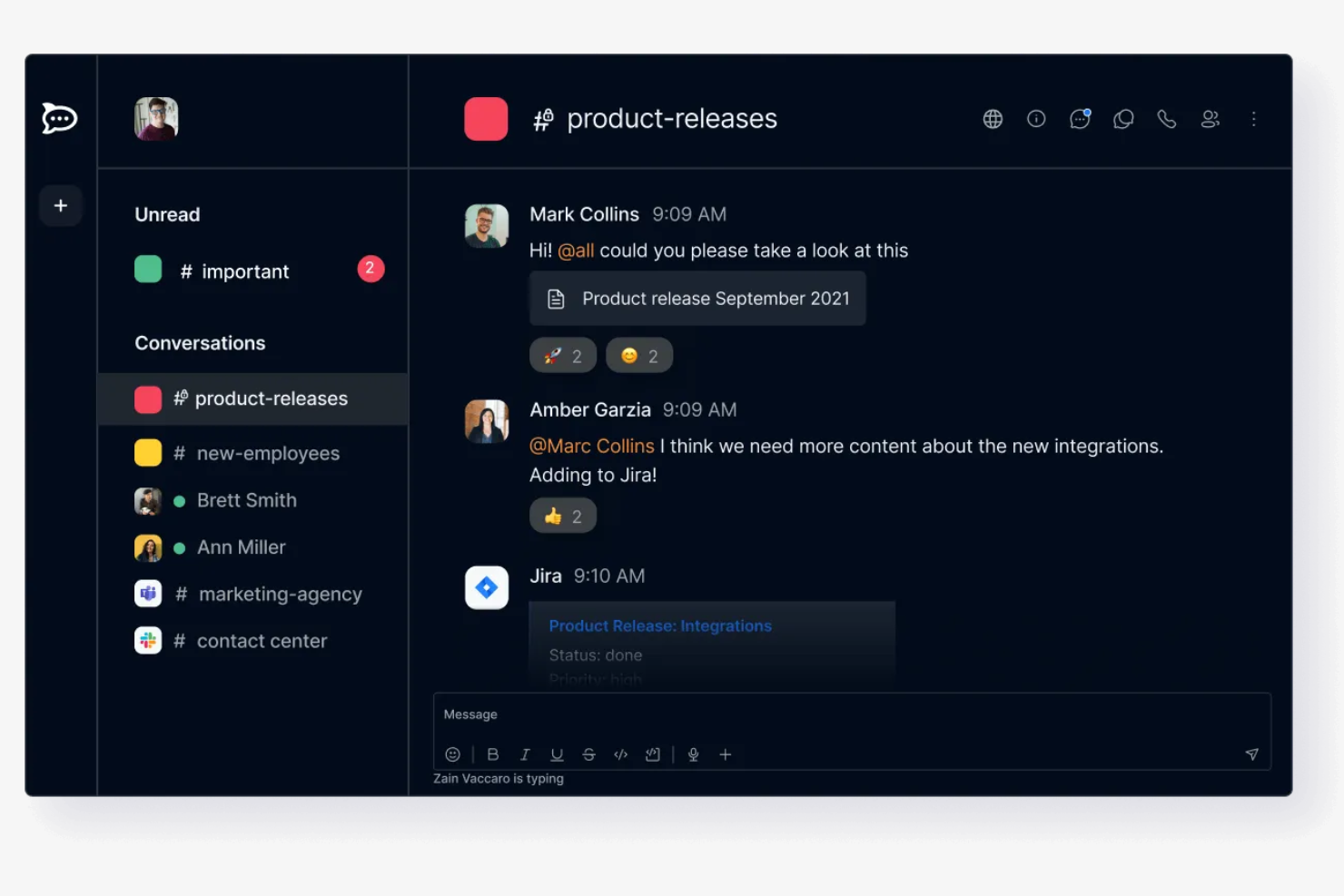
Rocket.Chat è una piattaforma di comunicazione a codice sorgente aperto progettata per aziende e sviluppatori che richiedono messaggistica e collaborazione sicure. È pensata per le organizzazioni che attribuiscono valore alla privacy e al controllo dei dati.
Perché è una valida alternativa a Slack: Rocket.Chat offre opzioni di hosting autonomo, garantendo che i tuoi dati rimangano sotto il tuo controllo, a differenza dell'approccio basato sul cloud di Slack. Supporta la crittografia end-to-end (E2EE) in stanze selezionate, fornendo un ulteriore livello di sicurezza per le comunicazioni della tua squadra. Grazie alle autorizzazioni personalizzabili, puoi gestire gli accessi e assicurarti che solo gli utenti autorizzati possano visualizzare le informazioni sensibili. L'attenzione di Rocket.Chat alla sicurezza lo rende ideale per le organizzazioni preoccupate per la privacy dei dati.
Funzionalità e integrazioni di rilievo:
Le funzionalità includono la traduzione in tempo reale, che consente alla tua squadra di comunicare superando le barriere linguistiche. Rocket.Chat offre anche un'API ricca di funzionalità, che permette agli sviluppatori di creare soluzioni personalizzate. Le opzioni di personalizzazione del marchio della piattaforma ti consentono di adattare l'interfaccia in modo che corrisponda al tuo marchio.
Le integrazioni includono GitHub, GitLab, Jitsi, Google Drive, Dropbox, Zapier, Trello e altro.
Pros and Cons
Pros:
- Elevato livello di controllo sui dati
- Autorizzazioni e accessi personalizzabili
- Adatto alle organizzazioni attente alla privacy
Cons:
- La configurazione può essere complessa
- Non ideale per le piccole squadre

Twist
Ideale per la comunicazione asincrona
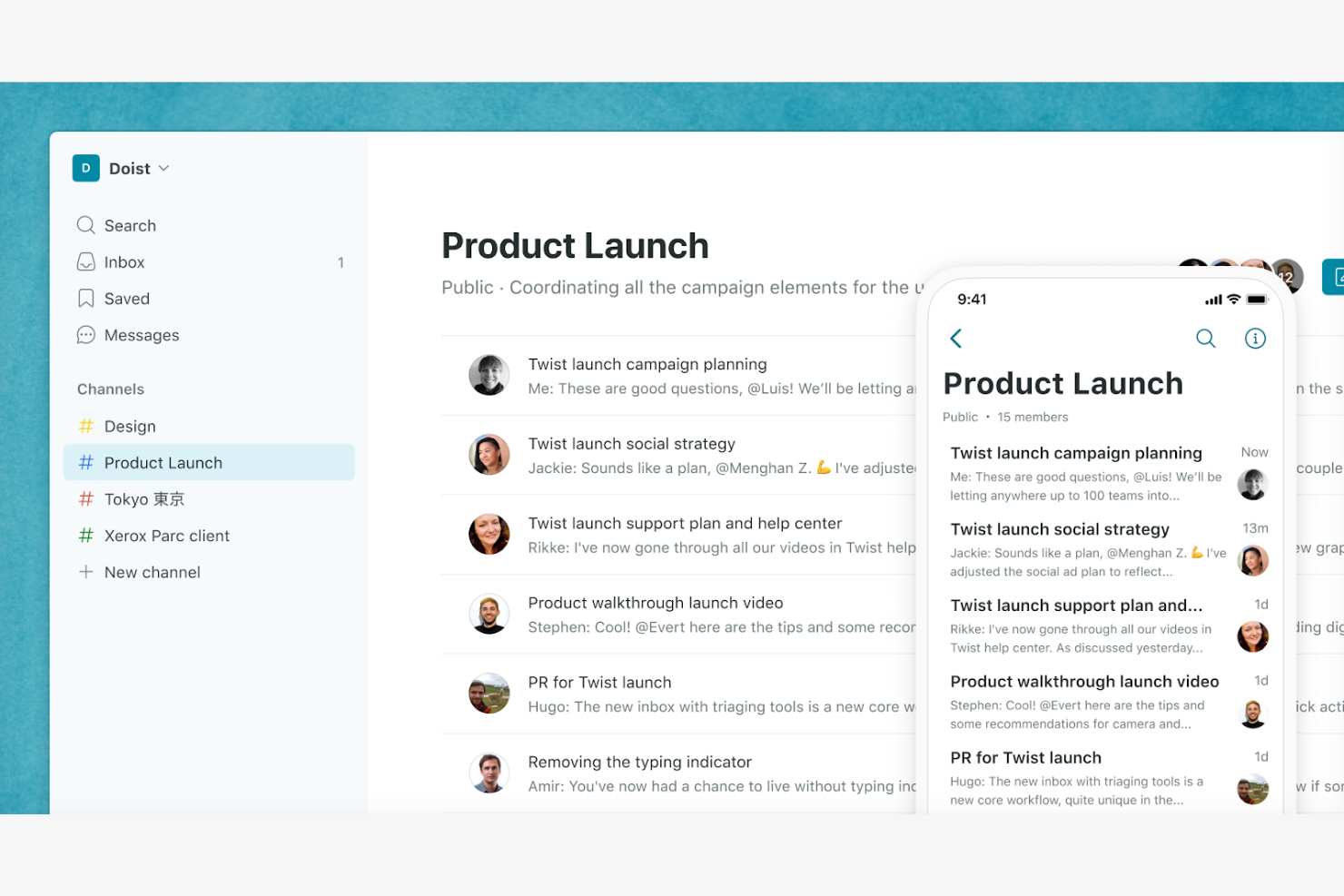
Twist è uno strumento per la comunicazione tra team, progettato per le organizzazioni che danno priorità a un lavoro concentrato e ponderato. La sua principale base di utenti comprende team distribuiti e aziende che apprezzano il lavoro approfondito senza interruzioni costanti.
Perché è una buona alternativa a Slack: Twist privilegia la comunicazione asincrona, consentendo al team di lavorare al proprio ritmo senza la pressione di dover rispondere immediatamente. La piattaforma organizza le conversazioni in filoni, facilitando il monitoraggio delle discussioni e la ricerca delle informazioni. Grazie a un'interfaccia priva di distrazioni, Twist aiuta il team a concentrarsi sulle attività senza il rumore delle notifiche costanti. Questo approccio favorisce un ambiente di lavoro più equilibrato e produttivo.
Funzionalità e integrazioni principali:
Le funzionalità includono la possibilità di creare e gestire filoni per discussioni organizzate. Twist offre anche una modalità priva di distrazioni, che consente al team di concentrarsi sul lavoro senza interruzioni. La piattaforma mette a disposizione una cronologia consultabile, così trovare conversazioni e informazioni passate è semplice.
Le integrazioni includono Asana, Trello, GitHub, Zapier, Todoist, Google Calendar, Google Drive e altro.
Pros and Cons
Pros:
- Modello di comunicazione asincrona
- Organizzazione delle conversazioni in filoni
- Interfaccia priva di distrazioni
Cons:
- Curva di apprendimento per i nuovi utenti
- Mancanza di chiamate audio/video integrate

Clariti
Ideale per organizzare la comunicazione del team
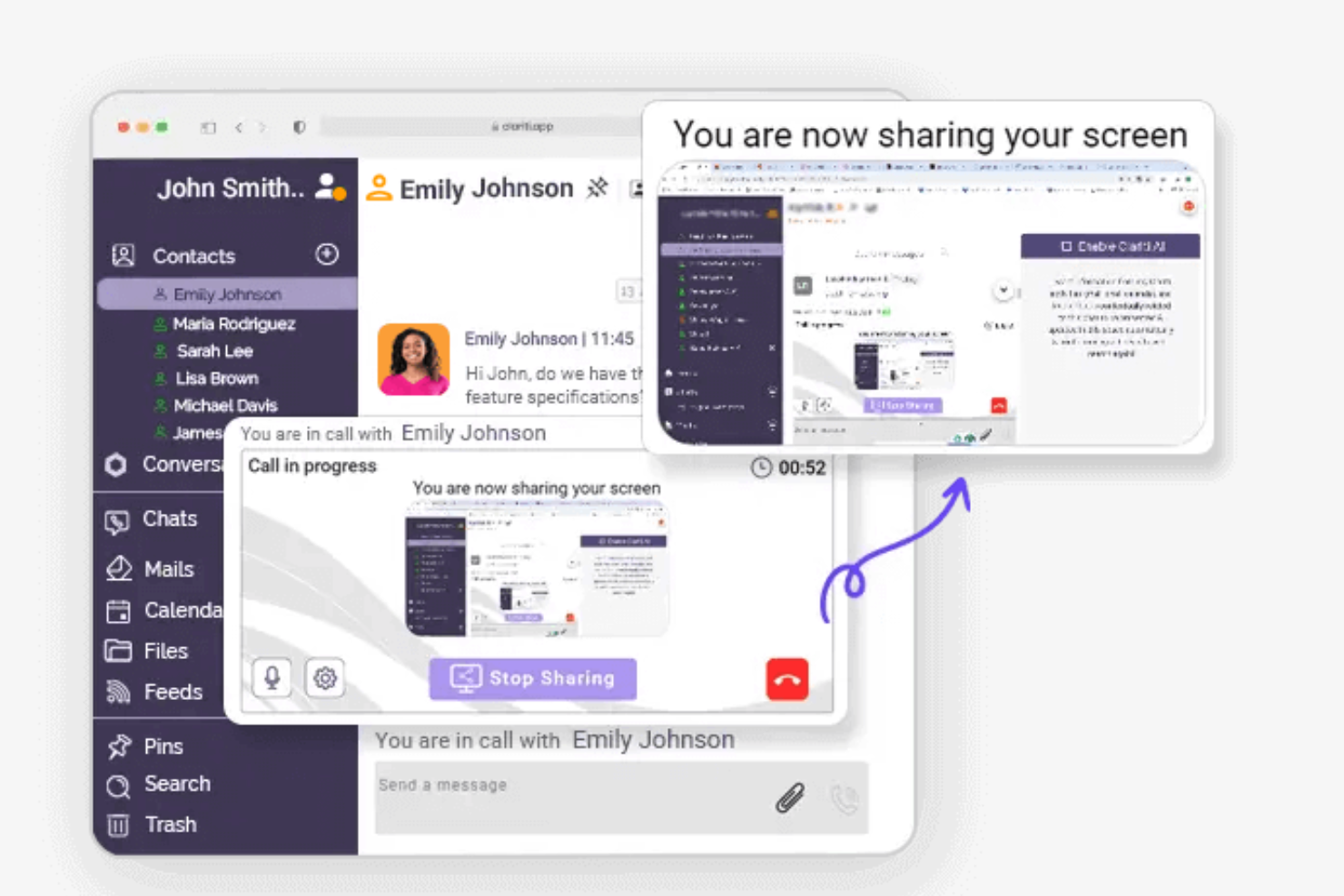
Clariti è uno strumento di comunicazione e collaborazione rivolto alle aziende che desiderano organizzare in modo efficiente le proprie conversazioni e attività. I suoi utenti principali sono i team che necessitano di un approccio coeso alla gestione di email, chat e documenti in un unico luogo.
Perché è una buona alternativa a Slack: Clariti offre la possibilità di collegare email, chat e documenti correlati in conversazioni concatenate, una funzionalità che Slack non offre. Questa caratteristica aiuta il team a mantenere tutte le informazioni pertinenti insieme, riducendo il tempo dedicato alla ricerca delle comunicazioni passate. Clariti supporta inoltre le chiamate vocali e la condivisione dello schermo, favorendo la collaborazione all'interno del team. La sua attenzione all'organizzazione e all'integrazione di diverse forme di comunicazione lo rende uno strumento prezioso per i team che necessitano di una soluzione di comunicazione completa.
Funzionalità e integrazioni principali:
Le funzionalità includono la possibilità di organizzare conversazioni e contenuti in discussioni collegate, mantenendo il team concentrato e riducendo il disordine. La funzionalità integrata di chiamata vocale di Clariti consente di comunicare verbalmente senza uscire dalla piattaforma. Lo strumento supporta anche la condivisione dello schermo, facilitando la collaborazione e le presentazioni da remoto.
Le integrazioni includono Salesforce, Stripe, Tableau, Power BI e altro.
Pros and Cons
Pros:
- Collega email, chat e documenti
- Organizzazione fluida della comunicazione
- Chiamate vocali integrate
Cons:
- Potrebbe non essere adatto alle esigenze in tempo reale
- Opzioni di personalizzazione limitate

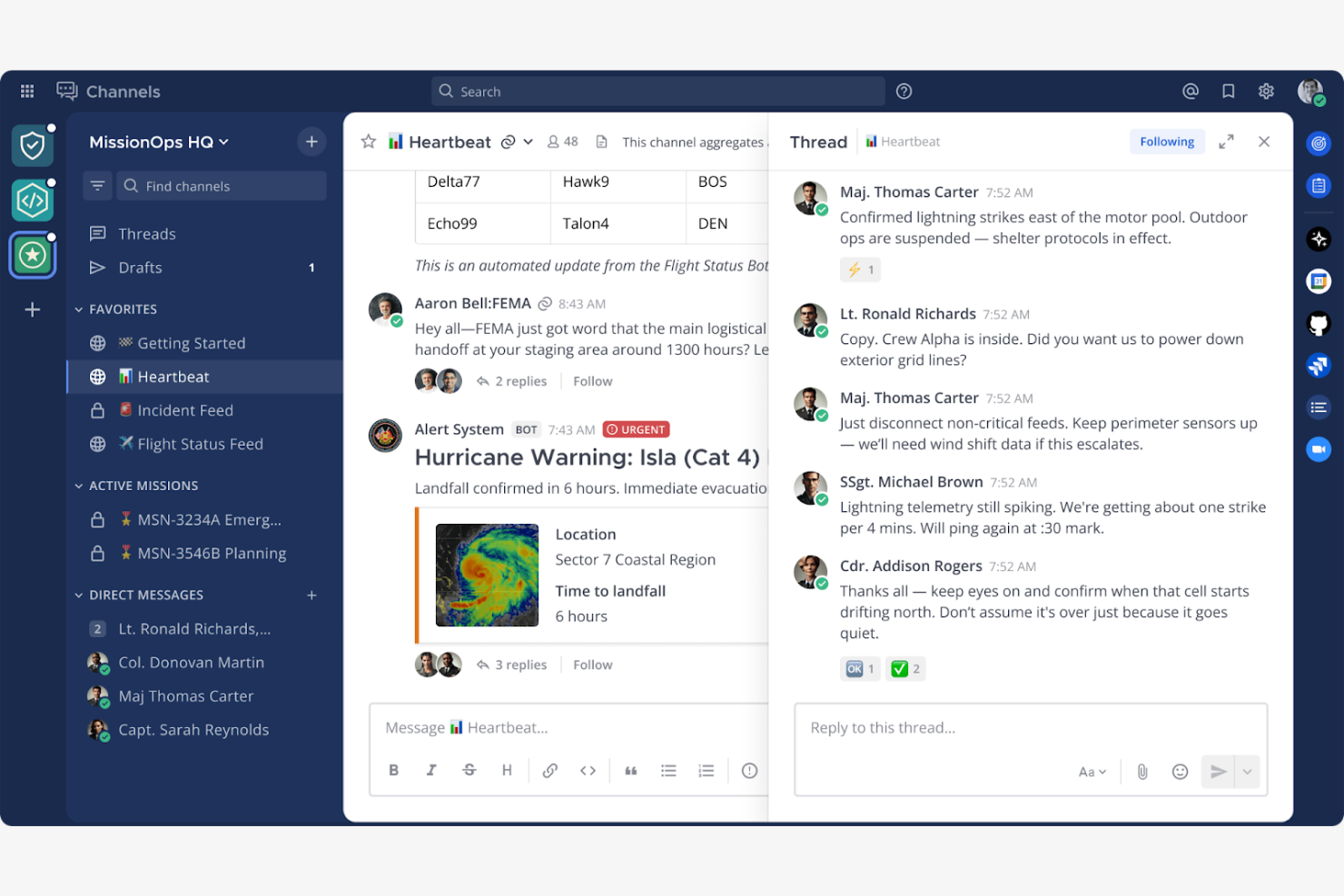
Mattermost è una piattaforma di messaggistica open source progettata per le organizzazioni che necessitano di soluzioni di comunicazione sicure e personalizzabili. I suoi utenti principali includono professionisti IT, sviluppatori e team che si concentrano sulla privacy e sul controllo dei dati.
Perché è una buona alternativa a Slack: Mattermost offre opzioni di hosting autonomo, garantendo che i dati rimangano sotto il tuo controllo, a differenza dell'approccio basato sul cloud di Slack. La piattaforma supporta funzionalità di chat private e di gruppo, consentendo al tuo team di collaborare efficacemente. Supporta l'hosting autonomo e controlli di sicurezza aziendali, dando priorità alla protezione delle comunicazioni. La sua natura open source consente inoltre un'ampia personalizzazione, rendendola adattabile alle esigenze specifiche del tuo team.
Funzionalità e integrazioni principali:
Le funzionalità includono conversazioni organizzate in thread, che aiutano a strutturare le discussioni e a mantenere chiari gli argomenti. Mattermost offre anche il supporto multilingue, utile per i team internazionali. L'interfaccia personalizzabile della piattaforma consente di adattare l'aspetto e lo stile al marchio della tua organizzazione.
Le integrazioni includono GitLab, Jira, Jenkins, GitHub, Zoom, Zendesk e altro.
Pros and Cons
Pros:
- Elevato livello di personalizzazione
- Grande attenzione alla sicurezza
- Adatto ai team IT e di sviluppo
Cons:
- Potrebbe richiedere competenze tecniche
- Funzionalità video e di chiamata limitate, che spesso richiedono integrazioni di terze parti

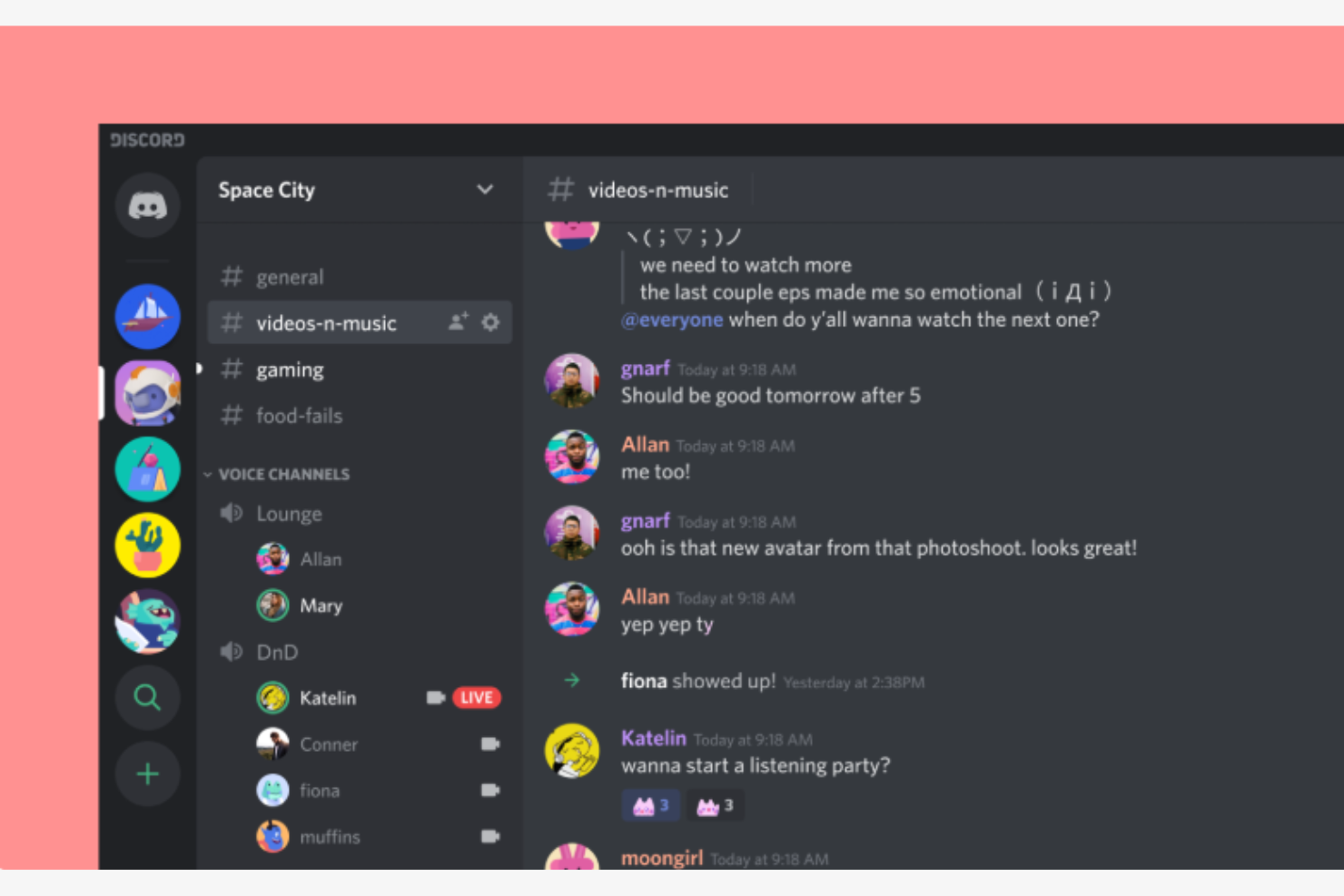
Discord è una piattaforma di comunicazione ampiamente utilizzata dai giocatori per le chat vocali, video e testuali. È anche popolare tra i professionisti come hub di comunicazione, consentendo l'interazione e la collaborazione in tempo reale.
Perché è una valida alternativa a Slack: Discord offre canali vocali per comunicazioni vocali spontanee, particolarmente utili per le sessioni di lavoro collaborative. La configurazione personalizzabile dei server della piattaforma consente di creare spazi dedicati a diversi argomenti o gruppi. Grazie alle funzionalità audio e video di alta qualità e agli strumenti per la creazione di comunità, come ruoli e autorizzazioni, supporta inoltre una gestione dei gruppi organizzata ed efficiente.
Funzionalità e integrazioni principali:
Le funzionalità includono la condivisione dello schermo, che consente di condividere lo schermo o le presentazioni con il proprio team. La funzione push-to-talk di Discord garantisce comunicazioni vocali chiare e controllate. La piattaforma offre inoltre canali testuali per discussioni mirate e la condivisione di informazioni.
Le integrazioni includono YouTube, Spotify, Twitch, Reddit, Twitter, PayPal, Steam, Nightbot, MEE6 e altro.
Pros and Cons
Pros:
- Strumenti per la creazione di comunità
- Comunicazione vocale spontanea
- Adatto alle comunità non dedicate al gaming
Cons:
- Incentrato principalmente sul gaming
- Può risultare complesso per l'uso aziendale e potrebbe richiedere un breve periodo di apprendimento
Altre alternative a Slack
\u003cspan style=\u0022font-weight: 400\u0022\u003eEcco alcune ulteriori alternative a Slack che non sono state incluse nella mia selezione, ma che vale comunque la pena prendere in considerazione:\u003c/span\u003e


Come valuto le alternative a Slack
Valuto le alternative a Slack su due livelli: la base che ogni strumento deve offrire per entrare nell'elenco e gli elementi distintivi che contano davvero per i team che gestiscono progetti tra canali e fusi orari.
Funzionalità principali (requisiti imprescindibili per questo elenco)
Quando seleziono gli strumenti per il mio elenco, assegno a ciascuno un punteggio su una scala da 0 (non offre la funzionalità) a 5 (eccelle in quest'area) per ogni funzionalità principale elencata di seguito. Poi converto il punteggio totale dello strumento in una percentuale. Ogni strumento deve raggiungere un punteggio totale minimo del 65% per essere preso in considerazione.
- Messaggistica in tempo reale: cerco canali persistenti, messaggi diretti di gruppo e accesso per gli ospiti, così i team di progetto possono separare le conversazioni per flusso di lavoro, cliente o sprint.
- Conversazioni organizzate in thread: i thread impediscono che gli aggiornamenti quotidiani, i blocchi e i feedback sul design finiscano sepolti in un canale molto attivo. Verifico quanto siano visibili e ricercabili i thread.
- Condivisione e ricerca dei file: valuto se sia possibile inserire in un canale un documento dei requisiti o un mockup e ritrovarlo effettivamente settimane dopo tramite una ricerca a testo integrale o filtrata.
- Chiamate vocali e video: le riunioni rapide sostituiscono il ciclo del "possiamo sentirci in chiamata?". Cerco funzionalità native audio/video con condivisione dello schermo per sincronizzazioni estemporanee e revisioni degli sprint.
- Integrazioni con gli strumenti di progetto: collegare la chat a strumenti come Jira, Asana o Monday permette agli aggiornamenti di stato di confluire automaticamente nei canali. Verifico la presenza di connettori nativi e l'ampiezza delle API.
- Notifiche e stato di presenza: valuto quanto siano granulari i controlli delle notifiche: se sia possibile silenziare i canali durante i periodi di concentrazione, impostare stati personalizzati e configurare regole di avviso specifiche per ciascun canale.
Una volta ottenuto un elenco di strumenti che soddisfano questi criteri, considero ciò che distingue ogni piattaforma.
Fattori distintivi (ciò che differenzia i fornitori)
Ecco come confronto e metto a paragone i diversi fornitori:
Funzionalità di rilievo
I riepiloghi basati sull'intelligenza artificiale rappresentano un importante elemento distintivo: cerco strumenti che consentano a un responsabile di progetto di recuperare le attività notturne di un canale senza scorrere centinaia di messaggi. Anche l'automazione dei flussi di lavoro è importante, in particolare la possibilità di trasformare un messaggio della chat in un'attività o di avviare una sequenza di approvazione senza uscire dalla conversazione. Valuto inoltre se una piattaforma includa funzionalità native di gestione dei progetti, come bacheche delle attività o cronologie, poiché ciò può eliminare completamente uno strumento dal proprio insieme di applicazioni.
Oltre le funzionalità
I modelli di prezzo e di licenza variano notevolmente in questa categoria, quindi verifico come i piani gratuiti gestiscano i limiti della cronologia dei messaggi e gli account degli ospiti: entrambi possono rappresentare ostacoli insormontabili per i team di progetto che collaborano con consulenti esterni. Le certificazioni di sicurezza e conformità come SOC 2 e ISO 27001 sono importanti quando i progetti riguardano materiali sensibili. Valuto inoltre la scalabilità, in particolare se uno strumento supporti strutture con più spazi di lavoro e canali condivisi, poiché gli uffici di gestione dei progetti in crescita spesso devono segmentare i portafogli senza creare istanze completamente separate.
Perché cercare un'alternativa a Slack?
Sebbene Slack sia una buona scelta per la comunicazione e la collaborazione tra team, sono diversi i motivi per cui alcuni utenti cercano soluzioni alternative. Potresti essere alla ricerca di un'alternativa a Slack perché:
- Hai bisogno di più funzionalità di collaborazione
- Il tuo team richiede una sicurezza avanzata
- Desideri una migliore integrazione con gli strumenti CRM esistenti
- Il tuo budget non è compatibile con i prezzi del piano a pagamento di Slack
- Il tuo team ha bisogno di funzionalità di accesso offline
Se ti riconosci in una di queste situazioni, sei nel posto giusto. Il mio elenco comprende diverse opzioni di software per la comunicazione tra team e soluzioni tutto-in-uno più adatte ai team che affrontano queste difficoltà con Slack e cercano soluzioni alternative.
Funzionalità principali di Slack
Ecco alcune delle funzionalità principali di Slack, per aiutarti a mettere a confronto ciò che offrono le soluzioni alternative:
- Canali: organizza la comunicazione del tuo team creando spazi dedicati per diversi progetti, elenchi di attività o argomenti.
- Slack Connect: collabora in sicurezza con partner esterni, sostituendo le comunicazioni tradizionali via email.
- Riunioni audio/video: organizza riunioni rapide in tempo reale con il tuo team utilizzando chiamate audio o video.
- Generatore di flussi di lavoro: automatizza le attività e i processi di routine con i bot, per risparmiare tempo e ridurre il lavoro manuale.
- Integrazioni: connettiti a più di 2.600 app per centralizzare documenti e flussi di lavoro e migliorare la produttività.
- Modelli: utilizza modelli predefiniti per una gestione efficiente dei progetti e l'avvio delle attività.
- Canvas: crea documenti scalabili e collabora in tempo reale con il tuo team.
- Sicurezza aziendale: proteggi i tuoi dati con funzionalità di sicurezza e strumenti per la conformità.
- Integrazione Salesforce: porta gli insight di Salesforce in Slack per migliorare l'allineamento del team e velocizzare i flussi di lavoro.