

I 10 migliori software per la gestione degli spazi d’ufficio nel 2026

Elenco dei migliori software per la gestione degli spazi d'ufficio


Il software per la gestione degli spazi d'ufficio offre un unico luogo in cui assegnare le scrivanie, pianificare i trasferimenti e supervisionare i costi relativi al luogo di lavoro e agli immobili. Se gestisci team in evoluzione, orari di lavoro ibridi o portafogli in crescita, lo strumento giusto ti aiuta ad adattarti rapidamente e a mantenere la conformità sotto controllo. Questa guida analizza i migliori software per la gestione degli spazi d'ufficio, così puoi vedere quali soluzioni affrontano la gestione delle planimetrie, la reportistica ESG e l'analisi dei dati e trovare quella più adatta alle tue esigenze in termini di spazio di lavoro, conformità e reportistica.
Perché fidarsi dei nostri consigli sui software
Il nostro team testa e recensisce software dal 2012. In quanto project manager noi stessi, sappiamo quanto sia difficile — e importante — scegliere il software giusto.
Per questa guida, abbiamo valutato gli strumenti attraverso test pratici e ricerche indipendenti, assegnando un punteggio agli strumenti in base ai nostri criteri di selezione. Ci basiamo inoltre sulle competenze di leader di pensiero del settore e di professionisti attivi nella gestione dei progetti.
Le nostre recensioni riflettono il nostro giudizio editoriale umano, non un discorso di vendita.
Revisori esperti:
Tabella comparativa dei software per la gestione degli spazi d'ufficio
Questa tabella comparativa riassume i dettagli sui prezzi delle mie migliori selezioni di software per la gestione degli spazi d’ufficio:
| Tool | Best For | Trial Info | Price | ||
|---|---|---|---|---|---|
| 1 | Ideale per la reportistica ESG collegata alla spesa immobiliare | Demo gratuita disponibile | Prezzi su richiesta | Website | |
| 2 | Ideale per analisi unificate degli spazi e dati dei sensori IoT | Demo gratuita disponibile | Prezzi su richiesta | Website | |
| 3 | Ideale per il monitoraggio dei costi e dei contratti di locazione del portafoglio immobiliare | Demo gratuita disponibile | Prezzi disponibili su richiesta | Website | |
| 4 | Ideale per la gestione dei trasferimenti e la ripartizione proporzionale degli affitti | Demo gratuita disponibile | Prezzi su richiesta | Website | |
| 5 | Ideale per la gestione del luogo di lavoro guidata dalle planimetrie | Demo gratuita disponibile | Prezzi su richiesta | Website | |
| 6 | Ideale per la gestione integrata di visitatori e consegne | Demo gratuita disponibile | Prezzi su richiesta | Website | |
| 7 | Ideale per IWMS per ambienti di lavoro autorizzati FedRAMP | Demo gratuita disponibile | Prezzi su richiesta | Website | |
| 8 | Ideale per la gestione del portafoglio immobiliare a livello IWMS | Demo gratuita disponibile | Prezzi su richiesta | Website | |
| 9 | Ideale per i report sui costi degli spazi e sui riaddebiti | Demo gratuita disponibile | Prezzi su richiesta | Website | |
| 10 | Ideale per la gestione degli ambienti di lavoro nei settori regolamentati | Demo gratuita disponibile | Prezzi su richiesta | Website |
Recensioni dei software per la gestione degli spazi d'ufficio
Di seguito trovi i miei riepiloghi dettagliati dei migliori software per la gestione degli spazi d’ufficio inclusi nel mio elenco ristretto. Le mie recensioni offrono uno sguardo approfondito sulle funzionalità, sui migliori casi d’uso e sulle capacità di ciascuna piattaforma, per aiutarti a trovare quella più adatta a te.

Ideale per la reportistica ESG collegata alla spesa immobiliare
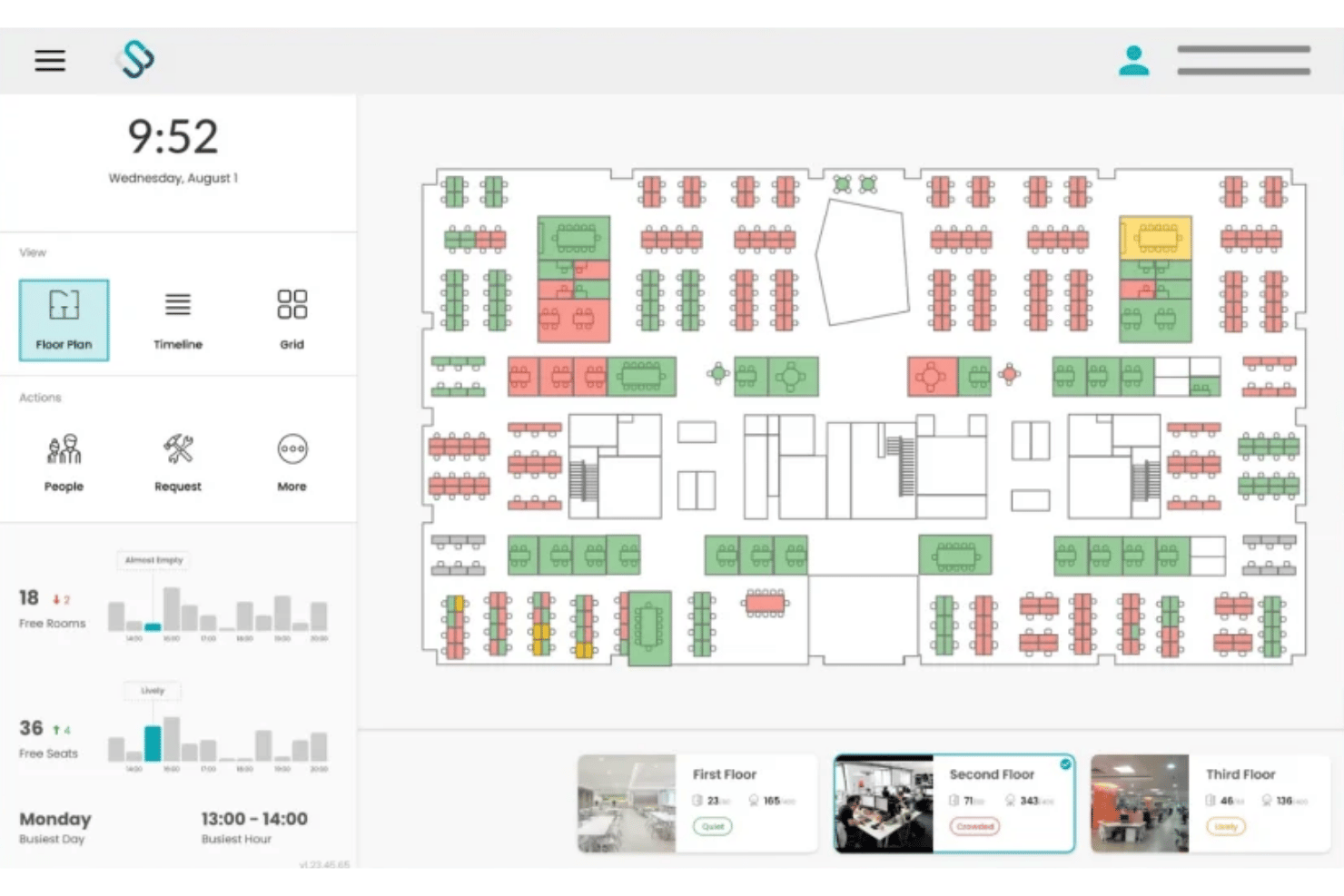
Spacewell è una piattaforma di gestione degli ambienti di lavoro che combina la prenotazione di scrivanie e sale, la visualizzazione interattiva delle planimetrie, l'analisi dell'occupazione basata sull'IoT e la reportistica energetica ESG per portafogli immobiliari distribuiti su più sedi.
Per chi è più adatto Spacewell?
Spacewell è particolarmente adatto ai team aziendali che si occupano di immobili e strutture e che gestiscono portafogli distribuiti su più sedi, dove i costi degli spazi, il consumo energetico e la reportistica ESG devono essere collegati in un unico sistema.
Perché ho scelto Spacewell
Spacewell si è guadagnato un posto nella mia rosa di candidati perché il modulo Energia collega la reportistica sulle emissioni di carbonio, l'analisi del fotovoltaico e i pannelli di controllo ESG direttamente ai dati dei centri di costo per ogni prenotazione di scrivania e sala. Apprezzo molto il fatto che, quando un direttore immobiliare deve giustificare l'accorpamento di due piani, la piattaforma mostri nella stessa schermata sia la spesa energetica sia i dati relativi al costo per postazione. Le simulazioni degli spazi consentono di modellare scenari di densificazione o consolidamento prima di prendere una decisione, così la valutazione ESG è supportata da dati effettivi sull'utilizzo.
Funzionalità principali di Spacewell
- Prenotazione conversazionale tramite IA: Un assistente IA integrato consente agli utenti di prenotare scrivanie o sale usando il linguaggio naturale in oltre 30 lingue e, apprendendo dalle precedenti abitudini di prenotazione, propone suggerimenti pertinenti.
- Monitoraggio della qualità dell'aria interna: I sensori monitorano in tempo reale CO2, livelli di COV, temperatura e umidità, mentre i dati sulla qualità dell'aria interna vengono visualizzati direttamente sulle planimetrie interattive insieme allo stato di occupazione.
- Ricerca dei colleghi: A partire dal piano Avanzato, i dipendenti possono cercare i propri colleghi e visualizzare le loro assegnazioni di postazione attuali su una planimetria aggiornata in tempo reale, per coordinare le giornate in ufficio.
- Integrazione dei sensori IoT: Spacewell si collega a una rete di sensori indipendente dall'hardware, tra cui VergeSense, XY Sense e Cisco Spaces, raccogliendo dati sul movimento, sul conteggio delle persone e sull'ambiente in un'unica visualizzazione dell'occupazione.
Integrazioni di Spacewell
Spacewell offre integrazioni native con Microsoft 365, Outlook, Teams, Google Workspace, Zoom, SAP, Oracle, ServiceNow, Workday, VergeSense, XY Sense e Cisco Spaces. È disponibile un'API per le integrazioni personalizzate.
Pros and Cons
Pros:
- Collega i costi ESG e quelli degli spazi
- La piattaforma indipendente dai sensori supporta portafogli di grandi dimensioni
- Monitora i parametri della qualità dell'aria interna
Cons:
- Non dispone del monitoraggio dei posti auto esterni
- Limita l'accesso indipendente tramite app mobile

HubStar
Ideale per analisi unificate degli spazi e dati dei sensori IoT
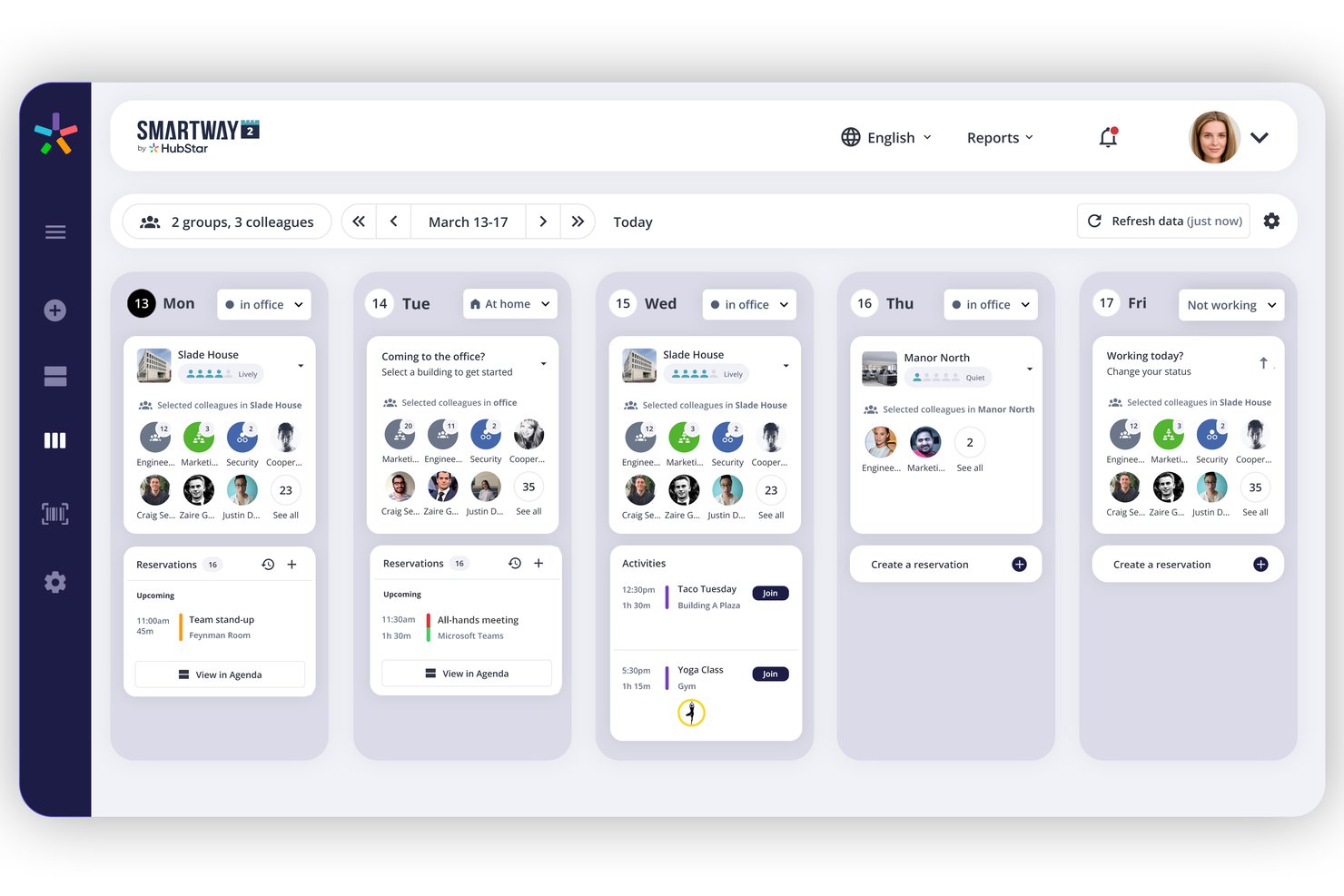
HubStar è una piattaforma modulare per la gestione degli ambienti di lavoro che combina la prenotazione di scrivanie e sale, l'analisi dell'occupazione basata su sensori IoT, la gestione interattiva delle planimetrie e la gestione dei visitatori per portafogli di uffici distribuiti su più sedi.
Per chi è più adatto HubStar?
HubStar è particolarmente adatto ai team aziendali responsabili delle strutture e degli ambienti di lavoro che gestiscono portafogli distribuiti su più sedi e necessitano di unificare in un'unica piattaforma i dati sull'occupazione provenienti da sensori IoT, Wi-Fi e sistemi di badge.
Perché ho scelto HubStar
HubStar si è guadagnato un posto nella mia selezione perché nessun'altra piattaforma che ho testato raccoglie i dati sull'occupazione da così tante fonti in un unico livello di analisi. PresenceIQ combina i dati dei punti di accesso Wi-Fi (Aruba, Cisco), le scansioni dei badge, i sensori proprietari e dispositivi IoT di terze parti come VergeSense e Butlr, per offrirti un quadro davvero completo dell'utilizzo degli spazi. Apprezzo anche il fatto che le analisi non siano soltanto descrittive: il livello prescrittivo presenta raccomandazioni specifiche per adeguare le dimensioni delle aree e riconfigurare le zone in base ai modelli reali di presenza.
Funzionalità principali di HubStar
- Assistente digitale basato sull'IA: consiglia i giorni ottimali in cui ciascun dipendente dovrebbe lavorare in ufficio, sulla base delle preferenze e dello storico, quindi prenota automaticamente la scrivania o la sala migliore disponibile.
- Gestione dei visitatori: gestisce il check-in tramite chiosco self-service, l'acquisizione delle foto, la firma degli accordi di riservatezza, la stampa dei badge e il monitoraggio dei visitatori in tempo reale all'interno della stessa piattaforma.
- Gestione delle aree e delle zone: assegna i team a zone specifiche della planimetria con criteri di prenotazione configurabili, rapporti di assegnazione dei posti e regole di prenotazione fino al livello della singola postazione di lavoro.
- Esportazione dei dati verso piattaforme di BI: trasferisce direttamente i dati sull'occupazione e sull'utilizzo a Power BI, Tableau, Qlik e ThoughtSpot per la reportistica e l'analisi esterne.
Integrazioni di HubStar
HubStar offre integrazioni native nell'ecosistema Microsoft (Teams, Outlook, Exchange, Azure AD), oltre a Zoom, Workday, PeopleSoft, Rippling, Okta, Ping Identity, VergeSense e provider Wi-Fi come Cisco e Aruba, insieme all'esportazione dei dati verso Power BI, Tableau, Qlik e ThoughtSpot. È disponibile un'API aperta per le integrazioni personalizzate.
Pros and Cons
Pros:
- Aggrega i dati sull'occupazione provenienti da sensori e Wi-Fi
- L'assistente basato sull'IA prenota automaticamente le scrivanie e le sale ottimali
- L'apprendimento automatico supporta la modifica delle planimetrie
Cons:
- Non offre un flusso di lavoro dedicato alla gestione dei trasferimenti
- Limita l'accesso indipendente all'app mobile

Planon
Ideale per il monitoraggio dei costi e dei contratti di locazione del portafoglio immobiliare
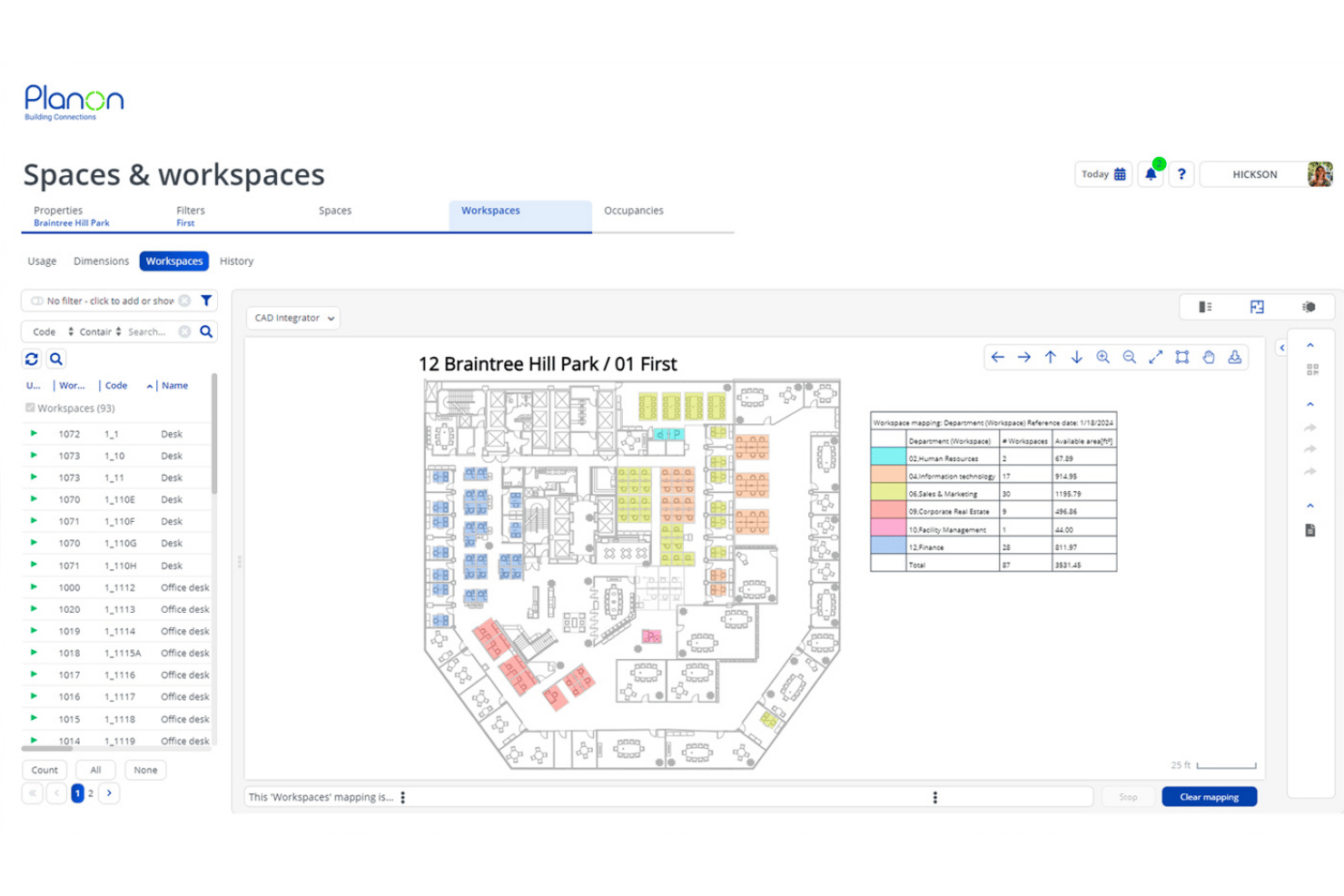
Planon è una piattaforma IWMS aziendale che combina la prenotazione di spazi e scrivanie, la gestione delle planimetrie integrata con CAD/BIM, l'analisi dell'occupazione basata su IoT, la contabilizzazione dei contratti di locazione e il monitoraggio del portafoglio immobiliare per operazioni globali su più sedi.
Per chi è più adatto Planon?
Planon è pensato per i team aziendali che si occupano di immobili e strutture e che gestiscono portafogli ampi distribuiti su più sedi, con requisiti complessi di contabilizzazione dei contratti di locazione e monitoraggio dei costi.
Perché ho scelto Planon
Planon è entrato nella mia lista ristretta perché nessun'altra piattaforma che ho testato è paragonabile alla sua profondità nella visibilità dei costi del portafoglio immobiliare e nella contabilizzazione dei contratti di locazione. Apprezzo in particolare il modo in cui combina il monitoraggio dei contratti di locazione conforme a IFRS 16/ASC 842 con l'analisi dei riaddebiti dei costi per postazione, permettendo ai team finanziari e delle strutture di lavorare sugli stessi numeri. Aggiungendo la pianificazione degli scenari collegata direttamente alle planimetrie CAD, è possibile simulare la riorganizzazione completa di un piano confrontandola con i dati aggiornati sui costi di locazione prima ancora di spostare una sola scrivania.
Funzionalità principali di Planon
- Integrazione dei sensori IoT: Collega sensori di occupazione, monitor della qualità dell'aria e sistemi di gestione degli edifici per inserire dati in tempo reale nei pannelli di controllo sull'utilizzo.
- Zonizzazione per quartieri: Assegna i team a zone definite del piano con criteri di prenotazione configurabili e limiti di capienza per reparto.
- Gestione dei visitatori: La registrazione autonoma dei visitatori, le notifiche agli ospitanti e il monitoraggio sicuro del flusso dei visitatori sono integrati direttamente nella piattaforma.
- Connessione per l'analisi: Esporta i dati sul luogo di lavoro verso strumenti di BI come Power BI, Tableau o Snowflake tramite API per creare report personalizzati.
Integrazioni di Planon
Planon offre integrazioni native con Microsoft Outlook, Microsoft Teams, Microsoft Places, Google Calendar, SAP, Oracle, AutoCAD e Autodesk Revit. È disponibile un'API per le integrazioni personalizzate.
Pros and Cons
Pros:
- Planimetrie in tempo reale con integrazione CAD/BIM
- Analisi avanzata dell'occupazione tramite sensori IoT
- Pianificazione degli scenari integrata per gli spostamenti degli spazi
Cons:
- Non include badge per visitatori personalizzati con il marchio
- Non offre il monitoraggio dei posti auto esterni

Ideale per la gestione dei trasferimenti e la ripartizione proporzionale degli affitti
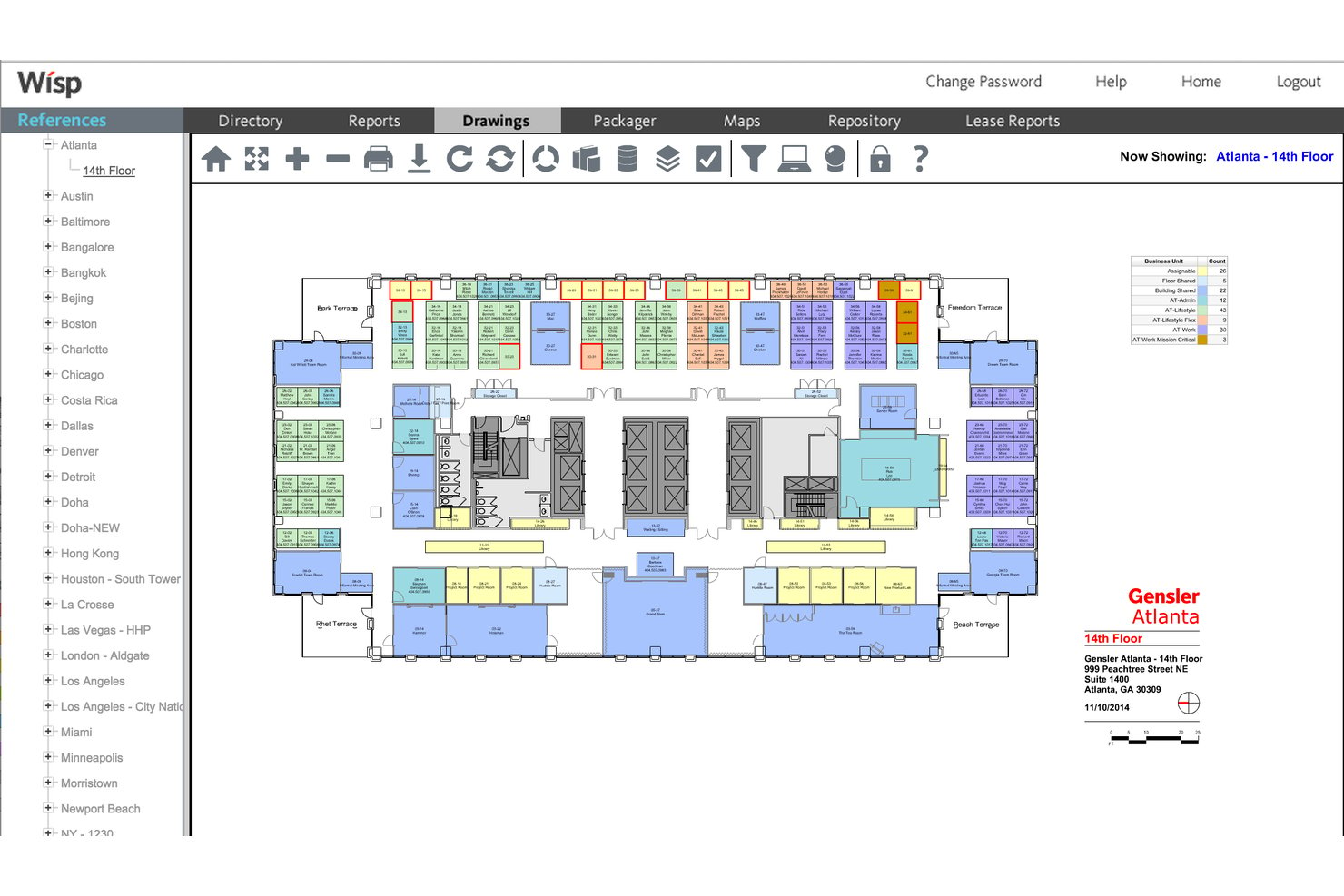
Wisp by Apex42 è una piattaforma per la gestione degli spazi degli uffici basata su planimetrie interattive, gestione dei trasferimenti, prenotazioni delle postazioni, analisi dell'utilizzo e report sulla ripartizione proporzionale degli affitti e sul riaddebito dei costi per più sedi.
Per chi è più adatto Wisp by Apex42?
Wisp è particolarmente adatto ai team aziendali responsabili delle strutture e degli immobili che gestiscono portafogli con più sedi, un elevato ricambio delle postazioni e complesse esigenze di allocazione interna dei costi.
Perché ho scelto Wisp by Apex42
Ho incluso Wisp by Apex42 tra le mie scelte principali perché le sue funzionalità di gestione dei trasferimenti e di ripartizione proporzionale degli affitti sono le più sviluppate che abbia visto in questa categoria. Il flusso di lavoro MAC configurabile gestisce le richieste di trasferimento, le approvazioni e gli aggiornamenti automatizzati delle planimetrie dall'inizio alla fine, mentre la pianificazione degli spazi basata su scenari illimitati consente ai team di simulare riorganizzazioni complete senza modificare i dati in uso. Per quanto riguarda i costi, la ripartizione proporzionale degli affitti a 27 livelli consente di addebitare ai singoli reparti la loro superficie esatta all'interno di un portafoglio con più sedi.
Funzionalità principali di Wisp by Apex42
- Planimetrie interattive: Visualizza e modifica planimetrie con più sedi create a partire da disegni CAD, con codifica a colori tramite Colorizers™ per visualizzare reparti, spazi vacanti e occupazione in tutto il portafoglio.
- Report sull'utilizzo degli spazi: Accedi a oltre 50 report predefiniti con analisi dettagliate in tempo reale, dal livello del portafoglio fino alla singola postazione, comprese mappe di calore basate su sensori visualizzate direttamente sulle planimetrie.
- Prenotazioni delle postazioni: Prenota le postazioni da qualsiasi dispositivo con check-in tramite codice QR, rilascio automatico in caso di assenza, opzioni di prenotazione ricorrente e restrizioni basate sulle aree.
- Flusso di lavoro per le richieste di assistenza: Invia e gestisci gli ordini di lavoro per le strutture collegati direttamente a spazi specifici sulle planimetrie, con instradamento configurabile al tecnico delle strutture appropriato.
Integrazioni di Wisp by Apex42
Wisp offre integrazioni native con ADP Workforce Now, UKG, Microsoft Entra ID, Brivo, Google Calendar, Microsoft Outlook, Microsoft Teams e Slack. È disponibile un'API per le integrazioni personalizzate.
Pros and Cons
Pros:
- Aggiornamenti CAD illimitati forniti dal team del fornitore
- Strumenti di automazione della gestione dei trasferimenti leader del settore
- Capacità di ripartizione interna degli affitti a 27 livelli
Cons:
- La prenotazione nativa delle sale è meno visibile rispetto alle alternative
- Strumenti limitati per la creazione di report personalizzati

Ideale per la gestione del luogo di lavoro guidata dalle planimetrie
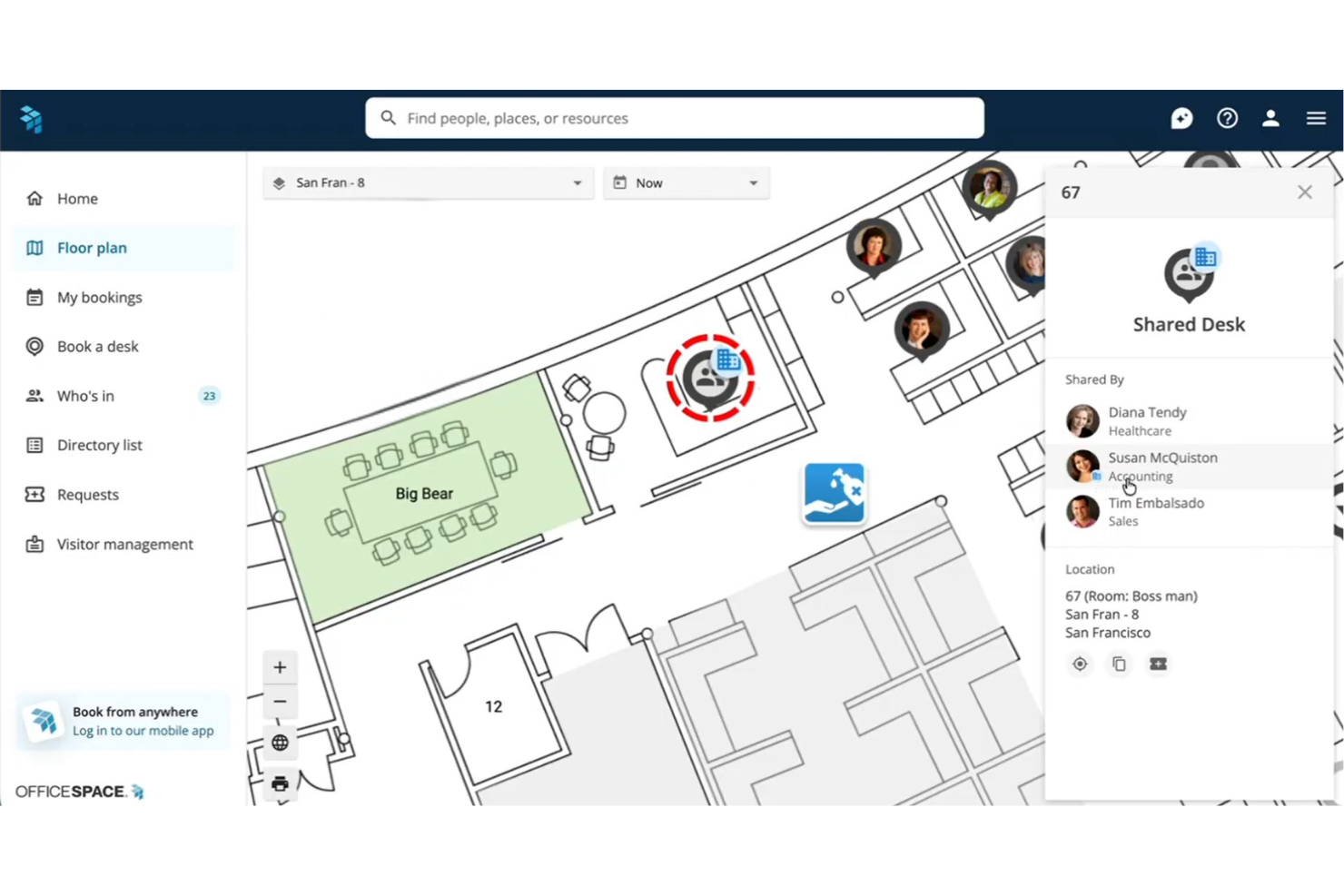
OfficeSpace è una piattaforma di gestione del luogo di lavoro basata su planimetrie interattive, che combina la prenotazione di scrivanie e sale, la gestione dei trasferimenti, l'analisi dell'utilizzo degli spazi e la pianificazione di scenari basata sull'intelligenza artificiale per portafogli di uffici distribuiti su più sedi.
Per chi è più adatto OfficeSpace?
OfficeSpace è particolarmente adatto ai team aziendali che si occupano di strutture e immobili e gestiscono portafogli di uffici complessi distribuiti su più sedi, avendo bisogno che la pianificazione degli spazi basata sulle planimetrie sia al centro del loro flusso di lavoro.
Perché ho scelto OfficeSpace
OfficeSpace si è guadagnato un posto nella mia lista ristretta perché la planimetria è al centro di tutto, non come semplice elemento visivo aggiuntivo, ma come vera interfaccia per prenotare le scrivanie, pianificare i trasferimenti e consultare i dati sull'utilizzo. Apprezzo molto il fatto che OfficeSpace Studio permetta ai team che si occupano delle strutture di modificare direttamente nel browser le assegnazioni delle postazioni, le zone dei quartieri e la disposizione delle sale, senza dover aprire una richiesta di assistenza. È nella pianificazione degli scenari di riorganizzazione e suddivisione che dà il meglio di sé: è possibile modellare una riorganizzazione completa su più piani, confrontare le versioni e combinare gli elementi migliori prima di applicare una singola modifica.
Funzionalità principali di OfficeSpace
- Controlli dei responsabili di quartiere: Assegna ai responsabili dei reparti la gestione delle politiche di prenotazione specifiche per zona, dei limiti di capienza e delle autorizzazioni di accesso nelle aree loro assegnate.
- Gestione dei visitatori con Greetly: Registra gli ospiti tramite chioschi con tablet personalizzati, con registrazione autonoma mediante codice QR, raccolta degli accordi di riservatezza e notifiche ai responsabili tramite Slack, Teams o e-mail.
- Agenti IA per il luogo di lavoro: Una suite di agenti appositamente sviluppati gestisce le richieste relative alle strutture, i suggerimenti sulle giornate di lavoro ibride e le consultazioni sull'utilizzo in linguaggio naturale tramite Insights Agent.
- Integrazione dei dati dei sensori e dei badge: Collega sensori IoT, dati sulla presenza tramite Wi-Fi e sistemi di badge di fornitori come VergeSense e Cisco Meraki per acquisire l'occupazione in tempo reale oltre ai dati delle prenotazioni.
Integrazioni di OfficeSpace
OfficeSpace offre integrazioni native con Slack, Zoom, Google Meet, Workday, ADP, BambooHR, Okta, VergeSense, Cisco Meraki e Jira, oltre a integrazioni native nell'ecosistema Microsoft, tra cui Microsoft 365, Teams, Outlook e Azure AD. Per le integrazioni personalizzate sul piano Pro Plus sono disponibili un'API REST completa e webhook avanzati.
Pros and Cons
Pros:
- Planimetrie interattive in tempo reale per tutte le sedi
- Agenti IA avanzati per la pianificazione degli spazi
- Pianificazione degli scenari per i progetti di gestione dei trasferimenti
Cons:
- Nessun monitoraggio nativo delle consegne dei pacchi
- Interfaccia di amministrazione complessa, secondo le recensioni
New Product Updates from OfficeSpace

OfficeSpace Adds Work Order Status and Cost Reports
OfficeSpace adds Work Order Status and Work Order Cost reports for built-in maintenance reporting. These reports help facilities teams track work order activity and costs without relying on manual spreadsheets. For more information, visit OfficeSpace’s official site.
 .
.
Robin
Ideale per la gestione integrata di visitatori e consegne
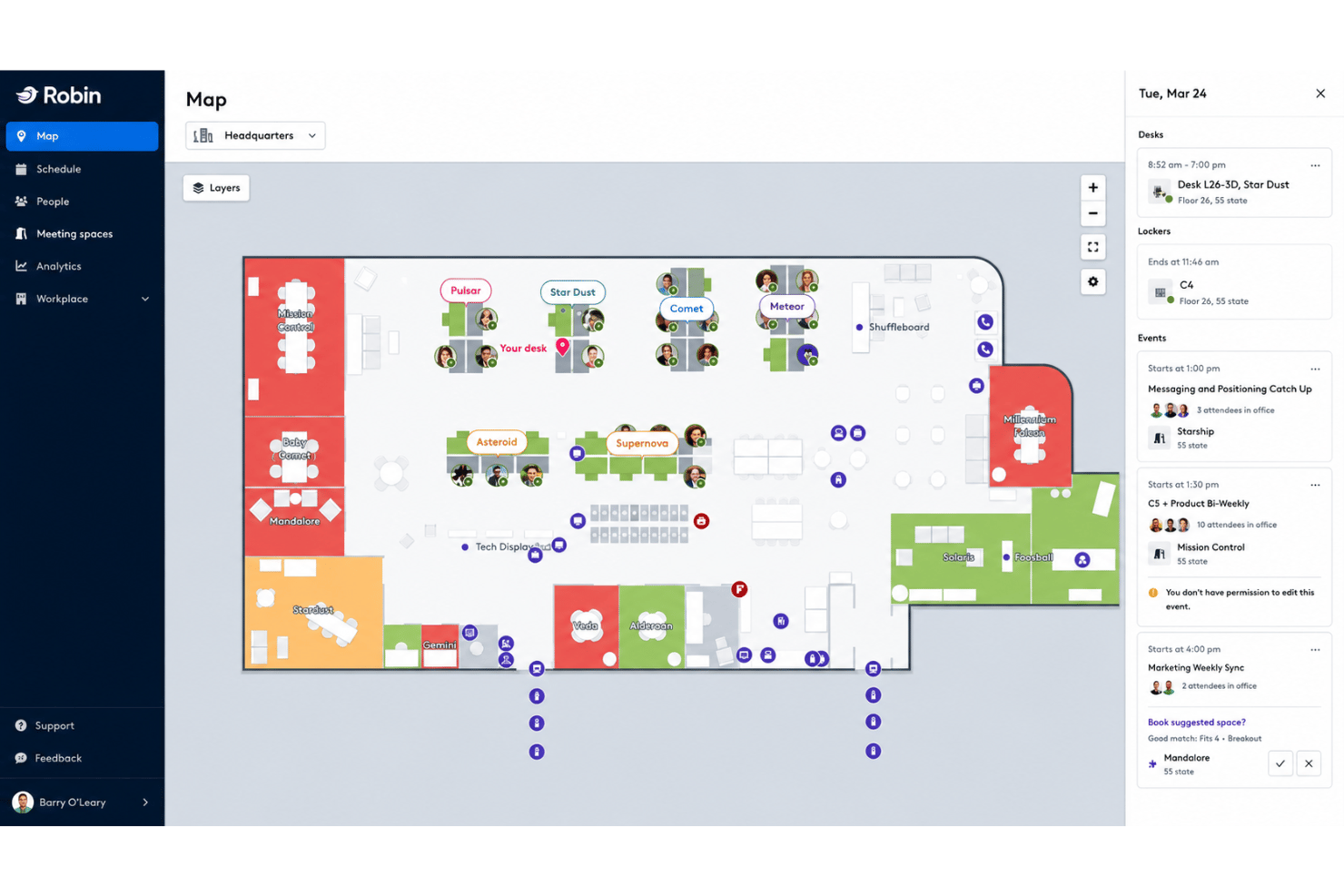
Robin è una piattaforma per la gestione del luogo di lavoro che combina la prenotazione di scrivanie e sale, planimetrie interattive, analisi dell'utilizzo degli spazi, gestione di visitatori e consegne e strumenti per la pianificazione del lavoro ibrido.
Per chi è più indicato Robin?
Robin è particolarmente adatto alle aziende di medie e grandi dimensioni che gestiscono team ibridi distribuiti in più uffici e che hanno bisogno di integrare la gestione di visitatori e consegne nella stessa piattaforma utilizzata per la prenotazione di scrivanie e sale.
Perché ho scelto Robin
Robin è entrato nella mia rosa di finalisti perché nessun'altra piattaforma che ho testato integra così strettamente la gestione di visitatori e consegne nello stesso spazio di lavoro. La pre-registrazione, il check-in autonomo, la stampa dei badge e le notifiche agli ospiti tramite Slack o Teams sono tutte funzioni native, mentre il tracciamento dei pacchi in arrivo si trova nella stessa dashboard delle prenotazioni di scrivanie e sale. Apprezzo anche il fatto che i registri dei visitatori e i dati delle consegne siano ricercabili insieme ai dati delle prenotazioni, così nulla rimane in uno strumento separato.
Funzionalità principali di Robin
- Prenotazione di scrivanie e sale suggerita dall'AI: Robin consiglia e prenota automaticamente scrivanie e sale in base alle abitudini di prenotazione passate e alla vicinanza dei membri del team.
- Controlli di quartiere e zonizzazione: Gli amministratori possono assegnare i team a zone specifiche di scrivanie e configurare autorizzazioni di prenotazione e regole di capacità a livello di reparto.
- Analisi dell'occupazione da più fonti: Robin raccoglie i dati provenienti da passaggi dei badge, sensori di occupazione, check-in tramite Wi-Fi e prenotazioni del calendario in un'unica dashboard di utilizzo.
- Coordinamento della settimana lavorativa: Una vista di pianificazione del team mostra chi lavora in ufficio e in quali giorni della settimana, sincronizzandosi con la posizione di lavoro di Google Calendar.
Integrazioni di Robin
Robin offre integrazioni native con Microsoft 365, Outlook, Teams, Google Calendar, Slack, Zoom, VergeSense, Avigilon, Brivo, Kisi, Okta, OneLogin e Rippling. È disponibile un'API per le integrazioni personalizzate.
Pros and Cons
Pros:
- Dashboard integrata per la gestione di visitatori e consegne
- Prenotazione di scrivanie suggerita dall'AI e prenotazioni automatiche
- Analisi dell'occupazione da più fonti e pianificazione di scenari
Cons:
- Le modifiche alle planimetrie possono richiedere l'assistenza di Robin
- I componenti aggiuntivi per l'analisi richiedono un acquisto separato

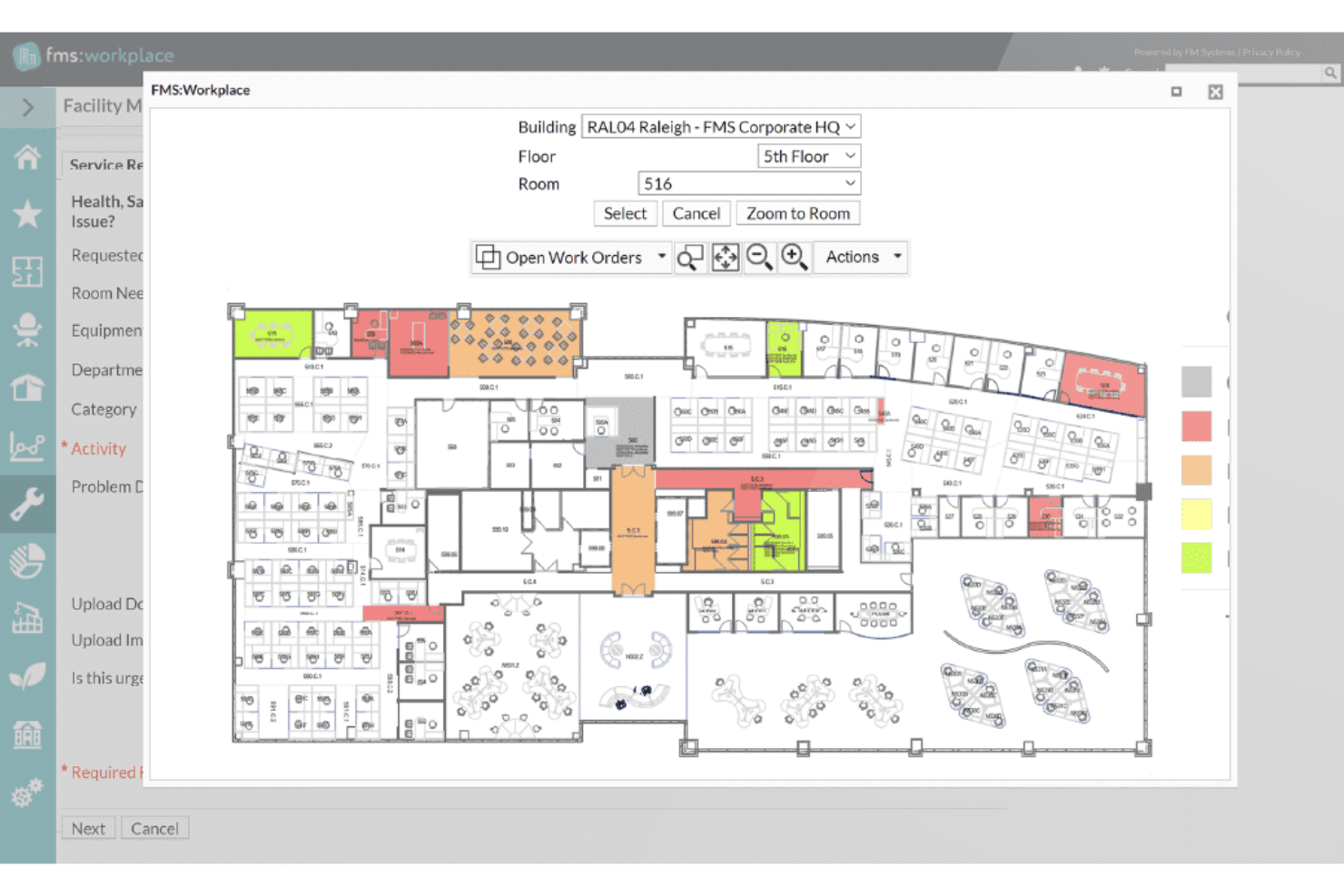
FM:Systems è una piattaforma IWMS modulare che comprende la prenotazione di scrivanie e sale, planimetrie interattive, gestione dei trasferimenti, analisi dell'utilizzo degli spazi, gestione dei visitatori e integrazione con sensori IoT in portafogli a sito singolo e multipli.
Per chi è più indicato FM:Systems?
FM:Systems è particolarmente adatto ai team aziendali che si occupano di strutture e immobili, soprattutto nel settore pubblico, sanitario e dell'istruzione superiore, che necessitano di un IWMS autorizzato FedRAMP con integrazione nativa dei sensori e gestione di portafogli multisito.
Perché ho scelto FM:Systems
FM:Systems si è guadagnato un posto nella mia lista ristretta perché è una delle poche piattaforme di gestione degli spazi per uffici con autorizzazione FedRAMP all'esercizio, il che la rende un'opzione concreta per le agenzie federali e gli ambienti regolamentati in cui la maggior parte degli strumenti non può semplicemente ottenere l'approvazione. Apprezzo in particolare il suo ecosistema nativo di sensori IoT, che invia i dati sull'occupazione in tempo reale direttamente a FMS:Insights senza richiedere una piattaforma di sensori di terze parti. Anche il modulo di pianificazione strategica degli scenari è davvero impressionante: consente ai team addetti alle strutture di creare planimetrie distributive con funzionalità di trascinamento e rilascio e analisi dei costi prima di procedere a una riorganizzazione o a un consolidamento.
Funzionalità principali di FM:Systems
- Prenotazione di scrivanie e sale: Prenota scrivanie, sale e servizi tramite il web, l'app mobile, Outlook o chioschi fisici, con registrazione tramite codice QR e sensori e rilascio automatico in caso di mancata presentazione.
- Gestione dei visitatori: Pre-registra i visitatori, abilita la registrazione tramite chiosco autonomo, invia notifiche all'ospitante all'arrivo e stampa automaticamente i tesserini attraverso il modulo visitatori integrato.
- Analisi dell'occupazione da più fonti: FMS:Insights raccoglie dati da sensori, prenotazioni, lettori di badge, Cisco Spaces Wi-Fi e sistemi finanziari in un unico cruscotto configurabile con assegnazione ponderata dei punteggi KPI.
- Integrazione con AutoCAD e Revit: Sincronizza bidirezionalmente disegni CAD e modelli BIM per mantenere aggiornate le planimetrie durante la pianificazione degli spazi, la gestione dei trasferimenti e la reportistica sull'utilizzo.
Integrazioni di FM:Systems
FM:Systems offre integrazioni native con Microsoft 365, Outlook, Teams, AutoCAD, Autodesk Revit, Google Workspace, Slack, Cisco Spaces, Cisco WebEx e Crestron Fusion. È disponibile un'API per le integrazioni personalizzate.
Pros and Cons
Pros:
- Sensori nativi per analisi degli spazi in tempo reale
- Pianificazione strategica degli scenari con modellazione dei costi
- Autorizzazione FedRAMP per ambienti regolamentati
Cons:
- Non include sensori fisici integrati
- Strumenti limitati per la creazione di rapporti personalizzati

Ideale per la gestione del portafoglio immobiliare a livello IWMS
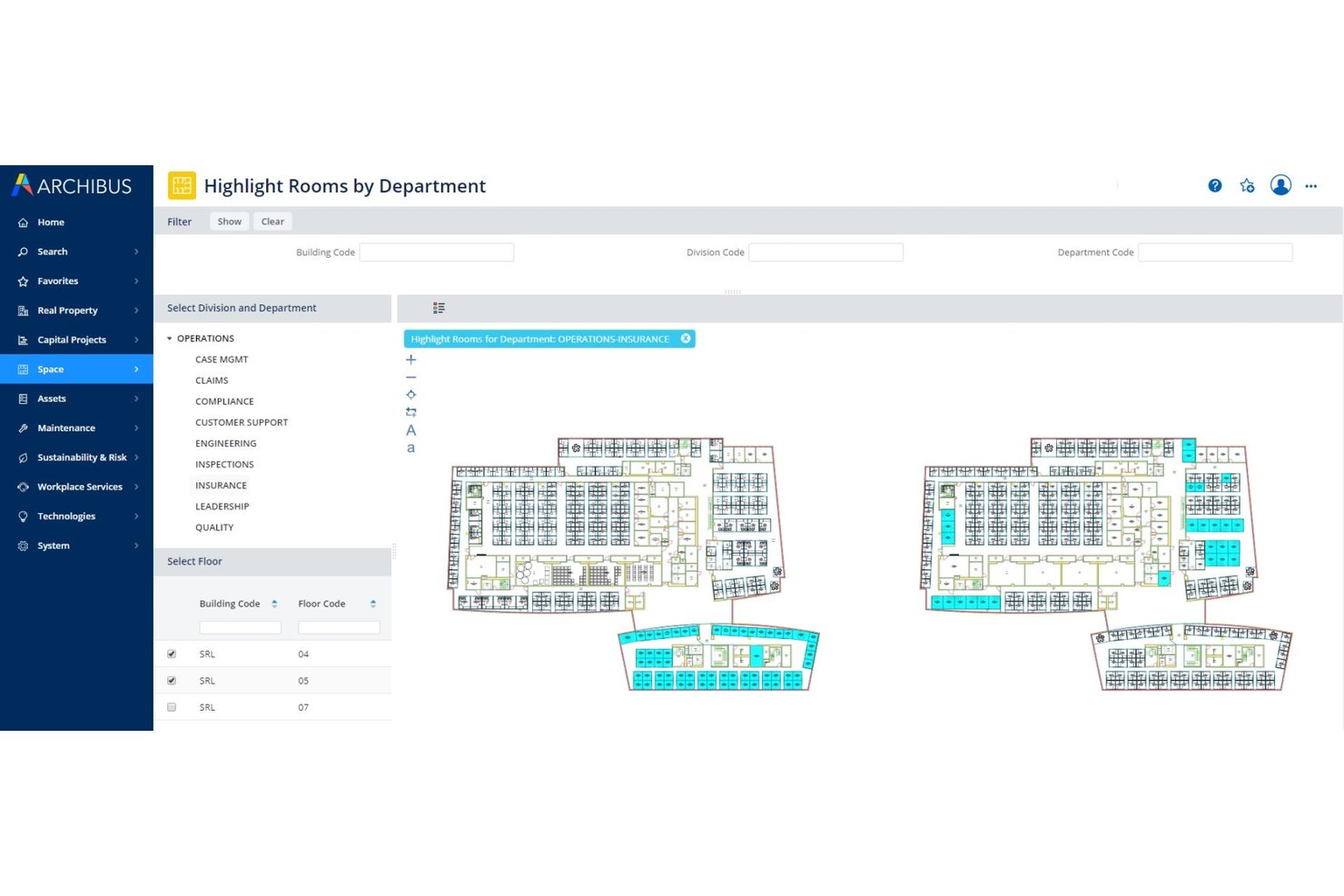
Archibus di Eptura è una piattaforma IWMS completa che copre la pianificazione degli spazi, la gestione dei trasferimenti, l'amministrazione dei contratti di locazione, il monitoraggio degli asset e la gestione del portafoglio immobiliare in ambienti aziendali multisede.
A chi è più adatto Archibus di Eptura?
Archibus è progettato per i team aziendali che si occupano di strutture e immobili e che gestiscono portafogli complessi distribuiti su più sedi, dove l'amministrazione dei contratti di locazione, la pianificazione degli spazi e la gestione dei trasferimenti devono convivere in un unico sistema.
Perché ho scelto Archibus di Eptura
Archibus di Eptura è entrato nella mia lista ristretta perché nessun altro strumento di questa categoria è all'altezza della sua profondità nella gestione completa di un ampio portafoglio immobiliare. Sono particolarmente colpito dal modulo di amministrazione dei contratti di locazione, che centralizza i dati contrattuali con avvisi automatici e cruscotti interattivi del portafoglio per contesti globali distribuiti su più sedi. Se a questo si aggiunge la pianificazione di blocchi e configurazioni basata su scenari, che consente di simulare riorganizzazioni complete e confrontare configurazioni ipotetiche prima ancora di spostare una singola scrivania, si ottiene un vero IWMS progettato per gestire la complessità su larga scala.
Caratteristiche principali di Archibus di Eptura
- Visualizzatore BIM: Consente di visualizzare e interagire con i modelli Autodesk Revit e BIM 360 direttamente nella piattaforma, senza richiedere competenze specifiche in Revit.
- Report sull'utilizzo tramite IoT: Recupera i dati sull'occupazione in tempo reale dai sensori VergeSense per generare mappe di calore e report sull'utilizzo nei periodi di picco per stanza e piano.
- Monitoraggio dei progetti di investimento: Monitora budget, programmi e traguardi dei progetti di allestimento degli ambienti di lavoro e delle infrastrutture dalla stessa piattaforma.
- Modulo per la sostenibilità: Monitora il consumo energetico e le emissioni in tutto il portafoglio con strumenti di reportistica dedicati collegati ai dati sugli spazi e sugli asset.
Integrazioni di Archibus di Eptura
Archibus di Eptura offre integrazioni native con VergeSense, Autodesk Revit, Autodesk BIM 360, AutoCAD, Workday, Okta, ServiceNow, Snowflake e dispone di integrazioni native nell'ecosistema Microsoft, tra cui Microsoft 365, Teams, Outlook, Copilot, Places, Power BI e Azure AD. È disponibile un'API aperta per le integrazioni personalizzate.
Pros and Cons
Pros:
- Monitora le tempistiche di consegna dei progetti di investimento
- Integrazione leader del settore con planimetrie BIM e CAD
- Mappe di calore sull'occupazione in tempo reale con sensori
Cons:
- È necessaria una rete di acquisto e assistenza riservata ai partner
- Manca la mappatura nativa degli esterni del campus

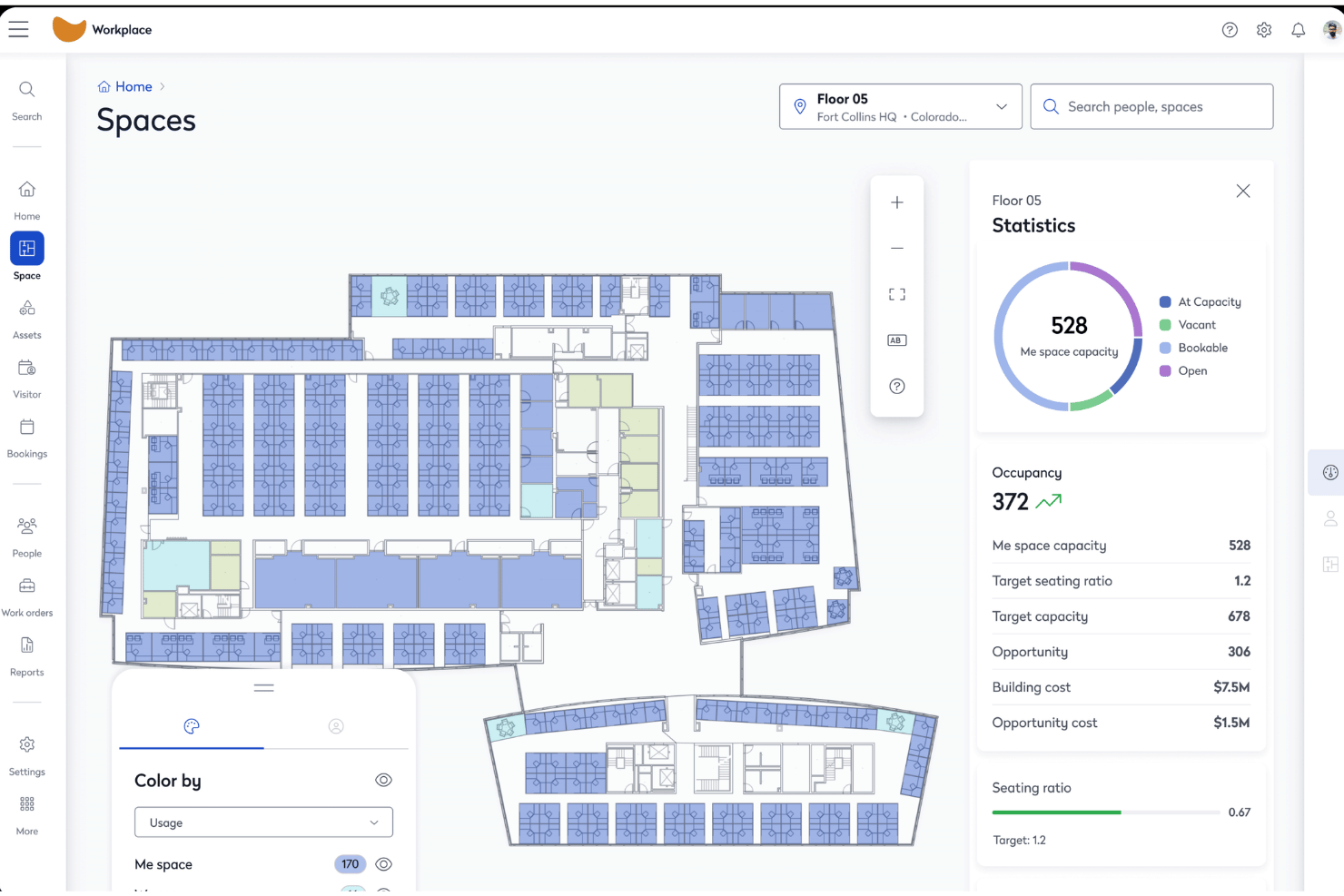
Eptura Workplace è una piattaforma aziendale per la gestione degli spazi ufficio che combina planimetrie interattive, prenotazione di scrivanie e sale, gestione dei trasferimenti, analisi dell'utilizzo degli spazi e gestione dei visitatori per portafogli con una o più sedi.
Per chi è più adatto Eptura Workplace?
Eptura Workplace è particolarmente adatto ai team aziendali che si occupano di immobili e strutture e che gestiscono portafogli multisede di grandi dimensioni, dove il controllo dei costi degli spazi e i report di riaddebito sono fondamentali per le attività operative.
Perché ho scelto Eptura Workplace
Eptura Workplace è entrato nella mia selezione ristretta per la sua capacità di gestire efficacemente il controllo dei costi degli spazi a livello di portafoglio. Apprezzo il fatto che combini la gestione dei dati dei contratti di locazione, il monitoraggio del costo per postazione e i report di riaddebito in un unico ambiente, consentendo ai team finanziari e immobiliari di collegare direttamente il consumo degli spazi alle unità aziendali. L'Agente per gli insight del portafoglio mette automaticamente in evidenza questi dati, mentre i connettori Power BI permettono di inserirli nei cruscotti direzionali senza estrazioni manuali.
Funzionalità principali di Eptura Workplace
- Pianificazione di blocchi e assegnazioni: gli strumenti visivi di pianificazione con funzionalità di trascinamento consentono di assegnare i team a piani e zone, modellare scenari di riorganizzazione e confrontare le opzioni di disposizione prima di procedere con qualsiasi trasferimento.
- Monitoraggio dell'occupazione da più fonti: raccoglie i dati sull'occupazione da lettori di badge, rilevamento della presenza tramite WiFi e piattaforme di sensori come VergeSense e Relogix, per offrire una visione passiva e accurata dell'effettivo utilizzo degli spazi.
- Gestione dei visitatori: preregistrazione, registrazione all'arrivo, stampa personalizzata dei badge, acquisizione della firma elettronica, liste di controllo e appelli di emergenza sono tutti gestiti tramite il modulo integrato per i visitatori.
- Agente IA per la pianificazione degli spazi: genera automaticamente piani di assegnazione basati sui dati reali relativi all'occupazione e al numero di dipendenti, quindi presenta confronti tra scenari affinché il team possa agire sulla base dei dati anziché procedere per supposizioni.
Integrazioni di Eptura Workplace
Eptura Workplace offre integrazioni native con Microsoft 365, Outlook, Teams, Google Calendar, Okta, AutoCAD, Autodesk Revit, VergeSense, Relogix, CoWorkr, ServiceNow, Tableau e Snowflake. È disponibile un'API per le integrazioni personalizzate.
Pros and Cons
Pros:
- La pianificazione visiva di blocchi e assegnazioni facilita le riorganizzazioni
- Combina i dati sull'occupazione provenienti da sensori, badge e prenotazioni
- Report avanzati integrati sui riaddebiti e sui costi
Cons:
- La navigazione del portale di amministrazione è complessa
- Non è documentata alcuna integrazione nativa con Slack

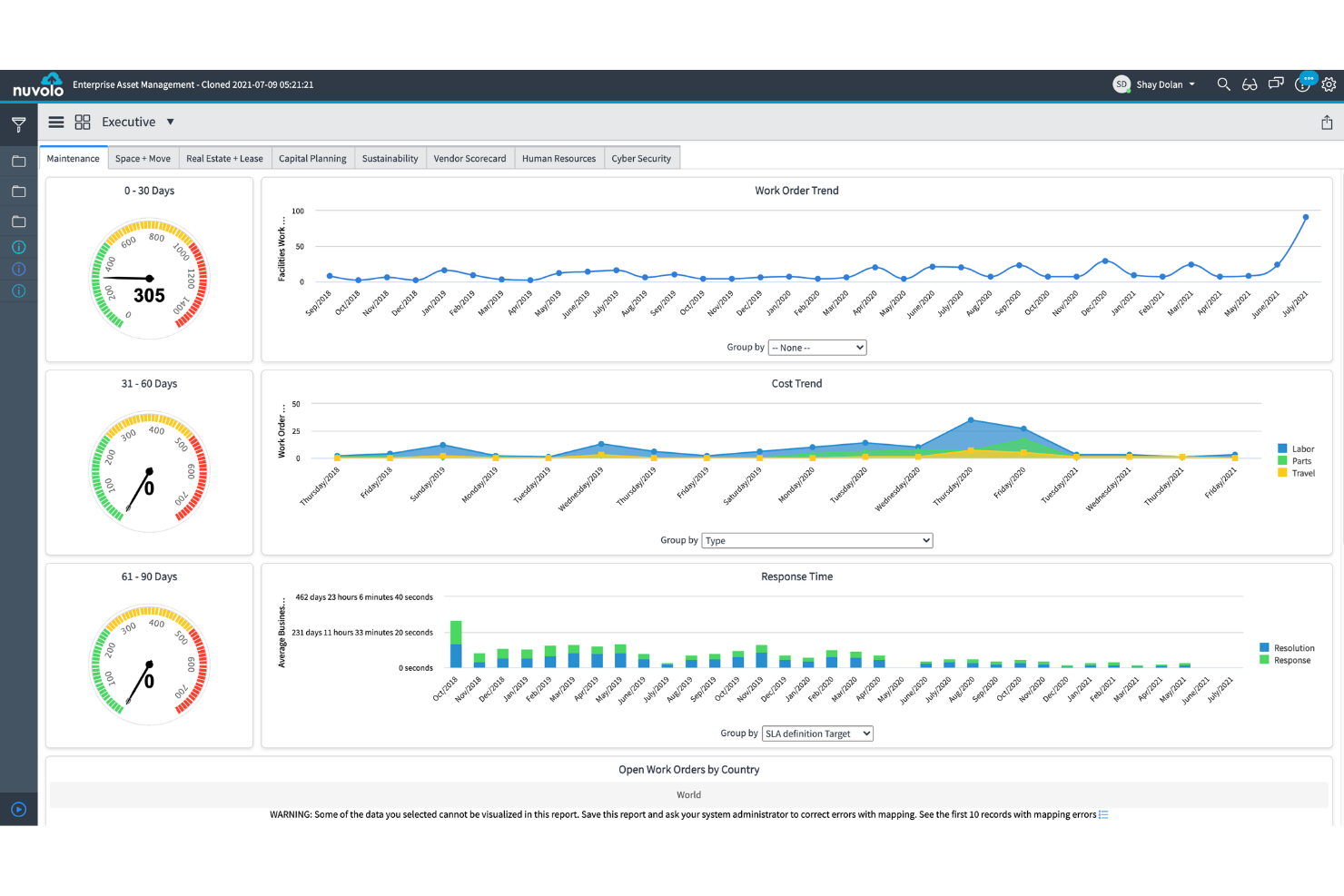
Nuvolo è una piattaforma IWMS sviluppata nativamente su ServiceNow che combina la gestione degli spazi, la prenotazione di scrivanie e sale, la gestione dei trasferimenti, il monitoraggio del portafoglio immobiliare e la reportistica sulla sostenibilità in un'unica suite connessa.
Per chi è più adatto Nuvolo?
Nuvolo è particolarmente adatto alle grandi aziende di settori regolamentati—sanità, scienze della vita e pubblica amministrazione—che utilizzano già ServiceNow e necessitano di un IWMS completamente integrato, con contabilizzazione dei contratti di locazione, gestione dei trasferimenti e sicurezza conforme ai requisiti normativi in un'unica piattaforma.
Perché ho scelto Nuvolo
Ho incluso Nuvolo tra le mie scelte principali perché è progettato specificamente per le grandi aziende di settori regolamentati che necessitano di qualcosa di più di un semplice strumento di prenotazione. Il suo motore brevettato di interpretazione CAD si sincronizza direttamente con AutoCAD e Revit, il che significa che l'inserimento delle planimetrie su larga scala (si pensi a oltre 3.500 sedi) non richiede infiniti caricamenti manuali. A questo si aggiunge un modulo dedicato alla gestione dei trasferimenti, che supporta i trasferimenti nei campus con scenari multipli e l'assegnazione automatizzata degli ordini di lavoro: il risultato è una piattaforma in grado di gestire una complessità che la maggior parte degli strumenti per gli ambienti di lavoro semplicemente non è in grado di affrontare.
Funzionalità principali di Nuvolo
- Conformità nella contabilizzazione dei contratti di locazione: Gestisce proprietà possedute e in locazione con conformità integrata ad ASC 842 e IFRS 16, inclusi avvisi sulle date critiche e notifiche automatiche di rinnovo.
- Previsione della domanda di spazi: Prevede il fabbisogno futuro di spazi utilizzando i dati sulla crescita dell'organico e il monitoraggio del rapporto di condivisione, per supportare le decisioni di consolidamento o ampliamento.
- Integrazione con sensori IoT e di occupazione: Si connette ai sensori degli edifici e ai dispositivi IoT per trasferire i dati sull'occupazione in tempo reale direttamente nei cruscotti di utilizzo.
- Gestione dei visitatori: Gestisce i flussi di lavoro dei visitatori in sede, il check-in tramite chiosco e le notifiche ai responsabili direttamente nella stessa interfaccia di gestione delle prenotazioni.
Integrazioni di Nuvolo
Nuvolo offre integrazioni native con AutoCAD, Revit, Workday, Oracle PeopleSoft, Microsoft Teams, Slack, Microsoft 365 e Outlook. È disponibile un'API per le integrazioni personalizzate.
Pros and Cons
Pros:
- Sincronizzazione CAD nativa per planimetrie automatizzate
- Gestione completa dei trasferimenti complessi
- Moduli per la conformità in ambito sanitario e governativo
Cons:
- Richiede licenze ServiceNow separate per l'utilizzo
- Non tiene traccia delle risorse hardware
Altri software per la gestione degli spazi d'ufficio
Ecco alcune opzioni aggiuntive di software per la gestione degli spazi d’ufficio che non sono entrate nel mio elenco ristretto, ma che vale comunque la pena prendere in considerazione:
- Kadence
Ideale per la pianificazione dei trasferimenti e la programmazione ibrida basate sull'intelligenza artificiale
- Tactic
Ideale per gestire visitatori e prenotazioni degli spazi di lavoro in un unico luogo
- Skedda
Ideale per regole autogestite di prenotazione di scrivanie e sale
- deskbird
Ideale per la prenotazione di uffici ibridi tramite Slack e Teams
- OfficeRnD Workplace
Ideale per la programmazione e la prenotazione per team ibridi
- Appspace
Ideale per l'orientamento nei chioschi e negli uffici mobili
- Envoy Workplace
Ideale per la prenotazione di visitatori e scrivanie in un'unica piattaforma
- Gable
Ideale per il coworking e la prenotazione di uffici su richiesta
- Yoffix
Ideale per la prenotazione di scrivanie e sale integrata nativamente in Microsoft 365
- Mri Manhattan
Ideale per la gestione del portafoglio immobiliare aziendale


Come valuto il software per la gestione degli spazi d'ufficio
La mia valutazione si articola su due livelli: le funzionalità di base che uno strumento deve offrire—planimetrie, prenotazioni, analisi dell'utilizzo—e gli elementi distintivi che separano una semplice app per la prenotazione delle scrivanie da una piattaforma in grado di gestire trasferimenti su scala aziendale e conformità normativa.
Funzionalità fondamentali (criteri minimi per questo elenco)
Quando seleziono gli strumenti da inserire nel mio elenco, assegno a ciascuno un punteggio su una scala da 0 (non offre la funzionalità) a 5 (eccelle in quest'area) per ogni funzionalità fondamentale elencata di seguito. Calcolo quindi il punteggio totale dello strumento come percentuale, utilizzando il 65% come parametro di riferimento per valutarne l'idoneità complessiva per l'elenco.
- Planimetrie interattive: cerco planimetrie multilivello per più sedi, con supporto all'importazione di file CAD o BIM e stato delle postazioni aggiornato in tempo reale, non semplici immagini statiche caricate come file PNG.
- Prenotazione di scrivanie e sale: è importante poter prenotare autonomamente scrivanie, sale ed elementi aggiuntivi come parcheggi o armadietti, insieme al check-in da dispositivi mobili e ai controlli delle policy per quartieri o zone.
- Analisi dell'utilizzo degli spazi: valuto se la piattaforma combina i dati delle prenotazioni con i segnali provenienti da sensori, badge o Wi-Fi per mostrare le tendenze reali dell'occupazione, non solo il numero di prenotazioni.
- Gestione dei trasferimenti: verifico la presenza di una pianificazione degli spazi con funzione di trascinamento e confronto tra scenari, soprattutto per i team che gestiscono riorganizzazioni o trasferimenti su più piani con tempistiche ristrette.
- Elenco dei dipendenti e orientamento: l'elenco dovrebbe sincronizzarsi con il sistema HRIS e collegare le persone alle postazioni loro assegnate sulla mappa, così chiunque può trovare un collega senza dover prima inviare un messaggio.
- Integrazione della pianificazione ibrida: la sincronizzazione bidirezionale con Outlook, Google Calendar, Teams o Slack è il requisito di base, ma cerco anche viste per coordinare le giornate dei team e il supporto SSO.
Una volta ottenuto un elenco di strumenti che soddisfano i criteri, valuto ciò che distingue ogni piattaforma.
Fattori distintivi (ciò che differenzia i fornitori)
Ecco come confronto i diversi fornitori:
Funzionalità di rilievo
Gli strumenti di pianificazione degli scenari sono particolarmente importanti quando si valuta una riorganizzazione o un consolidamento. Cerco funzionalità di modellazione di scenari ipotetici che consentano di testare le variazioni del rapporto di lavoro ibrido rispetto ai dati sui costi e sul numero di dipendenti prima di prendere una decisione. L'integrazione con sensori e dispositivi IoT è altrettanto importante: valuto se una piattaforma acquisisce dati passivi sull'occupazione dai badge o dai segnali Wi-Fi, non solo il numero di prenotazioni. La gestione di visitatori e consegne completa il quadro, sostituendo le app indipendenti per le aree di accoglienza con il check-in integrato, gli avvisi ai responsabili delle visite e il tracciamento dei pacchi.
Oltre le funzionalità
Valuto la rapidità con cui un fornitore può digitalizzare le planimetrie: alcuni offrono servizi completi di conversione CAD/BIM, mentre altri si aspettano che sia il cliente a occuparsene autonomamente, cosa che può rallentare di settimane l'implementazione. La profondità delle integrazioni è altrettanto importante: verifico la presenza di una sincronizzazione bidirezionale con Microsoft 365, Google Workspace e piattaforme HRIS come Workday, affinché la gestione degli utenti e delle prenotazioni rimanga automatica. Il livello di sicurezza è un altro criterio di selezione, in particolare la certificazione SOC 2 Type II e le opzioni di residenza dei dati per i team che operano in più regioni. Infine, esamino l'esportazione delle analisi: verifico se i pannelli di controllo si collegano a Power BI o Tableau, così i dati sull'utilizzo possono confluire nei report più ampi sul portafoglio senza estrazioni manuali.
Come scegliere un software per la gestione degli spazi d'ufficio
Il software giusto per la gestione degli spazi d'ufficio dipende dai problemi del luogo di lavoro che vuoi risolvere per primi:
| Se la tua priorità è... | Cerca... |
|---|---|
| Gestire gli orari di lavoro ibridi e le prenotazioni | Sincronizzazione del calendario e stato dei posti in tempo reale sulla mappa |
| Monitorare la spesa immobiliare e gli addebiti interni | Allocazione integrata dei costi degli spazi e reportistica sull'occupazione |
| Gestire contesti soggetti a conformità o regolamentati | Supporto del fornitore per FedRAMP, SOC 2 o documentazione simile |
| Coordinare grandi trasferimenti o riorganizzazioni | Strumenti di modellazione degli scenari per la pianificazione su più piani |
| Unificare i flussi di lavoro per visitatori, consegne e prenotazioni | Funzionalità integrate di registrazione e notifiche ai responsabili |
Come valutare il tuo elenco ristretto
- Testa la digitalizzazione delle planimetrie: carica una planimetria di esempio e misura i tempi di elaborazione dal vivo oppure verifica il supporto per i file CAD/BIM.
- Verifica la profondità dell'analisi: esegui un'analisi reale dell'occupazione utilizzando i dati delle prenotazioni insieme a quelli dei badge o dei sensori.
- Richiedi le prove di conformità: chiedi per iscritto il rapporto di audit SOC 2 Type II più recente o lo stato FedRAMP.
- Prova uno scenario di trasferimento: usa la loro piattaforma per riorganizzare tre team in un ambiente di test ed esporta le proiezioni dei costi prima e dopo.
- Scegli il compromesso: decidi tra la rapidità di implementazione (strumenti autonomi) e l'ampiezza delle integrazioni oltre alla conformità (soluzioni di livello aziendale).
Che cos'è un software per la gestione degli spazi d'ufficio?
Il software per la gestione degli spazi degli uffici è una piattaforma digitale che centralizza il modo in cui assegni le scrivanie, gestisci le planimetrie, pianifichi l'utilizzo degli spazi di lavoro e monitori i costi immobiliari. Aiuta i team a coordinare il lavoro ibrido, monitorare l'occupazione e garantire la conformità fornendo mappe interattive, strumenti di prenotazione e analisi. Questo tipo di software supporta i responsabili delle strutture, dell'IT e dei progetti nel mantenere visibili e adattabili le risorse dell'ambiente di lavoro al variare delle esigenze del team.
Funzionalità del software per la gestione degli spazi degli uffici
Quando scegli un software per la gestione degli spazi degli uffici, presta attenzione alle seguenti funzionalità chiave:
- Planimetrie interattive: visualizza, modifica e gestisci mappe digitali dei piani che mostrano l'assegnazione delle postazioni, i servizi e gli aggiornamenti sull'occupazione in tempo reale. Questo aiuta i team a visualizzare e pianificare gli spazi di lavoro su più sedi.
- Prenotazione di scrivanie e sale: consente al personale di prenotare scrivanie, sale riunioni o aree di collaborazione tramite strumenti self-service, spesso includendo il check-in da dispositivi mobili, le politiche di prenotazione e i controlli dei quartieri.
- Analisi dell'utilizzo degli spazi: monitora l'utilizzo effettivo e prenotato degli spazi di lavoro tracciando i dati sulle prenotazioni, i sensori, il Wi-Fi o l'attività dei badge, per supportare le decisioni sulle esigenze relative agli spazi e alla loro disposizione.
- Gestione dei trasferimenti: pianifica i trasferimenti e le riorganizzazioni degli uffici con simulazioni di scenari, modifica delle planimetrie tramite trascinamento e visualizzazioni prima/dopo, rendendo più semplice adattare l'assegnazione degli spazi di lavoro al variare dei team.
- Elenco dei dipendenti e orientamento: collega le persone alle postazioni loro assegnate, mostra i dati di contatto e fornisce mappe interattive che consentono ai dipendenti di trovare colleghi, sale riunioni o servizi.
- Pianificazione del lavoro ibrido: si integra con le piattaforme di calendario e offre una pianificazione basata sui team che mostra quando singole persone o gruppi prevedono di lavorare in sede, coordinando la presenza e riducendo i conflitti.
- Gestione dei visitatori: registra gli ospiti, rilascia pass digitali, avvisa gli anfitrioni e tiene traccia dei registri dei visitatori all'interno della stessa piattaforma, sostituendo gli strumenti indipendenti per la reception.
- Integrazione con i sistemi HR e IT: sincronizza i dati dei dipendenti, le assegnazioni delle postazioni e le autorizzazioni degli utenti con strumenti come Active Directory, Google Workspace o il tuo sistema informativo delle risorse umane (HRIS), per mantenere le informazioni aggiornate automaticamente.
- Monitoraggio e reportistica dei costi degli spazi: attribuisce i costi di occupazione ai centri di costo o ai team, genera report sull'utilizzo ed esporta i dati per i responsabili finanziari e delle strutture.
- Controlli di sicurezza e conformità: protegge i dati sensibili tramite SSO, autorizzazioni basate sui ruoli, registri di controllo e aderenza a standard di sicurezza come SOC 2 o FedRAMP, supportando le esigenze normative e di privacy.
Funzionalità comuni di intelligenza artificiale nei software per la gestione degli spazi degli uffici
Oltre alle funzionalità standard dei software per la gestione degli spazi degli uffici elencate sopra, molte di queste soluzioni stanno integrando l'intelligenza artificiale con funzionalità come:
- Previsione dell'occupazione basata sull'intelligenza artificiale: utilizza i dati storici sull'utilizzo e gli input dei sensori in tempo reale per prevedere la futura domanda di spazi di lavoro, aiutandoti a ottimizzare l'assegnazione delle scrivanie e a ridurre lo spazio inutilizzato.
- Raccomandazioni per l'ottimizzazione degli spazi basate sull'intelligenza artificiale: analizza i modelli di prenotazione, i programmi dei team e i dati sui movimenti per suggerire modifiche alla disposizione o riassegnazioni delle postazioni che migliorano la collaborazione e l'efficienza degli spazi.
- Rilevamento automatico delle anomalie: monitora i dati sull'occupazione e sulle prenotazioni per segnalare modelli insoliti, come assenze persistenti o sovraffollamento, consentendoti di affrontare i problemi prima che interrompano le operazioni.
- Assistenti per le query in linguaggio naturale: consentono di porre domande sull'utilizzo degli spazi, sulla disponibilità o sulle politiche di prenotazione in linguaggio naturale, mentre l'intelligenza artificiale individua istantaneamente risposte e informazioni utili nei tuoi dati.
- Avvisi di manutenzione predittiva: utilizza l'intelligenza artificiale per analizzare i dati dei sensori e sull'utilizzo, identificando quando le sale riunioni o gli spazi condivisi potrebbero aver bisogno di pulizia, riparazioni o rifornimenti prima che si verifichino problemi.
Vantaggi del software per la gestione degli spazi degli uffici
L'implementazione di un software per la gestione degli spazi degli uffici offre diversi vantaggi al tuo team e alla tua azienda. Ecco alcuni dei vantaggi che puoi aspettarti:
- Assegnazione centralizzata degli spazi di lavoro: Coordina le assegnazioni delle postazioni, le prenotazioni delle sale e le planimetrie in un'unica piattaforma, così il tuo team sa sempre quali spazi sono disponibili e dove si trova ogni persona.
- Analisi dell'utilizzo basate sui dati: Combina le analisi sull'occupazione, i dati dei sensori e i registri delle prenotazioni per monitorare l'utilizzo effettivo degli spazi di lavoro, aiutandoti a individuare le aree sottoutilizzate e a motivare le decisioni relative alla superficie occupata.
- Pianificazione integrata dei trasferimenti e degli scenari: Utilizza strumenti di trascinamento e rilascio e modelli ipotetici per pianificare trasferimenti d'ufficio, riorganizzazioni delle postazioni o transizioni al lavoro ibrido senza affidarti a fogli di calcolo statici.
- Coordinamento del lavoro ibrido: Sincronizza gli orari con strumenti di calendario come Outlook o Google Calendar, consentendo al tuo team di pianificare le giornate in sede e ridurre i conflitti nell'assegnazione delle postazioni.
- Gestione dei visitatori e delle consegne: Registra gli ospiti, emetti pass digitali e avvisa direttamente i responsabili dell'accoglienza all'interno della piattaforma, sostituendo le app indipendenti per la registrazione e le notifiche.
- Monitoraggio e reportistica automatizzati dei costi: Assegna le spese relative all'occupazione e agli spazi di lavoro ai centri di costo o ai team ed esporta i dati di utilizzo per la reportistica finanziaria o delle strutture.
- Garanzia di sicurezza e conformità: Gestisci chi può accedere alle planimetrie e ai dati delle prenotazioni tramite SSO, controlli delle autorizzazioni e supporto per standard come SOC 2 o FedRAMP, quando richiesto.
Costi e prezzi dei software per la gestione degli spazi d'ufficio
La scelta di un software per la gestione degli spazi d'ufficio richiede la conoscenza dei vari modelli di prezzo e dei piani disponibili. I costi variano in base alle funzionalità, alle dimensioni del team, ai componenti aggiuntivi e ad altri fattori. La tabella seguente riassume i piani più comuni, i relativi prezzi medi e le funzionalità tipicamente incluse nelle soluzioni software per la gestione degli spazi d'ufficio:
Tabella di confronto dei piani per i software di gestione degli spazi d'ufficio
| Tipo di piano | Prezzo medio | Funzionalità comuni |
|---|---|---|
| Piano gratuito | $0 | Visualizzazione di base delle planimetrie, prenotazione limitata di postazioni e sale, analisi semplici e supporto via e-mail. |
| Piano personale | $5–$25/utente/mese | Planimetrie interattive, prenotazione standard di postazioni e sale, report sull'utilizzo, registrazione tramite dispositivo mobile e integrazioni di base. |
| Piano aziendale | $8–$40/utente/mese | Politiche di prenotazione avanzate, analisi dell'utilizzo degli spazi, gestione dei trasferimenti, integrazioni con le risorse umane e l'IT e sincronizzazione delle directory. |
| Piano per grandi imprese | $30–$120/utente/mese | Analisi dell'intero portafoglio, pianificazione degli scenari, integrazioni personalizzate, SSO, controlli di conformità e supporto dedicato. |
Domande frequenti sul software per la gestione degli spazi in ufficio
Ecco alcune risposte alle domande più comuni sul software per la gestione degli spazi in ufficio:
In che modo il software per la gestione degli spazi in ufficio supporta gli orari di lavoro ibridi?
Il software per la gestione degli spazi in ufficio collega i sistemi di prenotazione ai calendari tramite un’app intuitiva per iOS o Android, consentendo di vedere chi prevede di lavorare in sede. Questo aiuta i team a coordinare la presenza, evitare la doppia prenotazione delle scrivanie e supportare i turni a rotazione in un ambiente di lavoro ibrido. Molti strumenti mostrano la disponibilità dei posti in tempo reale e si sincronizzano con Outlook o Google Calendar per facilitare la pianificazione, migliorando l’esperienza dei dipendenti.
Il software per la gestione degli spazi in ufficio è in grado di gestire planimetrie complesse su più sedi?
Sì, molte piattaforme software per la gestione degli spazi in ufficio supportano planimetrie su più sedi e più piani, con mappatura a livelli e importazioni CAD o BIM per monitorare ogni metro quadrato. Questa visibilità aiuta la gestione delle strutture e i responsabili di progetto a ottimizzare l’assegnazione degli spazi, assegnare le postazioni, pianificare i trasferimenti e mantenere aggiornate le planimetrie nelle organizzazioni in crescita o nei diversi ambienti di lavoro.
Quali integrazioni dovrei cercare in un software per la gestione degli spazi in ufficio?
Cerca una piattaforma tutto-in-uno con integrazioni per il tuo calendario principale (Google Workspace, Microsoft 365), il sistema informativo delle risorse umane, la gestione delle identità e i sensori per monitorare l’occupazione dell’ufficio. Le integrazioni avanzate automatizzano il provisioning degli utenti, sincronizzano gli orari e rendono disponibili dati reali sull’utilizzo tramite l’analisi del luogo di lavoro. Questo ti aiuta a prendere decisioni informate per una migliore pianificazione degli spazi.
Quanto è sicuro il software per la gestione degli spazi in ufficio per i dati riservati dell'ufficio?
La maggior parte delle piattaforme consolidate protegge il tuo ambiente di lavoro offrendo SSO, autorizzazioni granulari e registri di controllo. Per la gestione delle risorse regolamentate, verifica la presenza delle certificazioni SOC 2 Type II, ISO 27001 o di controlli sulla residenza dei dati. Prima di scegliere un fornitore o adottare nuove funzionalità, chiedi i report di conformità più recenti per chiarire come protegge i dati nelle diverse sedi.
Posso usare il software per la gestione degli spazi in ufficio per prenotare spazi di lavoro a breve termine o flessibili?
Sì, puoi usare la maggior parte dei software per la prenotazione degli spazi per definire criteri relativi a scrivanie condivise, prenotazioni delle sale riunioni, parcheggi e altre risorse dell’ufficio. Il personale può prenotare facilmente gli spazi, mentre la prenotazione da dispositivi mobili, i check-in tramite QR, i display delle sale conferenze e la mappatura in tempo reale supportano le prenotazioni a breve termine e le modifiche giornaliere nell’assegnazione dei posti.
Cosa comporta la digitalizzazione delle planimetrie esistenti con un software per la gestione degli spazi in ufficio?
Di solito dovrai caricare le planimetrie in formato PDF, CAD o BIM. Alcuni fornitori offrono un servizio di assistenza dedicato per creare mappe interattive dai tuoi file e migliorare l’esperienza sul luogo di lavoro, mentre altri richiedono caricamenti autonomi. Ti consiglio di inviare una planimetria di esempio per verificare la qualità. In questo modo puoi assicurarti che le mappe siano coerenti con la tua strategia per il luogo di lavoro, soprattutto se hai bisogno di mappe su più piani o personalizzate.