

I 10 migliori sistemi globali di gestione documentale selezionati per il 2026

Elenco dei sistemi globali di gestione dei documenti


Un sistema globale di gestione dei documenti è un software che consente al tuo team di organizzare, archiviare e accedere ai documenti in modo sicuro da qualsiasi parte del mondo. Se stai cercando una soluzione che supporti i team distribuiti, soddisfi i requisiti di conformità e mantenga attivi i flussi di lavoro oltre i confini nazionali, sai quanto è importante la scelta.
La piattaforma giusta può aiutarti a gestire le autorizzazioni, automatizzare i processi e integrare gli strumenti che già utilizzi, senza creare nuovi silos o colli di bottiglia. In questo elenco troverai un confronto tra i principali sistemi globali di gestione dei documenti per il 2026, così potrai scegliere con sicurezza quello più adatto alle esigenze della tua organizzazione.
Perché fidarsi dei nostri consigli sui software
Il nostro team testa e recensisce software dal 2012. In quanto project manager noi stessi, sappiamo quanto sia difficile — e importante — scegliere il software giusto.
Per questa guida, abbiamo valutato gli strumenti attraverso test pratici e ricerche indipendenti, assegnando un punteggio agli strumenti in base ai nostri criteri di selezione. Ci basiamo inoltre sulle competenze di leader di pensiero del settore e di professionisti attivi nella gestione dei progetti.
Le nostre recensioni riflettono il nostro giudizio editoriale umano, non un discorso di vendita.
Revisori esperti:
Tabella di confronto dei sistemi globali di gestione dei documenti
Questa tabella di confronto riassume i dettagli sui prezzi delle mie migliori selezioni di sistemi globali di gestione dei documenti:
| Tool | Best For | Trial Info | Price | ||
|---|---|---|---|---|---|
| 1 | Ideale per i flussi di lavoro documentali su dispositivi mobili | Prova gratuita di 14 giorni + demo gratuita disponibile | Da $20/utente/mese | Website | |
| 2 | Ideale per il supporto ai documenti multilingue | Demo gratuita disponibile | Prezzo su richiesta | Website | |
| 3 | Ideale per le funzionalità di conformità normativa | Prova gratuita + demo gratuita disponibili | Prezzo su richiesta | Website | |
| 4 | Ideale per l'automazione avanzata dei flussi di lavoro | Prova gratuita di 14 giorni + piano gratuito + demo gratuita disponibile | A partire da $5/utente/mese (fatturato annualmente) | Website | |
| 5 | Il migliore per l'integrazione con Microsoft 365 | Prova gratuita di 30 giorni disponibile | From $5.00/user/month (billed annually) | Website | |
| 6 | Ideale per la collaborazione nei piccoli team | Piano gratuito disponibile | Da $52/mese | Website | |
| 7 | Ideale per controlli di accesso granulari | Prova gratuita di 15 giorni + demo gratuita disponibile | Da $22/utente/mese (fatturazione annuale) | Website | |
| 8 | Ideale per l'integrazione con software di contabilità | Prova gratuita di 14 giorni + demo gratuita disponibile | Da $210/mese (fatturato annualmente) | Website | |
| 9 | Ideale per la sincronizzazione dei file su più piattaforme | Prova gratuita di 30 giorni disponibile | Da $12.99/persona/mese (fatturato annualmente) | Website | |
| 10 | Ideale per personalizzazione open-source | Versione gratuita + demo gratuita disponibile | Prezzo su richiesta | Website |
Recensioni dei sistemi globali di gestione dei documenti
Di seguito sono riportati i miei riepiloghi dettagliati dei sistemi globali di gestione dei documenti inclusi nel mio elenco. Le mie recensioni offrono un’analisi approfondita delle funzionalità, delle integrazioni e dei casi d’uso migliori di ciascun sistema, per aiutarti a trovare quello più adatto al tuo team.

Fluix
Ideale per i flussi di lavoro documentali su dispositivi mobili

Fluix si distingue per i team che devono gestire documenti e flussi di lavoro su dispositivi mobili, soprattutto nei settori dei servizi sul campo, dell'edilizia e dell'energia. È progettato per organizzazioni con team distribuiti o remoti che devono compilare moduli, raccogliere firme e inoltrare documenti in movimento. Fluix aiuta le aziende a mantenere i processi documentali mobili organizzati, conformi e collegati ai sistemi back-office.
Perché ho scelto Fluix
Per le organizzazioni che devono gestire documenti sul campo, Fluix offre un approccio mobile-first difficile da eguagliare. Ho scelto Fluix perché consente ai team di compilare moduli, annotare PDF e raccogliere firme direttamente su tablet e smartphone, anche offline. Gli strumenti di automazione dei flussi di lavoro aiutano a inoltrare i documenti per la revisione o l'approvazione senza bisogno di un desktop. Queste funzionalità rendono Fluix una scelta solida per le aziende che necessitano di una gestione documentale affidabile ovunque si trovino.
Funzionalità principali di Fluix
Altre funzionalità che rendono Fluix utile per i team di gestione documentale includono:
- Controlli di accesso basati sui ruoli: Assegna permessi agli utenti in base al loro ruolo o progetto.
- Distribuzione automatizzata dei documenti: Invia automaticamente i documenti aggiornati a team o dispositivi specifici.
- Tracciabilità delle attività: Monitora l'attività sui documenti e le azioni degli utenti per la conformità.
- Integrazione con archiviazione cloud: Collega Fluix a piattaforme come Box, Dropbox e Google Drive per la sincronizzazione dei file.
Integrazioni di Fluix
Le integrazioni includono Airtable, Procore, HubSpot, Salesforce, Power BI, Domo, Qlik, Tableau, Smartsheet e Dropbox.
Pros and Cons
Pros:
- Automazione dei flussi di lavoro integrata per le approvazioni
- Compilazione moduli PDF nativa e annotazione
- Monitoraggio in tempo reale dello stato dei documenti
Cons:
- Manca l'integrazione nativa della firma elettronica
- Il caricamento massivo dei documenti è manuale

Ideale per il supporto ai documenti multilingue

LogicalDOC è pensato per le organizzazioni che devono gestire documenti in più lingue all'interno di team distribuiti. È particolarmente utile per aziende internazionali, studi legali o qualsiasi gruppo impegnato nella gestione di contenuti multilingue e requisiti di conformità. Se i tuoi flussi di lavoro dipendono da un supporto linguistico accurato e dalla localizzazione, LogicalDOC soddisfa queste esigenze grazie alla sua interfaccia multilingue e alla gestione dei metadati.
Perché ho scelto LogicalDOC
Per i team che devono gestire documenti in diverse lingue, LogicalDOC offre un supporto multilingue difficilmente eguagliabile. Ho scelto LogicalDOC perché mette a disposizione un'interfaccia utente disponibile in più di una dozzina di lingue e supporta metadati multilingue, facilitando così l'organizzazione e il recupero dei documenti indipendentemente dalla lingua. La piattaforma consente inoltre di impostare preferenze linguistiche per ciascun utente, aiutando i team globali a lavorare in modo più efficiente. Queste funzionalità rendono LogicalDOC una scelta solida per organizzazioni con operazioni internazionali o che hanno esigenze linguistiche diversificate.
Funzionalità principali di LogicalDOC
Altre funzionalità che rendono LogicalDOC utile per la gestione documentale includono:
- Controllo delle versioni: Tieni traccia delle modifiche ai documenti e mantieni uno storico completo delle revisioni di ogni file.
- Automazione dei flussi di lavoro: Progetta e automatizza i processi di approvazione e revisione dei documenti.
- Ricerca full-text: Cerca documenti utilizzando parole chiave presenti all'interno dei contenuti, non solo nei nomi dei file.
- Controllo accessi basato sui ruoli: Assegna permessi in base ai ruoli degli utenti per gestire la visibilità e le azioni sui documenti.
Integrazioni di LogicalDOC
Le integrazioni includono WordPress, Joomla, Dropbox, Microsoft Office, Microsoft Outlook, OnlyOffice, Google Drive, Google Calendar, ShareFile e Docusign.
Pros and Cons
Pros:
- L'interfaccia multilingue supporta oltre 15 lingue
- L'automazione dei flussi di lavoro include un designer di processi visuali
- La ricerca full-text indicizza diversi formati di file
Cons:
- L'app mobile non offre funzionalità avanzate sui documenti
- Strumenti di collaborazione limitati per la modifica in tempo reale

FileHold
Ideale per le funzionalità di conformità normativa

FileHold è progettato appositamente per le organizzazioni che devono soddisfare rigorosi requisiti normativi e di conformità nella gestione documentale. È particolarmente rilevante per settori come sanità, finanza e pubblica amministrazione, dove la tracciabilità e il controllo dei documenti sono imprescindibili. FileHold aiuta i team a gestire registri sensibili, applicare politiche di conservazione e mantenere la conformità agli standard di settore.
Perché ho scelto FileHold
Quando la conformità normativa è una priorità assoluta, FileHold si distingue per i suoi controlli specializzati e le sue capacità di audit. Ho scelto FileHold perché offre una gestione dettagliata del ciclo di vita dei documenti, inclusa la programmazione della conservazione e la disposizione automatizzata: elementi essenziali per rispettare le normative di settore. Il sistema offre inoltre tracciabilità completa e firme elettroniche, aiutando le organizzazioni a dimostrare la conformità durante gli audit. Per i team che devono dimostrare un controllo rigoroso sui documenti sensibili, le funzionalità orientate alla conformità di FileHold lo rendono una scelta valida.
Funzionalità principali di FileHold
Oltre ai suoi controlli orientati alla conformità, FileHold offre diverse altre funzionalità per la gestione documentale:
- Scansione e acquisizione dei documenti: Importa documenti cartacei direttamente nel sistema utilizzando strumenti di scansione integrati.
- Tag dei metadati: Assegna campi di metadati personalizzati ai documenti per una ricerca e organizzazione avanzate.
- Controlli di accesso basati sui ruoli: Imposta i permessi utente su più livelli per gestire chi può visualizzare, modificare o eliminare i documenti.
- Accesso mobile: Accedi e gestisci i documenti in modo sicuro da dispositivi mobili tramite app dedicate.
Integrazioni FileHold
Le integrazioni includono Microsoft Office, Adobe Acrobat Sign, Docusign, Salesforce, QuickBooks, SAP, Sage 300, Microsoft Dynamics GP, ABBYY FlexiCapture e Kofax Capture.
Pros and Cons
Pros:
- Supporto conformità FDA 21 CFR Parte 11
- Conservazione e disposizione automatizzata dei documenti
- Tracciabilità dettagliata di tutte le azioni sui documenti
Cons:
- Nessun strumento di co-authoring integrato
- Funzionalità di modifica web limitate

Box
Ideale per l'automazione avanzata dei flussi di lavoro

Box offre automazione dei flussi di lavoro e gestione sicura dei documenti per team che lavorano in sedi diverse. È una scelta ideale per le organizzazioni che devono coordinare processi di approvazione complessi o gestire file sensibili su larga scala. Se la tua azienda dipende dall'automatizzazione dei flussi di lavoro basati sui documenti e dal mantenimento di rigorosi controlli di accesso, Box è progettato per soddisfare queste esigenze.
Perché ho scelto Box
Box si distingue per la sua avanzata automazione dei flussi di lavoro, essenziale per i team che gestiscono documenti tra uffici globali. Ho scelto Box perché il suo builder di flussi di lavoro permette di automatizzare processi di approvazione a più fasi e impostare trigger personalizzati per l'instradamento dei documenti. La piattaforma include anche logica condizionale, così puoi adattare i flussi di lavoro alle esigenze specifiche della tua organizzazione. Queste funzioni di automazione aiutano a ridurre il lavoro manuale e a mantenere i processi documentali coerenti, anche quando il team è distribuito a livello mondiale.
Funzionalità principali di Box
Altre funzionalità di Box che supportano la gestione globale dei documenti includono:
- Controlli granulari dei permessi: Imposta livelli di accesso dettagliati per utenti e gruppi per proteggere i documenti sensibili.
- Storico delle versioni: Traccia e ripristina versioni precedenti dei file per mantenere l'integrità dei documenti.
- Filigrana dei documenti: Applica filigrane personalizzabili ai file per maggiore sicurezza e tracciabilità.
- Opzioni di residenza dei dati globale: Scegli dove archiviare i tuoi dati per rispettare i requisiti di conformità regionali.
Integrazioni di Box
Le integrazioni includono Microsoft 365, Google Workspace, Salesforce, Oracle NetSuite, Okta, Broadcom, Splunk, Palo Alto Networks, Adobe e Slack.
Pros and Cons
Pros:
- L'automazione dei flussi di lavoro supporta processi complessi e a più fasi
- Permessi granulari per l'accesso di team globali
- Opzioni di residenza dei dati per esigenze di conformità
Cons:
- La configurazione dell'automazione dei flussi di lavoro può richiedere tempo
- Le funzionalità avanzate richiedono piani di livello superiore

Il migliore per l'integrazione con Microsoft 365

Se la tua organizzazione utilizza già Microsoft 365, Microsoft SharePoint offre un modo familiare di gestire i documenti e collaborare tra i team. È particolarmente utile per le aziende e i dipartimenti IT che hanno bisogno di centralizzare i contenuti, automatizzare i flussi di lavoro e controllare gli accessi in un ambiente Microsoft sicuro. La profonda integrazione di SharePoint con le app di Microsoft 365 aiuta i team a collegare file, conversazioni e processi in un unico posto.
Perché ho scelto Microsoft SharePoint
Per i team già investiti in Microsoft 365, SharePoint è una naturale estensione per la gestione dei documenti su larga scala. Ho scelto SharePoint perché consente di creare librerie documentali centralizzate che si sincronizzano con OneDrive e Teams, rendendo l’accesso ai file e la collaborazione fluida in tutto l’ecosistema Microsoft. I suoi controlli di permesso dettagliati aiutano le organizzazioni a gestire contenuti sensibili e a garantire la conformità alle policy interne. Gli strumenti di automazione dei flussi di lavoro di SharePoint supportano anche le approvazioni dei documenti e la gestione delle versioni, elementi essenziali per i team globali che gestiscono progetti complessi.
Caratteristiche principali di Microsoft SharePoint
Altre caratteristiche che rendono SharePoint prezioso per la gestione dei documenti includono:
- Siti personalizzabili: Crea siti e portali interni adattati a diversi team o progetti.
- Co-Authoring dei documenti: Più utenti possono modificare i documenti contemporaneamente in tempo reale.
- Ricerca aziendale: Ricerca su tutti i siti, le librerie e i contenuti collegati con filtri avanzati.
- Integrazione con Power Automate: Collega i flussi di lavoro ad altre app Microsoft e di terze parti per l’automazione dei processi.
Integrazioni Microsoft SharePoint
Le integrazioni includono Microsoft Teams, OneDrive, Outlook, Word, Excel, PowerPoint, Microsoft Loop, Microsoft Forms, Microsoft Planner e Microsoft Power Automate.
Pros and Cons
Pros:
- Integrazione profonda con tutte le app Microsoft 365
- Supporta il controllo avanzato delle versioni dei documenti
- Permessi di accesso granulare per team globali
Cons:
- Configurare la condivisione esterna può essere complesso
- I limiti di archiviazione dipendono dal piano Microsoft 365

Folderit
Ideale per la collaborazione nei piccoli team
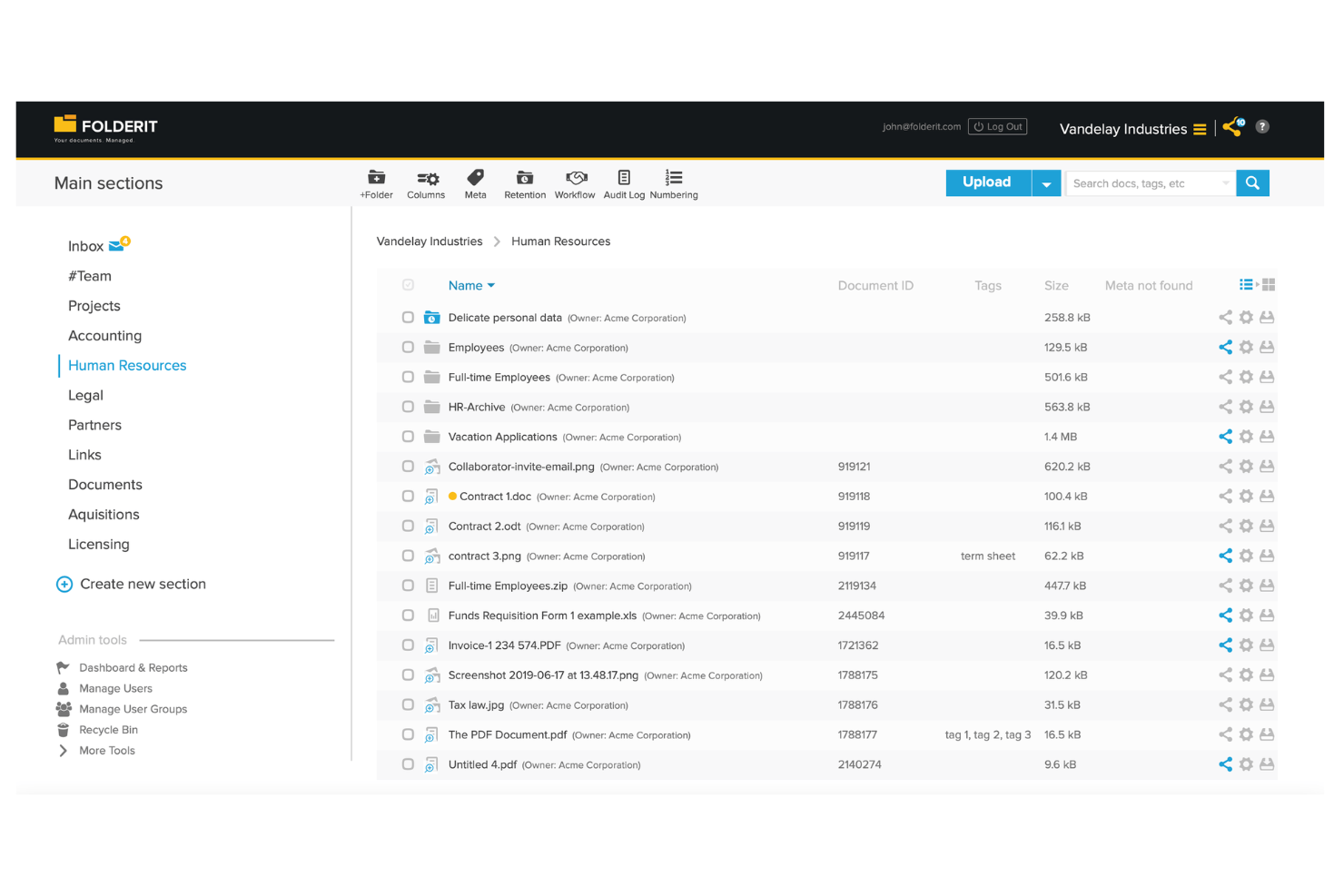
Folderit si distingue per i piccoli team che necessitano di un modo semplice per organizzare, condividere e approvare documenti insieme. È adatto per startup, organizzazioni non profit o dipartimenti che cercano strumenti di collaborazione semplici senza la complessità dei sistemi aziendali. L’attenzione di Folderit alla condivisione facilitata, ai permessi dettagliati e ai flussi di lavoro di approvazione aiuta i team a restare coordinati, anche lavorando a distanza.
Perché ho scelto Folderit
Quando i piccoli team hanno bisogno di un sistema di gestione documentale che non li sovraccarichi con complessità inutili, Folderit è una scelta solida. Ho scelto Folderit perché offre flussi di approvazione integrati e controlli granulari sui permessi, che aiutano i team a collaborare in modo sicuro e trasparente. Le funzionalità di condivisione documenti della piattaforma consentono agli utenti di invitare colleghi o partner esterni a visualizzare o modificare i file, facilitando il coinvolgimento di tutti. Questi strumenti orientati alla collaborazione rendono Folderit particolarmente utile per i team che devono gestire documenti insieme senza il peso di un grande sistema aziendale.
Funzionalità principali di Folderit
Altre funzionalità che rendono Folderit interessante per la gestione documentale includono:
- Pianificazione automatica della conservazione: Imposta regole per quanto tempo i documenti vengono conservati prima dell'eliminazione o dell'archiviazione automatica.
- Collegamento dei documenti: Collega tra loro file correlati per facilitare il riferimento incrociato e la navigazione.
- Registro delle attività: Traccia ogni azione effettuata su un documento, inclusi visualizzazioni, modifiche e download.
- Campi metadati personalizzati: Aggiungi tag e campi ricercabili ai documenti per un'organizzazione e un recupero più precisi.
Integrazioni di Folderit
Le integrazioni native non sono attualmente indicate. È disponibile un’API per integrazioni personalizzate.
Pros and Cons
Pros:
- Il flusso di approvazione è integrato nella condivisione dei documenti
- Programmazione automatica della conservazione per esigenze di conformità
- Campi metadati personalizzati per una ricerca avanzata
Cons:
- Nessuna integrazione nativa con strumenti di terze parti
- La velocità di caricamento massivo può essere incostante

Egnyte
Ideale per controlli di accesso granulari

Egnyte è pensato per le organizzazioni che necessitano di un controllo preciso sull'accesso e la condivisione dei documenti. È particolarmente adatto alle aziende che operano in settori regolamentati o che gestiscono dati sensibili all'interno di team distribuiti a livello globale. Se le tue priorità includono l'impostazione di permessi dettagliati e il monitoraggio delle attività sui documenti, Egnyte risponde a queste esigenze grazie ai suoi controlli di accesso granulari.
Perché ho scelto Egnyte
Quando occorre gestire documenti sensibili tra più team e aree geografiche, Egnyte si distingue per i suoi controlli di accesso estremamente dettagliati. Ho scelto Egnyte perché consente di impostare permessi personalizzati a livello di cartella, sottocartella e persino di singolo file, così da adattare l’accesso alle esigenze di utenti e gruppi diversi. La piattaforma include anche registri di controllo e monitoraggio delle attività in tempo reale, che ti permettono di tracciare chi ha avuto accesso o ha modificato i documenti. Queste funzionalità rendono Egnyte una scelta solida per le organizzazioni che devono bilanciare la collaborazione con rigorosi requisiti di sicurezza dei dati.
Funzionalità principali di Egnyte
Oltre alle sue impostazioni di permessi dettagliate, Egnyte offre diverse altre funzionalità dedicate alla gestione dei documenti:
- Archiviazione cloud ibrida: Archivia e accedi ai file sia nel cloud che on-premises, per una gestione flessibile delle risorse.
- Strumenti di collaborazione sui documenti: Annota, commenta e co-modifica i documenti direttamente sulla piattaforma.
- Classificazione automatica dei file: Organizza i documenti in base a contenuto e sensibilità grazie a tag e classificazione automatizzati basati sull'intelligenza artificiale.
- App mobile di accesso: Accedi, condividi e gestisci i documenti in sicurezza da dispositivi iOS e Android.
Integrazioni Egnyte
Le integrazioni includono Microsoft 365, Google Workspace, Salesforce, Slack, Procore, Autodesk, Box, Dropbox, AWS e Azure.
Pros and Cons
Pros:
- Le impostazioni dei permessi supportano il controllo dell'accesso a livello di file
- L'archiviazione ibrida supporta sia cloud che on-premises
- La classificazione automatica dei file utilizza tag basati su IA
Cons:
- La condivisione esterna richiede passaggi di configurazione aggiuntivi
- Capacità di modifica documenti integrate limitate

Ideale per l'integrazione con software di contabilità

SuiteFiles è progettato per gli studi che necessitano di un'integrazione stretta tra la gestione documentale e i flussi di lavoro contabili. È particolarmente utile per studi di commercialisti, consulenti finanziari e team di servizi professionali che si affidano a Xero o piattaforme simili. SuiteFiles aiuta i team a centralizzare i file dei clienti, automatizzare le richieste di documenti e mantenere i dati finanziari sensibili organizzati e accessibili.
Perché ho scelto SuiteFiles
Quando la gestione documentale deve lavorare di pari passo con il software contabile, SuiteFiles offre una soluzione su misura. Ho scelto SuiteFiles perché fornisce un'integrazione diretta con Xero Practice Manager, permettendo ai team di collegare i file dei clienti, le email e i documenti ai record contabili senza interventi manuali. La piattaforma supporta anche portali sicuri per i clienti per la condivisione dei documenti e le firme elettroniche, il che aiuta i team di contabilità e finanza a gestire in modo efficiente le informazioni sensibili. Queste funzionalità rendono SuiteFiles particolarmente adatto per gli studi che vogliono semplificare i flussi di lavoro documentali e contabili in un'unica soluzione.
Funzionalità principali di SuiteFiles
Altre funzionalità che rendono SuiteFiles prezioso per i team di gestione documentale includono:
- Modelli di documenti: Crea e utilizza modelli standardizzati per documenti ricorrenti e comunicazioni con i clienti.
- Creazione automatica di cartelle: Imposta regole per generare automaticamente strutture di cartelle per nuovi clienti o progetti.
- Integrazione con Outlook: Salva email e allegati direttamente da Outlook in SuiteFiles.
- Modifica PDF: Annota, unisci e modifica documenti PDF all'interno della piattaforma.
Integrazioni SuiteFiles
Le integrazioni includono Xero, Karbon, WorkflowMax, HubSpot, Microsoft 365 e QuickBooks Online.
Pros and Cons
Pros:
- Integrazione diretta con Xero Practice Manager
- Portale clienti sicuro per la condivisione dei documenti
- Componente aggiuntivo per Outlook per salvare le email nelle cartelle
Cons:
- L'app mobile non offre funzioni documentali avanzate
- Le opzioni di personalizzazione del marchio sono limitate

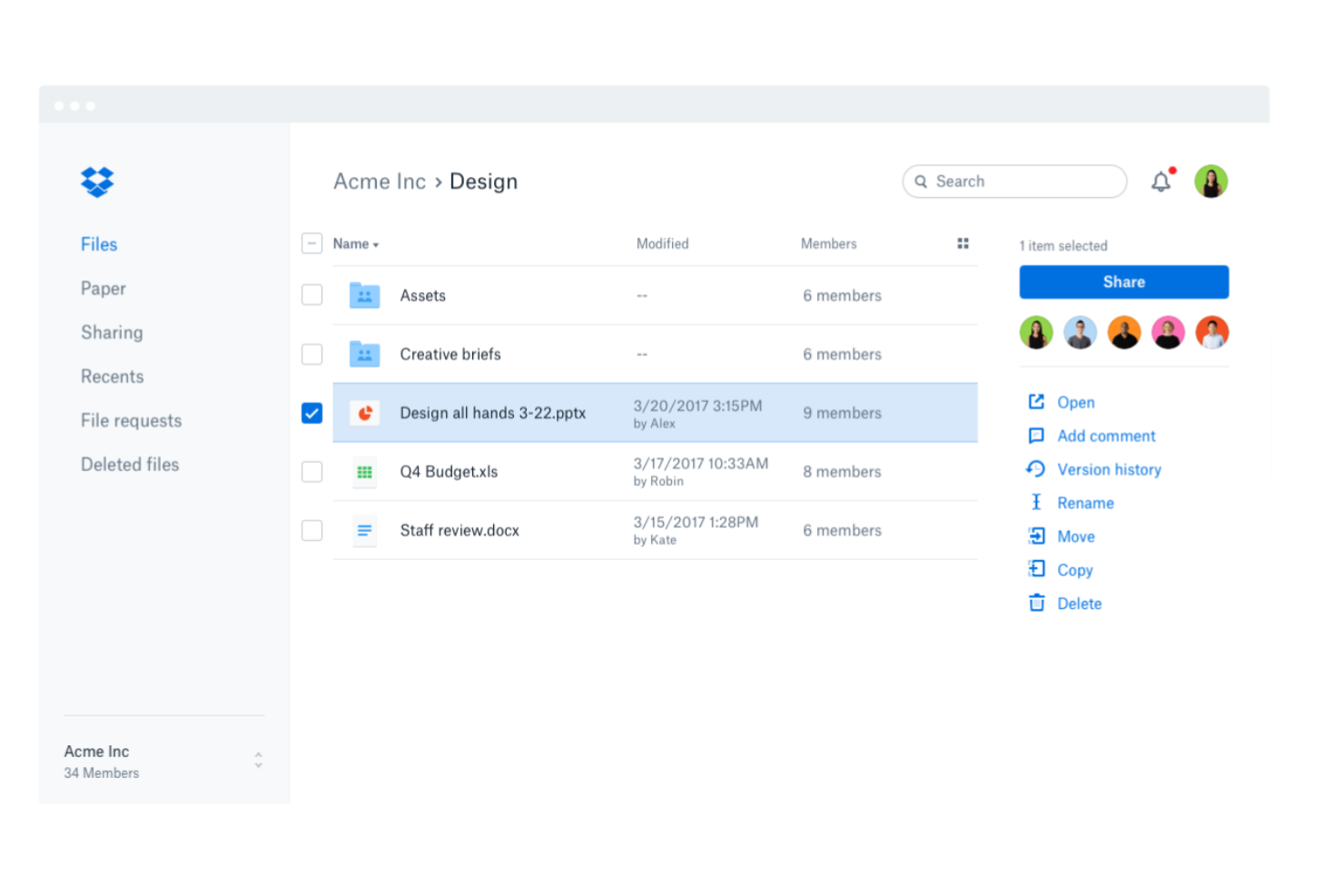
Dropbox Business è pensato per i team che necessitano di una sincronizzazione affidabile dei file tra dispositivi e sistemi operativi. È particolarmente utile per le organizzazioni con team distribuiti o che lavorano in ambienti ibridi, dove l'accesso fluido ai documenti è essenziale. Se la tua azienda dipende dalla condivisione e dall'aggiornamento dei file da qualsiasi luogo, Dropbox Business soddisfa queste esigenze grazie alle sue capacità multipiattaforma.
Perché ho scelto Dropbox Business
Per i team che devono mantenere i file aggiornati e accessibili su diversi dispositivi e sistemi operativi, Dropbox Business offre una sincronizzazione affidabile dei file su più piattaforme. Ho scelto Dropbox Business perché sincronizza automaticamente le modifiche in tempo reale, quindi tutti hanno sempre la versione più aggiornata di un documento, ovunque lavorino. La funzione Smart Sync consente di accedere a tutti i file dal desktop senza occupare spazio di archiviazione locale. Queste capacità di sincronizzazione rendono Dropbox Business una scelta solida per le organizzazioni che gestiscono documenti su scala globale e collaborano tra sedi diverse.
Funzionalità chiave di Dropbox Business
Altre funzionalità di Dropbox Business che supportano la gestione globale dei documenti includono:
- Strumento di richiesta file: Raccogli file da chiunque, anche da chi non possiede un account Dropbox.
- Gestione cartelle del team: Organizza e controlla l'accesso alle cartelle condivise per team o progetti differenti.
- Scansione documenti: Scansiona e carica documenti cartacei direttamente nel tuo spazio di lavoro Dropbox.
- Controlli avanzati sulla condivisione dei link: Imposta password, date di scadenza e permessi per i link condivisi.
Integrazioni Dropbox Business
Le integrazioni includono Microsoft 365, Google Workspace, Slack, Zoom, Adobe, HubSpot, Autodesk, Canva, AWS e Asana.
Pros and Cons
Pros:
- La sincronizzazione multipiattaforma copre Windows, Mac e Linux
- La gestione delle versioni dei file facilita il ripristino delle modifiche precedenti
- Controlli avanzati sulla condivisione gestiscono i permessi dei link
Cons:
- I controlli di amministrazione non offrono report di audit dettagliati
- Il caricamento di file di grandi dimensioni può bloccarsi o andare in timeout


OpenKM offre alle organizzazioni il pieno controllo sul loro ambiente di gestione documentale tramite una piattaforma open source progettata per la personalizzazione. È particolarmente adatto a team IT, sviluppatori e aziende con esigenze specifiche di flussi di lavoro o integrazione che le soluzioni preconfezionate non possono soddisfare. OpenKM aiuta i team a progettare processi documentali su misura, automatizzare attività e collegarsi ad altri sistemi aziendali grazie alla sua architettura flessibile.
Perché ho scelto OpenKM
Per i team che necessitano di un sistema di gestione documentale davvero personalizzabile, l’open source di OpenKM si distingue. Ho scelto OpenKM perché consente alle organizzazioni di modificare flussi di lavoro, ruoli utente e strutture documentali per rispondere a esigenze molto specifiche. La piattaforma supporta script personalizzati e accesso API, così puoi automatizzare processi o costruire integrazioni uniche con altri strumenti aziendali. Questo livello di flessibilità è particolarmente prezioso per team globali con necessità di gestione documentale complesse o in evoluzione.
Funzionalità principali di OpenKM
Altre funzionalità che rendono OpenKM utile per i team di gestione documentale includono:
- Controllo delle versioni: Traccia le modifiche ai documenti e mantieni una cronologia completa delle revisioni per ogni file.
- Scansione dei documenti: Acquisisci e digitalizza i documenti cartacei direttamente nel sistema.
- Ricerca avanzata: Individua rapidamente i file utilizzando opzioni di ricerca per metadati, contenuti e testo completo.
- Gestione delle attività: Assegna, monitora e gestisci le attività legate ai documenti all’interno della piattaforma.
Integrazioni di OpenKM
Le integrazioni includono Kofax, ABBYY FlexiCapture, Cognitive Forms, Flexibar, Canon IW DS, Microsoft Office, Active Directory, LDAP, SSO e CAS.
Pros and Cons
Pros:
- Accesso al codice sorgente per personalizzazioni profonde del sistema
- Opzioni di implementazione on-premises e cloud
- Controlli granulari dei permessi per la sicurezza dei documenti
Cons:
- Nessuna integrazione integrata per la firma elettronica
- Integrazioni di terze parti limitate disponibili out-of-the-box
Altri sistemi globali di gestione dei documenti
Ecco alcune ulteriori opzioni di sistemi globali di gestione dei documenti che non sono state incluse nel mio elenco, ma che vale comunque la pena valutare:
- EisenVault
Ideale per opzioni di implementazione on-premises
- Axero
Ideale per la gestione della base di conoscenza
- ONLYOFFICE Workspace
Eccellente con strumenti integrati di modifica dei documenti


Come valuto i sistemi di gestione documentale globali
I sistemi di gestione documentale globali sono la spina dorsale operativa per i team multinazionali che devono controllare chi accede ai contratti a Singapore, rispettare le regole di conservazione GDPR in Germania e mantenere una versione unica di un documento critico in tutte le sedi. Quando valuto gli strumenti in questo campo, considero due aspetti: se una piattaforma soddisfa i requisiti minimi che ogni serio DMS deve avere e cosa la rende in realtà una scelta migliore rispetto alle altre della lista.
Funzionalità core (requisiti indispensabili per questa lista)
Per i sistemi globali di gestione documentale, le funzionalità core che testo e valuto sono:
- Repository centralizzato: Verifico se i team di diverse regioni possono archiviare, organizzare e accedere ai file da un'unica fonte attendibile senza problemi di latenza o sincronizzazione.
- Controlli di accesso: Le autorizzazioni basate sui ruoli sono fondamentali, soprattutto quando partner esterni o clienti necessitano di accesso limitato alle cartelle insieme agli utenti interni tra le consociate.
- Controllo delle versioni: Valuto come il sistema traccia le revisioni quando un documento di policy passa per la revisione legale a Londra, la verifica di conformità a New York e le operazioni a Tokyo.
- Ricerca aziendale: La ricerca full-text sul contenuto dei documenti è il requisito di base. Verifico anche la presenza di OCR su file scannerizzati e il filtraggio tramite metadati per ridurre i tempi di recupero.
- Sicurezza dei documenti: Crittografia a riposo e in transito, SSO e supporto MFA sono imprescindibili. Controllo anche funzionalità extra come watermarking e link di condivisione a scadenza.
- Tracciabilità (audit trail): Ogni visualizzazione, modifica, download e condivisione deve avere un timestamp e l'ID dell'utente. Questo è il modo per dimostrare la conformità agli auditor in molteplici regimi normativi.
- Automazione dei workflow: L'instradamento delle approvazioni, i cicli di revisione e l'applicazione delle regole di conservazione devono procedere tra diversi fusi orari senza che i passaggi manuali rallentino il processo.
- Ecosistema di integrazione: Cerco integrazioni native con Microsoft 365, Google Workspace, Salesforce, piattaforme ERP e strumenti di firma elettronica come DocuSign o Adobe Sign.
Uno strumento deve offrire la maggior parte di queste funzionalità per meritare un posto in elenco. Da qui, considero ciò che distingue ogni soluzione.
Funzionalità distintive (cosa distingue le scelte)
Ricerco interfacce e supporto per metadati multilingue poiché i team globali si aspettano di navigare e taggare i documenti nella propria lingua. L'automazione supportata dall'IA—come classificazione intelligente, ricerca smart o suggerimenti di contenuto—può far risparmiare ore nella gestione di milioni di file distribuiti tra varie regioni. Valuto anche il controllo avanzato della residenza dei dati, che consente di selezionare le giurisdizioni di archiviazione, fondamentale per la conformità nella gestione di workflow documentali transfrontalieri.
Cosa valuto oltre alle funzionalità
La flessibilità di implementazione è importante. Verifico se una piattaforma offre opzioni cloud, on-premise e ibride, poiché settori regolamentati come quello farmaceutico e pubblico spesso richiedono controllo on-premise. Considero anche la copertura di conformità multi-normativa—certificazioni GDPR, HIPAA, SOX e FDA 21 CFR Parte 11 mi dicono molto su chi è il pubblico di destinazione dello strumento. Infine, verifico la disponibilità di supporto globale 24/7 e strumenti di migrazione, perché implementare un DMS in più uffici senza solide risorse di onboarding è un rischio che ho visto ostacolare l'adozione.
Come scegliere un sistema globale di gestione dei documenti
È facile perdersi in lunghi elenchi di funzionalità e strutture tariffarie complesse. Per aiutarti a rimanere concentrato mentre analizzi il tuo esclusivo processo di selezione del software, ecco un elenco dei fattori da tenere a mente:
| Fattore | Cosa considerare |
|---|---|
| Scalabilità | Il sistema sarà in grado di gestire il volume dei tuoi documenti e la crescita degli utenti nel tempo? Considera l'espansione futura, le esigenze di più sedi e i limiti di archiviazione. |
| Integrazioni | Lo strumento si connette nativamente alle piattaforme che già utilizzi, come CRM, ERP e archiviazione cloud? Verifica la compatibilità con il tuo stack tecnologico. |
| Personalizzazione | Puoi adattare i flussi di lavoro, le autorizzazioni e i modelli di documenti ai processi della tua organizzazione? Evita i sistemi rigidi che impongono soluzioni alternative. |
| Semplicità d'uso | Il tuo team adotterà rapidamente lo strumento? Cerca una navigazione intuitiva, etichette chiare e requisiti minimi di formazione. |
| Implementazione e avviamento | Quanto tempo ci vorrà per rendere operativo il sistema? Valuta il supporto alla migrazione, le risorse per l'avviamento e l'esperienza del fornitore con implementazioni simili. |
| Costo | I piani tariffari sono trasparenti e prevedibili? Considera le licenze utente, l'archiviazione e qualsiasi costo aggiuntivo che potrebbe incidere sul tuo budget. |
| Misure di sicurezza | Il sistema offre crittografia, controlli degli accessi e registri di controllo? Assicurati che soddisfi gli standard di protezione dei dati della tua organizzazione. |
| Requisiti di conformità | Lo strumento supporta i requisiti normativi del tuo settore, come GDPR e HIPAA? Verifica le certificazioni e il supporto agli audit prima di prendere una decisione. |
Che cos'è un sistema globale di gestione dei documenti?
Un sistema globale di gestione documentale (DMS) è una soluzione di gestione documentale che aiuta le organizzazioni ad archiviare, organizzare e controllare l'accesso ai documenti elettronici in più sedi. Questo tipo di software di gestione documentale supporta la gestione dei contenuti e garantisce che i file siano accessibili in modo sicuro ai team distribuiti.
Le moderne piattaforme DMS spesso includono funzionalità basate sull'intelligenza artificiale, come l'OCR per estrarre dati dai documenti, migliorando la possibilità di ricerca e riducendo il lavoro manuale. Questi sistemi supportano anche l'autenticazione, aiutando le aziende a proteggere le informazioni sensibili e a mantenere efficienti i processi aziendali.
Caratteristiche dei sistemi globali di gestione documentale
Quando selezioni un software di gestione documentale, presta attenzione alle seguenti caratteristiche principali:
- Archiviazione documentale centralizzata: Archivia e gestisci i documenti elettronici in un'unica soluzione di gestione documentale per facilitarne l'accesso e l'organizzazione.
- OCR basato sull'intelligenza artificiale: Utilizza la tecnologia OCR per acquisire e indicizzare i dati dai file scansionati, migliorando la ricerca e il recupero.
- Autenticazione degli utenti e controllo degli accessi: Imposta regole di autenticazione e autorizzazioni per proteggere i contenuti sensibili e controllare l'accesso degli utenti.
- Automazione dei flussi di lavoro: Automatizza i processi aziendali instradando i documenti attraverso flussi di lavoro di approvazione e revisione.
- Controllo delle versioni: Tieni traccia delle modifiche ai documenti e conserva una cronologia completa degli aggiornamenti.
- Notifiche e avvisi: Ricevi notifiche per approvazioni, aggiornamenti e azioni richieste, così da mantenere attivi i flussi di lavoro.
- Ricerca avanzata: Trova rapidamente i documenti utilizzando metadati, parole chiave e la ricerca a testo completo.
- Funzionalità di gestione dei contenuti: Organizza e gestisci i file con cartelle strutturate, tag e metadati.
- Funzionalità modulare: Aggiungi o personalizza ogni modulo in base alle esigenze aziendali e ai flussi di lavoro documentali.
- Accesso da dispositivi mobili: Accedi ai documenti e gestiscili da qualsiasi dispositivo per supportare i team remoti e globali.
Vantaggi dei sistemi globali di gestione documentale
L'implementazione di un sistema globale di gestione documentale offre diversi vantaggi al tuo team e alla tua azienda. Eccone alcuni:
- Accesso centralizzato alle informazioni: I team possono trovare e recuperare i documenti da un unico archivio organizzato, riducendo il tempo dedicato alla ricerca dei file.
- Maggiore sicurezza e conformità: Le autorizzazioni basate sui ruoli, le tracce di controllo e le politiche di conservazione aiutano a proteggere i dati sensibili e a soddisfare i requisiti normativi.
- Collaborazione ottimizzata: L'instradamento automatizzato dei flussi di lavoro e la condivisione sicura dei file consentono ai team di esaminare, approvare e aggiornare i documenti in modo efficiente, anche da sedi diverse.
- Controllo coerente delle versioni: Il monitoraggio delle versioni garantisce che tutti lavorino sul documento più recente, riducendo al minimo gli errori e la confusione causati dai file obsoleti.
- Gestione documentale scalabile: Il sistema può gestire volumi crescenti di documenti e utenti, supportando l'espansione aziendale senza sacrificare l'organizzazione o il controllo.
- Maggiore produttività da remoto: L'accesso da dispositivi mobili e le funzionalità basate sul cloud consentono ai team distribuiti e sul campo di gestire documenti e approvazioni da qualsiasi luogo.
- Riduzione del carico di lavoro manuale: L'automazione dell'instradamento dei documenti, della conservazione e della gestione degli accessi libera tempo da dedicare ad attività di maggiore valore.
Costi e prezzi dei sistemi globali di gestione documentale
La scelta di un sistema globale di gestione documentale richiede la comprensione dei vari modelli di prezzo e dei piani disponibili. I costi variano in base alle funzionalità, alle dimensioni del team, agli add-on e ad altri fattori. La tabella seguente riassume i piani più comuni, i relativi prezzi medi e le funzionalità tipicamente incluse nelle soluzioni globali di gestione documentale:
Tabella di confronto dei piani per i sistemi globali di gestione documentale
| Tipo di piano | Prezzo medio | Funzionalità comuni |
|---|---|---|
| Piano gratuito | $0 | Archiviazione documentale di base, accesso limitato degli utenti, condivisione semplice e funzionalità di ricerca di base. |
| Piano personale | $5-$15/utente/mese | Gestione documentale individuale, ricerca avanzata, accesso da dispositivi mobili e integrazioni limitate. |
| Piano aziendale | $15-$40/utente/mese | Strumenti di collaborazione per i team, automazione dei flussi di lavoro, autorizzazioni basate sui ruoli, tracce di controllo e reportistica. |
| Piano per grandi imprese | $40-$100/utente/mese | Sicurezza avanzata, strumenti per la conformità, integrazioni personalizzate, supporto dedicato e archiviazione illimitata. |
Domande frequenti sui sistemi globali di gestione dei documenti
Ecco alcune risposte alle domande comuni sui sistemi globali di gestione dei documenti:
In che modo i sistemi globali di gestione dei documenti supportano i team internazionali?
I sistemi globali di gestione dei documenti supportano i team internazionali fornendo accesso centralizzato ai documenti, interfacce multilingue e strumenti di conformità per diverse regioni. Questo aiuta i team distribuiti a collaborare, mantenere il controllo delle versioni e rispettare le normative locali sui dati, indipendentemente dalla loro posizione.
Posso trasferire i documenti esistenti in un sistema globale di gestione dei documenti?
Sì, la maggior parte dei sistemi globali di gestione dei documenti offre strumenti o servizi di migrazione per aiutarti a importare i file e le strutture delle cartelle esistenti. Cerca soluzioni che supportino i caricamenti in blocco, la mappatura dei metadati e l’integrazione con le piattaforme di archiviazione attuali per semplificare la transizione.
Quali misure di sicurezza dovrei aspettarmi da un sistema globale di gestione dei documenti?
Dovresti aspettarti funzionalità come la crittografia dei dati archiviati e in transito, controlli degli accessi basati sui ruoli, registri di controllo e aggiornamenti regolari della sicurezza. Queste misure di protezione aiutano a salvaguardare le informazioni sensibili e a garantire la conformità agli standard e alle normative del settore.
In che modo questi sistemi gestiscono il controllo delle versioni dei documenti e le tracce di controllo?
I sistemi globali di gestione dei documenti registrano automaticamente le modifiche ai documenti, conservano la cronologia delle versioni e registrano le azioni degli utenti. Questo consente di ripristinare le versioni precedenti, monitorare le attività e dimostrare la conformità durante gli audit.
Che tipo di assistenza è disponibile se riscontro dei problemi?
La maggior parte dei fornitori offre diversi canali di assistenza, come chat dal vivo, e-mail e supporto telefonico. Alcuni forniscono anche responsabili dedicati, basi di conoscenza e risorse per l’avvio, per aiutarti a risolvere i problemi e massimizzare il valore del tuo sistema.