



Confluence vs. Asana: Confronto e Recensioni Esperte per il 2026



Confluence è progettato per la collaborazione di squadra e la documentazione, mentre Asana si concentra maggiormente sulla gestione delle attività e sull'organizzazione dei flussi di lavoro. Entrambi supportano la gestione dei progetti, ma servono a scopi diversi. Confluence aiuta a creare e condividere conoscenza tra i team, mentre Asana permette di monitorare le attività e gestire i flussi di lavoro.
Ho testato e valutato ciascuno strumento e le loro funzionalità, vantaggi e svantaggi, e prezzi utilizzando la mia esperienza nella gestione dei progetti, così potrai trovare il software di project management più adatto alle tue esigenze.
Confluence vs. Asana: An Overview
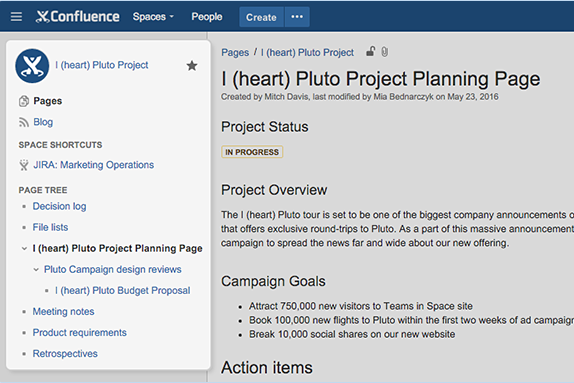
Confluence




Asana

Perché fidarsi dei nostri consigli sui software
Il nostro team testa e recensisce software dal 2012. In quanto project manager noi stessi, sappiamo quanto sia difficile — e importante — scegliere il software giusto.
Per questa guida, abbiamo valutato gli strumenti attraverso test pratici e ricerche indipendenti, assegnando un punteggio agli strumenti in base ai nostri criteri di selezione. Ci basiamo inoltre sulle competenze di leader di pensiero del settore e di professionisti attivi nella gestione dei progetti.
Le nostre recensioni riflettono il nostro giudizio editoriale umano, non un discorso di vendita.
Revisori esperti:
Confluence vs. Asana Pricing Comparison
| Confluence | Asana | |
|---|---|---|
| Free Trial | Free trial + free plan available | Free plan available |
| Pricing | From $5.42/user/month | From $10.99/user/month (billed annually) |
Prezzi di Confluence vs. Asana & Costi Nascosti
I prezzi di Confluence seguono un modello di abbonamento a livelli, con costi che aumentano in base alla quantità di spazio di archiviazione e utenti necessari, e le funzionalità avanzate sono disponibili solo nei piani di livello superiore. Il prezzo di Asana utilizza anch'esso un approccio a livelli di abbonamento. I costi aumentano man mano che aggiungi altri membri al team e funzionalità premium.
Per scegliere lo strumento di gestione progetti più adatto, valuta come ogni modello di prezzo si adatta alla dimensione e alle esigenze del tuo team. Considera anche la crescita futura per assicurarti che lo strumento resti conveniente man mano che i tuoi progetti si espandono.
Confluence vs. Asana Feature Comparison
Le funzionalità collaborative di documentazione di Confluence ti permettono di costruire una base di conoscenza centralizzata, utile per i team che necessitano di documentazione di progetto dettagliata e spazio per il brainstorming. Le visualizzazioni di gestione delle attività e delle timeline di Asana aiutano a visualizzare l’avanzamento dei progetti e le scadenze, rendendolo ideale per i team focalizzati sul monitoraggio e la gestione delle attività.
| Confluence | Asana | |
|---|---|---|
| API | ||
| Batch Permissions & Access | ||
| Budgeting | ||
| Calendar Management | ||
| Contact Management | ||
| Contact Sharing | ||
| Customer Management | ||
| Dashboard | ||
| Data Export | ||
| Data Import | ||
| Data Visualization | ||
| Expense Tracking | ||
| External Integrations | ||
| Gantt Charts | ||
| Multi-User | ||
| Notifications | ||
| Project Management | ||
| Resource Management | ||
| Scheduling | ||
| Task Scheduling/Tracking | ||
| Third-Party Plugins/Add-Ons | ||
| Travel Management |
Confluence vs. Asana Integrazioni
| Integrazione | Confluence | Asana |
|---|---|---|
| Jira | ✅ | ✅ |
| Slack | ✅ | ✅ |
| Microsoft Teams | ✅ | ✅ |
| Google Drive | ❌ | ✅ |
| Trello | ✅ | ✅ |
| Salesforce | ❌ | ✅ |
| Dropbox | ✅ | ✅ |
| GitHub | ❌ | ✅ |
| Figma | ✅ | ✅ |
| Miro | ✅ | ❌ |
| API | ✅ | ✅ |
| Zapier | ✅ | ✅ |
Confluence si integra con Jira in modo che tu possa allineare il tracciamento dei progetti e la documentazione. Questo è particolarmente utile negli ambienti tecnologici dove sviluppo e documentazione procedono di pari passo. Asana si integra con Figma, utile per i team di design che devono gestire e monitorare progetti di design, nonché tenere tutti aggiornati sui cambiamenti.
Confluence vs. Asana Sicurezza, Conformità & Affidabilità
| Fattore | Confluence | Asana |
|---|---|---|
| Crittografia dei Dati | Confluence cripta i dati sia in transito (TLS) che a riposo (AES-256) utilizzando protocolli standard di settore. | Asana utilizza la crittografia TLS per i dati in transito e la crittografia AES-256 per i dati a riposo. |
| Conformità Normativa | Confluence è conforme a standard internazionali come GDPR e ISO 27001 | Asana rispetta GDPR, SOC 2 e altri standard di conformità per proteggere i dati degli utenti. |
| Controlli di Accesso | Confluence offre permessi di accesso granulari per permetterti di controllare chi vede cosa. | Asana fornisce permessi personalizzabili agli utenti così da poter gestire l’accesso alle attività e ai progetti. |
| Affidabilità dell’Uptime | Confluence garantisce il 99,9% di uptime con un’infrastruttura robusta. | Asana offre il 99,9% di uptime come parte del proprio service level agreement. |
Confluence e Asana forniscono entrambi solide misure di sicurezza, rispettano gli standard principali e offrono un’affidabile crittografia. Per scegliere tra i due, valuta come le misure di sicurezza di ciascuno si allineano ai requisiti normativi e alla sensibilità dei dati della tua organizzazione.
Confluence vs. Asana Facilità d'Uso
| Fattore | Confluence | Asana |
|---|---|---|
| Interfaccia utente | Confluence offre un'interfaccia pulita con dashboard personalizzabili, ma può sembrare complessa per i nuovi utenti. | L’interfaccia di Asana è intuitiva e visivamente gradevole, e la navigazione è semplice. |
| Esperienza di onboarding | Confluence fornisce documentazione dettagliata e tutorial per aiutare i nuovi utenti a iniziare. | Asana propone un processo di onboarding facile con guide interattive e modelli. |
| Procedura di configurazione | La configurazione di Confluence richiede impostazioni, soprattutto per integrazioni e personalizzazioni. | La configurazione di Asana è rapida e semplice; sono necessarie poche impostazioni per l’uso di base. |
| Risorse di supporto | Confluence dispone di un ampio supporto tramite forum della community e una knowledge base. | Asana offre supporto reattivo tramite live chat e un help center completo. |
Confluence offre ampie possibilità di personalizzazione e risorse di supporto solide, ma la sua complessità può renderlo impegnativo per i nuovi utenti. Asana, invece, è più facile da adottare grazie alla sua interfaccia intuitiva e alla configurazione semplice, permettendo ai team di iniziare rapidamente a gestire le attività.
Confluence vs Asana: Pros & Cons
Confluence
- You can easily collaborate with your team through intuitive document sharing.
- It offers powerful search capabilities to quickly find the information you need.
- Your team can benefit from its extensive templates, saving time on setup.
- You might find its interface less visually appealing compared to other tools.
- It can be overwhelming for new users due to its extensive features.
- Your team may experience occasional performance issues with large data sets.
Asana
- You can easily track tasks and deadlines using Asana's intuitive interface.
- Asana's collaboration tools help your team communicate effectively in real-time.
- There are extensive customization options so you can tailor workflows and views to your specific needs.
- The reporting capabilities are somewhat basic, which may not satisfy teams needing detailed analytics.
- It can feel overwhelming if your team is small or your projects are simple.
- You might find the notification system a bit excessive or distracting.
Best Use Cases for Confluence and Asana
Confluence
- Software development teams Your team can benefit from Confluence's strong document management features, which keep project specs and updates centralized.
- Marketing departments You can streamline campaign planning and content creation with Confluence's templates and collaboration tools.
- Educational institutions Your institution can use Confluence to support faculty collaboration and manage course materials effectively.
- Remote teams You can maintain clear communication and document sharing across distances with Confluence's online capabilities.
- Product management Your product team can track development progress and share feedback efficiently with Confluence's collaborative features.
- Non-profit organizations You can organize and manage volunteer efforts and project documentation with Confluence's easy-to-use interface.
Asana
- Creative agencies You can manage creative workflows and client projects with Asana’s visual boards and timeline features.
- Tech startups You can coordinate product development and team tasks using Asana’s real-time updates and goal-setting tools.
- Marketing teams You can plan campaigns and track progress with Asana’s clear timelines and task comments.
- Nonprofits Asana lets you manage volunteer tasks, events, and fundraising efforts with clear task assignments and timelines.
- Remote teams You can collaborate effectively with Asana’s real-time updates and communication features.
- Event planners You can organize events easily with Asana’s task management and timeline visualization features.
Chi dovrebbe usare Confluence e chi dovrebbe usare Asana?
Secondo la mia opinione, Confluence è ideale per i team che necessitano di una collaborazione più approfondita e di una documentazione strutturata, soprattutto in settori come lo sviluppo software, dove la gestione delle conoscenze è fondamentale. Se crei documentazione dettagliata sui progetti e mantieni una knowledge base centralizzata, Confluence è una scelta affidabile.
Asana, invece, è perfetta per i team che devono gestire attività e scadenze in maniera efficiente. Se apprezzi la possibilità di organizzare e monitorare attività e sotto-attività in modo semplice e visivo, Asana è la soluzione più adatta.
Differences Between Confluence and Asana
| Confluence | Asana | |
|---|---|---|
| Automation | Confluence supports scripting and macros for advanced customization. | Asana includes built-in automation for routine task management. |
| Core Functionality | Confluence is for collaborative documentation and knowledge sharing. | Asana is designed for task management and project tracking. |
| Integrations | Confluence integrates well with Jira, which is helpful for development projects. | Asana integrates with Figma, which is helpful for creative workflows. |
| User Interface | Confluence offers customizable dashboards, but can be complex initially. | Asana provides an intuitive and visually appealing interface. |
| Read Confluence ReviewOpens new window | Read Asana ReviewOpens new window |
Similarities Between Confluence and Asana
| Collaboration | Both Confluence and Asana offer collaborative features. Confluence offers document sharing and Asana includes task collaboration. |
|---|---|
| Integrations | Both tools provide a wide range of integrations and can connect with apps like Slack to improve productivity. |
| Security | Confluence and Asana both adhere to high-security standards for data encryption and comply with regulations like GDPR. |
| Support | Both tools offer comprehensive support, help centers, and community forums to help with user queries and troubleshooting. |
| Read Confluence ReviewOpens new window Read Asana ReviewOpens new window | |